




Abstract
The versatile and integrated system for telerehabilitation (VISYTER) is a software platform for developing various telerehabilitation applications. VISYTER has been designed to take into account the environments and requirements of rehabilitation services. The requirements considered in the platform design include minimal equipment beyond what is available in many rehabilitation settings, minimal maintenance, and ease of setup and operation. In addition, the platform has been designed to be able to adjust to different bandwidths, ranging from the very fast new generation of Internet to residential broadband connections. VISYTER is a secure integrated system that combines high-quality videoconferencing with access to electronic health records and other key tools in telerehabilitation such as stimuli presentation, remote multiple camera control, remote control of the display screen, and an eye contact teleprompter. The software platform is suitable for supporting low-volume services to homes, yet scalable to support high-volume enterprise-wide telehealth services. The VISYTER system has been used to develop a number of telerehabilitation applications, including a remote wheelchair prescription, adult autistic assessments, and international physical therapy teleconsultations. An evaluation of VISYTER for delivering a remote wheelchair prescription was conducted on 48 participants. Results of the evaluation indicate a high level of satisfaction from patients with the use of VISYTER. The versatility and cost-effectiveness of the platform has the potential for a wide range of telerehabilitation applications and potentially may lower the technical and economic barriers of telemedicine adoption.
Introduction
Telerehabilitation (TR) has been considered an important technology for increasing accessibility and enhancing continuity of care for vulnerable populations, including people with chronic disease and disabilities. 1 –4 The versatile and integrated system for telerehabilitation (VISYTER) is a platform for building TR applications that takes into account the diverse settings and requirements of various rehabilitation services. TR refers to the use of information and communication technologies (ICT) to provide remote rehabilitation services such as physical and occupational therapies, cognitive assessment and therapies, speech-language therapies, and the provision of assistive technologies. The environment of rehabilitation services is unique, because it can be within the community (home, workplace, long-term care, assisted and independent living) or within rehabilitation clinics. TR services generally involve various healthcare professionals and diverse diagnoses. TR shares many of the features of chronic disease management where encounters between clinicians and patients * are generally repetitive and over a long time period, although the interaction is typically of low intensity. 5 This is in contrast to other telemedicine applications that require short-duration, high-intensity interactions.
In general, the conceptual models of TR service delivery can be divided into four categories 6 : teleconsultation using interactive videoconferencing, telehomecare with a mobile clinician coordinating services with a low-to-moderate bandwidth interactive connection, telemonitoring using unobtrusive methods with possible interactive tele-assessment, and teletherapy in which a patient conducts rehabilitative activities (such as exercise or play) at home while the clinician remotely monitors the performance and can set the course of the therapy or interactively participate in telecoaching. Interactive technologies (such as videoconferencing) and information sharing (both synchronous and asynchronous) comprise the technological backbone for supporting all models of TR service delivery. Other emerging technologies, such as immersive virtual reality and haptic interface, have been used to support teletherapy. 3 In addition to image-based videoconferencing, emerging technologies for physical teletherapy include sensor-based rehabilitation and virtual environments. 7
One of the obstacles to TR deployment is that the technologies work in isolation to one another. 2 This situation limits the functionality of the technology and leads to an expensive initial investment and cost of operation for deploying a complete TR system. Considering that the number of patients at a rehabilitation site is not extensive, the cost is prohibitive. Our solution was to use a computer and the Internet to develop a platform that can be used as a backbone for delivering various rehabilitation services across different service delivery models. The platform has been designed as an integrated system that goes beyond the conventional videoconferencing currently used in telemedicine by incorporating functions that are useful for TR. Previous work on the guidelines for TR 4 provides an initial list of useful features, including the recommendations for remote camera control, a secondary camera, videoconferencing with high-level data compression, access to health records, and collaboration among clinicians and caregivers. Rehabilitation and chronic care management usually involve collaboration among an interdisciplinary group of providers such as rehabilitation professionals, physiatrist, neurologist, psychologist, and assistive device supplier. ICT has been viewed as a potential solution to the problems of collaborative care either in continuity of care or in fragmented care environments. 8 The platform also needs to be extensible, that is, capable of incorporating new devices, functions, or new technologies.
In addition to being integrated and extensible, our goal was to develop a platform that is versatile in a number of ways. First, it requires minimal equipment beyond the standard commodity computers to minimize the initial investment cost. Second, the system is required to be easy to install and operate. This is not only to minimize the maintenance cost, but also to address the fact that the facilities usually have no ICT support staff. Requiring the system to be easy and quick to set up also addresses the issue of low-volume services to many rehabilitation settings. The system should be able to support low-volume TR to various locations in a scattered geographic area. Third, the system should also be able to adjust to different bandwidths, ranging from the very fast new generation of Internet (Internet2) to regular broadband connections available in assisted living and home residencies.
Materials and Methods
General Design and Objectives of Visyter
We developed a TR platform called VISYTER. The software platform has been designed to work with limited resources that are available in rehabilitation settings such as computers, Webcams, and broadband Internet connections. It has been also designed to be easy to use and requires minimal technical expertise and support. The time and cost for setting up TR services are expected to be minimal, because almost all of the components are available and can be used for purposes other than TR. At the same time, VISYTER is capable of delivering high-quality interactions (i.e., high-definition video and audio) and can be integrated with advanced technologies such as portable medical devices, a portal system, and electronic health records (EHRs).
Visyter Architecture
VISYTER architecture consists of hardware equipment, client software, and a server, as illustrated in Figure 1. VISYTER can connect two or more sites (multiway connection), where each site requires hardware and client software installation. The basic configuration of VISYTER equipment consists of standard commodity computers and off-the-shelf Web cameras. The basic hardware configuration can be augmented with ancillary devices such as a microphone with noise cancellation technology to improve the quality of the voice, a desktop teleprompter to provide eye contact, and a large display screen (24″ or larger).

VISYTER architecture: Multiple sites connect securely through a server. EHR, electronic health record; VISYTER, versatile and integrated system for telerehabilitation.
The client software connects the sites to VISYTER's virtual clinic rooms housed on the server that authenticates all users logging in. Only authorized users can access the clinic rooms. The clinic room management application on the server provides a room administrator facility to create a virtual clinic room and defines who has access to the room. The user authentication and the communications between the sites (video and voice) are encrypted using a symmetric encryption key. Authorized users have the capability to save the session's video, audio, and all interactions of all participants in an archive database within the server. The archive database can be integrated with the EHR. VISYTER supports interactions among sites using high-quality audio and video over the Internet. The server in VISYTER is used for security management (access control and encryption) and for storing database archives of saved TR sessions. The server is scalable, ranging from a small inexpensive computer to support small TR services to an enterprise server in a large healthcare organization to support large-scale TR services.
VISYTER architecture can be divided into three layers: interface, application, and transport. The interface layer manages the graphical user interface and handles the user's input and output. The application layer provides a host of TR applications such as videoconferencing, stimuli presentation, EHR access, and camera control. VISYTER can be customized for various TR services by activating only the necessary application. For example, stimuli presentation and interactive pen-tablet applications will be activated for a remote neuropsychology assessment, but will not be included for remote wheelchair prescription. Lastly, a transport layer provides interactivity among parties in the TR session. VISYTER uses a peer-to-peer transport using custom implementation of the real-time transport protocol (RTP) and an internet engineering task force standard for audio and video transmission designed for low-latency conferencing. 9 Because of the use of a multicast peer-to-peer protocol, VISYTER does not need a video server.
The video feature in the VISYTER application layer can handle multiple input video streams by assigning an RTP connection session for each video stream. The application layer is responsible for compressing the video stream and sending the stream through the transport layer. On the receiving end of the connection, the application layer is responsible for decompressing the video streams. Therefore, in a multiway and multiple input video streams, the number of RTP connections on each side is equal to the number of cameras involved in the videoconference. As each RTP connection requires compression or decompression, the number of parties and cameras that can join in a multiway videoconferencing is limited by the capacity of the computer to compress and decompress the video streams.
Visyter Capabilities
As an integrated system for TR, VISYTER software is designed to support all necessary tasks related to TR services. Figure 2 illustrates a list of capabilities provided by VISYTER, including the following:
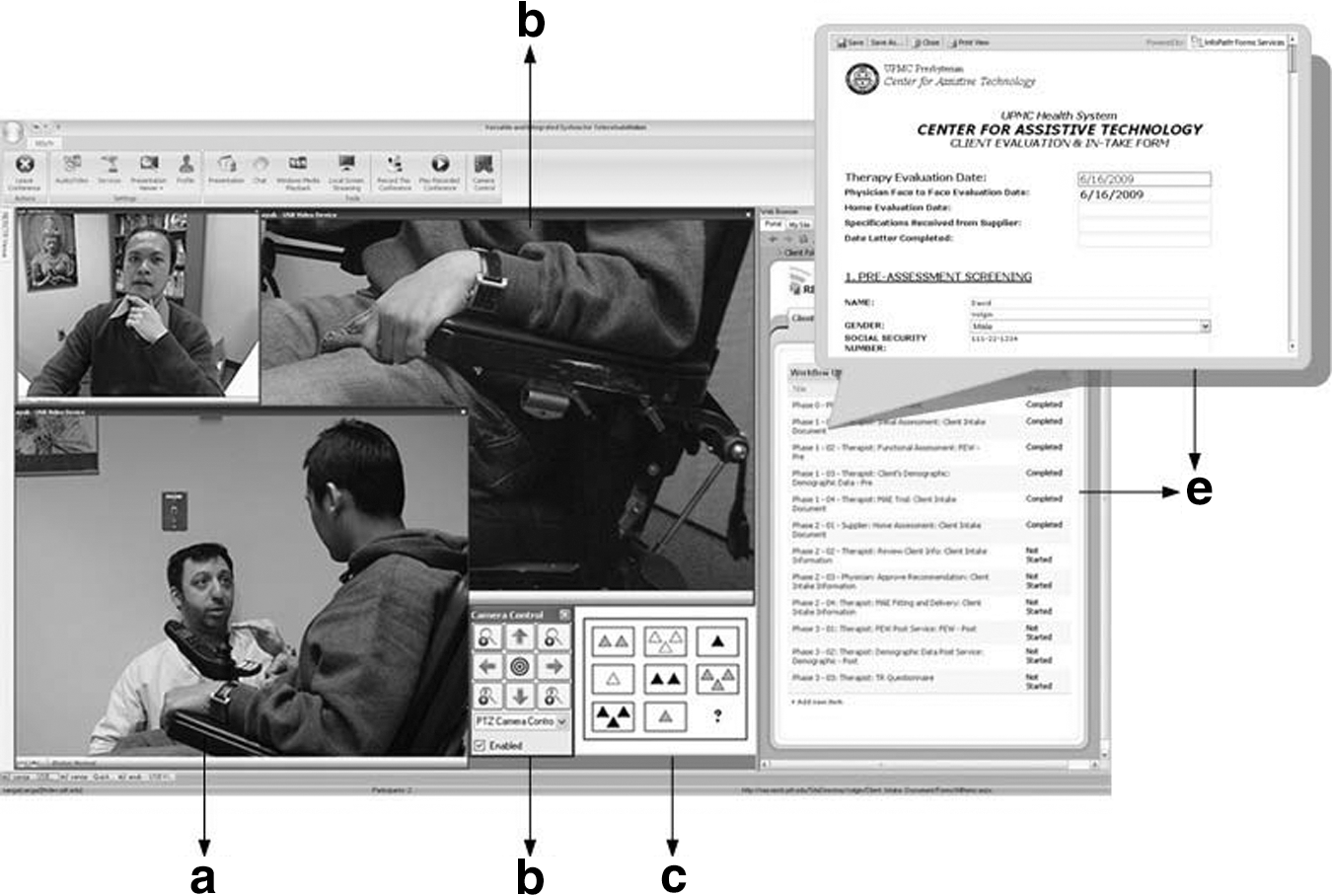
VISYTER capabilities: Videoconferencing with face-to-face (a) and observational (b) cameras, camera control (c), stimuli presentation (d), and EHR integration (e).
Videoconferencing
Videoconferencing is a key component of most telemedicine applications. The videoconferencing in VISYTER has been designed to handle high-quality full-screen video at 30 frames/s. The speed and quality of the video can be adjusted to the speed of the Internet connection. The frame rate, compression rate, and video resolution can be adjusted to the bandwidth of the Internet connection.
Remote camera control
Camera control is a critical element for TR applications. VISYTER currently works with any camera; however, the remote camera control uses the Pan-tilt-zoom protocol and works only with those cameras that use this particular protocol. A common scenario is to have two cameras on the patient side; one camera for face-to-face communications and another to serve as an observational camera. The face-to-face camera is used to support videoconferencing communication, whereas the observational cameras can be used for focus observations such as hand tremors and nonverbal behaviors. Typically, only clinicians can control the remote cameras, and the camera control protocol in VISYTER defines which sites can control the cameras.
Integration with collaborative clinical portal and EHR
VISYTER has been designed with the capability to be integrated with a clinical portal or EHR. The portal and EHR can be located on a different server than the VISYTER one. Figure 2 illustrates a clinician accessing a personalized clinical portal that is connected to the EHR. The personalized portal provides services such as scheduling, a calendar, and clinical workflow. Inside the portal, a clinician can see his or her schedule and a list of patients and tasks assigned by a clinical coordinator.
Developing a system that can provide collaborative patient treatment support among clinicians located in different sites and organizations is challenging. 10 The clinical portal in VISYTER can be viewed as a groupware system to support work and collaboration among clinician team members in providing care to shared patients. To coordinate care, a clinical coordinator can develop a treatment plan and assign different tasks within the clinical workflow to different clinicians. The portal provides a status update for each step in the workflow that is available to all team members while also providing the clinical teams with a discussion tool. The collaboration portal can be accessed independently from outside VISYTER by using a browser to facilitate asynchronous communications among members of the clinical team. This feature is important to allow clinicians to work on clinical documentation outside the live TR sessions.
Stimuli presentation and observational camera
A number of applications such as cognitive rehabilitation and assessment involve a combination of stimuli and responses. Remote administration of stimuli and response is demanding. A system that replicates the face-to-face experience of the examiner can be implemented by offering stimuli presentation and the use of a second camera for observing client responses (e.g., drawing or block-building). This is in addition to high-quality audio and video interaction for providing instructions and examining client responses. VISYTER fulfills all of these requirements by providing multiple cameras, high-quality audio and video connections, and stimuli presentations.
Eye contact and teleprompter
Eye contact is a natural and often essential element in TR and telemedicine sessions. Eye contact is important because it helps regulate the flow of communications. 11,12 As the viability of telemedicine services is often measured by comparing it with face-to-face services, a perception on the patient's side that a clinician makes eye contact is important in TR. Direct eye contact has been shown to increase the perception of credibility. 13 Although immersive eye contact is common in a high-end telepresence system with in-screen camera, achieving eye contact in a desktop environment is a difficult task. To achieve eye gaze perception and to support reading verbatim from clinical protocols required in a number of cognitive rehabilitation applications, a teleprompter program was developed to incorporate a simple mirror from Bodelin Technologies©.
Evaluation of Visyter for Remote Wheelchair Services
A remote wheelchair and mobility consultation application was developed using VISYTER. The need for wheeled mobility devices is increasing as our population ages and people are surviving trauma and disease. The availability of practitioners with specific expertise in wheeled mobility and seating is also limited, especially in underserved areas, and travel to specialty clinics by people with disabilities is often problematic. An initial assessment occurred for participants on a regularly scheduled clinic visit for a seating evaluation at one of the remote hospitals via TR using VISYTER. During this visit, a comprehensive interview with respect to participants' needs, preferences, and goals was conducted by the remote generalist therapist with the expert therapist observing via TR with VISYTER. This session also included a physical examination of muscle strength, joint range of motion, posture, and mobility as well as observation of the participants' ability to perform activities of daily living. Upon the delivery appointment of their new wheelchair, participants were asked to fill out a TR survey to evaluate participant satisfaction with the TR service delivery model using VISYTER. 14,15 The survey consisted of seven questions scored using a 6-point Likert scale of 6 = “completely agree” to 1 = “completely disagree.” Specific criteria for the success of the deployment of the wheelchair and mobility teleconsultation using VISYTER included the ability of the expert practitioner to assess the clients and provide a recommendation of appropriate wheelchair/mobility equipment for the clients; the ability to measure the clients' satisfaction with the TR service; the quality of the video and audio; and the overall quality of the technology in supporting the tele-assessment.
Results
Figure 3 illustrates the VISYTER station on the clinician's and patient's sides. Software applications are identical on both sides, but have different installation settings. The hardware component on the clinician station consists of a desktop computer, and a Webcam mounted on top of a monitor (Logitech Webcam C600) that fits inside a teleprompter mirror. This simple configuration can provide a perception of eye contact by the clinician on the patient side. The hardware components on the patient station include a similar desktop computer and multiple cameras. The same monitor mounted with a Webcam was used as the primary face-to-face camera. No mirror teleprompter was used on the patient side because it can be a distraction for the patient. The clinician can control the zoom of the primary camera as well as the wide-angle/wide-screen mode to provide a wider view of the patient's environment. The second observational camera was equipped with a mechanized motor base to allow pan and tilt in addition to the digital zooming capability (Logitech QuickCam Orbit AF). This capability allows clinicians to control the viewing angle of the camera remotely.
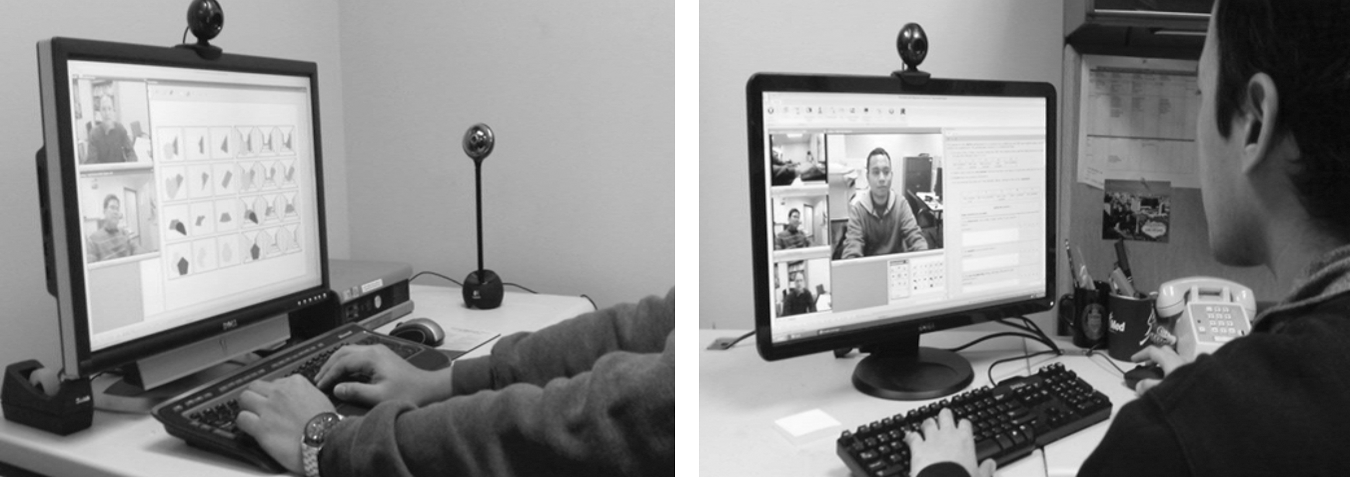
VISYTER station on the clinician's (right) and client/patient's side (left).
Figure 2 shows the two views of the patient from the clinician side (one face-to-face, the other focusing on the wheelchair). This dynamic view of the client is especially important during assessment phases, which require an evaluation of physical and/or nonverbal behavior of the patient. The observational camera was placed on the side of the client. Additional cameras can also be used to provide additional views other than the patient, such as specific devices she or he is using or the living environment. Other Pan-tilt-zoom–based cameras such as the Eagletron, which provides 22 × optical zoom, can also be used when zooming capability is important.
Achieving high-quality audio is important in a TR session. To assist with audio communication, a universal serial bus (USB) microphone with echo cancellation can eliminate distracting echoes during a real-time session. A Phoenix© Duet USB Speakerphone with the capability for properly detecting and filtering out audio feedback was used to achieve clearer audio transmissions during real-time communications even with a low-speed Internet connection.
Figure 2 illustrates an interface of VISYTER on the clinician side in a TR session. The menu bar of VISYTER provides facilities to record the session, replay a recorded session, chat among clinicians, and present stimuli. The left half of the screen shows a videoconferencing session involving two clinicians located at different places, while the larger screen is of a patient located at a remote clinic. The clinician has the ability to resize the video screen. If more than one camera is used on the patient side, all of the camera videos will be presented on the clinician side. On the right half side of the screen is an illustration of a clinician opening a collaborative portal containing clinical workflow and EHR for the remote patient. The EHR that is associated with the steps in the clinical workflow can be opened by the clinicians. When the clinician clicks the record, a new document will open. The clinical portal in VISYTER enables the facility to implement a workflow sequence while providing the status of each step (not completed, in process, completed). Figure 3 (left) shows the VISYTER interface on the patient side. Only video streams from the clinician side display, while the primary camera on the patient side and other observational cameras are hidden. The purpose of this setting is to prevent patients from being too conscious that they are being observed. The clinician has control of the interface appearance on the patient side.
This type of setting was used for the deployment and evaluation of VISYTER for remote wheelchair and mobility consultation. The TR application was used to deliver rehabilitation services from the University of Pittsburgh Medical Center (UPMC), a large academic medical institution, to four-wheeled mobility and seating clinics located in rural areas of western Pennsylvania. 14 The TR consultation model was established, where wheelchair expert practitioners at UPMC provided teleconsultation to remote general therapists and clients at the rural clinics. All of the remote clinics were at least 125 miles away from UPMC. These clinics were connected to the Internet using either broadband (asynchronous digital subscriber line [ADSL], 728 kilobits per second [kbps] up/1.5 megabits per second down) or T1 (1.544 megabits per second) connections and also standard-quality video (320 × 240, 30 frames/s).
This evaluation was conducted for over 2 years of TR service deployment. Overall, all mean scores were significantly higher than the scale midpoint of 3.5 on the TR survey, suggesting that the clients were satisfied with the TR services using VISYTER. Specific items on the survey included items such as the technology did not interfere with the assessment; the quality and clarity of the video and audio were acceptable; and would you (i.e., patient) be willing to use this tele-video evaluation process again. Within the TR survey, space was provided for subjective feedback where participants' comments were positive. Specific feedback included “We didn't even notice the cameras”; “I would love to see this technology expanded into different areas”; and “We were very pleased that a clinic was only a half-hour away and we were able to meet with experts in the field.” 15 The expert practitioner (while observing remotely using VISYTER) was able to assist with the evaluation of the participant, expand on questions to assist with the generalist practitioner's assessment, and store the assessment in the EHR inside VISYTER.
The versatility of VISYTER in handling different Internet connection speeds (from 384 kbps to 1 gigabits per second) was evaluated. When using high-speed connections (up to 1 gigabits per second) between the University of Pittsburgh and its medical centers, VISYTER worked well, delivering high-quality interaction and high-definition videoconferencing (1,280 × 720/720 progressive scan [p]). VISYTER was also tested using low-bandwidth Internet connections (384 kbps) for a pediatric physical therapy teleconsultation between Los Angeles (CA) and Tijuana, Mexico. 16 The connection speed from Mexico was low, but stable. The criterion for success for this test was that the expert therapist in Los Angeles should be able to evaluate the patient and the therapist in Tijuana should be able to follow the expert therapist's instruction. Using aggressive compression, a videoconferencing at a stable, low resolution (320 × 240) was achieved. At this resolution, the expert therapist was able to guide the local therapist and to demonstrate by using a model how to evaluate the patient.
Discussion
Mitigating Barriers to Adoption
One of the primary barriers to the adoption of telemedicine is the cost and complexity of the technology. 17 Telemedicine requires a significant capital investment in equipment and ongoing technical support. 18 The cost and complexity of technology is even a bigger barrier for TR considering its nonclinical settings. TR systems that take advantage of the commodity technologies such as VISYTER can potentially lower the barrier to adoption because of its low initial investment and operational cost, in addition to its ease of use.
There has been tremendous progress in the use of Webcam and desktop videoconferencing in the past decade. The Webcam is currently becoming a standard component of laptop and desktop computers. Researchers have also seen the maturity of desktop applications as part of the consumer technologies with Skype and Internet chatting. VISYTER takes advantage of the maturity and availability of the standard commodity technologies and uses them to develop an integrated platform for TR applications. The platform can be deployed in most rehabilitation environments that include outpatient rehabilitation clinics, rural clinics, assistive and independent living centers, as well as patient homes. The versatility and cost-effectiveness of the platform makes it a suitable platform for a wide range of applications.
Limitations and Future Developments
Our experience in developing TR applications using VISYTER suggests that it has most if not all of the features and capabilities for supporting integrated rehabilitation services. Additional features that can be useful for a number of other applications were identified and are to be added to VISYTER. Those features include confidential communications among clinicians during the session. This can potentially be implemented using confidential chats among clinicians. Currently, the chat function is open to all parties in the conference. The second feature is the capability for capturing a patient's response to stimuli in the form of drawing or handwriting. Currently, a second camera is used to capture this response. The use of a tablet or slate computer to capture this type of response can be more effective than the current system. The third feature is integration with sensor input devices for interactive assessment and therapy. This feature will be useful for services such as interactive physical therapy for motor recovery. Taking advantage of the extensibility of VISYTER, we plan to include these features in future versions of VISYTER. The versatility of VISYTER can be enhanced with the arrival of 4G wireless connections that are expected to be rolled out in 2010.
Footnotes
Acknowledgments
This project was funded in part by the National Institute on Disability and Rehabilitation Research (NIDRR)'s Rehabilitation Engineering Research Center (
Disclosure Statement
No competing financial interests exist.
*
The terms “patients” and “clients” are used interchangeably in rehabilitation fields. The term “patient” is used in this article to avoid confusion with the term “client” in software client programs and to be consistent with the term used in the other branches of telemedicine fields.