




Abstract
This article reports on a usability study of remote noninvasive cardiac testing in homes. We studied the Vitaphone 3100BT (Bluetooth®) event loop recorder (Vitaphone GmbH, Mannheim, Germany) and paired BlackBerry® Curve™ 8520 smartphone (Research In Motion, Ltd., Waterloo, ON, Canada). This application requires independent device set-up by patients in their own homes following receipt by mail out of the kit (instructions plus the event loop recorder and smartphone). The case studies of five participants, each with varying experience with technology, were documented as they interacted with the devices. Participants were videotaped following written instructions as they performed a “think aloud” procedure while completing 20 device set-up tasks. Interviews provided insight into how the independent device set-up and processes could be improved. This study concluded that gender, age, and familiarity with technology seemed to influence the participants' abilities to successfully set up these devices and that sending the kit by mail appeared to be an acceptable strategy to provide remote noninvasive cardiac diagnostic services. This study provides a foundation for future research assessing usability of mobile healthcare technology.
Introduction
Noninvasive cardiac testing is prescribed to assess the presence of cardiovascular disease such as a cardiac arrhythmia. Testing often requires a series of clinic appointments for device set-up and removal. The literature suggests that testing using an event loop recorder (ELR) may be more effective than the traditionally prescribed Holter monitor 1 –6 ; however, ELRs are prescribed less frequently in Ontario, Canada.
Holter monitors record every heart beat and are often worn for 24–48 h. ELRs may be worn for weeks, continuously capturing and recording abnormal cardiac events—either triggered by the patient or, with newer technology, automatically by the device itself. Use of older ELR technology requiring manual activation during cardiac events and the downloading of stored events over an analog telephone line by patients has been problematic. An individual's experience with technology has been shown to be associated with his or her ability to successfully send a cardiac event stored in an ELR device. 1,3,4
The Vitaphone 3100BT (Vitaphone GmbH, Mannheim, Germany) is a more advanced ELR device because of its increased functionality and wireless capability, thereby eliminating the need to manually trigger and transmit events. Automatically recorded data are sent wirelessly via a paired smartphone to a centralized receiving station for analysis by a healthcare professional.
The telemedicine application designed by the Principal Investigator for m-health Solutions in Burlington, ON, Canada, relies on the patient's ability to independently set up mailed devices in his or her own home. The devices used were the Vitaphone 3100BT ELR and paired BlackBerry® Curve™ 8520 smartphone (Research In Motion, Ltd., Waterloo, ON, Canada). As with any telemedicine intervention, end user customization and usability are key areas to consider when integrating telehealth systems into healthcare delivery. 7
Previously, cardiac devices have not been paired with a BlackBerry; no published studies have looked at the usability issues that may arise for patients while using these devices together. In fact, a paucity of evaluative research has examined patients while they use home healthcare technologies 8 ; however, the critical value of such studies has been documented. 9
Preparation for wireless auto-send of auto-detected cardiac events requires human–computer interaction with user interfaces and device hardware in a prescribed order. Field usability testing provides valuable insight into how end users will interact with the specific system design and processes in a naturalistic setting. The objectives of this study were to observe participants as they independently set up the devices, to determine the clarity of the written system set-up instructions provided, to assess any unforeseen problems that may be encountered by the participants, and to receive feedback on the processes.
Subjects and Methods
In 2010, study participants were recruited through their family physician's office in Burlington. Patients had come for a scheduled appointment unrelated to cardiac arrhythmia. Participants were prescreened for inclusion by their physician using the following criteria: English-speaking, literate, well adults (older than 40 years of age) men and women with varying experience with technology. Exclusion criteria included patients with any previous testing by Holter monitoring and those whose physical limitations would affect their ability to manipulate the devices. Large numbers are not required for usability research; even small sample sizes selected to represent typical end user profiles can provide valuable information reflective of the larger user group. 8 Therefore five study participants were recruited for this study. Ethical approval for this study was provided by the McMaster University Research Ethics Board. All participants signed a consent form and received a $5 coffee card for participating.
Preparation
Before the subjects left their physician's office, in preparation for the home delivery of the kit containing the ELR and BlackBerry devices the following day, two waterproof electrode patches were placed on the participant's torso by the Principal Investigator. For the purpose of the study the kit was not couriered, although this is the intended mode of delivery of the devices kit. The Principal Investigator visited participants at home. She hand-delivered the kit and proceeded to evaluate the independent set-up of the previously unseen devices.
The ELR was packed with the wire leads already attached to the device and the batteries installed as it would be couriered to patients. The BlackBerry was packed with the charger preconnected. A sign across the kit contents advised participants to read the enclosed 5-page instruction booklet before removing the devices (Fig. 1). The written instructions ranked 69.2 on the Flesch Reading Ease Test and 7.1 on the Flesch–Kinkaid Grade Level Test. These ratings indicate reading levels of a seventh grade student.

Event loop recorder and BlackBerry kit.
Data collection included (1) observation and the collection of field notes by the researcher, (2) a recorded “think aloud” exercise, and (3) a short interview at the end of the set-up procedure. The “think aloud” involved having participants demonstrate their understanding of the technique prior to starting as they described the steps they were taking during set-up. Participants were reminded to “keep talking” as they set up the devices. This method provides valuable insight into what the user is doing as they use the system. 10 From these descriptions researchers can understand the processes and reasons for their actions. Participants were videotaped and observed while independently following the written instructions to set-up the ELR and BlackBerry devices. If the participant was unable to complete a task, the Principal Investigator intervened so that the set-up could continue. Following set-up, a semistructured qualitative interview based on the research objectives was conducted, and it too was recorded.
To assist in analysis, audio from the videotape of each step of the ELR set-up procedure and notes about observed participant behavior as it related to usability were transcribed into Excel (Microsoft, Redmond, WA). Sessions were timed, and the number of interventions required by the researcher to assist was counted, noting difficulties relating to individual tasks. All data were fragmented and coded according to 13 quantifiable measurements adapted from Nielsen 10 (see Table 1) and assessed for learnability, memorability, errors, and satisfaction. Data analysis evaluated the frequencies and percentages of task completion. Both inductive and deductive analytical approaches were used 11 ; linkages and themes were sought using the constant comparative method. 12 From the usability data, we determined how to improve the instructions.
Task Analysis
Results
The five study participants ranged in age from 51 to 77 years; they included three females and two males. All but one owned a computer, and two owned a cell phone (not a BlackBerry) (Table 2). The time needed to get through the set-up ranged from approximately 9 to 18 min, and the number of interventions by the Principal Investigator required to assist participants in the set-up ranged from none to five.
Results Summary
Results by Each Step in Set-Up
We report the number of participants who completed each step, which is listed below as in the written instructions. We also include data on specific instances or occurrences that were valuable for understanding the step or that would signify that a change was needed in instructions or procedures.
1. First read through to the end of page 5 of the instructions before starting.
Only participants 2 and 3 read through to the end of the instructions before starting. Participant 5 immediately focused on the BlackBerry device, handling it and describing it as “awesome.” He turned on the BlackBerry, tried to make a phone call, and began to perform a series of erroneous activities. He later confirmed that his fascination caused him to block out everything including the written instructions, thus resulting in investigator intervention throughout the set-up to refocus him. Participants 2 and 3, who read through to the end before starting, had the fastest set-up time (see Table 2).
2. Set-up equipment in a clean, dry, well-lit area.
All participants chose an acceptable environment for device set-up.
3. Identify the key contents before removing them from the kit: recorder packed inside a protective pouch, the attached adjustable neck strap, and two connected plastic wire leads; and BlackBerry with attached charging plug.
Participant 4, a 77-year-old woman, had never seen a computer up close. She expressed a keen interest in participating in this study because of her dependence on others for transportation to medical appointments. She had trouble understanding this instruction and was unable to identify the ELR recorder, mistaking the BlackBerry with attached charger plug for the ELR and neck strap. She read the set-up instructions sequentially, not reading through each section first and not referring to the descriptive photo for assistance. She later revealed that she had had surgery on her eyes in the past, which may have contributed to her decreased ability to grasp the overall flow of the instruction document. She explained, “I think most older people want to get through it, so you kind of jump in and you don't know exactly what you are doing, so you kind of muddle through.” Participant 4 had the longest set-up time, requiring five interventions by the Principal Investigator helping to identify the devices, locate and hold down buttons, and turn pages in the instructions.
4. Expose the two electrode patches attached to your body.
This was done easily by all participants, each verbalizing that the preplacement of the electrode patches in the doctor's office facilitated the in-home ELR set-up.
5. Remove the recorder and its attachments from the kit as shown in the above photo.
Participant 4 focused on the BlackBerry, not realizing there was another device packed within the kit, and therefore required intervention by the Principal Investigator.
6. Do not remove the recorder's protective outer pouch.
Participant 1 unsnapped the pouch but did not attempt to remove the device. Participant 5 repeatedly attempted to remove the pouch, resulting in an intervention by the Principal Investigator; this participant later explained, “Typically, most electronic devices are placed in a pouch for protection. Most are not operational in that setting—like your cell phone, your GPS, or camera.”
7. Ensure wire leads are firmly connected to the (ELR) device by pushing the two pieces together at connection.
Participant 4 was puzzled as to where the connection was, demonstrating difficulty with the wording of this task. She looked all over the device, mistaking the “two pieces” as the red and white buttons at the end of the wire leads. She later explained that to her a “connection” did not mean the point where two pieces were joined together, it meant an outlet in the wall.
8. Place the neck strap over your head with the recorder window facing out.
Participant 3, having read to the end of the instructions before starting, felt comfortable enough to successfully do this step without rereading the task. Once participant 4 was directed to the recorder away from the BlackBerry, she was able to put the neck strap over her head with the window facing out.
9. Snap the white button at the end of the wire lead onto the top electrode patch as shown in the diagram.
All participants were able to complete this task without difficulty.
10. Snap the red button to the bottom electrode patch as shown in the diagram.
All participants completed this task.
11. Hold down the recorder start button for approximately 3 s to turn on the recorder.
Participant 3 performed this task without difficulty. Participant 2 left her finger on the button until the device had completed its warm up. Participant 1 was able to turn on the device on her third attempt, as she did not hold the button down for long enough, later revealing, “I am actually a really good candidate to do this on because I am not mechanically inclined at all.” Participant 4 required an intervention to locate the button on the device as she was focused on the charging plug. She had two failed attempts not holding down the start button for long enough. Participant 5 held down the button leaving his finger in place while continuing to read the instructions, inadvertently activating a recording sequence requiring intervention.
12. Identify the items displayed in the recorder window.
All of the participants, with the exception of participant 4, identified both the numerical heart rate and the blinking heart display.
13. Proceed to BlackBerry instructions.
All of the participants, with the exception of participant 5, who was distracted by the BlackBerry, progressed through the instructions in sequence. Participant 3, the other male participant, demonstrated great enthusiasm to be finally able to handle the BlackBerry device.
14. Remove the charger from the BlackBerry at the connection by gently pulling the two pieces apart.
Participants 2 and 5 completed this task with ease. Participants 1 and 3, not having cell phones, left the BlackBerry attached to the charger throughout the set-up. Participant 4 had trouble comprehending the instructions for this task. She looked at the BlackBerry and the charging plug and stated, “Well they're apart,” and proceeded to the next task.
15. Turn on the BlackBerry by holding down the red On/Off button located below and to the right of the screen until the screen lights up.
Participants 1, 2, 3, and 5 completed this task without difficulty. Participant 4 was unclear about the “button,” having never seen a screen up close. She did not refer to the labeled photo of the BlackBerry. She looked at the device, the charging wire, and the plug for the red On/Off button. She demonstrated uncertainty about the BlackBerry: “Is this whole thing a button?” This participant was shown the button on the instructional photo; at that point she was able to turn on the device independently.
16. Press the Start button below the recorder window until you hear a beep.
Participants 1 and 3 continued to focus on the BlackBerry device, resulting in erroneous activities. Participant 3 described being locked in on the BlackBerry. Following minimal intervention each returned to the recorder and successfully pressed the Start button to send a test. Participant 1 later verbalized feeling “A bit overwhelmed…most would have probably got it; however, I need some help here.” Because she had access to the Internet, she suggested it would be nice to go online to get additional assistance or make a phone call: “I felt at one point I needed someone to talk to about it.” Participant 4 missed this task.
The remaining four tasks were completed successfully by all participants.
17. Proceed to next step (in sequence).
18. If the BlackBerry has gone dark to save power, gently press the scroll button.
19. Gently roll your thumb or finger over the scroll button.
20. Pick any of the highlighted boxes and press the scroll button again to view the demonstration video.
During the post-set-up interview, participant 2 revealed that she had experience setting up patients with Holter monitors. This inadvertently provided an example of a “super user” for this study. Good instructions should provide enough information for the novice, without slowing down a super user. 10 Participant 2 had the fastest set-up completion time. She verbalized, “I thought it might be a little more complicated…. It was simpler than I thought.” She expressed that her only concern was about the BlackBerry: “I don't have a BlackBerry, so I was a little nervous thinking I don't know how to use a BlackBerry, but it is pretty straightforward.”
Participant 3 revealed that he focused on the BlackBerry because he was not familiar with it, even though he had not seen an ELR device before. In contrast, the ELR did not bother him; he saw that device as straightforward: “There was no problems what so ever—Hook it up and let's go!”
If participant 4 had not been participating in this study, she would have turned to her family to help her. Her overall impression of the technology and process was very positive: “I was thinking when all of this was going on, what a wonderful, wonderful, tool this is. Instead of going to the doctor's office every time you have to have a check up. To have it done at home would be marvelous.” Although intended as simplistic, the words “section,” “connection,” “plug,” “charger,” and “button” were problematic for her. However, her overall lack of independence in the set-up process did not frustrate her, it actually heightened her interest in technology.
Participant 5 stated that he had experienced performance anxiety during the set-up. During the interview, to address his stated aversion to written instructions, an option was proposed (in theory) of a video to demonstrate device set-up on the BlackBerry screen. He felt this option should not replace written instructions, but could supplement them, giving users a choice.
Table 3 provides a summary of the key results for each user based on problems they encountered during device set-up.
Key Problems Experienced During Set-Up
Discussion
This study provided important findings relevant to ELR and BlackBerry device set-up, assessing both their usability and the new process of initiating remote diagnostic testing at a family physician's office. No negative comments were reported by the participants regarding the testing process, electrode patch preplacement, the idea of kit mail out, or independent device set-up. In fact, participants were intrigued, noting the potential benefits and convenience that may be provided by this technology and business model. Therefore, the mail out of the kit appears to be an acceptable strategy to provide remote cardiac diagnostic services.
Results from this study confirmed that it cannot be presumed that written instructions will be read before mobile health technology is handled by patients. Studies have shown that when it comes to technology, people do not read written instructions. 13 Most set-up issues requiring intervention were explained within the written instructions; however, the interpretation and implementation proved problematic. A device set-up process designed to mitigate potential user uncertainty and device damage must be implemented. Individuals learn differently; more effective learning takes place when instructional design meets the need of the individual learner. 14 This may be addressed in part by providing device instructions through multiple delivery methods (e.g., hard copy DVD, vendor Web site, BlackBerry video, written instruction, and vendor call center). If a video is provided in multiple streams, patients could watch exactly how devices should be handled, the correct buttons to push and for how long, what the screens should look like, and exactly how the devices should work once in place. A video can also demonstrate electrode patch replacement, device charging, and how to return the kit to the vendor. The written documentation should follow the video in sequence and include close-ups of all connections, plugs, buttons, and screens. Participants who did not own a cell phone had set-up issues that could potentially be resolved by viewing an instructional video.
Scripting device set-up instructions with BlackBerry instructions first may prevent the problems experienced by participants 1 and 3. Those immediately attracted to the BlackBerry could benefit from activation of an instructional video when the device in turned on. Brock and Smith 15 reported that digital videos displayed on handheld devices can be a powerful and effective method for patient education. However, this type of application will require future study, including research into the effects of screen size on usage and information retention.
Premature handling of devices may be preempted by secure kit packaging and increased labeling. In addition, patient online registration via the vendor's Web site could be developed to ensure patient online viewing of device set-up instructions prior to kit mail out. Use of computers for patient learning has been shown to be an effective strategy to improve knowledge and outcomes. 16
Industry terminology should be used with caution. It is surprising that simple technical terms such as “connection,” “plug,” and “charger” were misinterpreted. Although this was not a required task during set-up, only two of the five participants understood to unfold the charger plug when charging the BlackBerry device. As suggested by participant 1, a call center back-up should be available when additional assistance is required. To minimize demand on call center resources, well-presented trouble shooting and frequently asked questions should be available on the vendor Web site for self-service; its effectiveness will require further investigation.
Based on the key findings and areas requiring researcher intervention during the kit set-up and supporting literature noted above, modifications were made to the written instructions. An instructional video and help call center were also launched for those who required further assistance. BlackBerry instructions were moved to the beginning of instructions to prevent moving back and forth between devices and to address immediate fascination with the device. Once switched on, the BlackBerry now displays the kit set-up demonstration video. It may be accessed by the user at anytime throughout the testing process. This video is also available on the company Web site (
Until a new culture of remote monitoring is established, a rigorous prescreening process of potential patients done by the ordering primary care provider is recommended. Before requisitioning this testing procedure, the primary care provider must assess the appropriateness of noninvasive cardiac testing for the patient and assess cognitive or physical limitations that may hinder successful implementation. Prescreening should also include the assessment of patient literacy and level of familiarity with technology. At the very least, patients should have internet access before the kit's arrival. This may be managed by a designated caregiver. Diagnostic test preparation should be discussed by the physician or other primary care provider. Figure 2 presents a decision tree to guide the selection of patients who could benefit from remote ELR monitoring. Further research is encouraged to refine the prescreening criteria for this diagnostic intervention. Use of these devices by those with physical limitations or unfamiliarity with technology should not be ruled out if interest is demonstrated, as with participant 4, as long as a supportive caregiver is present. The convenience of not having to transport dependent relatives to clinics for testing and repeated appointments may prove advantageous and requires further study. Moreover, device use in long-term care facilities with set-up by a healthcare practitioner warrants future research.
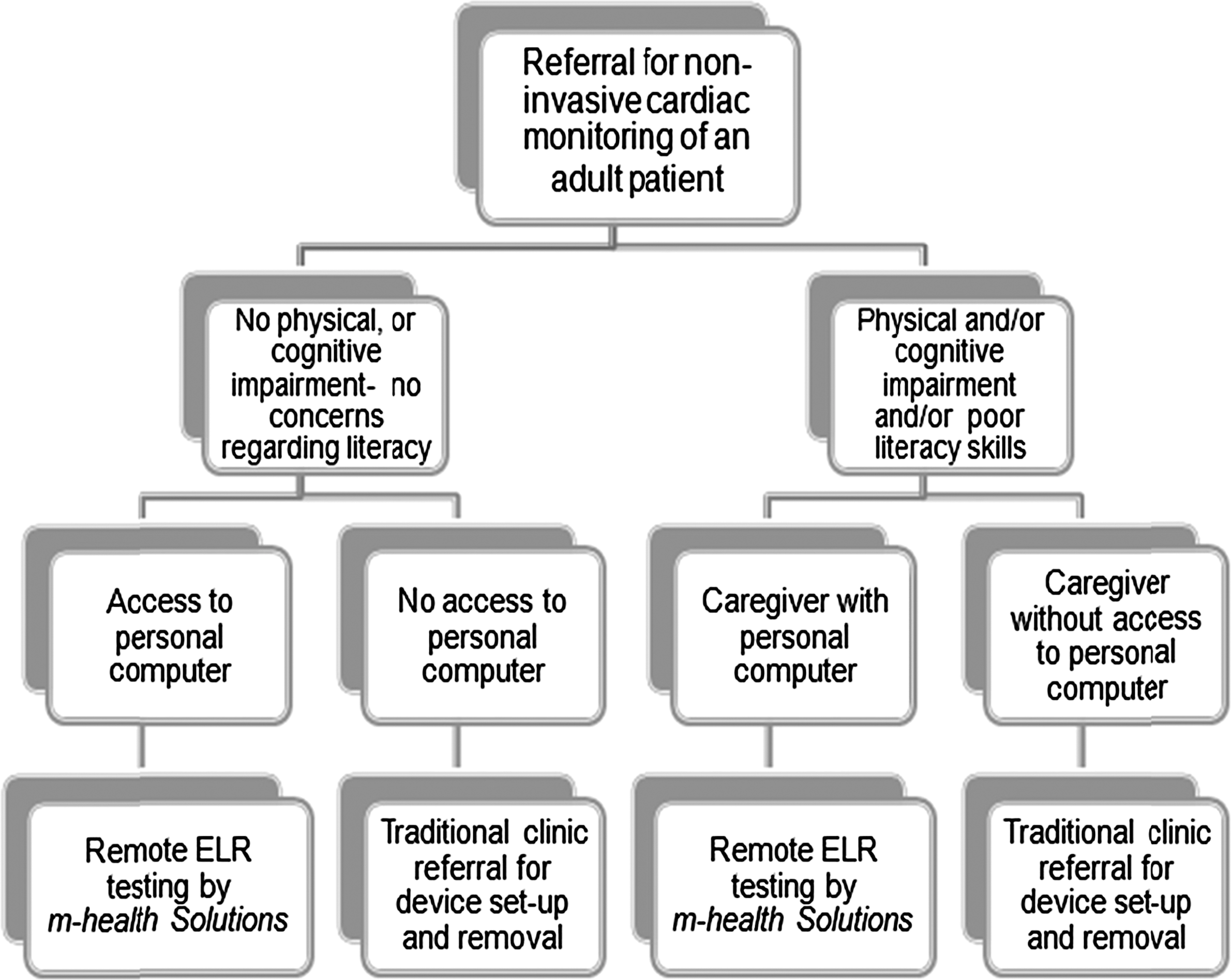
Recommended patient selection criteria. ELR, event loop recorder.
Fascination with the BlackBerry device by the male participants, although problematic, helped in participant recruitment overall. Potential participants, once hearing of BlackBerry device involvement, in the study became interested in learning more about this research. This interest may assist moving forward with this business model.
Before an alternative method of diagnosis using telemedicine becomes commonly used, it must be established into the routines of the healthcare providers. Research has shown that acceptance of telemedicine applications varies among healthcare professionals. 17 Therefore, before full roll out of this telehealth application, further study from the perspective of primary care providers is essential.
Limitations
This study examined well individuals not experiencing cardiac symptoms; therefore, it is unknown how symptomatic individuals would experience device set-up. It is unknown if participants from diverse backgrounds recruited from other primary care provider offices would provide different results. In addition, participants may be inclined to follow instructions more carefully while knowing they are participating in a research study—the Hawthorne effect. This study lacks substantial generalizability, as it is specific to this application and the written instructions as presented. However, it provides a foundation upon which to build further usability studies.
Regarding the methodology, the “think aloud” method can be unnatural for some because of the requirement of verbalization of steps. The process may affect completion time and influence problem-solving behavior. 10 The actual presence of the investigator may also influence the research. 18 Videotaping may result in study participants becoming self-conscious, thus influencing data collection and study results. 10
Conclusions
Large-scale telemedicine applications using mobile technology will require a great degree of user independence. Although mobile health technology currently exists, examples of practical applications in healthcare are limited. Studies investigating the usability of mobile health technology paired with smartphones are lacking. Analysis of participants' abilities and concerns while following written instructions for independent device set-up provided valuable information about how end users might interact with mobile health technology for cardiac monitoring in the home. Although more research is needed, this study demonstrated that for this application, gender, age, and experience with technology seemed to influence end users' abilities to successfully set-up the devices, and the results were very influential in the design modifications of the system before implementation. This research influenced the revisions in written instructions, the filming of the video instruction, and the patient prescreening and selection criteria, as well as overall redesign of workflow to support telehome monitoring.
This study is relevant to future applications of mobile health technology as little is known about how this type of technology is, or will be, used in the real world. Further research on the topic of remote cardiac testing should include investigation of health economic data and research based in the fields of business, health sciences, and information technology.
Footnotes
Disclosure Statement
No competing financial interests exist. This study is not affiliated with nor has it been authorized, sponsored, or otherwise approved by Research In Motion Ltd., owner of the BlackBerry trademark.