




Abstract
Background
Asthma is a chronic disease characterized by inflammation and obstruction of the respiratory airways. 1 According to the World Health Organization, 235 million people suffer from asthma worldwide. 2 Asthma symptoms include shortness of breath, chest tightness, coughing, and wheezing. 1 Asthma control is characterized by the reduction in exacerbations of symptoms, with improvement of a patient's quality of life and reduction in costs with healthcare. 1 Asthma management is necessary to closely monitor symptoms, avoid triggers, and comply with the treatment plan. Moreover, the influence of the upper airways on lower airway diseases is established, and most asthmatics have allergic rhinitis. 3 Allergic rhinitis is a disorder of the nose induced after allergen exposure characterized by four main symptoms: pruritus, sneezing, nasal obstruction, and mucus discharge. 3 Asthma and allergic rhinitis (ARA) patients frequently do not have their disease controlled. According to a survey carried out in 2010 in Portugal, only 57% of asthma patients had their disease controlled, 4 and only 50% used their controller medication in agreement with the recommendation of the Global Initiative for Asthma guidelines. 1
An effective way to track ARA control or test results is with mobile applications. Nowadays the smartphone market is rapidly growing. Since the launch of the iPhone® (Apple, San Jose, CA) in 2007, Apple has already sold more than 100 million phones 5 and has more than 510,000 applications available in the App Store with over 18 billion applications downloaded. 6 In 2008 Google (Mountain View, CA) launched Android™. Since then the Android Market has more than 300,000 available applications 7 with over 6 billion downloads 8 and 400,000 daily device activations. 9 In April 2011, 18 asthma-related applications were available in the App Store 10 and the Android Market. 11 The main features of these applications are the record of medication intake, peak flow meter results, symptoms, attacks, and exposure to triggers. Only four (22%) applications have mechanisms to share the information by e-mail, and seven (38%) only give information about asthma.
According to the literature mobile application of asthma self-monitoring and management can help patients controlling their disease. According to Liu et al. 12 this kind of application may decrease the number of exacerbations and unscheduled visits to the doctor, improving the quality of life of patients. The ease of use, the better understanding of asthma by the patients, and the ability to manage their symptoms were referred to by Ryan et al. 13 as the main advantages of a mobile phone technology in the management of asthma. Other studies suggest the compliance with asthma action plans, 14 the quicker communication and its facilitation with healthcare professionals, 15 and the ongoing record facilitating consultations 16 as the main advantages of this systems.
Despite the rapidly growth of smartphone utilization and consequently mobile application, the development of this kind of application has several challenges. Because of the specific features of these devices, the interface has to be adapted in order to adjust to small screens and touch screens. Moreover, before the deployment of the application it is important to evaluate the usability and the technologies used. Wyatt and Spiegelhalter 17 described as one of the major reasons to evaluate a system the need to report which techniques or methods are more effective and why certain approaches failed. This article describes some challenges we faced during the development of the mobile application m.Carat.
The main goal of this work is to develop a mobile application (m.Carat) for the Android and iOS operating systems. m.Carat is designed for the general public, most specifically persons with ARA, who are familiarized with mobile phones. Patients using the application should be able to fill out a questionnaire to assess the degree of control of ARA (CARAT
18
), record their exacerbations, triggers, symptoms, medications, lung function tests, and visits to the doctor or the hospital, receive information and news about ARA, define medication and tasks notifications, synchronize all records with an online database at the CARAT Network Website (
Materials and Methods
The mobile application m.Carat was developed for Android and iPhone smartphones. It was developed using PhoneGap, 19 which allows the development of applications for several mobile operating systems. To generate the user interface jQuery Mobile was used. 20
The development of mobile application like m.Carat presents two main challenges: creating a simple and user-friendly interface and developing an effective synchronization algorithm.
The organization, insertion, and presentation of different types of data in a mobile phone were challenges. Mobile phones have particular characteristics, including screen size, processing speed, or input methods, that require specific interfaces and interactions with the applications. As previously mentioned, the m.Carat interface uses a Javascript framework, named jQuery Mobile, that was built to create Web applications that work in the platforms of several smartphones. All HTML elements of this framework are adapted to mobile devices. m.Carat has 18 different screens to record and show information (9 to show and 9 to record) and 6 different types of input elements, namely, radio buttons, text inputs, select boxes, date pickers, sliders, and check boxes. All labels and layout of the form fields in m.Carat have to follow standards used in mobile application interfaces. Despite the use of jQuery Mobile, some elements have to be adapted to the m.Carat context, such as the CARAT questionnaire, symptoms buttons, and date picker. In the CARAT questionnaire, when a user answers a question, the interface automatically scrolls down to the next question. To represent the severity of each symptom a custom button was created with a three-level scale (red, yellow, and green) that changes value when the user clicks the button. To select a date an interface was created where the user selects individually the year, month, and day by pushing the buttons “+” and “−.” The presentation of recorded data to the user was another challenge. The stored information is presented to the user through six different lists (CARAT, Medication, Medication take, Diary, Status, and Tasks). These lists have limitations due to the large amount and different types of data that m.Carat can store, namely, the time to load all the records, the size of the page, or the scroll needed to reach the bottom of the page. To improve the lists each one can be filtered by date range. Moreover, in the Status tool, we developed a tool for the presentation of stored records that has a timeline where all events are summarized in a single screen. In the CARAT questionnaire we create a graph that displays dates and scores of all CARAT questionnaires, in order to provide an overview on the degree of control of ARA in the past weeks. To evaluate m.Carat usability, a pilot study was performed with eight users, having different backgrounds, who had to perform 10 tasks in m.Carat.
The synchronization between m.Carat and the online database was the other main challenge. Synchronization must keep both databases with the same data. To achieve this goal we implemented a synchronization service that receives the new, changed, and deleted records from m.Carat, stores them in the online database, and sends back to m.Carat the new, changed, and deleted records of the online database. To select only the changed, deleted, or new data in the database, each record table has two fields that identify these records: “is_sync” and “state.” If the “is_sync” field is equal to −1, the record has not been synchronized, and if the “state” field is equal to 1 or 2, the record was changed or deleted, respectively. When the synchronization service receives the mobile data, it will perform different actions according to the “is_sync” and “state” fields (Fig. 1).

Synchronization algorithm. DB, database.
For each change in the online database, a query is created in order to reflect the changes in the mobile database. After these actions the synchronization service checks for the same deleted, changed, and new records in the online database and creates a set of queries that are returned to the mobile application. To design this algorithm we considered all possible scenarios in order to avoid duplicated records, removal of the wrong records, and update of the wrong records. Still, the algorithm needs further refinement: if a user has several mobile devices, only one can be synchronized, and if a user changes his or her authentication credentials to another user in the mobile phone, all data already stored in m.Carat will be included in the new user records.
Results
Currently m.Carat is a mobile application where ARA patients fill out a questionnaire to assess the degree of control of ARA and record their exacerbations, triggers, symptoms, medications, lung function tests, and visits to the doctor or the hospital. Since January 2012 m.Carat has been available at the Android Market, and there have been more than 50 downloads. The following section describes in more detail all the m.Carat features. To better understand m.Carat integration with the CARAT Network, under System architecture how m.Carat interacts with the server and synchronization service is explained. In order to evaluate the m.Carat interface a pilot study, described under Evaluation, was conducted.
Application Features
In m.Carat an ARA patient may save his or her daily symptoms and fill out a questionnaire to check if his or her asthma has been controlled in the past 4 weeks. If the patient has an exacerbation, he or she may record the date and time, what triggered it, and the reliever medication used. If the patient goes to the emergency department or another healthcare service, he or she may also record this event. The following subsections give a more detailed description of m.Carat features.
CARAT questionnaire
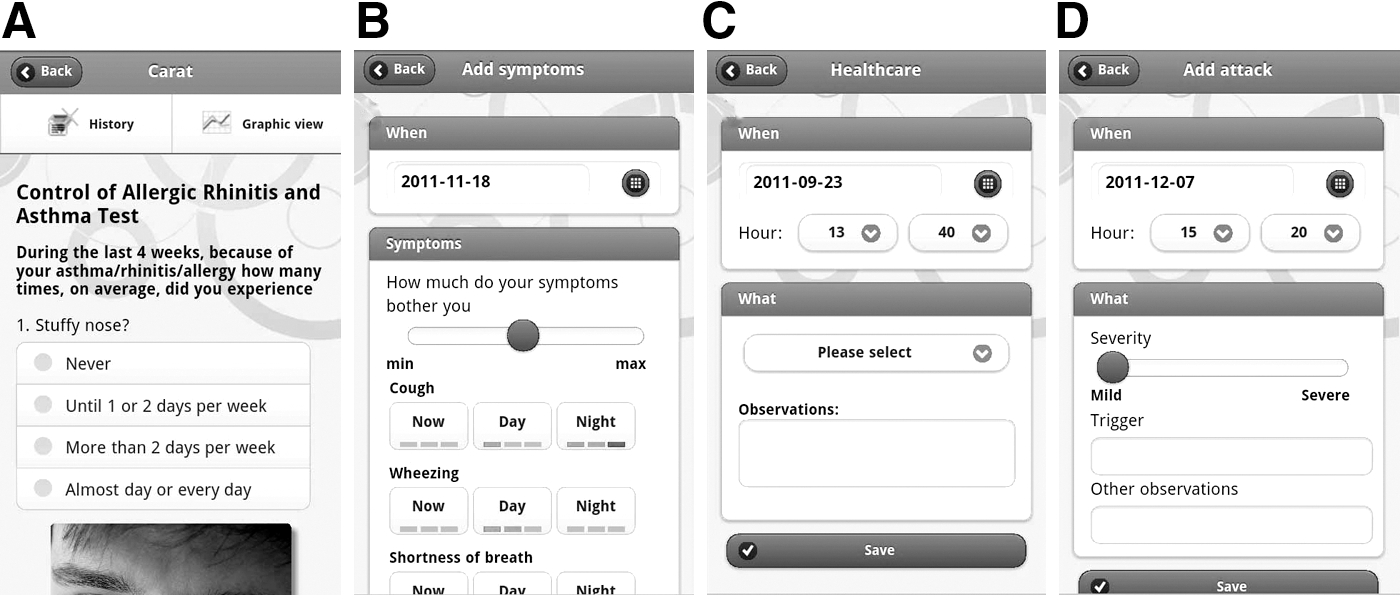
CARAT is a questionnaire (Fig. 2A) to quantify the degree of control of ARA. This questionnaire consists of 10 close-ended questions scored between 0 and 3 points. The first four questions address symptoms of the upper airways, and the last six questions are related to the lower airways. The total score ranges between 0 and 30, referring to the ARA degree of control (30 indicates maximum control, and 0 signifies no control). In the CARAT feature the patient may fill in the questionnaire and view his or her previous scores and results. The CARAT feature has also a graphic presentation of all scores, which gives patients an overview on the degree of control of ARA in the past weeks.
Diary
The Diary is a feature that records daily events related to ARA. This feature is divided into four different types of events: Attacks, Monitoring, Symptoms, and Healthcare Services. In Attacks (Fig. 2D) the patient may record when he or she has an attack, what triggers the attack, and other useful information related to the event. Monitoring records of test results (peak expiratory flow/fractional exhaledNO/forced expiratory volume in 1 s) and the date/hour that they were performed. In Symptoms (Fig. 2B) the patient may record any symptom related to ARA such as cough, wheezing, shortness of breath, chest tightness, sneezing, runny nose, itchy nose, or blocked nose and associate each symptom with its severity (three different levels) and time of the day it occurred (now, day, or night). In Healthcare Services (Fig. 2C) the patient may record any visit to healthcare services including medical consultations, visit to the emergency room, performing diagnostic tests, or others. All the recorded data can be viewed, edited, or removed in the main page of the Diary.
Medications
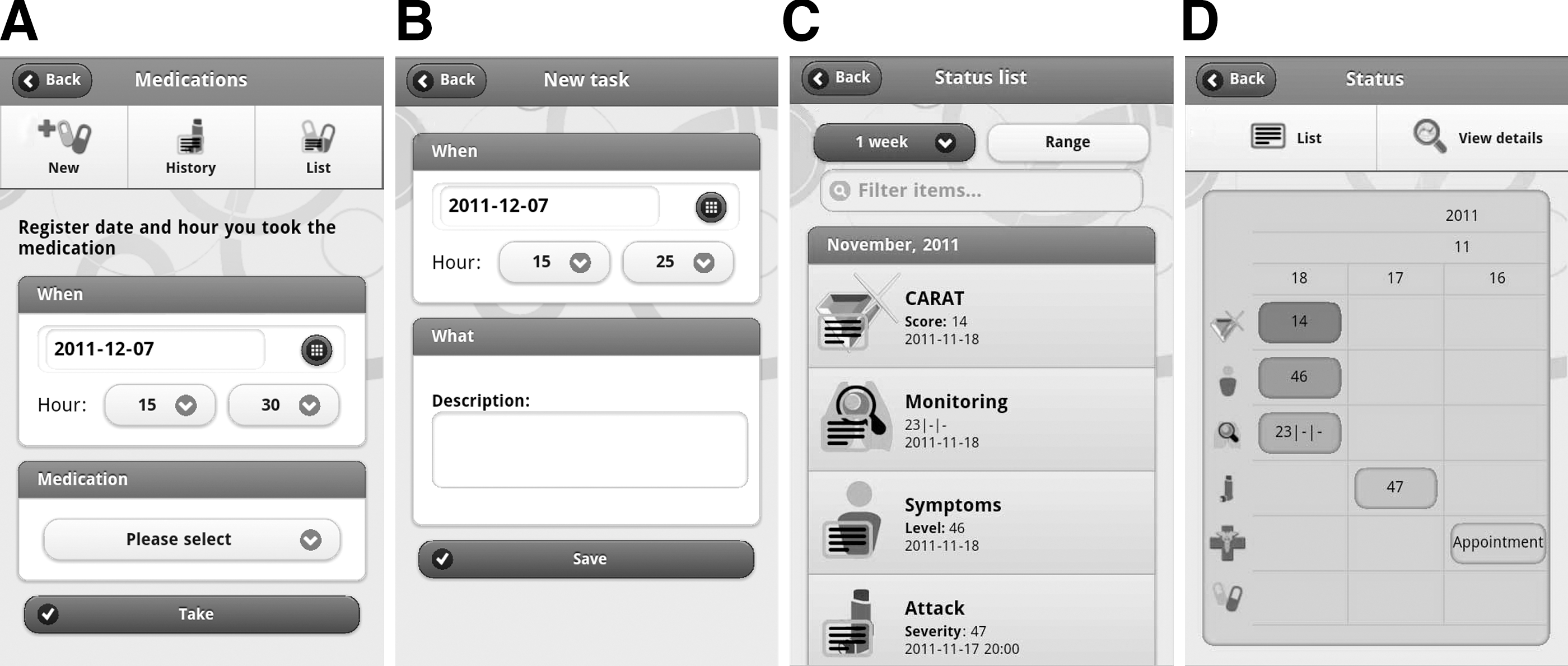
This feature allows the patient to record controller and reliever medications (Fig. 3A). For each medication it is possible to record the name, dosage, active ingredient, administration route, hour of intake, and treatment plan (if the controller medication is to be taken every day or with days apart). The patient can also define notifications to alert time of medication intake. This feature also allows the patient to record the date and hour that he or she takes any medication.
Tasks
Tasks is a checklist where patients may add ARA-related tasks, such as medical appointments, to help in reminding about the tasks already completed and the future tasks (Fig. 3B).
Status
Status shows a summary of recorded data in the Diary, Medications, and CARAT Questionnaire in a chronologically ordered page (Fig. 3C) where the patient may view and filter all the records by time frame (1 week, 4 weeks, 3 months, 6 months, 12 months, or date range) or name. These records can also be displayed in a timeline (Fig. 3D).
News
News provides information and news about ARA by acquiring the data from the Web in RSS format. By default it has a predefined set of contents, but users may add other sources of information just by adding the respective RSS URL.
Settings
This feature allows setting preferences of m.Carat such as language (Portuguese or English), list of items to be displayed in Monitoring, username and password for
System Architecture
m.Carat architecture is based in a client-server model so the system server provides a service to multiple clients (Fig. 4). The mobile application, the main client component, can be installed in several smartphones, allowing access to the application whenever necessary. The server has three components: the online application, a database, and a synchronization service. The server's main goals are the synchronization between the mobile application and the online database and the access to the database through

m.CARAT architecture. DB, database.
Evaluation
To evaluate the usability of m.Carat we have conducted a pilot study. Eight users, with different backgrounds, were invited to perform 10 standardized tasks in m.Carat and report any difficulties. Of the 80 total tasks tested, 37 (46%) were performed without any difficulty, but all users reported problems in accessing the Status tool and in the symptoms records filtering (Table 1). The main problems detected were (1) the location of some tools, (2) difficulties filling in medication and symptoms forms, (3) filtering records in the list of events, and (4) slow page transitions and scroll events.
m.Carat Evaluation Results by Number of Users Who Reported Problems for Each of the Tasks Proposed
This evaluation allowed the interface to be changed in order to improve the user's experience. Of the four main problems detected, only the slow page transition and scroll events were not solved.
Discussion and Conclusions
Currently m.Carat is a mobile application to be deployed in both the iOS and Android operating systems. All the features previously described were tested on several Android phones and are working properly. We developed simple solutions for the interface that can be used in other mobile applications. The synchronization algorithm will be further improved.
The evaluation of m.Carat allowed not only the detection and improvement of some problems in the organization of the tools, but also the evaluation of the solutions adopted for the introduction and presentation of information. Although several scenarios were tested, this study cannot evaluate the performance of m.Carat dealing with many records. A prospective study of m.Carat will be performed with ARA patients, to evaluate (1) the interface and usability and (2) the effect of m.Carat on clinical outcomes and patient enablement.
The use of PhoneGap to develop m.Carat was an important benefit in the dissemination of the application because it allows its deployment on several operating system for smartphones. Nevertheless, PhoneGap has some limitations. As it uses WebKit, the speed of the interface may be impaired, the access to native features is limited, and the performance may be not as good as native development.
In the future, the online application will be implemented in
Footnotes
Disclosure Statement
No competing financial interests exist.