




Abstract
Uncompressed high-definition (HD) video image quality is superior to compressed HD video provided in most commercially available videoconferencing products. Uncompressed HD videoconferencing tools provide a more immersive experience because there is no reduction of image information and, in most cases, lower latency. Four open source uncompressed video applications are reviewed that have been tested at the National Library of Medicine: three transmitting uncompressed HD video and one transmitting loosely compressed standard-definition video. The technical requirements for implementing each are described, and test results in terms of image quality, latency, and application reliability are presented. Because the hardware and bandwidth requirements for uncompressed HD video are relatively high and most applications are still under development, they are generally not ready for mass deployment. Some are, however, ready for pilot testing and experimentation in clinical settings by either those who have or anticipate having bandwidth sufficient to support them or those interested in researching the effects higher-quality video may have on diagnostic and other clinical outcomes.
Introduction
High-definition (HD) digital video technology has become more widely deployed in telemedicine and distance learning. Most HD videoconferencing technologies use compression to reduce the amount of data transmitted. Although it significantly lowers bandwidth requirements, compression degrades image quality and adds latency. Research and development are underway to transmit HD video without compression. These efforts can be viewed as a natural continuation of earlier ones to transmit very minimally compressed standard-definition video. If compressed HD video is relatively new and unresearched in applied telemedicine and distance learning contexts, then uncompressed video is even more so.
Three approaches to uncompressed HD videoconferencing as well as an earlier technology for delivering minimally compressed standard-definition video are described in this article. Common attributes and unique technical requirements are discussed, and the current status, benefits, and limitations of the technologies are assessed. Telemedicine and distance learning applications are identified where use of uncompressed video may be promising. The following observations are based on experiments implementing the technologies at the National Library of Medicine (NLM) and direct communication with developers. Although there are some exceptions, the technologies are too new to be widely reported in the literature.
Compressed Video
Uncompressed HD video is perhaps best understood in contrast to video that is compressed. Most compression algorithms work similarly. 1 Video is composed of discrete pictures or frames that, when displayed at a rate of 30 per second, give the illusion of full motion. Frames are composed of individual pixels and can be displayed interlaced or progressively. Interlaced divides horizontal lines of pixels into odd and even that refresh alternately, whereas progressive displays lines in sequence from top to bottom to create sharper picture. Consequently, the corresponding letter i or p is often added to frame dimensions to define HD resolution further (e.g., 1280×720p). Standard-definition video frame dimensions are 640 pixels horizontal and 480 pixels vertical, whereas HD video frame dimensions are either 1280 pixels horizontal and 720 pixels vertical or 1920 pixels horizontal and 1080 pixels vertical. Each pixel can contain varied amounts of color and brightness information, up to 32 bits each.
One strategy to reduce the amount of data to be transmitted is to use interframe compression where only the information that changes from one frame to the next is transmitted. A second strategy is to apply intraframe compression by sampling blocks of pixels and transmitting this “averaged” information, rather than encoding and sending information about each pixel. Generally, more color information will be reduced than brightness because humans are less sensitive to color changes. Most videoconferencing technologies use either interframe compression, intraframe compression, or both, and the amount of compression applied will depend on the rate video data are transmitted. More compression will be required to achieve lower transmission rates when networks have inherently less capacity (bandwidth) or more traffic and congestion. Networks with high bandwidth and less congestion can support higher transmission rates with less compression.
Because compression takes time and higher compression rates take more time, one of its first artifacts is latency. Sometimes it is minimal and barely noticeable; other times it may lead videoconference participants to erroneously think someone has stopped talking, a sign for conversational turn taking, leading to crosstalk. As capacity diminishes, compression algorithms may begin dropping frames, creating jitter, or reducing the color and brightness information within frames to the point the video looks blurred or posterized. Although these artifacts usually occur only when very limited bandwidth is available and compression algorithm developers strive to find ways to reduce data transmitted while minimally compromising quality, most compression degrades quality.
Compression effects are easily observable with any standard-definition or HD videoconferencing unit by initiating conferences set at lower transmission rates needing higher compression and then initiating conferences at higher transmission rates needing less. Whether compression's effects are clinically significant is another issue. Typical studies, for example, 2 –6 do not address different compression levels directly, usually comparing live interactive or store-and-forward telemedicine applications with in-person exams using only a single live interactive transmission rate or a single still image resolution. Image quality has been identified as an important focus of telemedicine research. 7 One study found no differences between uncompressed and compressed images of diabetic retinopathy when JPEG2000 compression was used at a ratio of 37 to 1. 8 Another study also found no differences in diagnostic accuracy with a compression factor of 30 but determined the reproducibility of diagnostic judgment was greater with images uncompressed. 9 Fourteen percent of diagnoses were adversely affected by picture quality in a videoconferencing study, 10 whereas other studies indicate video quality may be inadequate for some exams 11 and inferior to still images. 12 Several studies have suggested there may be a minimal compression and transmission threshold. 13 –15 Image quality may be more critical in certain specialties (dermatology versus psychiatry, for example), and even if diagnoses are similar, physicians may prefer higher-quality images to lower-quality ones. Indeed, quality expectations can change over time. As HD video becomes more prevalent, standard-definition video may be less acceptable, especially as costs decline.
Uncompressed Video
Raw video can be sent over networks without compression. Diminished latency and improved picture quality result, but at a cost of consuming higher bandwidth. The highest image quality is attained by packetizing video from the camera directly. If the video is recorded, compression will have been applied by the camera during the recording process, and it will not look as good. Packetizing the overwhelmingly large amount of raw HD video data in real-time is accomplished with software incorporating high-efficiency algorithms and the use of more powerful computers having high-end video capture and display cards that perform much of the computation that would otherwise be done by the computer's central processing unit (CPU). The raw video resolution output from HD cameras is 1080i, but it still can be displayed on either interleaved or progressive monitors and will look better if displayed progressively. Moreover, video will be superior to current commercially available compressed HD video regardless of how it is displayed.
Echo cancellation is required for any videoconferencing system, whether video is compressed or uncompressed, to avoid audio that is transmitted from being picked up by microphones at distant sites and sent back to its source. The simplest way to provide it is to use headsets, but it is more natural to use stand-alone echo cancellation hardware, or sound cards with built-in echo cancellation and echo cancellation software. Most commercially available videoconferencing systems using compressed HD video incorporate echo cancellation, whereas the technologies for uncompressed video do not. Consequently, it may be necessary to use one of these echo cancellation strategies to avoid audio artifacts.
Testing Methods
Uncompressed video technologies tested at NLM include for standard-definition video the lightly compressed Digital Video Transport System (DVTS) and for uncompressed HD video UltraGrid, ConferenceXP (CXP), and iHDTV. The technologies were identified by tracking advanced network video research and development reported at the member meetings of Internet2, the high-performance research and education network operated by a consortium of research universities and institutions in the United States. All the systems are software-based but use specific hardware and are free and open source.
Documentation and software were obtained from each technology's developer, and, when necessary, equipment was purchased to configure testing platforms. Components were shared among systems to reduce costs. For example, if two systems used several video capture cards, only the card used by both would be acquired. If the technologies used a different operating system (OS), computers could be set to dual or even triple boot so the installed hardware could work with each OS. Systems were first tested in the laboratory with cables connecting a machine or machines sending video to those receiving it. Once working in the lab, the systems were tested over NLM's local area network and, finally, over the Internet, usually with the developer or developer collaborator. If systems were modified because of these tests, another round of testing would be done with revised software.
Test Results
Each system is described below, including how software can be accessed, how platforms for using them can be configured (test configurations are shown in Table 1), and how they performed when tested. Test results for each system are summarized in Table 2.
Test Configurations
The letter i or p is added to frame dimensions to define high-definition (HD) resolution as interlaced or progressive, respectively.
Build effort “Low” means that the application software can be downloaded, installed, and run without additional hardware and software other than standard audio/video input/output devices. “High” means that it may require installing additional libraries and packages, compiling and debugging, installing devices and their drivers, and performing additional configuration.
Cost “Low” means the application only requires low-cost hardware like a DV camcorder. “Moderate” means it requires some HD hardware like a HD camera and a HD capture card. “High” means besides HD hardware, a 10 gigabits per second (Gbps) fiber network card and connectivity are required.
DVTS, Digital Video Transport System; SD, standard-definition.
Test Results
The letter i or p is added to frame dimensions to define high-definition (HD) resolution as interlaced or progressive, respectively.
Theoretically the data rate should be about 2 gigabits per second (Gbps). The lower data rate observed at the National Library of Medicine may be caused by data loss from the application.
DVTS, Digital Video Transport System; HD, high-definition; Mbps, megabits per second; SD, standard-definition.
DVTS
The DVTS was one of the first attempts to transmit lightly compressed video, and its development preceded that of HD video. The open source software was mainly developed by Keio University in Japan as part of the WIDE project, a consortium of research centers and private companies. It can be downloaded from
DVTS requires more bandwidth than compressed standard-definition and HD video, but the 25–30 megabits per second (Mbps) bandwidth requirement can be accommodated on most institutional networks. It provides a video resolution of 720×480 pixels. Although the video resolution is not as high as the HD video and is only slightly higher than the standard-definition video (640×480), the video quality is significantly better than that of compressed standard-definition video because only loose intraframe compression is applied (discrete cosine transformation and variable length coding). Because interframe compression is not used, more video information is preserved, and there is less computation, image quality improves, and latency diminishes.
DVTS hardware and software costs are lower than those of standard-resolution commercially available videoconferencing systems and much lower than those of commercial HD videoconferencing systems. A DV camcorder is used as the audio and video source. Both video and audio are input through a computer's IEEE 1394 port (Firewire), so video capturing hardware is not needed. The basic configuration, depicted in Figure 1, can be handled by most current computers. NLM tests of DVTS without headsets or echo cancellation devices yielded acceptable audio as long as speakers and microphones were placed far apart. The directional built-in microphone of the DV camcorders used may have helped, and other cameras may perform differently.
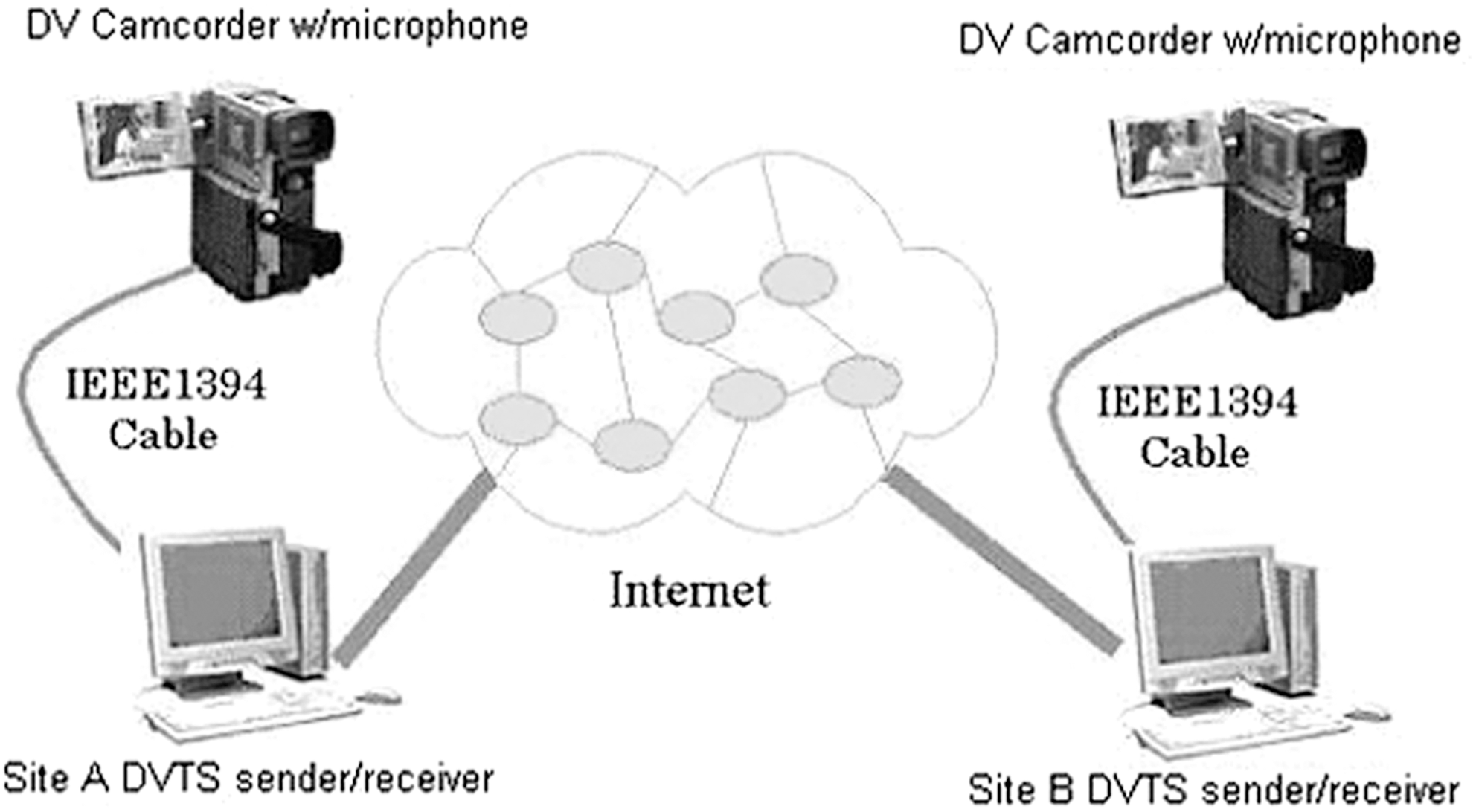
Digital Video Transport System (DVTS) system configuration.
There are DVTS versions for all major computer operating systems, including Windows, Linux, Unix, and Mac OS, and it has been incorporated into other Internet-based collaboration tools like the AccessGrid, an open source videoconferencing platform developed at Argonne National Laboratory that has been widely adopted by universities and research centers. DVTS has been deployed in applied settings, including healthcare. Pathologists at the University of Pennsylvania Health System experimented with DVTS for telemicroscopy, and the Center of Excellence for Remote and Medically Under Served Areas used DVTS for distributed medical education. 16 Kyushu University in Japan performed telemedicine research with DVTS, 17 as did Hanyang University in Korea. 18 The Veterans Affairs Palo Alto Health Care System and Stanford University School of Medicine experimented with teleteaching endoscopy using DVTS. 19 These studies show DVTS can be practically used for telemedicine and medical education.
Ultragrid
UltraGrid is an open source uncompressed HD videoconferencing application originally developed by the Information Sciences Institute at the University of Southern California with further development by several other institutes, most notably the Computer Science Department of Masaryk University in Brno, Czech Republic. The software can be downloaded from
UltraGrid supports regular 1080i HD resolution video in two modes: (1) uncompressed HD video at bit rates of 1.2–1.5 gigabits per second (Gbps) and (2) compressed HD video at a bit rate of 250 Mbps. The 1.2 Gbps transmission rate uses 8-bit color, and the 1.5 Gbps rate uses 10-bit color. The compressed 250 Mbps video has the same resolution and 8-bit color depth but has inferior quality. Sending and receiving software can be placed on a single machine at each end point or on two separate machines, depending on their processing power. Network connectivity of 10 gigabits is required for the uncompressed video modes.
UltraGrid runs only on Mac OS X and Linux (64-bit Ubuntu, Fedora, Debian, and openSUSE) platforms. It requires a relatively high-performance computer with at least a dual-core 64-bit CPU. If sender and receiver software resides on the same machine, a four-core or more powerful CPU is preferred. Video is sent from the HD camera to a HD video capture card on the UltraGrid sender computer through an HD-serial digital interface or HD multimedia interface cable. Any 1080 HD camera with HD-serial digital interface or HD multimedia interface output can be used, but DVS, Blackmagic DeckLink, or Quad HD video capture cards are required for Linux versions, and Blackmagic DeckLink, Quad, Kona, or Multibridge video capture cards are needed for Mac versions. A middle-to-high end graphic card with OpenGL support is required to display the HD video. The configuration for a single machine system is shown in Figure 2.

Single machine UltraGrid system configuration. Gbps, gigabits per second; HD, high-definition; HD-SDI/HDMI, high-definition serial digital interface/high-definition multimedia interface.
Although some of the UltraGrid releases can interoperate, it is best to ensure identical releases are installed on all end points. Besides the drivers for the cards, there are prerequirements for software packages and libraries to be installed before one can build an executable UltraGrid binary file that are documented at the UltraGrid download site. Earlier versions of UltraGrid lack audio support, but the latest ones incorporate it. Still, an external echo cancellation unit is desirable to avoid audio artifacts.
NLM has tested several UltraGrid versions on both Mac and Linux and has successfully conducted trans-Atlantic videoconferences with uncompressed HD video with Masaryk University with very low latency. The University has conducted research on HD multimedia with UltraGrid 20 and HD video for medical applications and education. 21 The Center for Computing and Technology of Louisiana State University studied UltraGrid's uncompressed HD video for collaborative teaching. 22 These studies demonstrate that UltraGrid can provide high-quality, low-latency video for telemedicine and distance education.
Uncompressed HD CXP
CXP is open source videoconferencing software supporting both compressed standard-definition and compressed and uncompressed HD video. Originally developed at Microsoft Research, it is now supported by the Computer Science Department of the University of Washington and can be downloaded from
Uncompressed HD video was added in the newest CXP version. Like UltraGrid, HD cameras are connected to HD capture cards on the computer. Its data rate for 1080i 16-bit color video should be about 2 Gbps. CXP uncompressed HD requires an AJA Kona LHi HD capture card for the sender and a high-performance graphic card for the receiver, along with 10 Gpbs network connectivity. CXP's system configuration is depicted in Figure 3, and it is similar in concept to UltraGrid's.
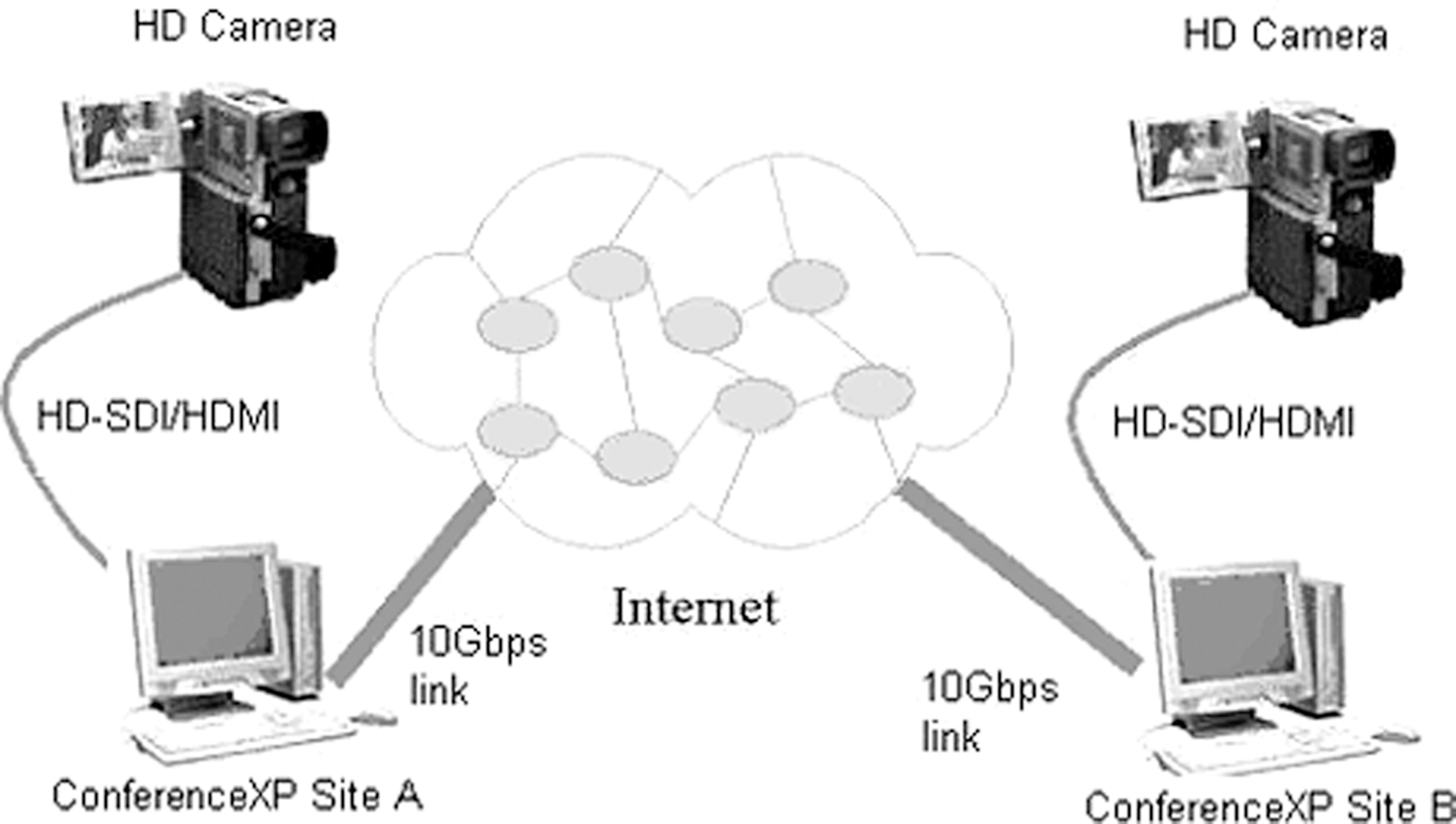
Uncompressed high-definition (HD) ConferenceXP configuration. Gbps, gigabits per second; HD-SDI/HDMI, high-definition serial digital interface/high-definition multimedia interface.
NLM's experiments with the uncompresssed HD version of CXP had higher than expected latencies of 1–2 s when transmitting between two computers back to back. Latencies increased to 5–6 s over networks, most likely because CXP relies on a transmission method called multicast, which adds overhead. CXP developers have created a stand-alone CXP DVDirect version that can reduce latency to ¼ to ½ s, an acceptable level, but NLM has been unable to replicate this. Moreover, actual data rates observed in NLM tests were less than 1 Gbps, much less than theoretically expected. CXP also provides compressed HD that has a latency of about a second, higher than ideal, but the transmission rate is reduced to 1–5 Mbps, depending on the amount of compression users decide to apply, and image quality is inferior, similar to that of commercial HD systems.
iHDTV
iHDTV was developed by the Research Channel at the University of Washington. Like Ultragrid and CXP, it supports uncompressed 1080i HD video, but it has no option allowing compression. The open source software works with commercially available hardware components to capture, packetize, and transport HD video at data rate of 1.5 Gbps through two 750 Mbps network connections. This allows transmitting video by two 1 Gbps network connections between two end points, obviating the requirement for a 10 Gbps internal network infrastructure. A 10 Gbps enterprise connection to the Internet is still required. The iHDTV software can be downloaded from
The iHDTV sender and receiver software needs to reside on separate machines, so each videoconferencing end point needs to have two machines. The iHDTV transmitter is able to take audio and 1080i HD video directly from a Black Magic Decklink Extreme HD capture card, but the iHDTV receiver requires a HD capture card (AJA Xena card) and an external hardware audiovisual de-embedder to playback synchronized audio and video. The configuration is shown in Figure 4.
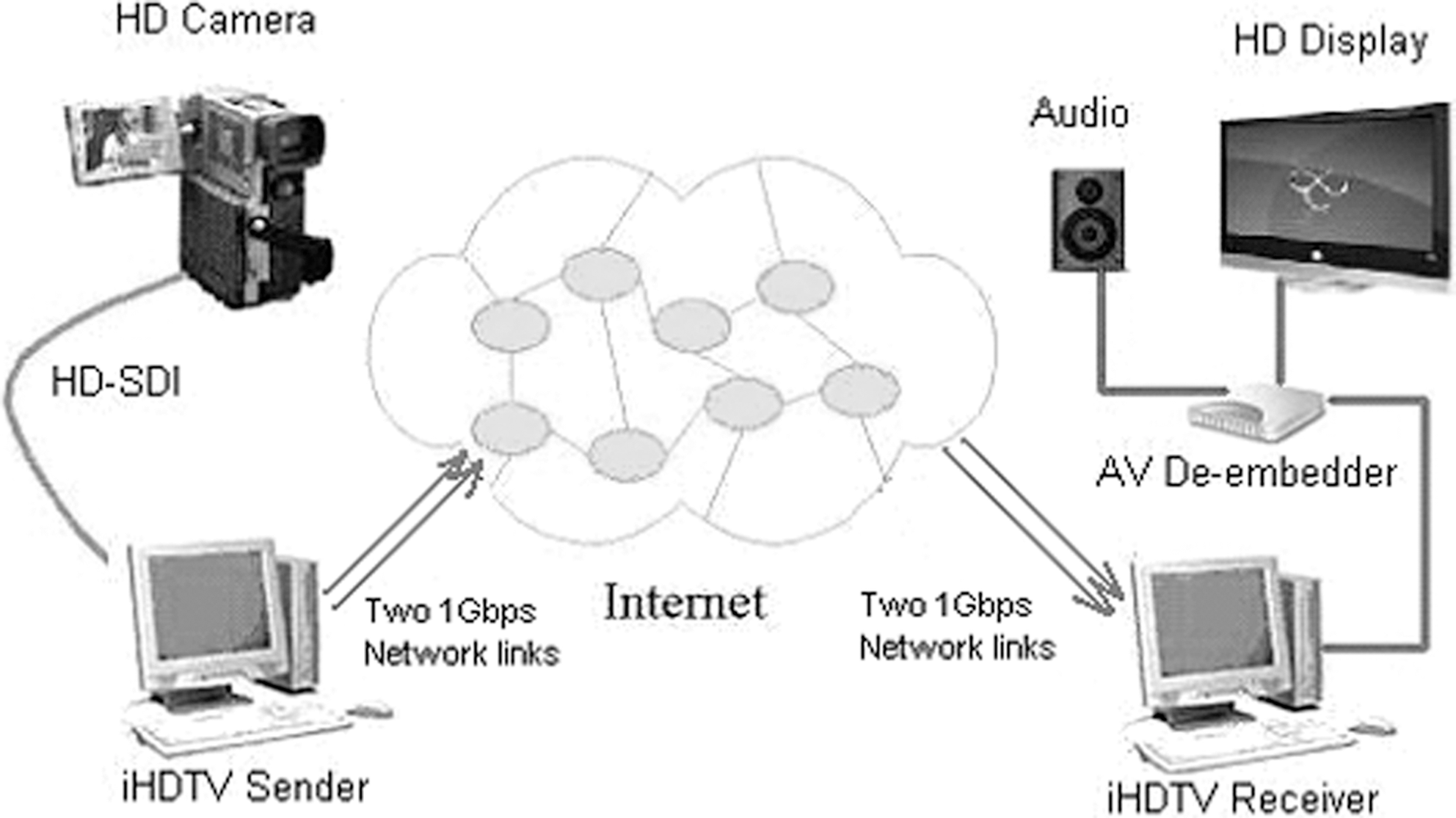
iHDTV one-way communication configuration. AV, audiovisual; Gbps, gigabits per second; HD, high-definition; HD-SDI, high-definition serial digital interface.
NLM has successfully tested iHDTV over the Internet and in a clinical setting, but the research channel discontinued development in 2009, and it does not support newer HD capture cards. The orphaned software is still useable and, because it is open source, can be updated by anyone interested in incorporating drivers for current HD capture and network interface cards.
Conclusion
DVTS is a mature videoconferencing application with slightly higher than standard video resolution. It is a good option when its video resolution is sufficient and users have 1-gigabit or 100-megabyte capacity networks. Uncompressed HD video will provide much higher video quality with lower latency if there is sufficient network capacity to accommodate the higher transmission rates and one has or can acquire the higher-performance computer and the needed display and capture cards.
NLM's tests indicate only the feasibility and reliability of uncompressed HD technologies. Uncompressed HD technologies are not ready for broad deployment. They are, however, at the point where their potential application for telemedicine and distance learning can be researched, especially in settings that have or are upgrading to 10-gigabit networks. In areas of telemedicine where standard-definition videoconferencing has proven to be as effective as consultations in-person, such as psychiatry and neurology, 23 or where the information transmitted from medical devices is essentially standard definition, such as ultrasound, compressed and uncompressed HD video can be expected to perform as well. But it is in areas such as dermatology, where standard-definition video has been sometimes found lacking and the research outcomes are less consistent, 24 that uncompressed HD video may make a significant difference. Because HD video provides a greater sense of depth, it also may make substantial contributions to telesurgery or to distant surgical education. These hypotheses about where uncompressed video may make a critical difference need to be tested in clinical and distance learning settings. Uncompressed technology deployment will depend on three factors: (1) the expansion of network infrastructure to accommodate bandwidth requirements, (2) the development of turnkey products or the technology’ incorporation into existing turnkey products that can be used without having to acquire and configure components, and (3) research and other evidence showing its benefits.
Footnotes
Acknowledgments
The DVTS research group provided detailed documents online for the technologies developed for DVTS. Petr Holub and Martin Pulec of the Computer Science Department of Masaryk University in the Czech Republic provided technical support for UltraGrid. The iHDTV research group provided support for setting up iHDTV. Fred Videon of the Computer Science Department of the University of Washington provided support for uncompressed/compressed HD CXP, and Benjamin Smith of the National Center for Supercomputing Applications assisted with testing. This research was supported by the National Library of Medicine intramural research program.
Disclosure Statement
No competing financial interests exist.