




Abstract
Introduction
Obtaining data is critical for research. It involves acquiring information and organizing it for analysis, which requires collecting the data, creating a database, and transcribing the collected data into the database for analysis. 1 This process can be ponderous and many capturing errors can occur. Another issue is ensuring data are not lost and will be secure. 2,3
Electronic data capture (EDC) is replacing the use of paper since it reduces capturing errors, avoids the need of transcription of the information, and allows near real-time data analysis. 2,3 –5,7 –10
There are many vendor solutions for EDC in clinical research, but they can be prohibitively expensive for small-scale studies. 11 Free web-based options, such as Google Forms® or Survey Monkey,® do not allow working on existing documents, requiring more time for input and limiting the design options (such as background color, distribution of objects and text, and font type and size), and require an internet connection. 12,13 An exception is the Research Electronic Data Capture system (REDCap®).
REDCap is a web application for building and managing databases built in 2004 at Vanderbilt University Medical Center. This application was originally introduced to put researchers in total control of their work and to capture any type of data in any form and for any purpose. 14 This system has a secure web connection with authentication and data login. Research groups have complete autonomy and control to add new users and modify their work. It is available in many languages and allows users to export any data from their REDCap projects in various ways and formats. 15 Nevertheless, REDCap has infrastructure requirements, such as institutional IT support for installation and maintenance, web server requirements, and an interinstitutional agreement, 16 and might be overcomplicated for small research projects.
Given these limitations, a combination of Adobe Acrobat 9 Pro® (which was already institutionally available) and Dropbox® basic (which is free) was explored to design a system for the capture of data derived from research protocols at the Bipolar Disorder's Clinic.
Materials and Methods
Software
Adobe Acrobat® is a family of programs developed by Adobe Systems designed to visualize, create, and modify files with the Portable Document Format (PDF). Adobe Forms®, one of these programs, allows to create forms in an electronic format. Forms created with this program are more versatile than most available survey formats, such as Google Forms®, as one can either start a form directly on the Adobe program or create a form from an existing Word®, Excel®, or text file or from a scanned document. 12,17 This is particularly helpful for research because it saves time by working directly on existing documents, such as rating scales, and for working at institutions since the form can be printed on the institution's preferred format.
Just as other EDC systems, the basic tools for entering and coding data are text fields, checkboxes, radio buttons, list boxes, combo boxes, buttons, electronic signature fields, and barcodes. These tools allow coding variables for exporting specific data values to diminish capturing errors since a field can be restricted for specific types of entry (such as date format, numbers, etc.). 18,19
Dropbox is a cloud storage service that simplifies file sharing. 20 Cloud storage services are characterized by two key components: a client application that runs on user devices, and a storage service that resides within the cloud, hosting the user's files in huge data centers. 20 –23
In addition to the client application, Dropbox allows users to access shared folders and files using both its main web interface and a direct link download mechanism. These services provide reliable data storage that can be automatically synchronized across multiple devices and shared among a group of users. 20 –23
Dropbox provides both offline data entry and online file synchronization. Continuous internet connectivity is not required for offline data entry, and online synchronization allows for near real-time data sharing. 24
For security, public files are only viewable by people with links to the file(s). Dropbox is designed with multiple layers of protection, including secure data transfer, encryption, network configuration, and application- and user-level controls distributed across a scalable, secure infrastructure. Encryption employs the 256-bit Advanced Encryption Standard (AES). Dropbox uses the Secure Socket Layer/Transport Layer Security to protect data in transit between Dropbox apps and Dropbox servers, creating a secure tunnel protected by 128-bit or higher AES encryption. Two-step verification is available for an extra layer of security at login. Security codes can be sent by text message or through Time-Based One-Time Password apps. 25
The safety of the data is ensured by the creation of an automated copy of each saved file in Dropbox. In the basic version, one can access previous versions of a file and deleted files for up to one month. Such access is unlimited in advanced versions. 26,27
Other cloud storage services, such as Google Drive,® Mega,® OneDrive,® iCloud,® etc. may have the same benefits as Dropbox; Dropbox was chosen because it met requirements and was already in use by the research team.
Development of the Forms
Personalized forms were developed based on Microsoft Word or Excel files or on scanned documents containing the information required.
The development of all forms was done by medical doctors with no prior training and minimal knowledge of informatics.
The programming of the form's fields was designed in Adobe Acrobat Professional to export values to Excel spreadsheets according to the coding system defined for each variable as one would do in statistics programs (assigning the code to categorical variables, such as 1 for male, 2 for female) and defining the field format to avoid capturing errors (for example assigning a specific DATE format—i.e., dd/mm/yy—to text fields).
Data captured consisted of demographic information, vital signs, anthropological measures, data obtained from clinical records, and self-rated scales (Fig. 1). Demographic information, vital signs, and anthropological measures were captured with text fields, which could be mandatory or not. Dropdown lists were also used for this type of data. Data from self-rated scales were captured using radio buttons or checkboxes.
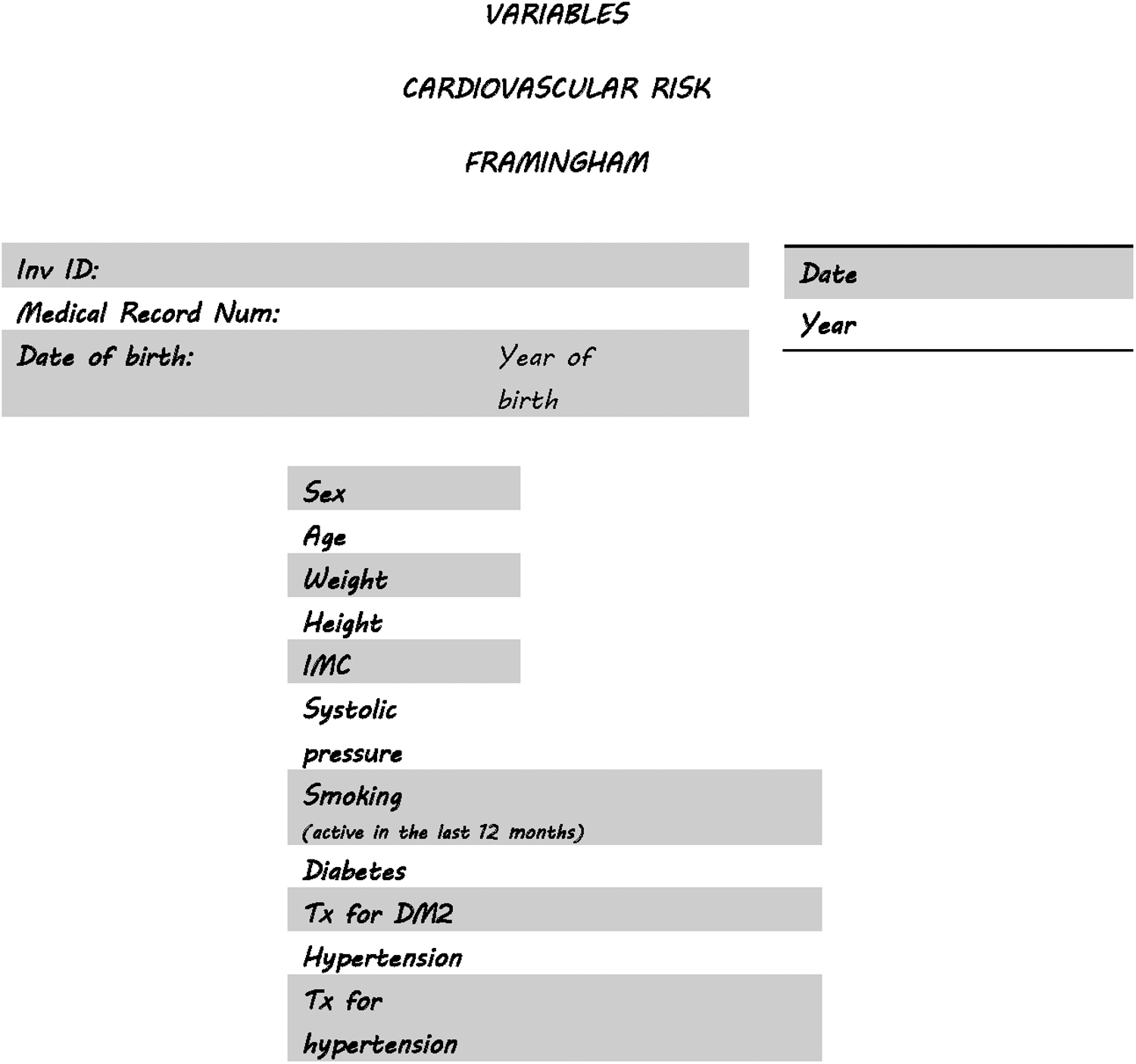
Example of a form designed for a protocol on cardiovascular risk in bipolar patients of the affective disorders' clinic.
By far, radio buttons and checkboxes were the most used (90% of programmed fields).
Data Capturing
Data capturing on the forms created and distributed was tested on tablets with either android or iOS operating systems with Adobe Reader, and on laptops with either Mac or Microsoft operating systems, having only Adobe Reader (and not Adobe Professional). They also had Dropbox installed.
Forms could be combined when desired (for example when all the information belonged to a single patient), facilitating the analysis of the data.
The capturing was done by either fellow researchers (medical students, psychiatry residents, and psychiatrists) or by participants of the protocols (in our case, patients with bipolar disorder).
Storage of the Forms
Once the forms were elaborated and distributed and the Answers and Distributed files were obtained, these documents were saved into different Dropbox folders: one folder contained the original pdf form owned by the programmer, one folder shared with each researcher (including the main investigator) contained a copy of the Distributed-Form file, and one folder contained the answers' file, where all filled forms were to be gathered, owned by the main researcher. The answered forms were to be saved in each participant's folder into a subfolder called “Answered Forms” (Fig. 2).

Elaboration, distribution and gathering of forms, and sharing of the information. Folders are represented by double-lined squares. PDF, Portable Document Format.
The elaboration and distribution of the forms as well as the gathering of the filled forms was done with PC computers with Adobe Acrobat Professional and Dropbox. For security of data, all Dropbox accounts were created using institutional e-mail accounts and the main researcher set the passwords to these accounts. To safeguard the confidentiality of the participants, none of the forms contained data that could reveal their identity, and unique codes were given. These two processes meet the requirements of the ethics committee for data and confidentiality safekeeping at our institution.
Results
Development of the Forms
Thus far, 16 electronic forms have been programmed, obtaining 16 Answers Files. An Answers File can then be exported to Excel spreadsheets to form databases. If desired, the programmed forms can be combined into a single document to obtain an Answers File with information from both forms (Fig. 3). This feature is particularly useful when the information is obtained from a single participant but at different times, or by different evaluators. For example, at our clinic, an interview is performed with the patient by an evaluator and recorded in a form called “Interview,” whereas another evaluator enters the patient's information from her clinical records in a form called “Medical Records Information”; the Main Researcher then imports the data from both forms to a third one called “Interview and Medical Records Information” for analysis.
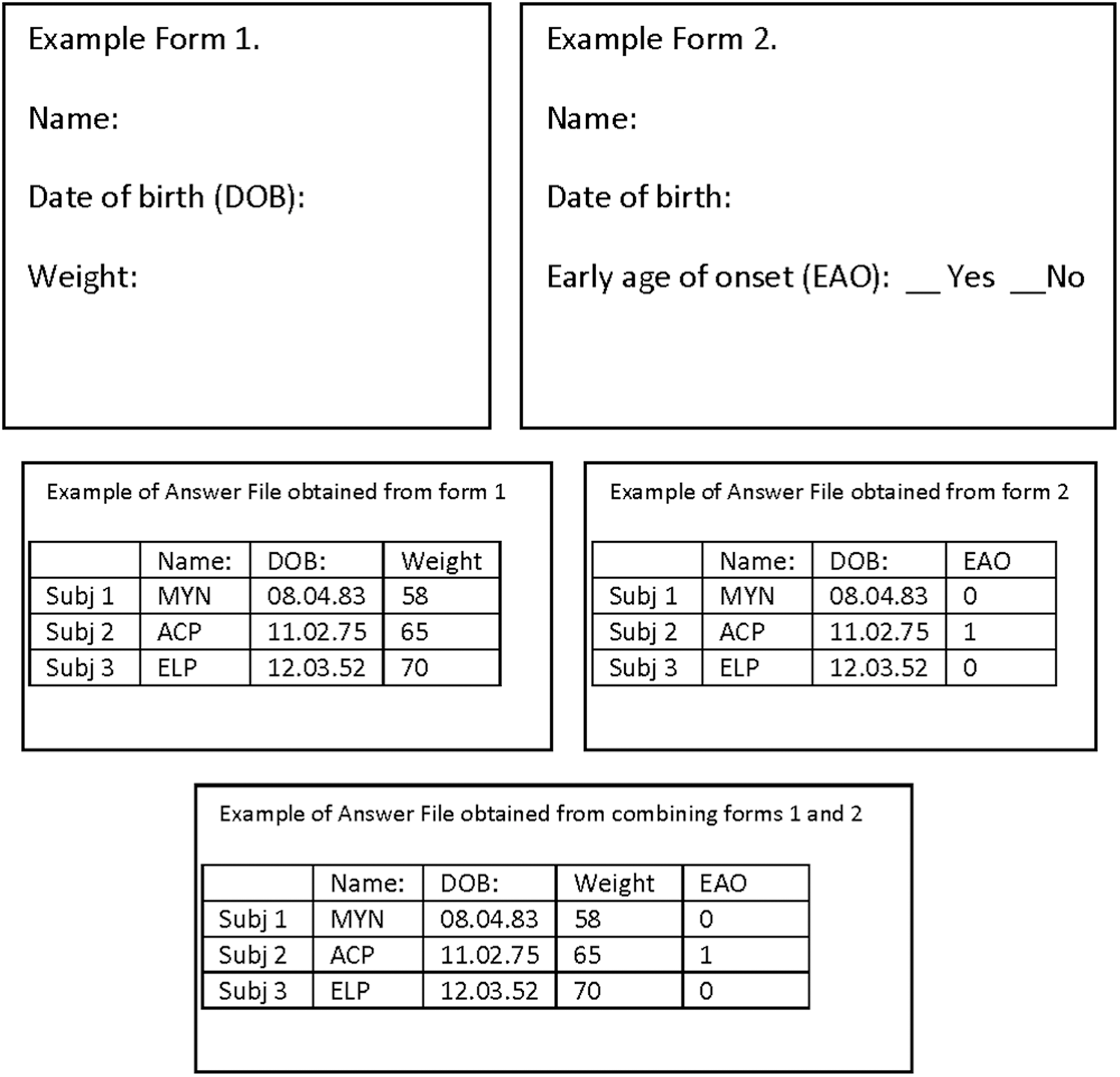
Example of two forms combined to obtain data of a participant in two different studies.
The electronic forms designed serve different purposes: 14 are designed to interview participants in research protocols, one is designed to capture data from medical records for research protocols, and one is designed for administrative purposes in research protocols.
The time for completion of the forms varied from around 30 min for very simple forms (around 17 variables) to 1 week for the most complex forms (255 variables).
Capture
There were two types of forms' users: researchers (n = 5) and participants in research protocols (n = 56), which in our case are patients with bipolar disorder.
The researcher's group needed no explanation on how to fill forms. A brief explanation was offered to the second group, but if the participant was unaccustomed to electronic devices, the researcher remained by her side for assistance during the filling of the form. A minority of users (5%, n = 3/60) asked for the form to be printed for hand filling. The researchers then captured the hand-written information into the electronic form.
Two types of errors were found. The first were omissions of certain fields (Table 1). Omissions were calculated by obtaining the percentage of missing fields for each variable and each category (nonmandatory text field, mandatory text field, drop-down list, and radio button or check box; on average there were 1.2% missing fields in the forms (0% of missing fields for the most accurate variables to 6.54% for the least accurate). The second type was programming errors found specifically in fields programmed to add the values of other fields, all of which were verified and corrected once the data were on spreadsheets. As these fields require no interaction with the user, they were excluded from the analysis of missing fields.
Number of Missing Fields Depending on Type of Field Used in Programming
The highest percentage of missing fields (2.5% and 1.95%) related to drop-down lists and nonmandatory text fields.
Discussion
Using Adobe Acrobat 9 Pro and a free cloud storage service (Dropbox), an EDC system was developed that was compatible with smartphones, tablets, and computers, thus realizing the benefits of EDC systems: elimination of transcription error, decrease in capturing errors, and cloud storage solutions: group collaboration, security, and safety of data and near real-time data access.
The main drawbacks of the system relate to the distribution of the form for remote filling by the study population: Adobe Forms® require Adobe Reader,® and cannot be analyzed if the forms are filled with another PDF software. Adobe Reader is free. However, downloading the specific software may pose problems for some users. The Adobe Forms was accessible from websites, but is not any longer,
28
which means that the forms need to be distributed through e-mail. Once completed, the forms can be e-mailed back. However, to do so, the default e-mail in the end-user's computer needs to be set up. Many users use commercial e-mail and not the default e-mail. Setting this to work or finding a way around it (saving the form in their hard-drive for later attachment to an e-mail) can be confusing. The need of e-mail accounts jeopardizes important confidentiality and security policies since not all commercial e-mails are encrypted and the identity of some participants can be known through their e-mail address. Moreover, copies of the filled form may remain in secondary folders, such as sent e-mail.
A drawback for the combination with Dropbox is the storage limit: to collaborate with a given person, the ideal scenario would be to share the file through this person's work Dropbox account, but this restricts the size of the files that can be shared to the amount of space available in that person's Dropbox. Also, the main investigator, who has access to all the folders, including the folders containing the databases, needs to have a large amount of Dropbox storage. A work around this is saving completed forms in Adobe Forms Data Format (.FDF), which uses about 1,000 times less space. 17 In addition, Dropbox might change its policy and stop having a free version. However, many other cloud storage services exist.
The fine-tuning of complex forms is very much time consuming. Nevertheless, the time gained by correcting capturing errors surpasses this limitation.
As Adobe Acrobat has the same features as other EDC systems (text fields, buttons, check boxes, radio buttons, list of choices, drop-down lists, date fields), it grants the same advantages as all EDC systems of reducing capturing errors. The 1.2% error rate in our trial is comparable to the error rate of other EDC systems. 2,29
Security in clinical trials requires the main investigator to centralize all study information and coordinate multiple processes in real-time. 3 Dropbox requires a unique user identification (ID) and password for access, which allows the main investigator to decide who can view or edit files and to identify who edited the original file and when.
Nevertheless, the procedure and our results should be taken with caution as these benefits cannot be generalized to the necessities and procedures of other research teams. In addition, some studies may require other useful alternatives, such as studies with remote filling by untrained users or even surveys with very broad samples. These should be evaluated by all researchers and research teams so that they make the best decision for the execution of the study to achieve the objectives of their research effectively, meeting the standards of objectivity, confidentiality, and data security.
Footnotes
Acknowledgments
The authors thank Paulina Preciado for her help with this study. This study was supported by Cátedras CONACyT Grant 1683 and FOSISS 2015 Grant 261459.
Disclosure Statement
No competing financial interests exist.