




Abstract
Objective:
User performance, perceived usability, and preference for five smartphone text input methods were compared with younger and older novice adults.
Background:
Smartphones are used for a variety of functions other than phone calls, including text messaging, e-mail, and web browsing. Research comparing performance with methods of text input on smartphones reveals a high degree of variability in reported measures, procedures, and results. This study reports on a direct comparison of five of the most common input methods among a population of younger and older adults, who had no experience with any of the methods.
Method:
Fifty adults (25 younger, 18–35 years; 25 older, 60–84 years) completed a text entry task using five text input methods (physical Qwerty, onscreen Qwerty, tracing, handwriting, and voice). Entry and error rates, perceived usability, and preference were recorded.
Results:
Both age groups input text equally fast using voice input, but older adults were slower than younger adults using all other methods. Both age groups had low error rates when using physical Qwerty and voice, but older adults committed more errors with the other three methods. Both younger and older adults preferred voice and physical Qwerty input to the remaining methods. Handwriting consistently performed the worst and was rated lowest by both groups.
Conclusion:
Voice and physical Qwerty input methods proved to be the most effective for both younger and older adults, and handwriting input was the least effective overall.
Application:
These findings have implications to the design of future smartphone text input methods and devices, particularly for older adults.
Introduction
Smartphone devices have secured 70% of the American mobile subscriber market share (Nielsen, 2013; comScore, 2014). Nearly all users report that they use their device to send text messages (90.5%), e-mails (77.8%), and access social networking (65.3%) (comScore, 2013).
The rapid adoption of smartphones has created a fiercely competitive market, and vendors offer a variety of form factors and features from which users can choose. In a recent survey, consumers identified the top three considerations when choosing a phone as the service network, the operating system, and the cost of the device (comScore, 2013). One commonly overlooked, but important, feature is the text input method(s) available on the device. Given the prevalence of text messaging, e-mail, and social networking, reliable and accurate text input is critical. Consequences of poor input method usability have been the source of user frustration as well as a source of public entertainment, as illustrated in Damn You, Autocorrect! (Madison, 2011) and on websites, such as autocorrectfail.org.
The balance between portability and functionality has resulted in many challenges to create text input methods for smartphones. Many phones are thin, lightweight, and utilize touch screen technology for input. Some popular examples of touch screen text entry methods include the onscreen Qwerty keyboard input, shape-writing recognition (e.g., Trace, ShapeWriter, Swiftkey, Swype), handwriting recognition (e.g., DioPen and Graffiti), and voice recognition (e.g., Dragon Dictation). Other phones are bulkier but offer a Qwerty keyboard with physical buttons in addition to a touch screen for typing and navigation. Figure 1 shows examples of these input methods.

The smartphone text input methods used in this study.
An examination of the literature shows wide variability in the results comparing performance of these input methods on a smartphone. The research varies in the type of protocol, stimuli, metrics, task type, level of participant expertise and demographics, and differences in the device used (Allen, McFarlin, & Green, 2008; Arif & Stuerzlinger, 2009; Azenkot & Lee, 2013; Castellucci & MacKenzie, 2013; Hoggan, Brewster, & Johnston, 2008; Nguyen & Bartha, 2012; Nicolau & Jorge, 2012; Page, 2013; Yatani & Truong, 2007). Hoggan et al. (2008) reported physical keyboard input was faster than onscreen Qwerty keyboard input, but Allen et al. (2008) found input time for physical keyboard input to be equal to onscreen Qwerty keyboard input. Similar discrepancies occur when comparing results for onscreen Qwerty and shape-writing input (Castellucci & MacKenzie, 2013; Cuaresma & MacKenzie, 2013; Nguyen & Bartha, 2012; Yatani & Truong, 2007).
Castellucci and MacKenzie (2013) compared performance of novices using onscreen Qwerty, handwriting, and Swype shape writing and found the onscreen Qwerty method to be superior to Swype and both onscreen Qwerty and Swype to be better than onscreen handwriting. Entry speeds were on average 20 words per minute (WPM) with onscreen Qwerty, 16 WPM for Swype, and 7 WPM for handwriting. Total error rates were approximately 7% for the onscreen Qwerty and Swype and 30% for handwriting. Other studies report different performance values for onscreen Qwerty text entry, such as 4.73 WPM (Nicolau & Jorge, 2012), 15.9 WPM (Arif, Lopez, & Stuerzlinger, 2010), and 54 WPM with experienced users (Cuaresma & MacKenzie, 2013). Page (2013) reported user performance with Swype and Swiftkey to be comparable to common full-size computer keyboard typing speeds and to vary based on experience level.
Smartphone Use Among Older Adults
A special concern regarding the use of smartphone text input methods is with the older population. Baby boomers began reaching retirement age in 2011, and it is projected that the older population will account for 20% of the population by 2030 (Administration on Aging, 2010). The smartphone market is entering the “late majority” stage of the adoption curve (comScore, 2013), when marketing strategy will aim to convince those who have not yet bought into smartphone technology. Many older adults fit into the “late adopter” group. Currently, 49% of American adults ages 55 to 64 and 19% ages 65 and older own smartphones (Pew Research Center, 2014). Smartphone users in this age group perform many of the same essential tasks on their devices as younger users. It has been proposed that technologies, like smartphones, can decrease social isolation and boost security, empowerment, and quality of life (Jerram, Kent, & Searchfield, 2010). Smartphones also are being investigated as a medium for delivering medication reminders and safety alerts (CTIA, 2011) and to track health (Barrett, 2011). Survey data have shown that older adults are willing to adopt technologies that can help them “maintain social contact, gather information, be safe at home, and promote their personal health” (Barrett, 2008, p. 1). In order to convince this population that smartphone technology is beneficial, the ease with which older adults can use the device is paramount.
However, smartphone hardware and software design typically does not accommodate older age groups, for which physical and cognitive limitations may be more pronounced. For example, changes in physiology, such as loss of muscle mass, can affect manual strength and precision dexterity (Carmeli, Patish, & Coleman, 2003), voice quality and speech rate (Vipperla, Renals, & Frankel, 2008), and vision, including reduced visual acuity and increased susceptibility to glare (Charness & Holley, 2004). Cognitive decline in areas of the brain, such as the cerebellum (Jernigan et al., 2001) and motor neurons, may manifest in more variable proprioceptive acuity (Adomo, Martin, & Brown, 2007), increased force and variability for smaller movements (Contreras-Vidal, Teulings, & Stelmach, 1998), decreased performance speed, and increased time to learn a task and error rates (Holzinger, Searle, & Nischelwitzer, 2007). These changes may impact the speed and accuracy in selecting keys on a keyboard and articulating phrases, the ability to see the output, and the learnability of these input methods.
In a review of literature related to the use of handheld computing devices among older adults, Zhou, Rau, and Salvendy (2012) found that older adults preferred physical keyboards to onscreen keyboards for text entry due to the tactile feedback and the ability to have larger keys and larger interkey spacing (such as on slide-out keyboards). Previous reviews on the use of touch screens suggest that older adult performance improves with larger target and touch screen sizes, increased spacing between targets, and alternative methods to tapping for smaller targets (Motti, Vigouroux, & Gorce, 2013). Investigating text input method performance and usability with this population is important because the recent trend among smartphone manufacturers, such as HTC (Oryl, 2012) and Apple, is to favor touch screen technology over a physical keyboard, and few smartphones available on the market incorporate touch screen design recommendations for older adults.
Purpose
Given the ubiquity of smartphone devices and the consideration that tasks dependent on text entry are completed by users at all age levels, it is necessary to explore how different text input methods impact performance and user perceptions. We examined both younger and older adults on their usage of five popular text entry methods (physical Qwerty, onscreen Qwerty, tracing [shape writing], handwriting, and voice). Participants with no prior experience with the input methods (novices) were selected specifically to decrease bias and the effects of experience on performance.
Method
Participants
Fifty participants (25 younger, 25 older), recruited from college campuses and communities within a 60-mile radius of a midwestern university, performed text entry tasks using all five input method conditions (physical Qwerty, onscreen Qwerty, tracing, handwriting, and voice). To control for the effects of experience, participants with no experience with any of the five text input methods on a smartphone device were recruited. Twenty-two of the younger participants and 20 of the older participants had experience with a cell phone using a physical numeric keyboard (“flip phone”). The remaining participants did not own a cell phone or used one only to make and answer calls. The younger adults (17 female, 8 male) averaged 24.4 years (range 18–35, SD = 5.6 years) in age, and the older adults (16 female, 9 male) averaged 68.8 years (range 60–84, SD = 7.4 years). None reported having any major current finger, hand, or wrist problems or speech disorders that would impact text input with any of the methods used in the study. All participants were within the published normal range for their age group regarding fingertip sensitivity (Desrosiers, Hebért, Bravo, & Dutil, 1996) and dexterity (Trites, 1989). Participants also had normal, or near-normal, near binocular visual acuity (as measured by the Snellen eye chart) and were within normal cognitive function, achieving scores higher than 26 on the Standardized Mini Mental State Examination (Vertesi et al., 2001).
Materials
Smartphone device and input
Participants used a Motorola Droid 4 running Android OS 2.3.5. The smartphone’s physical Qwerty keyboard and the FlexT9 Text Input suite (Nuance Communications, 2011) onscreen Qwerty (Version XT9 V08.00.00.07), tracing shape-writing keyboard, (Version XT9 V08.00.00.07), handwriting (Version T9WRITE V05.02.01), and voice input (Dragon Version 2) were evaluated (see Figure 1). All manual input methods were evaluated in landscape mode for consistency, as the physical keyboard was in landscape orientation, whereas the voice input method was evaluated in portrait mode. The autocorrect setting was enabled for the physical Qwerty keyboard. A low level of autocorrect, automatic acceptance of words once the space bar was selected, and detection of end-of-speech for voice recognition were enabled settings for FlexT9. The presentation order for the input methods used a balanced Latin square design.
Phrases
The performance test stimuli consisted of 500 phrases developed by MacKenzie and Soukoreff (2003), commonly used in text input studies, which are 16 to 43 characters in length; exclude capitalization, punctuation, numbers, and symbols; and are overall representative of English character frequency (i.e., “fall is my favorite season”). The Text Entry Metrics for Android (TEMA) software application (Castellucci & MacKenzie, 2011) was used to randomly present phrases and collect performance data for all of the input methods. The phrase was also displayed on a 19-in. monitor for participant reference.
Procedure
After providing informed consent, participants were given brief descriptions of each of the five input methods in the order they were to be presented during the test. They were asked to rate each input method on a 0-to-50-point scale (0 = least preferred, 50 = most preferred) based on their initial impressions of how desirable or valuable they expected it to be for entering text on a smartphone.
Participants then entered 20 phrases with each input method, with the first five phrases of each input method considered as practice. A brief demonstration and description of each method was provided prior to use. They were told to input the text as quickly and as accurately as they could, without capitalization, punctuation, or shorthand. They were allowed to correct mistakes and were asked to keep the accuracy of their messages at a level they would feel comfortable sending to a friend. Participants were allowed to hold the device where it was most comfortable, as long as it remained in the landscape position for the manual input methods. For the voice input method, participants were instructed to hold the phone at a comfortable distance in portrait mode and to speak normally. Following the block of trials for each input method, participants completed a perceived usability questionnaire. After all trials for all input methods were complete, participants again rated their preference of the input methods, and subjective comments were recorded by the facilitator. All sessions were digitally recorded. The study lasted between 2 and 3 hr, including breaks. Participants were compensated $30 cash for their time.
Dependent Measures
The following dependent measures were recorded:
Performance
Perceived usability
Posttask perceptions of usability were evaluated across all of the input method conditions with a modified version of the System Usability Scale (SUS; Brooke, 1996), wherein the word system was replaced with text input method for each of the 10 items. The SUS is an industry-standard 10-item scale with five response options (strongly disagree to strongly agree; Brooke, 2013). Scoring of the SUS yields a composite score between 0 and 100, with higher scores indicating higher perceptions of usability.
Preference
Preference was obtained by asking participants how desirable or valuable each input method was perceived to be for entering text on a smartphone device, both pre- and posttest. Participants simultaneously rated all five input methods along a 0-to-50-point scale (0 = least preferred, 50 = most preferred).
Results
Prior to data analyses, data were screened and transformed when necessary to meet normality assumptions for ANOVA. Arcsine square root transformations were applied to all error rate distributions. Character-level error rates were analyzed with a 2 × 4 mixed ANOVA; entry rate, word-level error rate, and perceived usability were analyzed with mixed 2 × 5 ANOVAs. Age group was the between-subjects factor, and input method was the within-subjects factor. In cases when the assumption of sphericity was violated, a correction to the degrees of freedom using Huynh-Feldt estimates of sphericity was used. Guidelines for these procedures were taken from Fidell and Tabachnick (2003), Tabachnick and Fidell (2007), and Field (2009). Significance values were corrected for multiple comparisons using the false discovery rate procedure (Benjamini & Hochberg, 1995), q = .05. Partial eta squared (ηp2) was used to estimate effect size for all ANOVA tests. Analyses of simple main effects were conducted to follow up on all significant interactions.
AdjWPM
Figure 2 shows the average AdjWPM for the younger and older adults. Results from a two-way ANOVA showed a significant main effect of input method, F(3.24, 155.6) = 553.55, p < .001, ηp2 = .92; a significant main effect of age group, F(1, 48) = 53.59, p < .001, ηp2 = .53; and a significant interaction between input method and age group, F(3.24, 155.6) = 14.88, p < .001, ηp2 = .24. Follow-up tests for the input method main effect indicated that voice was the fastest input, followed by physical Qwerty, tracing, onscreen Qwerty, and handwriting (all p < .001). The age main effect indicated that the younger adults had a faster average AdjWPM than the older adults. Follow-up analyses for the interaction revealed that older participants showed a slower average AdjWPM than younger adults for all input methods except voice, F(1, 139) = 1.89, p = .21; physical Qwerty, F(1, 139) = 64.58, p < .001; onscreen Qwerty, F(1, 139) = 48.58, p < .001; tracing, F(1, 139) = 53.64, p < .001; and handwriting, F(1, 139) = 9.94, p = .003.

Average adjusted words per minute for younger and older novice adults. Bars indicate ±1 SEM.
Word Error Rate
Results from a two-way ANOVA revealed a significant main effect of input method for word error rate across input methods, F(4, 192) = 3.77, p = .006, ηp2 = .07; a significant main effect for age group, F(1, 48) = 10.48, p = .002, ηp2 = .18; and a significant interaction between input method and age group, F(4, 192) = 3.79, p = .005, ηp2 = .08 (see Figure 3). Follow-up tests for the input method main effect revealed higher word error rates for handwriting than physical Qwerty, p = .005, and voice, p = .04; and onscreen Qwerty and tracing had higher word error rates than physical Qwerty, p = .03 and p = .02, respectively. The age main effect indicated that older adults had higher word error rates than the younger adults.

Average word error rate for younger and older adults. Bars indicate ±1 SEM.
Follow-up analyses for the interaction revealed that older participants had greater word error rates than younger participants for all methods except voice and physical Qwerty, both p > .19; onscreen Qwerty, F(1, 182) = 6.34, p = .02; tracing, F(1, 182) = 9.12, p = .005; and handwriting, F(1, 182) = 15.85, p < .001. Additionally, significant differences were discovered between input methods for older adults, F(4, 192) = 6.24, p < .001, but not for the younger adults, p = .57. For the older adults, handwriting resulted in a significantly higher word error rate than physical Qwerty, p = .009, and voice, p = .002; and tracing had a significantly higher word error rate than physical Qwerty, p = .007, and voice, p = .01.
Error Rates at the Character Level
The manual input methods (physical Qwerty, onscreen Qwerty, tracing, and handwriting) produced text at the character level; thus total, corrected, and uncorrected error rates were used to describe their accuracy.
Total error rate
Results from a two-way ANOVA showed a significant main effect of input method for total error rate across input methods, F(3, 144) = 167.89, p < .001, ηp2 = .78, and a significant main effect for age group, F(1, 48) = 4.89, p = .03, ηp2 = .09. There was no significant interaction between input method and age group (see Figure 4).

Average total error rates (corrected, uncorrected) for younger and older novice adults. Bars indicate ±1 SEM of the total error rate.
Follow-up analyses to the input method main effect showed that all comparisons between input methods were statistically significant (p < .001). Handwriting had the highest average total error rate, followed by onscreen Qwerty, tracing, and physical Qwerty. The age main effect indicated that older adults had greater total error rates than younger adults.
Corrected error rate
Results from a two-way ANOVA showed a significant main effect of input method on corrected error rate, F(3, 144) = 141.13, p < .001, ηp2 = .75. There was no significant main effect of age group, F(1, 48) = 1.13, p = .29, ηp2 = .02, and no significant interaction between input method and age group, F(3, 144) = 1.46, p = .23, ηp2 = .03 (see Figure 4).
Follow-up analyses to the input method main effect indicated that handwriting had the highest corrected error rate, and onscreen Qwerty was higher than tracing and physical Qwerty. The physical Qwerty input method had the lowest corrected error rate (all p < .001).
Uncorrected error rate
Results from a two-way ANOVA showed a significant main effect of input method for uncorrected error rate across input methods, F(3, 144) = 22.09, p < .001, ηp2 = .32, and a significant main effect for age group, F(1, 48) = 17.81, p < .001, ηp2 = .27. The interaction between input method and age was not significant, F(3, 144) = 3.94, p = .05, ηp2 = .08 (see Figure 4).
Follow-up analyses for the input method main effect showed that tracing had higher uncorrected error rates than physical Qwerty, p < .001. Onscreen Qwerty had higher uncorrected error rates than physical Qwerty, p < .001, and tracing, p = .008. Handwriting had higher uncorrected error rates than physical Qwerty, p < .001, and tracing, p = .001, but not onscreen Qwerty, p = .17. The main effect of age indicated that older adults had higher uncorrected error rates than younger adults.
A summary of performance results is shown in Table 1.
Results Summary for Performance

Perceived Usability
Results from a two-way ANOVA revealed a significant main effect of input method for perceived usability, F(3, 144.05) = 42.56, p < .001, ηp2 = .47; a significant main effect of age group, F(1, 48) = 12.95, p = .001, ηp2 = .21; and a significant interaction between input method and age, F(3, 144.05) = 2.92, p = .036, ηp2 = .06 (see Figure 5). Follow-up tests for the main effects revealed that younger adults reported higher usability ratings than older adults, and all input methods were significantly different from one another, p < .003, except for onscreen Qwerty and tracing, and physical Qwerty and voice, both p > .13.
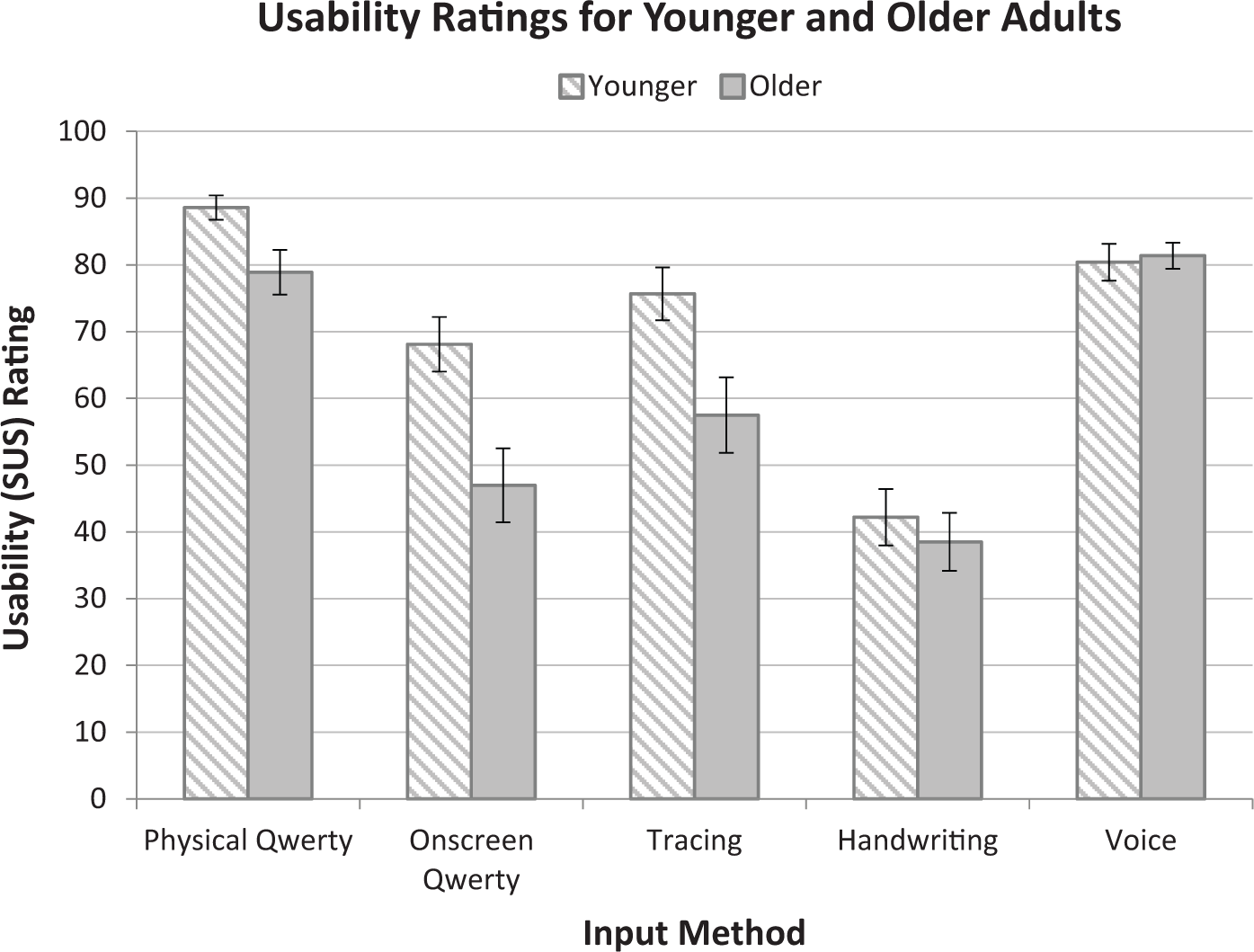
Perceived usability ratings for younger and older novice adults. Bars indicate ±1 SEM.
Analysis of simple main effects of the interaction revealed that younger participants reported significantly higher usability scores than older participants for the onscreen Qwerty, F(1, 215) = 17.51, p < .001, and tracing input methods, F(1, 215) = 12.74, p < .001, but not for voice, handwriting, or the physical Qwerty input method, all p > .08. Significant differences were discovered between input methods for younger adults, F(4, 192) = 21.11, p < .001, follow-up tests indicating all comparisons were significant, p < .02, except between tracing and voice and between tracing and onscreen Qwerty, both p > .26. Additionally, significant differences were found between input methods for older adults, F(4, 192) = 24.37, p < .001, follow-up tests indicating physical Qwerty and voice to be more usable than onscreen Qwerty, tracing, and handwriting, all p < .01. Tracing was also reported as more usable than handwriting, p = .001. No other differences were significant, all p > .28.
Preference
Figure 6 shows the average pre- and posttest preference ratings for the younger adults, and Figure 7 shows these ratings for older adults. Results from a three-way ANOVA (time, age, input method) revealed a significant two-way interaction for Input Method × Age Group, F(3.74, 247.68) = 8.07, p < .001, ηp2 = .99, and Input Method × Rating Time, F(3.28, 157.23) = 8.05, p < .001, ηp2 = .99. The interaction for Rating Time × Age Group was not significant, F(1, 48) = 3.78, p = .06, ηp2 = .48, nor was the three-way interaction, F(3.28, 157.23) = .67, p = .59, ηp2 = .20.
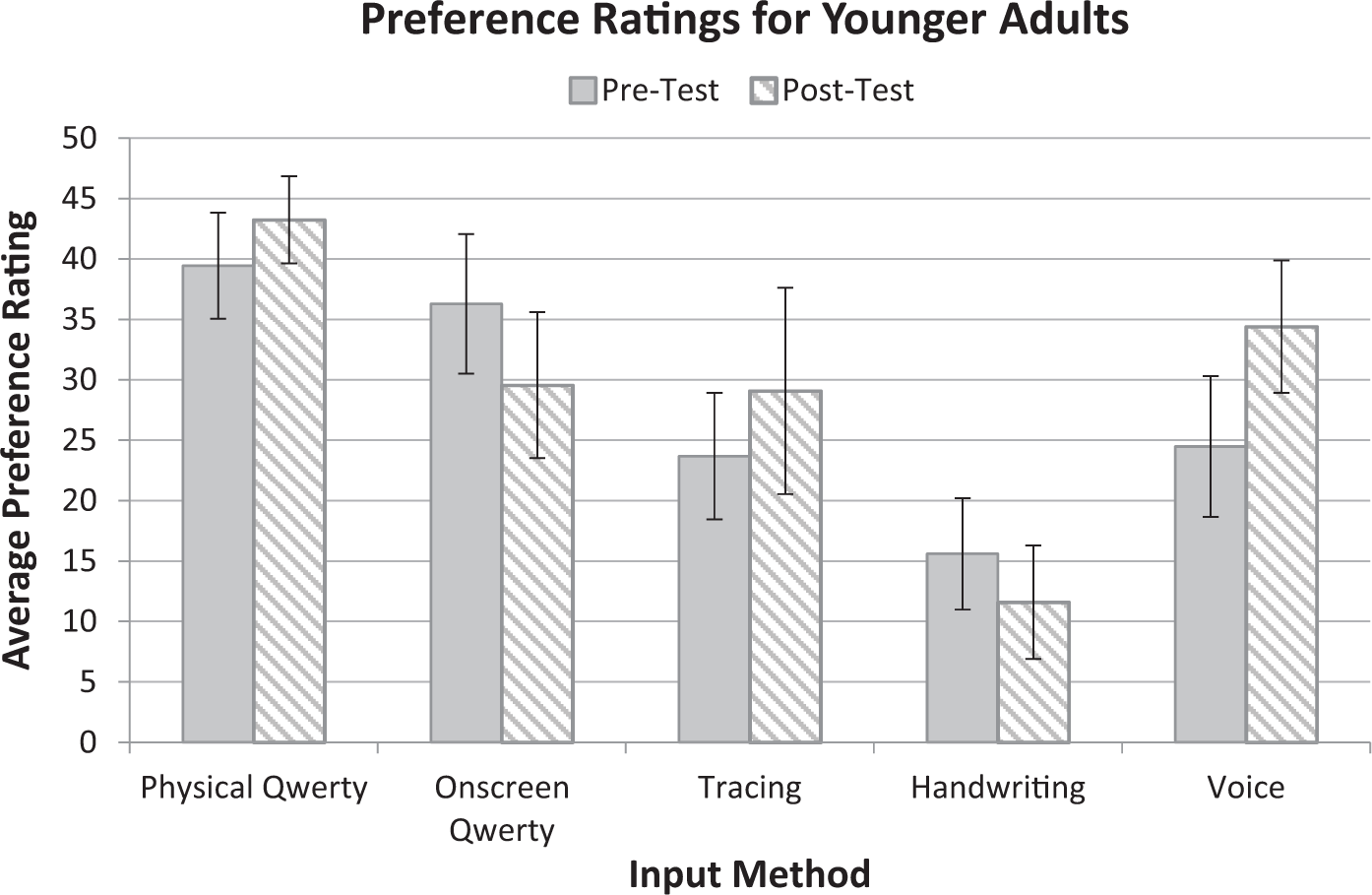
Pre- and posttest preference ratings for younger adults. Error bars are ±1 SEM.

Pre- and posttest preference ratings for older adults. Error bars are ±1 SEM.
Analysis of simple main effects for the Input Method × Age Group interaction revealed that younger participants rated physical Qwerty, F(1, 237) = 4.49, p = .048, and onscreen Qwerty, F(1, 237) = 9.02, p < .005, higher than did older participants and that older participants rated voice, F(1, 237) = 12.75, p < .001, higher than did younger participants. Older participants also rated handwriting higher than did younger participants, F(1, 237) = 5.55, p = .03; however, handwriting was rated low for both groups. There was no difference for tracing, p = .16. Additionally, younger adults rated physical Qwerty higher than all other methods (p = .004), whereas older adults rated voice higher than all other methods (p = .03).
Analysis of simple main effects for the Input Method × Rating Time interaction revealed that voice resulted in significantly higher posttest ratings compared to pretest ratings, t(49) = 2.52, p = .02; and onscreen Qwerty, t(49) = 3.27, p = .003, and handwriting, t(49) = 3.15, p = .004, were rated significantly lower posttest compared to pretest. There were no significant differences for physical Qwerty or tracing, both p > .06, across time. Significant differences were found between input methods pretest, F(3.23, 77.63) = 10.1, p < .001, whereby follow-up tests indicated significant comparisons between all input methods, p < .02, except that voice was rated as high as physical Qwerty, p = .09, and onscreen Qwerty, p = .94, whereas tracing and handwriting were rated similarly low, p = .64. Additionally, significant differences were found between input methods posttest, F(3.23, 77.63) = 14.21, p < .001, follow-up tests indicating significant differences between all input methods, p < .005, except physical Qwerty and voice, which were rated similarly high, p = .36, and onscreen Qwerty and tracing, p = .58.
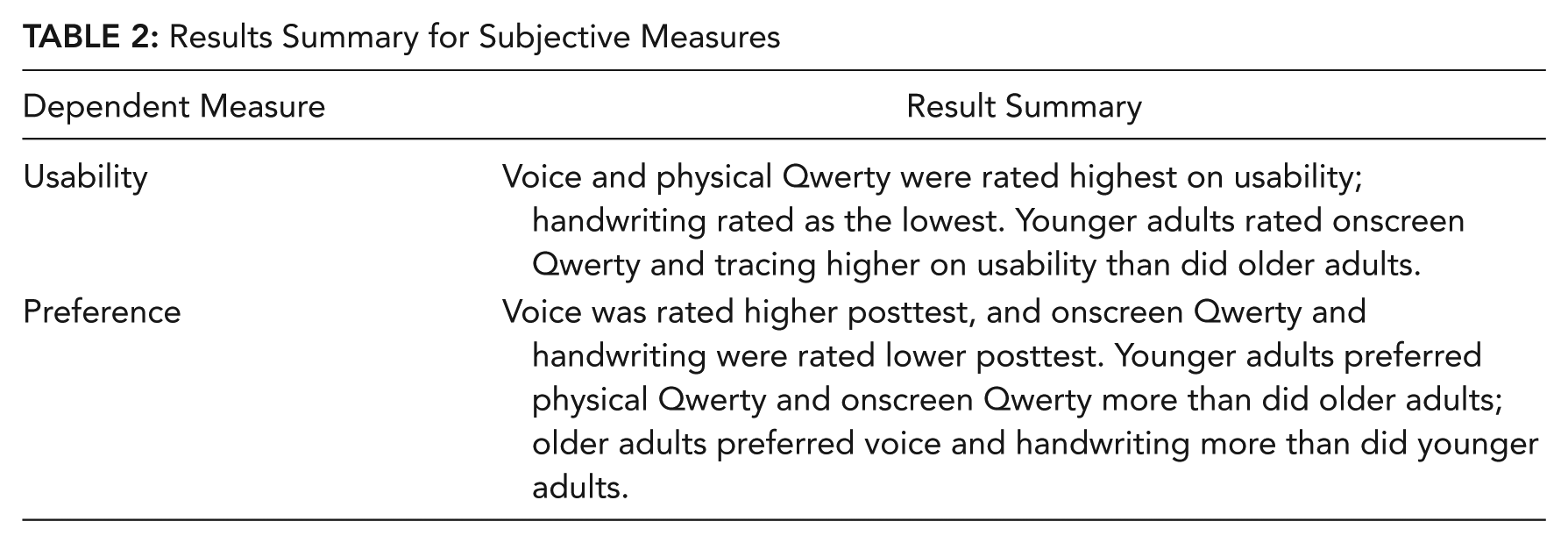
A summary of subjective results is shown in Table 2.
Results Summary for Subjective Measures
Relationship Between Performance and User Perceptions
Perceived usability was correlated (Kendall’s τ b ) with AdjWPM, total error rate, and word error rate. Results showed that younger adults with lower entry rates tended to report higher usability scores with physical Qwerty (rτb = –.34, p = .02), and younger adults with lower total error rates reported higher usability scores with tracing (rτb = –.31, p = .03). Older adults with higher entry rates reported higher usability scores for onscreen Qwerty (rτb = .29, p = .04), tracing (rτb = .54, p < .001), and handwriting (rτb = .44, p = .003). Older adults with lower total error rates reported higher usability scores for onscreen Qwerty and handwriting (rτb = –.31, p = .04, and rτb = –.43, p = .003, respectively), and lower word error rate with onscreen Qwerty and voice (rτb = –.32, p = .03, and rτb = –.34, p = .03, respectively).
Discussion
This study involved the direct comparison of five popular text input methods among younger and older novice adults. Younger adults had the most positive experience with the voice and physical Qwerty input methods, whereas older adults had the most positive experience with voice, based on performance and subjective ratings. Interestingly, voice was the one method in which performance did not differ across age group on all performance measures and resulted in similar subjective ratings. Both groups reported that voice was fast, easy, and accurate for entering text, though it should be emphasized that this was a laboratory study in which background noise was minimal. Participants mentioned that voice input was “natural” and worked well for them in this environment but were unsure about using it in noisy settings or in situations where privacy was a concern.
Physical Qwerty input was the next-best method of input for both age groups. Participants reported that this method was comfortable and easy to get used to, due to their familiarity with a full-sized Qwerty keyboard on a laptop or desktop computer. Additionally, the tactile and slight audible (“click”) feedback and the separation between keys provided less guesswork regarding on-key digit placement, both of which influenced participant reports of increased accuracy and ease of control. This finding presents an interesting trade-off for smartphone manufacturers, who seem to be producing more devices without a physical keyboard presumably to decrease costs and weight. Our results suggest that this design decision may result in a cost to user performance and satisfaction.
In the context of the manual touch screen methods, both age groups performed slightly better with the tracing input method compared to onscreen Qwerty, and both groups performed poorly with handwriting. Tracing was reported to be fairly quick and easy to learn for participants in both age groups, which was surprising since this technique was more foreign to many when introduced. Some participants even reported that they “learned” some of the frequently used gestures by the end of the condition trials (e.g., “the,” “and”). One complaint of this method was that the participant’s finger obscured the keyboard, which made it difficult to see the individual keys. Participants performed worse with the onscreen Qwerty and rated it less usable overall. The lack of haptic or audio feedback and small key size were among the reasons participants gave for their low ratings of this input method and contributed to the inaccuracy of the output. Many participants also did not like the pop-up graphics upon key press. Older participants were especially confused by the pop-up symbol menus, which appeared if a key was held down too long. Handwriting was the most frustrating for participants in that they struggled to discover a strategy that would make their output more accurate. Many had to alter their natural style of writing regarding letter form, order of strokes, and pacing of their handwriting. These factors, combined with the “unrefined” look of the handwriting output, contributed to the participants’ low opinion of this input method.
This study is the first to report an empirical comparison of these five input methods on a single device with an inexperienced population. Our results support the findings of Castellucci and MacKenzie (2013), who found that onscreen Qwerty and tracing performance was superior to handwriting, finding similar entry and error rates for the younger adult population in this study. It is possible that entry rates for handwriting will never be as fast as other methods, given that natural handwriting is constrained to around 20 WPM (Bailey, 1996), compared to the voice rate of expert dictation of approximately 200 WPM (Gould, 1978). Our findings also support the findings of other researchers who found that performance with physical Qwerty was better than onscreen Qwerty (Arif & Stuerzlinger, 2009, Hoggan et al., 2008) and handwriting (Arif & Stuerzlinger, 2009). Our results for voice input differ from the findings of Azenkot and Lee (2013), who found entry rates of only 19.5 WPM for voice and no difference in accuracy between voice and onscreen Qwerty. It should be noted, however, that their participants were visually impaired. Additionally, our findings showed significantly slower entry rates and higher error rates for onscreen Qwerty than for tracing for younger adults, which is different from the results of Castellucci and MacKenzie (2011, 2013) and Cuaresma and MacKenzie (2013). This difference could be due to differences in devices and software used for the evaluations or the fact that our participants were complete novices to these input methods whereas the participants in the other studies were identified as nonexperts.
Limitations and Future Research
We investigated the Motorola Droid 4’s physical Qwerty and the Flex T9’s suite of onscreen input methods. The same device and software was used for all methods of input to control for variability. Although this method was better from an experimental design perspective, it could also be considered a limitation in that the results may not be generalizable to other devices, keyboards, and software. Future research should replicate this study with other devices and keyboard software. It also would be beneficial for authors of future studies to assess the adequacy of these input methods in more naturalistic environments, including public transit systems and social settings, that vary in the level of background noise. Voice input, in particular, can result in poorer performance in noisy environments (Makhijani, Shrawankar, & Thakare, 2010). Additionally, it would be interesting to evaluate user performance with the input methods while standing or moving to simulate how mobile devices are typically used.
It also should be assessed whether differences between input methods exist for keyboards with haptic and audio feedback features enabled and with equipment that may help users interact with the touch screen interface, such as a stylus.
Experience is likely to alter perceptions of the input methods as well as performance. Authors of a future longitudinal study could assess the amount of time needed to become proficient with each method and how user perceptions of the input method change over time. In addition, a more diverse sample of users (i.e., those with voice or manual impairments) should be included.
Recommendations for Design
Results from this study may be used as the basis for design recommendations:
Manufacturers should continue to release smartphone models with physical Qwerty keyboards.
Smartphones that do not have a physical Qwerty should provide voice and shape-writing recognition input as standard options and alternatives to onscreen Qwerty.
Key Points
Overall, participants, regardless of age group, performed best with voice input, followed by physical Qwerty, tracing, onscreen Qwerty, and handwriting.
Older adults performed the same as younger adults using voice input. For all other methods, older adults demonstrated slower entry rates than younger adults.
Older adults committed the same error rates as younger adults using both voice and physical Qwerty. For manual onscreen methods (onscreen Qwerty, tracing, handwriting), older adults committed more errors than the younger adults.
Participants in both age groups found voice and physical Qwerty input to be the most usable and handwriting to be less usable.
For onscreen input methods, tracing input was more promising than onscreen Qwerty and handwriting, especially for older adults.
Footnotes
Amanda L. Smith received her PhD in experimental psychology from Wichita State University. She is a research analyst for both the Software Usability Research Laboratory (SURL) and the Aviation Psychology and Human Factors Laboratory at the Applied Psychology Research Institute at Wichita State University. Her research interests include usability evaluation methods, user interface design, input methods, and complex systems.
Barbara S. Chaparro has a PhD in experimental psychology from Texas Tech University. She is the director of the Software Usability Research Laboratory (SURL) and the coordinator of the Human Factors doctoral program at Wichita State University. Her research interests include human–computer interaction, usability evaluation methods, and mobile computing.