




Abstract
This article explores the creative function of virtual instruments, sequencers, loops, and software-based synthesizers to introduce basic scoring and sound design concepts for visual media in an introductory music technology course. Using digital audio workstations with user-focused and configurable options, novice composers can hone a broad range of creative mixing skills supported by guided instruction, structured listening activities, and a discovery-based learning environment. Music production software affords many creative options to introduce soundtrack creation and granular synthesis for all levels with three curricular options listed here.
Keywords
Students of all ages and experience levels can experiment with sound and compose scores using the guidelines and types of digital audio software described here.
It is an exciting time for teachers and students to explore new approaches to technology-enhanced music-making and sound creation. The modern software-based tools used in contemporary electronic music production and film scoring are efficient, robust, portable, and affordable. Analog equipment, once the preferred choice of professional-level film composers and commercial musicians, is now replaced by digital audio workstations. 1 Also, the equipment commonly used in electronic music production has changed—becoming quicker, less expensive, higher-performance, and stored within the confines of smaller portable devices. 2 Beyond the music and media industries, music production technology is now available for teachers to engage student populations in preK–12 settings. 3 For educators teaching music to students of almost any age, considering the most appropriate software-based music technology affords many opportunities to inspire student creativity and expression through discovery-based learning activities and guided instruction. 4
NAfME is glad to offer recognition of professional development activity to you for reading this article. Please follow the link below and complete a short quiz to receive your certificate of completion.
Home computers—once outfitted with less-than-ideal sound cards—now come equipped with increased memory and performance; these items enable musicians and producers to create new music and sound content with relative ease. 5 PreK–12 students in particular represent a growing body of technology users intimately familiar with these digital tools. 6 This media reaches students at all different grade levels and also encourages new modes of learning in college music courses. 7 Noting the advances in computer technology’s reliability, versatility, and affordability, music teachers may consider incorporating audio recording software in the classroom as one way to foster the general music student’s curiosity about sound and its many creative possibilities.
Today, music and sound can be quickly recorded, edited, and produced on a laptop computer or smaller device. Audio programs like Audacity and GarageBand come equipped with simple effects and allow the user to store his or her ideas on a hard drive. With careful lesson planning and implementation, these digital audio workstations (DAWs) can potentially enhance millennial learning experiences—particularly for middle and high school students ages 10 to 18 who are already expressing interest in (and have an aptitude for) music-making, visual media, and songwriting. 8
Thoughtful application of this technology has the power to transform an ordinary classroom computer lab into an exciting multiplatform learning community—deeply integrating collective student interest in music, media, and popular culture with hands-on activities. 9 Students conveying an interest in sound recordings, digital storytelling, movies, games, and popular culture are an ideal cohort to explore these ideas in the classroom. In this case, the intersection of music performance, sound recordings, and information technology predicts innovative trends in music education. 10 Moreover, the computer technology is small, compact, and robust enough to include these concepts in live and networked performances beyond the classroom—thus captivating a wide assortment of students. 11
Indeed, music notation software and DAWs give artists, composers, and producers options to customize the ways they create new ideas. Over the past two decades, college music students gravitated toward notation software like Sibelius and Finale. While notation programs give undergraduate composers numerous options for realizing their work, how can secondary school music teachers take advantage of the contemporary software platforms normally designed to record and produce audio? Beyond sound production, how can preK–12 teachers encourage students to combine music and visual media assets creatively? Finally, how does music technology reach a diverse student population while stimulating a “community of practice” in the classroom? 12
I begin with a general overview of how DAWs intersect with music creation and sound production. I explore DAWs in a lab context and offer three scenarios that serve as templates for developing basic music technology lesson plans. Although these possibilities are customizable across age groups, they focus on middle and high school students. Included with the three instructional scenarios are some open-ended questions teachers may include for additional reflection.
Thus, it is certainly possible for music teachers to integrate DAWs into a range of introductory music and media technology courses. DAWs afford users of all levels a chance to manipulate music and sound and combine those new tools with still images, photographs, and short videos. Incorporating relevant software to cultivate basic compositional and sound design skills in an introductory course integrates aural, visual, and decision-making skills. Although the specific course name and learning objectives might vary from school to school, DAWs are most effectively used in elective or general music classes that meet in a computer lab or similar location with Internet connectivity, keyboard controllers, and similar items. Additionally, tablets and portable devices with preloaded software can be used to reinforce music concepts in classes, rehearsals, and private lessons.
Media and Millennial Students
The description of preK–12 millennial learners as culturally varied, group-driven, generally comfortable with mobile and portable technology, and curious about music and media embodies the typical student interested in computers and related digital tools. 13 PreK–12 students consume music and videos on YouTube, through social media, and by playing video games. 14 These forms of entertainment present numerous sources for students to reference in their own projects later on.
The rich musical and audiovisual content found in film and games entices young students to wonder how they can create such items on their own. This scenario, where students express curiosity about how they can be expressive in technology-focused environments, incentivizes teachers to explore how DAWs can enhance lab-based learning. This article avoids specific recommendations about audio production and video editing software. Rather, the pedagogical ideas explored here are intended to guide instructors to the preferred DAW and video/image editing software combination that suits their particular classroom and budgetary needs.
DAWs and Music Composition Education
Digital audio workstations, as an intermediary, introduce multilayered music and media competencies to novice composers, songwriters, and producers when presented in a computer laboratory setting. Students explore the artistic possibilities of producing original sonic and multimedia content through a software-based method and guided instruction. The use of DAWs, although broadly conceived, can give in-service teachers ideas on how to engage students to create simple music and sound assets. Once incorporated into teaching praxis consistently, contemporary music and media can help recontextualize the preK–12 student learning process in innovative ways. 15 A growing interest in connecting digital technology to praxis is reflected in the music education literature. 16
Modern composers have extensive hardware- and software-based means to create sonic ideas once considered inconceivable; each tool influences how the composer envisions new content along with the most applicable techniques to use. 17 The major changes in accessible recording technology transform how musicians define their artistry—the process of capturing the first idea to the finished product is quicker than ever before. 18 For teachers and students representing the band, orchestra, and choir programs, recording technology may be entirely unfamiliar. And yet, students may very well perform songs from movies and games in their ensembles and participate in rock bands. Considering these paradigms, how can teachers inspire their students to interact with technology in fresh ways? As recent music education scholarship illustrates, human beings are deeply influenced by modern technology, and teachers are encouraged to give media technology a closer look when lesson planning. 19 Rather than isolating music-making activities, is it possible to use relevant technology to inspire diverse compositional activity? 20
Several important questions arise about DAWs in music education: First, how can teachers, many of whom are unfamiliar or uncomfortable with this technology, begin to introduce software-based music creation and sound design in middle school and high school? Second, how can teachers pair readily available assets including cell phones, tablets, laptops, and Internet resources with DAWs? Third, what sorts of lessons can teachers create to include DAWs and other forms of art and media? The following curricular options attempt to give teachers some creative ideas for lesson planning.
Option 1: Template-Based Sound Discovery with Virtual Instruments
For teachers new to exploring the creative possibilities that DAWs have to offer, adopting a template-based approach is one possible option to start with. Most DAWs include different types of virtual instruments with hundreds of different types of premade sounds. A user can create a new MIDI (Musical Instrument Digital Interface) virtual instrument or an audio track and place one of the software-based synthesizers as an “insert” on the track itself (Figure 1).
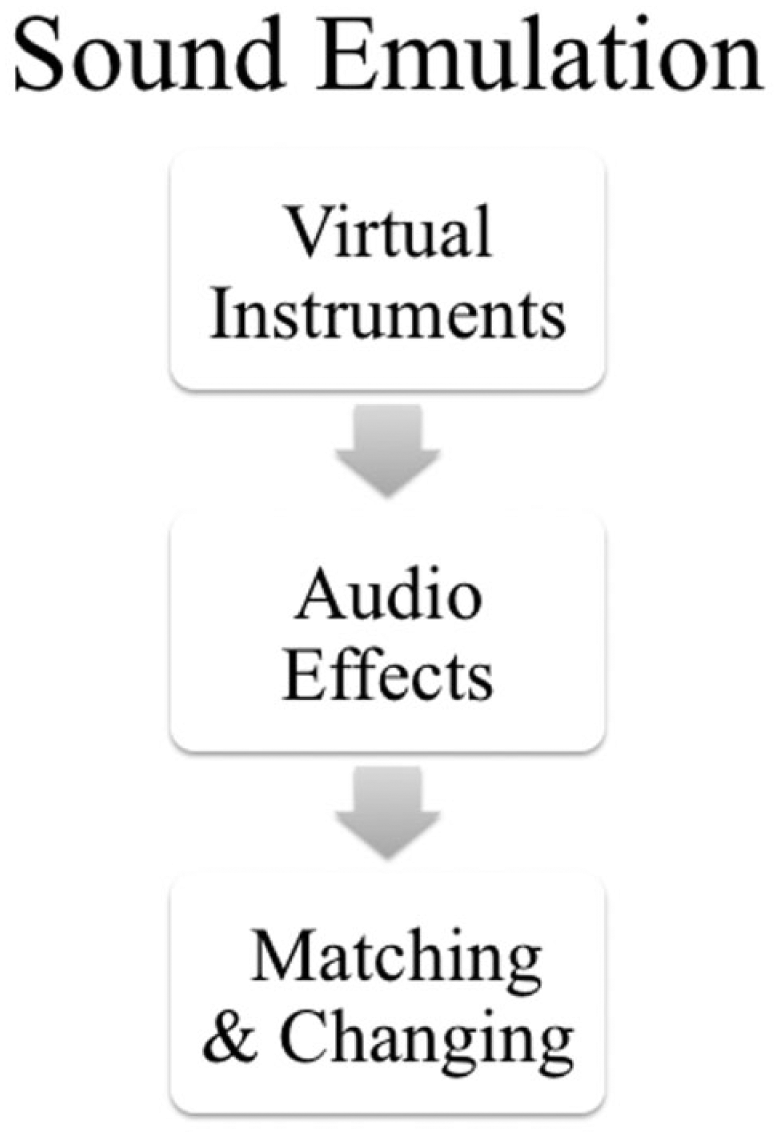
Sound Emulation with Digital Audio Effects and Virtual Instruments
An insert on a track refers to a virtual instrument that is self-contained inside the DAW. No external components are generally required other than a USB-powered keyboard. Each DAW uses a slightly different nomenclature to identify the types of available tracks, but their functions are quite similar and are broadly labeled as follows:
These are some of the most common types of tracks found in DAWs. Additionally, the tracks are often located on a virtual mixer or channel strip that the user can adjust in various ways. Each of the track controls allows the user to isolate the individual sounds, route them in different ways, and mix them with other instruments in a song or soundtrack. Recent studies suggest that incorporating the sequencers commonly found in DAWs seems to positively influence musical creativity. 21
Starting with a single virtual instrument track, teachers should ask students to choose one sound they are familiar with. This sound or virtual instrument could be similar to the instrument that they play or perhaps an unusual combination of sounds. Giving the students time to explore one of the virtual instruments is advisable. As the students are “playing” with the software-based instruments, teachers should ask the students what the sound reminds them of. Although it is challenging to quantify how timbre affects each person, teachers may guide their students to consider the emotive potential of sound—especially considering how timbre influences mood. Those leading questions inspire a healthy dialogue in the class and reinforce the student’s connections to technology and sonic content.
Before giving the students free time to explore, the teacher might start the lesson by playing a recording of a specific instrument and then ask the students to find a sound on the virtual instrument that resembles what they just heard. This encourages the students to listen critically and distinguish the main characteristics of certain timbres. After the students find an “accurate” sound, the next step includes manipulating and/or changing some aspects of the virtual instruments they chose.
Audio and virtual instrument plug-ins contain software-based effects that alter the characteristics of each track. Often, the virtual instruments have their own specific parameters that the user can adjust. Beyond that, plug-ins closely resemble and model the types of physical hardware effects commonly found in recording studios and live venues. After students are given time to insert one of these effects on the track, teachers should then encourage the students to alter their original sound as much as they can. One way to do this is by having the students use a descriptive word to embody their new sound. Encouraging the students to create an “angry cello” or a “distant piano” are a few options to consider. Here, teachers can pause to ask their students a few important guiding questions:
How can we classify sound in descriptive ways using adjectives?
Once clear, how can we manipulate existing sounds to match our descriptions using the tools found in digital audio workstations?
This exercise is not overly concerned with creating a specific musical form. Rather, the idea is to encourage the students to think about sound first and structure second. In fact, before students begin changing their sounds, teachers may encourage them to jot down some adjectives to describe the kinds of sounds they hope to create. For beginners with little experience in formal music theory, it is a fun starting point to get them thinking about timbre and to encourage writing. Students explore the role of sonic space and perspective in original pieces, and such plug-ins, combined with various audio effects, introduce the budding composer to abstract soundscape ideas. 22 Some composers choose to use the DAWs’ plug-in settings to design and shape their pieces by adjusting the timbral qualities of presets through advanced manipulation—the focus here is on using templates to inspire sonic changes rather than on a traditional composition. 23
Option 2: Basic Sound Synthesis with DAWs
Granulation as a sound design and electronic music composition synthesis technique has emerged in the past few years in games and visual media, allowing users to manipulate pitch and tempo apart from each other. 24 Users capture sampled sounds, fragmented into tiny pieces, known as grains, and played through synthesizers commonly found in digital audio workstations. 25 Granular synthesis, a relatively new approach to software-based electronic music production, manipulates signals by shifting pitch, speed, and each sound independently; this is possible in real time if the computer’s processing and memory power allow it. 26
Teachers looking for ways to connect sound synthesis and music production might consider playing short excerpts from videos and games. By asking the students to pay attention to the drones, low-pitched sounds, and various effects, teachers can bridge the music and sound design concepts into a cohesive lesson. Granulation is practical to create new sound design techniques, and these sounds mimic timbres found in nature due to the fineness or coarseness of the original source. 27 For students interested in granular synthesis, many DAWs feature virtual instruments with presets and templates. Playing sounds through the keyboard gives the user a chance to explore more abstract timbres. Most of the virtual instruments found in DAWs have controls that let the user adjust the sound’s parameters.
Sound synthesis forms an important aspect of electroacoustic composition. For new learners without access to traditional analog equipment and programming experience, software-based synthesis techniques introduce students to historically significant compositional practices through digital audio workstations. Just as the virtual instrument templates give students a useful entryway into sound manipulation, granular synthesis can be accomplished using the software’s existing synthesizers.
Bass tones are wonderful sources for demonstrating how a sound can be shaped. Although there are many complex processes happening to the sound’s physical properties, teachers need not overemphasize such difficult concepts. By having the student play with a bass tone, they can experiment with adding and subtracting portions of the sound through the virtual instrument’s controls. Focusing on one sound at a time keeps the exploration process manageable.
Similarly, teachers can have students work together to make up sounds that they enjoy and that emulate what they hear in films and games (Figure 2). Having the students share their sound creations with their classmates is a great way to debrief and expose them to basic sound synthesis. This exchange of musical and sonic vocabulary gives students a forum to workshop their ideas. By working in pairs, they develop a collaborative mind-set aimed at a common goal of producing new ideas. As the students improve their understanding of synthesis, they may proceed to more sophisticated platforms to achieve their creative and educational aims. 28 Although synthesis can be a challenging unit to cover, teachers may ask students the following questions during each class:
Can you think of examples where sound synthesis (drones, stingers, sound effects, etc.) is used in films and games?
How do these sounds enhance the on-screen action?
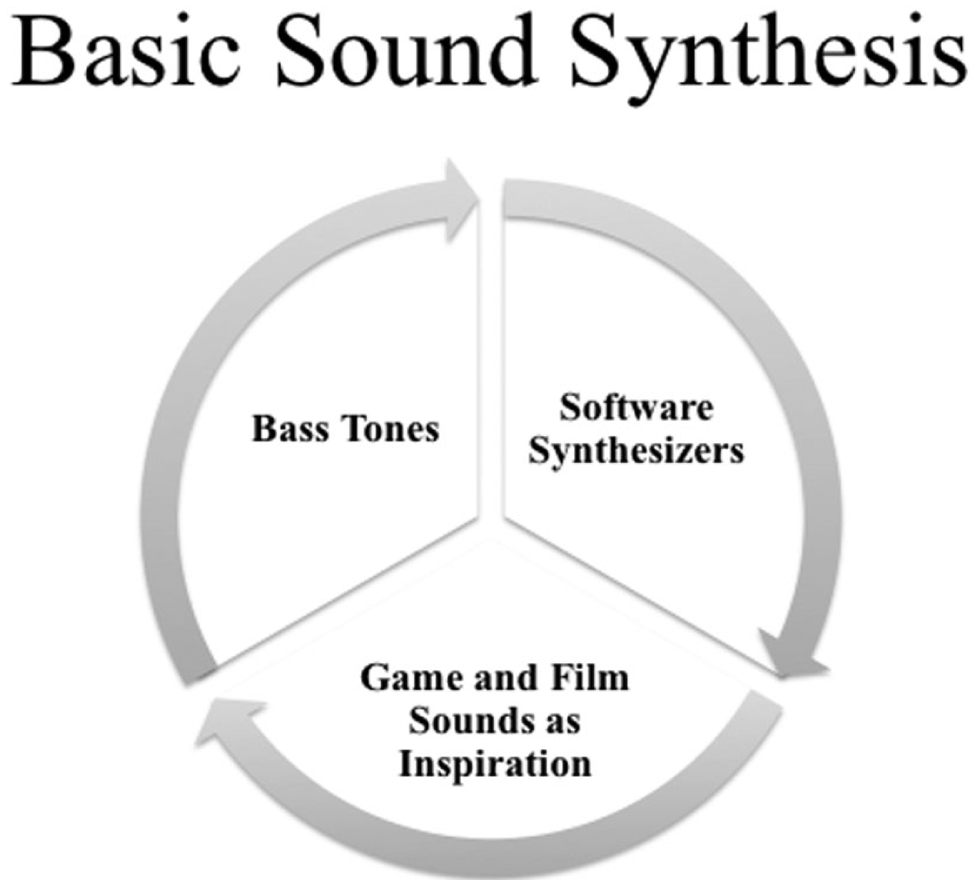
Using Presets in Digital Audio Workstations to Manipulate Bass Tones Is One Approach to Introduce Sound Synthesis to Beginners
Option 3: Incorporating Simple Visuals and Collaboration
Film scoring differs from traditional music composition; composers must understand how their musical choices heighten the visual content, and instructors may prefer to complement lab activities with interviews with successful composers—many of whom explain their working relationships with directors. 29 More important, students must understand how music affects mood and viewer perception. 30 These are the possible scenarios P–12 students might experience in a similar university course later in their studies. Before tackling the role of music and sound in film, using photographs and short videos are great ways to get students thinking about how music and sound can enhance what they see on the screen. More important, introducing students to the concept of working as a member of a team is equally valuable.
There are many ways to integrate visual media with basic music and sound design concepts. One way that teachers can encourage students to begin multimedia production is by encouraging them to take pictures with a digital or web camera, portable device, or mobile phone. Lessons could require students to find specific sites to photograph. Once the students have a list of photos, they can import or upload them to their computer to produce a slide show. Next, the students should choose three to five pictures and assemble them in a particular order in a photo or movie editing program, an Internet-based program, or Microsoft PowerPoint. Once assembled, students can choose how long each photo lasts and then export the finished sequence as a QuickTime movie or MP4 video file. These videos should not exceed one minute to begin with.
Most DAWs allow users to import finished videos so that the composer can create music, dialog, and sound design elements. After the students import their video into the DAW, it will appear as a sequence on the screen. From there, the student can use virtual instruments and similar items to score a new piece for their movie. This is a challenging project for beginners. Just as teachers encourage a workshop approach with sound synthesis, they may find that method particularly useful to introduce more advanced concepts.
Teachers might also have students work in pairs with classmates from other departments—with each student taking on a particular creative role to produce the short media clip. This scenario could appeal to music teachers interested in having their classes collaborating with students with an interest in visual media. Art, photography, and computer students could produce the images, short videos, and animation. From the sound and music perspective, one student could find simple loops, another could find a virtual instrument to use, and a third could be in charge of the mixing. After the students build some confidence, teachers should give them the space to decide how the media should look, sound, and feel to the audience. Likewise, this type of project offers students a chance to think about the following questions:
How do music and sound influence visual media?
What is it like to work as a member of a sound or music team?
As more DAWs adopt an Internet-based storage system, sharing projects between classmates is quite feasible. In this case, the technology affords a certain level of flexibility. The students can work on the project at home and at school as their time allows. This kind of activity is advanced and is best suited for more experienced students. Regardless, interdepartmental collaboration presents important opportunities to reinforce social learning concepts and introduce the students to practices commonly found in the music and media industries. A crew-based method offers students the opportunity to conceive a multimedia project that engages multiple senses and encourages teamwork (Figure 3).
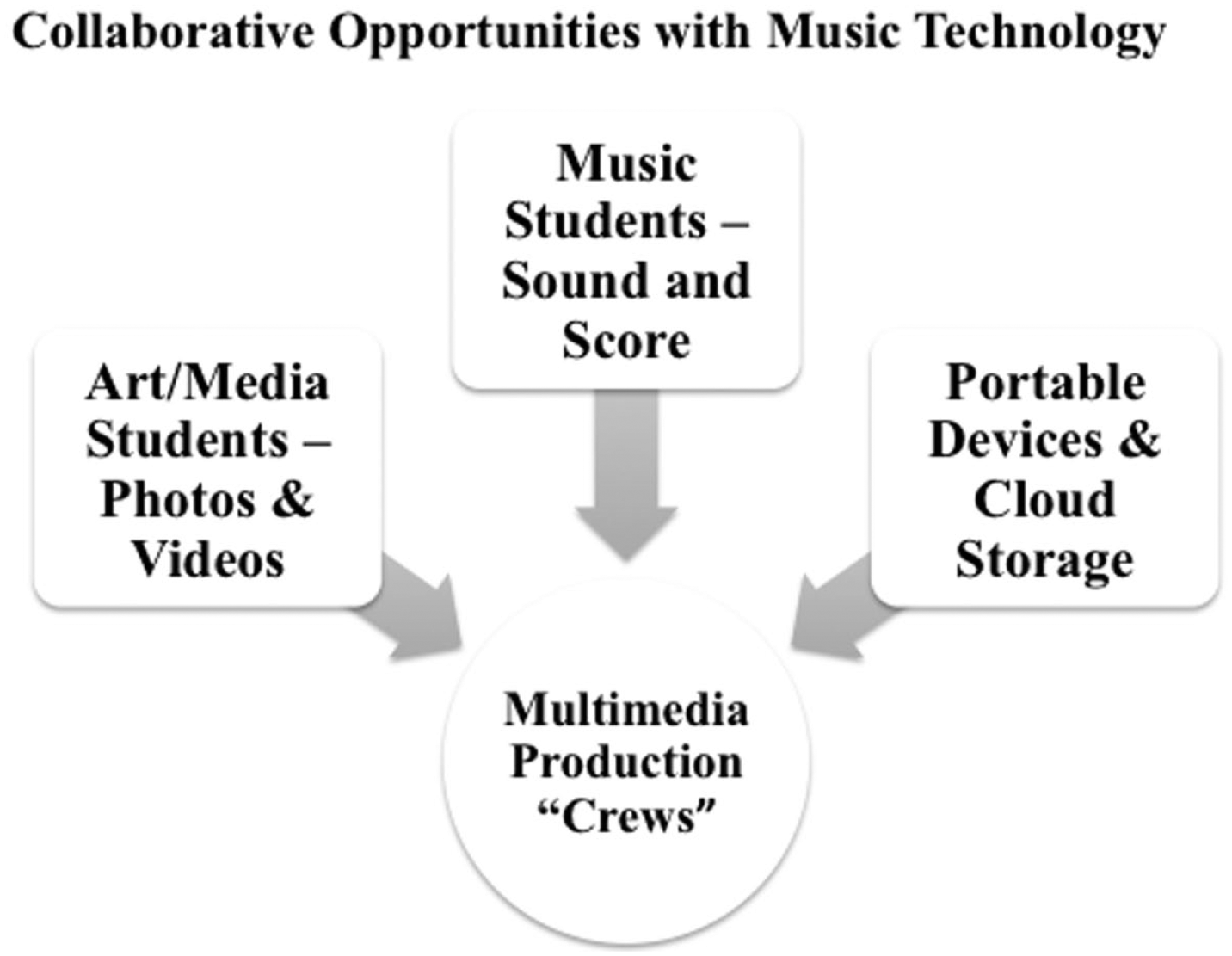
Music Technology Fosters Group Projects and Collaborative Opportunities for Students to Create a Soundtrack
One Idea at a Time
Music teachers often work with a savvy cohort of highly media-literate students. As children interact with movies, games, music, the Internet, and related technologies, that interaction inspires students to draw connections to the media content and modern tools they use on a daily basis. Those same tools generate collaborative opportunities for promoting diverse communities of learning. DAWs are affordable, user-driven, and versatile as supplemental materials in the contemporary music lab. Furthermore, DAWs appeal to a wide range of students, many of whom might not participate in music-making otherwise. Perceptive instructors should carefully reflect on how this technology can enhance the students’ learning experiences and how they can guide students toward creating their own music and sound ideas with minimal supervision.
As an entryway to begin, teachers and students can explore one of the many free open-source DAWs available from the Internet. Starting with MP3s and preexisting sounds, users learn how each program works through a balance of experimentation and guided instruction. Many DAWs supplement their software with user guides and free web-based resources that answer commonly asked questions. YouTube and other websites provide tutorials as well. Once the user gains confidence through fundamental skill acquisition, they advance to more sophisticated sound production concepts. Working with DAWs starts with one sound and one idea at a time.
DAWs certainly have their place in computer labs, private lesson studios, small ensembles, and music classrooms. As preK–12 music teachers improve their DAW-based technical proficiency, they may choose to find new methods to reignite their own practicing, composing, production, and interaction with music and media content. Equally, the technology itself does not necessarily alter a teacher or student’s musicianship. Moreover, purchasing the most expensive software does not necessarily equate to high-quality creative learning. Schools considering such purchases should explore how user-friendly the software is and then add supplemental technology as needed. Steady, pragmatic instruction with DAWs ensures that teachers and students will enjoy the many possibilities that technology-enhanced media production brings to the classroom and beyond. Finally, including guiding questions and supportive instruction ensures that students will enjoy their own creative learning process while building confidence with relevant software-based technology.