




Abstract
Recent advances in music technology include practical tools for sound recording and production in school music classrooms. Secondary school music production classes allow students to make meaningful connections between school music and the music in their own lives. We offer several projects for teaching music production and sound recording; provide examples of authentic, performance-based assessments; and identify opportunities for collaboration through digital means. These projects are particularly well aligned with the United States’ Core Arts Standards related to creating music and may widen the door for students who are less interested—or less able to participate—in traditional bands, orchestras, and choirs or music appreciation electives.
Technology can be a tool for inclusion in your music classroom and school.
Music educators and students are witnessing tremendous growth in the volume and ubiquity of computer and mobile software applications dedicated to sound recording and audio production. While nonprofessionals may have once been restricted as “consumers” of the music industry, they can now actively “prosume” in online sharing of original music projects through social media and streaming platforms. A prosumer is both a producer and a consumer and plays an active role in both fields: Anyone with a computer or mobile device can record, refine, distribute, and even sell his or her original work in a global market. This form of “participatory culture” in music provides educators the chance to leverage student interest in music production and sound recording into classroom activities that foster creativity and collaboration. 1
NAfME is glad to offer one hour of professional development recognition to you for reading this article. Please follow the link below and complete a short quiz to receive your certificate of completion.
While access to technology has steadily increased inside and outside our schools, music teachers report that they primarily use technology for administrative tasks and not for teaching and learning. 2 This is a missed opportunity for music educators, as sound recording and music production classes could help students make meaningful connections between school music and the music in their own lives or, in the words of music education scholar Evan Tobias, “crossfades” between music engagements inside and outside school. 3 The integration of music technology offerings into traditional school music programs may also help initiate more student-centered, relevant, and engaging learning experiences in school music contexts. 4
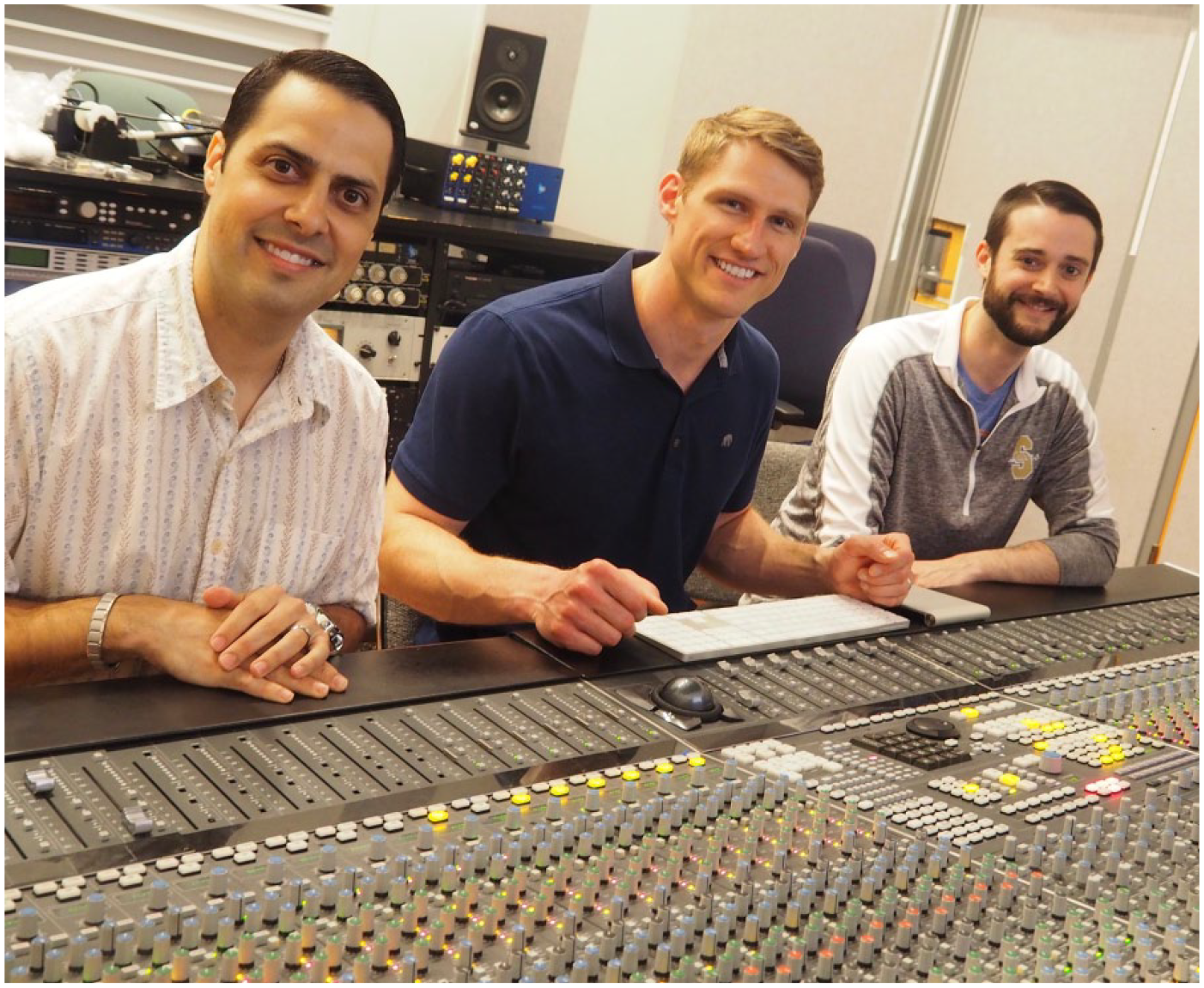
Photo of Radio Cremata (left), Matthew Clauhs (center), and Brian Franco (right) by Erin O’Rourke
Contemporary music ensemble and production classes can provide opportunities for more students to participate in school music. In 2016, Michael Brownell, then president of the New York State School Music Association (NYSSMA), recognized this potential for student engagement and created a committee focused on the study of nontraditional genres through collaborative and creative projects. In a statement in NYSSMA’s official publication, School Music NEWS, he explained, This past year has included an important national dialogue and discussion over the goal of inclusion, diversity, equity, and access in our music programs. As we look to the future of music education, we must seek to remain current with changing student demographics and underserved populations. . . . I posed the question of how to encourage opportunities for emerging ensembles that hold the promise to attract new students to our music programs.
5
Over the last decade, we have seen an increasing number of cases where schools have incorporated such emerging ensemble classes as an additional option to the traditional band, chorus, and orchestra programs that exist in most schools. 6 These additional classes lend themselves to incorporating recording familiarity and fluency in music production. By adding recording projects into a school’s music curriculum, teachers and students have the opportunity to create student-generated products in a digital medium that fosters creativity and imagination while engaging with the school community in new and exciting ways.
One of the primary motivating factors for sound recording and music production classes is a school’s faculty and administration’s desire to reach “the other 80 percent” of a high school population—those students who are not enrolled in traditional band, orchestra, or choral programs. 7 In an era when school budgets can be unforgiving, many music teachers have had to redefine their roles in the school community. By adding courses that allow young people to study musicianship through a lens attractive to new student-musicians, the music department is able to further expand its role to one of greater inclusivity and relevance.
Recent increased accessibility of equipment and technological advances have contributed to the success of these practices in a classroom setting. Cloud-based recording software, such as Soundtrap and BandLab, have turned almost any electronic device into a portable studio. Mixers (e.g., Roland HS-5) allow multiple student groups to practice simultaneously in the same room without disrupting each other. Virtual instruments compatible with iPad technology, such as the Korg iKaossilator and the Alchemy Synthesizer available for GarageBand for iOS, replicate the sounds of acoustic and electronic instruments for a fraction of the cost. Furthermore, the increased accessibility of recorded music through services such as Spotify and YouTube, as well as the countless music learning apps available to students, have democratized production tool choice and learning experiences in classrooms, allowing the role of the teacher to shift to more of a facilitator and/or producer role, guiding students toward resources to help them succeed. 8
Sample Classroom Projects
Sound recording and music production classes can take many shapes and forms. We have taught these courses in a variety of classroom environments, ranging from fully equipped music technology classrooms to general shared-use computer labs with no dedicated music equipment. The activities and projects presented in the following section can be accomplished in virtually any classroom space with apps that are often free and widely available on multiple devices, including phones, tablets, and desktop computers. Little to no prerequisite knowledge is required of the student to complete many of these activities.
Project 1: Film Composing
General
information (suggested apps: GarageBand [free on iOS/MacOS]; Soundtrap [“freemium,” meaning that the basic software is free, but there is a charge for add-ons, with special pricing for educational institutions 9 ])
Film composing projects may foster student understanding of music’s role in conveying mood and emotion. Without music in place, movie scenes fall flat, suspense is eliminated, and the audience does not fully comprehend the mood of the situation. Additionally, the flexible nature of film composing makes it an appropriate project for many grade levels and in a variety of classes.
What mood and/or emotion is being conveyed in this piece? How can I musically convey these ideas?
To avoid copyright infringement, teachers might explore the variety of online databases for public domain videos. 10 We have found animated films to be particularly useful for this project, although any video with clear action sequences and limited dialogue will work. Depending on student experience, teachers may dedicate some time to basic digital audio workstation (DAW) navigation as students decide how to use the virtual instruments at their disposal. Composition projects such as these often work well when certain limitations are in place; for example, students are allowed only to use an E-minor chord with synthesizers and smart instruments. This allows students to engage in the compositional process and experiment with tempo, range, instrumentation, timbre, and so forth while not worrying about harmonic language of the piece. Students quickly realize that composition is not an intimidating process but, rather, one in which they use their ears and intuition to create a musical work. Over the course of the project, teachers may decide to discuss, for example, the importance of synchronization, pacing music with the visual provided, and how to effectively arrange and layer instruments. As students advance through this work, teachers (serving as facilitators and/or producers) might further explore the function of harmony, rhythm, form, and melody with students as they compose.
Video Example 1. High School Film Composition: https://youtu.be/Xk0V-qfy3V8 Video Example 2. High School Film Composition: https://youtu.be/wEZtyGmJmFg
Project 2: “9-Square” Project
General
information (suggested apps: Acappella [freemium]; Final Cut Pro [$299]; Adobe Premiere Pro [$20/month])
A 9-square project is a video in which one or many performers record themselves multiple times in nine boxes on the screen, creating a fully realized piece by performing the parts in multiple takes that are presented simultaneously to the viewer. This style of performance has made Internet celebrities of artists such as Jacob Collier (Figure 1) and Peter Hollens.
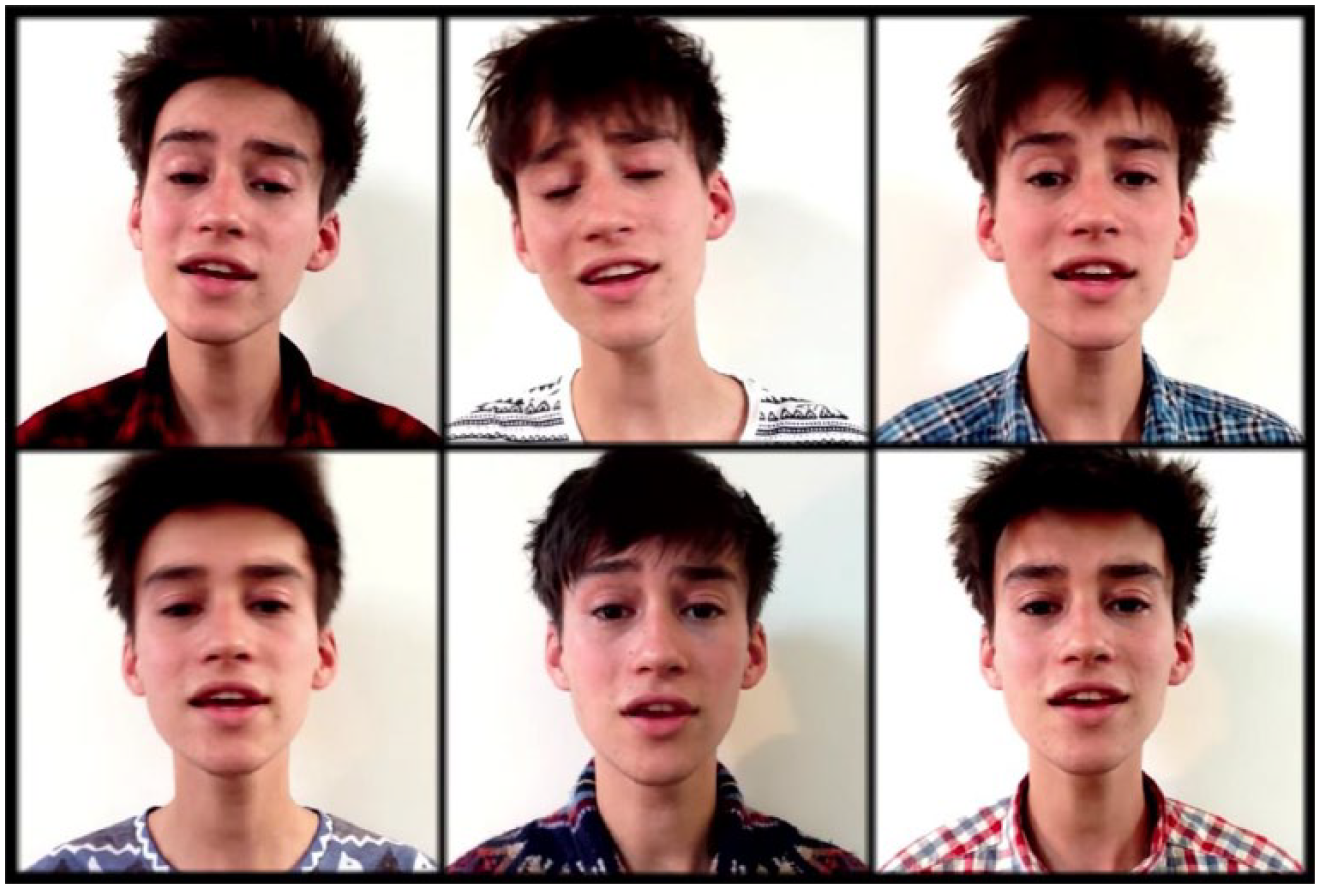
Jacob Collier Performing “Fascinating Rhythm”
This is another project that has a wonderful amount of flexibility, even more so than film scoring, with the added bonus of having the feel of the kind of viral videos students see daily on YouTube. While 9-square projects are often produced to creative covers of popular songs and classwide collaborative projects, they could be used to support ensemble goals, as well. For example, a high school trombonist might learn all four parts of a trombone quartet, or a choral student with a good range could learn and sing all four parts of an arrangement being worked on in rehearsal.
The Acappella app simplifies the editing process by allowing a student to create a visual layout for a video. After planning out their filming sequence, students can record vocal and/or instrument parts one at a time and hear their arrangements unfold as they add each take. By engaging students in the processes of learning, planning, and executing the performance of all parts of a composition, they may gain a deeper appreciation for—and understanding of—the various roles and functions of members of an ensemble and elements of music (e.g., melody, harmony, rhythm, form).
Project 3: Full-Length Album
General information (suggested apps: MixCraft [Windows] or GarageBand [iOS, MacOS])
In this project, each student composes an original piece that aligns with an overarching theme, resulting in a cohesive album. Students are encouraged to collaborate with one another, offering their individual skills on voice, instruments, and/or beat production to their classmates. Depending on the classroom setup and available technologies, students may create their songs through a variety of DAWs: (1) computer-based software programs, such as MixCraft (Windows) or GarageBand (MacOS); (2) cloud computing programs, such as Soundation; or (3) apps designed for smartphones, tablets, and Chromebooks, including GarageBand (iOS), FL Studio (MacOS, iOS, Windows, Android), and Soundtrap (Chrome OS, iOS, Android). See Table 1 for a comprehensive list of DAW apps for recording, editing, and producing audio as well as apps for video editing. While this type of project allows for a great deal of student autonomy and collaboration, facilitators are challenged to control and/or curate the learning processes, monitor students works, provide suggestions as students bump into challenges, and restructure guidelines to maximize students’ creativities. 11 This can be accomplished through nongraded formative assessments using rubrics and checkpoints for students to submit and reflect upon the current state of their work. The facilitator could end classes by having students loop a portion of their project, open a Word document, and circulate around the room, moving from station to station while listening and providing feedback to their peers. Sharing protocols such as the one described here may help to keep students on task and encourage dialogue about how elements of their songs were created. This fosters a sense of collaboration and leads to new understanding about composition and sound-recording techniques.
Recommended Apps for Sound Recording and Production

Note. DAW = digital audio workstation.
Because the album consists of original music, it may be widely shared without copyright infringement. The teacher might consider uploading the album to a global distribution company, such as CDBaby. This organization distributes the album to online music sellers and streaming platforms (e.g., iTunes, Spotify, and Amazon Music). Booster organizations may be able to help manage the proceeds from the sale of the album, and this activity could even serve as a fund-raiser for the music program. Students can create a commercial that features selections of their original compositions and directions for purchasing the album online. This type of activity does raise a question of intellectual property and who “owns” the students’ work. We maintain that work created in the school for class purposes belongs to the school. There is also a great potential for learning about business, entrepreneurship, industry, creative commons, and intellectual property by engaging students in the promotion, sale, and distribution of their original content.
Video Example 3. Commercial for Full-Length Class Album: https://youtu.be/4D26Wjg7do4
Deterritorialized Collaboration
While music-making and music-sharing once were limited to physical spaces, these processes can now nimbly, elegantly, and fluidly be mediated through deterritorialization. Anthropologist Brigitte Jordan was among the first to discuss deterritorialization with regard to lifestyle wellness and home/life balance. 12 The concept is being adapted here for music collaboration because it can serve as a means to understand e-collaboration. We can understand deterritorialization to be the essence or perception of people being in different locations. For example, a music maker may physically occupy a basement home studio in Hamburg, Germany, but stream her music through an online portal capable of collaborating with almost anyone who can connect to her through an online connection. At the same time, a 10th-grade music classroom in Miami, Florida, might enlist the Hamburg musician as a music mentor and/or music collaborator on a class project. Leveraging deterritorialization in music education has become more and more normalized due to efforts by music teacher practitioners and software/web developers. 13 Some of their ideas, experiences, and opportunities will be discussed. We should note here that research in this field is ongoing with notable contributions by music education scholars. 14 It can be helpful to consider deterritorialized collaborations through three different approaches that also function and operate in school music settings: projects, ensembles, and mentoring/lessons. While there may be overlap among each of these, a variety of unique circumstances and opportunities for each are discussed later.
Deterritorialized, project-based music education can occur in many ways. For example, teachers and students may enlist collaborators over the phone, requiring little more than a pen/pencil, paper, and a telephone. Alternatively, the teacher may use websites such as Indaba, GrooveZoo, Soundtrap, Club Create, JamStudio, Riffworld, Kompoz, Aviary, Soundation, Drumbot, Sonat Live, and Audiotool. Offshoots of these are constantly appearing on the Internet, making project-based collaboration even more feasible. The project can be constructed on a DAW using a combination of loops, digital instruments, live instruments, and vocals. Video is also feasible. Some of the benefits of these experiences include increased student flexibility, access, affirmation, and autonomy. Likewise, these project-based experiences serve to decrease teacher directedness, centeredness, and creative control. 15
Ensemble-based collaboration is an emerging phenomenon and one that will likely become more and more feasible as technologies related to latency and sound quality catch up to the standards to which prosumers are accustomed. To date, a widely referenced contribution to the music community is Eric Whitacre’s choir (an asynchronous ensemble, meaning its members do not perform at the same time or in the same physical space). Collaborators worldwide were assembled in a virtual space under the virtual asynchronous direction of Whitacre. Students, working on their own projects, can certainly replicate Whitacre’s work using tools such as Logic, Final Cut Pro, YouTube, FaceTime, Skype, or other video conferencing applications. If they wish to push beyond the limitations those technologies impose on the music, they will need to explore new portals or combinations of portals. FaceTime, Skype, and other e-communication tools might serve as possible options. Since latency (sound delay) can pose a problem through FaceTime and Skype, musicians might desire lower-latency options. JamKazam, a free website, offers users profiles and matchmaking opportunities to share/connect with peers in zero-latency online music spaces. Additionally, there is Jack Trip, a free, zero-latency software program. Since latency affects synchronicity, musicians might find zero-latency digital environments more useful for collaborative music activities. Course work in this field is also emerging. For example, one can enroll in music professor and composer Chris Chafe’s Online Jamming and Concert Technologies course for free at kadenze.com. 16 This course explores opportunities for online music-making/jamming and zero latency. Central to understanding and accepting the e-space for ensembles is to understand that it can function to diversify participants, open up new music possibilities, and expand notions of instrumentations, group constitutions, and venues.
Musicians might also benefit from deterritorialization in mentoring and lesson settings. While some digital communication tools, such as Skype, Face Time, Adobe Connect, and Zoom, are normalized in informal friend–friend contexts and institutionalized social networks, they are not necessarily the most functional for online music mentorship and lessons. There is an emergence of specific music-applied online communication, such as www.takelessons.com, www.thezoen.com, www.lessonface.com, and www.livemusictutor.com. These tools afford, for example, private piano instruction through combined networked video-/audio conferencing with MIDI functionality. Music teachers and mentors might use these tools to expand the venues through which they engage students and peers alike. The possibilities exist to teach a variety of musical instruments, styles, and musicianships through these tools. Additionally, digital communication tools can provide supplemental support, reflection, and sharing beyond the weekly lesson time.
Standards and Assessment
Sound recording and music production classes are particularly well aligned with the National Core Arts Anchor Standards related to the overarching artistic process of creating music. These standards are as follows: (1) Generate and conceptualize artistic ideas and work; (2) Organize and develop artistic ideas and work; and (3) Refine and complete artistic work. 17 Next, we look at three Anchor Standards and discuss how a music technology class can help students understand the process of creating music.
Authentic Assessment
Music teachers often struggle to find ways of assessing student work in an authentic, meaningful way, especially in an age of standardized multiple-choice tests designed to measure student growth through statistical analysis. Art and creativity do not always fit well into this model of educational assessment. Instead, the use of rubrics, such as the one displayed in Figure 2, is helpful for the development of student learning in music technology classes. When designing a rubric, the teacher might ask the question, “What should students be able to do?” 19 The emphasis is on do, not know, because it is through doing that students best demonstrate their knowledge and understanding. While this approach to assessment is standard practice in the United States, it is worth noting that some scholars, including Randall Allsup and Gareth Dylan Smith, have made compelling cases for why educators should not focus on learning outcomes in this way. These scholars argue that assessment practices have become too standardized and focused on strict outcomes that may not serve our students’ creative efforts well. 20

Sound Recording and Music Production Rubric
However, there are a number of preexisting rubrics and mechanisms for evaluating creative work that could be considered as assessment tools in a music technology class. Music education scholar Maud Hickey published a variety of rubrics for evaluating composition as well as guidelines for assessment. 21 Teresa Amabile, a business professor at Harvard University, developed the Consensual Assessment Technique (CAT) as a tool for measuring creativity. 22 The CAT is a reliable form of assessment when evaluating individual and group music compositions. 23 These rubrics and tools are a helpful frame of reference and might be considered when developing evaluation criteria for a project. A negotiated assessment involves that the teacher and students come to a consensus on the criteria and indicators of a rubric or any other mechanism for evaluation. 24 This process allows for more individualized assessment by creating different plans for each student, or groups of students, depending on the assigned roles in the class (e.g., performer, songwriter, recording engineer). Regardless of the form of assessment used in the music technology classroom or rehearsal space, the teacher might work to ensure that the assessment is naturally and authentically woven into the design of the class itself and implemented at a variety of stages throughout the creative process.
Opportunities Abound!
While previous research suggests music teachers have long struggled to incorporate creative activities into their daily lessons, 25 the very foundations of sound recording and music production classes are rooted in four fundamental creative practices identified by the Core Arts Standards: imagination, investigation, construction, and reflection in multiple contexts. 26 Whether students are scoring film music, creating an a cappella video, or producing a full-length album for iTunes, they are tapping into material imagined in their own musical minds and applying it in a variety of situations. Beyond the Core Arts Standards, these creative experiences engage students in critical thinking, problem solving, and collaboration in ways not always possible, or practical, in other school music activities.
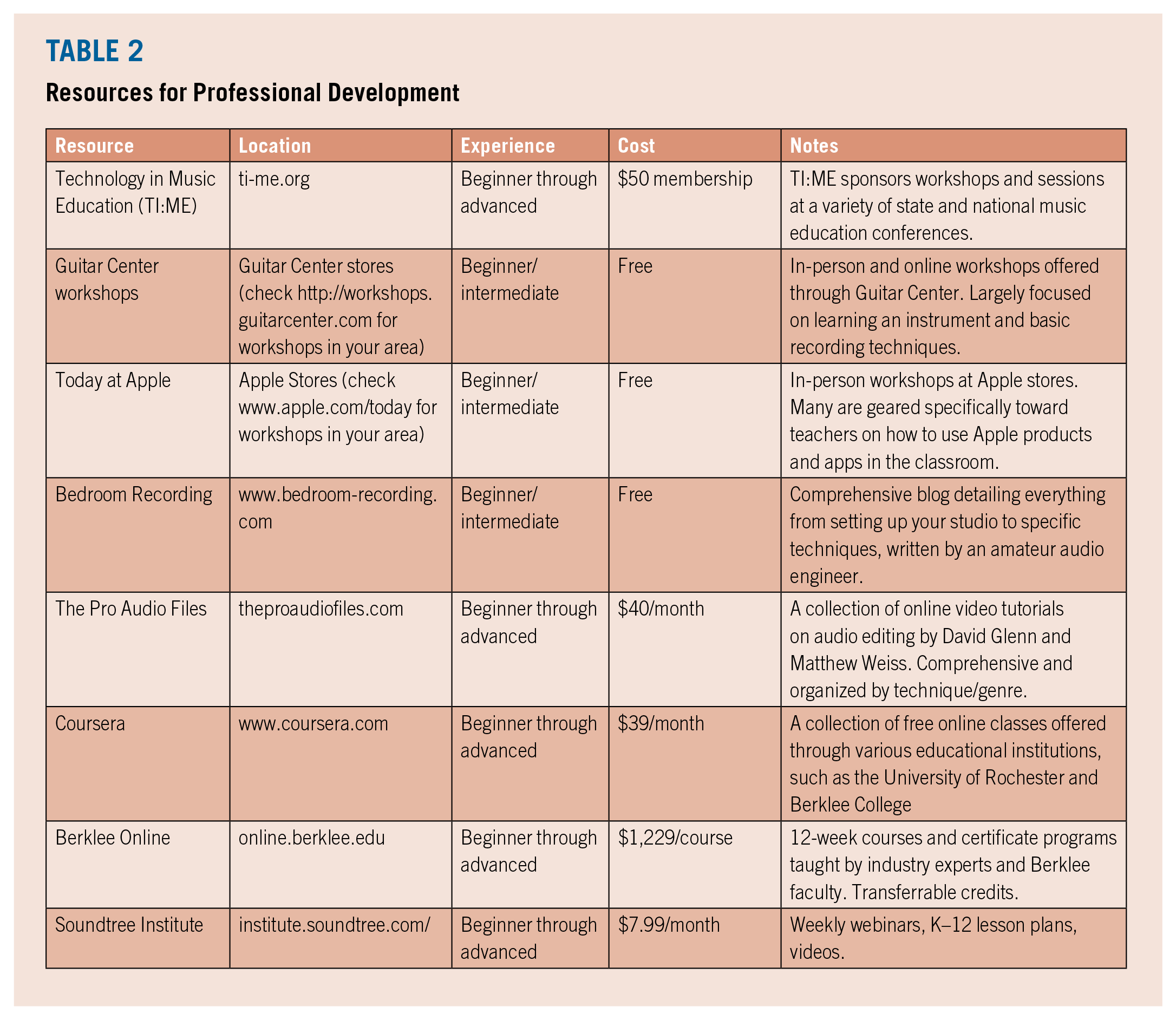
Because music teacher education programs rarely offer comprehensive instruction on music production and sound recording, readers may find Table 2, which displays resources for professional development, useful. This list provides a variety of opportunities through conference training, online courses, and workshops at a variety of price points. Many of these resources satisfy state-level professional development requirements, and some offer college or graduate credit.
Resources for Professional Development
While training and professional development will be useful, the authors also recommend a reconceptualization of the traditional roles of teachers and students in the classroom and rehearsal space. The teacher may consider limiting the amount direct instruction in the class and shift more into a facilitator role, acting as a music producer. 27 Our classroom spaces can be transformed into a studio, and our school program can become a working record label or production company. Physical classrooms can be expanded into deterritorialized communities or hybridized spaces. We can see the students inside and outside our classrooms as creative independent artists and singer-songwriters, and recognize that school music can be synonymous with student music.
Footnotes

Notes
Matthew Clauhs is an assistant professor of instrumental music education at Ithaca College in Ithaca, New York; he can be contacted at