




Abstract
With the exponential growth of information and communication technology, many digital tools that can provide immediate feedback on pronunciation have been developed in recent years. Among them, one recent noteworthy tool is Clips, which is capable of creating fun videos with automatically generated captions. This technology review provides an overview of its features and discusses how they can benefit foreign language teaching and learning.
Introduction
Language researchers have long noted the value of computer-assisted pronunciation training (CAPT) for foreign language learning (Levis, 2007; Mahdi and Khateeb, 2019). With the recent rise of artificial intelligence, CAPT is also entering a new era. Thanks to the increasing accumulation of data, the ever-growing cloud computing capacity, and the ubiquitous mobile devices, language learners nowadays are endowed with a growing list of tools that can be used to facilitate personalized CAPT (Rogerson-Revell, 2021). Among them, Clips is one with notable pedagogical benefits (Apple, 2021).
Overview
As a versatile video-making app, Clips allows users to quickly combine multimodal content such as videos, photos, text, and music into a video clip, and easily share it. In general, the creation of a clip within the app is straightforward. As is shown in Panel A of Figure 1, users can hold the red button on the bottom to start recording; and individual clips are retained for review, editing, and assembly in the dock area. Moreover, users can customize their clips with special effects, including Memoji (an augmented avatar that mirrors a user’s facial expression), filters, Live Titles (synchronous caption), scenes, text, stickers, and Emoji. With its robust speech-to-text engine and the augmented reality platform, Clips turns the creation of such videos into a relatively easy task.
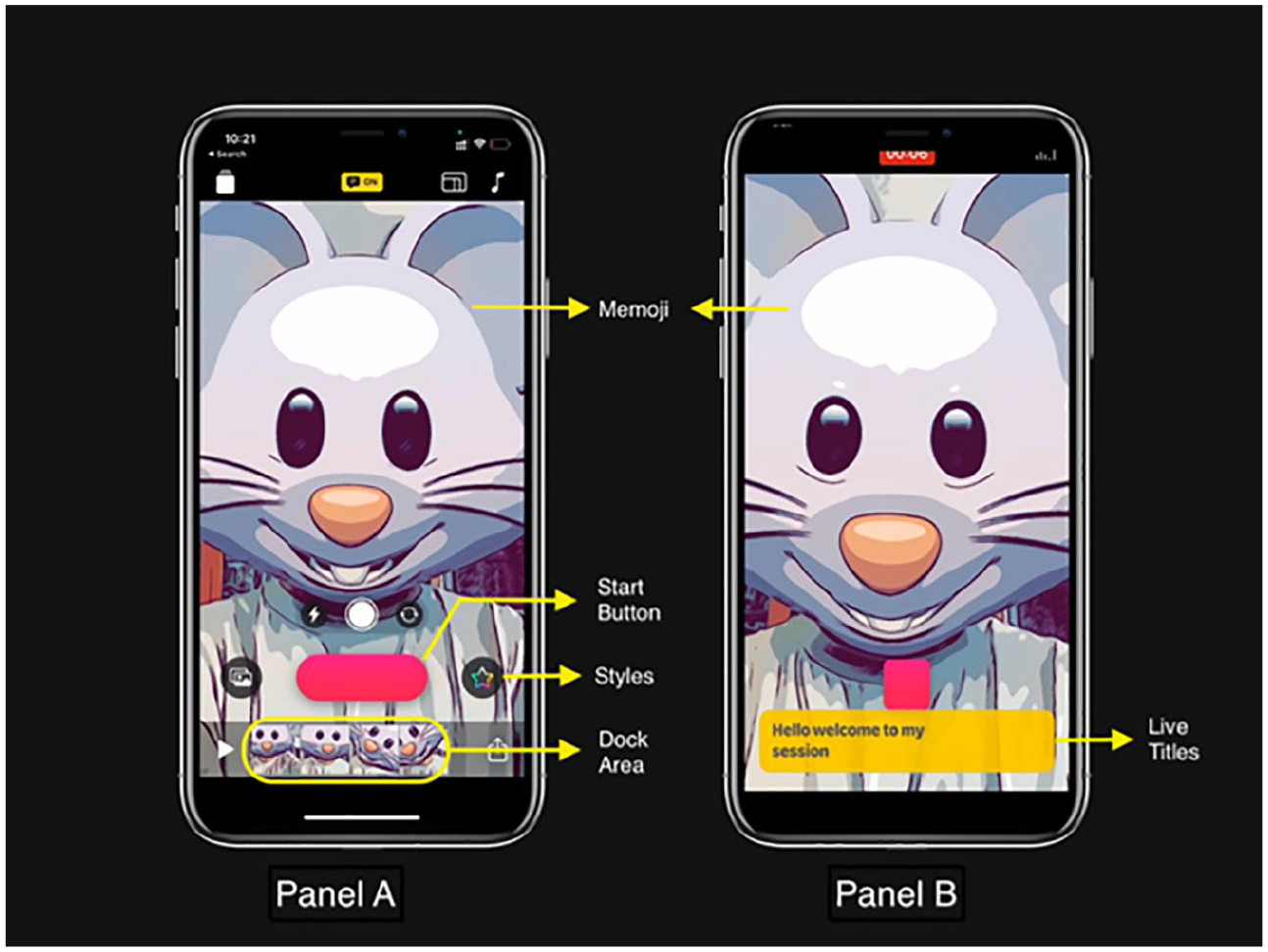
The user interface of Clips.
Potentials in CAPT
There are several pedagogical benefits of using Clips in CAPT, which include reducing language learners’ anxiety, providing instant feedback on their pronunciation, and making language learning more engaging.
First, for novice language learners, Clips helps to create a low-pressure environment where learners’ anxiety can be reduced. Prior research (Szyszka, 2017; Woodrow, 2006; York et al., 2021) has pointed out the association between learners’ decreased anxiety and boosted oral performance while using Clips. With Memoji turning them into animated talking avatars, language learners’ anxiety can be kept at a low level, and thus learners are likely to be more willing to express themselves. Furthermore, an additional benefit of this feature is that it may also help ensure students’ privacy in this digital age (Wehner et al., 2011).
Next, the multilingual speech-to-text engine can synchronize the captions with a learner’s voice, thus providing students with instant feedback. Through replaying the captioned clip, learners can easily pinpoint strengths and deficiencies in their pronunciation by identifying the words in the caption that do not match what they have just read. Research on CAPT has shown that this step has two potential benefits. First, with their voice being accurately recognized, learners’ confidence in communicating in the target language can be fostered (Eskenazi, 1999). Second, when checking these errors, learners’ phonological awareness can also be developed so that they are more aware of the subtle differences of sound patterns of the target language (Thomson, 2011). Moreover, compared with face-to-face communication, this CAPT approach is more acceptable for introverted learners.
Last but not least, with Clips, teachers can create more engaging learning experiences. For example, teachers may employ Clips to make their delivery of content livelier (e.g., sparkling stickers, captions, and music) or assign Clips-based pronunciation training tasks to implement task-based language learning (Gordon, 2021). In the latter case, students may be assigned a pronunciation accuracy task by creating an annotated video in order to showcase their understanding of the contrasting features of the target-language sound patterns (Hew and Ohki, 2004). On top of that, teachers can also sign up on the Apple Teacher Learning Center for further help, get free training materials, and stay updated. Furthermore, learners can also use Clips to document their learning experiences and share them with friends on social media. By doing so, they can form their community of interest, which helps to keep them motivated toward a common goal (Fouz-González, 2017).
Challenges
Despite these benefits, there are also several limitations in the use of Clips. First, both Clips and Memoji are confined to some recent iOS devices. Though mobile technology seems to be increasingly ubiquitous, teachers should keep in mind that students’ access to such technologies is not equal and this deserves careful consideration before introducing Clips to a language classroom. During our practice, we also found that when some students pronounce a word or sentence, they tend to consciously slow down the speed to be recognized by Clips. In our view, this deliberate choice may be helpful in the initial stage but may hinder the future improvement of students’ oral speech. Lastly, though highly intelligent and accurate, Clips is still far from perfection, which means users need to be reminded of its assistant role.
Conclusion
The growth of learning technologies, especially automatic speech recognition, brings CAPT a wealth of new possibilities (Rogerson-Revell, 2021). For advanced adult learners (e.g., preservice foreign language teachers), Clips is a convenient tool to identify their fossilized pronunciation errors and improve their overall oral performance. And for novice foreign language learners, Clips provides them with a stress-free environment where they could be engaged in evidence-informed pronunciation training. However, due to Clips’ confinement to the iOS platform (i.e., it can only be installed on iPhones or iPads but not MacBooks), the potentials of the free app remain underexplored. For further details, see Apple (2021).
