Abstract
In response to the COVID-19 pandemic, school closures across the country have altered the way educators teach and provide services to students. Engaging technologies in learning environments have become the primary mechanism delivering curriculum and maintaining the intellectual wellbeing of students.
Even with social distancing restrictions in place, special educators must continue providing academic, behavioral, social, and emotional-related services to students with individualized education programs, most often with little guidance (Goldschmidt, 2020; Hamilton et al., 2020). Due to the rapid shift from traditional learning to distance learning, there is a need for ongoing and additional resources to address remote instruction (Hamilton et al., 2020). Harnessing interactive and adaptive technologies to marshal pedagogically sound practices into the home setting will be crucial to successful e-learning.
Artificial Intelligence
With the accelerated expansion of technologies across the K–12 curriculum, students’ opportunities to engage with education-focused artificial intelligence (AI) software have increased (Touretzky et al., 2019). AI is described not as a cognitive process but as a multitude of components that constitute intelligence, such as problem solving, perception, and language identification; researchers have been able to develop AI software that mimics human decision making from its experiences (Lodhi et al., 2018). Society has more access to and interacts with AI devices more regularly and intimately than previous generations (McCarthy, 2007; Touretzky et al., 2019).
Amazon Alexa
Students are beginning to interact with and orient themselves to AI through the use of home devices, such an Amazon Alexa (Jones, 2019). Many families and educators already have an Alexa device in their home that provides simple interactions with immediate feedback. Users can access Alexa’s built-in functionalities, such as using search engines, providing weather information, or playing their favorite song (Wang, 2017). Alexa refers to these capabilities as “skills” and are the programmed applications that create experiences for users when they interact with their devices.
Any developer with knowledge of code can build the skills through the Alexa Voice Service platform (Amazon Alexa, n.d.). Amazon also provides users with premade blueprints for Alexa that are shells of skills made to be used by users of all technological abilities. The blueprints offer the average user guidance to create customized and personal voice user interface activities. As virtual assistants’ capabilities continue to multiply, the blueprints provide conversational frameworks of short exchanges that offer endless opportunities for practice (Rosell-Aguillar, 2018; Skidmore & Moore, 2019).
As these technologies become more commonplace, we should begin looking toward how we can adapt these tools to be used by individuals with disabilities (Liu & Mihalilidis, 2019). The aim of home-based assistance interfaces was not to educate users; however, the software programs can be leveraged to structure home environments and create opportunities for a routine. Therefore, we propose the use of AI devices, Amazon Alexa, and their prebuilt blueprints as an emerging form of educational technology. Educators can adapt the established blueprints to meet the needs of their students, mainly to help support distance-learning initiatives.
Adapting strategies
One popular Alexa blueprint that can be useful to educators is Task Tracker. Task Tracker provides the user with a checklist of activities that help the person stay organized and require sequential completion and user voice prompt to advance. Educators can adapt the skill using the same principles from task analysis and create a self-operated auditory prompting system to increase student independence in academic and behavior-related goals (Savage & Taber-Doughty, 2017).
Task analysis breaks down target academic or behavioral tasks into manageable steps with antecedent cues to the student to increase the overall success of the entire target skill (Mays & Heflin, 2011). Using a self-operating auditory prompting system allows students to independently move through the scripted audible prompts using a technology device. With students completing the task independently, it allows educators to increase their distance and fade their support of the target skill (Savage, 2014). Mechling (2007) showed that using the self-operating auditory prompting system in teaching and learning can be successful with a range of students, including those with autism, intellectual disabilities, and visual impairments.
Guided practice
The first step for educators and parents to access the skill blueprints is to own or borrow any device with Amazon Alexa. Amazon has launched devices with and without screens that facilitate both voice- and image-supported experiences (e.g., Echo Dot vs. Echo Show). The blueprints support voice commands and experiences only, but once created, they can be enabled to be used on any device.
Next, the user would need to log in to https://blueprints.amazon.com with their Amazon account information. From here, users can see the suite containing all of the blueprints available with a brief description of their intended use (see Figure 1). Amazon organizes the blueprints into categories, such as home, business, learning and knowledge, and fun and games. Users select the desired blueprint form, such as Task Tracker (see Figure 2), and are provided with an example skill and the option to create their own.
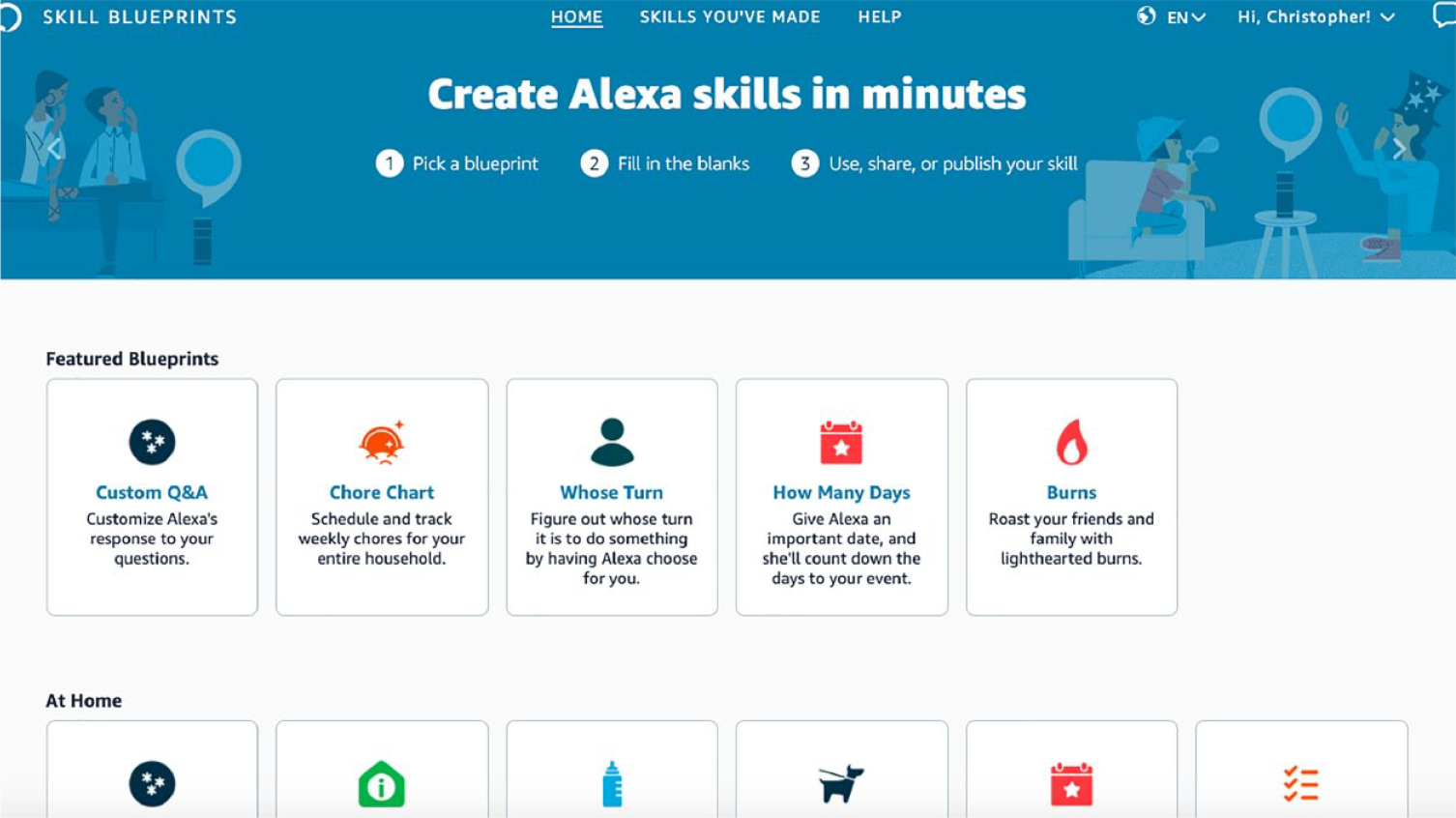
Amazon Alexa blueprint homepage
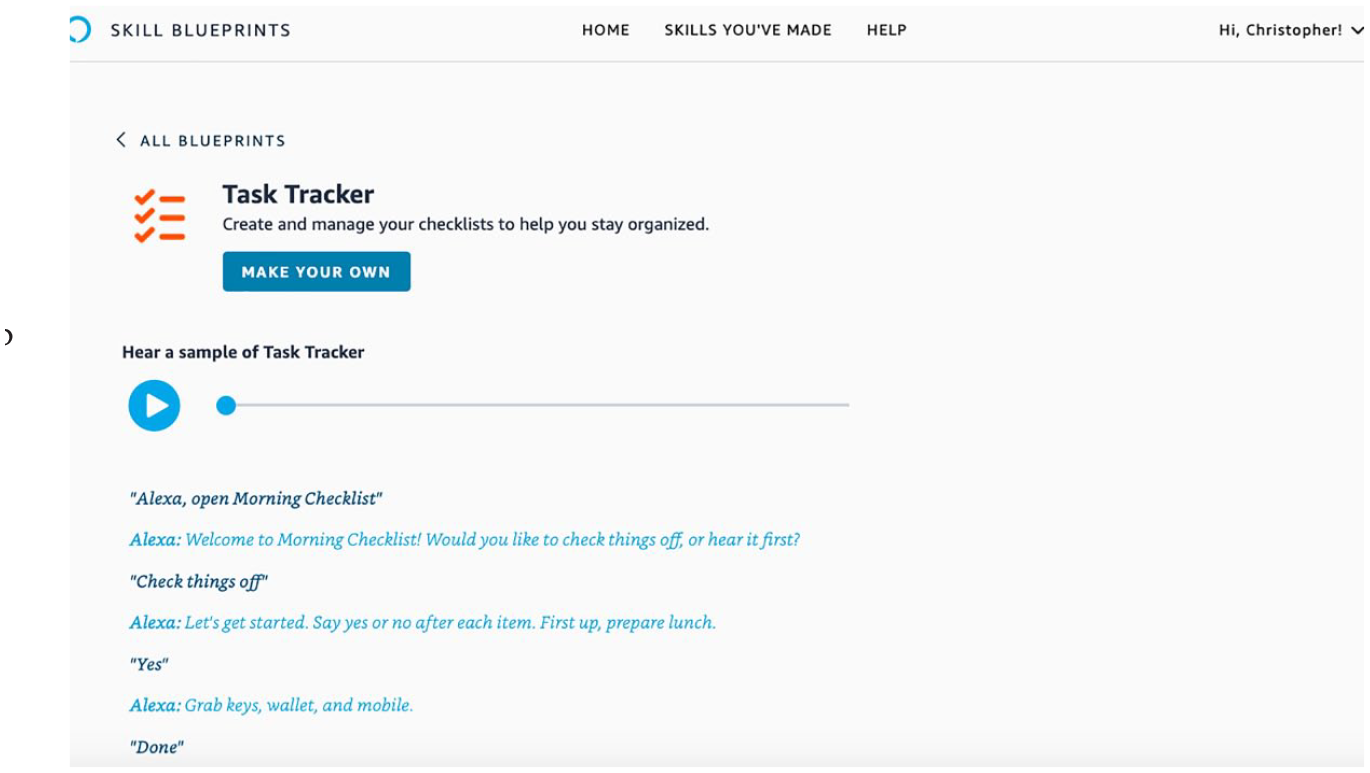
Amazon Alexa blueprint: Task Tracker skill
Users fill in fields that correspond to content related to the skill, the user experience, device responses, and naming the skill, which becomes the phrase used to initiate the experience (see Figure 3). The skills are intuitive for the user to move through rather quickly. After the user completes the form, the next step prompts to create the skill the user just made by making it accessible on the user’s personal Alexa devices (see Figure 4). Once the user creates the skill, they can publish the skill for all Alexa users to access, or as the creator, they can email the skill directly to individuals who can then access it on their Alexa devices (see Figure 5). This feature allows educators to create personalized skills using the blueprints for their students during e-learning and beyond.
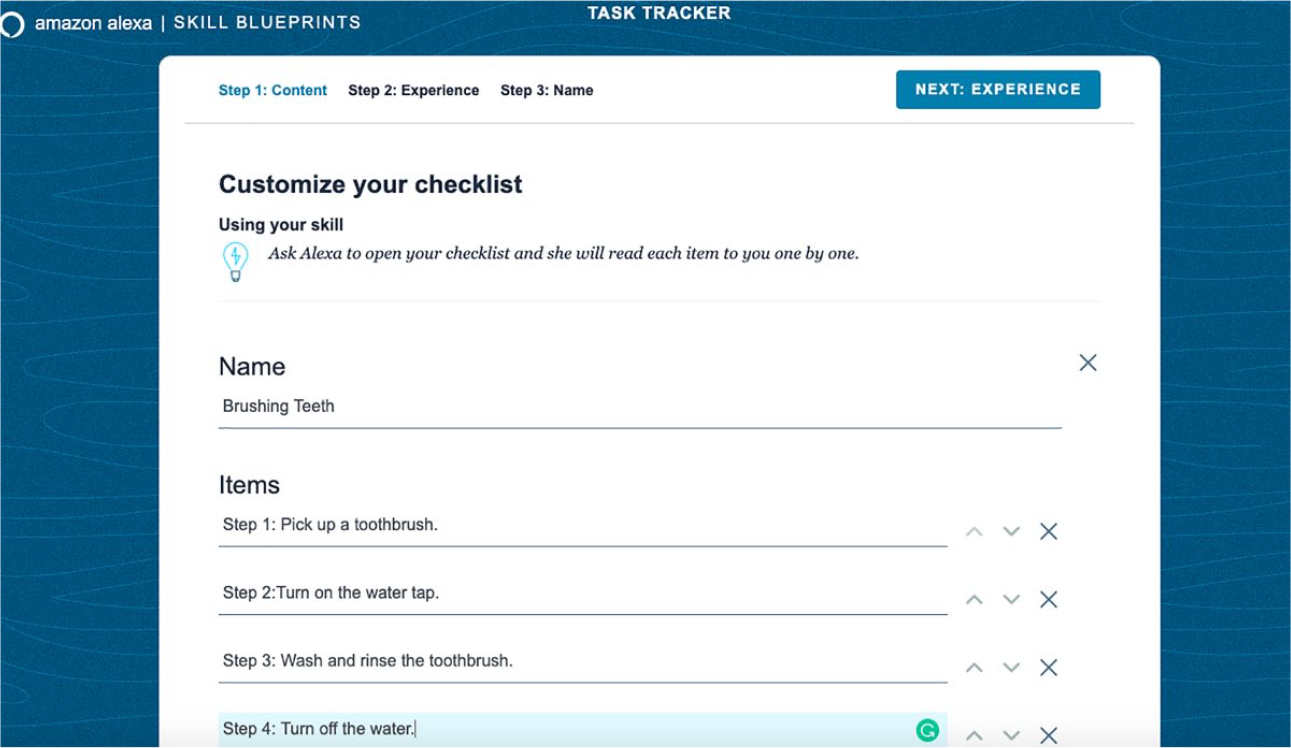
Amazon Alexa blueprint: Task Tracker skill customization
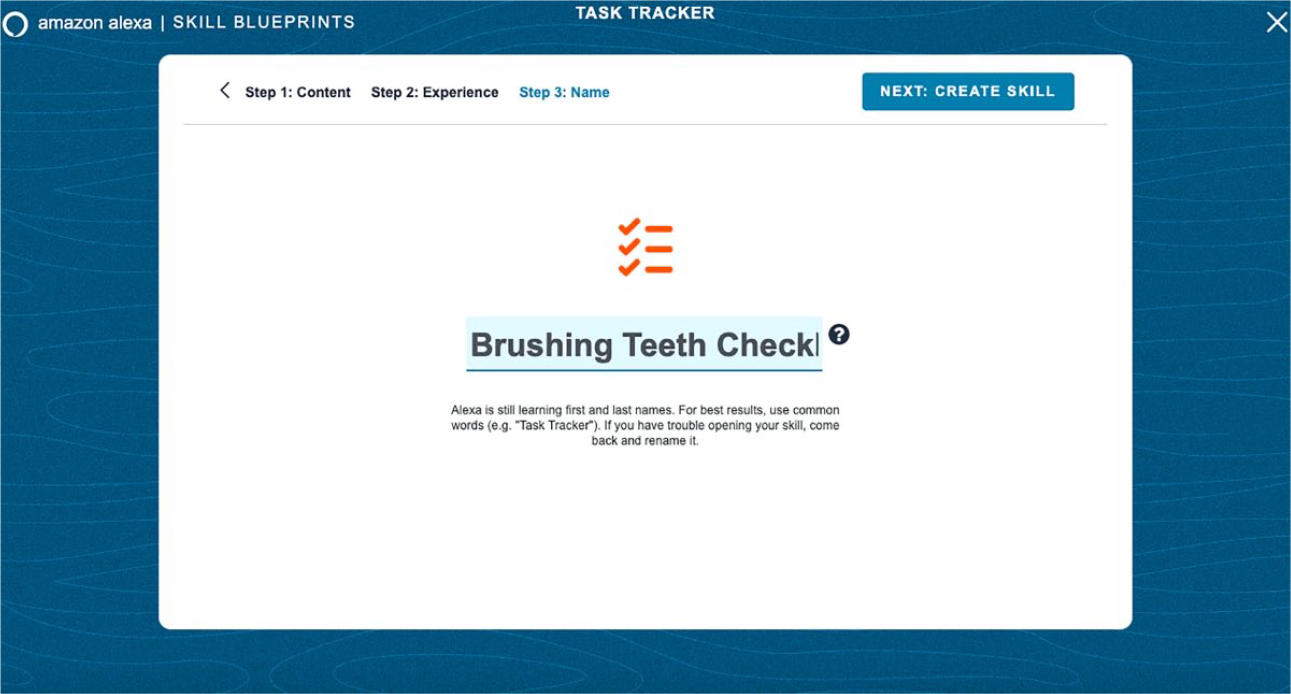
Amazon Alexa blueprint: Task Tracker skill title
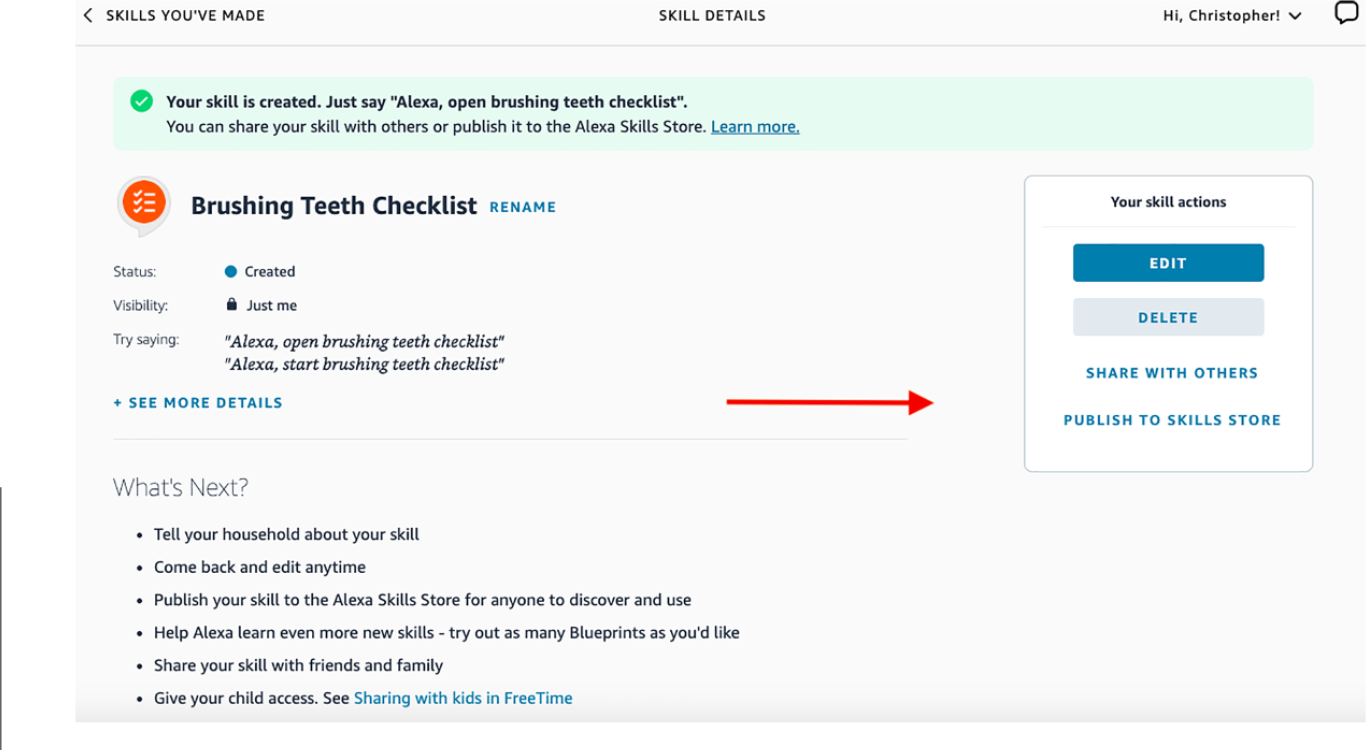
Amazon Alexa blueprint: Task Tracker skill
Leveraging Technology to Support Student Learning
As of 2019, Alexa was embedded in nearly 150 commercial items on the market (Bohn, 2019). By leveraging the ability to create customized smart assistant skills, educators can embed strategies unobtrusively into the home setting through technology that may already be owned by families. Inherent limitations still exist with the Alexa devices; for one, the blueprints are fixed. The user must use the existing forms to adapt the strategies they develop for their audience unless they have coding abilities. However, with some ingenuity and software advancements, Alexa could go beyond facilitating simple exercises and move toward more valuable and complex learning experiences (Skidmore & Moore, 2019). Although the COVID-19 pandemic is the reason that caused us to look at new and burgeoning technology opportunities, the universal acceptance of home AI devices and their ease of access will be what help their longevity. More research on the use of home AI devices in learning is still needed. Education researchers and educators will need to consider their roles in supporting students in learning moving forward.