



Abstract
Individuals with disabilities continue to struggle with writing. Most students with disabilities do not measure at even the most basic level in writing assessments. Technology offers tools to support writing instruction, but many teachers acknowledge a lack of confidence in designing instruction using these tools in writing. Using the 6 Traits of Writing model as a framework, this article describes how students with disabilities may be challenged in each trait and provides technology that can support the attainment of skills within that identified trait area.
Keywords
Writing instruction continues to be a challenge for teachers as well as the students they serve. Finding the time to write, let alone teach writing, is an ongoing struggle. The lack of this instruction is evident in national data, particularly for students with identified disabilities. For example, according to the latest results from the National Assessment for Educational Performance, 80% of the eighth-grade students identified with a disability were unable to write at even the basic level of performance (U.S. Department of Education, 2011). Fortunately, the integration of the Common Core State Standards (CCSS) paired with the increased literacy focus in the Every Student Succeeds Act (ESSA, 2015) has created a heightened focus on writing. Furthermore, the CCSS expects students to use technology and thus keyboarding for text generation beginning in the second grade. Current findings, however, suggest that schools continue to struggle with facilitating significant changes in writing instruction (Graham, 2019).
The CCSS (used in over two thirds of the states) support an increased focus on writing across content areas and grade levels and yet findings suggest a limited focus on writing instruction with slight increases in time for writing (Troia, 2014). One of the identified problems is that teachers have little training on how to teach writing, which informs why we continue to find limited writing instruction in the K–12 environment. Troia and Graham (2016) found that fewer than half of teachers surveyed in Grades 3–8 had taken a college class solely devoted to how children learn to write. Not surprisingly, nearly half of the respondents, 45%, said they did not enjoy teaching the subject.
While the discussion for why there is a limited focus on writing may be ongoing, research is increasingly arguing that classroom teachers need to emphasize process and not product (Troia, 2014). Due to limited time or a hyperfocus on outcomes, teachers are found to regularly emphasize specific parts of an assignment rather than assisting the student in the process of writing (e.g., generating ideas). The result, particularly for students with disabilities, is an incomplete or poor product with limited skill development on the part of the student.
While CCSS and ESSA are providing a much-needed wake-up call on the importance of effective writing instruction, preK–12 schools are in the midst of a digital transformation. Today, nearly 45 million K–12 students and over 2.6 million teachers in more than 81,000 schools have access to internet-based solutions they need to foster digital learning (Education Superhighway, 2019). Across the United States, 98%of all public school districts are connected to high-speed broadband. Digital learning initiatives featuring one-to-one student to digital device programs are exploding across K–12 classrooms. Blended and virtual learning is spearheading digital conversion within the classroom replacing hard copy textbooks with interactive multimedia digital textbooks or e-textbooks, and as a result, individual students are conducting a significant portion of their instructional and learning day on a laptop, tablet, or smartphone.
Growth in technology has renewed efforts in examining the use of technology paired with writing instruction (West, 2019). Specifically, researchers have resumed efforts to move past the investigation of not only how technology can be used to support writing assessments but also how technology can be paired with instructional supports and used to deliver formative feedback (Allen et al., 2016; Roscoe et al., 2013). Research has shown that technology can facilitate the writing process, particularly for struggling learners and those individuals with disabilities (Bouck et al., 2015). Integrating technology into writing instruction that moves beyond basic word processing can support better attainment of skills to improve the quality and quantity of writing produced by students including those with disabilities (Vue et al., 2016). Educators across grade levels and content areas are seeking best practice for teaching writing and using technology to write digitally in engaging and impactful ways (West, 2019). The pairing of writing instruction with technology has many potential benefits to engage and motivate students and support teachers’ confidence and skill set when teaching writing, thereby directly impacting the outcomes of students with disabilities as they move into the adult domains of postsecondary education, employment, and residing in the community. In addition, whether on computers or tablets, schools across the country are seeking to further the integration of technology including word processors and other forms of electronic communication (Education Week, 2017; Graham et al., 2016).
In this article, we describe digital technology solutions that are readily available to teachers and students to facilitate teacher writing instruction and student writing efforts. There are numerous apps, Google Chrome (google.com/chrome) extensions, and overall technology tools that support the writing process. A simple list of these various tools is beneficial but offers limited guidance in the use of each within writing instruction and how specifically the digital solution would support the individual student, particularly those with identified disabilities. Instead, like most technology implementation efforts, we need to connect the digital tools with specific instructional practices. The instructional approach we have selected is 6 Traits of Writing (6 Traits). Recognizing there are a number of instructional approaches and frameworks, we focus on the 6 Traits due to its wide use in today’s classrooms, its broad application across K–12 grades, its alignment to CCSS, and its basic elements that mirror similar writing approaches. To better support teachers in their writing instruction, our intent is to align each of the individual traits with an instructional approach and several digital solutions that are widely available, easily accessible, and that have been shown to facilitate, if not improve, student writing, particularly those with disabilities. Therefore, the purpose of this article is 2-fold. First, we will demonstrate how technology can support the teaching, learning, and implementation of the 6 Traits of Writing. Second, we will examine how technology can support educators to individualize learning for all students, especially those who struggle. Specific tools and field-based stories will be shared for each trait, as well as steps for implementation to help readers generalize to their own contexts.
6 Traits of Writing Approach
Graham et al. (2011) assert that students who learn to write well fare better as they progress through K–12 academic requirements, postsecondary academic requirements, and on into their adult employment. Many educators, however, feel unprepared to teach writing, especially if they are in specific content areas like science, social studies, or other areas beyond language arts (Kohnen et al., 2016; Myers et al., 2016). Likewise, students who struggle with writing, especially those with learning disabilities, need explicit instruction to support the development and execution of writing (Graham & Harris, 2013). One instructional approach common in the K–12 classroom is the 6 Traits. The 6 Traits are often seen as a structure to support writing instruction, serving more as a framework than a writing program. The 6 Traits model was developed in the 1980s and asserts that good writing has six key traits, which include ideas, organization, voice, word choice, sentence fluency, and conventions (see https://educationnorthwest.org/traitsformoreinformation). The 6 Traits serve as key components that provide teachers and students a guide for how to generate ideas, compose, revise, and then assess various types of writing (e.g., narrative). These 6 Traits are not a curriculum but rather a set of qualities that help define, generate, assess, and describe good writing (Coe et al., 2011). Indeed, research suggests that 6 Traits may produce negligible or no benefit to student writing (Graham, et al., 2015) and yet, they are described as a common language for teachers and students to determine what is and is not working in their writing product (Culham, 2006) and can be used to facilitate explicit instruction. With the development of the CCSS, efforts have been made to crosswalk and correlate the traits and the standards for narrative, argumentative, and informational/explanatory writing.
For each trait, there are practical and creative technology enhancements that can support all students, especially those who struggle. Pairing these 6 Traits with technology has the potential to effectively meet the needs noted earlier of teachers who feel insecure about writing instruction and promote effective outcomes for those students with disabilities who struggle with writing. We offer these paired technology solutions below.
6 Traits Plus Technology
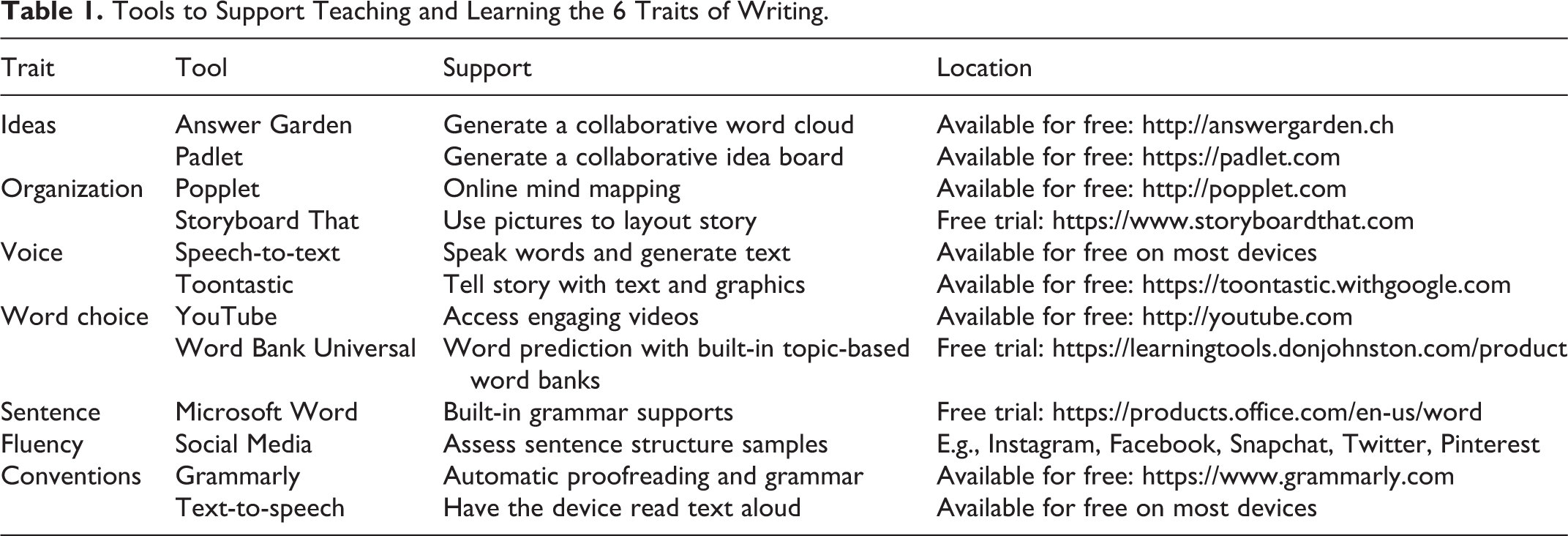
In order to support the pairing of technology, each writing trait should be examined systematically. In the following section, we will introduce each trait, highlight how a student might struggle with the trait, and describe how technology can support the teaching and learning of that trait for students. Specific attention will be given to how the trait can be differentiated depending on the needs of the students. See Table 1 for a summary of the traits, the technology recommendations, their cost, and locations for attainment.
Tools to Support Teaching and Learning the 6 Traits of Writing.
Ideas
The first of the 6 Traits is ideas. The ideas of a writing product include the main message and supporting details. Students with disabilities (e.g., learning disabilities, attention deficit hyperactivity disorder), often struggle with identifying ideas for a writing task. Challenges in reading are often the primary cause. Limited skills in reading comprehension reduce student content knowledge. Students with limited foundational knowledge often do not have information to draw from and thus, ideas are restricted or incomplete. A common solution to support student acquisition of new knowledge is offering them some sort of published text, for instance, a website or a reference book and yet students with learning disabilities also struggle to develop a reflective practice with reading as compared to more proficient writers and readers in their peer group and thus they struggle to analyze and draw evidence from written sources (Joseph & Ross, 2017). Likewise, students with disabilities find it difficult to decide on a topic, generate supporting details, or offer reasons to justify their main points (Kiely, 2018). Over time, these students become reluctant writers, struggling to get started in the writing process and unable to generate text. Over time, their anxiety grows, and they find themselves making little to no progress. To support students in generating ideas, technology can be a helpful solution (Saulsburry et al., 2015). For example, AnswerGarden (Creative Heroes, n.d.) is a free tool where teachers or students can state a question and request responses from other people. A student or teacher may type the question, “What is the most exciting thing that could happen to you?” and send the link to peers via text or Google Classroom (classroom.google.com) where ideas can be generated by class members. Students click on the link, read the question posted in AnswerGarden, and type their response. The result is a word cloud where the most frequently mentioned items grow larger than items that were mentioned fewer times. This example gives students a starting point with ideas that they can choose from instead of having to generate on their own.
Interactive whiteboards or collaborative spaces are another option for idea generation. Padlet (Goel, 2008) is one of several web-based tools that allow one to generate ideas via a series of stickies, posts, or additions to a virtual bulletin board. Padlet is meant to be a collaborative space where students can add ideas via words, images, video, graphics, and the list goes on. Students can add anonymously if they are hesitant to claim an idea or thought. Not limited to words, ideas can also be represented through pictures, audio files, and other multimedia that students generate or more likely, find across the web and insert via the Padlet tool. The result is a list of ideas developed by an individual or a group of individuals. Ideas that can then be structured for a writing task.
Organization
Once ideas are generated, they need to be organized and arranged in a clear order including a beginning, middle, and end. This is a complex task requiring executive functioning skills that allow students to plan, organize, strategize, and regulate how to approach a task. The second of the 6 Traits requires students to organize their thoughts so that there is a thread or pattern and sequence that fits into a central idea. For students with disabilities, challenges with executive functioning skills exacerbate the organization and planning that is needed for this second trait. Without the necessary supports, students who struggle with organization and structure tend to spend less time planning their writing and in turn, have difficulty putting their ideas into a meaningful and purposeful order (Rouse & Sandoval, 2018). Even if students have generated ideas, lack of structure, poor sequencing, and similar challenges in organization will often prevent students from developing a connected piece that helps the reader understand the central theme. Technology tools that support organization include Popplet (Apple, Inc., 2013), Inspiration (Inspiration Software, Inc., n.d.), Kidspiration (LearningWorks, 2020), Storyboard That (Sherman, 2012), and a host of other interactive graphic organizers.
For example, Popplet (Apple, Inc., 2013) is an interactive graphic organizing tool that helps students structure ideas by dragging and dropping them into various categories and order in preparation for the drafting of paragraphs. Organization tools like Popplet, Inspiration (Inspiration Software, Inc., n.d.), and Kidspiration (LearningWorks, 2020) offer multiple features for altering shapes, connecting thoughts with arrows or lines, and using different colors/patterns to visually show relationships between different ideas, thus providing students who struggle a tool for supporting progress (Ewoldt & Morgan, 2017). These apps also allow for various media including images, pictures, and videos to further represent ideas supporting learners as they seek to structure their paper. Some of the interactive graphic organizer apps convert a graphic web into a traditional outline (e.g., Inspiration), useful to further facilitate the writing task. A word of caution on the broader family of mind mapping apps, which Popplet and Inspiration are often included. Unfortunately, not all mind mapping apps and web-based tools are equal, particularly for students with disabilities. A number of these mind mapping apps were developed for the business world or similar audiences (e.g., Mindmeister [Meister Labs, 2020] or Mindomo [Expert Software Applications, Inc., 2007]). They are often limited in the ability for the learner to use video, flexible arrows to connect ideas, patterns and colors, and other critical supports that facilitate organization for students with executive function challenges.
Other apps and web-based tools that support student organization reside in the broad area of storyboards or even interactive digital storybooks. A popular storyboard web-based resource is Storyboard That (Sherman, 2012). Storyboard That allows students who are generating a story to organize scenes sequentially with pictures. For instance, a student may be writing a narrative story and they know they want to begin with a football game where their favorite team wins the championship, then move to their favorite pizza place to celebrate, and end up at home to rest after having a wonderful time. Storyboard That provides empty boxes with already generated images of people, places, and things that students can drag into each scene to help tell their story and then add text to offer additional details. The structure of the storyboard requires the students to place their idea into a sequence. The images, graphics, and text bubbles offer tools to illustrate their idea, enriching the information, and further building their writing in an organized sequential manner. Similar to the interactive graphic organizers, digital storyboards provide engaging and motivating opportunities to structure and order one’s thoughts before they begin writing their story in paragraph or essay form (Saulsburry et al., 2015).
Voice
Voice is a 6 Trait that involves exhibiting the personal tone of the author. Often seen as the most important of the 6 Traits, voice is where the writer comes through to their audience offering a sense that a real person is speaking to the reader. The heart and soul of writing is exhibited through voice where the author engages the reader and shares with them their knowledge of the topic. This trait is often accomplished through good sentence structure, effective word choice, and the use of intentional punctuation. For students with disabilities, their struggles in reading comprehension can often hinder vocabulary knowledge, which is needed in facilitating a student’s voice (Baker et al., 2003). Likewise, students with disabilities struggle with syntax or the rules in language for assembling words to form sentences (Troia, 2014). Forming sentences requires a writer’s semantic (i.e., word usage in context), grammar, and mechanical (e.g., application of punctuation rules) application. Problems in any of these features impact the voice of a writing product.
Teachers can support student development of voice in their writing by alleviating challenges with spelling and handwriting and allowing their students to speak their words into a speech-to-text software (Cannella-Malone et al., 2015). By helping students use the built-in speech-to-text feature on a student laptop, tablet, or mobile device, they can speak their thoughts and ideas in a stream of consciousness, conversation style and then go back through the written text to edit and refine. For example, Google (n.d.) Docs offers a Voice Typing Tool to facilitate speech-to-text. Increasing, Microsoft (n.d.) products like Word and Outlook offer a dictation tool for their own version of speech-to-text. There are also a number of assistive technology tools developed specifically with speech-to-text functions including wordQ (Quillsoft, Ltd., 2020), Dragon Naturally Speaking (Nuance, n.d.), and a host of similar supportive word processors. Thus, depending on the digital tool a student used to organize their ideas (e.g., interactive graphic organizer or outline), they can then use it as a guide when they open a word processor and speak their story into their device.
Students who struggle with voice often follow a limited step-by-step structure of a paragraph or essay where they regurgitate rote text. While this produces text on paper, the student’s personality does not come through in their writing. Technology tools that facilitate a student’s voice drawing out their personalities include comic or comic strip creators. Digital comic creator apps and web-based sites can be used to quickly generate an animated story utilizing comic visuals, conversation clouds, characters, and text boxes. These supports facilitate the generation of ideas while allowing students a forum to infuse their passion, personality, opinions, and whimsy in their writing. Examples of web-based comic creators include Make Beliefs Comix (Zimmerman, 2006) or Pixton (n.d.). Each provides premade characters (including various emotions and poses), backgrounds, thought and speech balloons, and a variety of other tools that facilitate student development. Apps like Toontastic (Google, n.d.), or Puppet Pals HD (Polished Play, LLC., 2018) offer further digital solutions to facilitate sentence structure and bringing one’s personality to their writing. For example, Toontastic offers a traditional background, characters, and similar digital features while also providing a writing structure. The embedded structure is meant to facilitate the structure of the writing, support the ideas that the student is trying to integrate into the writing, and in turn, allow for their personality to come out in the cartoon. Of course, the digital comic could serve as the writing outcome or easily serve as a draft to be transferred into a traditional paper. By offering students alternative mediums like digital comics to write in and by letting students speak their ideas instead of having to focus on the physical creation of text, students have more opportunity to discover what works best for them to share their Voice with their audience.
Word Choice
Another 6 Trait is Word Choice. Word choice is the vocabulary used by the author to form a mental picture of the author’s message. In persuasive writing, for example, strong and purposeful word choice clarifies and expands ideas, moving the reader to understand your vision. Effective word choice is characterized by a combination of vocabulary and skill in the use of everyday words to communicate your thoughts and ideas to the reader. Students who struggle with word choice tend to choose common, generic words that illicit unclear or muddy visuals for the reader. As students read more and are exposed to more vocabulary, their word choice may expand; however, purposefully modeling the use of powerful, illustrative words can support a more conscious focus on spicing up the words used for writing. Modeling allows students to visualize what they want to share. By seeing examples, students realize they are not so much telling their audience as they are offering a descriptive narrative. A digital tool that can foster this process is video. Simple descriptive videos that are increasingly available to teachers and their students, such as those found on YouTube (Google, n.d.), offer a number of channels designed by educators and entertainers, specific to topics such as boosting word choice. For instance, the Jack Hartmann Kids Music Channel is packed with videos on educational topics, one of which is called Vivid Verbs (Hartmann, 2019). The Vivid Verbs video can be used to engage middle school students in the topic of word choice, model examples, and nonexamples of strong word choice, and then ask the students to enhance their own writing by choosing three to five words to boost.
Once students have examples of strong word choice and understand they are in the description business, they will most likely continue to struggle to generate the strong words that they want to produce. Another digital solution is word prediction. Word prediction is increasingly a standard tool for most writing. For example, it is rare to find a mobile device without some sort of word prediction available to support and sometimes aggravate (e.g., producing the incorrect word), the writing process. As a basic tool, word prediction generates word options to facilitate the writing process. However, not all word prediction tools are equal. Instead, for the student with a disability who struggles with word choice, word prediction offers a number of critical supports through its various features.
Central to word prediction is the word list that is automatically generated for the student. As a student types, word prediction detects what letters are being typed. With each typed letter, word prediction offers a list of (e.g., five) words that it thinks the student is trying to write. As the list appears, the student can often hover over the word, depending upon the word prediction app, in order to listen to the word being read aloud. When the student identifies the appropriate word, they can select the word, type the corresponding number (e.g., 1–5), or continue typing the word to insert it into the writing. Generated word lists will also offer suggested words. For instance, a student might begin a sentence with the word “The.” Word prediction would then offer a list of words that would be appropriate to continue the student’s thought. As a student uses word prediction, many apps will identify a topic or list of common words being used and begin to provide these suggestions as part of the word list. There are also advanced word prediction options available to provide supports for word choice. For instance, Word Bank Universal (Google, n.d.) allows a student or teacher to enter a topic, such as “Jurassic Period,” or “Roll of Thunder, Hear My Cry,” and the software will predict words, based on that topic. Students are more likely to find words related to their topic if they are enhancing the power of word prediction with a word bank. By providing examples of strong word choice and modeling the use of strong word choice while also offering students opportunities to practice with word banks customized for their topic, students who struggle have tools to support the use of powerful and illustrative words in their writing.
Sentence Fluency
The next trait is sentence fluency. Sentence fluency is how well a paper flows within and between sentences and paragraphs. Students who struggle with sentence fluency tend to have incomplete, fragmented, or run-on sentences, or they may use the same word repeatedly to begin sentences or to make transitions between different topics or ideas. They also struggle to generate text and thus, applications like word prediction, mentioned earlier for word choice supports, can enhance sentence fluency. However, one digital tool or family of tools that can often impede sentence fluency, and thus a teacher or student may consider turning off, are grammar and spell check features. For example, word processing applications (e.g., Microsoft Word, Google Docs) have historically offered convention tools that identify writing errors. In Microsoft Word, a red squiggly line underlies a potential spelling error, while a green line suggests a grammar error. These tools are excellent for some students to realize needed challenges in their drafts; however, for some students with disabilities, particularly those with attention challenges, these visual prompts can often impede fluency. For instance, instead of waiting to return to their draft to correct their writing error, students with disabilities often stop and correct the error immediately. This impacts the rhythm and flow of the language as well as the word patterns being generated through fluency of the thought process, which often facilitates sentence construction. An easy fix to this distraction is to turn these convention tools off during the drafting stage. When sentences are complete and ready to be reviewed, simply turn the tool back on allowing for the rainbow of colors to appear identifying potential errors in the writing. For students who find the added color overwhelming, teachers can offer an initial grade, feedback on the content (not the mechanics), or a similar strategy prior to the spelling and grammar corrections. This would reinforce rather than discourage the learner as they apply energies to needed edits.
If students are unsure of how to construct quality sentences, it is also important to teach and practice each type. There are four different types of sentences including simple, compound, complex, and compound-complex. Each type of sentence needs to be explicitly taught examples and nonexamples shared, and students need an opportunity to practice and locate them (Troia, 2014). One suggested strategy would be the use of social media to facilitate sentence fluency. By sending students out to current social media outlets to identify examples of the various sentence types, learners are further engaged in ways to explore written text and thus, learn about sentence fluency. In a 3-year study, funded by the National Science Foundation, to explore how social media could be used to support student learning and teacher instruction, researchers found that with proper guidance on digital citizenship and teacher articulated search parameters, students can learn within the engaging digital social spaces that they tend to frequent during their free time (Rowland, et al., 2017). Through purposeful use of text-to-speech features on digital devices, and by allowing students to discover how sentence fluency is used on social media, struggling writers can increase the readability and flow of their writing in order to better share their message with their audience.
Conventions
Conventions are the final trait. Conventions include spelling, grammar, capitalization, punctuation, and paragraphing. Students who struggle with conventions may struggle to draft, edit, and revise their writing (Ok & Rao, 2019). To support students who struggle with conventions, there has been an explosion of online grammar checks. One of the most popular is Grammarly (Grammarly, Inc., 2009). These online proofreading tools identify deficiencies in the text, highlight errors, suggest grammar and punctuation corrections, and check for fragments, tense, and even dangling modifiers. As the student types, errors are identified and by hovering over the potential error, Grammarly, Ginger (Ginger Software, n.d.), and similar applications provide suggestions for correcting the problem. Similar to Microsoft Word, many of these digital tools will color an error (e.g., red, green, blue) so that the student can understand their error is misspelling (i.e., red) and a suggestion for writing style (i.e., blue). As these tools continue to grow, they can be applied to a variety of writing platforms including word processing docs, blogs, web page applications, and of course, email applications. Likewise, the proofreading supports are increasingly expanding beyond conventions offering options to rephrase text while also recommending synonyms and definitions. Products like Ginger and Grammarly offer students a level of independence as they struggle to make meaningful revisions to their drafts (Rouse & Sandoval, 2018).
Conventions can be further improved by conducting a read-aloud. Listening to what one wrote is an effective strategy to determine the mechanical correctness of one’s draft. Reading a draft aloud allows a writer to hear errors in their sentence, paragraph, and the entire essay. They may have left a word out, made grammatical or punctuation errors, shared an incomplete thought, or a host of other problems. By reading aloud where you follow along word by word at a moderate pace, the writer allows their brain to process what they have written.
In today’s digital age, text-to-speech offers a great read-aloud tool for identifying potential errors in punctuation, grammar/usage, and overall writing. Increasingly built into web browsers or word processors (e.g., ReadWrite), students can select a sentence, paragraph, or the entire essay and have each and every word highlighted as the computer reads it aloud. Students can set the pace to ensure it is at an appropriate level to identify potential errors. As the text-to-speech highlights and reads a word, the student gets visual and audio support to identify errors or challenges in their writing. Thus, teachers can support conventions by facilitating the use of built-in text-to-speech settings on their writing devices (e.g., iPad, laptop). By allowing students to hear what they wrote, they may be more likely to hear what sounds awkward instead of having to use their cognitive load to both read the text and determine what sounds awkward within (Ok & Rao, 2019).
Conclusion
Writing is an essential skill highlighted by ESSA (2015). The use of technology to support writing instruction continues to grow (Rowland et al., 2020). Using the six key traits of writing (Culham, 2006), we have identified how learners with disabilities may need support within each trait and have suggested technology to meet that need. Technology-supported writing instruction leads to better academic outcomes (Vue et al., 2016). Many intervention studies for students with disabilities have investigated technology tools for planning, organization, composition, or revision (e.g. Evmenova, et al., 2016) and teachers should devote time and resources to these recommended tools with some caution and use data-based decision making to ultimately judge their merits. Suggestions made here should support teacher decision making, thereby improving teacher confidence in their design of writing instruction. Both general and special educators can benefit from tying a specific trait of writing to a variety of technology-based solutions. Likewise, these tools can also provide individual choice and a level of autonomy, optimizing student engagement within the writing process and thus, promoting independence.
Footnotes
Declaration of Conflicting Interests
The author(s) declared no potential conflicts of interest with respect to the research, authorship, and/or publication of this article.
Funding
The author(s) received no financial support for the research, authorship, and/or publication of this article.
