



Abstract
During various learning activities, teachers and students need to clarify, explore and share their understanding of reading materials. For doing this, they must make explicit the mental representation constructed during the reading process. In this article, we propose an approach combining semantic annotations and semantic networks as formal means for elicitation, structuring, formalisation, analysis and sharing of teachers’ and students’ understanding of textual materials that they are asked to read in learning tasks. In the proposed approach, teachers can create learning tasks, in which students are asked to semantically annotate a text by associating portions of it to resources described in a Knowledge Base (KB) in accordance with a provided ontology. New instances can be created by students or teachers in the KB during the annotation process. We show how semantic networks can be used to visualise extracts of the resulting KB, and to help people organise their comprehension of texts. In addition, teachers can assess student evolution by analysing the semantic networks that each one produces during the reading and annotation process. This approach is implemented by using our annotation tool, integrated with a digital repository and a virtual learning environment. An empirical evaluation of the benefits of the proposed approach in a literature case study confirms that it facilitates information extraction, sharing and analysis, contributing to leverage teaching and learning.
1. Introduction
Learning is an active process that depends upon the mental activities of the students [1]. During the learning process, teachers may engage the students in tasks requiring their active participation and continuous involvement. In several of these tasks, students need to clarify and explore their understanding of reading materials. This understanding can be retrieved from their long-term memories or inferred during the reading process. For instance, in literary analysis essays, students are asked to examine and sometimes evaluate a literary work.
The reading process involves the construction of a mental representation that reflects the student’s knowledge and understanding [2,3]. This mental representation can be externalised at least in part with graphical representations, which may be more understandable and intuitive than textual ones. For instance, concept maps [4] and semantic networks [5] are widely used in education to represent the learner’s knowledge or understanding of a subject matter [6]. Students can use such cognitive tools as a way to organise and externalise their understanding, while teachers can exploit these outcomes to evaluate the knowledge and skills acquired by the students during reading activities.
Knowledge-based systems address many problems like those mentioned above. In such systems, a usual way to capture and represent knowledge is through ontologies. An ontology is defined traditionally as ‘an explicit and formal specification of a shared conceptualization’, carried out using mainly classes (or concepts), instances (or individuals), semantic relations between them, and axioms [7]. Classes are the specification of relevant concepts in a universe of discourse, providing an abstraction mechanism for grouping instances with similar characteristics. Instances represent concrete or abstract elements of a given class. In addition, semantic annotations are used in the knowledge management field to associate a target (e.g. a text fragment that is a mention of something) with its semantically well-defined description in an ontology.
In this article, we propose an approach that combines semantic annotations and semantic networks to allow students and teachers to make explicit, share and analyse their interpretation and understanding of texts. First, people are asked to make semantic annotations on texts, in accordance with relevant concepts defined in an ontology. New instances (e.g. specific characters) can be inserted in the Knowledge Base (KB) as annotations are produced. This KB evolves gradually, as annotations and instances are inserted, deleted or changed to externalise and refine the reader’s understanding of the text. Then, once a number of annotations have been produced for a particular text, the instances and concepts referenced in the annotation values or related to the former, along with relevant semantic relations between them, can be selected for visualisation and analysis. The user can also make changes on the visualisations themselves, as his or her personal view about the textual material evolves, so that these changes are reflected in the KB.
Ontology-based approaches enable the use of various visual mapping techniques to knowledge visualisation. In this work, we adopted a semantic network structure to graphically present the KB populated by teachers and students. In this semantic network formalism, the nodes represent instances of classes inserted in a KB during the annotation process, and directed edges represent semantic relations between them. For example, the nodes of a semantic network can represent characters and places identified in a text, and its edges relations between them. By selecting the classes, the instances of which will compose the semantic network, students and teachers can visualise and explore extracts of the KB for different purposes, including concrete structuring of understanding and its assessment to support teaching and student evaluation.
It is important to notice that the goal of the proposed approach is to capture the user’s personal understanding of the subject matter and gradually improve it throughout the repeated cycles of reading, annotation and semantic network visualisation, instead of capturing knowledge that is ensured to be universally true. Validation can be done afterwards, by relying, for example, on justification and consensual belief, during discussions about the subject matter and the semantic networks produced by distinct individuals for the same text. The gradual refinement of the understanding and its concrete representation in semantic networks is considered part of the reading and learning process. In addition, some relaxation of validity is necessary to exploit distinct interpretations of certain texts, especially in certain domains, such as literature.
The proposed approach is implemented by our manual annotation tool, called DLNotes2. It allows teachers to create learning tasks, in which students are asked to semantically annotate some text by associating portions of it with instances of classes of an ontology defining what is relevant for specific learning objectives. Exchanging the DLNotes2 ontology allows adaptation to distinct goals or domains (e.g. literature, health). Both teachers and students can produce, publish and discuss annotations. DLNotes2 can be integrated with distinct Digital Libraries (DL) to support the annotation of their textual contents, and to Visual Learning Environments (VLEs) that can manage annotation tasks as the execution of learning activities. We have evaluated the effectiveness of DLNotes2 and, consequently, our proposed information elicitation approach, in literature lectures. In this article, we present an empirical evaluation of the benefits of the proposed approach in a case study. As will be presented, we verified that our approach facilitates information extraction, sharing and analysis, and contributes to a better performance of both students and teachers.
The remainder of this article is organised as follows. Section 2 discusses related work, outlining the main related concepts. Section 3 presents the proposed approach for information elicitation in learning. Section 4 describes our annotation tool implementing the proposed approach. Section 5 reports an empirical evaluation of the proposed approach in a case study in the literature domain. Finally, conclusions and future work are presented in Section 6.
2. Related work
Nowadays, educational technologies play an important role in the creation of new learning activities that leverage teaching/learning and promote the student engagement. However, semantic annotation tools have not been exploited in combination with educational environments and graph-based knowledge visualisation to support teaching and learning activities as we show in this article.
Semantic annotation tools can be categorised according to the specific approach they adopt to implement the semantic annotation process (semantic markup) [8, 9, 10]: manual annotation (created by people), semi-automatic annotation (e.g. based on automatic recommendations), and fully automatic annotation. In general, automatic and semi-automatic annotation tools are justified because manually making annotations can be a labour-intensive and tedious task [11]. Moreover, manually made annotations are considered of limited value due to little consistency and uncontrolled quality [12]. However, the manual annotation can be useful when the automatic annotation is not possible, to get training data for automatic annotation tools based on machine learning, and to grasp insights about human annotators in applications such as teaching and learning.
In general, semantic annotation tools aim to annotate data objects (e.g. text documents, images) using a set of classes and instances defined previously in ontologies. There are also some annotation tools providing ontology population, which is the addition of new instances and properties to KBs. The latter kind of annotation tools can be used for capturing domain knowledge. Considering knowledge as a true and justified belief, this way of knowledge capture must be accomplished by experts and using methods to validate the captured knowledge. Ontology population is a much harder task than ontology-based lookup and reference disambiguation during the semantic markup, since ontology population can introduce noise and unreliable information [10].
The use of manual annotations and ontology population by non-specialists for information elicitation as proposed in our approach may look venturous without the use of appropriate validation methods. However, it is justifiable because the intention here is to capture information from instructors and learners in accordance with an Activity Ontology (AO), and not to specify completely and correctly the domain knowledge. The possible lack of consistency and quality resulted from manual ontology population performed by non-specialists can be dismissed in various learning situations. Capturing shareable understanding, and not necessarily shareable knowledge, is crucial to support teaching, collaborative learning and student assessment.
A semantic annotation tool, in order to be effective as a learning instrument, should provide visual representations and interaction techniques allowing users to see, explore and understand large amounts of abstract data at once. The possible objectives of this graphical representation may include the reinforcement of human cognition, exploration of a large amount of abstract data, and the improvement of the transfer of knowledge [13]. Thus, this section presents related work on semantic annotations tools supporting ontology population for the acquisition and visualisation of knowledge/information.
OntoAnnotate [14] and AKTiveMedia [15] are applications allowing the manual semantic annotation of HTML documents, with support for ontology population. These annotation tools have two significant drawbacks. First, they are stand-alone applications, whereas web-based tools are more convenient for being platform-independent and not requiring the user to download and install additional software. The second drawback of these tools is that they do not provide graphical visualisation to exploit the captured knowledge.
ONTO-H [16] and Knowtator [17] are plugins for Protégé 1 that allows semantic annotation of documents. A drawback common to these plugins is the complexity of its user interfaces, which require users to be experienced in Semantic Web technology. Thus, ONTO-H cannot be used as a learning tool because, usually, learners are not specialists in Semantic Web.
In Hao et al. [18], the authors propose a user-oriented semantic annotation approach to knowledge acquisition that is supported by a user-oriented markup language. The effectiveness of this approach was tested using an annotation system in a corpus of the classical Chinese poetry domain. Similar to the previously analysed systems, this annotation system requires users to be experienced in Semantic Web technology and does not provide graphical visualisation of the knowledge acquired.
Pundit [19] is a semantic annotation tool for web pages, in which semantic annotations are supported by means of semantic statements (triples) in the form of subject–object–predicate. Pundit exposes the knowledge graph created by the semantically typed relations via a REST API so that alternative ways of visualising the knowledge graph can be built [20]. However, it depends on an external tool for visualisation, and it is not evident whether there is a coupling relation between the annotation process and the knowledge visualisation tool. Moreover, like ONTO-H, the complexity of the user interfaces requires users to possess a previous knowledge of the Semantic Web technology.
As detailed in this work, DLNotes2 is a web tool supporting semantic annotation of HTML documents. It can be coupled to a variety of DLs and VLEs, as well as adapted to distinct domains by changing the ontology defining classes of things to be annotated. However, once these issues are configured by a system engineer, the final users do not have to worry about them. DLNotes2 is oriented to be used as a learning instrument, enabling the creation of annotation tasks focused on capturing a personalised information gathered during the reading process. Similar to OntoAnnotate and AKTiveMedia, DLNotes2 tries to hide the complexity of the Semantic Web technologies by offering menu-oriented interfaces, which enable non-expert users to easily create new instances and properties. DLNotes2 allows the display of explicit information in the form of semantic networks, which allow for exploration and manipulation of information.
3. Using semantic annotations and semantic networks for information elicitation in learning
This section presents the proposed approach that combines semantic annotations with semantic networks for information elicitation, visualisation and analysis. The goal is to make explicit the interpretations and understanding of texts made by students and teachers, in an individual or collaborative manner. Our approach can be applied to different learning situations: (1) teachers can enrich texts with annotations, which can be used as support material; (2) students can make explicit the information related to their reading for personal or collective use and (3) teachers can propose learning tasks in which students are required to read and analyse selected texts. In this article, we present the use of the proposed approach considering the learning situation (3). Figure 1 shows the sequence of steps of the proposed approach for this situation. As can be seen in this figure, (i) teachers start by sharing an AO that specifies the concepts to be considered by the students when making annotations. Each student, during the reading process (ii), can semantically annotate the contents with these concepts and instances (iii). During this process, students populate a KB (iv) with new instances of the AO concepts and relations between instances. Thus, the student formally specifies the information related to his or her reading by populating the AO ontology. In addition, students and teachers can edit information and visualise the KB as semantic networks (v). The teacher can assess the learning outcomes by analysing the information made explicit by each student in the KB while annotating the document (vi) as a semantic network (vii). Finally, the teachers can elect instances contained in any personal KB to populate a public KB (viii).

Using semantic annotations and semantic networks for information elicitation.
3.1. Representing the intentional knowledge
An ontology comprises two basic knowledge levels: intentional and extensional. Intentional knowledge consists of a set of general classes and properties that describe the domain of interest using a controlled vocabulary. The extensional knowledge includes assertions about instances in concrete situations. For instance, in the literature domain, the intentional knowledge comprises general concepts like Place, Character and Event. In its turn, the extensional knowledge comprises instances like Verona (instance of Place), Romeo (instance of Character) and Romeo meets Juliet (instance of Event).
In the proposed approach, each learning task is associated with an AO specifying the intentional knowledge related to the task, which includes general concepts provided by the teacher according to the learning objectives of the task. For example, an AO can include concepts like Character, Place, and semantic relationships that can happen between their stances, such as marriedTo (between Characters) and livingPlace (between a Character and a Place), to capture extensional information in accordance with this intentional knowledge provided by the AO, during the semantic annotation process. The AO must be created taking in consideration at least two of the factors identified by Shuell [1] for learning tasks: the context in which the reading material is presented, and the information schema made available to guide student interpretation and understanding of new information.
By specifying the AO for the task, the teacher can define the scope of classes and semantic relations that must be taken into account by the students during the annotation task. For instance, if the purpose of the activity is to identify characters, places and events in a literary work, the teacher can use an AO with the classes and semantic relations illustrated in Figure 2. This ontology specifies the classes Place, Character (with subclasses Person, Animal and Object), SpatialThing (a generalisation of Place), Event and some properties and relations. Such an AO plays a role similar to that of a database schema to guide the students’ interpretation and understanding of new information. The teacher can associate an icon (identified by a URL) with each concept in the AO (also represented in Figure 2), by using a data property called hasIcon.
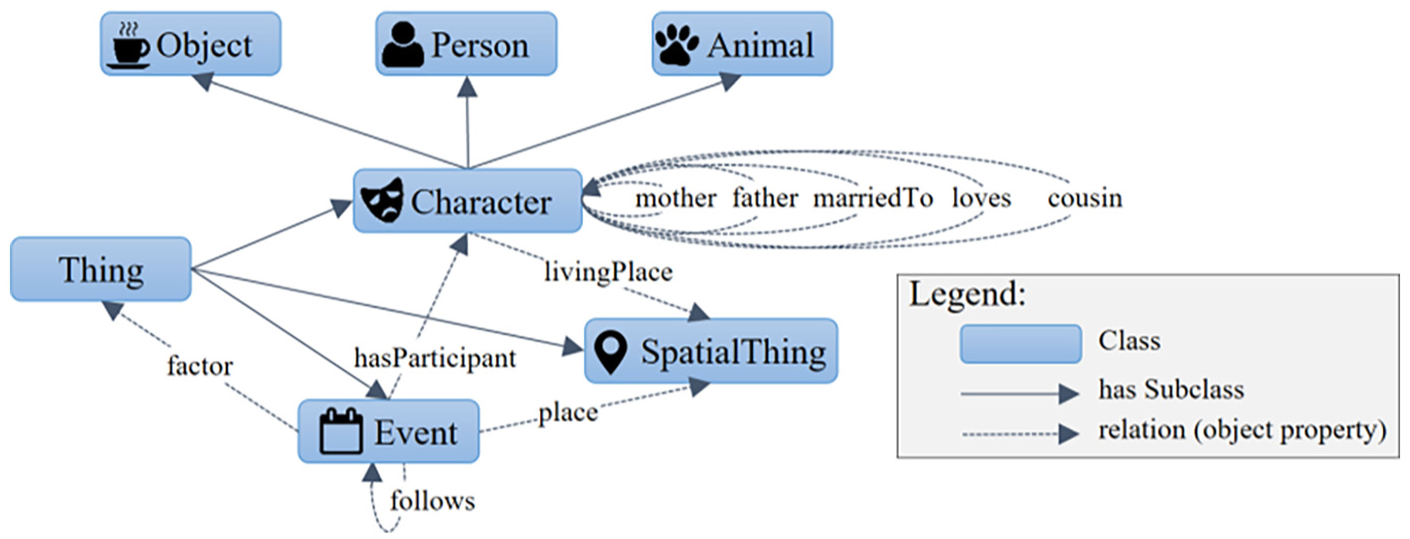
Example of Activity Ontology.
Note that different from conventional semantic annotation tools, here we do not intend to propose a manual semantic annotation tool to capture intentional knowledge. Our aim with the AO ontology is to specify a schema to capture individual interpretations and understanding during the reading process. Therefore, differently from conventional knowledge-based systems, the AO ontologies used by instructors do not need to be built using ontology development and evaluation methodologies [22].
3.2. Semantic annotation
Starting from the intentional knowledge specified with the AO, students can create semantic annotations to make explicit their interpretations and understanding of the text, which is retrieved from their long-term memories or derived during the reading process. In our proposal, semantic annotations associate text fragments with instances of the concepts defined in the AO. Instances are created by the students during the reading and annotation process and maintained in a KB.
Figure 3 illustrates semantic annotations on a passage of the Shakespeare’s tragedy Romeo and Juliet, considering the AO presented in Figure 2. By creating a semantic annotation, the student can create an instance of a class defined in the AO and associate it with a text fragment. As exemplified in Figure 3, the student created two semantic annotations (Ann#1 and Ann#2) on the terms ‘Juliet’ and ‘Romeo’ associated with the respective instances of the class Person: Romeo and Juliet. These instances have been created while making the annotation, when the user also linked Romeo to Juliet via the relation loves. In Figure 3, an arrow from a text fragment to an annotation represents that this fragment is the target of the annotation, and an arrow from an annotation to an entity stored in the KB represents that this entity is in the body of the annotation. This figure presents other instances and relations created by the student, which are stored in a KB. Thus, the KB stores the information elicited by the student.
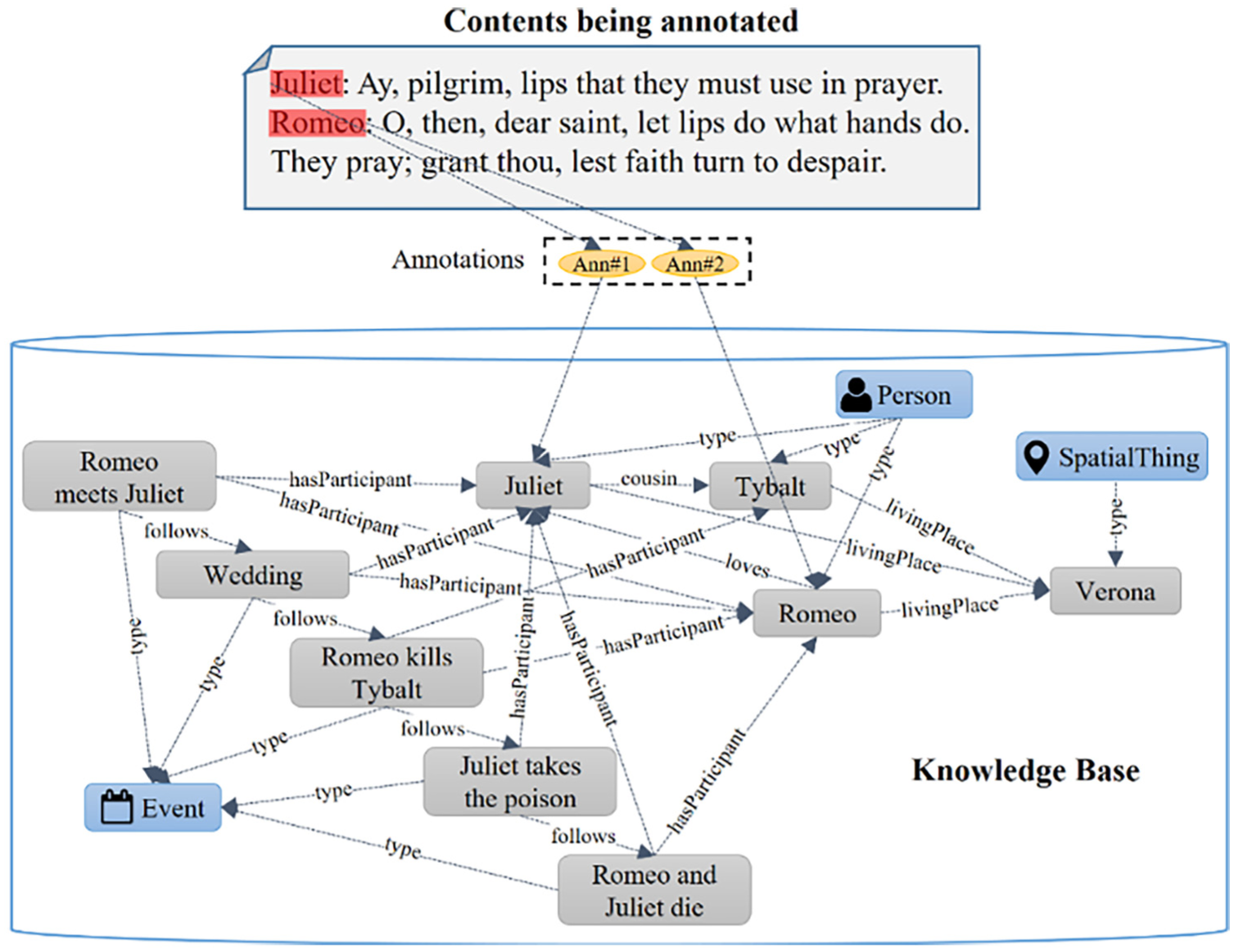
Example of semantic annotations pointing to instances in a KB.
Note that an AO describes intentional knowledge by specifying a set of general classes and properties that describe the scope of interest for the annotation task, by using a controlled vocabulary. An AO is not specific to particular textual material. It can be adopted in different annotation tasks considering different textual materials. By annotating a specific textual material in accordance with a given AO, the student makes explicit assertions in concrete situations present in that textual material, by indicating on the text instances of classes and semantic relations provided as intentional knowledge in the AO. Thus, during the annotation process, the student produces annotations in the KB (extensional level) in accordance with the AO (intentional level) that determines what is of interest for the annotation task. For instance, the AO presented in Figure 2 determines that the student must take into account characters, events and places in different literary works. The annotations produced in accordance with each AO and the instances that these annotations point to are stored in different KBs.
3.3. Visualising, editing and exploring information with semantic networks
In general, the semantically annotated text fragments are marked (e.g. underlined). Then, if the user clicks on one of these fragments (or on mouse over), an infobox is displayed with the body of the semantic annotation. However, just being able to check details of each annotation isolated is not enough to overview or analyse relevant information elicited during the reading and annotation process.
Ontology-based approaches for information elicitation enable the use of various visualisation and exploration techniques that leverage the knowledge structure to bridge the gap between the information complexity and the need for knowledge elicitation. There are various visual mapping techniques to graphically represent knowledge structures specified with ontology languages [23]. In the proposed approach, we adopted a visualisation method based on a directed graph. In this graph-based approach, nodes represent instances of concepts, and directed arcs represent semantic relations between them. We refer to such directed graphs as semantic networks, which are regarded as being equivalent to the semantic networks as defined by Lehmann [5]. In the proposed visualisation method, the classes are not directly represented as nodes in the graph in order to decrease the complexity of the graphs. Instead, each instance in the graph is represented by the icon associated with its class (via the property hasIcon). For instance, Figure 4 presents a semantic network representing the instances present in the KB of Figure 3.
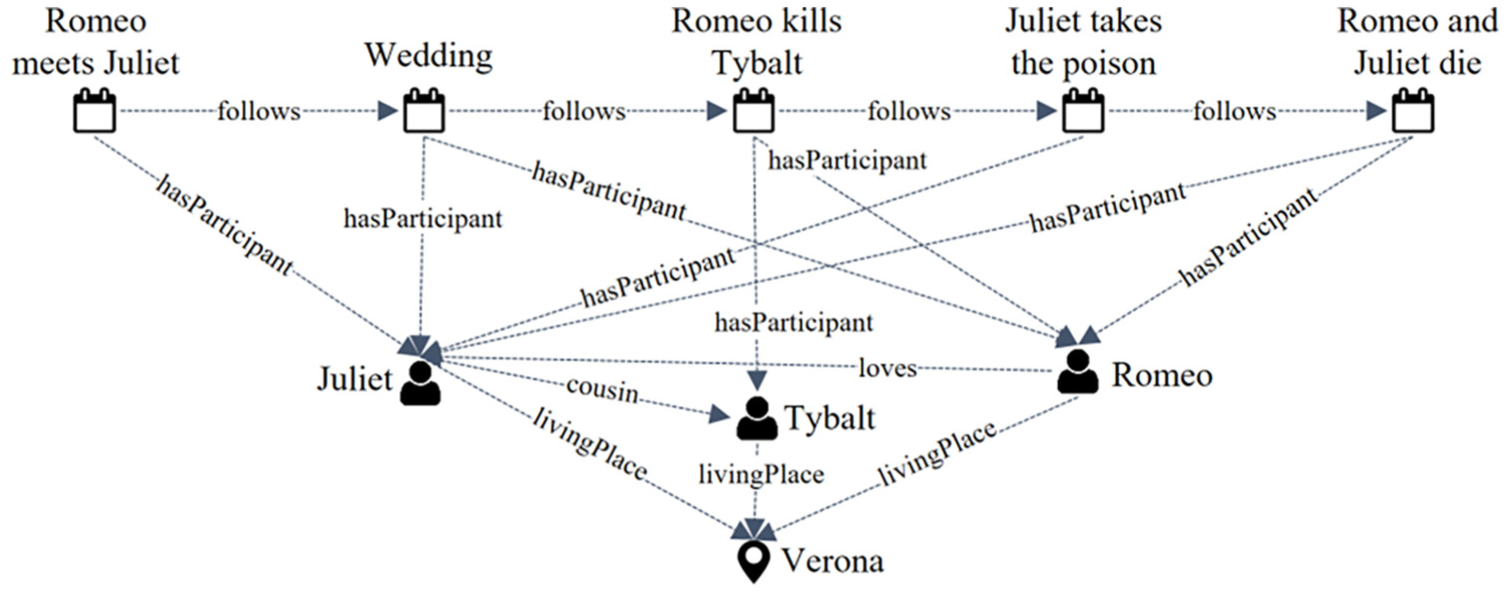
Example of semantic network.
Our semantic network visualisation is used to externalise extracts of the mental representation constructed during the reading process. A semantic network reflects the learner’s understanding of the text, captured in the KB. The use of semantic networks in learning has been motivated by the results presented in Novak and Cañas [4] and Nesbit and Adesope [24]. These techniques help learners to learn, and evaluators to assess learning results by facilitating meaningful learning [4]. Moreover, in the study by Nesbit and Adesope [24], it was demonstrated that activities based on this information visualisation technique are ‘more effective for attaining knowledge retention and transfer than activities such as reading text passages, attending lectures, and participating in class discussions’.
We adopt semantic networks not only to visualise the KB. Students and teachers can edit the graph for different purposes: (1) to manually re-arrange the graph by moving a node for putting some instance or semantic relation in evidence, or to organise a sequence of events in a line, as shown in Figure 4; (2) to filter classes of instances to be displayed, which allows faceted information analysis (detailed in Section 4.3) and (3) to create new instances or set new properties or relations for populating the KB. The latter feature is also considered an information elicitation approach, as it helps to externalise the mental representation constructed during the reading process. It can be considered a complement to the semantic annotations because information can be externalised in the semantic network without the need to associate this information directly or immediately with the content. Instances associated indirectly with annotations may express relevant information, and some instances inserted in the KB can be linked to the text later.
3.4. Learning assessment
Upon the completion of the semantic annotation activity, the teacher can assess the information made explicit by the students. The visualisation of semantic network views generated automatically from the KB can help the teacher to evaluate the students’ comprehension and interpretation of the texts. In the evaluation process, the teacher can analyse whether the extensional knowledge produced by the student represents concrete situations present in the text. The analysis of the instances generated by the student in accordance with the intentional knowledge provided as a schema in the AO allows the teacher to easily evaluate whether the student has deficiencies in the application of certain concepts.
Semantic networks views allow the teacher to overview and analyse from distinct perspectives the various generated instances and their relations. Besides observing the amount of information produced, it is possible to verify the quality of the various relations established among the different identified instances. Moreover, the teacher can also assess the quantity and spatial distribution of the semantic annotations created by a student to see whether the student has performed an in-depth critical reading of the text.
In the next years, we intend to partially automatise the assessment of semantic networks produced by the students. These semantic networks summarise the results of the students’ annotation actions. They show, among other important things, the relative participation of each used concept and semantic relation present in the AO used in the annotation task in the students’ annotation of a given textual material. Thus, the automatic analysis of the semantic networks produced by the students will certainly help the teachers to better interpret the students’ reading and understanding of the literary work. It will enable to complement the teacher assessment of the students’ accomplishments and drawbacks.
4. DLNotes2
DLNotes2 is a web-based annotation tool that makes it easy for HTML documents to be semantically annotated, by a single individual or collaboratively. DLNotes2 has grown out of our experience with a previous tool [25], but it is a completely new tool that combines semantic annotations and semantic networks for teaching and learning.
4.1. Learning tasks
Instructors often manage several learning tasks, each one with its own learning objective. Thus, it is important that each task be individually configurable. Such fine-tuning should allow instructors to specify, for example, which types of annotation are permitted, who can view the annotations created by students and the kinds of interactions that the learners can engage in.
DLNotes2 allows instructors to create annotation activities for capturing and assessing students comprehension and interpretation of texts, or for generating a KB to be used in collaborative learning scenarios. These activities are created by using the DLNotes2 administrative interface, presented in Figure 5. An instructor can freely add HTML documents to an activity by choosing from the list of available ones as illustrated in Figure 5(a). All users to whom that activity is assigned can then add annotations to those documents. Several parameters, such as those shown in Figure 5(b), can be set to drive DLNotes2 behaviour during the execution of each activity.
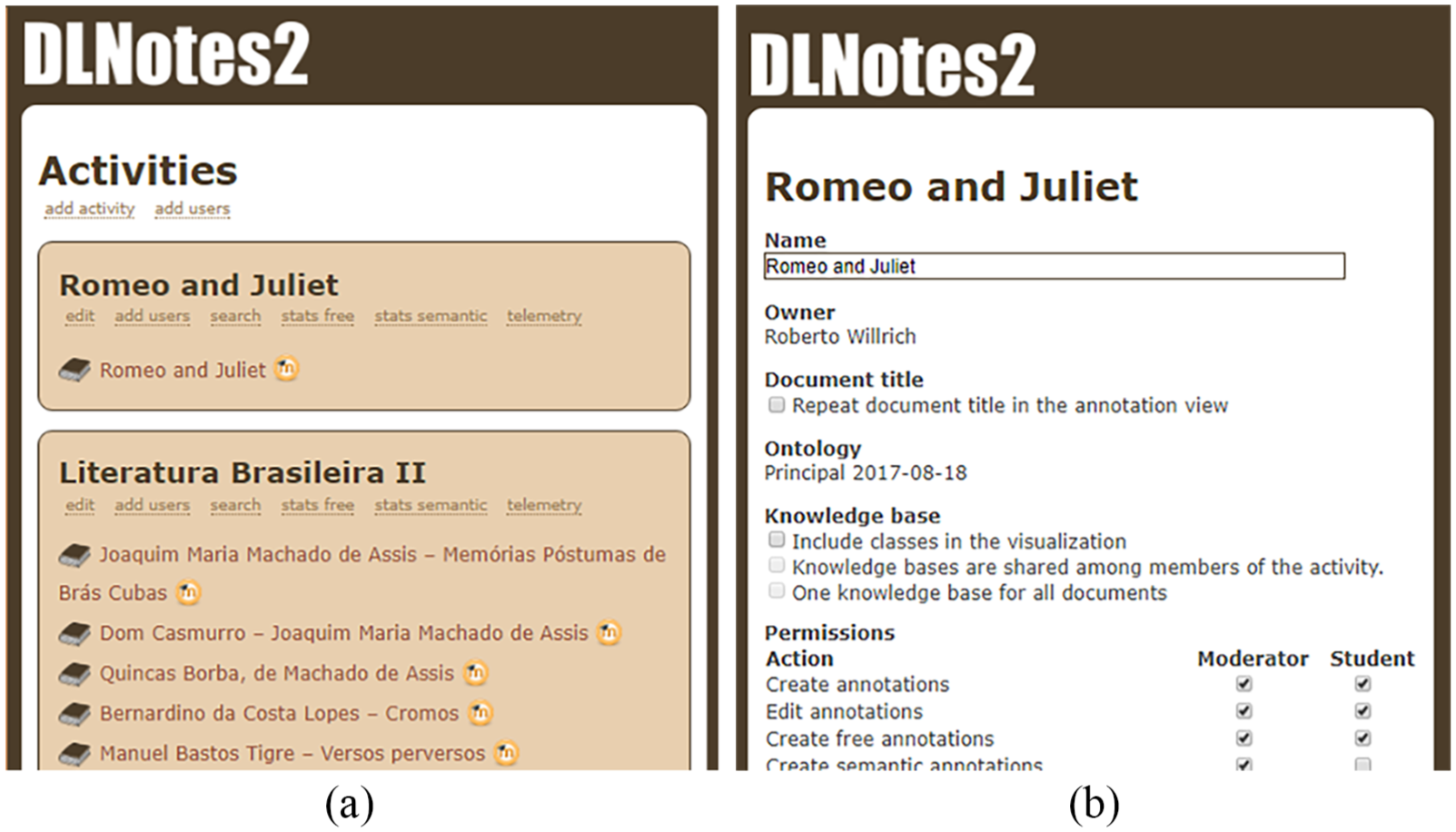
Administrative interface of DLNotes2. (a) Available activities. (b) Activity settings.
As seen in Section 3.1, each annotation activity is associated with its own AO. DLNotes2 is currently able to import ontologies in the RDFS format. In order to make it easier for a wider public to create ontologies, DLNotes2 offers the possibility of converting mind maps produced by FreeMind 2 into RDFS. Although mind maps are not compatible or equivalent to ontologies, the use of FreeMind makes the creation of simple ontologies accessible to a great number of people. In the conversion of FreeMind into RDFS, the nodes in the mind map are interpreted as classes and their attributes as properties. The value of a property is either a literal of a simple type (e.g. string, integer, Boolean) or another class.
4.2. Creating annotations with DLNotes2
Upon logging into DLNotes2, the user sees a list of activities assigned to him or her, along with the respective documents to be annotated. When accessing a document, a user can see the text with annotations that are visible to him or her, and a small, unobtrusive toolbar on the bottom of the screen, as presented in Figure 6. The toolbar buttons have the following functions (from left to right): Hide Annotations, Show Annotations, Refresh, View Annotation Report, View Semantic Network and Exit. The View Semantic Network button allows access to the visualisation of semantic networks, as presented in Section 4.3. The View Annotation Report button, in its turn, allows teachers to access annotations and semantic networks of specific students for assessment purposes, as explained in Section 4.4.

Visualisation of the content of a semantic annotation.
In order to create an annotation, the user selects the text fragment to be annotated and fills in the annotation body details. Upon finishing the new annotation, DLNotes2 highlights this fragment and puts an icon at its beginning, which varies with the associated (instance) class and serves as an anchor. By clicking on this icon, the user can open the annotation infobox to view details of the annotation body, and edit or delete the annotation, as presented in Figure 6. The Discuss button in the annotation infobox is used to access the discussion forum attached to each annotation. It allows students and teachers to post and exchange discussion messages related to each annotation.
In this way, the teacher can evaluate each annotation as well as provide feedback comments about each annotation using the Discuss button in the annotation infobox (Figure 6).
The visual notation provided by DLNotes2 hides the complexity of the modelling language necessary to create instances in the KB. Upon creating or editing a semantic annotation, the user is presented with the dialog shown in Figure 7. The left panel presents the class hierarchy as defined by the AO ontology. This representation organises classes in a specialisation hierarchy. For instance, the class Character has three specialisations (or subclasses): Person, Animal and Object. When annotating a text fragment, the user must first select the class of the mentioned thing. Then, the properties and semantic relations pertaining to that class will be shown in the right panel. Using this panel, the user can fill in these instance details. For instance, when annotating the mention Romeo, the user can specify that Romeo (an instance of Person) lives in Verona (instance of Location). The relations between instances are defined either by typing part of another existing instance’s identifier or by clicking on the add button to open another dialog on top of the former one, for the user to specify a new instance which will be related to the instance being edited or created by the former dialog. This process allows the user to define new instances without having to select any text fragment at all. If the user does not set any property or relation in the right pane, no instance will be created and the class itself will be used as the semantic tag.
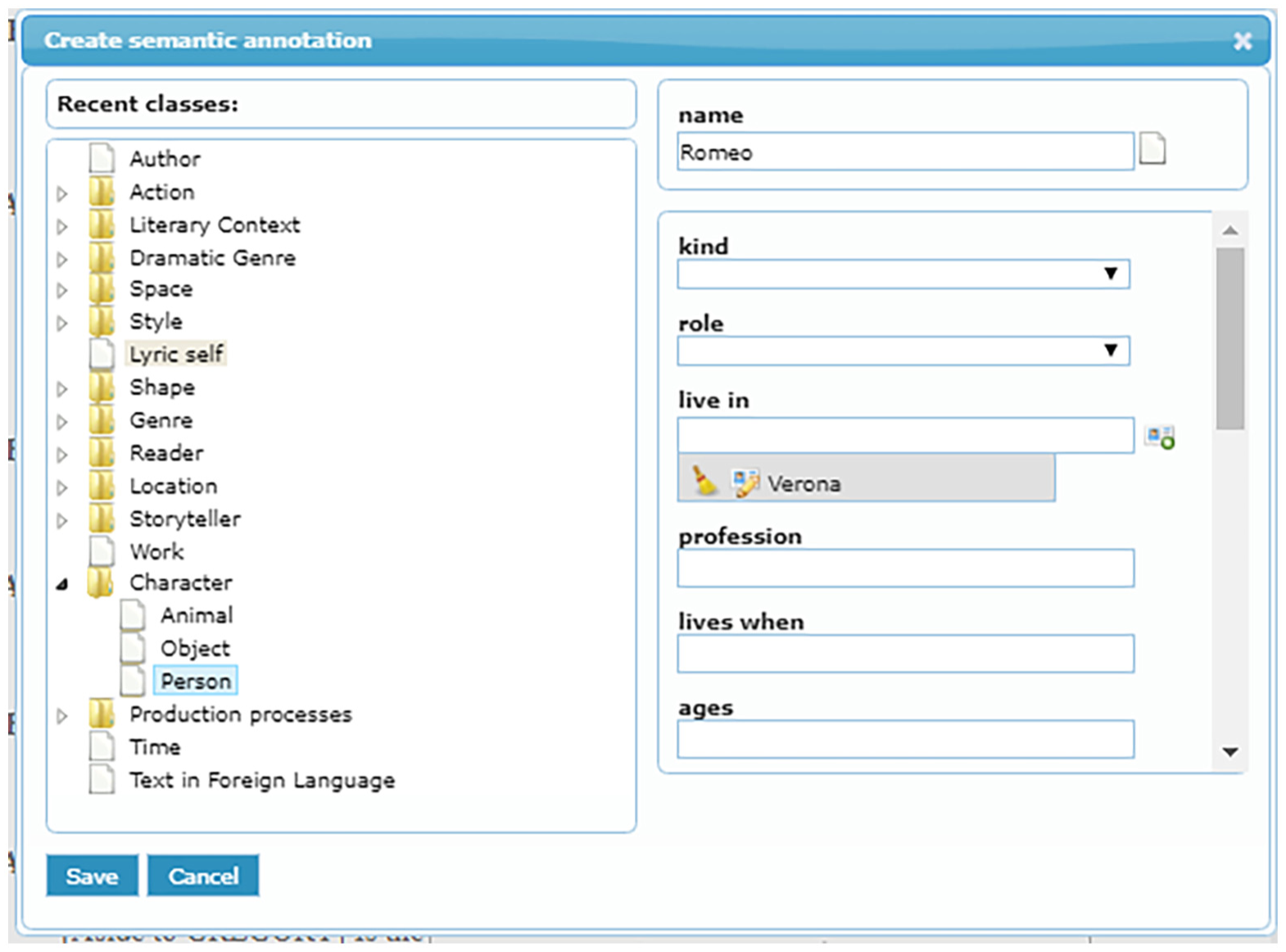
Creation of a semantic annotation in DLNotes2.
4.3. Visualising captured information as a semantic network
By selecting the Semantic Network Visualisation button in the DLNotes2 toolbar, the user can access the semantic network visualisation of the KB. As already presented, this visualisation is a graph where each node represents an instance symbolised by the icon associated with the AO class via the property hasIcon. The links between nodes represent semantic relations between the things that they represent. Figures 8(b) and 9 show some semantic network visualisations.
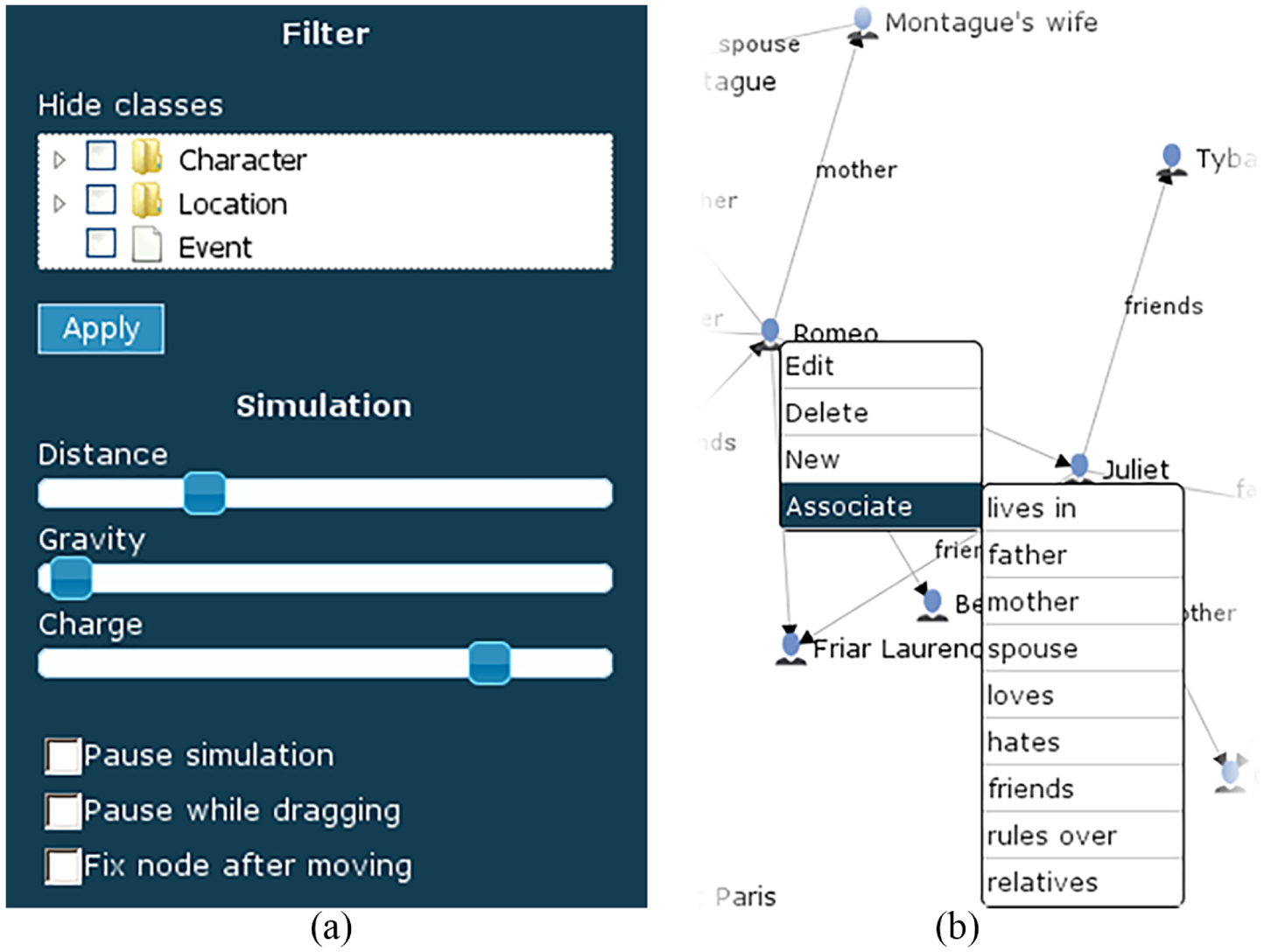
Parameterising and editing the semantic network. (a) Filtering and parameterising the visualisation. (b) Editing the KB using the graphical representation.
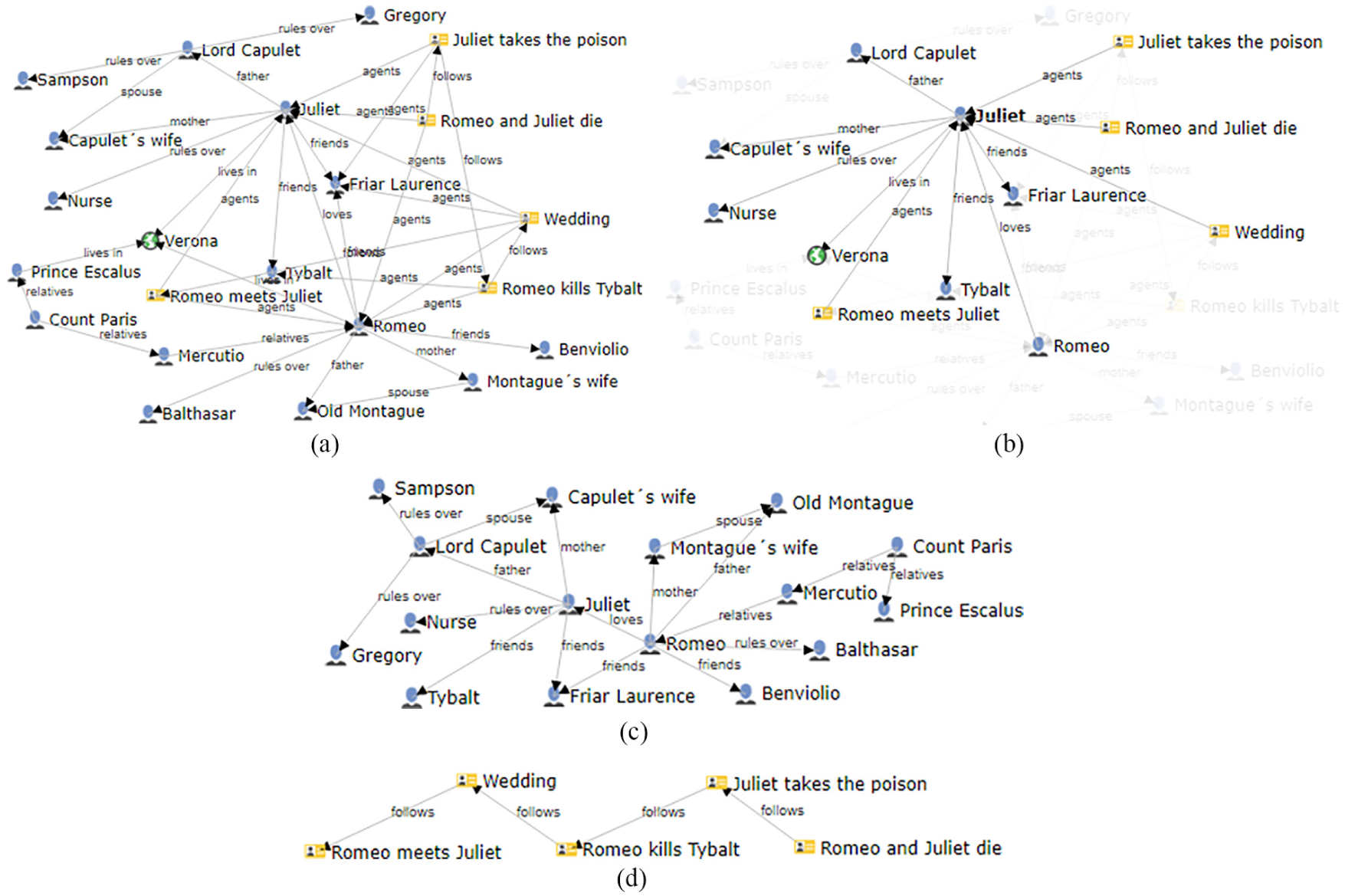
Alternative semantic network visualisations of the same KB. (a) All instances and their relations. (b) Focus on a specific instance. (c) Visualising Character instances. (d) Visualising Event instances.
The semantic network usually has a sensible initial arrangement of nodes. Nevertheless, the user is free to change visualisation parameters and drag nodes around the screen. Using the interface presented in Figure 8, parameters can be set by adjusting the controls displayed at the left of the screen. The user can also adjust node positions in the visualisation to create desired arrangements.
In DLNotes2, users can express new information directly on the semantic network visualisation of the KB. As presented in Figure 8(b), by right-clicking on a node representing an instance, the user can choose to edit the instance attributes, delete it, associate it with existing or new instances or create a new instance of the same class. If the user adds an association, whether by editing it in the standard dialog box or by using the corresponding pop-up menu item, the visualisation is immediately updated with it.
As illustrated in Figure 9(a), depending on the number of nodes and edges, the semantic network can become cluttered. There are two features the user can take advantage of to overcome this issue. The first is simply moving the mouse over a node to highlight that node and fade out all other ones not directly linked to it, as illustrated in Figure 9(b), that focus on the character Friar Laurence and his relations. The second way to unclutter the semantic network visualisation is to view only nodes of certain classes and edges representing certain kinds of semantic relations, by using the Filtering interface shown on the top of Figure 9(b). Figure 9(c) presents the graph obtained by restricting the semantic network visualisation to show only nodes of the class Character and their relations. Figure 9(d) presents another example in which only instances of the class Event are presented so that the plot of Shakespeare’s work Romeo and Juliet becomes apparent.
4.4. Assessment of understandment, skills and beliefs
DLNotes2 offers two complementary perspectives for the teachers to assess learning outcomes. First, by clicking the View Annotation Report button in the DLNotes2 toolbar, the teacher accesses a report of the annotations created by each student. This web interface also provides quick access to the place of each annotation within the text. In this way, the teacher can evaluate annotations as well as provide feedback comments about each annotation by using the Discuss button in the annotation infobox (Figure 6). Second, the teachers can visualise the captured information by each student as a semantic network (as presented in Section 4.3). This last perspective allows the teachers to have a clear and well-focused view on the relations between the instances stored in the KB.
4.5. Integration with third-party systems
In the e-learning context, annotation tools should not compel instructors and students to abandon the e-learning environment they are already familiar with. Therefore, annotation tools must be closely integrated with e-learning applications in order to be easily and transparently accessed from Virtual Learning Environments (VLEs). An important feature of DLNotes2 is its compliance with LTI (Learning Tools Interoperability), a standard developed by IMS Global Learning Consortium for integrating learning applications. The adoption of this standard allows DLNotes2 to be integrated with any other systems that implement it, for example, the VLE Moodle. 3 By assuming the role of a tool provider, DLNotes2 gains access to certain data about students that allow accounts to be automatically created and users to be transparently logged in.
4.6. Other technical aspects of the implementation
PHP language was used with the CodeIgniter Web framework to implement the DLNotes2 server running on Apache HTTP. MySQL was used for data storage. The system was internationalised with GNU gettext. Javascript and jQuery have been used on the client side. D3.js 4 was used to build the visualisation of the semantic networks.
5. A case study
DLNotes2 has been used to support real-world learning activities at the Federal University of Santa Catarina, Brazil. Since 2012, a group of lecturers is making use of it for teaching Brazilian literature. Dozens of annotating activities have been undertaken with several groups of students with very positive results. This section reports one of our latest experiences using DLNotes2 for making semantic annotations and semantic networks for information elicitation in learning. In addition, this section presents an empirical evaluation of the usefulness of the proposed approach. The experiment objectives are (1) to demonstrate how students perform an individual activity using semantic annotations and semantic networks; (2) to demonstrate how the lecturer evaluates the information produced in such a learning activity; (3) to demonstrate how the KBs created by students are used as a means for discussion and collaboration in the classroom; (4) to evaluate the proposed approach from the point of view of the lecturer and (5) empirical, quantitative evaluation by students.
5.1. Literary analysis ontology
As seen in Section 3.1, the first step to use the proposed approach is to build an AO. For this case study, we have developed and used an ontology defining all relevant concepts applied during the analysis of literary works, called Literary Analysis Ontology (LAO). Its development used the methodology given by Noy and McGuinness [26], since it is a simple guide for building ontologies. It allowed the participation of literature experts who had no prior experience with formal ontologies. We first started by gathering literary terms that could be marked in texts. This initial effort was much facilitated by the e-dictionary of literary terms of Carlos Ceia. 5
Due to lack of prior knowledge of RDFS or Protégé of the lecturers, we used FreeMind to organise LAO hierarchy of classes, as shown in Figure 10. By using FreeMind, we ensured that all participants, regardless of their prior knowledge of Semantic Web technologies, could contribute. After many sessions of pruning and growing the hierarchy, we produced a mind map with 444 classes and 94 properties.
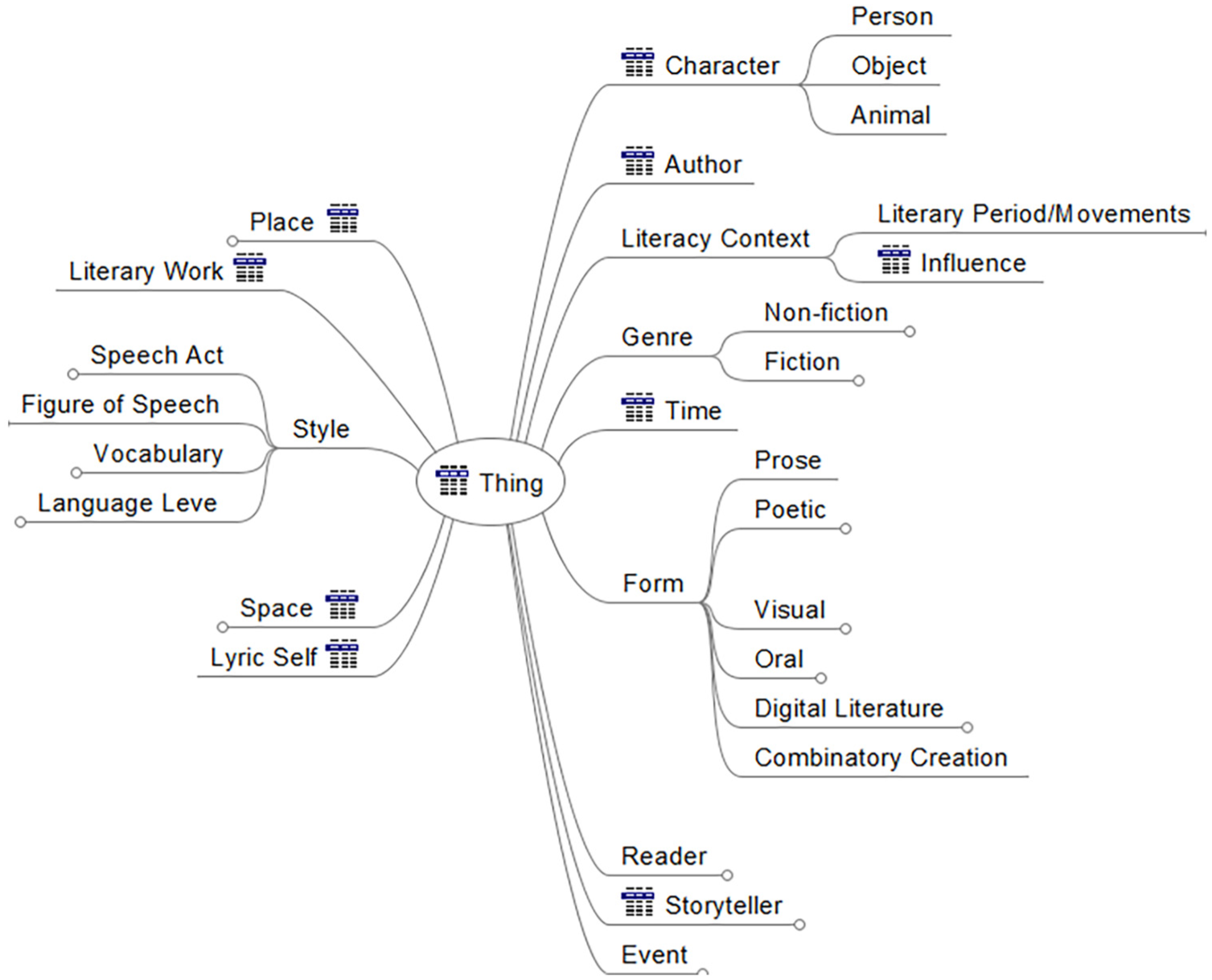
A fragment of the Literary Analysis Ontology.
The LAO can be used in various learning/teaching scenarios in the context of literature. The lecturer can choose a subset of the LAO classes to achieve specific learning objectives and, consequently, limit the information to be captured/transmitted during learning activities or teaching.
5.2. Experiment overview
The experiment that we describe here took place in the context of a second semester class on Brazilian Literature for 21 students of Portuguese Language and Literature. The activity, which was carried out with the aid of DLNotes2, had the educational objective of studying Brazilian literature from the second half of the 19th century and the early part of the 20th. Two poetic works were added to the activity. The idea was to ask students to read and analyse poems from these two works in order to identify the following elements: characters and the relations among them; events that are narrated in the poems; places mentioned, either directly (a place the poem talks about) or indirectly (a place where the lyric self talks about); the lyric self, who has a gender and several other features; as well as the relations between the lyric self and characters, events and places. The lecturer defined an AO using a subset of LAO classes and relations referring to these elements to avoid student overload and misleading. As first-year students, they still did not have a sufficiently secure grasp of the concepts of literary theory involved. This fact brought an additional difficulty to the learning activity.
In a first stage, the lecturer described the concepts underpinning the activity: literary analysis concepts, semantic annotations and how they relate to each other. The lecturer then explained the activity objectives and how it would be carried out. The first activity was created and realised just to let the students freely explore DLNotes2, to make them comfortable with the tool.
5.3. Semantic annotations made individually
In this stage, students were given two sessions of 100 min to individually add semantic annotations to the poetic works. These semantic annotations express what each student know and think about the elements he or she finds in the text while reading it. Furthermore, the information created by each student in the KB can be viewed in isolation and edited in the semantic network. The total number of instances created by all the students in the KB was 671, with an average of 33 instances per student. The number of semantic annotations created was 588, with an average of 28 annotations per student. An important remark is that the number of instances created by the students was greater than the number of semantic annotations. It can be justified considering that the students, during the creation of a semantic annotation, can specify additional related individuals (e.g. a new character related to the target of the annotation). In addition, for various other reasons, the student can generate instances that are not used by any semantic annotation.
5.4. Student evaluation
After completing the individualised activity, the lecturer was able to assess whether the students were able to achieve the educational objectives. For each poetic work, the lecturer could examine annotations in three ways: (1) analysis of each poetic work containing all the semantic annotations generated by all students, so that the lecturer could quickly understand which parts of the work were annotated more frequently and compare annotations of different students; (2) analysis of the annotations created by each student to quantitatively and qualitatively evaluate the created semantic annotations, and identify in which parts the student was able to carry out a more in-depth reading and in which parts more superficial analyses were carried out and (3) analysis of the semantic network created by students, allowing the lecturer to have a global view of a large number of created instances, with the possibility of applying specific filtering.
Observing the semantic network, the lecturer was able to quickly evaluate how the students explored the work, and whether they correctly applied the concepts defined in the AO ontology. It was also possible to evaluate how the reading and the accomplishment of the semantic annotations helped to deepen the knowledge of the concepts of literary theory. A greater number of semantic annotations does not necessarily imply greater depth in the analysis of the work and better results in reading, but implies, in the vast majority of cases, a more secure understanding of the theoretical concepts involved and, certainly, a deeper reading of the work, since more poems were read and concepts were used more often.
5.5. Collaborative learning
In this stage, the lecturer and the students interacted so that all of them could collaborate on learning from the semantic annotations created in the learning activity. Four sessions, each with an allocated time of 1 h and 40 min, were assigned specifically for this interaction. In the classroom discussions, the individual semantic annotations were analysed by the class for the construction of the collective knowledge base and students’ appropriation of the formal elements of the poems and their association with concepts of literary theory. These two objectives were greatly facilitated by the use of DLNotes2. The lecturer remarked that there was no need to repeat concepts several times in an abstract way, hoping that at some point, the students could grasp their meanings. The creation and visualisation of semantic networks made the teaching/learning process less time-consuming, more enjoyable and, above all, more productive.
5.6. Evaluation
The experiment was evaluated by both the lecturer and the students. The lecturer was interviewed and expressed that DLNotes2 contributed to a positive experience in the classroom. First, he affirmed that understanding and applying literary analysis concepts became an easier, more concrete and quicker process. By annotating the poetic works during reading, students began to realise that those concepts are an integral part of the dynamics of reading and not a set of definitions to be learned a priori. Second, by being offered an explicit set of concepts that they should take into consideration, students developed a greater awareness of formal elements. Finally, the discussions that took place in the classroom about the works benefitted from the fact that students had created semantic annotations on those works. The process of creating annotations prompted students to broaden their research: they took into account other literary works and even non-literary works such as history, sociology and literary analysis manuals.
The evaluation of DLNotes2 by the 21 students was done through the use of a questionnaire with 25 questions using a five-point Likert-type scale. This questionnaire was designed to gather information about various dimensions of the use of semantic annotations and semantic networks, as implemented in DLNotes2, in the learning activity:
Perceived ease of use: The students generally agree that DLNotes2 is easy to use (mean score of 3.9) and that it has a small learning curve (mean score of 3.6).
Perceived ease of understanding of semantic annotations: The students believe they understood very well what are semantic annotations (mean score of 4.5) and their purpose in the activity (mean score of 4.3).
Effectiveness of the proposed approach to information elicitation: Students agree that our annotation tool is useful for organising knowledge (mean score of 4.5) and that this organisation is even capable of generating new knowledge (mean score of 4.3). The majority of the students agree that DLNotes2 was able to express what they understood about the poetic work (mean score of 3.8).
Effectiveness of the proposed approach to assessment: The majority of the students believe that the lecturer was able to assess students’ skills as well as inabilities in the activity (mean score of 3.9).
Learning satisfaction: The students said that, prior to using the tool, they had trouble understanding the literary analysis concepts explained by the lecturer (mean score of 3.1); after the educational activity, this proportion went down (mean score of 4.0). Students also generally agree that the annotations they created on their own are beneficial to the learning process (mean score of 4.3). Regarding the collaboration that took place in the classroom, students generally agree (mean score of 3.9) that using DLNotes2 is useful.
Perceived usefulness: The students agree that the tool is useful for teaching (mean score of 4.3). The majority completely disagrees that DLNotes2 is too difficult for use in a teaching context (mean score of 3.7). Students, therefore, overwhelmingly agree that DLNotes2 is useful for teaching.
6. Conclusions
In this article, we have presented an approach using semantic annotations and semantic networks as a formal means for elicitation, structuring, formalisation, visualisation, and analysis of teachers’ and students’ understanding of textual learning materials to leverage teaching and learning. The proposed approach is supported by DLNotes2, our annotation tool. The experiences of using DLNotes2 in literature teaching have shown promising results. In addition to being a tool that effectively supports the learning process, the use of DLNotes2 (1) propelled students to read more deeply the text for the production of richer and more coherent annotations, (2) improved their participation in the classroom, and (3) allowed teachers to make a better evaluation of learning outcomes, mainly regarding the correct use of the concepts used in the learning tasks. In addition, semantic networks have helped teachers to assess reading comprehension more quickly and objectively than the traditionally used forms of assessment.
For future work, we intend to add mechanisms to aid in the collaborative construction and validation of KBs to be applied in collaborative learning. Another future research direction consists of providing semi-automatic assessment mechanism based on the semantic network generated by the students.
Footnotes
Declaration of conflicting interests
The author(s) declared no potential conflicts of interest with respect to the research, authorship, and/or publication of this article.
Funding
The author(s) disclosed receipt of the following financial support for the research, authorship, and/or publication of this article: This work was partially supported by CNPq and FAPESC.
