




Abstract
Access or assessment accommodations and arrangements exist to enable students with disabilities to be included in high stakes examinations, and to comply with Equality legislation and the Convention on the Rights of Persons with Disabilities. This article explores the accessibility of digital versions of Question Papers offered by UK awarding bodies for high stakes externally assessed examinations. It raises concerns that question papers from five out of six providers are not adequately accessible for candidates with visual impairment who use screen reader technologies and so asks broader questions about ways in which, even in high income countries with a strong espoused commitment to equality, disadvantage can be compounded rather than addressed. Access arrangements offered by awarding bodies should reflect candidates’ ‘normal way of working’; this article presents original and unique data from a survey of Qualified Teachers of the Visually Impaired in respect of technologies and strategies used by 325 students with visual impairment and finds that up to 16% of these learners are using screen reader tools in school. These candidates may, therefore, be disadvantaged in examinations because the technology they use to access learning resources cannot be successfully utilised to access assessments. The article concludes with recommendations for regulators and providers of assessments.
Keywords
Inclusion and equity in high stakes assessments
In the United Kingdom and many other countries (Eurydice, 2011; Rey, 2010), summative high stakes external examinations are used to measure attainment during the final 2 or 3 years of secondary schooling. In the United Kingdom, these assessments generally take the form of paper-based examinations designed to national standards, primarily the General Certificate of Secondary Education (GCSE) and General Certificate of Education (GCE) in England, Wales, and Northern Ireland, and National and Higher Qualifications in Scotland (Table 1). Examples in other countries are the International Baccalaureate; the German Abitur, or the French baccalauréat.
UK high-stakes externally assessed examinations.

GCSE: General Certificate of Secondary Education; GCE: General Certificate of Education; AS: advanced subsidiary.
In England, Wales, and Northern Ireland, GCSE, advanced subsidiary (AS), and A level assessments are administered by five different examination boards (Assessment and Qualifications Alliance (AQA); Pearson Edexcel; Oxford, Cambridge and RSA (OCR); Northern Ireland Council for Curriculum, Examinations and Assessment (CCEA) and WJEC/CBAC (formerly the Welsh Joint Education Committee). Schools may choose assessments from any of the boards although most schools in Wales use WJEC and those in Northern Ireland use CCEA. In Scotland, which has a different education system, most schools use examinations designed, distributed, and marked by the Scottish Qualifications Authority (SQA).
UK awarding bodies are required under the Equality Act 2010 (Equality Act 2010) to ‘make reasonable adjustments where a disabled person would be at a substantial disadvantage in undertaking an assessment’ (Joint Council for Qualifications, 2018a). The adjustments must enable candidates to access the assessment without giving any advantage over other candidates: ‘the purpose of assessment arrangements is to provide candidates with an equal opportunity to demonstrate their attainment without compromising the integrity of the assessment’ (Scottish Qualifications Authority, 2017).
In England, the responsibility for regulating assessments, qualifications, and adjustments is held by the Office of Qualifications and Examinations Regulation (Ofqual, 2018a), in Wales by Qualifications Wales and in Northern Ireland by CCEA Regulation. The awarding bodies for England, Wales, and Northern Ireland follow guidelines on ‘Access Arrangements’ issued by the Joint Council for Qualifications (2018b). In Scotland, SQA is both the awarding body and regulator that specifies which adjustments can and cannot be made to assessments (Scottish Qualifications Authority, 2013). In all four nations of the United Kingdom, the end result, as far as learners with disabilities are concerned, should be the same, that is, reasonable adjustments to enable them to access national assessments.
This article focuses on arrangements for examinations in the United Kingdom, but the principles and practices discussed are relevant for qualification boards internationally in countries that utilise externally assessed examinations (Douglas et al., 2016; Lazarus et al., 2009; Pepper, 2007) and that are signatories to the United Nations Convention on the Rights of Persons with Disabilities (United Nations, 2006).
Access and assessment arrangements and accommodations
Access and assessment arrangements available for UK candidates in externally assessed examinations include, for example, extra time; use of technology to generate responses; provision of question papers in alternative formats such as Large Print, Braille, digital PDF, coloured paper; or use of a human reader to read questions and/or a scribe to write a candidate’s responses (Joint Council for Qualifications, 2018a; Scottish Qualifications Authority, 2017).
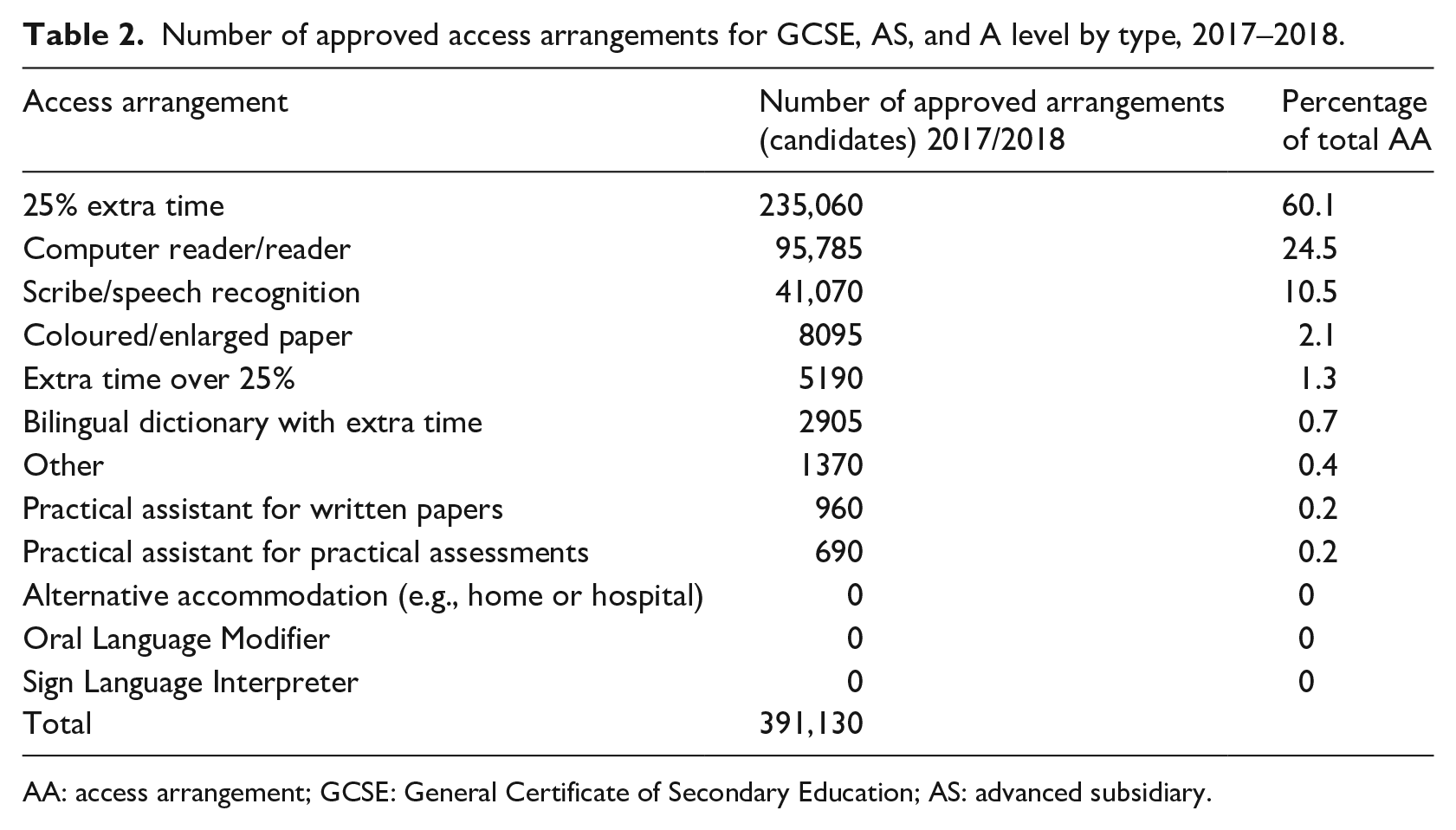
The use of access and assessment arrangements is commonplace throughout the United Kingdom. In 2017–2018, access arrangements were approved for 391,130 candidates, from 91.3% of all GCSE and GCE presenting centres (Ofqual, 2018c). The most common arrangements in 2017–2018 were 25% extra time, a computer or human reader, and a scribe or speech recognition (Table 2; Ofqual, 2018c). The terminology used in Tables 2 to 4 regarding the type of arrangements and papers is taken from the published Ofqual and SQA data; for some, we have provided examples to aid clarity.
Number of approved access arrangements for GCSE, AS, and A level by type, 2017–2018.
AA: access arrangement; GCSE: General Certificate of Secondary Education; AS: advanced subsidiary.
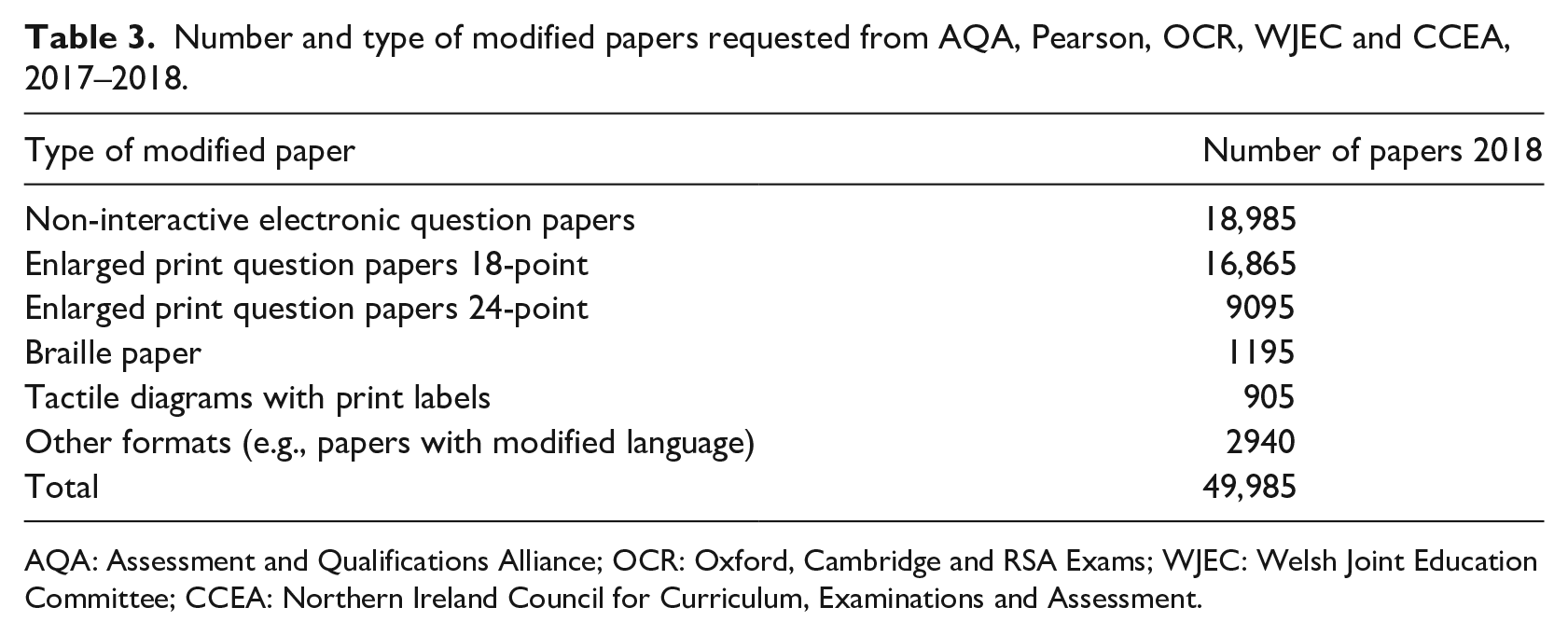
Number and type of modified papers requested from AQA, Pearson, OCR, WJEC and CCEA, 2017–2018.
AQA: Assessment and Qualifications Alliance; OCR: Oxford, Cambridge and RSA Exams; WJEC: Welsh Joint Education Committee; CCEA: Northern Ireland Council for Curriculum, Examinations and Assessment.
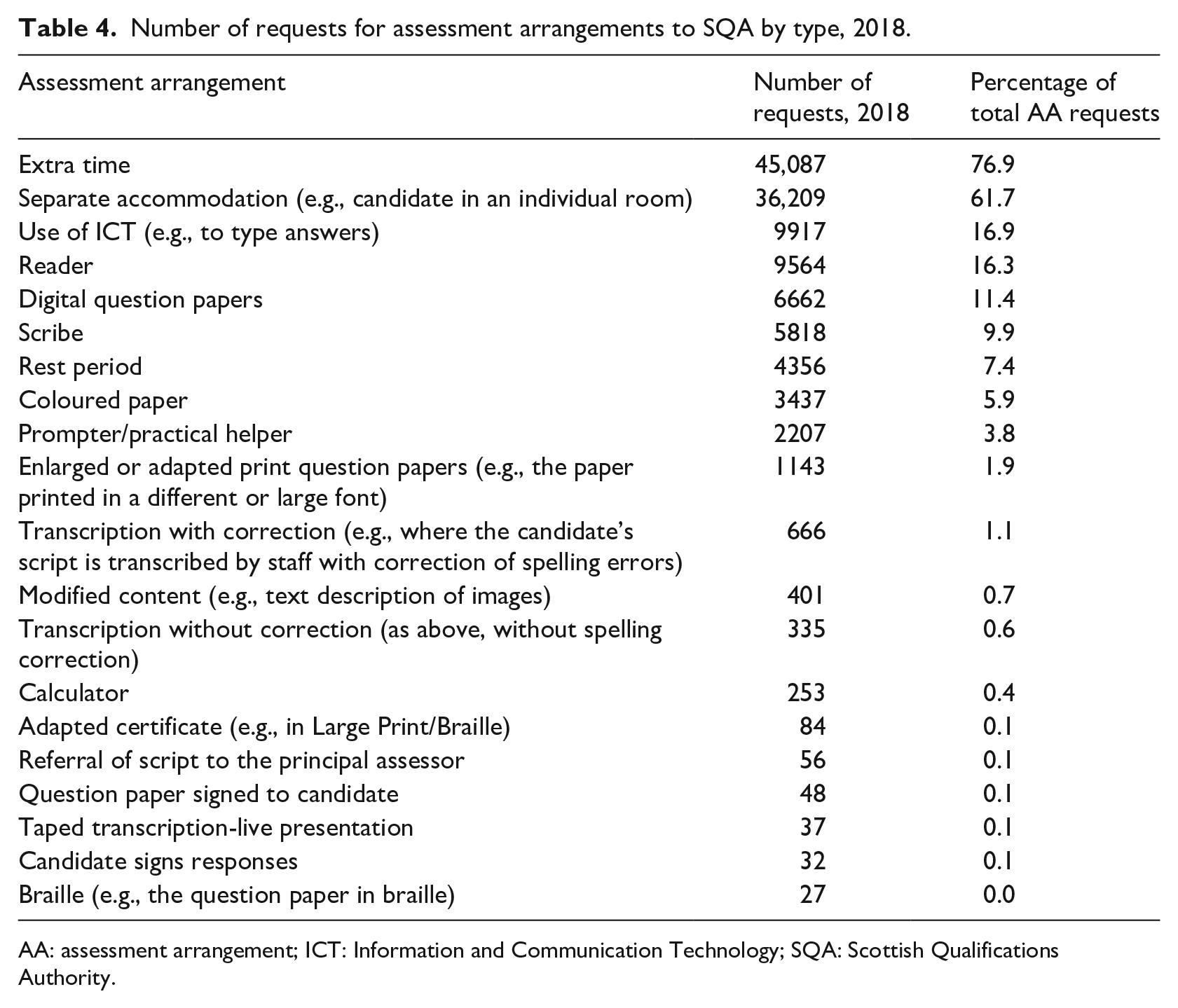
Number of requests for assessment arrangements to SQA by type, 2018.
AA: assessment arrangement; ICT: Information and Communication Technology; SQA: Scottish Qualifications Authority.
The number of requests for examination question papers in alternative formats are reported by Ofqual in respect of each individual exam paper (Table 3; Ofqual, 2018b). In 2017–2018, there were 49,985 requests for modified papers representing 0.3% of the total number of GCSE, AS, and A level papers marked.
In Scotland, SQA received 58,655 requests for assessment arrangements on behalf of 18,487 candidates in 2018, representing 15.1% of the total number of candidates sitting the examinations; assessment arrangements were requested for 11.7% of the total number of examination entries (Table 4; source: data provided by SQA to the author 1 ).
The most common types of arrangements used throughout the United Kingdom are therefore Extra Time, use of human or computer reader, technology or scribe for writing, and adapted papers in digital, coloured, or Large Print formats.
Digital/electronic question papers
Digital or electronic versions of examination question papers in PDF were introduced by SQA in Scotland in 2008 following research and trial by CALL Scotland, a research and service unit at the University of Edinburgh (Nisbet, 2008, 2012) and subsequently by other UK examination boards in 2014 (Ofqual, 2015). By 2018, digital or electronic papers had become the most commonly requested type of alternative format question paper both in Scotland (Table 4) and the rest of the United Kingdom (Figure 1; Ofqual, 2018c). Note that one GCSE board did not report the number of requests for electronic question papers in 2018.
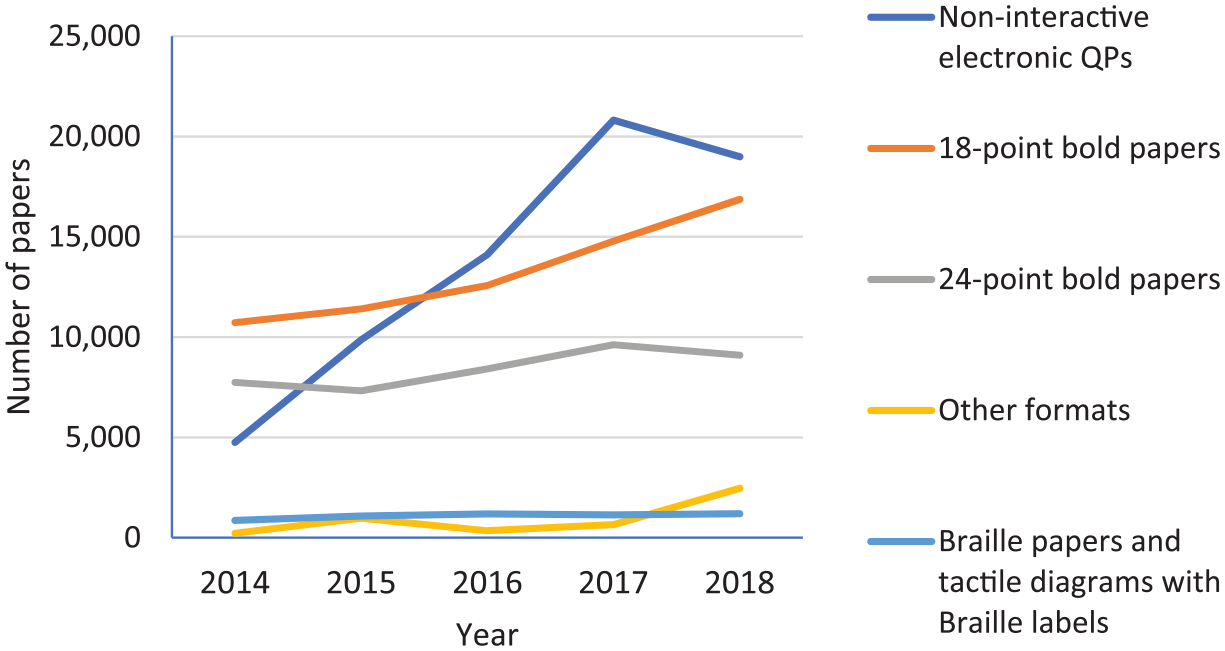
Number and type of modified papers produced by GCSE/AS/A level providers 2014–2018 (Ofqual, 2018c, Table 3).
The uptake of digital question papers suggests that the technology is meeting the needs of many candidates who require access/assessment arrangements in examinations. However, digital question papers are PDF files which have a poor reputation in terms of accessibility (Nielson, 2003; Seale, 2006; Williams, 2018), particularly for people with severe sight impairment who use screen reader technologies (Lazar et al., 2007; National Federation of the Blind, 2018; OpenText, 2015). While accessibility options for PDF files have been developed by Adobe over the years (Adobe, 2018; Adobe & AFB Consulting, 2008), people who use screen readers continue to find PDF inaccessible because authors do not always create files to be accessible (Bigham et al., 2016). Why then have candidates and schools apparently embraced digital papers, given these limitations?
The research and commentary referenced in the previous paragraph is particularly critical of PDF accessibility for people with severe sight impairment who use screen reader technologies. It is important to clarify the difference between a computer Text Reader and a Screen Reader. Screen readers such as Job Access With Speech (JAWS) (Windows OS; Freedom Scientific, 2019a) or VoiceOver (iOS; Apple, 2019) are designed for people with no or little sight: the software not only reads text but also provides an audible description of the components and elements on the screen, such as descriptions of images, applications running, filenames of documents; contents of menus; dialogue boxes; and so on. Screen readers are complex tools and require training and practice to develop high levels of competency. They also require digital resources to be designed and created in formats that are accessible to the screen reader.
Text reader tools read text from the computer screen – in most cases the student selects the text to be read or places the cursor within the paragraph on screen and then activates the reader. They do not generally provide audible descriptions of the elements of the screen. Text readers are therefore typically used by candidates with dyslexia or reading difficulties or low vision, that is, candidates who have sight.
The Scottish Government 2018 Pupil Census reports 64.5 pupils per 1000 identified with an additional support need (ASN) arising from dyslexia or other specific learning difficulty compared with 6.6 pupils per 1000 with an ASN arising from visual impairment (Scottish Government, 2018, Table 1.8). The incidence of learners with dyslexia or specific learning difficulties is 9.7 times that of learners with visual impairment. Within the group of learners identified as sight impaired, those who have severe sight impairment are small in comparison to those who have low vision: Vision UK (2018) reports that 0.2% of children and young people up to the age of 25 are sight impaired according to World Health Organization classification, and an estimated 0.05% of children and young people are severely sight impaired.
Therefore, it is likely that examination papers in PDF have been successful because they meet the needs of the majority of candidates who require assessment arrangements as a result of dyslexia or reading difficulties; autism, cognitive, behavioural, or physical challenges; or less severe sight impairment.
It is not clear from the data from awarding bodies whether the PDF question papers that are currently offered are being requested or used by candidates with severe sight impairment who use screen reader technology.
Research questions
The questions addressed by the author of this article are as follows:
How accessible are the digital question papers offered by awarding bodies for candidates with severe sight impairment who use screen readers?
Which screen reading technologies are currently used by learners with sight impairment?
And given that students who use screen readers may also use other methods and formats – for example, audio books or Braille – to access assessment and curriculum materials – we also investigated:
3. Which other access methods and formats are used by candidates with sight impairments?
Research question 1: accessibility of digital question papers with screen readers
RQ 1 – method
According to Lazar et al, the most common causes of frustration reported in a survey of 100 screen reader users were: ‘a) page layout causing confusing screen reader feedback; b) conflict between the screen reader and application; c) poorly designed/unlabelled forms; d) no alt text for pictures’ (Lazar et al., 2007, p. 256).
For examination papers in PDF, the UK Association for Accessible Formats (UKAAF; Day, 2014) specify two levels of accessibility: Level One papers are primarily ‘intended for use by sighted candidates who are print impaired’ while Level Two assessments are ‘for use by candidates who are blind or who have a significant visual impairment’ and who use Screen Reader software (Day, 2014). Table 5 lists the minimum standards for each level of accessibility for PDF examination papers.
UKAAF minimum standards for examination question papers in PDF.
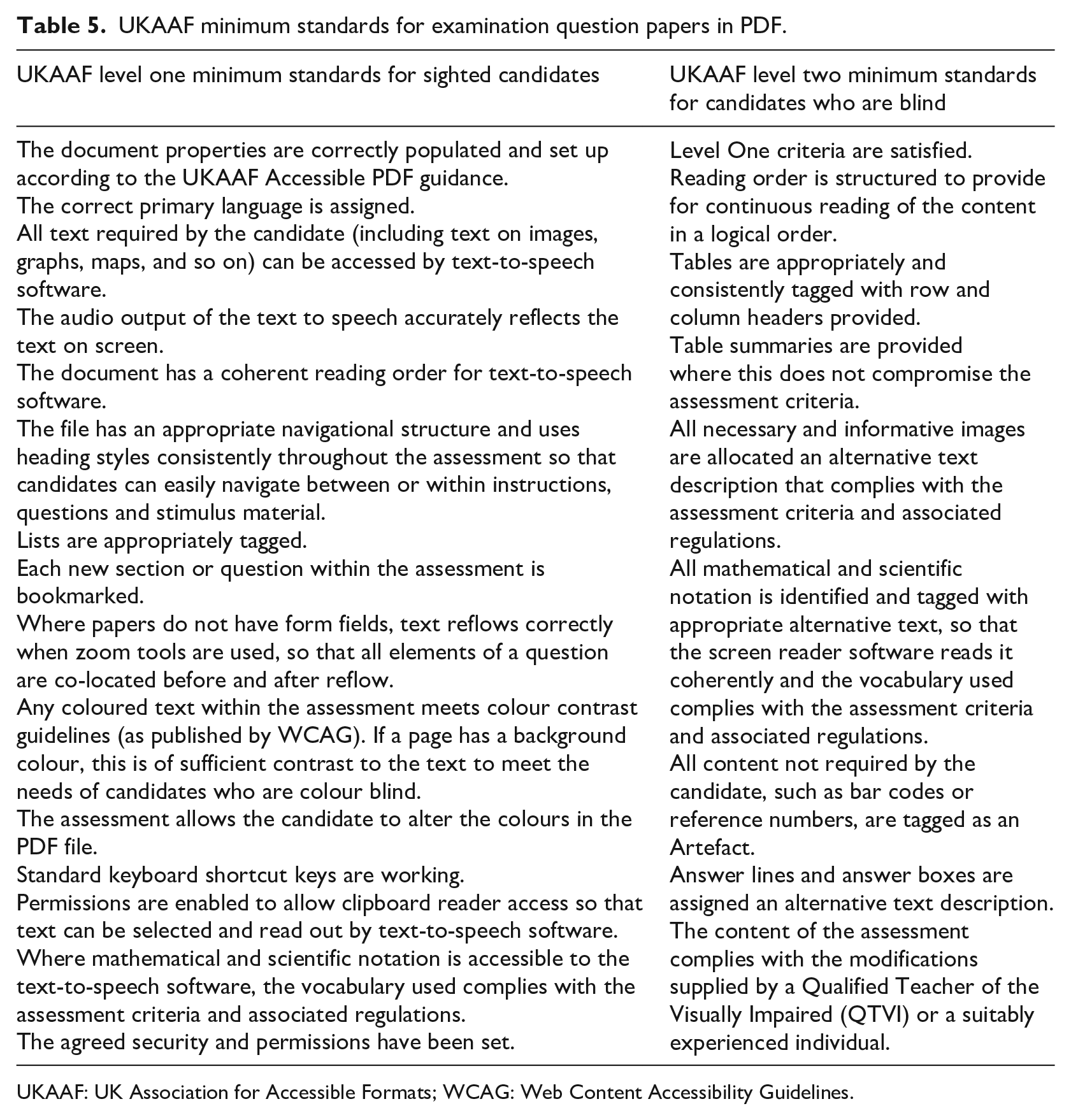
UKAAF: UK Association for Accessible Formats; WCAG: Web Content Accessibility Guidelines.
To investigate the accessibility of examination papers currently available for UK candidates who use screen readers, tests were conducted on a sample of 2017 and 2018 papers from each UK awarding body. It was beyond the scope of the project to conduct a comprehensive accessibility test for every paper from every awarding body and so we tested English Language papers, given that these assessments are undertaken by a large number of candidates, and Physics papers, which were chosen because they include more complex page layouts incorporating images and diagrams. Tests were conducted on both standard and large print modified or ‘accessible’ PDF papers, where available. Twenty papers from six awarding bodies were tested in total. The papers were sourced from the following locations:
AQA standard papers https://www.aqa.org.uk/exams-administration/exams/find-past-papers-and-mark-schemes
AQA modified papers https://www.aqa.org.uk/exams-administration/special-requirements/access-arrangements/modified-question-papers
CCEA http://ccea.org.uk/qualifications/past_papers_mark_schemes/gce
OCR https://www.ocr.org.uk/qualifications/past-paper-finder/
Pearson Edexcel https://qualifications.pearson.com/en/support/support-topics/exams/special-requirements/modified-papers.html
Tests were conducted using the Acrobat Pro Accessibility Checker (Adobe, 2019) which generates results for 32 different characteristics: there is not capacity to present results for all 32 features here so instead we report results for four particular aspects identified by Lazar et al and UKAAF (Table 5) that have particular impact on access with screen readers:
Tagged PDF – failure on this test indicates that there is no information on the logical structure and the elements for the screen reader to interpret;
Logical reading order – whether the document structure provides a logical reading order for the screen reader (the most common cause of frustration);
Tab order – whether the tab order matches the document structure to enable users to tab through in a logical order;
Figures alternate text – whether figures and images have alternate text that can be read by a screen reader.
In addition, manual observational tests were carried out by the author and colleagues on each paper using JAWS 2019 (Freedom Scientific, 2019a) to assess:
Whether navigation using headings was possible;
Whether the reading order was logical;
Whether artefacts are read out;
The presence of appropriate alternate text for images;
Accessibility of form fields.
RQ1 – results
The test results are summarised in Table 6 and suggest that ‘accessible PDF’ papers from Pearson Edexcel are likely to be usable by candidates who use screen readers but that digital papers from the other awarding bodies are unlikely to meet the needs of these candidates.
Results of accessibility tests with sample digital papers.
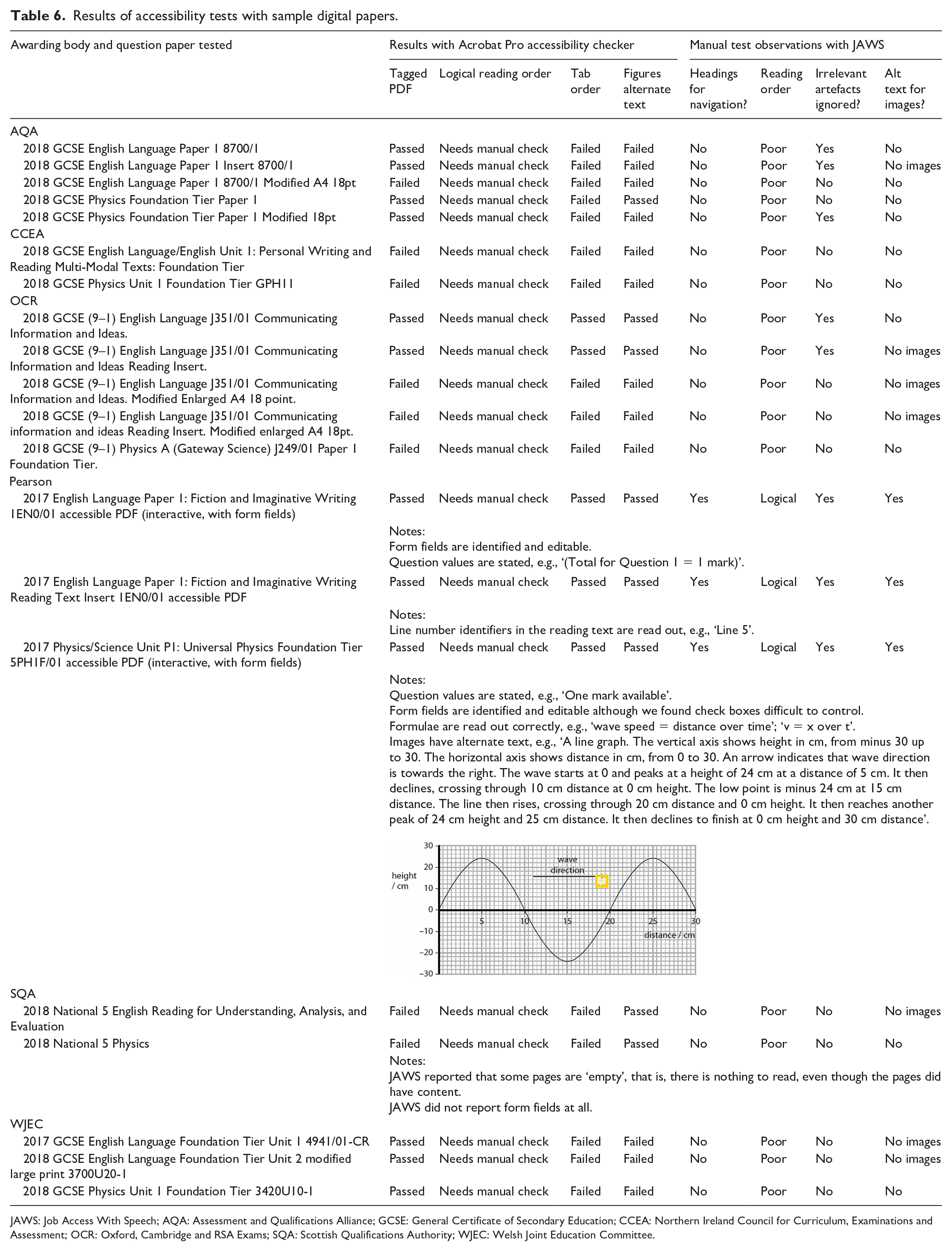
JAWS: Job Access With Speech; AQA: Assessment and Qualifications Alliance; GCSE: General Certificate of Secondary Education; CCEA: Northern Ireland Council for Curriculum, Examinations and Assessment; OCR: Oxford, Cambridge and RSA Exams; SQA: Scottish Qualifications Authority; WJEC: Welsh Joint Education Committee.
The author contacted the GCSE awarding bodies directly to ask whether papers offered were suitable for learners who use screen reader technologies. Responses from AQA and OCR indicated that their papers were not tested for screen reader accessibility. OCR did provide us with additional versions of the English papers but in our tests we found the same problems with reading order and lack of headings for navigation that were present with the files from the OCR website. Pearson reported that their accessible papers were tested with the NonVisual Desktop Access (NVDA) and JAWS screen readers.
SQA and Pearson Edexcel offer ‘interactive’ or ‘question and answer’ papers with ‘form fields’ where candidates can enter answers on screen, and for most candidates, these simplify access. However, form fields can add complexity for candidates who use screen readers; different screen readers handle form fields in different ways; while our research found that VoiceOver on iPad ignores form fields completely.
There are therefore significant concerns regarding access to digital question papers in examinations for candidates with severe sight impairment who use screen readers. The accessibility characteristics of the PDF papers from different providers vary and are further compounded by inconsistencies in the functionality of screen reader technologies and/or digital devices used by students.
Figure 2 illustrates some of the challenges that a candidate using a screen reader may face (Douglas et al., 2009; Nisbet et al., 2006) when reading a Digital Question Paper in PDF that has not been designed for screen reader access:
The logical reading order is not defined correctly and so the screen reader begins by reading the bar code number at the bottom of the page and then follows the order shown by the arrows. This is unlikely to make sense to the candidate.
Irrelevant artefacts on the page (e.g., the bar code and instruction to avoid writing in the marker’s margin) are read out.
The number of marks that each question is worth is difficult to determine.
The form fields (the on-screen answer boxes) are not tagged and are therefore ignored by the screen reader so that the candidate does not know that they exist.
The image of the blender does not have an alternate text description, so the candidate does not know that it is present or what it means.
The circuit diagram is invisible as far as the candidate is concerned.

SQA National 5 Engineering Science 2018: the order in which text is read by the screen reader is confusing; answer boxes are ignored; irrelevant information is read out; the circuit diagram cannot be understood.
Other difficulties we found with papers that are not prepared for screen readers include the following:
Tables may not be specified as such and so may not read out in a way that can be understood;
Mathematical and scientific expressions are unlikely to be read correctly;
Lack of headings means that navigation around the paper is difficult, especially if essential text is in one location (e.g., the reading text for the English comprehension papers used in our tests) and the questions that refer to the text are elsewhere in the paper.
To be adequately accessible with a screen reader, the page in Figure 2 requires the following:
Headings tagged so the candidate can navigate to questions easily;
The reading order to be logical and make sense;
The bar code and marker’s instructions to be tagged to be ignored by the reader;
An ‘alternative text description’ added for the circuit diagram, indicating, for example, that the diagram is available in tactile or enlarged or other format.
Form fields tagged such that the screen reader alerts the candidate to their presence, so that answers can be entered.
Accessibility standards and regulations and implications for digital question papers
This research suggests that Pearson Edexcel is the only UK awarding body provider at time of writing in May 2018 to provide digital question papers that are adequately accessible for candidates who use screen reader technologies.
Article 9 of the United Nations Convention on the Rights of People with Disabilities requires signatories to ‘take appropriate measures to ensure to persons with disabilities access, on an equal basis with others, to the physical environment, to transportation, to information and communications, including information and communications technologies and systems, and to other facilities and services’ (United Nations, 2006) while European Guidelines on Information Accessibility for Learning states that:
It is crucial to provide information in general – and information for learning in particular – in a way that is accessible to all users. Providing information that is not accessible creates an additional barrier for learners with disabilities and/or special needs. (European Agency for Special Needs and Inclusive Education, 2015)
The Equality Act 2010 requires awarding bodies to make reasonable adjustments for candidates with disabilities (Joint Council for Qualifications, 2018a) while the Public Sector Bodies (Websites and Mobile Applications) Accessibility Regulations 2018 (UK Government, 2018) requires public sector organisations to ensure that websites and downloadable documents (including PDFs) published after 23 September 2019 comply with European standards for Accessibility requirements for Information and Communication Technology (ICT) products and services (EN 301 549; European Telecommunications Standards Institute, 2018).
We argue that this and other legislation on equality and access to information is applicable to digital question papers provided by awarding bodies for examinations, and that digital question papers should be accessible for all candidates including those who use screen reader technologies.
Research questions 2 and 3: technologies used by learners with sight impairment
One of the principles governing the use of access or assessment arrangements is that the support(s) must reflect the candidate’s ‘normal way of working’ (Joint Council for Qualifications, 2019, p. 17; Scottish Qualifications Authority, 2017, p. 4). To understand the requirements of candidates, it is therefore necessary to identify the technologies and screen reader tools that are currently being used by learners in schools. If screen readers are not in fact in common use, then there may be little need for awarding bodies to provide Digital Question Papers that are accessible using the technology.
RQ 2 and 3 – method
A survey tool was designed by the author and distributed to Sensory Support Teams and Qualified Teachers of the Visually Impaired in Scotland. Scotland was chosen because the author has contact with the Scottish Association of Visual Impairment Educators (SAVIE) and distribution of the survey was likely to be efficient. The survey (Appendix 1: Access to Curriculum Resources Survey Form) asked practitioners to record which tools and technologies were being used to access curricular resources by individual learners with visual impairment or blindness. The survey was distributed in April 2016 in a range of formats: on A3 paper; as a Microsoft Word form, and as an interactive PDF form. Ethical approval to publish this article was given by Moray House School of Education and Sport Ethics Committee at the University of Edinburgh.
RQ 2 and 3 – results
Twenty-two responses were received from Sensory Support Services located in 16 of the 32 local authorities in Scotland and from one special school catering for learners with visual impairment, in respect of a total of 325 learners. The data provide a revealing snapshot of support tools and methods used by learners with sight impairment.
Age of learners
A breakdown of learner ages is given in Figure 3. The age of 13 learners was not reported (‘blank’ in the table), while the age of five learners was given in terms of their school year: nursery (< 5), primary 1 (age 4–6), primary 3 (age 6 to 8), primary 7 (age 10 to 12), and third year of secondary (age 13 to 15). 89 out of 325 learners (27%) are aged 15 or older and therefore of an age to sit external examinations but inclusion of the wider age group gives an overall picture of support methods across the school-age population as learners progress towards high stakes assessments.
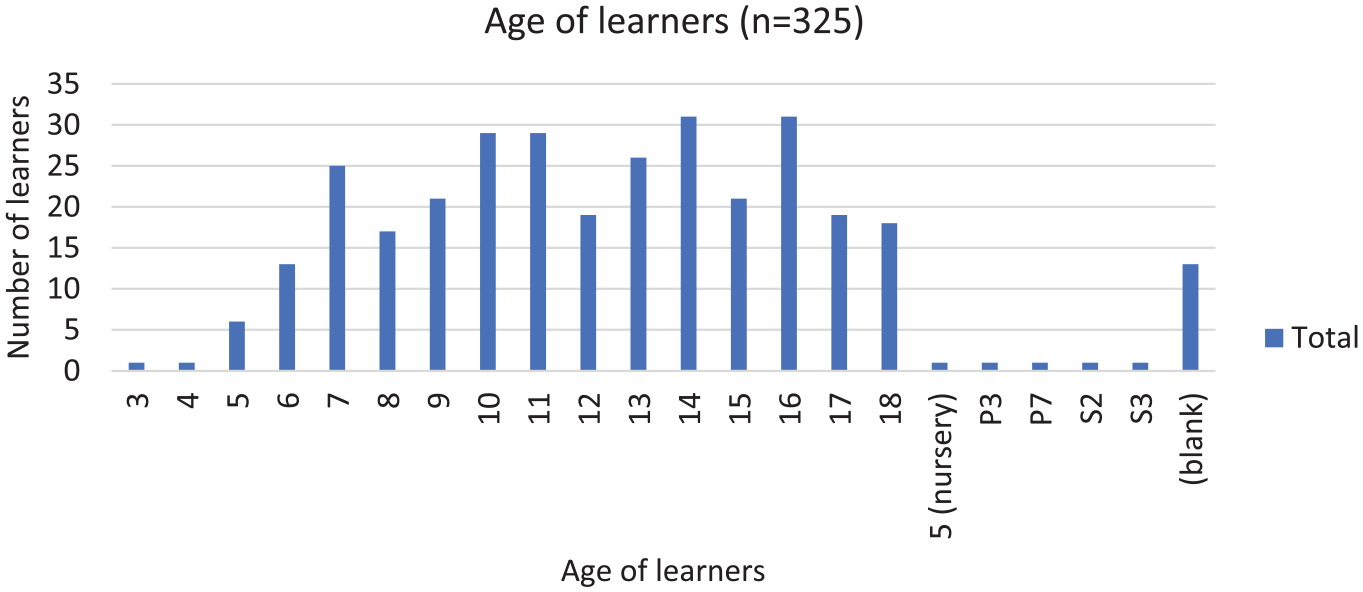
Age breakdown of learners.
Access tools and methods
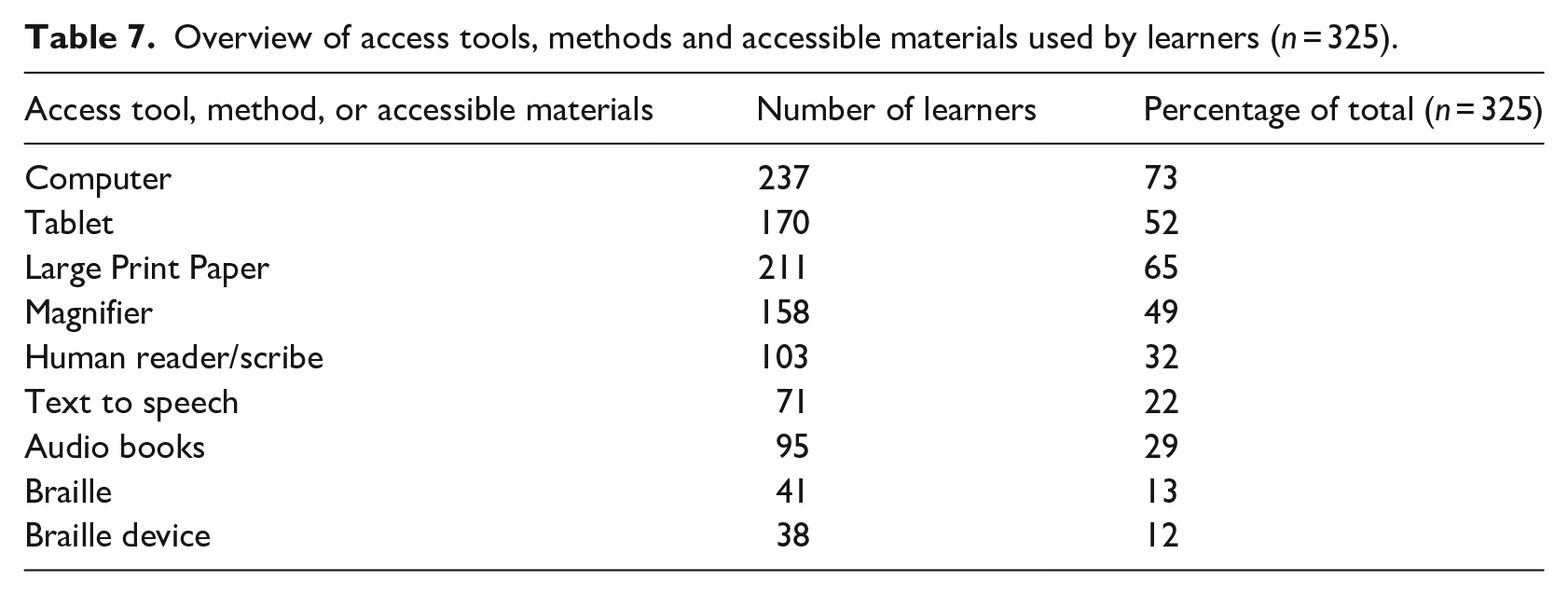
Table 7 provides an overview of the access tools, methods, and accessible materials that are reported to be in use by the 325 learners. Most students are reported to use several methods and technologies. Regarding technology, 73% of learners use a laptop or desktop computer while 52% use a tablet. Almost half the students are reported to use a magnifier, while 65% use hard copy Large Print. Almost a third use a human reader or scribe. About 22% are reported to be using some sort of text to speech on a computer or tablet, while 13% use braille and 12% use a braille digital device. The number of learners reported to use large print resources is more than five times the number who use braille materials.
Overview of access tools, methods and accessible materials used by learners (n = 325).
Digital technologies
Laptops and computers
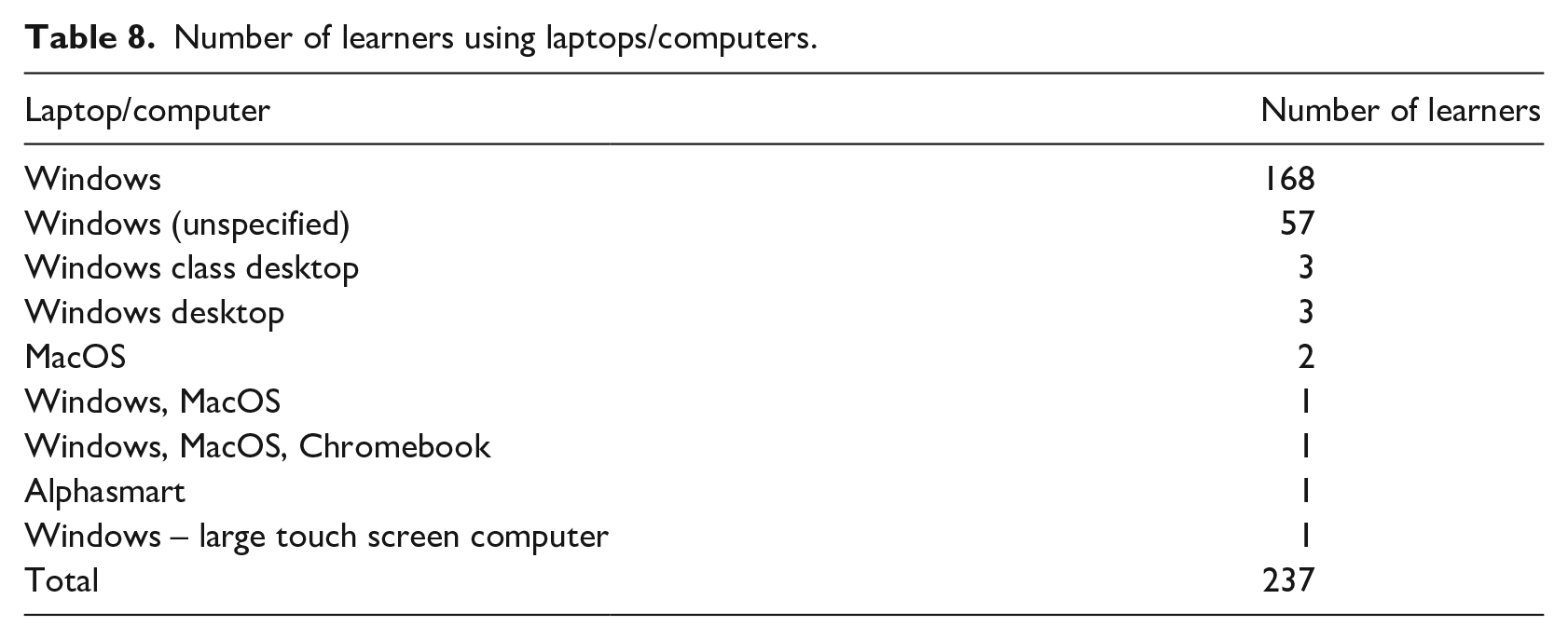
A total of 237 learners out of 325 are reported to be using a laptop or computer (Table 8). Windows computers are the most common type, used by 99%. The survey asked respondents to record the type of laptop used by learners and some respondents did not select ‘Windows’, but did report use of accessibility features within the Windows operating system such as built-in magnification or a particular file format or font size, so these learners have been categorised in the data as using a ‘Windows (unspecified)’ computer. We hypothesise that these students have access to a Windows desktop computer in class. Three students are using Alphasmart, Chromebook, and/or MacOS laptop.
Number of learners using laptops/computers.
Tablets
A total of 170 learners out of 325 (52%) are reported to use of a tablet device (Table 9) and the iPad is the most common: 87% (148 learners out of 170 tablet users) have an iPad. Kindles are next most popular (23 learners), followed by Windows (12 learners) and then Android (4 learners).
Number of learners using tablets.

While there are reports of the advantages of iOS devices for people with sight impairment (American Foundation for the Blind, 2018; Hewett et al., 2014; Horsford, 2016; RNIB, 2018; Stenger, 2013), there is little published research on accessibility of iPads for visually impaired learners or the prevalence of use by this group of learners in schools. The data presented here may suggest that iPads provide a more accessible technology for learners with a visual impairment than tablets running Windows, Android or Chrome OS. Note that many learners use more than one type of technology: 109 out of 148 iPad users were reported to use both an iPad and a Windows computer or laptop, for example. There are other factors influencing choice of device and accessibility software that may be considered such as school, sensory service, and local authority policies and practices. At time of writing in 2019, some local authorities in Scotland are provisioning Chromebooks for students, while others are planning to provide iPads on a 1:1 basis, and these policies are likely to impact upon the technologies that are available to and used by learners with sight impairment.
Digital devices in use by learners in Senior Phase of secondary education
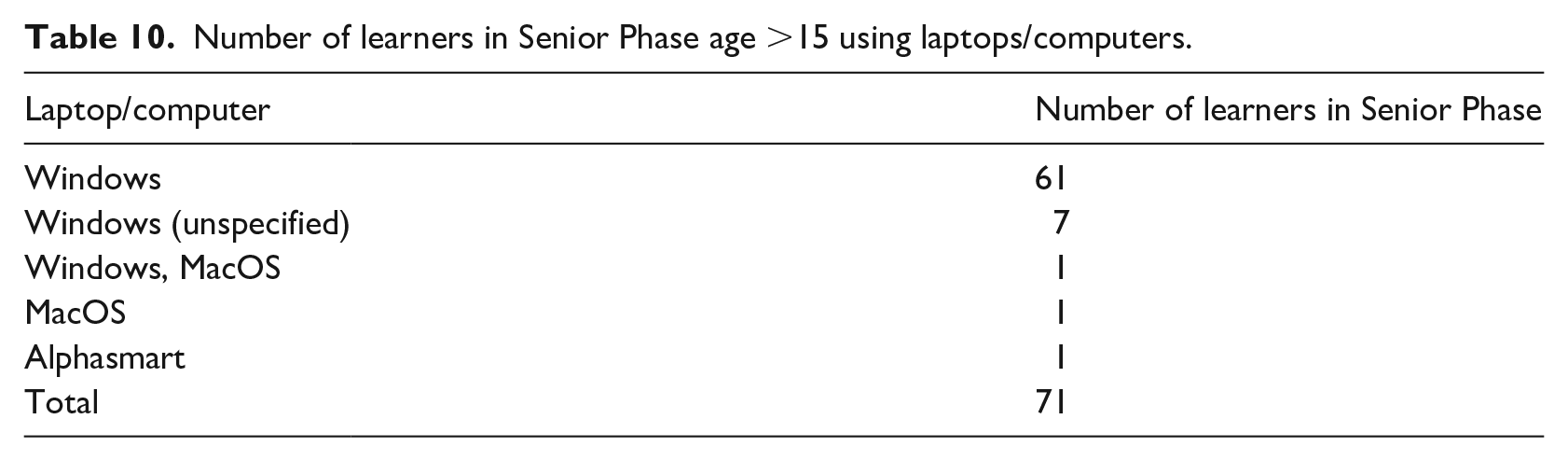
Our primary focus is on learners aged 15 or above who are of an age to sit external examinations. Table 10 gives the number of students in the Senior Phase who are reported to use computers or laptops: 69 out of 71 learners use Windows computers, of which 61 (86%) use laptops, while 50 out of 55 Senior Phase tablet users (91%) have iPads (Table 11).
Number of learners in Senior Phase age >15 using laptops/computers.
Number of learners in Senior Phase age >15 using tablets.

Screen readers and text-to-speech
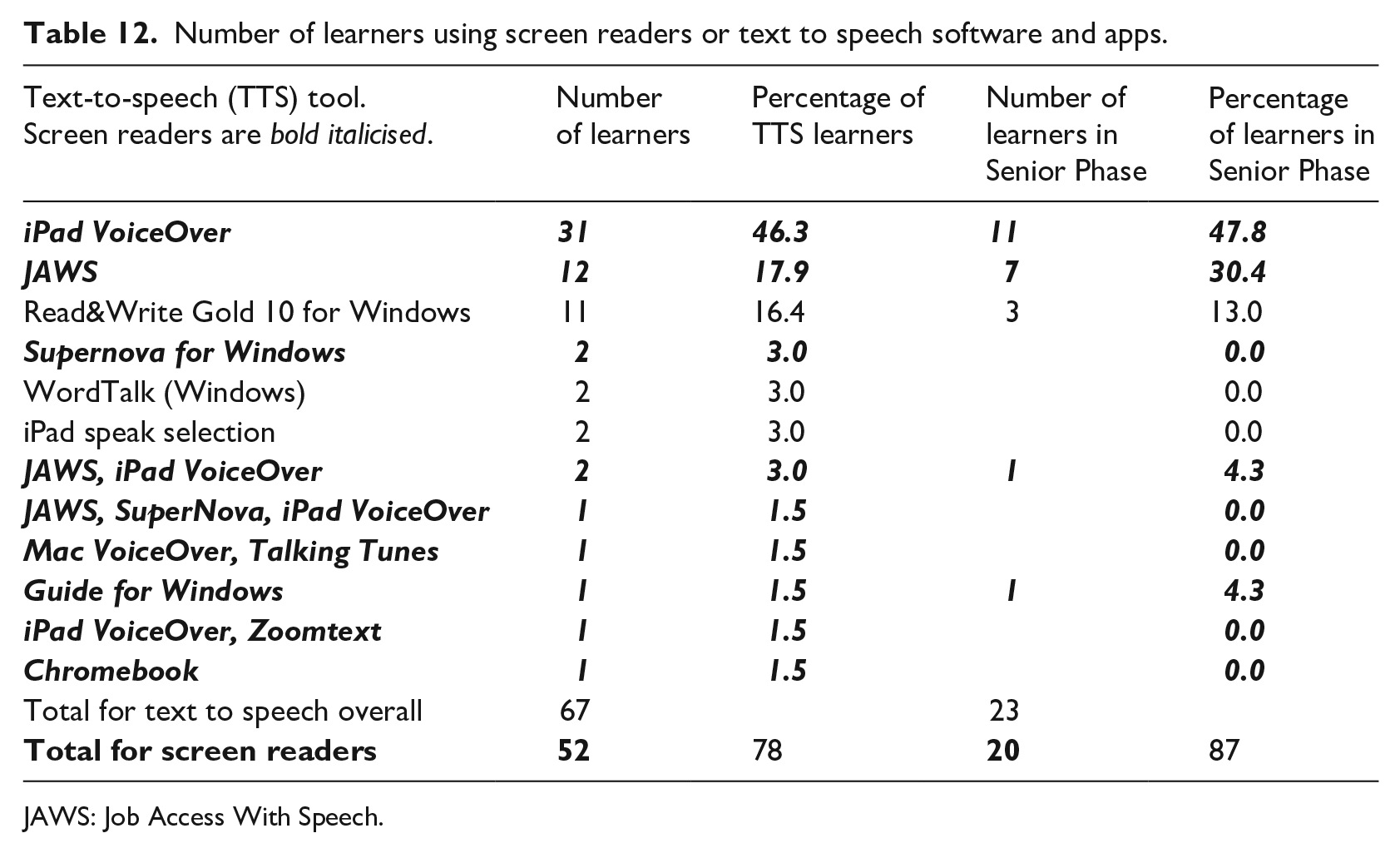
A total of 67 learners out of 325 (21%) are reported to use some sort of text-to-speech technology (Table 12). VoiceOver on iPad (Apple, 2019) is most common, used by 35 (52%) out of the 67 learners (Table 12). JAWS (Freedom Scientific, 2019a) is the most frequently reported Windows computer reader, used by 15 learners (22%), followed by Read&Write Gold 10 (Texthelp, 2019; 11 learners, 16%). Table 12 also gives the number of learners in the Senior Phase who are reported to be using screen or text reader technologies. Again, iPad VoiceOver is most common, used by 12 learners out of 23 (52%), followed by JAWS, used by 8 learners (35%). Neither Windows Narrator, the screen reader which is built-in to the Windows operating system nor NVDA, a free screen reader for Windows (NV Access, 2018) were reported to be used by any learners. This may or may not reflect actual practice as they were not offered as an option in the survey, although there was an opportunity to respond with ‘Other’ and to specify the tool in use.
Number of learners using screen readers or text to speech software and apps.
JAWS: Job Access With Speech.
Read&Write Gold (11 learners, 16%) and WordTalk (CALL Scotland, 2019; 2 learners, 3%) are primarily designed as text readers for learners with sight and reading difficulties (Holzberg, 2013; Lange et al., 2006), rather than screen readers (e.g., VoiceOver or JAWS) which are specifically designed for people with severe sight impairment. iPad Speak Selection requires sight to select the text to be read, so we do not class it as a screen reader (American Foundation for the Blind, 2018). Supernova (Dolphin, 2019b), Guide (Dolphin, 2019a), and ZoomText (Freedom Scientific, 2019b) all provide both screen reading and screen magnification. One learner is reported to use a Chromebook, which has both screen and text reader options (Google, 2017).
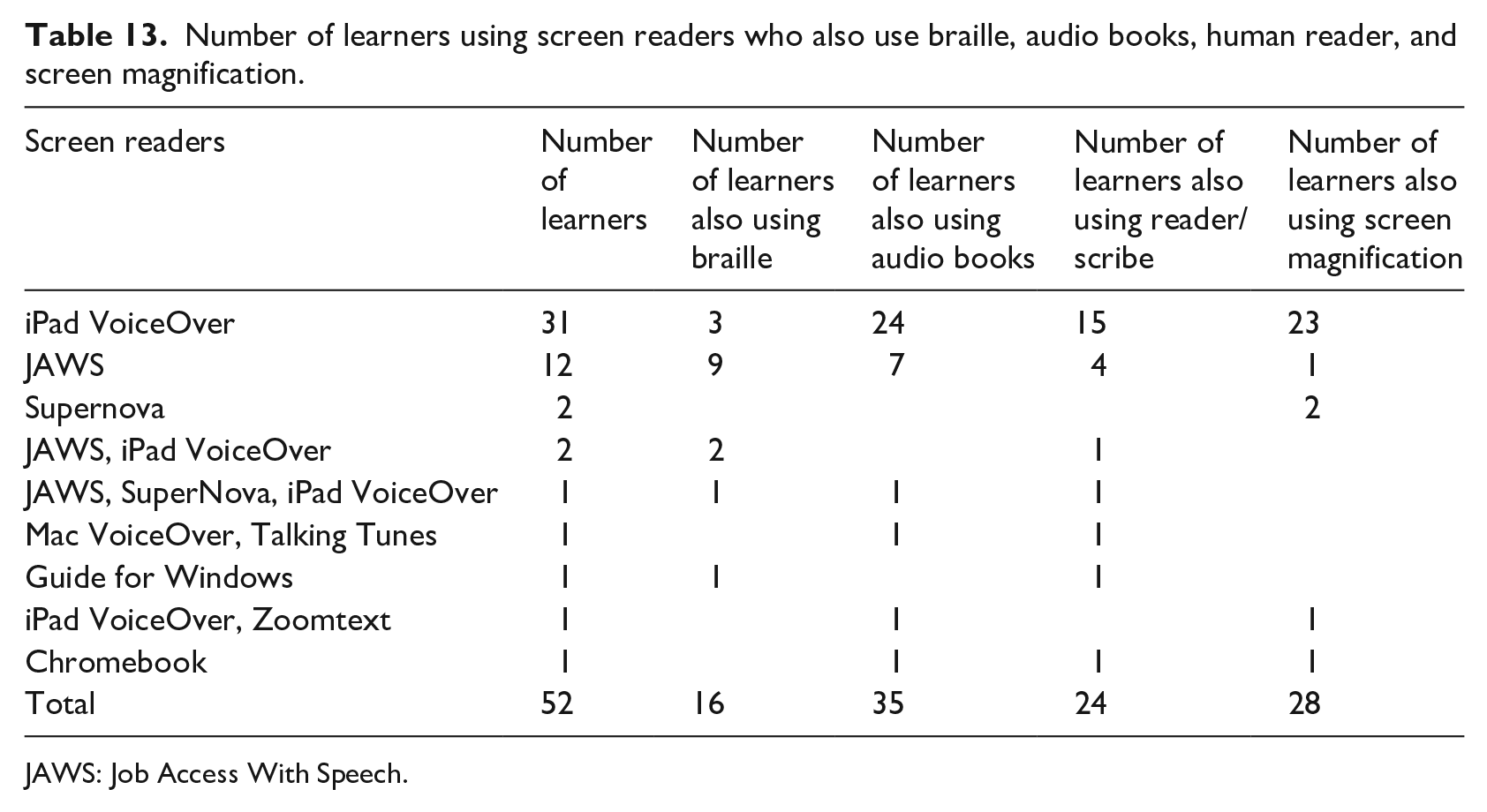
Out of the 67 learners who are reported to use text to speech, there are therefore up to 52 learners (16% of the total number of learners represented in the survey responses) using screen readers. The data show that most students with sight impairment use more than one method of support, and Table 13 provides an overview of the other strategies employed by those learners who are reported to use screen readers. This analysis shows that a majority of the 35 learners who use iPad VoiceOver are reported to use screen magnification also (24; 69%) while only 17% are reported to use braille. In contrast, only 1 out of 15 JAWS users also uses screen magnification, while 12 out of 15 use braille. While the sample size is small, the data suggest that JAWS users are less likely to use sighted methods of access, whereas iPad VoiceOver users do also use low vision aids and strategies.
Number of learners using screen readers who also use braille, audio books, human reader, and screen magnification.
JAWS: Job Access With Speech.
Screen magnification
Just over half of learners (175; 53%) are reported to use some sort of screen magnification software or facility compared with the 67 learners (21%) who use text-to-speech software and 38 (12%) who use a device to read or write Braille (Table 14). Many learners are reported to be using combinations of different tools – for example, 30 learners use screen magnification on both Windows and iPad machines – and so Table 14 gives aggregated totals. The most common magnification systems are those built into the Windows and iPad operating systems. Of the specialist magnification software packages, SuperNova is more common than ZoomText.
Numbers of users of screen magnification software.

Braille and braille devices
A total of 40 learners out of 325 (12%) are reported to use Braille materials and 38 use some sort of Braille device – either a Manual or Electronic Brailler, refreshable Braille display, or a Braille Notetaker such as a BrailleNote. Some learners use more than one Braille device and Table 15 gives the aggregated figures. While the main focus of this research is on devices and technologies for screen reader users, it is also helpful to investigate Braille displays and Braille Notetakers with braille displays because learners may wish to use these to access digital question papers also. There were 25 learners in total out of 325 (8%) and 7 (2.2%) learners in the Senior Phase reported to be using a refreshable Braille display or Braille Notetaker. (The totals in Table 15 are greater than 25 and 7 because most students use more than one Braille device).
Numbers of learners using Braille devices.

Limitations
Although the accessibility tests were undertaken on a small sample of digital question papers sourced from the awarding bodies’ web sites, we suggest that production methods and processes are sufficiently uniform to assume that the results will apply for most papers available from the awarding bodies. There is however a need to conduct research with learners with severe sight impairment who use screen readers to fully understand the requirements of candidates.
The data on the strategies and tools used by learners were provided by a self-selecting group of 22 practitioners in specialist Sensory Support teams in 16 out of 32 local authority areas in Scotland and from one special school for students with visual impairment. The data should, therefore, be reasonably accurate given the sources although the information has not been validated and may include errors, varying interpretations and bias. The survey data are with respect to learners in Scotland but should be applicable internationally given that the needs of learners with visual impairment in terms of access to the curriculum and the technologies described are reasonably consistent across the United Kingdom and other nations where technology is used by learners with visual impairment.
The data describe technologies and strategies used by 325 learners and are not by any means a comprehensive survey of all learners with a visual impairment in Scotland. For example, one respondent noted that:
This is not my full caseload: it’s been completed only for those who rely or use technology in some way. Many of my caseload use PCs in class without added extras, i.e. sit closer to it. Many of my younger pupils don’t need anything yet as print size is ok and don’t use any additional technologies.
The survey was conducted in summer of 2016 and provides a snapshot of technologies and approaches in use at that time: this will undoubtedly change as technologies and practices develop.
Discussion
UK awarding bodies are required to make reasonable adjustments for people with disabilities and one such adjustment is the use of access or assessment arrangements by candidates in externally assessed examinations. UK awarding bodies offer adapted and/or modified question papers in Large Print, Baille, and digital formats. The digital or electronic question papers are provided in PDF and while uptake suggests that they are accessible for learners with sight, this research has found that digital examination papers from five out of six UK awarding bodies are not adequately prepared for candidates with severe sight impairment who use screen reader technologies.
This does not necessarily mean that these candidates are being disadvantaged in examinations: they may be using other methods of support in the assessment, such as a human reader, or braille papers. There are no published data regarding the number or pattern of requests for digital question papers on behalf of candidates who use or would wish to use screen readers to access examinations. Since access arrangements should reflect candidates’ ‘normal way of working’ in school or college, it is important to understand which technologies are being used by learners with sight impairment to inform the provision of appropriate arrangements, and the data sets described in this article offer a unique overview and insight into tools and strategies used by 325 learners across Scotland. Although the data are restricted to learners in Scotland, we suggest the analysis is relevant for awarding bodies, practitioners, and policy makers across the United Kingdom and internationally in other countries where inclusive practices are in place.
The research has found that 73% of learners use a laptop or desktop computer while 52% use a tablet. Windows devices are the most commonly used type of laptop or computer, while iPads are the most common tablet device, although as this picture will no doubt alter as technology changes and develops.
A majority of learners with sight impairment are reported to use visual aids or adaptations: the number of pupils using large print resources are more than five times the number who use braille materials, for example.
Regarding screen reader technologies, the focus of this article, up to 52 (16%) of the 325 learners are reported to be using screen reader tools, compared with 13% who use braille; 29% who use audio books, and almost one third who have support from a human reader or scribe. The research finds that VoiceOver on iPad is most commonly used, followed by JAWS. However, detailed analysis indicates that a majority of VoiceOver users also access technology with screen magnification and so it may be that this group are employing the latter instead or in addition to VoiceOver in examinations; while 12 out of 15 JAWS users read braille resources in class, so this group may be able to access braille papers in examinations rather than using the screen reader. Nevertheless, even if other access arrangements are an option, the lack of screen reader accessible digital papers may disadvantage learners for whom a screen reader is their preferred or more usual method of accessing learning resources. There may also be a risk that schools do not promote or may even discourage the use of screen readers in class, if examination question papers are not accessible using the technology.
This research indicates that there are more learners using screen reader technologies than those who use hard copy braille; yet only one out of six awarding bodies (Pearson Edexcel) offers digital papers that are adequately accessible with screen readers, while all boards apart from CCEA report that they provide hard copy papers in braille (Ofqual, 2018c, p. 3; Scottish Qualifications Authority, 2017, p. 7).
We therefore argue that five out of six examination boards in the United Kingdom are not be adequately meeting the needs of learners who use screen reader or electronic braille technologies and are not meeting obligations under equality legislation (Equality Act, 2010).
One reason why UK awarding bodies do not produce screen-reader accessible papers may be because current guidance (UKAAF, 2018) for adapting and modifying question papers for candidates with disabilities addresses the production of Large Print and braille examination papers, but does not deal with screen reader technologies. The production of assessments that can be accessed with screen readers involves more than simply adapting the digital question papers that are currently available for candidates who use sight because the assessment may require modification to take account of the needs of candidates who do not have sight, following similar processes that are used to produce braille papers. This modification process is required under UKAAF Level Two standard: ‘The content of the assessment complies with the modifications supplied by a Qualified Teacher of the Visually Impaired (QTVI) or a suitably experienced individual’ (Day, 2014).
There is therefore a need for regulators, awarding bodies, educators, accessibility specialists and organisations representing candidates to research, develop, and publish modification guidelines for production of digital examination papers by users of screen reader and braille display technologies so that candidates are not disadvantaged. Digital question papers for candidates who use screen readers or electronic braille displays must be designed, created, and tested so that they function reliably and accurately on the full range of technologies that are used by learners, particularly VoiceOver on iPad, JAWS, and electronic Braille displays and devices.
Footnotes
Appendix 1
Declaration of conflicting interests
The author(s) declared no potential conflicts of interest with respect to the research, authorship, and/or publication of this article.
Funding
Funding of the design and distribution of the survey discussed in this article was provided by the Scottish Qualifications Authority. The author(s) received no other financial support for the research, authorship, and/or publication of this article.
