




Abstract
An article published in this issue (Rainey M) has introduced the value of using patents as a resource of scientific and technical and competitor information and the growth in free patent websites, highlighting Espacenet and PatentScope in particular. This article provides in-depth information on the most useful search techniques for these sources and includes a relatively new addition to the free patent database suite, that is, Google Patents.
Keywords
Introduction
Most free patent sources are fairly straightforward to use if you know of a particular patent/inventor or company or if you wish to get hold of a translation, download the PDF or obtain legal status. The simple/advanced search forms on free patent websites offer menus for patent number/inventor/assignee searching. But the real challenge is how to interrogate the subject matter to gain insights into patent white space and/or what is already public knowledge. This article will take you step by step through a full-text search on Google Patents (Google), Espacenet (The European Patent Office (EPO)) and PatentScope (World Intellectual Property Office (WIPO)) and explain why and how to approach full-text patent searching in a knowledgeable, methodical and consistent manner.
Free versus paid for sources
Patent information professionals in private companies often have access to a wide range of commercial patent sources such as Orbit/PatBase/Thomson Innovation. These tools contain huge collections of patent data enabling fielded searching, facile use of classifications and, of most importance to the topic covered here, intuitive interfaces separating claims/titles/abstracts from the full text, should your search demand it.
Search topics can be executed to exhaustion by building up complex strategies with clever syntax, providing a comprehensive set of results and thus a more confident opinion of the prior art. Proximity (keywords can be ‘n’ words apart), Boolean logic (‘ANDing’, ‘ NOTting’, keywords or entire search lines), relevance ranking, exporting, saving, editing and re-executing complex and detailed strategies all form part of the package, providing a rapid overview in much less time than the Internet services.
In addition, commercial databases are secure compared with free sources where the search keywords are unencrypted. However, the budgetary impact of commercial databases should be weighed up with the offering of free databases, which are improving rapidly in their content, speed and currency, giving inventors/applicants and researchers a solid overview of what’s in the public domain before they engage a professional searcher or submit a patent application. Paul Schwander’s article ‘An Evaluation of Patent Searching Resources: Comparing the Professional and Free On-line Databases’ 1 provides more details.
The patent databases reviewed in this article (Google Patents, Espacenet, PatentScope) have been selected on the basis of what countries and dates they cover, how up to date they are, separation of fields (claims vs. the entire specification) in the search form and, more importantly, the patent expertise of the providers, the length of time they have been in the business and the funding they have to maintain and improve their searchable patent collections.
What you need to know about patents before you start to search
A patent is a right granted to the owner of an invention that prevents others from making, using, importing or selling the invention without the inventor’s permission. A patentable invention can be a product or a process that gives a new technical solution to a problem. 2 A patent can also be called a case or a specification. Strictly speaking, ‘patents’ are only cases that have been granted. Non-grants are called ‘patent applications’. A granted patent is distinguished from the application by its kind code, that is, a letter following the patent number. Very generally, a kind code A is an application and a kind code B is a grant.
Example: EP123456 A is an application and EP123456 B is the grant.
Granted patents are usually in force for approximately 20 years unless their renewal fees have not been paid or the patent was opposed and revoked. A large number of patent applications are never granted and hence lapse over time.
Novelty or FTO searching?
Content of a patent
Before searching, it is important to familiarize yourself with the content of the full text of a patent document. An abstract on the front page summarizes the invention. This is followed by a detailed description (which is the longest part and comprises background information (prior art)), a summary of the invention, precise details about the invention (including experimental details, drawings and tables) and why it is claimed to be superior over the prior art (Figure 1). The claims follow the description and are the most important part of the document. The goal of the claims is to particularly point out and distinctly claim the subject matter, which the applicant regards as his or her invention. 3

(a) Front page and description. (b) Claims.
Novelty
Typically an inventor will want to know whether his/her invention is novel, also known as Novelty or Prior Art search. In this case, the entire patent document should be searched. Non-patent literature, for example, journals, conferences and websites, should also be considered (not covered in this article). Google’s Prior Art Finder should be explored for this purpose.4,5
Freedom-to-operate
Another commonly posed question regarding the patent literature is ‘are we free to use our invention or will testing or commercializing the product infringe other patents’, known as a freedom-to-operate (FTO) or clearance search. 6 In this case, the search can be restricted to the claims, as claims are the only legally enforcing portion of the patent document. If the product/invention is only going to be marketed or commercialized in one country or territory, you can use a patent database that only covers that country, for example, US Patent and Trademark Office (USPTO) for US patents or Espacenet for European patents (EPs).
The search can be restricted to documents published within the last 25 years, as patents published earlier than that would probably have expired. The legal status of each case retrieved needs to be assessed on whether individual family members are granted and in force or patent applications which are pending. Only ‘granted and in force’ or ‘pending’ will matter (Note: it’s very difficult to ascertain the status of a patent family without prior legal knowledge. A good tip is to consult a patent expert).
In other words, an FTO search will retrieve fewer hits than a patentability search as you can restrict to claims/country or jurisdiction and negate older patent documents.
There are other search types (validity, assignee or legal status), but these are not covered by this article.
Patent families
A patent family is a set of patents taken in various countries to protect a single invention (when a first application in a country – the priority – is then extended to other offices). In other words, a patent family is ‘the same invention disclosed by a common inventor(s) and patented in more than one country’. 7
In the patent websites discussed in this article, most of the full-text searching will retrieve duplicate inventions, for example, three hits, one from the US, one from EP and one from WIPO, all of which can be part of the same family (but may have different wording, e.g. in the claims) and thus correspond to one unique invention. It may be that you can view the patent family information for each hit, but you will be viewing the same family for all three. Very few databases offer grouping of the results after full-text searching; in other words, reducing/condensing them down to families, where one hit equals one invention. The Lens 8 is one of the few patent databases that does offer this very useful feature. However, the Lens, as one of the newer patent databases is not as robust as the more established search systems and is poorly supported, so not discussed in detail in this article, but well worth keeping an eye on for future developments
Why search full text instead just abstracts?
Abstract searching is recommended to gauge the scope of your search. Some patent databases (notably Espacenet and PatentScope) default to offering a broad country coverage with abstract (and titles) as the only available subject searchable fields. You can view the full text, but you rely on your hit keywords being present in the abstract (or title).
Searching abstracts may result in most of the hits presenting in foreign-language patents with an English abstract and no English language equivalent. Or you may find nothing, purely because the abstract content doesn’t contain the keywords you have input. Conversely, there may be too many hits but refining with more keywords gives zero. FTO searches will demand restricting to claims and prior art to the full disclosure, in which case a knowledge of what percentage of the database offer full-text collections, and from which national patent offices, is a necessity.
An example of abstract versus full-text searching is to search for use of Lipitor in multiple sclerosis in Espacenet.
Espacenet Worldwide coverage offers title or abstract field and gives 0 results. Espacenet full text on WIPO patent applications offers keyword(s) in full text and gives over 200 results (Figure 2).
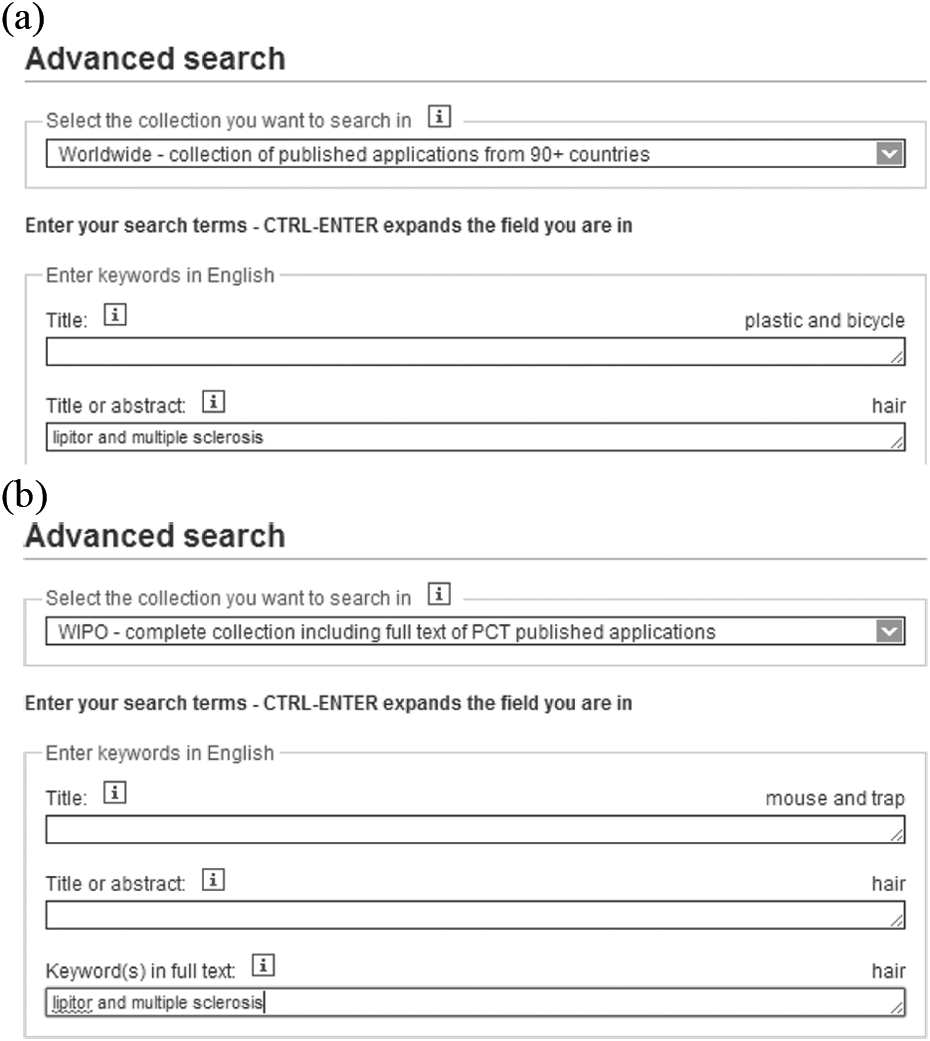
(a) Espacenet worldwide abstract search. (b) Espacenet WIPO full-text search.
Patent databases such as Google Patents default to searching the full text where it’s available and the abstract where it’s not. PCTFULL (Patent Cooperation Treaty Full Text) offers full-text search options, but you need to be aware that if the search is restricted to full text, only a portion of their coverage will be searched (i.e. only the countries whose collections are loaded in full text).
Classification schemes
Patent offices worldwide use the International Patent Classification (IPC).9,10 There are approximately 70,000 different IPC codes for different technical areas. Examiners at the various patent offices will use classification searches initially to find existing prior art for a newly submitted application, thus obtaining a subset of answers before they focus on relevant subject keywords. The advantage of using a classification code is it focuses your search and retrieves hits that your keywords can miss, particularly if the patent is in a foreign language. A good classification code for an area of interest prevents you having to think of all the multiple variations the concept may be expressed in a patent document. Classification also offers a way of analyzing documents by technologies.
A relevant classification code is very useful in the databases that do not allow much flexibility for constructing a detailed search strategy, for example, Google Patents. The IPC coding system will be used in the examples in this article, but there are other countries’ specialist classification systems to consider especially when searching national patent collections such as the US, 11 Japan 12 and a recent developed Cooperative Patent Classification (CPC) coding system developed by the EPO as an extension of the IPC 13 (note: the US is moving away from its USPTO coding system towards the CPC in an attempt to harmonize with the EPO).
Full-text patentability search example
The stages that need to be followed are given below:
The Invention: A scent to enhance cut flowers’ natural odours making them stronger and longer lasting
Decide on the type of search
This is a patentability search to find out whether this invention is novel by trying to find prior art. Searching will be preferably undertaken within the title, abstracts, descriptions and claims, that is, the full text of a patent. Legal status information is not relevant in a patentability search (although it will be briefly highlighted for the purpose of FTO searching).
Comparisons and evaluations will be based on the following criteria:
Content: Ability to restrict to claims, hit-term highlighting, availability of patent family information, proximity (how closely the keywords can be associated) and truncation (variability of word endings; some databases automatically look for variations in word ending (called stemming)), multi-row strategy construction (ability to break the strategy into lines, as opposed to inputting it in one go), refining and exporting andHelp/support: It is a combination of online help/ease of finding answers to your questions/online forums and email help.
Decide on the patent websites
Google Patents, Espacenet and PatentScope will be used. All have intuitive interfaces, broad coverage and are fast. Google Patents automatically searches the full specification of patent authorities loaded in full text, together with the abstracts of those that are not. Devise synonyms for each concept SCENT, FRAGRANCE, AROMA, PERFUME FLORAL, FLOWER, ROSE, BOUQUET CUT, VASE LONG TERM, MANIPULATE, INCREASE, MODIFY, PROLONG, LASTING, ENHANCE
Apply truncation to allow for a variety of word endings and proximity to determine how near the words can be to each other
((LONG TERM or INCREAS* or MODIF* or PROLONG* or LASTING or ENHANC*) NEAR (SCENT OR FRAGAN* OR AROMA OR PERFUME*) AND (FLORAL OR FLOWER* OR ROSE* OR BOUQUET) AND (CUT OR VASE).
Find an IPC code relevant to the area by browsing the WIPO International Patent classification code thesaurus
Within the WIPO website, 9 click on Browse and Search the IPC. If you are unclear as to what section your IPC will fall into, select the Search TERMS option towards the bottom of the left-hand pane. A pop-up box will allow entry of keywords and show definition and catchwords. It is worth taking the time to click on these definitions and read the resulting thesaurus sections, as addition of an IPC code to a search from could save you getting hundreds of false hits in your search (Figure 3).

IPC term search WIPO IPC code thesaurus. IPC: international Patent Classification; WIPO: World Intellectual Property Office.
In this case, A01N 3/02, Keeping cut flowers fresh chemically, is the best code to use (you can go broader and use A01N3, which will search all the narrower definitions too). Other codes to bear in mind are C11B 9/00, Essential oils and A01G 7/00 Botany in general.
This subclass covers: [3]
compositions, physical forms, methods of application of specific materials or the use of single compounds or compositions; [7] chemosterilants for the sexual sterilisation of invertebrates, e.g. insects (sex sterilants for other purposes A61K). [7] This subclass does not cover materials which affect the growth of a plant solely by supplying nutrients, i.e. plant food, ordinarily required for growth or materials which are used to prevent or cure mineral deficiencies in plants, e.g. addition of iron chelates to cure iron chlorosis, which materials are covered by class C05. [3] In this subclass, the following expression is used with the meaning indicated: “plant growth regulators” are those materials which alter the plant through a chemical modification of the plant metabolism, such as auxins. [3] Biocidal, pest repellant, pest attractant or plant growth regulatory activity of compounds or preparations is further classified in subclass A01P. [8]
Running your search in Google Patents
Google Patents is driven by Google’s own search engine offering excellent features such as speedy searching, efficient patent image browsing, foreign translations of claims, PDF downloads and legal status. Google’s powerful automatic ranking shows the most relevant answers first. However, it’s not simple to do an accurate or a comprehensive search due to limitations on the search form; you are restricted to the amount of synonyms you can input, you can’t use truncation at the end of words and you cannot refine a search or export a list of results.
If you Google ‘Google Patents’ you will be taken to the basic search box, so include the word ‘advanced’ or follow the link in the table below which takes you straight to the advanced form, from which it is much easier to construct a meaningful search strategy than the basic form. The words you input will be searched in the full text if available and the title and abstract if not.
Table 1 provides a summary of the key features for interrogating Google Patents.
Summary of the key features for interrogating Google Patents.

USPTO: US Patent and Trademark Office; WIPO: World Intellectual Property Office; EPO: European Patent Office.
Google patents search form
www.google.co.uk/advanced_patent_search
Find results with all of the words* SCENT OR FRAGANCE OR AROMA OR PERFUME with the exact phrase CUT with at least one of the words FLORAL FLOWER ROSE BOUQUET without the words ARTIFICIAL Return patents with the international classification A01N 3/02
Google echoes back “about 43 results” (22/09/2014) The results may be duplicates – i.e. part of the same family
The results can be sliced down further by patent office/patent type/issued versus application expanding on the Search tools menu – it is worth doing so to cut down on the numbers of results (Figure 4).

Google search Tools Menu.
Managing the results
Each patent from the search needs to be individually viewed as it’s not possible to export the results’ list. This is time consuming, you need to be on the Internet, and you cannot be an intermediary searcher and pass the results onward. Selecting relevant hits provides valuable information such as the patent family, links to patent office websites, drawings and translated claims for foreign language documents and legal status. There is also an option, for each individual hit, to take the search into non-patent literature using Google’s Prior Art Finder4,5 (see Find Prior Art at the upper right corner of each individual display; Figure 5).
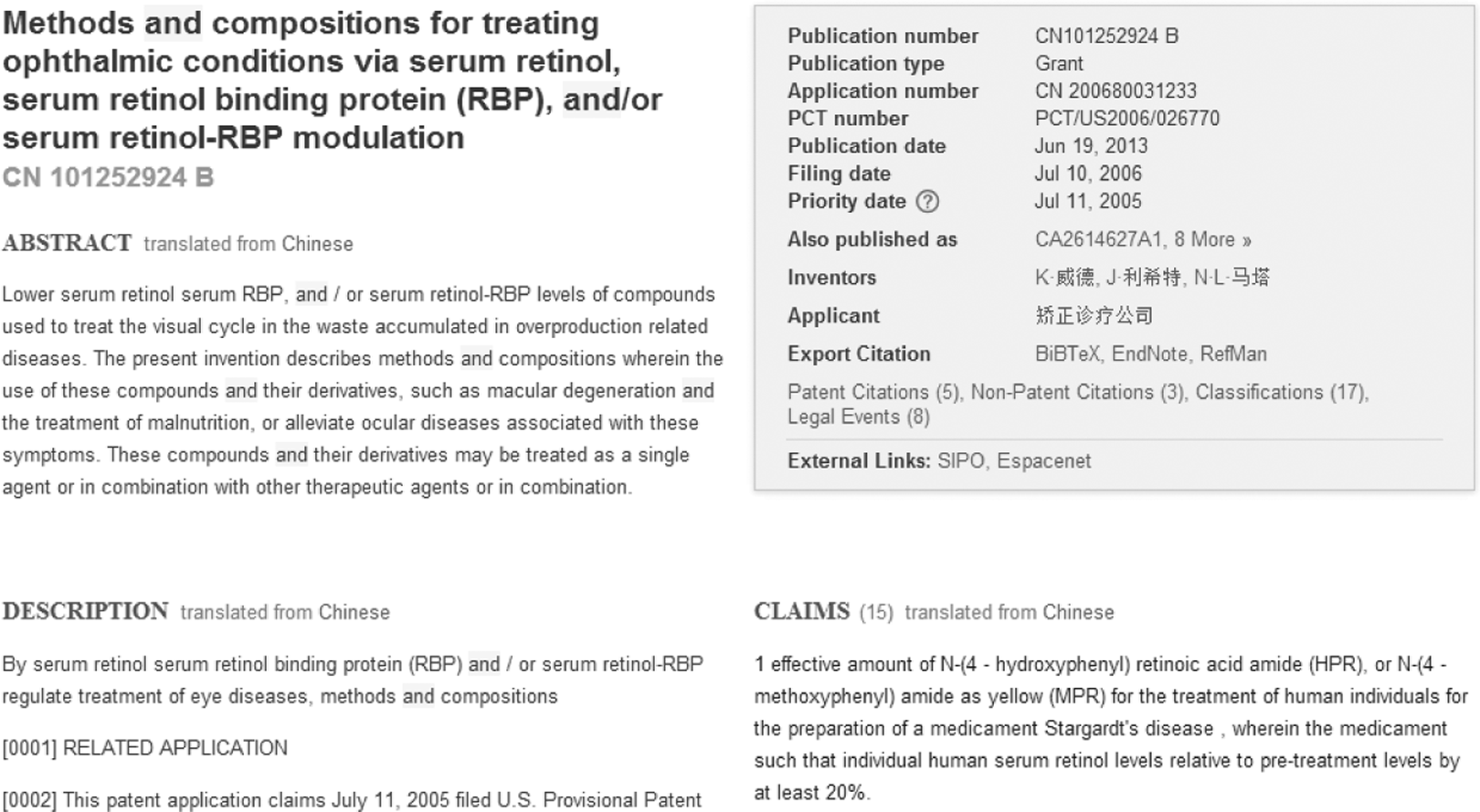
Google Patent Display.
Running your search in Espacenet
Espacenet is a free search service offered by the EPO. When you load and search Espacenet, it is important to be aware that the default coverage option – its worldwide collection – does not allow full-text searching, and you need to change to the EP Collection and then repeat your search in the WIPO collection in order to interrogate the full content of patent documents.
You will only find EP and WO references during a full-text search on Espacenet. The search form allows you to input a query using AND/OR and closer proximity using ‘n’ to signify the number of words apart. You are allowed a maximum of 10 words/field in the advanced form. However, you have to compile the query in one line, using nesting.
Note: You will also need to repeat the search using German, French and Spanish keywords to find EP or WO documents filed in these languages.
Table 2 provides a summary of the key features for interrogating Espacenet.
A summary of the key features for interrogating Espacenet.
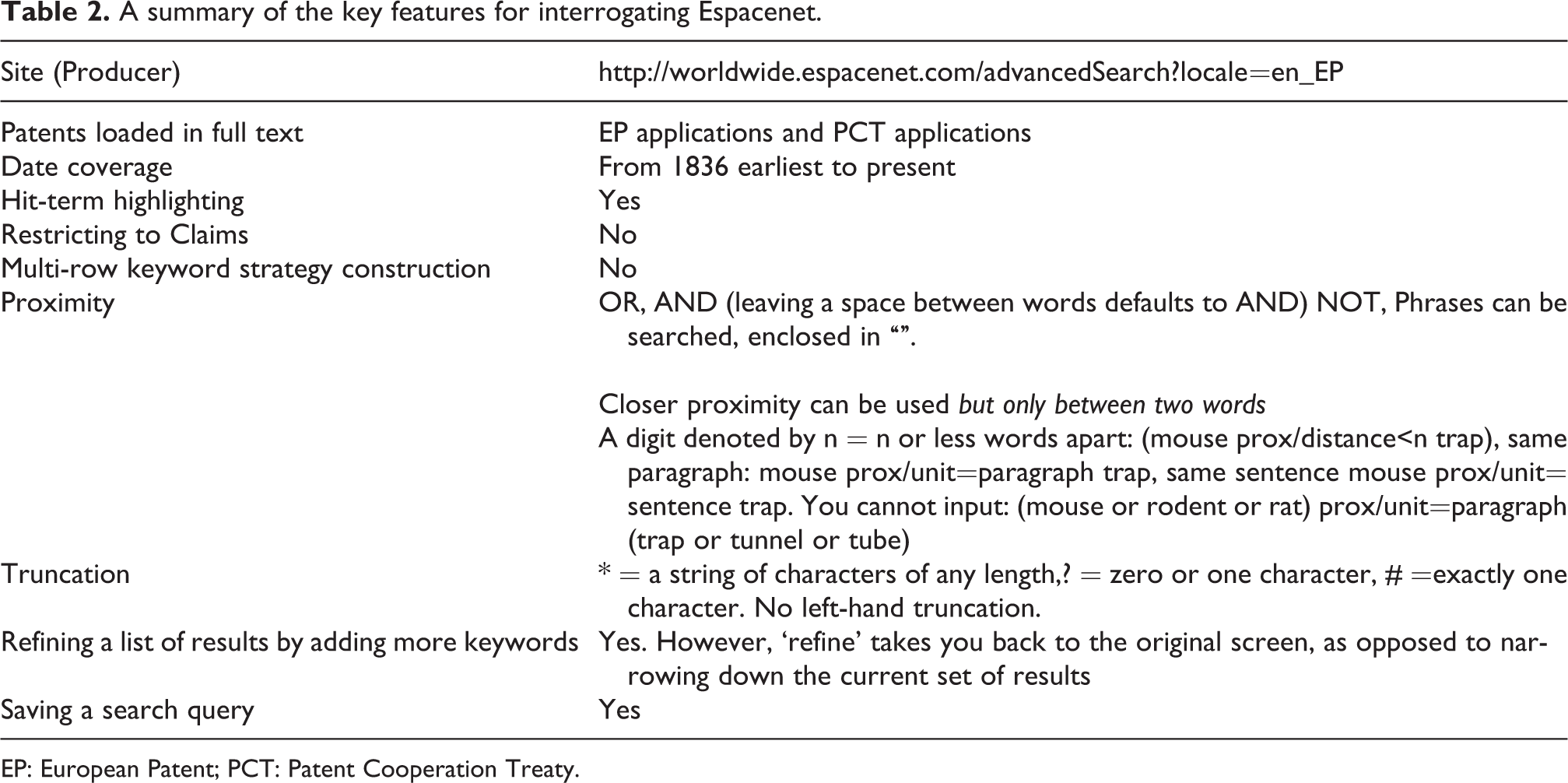
EP: European Patent; PCT: Patent Cooperation Treaty.
Espacenet search form
http://worldwide.espacenet.com/advancedSearch?locale=en_EP (Figure 6).
Five results in EP (22/9/2014)

Espacenet Advanced search.
The search will need to be repeated in the WIPO collection to retrieve WO patent applications and then again in French, German and/or Spanish terminology. Espacenet keeps a Query History, which saves your queries unless you delete your cookies. Selecting an earlier query enables the keywords to reappear on the search form, and the collection can be changed from EP to WIPO
Twelve results in WIPO (22/9/2014)
The results between the EP and WIPO may be duplicates, that is, part of the same family.
Managing your results
The description and claims from individual hits can be viewed. A link to the EP register provides the prosecution history and legal status, although help may be required from a patent professional for detailed interpretation The result list can be exported into Excel, meaning that an intermediary can pass on the search results and/or they can be interpreted offline. By reading titles and inventors within the Excel export, it is possible to discern which patents are duplicates, or part of the same family, and thus considerable time can be saved during the analysis stage (Table 3). Front page/covers can be downloaded (up to 500 pages, direct download PDF, over 500 pages, page-at-a-time download PDF), enabling diagrams/chemical structures, and abstracts can be viewed at a glance. A collection of relevant patent results can be created by the user, up to a maximum of 100 for consulting at a later stage.
Results export from Espacenet.

Running your search in PatentScope
PatentScope is a free search service offered by the WIPO. It includes many national patent collections, including some rare coverage. Before you begin to search PatentScope, it is worth setting up an account, which is free of charge and allows you to save queries and export results. The account sign-up feature is under the login menu on WIPO’s home page. 14 Use the link provided below in Table 4 or navigate yourself to the field combination form, from which it is much easier to construct a meaningful search strategy than the basic or advanced forms. The field to search full text is in English All (you can be more selective and choose claims/description).
A summary of the key features for interrogating PatentScope.

EP: European Patent; PCT: Patent Cooperation Treaty.
PatentScope’s search form is much more flexible than Google Patents or Espacenet. There are numerous boxes that can be combined with AND, in addition, a NEAR operator which can greatly reduce the number of extraneous results: PatentScope allows limitation of the keywords to the Claims section, which makes it an excellent choice for FTO searches.
A very useful algorithm previews the number of results as you are typing the keywords into the search forms alerting you to the commonality of your subject area.
Table 4 provides a summary of the key features for interrogating PatentScope.
PatentScope form
http://patentscope.wipo.int/search/en/structuredSearch.jsf
If you have to set up an account, choose login before you start the search (Figure 7).
Search strategy
PatentScope Advanced Search Form. English All (CUT OR VASE) AND English All (MANIPULAT* OR INCREAS* OR MODIF*) near (SCENT OR FRAGAN* OR AROMA OR PERFUME AND English All (ROSE OR FLOWER* OR FLORAL OR BOUQUET) AND International Class A01N3/02.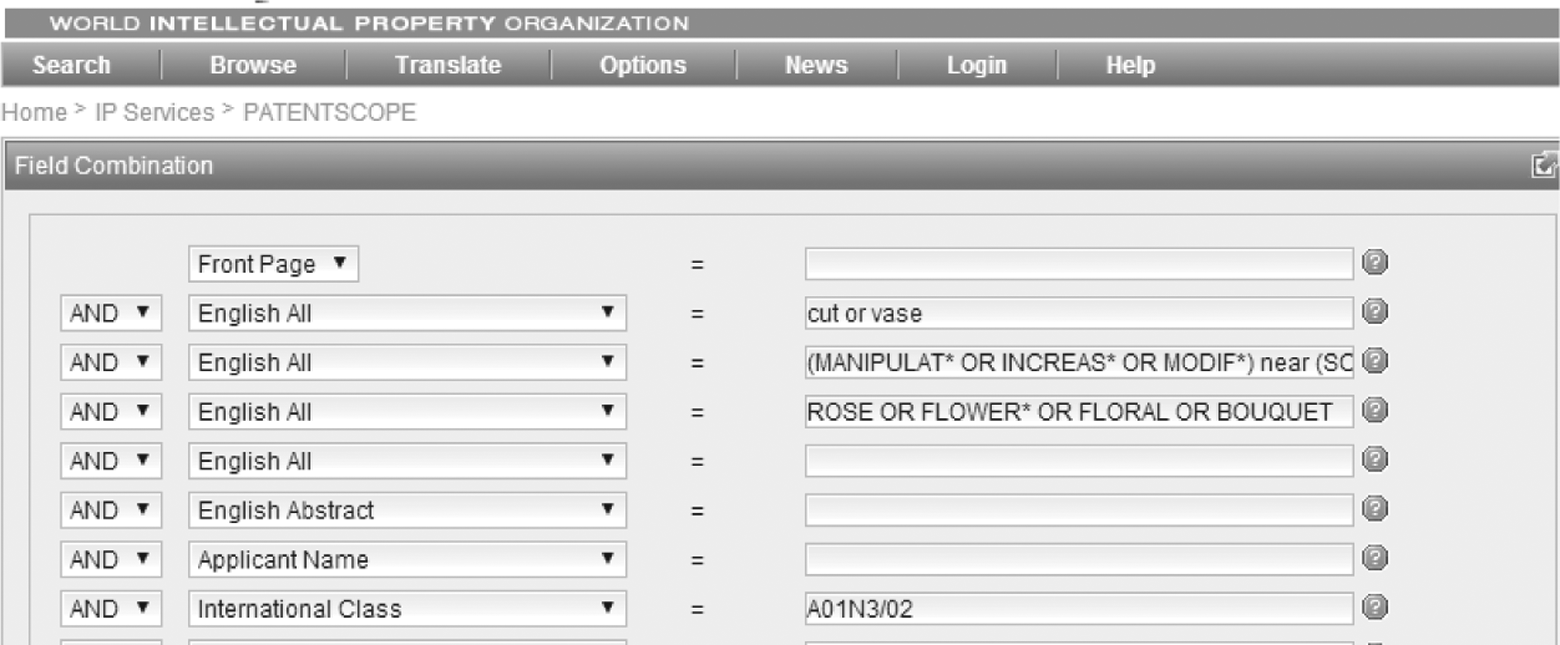
5 Results (22/09/2014)
The results’ set can be broadened using the Back browser to return to the form, deleting the IPC and altering the strategy. English All (MANIPULAT* OR INCREAS* OR MODIF*) near (SCENT OR FRAGAN* OR AROMA OR PERFUME) AND English All (CUT OR VASE) near (ROSE OR FLOWER* OR FLORAL OR BOUQUET)
64 Results (22/09/2014)
The query can be saved (providing you have logged in under your account) by clicking on your user name in the blue title bar, allowing rerunning and updating the results at a future date.
Managing your results
The results’ list can be browsed, and the description, claims and drawings viewed. A good machine translation option (designed by WIPO) is offered for individual patents. The ‘look’ of the results’ list and the order of columns can be defined under Options. Legal status is not available yet, but there are plans to link the patent to national registers 15 in order to gain an understanding of the prosecution status in various countries.
Up to 100 results from the hits can be exported, provided you have logged in under your account, by selecting the small excel icon to the right of the Refine search box. A very impressive Excel file that is complete with hyperlinked patent number and drawing is produced, allowing the search to be handed onto colleagues to be evaluated (Figure 8). A helpful analysis feature allows authors, inventors, countries and publication dates to be charted (Figure 9).
Conclusion
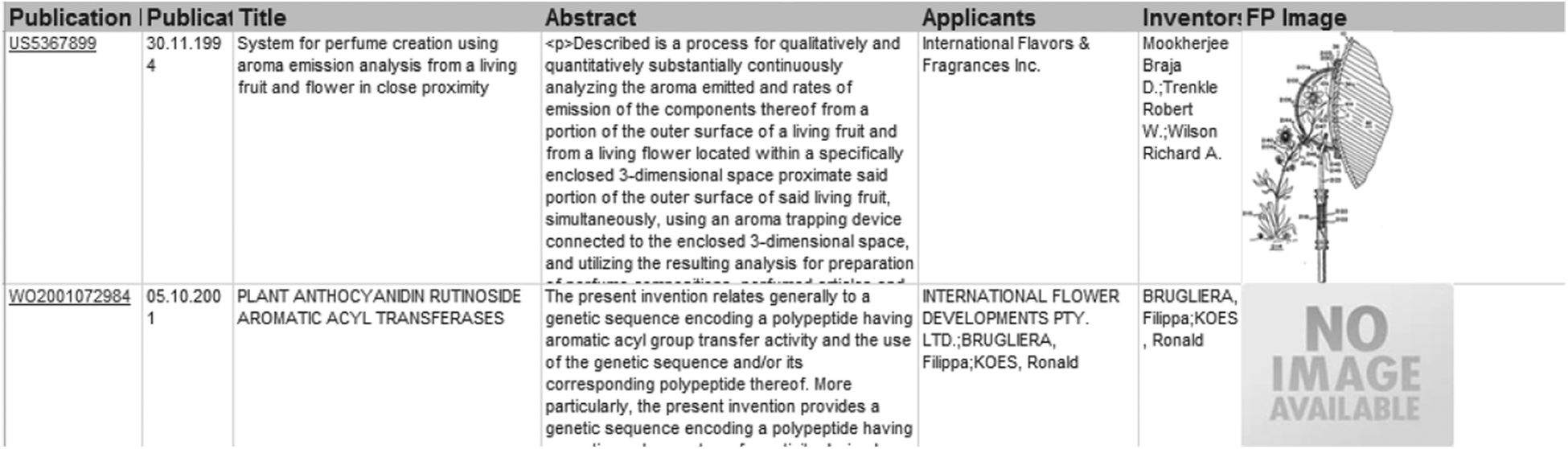
PatentScope Excel export.
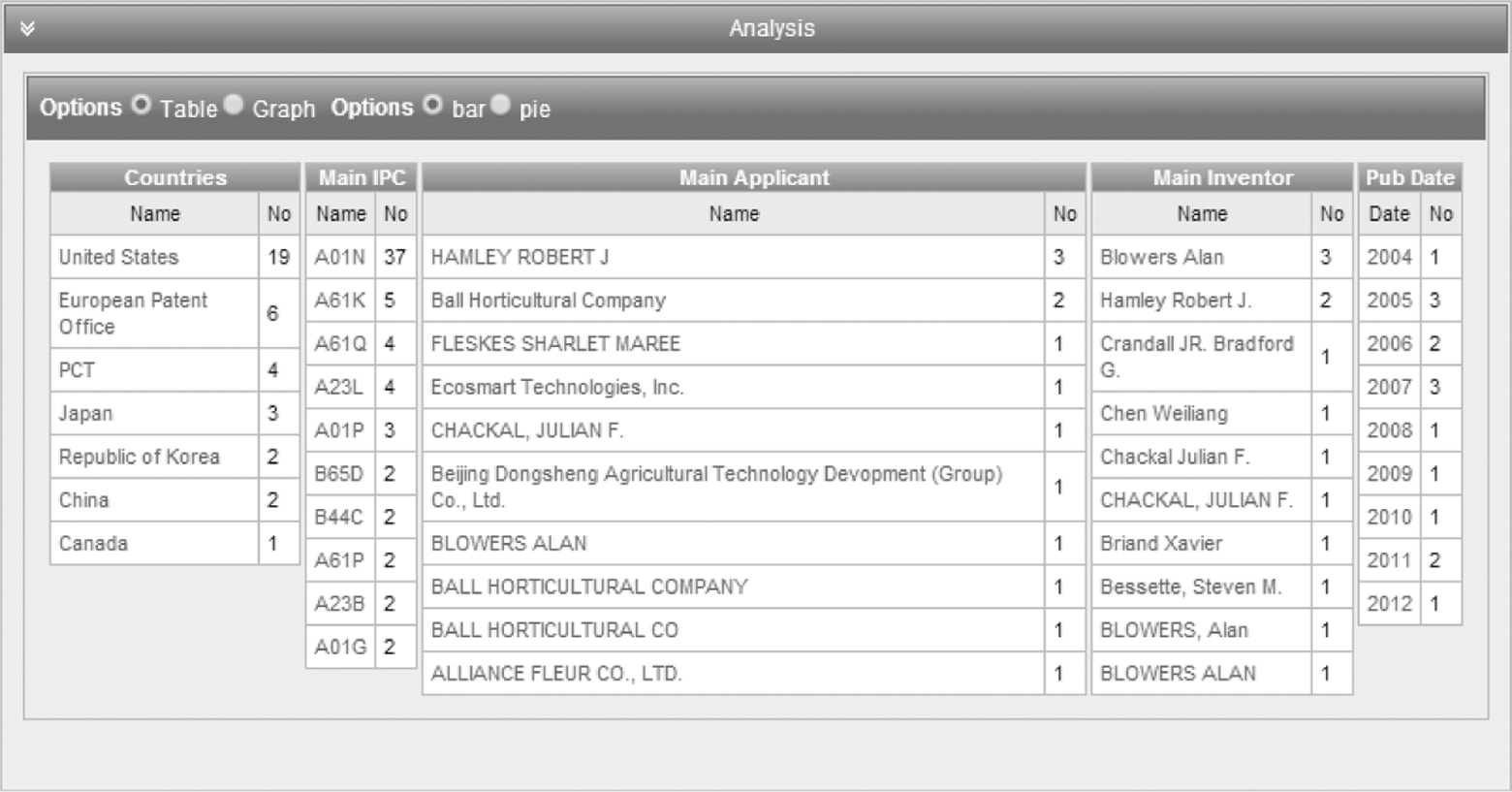
PatentScope Analysis.
Each free patents system offers its own version of searching full-text patent literature, and by understanding the synergies and differences, a meaningful, accurate and comprehensive set of results can be obtained.
Table 5 provides an overall picture of the features/benefits/pros and cons of the patent websites used in this article, but the simple conclusion is to use them all to gain the most synergy from their respective strengths and weaknesses.
Summary of full-text patent databases, features and benefits.
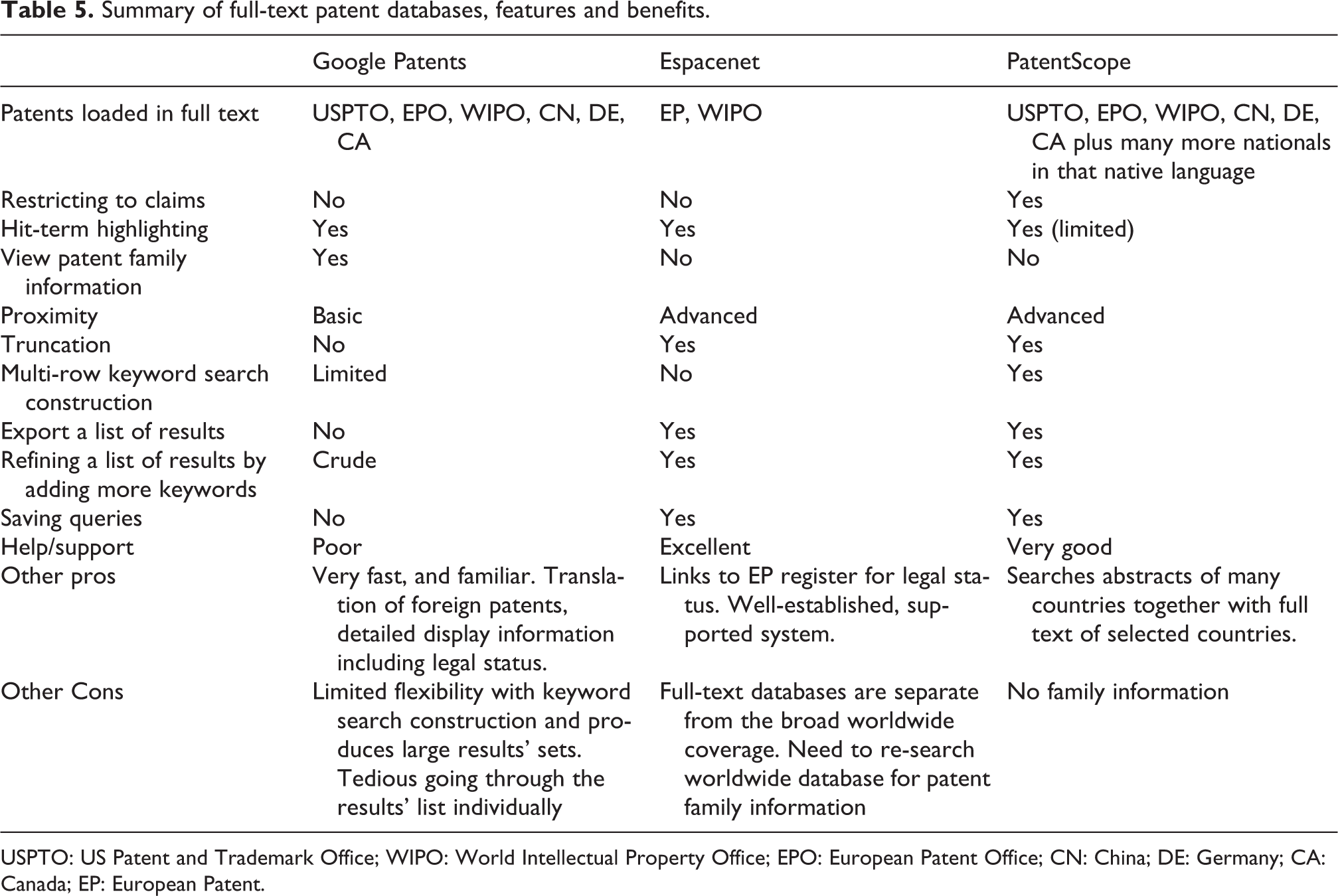
USPTO: US Patent and Trademark Office; WIPO: World Intellectual Property Office; EPO: European Patent Office; CN: China; DE: Germany; CA: Canada; EP: European Patent.
Patentscope has the best coverage. Espacenet provides a European flavour with links to the register for legal status, and Google Patents uses search and display technology and ranking that are powerful, tried and trusted.
It is important to note that finding nothing does not mean nothing is out there, and it may be worthwhile justifying the cost of a professional search before business-critical or financial decisions are made. However, the inventor is the subject expert and therefore should develop the skills to conduct his/her own searching and analysis to familiarize himself/herself with the prior art and to steer their invention forward, rethink it or work around what’s in the public domain in order to utilize and maximize research and development time and resources.
Footnotes
Authors’ note
All searching were conducted on Google Chrome. The views are my own and not that of GSK.