




Abstract
While tablets and lightweight laptops have become commonplace in the K-12 classrooms, previous studies have shown mixed results on the effectiveness of these mobile devices with respect to learning. Based on the Substitution, Augmentation, Modification, and Redefinition pedagogical framework and the international society for technology in education technology standards, this mixed-methods research study examined what teachers in a large diverse urban school district in Midwest United States did in their classrooms and what students expected from learning with iPads. The results show that the majority of instructional activities are at the levels of Substitution and Augmentation that focus on information search, worksheet practice, and online textbook reading, even though student perceptions reflected strong expectation of utilizing iPads for tasks that involved communication, collaboration, creativity, and critical thinking. Multiple factors that contributed to mismatched instructional patterns and student expectations are highlighted in the study.
Introduction
Although there have been many reports on successful integration of iPads into classrooms, not all teachers have been able to maximize the full potential of these devices (Mouza & Barret-Greenly, 2015). Both teacher and student perceptions can provide vital information on factors contributing to success or failure of tablet integration. While teacher attitudes toward emerging technologies play a key role in the adaptation of educational technologies (Zhao & Frank, 2003), student perceptions also add to the understanding of student engagement and learning with tablets (Chou, Block, & Jesness, 2014; Soebari & Aldridge, 2015; Soffer & Yaron, 2017). This study is intended to provide an in-depth analysis of what teachers and students do with tablets that lead to many of the opportunities and challenges in iPad integration in a large urban school district in the Midwestern United States. Once we have developed in-depth understanding of iPad utilization by teachers and students, we can proceed with developing strategies for mitigating issues related to the integration of iPads, or tablets in general, into classroom learning. The objectives of this study are to examine (a) teachers’ instructional patterns and perceptions in using iPad carts, (b) student perceptions of the impact of iPads on their learning skills, and (c) the barriers to and opportunities for iPad cart integration into secondary classrooms. An iPad cart refers to a mobile cart which stores multiple iPads and charging cables to be shared by students from different classes. The findings from this study illustrate the intricate dynamic between teacher action and student expectation and how this dynamic shapes iPad integration into secondary classrooms.
Background Literature
Practitioner Pedagogical Framework: Substitution, Augmentation, Modification, and Redefinition
Puentedura (2013) proposed a pedagogical model for technology integration that stressed Substitution, Augmentation, Modification, and Redefinition (SAMR). Substitution refers to the use of technology as “a direct tool substitute, with no functional change,” for example, using a word processor to replace a typewriter. Augmentation refers to the use of technology “as a direct tool substitute, with functional improvement,” for example, using the spell-check function in a word processor to proofread an essay. Modification refers to the use of technology to “allow for significant task redesign,” for example, assignments integrating e-mails, spreadsheets, and graphing programs. Finally, Redefinition refers to the use of technology that “allows for the creation of new tasks, previously inconceivable,” for example, small-group collaboration to solve a world problem with international partners through use of a learning management system. Although critics have argued that SAMR lacks a specific context for technology integration and places too much emphasis on products over process (Hamilton, Rosenberg, & Akcaoglu 2016), the model has become very popular among K-12 educators for its simplicity and clear development, and many educators have offered their renditions of SAMR interpretation with specific examples (Oxnevad, 2013).
Hilton (2016) applied the SAMR framework to examine two social studies classrooms in two eighth-grade classrooms in a diverse school and noted differences in technology use for content learning and technology use in application to achieving key social studies skills. Content learning is the foundation for content application, and Hilton’s findings showed that teachers found the use of technology, even at the level of Substitution and Augmentation, can help hold students’ attention longer than traditional teaching without use of technology in content learning. Hilton noted that teachers’ use of technology at Modification and Redefinition levels deliberately occurred less frequently because of the practical concern that students were unlikely to have necessary access to iPads and less technology in general to ensure a smooth transition to higher grades. Hilton cautioned that more practical considerations such as location, context, and target students in the application of the SAMR model should be considered and not treated as comprising a simple hierarchy. In this study, we explored the rationale behind various ways instructors in a large diverse public school district use iPad carts for social studies content learning and application.
Perceptions Toward iPad Integration
The one constant factor affecting tablet integration or technology integration in general is teacher perception (Ertmer, 1999; Zhao & Frank, 2003). Specifically, Ertmer (1999) described barriers to technology integration in two terms. The first-order barrier refers to factors extrinsic to the teachers, for example, equipment, time, training, technical support, and so on. The second-order barrier refers to factors intrinsic to teachers’ underlying beliefs, perceptions, and knowledge that might have prevented some teachers from integrating technology (D’Agostino, Rodgers, Harmey, & Brownfield, 2016). D’Agostino et al. (2016) found that teachers in an experimental group cast doubt on the effectiveness of continuous utilization of a vocabulary learning app even after observing significant improvement in student performance. The qualitative interview data showed that teachers preferred traditional vocabulary learning with magnetics to app-based learning with iPads because they felt it to be more developmentally sound to have elementary school students learn through kinesthetic activities with hands rather than with iPads. Therefore, teacher perceptions of the impact of technology on student learning could influence their willingness to adopt technology-based methods. Zhao and Frank (2003) summed up with two factors that ultimately impact teacher willingness in technology utilization: “(a) the nature of the uses and (b) the result of the teacher’s analysis of the uses” (p. 817). This leads us back to the difference between the first-order barrier and the second-order barrier, that is, that the former can be resolved through purchasing of hardware or software and training while the latter would require development of an ecosystem that takes into consideration the influence on teacher action of the “teacher’s niche in the ecosystem, teacher-ecosystem interaction, teacher-computer predisposition for compatibility, and opportunities for mutual adaptation” (Zhao & Frank, 2003, p. 833).
Previous studies have shown that student perceptions on learning and engagement are closely related to the types of instructional activities involving iPads (Ciampa, 2014). Soffer and Yaron (2017) concluded that student-perceived learning and engagement existed only at a moderate level when instructional activities were mostly reading online textbooks and information search, while students reported higher levels of perceived engagement when iPads were used for activities related to communication, collaboration, and creativity. Examining both teacher and student perceptions provides us with a framework for understanding teachers’ decisions in technology adaptation and students’ perceived satisfaction with technology integration in the classrooms.
Opportunities and Challenges in One-to-One Learning Initiatives
One-to-one technologies have been broadly described by Harper and Milman (2016), in their meta-analysis of 1:1 learning in K-12 classrooms between 2004 and 2014, as classroom technologies used on a personal 1:1 basis. They analyzed 46 empirical studies published in academic peer-review journals and found the following trending themes in 1:1 learning: (a) student achievement, (b) changes to the classroom environment, (c) student motivation and engagement, (d) various classroom uses, and (e) challenges to integration. Their comprehensive meta-analysis sums up many of the opportunities and barriers related to one-to-one learning initiatives. While some studies in the meta-analysis showed improved student achievements and some found no improvement, more consistent and detailed findings related to the opportunities brought forth by one-to-one learning included (a) positive changes in student learning experiences, (b) increased use of differentiated instruction, (c) more student-centered constructivist learning activities, (d) utilization of cooperative learning, and (e) higher degrees of motivation and engagement (Harper & Milman, 2016). One-to-one technology has also faced many challenges, including (a) technical issues, (b) stakeholder buy-in, (c) teachers’ lack of familiarity with devices and professional development, (d) insufficient tech support, (e) increases in difficulty of classroom management (such as distractions), and (f) access restrictions set by school filters. Harper and Milman recommended longitudinal studies on teaching strategies, student motivation, engagement, and achievement.
Another issue related to one-to-one learning and pointed out by Mouza and Barrett-Greenly (2015) is the lack of studies in low-income underserved areas where students do not have easy access to mobile devices either inside or outside school. Wilson (2014) studied student laptop technology use in a one-to-one high school with a high concentration of socioeconomically lower level families and found that tensions between institutional, instructional, and student perspectives can limit the potential of technology utilization in the classroom. For example, schools and educators may put restrictions on mobile devices to prevent undesirable student behaviors, and students may resist by turning in low-quality projects. Wilson warned that technology use without careful consideration and implementation can contribute to further educational inequalities among marginalized students.
In this literature review, we have focused on the application of SAMR pedagogical framework, teacher or student perceptions of iPad carts, and factors contributing to the successes and failures of iPad cart integration. While studies have emphasized the importance of professional development and changing pedagogy in enhancing student learning, there is a relative lack of studies that examine general instructional practices with iPad carts. As Zhao and Frank (2003) pointed out, we must determine how teachers use technology and analyze their technology use if we are to develop effective integration strategies, and student voices should also play a key role. Taking student perceptions into consideration allows them to become willing participants in developing a blueprint of technology integration. In this study, we proposed to examine teacher uses of iPad cart in a large diverse school district, focusing both on teacher perceptions of iPad cart utilization and student perceptions of iPad effects on their learning skills.
Background
The site chosen for this study was one of the largest K-12 school districts in midwestern United States, with more than 32,000 students, with 68% of students of color and 66% of students receiving free or reduced lunches. The district is composed of 3,630 teachers and 75 schools, including 45 elementary schools, 7 middle schools, 8 high schools, and 15 of other types (special education, alternative, and charter schools). The school district implemented the iPad cart initiative in Spring 2012 to address the the problem of uneven distribution of technology resources, starting with four iPad carts in four ninth-grade geography classrooms at four different schools during Year 1, 40 carts in a combination of 40 sixth-grade social studies and ninth-grade geography classrooms in 28 schools during Year 2, and 100 carts in a combination of 100 6th- to 10th-grade social studies and geography classrooms in 31 schools during Year 3 (2012–2014). Multiple professional teacher-development opportunities were offered through 2-day professional training sessions in a summer academy and monthly learning circles on a rotational basis at different schools to provide one-to-one tutoring and online video-on-demands. The district also hired a one-to-one learning coach to visit teachers needing assistance in lesson preparations or classroom teaching. During the day-long professional development workshops, the SAMR model was introduced using concrete examples and activities for teachers to help them develop their own SAMR-based instructional activities. This study focuses on data obtained during the third year, complementing the published data from the first two years (Chou, Block, & Jesness, 2012, 2014)
Methods
This mixed-methods study examined the patterns of instructional activities and perceptions of teachers and students with respect to classroom iPad cart integration, with data collected from observations, focus groups, and surveys for the purpose of data triangulation. According to McMillan (2015), observations of behaviors can yield more objective data by avoiding possible contamination of self-reporting, a focus group interview can provide better understanding of what is being studied through participant interaction, and survey data can provide rich information over a wide range of issues by reaching a larger population beyond the limited number of subjects involved in observation and focus group interviews.
Research Questions
To understand teachers’ uses of iPad cart and student perceptions, this study poses the following research questions:
What are the general patterns of instructional activities with iPad carts in the classrooms based on the SAMR framework? What are the teacher perceptions with respect to the challenges and opportunities brought forth by iPad cart integration? What are the student perceptions on the impact of iPad cart integration on their learning skills?
Data Sources and Participants
The data sources and numbers of participants are listed later:
Qualitative data
Teacher focus group and survey
The research team conducted one face-to-face focus group with six teachers from different schools. To increase the participation rate, we also sent an online survey with identical questions to all teachers with iPad carts. The teachers were asked about to describe factors that either contribute to or inhibit student learning with iPads, factors that contribute or inhibit teacher’s facilitation of learning with iPads, ways to improve iPad cart integration, iPad potential for improving teaching practices, and successful examples of iPad integration. Six teachers participated in the in-person focus group, and 19 teachers out of the 100 who received iPad carts responded to the focus group survey. The in-person focus group data were captured with an iPhone audio recording app and transcribed. The focus group transcript and online survey anonymous data were sent to teachers for feedback and corrections. The online survey also included demographic questions such as grade levels, iPad experience level (novice, proficient, or master users), iPad use frequency (low, intermediate, and high), and self-rated SAMR levels.
Student focus group survey
Because of large-scale implementation of iPad carts in 31 schools, the research team decided to reach more students by putting the focus group questions online. A total of 878 students completed the online focus group survey that included five open-ended questions about the impact of iPad carts on social studies content learning and learning skills related to communication, collaboration, problem solving, creativity, innovation, information search, and digital citizenship as outlined in the 2007 International Society for Technology in Education (ISTE) standards. The ISTE is a professional organization that has established technology standards for the use of technology for teaching and learning activities. At the time of the study (2012–2014), we developed an observation form based on the 2007 technology standards for students because the revised 2016 standards were not yet available. The specific standards established reflect the types of desirable learning skills for 21st-century learners.
Quantitative data: classroom observations
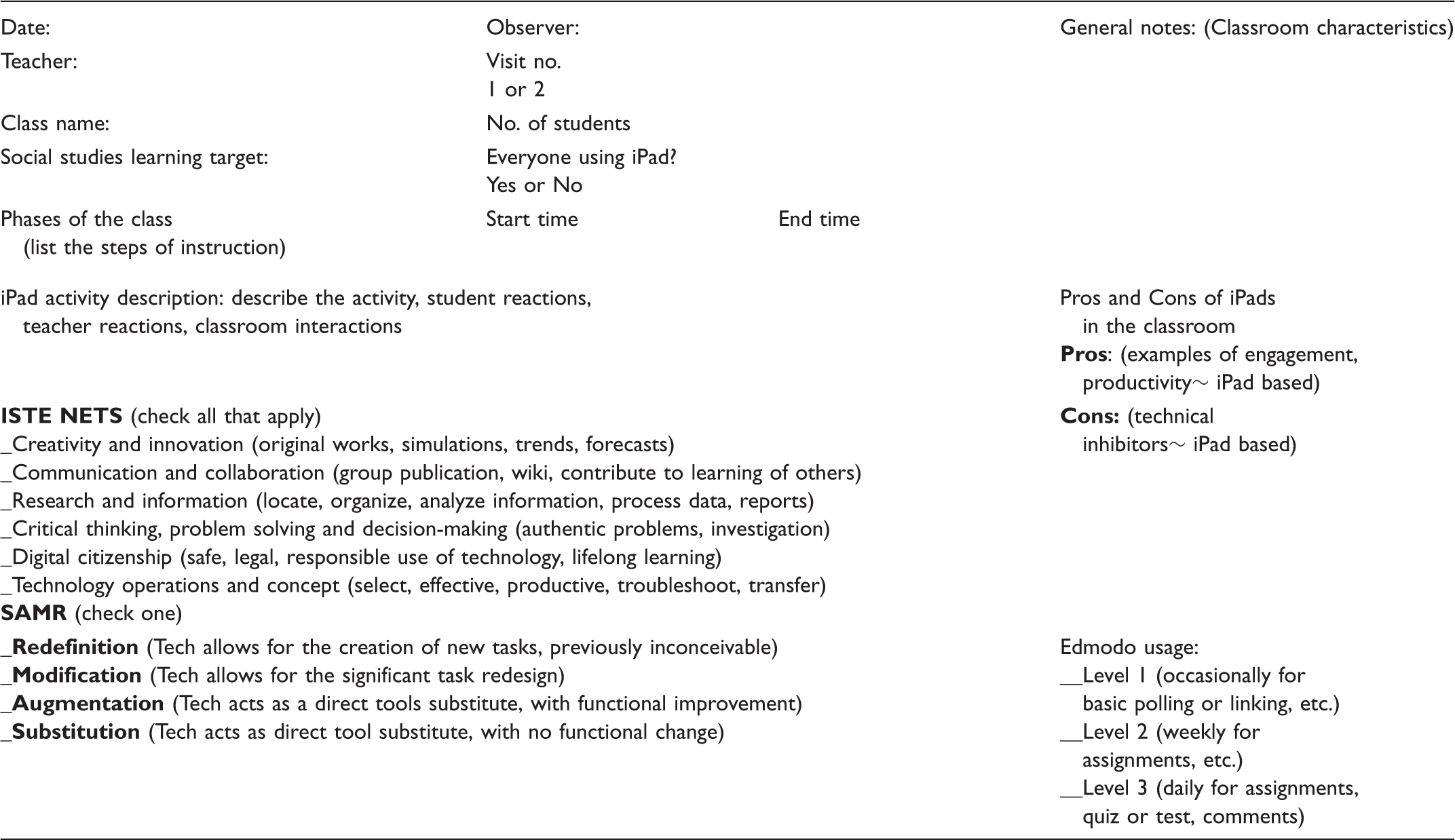
The research team developed a classroom observation form (Appendix 1) containing three items of quantitative data: the SAMR level, ISTE standards, and teacher level of proficiency with iPads. We have provided specific examples of SAMR in the literature review section. The observers reviewed each class session, and from the session, activities determined all applicable ISTE learning skills and the most appropriate SAMR level. Teacher proficiency with iPads was identified at three levels (novice, intermediate, and master) through teachers’ self-reported ratings. The research team observed 25 classrooms at 16 different schools during the last 2 months of the project period. Each classroom activity was coded with one of the four SAMR levels and several applicable ISTE standards for students following consensus of the two classroom observers. The researchers developed a more extended definition and examples for each SAMR level during the professional development workshops with teachers, and these expanded definitions served as the basis for coding of the classroom observation:
Substitution: Using iPad to replace activities normally done in paper and pencil, for example, note-taking, web search, and so on. Augmentation: Using iPad to enhance face-to-face activities such as reports with graphics, online chats, UN database retrieval, information sharing via Edmodo (a course management system), and so on. Modification: Using iPad to redesign activities such as using apps to create concept maps, posters, collages, websites, multimedia projects, and engagement in peer interaction via Edmodo, and so on. Redefinition: Using iPad to engage students in authentic tasks obtaining feedback from real-world audiences.
Data Analysis
To answer the first research question related to teacher instructional patterns, we analyzed data from classroom observations. To answer the second research question related to teacher perceptions of factors influencing iPad integration, we analyzed data from the focus group conversation and the online survey. Utilizing the thematic analysis method (Boyatzis, 1998), the research team developed top-level codes (opportunities and challenges) then developed a sublevel coding scheme based on themes emerging from the focus group results and the relevant literature. To answer the third research question related to student perceptions of the influence of iPad cart integration on their learning skills, we analyzed data from the online student survey. We analyzed qualitative data using NVivo, a qualitative data analysis tool, and to ensure consistency in data coding, three coders conducted the initial coding on the first one hundred responses to the five open-ended questions from 878 student respondent, with intercoder reliability examined for each question separately. For the initial coding, we coded each response as opportunities (advantages), challenges (disadvantages), neutral, or nonapplicable. Using Cohen Kapp measurement (agreement between individuals), the intercoder reliability for the questions were 0.804 (Question 1), 0.785 (Question 2), 0.819 (Question 3), 0.82 (Question 4), and 0.782 (Question 5). Since on average, a value of 0.8 indicates a good agreement, our numbers were either above or very close to the good agreement level. The two coders, after reading the entire set of responses, worked together to develop the sublevel coding schemes below the top-level coding scheme (opportunities and challenges) from participant perspectives and relevant literature (Maxwell, 2005). The main coder continued to code the remainder of the responses while the second coder served as a shadow coder to review the final coding. The two coders discussed the final data coding and reached consensus on statements for which they initially had differing opinions. The same process was repeated for the teacher focus group coding.
Findings and Discussion
In this section, we analyze the data to answer each research question.
Teacher Instructional Patterns
To answer the first research question on instructional patterns through iPad integration, the research team coded the instructional activities in each classroom observation as Substitution, Augmentation, Modification, or Redefinition. The research team also marked all applicable learning skills in terms of ISTE standards, and the next two sections analyze the findings. Comparison of SAMR levels between observers’ ratings and teachers’ self-reported evaluations is also presented.
Instructional patterns based on SAMR
Using the SAMR framework to examine what teachers do with iPad carts in the classroom, we tallied the frequency of particular instructional activities based on teacher’s self-evaluations and observers’ data as shown in Figure 1. A first examination of observers’ data shows that the largest group (40%) of instructional activities are in the category of Substitution, followed by Modification (20%), Augmentation (32%), and Redefinition (8%; Figure 1). Second, a comparison of teachers’ self-ratings and observers’ ratings shows that most teachers viewed their classroom activities as substitution (74%) and research (16%), although, interestingly, since research is not one of the enumerated SAMR categories, there seems to be a gap between observers and teachers in the interpretation of SAMR. Observers viewed research activities as a substitution for information search in the atlas, dictionary, encyclopedia, Wikipedia, or Google, while a few teachers do not see research activities as a substitution activity. There are two possible interpretations of this apparent discrepancy. First some teachers view research activity as the foundation for modification or redefinition types of activities so it is difficult to assign it to one single category. Second, some teachers might have missed the SAMR training during the professional development workshop and made their selection based only on the short SAMR definitions provided in the online survey. To provide specific information about these instructional activities, a list of examples of the observed SAMR activities are presented in Table 1.
Comparison of instructional patterns using SAMR between teachers and observers. Selected Examples of Observed SAMR Activities. Note. SAMR = substitution, augmentation, modification, and redefinition.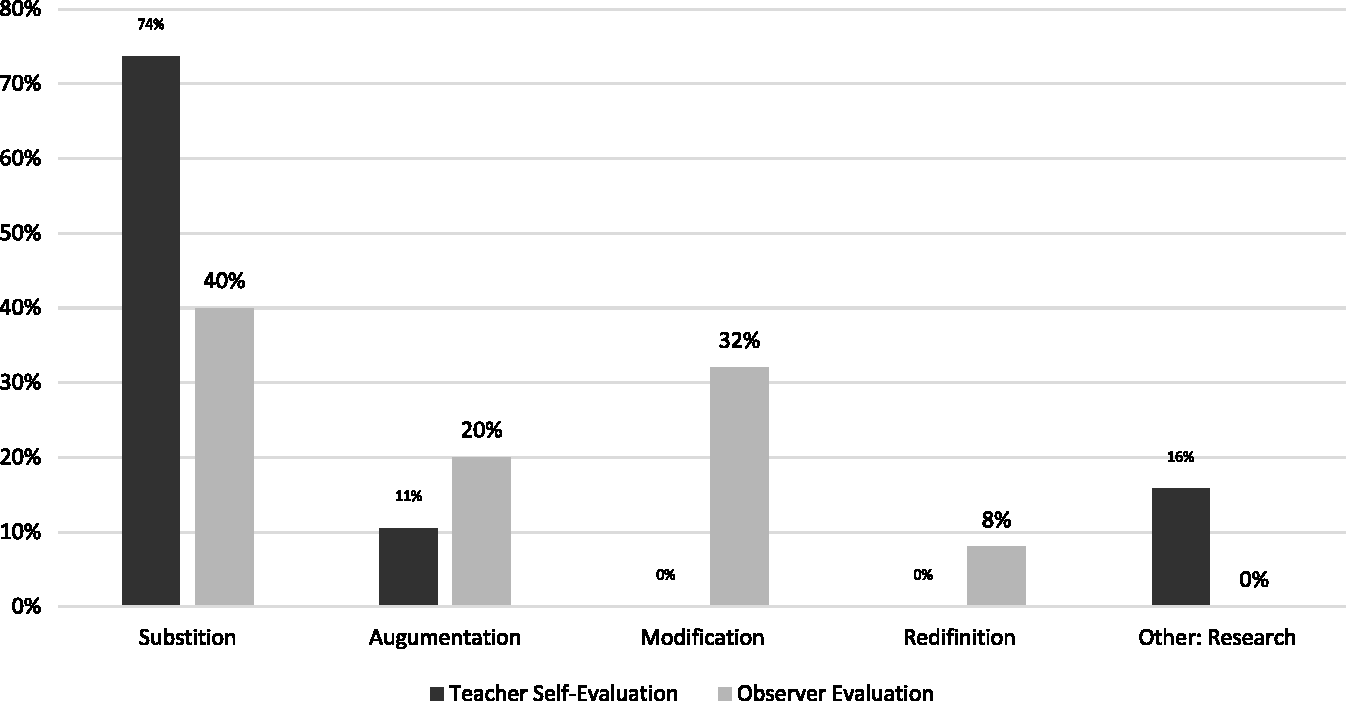
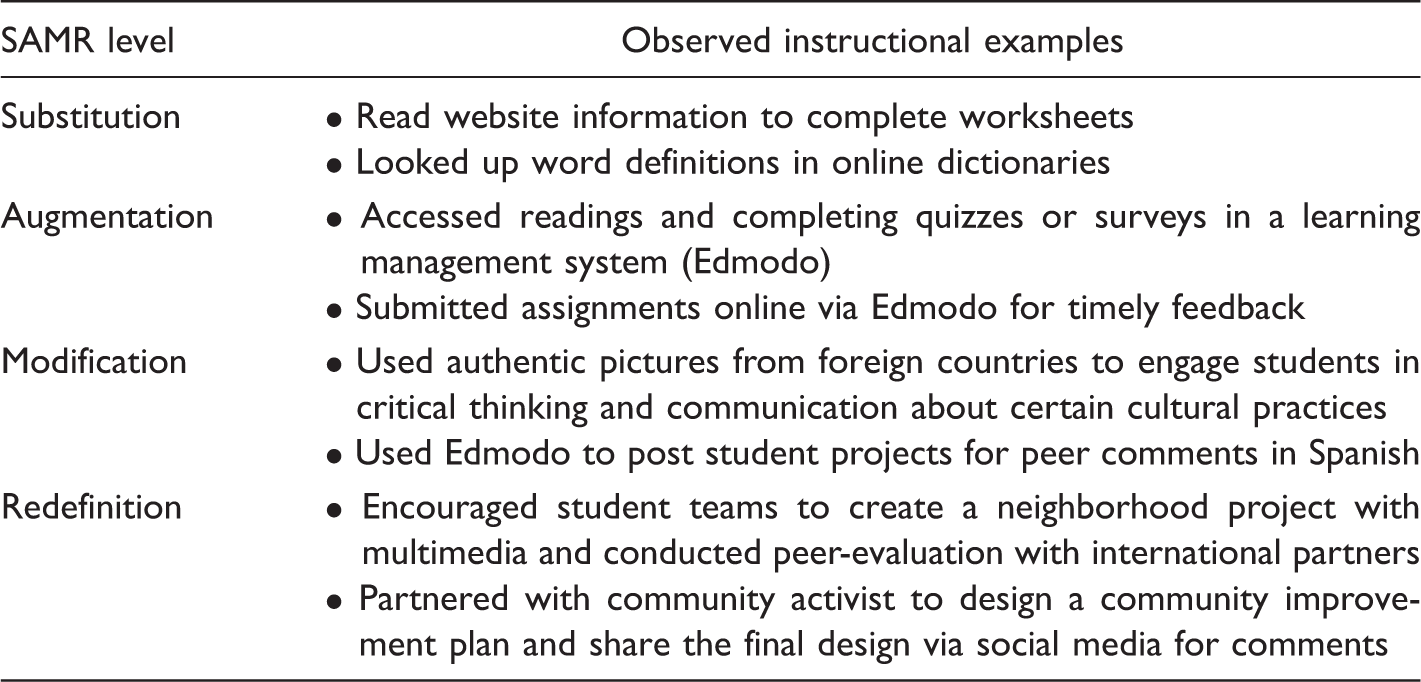
The researchers cannot find any correlation between teacher grade levels, iPad experience level, iPad use frequency, and the SAMR categories. However, Hilton’s (2016) research findings on iPad integration in the social studies classroom helps provide explanations to the higher number of Substitution level of activities. The activities at the Substitution and Augmentation levels are appropriate for content learning, while activities at the Modification and Redefinition levels are suitable for the application of social studies skills. Since content leaning is a prerequisite of skill application, information search activity was highly utilized in all classrooms.
Learning skill alignment with ISTE standards
The observed data also reveal the types of learning skills utilized in the classrooms (Figure 2). Using ISTE standards as the criteria, the most utilized learning skills were project research and information searches, accounting for 42% of the overall learning skills utilized. The second most utilized learning skills and percentages were communication or collaboration (20%) and critical thinking or problem solving (20%), and the others were creativity or innovation (11%), technology operation and concept (4%), and digital citizenship (2%).
Observed ISTE-aligned activities in the classrooms.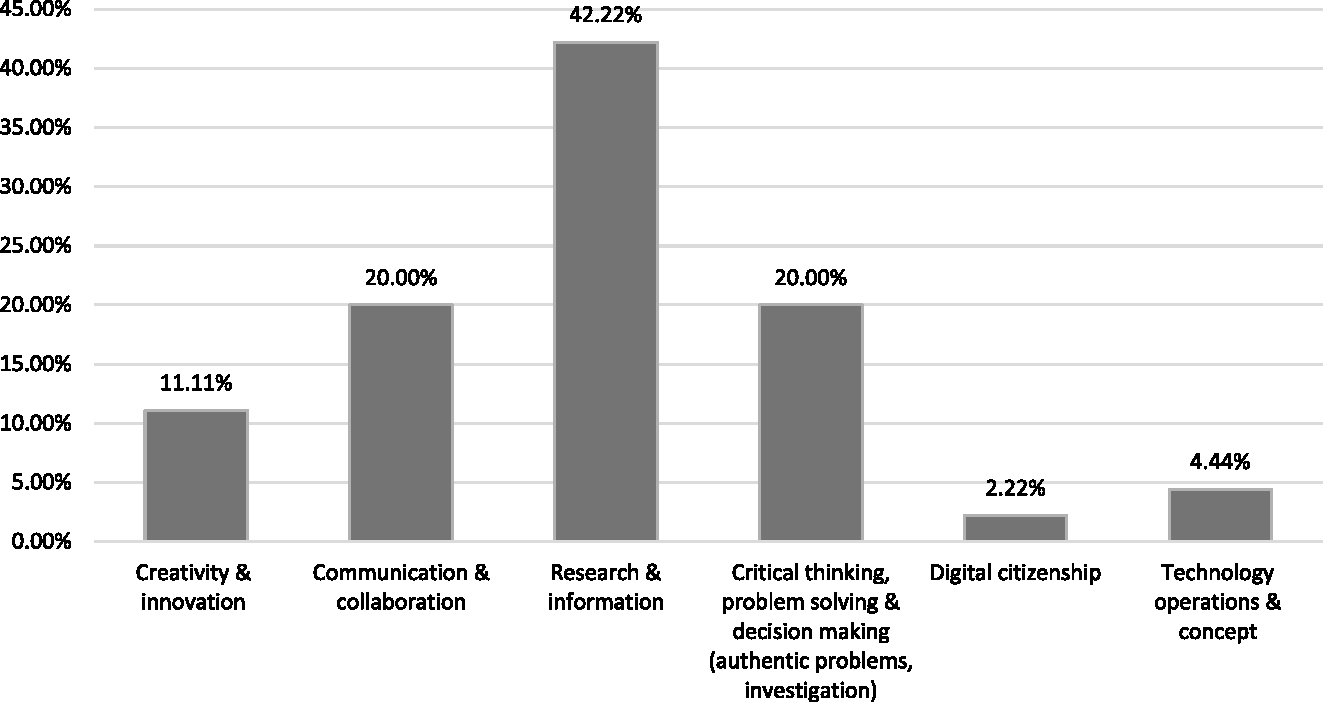
The emphasis on the skills for information search were consistent with the Substitution activities in SAMR during which students often conducted searches for assignments and projects. Activities with a focus on communication, collaboration, critical thinking, or problem solving were not strongly emphasized, and there seemed to be even fewer opportunities for students to be creative, innovative, or more able to learn about digital citizenship and the technical aspects of iPad. It is possible that most students had received information about Internet safety at the beginning of each school year so teachers did not feel a need to spend additional time on digital citizenship. We also observed the classrooms toward the end of the school year at which time students had already become familiar with basic iPad operations, perhaps accounting for fewer observed instructional activities related to iPad basics.
Teacher Perceptions
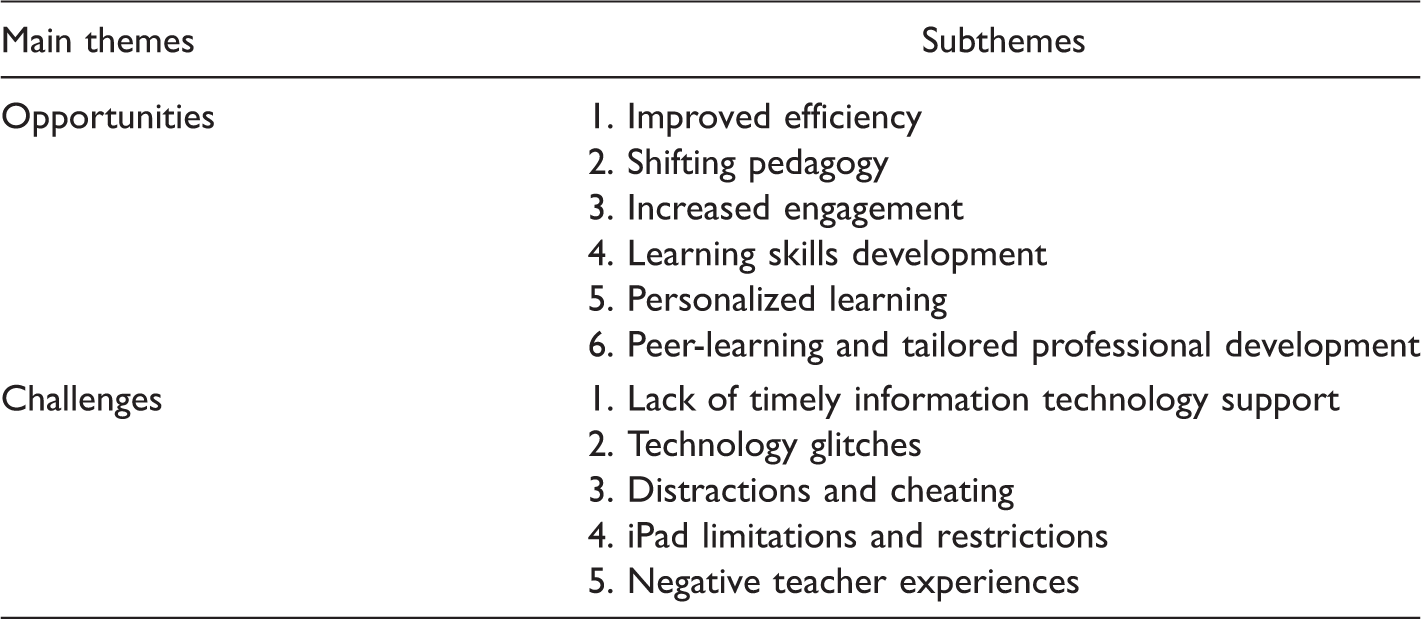
Teachers shared their views on both the opportunities and challenges of iPad integration through the focus group interview and online survey, as summarized in Table 2. The following themes contributing to opportunities emerged from the data:
Improved efficiency: Improvements were evident in both teaching and learning activities. Many teachers found using iPads to connect students with one another and support project collaboration more efficient than classroom teaching without iPads. Students were more focused and productive working together. By moving his classroom from paper-based textbooks to online e-books, one teacher remarked that students could then look up word definitions, listen to audio text, and watch embedded multimedia videos. Teachers mentioned that checking student understanding and progress is much easier through iPad usage than in teaching without iPads. Teachers also shared the importance of utilizing a learning management system to put the curriculum online and thereby allow students convenient access to course-related information. Shifting pedagogy: Teachers used a greater variety of instructional strategies to engage students with more student-centered activities in the classroom. Many teachers emphasized that iPads are a good alternative to computers in providing more interactive features, creating a paperless classroom, and supporting various methods for student assessment. One 28-year veteran teacher specifically said “my learning curve is exploding… and I love it - I am much more hands on, explore, dig in, work together… working with student teachers 1/2 my age who are the ‘plugged in generation’ has helped me immensely.” Increased engagement: Teachers noticed that student engagement through course participation in class activities has increased as a result of employing iPads, and teachers used expressions such as “engrossed with content,” “loved it,” “working hard,” “thoroughly engaged,” and “really involved” to describe such student engagement. One teacher compared online and face-to-face discussions with students by stating that “in one Socratic Seminar, with 28 students, 18 on-topic comments were made by 11 students in the spoken part, and 57 on-topic comments by 25 students were made in the online part.” Learning skills development: In addition to more hands-on activities and active participation, students utilized more learning skills during class activities. As one teacher observed: “Research, on-line textbooks, and interactive activities are crucial to education through iPads. Students ultimately are more excited to learn.” Another teacher described a typical session with iPads as follows: “They get into small groups, holding iPads and looking at their creations, they get in front of the groups and talk to one another and that’s what we want them to get into.” Students worked together and used learning skills to solve problems and communicate about, collaborate on, and create projects together. Personalized learning: Teachers found students not only could collaborate with one another but also could learn at their own pace through the more personalized iPad learning environment . As one teacher stated: “kids were able to deepen their learning and engage their natural curiosity by being able to easily do research on topics from class that interested them.” Another teacher also observed that “students were able to conduct more individual-tailored investigation into their interests and find primary and secondary sources beyond those assigned.” Peer-learning and tailored professional development: Many teachers expressed strong interest in learning from fellow teachers through iPad-supported professional development opportunities and one-to-one learning coaching. Monthly learning circles often focused on topics in which teachers were quite interested. Teachers found it valuable to learn the best practices of teachers from outside their buildings or districts. One teacher summed it up well: “I sought out other resources to help fill in the gaps of my understanding the technology.” Teacher Perceptions on Opportunities and Challenges of iPad Cart Integration.
Overall, many teachers through iPad integration found new ways to connect with students, engage them in group work, and enhance their 21st-century learning skills (Ciampa, 2014; Hoffman, 2013). Educators also sometimes adjusted their teaching practices by reorganizing instructional activities and curricula to leverage the affordances of iPads (Newman, Coyle, & McKenna, 2013).
Many teachers also faced continual challenges in iPad cart integration, with related themes emerging from the focus group and surveys, including:
Lack of timely information technology (IT) support: With a large-scale implementation of a relative new technology at the time, the technology support personnel did not receive sufficient timely training for keeping up with the demands for services. Many teachers were frustrated by the inadequate IT support in their buildings. One teacher observed that “when they were supposed to be updated, when they are supposed to do stuff with them, it didn’t happen.” Technology glitches: Many teachers were upset by frequent glitches in apps that caused a certain degree of disruption of student activities. One teacher summed it up “the iPads were constantly breaking, due to accidental misuse (downloading updates, failure to properly plug into cart resulting in dead batteries) as well as intentional misuse (adding passwords, misusing camera, etc.).” Distraction and cheating: Teachers described the “constant battle” to direct kids in focusing on tasks at hand. One teacher described the scenario as, “the vast majority of students spent a great deal of time and energy trying to (and succeeding) circumvent the protections against playing games, listening to music, signing into their own Apple IDs and otherwise interrupting the educational process.” Having constant Internet access also made cheating easier. One teacher observed that “I wish students could have access to Word processing without internet so I could give them a short or long answer essay test without giving them access to answers to cheat.” iPad limitations and restrictions: Many teachers also found iPads limiting in terms of the apps available and control of the devices. For example, typing long paragraphs was not easy without a keyboard. Since teachers did not have authority or capability to install new apps or reset iPads, they were not able to provide timely updates of apps or achieve removal of improper pictures downloaded by students. Negative teacher experiences: Many novice teachers found the overall experience counter-productive. One teacher felt ill-prepared, saying “I came into the year with no familiarity with the iPad, and did not find the professional development on iPad usage in curriculum to be helpful (it was all way above my head, technologically speaking).” To some teachers, using class time to deal with technical issues took away instruction time, “I did have to spend a fair amount of time repeating instructions on how to get to particular websites and enter correct user IDs and passwords.”
In short, some of the challenges of iPad integration, such as inadequate IT support at an early stage, were associated with timing. Other common types of challenges such as distraction, cheating, app or device limitations, and glitches were also reported in previous studies (Chou, Block, & Jesness, 2014; Harper & Milman, 2016). Teacher perceptions of technology integration could also influence the scale of technology implementation in the classrooms (D’Agostino et al., 2016; Ertmer, 1999; Zhao & Frank, 2003). While recognizing the benefits of iPad use in classrooms, many teachers struggled to keep up with curriculum, deal with technological issues, and achieve balance between student-centered and teacher-centered activities in a one-to-one learning environment.
Student Perceptions on Influences of iPad on Learning Skills
Quantitative data
First, student demographic data show that, out of the 878 student respondents, 71.40% owned smart phones, 87.10% had home computers or tablets, 92.5% had home Internet access, 76.50% used home computers for homework, and 51% used smartphones for homework. The age of participants ranged from 12 to 18 years, with 56% high school students and 44% middle school students. Student gender was reported as 50% females, 45% males, and 5% unidentified.
In reviewing student responses related to the influence of iPads on learning skills, as specified in ISTE NETS, we first grouped the 878 responses from the open-ended questions into four categories: opportunities, neutral, challenges, and nonapplicable (Figure 3). The majority of students favorably viewed the iPad as a tool that would enhance all learning skills, especially content learning. A breakdown of the percentage of positive views of iPad on student learning skills included 76% on content learning, 75% on creativity and innovation, 65% on information search and digital citizenship, and 59% on communication, collaboration, and problem solving. These numbers are in stark contrast with those for teacher utilization of learning skills shown in Figure 2. The percentages of negative student views of iPads on content learning and learning skills were 7% (content learning), 9% (creativity and innovation), 8% (information search and digital citizenship), and 12% (communication, collaboration, and problem solving). In the next section, we will analyze the qualitative data that underly these student perceptions.
Student perceptions of iPad influences on learning skills.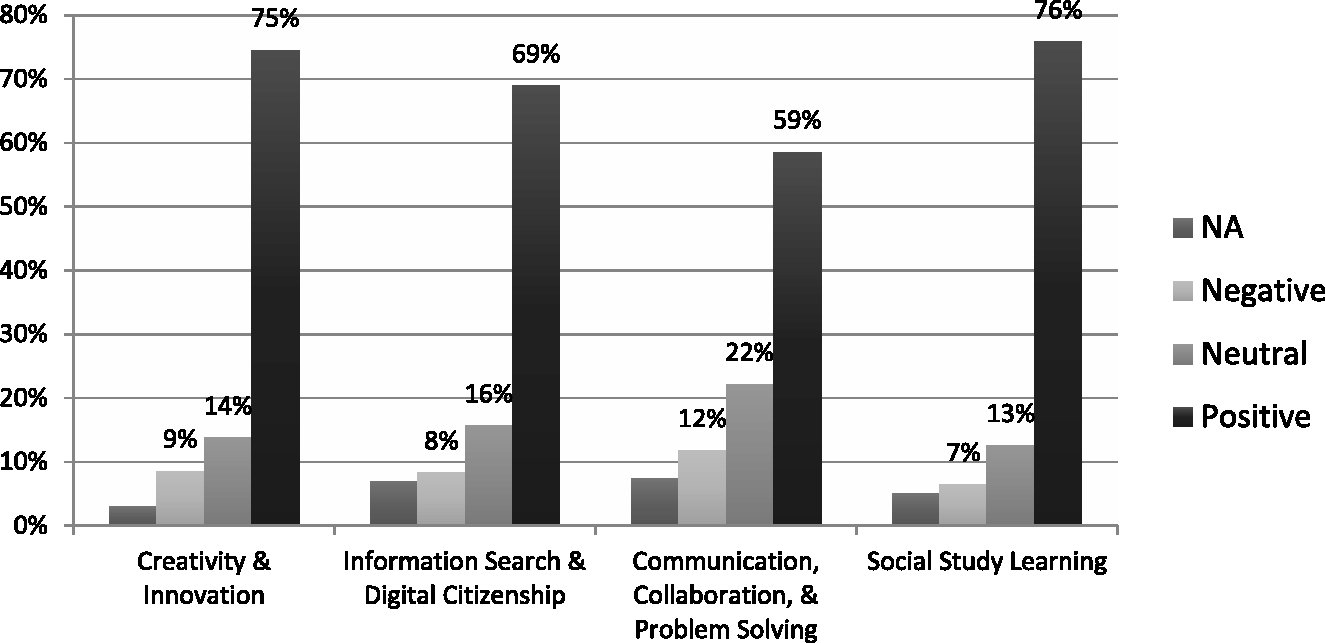
Qualitative data
Student Perceptions on Positive and Negative Impacts of iPads on Learning Skills.
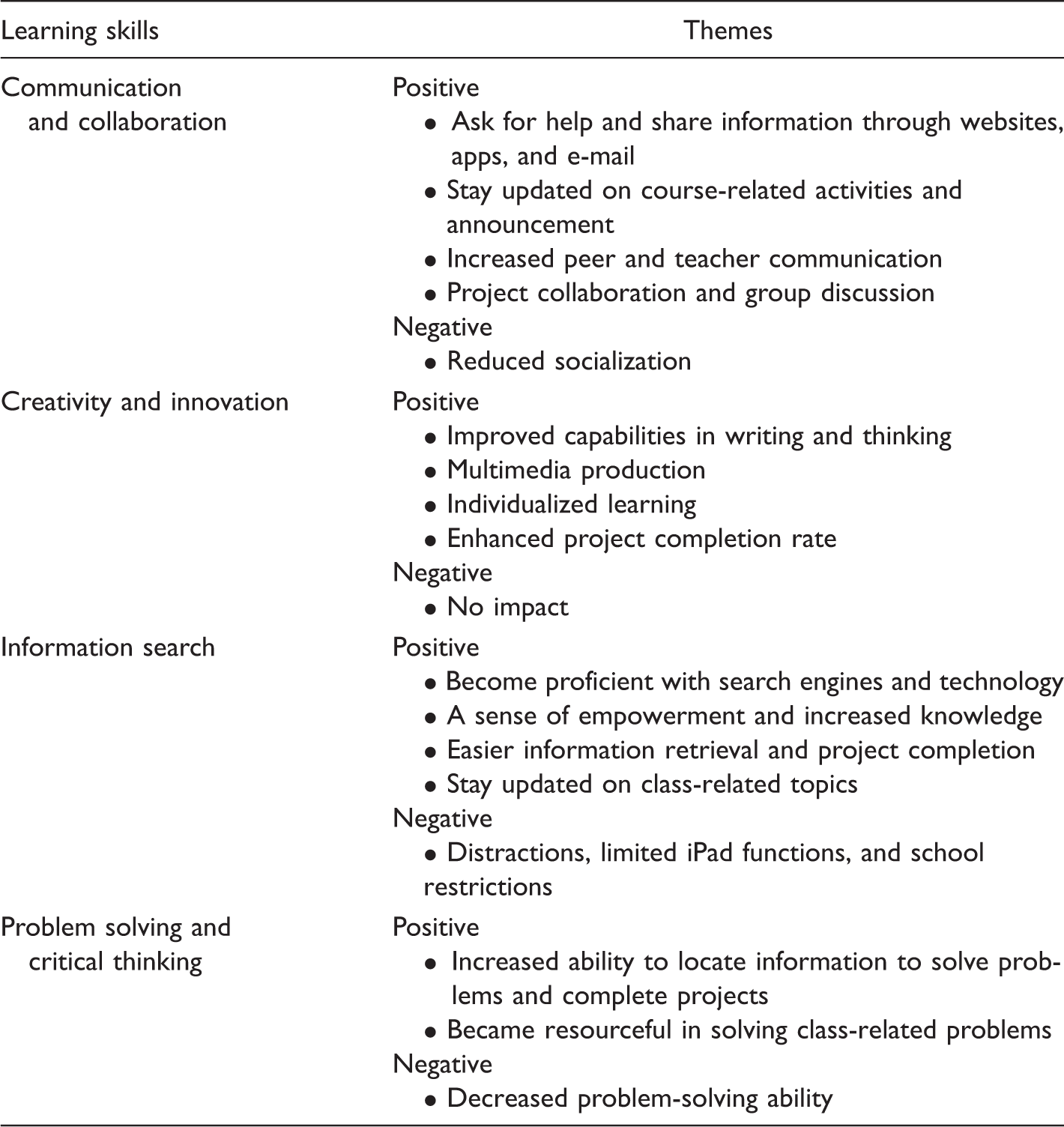
Specifically, students acknowledged that their communication and collaboration skills were enhanced as a result of iPad integration through information seeking and sharing, regular updates of course activities, increased teacher-student and peer communication, and project collaboration and group discussion. As one student commented, iPad integration helped to “create a community online as well as in a classroom.” Some were also concerned about reduced socialization since students might tend to go online to seek answers instead of asking each other about a question.
Furthermore, students highlighted their enhancement in creativity and innovation skills through improved capabilities in writing and thinking, multimedia production, independent learning, and higher project completion rate. Students stated that iPads provided “the resources to explore different perspectives on the internet, instead of only getting one from our textbooks” and “allow you to work at your own pace.” However, not everyone agreed that iPads increased student creativity. One student commented that iPads were being used as an eBook and not for “anything moderately creative.”
With regard to information search skills, students emphasized achievement of improvement in proficiency with search engines, a sense of empowerment in gaining new knowledge and completing projects, and quicker access to updated information. One student summed it up well by saying, “It allows us to look into current events in our time instead of looking in a textbook about geography from ten years ago.” Students also expressed concern related to distractions resulting from an overwhelming amount of information and limited iPad functions. One student indicated that it is “less convenient to search for things” because of restrictions set by schools.
Finally, with regard to learning skills related to problem solving and critical thinking, students underscored their increased abilities to locate information, complete projects, and utilize resources in problem solving. Although many students considered looking up information to complete school assignments to be problem solving, many gave themselves credit for being better able to “solve problems on my own because I find the information online instead of figuring it out for myself.” Since students were restricted to the type of problem-solving tasks assigned by their instructors, without more activities at the Redefinition or Modification levels in which they are encouraged to tackle real-world issues, students could only apply their problem-solving skills to the given assignments. Some students also commented the iPad limited their problem-solving skills since they could locate answers online without first having to solve problems on their own.
In conclusion, both quantitative and qualitative data show that student perceptions the effect of iPad integration on enhancing their learning skills were highly favorable. While perceived negativity with iPad integration from such factors as distraction, iPad restrictions, personal preferences, and limited instructional activities accounted for only a very small percentage of student perceptions, it is important to acknowledge student concerns and incorporate instructional activities that cultivate student interests and foster the development of 21st-century learning skills.
Conclusions and Significance
This study set out to study the instructional patterns and teacher-student perceptions of iPad cart integration. This mixed-methods study utilized a data triangulation approach to achieve an in-depth analysis of what teachers do and what skills students desire to utilize in the classroom. Teachers recognized the following opportunities during iPad integration: improved efficiency, shifting pedagogy, increased engagement, learning skills development, personalized learning, peer-learning, and tailored professional development. Teachers also faced the following challenges: lack of timely IT support, technology glitches, distractions and cheating, iPad limitations and restrictions, and other negative experiences. Nevertheless, students provided highly favorable views on the value of iPad integration in assisting them in content learning and improving creativity, communication, collaboration, and information search skills. Students also shared concerns over distractions, reduced socialization, single-purpose use of iPad as eBooks and search engines, restrictions related to apps, and limited instructional activities.
Although there were overwhelming positive views toward iPad integration, the gap between teachers’ instructional practices and students’ desired learning scenarios was noticeable, especially with respect to a lack of activities encouraging student communication, collaboration, creativity, and problem solving. Previous studies have noted that the novice factor could boost initial student interest but not sustain student learning over time (Magana, 2017). This project aims at reducing first-order barriers (Ertmer, 1999) by providing equitable access and support for all participating teachers. It also represents an effort to minimize second-order barriers by offering professional development workshops at the district and building levels. Nevertheless, like any large-scale technology implementation, many teachers still felt ill-prepared or poorly supported at local levels. When their main focus was on information search and reading texts on iPads, students were restricted to activities that did not maximize iPad affordances to foster learning skills, even though findings suggest that iPad-enriched learning activities that incorporate 21st-century skills can contribute to positive learning perceptions by students. On the one hand, the study results corroborated the findings from previous research that iPads have potential for changing instructional practices and improving engagement (Harper & Milman, 2016). On the other hand, the research findings also suggest that some teachers may need more individualized training and peer-support to achieve confidence in effectively utilizing iPad carts in the classroom.
The limitations of this study include a lack of baseline data related to teacher adaptation of iPads at an early stage of iPad cart integration and absence of a consistent instrument for measuring both teacher and student perceptions. Because of different roll-out schedules implemented in individual schools, not all teachers received the iPad carts during the same time frame. To try to boost the participation rate, the research team decided to visit the volunteer teachers’ classrooms toward the end of the semester when they might feel more confident in being observed. Ideally, it would have been helpful to have made two separate observations in each classroom to detect possible growth and changes in the individual teacher’s instructional activities. It would also be helpful to use a validated instrument to produce a quantitative data set to supplement the qualitative focus group data and probe teacher–student perceptions for consistency. Finally, inclusion of teacher perceptions of student iPad use of might also provide an interesting contrast with respect to student perceptions.
This study makes a significant contribution to the growing literature on iPad cart integration by examining the instructional patterns through the SAMR framework and widening differences between teachers and students in expectations of technology-enriched classrooms. This research not only pointed out the importance of incorporating a pedagogical framework but also highlighted specific instructional strategies (e.g., collaboration, communication, problem solving, etc.) that could excite learners. The goal of this study was not to promote the use of iPad carts but rather to highlight the importance of utilizing a sound pedagogical framework for professional development and instructional activities. Although there is no lack of studies on teacher and student perceptions toward technology, the study findings reveal a predominant instructional pattern at the levels of Substitution and Augmentation in the classrooms and mismatched expectations of iPad use between teachers and students. Further study could explore the connections between a teacher’s pedagogical framework and student engagement either with or without technologies. If a teacher mainly uses worksheets or a teacher-centered approach in the classroom, s/he may replicate the same pedagogical orientation in a technology-enriched environment, and changing teachers’ pedagogical orientation might provide a key for successful technology integration.
Appendix 1. Classroom Observation Form.
Footnotes
Authors’ Note
This research was carried out under ethical guidelines. We obtained institutional review board approvals from the affiliate university and school district. All data are available upon request. The manuscript is approved by all authors for publication.
Declaration of Conflicting Interests
The authors declared no potential conflicts of interest with respect to the research, authorship, and/or publication of this article.
Funding
The authors received no financial support for the research, authorship, and/or publication of this article.