




Abstract
Background. There is a need to enhance simulation activities in
Methods. A
Results. Participants found the interactive digital simulation table easy to use and felt it would be useful for nursing education as it provided an experience similar to real clinical practice.
Conclusion. There is evidence to support including the interactive digital simulation table as part of a suite of simulations offered to nursing students.
Keywords
The use of simulation laboratories is now routine practice in North American nursing education as strong evidence consistently demonstrates their educational benefits (Pittiglio, Harris, & Mill, 2012; Wood & McPhee, 2011). These benefits are significant, they provide a safe learning environment for knowledge application, the opportunity to integrate theory with practice, promote skill advancement, reflection on decision-making and immediate feedback (Hayden, Smiley, Alexander, Kardong-Edgren, & Jeffries, 2014). Hayden et al. found substantive evidence suggesting that nursing students could engage in in-person and computer-based simulation for up to 50% of their clinical time. Recently, there has been a significant increase in the number of available computer-based simulations which incorporate gaming elements. More recently, a interactive digital simulation table became available to nursing educators. This paper describes a usability study, based on the Technology Acceptance Model which was completed to assess the ease of use and perceived usefulness of this new simulation product.
In this study, usability testing is accomplished by asking a small, representative group of nursing students to evaluate the ability of the interactive digital simulation table to meet specific goals (Rubin & Chisnell, 2008). One of the goals is to review the process of using the interactive digital simulation table to determine if there is any frustration among the students using it (Rubin & Chisnell, 2008). The results will be used by the team to mitigate identified concerns. The other goal is to assess if the students’ outcomes are met through the interactive digital simulation table and they would be willing to use it again due to its usefulness (Rubin & Chisnell, 2008). This is an important factor since the interactive digital simulation table has a number of different cases for nursing students.
Background
Computer simulation experiences or virtual experiences have increased significantly in nursing education. They provide nursing students with a virtual environment in which to apply theoretical concepts to scenarios so they can practice decision-making in an engaging environment that is safe for them and for their clients (DeGagne, Oh, Kang, Vorderstrasse, & Johnson, 2013; Ulrich, Farra, Smith, & Hodgson, 2014). In these virtual environments, mistakes provide an excellent opportunity for reflection and learning (Verkuyl & Hughes, 2019). Repetitive practice allows for the acquisition of skills, a heightened awareness of consequences of their actions and opportunities to experiment with different clinical decisions (Verkuyl & Hughes). The results of a scoping review on virtual simulation in healthcare suggest they may have advantages over in-person simulation methods (Duff, Miller, & Bruce, 2016).
Body Interact™ (BI), is a web-based interactive digital simulator that uses physiological algorithms within a branching scenario to create and enact clinical experiences to promote learners’ critical thinking and clinical decision-making skills (See Figure 1). The ‘patient’ appears in 3D on a touch screen computer table, where users make clinical decisions by touching a specific drop-down menu on the screen. A case situation opens with a short report about the patient. The user cares and makes clinical decisions for the patient within a pre-determined set of time. As decisions are made, real time patient status reports and performance evaluations are provided. The user asks the patient questions by selecting a specific system from the menu, then a drop-down list is displayed with specific questions related to the chosen system. Once a question is selected, the patient provides a response. At any-time the user can perform physical assessments including vital signs. After choosing an assessment, the specific assessment is performed and results are provided. For example, if the user selects ‘auscultate the chest’, a stethoscope appears and the user can move it to hear chest sounds. Or, with an intervention, if the user selects a medication, the dose and route are selected, administered and the patient responds appropriately. For example, if a medication like Salbutamol is administered for wheezing, the patient’s wheezing and respirations decrease and the heart rate increases. Similarly, the user can order diagnostic tests and obtain results. On completion of the scenario, a feedback page displays the decisions made and an analysis of their effectiveness. The feedback provided is considered the debriefing phase. BI can be used individually through a web-based interface or with a group of users around the BI table.
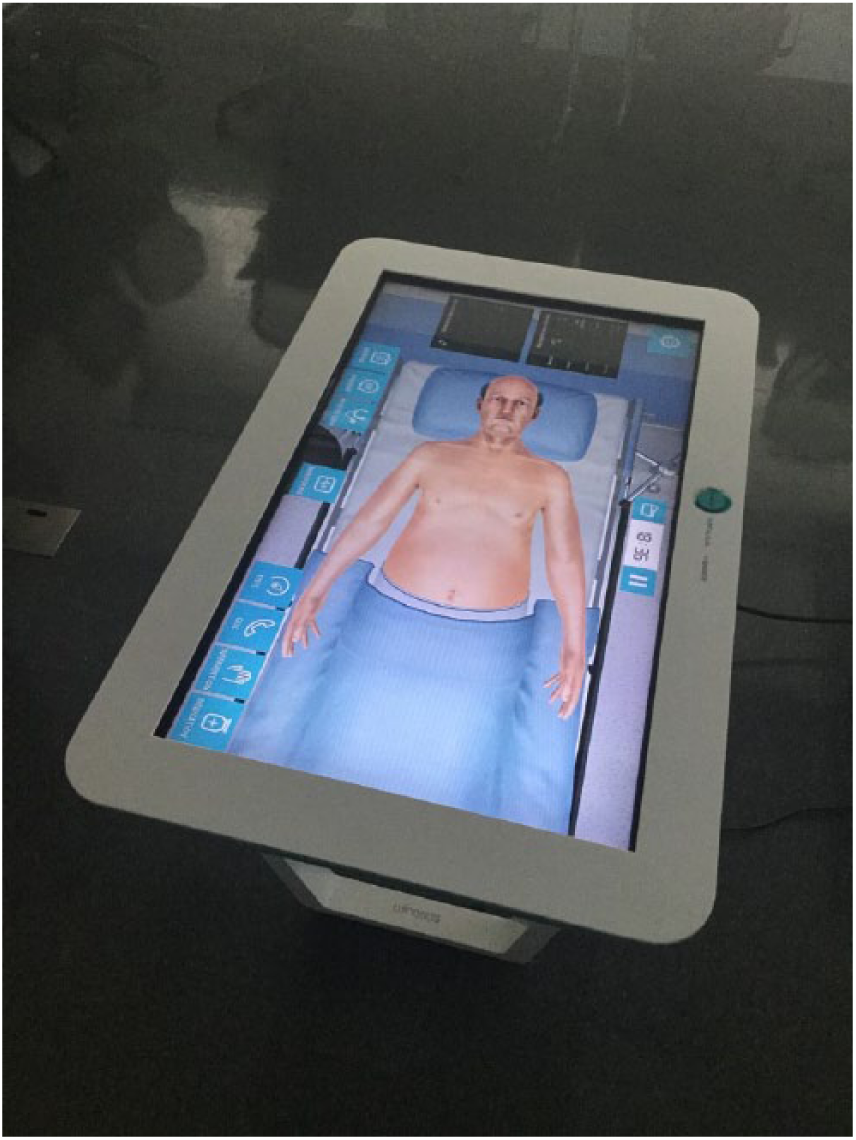
Body interact table.
BI was initially designed for medicine and numerous clinical scenarios for medical students have been developed, however the technology is new to nursing. For this usability study, an existing asthma/chronic obstructive lung disease scenario designed for medical students was revised for nursing students. The scenario design was standardized to include all three simulation components: brief, scenario and debrief (feedback).
The purpose of this study was to conduct a usability test on the BI simulation table to ensure it was both easy to use and useful for nursing education.
Usability Testing
Usability testing is an important, often overlooked and essential step conducted to identify and resolve any potential barriers to the users’ experience. Usability testing invites participants, like the target users, to assess the product using specific criteria (Rubin & Chisnell, 2008). The framework used to guide this was the Technology Acceptance Model (TAM) with a focus on the product’s ease of use and usefulness. These two variables play a critical role in end user uptake of the technology (Davis, Warshaw, & Bagozzi, 2006). The TAM theory suggests that if the interactive digital simulation table is easy to use and students view it as useful uptake will be facilitated. Conversely, when students have technical issues with virtual experiences it can negatively affect their experience (Caylor, Aebersold, Lapham, & Carlson, 2015; Foronda et al., 2016).
Methods
Study Design
The usability testing was conducted using surveys and interviews following a process reported in earlier studies (Nahm, Preece, Resnick, & Mills, 2004; Tullis & Albert, 2008) and recently used to evaluate a virtual gaming simulation (Verkuyl, Atack, Mastrilli, & Romaniuk, 2016).
Participants and Setting
The participants, second year baccalaureate program nursing students, were recruited using convenience sampling. The study was conducted at a large urban college simulation center.
Intervention
Participants arrived at the simulation lab in groups of four to six. They were provided an orientation on how to use BI then they worked together to complete an asthma case. The students had recently gained didactic knowledge of asthma and chronic obstructive lung disease in class and some students had cared for someone in clinical with respiratory distress. After working through the case using the simulation table they were asked to complete a usability survey then participated in individual interviews.
Instruments
Simulation survey
The survey includes six demographic items such as age, gender, educational level and gaming experience. The next 17 items measure the ease of use and usefulness of the BI using a five- point Likert scale from strongly disagree (1) to neither agree/disagree (3) to strongly agree (5). None of the items were reversed. Evidence for validity and reliability of survey items has been reported in past usability studies with Cronbach alpha results consistently greater than .70 (Albu, Atack, & Shrivastava, 2015; Verkuyl et al., 2016). The items were modified to reflect the current testing topic: asthma/chronic obstructive lung disease. The alpha for the current study was 0.87 providing evidence for reliability.
Interview
Immediately, after completing the survey, the participants were interviewed individually for 30 to 60 minutes by an experienced interviewer not responsible for teaching the students. The semi-structured interview guide included questions designed to explore the participants’ experiences with the BI. Sample questions included: What was it like for you to get started with the Body Interact™ Simulation? And, Did you have any technical problems? The interviews were taped.
Research Ethics
The study was approved by the Research Ethics Board at the participating educational institution. Participants provided informed consent before enrolling in the study. The faculty involved in the study did not teach the participants and held no position of power over them.
Data Analysis
SPSS version 24 was used to calculate descriptive statistics for the survey data. The interviews were transcribed and a content analysis to identify key themes was conducted by two researchers. The qualitative themes emerged from a team approach to the analysis (Braun & Clarke, 2006). Line-by-line coding then categorization then naming of themes was completed initially individually then as a team. Throughout the process there was defining and redefining of codes and themes (Braun & Clarke, 2006). The two researchers reached consensus on the important aspects and themes obtained from the data.
Results
Participants
Fifteen nursing students participated in the usability testing; typically, usability studies include 10 to 12 participants however, there is general agreement that 80% of problems are revealed by the first four or five participants (Rubin & Chisnell, 2008). Thirteen percent (n = 2) were male and 87% (n = 13) were female. The majority (n = 12; 80%) were aged 17 to 25 and the remaining participants were aged 31 to 35. Forty-seven percent (n = 7) reported that they never played video games and 40% (n = 6) played them occasionally. An equal number had previous simulation experience.
Simulation Survey
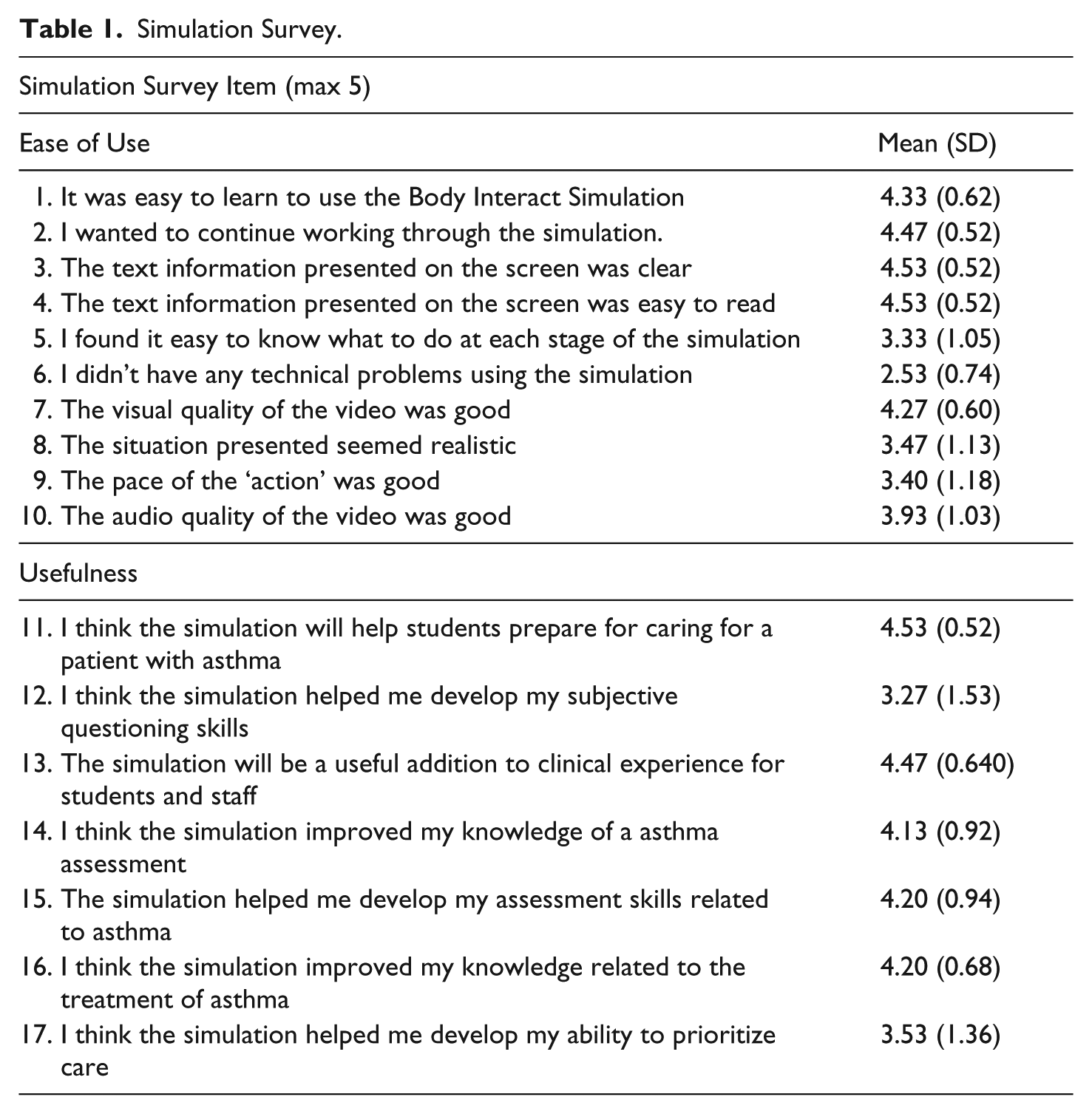
The mean score for the total Clinical Simulation Survey items was 67.1/85 or 78.9/100(%). Items five and six received the lowest scores; these items related to the ability to know what to do at each stage of the simulation and to technical problems (see Table 1).
Simulation Survey.
Interviews
Five themes emerged from the interviews: ease of use, experience, experience with technology, usefulness and recommendations.
Ease of use
The participants reported that the BI was, in general, easy to use. They said it was like ‘an app on your phone’ and ‘straight forward-like a tablet’. They felt that a ten-minute orientation was all they needed to get started. Some reported that the interface made it easy to locate options on the screen such as subjective questions, physical assessments and interventions. When observing the patient experiencing symptoms such as bronchospasm and cyanosis, they felt the avatar was more realistic than the mannequins in the simulation lab. One difficulty, reported by a few participants, was finding the medications they wanted to administer and the appropriate doses. Participants wanted to mix two medications in a mask but were unsure how to add another medication to the mask or how to administer more than one dose. Participants worked together on the scenario, however, at times several participants touched the screen at the same time causing several windows to open. When multiple windows were open the screen was obscured with too much information for the participant to process.
Experience
Most participants noted that BI was, “interesting”, “cool”, “realistic” and an “interactive experience”. They liked its interactive design and the opportunity to receive immediate feedback. A few said it was less stressful than in-person High Fidelity patient simulation however, they felt that it should be used in addition to High Fidelity patient simulation, not replace it. Participants felt that the two experiences were very different and both had educational benefits. They noted that the BI provided a safe environment where they could learn from their mistakes. They did however, report that there was an overwhelming number of questions in the drop-down menus to choose from when asking the patient a question. When provided with a medication list, they did not recognize some of the medications listed and were not clear about when the last dose was given. They were also unsure of medication peak-times and as a result were not sure when to expect results. Results were provided in the diagnostic/test area, however, as nursing students they were are not trained to read some of these such as the ECG and x-rays. The first group of participants was not given a paper chart like the client record they would typically have access to when in clinical practice which they said would have been helpful; subsequent participants were given a paper chart. The participants’ said they liked working with everyone around the table and found they were consistently engaged.
Experience with technology
There were several concerns voiced related to the technology. In the simulation, only the anterior aspect of the patient is seen on the screen. The participants were frustrated that they were unable to raise the bed and listen to the posterior aspect of the chest or turn the patient. At times it seemed to take too long for an intervention such as oxygen to be applied or completed. The table had lip over the edges that at times covered the options or buttons. Also, some buttons appeared only for a short time, participants did not know how to make them reappear. At times the table did not respond to the selection tapping or responded slowly. There were no specific follow-up questions provided after an intervention. Finally, all participants wanted temperature to be included in the vital signs report.
A summary/debrief screen at the end of the scenario provided users with feedback on their experience. Some interventions were reported in red which confused participants. A few participants said the screen indicated the number of points you hit but never specified what you missed. That information was available, however, participants were not clear how to access it. Several participants found the debrief to be limited and many would have liked more rationales provided.
Usefulness
Participants described several ways BI was useful. One participant said, “It’s like exactly like what you’re dealing with at clinical, you have the orders and then medications” They felt that using it was useful and more interesting then case studies or national exams. Several participants indicated that it helped them to think about pathophysiology and theory and then, “put that knowledge into practice”. They felt the simulation promoted critical thinking and helped them make connections because they could immediately see the results of their interventions. They said the case provided was interesting, made them think quickly and the responses they received helped them work through the simulation. While most participants felt BI was useful, some felt the in-person simulation was more realistic. Participants reported that the experience would be useful in preparing for clinical and exams and that because it was fun that they would likely remember the content well.
In the debrief screen the user is given a score to indicate the percentage of items that were completed appropriately. Many of the participants found the reflection and rationale opportunities to be somewhat helpful and that the feedback was an important component. A few found the summary useful because it promoted critical reflection and enabled them to “make your own nursing diagnosis.”
Recommendations
The participants had several recommendations for using BI and to better prepare them for this learning activity (Table 2).
Recommendations.

Discussion
The overall satisfaction score of 79/100 and the interview data suggests participants were quite satisfied with BI, results supported by Padilha, Machado, Ribeiro, and Ramos (2018). The interview component of the study was particularly useful in identifying changes that impaired the students’ learning experience. Ease of use, as identified in the TAM framework, is key to technology uptake and accordingly. The problems found were reported to the developers for feedback and the table was fine tuned before embedding it in the curriculum. Faculty gained a clearer understanding of the support activities and materials they could use to enhance the orientation/prebrief and the scenario. They learned how best to use the interactive digital simulation table in the curriculum, such as the importance of making a patient chart available and advising students to review generic medication names and doses before their session. This type of information is important for faculty who will be using the simulation for the first time; it will enhance their ability to structure a quality learning experience and improve learning outcomes for students.
The study participants reported that the table was very useful; it was similar to a clinical experience and provided a realistic learning experience. Close proximity to reality is an important characteristic of virtual simulation (Irwin & Coutts, 2015) and our technology-savvy students expect and embrace these types of experiences (Lynch-Sauer, 2011; Verkuyl & Mastrilli, 2017). An integrative review by DeGagne et al. (2013) found virtual worlds can be an excellent medium in which to apply nursing concepts and enhance nursing students’ clinical reasoning skills. One of the questions we had which was answered by this study was related to the integration of technology such as the interactive digital simulation table in the range of simulation activities we currently offer students. Duff et al. (2016) found virtual simulations are comparable and may have some advantages over in-person simulation methods particularly in the area of engagement, safe environment and convenient access. Virtual experiences can be an effective, potentially financially feasible way to prepare nursing students for clinical by giving them ample opportunities for decision making regarding a specific clinical experience within a safe practice environment. Going forward, instead of replacing High or Low Fidelity simulations with the interactive digital simulation table, we will proceed, as students suggested and use BI to augment current simulation experiences and increase student access to experiential, safe clinical experiences.
One limitation of the study was the use of convenience sampling, however, the study participants demographically resembled the larger student population at our institution. It is also important to remember that any new technology is inherently interesting and this may have influenced study results. The findings of this study helped to inform the BI developers about what is needed from a nursing student perspective which will likely improve uptake and the learning experience. The suggestions provided from the study will be part of the guidelines developed for faculty who will use the table. Further research is needed to determine if it helps students meet specific learning outcomes and the most effective way to include the table in a curriculum.
Conclusion
Usability testing is an important step with any new technology and contributes to increased ease of use and student engagement in virtual learning experiences. This study found BI to be easy for students to use and it was perceived to be a useful learning experience, closely mimicking a real clinical experience. It also provided direction for faculty regarding how to successfully integrate interactive digital simulation tables in nursing education.
Footnotes
Declaration of Conflicting Interests
The authors declared no potential conflicts of interest with respect to the research, authorship, and/or publication of this article.
Funding
The authors disclosed receipt of the following financial support for the research, authorship, and/or publication of this article: This work was supported by a GBC Collaborative Applied Research Funds.
Author Biographies
Contact:
Contact:
Contact: