



Abstract
The implementation of the National Core Arts Standards has amplified the need for multiple approaches and opportunities for student responses and may compel music educators to use new tools. There are currently over one million available apps, and with the popularity of smart devices, student access to technology is increasing exponentially. Music teachers can take advantage of the apps and technology to help meet these standards and enhance the classroom experience.
The implementation of the National Core Arts Standards has amplified the need for multiple approaches and opportunities for student responses and may compel music educators to use new tools. There are currently over one million available apps, and with the popularity of smart devices, student access to technology is increasing exponentially. These advancements in technology have changed children’s access to music and the ways that children can experience music. While new devices are more available to students, it is important to realize the opportunities that teachers may have by implementing this technology in the classroom. Music teachers can take advantage of the apps and technology to help align with these standards and enhance the classroom experience.
The apps that have been created with children in mind have tripled in recent years. Finding quality apps for the music classroom can be particularly challenging and time consuming. Therefore, the apps discussed in this article have an interface, content, or design that we feel are particularly exceptional for use with elementary aged music students, and could work to implement the new core standards. Beyond the discussion of select apps, additional apps for each Core Arts Standard are provided. And, while we are not suggesting that these apps replace the art of teaching, we do believe these apps could positively affect student learning in the 21st-century music classroom.
Creating
Developer: 09 Line Development Co.
Cost: $0.99
There are three anchor standards under the core standard of creating. These anchors can be summarized as a student’s ability to generate, conceptualize, organize, develop, and refine artistic ideas (National Coalition for Core Arts Standards [NCCAS], 2014). While there are many apps that could reinforce this core standard, we especially like Sketch-a-Song Kids. This composition style app offers students a platform to make music in seconds. By choosing from a number of “sketch pads” and instruments, students are immediately in control of their musical work. Additionally, the app provides premade “grooves” that can be added to or replicated. The varieties of instrument choices within the app are separated by timbre and function, and students can add anything from drums, to voice, to woodwinds, to sitar. Finally, students are able to understand chord progressions (which are labeled within the app) and continue to add measures for infinite compositional enjoyment. For other recommended apps under this core standard see Figure 1.

Apps that meet the creating core standard.
Link to video demo: https://www.youtube.com/watch?v=VfRu2RrK0JA
Link to purchase: https://itunes.apple.com/us/app/sketch-a-song-kids/id766925471?mt=8
Performing/Presenting/Producing
Developer: JibJab Media Inc.
Cost: Free
This core standard also has three anchor standards. The anchors can be summarized simply as a student’s understanding and discrimination of musical works chosen for presentation (NCCAS, 2014). Typically, we view this standard as the performance portion of our curriculum, but students are now required to be a bit more analytical. Although there are a myriad instrument-type apps that could meet the requirements of this standard, we particularly like Storybots Tap & Sing. This app is a xylophone style interface where each “bot” sings a different pitch that allows students to tap notes, chords, and melodies. Additionally, Storybots can be used individually, as a small group, or by the entire class to create patterns, repeat teacher-presented patterns, or investigate patterns in existing songs. For other apps we recommend under this core standard see Figure 2.

Apps that meet the performing core standard.
Link to video demo: http://www.youtube.com/watch?v=yoBO6nfQDXU
Link to purchase: https://itunes.apple.com/us/app/tap-sing-by-storybots-free/id602903380?mt=8
Responding
Developer: Showbie Inc.
Cost: Free
Three anchor standards exist within the core standard of responding. Although this standard may seem daunting to some music educators, it can be simply understood as a student’s ability to evaluate, analyze, and interpret meaning in music (NCCAS, 2014). Apps that allow students to immediately respond to what they are hearing do not exactly exist in the realm of smart devices yet. Teachers may have to use other apps to specifically address this standard beyond a whiteboard or paint style drawing app. There are many secretarial apps available for a teacher’s use in the classroom; however, the one we like is Showbie. Not only does this app have a delightful support staff and collection of YouTube “how to” videos, the idea of going paperless is appealing. As an elementary music educator, you can upload any type of listening or analyzing worksheet to the app and distribute to students. Students can record their responses through drawing or writing and turn the document in to the teacher, all within the app! The possibilities for responding are endless. For other apps like Showbie see Figure 3.
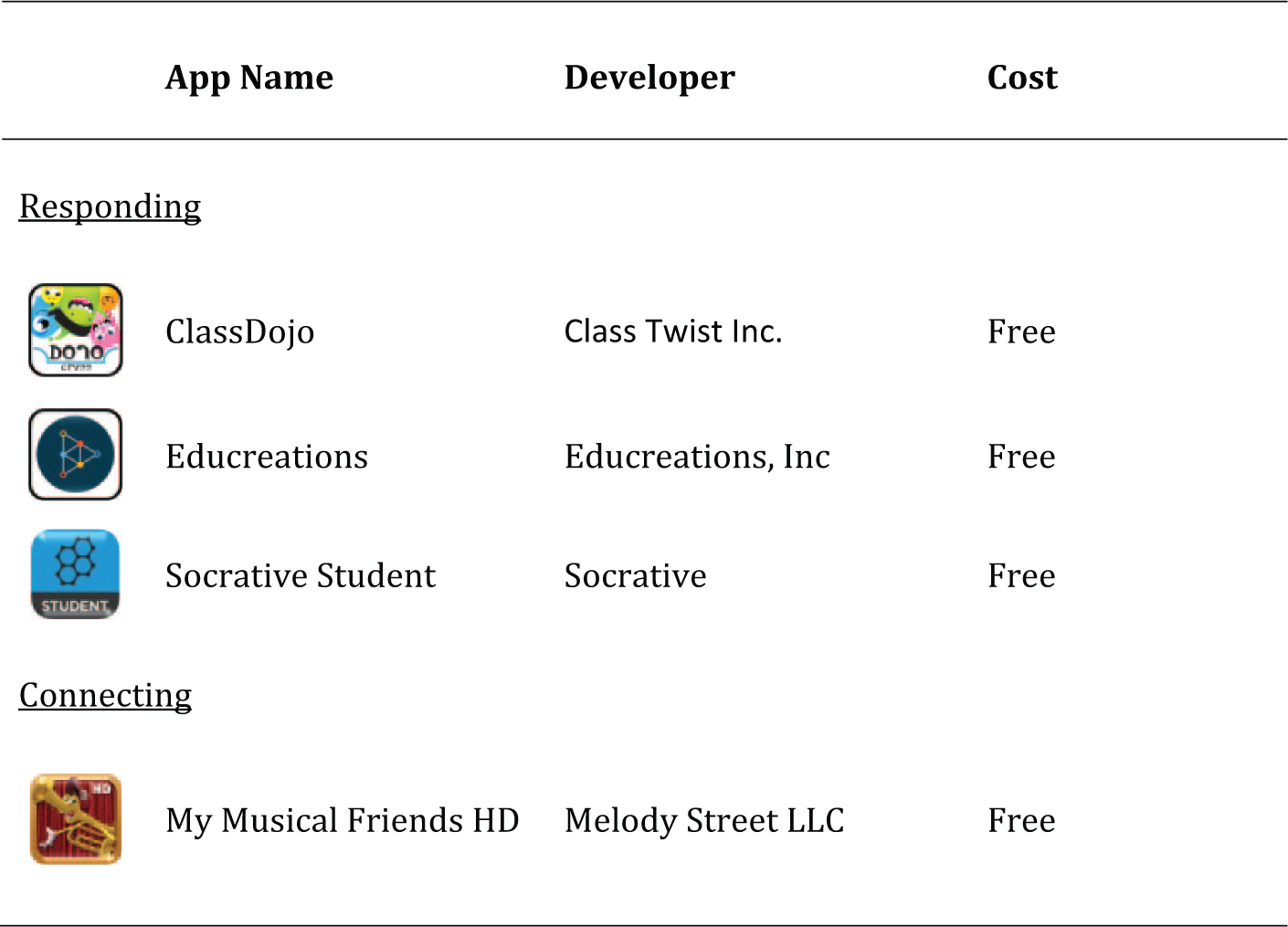
Apps that meet the responding and connecting core standards.
Link to video demo: https://www.youtube.com/watch?v=iHVnsnekHVI&list=UUDon_Di52Mx4vNUzr_oAcoQ
Link to purchase: https://itunes.apple.com/us/app/showbie-for-ipad/id548898085?mt=8
Connecting
Developer: Launchpad Toys
Cost: Free
The two anchor standards that exist under the connecting standard facilitate a student’s ability to make the transfer of their music knowledge to other areas of their lives. In addition to arts goals addressed with this standard, it is quite simple to incorporate cross-curricular standards and goals (NCCAS, 2014). Although many learning apps are available, our favorite in this category is Toontastic. Through use of this app, students are able to animate, score, and share cartoon stories of their own creation. Within the app students are provided storyboards, characters, and events and coached through the development of their own complete story. Students enhance their story with sequence of events, mood, and the opportunity to add their own script and music. Additional packs are available for purchase to increase options. This app is highly rated by many entities and we find it is quite simple to integrate within the music curriculum. For other apps that we like which are similar to Toontastic please see Figure 3.
Link to Video Demo: https://www.youtube.com/watch?v=mCStNPJr74o
Link to Purchase: https://itunes.apple.com/us/app/toontastic-create-share-cartoons/id563403725?mt=8
The apps listed within this article can enhance your lessons and help implement a curriculum that aligns with the National Core Arts Standards. And while we understand that not every school has access to one smart device per student, these apps could be used within the classroom via a projector or SMARTboard. It is also possible for students to access some of these apps on the Internet and continue their exploration and growth in music at home. This is especially important since class time with elementary-school-age music students is limited. Access to this type of technology in the classroom may allow the 21st-century music teacher to positively support the Common Core Arts Standards and focus on the students’ process of music making.
Footnotes
Declaration of Conflicting Interests
The author(s) declared no potential conflicts of interest with respect to the research, authorship, and/or publication of this article.
Funding
The author(s) received no financial support for the research, authorship, and/or publication of this article.