



Abstract
Many students with learning disabilities demonstrate difficulty in developing a conceptual understanding of mathematical topics. Researchers recommend using visual models to support student learning of the concepts and skills necessary to complete abstract and symbolic mathematical problems. Virtual manipulatives (i.e., interactive visual models) can be used as tools for students while actively engaging in learning mathematics. This article discusses (a) technology trends in teaching mathematics to students with learning disabilities, (b) virtual manipulatives as instructional mathematical tools for use in the classroom, (c) the benefits of using virtual manipulatives, and (d) potential challenges with using virtual manipulatives for instructional purposes.
Keywords
Many students with learning disabilities (LD) demonstrate poor conceptual understanding of fractions, limiting their ability to solve more advanced problem-solving tasks, including ratios, rates, and proportions (Siegler et al., 2010). When working with students with LD who have individualized education programs in the area of mathematics, recent research supports the use of interactive visual models called virtual manipulatives (Bouck & Flanagan, 2010; Shin, 2013) because of the ability to enable the design features to adjust instructional demands, scaffold mathematical content, and increase the amount of practice opportunities, all of which can be incorporated into intensified instruction for students with LD (B. R. Bryant et al., 2016).
Initially, virtual manipulatives were defined as web-based images on a computer monitor that permitted students to manipulate a visual model as if it were three-dimensional (Bouck & Flanagan, 2010). Previous syntheses and meta-analyses of methods of teaching fractions to students with LD recommended the use of visual models (e.g., Shin & D. P. Bryant, 2015) because of their potential in helping students to better understand the meaning and relationship of fractions through relevant diagrams (e.g., part-whole relationship is represented with a divided circle, multiplication of fractions is represented with a rectangular area model). Through technology, students can access virtual manipulatives on mobile devices such as iPads in addition to web-based computer applications. This capability to easily access virtual manipulatives allows students opportunities to engage with the visual models as part of their intervention on various concepts and skills related to fractions. For example, teachers can use a variety of virtual visual models such as fraction bars, area models, and number lines to teach equivalent fractions and addition, subtraction, multiplication, and division of fractions. This article discusses (a) technology trends in teaching mathematics to students with LD, (b) virtual manipulatives as instructional mathematical tools for use in the classroom, (c) the benefits of using virtual manipulatives, and (d) potential challenges with using virtual manipulatives for instructional purposes.
Technology Trends
Over the past 30 years, computers have been used in special education for independent games, drill practices, and tutorials for improving mathematics knowledge of and proficiency with skills and concepts such as basic mathematics facts, computation, and problem solving (Seo & D. P. Bryant, 2009). Federal policy and standards (e.g., National Governors Association Center for Best Practices & Council of Chief State School Officers [NGAC/CCSSO], 2010) have emphasized the importance of infusing technology into mathematics practice as a means for promoting mathematical understanding. Moreover, in the digital world, schools and teachers are expected to provide engaging opportunities for students with disabilities through the use of integrating technology into instructional practice (Edyburn, 2013).
As a result of this emphasis on integrating technology into mathematics instruction, most of the research on virtual manipulatives as an instructional tool has focused on typical students in general education settings. For example, Moyer-Packenham and Westenskow (2013) conducted a meta-analysis of virtual manipulatives. They found 32 studies that showed a moderate effect of virtual manipulatives on math performance compared to typical instruction in the general education classroom (e.g., instruction with physical manipulatives and/or abstract mathematics symbols but not the use of virtual manipulatives as a tool). Recently, other researchers have investigated the effects of virtual manipulatives as a tool with students with LD using a single-subject research design. For example, Reneau (2012) and Shin (2013) investigated the effects of using virtual manipulatives as a tool for teaching fraction concepts and skills within the context of word problem solving to students with LD. The findings from these two studies showed improvements in word problem-solving, which included problems with fractions, during the intervention phase compared to performance in the baseline condition. In another study, Satsangi and Bouck (2015) found virtual manipulatives an effective tool for teaching the concept of area and perimeter to students with LD. This effect was maintained over time and generalized to abstract word problems. Based on recent research on the use of virtual manipulatives as tools for teaching mathematics to students with LD, a number of potential resources are available to classroom teachers.
Virtual Manipulatives as Instructional Mathematical Tools
In responding to the needs of “web natives” who are adept at accessing and manipulating technology devices (Brown, 2013, p. 55), virtual manipulatives provide a variety of classroom opportunities. Teachers can implement virtual manipulatives as a form of interactive visual models to teach the concept of fractions during their lessons. When virtual manipulatives are presented in the form of games and quizzes, teachers can use them to check for understanding of fraction concepts and skills. Table 1 summarizes the features of web-based and iPad applications of virtual manipulatives for selected products.
Summary of the Features of Virtual Manipulatives.
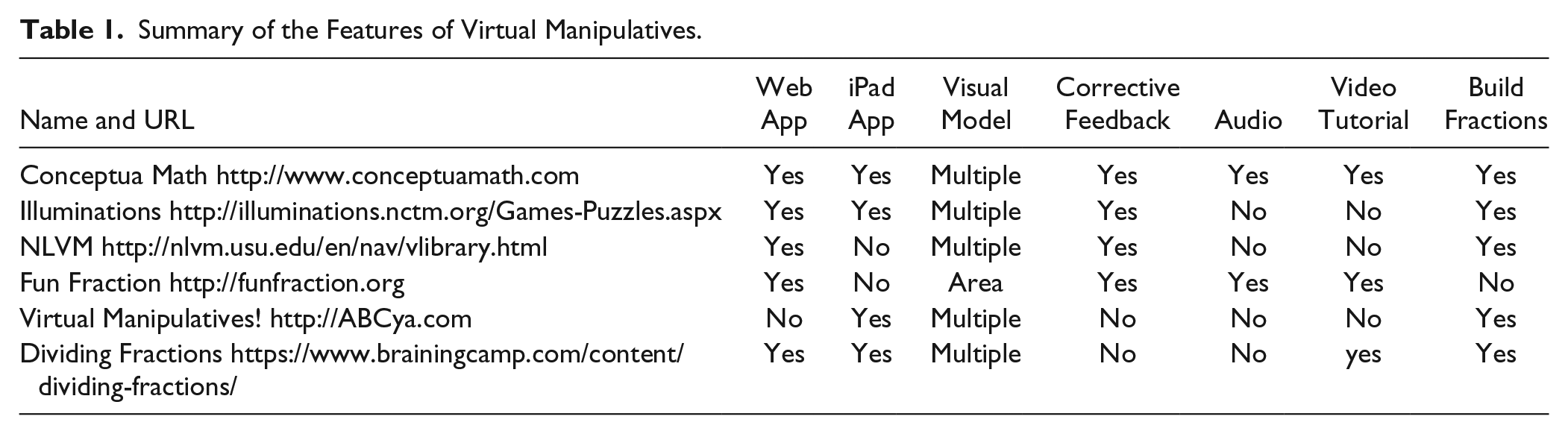
Teachers can integrate the use of visual manipulative tools into their instruction by demonstrating how the models can be used to teach new concepts, such as fractions, and providing students opportunities to engage in interactive activities during guided and/or independent practice. Several web-based virtual manipulatives applications provide build your own fractions options, whereby teachers can create their own fraction problems and control virtual manipulatives as visual model tools for instruction. Because virtual manipulatives provide a visual model tool, teachers must be able to guide students in how to use them and make the connection between visual models and what they represent (Moyer-Packenham & Westenskow, 2013). The Common Core State Standards for Mathematics (NGAC/CCSSO, 2010) include the recommendation for using various tools, such as virtual manipulatives. This recommendation can be translated into instruction by having students manipulate visual models and importantly explain their models in relation to mathematical equations to be solved. For example, when solving fraction problems, teachers should demonstrate how to manipulate quantities that illustrate the meaning of the fraction number (i.e., numerator and denominator quantities). Students should be expected to talk about how they are using the visual model tools to show their work while solving problems.
Free and available web-based applications offer opportunities for teachers and students to implement virtual manipulatives (i.e., visual model tools) during mathematics instruction. For example, using Illuminations (http://illuminations.nctm.org/Games-Puzzles.aspx) or Conceptua Math (http://www.conceptuamath.com), teachers can provide instruction in fractions during whole-class and small-group instruction. These web-based applications offer various visual model tools (e.g., pattern block, number line, vertical bar, dots) for each relevant fraction concept (e.g., equivalent fractions, addition, subtraction, multiplication, division, word problems). Using interactive whiteboards, teachers can demonstrate how to connect virtual manipulatives to each fraction concept. In addition, using iPad applications (e.g., ABCya.com’s Virtual Manipulatives!, Brainingcamp’s Dividing Fractions), teachers can help individual students explore fractions using their own mobile devices. After the teacher has introduced concepts and skills related to equivalent fractions or dividing fractions, students can individually explore fraction visual models using iPad apps. Students can drag pieces of circles or fraction bars into the workspaces. By comparing the size of sliced circles or length of fractions bars, students can compare equivalent fractions. In particular, Virtual Manipulatives! provides note functions through which students can draw any other fraction diagrams and write equations if needed.
Design Features of Virtual Manipulatives
One design feature of virtual manipulative tools (e.g., National Library of Virtual Manipulatives [http://nlvm.usu.edu/en/nav/vlibrary.html], Fun Fraction [http://funfraction.org]) and iPad applications (e.g., Conceptua Math’s Student App, Brainingcamp’s Dividing Fractions) is the ability to monitor student progress with specific concepts and skills through the use of virtual-manipulatives-based quizzes and games (Bouck & Flanagan, 2010; Edyburn, 2013). In this student-centered learning and evaluation environment, virtual-manipulatives-based quizzes and games provide corrective feedback after learning trials. Through the hints and prompts provided by the applications, students can check their answers. Also, by using virtual manipulatives, teachers can determine their students’ ability to manipulate base-10 blocks, graph equations, and determine parts for multiplying or dividing fractions to represent problems and find solutions.
Students also can be provided with individualized scaffolds through several design features in virtual-manipulatives-based quizzes and games. For example, certain models (e.g., fraction bars, circles, rectangular area models, number line bars) provide multiple visual models to represent fraction concepts and skills (e.g., equivalent fractions, multiplication, division). Thus, students can easily focus on previously constructed visual models to solve their fraction problems. Some applications provide multiple visual models for each application so that students can select either circle or square models. When solving word problems with fractions, students can listen to the question through read-aloud functions in Conceptua Math and Fun Fraction. In addition, when students continually fail to solve word problems and forget how to use virtual manipulatives for learning fractions, students can review lessons by watching videos in the applications (e.g., Fun Fraction).
Figure 1 describes how a student can create and apply virtual manipulatives (i.e., Fun Fraction) to solve mathematical word problems such as this: “There are feet of ribbon for making bows. I used of the ribbon. How many feet of ribbon did I use to make bows?” Fun Fraction initially includes four mathematical problem-solving steps: read, Restate, Represent, and Answer. Of the four steps, screenshots in Figure 1 show the represent step, which includes virtual manipulatives for representing the problem situation. In solving mathematical word problem using the virtual rectangular area model in Fun Fraction, a student can go through nine instructional steps.
Step 1: Identify two quantities: vertical line (used ribbon), horizontal line (original ribbon).
Step 2: Because there are feet of original ribbon, divide 1 unit into 3 pieces (denominator of the multiplicand) by increasing the denominator arrow button to 3.
Step 3: Shade of the original ribbon by shifting the green slider to the right.
Step 4: Because I used of the ribbon, divide 1 unit into 2 pieces (denominator of the multiplier) by increasing the denominator arrow button to 2.
Step 5: Shade of the used ribbon by shifting the yellow slider to up.
Step 6: Count the number of sections in 1 unit square. That is the denominator of the product.
Step 7: Count the number of purple color sections. That is the numerator of the product.
Step 8: Thus, of is.
Step 9: Namely, × = .
In this way, the student can use virtual manipulatives to solve the word problem and connect the virtual visual model to numeric symbols to find the solution.
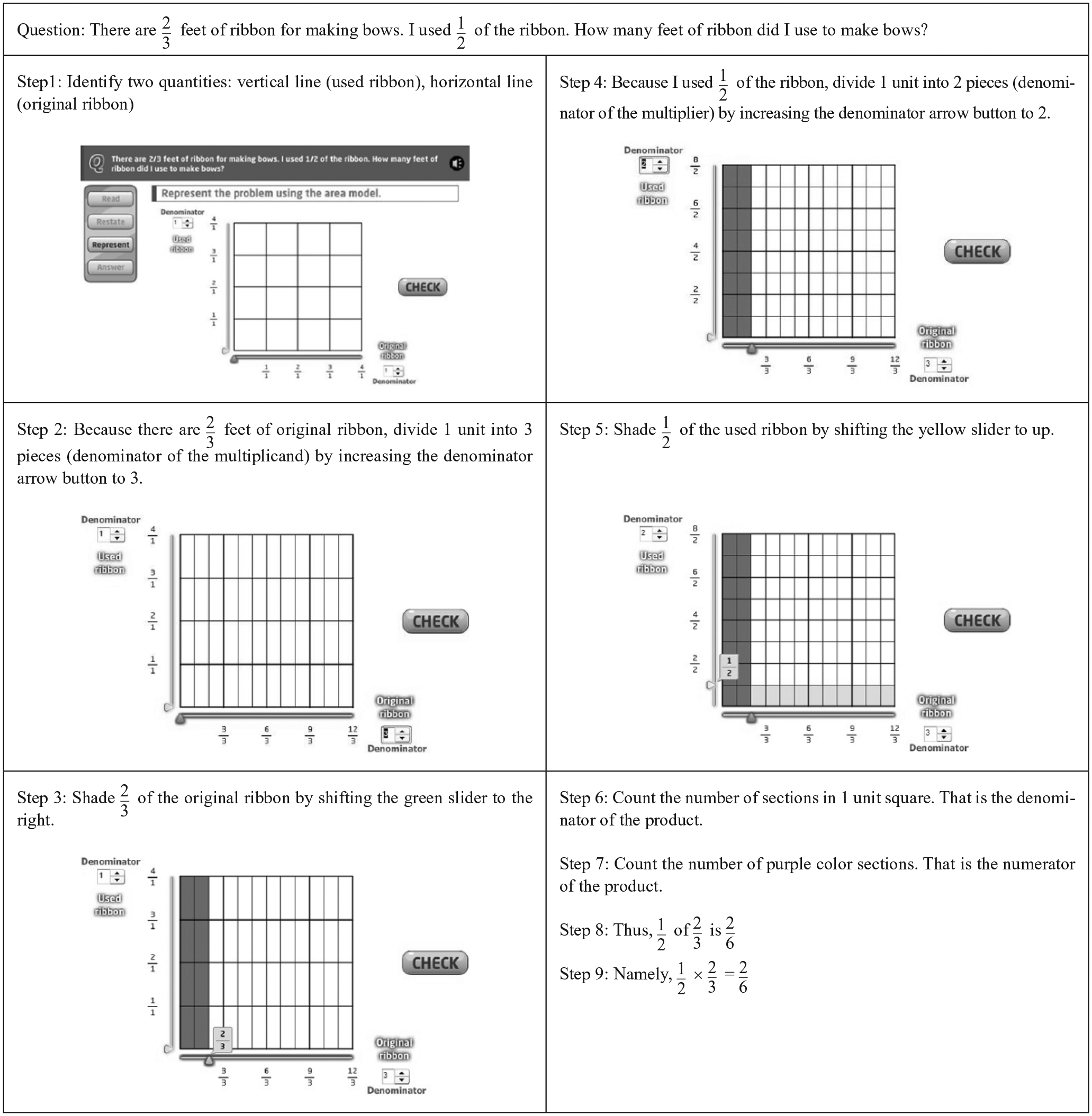
Results of a student completing prompts in the Represent step. This figure illustrates the procedural steps of how to use virtual manipulatives. Used by permission from http://funfraction.org.
Benefits of Virtual Manipulatives
There are several major benefits for special education teachers to use virtual manipulatives in the classroom when teaching students with LD. First, virtual manipulatives help students follow their virtual mental images on the screen using built in visual and numeric models. Suh and Moyer (2008) indicated, “The applet seemed to benefit special needs learners by giving them built in supports for the mathematical ideas that reduced their cognitive overload” (p. 303). By using the computer-built-in pictorial images and symbolic notations, students could be free to focus on the mathematical connections and relationships (Moyer-Packenham, Salkind, & Bolyard, 2008; Suh & Moyer, 2008). Second, the application of virtual manipulatives acts as individualized accommodations for students with LD and mathematics difficulties (D. P. Bryant & B. R. Bryant, 2011; Edyburn, 2013). That is, students can control the learning process by adjusting their own pace and repeating the practice, if necessary (Claes, Van Hove, Vandevelde, van Loon, & Schalock, 2012). Third, the use of virtual manipulatives tools allows students to actively engage in their learning (Satsangi & Bouck, 2015). For example, recent studies have demonstrated that virtual manipulatives encourage active engagement of students with LD and increase their academic achievement in fraction concepts and skills (Reneau, 2012; Shin, 2013). Fourth, many virtual manipulative websites are available free of charge and allow easy access to everyone (Bouck & Flanagan, 2010). Teachers with busy class schedules can access these ready-to-use online resources efficiently. Teachers do not need to clean up and store manipulatives after using the visuals, thus their time can be better devoted to planning and implementing instruction for their students with LD.
Challenges and Solutions With Virtual Manipulatives
The use of virtual manipulatives for teaching fractions with students with LD presents four major challenges. First, in general, most teachers have not been trained on how to use and select the right device to meet individual students’ needs (McMahon & Walker, 2014). To alleviate the challenge of incorporating virtual manipulatives into their instruction, teachers can use video tutorials and instruction provided in virtual manipulative websites and applications. See Table 1 for websites and applications that provide video tutorial options. Using the tutorials and instruction, teachers can easily follow how to implement the virtual manipulatives in their lesson plans. However, only some of the websites and applications provide the tutorials; virtual manipulatives websites and applications developers should consider providing the tutorials for users.
Second, although the video tutorials can be useful for teachers, they are insufficient. Many researchers have warned that virtual manipulatives in and of themselves do not guarantee that students are developing mathematical conceptual understanding (Moyer-Packenham & Westenskow, 2013). When using virtual manipulatives, teachers must check students’ ability to use virtual manipulatives to accurately connect their visual models to mathematics concepts (McMahon & Walker, 2014). During this process, students should be encouraged to verbalize their mathematical thinking and justify their representations of problem situations (Hunt, 2014). Teachers should monitor students’ actions of linking two dynamic visual models on the screen or touch pad by asking reflective questions such as these: “What does the virtual fraction bar represent in the given situation? What happened to the graph when you changed the spinner? How can we define the mathematical relationship between the two virtual area models on the screen?” (Hunt, 2014; Moyer-Packenham & Westenskow, 2013). In this way, students should be shown a visual representation of a mathematical concept and asked to explain it; or, in the reverse situation, given problems such as equivalent fractions, students should be able to represent this concept using virtual manipulatives (Dougherty, D. P. Bryant, B. R. Bryant, Darrough, & Pfannenstiel, 2015).
Third, teachers must employ thoughtful selection criteria to choose from a vast array of visual models offered on websites and as applications. Much like software, there is a need to consider instructional design features particularly as they relate to the instructional needs of students with LD. For instance, teachers can utilize a rubric when evaluating and selecting web-based or iPad applications. Ok, Kim, Kang, and B. R. Bryant (2016) developed a rubric form that teachers can use to evaluate instructional applications for teaching students with LD. The rubric form includes three sections: (a) identifying information such as content area, objectives, and type of application, (b) evaluating instructional features such as examples, progress monitoring, and feedback, and (c) grading options. Using the rubric can be helpful for teachers to identify and select high-quality virtual manipulatives applications.
Finally, in recognizing the need for intensive instruction for students with LD, teachers should embed the use of virtual visual models during guided practice of mathematical concepts and skills as part of “intensive, strategic, and explicit” instruction (B. R. Bryant et al., 2016, p. 9). Moreover, because not all students respond to virtual visual models in the same way, teachers will likely need to modify the instructional delivery process. For example, teachers can scaffold instruction by first providing physical manipulatives and then applying virtual manipulatives in the extension of the previously taught concepts (B. R. Bryant et al., 2016; Leh & Jitendra, 2012). Instead of using all of the multimedia options provided by virtual manipulatives websites and applications, teachers can carefully select mathematical inputs and symbols from the multiple options to incorporate as a means for intensifying instruction (Mayer & Moreno, 2003).
Concluding Thoughts
By promoting an interactive learning environment, teachers can help students with LD engage in their learning of mathematics. The use of virtual manipulatives is a viable tool for teaching fraction concepts and skills to students with LD. Virtual manipulatives can be integrated into teacher-delivered instruction as a visual model tool to facilitate students’ conceptual understanding. Also, they can be used as a form of checking for understanding or as games and quizzes during differentiated instruction or remediation (Regan, Berkeley, Hughes, & Kirby, 2014). Regardless of the instructional situation, teachers must monitor students to make sure they fully understand what they are doing with the tools and, as a result, have a meaningful learning experience.
Footnotes
Declaration of Conflicting Interests
The author(s) declared no potential conflicts of interest with respect to the research, authorship, and/or publication of this article.
Funding
The author(s) received no financial support for the research, authorship, and/or publication of this article.