



Abstract
Students with emotional and behavioral disorders (EBD) often struggle with behavior and can display academically challenging behavior in the classroom. Therefore, teachers should consider implementing evidence-based strategies that promote desirable behavioral and academic outcomes. This article focuses on how general and special educators can use technology to deliver two evidence-based classroom management practices: (a) opportunities to respond and (b) behavior-specific praise.
In recent years, the number of students with disabilities and those with challenging behavior are increasingly educated in inclusive classroom settings (National Center for Education Statistics, 2017). In the United States 47% of students who receive special education services under the category of emotional disturbance spend at least 80% their day in a general education classroom (U.S. Department of Education, 2016). An even greater number of K–12 students exhibit manifestations of an emotional and behavioral disorder (EBD; Forness, Freeman, Paparella, Kauffman, & Walker, 2012). Despite being identified as having an EBD, most students do not receive special education services (Forness et al., 2012) due in part to the definition of emotional disturbance (Landrum, 2011). Many of these students have a wide range of academic abilities (Wei, Blackorby, & Schiller, 2011). To demonstrate, in reading, many students with or at risk of EBD are more than one grade level behind their peers (Reid, Gonzalez, Nordness, Trout, & Epstein, 2004). This emphasizes the link between student behavior and academic progress (Siperstein, Wiley, & Forness, 2011).
As such, general education teachers need to have strategies to simultaneously support student academic and behavior outcomes (Cooper & Scott, 2017; Landrum, 2011). An important part of classroom management is the teacher’s ability to select appropriate practices and then implement them effectively (Cooper & Scott, 2017). Researchers have identified several classroom management practices associated with academic and behavioral gains for students with EBD that can be implemented across all types of classrooms (Simonsen, Fairbanks, Briesch, Myers, & Sugai, 2008). Simonsen et al. (2008) identified 20 effective practices that are grounded in the principles of applied behavior analysis. Two of these strategies, teacher-delivered opportunites to respond (OTR) and behavior-specific praise (BSP) are defined and described in detail in the following sections. For an overview of all strategies, see Simonsen et al. (2008, 2015).
Given recent advances in technology, teachers have access to a number of tools that can be integrated into their classroom management practices. The National Education Technology Plan (U.S. Department of Education, 2017) recommended schools implement technology in the classroom to accelerate and transform active student learning. Teachers are tasked with leveraging technology as part of their instruction as 50% to 89% of students in Grades 3 to 12 have access to devices such as laptops, tablets, or smartphones (Speak Up, 2013). Research indicates that technology provides students with unique opportunities as well as enjoyment in learning (Chiong & Shuler, 2010). Mobile devices also allow students with disabilities to blend in with other students as they are no longer singled out for utilizing an assistive technology device (Newton & Dell, 2011).
Unfortunately, teachers may not know how to conceptualize what technology integration looks like in practice (Klopfer, Osterweil, & Salen, 2009). Herro, Qian, and Jacques (2017) investigated new digital tools in the classroom as part of a mixed-methods study. Of teachers, 50% reported wanting to learn more about polling or student response tools. When the researchers met with teachers, they expressed concern over increasing their technology as part of their instruction (Herro et al., 2017). Consequently, recent calls have been made to support teachers’ understanding of how to integrate technology into their instruction with the goal of improving student outcomes (Institute of Education Sciences, 2018).
In this article, two classroom management practices are paired with technology tools that can be used with students with EBD and their typically developing peers. The strategies can be implemented in isolation or combined to increase effectiveness. Given limited teacher time and resources, these tools were selected based on their (a) availability and (b) feasibility; however, it is not intended to endorse a particular tool or product.
Teacher-Directed Opportunities to Respond
Teacher-delivered OTR is an evidence-based instructional strategy and classroom management practice (MacSuga-Gage & Simonsen, 2015; Simonsen et al., 2008). OTRs are teacher-directed behaviors that cue a variety of student responses. OTR examples include oral responses (e.g., individual or group questions), gestures (e.g., thumbs up or down), choral responses (e.g., unison group response), response cards (e.g., write response on a whiteboard and hold it up), preprinted cards (e.g., premade answer cards), and electronic student response systems (e.g., clickers). After the student(s) respond, teachers provide praise (i.e., BSP) or corrective feedback. The rate of OTRs vary based on the type of instruction, response required content area, and form of response (MacSuga-Gage & Simonsen, 2015). Experts suggest a higher rate of OTRs (8 to 12 per min) for reviewing content whereas a lower rate of OTRs (4 to 6 per min) is suggested for new or complex content (Partin, Robertson, Maggin, Oliver, & Wehby, 2010; Simonsen & Myers, 2015). See Table 1 for examples across the K–12 grade span.
Examples of Opportunities to Respond.
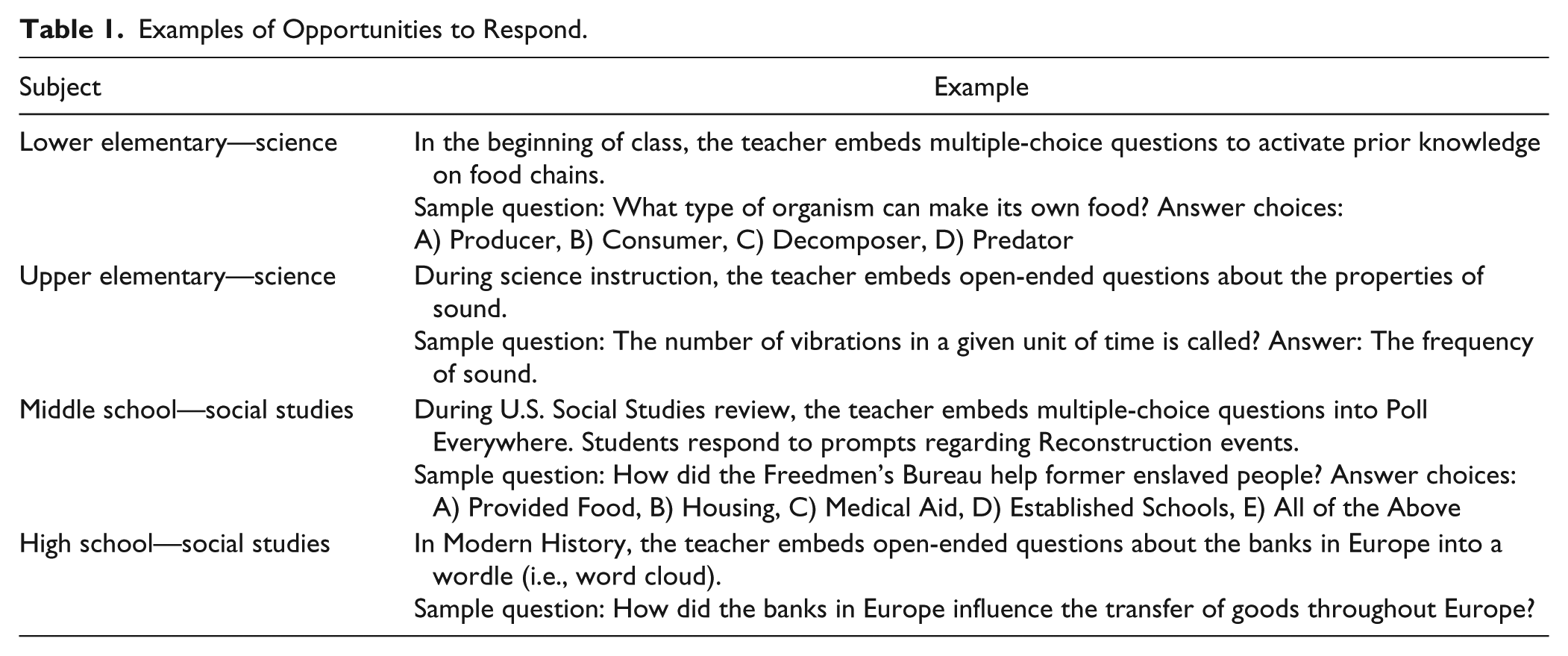
Providing multiple OTRs to students with EBD has been linked to desirable outcomes, including decreased inappropriate behavior and increased task-engagement (Partin et al., 2010). For example, Sutherland, Adler, and Gunter (2003) found when teachers increased their rate of OTRs with nine students with EBD, the students had fewer disruptive behaviors, increased academic engagement, and provided substantially more correct responses. In another study, Alter, Brown, and Pyle (2011) found a relationship between increasing the OTR and problem-solving accuracy. In addition to producing desirable student outcomes, OTRs provide teachers with instructional feedback. These formative probes allow teachers to adjust their instruction and identify students who may need additional support.
Technology allows teachers to create highly engaging content with OTRs. Digital response cards or clickers have been available for classroom use for over two decades. For example, Fies and Marshall (2006) reviewed the classroom response system literature. Results indicate that classroom response systems are an established a practice. Mobile devices (e.g., laptop, tablet, phone) offer an extension of the traditional clickers. Rather than utilizing a separate device, students can respond on a mobile device. They can respond to a variety of different questions (e.g., true/false, multiple choice, labeling images, short answer). Moreover, many of the programs record data on student responses (e.g., accuracy, frequency), which can be exported as a permanent product (Ault & Horn, 2018).
There are a variety of technology-based tools designed for use in the classroom to deliver OTRs and increase student responses (Ault & Horn, 2018; Rila, Estrapala, & Bruhn, 2019). Rila et al. (2019) provided a step-by-step guide for using three different programs (i.e., Plickers, Kahoot, Socrative). The following section highlights the use of a fourth program, Poll Everywhere.
Poll Everywhere
Poll Everywhere is a program that teachers can implement to increase their use of OTRs during instruction. Poll Everywhere is designed to seamlessly integrate with PowerPoint and Google Slides to engage students throughout instruction. Unlike handheld student response clickers, students use tablets, laptops, or phones to respond to Poll Everywhere prompts. Immediately following a prompt, the students’ answers are posted anonymously on the screen. An online portal also allows instructors to review questions as well as individual student responses. The following sections outline the steps to Poll Everywhere setup, implementation, and assessment of the effectiveness of this technology. In addition, Figure 1 contains a checklist with the critical components.
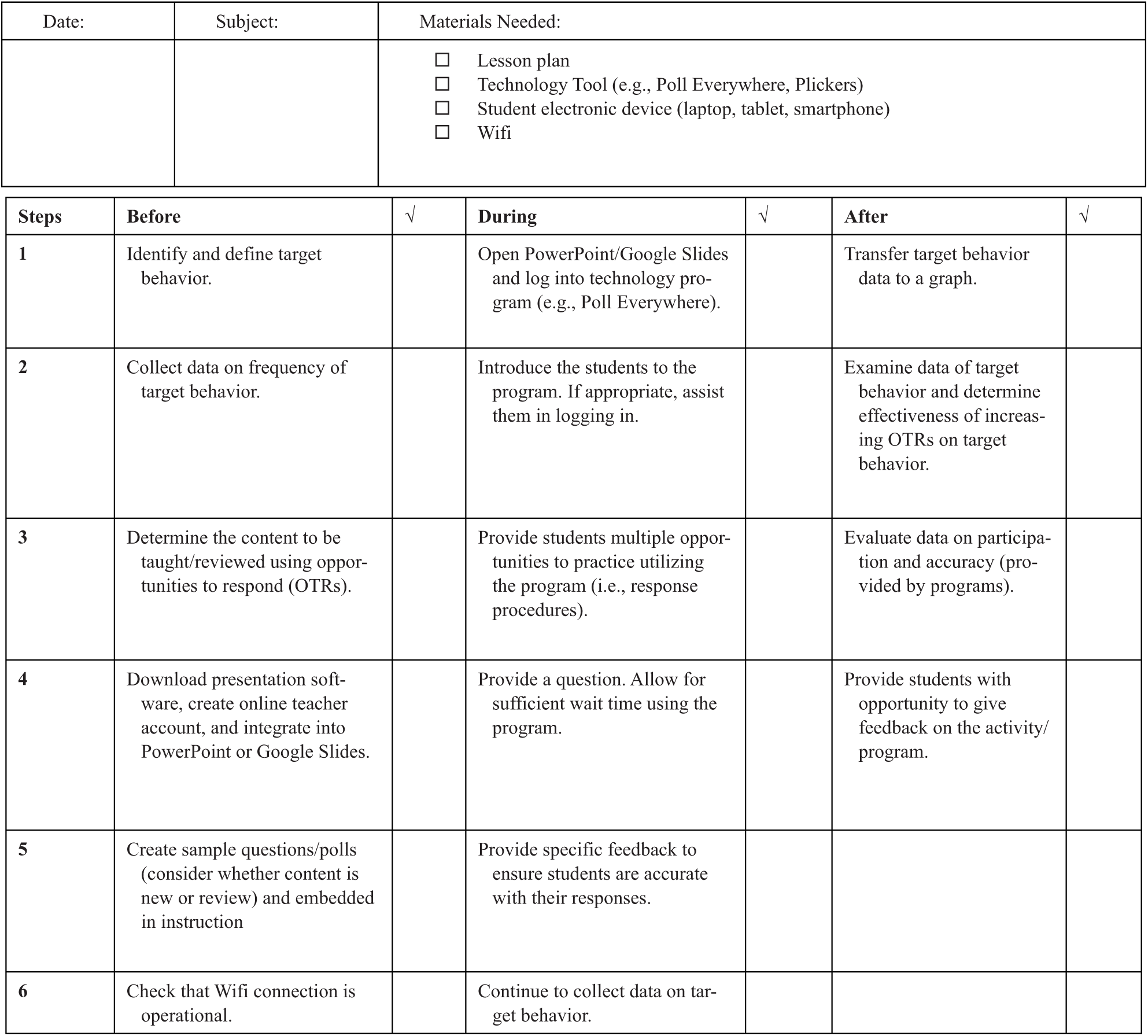
Opportunity to respond (OTR) checklist.
Before Instruction
Teachers will need to create an online account and download presentation software. An account is free for K–12 teachers with fewer than 40 students. Once the program is downloaded, it can be integrated into PowerPoint or Google Slides. Teachers are tasked with creating their own polls (i.e., questions) on the computer prior to delivering instruction with OTRs. A plethora of polling options are available, including multiple choice, clickable image, short answer (i.e., open-ended), word cloud, true or false, and rank order. Teachers embed the polls directly into their instruction. Thus they do not have to switch programs during the lesson.
Teachers should consider whether the content they are teaching is new or if they are reviewing content and determine how many OTRs they would like to include per minute. The number will also depend on the form of the question (e.g., multiple choice or short answer). The teacher can purposefully plan to incorporate these opportunities throughout their lesson in order to increase engagement and decrease off-task behavior.
During Instruction
It is important to make sure Wi-Fi access is available for instruction. Next, the teacher will open the program (i.e., PowerPoint, Google Slides) and log into Poll Everywhere. Initially, it is helpful to introduce the students to the program and help them log in. Each teacher has their unique identification code provided by Poll Everywhere. Students will enter the poll information into their device. Practice polls can be used to get them comfortable with the technology and allow teachers to troubleshoot. Once the students are competent using Poll Everywhere, the teacher can switch over to instruction. During instruction, questions will be displayed on the screen and students will respond individually via tablets, laptops, or smartphones.
There are several pieces of data that can be tracked during instruction that will be used to evaluate the effectiveness of this strategy. First, the teacher should keep track of the number of OTRs that occurred during the lesson and the length of the lesson, which can be used to calculate the average OTRs per minute that were provided. The teacher may also want to determine if providing OTRs helps decrease inappropriate behavior or increased task-engagement for students with EBD as suggested by Partin et al. (2010). This can be done by measuring the occurrence of inappropriate behavior and task-engagement.
After Instruction
In order to measure the effectiveness of a strategy, teachers should compare behavior before and after the implementation of the strategy (Hirsch, Ennis, & Driver, 2018). Teachers can use high-tech or low-tech options to record student behavior in order to determine whether the intervention was effective in changing student behavior (Hirsch et al., 2018). Hirsch et al. (2018) laid out a three-step process that can be helpful for teachers to reflect and plan for the future: (a) identify and define a target behavior, (b) create a monitoring plan, and (c) identify how many students are engaging in the target behavior.
For example, a teacher might hope that using Poll Everywhere would decrease the number of times that students call out answers in the classroom. The teacher would start by identifying and defining the target behavior (e.g., calling out answers) and determining how many times the behavior is occurring in the classroom prior to implementing Poll Everywhere. The teacher can continue to monitor the occurrence of the behavior as they utilize Poll Everywhere in their classroom to determine if there is a change in the frequency of the behavior. If the behavior has improved, the teacher may decide to continue with the strategy. If the behavior has not improved, then the teacher might decide to modify the strategy or implement another classroom management strategy. It is important to continue to collect data in order to monitor the effectiveness of the strategy so that teachers can make changes when necessary.
Behavior-Specific Praise
Praise is an effective, evidence-based practice that is easily implemented in the educational setting to increase desired behaviors and improve academic performance. General praise refers to praising students without specifically stating what behavior is being praised (e.g., Good job!) and can be implemented as an effective reinforcer for many students. BSP, however, is the most powerful and effective method of praise (Villeda, Shuster, Magill, & Carter, 2014). BSP refers to nonintrusive, positively reinforcing verbal feedback that is delivered as a praise statement and that explicitly describes the target behavior for which the student is being praised (Sutherland, Wehby, & Copeland, 2000).
BSP is easy to implement and is a nonintrusive strategy that requires minimal teacher training (Myers, Simonsen, & Sugai, 2011). According to Myers et al. (2011), in order for BSP to be effective it should include a description of the desired or target behavior, be specific to the individual student or class, and be a positive praise statement. In addition, BSP should be delivered consistently and immediately following the desired behavior for it to be most effective. It is important that teachers monitor whether students find praise reinforcing, since some students, particularly adolescents, may actually perceive praise as punishing (Maag, 2001). An example of general praise delivered to a student working on math might be “Great job on your math homework.” A BSP statement, however, should be explicit and underscore the student’s efforts and accomplishments, such as, “Wow, John, you set up the division problem correctly and placed all numbers in the appropriate columns.” Table 2 provides examples of BSP statements.
Examples of General and Behavior-Specific Praise.
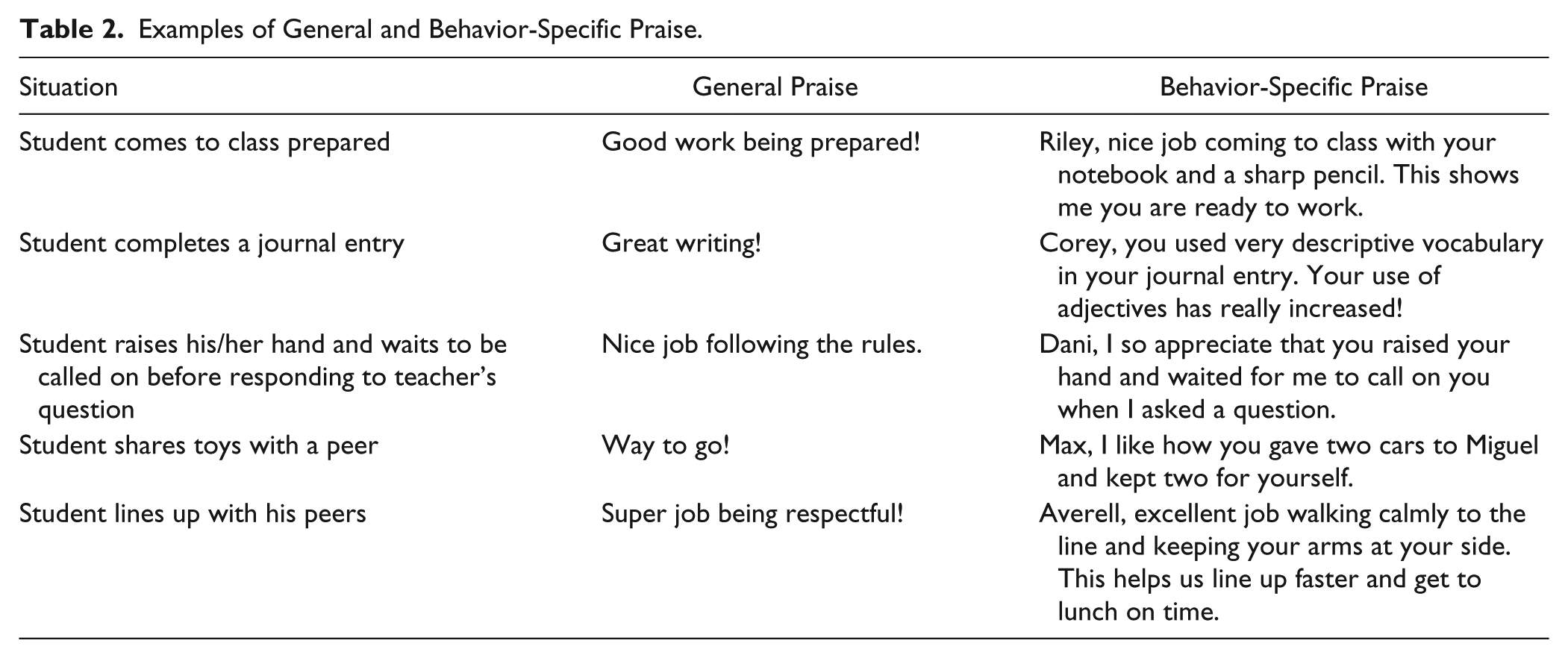
There is an abundance of research that provides evidence of the effectiveness of BSP. One benefit of BSP is that it significantly increases desirable classroom behaviors, including students’ time on task and task completion (Thompson, Marchant, Anderson, Prater, & Gibb, 2012). Academically, students who are presented with BSP provide a higher rate of accurate academic responses, and behaviorally they exhibit less disruptive behavior and are more compliant with requests. Teachers benefit from their use of BSP in that they create classroom environments that are more positive and productive, and they spend less time correcting undesirable behaviors, which allows for more time to spend on instruction (Thompson et al., 2012). Research suggests that the optimal rate of BSP is approximately six praise statements every 15 minutes, and for every single reprimand statement a teacher should deliver four BSP statements (Myers et al., 2011).
Mobile technology allows teachers to increase their rate of praise to students. For example, Rivera, Mason, Jabeen, and Johnson (2015) investigated whether mobile prompts increased teacher praise and consequently on-task student behavior. The teacher wore a mobile device (i.e., Samsung Galaxy Player) and used a high-intensity interval training application. The application prompted (i.e., audio or vibration) the teacher every 15 seconds. Results indicated mobile device prompts increased the teachers’ rate of praise and may have increased student on-task behavior.
Behavior-Specific Praise and Teacher Self-Monitoring
Despite research supporting BSP, other research indicates that a majority of praise statements made by teachers are general praise statements (Sutherland et al., 2000). In addition, in classrooms for students with EBD, rates of praise range from 1.2 to 4.5 per hour per student (Sutherland & Wehby, 2001), and teachers’ reprimand statements outweighed praise statements by a ratio of 3:1 (Sutherland & Wehby, 2001). Teacher self-monitoring has been shown to be effective in changing behavior, and a technology-based tool to self-monitor BSP is one strategy to increase rates of BSP (Rivera et al., 2015). Researchers recommend utilizing both low-tech and high-tech tools to self-monitor BSP rates (Myers, Sugai, Simonsen, & Freeman, 2017). A MotivAider is one piece of technology that teachers can utilize to promote the rate of BSP.
MotivAider
The MotivAider is a small battery-operated electronic device that is the size and shape of a pager. It can be programmed to vibrate on a fixed (i.e., regular) or intermittent time schedule (i.e., average). The device can be set to vibrate at intervals of seconds, minutes, or hours. Unlike traditional timers that need to be manually started, this device automatically restarts at the end of an interval. When used in the classroom or across other school settings, the MotivAider can be clipped to the teacher’s waistband or clothing, and the vibration emitted can be a cue for the teacher to deliver BSP. For example, during recess, a teacher places a MotivAider on the waistband and sets the timer to vibrate on a 2-minute fixed interval. Every 2 minutes the MotivAider will remind the teacher to scan the playground and check whether the students are playing safely. During this scan, the teacher delivers BSP to students or provides a brief reminder of the expectations. A similar setup could be used during guided reading lessons when the teacher is tasked with actively supervising multiple groups. MotivAiders can also be used to support students who may need extra attention and reinforcement. The teacher can set the MotivAider to vibrate on average every 3 minutes. When the MotivAider signals, the teacher can briefly scan the room or setting and deliver BSP.
Before Instruction
Figure 2 contains a checklist with the critical implementation steps. Prior to implementing the use of the MotivAider, it is important to learn how to deliver BSP statements. This can be achieved through explicit instruction on BSP. Explicit instruction should include (a) a definition and overview of BSP, (b) a review of the research that supports evidence of the effectiveness of BSP, and (c) specific guidance on the steps to implement BSP in the classroom (Gage, MacSuga-Gage, & Crews, 2017). When learning about BSP, teachers are encouraged to engage in discussion of examples and nonexamples of BSP statements and to generate their own BSP statements to ensure they understand the components of an effective BSP statement and how it is distinguished from a general praise statement. Finally, it is helpful to practice delivering BSP statements in role-play situations. Once a clear understanding of BSP implementation is achieved, the MotivAider should be set on a variable schedule to vibrate. Myers et al. (2011) suggested teachers deliver approximately six BSP every 15 minutes. Therefore, the recommendation is to place the motivator on a 4-minute variable timer.
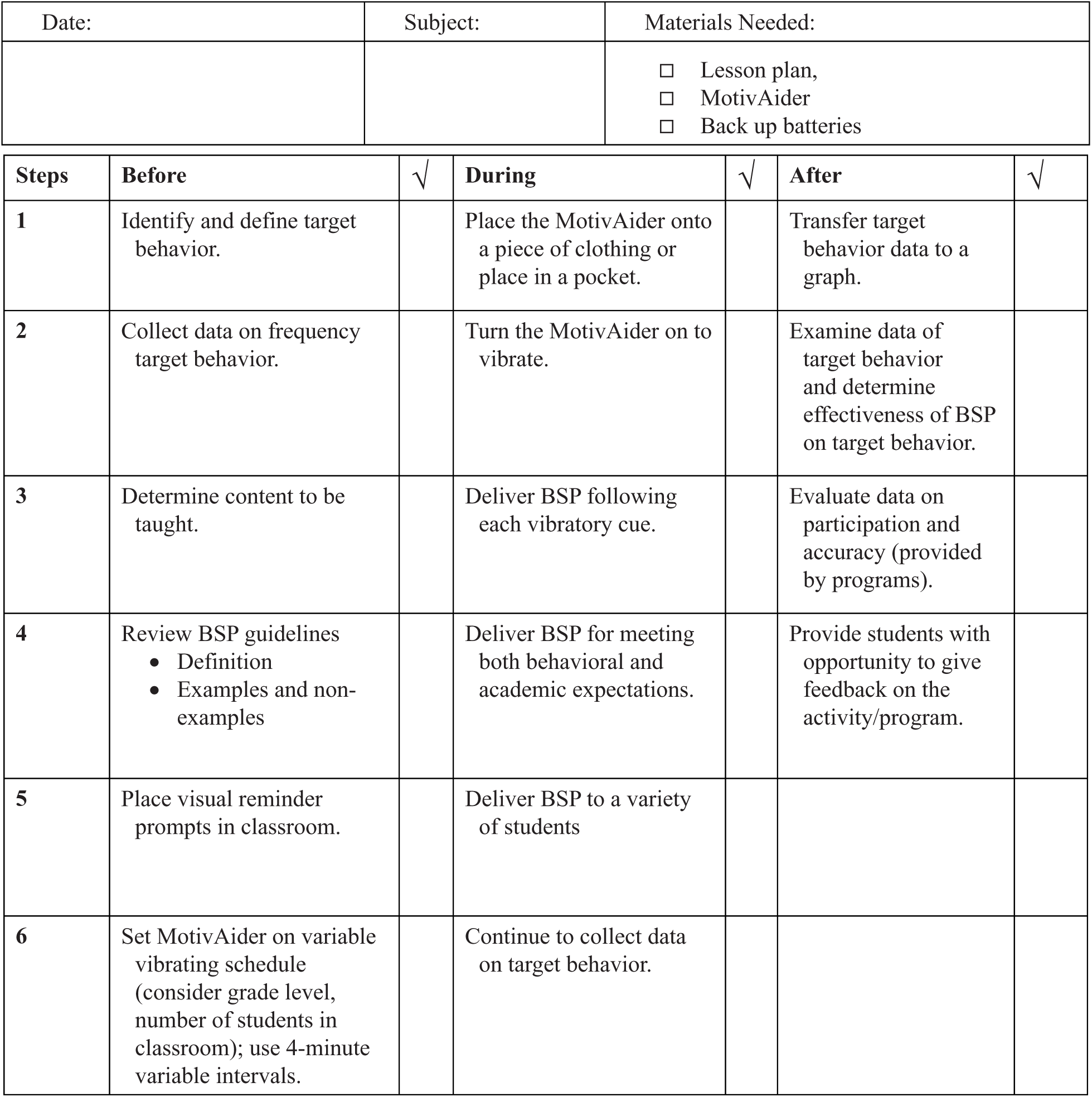
Behavior-specific praise (BSP) checklist.
During Instruction
Once a clear understanding of BSP has been established, the next step is to use the MotivAider during instruction. The teacher programs the MotivAider to a variable-time schedule (i.e., random) and places it on a belt loop, collar, or in a pocket. It may also be necessary to place visual prompts of examples of BSP statements throughout the classroom. Each time the teacher receives the vibratory cue from the MotivAider, a BSP is delivered based on appropriate student behavior. The behavior to be praised can be aligned with behavioral expectations as well as academic expectations that have been discussed with students. It should be noted that teachers should not be discouraged from delivering BSP in the absence of the MotivAider cue but reminded that the goal is to increase the frequency of BSP statements delivered to students.
The teacher can have a student with EBD in mind when using the MotivAider. When the MotivAider provides a cue, the teacher can look to their student and provide a BSP statement to this student. For example, if the student is sitting in their seat and working on classwork, the teacher can provide praise about their on-task behavior.
As with OTRs, data can be collected during instruction to help determine the effectiveness of the MotivAider tool. First, the teacher can count the number of BSP praise statements made during the lesson and can use this information, along with the length of the lesson, to determine the average number of statements per minute. The teacher can also collect behavioral data on their target student in order to determine if there is a change in behavior that results from the use of this tool.
After Instruction
To measure the effectiveness of MotivAider, the teacher can monitor the number of BSP statements offered during the lesson and whether the MotivAider increased the number of statements. This can be done by counting the number of BSP statements provided in a lesson prior to using the MotivAider and comparing this to the number of statements made when using the MotivAider. An increase in BSP statements will indicate that the MotivAider is an effective way to increase the amount of BSP provided during a lesson.
In addition, it is important to determine if the additional BSP affects the behavior of students with EBD in the classroom. The same three-step process described previously (Hirsch et al., 2018) can be used to examine student behavior. The teacher would first select a target student and define a target behavior. He or she would then see if utilizing BSP changed the occurrence of the target behavior. For example, the teacher might want to see a decrease in the number of times a student gets out of his/her seat during class and can use BSP to decrease this number.
Conclusion
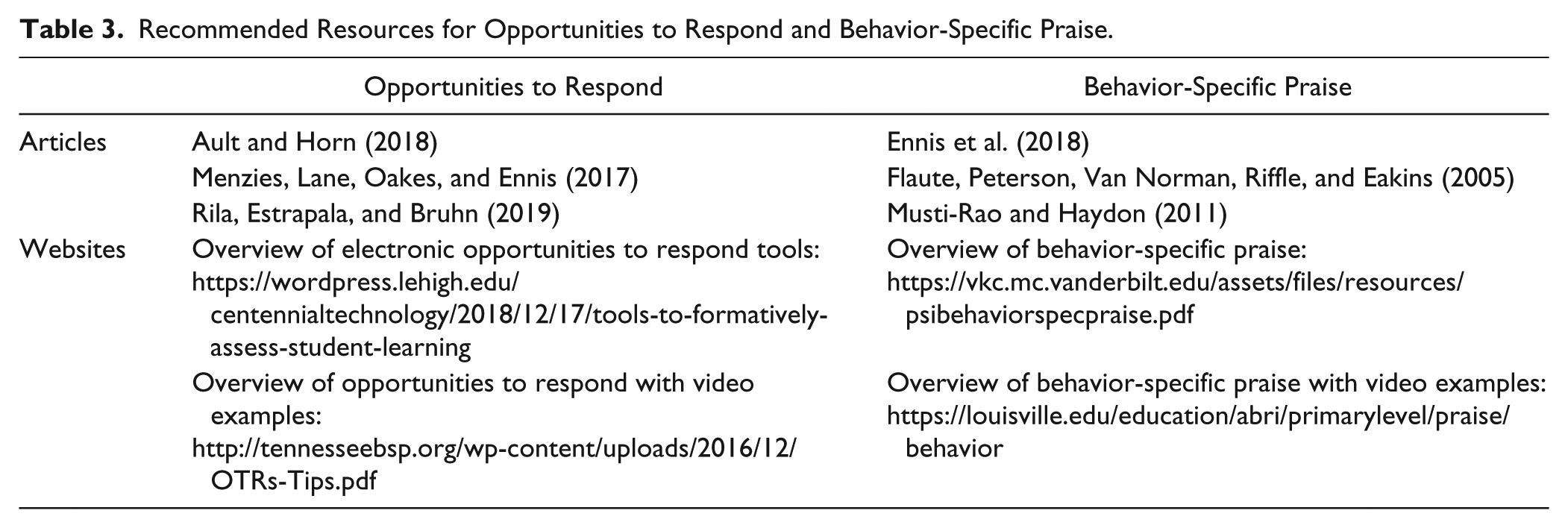
Engaged students demonstrate higher academic performance as well as lower rates of challenging behavior. The two practices presented in this manuscript can be used in isolation or together to increase engagement. These practices will require some planning, but are feasible to implement. To support implementation, several resources for BSP and OTRs are identified in Table 3.
Recommended Resources for Opportunities to Respond and Behavior-Specific Praise.
Each evidence-based practice is paired with a technology tool to deliver high quality instruction to students with behavioral concerns as well as their peers. As teachers begin implementing the practice, the steps outlined in the manuscript provide a guide. The checklists (Figures 1 and 2) also allow teachers to evaluate their implementation. These strategies have been found to be useful for supporting students across educational settings and grade levels with minimal training.
Footnotes
Authors’ Note
The authors have no connection to the products described.
Declaration of Conflicting Interests
The author(s) declared no potential conflicts of interest with respect to the research, authorship, and/or publication of this article.
Funding
The author(s) received no financial support for the research, authorship, and/or publication of this article.
