



Abstract
Introduction
This article presents an innovative approach to the development of contour-based products, such as assistive technologies, with postural readjustment. The process integrates advanced techniques of three-dimensional scanning, digital modeling, and 3D animation.
Objective
To develop a method that employs digital human models obtained through 3D scanning, applying modeling and animation techniques to digitally adjust posture and enable the digital fabrication of custom-fitted products with postural correction.
Method
The method was developed following an action research framework, encompassing its design, application, and refinement through a case study that illustrates its practical use.
Results and Discussion
The case study describes the development of a custom seat with postural realignment for a wheelchair user. The development is structured into five stages: (1) Application Requirements; (2) 3D Scanning; (3) Digital Model Processing; (4) Digital Fabrication; and (5) Evaluation. For each stage, technical possibilities and real-world challenges are presented based on the case study that demonstrates the complete implementation of the method.
Conclusion
The proposed method proved to be effective, enabling the production of high-quality seating with accurate postural adjustments. This contribution opens new avenues for research and practice in the field of assistive technology by enabling faster and more precise product development. It keeps pace with the latest advances in product design and healthcare, supporting professionals in delivering better care, and benefiting a greater number of people with disabilities.
Introduction
Digital design has emerged as a powerful approach in the development of assistive technologies. It enables the creation of customized products that respond more precisely to users’ functional and morphological needs. This process combines digital tools and techniques such as 3D scanning, digital modeling, animation, and digital fabrication, supporting a workflow that integrates user data, simulation, and prototyping in a streamlined and adaptable manner.1,2,3
Among these techniques, three-dimensional (3D) scanning captures the external surface of the human body in high detail, while modeling and animation techniques allow for the manipulation of this geometry to meet specific functional requirements. Digital fabrication, through additive (e.g., 3D printing) or subtractive (e.g., CNC milling) methods, translates the refined digital model into physical, personalized products.4,5
Digital technologies have expanded the possibilities for producing assistive devices tailored to individual needs. This approach supports a user-centered design process by prioritizing not only anatomical precision but also the user’s lived experience, comfort, and functional goals.6,7 To strengthen this person-centered perspective, it is essential to involve both healthcare professionals and users in the development process. Their participation ensures that the resulting products align with clinical goals, respect user preferences, and promote autonomy, leading to more effective and meaningful assistive solutions.
Despite these advances, most developments in the field still focus mainly on morphological adaptation, often neglecting the more complex challenge of postural realignment. Although 3D scanning provides a highly detailed representation of the body, it captures only a static posture. Adjusting this model to a corrected or optimized position remains a largely underexplored area.5,8 In many cases, posture correction is still performed manually, using traditional techniques. 9
Few approaches advance beyond these initial stages to apply the digital model itself as a tool for postural correction.6,8,10 This gap emphasizes the need for methods that combine anatomical precision with functional adaptation. Using digital environments not only to replicate the user’s morphology but also to actively improve their positioning.
In this context, the objective of this paper is to present a method that uses digital human models obtained through 3D scanning, applying modeling and animation techniques to digitally adjust posture and enable the fabrication of custom-fitted products with postural correction. What distinguishes this method is its use of advanced digital tools not only to replicate the user’s morphology but also to improve their posture through virtual manipulation. 1 Although the method can be adapted to various assistive products, its application is demonstrated here through a case study involving the development of a custom wheelchair seat.
Reference framework
The need for assistive technology may be identified by the user or by individuals involved in their daily routines, including family members, caregivers, educators, or rehabilitation professionals. According to Cook and Polgar 9 , assistive technologies should be considered whenever barriers, whether environmental or related to physical or cognitive impairments, hinder full participation in daily, leisure, or work activities. Among assistive technologies, a specific subset focuses on postural support, aiming to help users maintain functional and safe positions throughout the day. This includes orthoses and customized seating systems, which often require personalization due to health conditions that compromise postural control. Properly designed and adjusted postural devices contribute not only to stability but also to comfort, prevention of deformities, and overall well-being.11,12
When postural asymmetries or musculoskeletal deformities are present, it becomes necessary to go beyond static support and incorporate active realignment strategies. Traditional methods for achieving this include the use of wedges, lateral supports, seat tilt systems, or manual foam carving to gradually guide the body into a more functional position. 1 These interventions must consider biomechanical principles, individual preferences, and contextual factors to produce effective, inclusive, and sustainable outcomes.9,13
Despite technological advances, one of the major challenges in this field is the integration of postural correction into digital design workflows. Although digital anthropometry has enabled precise modeling of human morphology, most existing approaches capture the user’s posture as-is, without accommodating realignment needs.4,7 For individuals with asymmetries or limited motor control, the posture recorded during scanning may not be optimal for product design or daily use. 14
Recent studies have begun to explore how digital models can be manipulated to simulate postural improvements before fabrication, allowing better alignment between clinical goals and final product geometry.6,8,10 However, this remains a largely underexplored area. Integrating postural correction into digital workflows, particularly through animation and modeling tools, represents a critical opportunity to bridge clinical reasoning and technological precision.
The use of digital human models in the design and fabrication of customized assistive products is well-documented in the literature and can be implemented through various approaches. Among the most widely used modeling techniques are extrusion, used to create consistent thickness around the human body, and Boolean operations, which define the product geometry by subtracting the user’s shape from a predefined volume. This latter technique closely resembles traditional manual carving methods. Once the digital modeling process is complete, the result is a 3D file ready for fabrication.1,10,15
In the manufacturing phase, digital fabrication tools, also referred to as rapid manufacturing technologies, allow for the direct production of these customized products from digital files, eliminating the need for traditional molds. These technologies offer greater agility and adaptability, as they enable modifications between production cycles. Common equipment includes 3D printers, laser cutters, and CNC milling machines, all of which are frequently used in assistive technology development due to their precision and flexibility.1,15
Despite technical and technological advances, the development of custom seating solutions still faces practical barriers, including long production timelines and dependence on specialized professionals. These factors reduce accessibility, especially for users in underserved settings. By incorporating digital tools that allow virtual posture adjustment and fabrication, there is potential to accelerate workflows and promote broader access to personalized solutions.1,16
Method
This paper presents a method for developing assistive technology products with postural realignment using 3D modeling and animation techniques. The approach is based on a participatory action research framework, in which a case study was conducted to apply and refine the method in a real-world context. This integration of practice and reflection enabled both practical problem-solving and knowledge generation. Action research, as described by Thiollent 17 , follows a continuous cycle of planning, action, observation, and reflection.
The first step was identifying the core issue: the challenge of incorporating postural realignment into the digital design and fabrication process of assistive technologies, as previously discussed. The planning stage then defined the main stages of the method (Figure 1), which combines 3D scanning, digital modeling, and digital fabrication techniques. Stages of the proposed method for developing assistive technology with postural realignment. Source: Authors’ own work.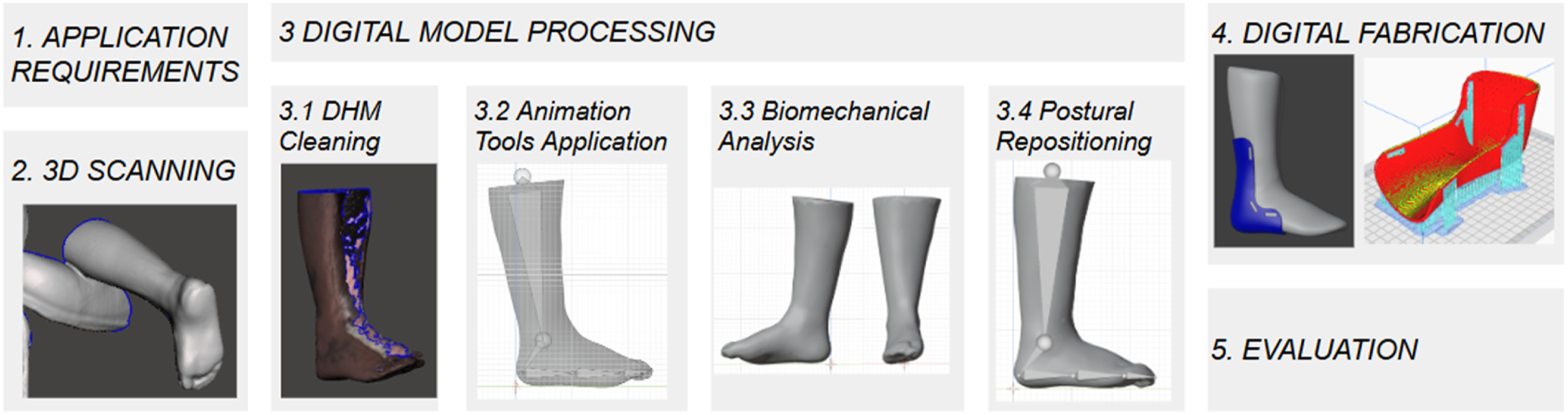
Stages of the proposed method are detailed as follows: 1. Application Requirements: Identifying user needs and evaluating the feasibility of applying the method. 2. 3D scanning: Capturing the user’s body morphology. 3. Digital Model Processing: Editing and digitally adjusting the posture of the scanned model. 3.1. Digital Human Model (DHM) Cleaning: Preparation of the digital mesh for further processing. 3.2. Animation Tools Application: Use of rigging and manipulation tools to enable repositioning. 3.3. Biomechanical Analysis: Assessment of joint constraints and ergonomic alignment. 3.4. Postural Repositioning: Adjusting the posture of the digital human model based on ergonomic and functional parameters. 4. Digital Fabrication: Producing the physical product based on the digitally corrected model. 5. Evaluation: Assessing the assistive technology.
The method was implemented through a case study focused on developing a custom seat for a wheelchair user. Case studies are valuable for analyzing complex phenomena within real-life contexts. 18 Although the implementation focused on customized seating systems, the method is potentially applicable to other assistive products that require morphological adaptation and postural correction. To demonstrate this possibility, Figure 1 shows the method applied to the development of an orthosis.
Four software programs were used in the development process. The first, Skanect 19 , was used during the 3D scanning stage, together with the Kinect 360 20 , scanner a low-cost and easily accessible sensor. Next, Meshmixer 21 was used to clean the scanned files. For the modeling and animation stage, Blender 22 software was employed, and the file was then exported to Cura 23 for 3D printing setup, which was carried out using a Creality printer. 24
Data collection combined different qualitative techniques, direct observation of the process, analysis of the 3D models before and after postural realignment; application of the QUEST 2.0 assistive technology evaluation tool 25 , and subsequent reflection and analysis supported the evaluation of outcomes and the identification of necessary improvements.
Participants were selected by convenience and included: a design and 3D scanning specialist, a 3D modeling and animation specialist, a wheelchair user and an occupational therapist. All had prior collaborative experience and consented to participate in the study, which was supported by ongoing researcher guidance. The study followed all required ethical procedures, including approval by the Research Ethics Committees of the Federal University of Paraná (CAAE 39378720.9.0000.0102, Opinion 4.442.734) and the Worker’s Hospital of Paraná (CAAE 39378720.9.3001.5225, Opinion 4.536.560).
Results and discussion
The results presented in this section are based on the application of the proposed method in a real case involving the development of an adapted seat for a wheelchair user. The process followed the five stages previously described, from identifying user needs, to evaluating the final product.
Application requirements
Assistive technology often requires customization.9,15 Therefore, understanding the user’s biopsychosocial needs is essential before applying the method. In the proposed approach, four conditions must be met for the method to be considered appropriate: The person needs assistive technology. The product must be body-conforming. The user must be accessible for direct 3D scanning. And postural realignment is required during development. When these conditions are present, the method is justified.
Two scenarios may then arise regarding the posture captured during scanning: • Ideal posture during scanning: If the user can be correctly positioned, using physical supports or plaster/vacuum molds, then the need for digital postural adjustment is minimal. In this case, the method can be used for small refinements or may be partially omitted. • Natural posture with digital adjustment: If ideal positioning is not possible, scanning is performed in the user’s natural posture, followed by digital realignment. In such cases, it is crucial to capture a broader segment of the body, for example, including the legs when realigning the trunk, to maintain postural coherence. This broader digital representation facilitates postural adjustment and improves the accuracy of the final product.
It is also important to assess whether the user can remain still during the 3D scan, which takes approximately 3 minutes. If not, indirect methods may be used, such as plaster molds or vacuum-formed impressions, to obtain a physical reference that can be digitized later. These precautions improve the accuracy of the digital model and the final result.
This stage is similar to the patient evaluation phase in any assistive technology development process, whether manual or digital. It should be carried out by a professional who understands the clinical needs of the person being assisted, or be accompanied by someone with this expertise. However, this step also includes the verification of the four specified requirements, which should preferably be performed by a professional familiar with the 3D scanning and digitization process, ensuring that the responses to the questions are as accurate as possible. • Case study: Assessment of the Participant’s Needs
The selected participant is an adult woman, a wheelchair user, and a paracanoe athlete. She became paraplegic as a result of poliomyelitis and post-polio syndrome, which progressively compromised her ability to use her legs and part of her trunk for mobility. This condition also led to atrophied and deformed lower limbs.
Based on the first criterion, need, the participant required an adapted seating device for adequate positioning. Regarding the second, conversations with the user and her occupational therapist confirmed that the seat needed to be custom-shaped, since her leg deformities prevented the use of standard seating models. The third criterion, access for body geometry capture, was also met, as she was available and able to be scanned directly.
Additionally, a postural adjustment was needed, as her previous seat contributed to a pressure sore caused by a slight rightward pelvic tilt. The 3D scanning team confirmed that the participant could be scanned in her natural seated posture, which would then be digitally corrected during the design process using the proposed method.
3D scanning
Once the application stage criterion is confirmed, the next step involves carefully planning the three-dimensional scanning process. This includes selecting a scanner that is safe, fast, and capable of producing medium/high-resolution anatomical data. High-powered laser systems are not recommended due to their slow operation and potential safety risks to the user. Instead, infrared or structured light scanners, after preliminary testing to confirm resolution and performance, are better suited for assistive technology development.
Participants should wear tight-fitting clothing, as loose or bulky garments can compromise scan quality. Remaining as still as possible during the procedure is crucial. The use of supports or positioning aids is recommended to ensure stability and improve data accuracy. Because 3D scanning operates similarly to photography, any surface irregularities or involuntary movements, may cause distortions that require digital correction. Proper participant preparation significantly improves scan quality and minimizes the need for extensive post-processing. If opaque supports are captured by the scanner, they must be digitally removed during post-processing. Additionally, it is essential to ensure that no relevant anatomical regions are obscured, as this may compromise product development.
The scanning begins once the participant is properly dressed and positioned. The operator slowly moves the scanner around the participant’s body, capturing the full geometry. A full-body scan typically takes around 3 minutes, while partial scans of specific segments may take 1 minute. Once the scan is complete, the 3D model should be immediately reviewed. If artifacts or missing data are detected, the scan should be repeated promptly to ensure data quality.
A trained professional must be present to carry out this stage of the process. Although 3D scanning is a relatively simple and technical task that can be taught to anyone, prior experience significantly reduces scanning time and improves output quality. Continuous practice leads to more efficient and accurate execution. When the professional has dual expertise, in 3D scanning and in fields like biomechanics, occupational therapy, physical therapy, ergonomics, or related areas, the process is further enhanced. This is because such a professional has a clearer understanding of the anatomical landmarks that must be visible and can better assess whether their representation in the digital model is accurate. • Case Study: Three-Dimensional Scanning of the Participant
In this case study, the method applied was based on the ADAP approach.
6
The scanning process was carried out using a Kinect 360
20
scanner along with Skanect
19
capture software. She was positioned in a customizable transparent seating structure, which ensured a safe and stable posture throughout the process and prevented the occlusion of any relevant body parts (Figure 2). Participant positioned for 3D scanning. Source: Authors’ own work.
Despite presenting impairments associated with poliomyelitis, including lower limb paralysis, muscle atrophy, and spinal and foot deformities, the participant retained significant upper body control, as expected from her experience as a paracanoe athlete. This allowed her to remain still during scanning, contributing to higher quality capture.
Two scans were performed in different seated positions to obtain complementary views and minimize surface distortion caused by contact with the seat. This strategy produced more complete data sets, which were merged into a single, cohesive 3D model, free from deformations of soft tissues compressed by the seating surface. The resulting model served as the digital human base for subsequent postural realignment and product development.
Digital model processing
This stage involves four sequential substeps that ensure the quality of the digital model and its suitability for designing and fabricating an assistive technology product. These substeps are: (1) Cleaning and processing of the scanned data; (2) Insertion of a virtual skeleton (rigging) and application of animation tools; (3) Biomechanical analysis and postural evaluation; (4) Mesh manipulation and repositioning for product development.
The following case study details how each of these substeps was implemented in practice.
Digital human model cleaning
Cleaning and processing aims to correct common issues that occur during the scanning process. These may include holes, surface noise, scanning artifacts, protrusions, intersections, or disconnected polygons. Once this cleaning is completed, a digital human model is obtained that is morphologically equivalent to the scanned individual and ready for animation. Model cleaning can be done automatically, depending on the scanning software used, or manually, meaning each error is intentionally corrected one by one. Manual cleaning is recommended, particularly due to the need to preserve the morphological characteristics of the model. Automatic correction tools may not interpret anatomical deformities or surface artifacts accurately.
Figures 3(a) and 3(b) show the two cleaned scans. Detailed editing was performed using Meshmixer software.
21
As a result, two digital human models were generated. The first represents the participant seated with her back and the underside of her thighs resting on the seat, which caused deformations in those contact areas. The second model was obtained with the participant seated in a position where the front of the torso rested on the seat, allowing the posterior side to be captured without deformation from contact. Despite differences in the captured data, both models are considered morphologically accurate within their respective contexts. Digital human models. Caption: (a) Digital human model 1—deformation on the back; (b) Digital human model 2—deformation on the front; (c) Combination of digital human models; (d) Digital human model 3—complete and free from deformations. Source: Authors’ own work.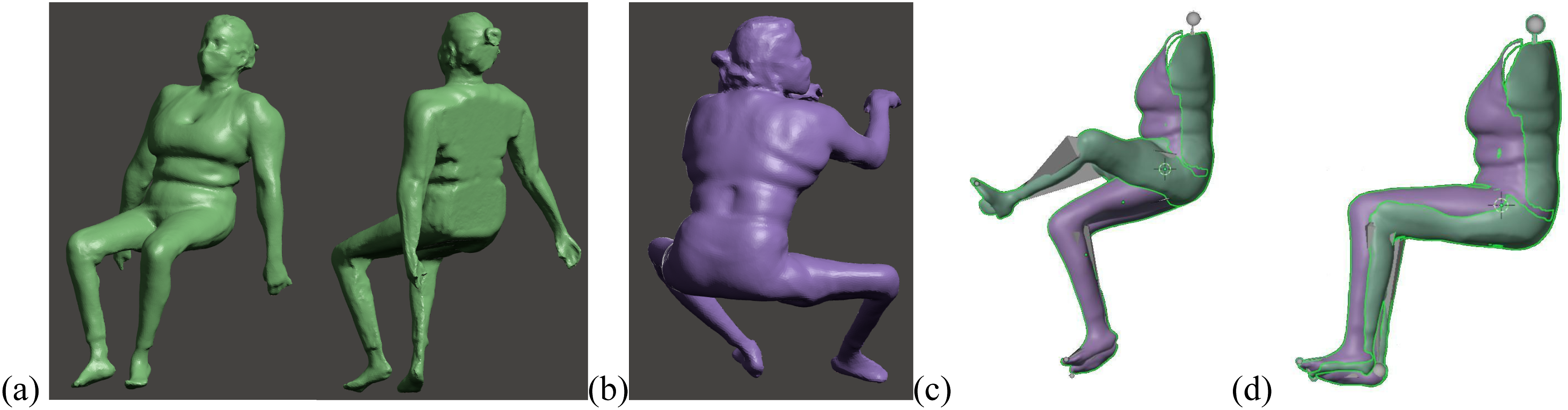
Subsequently, in the modeling software, Blender 22 , the two meshes were merged (Figure 3(c)) to create a third complete digital human model (Figure 3(d)), free from deformations caused by seat contact. This resulted in a complete and functional model, which then served as the basis for the application of animation tools for biomechanical analysis and postural adjustment.
Animation Tools Application
In this substep, animation tools are applied to insert a virtual skeleton within the digital human model. This technique, known as rigging, allows the model to be articulated and adjusted, making it possible to simulate movement or reposition body segments as needed (Figure 4). Any 3D animation software can be used to create these bones, often through simplified or even automated processes. In this case, Blender
22
was used. Once the skeleton is created, it must be connected to the mesh of the digital human model using a technique called skinning. This process defines which parts of the mesh will respond to bone movements and which will remain rigid. Digital human model rigging. Caption: (a) Digital human model with added skeleton; (b) Model repositioned to improve visualization during biomechanical analysis. Source: Authors’ own work.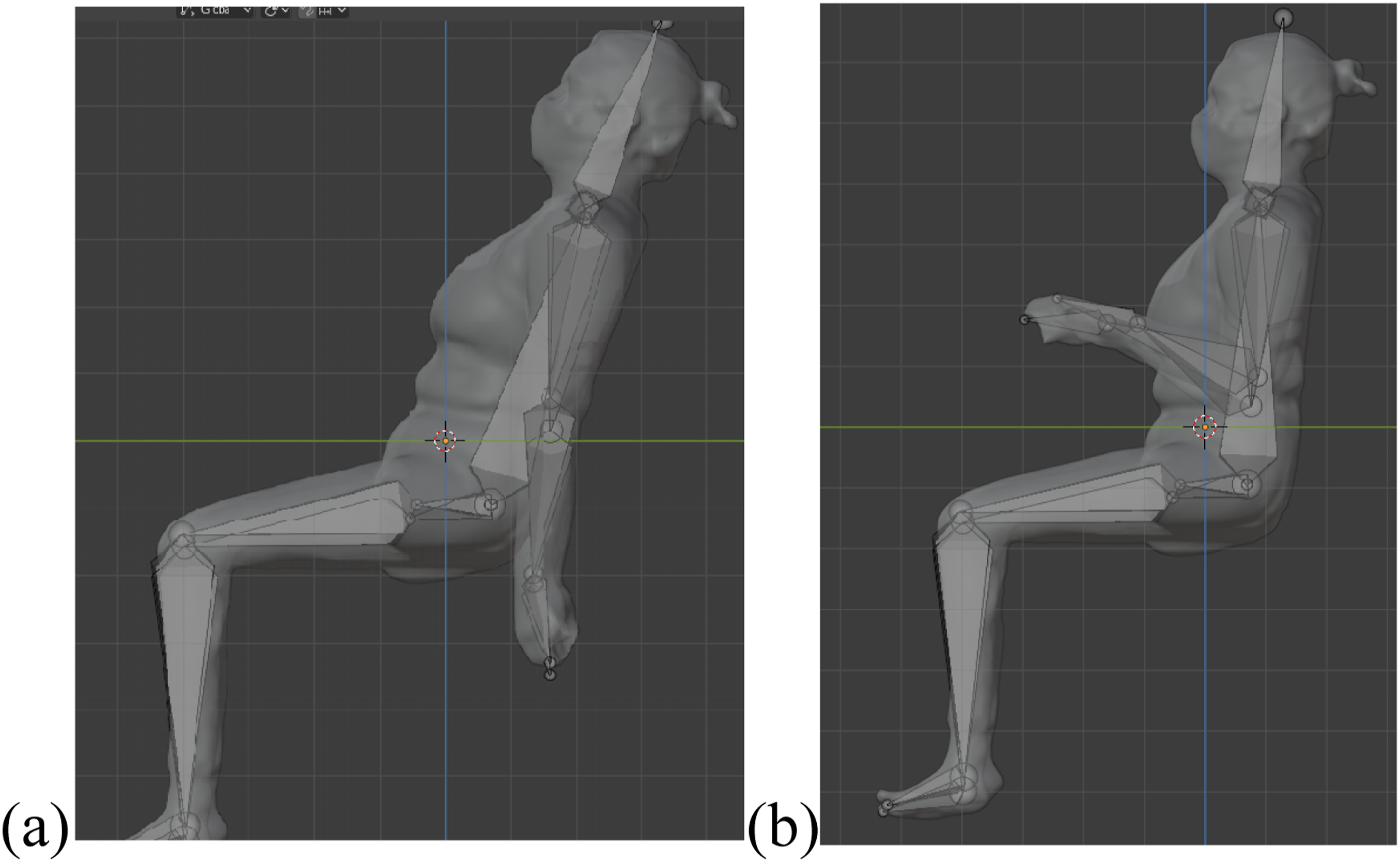
It is not always necessary to replicate human anatomy in full detail, especially when it does not align with the objectives of the study. In Figure 4(a), for instance, the spine was simplified into a single bone, as there was no need for lateral trunk repositioning in this case. This simplification also enhanced the clarity of the model’s alignment. The same approach was applied to the hands and feet, each represented by a single bone to streamline the skeleton creation process. Such simplifications are acceptable when the goal is to focus on the movement of key anatomical regions relevant to product design.
Biomechanical analysis
A biomechanical analysis of the digital human model is then carried out to identify postural misalignments, anthropometric measurements, and specific biomechanical needs that must be considered in the design of assistive products. This phase is essential for ensuring a functional and individualized outcome. It should involve health professionals to ensure alignment with the user’s clinical condition.
Below is a summary of the postural adjustment process. The full report prepared by the health specialist was more detailed and directly informed decisions regarding the structural and functional characteristics of the product. Due to research ethics, certain personal recommendations provided to the participant will remain confidential.
In Figure 4(b), clear asymmetries can be observed, differences in shoulder height and misalignments in the hips, which consequently affect thigh positioning. These postural deviations are visualized through pyramid-like shapes that represent the virtual bones created during the rigging phase, showcasing discrepancies in both upper and lower limbs.
Additionally, the arms were repositioned and aligned to improve analysis of the back. Although the upper limbs were not directly involved in the product design, the postural assessment generated practical recommendations, for instance, suggesting that the participant maintain shoulder symmetry when propelling her wheelchair to help prevent future musculoskeletal issues. These observations reinforce the importance of detailed analysis, not only for the development of a personalized product but also as an opportunity to provide postural health guidance.
Postural repositioning
Based on the biomechanical analysis, the skeleton was articulated within the modeling software to reflect the corrected posture. Figure 5 illustrate a comparison between the original digital human model obtained through 3D scanning (Figure 5(a)) and the repositioned model (Figure 5(b)). Notable changes include improved alignment of the hips, knees, shoulders, and trunk, as well as the repositioning of the head relative to the rest of the body. Digital Human Model Repositioning. Caption: (a) Natural posture; (b) Repositioned posture. SOURCE: Authors’ own work.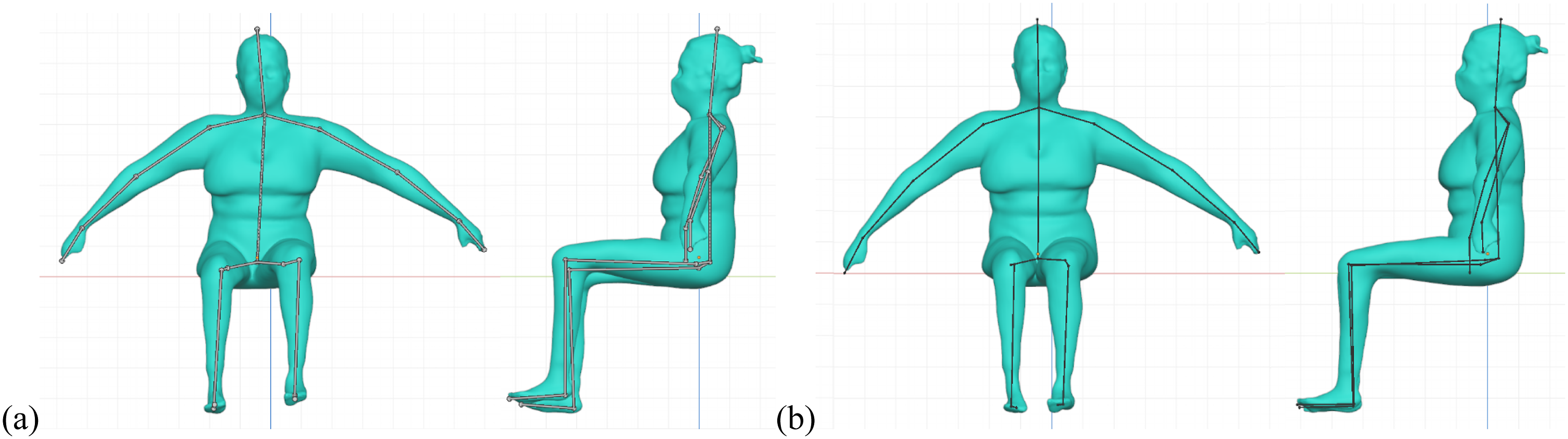
During repositioning, the angle and final position of each bone in the virtual skeleton can be precisely defined, which directly influences the surrounding 3D mesh. This intuitive process allows for fine-tuning of the alignment, ensuring that the corrected posture meets the user’s anatomical and functional requirements. Once this step is completed, the digital human model is ready to be used for the design of the adaptive seating solution.
When considering the digital model processing stages, the professional background required for these activities should be noted. Unlike traditional methods, where healthcare professionals typically analyze the human body directly and develop the product manually through sculpting or other techniques, the digital processing stage is almost entirely associated with 3D design. Therefore, the professionals most experienced in this type of work are usually from arts, engineering, and design fields.
However, with appropriate training, healthcare professionals can also perform these tasks. Their knowledge of biomechanics and human anatomy supports the creation of the skeletal structure, the identification of key anatomical landmarks, and the postural repositioning process. If this stage is carried out by design professionals or those from related fields, it is essential that they work in collaboration with a healthcare professional experienced in biomechanics, to guide the analysis and validate repositioning decisions.
Digital fabrication
This stage involves the design and fabrication of the assistive technology product, beginning with digital modeling. This modeling can be carried out in various ways, as discussed in the theoretical framework, particularly through Boolean operations or the extrusion of geometry collected from the user’s body. Next comes the digital fabrication, which can be performed using 3D printing or CNC machining.
During the development process, it is crucial to consider the user’s environment and routine to ensure that the product meets their specific needs. This includes selecting materials and geometries that support daily activities, taking into account comfort, safety, and ease of use. Additionally, the design must accommodate the user’s clothing, body dynamics, and integration with other assistive devices.
These activities are typically carried out by product designers, engineers, and professionals experienced in digital modeling and fabrication. However, the involvement of healthcare professionals, can be highly beneficial in defining product requirements, including dimensions, materials, thicknesses, and usability. • Case Study: Digital Fabrication of the Adapted Seat
In the case study conducted, the initial objective was to produce a rigid prototype of the seat to evaluate its dimensions and fit within the wheelchair. This prototype served as a preparatory step for the fabrication of the final version, which would include foam padding and textile coverings, although these final materials are beyond the scope of this study.
To create the test model, measurements were first taken from the participant’s wheelchair. Based on these dimensions, a cubic 3D model was designed, incorporating the required width, depth, and height of the seat and backrest. Then, using the previously repositioned digital human model, a Boolean subtraction operation was applied to remove the user’s body shape from the cube, forming a seating cavity shaped to the user’s anatomy. To ensure comfort while wearing clothing, a 0.5 cm offset was applied around the internal geometry. Finally, a smoothing tool was used to refine the surfaces and edges of the model.
The final model was divided into four parts to facilitate the 3D printing process. After printing, the components were assembled using adhesive, and foam was added underneath the base to ensure the final seat height matched the specifications and provided a secure fit within the wheelchair. The complete workflow is illustrated in Figure 6. This prototype was then tested in the final phase of the development process, as described in the following section. Product development. Caption: (a) Cube with seat dimensions; (b) Boolean subtraction of user geometry; (c) Seat shaped to user anatomy; (d) 3D printed prototype; (e) Assembled prototype. Source: Authors’ own work.
Evaluation
Finally, the method includes an evaluation phase in which assistive technology professionals and end users actively participate. This assessment is conducted using the QUEST questionnaire, 25 a validated tool designed to measure user satisfaction and the perceived effectiveness of assistive technology products. The questionnaire consists of 12 items, addressing both device characteristics and service-related aspects.
Each item is scored on a 5-point Likert scale, where 1 indicates “not satisfied at all” and 5 indicates “completely satisfied.” In the proposed method, the questionnaire is administered both to the end user and to the prescribing health professional. If results indicate dissatisfaction in any domain, adjustments to the product are recommended, followed by re-evaluation. These results are incorporated into the iterative design process, helping ensure that the final product meets both technical requirements and user expectations.
The device received nearly perfect scores, with lower ratings only in the categories of stability, safety, and dimensions (Figure 7). These aspects were then revised, the seat’s depth was increased, and its height was reduced, and these modifications improved the user experience. Quest evaluation of the seat prototype. Source: Authors’ own work.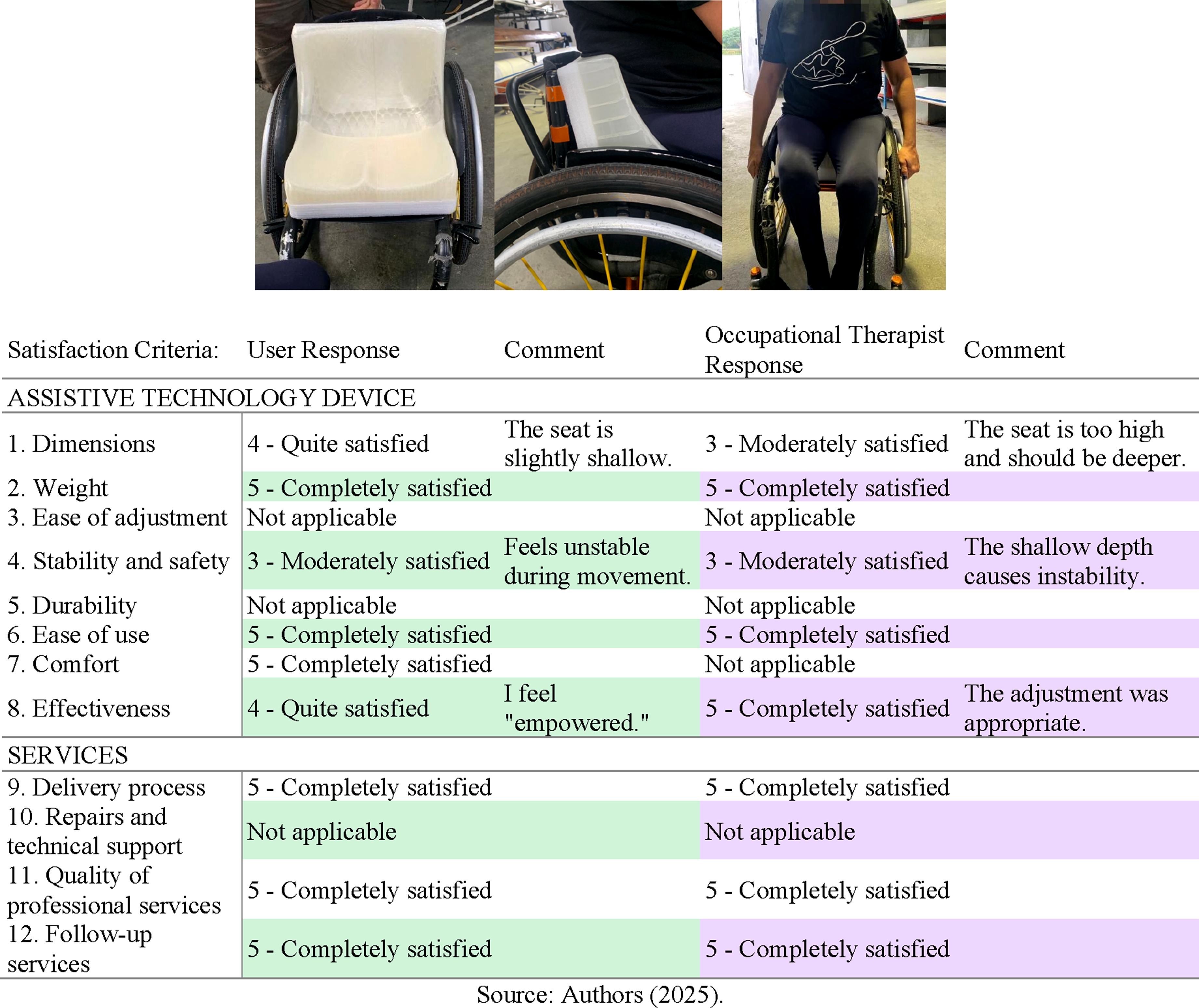
Since this is a 3D model used in the product’s fabrication, adjustments to the seat can be made directly by repositioning the digital human model in relation to the seat during the modeling stage (Figure 6(b)). Once this modification is made, the subsequent steps follow the previously described procedure, allowing for reassessment and ensuring both product quality and user satisfaction.
In addition to the high satisfaction levels indicated in the QUEST questionnaire, both the end user and the occupational therapist confirmed a significant improvement in posture when using the developed prototype. This was qualitatively verified during the final fitting stage, when the user was observed sitting in the device. Compared to the original seating configuration, the new seat provided better alignment, support, and comfort, meeting the intended objectives of postural correction and customization. These findings reinforce the effectiveness of the proposed method, not only in terms of usability but also in terms of its functional contribution to user well-being.
It is relevant to mention that, as with any assistive technology product, multiple solutions may be viable to address the needs of a given user. These may include the addition of extra supports, the use of contoured seating, products with different inclinations, or a range of other strategies that also involve user training and repositioning, depending on how the person interacts with and moves within the product.
These aspects are largely qualitative, making direct comparisons between different solutions neither straightforward nor always meaningful. However, user satisfaction, along with feedback from the primary caregiver, and the achievement of predefined postural and functional goals can be considered strong indicators of a positive outcome in the development of such products.
In other words, although it is not always feasible to quantify the degree of improvement or to make numerical comparisons across different solutions, it is ultimately up to the user and their primary caregiver to define these objectives and assess whether the technology in use meets them. Within this context, the developed prototype was considered effective, as it met the expected goals and delivered a positive user experience.
Moreover, in addition to enabling the production of multiple customized seats in less time and with greater accuracy, this method addresses a concern by Paquet and Feathers 26 and Steinfeld et al. 14 These authors emphasize the importance of developing standardized systems and detailed protocols that take into account the specific needs of the target population. The method presented here responds to this recommendation by ensuring that individual anatomical and functional needs are met through a systematic, replicable digital process.
Final considerations
This paper identified a gap in the development of assistive technology products related to the postural readjustment of three-dimensional digital human models generated through 3D scanning and their subsequent digital fabrication. To address this issue, a method was presented that, while based on traditional development processes, incorporates adjustments directly in the 3D model, allowing for postural corrections in a digital environment without the need for manual techniques. The study also provided recommendations and underlined key aspects to be considered during the development process, taking into account both the needs of the target population and the application of interdisciplinary techniques to create appropriate and functional products.
The described method, encompassing accurate 3D scanning, digital postural readjustment, and fabrication, proved effective in producing more precise and customized products capable of offering greater comfort and functionality. The method was applied in a case study involving a person with motor disability caused by poliomyelitis, which validated the methodology and enabled the identification of potential improvements in its stages. The biomechanical analysis of the digital human model made it possible to implement essential adjustments in body alignment, which were crucial for developing a seat tailored to the participant’s specific characteristics.
Furthermore, the use of the QUEST questionnaire 25 in the final evaluation phase was essential to ensure that the product met both technical requirements and the practical expectations of end users. This research also reinforces the importance of involving healthcare professionals and users themselves in the validation process, promoting a person-centered approach.
Several points can be highlighted regarding the implementation of the method. In the traditional approach, a healthcare professional must be trained to perform the analysis, prescribe the seat, develop it, and often also fabricate and evaluate the final product. The proposed method follows a similar logic: it allows professionals to be trained to carry out all stages of digital development. The key difference between the two approaches lies in the type of training required.
Furthermore, the involvement of an interdisciplinary team in the development of these products greatly contributes to the quality of the outcome. One of the key distinctions between the methods is the development time: while the traditional process can take an average of 3 months, the digital approach reduces this to just three or 4 days. This significantly increases the range of possibilities for product development and broadens access to customized solutions for more people.
Manual and labor-intensive work is also considerably reduced, being replaced by a digital modeling and fabrication process that, with skilled professionals, can be carried out more swiftly and accurately. From a single digital human model, it is possible to make unlimited adjustments and develop various products. Additionally, this same model can be used to monitor the users’ clinical conditions, a factor that, although not addressed in this work, is of great interest to the healthcare field. Therefore, as more professionals become trained in this type of development and as digital databases and support materials (manuals and guides) expand, the method’s dissemination potential grows. This would benefit users across multiple fields related to assistive technology.
Although this work does not aim to describe the training process in detail, it seeks to present relevant characteristics and information so that professionals from healthcare, design, engineering, and related areas can identify in this method a new possibility. It represents a development approach that differs from the conventional one, but with the potential to produce high-quality products in a more efficient way.
The proposed method not only responds to literature recommendations concerning the need for standardization and detailed protocols but also expands the possibilities for customization, making the development of assistive technologies more accessible and efficient. The use of free software, namely Blender 22 , and affordable equipment, like low-cost scanners, helps democratize access to personalized solutions, benefiting a wider audience.
In conclusion, this work represents a significant advancement in the development of assistive technology, promoting greater autonomy and inclusion for people with disabilities. Future studies may deepen the investigation into the application of this method in different contexts and explore its integration with other technologies, for example, artificial intelligence or automation, to optimize the design process.
Footnotes

Ethical considerations
This study was approved by the Research Ethics Committees of the Federal University of Paraná (CAAE 39378720.9.0000.0102, Opinion Report 4.442.734) and the Hospital do Trabalhador of Paraná (CAAE 39378720.9.3001.5225, Opinion Report 4.536.560).
Consent to participate
Written informed consent for participation was obtained from all participants.
Consent for publication
Written informed consent for publication was obtained from all participants.
Author contributions
Isabella de Souza Sierra: Funding acquisition, Project administration, Conceptualization, Data curation, Formal analysis, Investigation, Methodology, Visualization, Writing—original draft, Writing—review and editing.
Funding
This research was partially funded by the Coordination of Superior Level Staff Improvement (CAPES) through a postdoctoral scholarship granted under the Institutional Postdoctoral Program (PIPD)(001).
Declaration of conflicting interests
The authors declared no potential conflicts of interest with respect to the research, authorship, and/or publication of this article.
Data Availability Statement
Identifiable data of this study are not publicly available due to privacy and ethical restrictions involving human participants. Data may be available from the corresponding author upon reasonable request and with approval from the relevant ethics committees.