




Abstract
With each new technology interface introduced in the environment, users spend more time switching between and managing these interfaces. When the interfaces involve screen-based displays and controls, eye movements may provide an intuitive and efficient means of switching between screens. This research focused on evaluating manual keyboard and gaze-based control methods for switching control between displays of a simulated surveillance system. Results showed that gaze-based tracking was faster and produced lower subjective workload than using a manual keyboard. Operators’ performance was also consistent with Keystroke-Level Model–Goals Operators Methods Selection predictions for each control method. These findings identify gaze-based control as a viable method for switching control between multiple monitors.
Potential time saved managing information flow with eye tracking versus keyboard control could aid security monitors.
Take a moment to look around. How many digital devices and displays do you see? As technology advances, the average person is exposed to more information, often through more than one interface. With each new interface introduced into their environment, users are presented with greater demands for their attention and interaction, spending more time switching between and managing these various interfaces.
This is particularly true for law enforcement and military personnel, who are equipped with more technology than ever (National Institute of Justice, 2012) and are routinely tasked with monitoring multiple security systems and sensor feeds. With the addition of each new system, sensor, or video feed, users must manage and interact with increasing numbers of screens and the information displayed on these screens. Often, interaction with an individual screen or component of a system requires users to switch control between the interfaces through a series of manual controls. An example of this type of interaction is a security operator switching between camera feeds in a surveillance system.
To switch between camera feeds, an operator must select and confirm the camera he or she wants to control. It may take only a few seconds to manually switch between feeds, but these seconds matter (Gray & Boehm-Davis, 2000). It is critical, then, to design ways to reduce the time needed to switch. One method (or solution) is to reduce the number of operations needed to switch between camera feeds. One way to do that is to track eye movements and activate whichever screen at which the operator is looking. Simple, right? Well, yes and no. In this article, we describe the impacts of using an eye-gaze based system to switch between multiple screens as well as detail how Keystroke Level Model–Goals Operators Methods Selection (KLM-GOMS) can be used for predicting user behaviors in certain systems. (See sidebar for more about KLM-GOMS.)
Link Between Eye Movements and Ongoing Task
Eye movements have long been studied in relation to cognitive processes. The two primary components of an eye movement process are fixations and saccades. Fixations are moments when the eyes are focusing on an aspect in the environment to gain visual information. Saccades, conversely, are the rapid-transition movements between fixations (Rayner, 1998). Hayhoe and Ballard (2005) reviewed several research studies investigating eye movement patterns for various real-world tasks. The central finding was that eye fixations are tightly linked to the temporal (time-related) evolution of a task, with very few task-irrelevant areas being fixated.
A user’s gaze may provide an intuitive and efficient means of switching between feeds, eliminating the need for manual input and reducing the number of operations needed to switch. Based on this assumption, we developed a system to leverage the speed and intent of eye movements to gain control of a display simply by looking at it. A simulated surveillance interface and task were designed with input from a subject matter expert who had worked as a Sears security operator. The system was intended to help us determine the feasibility of gaze-based interaction and to quantify the performance differences between gaze-based and traditional control (i.e., manual) methods. We conjectured that gaze-based control would improve the efficiency of switching between multiple displays (i.e., would reduce the number of operations needed), allowing for quicker and more accurate responses to sudden changes in the visual display environment.
Predicting and Evaluating Performance of Gaze- and Manual-Based Control
It was important to determine the success of the hardware and software integration, confirming the system performance to ensure that any scientific results obtained from its use would be accurate and precise. As such, in this study we compared user performance with the system against KLM-GOMS human–computer interaction performance predictions for each input method. KLM-GOMS is one of numerous tools used in the design and evaluation of human–computer interaction with a system (John & Kieras, 1994). Specifically, it is a simplified version of the more complex GOMS model and uses pre-established operators to predict the time to execute each component of a given task. Although KLM-GOMS models provide relatively accurate benchmarks of predicted average task times, it is important to note that they do not account for individual differences among users or tasks.
One of the techniques employed in this study is the Keystroke-Level Model–Goals Operators Methods Selection (KLM-GOMS), which is one of numerous tools used in the design and evaluation of human–computer interaction with a system (John & Kieras, 1994). The KLM-GOMS procedure uses preestablished operators to predict the time to execute each component of a given task. Although it is important to note they do not account for individual differences among users or tasks, KLM-GOMS models provide relatively accurate benchmarks of predicted average task times.
Evaluation setup
For this study we used an LC Technologies EyeGaze eye tracker and a PC computer system. The LC system is a desk-mounted eye tracker; it was selected because it provides the ideal setup for situations such as security monitoring, supplying a noninvasive interface and allowing for less constricted user movement. The EyeGaze eye tracker works by directing invisible infrared light at the eye, which is then reflected off the retina and enables the eye tracker to locate the pupil.
An evaluation setup was constructed based on input the Sears security system operator who served as our subject matter expert. Four cameras were integrated with the system to form a simplified surveillance display. Each camera feed was arranged in one of the four quadrants of the display and assigned a number (1 through 4) as the numerical reference for manually switching between the different camera views.
Using the gaze-based control method, users simply looked at the target presented within a quadrant and entered the letter shown (either D or G). While using the gaze-based control, users were shown a small green feedback dot, providing saliency of their gaze location and reassurance that the system was active and responding correctly (Figure 1, eye gaze mode).
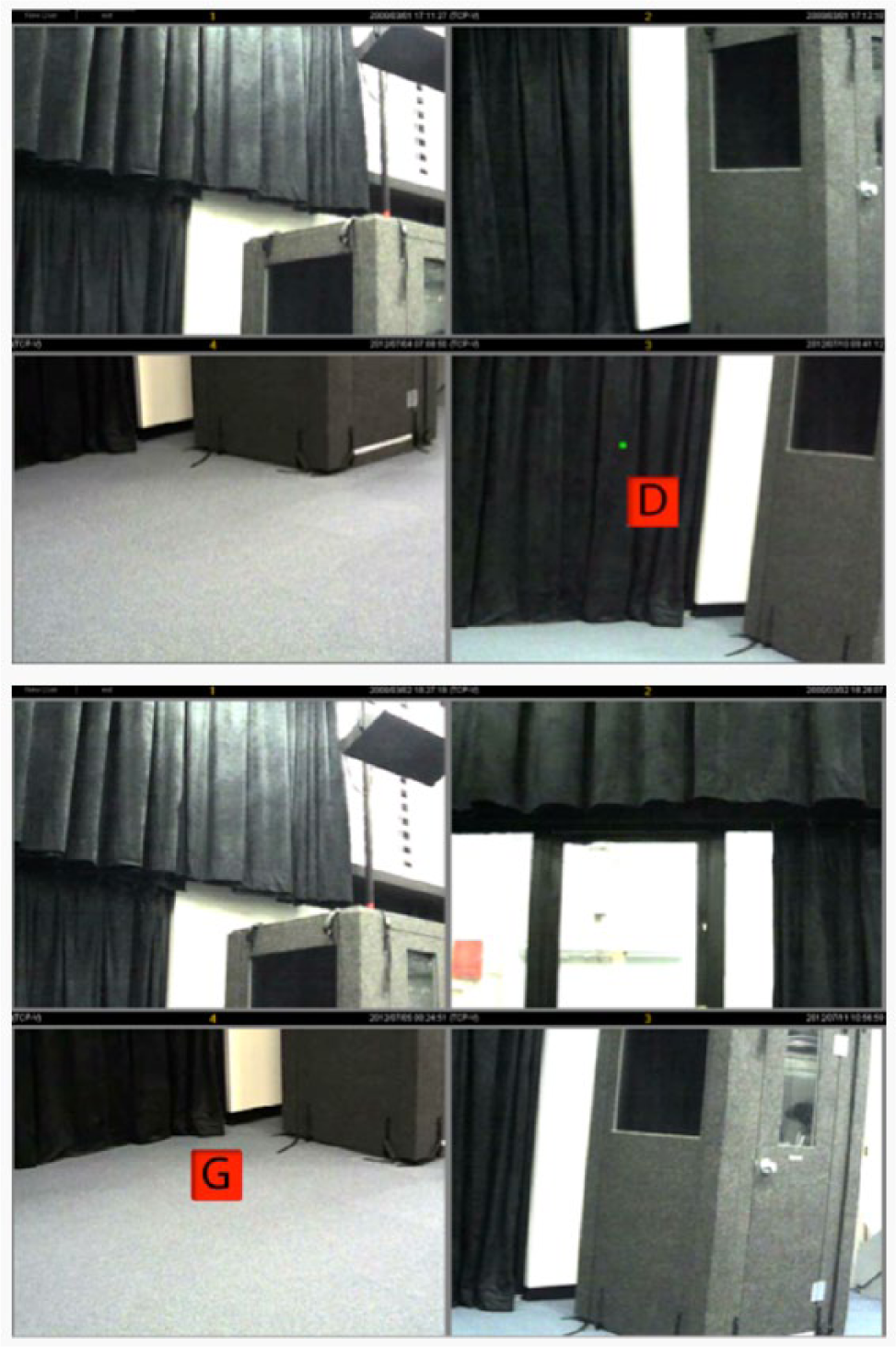
Eye gaze (top) and manual (bottom) modes.
With manual control, the keyboard was the sole input method for gaining control of individual camera feeds and responding to the targets presented (Figure 1, manual mode). Users identified the quadrant on the basis of the numeric label, then used one or both hands (hand usage was not specified) to press the quadrant’s corresponding numerical key at the top of the keyboard, followed by a confirmation key. Finally, they entered the letter shown (either D or G).
Evaluation design
Users were randomly shown a single red icon containing a target (G and D) in the center of one of the four quadrants (Figure 1) and required to respond in every trial. Because the time to switch between cameras was the primary variable of interest, presentation of the target location was held constant. We recorded times for events (target presentation) and user responses. User responses also included an error log that recorded incorrect target responses or quadrant switches. The time stamps and error log automatically calculated event and user action time durations and accuracy.
The evaluation consisted of a within-subjects, repeated-measures design, with each participant using the gaze- and manual-based control methods to switch control between displays. Each control condition (gaze or manual) required participants to identify 72 targets; target icon location was randomized throughout each evaluation trial. Targets remained on the screen until the participant responded, and the next target immediately appeared after a correct response. We instructed participants to respond to targets as quickly and accurately as possible.
At the conclusion of each control condition, participants completed the NASA Task Load Index (NASA-TLX) Subjective Workload Measure to rate the perceived workload of each control method (Hart, 2006). We chose NASA-TLX instead of other subjective workload measures for its consistent sensitivity and detailed multidimensional scales (Hill et al., 1992). The measure is broken into six subscales (Mental Demand, Physical Demand, Temporal Demand, Subjective Performance, Effort, and Frustration) and rated from 1 to 7, with lower subjective workload associated with lower numbers on the given subscale.
KLM-GOMS predictions
Prior to data collection, we calculated KLM-GOMS predictions for each control method according to the outlined procedures for the evaluation task. Action operators are prespecified time counts for specific actions used in KLM-GOMS predictions. For the system developed, three relevant action operators were used in switching control between multiple displays: mental preparation time, keystrokes, and eye movement.
The KLM-GOMS model prediction for a mental preparation operator (M), the amount of time it takes a person to mentally prepare to make an action, is 1.2 s. The estimated time for pressing a button on a keyboard, a keystroke operator (K), is 0.28 s for the average nonsecretarial typist (Kieras, 2001). Eye movements, in comparison, are the fastest component, with an eye movement operator (E) prediction of 0.03 s (John & Kieras, 1996). Using these predicted times, we determined overall response time estimates for gaze- and manual-based control, with predictions of 1.51 s and 2.07 s, respectively (see Table 1).
KLM-GOMS Predictions for Manual Versus Eye Movement Camera Switches
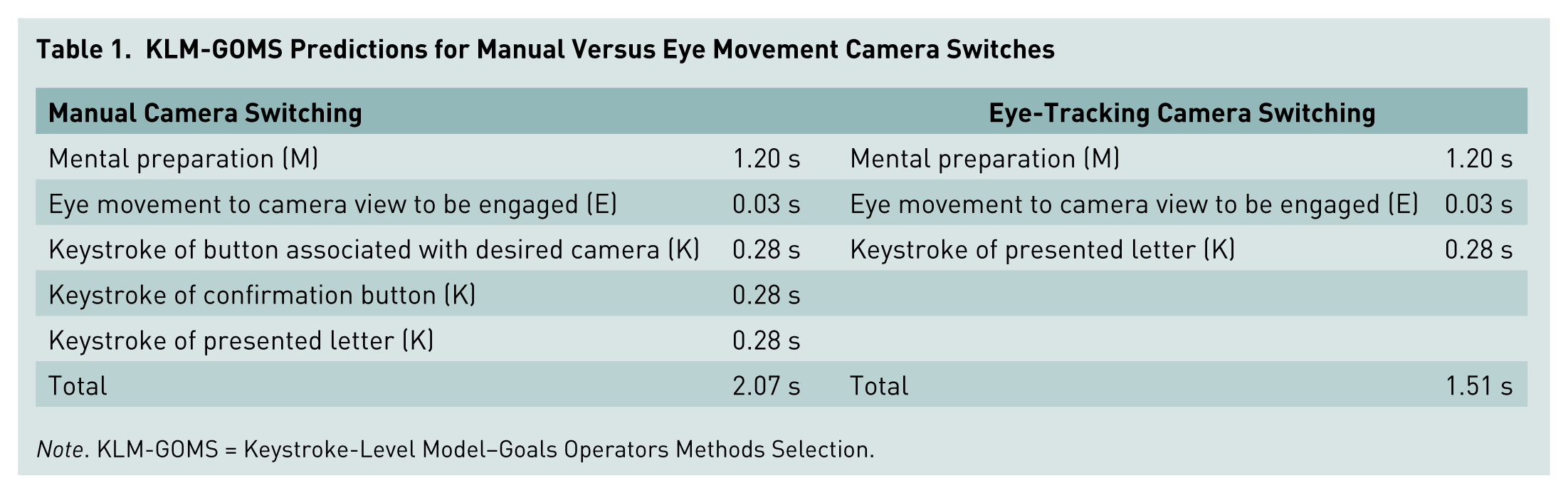
Note. KLM-GOMS = Keystroke-Level Model–Goals Operators Methods Selection.
Evaluation Results
Evaluation of the system involved comparing the resulting user performance data with the KLM-GOMS predictions of performance for each control method. Given the simplicity of the interface and evaluation task, KLM-GOMS may result in an overestimation of the predicted response time, particularly for time associated with mental preparation. Thus, for the integration to be considered a success, we expected the mean user event response times for each control method to be less than or equal to the predicted times, 1.51 s for gaze control and 2.07 s for manual control. Twelve participants – five males and seven females ages 21 to 50 (average age 34.5 years) – with normal (20/20) or corrected-to-normal vision participated in the study.
We averaged participant event response times for each evaluation trial and aggregated to determine the overall mean event response time for each control method (Figure 2).
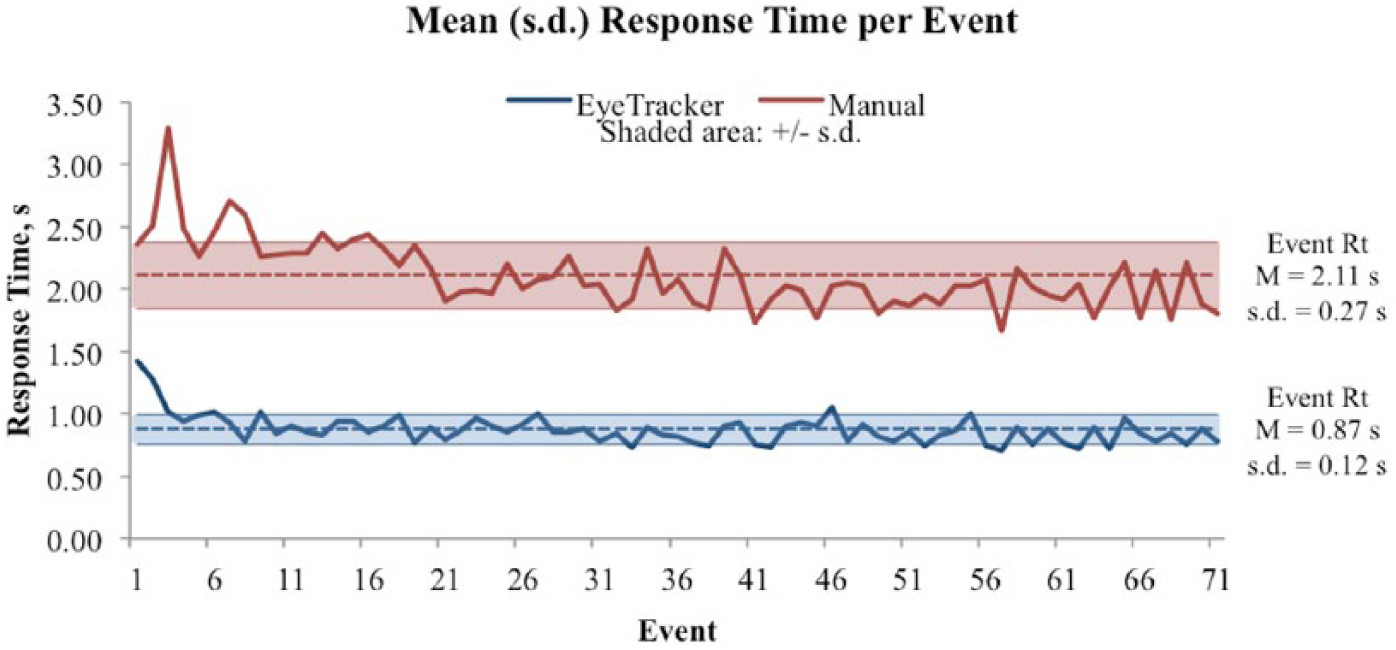
Mean response time (Rt) per event during the course of the task.
The overall mean event response time for each control method was then compared with the KLM prediction using a one-way sample t test. The mean event response time for gaze-based control (M = 0.87 s, SD = 0.12 s) was significantly different and less than the predicted 1.51 s, t(70) = −45.14, p < .001. The mean event response time for manual control (M = 2.11 s, SD = 0.27 s) was not significantly different from the predicted 2.07 s, t(70) = 1.20, p = .115. These results confirm that each control method performs at or better than the KLM-GOMS prediction.
Paired t test comparisons of the gaze-based and manual control methods were performed to analyze the mean event response times of all 12 participants. Results show faster response times with the gaze-based control method (M = 0.87 s, SD = 0.04 s) than with the manual control method (M = 2.11 s, SD = 0.21 s), t(11) = −11.14, p < .000.
A more detailed examination of individual user actions for event responses revealed that time savings associated with gaze-based control occurred during the switch from one quadrant to a quadrant of interest (Figure 3). We recorded times for each user action throughout the evaluation, allowing for the comparison of subactions between the two control methods. Comparing the mean time to perform a switch action using gaze-based control (M = 0.23 s, SD = 0.06 s) with that of manual control (M = 1.66 s, SD = 0.32 s) resulted in a significant difference, t(11) = −19.12, p < .001, with gaze control switching taking approximately 1.5 s less time to perform.
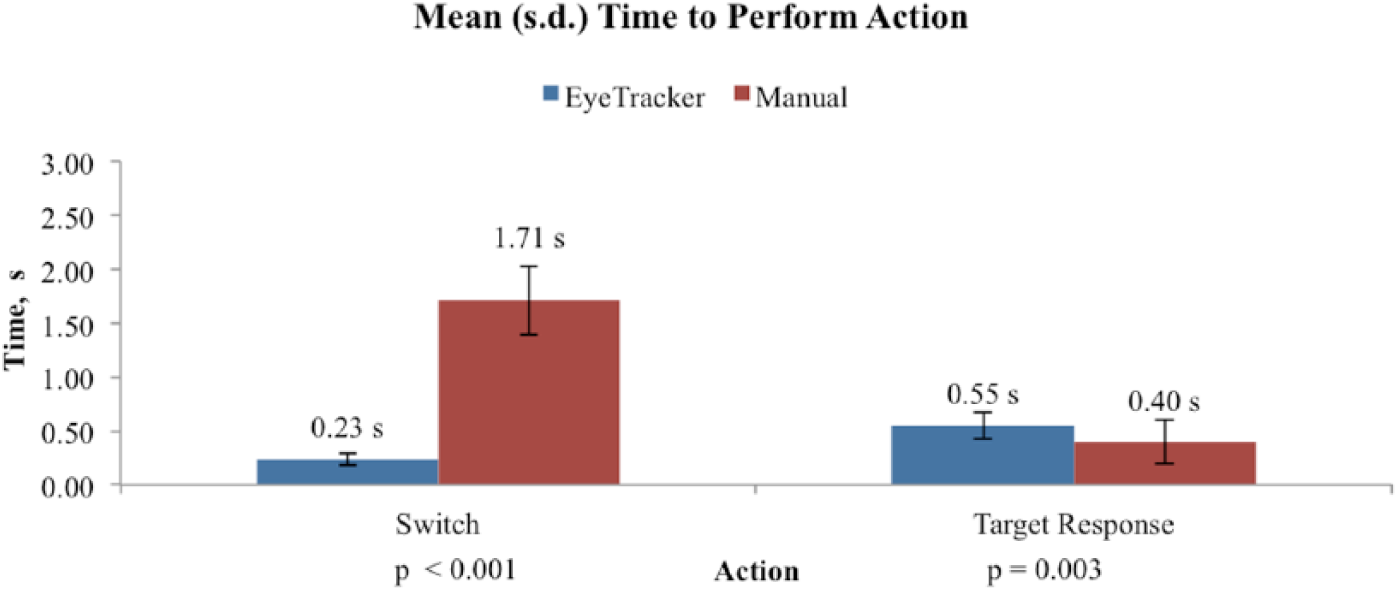
Mean time to perform action.
Interestingly, the time to complete a target response was significantly different between gaze and manual control, t(11) = 3.46, p = .003; manual control target response (M = 0.40 s, SD = 0.20 s) was slightly faster than gaze control target response (M = 0.55 s, SD = 0.13 s). The cause of this difference is unclear, but a possible explanation could reside in how much mental preparation time is needed for planning and executing a series of key presses versus the mental preparation necessary for a series of eye movements.
During the study, two error types were recorded: quadrant errors, which occurred when a participant switched to an incorrect quadrant, and value errors, which occurred when a participant selected an incorrect response to a target. Gaze-based control resulted in a mean quadrant error rate of 3.52% (SD = 5.01%) and a mean value error rate of 2.82% (SD = 2.88%), with manual control resulting in a quadrant error rate of 3.17% (SD = 4.58%) and a value error rate of 2.35% (SD = 2.77%; see Figure 4). A paired t test resulted in no significant differences in quadrant error rates, t(11) = −0.27, p = .79, or value error rates, t(11) = −0.46, p = .65, between gaze and manual control methods.

Mean error rate.
Finally, an examination of the NASA-TLX subjective workload ratings showed slight differences in the perceived workload for each control method (Figure 5). A repeated-measures ANOVA revealed significant differences between the eye gaze and manual control modes, F(1) = 12.23, p = .005, with eye gaze having lower subjective workload ratings than manual control. Using a paired t test with an adjusted alpha value of p = .027 for the multiple comparisons, we found that mental demand, t(11) = −3.84, p = .001; effort, t(11) = −2.19, p = .025; and frustration level, t(11) = −4.08, p < .001, were significantly different and lower for the eye gaze control method compared with manual control. A comparison of temporal demand, t(11) = 0.31, p = .380; physical demand, t(11) = −1.77, p = .052; and performance, t(11) = −1.51, p = .08, for each control method resulted in no significant difference. Gaze control method overall appears to have a lower perceived workload compared with manual control, although this finding is not conclusive.

Mean workload scores.
Discussion
Our results suggest that gaze-based is more effective than manual control when an operator needs to switch between camera feeds. Although no differences were obtained for accuracy, the time needed to switch between camera feeds proved to be faster with gaze than with manual control. In addition, subjective workload measures were significantly lower for gaze than for manual control. Based on the findings, we determined that the system hardware/software integration was a success and that user performance with the system, for both gaze-based and manual control, was consistent with initial predictions.
The results also reinforce that the KLM-GOMS model provides an effective method for predicting the performance of both gaze-based and manual control systems. KLM-GOMS breakdowns are often thought to be large, unwieldy analyses, which can definitely be the case when applied to complex, multioutcome, or highly cognitive tasks. However, given the basic control types and tasks used in this evaluation, we found KLM-GOMS to be a quick, simple, and accurate predictor of performance and a useful analysis tool for the subsequent iterations.
There are several limitations with the evaluation study. The keyboard layout for the manual input mode used the number keys at the top of the board instead of the numerical keypad. The case can be made from a human factors perspective that the usability of manual input for this system could be improved by switching the numerical keys to a spatial layout. However, KLM-GOMS does not make any specific predictions that one layout would reduce times relative to another. A confirmation key was required for manual, but not eye gaze–based, control. Although this design inherently makes the manual mode longer, if one removes this operator from the manual condition, the KLM-GOMS estimated times between gaze and manual are still different. Future performance comparisons between gaze- and manual-based inputs will require researchers to account for such usability limitations and confirm KLM-GOMS estimates.
As law enforcement and military personnel continue to be responsible for managing, monitoring, and switching between greater amounts of information/sensor displays, the time saved over thousands of switches enables more attention to be focused on other mission-critical tasks. Furthermore, the increased speed and decreased workload possibly afforded by using gaze-based control has the potential to increase long-term output, improve the probability of success, and decrease the demands on operators. The work done in this study, using KLM-GOMS and experimental data, provides a good first step in exploring the benefits of an eye gaze–based control system.