




Abstract
Millions of workers have been uprooted by COVID-19 (coronavirus disease 2019) and been thrown into a “new normal” of working from home offices. To further complicate things, many individuals were provided with only a laptop and little, if any, education on setting up an ergonomically correct workstation. As a result, many home office–based workers potentially face suboptimal working conditions. Based on 41 home office ergonomic evaluations, most ergonomic concerns related to laptop usage, nonadjustable chairs without armrests, low monitor heights, and hard desk surfaces. If home-based office work continues, people need to understand the ramifications of poor workstation.
Keywords
As the COVID-19 pandemic spread in early 2020, workers shifted into the home office, which may not fit them ergonomically. This article documents potential problems of home offices and evaluates them for ergonomic concerns.
As the COVID-19 (coronavirus disease 2019) pandemic spread in early 2020, the United States was sent into self-isolation in response to widespread stay-in-place orders. As a result, offices and schools were closed and entered into a much more virtual world. The “new normal” has changed our business casual attire to home casual, our in-person meetings into web conferences, and our in-person school rooms into online assignments and virtual lessons. We engage in more screen time than ever before, and we spend long durations in office areas that are poorly designed for long-term use.
With this rapid stoppage of the economy, workers were shifted instantly from the office to the home with their laptops in hand, facing the need to set up an office area with what they had in their home: dining tables and chairs and other makeshift desks, no external input devices or monitors, and environments with dual functions, potentially used by multiple people (e.g., kids for school, adults for work, and family for dinner). These home offices may not fit the worker ergonomically, which could result in a fairly rapid onset of discomfort in the body that may lead to more serious problems in the future.
The point of this article is to document the potential problems of the critical components in the home office such as the chair, desk, input devices, and monitor. Through a quality improvement evaluation for faculty and staff at the University of Cincinnati, current home offices were evaluated for potential ergonomic concerns.
The Ergonomic Assessment
A survey went out to all of the faculty (N = 4,200) and staff (N = 4,300) at the University of Cincinnati that included an email address to send pictures to on completion of the survey so that participants could have their home office evaluated by an experienced ergonomist. The instructions requested two pictures of the individual working, one from directly behind the person using the computer in the home office area and one from the side. One individual (KGD) provided the initial ergonomic assessment, identifying concerns and recommendations. Another individual (SEK) reviewed and edited the assessments, providing any input where it was felt something was missed. The remaining team members coded and classified characteristics of each home office, which were then reviewed by KGD. The following components were classified: (1) monitor (primary/secondary, laptop/external, too high/too low, centered/off centered), (2) chair (chair type, hard seat, too high/too low, five casters, armrests, armrests used, armrests adjusted properly, lumbar support, feet on floor), (3) worksurface (hard front edge, glare, too dark, task light), (4) input devices (external keyboard, laptop keyboard, laptop touchpad or mouse, external mouse), and (5) type of workstation (sitting, standing, other). The data were then summarized across all workstations. The recommendations concentrated on viable and inexpensive fixes for the majority of the concerns identified. All the recommendations were then reported to the individuals, along with encouragement to implement them.
Participants: In all, 46 individuals sent in pictures of their home offices. Five sets of pictures were eliminated from the evaluation due to no person being in the picture, which severely undermines the ergonomic evaluation. Thus, in total, 41 workstations (from 29 female and 12 male participants) were evaluated and the findings were summarized. To maintain confidentiality, no other information was recorded, and a two-letter code was assigned to each set of pictures for tracking purposes.
Trends in the COVID-19 Home Office
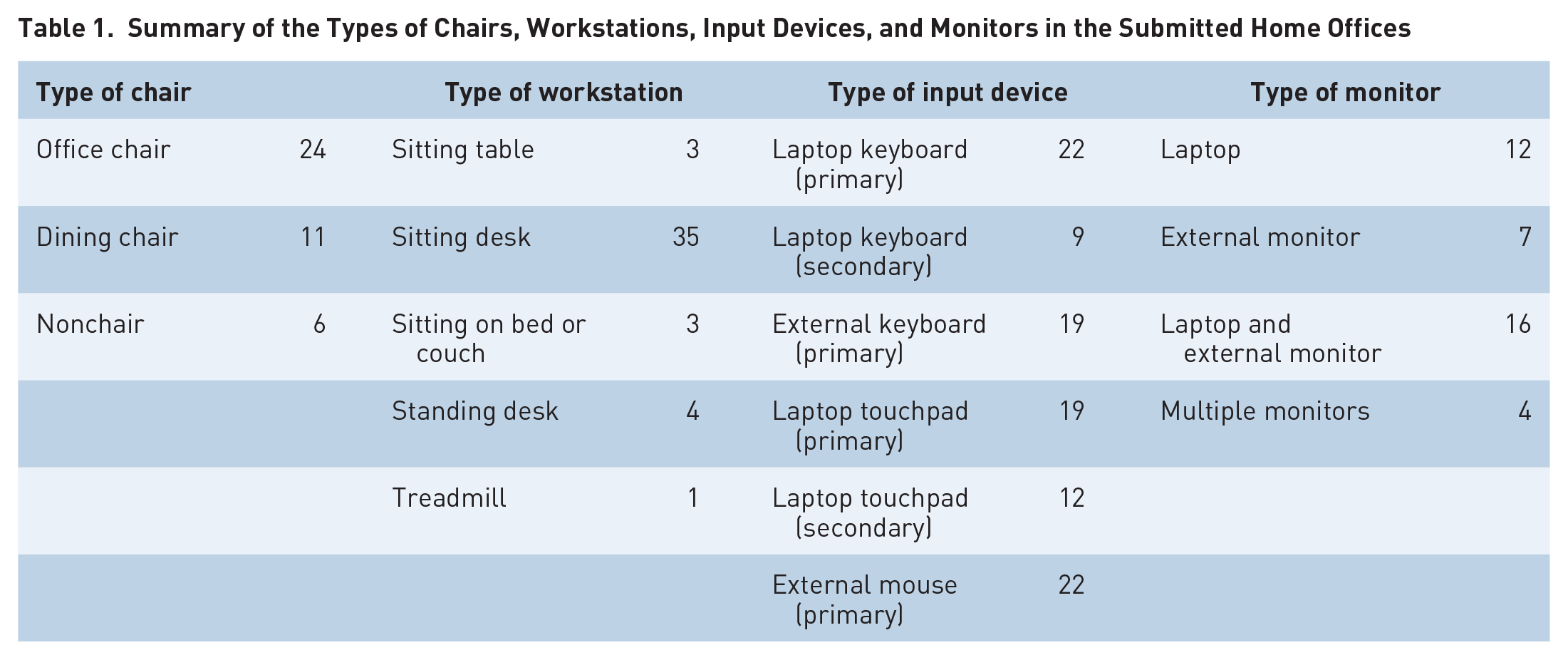
Table 1 provides a summary of the types of chairs, workstations, input devices, and monitors. Most workers (58%) have had some type of office chair, although not all were good office chairs. The remaining workers used dining chairs (27%) and nonchairs like a bed or couch (15%). A majority sit at a desk (88%), while a small portion sit at a table (7%) such as a dining table. Of the individuals working at a desk, four also have a standing workstation and one has a treadmill workstation. The type of keyboard breakdown was laptop keyboard (54%) and external keyboard (46%), with 47% of the external keyboard users having a laptop as a secondary input. Laptop touchpad or input devices were used by 46%, while an external mouse was used by 54%. More than half of the external mouse users (55%) used the touchpad of the laptop for an input device. The use of monitors fell into four groups: laptop (29%), external monitor only (17%), combination of laptop and external monitor (39%), and multiple monitors (10%).
Summary of the Types of Chairs, Workstations, Input Devices, and Monitors in the Submitted Home Offices
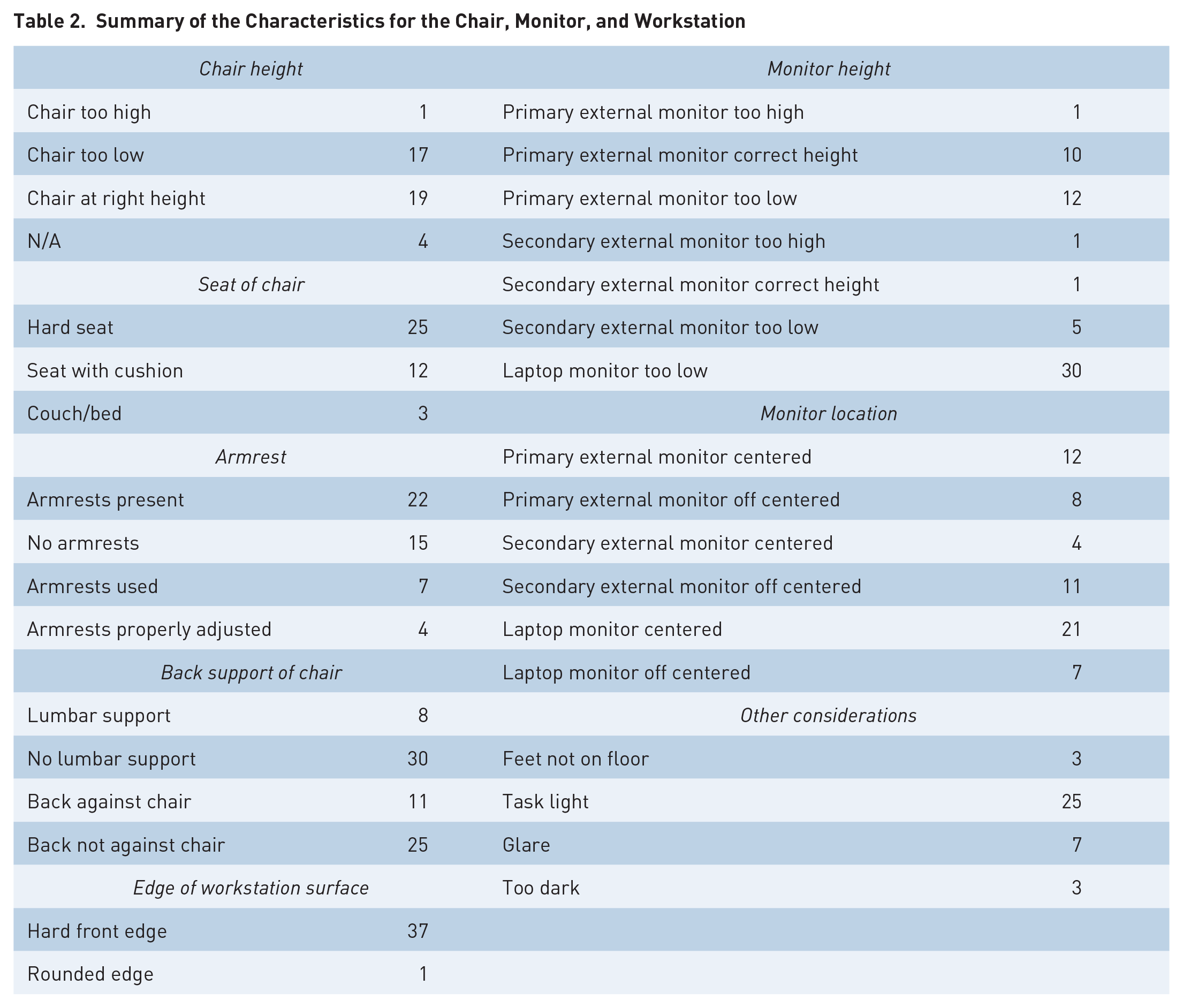
Ergonomic evaluations of the workstations identified many issues that could be adversely affecting the workers (Table 2). Many chairs were the wrong height (41% too low and 2% too high), which resulted in elevated arms, leaning on front edge, and poor head position (see Figure 1a). A common characteristic of the chairs was a hard surface to sit on (63%; Figure 1b). Three of the workers sat in a nonoffice-style workstation such as a couch or bed for their primary work area. A slight majority of the workers had armrests on their chairs (53%), but many people did not use them (32%) or the armrest was improperly adjusted (18%). Lack of use of armrests causes contact stress on forearms and strain across the upper back (see Figure 1c and d). The support of the back of the chair was often not used (69%) and oftentimes without any lumbar support (73%). Thus, many individuals do not have the proper support of their lower back (see Figure 1d-f).
Summary of the Characteristics for the Chair, Monitor, and Workstation

Examples of common problems found in the home offices: (a) poor chair, hard edge on desk surface, external monitor off to side, (b) hard and nonadjustable wood chair, (c) large monitor to side, laptop monitor too low, no back on chair, (d) forearms leaning on edge of desk due to not using properly adjusted armrests, (e) back not support by back of chair, (f) working on monitor to side causing neck to rotate, (g) split between external monitors directly in front, and (h) walking on treadmill may cause fall risk.
Position of the monitor was oftentimes too low or off to the side. Three quarters of monitors were laptops, which were too low relative to the workers’ eye height (see Figure 1a and c-g). External monitors were also routinely set up too low (52%) or too high (4%). Another common issue with the monitors was the lack of the primary screens centered in front of the workers (31%), resulting in twisting of the neck and/or back to view the monitor (see Figure 1a, c, f, and g). As expected, the secondary monitors were not centered for the most part (73%).
Several other concerns were identified with the workstations such as poor lighting (17% had glare and 5% were too dark) and feet not touching the floor (7%). Very few work surfaces had a rounded edge; more than 90% had a hard, sharp edge (see Figure 1a-e). As seen in Figure 1h, there was one treadmill workstation that was set up appropriately.
Potential Low-Cost and Effective Fixes
As we start to adapt to the new normal, home offices must be set up correctly to ensure workers do not experience discomfort or become injured. To further complicate the home office environment, many people are faced with very limited budgets; limited access to proper chairs, desks, and input devices; and are sent home with only a laptop. While these 41 workstations only represent a small portion of home offices, there are many common themes of problems that are typically found in poorly designed offices.
First, office chairs are often a source of problems. The best chairs have the following key components: adjustable height, adjustable armrests, five casters, and lumbar support in the back of chair. However, few chairs in a home have all of these components, and a new chair may be out of the budget. Some potential fixes for the chair include the following:
Putting a pillow on the seat to elevate the seat height
Putting a pillow and/or rolled up towel behind the back to provide lumbar support and back support and eliminate the need to lean away from the back of the chair
Wrapping the armrests when they are low and not adjustable
Moving the chair closer to the desk or table to encourage having the back against the back of the seat
Second, it was clear that a large number of workers were given a laptop to work at home, which resulted in poor postures of the back and neck, whether that was due to placing the laptop on the lap or setting it on the desk. Either way, the monitor of the laptop is too low and results in the worker looking down, oftentimes for long durations. Some potential fixes for using a laptop are as follows:
Place a lap desk or large pillow under the laptop to raise the monitor when using it on the lap.
Use an external keyboard and mouse, along with raising the monitor by placing a stack of books or a box under the laptop when using a laptop on a desk.
When possible, use an external monitor at right height (e.g., top at eye height) and centered on the person.
When using dual or multiple monitors, it is key to keep the primary monitor directly in front of you and to place the secondary monitors (e.g., laptop or second external monitor) to the side of the primary monitor.
Third, the workstation or desk is also a regular source of concerns starting with the hard surface and specifically the front edge that oftentimes comes into contact with wrist and forearms. The contact stress is especially problematic when chair armrests are too low or are not used. Some potential economical fixes for a hard front edge surface are as follows:
Place a folded towel over the edge on the desk and in front of the keyboard.
Use pipe insulation from a local hardware store, or a pool noodle, which can be split down the seam and placed along the edge (see Figure 2).
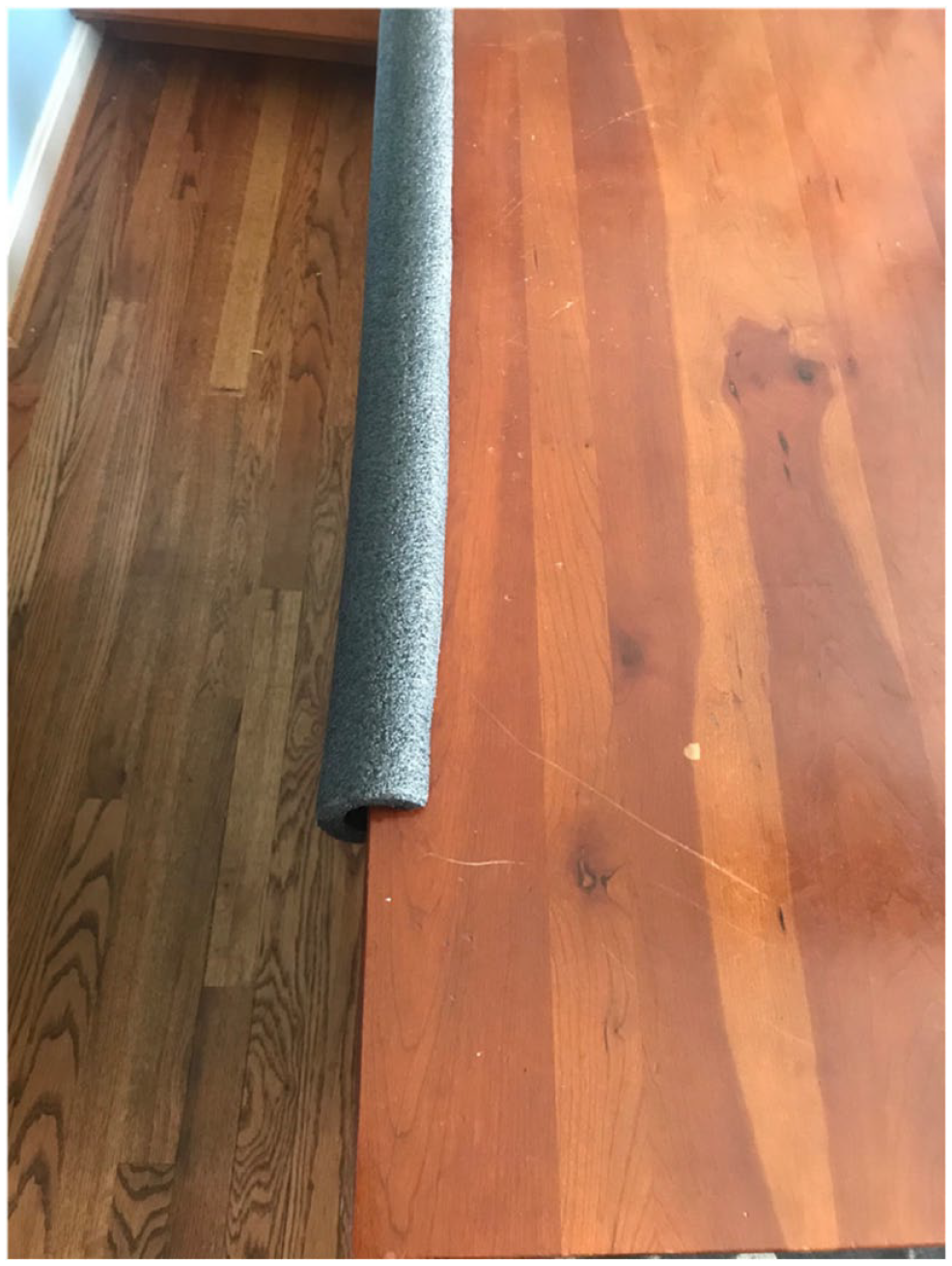
Use of pipe insulation on the edge of table or desk to reduce the contact stress due to hard edge.
Other considerations for the home office are to stay away from the dining table, couch, bed, and floor. These work areas oftentimes lead to poor postures and discomfort as they are suboptimal. Glare is another concern that accompanies workstations in homes, which typically contain more windows than an individual’s respective workplace office, due to sunlight exposure through untreated glass. The workstation should be oriented such that the monitors are positioned perpendicularly to the window and so that, if possible, windows are behind the monitor.
Finally, if obtaining a new chair or identifying an appropriate sitting workstation at home is not possible, rotating between a poor sitting workstation and a standing workstation would be the next best practice. There are many simple, makeshift standing workstations available in the home, including implementing the use of an ironing board, a kitchen counter, the top of a piano, a clothes basket placed upside down on a table or desk, or a large box under the laptop. An appropriate standing workstation should have the top of the monitor at eye height and directly in front, keyboard at a height so that forearms are parallel to the ground (approximately 90° elbow angle), and a soft or rounded front edge to the working surface.
Importance of Posture Change Throughout the Day
Whether any of the recommendations above are possible to be implemented or it is necessary to remain in a makeshift home office for whatever reason, it is highly recommended to change posture throughout the day. Every 30 minutes, one should stand up and move around for 2 minutes (Davis & Kotowski, 2014, 2015; Healy et al., 2013; Neuhaus et al. 2014). One potential option to maintain fluid posture is to switch between a sitting and standing desk throughout the day so the shift can be balanced between sitting and standing. Too much sitting has been related to increased risk for diabetes (Chaput et al., 2015; George et al., 2013; Kim et al., 2013; Patterson et al., 2018), increased weight gain (Dunstan et al., 2012; Ekelund et al., 2008; Smith et al., 2014), and increased discomfort (Tissot et al., 2009; Wahlström, 2005). Some researchers have found standing to improve calorie usage (Benden et al., 2011), reduce glucose levels (Buckley et al., 2013; Dunstan et al., 2012; Thorp et al., 2014), improve cholesterol and triglyceride levels (Graves et al., 2015; Healy et al., 2013), and reduce discomfort (Davis & Kotowski, 2014; Karakolis & Callaghan, 2014). However, you do not want to stand the whole day, as prolonged standing can be detrimental too (Gregory & Callaghan, 2008; Waters & Dick, 2015). In essence, the key to proper posture is not to sit or stand continually without changing your position; recommendations can include large body posture changes like walking, changing between sitting and standing, or even utilizing a restroom, snack break, or water break.
Significance of Adapting to the New Normal
From this point forward, home offices will likely be a mainstay for a large part of the population, both in the short term and in the long term. In the short term, companies will likely continue the stay-in-place home offices to reduce the potential of widespread COVID-19 infection within the workplace. As a result, millions of workers will be needing safe home offices. In the long term, companies have realized that work can be completed at home, and this will likely lead to regular work hours performed at home. Home offices are appealing to workers due to less commuting, better work–home balance, and less stress due to being in the comforts of home. Home offices will need to incorporate sound ergonomic concepts to ensure the long-term health of the workers. As the home offices become a permanent option for many workers, companies will need to provide proper accommodations with respect to ergonomics, otherwise, the widespread discomfort will progress into more detrimental conditions such as musculoskeletal disorders. Increased prevalence of musculoskeletal disorders will have direct impact on the companies’ bottom line through treatment costs, compensation costs, and absenteeism and presenteeism.
Footnotes
Partial funding was provided by the National Institution for Occupational Safety and Health for this project through the sponsorship of the University of Cincinnati Education and Research Center (#T42OH008432).
