



Abstract
Recent technological developments have made it feasible for qualitative researchers to develop their own digital tools. As an example, the goal of this article is to explore the design process involved in developing cell phone applications for qualitative research. Cell phones, ubiquitous in our daily lives, can serve researchers in many ways. Cell phones can be used for recording conversations during interviews and taking pictures during observations. We will introduce two cell phone applications—Interview and Observation Tools—developed by the first author in response to data collection and analysis tasks carried out in discussion with the second author, his dissertation advisor. We will also introduce App Inventor, which is an open-source web application for the android operating system that the first author used to program and develop both applications. We will discuss why and how we included specific features based on the first author’s reflections. This work will provide qualitative researchers with practical tips for developing their own digital tools and generate ideas for future research by introducing the methodological problems the first author encountered and how he addressed them in the design and development processes of his cell phone applications.
There are several ways to approach qualitative research, which consistently embraces complex epistemologies and methodologies to avoid looking at the world from a reductionist perspective (Gemignani, Brinkmann, Benozzo, & Puebla, 2014). From this nonreductionist perspective, qualitative researchers are open to diverse methods and approach for engaging in research (Frost et al., 2010). For example, Qualitative Inquiry as a journal celebrated its 20th anniversary with a special issue, and in that issue, Flick (2015) highlighted that from the beginning, the journal welcomed nontraditional forms of research approaches, methods, and representations of new knowledge. In this article, as part of a special issue in Qualitative Inquiry that highlights the use of digital tools in qualitative research, we will introduce how qualitative researchers themselves can develop cell phone applications for collecting interview and observation data. We chose to introduce our experience with cell phone application development because programming skills involved in developing a customized cell phone data collection tool has become far less complex and we encourage qualitative researchers to consider creating their own tools.
Recent technological developments have made it feasible for qualitative researchers to develop their own digital tools. As an example, the goal of this article is to help qualitative researchers develop ideas for how they could design and develop cell phone applications as a digital tool in their scholarly work. This article is a result of collaboration between the first and second authors. The experiences described in this article are Do’s personal experiences, but throughout the application development process, he sought advice from Yamagata-Lynch, his advisor, while making decisions about specific design features to include in the cell phone applications. When the opportunity to share Do’s experiences came about initially through a conference presentation, then as a journal article, both authors worked closely to (a) identify the structure through which to narrate Do’s experiences, (b) ground Do’s experiences within the qualitative research literature, (c) reflect on Do’s experiences, and (e) write the article. To provide qualitative researchers with practical tips for developing their own digital tools, we will introduce the methodological problems Do experienced and how he addressed them in the design and development processes of his cell phone applications.
We will begin the article by introducing the literature in qualitative research relevant to Do’s experiences. Then we will introduce the Interview Tool and the Observation Tool following the design case narrative style, and share why and how Do designed specific features in the two applications. We will also share how other researchers can use the two applications in their future research. We will end the article by identifying implications that customizable application development brings to future qualitative studies.
Digital Tools and Qualitative Research
There are qualitative researchers who rely on digital tools for recording their reflexive practice, sharing work in collaborative teams, engaging in data collection and analysis, writing findings, and disseminating results (Paulus, Lester, & Dempster, 2014; van Doorn, 2013). In many cases, these digital tools are preexisting programs and devices designed and developed by a third party who is not the researcher himself or herself such as cloud-sourced note-taking tools and Qualitative Data Analysis Software (QDAS). Therefore, most qualitative digital tools require that the researcher learn to customize his or her usage to fit the specifications of the tool.
The Use of Cell Phone Applications for Qualitative Data Collection
Mobile devices such as cell phones and tablets have become an everyday tool for many consumers around the world. In the United States alone, nearly two thirds of the population own smart phones that regularly access the Internet to retrieve information critical to their daily lives (Pew Research Center, 2015). Engaging with mobile devices on a daily basis has become an ordinary event in people’s lives (Prensky, 2001). As a natural extension, cell phones have become a useful tool in research. Among quantitative researchers, cell phones have been used for collecting surveys and questionnaires (Fernee, Sonck, & Scherpenzeel, 2013; Monyarit et al., 2014; Sonck & Fernee, 2013), demographic data (Eagle & Pentland, 2006; Kiukkonen, Blom, Dousse, Gatica-Perez, & Laurila, 2010; van Doorn, 2013), information on human behavior and interactions (Cherrington & Watson, 2010; Chittaranjan, Blom, Gatica-Perez, 2011; Moylan, Derr, & Lindhorst, 2015; Plowman & Stevenson, 2012), and information on feelings and time use (Fernee et al., 2013; García, Welford, & Smith, 2015; van Doorn, 2013; Williamson, Leeming, Lyttle, & Johnson, 2012). Eagle and Pentland (2006) introduce cell phone as wearable sensors which is capable of collecting rich behavioral data.
Even though there is not a lot of discussion about cell phone use among qualitative researchers, we have started to see a gradual increase (García et al., 2015). For example, cell phones have been used as a digital tool in qualitative research for data collection to record conversations and to take pictures (see Moylan et al., 2015; van Doorn, 2013). van Doorn (2013) relied on cell phones for various purposes in ethnographic research. He used a cell phone as a navigation device when traveling to research sites. He also used a cell phone as a voice-recorder for interviews, digital storage device for photos and videos, and note-taking device for his reflections. In another example, García et al. (2015) developed an application called the FREE Project to collect participants’ football experiences through photographs and audio-diaries. Plowman and Stevenson (2012) used mobile phone diaries to collect children’s everyday lives about their interactions with leisure and work technologies. Beddall-Hill, Jabbar, and Al Shehri (2011) used a cell phone during observations and interviews and recorded video clips, photos, audio clips, and researcher diaries.
Based on discussions in existing qualitative studies, we can conclude that cell phones are used to collect participants’ natural experiences and perspectives in everyday contexts (Cherrington & Watson, 2010; Moylan et al., 2015; Plowman & Stevenson, 2012; Williamson et al., 2012). For example, Cherrington and Watson (2010) introduced the use of video diaries to collect participants’ everyday lives as an innovative way for collecting qualitative data. In another example, Moylan et al. (2015) used the “Daily Routine,” which is a cell phone application that records participant daily routine and behaviors. Many of these studies capture participants’ daily activities and track specific behaviors by asking participants to keep audio, video, or written diaries.
García et al. (2015) identified benefits of using cell phones for data collection, such as reduced time and cost. For example, asking participants to record data with their own cell phone eliminates the need for the researcher to acquire specific equipment for participant use and data can be transferred instantly to a cloud-sourced storage location or to a computer. García et al. also argued that cell phones can increase research participant response rate and reduce dropout rates because participants are already familiar with the device. Finally, cell phones can be an effective tool when collecting data on sensitive topics because they are unobtrusive and discrete.
García et al. (2015) also introduced weakness associated with the use of cell phones as a digital tool in qualitative research. First, even though cell phone use may save cost for data collection and management, developing applications that meet researchers’ needs may be costly. For example, García et al. hired a software company to design an application and for paid support. It can be difficult to find and develop an ideal cell phone application to meet researcher needs. Finally, developing, modifying, and using cell phone applications can require significant time working with a software company to solve technical difficulties.
Design Case: Interview and Observation Tool
We approach design as a problem-solving activity for creating adequate and sustainable solutions to wicked problems (Buchanan, 1992). Wicked problems are ill-defined and complex and are often incomplete and contradictory with competing demands (Rittel & Webber, 1973; Wahl & Baxter, 2008). In this article, we introduce Do’s experience developing two cell phone applications as a design problem. The problems that Do addressed through his design were the challenges he encountered during qualitative interviews and observations. We understand that not all qualitative researchers would address the problems Do encountered by specifically developing cell phone applications. However, we believe that by sharing an in-depth account of Do’s experiences in the form of a design case will serve as an example of how qualitative researchers can address methodological problems by developing their own digital tools rather than solely relying on existing tools.
Following the design case approach, we will present Do’s cell phone app development experiences in which he attempted to solve these challenges. Design cases are descriptions of real artifacts or experiences that have been intentionally designed (Boling, 2010). According to Boling (2010), design cases are presented as a type of research that follows a social science model to answer questions like “What activities make up designing?” and “What kind of thinking do designers engage in when they are sketching?” In the following section, we will introduce this design case by presenting the design situation, design process, specific design activities, design decisions made, and by describing the developed artifacts.
Design Situation
Do took his first graduate-level introductory qualitative research course at the University of Tennessee. In this course, he engaged in fieldwork assignments. His research question for one assignment was how students use their cell phones when studying at the library. To address this research question, he engaged in observations and semistructured interviews. Then he transcribed and analyzed the data with ATLAS.ti (a QDAS tool) to identify categories, codes, and themes to interpret the findings.
In his course experience, Do underwent many trials and errors, which taught him lessons about qualitative research, particularly related to collecting data. As a novice qualitative researcher, Do reflected on his experiences and identified the following as data collection challenges: (a) managing recorded interviews, (b) unknowingly skipping several interview questions, (c) recording the time during observations, (c) converting handwritten observation notes to a digital format, and (d) managing observation notes. Do decided to engage in observations and interviews with the same research question after the course ended to continue improving his qualitative research skills.
Identifying the Design Process
Do decided to develop research tools that would allow him to minimize the challenges he encountered. He decided to develop cell phone applications after reviewing several options to address his challenges including web applications and paper-based tools. One reason for developing cell phone applications was because he had read about cell phones being used in qualitative research. Another reason was because he was familiar with and felt comfortable using a cell phone in his daily activities. He frequently relied on his cell phone to write diary entries, take notes, and write Facebook posts. However, he did not have the professional knowledge or skills for developing the tools he wanted. He searched for an appropriate application development program.
Do found App Inventor, which is an open-source web program that allows users to create software applications (“App Inventor for Android,” 2015). This web-based tool gives users including novices, a platform to develop their own applications (Wolber, Abelson, & Friedman, 2014). The program allows researchers with limited experience to fairly easily create applications for the Android operating system, which means that applications developed on this platform will not work on iOS or Blackberry devices. App Inventor is built on an interface that simplifies programming to dragging-and-dropping visual objects (Hsu, Rice, & Dawley, 2012). By dragging and dropping blocks onto designated screen areas and combining several blocks, users are able to build fully functional applications.
After becoming familiar with the App Inventor, Do developed the two data collection applications following five design steps: analysis, design, development, implementation, and evaluation. Do decided to follow the above steps because instructional designers often follow them when developing effective performance support tools (“ADDIE Model,” 2015). Do also consulted the literature on user-centered design (Kangas & Kinnunen, 2005), personal tool characteristics (Sharples, 2000), and user interface issues related to mobile applications (Nilsson, 2009). He also consulted existing cases about mobile application development (Foley, 2012; Kirwan, Duncan, Vandelanotte, & Mummery, 2013).
Step 1. Analysis: Understand the necessity for developing a tool
The first qualitative data collection challenge that Do encountered in his course research was during the semistructured interview. He would get caught up with the conversation and accidently skip over a question in his interview guide without realizing it until the interview ended. The second challenge was during transcription when he found it difficult to differentiate when one question began and when the answer ended. To make matters worse, the interview was too long and complex for him to be able to concentrate on transcribing without losing his place. The third challenge was while listening to recordings, it was difficult to return to specific moments in the long audio recording without some kind of marker.
Do also encountered challenges during his observations. The first challenge was the inconvenience of checking and recording the observation time. Every time he checked the time it seemed that he missed an important event that he could have recorded in his notes. The second challenge was that it was difficult to keep up with converting his handwritten notes to digital format. The third challenge was that Do wanted to be a passive observer, but while using his notebook and laptop, he inadvertently made himself significantly visible to participants, to the point that he suspected that it changed participant behaviors.
Step 2. Design: Identify the required functions in tools
Based on the above challenges, Do identified functions he decided were required to design features for his tools. He wanted to take advantage of the basic functions packaged with current cell phones such as voice recording and note-taking features, and add customized functions. Table 1 summarizes the functions that he chose to include.
Unique Functions in Developing Tools.
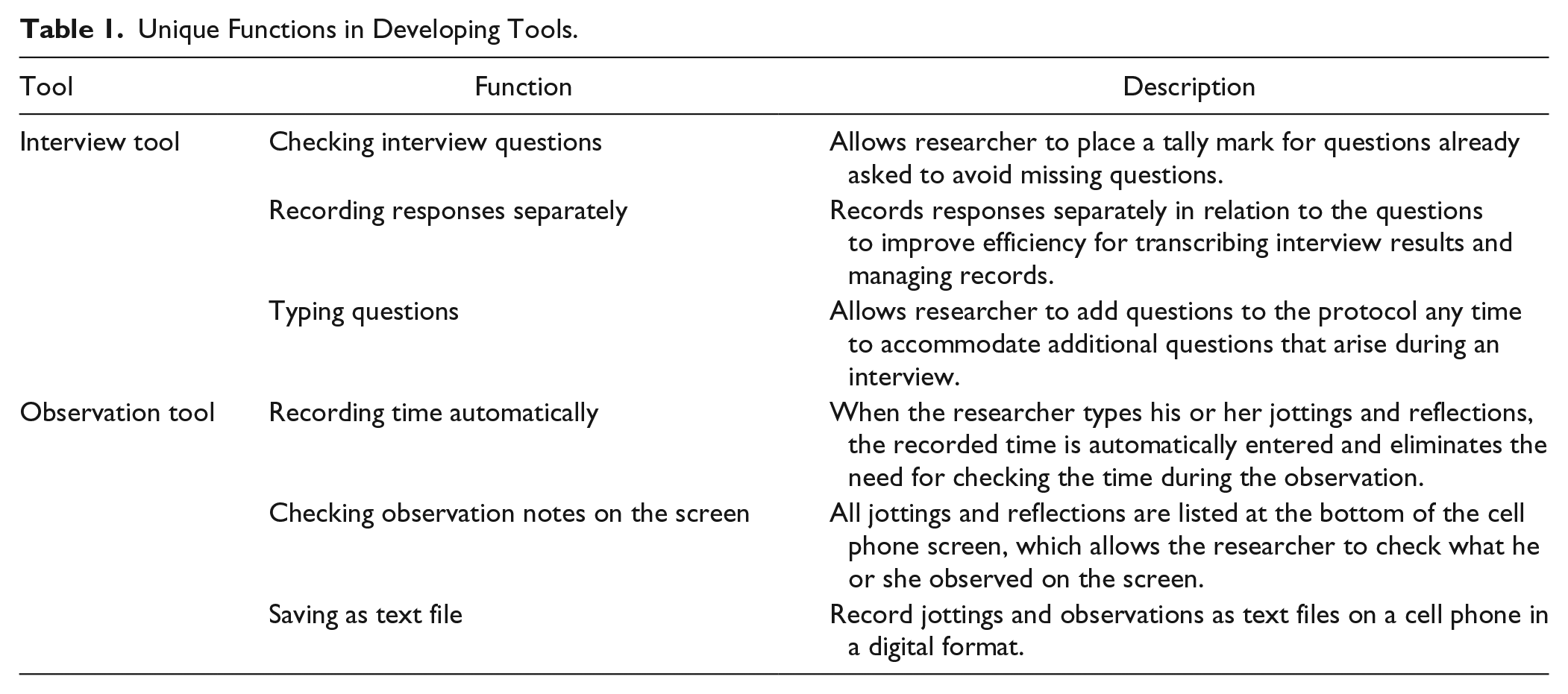
While identifying functions for the interview and observation tools, Do reflected on strategies discussed by other qualitative research authors for conducting successful interviews and observations. He relied strongly on Roulston’s (2010) Reflective Interviewing: A Guide to Theory and Practice, incorporating her strategies into his application. First, Do set up the interview plan including developing an interview procedure, deciding the number of interviewees, choosing an interview format, and developing a plan for transcribing and analyzing the data. Second, he developed an interview guide for a semistructured interview. Do chose to engage in semistructured interviews because he felt that the structure would help him better address his research question. Third, he found participants. Before starting each interview, he tried to establish rapport with participants, and then he asked participants to sign the consent form after he explained the details. After a preparatory activity, he conducted the interviews and used the application he developed. After the interviews, he transcribed the audio files.
In regard to developing an observation tool, Do identified critical components of observation field notes based on Emerson, Fretz, and Shaw (2011)’s Writing Ethnographic Fieldnotes. According to the authors, observation field notes consist of initial impression, key events, significance of others, interaction patterns, and social scenes. Do developed the observation headnote application while considering the above components.
Step 3. Development: Using App Inventor
To develop applications with the above design functions, Do learned the ins and outs of App Inventor by watching tutorials and analyzing existing applications with the design functions he wanted to incorporate. App Inventor is a blocks-based programming tool (“MIT App Inventor | Explore MIT App Inventor,” 2015), which means that there are visual objects called blocks to manipulate and program an app. The programming platform consists of two sections: Designer and the Blocks Editor. In the “Designer” section, users can select components of an application that they are developing and specify their properties. Components are the elements users organize to create applications. By selecting and arranging components of an application on the center of the designer section, which is called the Viewer, users design application based on what they want it to look like. The Designer is divided into several areas based on function.
Viewer (on the center of page): This is where users place components and arrange them to map out what they want their application to look like.
Palette (on the left side of page): This is a list of components from which users can select.
Components (on the right side of page): This section shows lists the components in user’s project.
Media (on the right side of page): This section shows the Media (pictures and sound) in the project.
Properties (on the right side of page): This section shows the properties of components such as a background color, a background image, and a title.
By clicking on the “Blocks” button in the upper-right corner, users can move “Designer” page to “Blocks Editor” page (see Figures 1 and 2). In the Blocks Editor, users can assemble blocks that define how the components will behave. This is where users instruct the components what to do and when to do it. In this section, there are several choices the researcher can implement in their programs such as controlling, calculating, texting, changing colors, playing audio files, and recording. Each visual object in the Blocks Editor represents a specific function such as sending a text, changing colors, playing audio files, and recording.
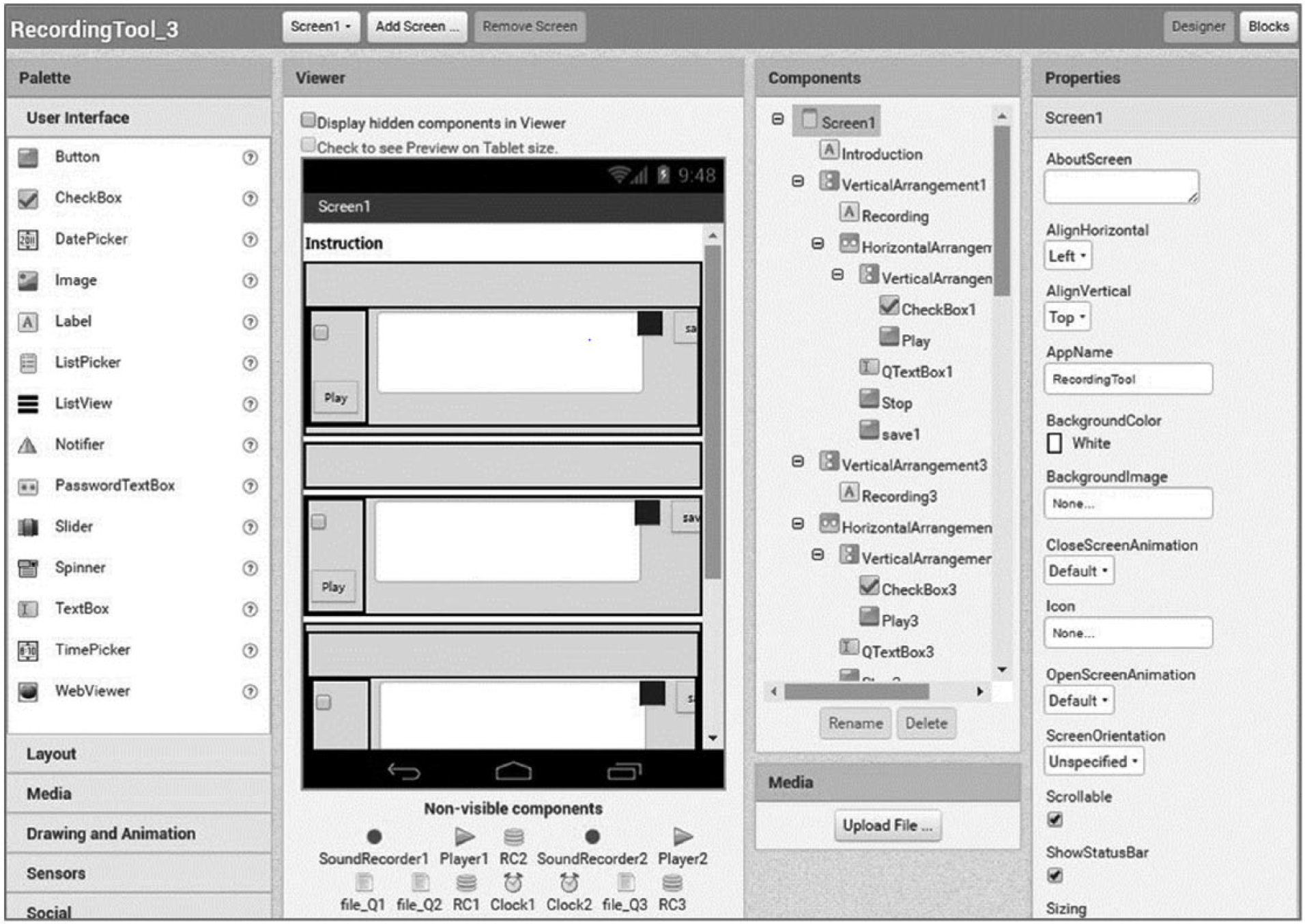
Designer page of interview tool.
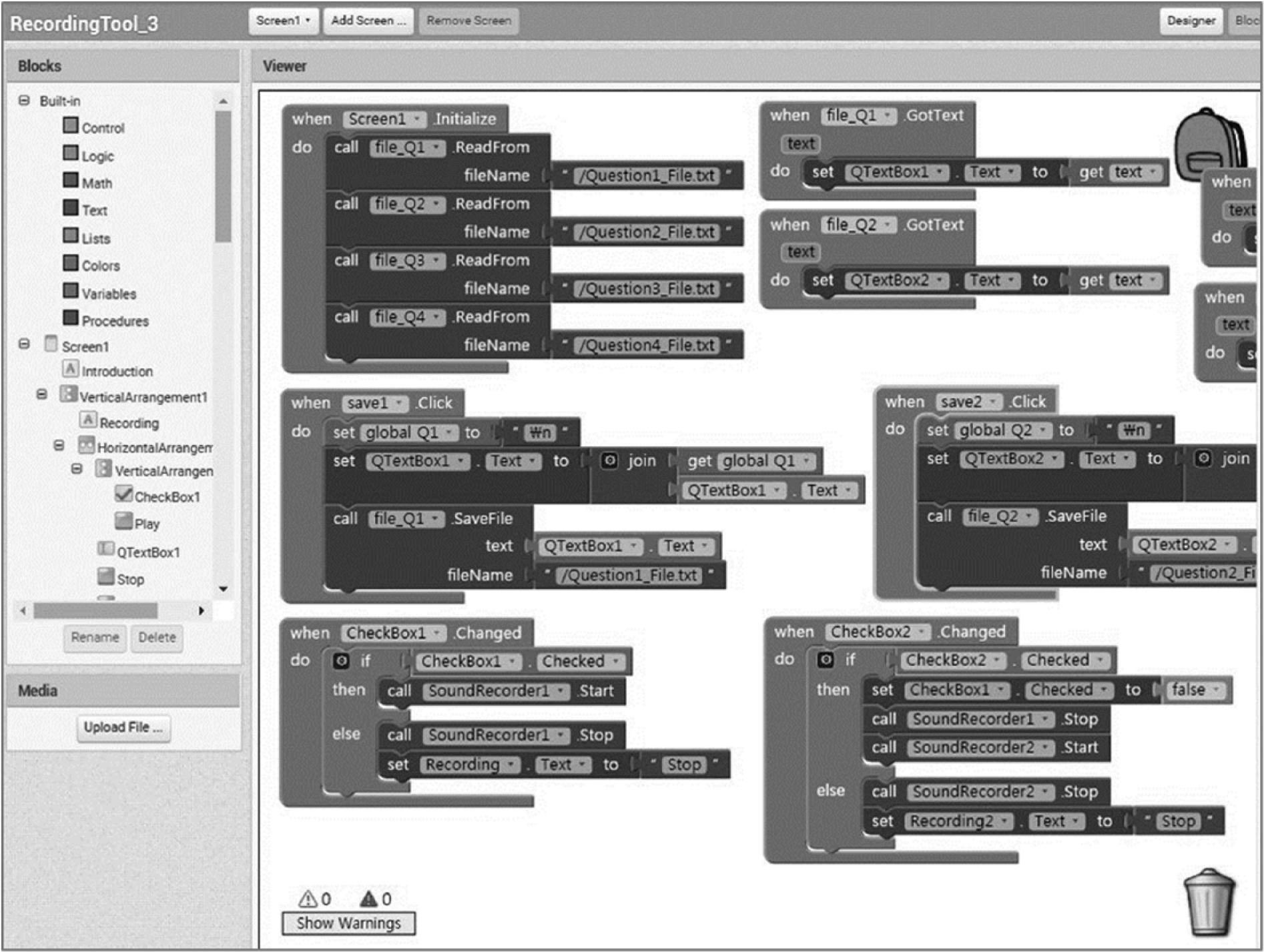
Blocks Editor page of interview tool.
Figures 1 and 2 are examples of how Do designed the interview tool with App Inventor, and Figures 3 and 4 are examples of how he designed the observation tool. Figure 1 is a screenshot of the interview tool Designer page. Do moved blocks from one area of the screen to another to determine specific functions to include in the program. For example, Do created checkboxes that the user can mark, and placed a textbox next to each checkbox. In each textbox, users are able to type their interview question. Do also made the blue box which functioned as a button to stop the recording, and also created the “Save” and “Play” buttons. He replicated the above program functions for each question in his interview.

Designer page of observation tool.

Blocks Editor page of observation tool.
Figure 2 shows a Blocks Editor page for the interview tool. By considering each block’s characteristic, Do created several functions for interviewing. Do created a function where users could write and save interview questions. He programmed the function so that when the user checks a particular checkbox, the application will start to record voice. He assembled “if Checkbox 1 Checked” block and “call SoundRecorder1 Start” block for designing this function. And he made a function that when the user clicks the blue button, the application will stop recording and save the file according to a number of interview questions. In addition, if the user checks another checkbox without clicking blue box, ongoing recording work will be stopped and saved automatically, and another recording work will start.
Figure 3 is a screenshot of the Designer page for the observation tool. Do created labels for “Jotting” and “Reflection” and placed textboxes next to those labels. Do also made a “Submit” button. He designed the tool so that all submitted observation notes will be listed at the bottom of the screen. Do moved blocks from one area of the screen to another to determine specific function.
Figure 4 shows a Blocks Editor page for the observation tool. By assembling the blocks, Do created a function where users could quickly jot notes of the observed scene. He programmed the tool so that when the user submits his or her observation record, the application will add a timestamp to the jotting. In addition, he designed the application so that all jottings are deleted on the cell phone screen when he clicked “Jotting List Reset” button.
Step 4. Implementation: Using developed application for qualitative data collection
In relation to using the Interview Tool, researchers can record their interview questions before conducting an interview. There is a checkbox next to each interview question that the researcher can mark when they ask the question to a participant during an interview. When the researcher marks the checkbox, the application accesses the recording feature on the cell phone and records the audio for each question. When the researcher marks the checkbox for the next question, the recording for the first question ends and the recording for the next question begins. Therefore, the researcher can keep track of which questions he or she addressed during an interview and store and sort the audio interview recordings on his or her cell phone. This allows the researcher to listen to recorded participant responses that are in .3GP file format for each question when he or she clicks the “play” button. Figure 5 shows a sample screen of the Interview Tool.
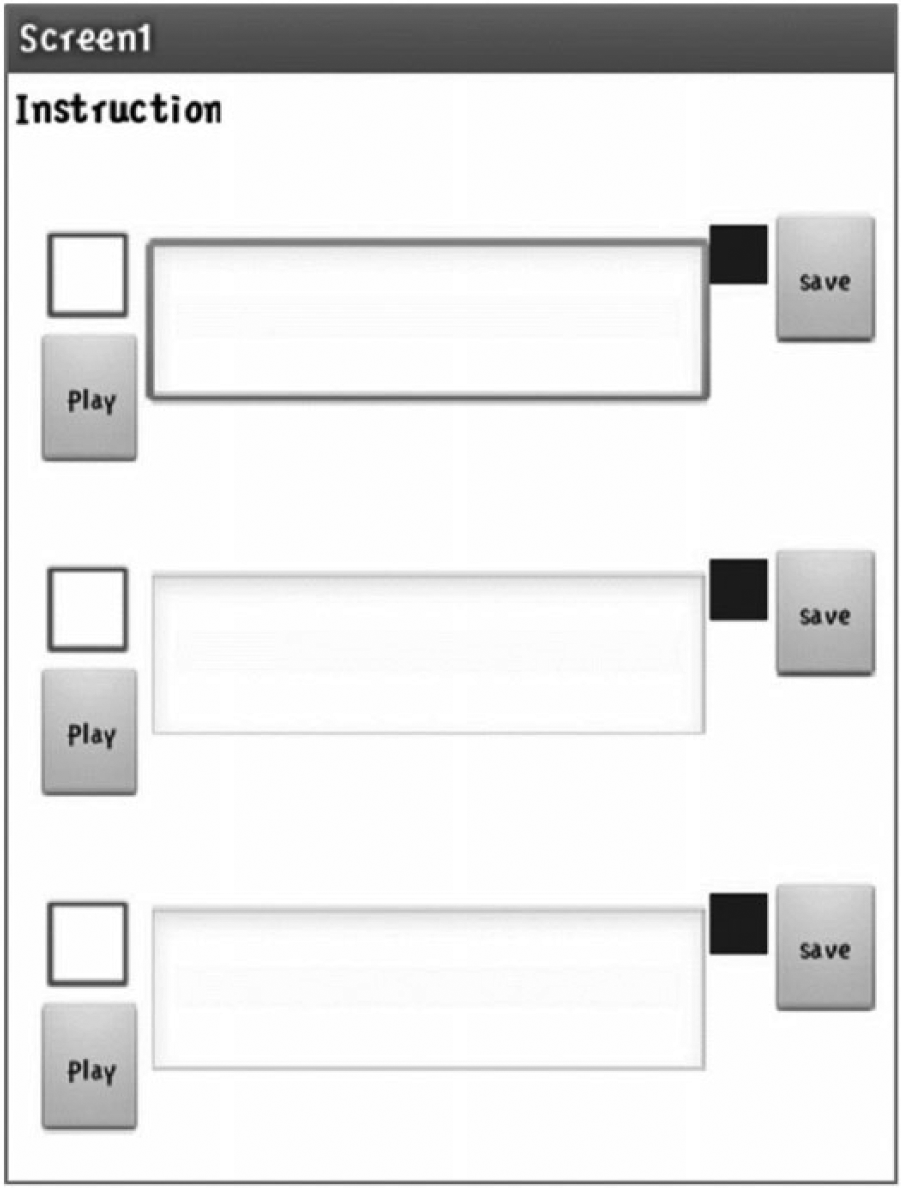
Interview tool.
The observation tool consists of two pages: Observation Headnote and Conducting Observation (see Figure 6). With Observation Headnote, researchers can write down initial impressions, key events, significance of others, interaction patterns, and social scenes. Each component of the observation headnote records what the researcher types and is automatically saved in a Google fusion table. Google Fusion Table is an experimental data visualization web application to gather, visualize, and share data tables (“About Fusion Tables–Fusion Tables Help,” 2016). Researchers can collaborate with others using observation headnotes through a Google Fusion Table. On the Conducting Observation page, researchers can type what they observed in jotting box and type their reflections about their observation in the reflection box, which are both textboxes. Every jotting and reflection that researchers enter will be listed on the bottom of the screen with a timestamp. In addition, all observation records that researchers submit are automatically saved on the phone as a text file. The TXT file format is easy to manage, edit, and transfer, particularly to QDAS such as ATLAS.ti and NVivo. This means that researchers can import files into QDAS without any format conversion issues.

Observation headnote and conducting observation pages.
Step 5. Evaluation
With the two digital tools Do developed, he conducted interviews and an observation with the research question: How do students use their cell phone when studying at the library?
Do found that during interviews he did not skip any question by marking them on his cell phone as he asked his questions. Do was also able to save participant responses for each question as separate files. This function allowed him to manage audio files as separate interview question files, and it made it easier for him to transcribe and manage the data later. Do was able to rely on his cell phone alone and stay on track with his interview. This led him to enjoy the interview process without awkward pauses.
In terms of the observation, the tool that Do developed automatically recorded the time that he entered an observation note. This eliminated the need to write down the time, and he was able to focus on recording the observed events. In addition, he was able to record his observation electronically by taking notes on his cell phone. This eliminated the need to transfer notes from a written form to digital format. He was also able to keep up with and manage his observation record without worrying about losing his written notes. He also felt that he was able to better conduct his observations without being noticed by participants.
Discussion
In this article, we introduced the first author’s experience developing two cell phone applications to address challenges he faced during qualitative data collection in an introductory course. We shared Do’s experience with the intention to demonstrate how as qualitative researchers we can create our own tools rather than solely rely on existing tools that at times do not meet our methodological needs and require us to modify our methods to fit the tool. From Do’s design and development experiences, there were several lessons we gained. First, while it may be time-consuming to design and develop a fully customized research tool, putting the time into developing such a tool ensures a good match between the tool and the researcher’s needs. Design involves problem solving (Buchanan, 1992), and by creating his own tools, Do attempted to solve problems he previously experienced related to data collection.
As we discussed earlier, qualitative research welcomes diversity in approaches and methods (Flick, 2015; Frost et al., 2010). This provides researchers a safe space to engage in investigations through a variety of methods in different situations. At the same time, when diversity in research and explorations of new methods are encouraged, it is likely that researchers uncover unique challenges and design problems that others have not encountered. One way to address these challenges is by creating digital tools. Researchers may find that tools that they develop on their own would be more usable than third party–developed tools.
Another lesson we learned was that a researcher can be a designer if that person understands design, its context, and researcher and participant needs. Design decisions are made based on specific contextual situations (Jonassen, 2011). To understand contextual issues, target user participation in design is critical to ensure that a designed product will meet user needs (Smith-Jackson & Williges, 2001; Vines, Clarke, Wright, McCarthy, & Olivier, 2013; Yang, Xue, Fang, & Tang, 2012). Researchers can start by reflecting on the research environment and the conditions that a developed tool will be used, how a new tool will be used, and what functions of a tool will likely support his or her research, which, in many cases, a qualitative researcher already has a good understanding.
Another lesson we learned was about how application development has become much more accessible to the public, and qualitative researchers can become competent application developers themselves. Developing cell phone applications no longer requires a professional level knowledge and skills in programming. Do developed his cell phone applications by reading and becoming familiar with design theories, and he learned how to develop cell phone applications mostly from trial and error. By relying on App Inventor, programming became accessible to Do, and we believe that other qualitative researchers can develop their own research tools that meet the needs of their future investigations.
In conclusion, cell phone application development is no longer a complex task reserved for computer scientists. With progress in application design and development technologies, there are many programs that assist ordinary people to create their own applications. We find that between the existing functions included as standard features in modern smart phones and an individual’s ability to develop his or her own applications, there is great potential in cell phones serving as a digital tool for qualitative research.
Footnotes
Declaration of Conflicting Interests
The authors declared no potential conflicts of interest with respect to the research, authorship, and/or publication of this article.
Funding
The authors received no financial support for the research, authorship, and/or publication of this article.