



Abstract
The growing complexity of radiologic examinations and interventional procedures requires frequent exchange of knowledge. Consequently a simple way to share and discuss patient images between radiology experts and with colleagues from other medical disciplines is needed. Aims of this work were the development and initial performance evaluation of a fast and user friendly, platform independent teleconsultation system for medical imaging. A local back end system receives DICOM images and generates anonymized JPEG files that are uploaded to an internet webserver. The front end running on that webserver comprises an image viewer with a specially developed pointer element for indicating findings to collaborative partners. The front end that uses only standard web technologies works on a variety of different platforms, mobile devices and desktop computers. Images can be accessed by simply calling up a special internet address in a web browser that may be exchanged between users (e.g. via email). A speed evaluation of the system showed good results: For example the preparation and upload of a standard head CT took less than 21 seconds. The data volume of the same series and the viewer application could be transferred to a mobile phone in less than 42 seconds via a UMTS network or in less than 3 seconds via a HSPA network. The presented system with its minimal hard- and software requirements, its simplicity and platform independence might be a promising tool in the increasingly important area of teleconsultation.
Introduction
The advances of digitalization in radiology in recent years have led to an increasing impact of teleradiological applications. Teleradiology reporting of emergency examinations after hours has become every day routine at many hospitals. An emerging application area of teleradiology is obtaining of a second, expert opinion in uncertain or rare patient cases (teleconsultation). Due to the increasing specialization in radiology with its complex imaging methods and interventional possibilities this field will certainly gain further importance. Especially, smaller hospitals cannot provide all radiologic (sub-)specializations at their highest levels and have to gather expert information from specialized centers. Apart from that, there is the demand for teleconsultation in interdisciplinary collaboration such as when it comes to finding the proper therapy especially in time critical patient cases (e.g. interventional vs. surgical approach).
For these reasons there seems to be a great need for a fast and easy technical implementation to share patients' images and collaborate with remote colleagues. Up to now many radiologists seeking advice take screenshots of patients' images and send them to remote colleagues via email to seek a second opinion. Some authors have also proposed to use the built-in camera of mobile phones and the Multimedia Messaging Service (MMS) to transmit key images for further assessment.1,2 However, we believe that in order to fully understand a patient case and to formulate a diagnosis in cross sectional imaging the review of multiple images, preferably in form of scrollable image series, is essential.
The already established applications of teleradiology usually operate via dedicated data transfer lines or virtual private networks (VPN) between fixed partners, that need time and effort to set up and maintain. Recently, new technical developments with fast wireless networks, mobile devices like tablet computers or smartphones and new internet technologies have fundamentally changed the way people think and work. This influence also demands new solutions and more flexibility in radiologic workflows. A current approach of the Task Group for Information Technology (@GIT) of the Radiological Society of Germany proposes DICOM e-mail (Digital Imaging and Communications in Medicine) as a promising interoperable and manufacturer-independent standard protocol in teleradiology. 3 Furthermore, many PACS (Picture Archiving and Communication System) vendors have come up with proprietary systems to access image data from almost everywhere via the internet using mobile devices.
Many studies have already shown that image evaluation on mobile devices is feasible with an accuracy comparable to PACS workstations.1,2,4–14 Apart from that there have also been studies that show promising results in the design and evaluation of solutions dedicated to the area of teleconsultation or teleconferencing.15–20 However, we did not find a commercial product that was low-cost, easy to implement, platform independent, and that could be readily used to share and discuss patient images with distant colleagues.
List of desirable features for our application and the respective methods that were used.

Methods
Our proposed system consists of two components: a local back end for preparing and uploading the images to an external webserver and a user front end acting as an image viewer and collaborative tool. The whole development process took around six months and was carried out by the authors (radiologists) under the special guidance of the first author (FJK). No other specialties were involved. The architecture of the system is visualized in Figure 1.
System architecture. A modality or PACS console sends DICOM-images to the local back end. The images are anonymized, JPEG-compressed and uploaded to a remote webserver via sFTP (secure File Transfer Protocol) running the front end which is accessible via HTTP (Hypertext Transfer Protocol) by desktop computers or mobile devices using a standard web browser.
In order to keep the costs as low as possible, we used open source software to build our system. The scripting language PHP (Hypertext Preprocessor, originally Personal Home Page) performs the necessary operations on the DICOM images and the file transfers. The DICOM toolkit “DCMTK” 21 developed by the OFFIS computer science institute (Oldenburg, Germany) provided several functions for receiving and processing the DICOM images. The back end scripts run without a http server. The front end uses the Apache http server in its version 2.4 (The Apache Software Foundation, Delaware, USA).
Back end
Images can be sent to the local back end from a modality or from a PACS using the standard DICOM push command “C-STORE”. The OFFIS DICOM toolkit contains the “storescp” application that implements a Service Class Provider for the Storage Service Class. It listens on a specific TCP/IP (Transmission Control Protocol / Internet Protocol) port for incoming association requests from a Storage Service Class User and can receive both DICOM images and other DICOM composite objects. Another way to export images to the system is saving DICOM files in a predefined directory which can either be located on the same computer acting as a server or on any other computer within the network to which the server has access. Most PACS vendors provide a function to export images to the file system in DICOM format. The PACS used at our department (syngo.plaza, Siemens, Erlangen, Germany) allows the export of single images as well as parts of series or whole series. A script continuously monitors the predefined directory. The received images (via DICOM push or the import folder) are passed to an import-script. This extracts the patient's ID, gender and birthdate as well as the image's acquisition date, series number, study accession number, study description and the modality. Apart from that the DICOM tag “image orientation” is extracted for the creation of orientation labels in the front end. The import script then creates an anonymized, compressed JPEG (Joint Photographic Experts Group) image at the original resolution of the DICOM image in 8-bit greyscale. The advantage of plain JPEG files over (compressed) DICOM files is that they can be supplied to the browser directly without any additional conversion steps on the front end. The JPEG compression quality can be adjusted separately for each modality with percent values between 0 (lowest quality, highest compression) and 100 (highest quality, lowest compression). We currently use the values of 50 for projectional radiography and fluoroscopy and 100 for all other modalities. Those values were determined empirically. We created image series in different compression levels and chose the highest compression rate that subjectively provided sufficient image quality while keeping the file size as low as possible.
A small thumbnail image for each series is also created. After that, the local import script establishes a secure FTP connection to a predefined remote webserver on the internet and uploads the anonymized images to a special subdirectory structure on the remote server. We use a freely available open source library (phpseclib) to perform the upload and the remote file system operations. 22 The study's acquisition date, accession number, modality and the series number as well as the patient's ID are used as folder names. The remaining extracted information (e.g. study description, patient's gender and the calculated age) is stored in plain text files inside the subdirectory structure in the JavaScript Object Notation format (JSON). Therefore no relational database system is needed in order to store the metadata.
To evaluate the speed of the back end and the upload time to the external webserver, we measured the time that passed between the start of a DICOM export out of our PACS (syngo.plaza, Siemens, Erlangen, Germany) until all of the images of a certain series were accessible on the remote webserver using a stopwatch. We used axial DICOM images of a computed tomography (CT) of the head (27 images), a CT of the neck (96 images) and a combined thoraco-abdominal CT (135 images). Those examinations represent typical use cases for the system at our hospital (e.g. during night shifts or on weekends). Each testing was performed 10 times. Mean values and standard deviations (SD) were calculated. Our local network allowed a download and an upload speed of 200 megabits per second (mbit/s).
Front end
The user front end is built up as a pure web based application. With the use of PHP and HTML (Hypertext Markup Language) in its latest revision 5 in combination with the other standard internet technologies CSS (Cascading Style Sheets) and the programming language JavaScript interactive websites that function like desktop applications can be created. Additional JavaScript libraries that were used are the jQuery 23 and jQuery mobile 24 frameworks in order to simplify the client-side scripting and make the application compatible with a wide variety of smartphones and tablet computers, especially with the currently leading mobile operating systems Android and iOS. The Hammer.js library 25 was used to implement the multi-touch gestures on mobile devices.
The front end analyzes the directory structure on the webserver and extracts the metadata contained in the folder names and text files to generate a list of the available studies and series sorted by date in a descending order. A click / tap on a study opens a dropdown menu with thumbnails and further information about the contained series. By choosing one of the series, the user is referred to another webpage that contains the actual image viewer application (Figure 2).
Workflow. Step 1 (Overview of all the uploaded studies): The user opens the front end's URL in a web browser and selects one of the series - Step 2 (Image viewer): The URL referring to the study can be sent to a remote colleague using the email function provided in the left corner menu or by simply copying the URL from the browser's address bar - Step 3 (Recipient's email client): The recipient of the inquiry simply follows the URL contained in the email. - Step 4 (Recipient's web browser): Instant access to the images using a standard mobile web browser.
The image viewer preloads the anonymized JPEG images of a particular series and places them into an image stack that can be scrolled through similar to a real PACS console. Further functions that we developed provide methods to zoom and move the image stack across the screen as well as to navigate between different series and studies of a certain patient. The viewer uses most of the screen to display the image stack as large as possible while making sure that it always fits into the screen of the used device, be it a desktop computer, a tablet or a smartphone. The stored metadata is displayed in the left right and right upper corner of the screen similar to a PACS console. On a mobile device the image stack can be scrolled through by simply dragging the finger up and down on the screen. Multitouch gestures were implemented to zoom (pinch with two fingers) or move the image stack across the screen (drag with two fingers). The user does not have to wait until all of the images are loaded but can start scrolling through the already loaded images immediately while the following images are loaded in the background. A double tap on the image resets the view. Swipe gestures to the left and right bring up the previous or next series in a study. The mouse and its wheel can be used to scroll through the images on a desktop computer.
Two small buttons in the upper corners of the screen reveal further functions. The patient folder button (right icon) gives an overview of other series and available studies of the same patient. The menu button (left icon) contains links back to the list of all examinations and an item to activate / deactivate the collaborative mode. A function to send an email with the URL referring to the study is also provided. As an alternative to that the URL can also simply be copied out of the address bar of the web browser and sent to a remote partner using a dedicated email client or via other messaging services.
In order to realize collaborative functions a pointer element was designed that can be moved around the screen freely. The pointer feature simply comprises a small image of an arrow embedded into a HTML DIV-container that can be repositioned by dragging it with a touch gesture on mobile devices or with the mouse on a desktop. The position (x, y and image number) of the DIV-container is stored in a plain text file (JSON format) in the same directory as the images on the webserver. When a user turns on the collaborative mode, the front end repeatedly checks for position updates using client-side asynchronous JavaScript and JSON (AJAJ) which occurs in the background without interfering with the display and behavior of the application. The pointer element can be brought up by holding down the finger / mouse button for around a second. It can then be dragged across the screen and a collaborative partner will always see it in the identical position (Figure 3). In a study that contains several images the pointer can be moved to a different image by again holding the finger / mouse button down on the desired new image.
While both users are in collaborative mode a pointer element can be brought up and moved around the screen. The pointer's movement is synchronous on both devices.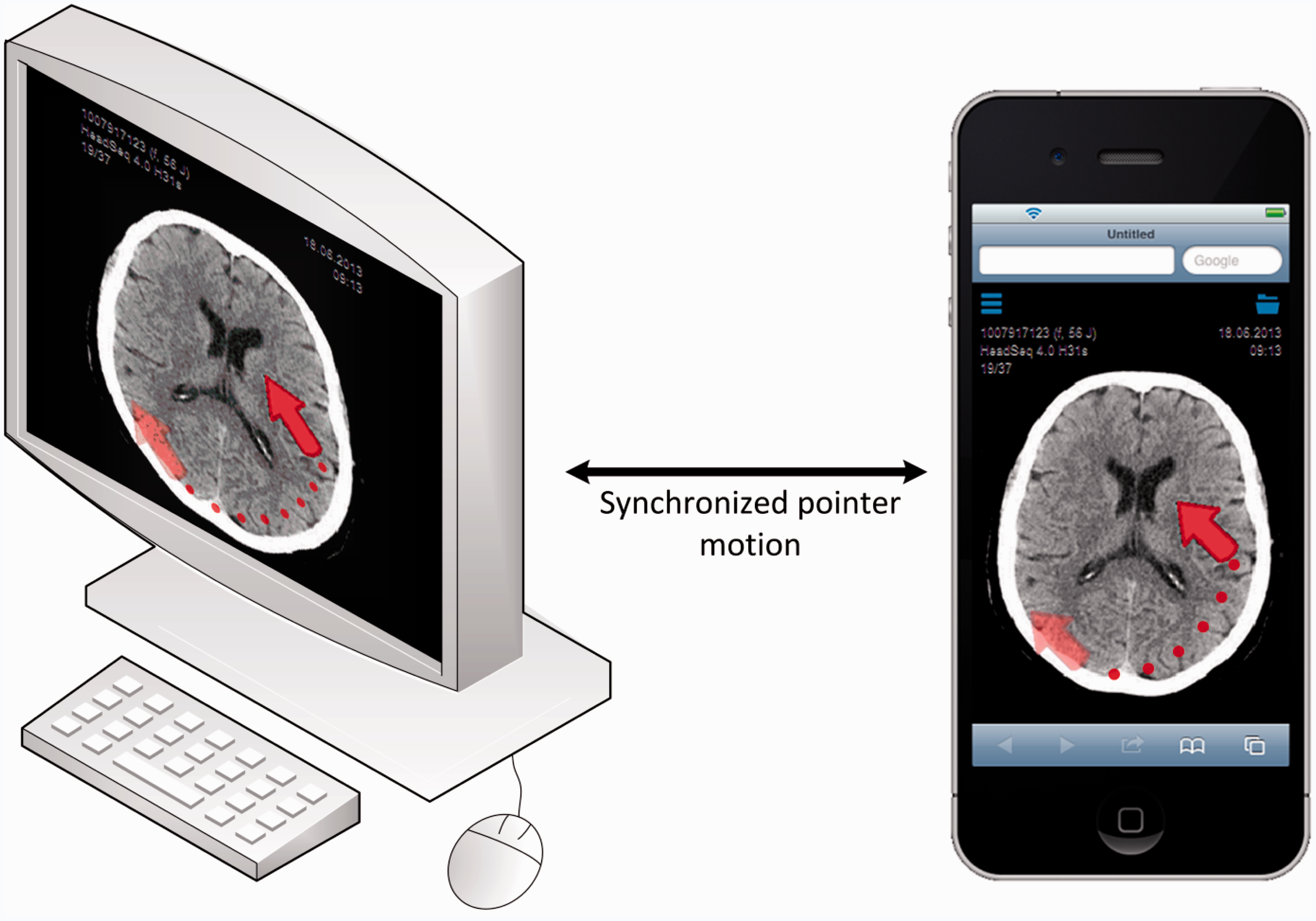
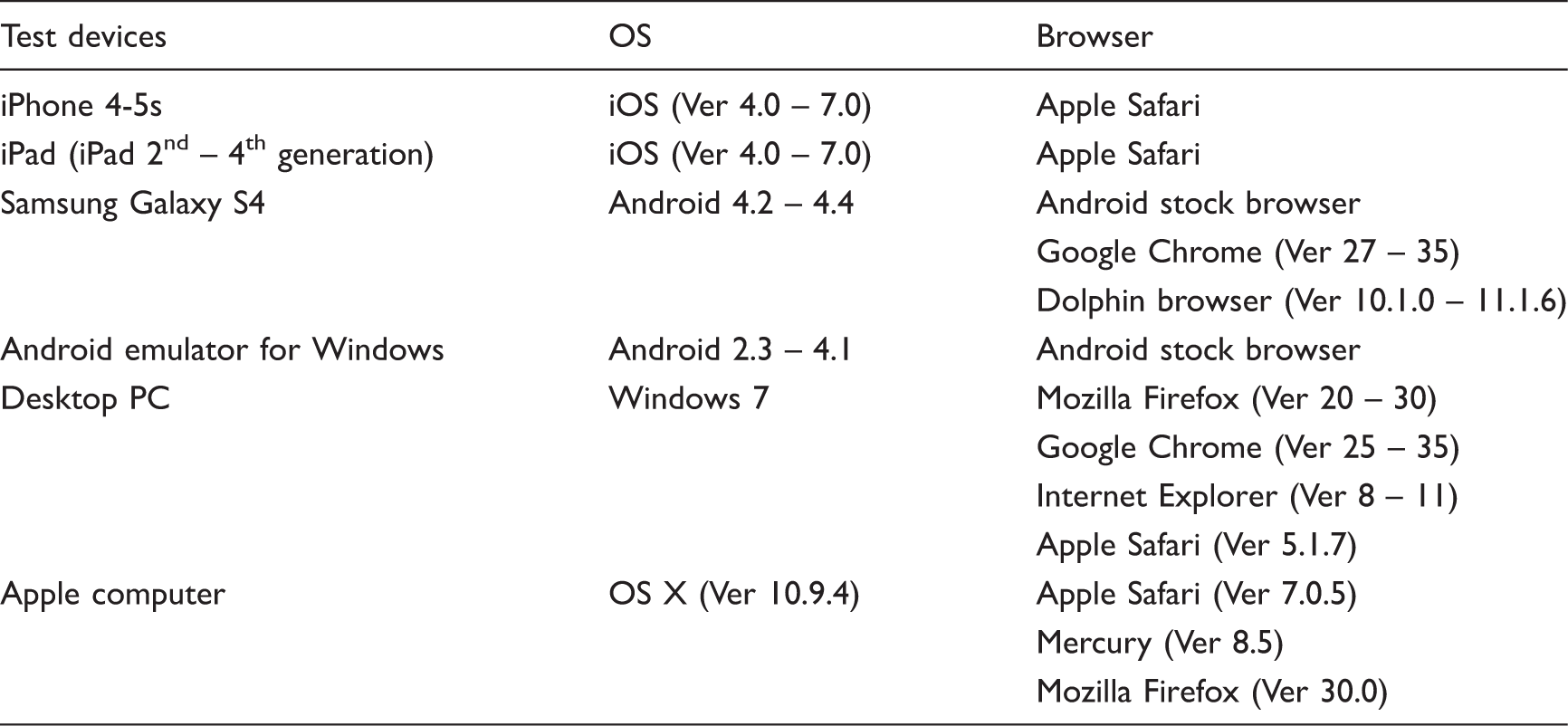
Tested devices, operating systems (OS) and browsers. Ver – Version.
To evaluate access times to various imaging studies, the user front end was tested at different network speeds: ADSL (Asymmetric Digital Subscriber Line), HSPA (High Speed Packet Access), UMTS (Universal Mobile Telecommunications System) and EDGE (Enhanced Data Rates for GSM Evolution) using the Network Emulator for Windows Toolkit in its Version 2.1 (Microsoft, Redmond, Washington, USA) on a standard desktop PC (Microsoft Windows 7 32 Bit; Intel Core 2 Duo @ 1,2 GHz; 4 GB RAM). For representative testing the same studies that were uploaded for the back end evaluation were chosen for the front end evaluation: axial slices of a computed tomography (CT) of the head (27 images), a CT of the neck (96 images) and a combined thoraco-abdominal CT (135 images). Page loading times were assessed using the developer tools built into Google's Chrome browser Version 35 (Google Inc., Mountain view, USA) which indicate the loading times accurately up to milliseconds. The browser's cache was emptied before each measurement. Each testing was performed 10 times.
Apart from this quantitative evaluation we tested the system over a time period of 6 months in actual cases and uploaded 45 different examinations (CT, magnetic resonance imaging and angiography) for various teleconsultation partners, e.g. referring physicians or radiology colleagues.
Results
Back end
The back end system was successfully integrated in our local environment and runs on a standard desktop PC (Intel I5-2400 @ 3.1 GHz with 4 GB of RAM) with Windows 7 (Microsoft, Redmond, Washington, USA) as operating system.
Quantitative testing of the back end system for different computed tomography (CT) examinations. MB - Megabytes.

Front end
The front end was installed on the same webserver that hosts our department's website. It can be accessed with a web browser on a desktop computer or on different mobile devices by simply calling up the URL (Uniform Resource Locator) referring to the directory in which the front end has been installed. A demo of the front end with several example cases can be found at http://idr.med.uni-erlangen.de/telco.
The different functions of our user front end were successfully tested on different platforms and browsers (Table 2). Concerning mobile devices the system was fully operative on iPhones and iPads using the Apple's browser safari as well as on Android based systems using the stock browser or different third party browsers. The system was also successfully tested on desktop computers running Windows 7 and Mac OS X as operating systems each with several different browsers.
During the 6 months' time of our preliminary testing the system showed no stability problems: All of the images were successfully loaded and were visually intact. The image scrolling and manipulation functions (zoom / move), the navigation between the series as well as the collaborative mode using the shared pointer could be successfully used.
Quantitative testing of the user front end accessing different computed tomography (CT) examinations at various network speeds. MB - Megabytes. Mbit/s – megabits per second. Kbit/s – kilobits per second.
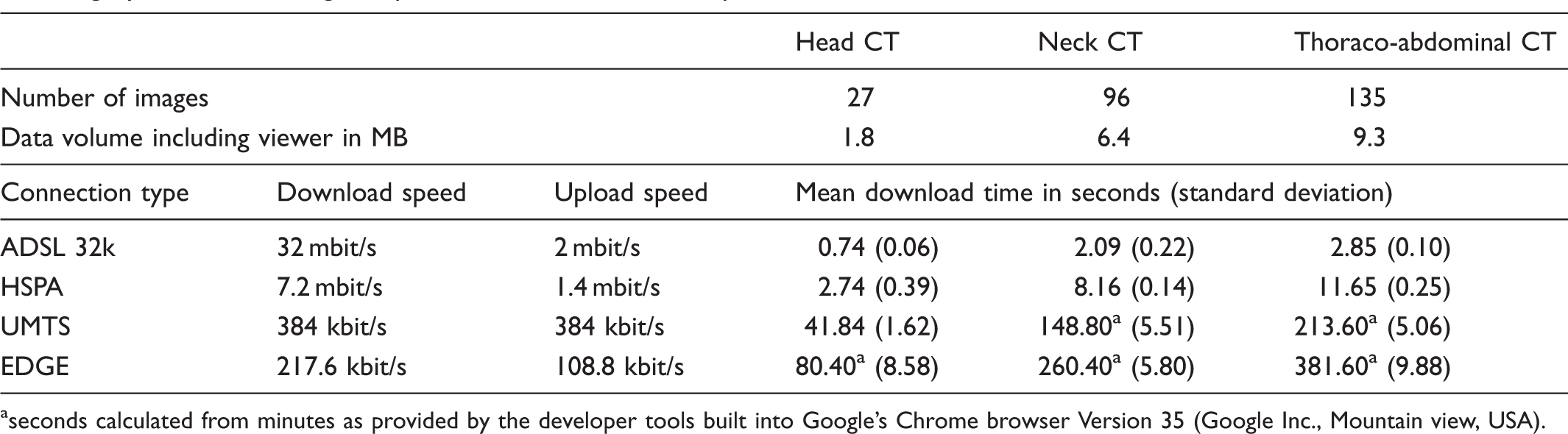
seconds calculated from minutes as provided by the developer tools built into Google's Chrome browser Version 35 (Google Inc., Mountain view, USA).
Discussion
There is an increasing need for an easy way to quickly exchange medical images between radiology experts and to share them with other medical disciplines in order to optimize diagnostics and patient care. This work presents the design and development of a new teleconsultation system for radiology.
There are lots of existing solutions to access patient images using mobile devices over the internet, most of them being provided by the respective PACS vendor, e.g. syngo.via WebViewer (Siemens, Erlangen, Germany), Aquarius iNtuition Mobile (TeraRecon, USA), ResolutionMD mobile (Calgary Scientific, Canada) or Aycan mobile (Aycan, Germany). Those are often implemented as (“apps”) that have to be downloaded and installed on the different devices and operating systems. The fact that our system is built up as a pure web based application ensures its independence of a certain platform and makes the installation of additional software (image viewer) unnecessary. As shown in our evaluation the images can be quickly accessed on mobile devices or desktop computers using standard web browsers by simply following a URL that can be exchanged via email, SMS (Short Message Service) or any other messaging service.
The time needed to download a patient study is of course strongly dependent on the number and file size of the respective images and of the users' network. However as our simulation of different network types revealed the compressed images and the lightweight system architecture make quite short loading times possible. For example the data volume of a standard head CT series (27 JPEG images) and the viewer application, which is lower than 2 MB in total, can be transferred to a mobile phone via a UMTS network in less than 42 seconds or via a HSPA network in less than 3 seconds. Using an ADSL 32k connection a complete axial series of a thoraco-abdominal CT can be accessed in less than 3 seconds.
The created JPEG images are of reduced bit depth (8-bit greyscale) and therefore window / center values cannot be adjusted directly. Different window settings and reconstructions (e.g. a sagittal bone window of the spine) have to be uploaded to the system separately and are then available via the patient folder button. The quality of the images should be better or at least comparable to paper copies which are also often sent to colleagues or referring physicians. Several studies that have compared readings on mobile devices with those on PACS workstations support this theory. For example, Filip et al. could not find any differences in the quality of computed tomography / magnetic resonance images in compressed JPEG format viewed on a smartphone screen compared to the original images on a PACS workstation.26,27 Nevertheless, our system may of course never be used for definite diagnosis which has to be reserved to dedicated PACS workstations that work with the original DICOM data.
Besides the need for an installation of dedicated viewing applications existing solutions for mobile image access usually demand a user name and password to log into their dedicated servers. In our opinion the recipient of a consultation inquiry should not have to install any additional software or perform complex login procedures to get access to the images.
Most of the aforementioned apps provide plenty of functions for measurements and reconstructions (3D, maximum intensity projection, etc.). We believe that most of these elaborate features are not mandatory for the remote evaluation of image data as a second opinion. Unfortunately, only few existing systems offer interactive tools that can be used for live teleconsultation purposes (e.g. ResolutionMD mobile). We decided to limit the functionality of our front end image viewer to a minimum in order to keep it simple and intuitive. Touch gestures that should be well known to most users from other applications were implemented to perform the most important tasks like scrolling through the image stack, zooming and moving it around as well as to navigate between the series of a study. The specially designed pointer element can be utilized to indicate certain findings to a collaborative partner and therefore enables a real-time interactive teleconsultation. A live voice connection can be realized by simply using the telephone functionality or voice over IP applications of a mobile device.
The hard- and software requirements of the proposed system concerning the existing IT infrastructure are minimal. In order to keep the set up as simple as possible we did not use a dedicated DICOM server like the Web Access to DICOM Objects service (WADO) which in principle sets a solid approach to implementing web viewing in radiology. We wanted to leave our secure internal infrastructure separated without access from the internet. The internal back end which performs the anonymization and the image upload can be installed on almost every storage device, even on portable hard drives, USB (Universal Serial Bus) flash drives or memory cards and runs on a standard desktop PC. In order to be able to push images from a modality or a PACS to the back end via DICOM C-STORE, certain changes to the local environment are necessary. However the images can also be imported directly from the file system using the import folder which may remove the need to reconfigure modalities or PACS. The front end with the image viewer module can be installed in a subdirectory on an internet accessible webserver of a low cost web hosting service with minimal requirements. PHP should be available as a scripting language on most webservers. The data is transferred via a secure FTP transmission. Since all of the metadata is stored in plain text files and in the folder names no relational database system is required.
As a limitation it has to be mentioned that the system's simplicity results in reduced image information and a minimized feature range. Concerning image quality we are aware that the image compression reduces the data volume that has to be transferred but might also influence the diagnostic value of the images. As explained the JPEG compression levels that we currently use are empirically determined and further studies should be conducted to determine evidence based compression rates and to evaluate the diagnostic performance of our system in general. Apart from that the integrity of the transferred images was only assessed visually and should be further evaluated. However the tool is not designed for final teleradiology reporting but is supposed to offer a low cost, easy and fast way to share and discuss images in the emerging area of teleconsultation.
Since we anonymize the images, the privacy protection of the patient's name and birthdate is ensured in principle. However there is the theoretical risk that internal patient identifiers or study accession numbers might be known to unauthorized persons. A solution to this could be the implementation of random or hashed identifiers. An additional password protection could further increase the system's security. Apart from that the user of the back end system has to make sure that no patient data is “burned” into the DICOM-images e.g. by ultrasound machines, in dosimetry records or by older modalities that might not fully comply with modern DICOM standards.
It has to be taken into account that concerning cost efficiency every system needs continuous maintenance and support which might raise further costs, even if the software components that were used are open source and therefore free. Finally it has to be mentioned that the regulations and legal conditions of the individual countries have to be respected. However, a thorough discussion of all potential legal issues that might derive from the use of a teleconsultation system like the one proposed would go beyond the scope of this paper.
In summary, regarding the desired requirements for an optimal teleconsultation system we believe that our proposed approach combines most of them to a practicable tool. As discussed we believe that its uniqueness does not derive from elaborate features but from its simplicity concerning the implementation and usability as well as from its platform independence. To our knowledge up to now there is no other system that makes interactive collaboration on a patient case as easy as sharing the link to any other interesting web page.
Footnotes
Acknowledgements
We thank the Editors of the Journal of Telemedicine and Telecare and those who reviewed this article.
Declaration of Conflicting Interests
The author(s) declared no potential conflicts of interest with respect to the research, authorship, and/or publication of this article.
Funding
The author(s) received no financial support for the research, authorship, and/or publication of this article.