




Abstract
In the current computer-aided architectural design education, students do not necessarily need to be taught to use more digital tools, but need to be introduced to the possibilities of designing their own digital tools. Designing the original tools with the assistance of educational-use environment for computational fluid dynamics programming improves the capability of the students to estimate the flows around architectures based on the mathematical background and the actual program. The authors have developed Educational Library for Fluid as an educational-use environment for computational fluid dynamics programming and ran the workshop where the students majoring in computer-aided architectural design tried to design computational fluid dynamics tools with Educational Library for Fluid. In this article, the details of Educational Library for Fluid and the results of the workshop are being reported. In addition, the key points of computational fluid dynamics education that the authors learned through the experience of the workshop are shared.
Keywords
Introduction
In the current computer-aided architectural design (CAAD) education, it is necessary to enhance the architects with the computational insight, but not to enhance the skilled operators with computer technologies.1,2 The computational insight is a capability to estimate algorithms forming optimized architectures based on a structural engineering perspective. To develop this capability, an educational approach of designing original tools (hereinafter called self-designing) is effective for students majoring in CAAD.3,4 For example, Aish, 5 who noted this approach as “learning by doing,” developed an educational-use parametric modeling library, DesignScript, to assist self-designing.
On the other hand, students hardly attempt to design their original computational fluid dynamics (CFD) tools. This is due to the fact that CFD programming environment is insufficient. Professional-use CFD software is widely accepted and is effective for students to build up practical experiences. The educational examples include cases using Autodesk Vasari (the validity expired on 31 May 2015), Ecotect and ANSYS Fluent.6–8 With the use of these professional-use CFD software, students can visualize easily the flows around the various kinds of buildings without scripting. When students repeat this visualization process many number of times, they can acquire the sensory insight on the flows. However, professional-use CFD software is too expensive for educational use, and its program source codes embedding numerical analysis and simulations are generally not disclosed. In addition, its Application Programming Interface (API) is also generally not disclosed, which makes it difficult for the students to design their own tools through modifications of this CFD software. Self-designing tools with the assistance of educational-use environment for CFD programming improve the capability of the students to estimate the flows around architectures based on the mathematical background and the actual program (hereinafter CFD insight).
Hence, the authors have developed Educational Library for Fluid (ELF) as an educational-use environment for CFD programming. The students can apply results of fluid simulations to their own projects through these four features; the first feature is to import a three-dimensional (3D) model of architectures and components as obstacles in fluid simulations; the second feature is to change velocity and density in a fluid field. It is important for the students to learn the concept of fields in order to acquire CFD insight; the third feature is to change modes of visualization. They include a fluid-particle (hereinafter particle) mode, a fluid-path (hereinafter curve) mode, and a fluid-body (hereinafter volume) mode which are expected to be applied to Form-Finding for organic architectures. On the other hand, first two modes are aimed to assist the students to understand flows, and the fourth feature is to export volume as a 3D model.
The authors ran a workshop where the students tried to design CFD tools themselves with the use of ELF. The outcomes from the workshop experience lead to the suggestion that the workshop with ELF is an effective way of enhancing CFD insight. In this article, the details of ELF and the results of the workshop are being reported. In addition, the key points of CFD education that the authors learned through the experience of the workshop are shared.
Educations on CFD for students majoring in CAAD
In the current CAAD education, it is necessary to enhance the architects with the computational insight, but not to enhance the skilled operators with computer technologies.1,2 For example, it was stated by Achim Menges and Sean Ahlquist that “the main challenge does not lie in mastering computational design techniques, rather in acculturating a mode of computational design thinking.” 9 Based on the perspectives mentioned above, the authors first refer to the education of CFD for students majoring in CAAD. Finally, the authors introduce the originality of this research.
Workshop for self-designing CFD tools
Through the geometry education in which students self-design tools, they learn the mathematical backgrounds and the algorithms for generating architectural forms. For example, Aish 5 mentioned the educational perspective with the use of an educational-use library, DesignScript, with which students can exercise parametric curve and surface modeling. Biao and Rong 10 reported on a workshop where the students succeeded in creating the tools implementing cellular automaton, genetic algorithm, and multi-agent system.
When it comes to CFD education, although workshops using professional-use CFD software have been reported,6,7 none of them were aimed at students to create their own CFD tools.
Educational-use environment for CFD programming
In the CAAD education, the students frequently use programming environment for self-designing tools. Educational examples using Processing11,12 as well as a set of Rhinoceros and Grasshopper as plug-in13,14 are being reported. Examples using Arduino are being reported as well as the case of hardware programming environment.15,16
On the other hand, the educational-use environment for CFD programming is not sufficient. The software which generates a free-form optimized surface based on wind loads is reported. 17 However, an object-defined software does not have enough room for the students to make creative modifications, which makes it difficult for them to self-design the tools. Therefore, it is fair to say that the object-defined software is not suitable for educational-use environment of CFD programming.
Originality of this research
As stated above, neither a workshop for self-designing CFD tools nor an educational-use environment of CFD programming has been reported so far. Therefore, the authors have developed an educational-use environment for CFD programming, ELF, and ran the workshop with this environment aimed for the students to design their original CFD tools. The outcomes from the experience consequently suggest that the workshop with ELF is suitable to enhance CFD insights. Based on this experience, the authors concluded a report on the key points regarding CFD educations for the students majoring in CAAD. The contributions of this research include developing ELF, developing the workshop for the students majoring in CAAD to verify the effectiveness of ELF, and reporting key points of CFD education for the students based on the experience of the workshop.
ELF
For developing ELF, Processing and toxiclibs 18 were used, both of which are widely accepted among the students majoring in CAAD. Toxiclibs is a graphic library with a large variety of algorithms. However, toxiclibs has no feature of fluid simulations (as of 30 July 2015). Therefore, the authors added Stable Fluid, 19 an algorithm for 3D incompressible fluid simulation, to toxiclibs. This Stable Fluid is used in the gaming industry to enable high-speed incompressible fluid simulations.
Importing
The students can convert a 3D model to obstacles against an incompressible fluid. For example, the script for importing the 3D model of the file designated sphere.stl as obstacles is described in the following: ELF.import(“sphere.stl”);
The sphere.stl has the 3D model data of a simple sphere. As ELF applies a lattice model, surfaces tend to be voxelized. The examples in this chapter are based on the conditions of 20 × 20 × 20 lattices.
Changing velocity and density in the fluid field
To help the students have the CFD insight, the authors have developed the script to assist the education on lattice model, velocity field (vector field), and density field (scalar field). These scripts are explained as follows.
The students can set the velocity at an arbitrary position in a 3D space. In order to set the position, the students test indices of lattices. These repeated actions of testing indices are effective for the students to learn lattice models as well as a velocity field. The script for setting the velocity (Vx, Vy, Vz) at the position of lattice (i, j, k) is described as follows: ELF.addVelocity(i,j,k,Vx,Vy,Vz);
Particles are moving according to the velocity field obtained from Stable Fluid algorithm. When a particle exists in the lattice whose velocity is

A script for changing constant a in the Equation (1) is described:
ELF.changeParticleAccelerationConstant(a);
As a value of a is close to 0, the average of the velocities in its neighboring lattices has stronger impact on the velocity of the particle. In contrast, as the value of a is close to 1, the average of the velocities has weaker impact on it. The students can learn the velocity fields through the observations of various particle movements changed by the values of a.
In addition, they can set the density at an arbitrary position in the 3D space. The script for setting the density d at the position of the lattice (i, j, k) is described: ELF.addDensity(i,j,k,d);
In case of eliminating the impact by a velocity field, the density diffuses into neighbor lattices as if ink were dropped in a pool. Through the observations of this diffusion, students can learn the density field. Figure 1 shows the flow under the conditions of density d = 15 and velocity (0, 1, 0) using the features of changing velocity and density in the fluid field. In Figure 1, white cubes stand for the obstacles, while directions and colors of cones stand for velocity and density, respectively.
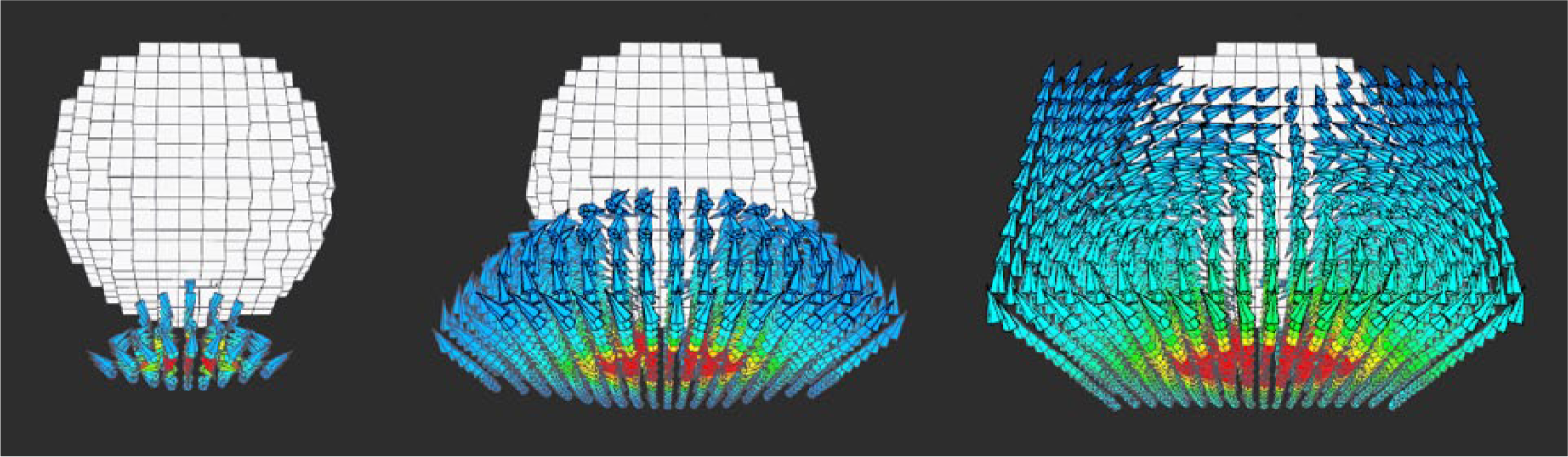
Sequential images of the flows around a sphere when velocity is (0, 1, 0) and density is 15. White cubes are the obstacles. Directions and colors of the cones are the velocity and the density.
Changing visualization modes
The authors implemented particle and curve modes for visualization modes to assist the students to understand the flows. The script for enabling a curve mode is described:
ELF.enableVisualizationMode(CURVE);
Joining the particles creates the curves. Multiple visualization modes can co-exist. For example, the following are scripts for allowing particle and volume modes, respectively, to co-exist:
ELF.enableVisualizationMode(PARTICLE); ELF.enableVisualizationMode(VOLUME);
The authors introduced Marching Cubes algorithm 20 for implementing volume, expecting to apply Form-Finding for organic architectures. This algorithm converts the volume data to the polygon data. The authors calculated the volume data from particles whose movements are influenced by the velocity field. The volume data Vijk in the lattice (i, j, k) were derived with the following equation. In this case, the density is dijk and the number of particles in the lattice is Nijk

The students can change the threshold value in Marching Cubes algorithm with the following script: ELF.changeThreshold(threshold);
As the threshold value becomes smaller, the volume becomes larger. Figure 2 shows visualization examples of particle, curve, and volume mode.

Visualization modes in Educational Library for Fluid. Left: particle mode. Middle: curve mode. Right: volume mode.
Exporting
The students can export volume as the 3D space (STereoLithography (STL) format) with the following script: ELF.export(“file.stl”);
With this feature, the students majoring in CAAD can import volume to variety of software applications that they normally use.
Workshop
The workshop was a part of a studio challenge for 3 months. The objective of this studio challenge was to propose a design for the train station near the new stadium to be used for Tokyo Olympic in 2020 taking the factors of surrounding flows into account. According to the article in the The Japan Times, “the heat ranging from 33°C to 40°C is suffocating and the humidity, which is over 80 percent most of the time, make it all the more unbearable.” 21 It cannot be denied that severe climate conditions around the stadium such as high temperature and humidity have deleterious effects on the health conditions of not only athletes but also audiences.
In May 2015, the authors ran the workshop with the use of ELF. The objective of this workshop was to self-design tools that can be used for studio challenges. Learning CFD insight by self-designing tools is an effective way for the students to design the stadium, taking the factors of surrounding flows into account. Ten graduate students majoring in CAAD participated in the workshop from the university in the United States. Five of them had no experience of programming, and remaining five had not mastered programming before the workshop.
Schedule
The workshop started with the four classes to learn CFD insight and proceeded intensively in a short term. Each of them provided the students with writing-on-blackboard lectures and hands-on tutorials on CFD. This is for consolidating all the processes involved from understanding mathematical backgrounds on CFD in the lecture to actual programming in the tutorial, into one class (Table 1). The students were required to revise tutorials in the end of each class in order to exercise. In the beginning of the first class, the authors demonstrated the CFD tools which had been designed by them. This was to motivate the students to learn by showing effectiveness of studio challenges by CFD tools which are to be self-designed in the workshop. After the four classes in the workshop, the authors gave the students an assignment of self-designing tools which could be used for studio challenges. The students made a presentation on it at the final reviewing class on 12 June.
Schedule of our workshop in May 2015.

2D: two-dimensional; 3D: three-dimensional.
The workshop results
Graduate students in the four classes of the workshop exercised to script CFD tools using ELF (Figures 3 and 4) with supports from the authors. In Figure 3, white architecture splitting up and down is the platform of a railway station in the form of assembling white boxes. Blue curves and volumes indicate the wind flows that occurr after a train passes. Figure 4 illustrates the design tools for applying volumes split by blind doors in the form of assembling white boxes, to high-level bridges connecting buildings.
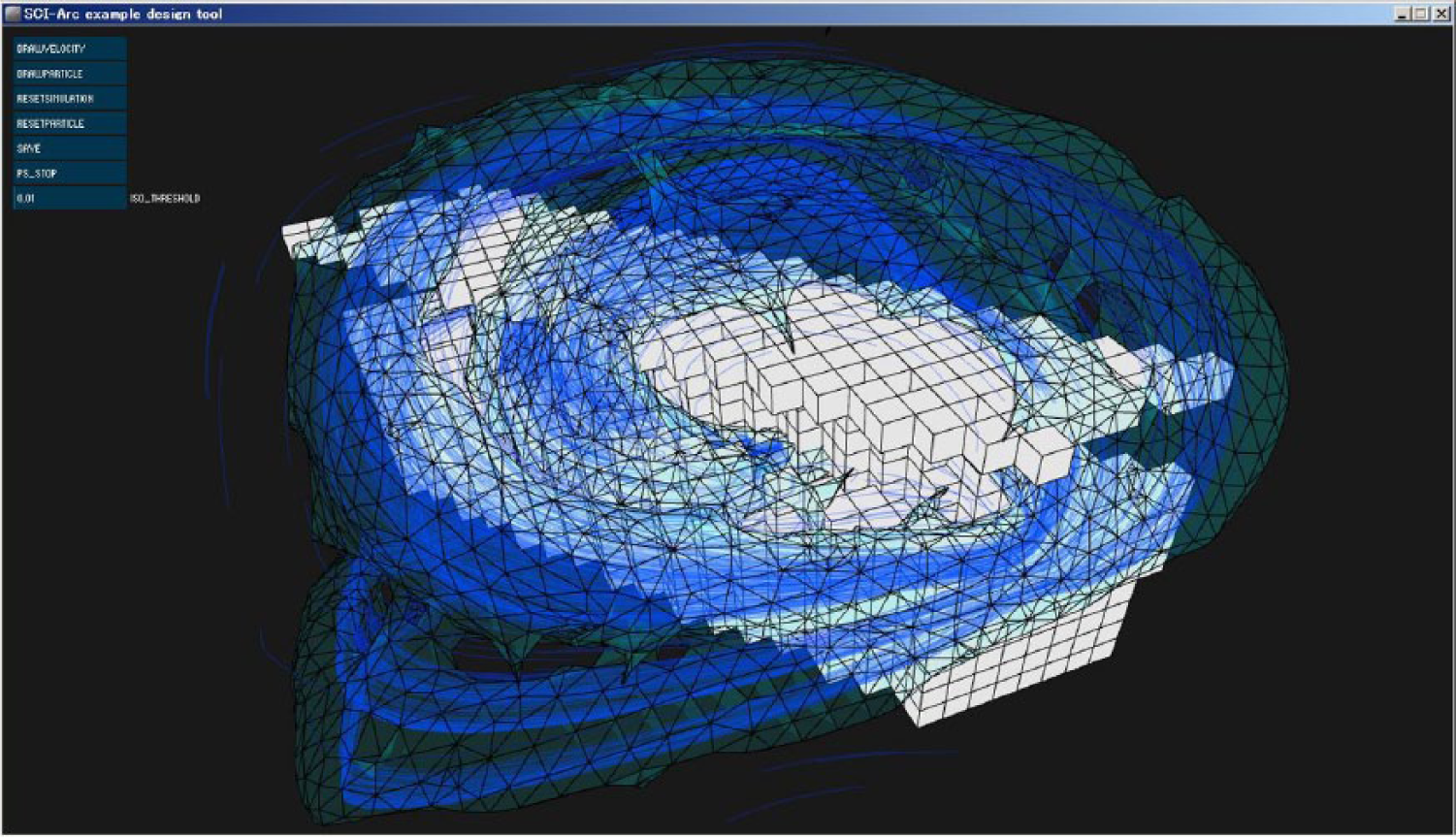
An example of the tools scripted as an exercise by the graduate students. Blue curves and volumes indicate the wind flows occurred after a train passing.
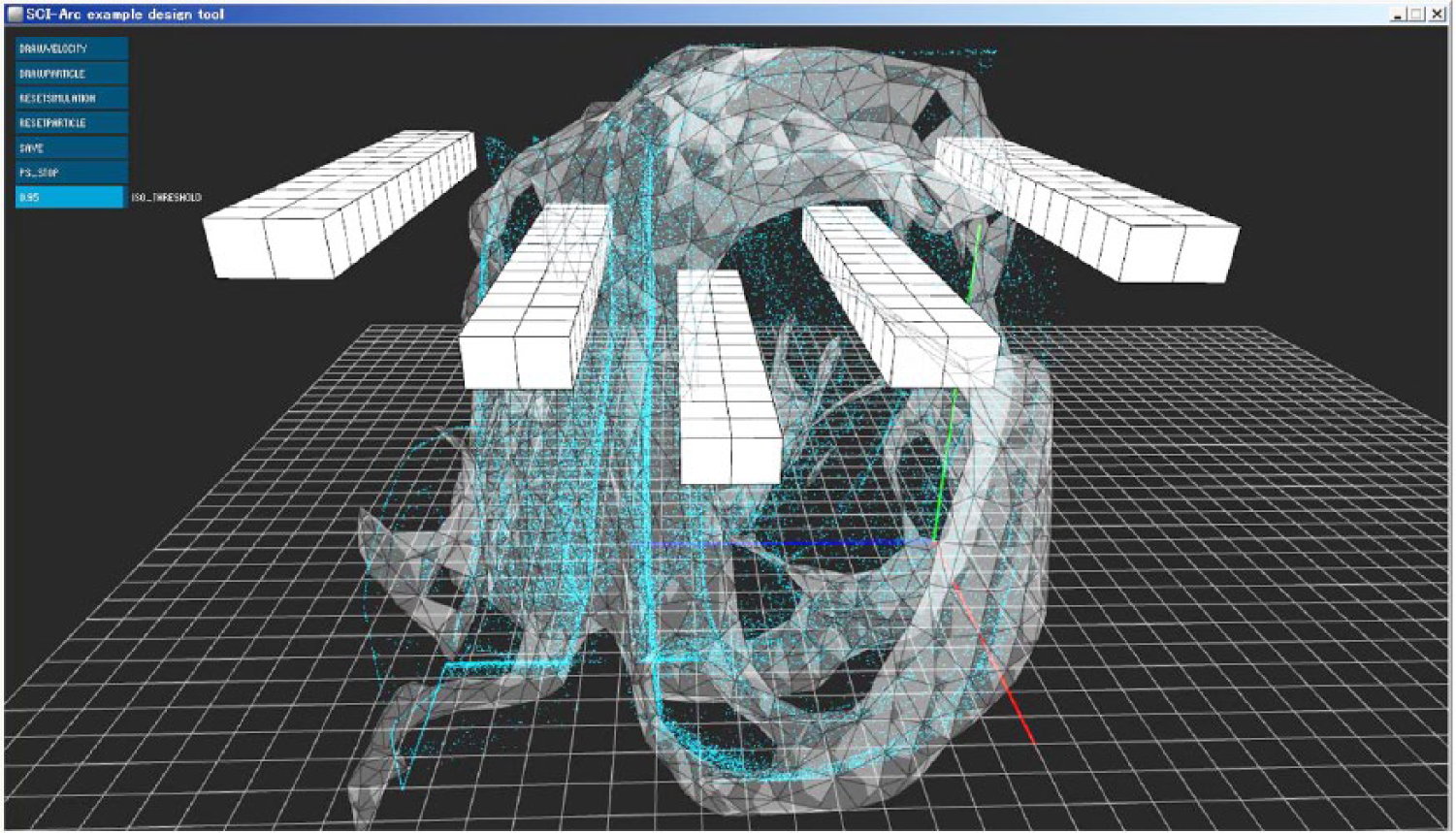
An example of the tools scripted as an exercise by the graduate students. Volumes split by blind doors (in white boxes) are applied to high-level bridges connecting buildings.
In the final reviewing class of the workshop, 8 of 10 graduate students succeeded in self-designing CFD tools with almost no support from the authors. Figures 5 and 6 illustrate the examples.
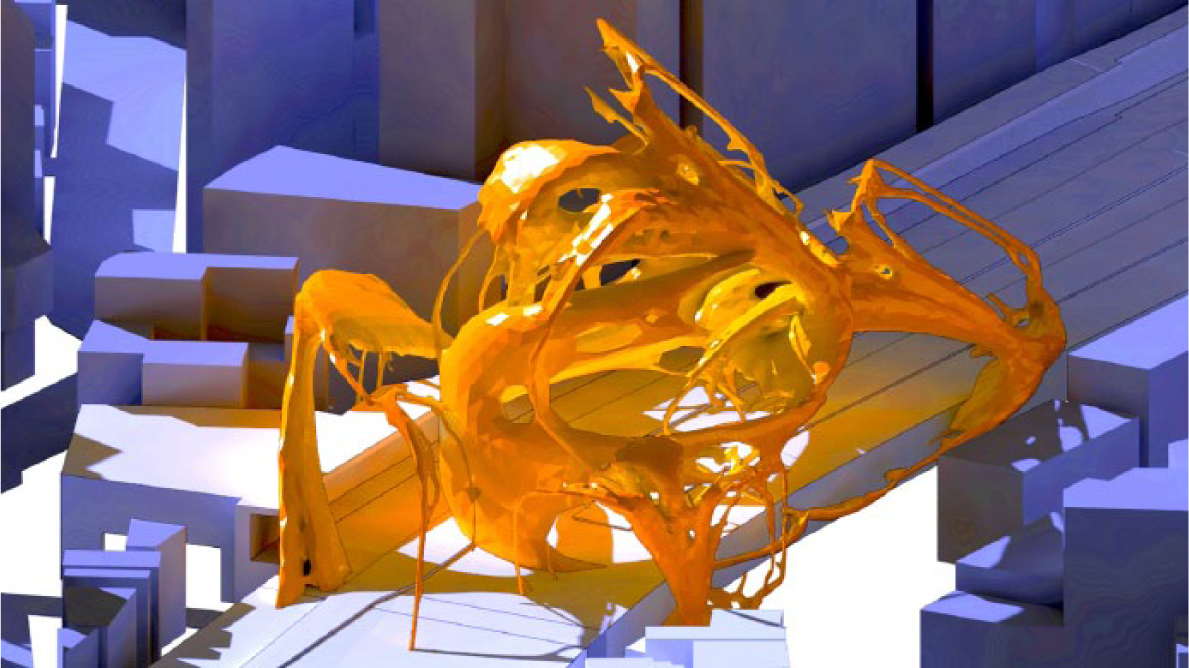
An example applying a volume to Form-Finding. The architecture is designed from the perspective which considerate the complicated fluid fields occurred when multiple trains are passing.
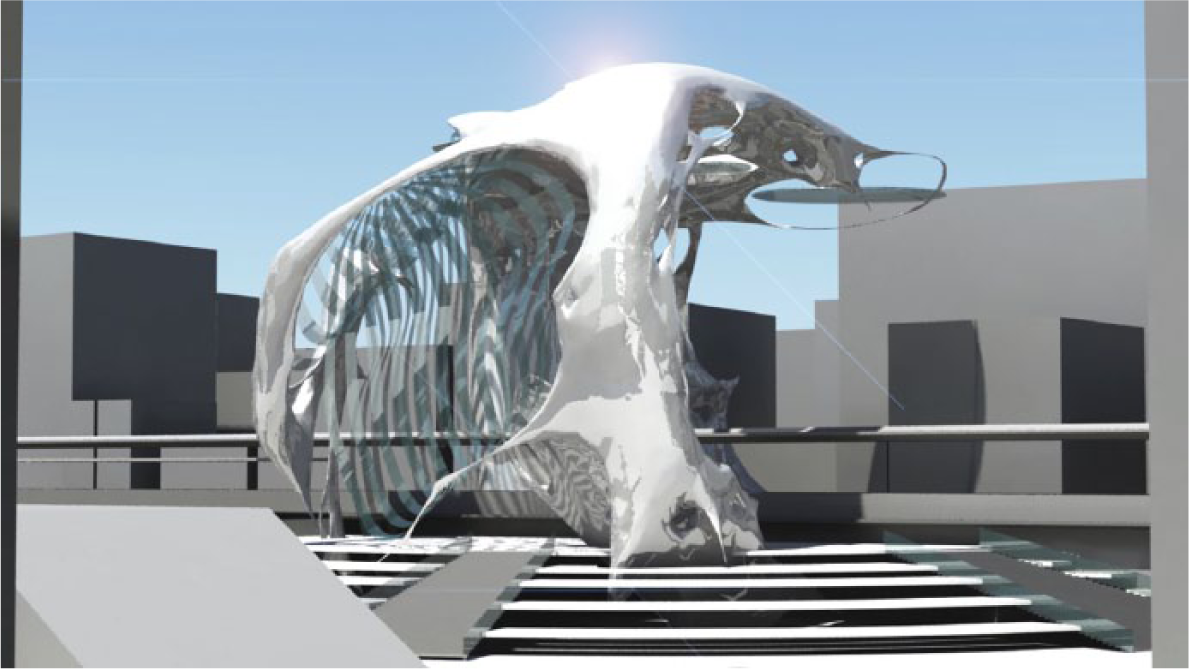
An example applying a volume to Form-Finding. This is a Form-Finding example which seeks to take in the natural sunlight by filling between volumes and sustain organic forms.
Applying a volume to Form-Finding with the use of the tools self-designed by the graduate students, who tried to find for their studio challenges, the new forms of a station near the stadium by means of converting the flows caused when the train(s) is (are) passing. In Figure 5, the white architectures passing through from upper right to lower left are rail tracks. Taking into consideration that the complicated fluid fields occurred when multiple trains passed, the station painted in orange is designed to maximize the internal space and has all the components attached on the ground. In Figure 6, the case of reducing the number of rail tracks to one in Figure 5 is a Form-Finding example of a station which seeks to take in the natural sunlight by filling between volumes and sustain organic forms.
Considerations
Visualization
Before participating in the workshop, the graduate students used Autodesk Vasari and visualized a density field and a velocity field of fluid on an arbitrary two-dimensional (2D) cross-section surface. The graduate students commented that it was very hard for them to grasp 3D flows because they could not see the flows going behind or in front of the cross-section surface in the 2D fluid.
After participating in the workshop, they pointed out the advantages of ELF as follows: they could test 3D simulations under the various conditions; they could see the 3D flows clearly by moving a viewing point closer, put off or revolved, which worked well for solving the problems in the 2D fluid, and many of them found it the easiest way to grasp the flows in a curve mode in the center of Figure 3. Flows of the previous frames in a curve mode remain as tracks, different from a particle mode and a volume mode. It seems that graduate students estimated the flow of the next frame based on the tracks. The authors analyze that a curve mode was the easiest way for the graduate students to grasp the flows because they could not observe any difference between the actual simulation and their estimation as a result. This indicates that ELF worked effectively for educating on CFD insight.
Comments in ELF script
The authors put comments in ELF script, but not in external documents for the convenience of the workshop (Figure 7). Comments are related to basic ways of using ELF features and further applied usages. When the authors observed behaviors of the graduate students in the workshop, it was found that they added the comments of ideas which could be applied to their studio challenges and usage of ELF features to embody those ideas. Their behaviors are one way of expressing their will to modify CFD tools for their studio challenges. Namely, it is regarded as a moment when they have included self-designing CFD tools in their architectural designing activities.

Comments in Educational Library for Fluid script.
Symptom of CFD insight
When the authors observed behaviors of the graduate students after the workshop, it was found that they had a conversation to adjust fluid simulation result to the real world. For example, they were discussing the flows from the air conditioner in the workshop classroom. They built a virtual classroom with the use of ELF and selected the coolest desk by finding it through visualizing the flows. Their behaviors could be said as symptoms that they began to learn CFD insight.
Key points of CFD education for the students majoring in CAAD
The authors have developed ELF as an educational-use environment for CFD programming and ran the workshop with the use of it. The four key points of CFD education for the students majoring in CAAD that the authors learned through the experience of this workshop are shared as follows.
The first key point is related to the theme of studio challenges. The theme should have a stronger relationship to CFD, and establishing a stronger relationship between the theme of studio challenges and CFD stimulated motivations of the graduate students who are eager to have deeper understanding on script in equations behind CFD. Indeed, these eight students successfully self-designed their own tools and completed the workshop.
The second key point is related to the programming environment. It should be easy to use and inexpensive for the students majoring in CAAD. If possible, features of beautiful fluid visualization should be provided. For example, students can carry out their studio challenges spontaneously if they use Processing or openFrameworks. Indeed, they were discussing in the workshop classroom the convected flows from the air conditioner. In addition, features of beautiful fluid visualization should be provided to stimulate their interest and creativity, as authors in the first class of workshop demonstrated CFD tools which had been designed by themselves.
The third key point is related to features of the educational-use programming environment. It should have features compatible with basic developing software of the students majoring in CAAD. An educational-use programming environment is often closed because it has no feature to export a 3D model into basic development environments such as Rhinoceros, Bentley, and Maya. By exporting feature, the motivations of the students would be stimulated to self-design the tools applicable to their studio challenges. Indeed, in the workshop, many graduate students were discussing the city design by arranging stations and office buildings around imported volume from ELF.
The fourth key point is related to comments in the script. All the comments should be put in the script. The authors found that students use them for notes and memorandum. They added comments of ideas which could be applied to their studio challenges and used ELF features to embody those ideas. The addition of comments was effective in self-designing of CFD tools in their architectural designing activities. In general, long comments in the script are not recommended. However, for the purpose of this challenge, long comments might be recommended.
The workshop can be concluded to be successful. However, key points stated above are strictly based on the authors’ experience in the workshop. For example, it heavily depends on the students’ majors and the amount of their experience in programming. The authors think it is necessary to continue careful researches and make revisions if needed.
Conclusion
CFD programming environment for CAAD education is insufficient. The authors have developed ELF as an educational-use environment for CFD programming and ran a workshop where the students majoring in CAAD tried to design CFD tools with ELF. The authors concluded the four key points of CFD education from the experience. For future work, the authors are planning to improve ELF by adding compressible fluid simulation and thermal fluid simulation and seek for the new visualization method for students to understand the flows intuitively while sustaining simulation accuracy. Furthermore, in order to propose a more detailed concept and methodology of CFD education, the authors are planning to develop new workshops, creating the method of data collections and defining the metrics with parameters such as time extension, tasks developed, and forms for the fluid simulation.
Footnotes
Acknowledgements
The authors thank Ehsan Adibian, Madeleine Claire Hahn, Kenji Hattori, Meghan Hui, Elena Jurievna Larionova, Christopher Andrew Nolop, Anthony Julian Rosales, Tatiana Tennie Sarkisian, Hao Wei, and Chun Mei Yuan for participating in our workshop and Yuuri Taki for assisting the research.
Declaration of conflicting interests
The author(s) declared no potential conflicts of interest with respect to the research, authorship, and/or publication of this article.
Funding
The author(s) received no financial support for the research, authorship, and/or publication of this article.