



Abstract
The purpose of this paper is to document the perceptions of school leaders regarding the technological use, skills, and attitudes of high school teachers. Using a qualitative research approach, 11 educational leaders from Prince Edward Island (Canada) were individually interviewed. Participants represented the Department of Education, principals, vice-principals, and department heads. Analyzed through the concept of e-leadership, the findings indicated that participants used a growing array of technological tools and activities including Smartboards, flipped classrooms, Prezi, educational apps, YouTube, and teacher blogs. Participants identified lack of time as a possible reason why some teachers were not incorporating technology into student learning. Findings highlight the need for provincial and school district authorities to promote policies aimed at promoting e-leadership among teachers. We insert an appendix to provide descriptions of the technological terms included within the paper.
Introduction
Amidst the relentless proliferation of digital devices, communication gadgets and social media, a new generation of students is populating Kindergarten to Grade 12 classrooms. Authors refer to this technologically-equipped group of young learners as the “Net Generation” (Gabriel et al., 2012: 3), “Generation Z” (Geck, 2007: 235), or the “iGeneration” (Rosen, 2010: 2). 1 Alongside the emergence of this generation, some educators are recognizing and addressing the urgent need to integrate technology into classroom activities. For instance, via school blogs, 2 some educators ask students to review class lectures and complete homework assignments. Previously unavailable due to distance, guest speakers are being Skyped into some classrooms. Through the use of GoogleDrive, the dynamics of group work is being transformed to include synchronous online teamwork for some students. Via TeacherTube, podcasts, and Prezi, teachers can access specialized knowledge and convey information within a stimulating learning environment. These examples highlight how educators have the ability to create a rich array of innovative student-focused learning activities through the application of technology.
This study is based on the assumption that wide-scale incorporation of digital technology within school environments is a sound and necessary instructional leadership goal. However, literature suggests there exists a vast divide between the technological knowledge, infusion, and pedagogy of K–12 educators and the digital skills and needs of the Net Generation (Bauer and Kenton, 2005; Leonard and Leonard, 2006; Tapscott and Williams, 2010). Through this research, we explore this divide. More specifically, the purpose of this paper is to document the perceptions of these school leaders with regard to the technological usage, skills, and attitudes of high school teachers in the Canadian province of Prince Edward Island.
It is important to state upfront some defining characteristics of this study. First, we view the concept school leaders in a broad fashion. Customarily, research scholars identify school leaders to be government representatives, principals, and vice-principals. While we do not dispute that these roles embody school leadership, herein we explore leadership capacities in a more encompassing way. For this research, participants represent traditional educational leaders outside of the classroom (i.e. Ministry of Education personnel and principals), plus vice-principals and department heads who hold leadership positions plus teach in the classroom. By distinguishing school leaders in this accommodating way, and by amalgamating the views of these diverse types of school leaders, we break hierarchical divides often ensconced in traditional forms of educational leadership. In acknowledging these broader levels of leadership, the results of the study represent a more encompassing type of learning, energy, and authority emanating from high school leaders. Furthermore, by amalgamating the views of various levels of school leaders, we promote a truer concept of e-leadership, the analytical lens for the research. The concept of e-leadership within a school setting ignores the boundaries of formal school leadership titles and recognizes leaders as anyone who advocates, innovates, and stewards technological activities within educational settings. As a final point, we delimited the focus of the research by inviting school leaders involved in high school contexts. In sum, we view this research as a type of reconnaissance study aimed at documenting the current technological landscape (according to educational leaders) of Prince Edward Island high schools. That is to say, the findings of this study do not represent the views of all (or even the majority) of school leaders within Prince Edward Island (Canada); however, the findings do represent a snapshot of some of the perceived realities of technological activities within six of the 10 high schools located in Prince Edward Island.
Literature scan: technology in the classroom and e-leadership
Both inside and outside the classroom, learning and communication among and between teachers and students are being transformed through the burgeoning presence of technological and social media tools. Integrally incorporated into discussion about technology and education are iPads, Smartboards, Twitter, and Facebook. Research has shown that, when using these tools, students became more engaged and creative during the learning process (Saine, 2012). In particular, the use of iPads and Smartboards with students with special needs has enhanced learning because of the capacity these tools have to produce visuals of content and abstract topics (Pennington, 2010). Furthermore, iPads and Smartboards have enhanced the social and communicative language development of children with autism (Ploog et al., 2013; Xin and Sutman, 2011). With particular regard to Smartboards, Min and Siegel’s (2011) study showed how the integration of this tool has improved the on-task behavior of Grade 2 math and science students. Additional research has shown that Smartboard use has improved student behavior and motivation to learn (Erduran and Tataroğlu, 2009; Hamdan et al., 2012; Smith et al., 2005), has facilitated effective use of democratic voting systems (Bell, 2002) and has enhanced social interaction among students (Türel and Demirli, 2010). In addition to hardware, social media, such as Twitter and Facebook, are being introduced into classroom settings (Levinson, 2010). Some of the countless examples of Twitter in the classroom include students tweeting answers to homework assignments, haikus to describe course content, sentences using newly learned vocabulary, inspirational quotes to foster class morale, and opinions in support of book studies (Dunn, 2012; Miller, nd; Powerful Learning Practice, 2012). Additional Internet media, such as e-portfolios, classroom websites/blogs, and Facebook, have been shown to promote collaborative learning, self-paced exploration, and engagement during the learning process (Shaltry et al., 2013).
Juxtaposed with these new technologies, there exists a pressing need for school leaders and teachers to learn how to effectively use these expanding technologies within classroom settings (Schrum, 2012; November, 2010). Schrum and Levin (2012) believe that one of the most effective ways for school leaders to promote digital usage in the classroom is to invite teachers to select their own technological focus with regard to learning objectives, content, activities, and assessment. School leaders then need to promote professional development and collaborative learning opportunities in the area of technology. Throughout this process, leaders need to respect, trust, and support teachers at each step to implement change and adopt new and innovative pedagogy. Also in line with increasing the usage of technology in the classroom, November (2010) refers to the need for teachers to relinquish control of traditional teaching and learning dynamics and be open to “reverse mentorship” 3 from students. Furthermore, November recognizes that there is hesitancy among many teachers to increase technology-based activities within the classroom, and at the center of teacher reluctance is the fear of change. November states that it is essential that the fears and anxiety of teachers not be ignored by school leaders. Instead, leaders need to invite teachers to openly discuss potential anxieties about technology and its ensuing pedagogical changes and devise ways to relieve fears and hesitancy.
Coupled with pedagogical changes, the increased presence of technology in the classroom brings leadership changes. To help school environments thrive in a rapidly-changing society, leadership cannot be bestowed upon a minority of chosen people. Authors use various terms when referring to techniques of shared leadership, including such phrases as “distributed leadership” (Harris, 2008; Spillane, 2006), “sustainable leadership” (Hargreaves and Fink, 2006), “transformational leadership” (Leithwood and Jantzi, 1999), “servant leadership” (Greenleaf, 1977), and “participatory” or “shared leadership” (Goldring and Greenfield, 2002). Just like these forms of leadership, e-leadership is meant to produce a positive change in the attitudes, feelings, thinking, behavior, and/or performance of individuals or groups within an organization. However, e-leadership is unique from these forms of leadership.
Although some authors refer to e-leadership as promoting relationships among organizational members via a virtual or online presence (Avolio and Kahai, 2003; Zaccaro and Bader, 2003), we do not refer to e-leadership in such a manner. For us, and other authors (e.g. DasGupta, 2011; Gurr, 2004), e-leadership is the effective promotion and integration of technological learning and literacy into and within school environments. E-leadership is recognized in anyone who assists fellow colleagues to be technologically skilled within a globalized, knowledge-intensive economy and use these skills to promote digital learning in students. This technological leadership can occur at any hierarchical level within the educational system (e.g. ministry personnel, principal, vice-principal, department head, teacher, educational assistant, etc.). It can involve one-to-one or many-to-one interactions within and across schools and educational jurisdictions. Other traits of e-leadership are embodied by educators who are creative and comfortable with risk-taking. Riel and Becker (2008) recognize e-leadership is a catalytic medium for teachers to assume leadership roles by becoming involved in professional communities where these teachers “gain a sense that they belong to a community of innovators at the leading edge of change in educational practices” (2008: 397).
During our scan of literature on e-leadership, we found no formal reference to the American-based International Society for Technology in Education (ISTE) and its five National Education Technology Standards (NETS) for school administrators; nevertheless, we believe the NETS for school leaders are integral features of e-leadership. These standards call upon school leaders to: (a) inspire and facilitate purposeful changes that maximize digital resources to meet learning goals; (b) create, promote and sustain a dynamic digital-age school learning culture, (c) promote professional learning that empowers educators to enhance student learning through contemporary technologies and digital resources, (d) promote systematic improvement via the effective use of information technology, and (e) promote digital citizenship by modeling and facilitating an understanding of social, ethical, and legal issues and responsibilities related to an evolving digital cultures (ISTE, 2012). Although these standards are specifically written for school administrators, we believe that these features exemplify actions that any e-leader can do to promote and integrate technological learning and literacy into/within school environments.
Research structure and participant description
Through a social constructivist approach to data collection (Schwandt, 2007), semi-structured individual interviews (Barbour and Schostak, 2011) were conducted with 11 school leaders representing the Prince Edward Island Department of Education and Early Childhood Development personnel, high school principals, vice-principals, and department heads. (As mentioned previously, all vice-principals and department heads assumed leadership roles as well as classroom teaching responsibilities.) One participant provided written answers to interview questions, and, during the formal interview, this participant and one of the researchers reviewed these answers. The other 10 participants were individually interviewed, and their oral responses were audio-taped. The length of each participant interview ranged from 40 minutes to 1 hour and 43 minutes, with the average interview lasting 59 minutes. After the recorded interview, participants were provided with a written copy of their interview transcripts and asked to perform a member check to ensure the meaning they intended to convey during the interview was accurately displayed in the written transcript (Imman et al., 2012; Lincoln and Guba, 1985). As a part of the member check, we asked participants to change, delete, and/or add anything they deemed appropriate within the transcripts. The participants then provided written assurance that their transcript reflected a realistic representation of their intended meaning during the interview. At this point, we integrated any changes to the transcripts and reviewed the final transcripts to create a preliminary list of key ideas, commonalities, and differences, which we amalgamated into larger thematic ideas in response to the study’s purpose (Creswell, 2013). Transcripts were then reread to ensure the data representing the themes were accurate. Data results were further analyzed via the concept of e-leadership (DasGupta, 2011; Gurr, 2004).
To obtain participants, invitation letters were sent all school leaders employed within the Prince Edward Island Department of Education and Early Childhood Development whose leadership portfolio included technological usage in high schools. Also, invitation letters were sent to all high school principals, vice-principals, and department heads throughout the province of Prince Edward Island. In total, 48 invitation letters were sent and 11 participants volunteered to participate in this study. We welcomed all 11 volunteers to the study, under the assumption that volunteers were likely individuals who were confident and comfortable talking about and using technology in the classroom. As a result, the participant sample potentially represented leaders who were probably more literate in the use of technology than the general population of school leaders. Also, with regard to this sample, we asked school leaders to comment on the personal technological activities of colleagues and fellow staff members. We do not consider this second-hand description as cumbersome or in any way invalid, as it is a common practice for school leaders to possess an understanding about the activities and attitudes of colleagues and other staff members.
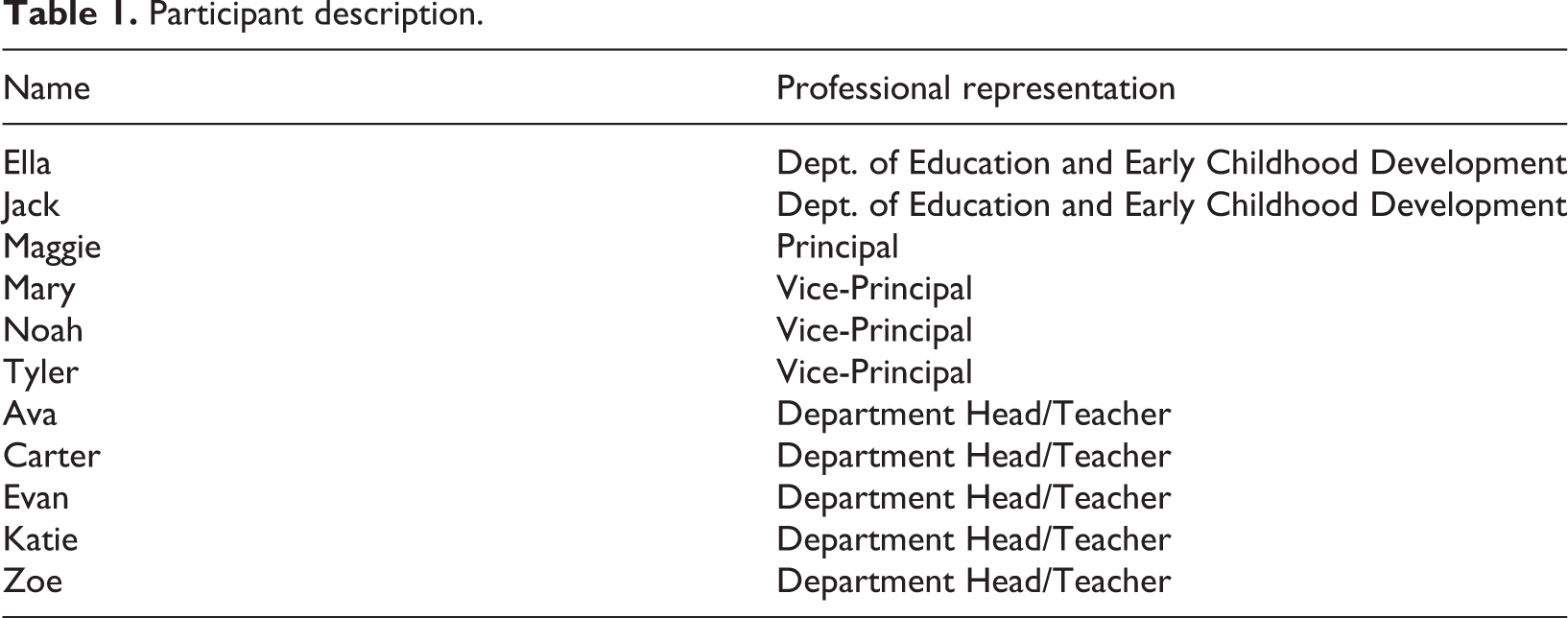
Of the 11 participants, gender was quite evenly represented: six participants were female and five were male. Two participants represented the Prince Edward Island Department of Education and Early Childhood Development, one participant was a high school principal, three participants were vice-principals, and five participants were department heads. In our analysis of the data, we did not separate the data by professional title/affiliation (i.e. Department of Education, principal, vice-principal, and department head) for two main reasons. First, there were irregular numbers of participants across titles/affiliations, and, second, as mentioned above, we view leadership to span a broader definition than just title/affiliation. A chart displaying the participants’ pseudonym names (to promote participant anonymity) and professional affiliation/title are outlined in Table 1.
Participant description.
At the time of this study, Prince Edward Island had 10 English high schools located across the province, and volunteer participants represented six of these 10 schools. In each high school across Prince Edward Island, the student population is approximately 500 to 1,000 students who represent Grades 9–12 (ages 15 to 18). The high schools involved in this study were part of the English Language School Board, which spans the province and enrolls approximately 19,000 Kindergarten to Grade 12 students in total (English Language School Board, 2013). Within the past five years, this school division consistently provided technological support (e.g. professional development) and resources (e.g. Smartboards in all high school classrooms) to its high school teachers. In using Puentedura’s (2013) four-tiered model of effective use of technology within the schools, teachers within this school division appeared to promote mid-range levels of technologically-assisted student learning (i.e. augmentation and modification).
Thematic results
Participants indicated that Prince Edward Island teachers incorporated an array of technological tools and instructional methods into their classrooms, the most popular being Smartboard applications. For this study, we also documented the attitude and beliefs of participants regarding the integration of technology into the classroom. We found that teacher confidence and abilities depended upon their previous experience and knowledge of technology. These and other findings are explicated below.
The technology use and skills of participants
Smartboards
Among participant responses, the most popular reference about the use of technology in the classroom was the Smartboard. On this topic, Jack indicated that, across the province, “Smartboards [are in] all senior high classrooms and in many intermediate level classrooms.” Maggie stipulated that, in 2010, the provincial government provided Smartboards to every high school classroom. She also said, “All our staff uses them and not just as whiteboards but through fully interacting with them.” Tyler, skillful in integrating Smartboard applications into his teaching, believed that using a Smartboard was a way to enhance student learning:
I can get kids up to the board to build a molecule of DNA with all the constituents. They have to put it together properly by pulling and dropping and dragging things into the right place and actually building the molecule or a short strand of it.
Ava was also extremely skillful with the Smartboard and its applications. Sometimes she used the Smartboard clicker to get students to complete a multiple-choice “click quiz.” She explained how she pre-formulated the questions and answers through Smartboard software, and student supplied answers through the clicker. Student results were instantly tallied and represented via a pre-chosen visual method (e.g. pie chart). She described this process as formative assessment – a way for both the teacher and the student to track the level of student learning. Noah believed Smartboards were a way to partner students with technology, and he indicated that teachers were “getting reasonably comfortable with the Smartboard and using it.” A few participants indicated that, although Smartboards were in virtually every high school classroom, “[i]n terms of any advanced skills with the Smartboard, a lot of teachers are probably just using it as a mouse” (Carter). On a similar note, Evan stated, “I find that a lot of Smartboards are just glorified LCDs.” In sum, all participants talked about the existence of the Smartboards in high school environments – seven participants spoke about teachers using them in an effective manner, and four participants believed teachers needed to be more competent in using them.
YouTube and WordPress
Two additional popular teaching tools were YouTube and WordPress. Many participants stated that they incorporated YouTube clips into their teaching. Both Carter and Evan said, “I use a lot of YouTube.” Ava used YouTube as a medium for her students to review her lectures online. She explained, “I also post them [class lectures] on YouTube. So if they [the students] didn’t get it in class, they can see it again on YouTube.” Ava also said she used the YouTube video medium to flip classroom activities. That is, students watched the video lesson as homework and then, the next day, students would complete questions about the video content during class time.
WordPress was another technological tool surfacing within school environments of participants. Tyler indicated that he uploaded his notes to a WordPress website that he constructed and asked students to read his notes before coming to class. In turn, “[t]hat frees up more time for teaching, rather than writing notes” (Tyler). Jack explained that a variety of schools are using WordPress to create school webpages. Katie explained that one of her colleagues organized an after-school session for teachers who were interested in learning the basics of WordPress. Katie had previous experience with a different blogging tool. As a result, she thought manipulating WordPress was rather straight-forward and used it to support homework communication with students.
Sharing of skills
All participants who volunteered for this research appeared to regularly share their technological vision, knowledge, and experiences with interested colleagues. Tyler described how he and a group of technologically like-minded colleagues applied for grants from private companies and volunteered to be involved with pilot research aimed at technology in the classroom. In return, the school was supplied with Smartboards, printers, and laptops. Zoe spent time in teacher-focused chat rooms to share her classroom-related technology experience. Jack indicated that, “Teachers who are early adopters of using technology in the classroom are known to each other and seek each other out.” Evan, Ava, and Carter led sessions to help colleagues with various aspects of the Smartboard, GoogleDrive, and school software. On this topic, Evan stipulated that, during these sharing sessions, he was not out to “convert” people, and he yearned for more time to meet with like-minded teachers who sought to improve student learning through technology. Most of the participants involved in helping their colleagues had a background degree or experience related to technology; however, these participants stipulated that the technological activities they used in the classroom were self-taught and not acquired from a computer programming degree, for example. Other participants expressed that more professional development was needed in the areas of blogging, e-portfolios, the Smartboard, and the use of specific school software.
Additional usage and skills
A number of participants talked about how technology was revolutionizing science classes. Zoe, Evan, and Jack explained that science probeware was being incorporated into biology, chemistry, and physics classroom activities. Zoe said, “We have a fair amount of DNA forensic-type of equipment. We have DNA mapping and DNA analysis … We have a DNA copier and a thermo-cycler.” Zoe also indicated that her school was equipped with a GLX system, which was hooked up to a computer, and, through the computer, data from student labs were projected on a screen and shared with the entire class. Jack also added that, through computer animations and educational apps, a number of high school teachers were getting their students to creatively describe science processes. Evan indicated that he “scours the app store every now and then” to gain a sense of and possible use of the newest science apps for his lessons.
Participants supplied many additional ways in which technology was being incorporated into high school environments. “In our lobby there’s a flat screen TV monitor. It has announcements, but it also has current slide shows the kids are doing or slide shows the kids worked on” (Maggie). Evan and Katie indicated that they commonly used Prezi within their teaching and asked their students to create Prezi presentations. Katie and Maggie explained that their schools had a Twitter account. Maggie stipulated that, although her school’s Twitter account was used quite frequently at the start of the year, “it’s fallen out of vogue, somewhat.” Katie and Carter believed that Twitter was a potential way for teachers to communicate school-related issues such as homework, dates of tests, and school events with students. Other participants referred to specific computer programs that were being used in the school. Ella named a number of specific programs for students with special needs. She talked about Kurzweil (a program that allows content to be read to students), Dragon Naturally Speaking (a program that converts speech to text), and Word Prediction (a program that predicts a word that a user intends to type). Jack provided a list of technological tools supplied to all high schools in Prince Edward Island. His list included:
Digital video cameras, camcorders, video editors, microphones, lighting kits, tripods, external hard drives, scanners, printers, graphic tablets, and animation supplies have been provided to support senior high multimedia curriculum.
Jack also provided a province-wide overview of the Internet tools being utilized by high school teachers:
ATutor, Prezi, Edmoto, Glogster, WordPress, PB Works, Wisemapping, Symbaloo, Wordle, GoogleDocs, GoogleSites, Dropbox, Pinterest, GoogleEarth/Maps, Edublogs, Wiki spaces, Voki, SchoolTube, TeacherTube, Animoto, Kid Blog, Blogger, Scribblar, Story Bird, Bitstrips GIMP.
With regard to these two lists, digital cameras, camcorders, ATutor, Edmoto, Glogster, Word Press, GoogleDocs, GoogleSites, and Dropbox were mentioned by nine participants as tools they sometimes used to support student learning.
Technological attitudes of teachers
Confidence and educational responsibility
The participants, themselves, seemed quite positive, confident, and able to effectively thread technology-based learner activities into the classroom. Ava said, “That’s my thing, technology. That’s my avenue to get to my students.” Evan said, “Maybe my technological background has given me confidence.” Noah stated, “My curiosity of technology helped me stay ahead of the game for the most part.” Noah also talked about his colleague who had a Master’s degree in technology and believed this academic background was one of the reasons his colleague incorporated iPods, iPads, Kurzweil, and Dragon Naturally Speaking into his teaching. On a similar note, Carter had a postsecondary degree related to technology and assumed that this background experience made him more comfortable with integrating technology into his lesson plans. Tyler had a long-standing interest in technology. He explained that, about 10 years ago, a colleague and he developed their school’s first blogging site. In general, it appeared that the participants who volunteered for this study were either knowledgeable about and/or had experience in using technology.
Eight participants also perceived that the incorporation of technology into the classroom environment enhanced student learning and was a central part of their teaching duties. Ella and Tyler articulated their belief that the effective use of technology both helps students learn and increases motivation. “I think part of what we may be able to do with technology is get back a little bit of that student engagement that we’ve lost over the last number of years” (Ella). “As a teacher, we need to provide what we can to make it easier for students. That’s our job. So it’s our job to get into technology” (Tyler). Other participants recognized technology as a medium for delivering enriched feedback to students during the learning process. For example, Jack saw technology as a way to “support assessment as learning and assessment for learning.” In sum, participants appeared to believe that incorporating technology into the classroom increased student motivation and learning, and, in turn, was their pedagogical responsibility.
The need for digital citizenship
Every participant believed that teaching the students how to be critical consumers of the Internet was a vital part of their roles as educators. On this topic, Carter said, “Being critical of all the information they have access to is an important skill they [the students] have to acquire.” On a similar note, Maggie stated, “They [the students] need to be able to question reliability, authenticity, and credibility of sources.” Ten participants stated their belief that most students lacked an understanding of what it means to be responsible, digital citizens in a global world. Some of the many comments supporting this point included, “Facebook has caused a lot of issues for us, because they don’t understand that they’re responsible for their own words they use while on Facebook or when they text” (Noah). “There have been some issues because of what’s been said on the Internet … They need to learn that what they say can lead to controversy” (Tyler). “Most kids don’t understand what slander is” (Mary). “[Students] probably never read the terms of use or privacy statements from services that they have signed up to” (Jack). Ella summarized these points when she said, “They significantly lack the ethics and the responsibility needed in the digital world.” In turn, all participants believed that it is crucial that students need to be taught about digital citizenship.
The lack of time, accessibility, and trust
Participants believed that many teachers were incorporating PowerPoint and YouTube into their classes; however, nine participants also stated their belief that some of their colleagues were having a difficult time with technology. Lack of time was identified as a possible reason for this point. Accordingly, Tyler stated, “Part of the biggest issue in terms of technology that teachers face is having the time just to sit down and play with it.” Zoe thought, “You could learn about the newest aspect of anything, if you had the time to do it.” Evan stated, “When they talk about engaging 21st century skills, we need the time to plan to do it.” Noah spoke about time, technology, and stress when he said, “Time is always of the essence for teachers … Teachers are stressed out with the expectations that technology has brought.” In turn, because teachers appeared to be stretched for time, Carter explained that teachers who attended professional development (PD) events often had only their most urgent technological needs answered. For many teachers, “[PD and technology] is more about meeting their immediate need, and then they can go and do all the other things that are on their priority list.” Evan suggested a way to get more teachers interested in technological tools and PD:
So the first thing is to convince them [other teachers] that this PD would make their life easier or would make their lessons richer. To force someone to sit down and listen to GoogleDocs when they don’t see the value in it, will completely turn them off on all PD.
A core idea threaded into these comments was that getting teachers to incorporate more technology into the classroom activities depended on providing teachers with the time and motivation to do so.
Two additional reasons participants believed some teachers were not enthusiastically incorporating technology into their lessons were the lack of reliability and lack of trust in the technology. Maggie indicated, “There have been some pockets of resistance amongst the staff in the sense that wireless has not been found to be reliable.” Carter explained that it was difficult to plan his lesson with unreliable services:
My understanding is, we have two servers here at [name of school], and when I log on, I’m put on whatever server’s available. The settings aren’t identical on the two servers. So if I preview a video today, and I want to use it in class tomorrow, it may work for me today, and if I log out of my computer at the end of the day and log in tomorrow, it may throw me on the other server. Then I may not have access to what I saw before.
Mary explained a similar experience. She would pre-plan for a lesson, not knowing if she would have access to the same online material during the actual time of the lesson. “So you don’t know from one day to the next which sites you can use and which you can’t” (Mary). Ava made a similar comment to Carter and Mary. Katie explained that in her school there was a set of wireless laptops, which teachers could sign out; however, in her experience, the laptops were unreliable. She explained that when using the laptops, half of the students were unable to access the Internet, causing problems she did not experience when she got students to use paper and pen. Carter made a similar comment to Katie’s when he said, “We also have a mobile computer station, but the logistics of the building make it difficult to use them.” Ella also highlighted that many teachers faced challenges when attempting to use iPads because of lack of wi-fi within schools.
Participants also talked about accessibility challenges when trying to book a computer lab. All participants who worked in schools highlighted that, without about two weeks’ notice, getting into a computer lab was almost impossible. “One of the most frustrating things with technology is booking a lab, even though we probably have more labs, more computers, one of the best-equipped schools” (Ava). Similarly, Zoe and Maggie said, “We could use more computers, because there are always waiting lists to sign out for the computer room” (Zoe). Noah described the effort that he had to go through to attempt to access to a computer lab:
A couple of weeks ago, I needed a lab for a class. We were going to do a web-quest on the heart, because we were doing the circulatory system. So, I look at one lab. Oh, it’s booked. I have a specific day in mind. It’s like Tuesday at 10:30. So I went to the first lab, no luck, it’s booked. I go to the second lab – it’s booked. Third lab – booked. Fourth lab – booked. So I said, “Okay, I can’t do that lab on that day.”
Carter explained a reason why computer labs appear to be difficult to access: “We have courses that are taught out of computer labs, so they occupy a lab for a whole block, for the whole semester.”
Discussion of results: e-leadership
The participants who volunteered for this research appeared to have formal and/or experiential knowledge related to technology, which, in turn, seemed to accentuate their ability to thread technology into their teaching. Moreover, most of these technologically-confident participants were continually teaching their colleagues and/or co-learning with their colleagues about how to better integrate technology into classroom activities and the school culture. Such actions exemplify concepts of e-leadership, where the technological propensities of some teachers were shared within pockets of interested colleagues via work sessions and discussions. During these times, like-minded colleagues offered their technological craft and knowledge, disclosing personal reflections and practices around successful use of technology in the classroom. In such a manner, e-leadership engendered a support group or professional learning community, the end result of which was an interconnected, improved capacity to enhance technological literacy in both teachers and students. Furthermore, the e-leadership attributes embodied within participants appeared to be intrinsically driven, that is, without the foundational structures of policies, job titles, or monetary remuneration, for example. In turn, participants’ professional relationships were not coerced into existence by pre-determined leadership responsibilities; rather, e-leadership was organic in nature, in that participants gave and grew according to their abilities, skills, and classroom experiences. Also, participants who embodied traits of e-leadership seemed confident with technology, unafraid to take risks with technology, and /or intrinsically motivated to learn more about technology. These characteristics seemed to make them successful e-leaders.
While all participants cited a plethora of digital tools they used or saw being used by colleagues, about half of the participants also cited serious challenges to the integration of digital technology in secondary school settings. One significant finding of this research is that, although there were many teacher-leaders sharing their knowledge and providing quality e-leadership, there appear to be structural barriers affecting the promotion of e-leadership and the effective use of digital tools in Prince Edward Island high schools. One of those structural barriers appeared to be lack of time. The idea that teachers are pressed for time was also a major finding in MacDonald et al.’s (2010) study on the workload and work life of Prince Edward Island teachers. Other structural barriers included accessibility to hardware and lack of trust in the hardware. Interestingly, at the time of this study, the Government of Prince Edward Island (2013) announced that it was investing CAN$8 million in educational technology to benefit schools across the province. Even with this new financial allotment dedicated to technology in schools, educational leaders need to develop a means for checking in with teacher-leaders and other classroom teachers to assess both positive and challenging experiences about the integration of technology into regular classroom instruction. As numerous participants attested, it is not enough to install new technological tools; educators in schools need ongoing professional learning and ample time to learn about and integrate these new tools into their teaching. Also, participants in this study were struggling to gain access to the Internet in schools, to book computer carts, or book computer labs. This point reveals a divide that needs to be bridged before teachers can freely integrate digital tools into their learning practices. The finding that numerous educators reported a lack of faith in the tools to which they had access suggests the quality of the tools or the consistency of Internet access continues to be a deterrent toward the promotion of technology in the classroom.
As a penultimate point, promoting e-leadership among all educators potentially involves developing professional e-capital among teachers. Hargreaves and Fullan (2012) believe that the acquisition of professional capital is garnered through human capital, social capital, and decisional capital. As applied to our research, increasing the professional e-capital of teachers is akin to providing PD where teachers gain more knowledge about technology, promote social networking opportunities for people to share their experiences with technology, and have teachers understand that it is important to take risks (and make mistakes) as they make decisions about, and play with, technology and teaching. That is, developing professional e-capital is akin to promoting e-leadership in teachers.
In sum, if educational leaders want to promote technology in the school, they must attend to the conditions, culture, and community of technological advancement across the school and invest in developing teachers’ capacity, confidence, and creativity with technology. Because technology is always changing and advancing, e-leadership also necessitates the continued provision of PD focusing on technology and the dedication of greater resources to enhance the technological infrastructure and tools available throughout the school. In doing so, greater trust in technology may flourish within teachers.
Implications
E-leadership documented within this study seemed to be reflected by a minority of leaders who were comfortable and able to effectively thread technology-based learning into classroom settings. Attached to this statement are opportunities and challenges with regard to school leadership. With regard to opportunities, school systems need to identify teachers who embody e-leadership and call upon their expertise in technological innovation, advocacy, and stewardship to embellish knowledge and refine the technological foci of senior leadership teams. This invitation for classroom teachers to become active agents in senior leadership might include reverse mentorship in the form of teacher e-leaders training more experienced school leaders about how to promote e-pedagogy in classrooms. A challenge surrounding e-leadership pertains to enticing teachers who are not self-confident or interested in technology to embrace traits of e-leadership. In developing both a skillset and a mindset needed for e-leadership, teachers require more than simple software training or access to technological tools such as a Smartboard; rather, they must first learn how to learn with technology, develop confidence in using technology, and feel safe to try new things (Koehler and Mishra, 2005). To accomplish this goal, school districts and school authorities need to recognize a need for all teachers to embody some form of e-leadership and integrate this need into school improvement plans. For example, through leadership policy, practices, resources, and PD, school leaders could invite teachers to select and accomplish one technological activity per semester.
A final implication evolving from this study is that additional research needs to be undertaken to explore what it means to lead in technologically-imbued school environments. How does e-leadership compare to other forms of leadership, such as transformative and distributive leadership? What are the core features of e-leadership and what influences do these features have on student learning? What kind of school culture supports and/or demotes e-leadership? Through addressing such questions, the co-evolution of technology and leadership will be better understood.
Footnotes
Appendix: technological terms within paper
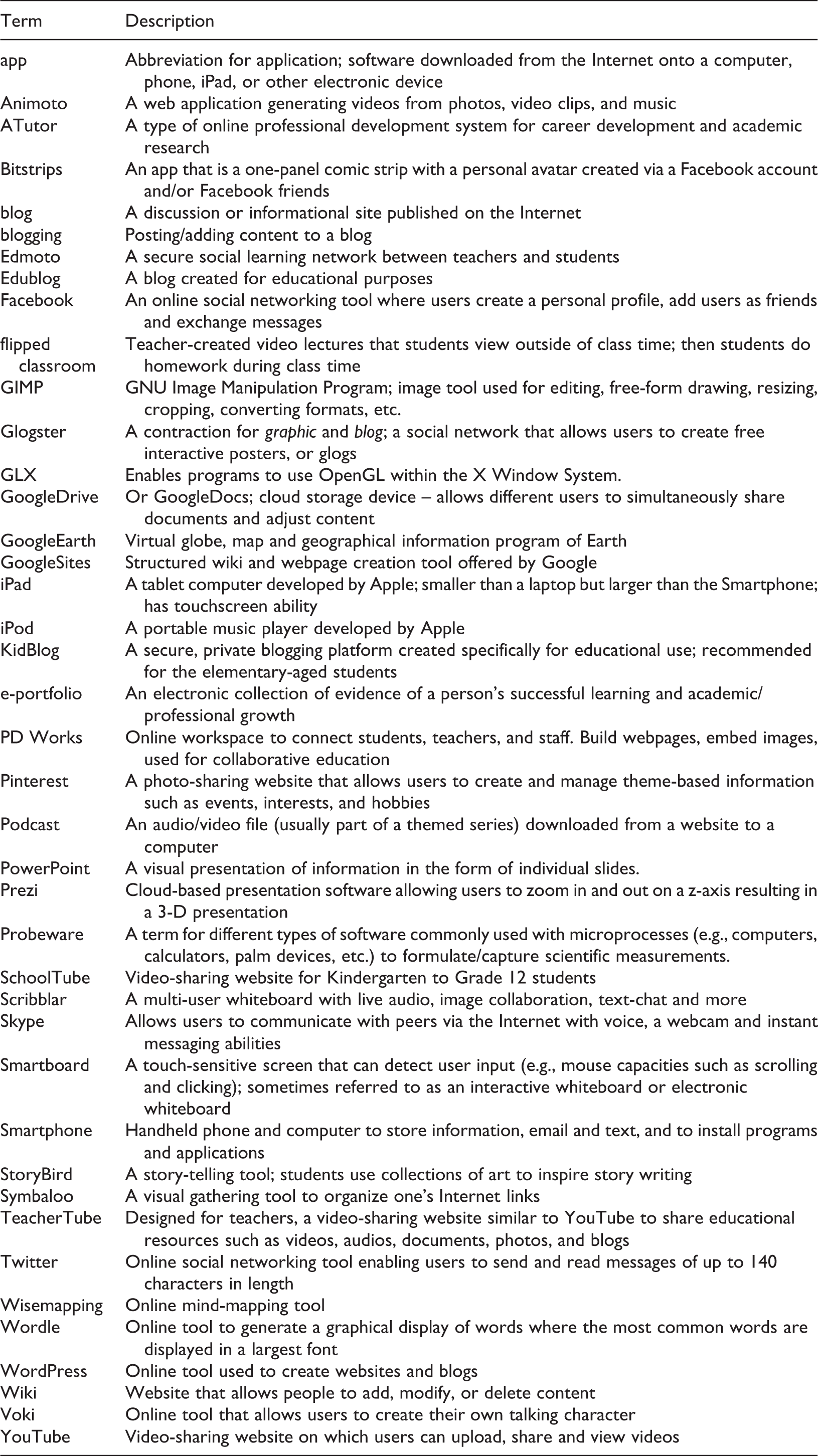
| Term | Description |
|---|---|
| app | Abbreviation for application; software downloaded from the Internet onto a computer, phone, iPad, or other electronic device |
| Animoto | A web application generating videos from photos, video clips, and music |
| ATutor | A type of online professional development system for career development and academic research |
| Bitstrips | An app that is a one-panel comic strip with a personal avatar created via a Facebook account and/or Facebook friends |
| blog | A discussion or informational site published on the Internet |
| blogging | Posting/adding content to a blog |
| Edmoto | A secure social learning network between teachers and students |
| Edublog | A blog created for educational purposes |
| An online social networking tool where users create a personal profile, add users as friends and exchange messages | |
| flipped classroom | Teacher-created video lectures that students view outside of class time; then students do homework during class time |
| GIMP | GNU Image Manipulation Program; image tool used for editing, free-form drawing, resizing, cropping, converting formats, etc. |
| Glogster | A contraction for graphic and blog; a social network that allows users to create free interactive posters, or glogs |
| GLX | Enables programs to use OpenGL within the X Window System. |
| GoogleDrive | Or GoogleDocs; cloud storage device – allows different users to simultaneously share documents and adjust content |
| GoogleEarth | Virtual globe, map and geographical information program of Earth |
| GoogleSites | Structured wiki and webpage creation tool offered by Google |
| iPad | A tablet computer developed by Apple; smaller than a laptop but larger than the Smartphone; has touchscreen ability |
| iPod | A portable music player developed by Apple |
| KidBlog | A secure, private blogging platform created specifically for educational use; recommended for the elementary-aged students |
| e-portfolio | An electronic collection of evidence of a person’s successful learning and academic/professional growth |
| PD Works | Online workspace to connect students, teachers, and staff. Build webpages, embed images, used for collaborative education |
| A photo-sharing website that allows users to create and manage theme-based information such as events, interests, and hobbies | |
| Podcast | An audio/video file (usually part of a themed series) downloaded from a website to a computer |
| PowerPoint | A visual presentation of information in the form of individual slides. |
| Prezi | Cloud-based presentation software allowing users to zoom in and out on a z-axis resulting in a 3-D presentation |
| Probeware | A term for different types of software commonly used with microprocesses (e.g., computers, calculators, palm devices, etc.) to formulate/capture scientific measurements. |
| SchoolTube | Video-sharing website for Kindergarten to Grade 12 students |
| Scribblar | A multi-user whiteboard with live audio, image collaboration, text-chat and more |
| Skype | Allows users to communicate with peers via the Internet with voice, a webcam and instant messaging abilities |
| Smartboard | A touch-sensitive screen that can detect user input (e.g., mouse capacities such as scrolling and clicking); sometimes referred to as an interactive whiteboard or electronic whiteboard |
| Smartphone | Handheld phone and computer to store information, email and text, and to install programs and applications |
| StoryBird | A story-telling tool; students use collections of art to inspire story writing |
| Symbaloo | A visual gathering tool to organize one’s Internet links |
| TeacherTube | Designed for teachers, a video-sharing website similar to YouTube to share educational resources such as videos, audios, documents, photos, and blogs |
| Online social networking tool enabling users to send and read messages of up to 140 characters in length | |
| Wisemapping | Online mind-mapping tool |
| Wordle | Online tool to generate a graphical display of words where the most common words are displayed in a largest font |
| WordPress | Online tool used to create websites and blogs |
| Wiki | Website that allows people to add, modify, or delete content |
| Voki | Online tool that allows users to create their own talking character |
| YouTube | Video-sharing website on which users can upload, share and view videos |
Funding
This study was part of a larger three-year research project entitled “A University-College-Government-Industry Community Partnership to Transform Education for Employment in the Digital Economy,” funded by the Social Science and Humanities Research Council of Canada.