




Abstract
This article examines how Web 2.0 technologies can be used to “flip” the online classroom by creating asynchronous workshops in social environments where immediacy and social presence can be maximized. Using experience teaching several communication and writing classes in Google Apps (Google+, Google Hangouts, Google Drive, etc.), I argue that flipping the classroom online with Web 2.0 technologies can maximize student participation and engagement, while also helping students develop flexible strategies for writing collaboratively and publicly in online spaces.
Keywords
The goal of this article is to examine how using Web 2.0 spaces for asynchronous discussion and workshopping can “flip” the online classroom by maximizing student participation and increasing instructor immediacy. Also known as the “inverted classroom,” the “flipped classroom” is not a new model of teaching in the field of composition and communication (Lage, Platt, & Treglia, 2000). In most cases, the flipped classroom refers to a model where lecture content is delivered outside of the classroom, while homework is actively engaged during class time (Berrett, 2012;Mangan, 2013;Porter, 2012). New technologies in video and screencasting have enabled traditionally lecture-based classes, particularly those in STEM education, to become more workshop-oriented. Students watch lectures outside of class and work on applied problems in the classroom. In the teaching of writing and business and professional communication, the flipped classroom is analogous to the workshop model where students actually do writing in the classroom, talk about their writing, and apply rhetorical and composition theory to the writing and communication process (Cummings et al., in press). Though instructors may have small lectures or discuss model writing, the bulk of class time is usually focused on actual student writing. How does one bring this workshop aspect of the course into completely online environments? Web 2.0 spaces allow online interaction to move beyond mere discussion into workshopping student writing and communication through asynchronous collaboration.
Early incarnations of online writing instruction have relied primarily on Web 1.0 technologies along with a more unidirectional approach to communication. Much like a book, Web 1.0 texts are more static and enable less interaction between author/reader or designer/user. Although contested since the term was coined in 2004, Web 2.0 has generally referred to the web as an interactive or two-directional platform (O’Reilly, 2007). Specifically, Web 2.0 platforms are developed within an “architecture of participation” that promotes
Software that gets better with use through constant updates
The remixing of data from multiple sources
The creation of richer user networks (O’Reilly, 2007, p. 17)
Web 1.0 naturally follows a linear or unidirectional model of composition that emphasizes ownership of text, whereas Web 2.0 encourages more recursive approaches within collaborative networks. Take, for instance, the difference between Microsoft Word and Google Docs, both of which are commonly used in the professional and business communication classroom. Word documents are difficult to share and changeable only on one device at a time, whereas Google Docs allows for multiple users on multiple devices. Word documents generally must be uploaded and downloaded by different users, whereas a Google Doc exists primarily in a shared space. Since Google Docs exist in the cloud, improvements and updates to the text are much more frequent and fluid. Additionally, the ability to “remix” collaborative authors’ ideas and research is a primary affordance of cloud technology. Google Docs also links with otherrich user networkssuch as Google+, Twitter, Facebook, and others.
The difference between Web 1.0 and 2.0 is more of a continuum than distinct categories, often depending on context and use. For example, Microsoft Word can be just as collaborative with a group of people sitting around the same monitor, and Google Docs can be used to draft and publish a document linearly. The advantage of Web 2.0 spaces lies in their flexiblity, allowing for more kinds of collaborative use. Students in today’s business and professional communication courses will increasingly require the skills and strategies to navigate this continuum in multiple ways, critically reflecting on the affordances of each individual space. With Web 2.0 spaces, teaching business and professional communication online can be more than a convenient substitute for face-to-face classrooms, but can actually foster student engagement in unique ways, particularly when many learning environments are designed on Web 1.0 principles.
Despite the ubiquitous presence of Web 2.0, social media, and other developing genres and modes of communication, the temptation to use or design learning management systems (LMS) around the lecture hall model can create a fairly closed interface, much like a room with four walls and a door (Alexander, 2008;Schneckenberg, Ehlers, & Adelsberger, 2011). Flipping the classroom in these online spaces can be difficult. Even though many business and professional communication classes have used Web 2.0 spaces to draft and deliver documents in new and innovative ways, directly applying face-to-face strategies to the online classroom is not always successful (Buechler, 2010;Staggers, Garcia, & Nagelhout, 2008). The physical classroom is often the driving metaphor that structures these spaces both literally and figuratively. Many online curriculums rely too much on “the electronic transposition of traditional material presented through rigid interaction schemes and awkward interfaces” (Ardito et al., 2006, p. 271). In other words, recreating the lecture hall with Web 1.0 is not the most effective way to bring the business and professional communication classroom online. The participatory nature of Web 2.0 spaces supports an online version of the “flipped classroom” by (a) promoting collaboration in shared spaces, (b) providing complex interactions between class participants, and (c) allowing more opportunities for projecting instructor presence (seeTable 1).
Web 1.0/2.0 and Online Teaching.
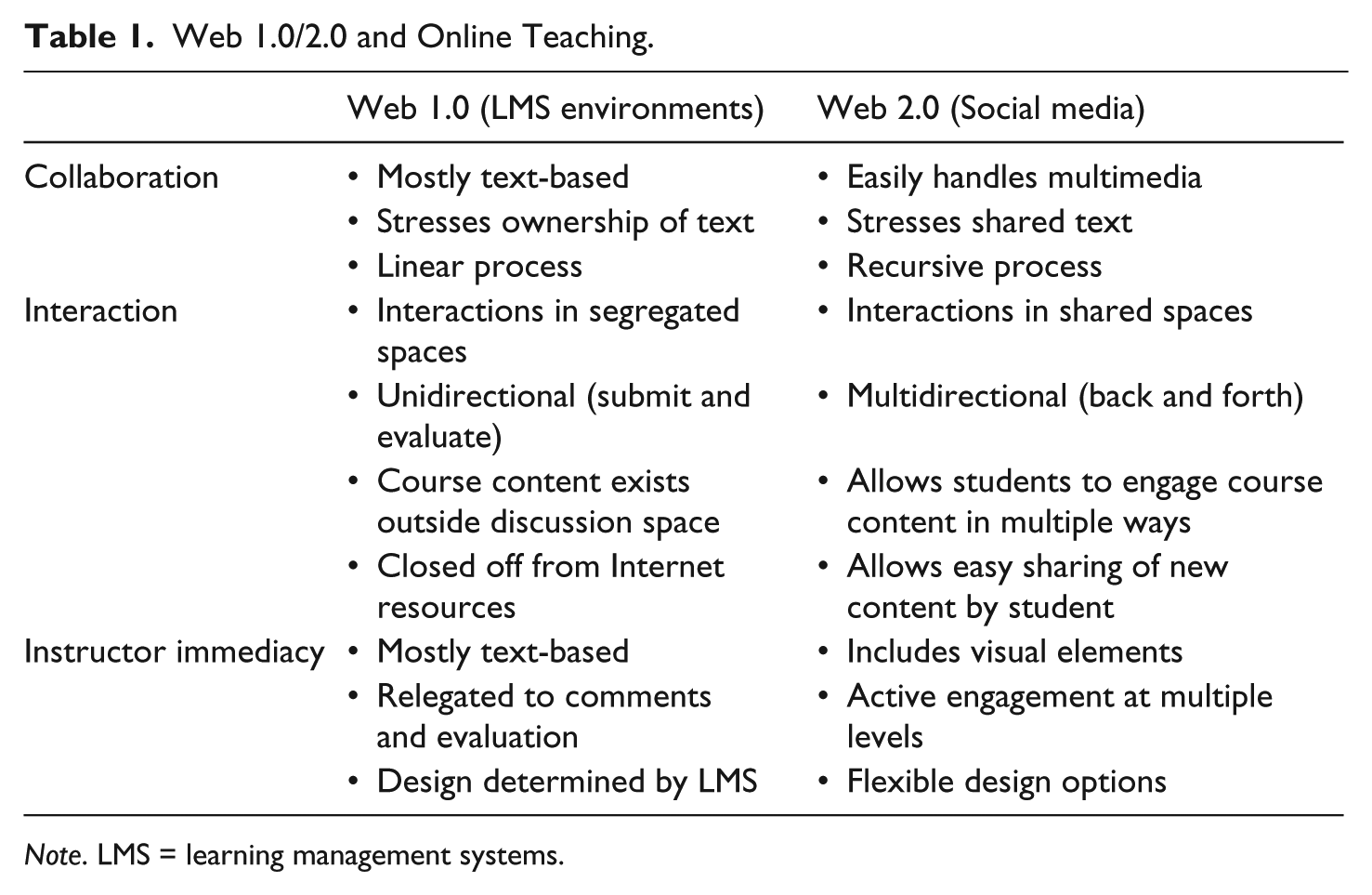
Note. LMS = learning management systems.
The flexibility of Web 2.0 spaces enhances instructors’ ability to flip the face-to-face classroom by extending collaboration outside of the classroom more easily and asking students to engage the communication process together at multiple levels. One of the primary elements of the flipped classroom is exactly this kind of collaboration—students work together to apply what they have learned in a lecture or textbook, while the instructor functions as a facilitator. Web 2.0 spaces, like Google Docs, enhance this collaborative element in the face-to-face classroom by allowing students and instructors to comment and dialogue on drafts both in class and outside of class. When flipping the face-to-face classroom, Google Docs also allows instructors to move some elements of peer review outside of scheduled class time, allowing for more thorough in-class discussion. For example, having already read and commented on drafts, students have time to discuss their comments in relation to a rubric, develop more specific revision strategies, or discuss “best of” excerpts as a whole class. All student comments are also visible together in one document (instead of in separate physical drafts), helping students interpret and discuss comments more holistically. As an instructor teaching business and professional communication as a workshop class, Google Docs has helped me make the most of the 50-minute class period in which I am often required to teach.
Recreating these interactive classroom moments online can be difficult, especially when online instruction interfaces are not always conducive to this kind of collaboration. Significant evidence has demonstrated that online instruction can be as effective as face-to-face instruction if appropriate adjustments are made to make up for the lack of opportunity for face-to-face interaction (Conaway, Easton, & Schmidt, 2005;Sauers & Walker, 2004;Staggers et al., 2008). Though perhaps difficult to achieve, learner interactivity is key to moving the online business and professional communication course completely online (Mabrito, 2006). Past research has shown that three kinds of interaction are necessary for promoting engaged learning: learner to instructor, learner to content, and learner to learner (Conaway et al., 2005;Moore & Kearsley, 1996). All of these interactions can be achieved much more fluidly in a physical classroom. Though perhaps easier to achieve in a face-to-face classroom, each of these levels of interactivity is critical for making an online class work, though the nature of many LMS environments can make this difficult, since they are often set up more around Web 1.0 principles.
LMS environments tend to segregate these spaces by use rather than allowing all three sets of interactions to occur relationally in one space. For example, students usually interact with each other on a discussion board, separate from where instructor material is distributed. Students are more likely to understand course material as static and unidirectional when these spaces are segregated. The discussion board is meant to be a place where students interact with the content of the course, but students must navigate between spaces, much like they would with a textbook. Interaction between the instructor and student is mostly on the instructor’s terms as they comment on various discussion posts or more formal assignments. Such segregated spaces tend to decrease students’ sense of instructor immediacy because of the unidirectional nature of this interaction. Most would agree that instructor immediacy is a critical factor when flipping the classroom (Conaway et al., 2005;Wiener & Mehrabian, 1968). In a face-to-face classroom, instructors can accomplish this simply by walking around the room and engaging students in their work. But how does one “walk around” a course site like Blackboard or Sakai?
Though more difficult online, immediacy can be achieved by commenting on student writing, being quick to respond, and using students’ names (Conaway et al., 2005). For example, being sure to comment frequently on discussion board posts can increase instructor immediacy. With the rise of video technology like Google+ Hangouts and Zoom, using synchronous video chats seems an obvious choice for increasing instructor immediacy, but has proven difficult and time consuming. In the online classroom, synchronous interaction usually occurs through video or text chat—often awkward spaces to signal instructor immediacy. Since many of the venues used for synchronous interaction happen rapidly and can be considerably awkward, learners often interact more in asynchronous settings. For example,Mabrito (2006)found that, though students spent more time and interacted more during synchronous text chats, the interaction within asynchronous spaces tended to be more focused on specific tasks, even though the actual amount of discussion may have been less. Perhaps counterintuitive at first, asynchronous spaces are often more ideally suited for flipping the classroom online, particularly when instituting a workshop model to writing and communication. Using Web 2.0 spaces as a classroom discussion space takes the flipped classroom to a new level, allowing students to participate within asynchronous workshops while learning to work in flexible online environments.
Most research into online interaction and discussions has focused on the effects of instructor immediacy and strategies for increasing the quality and quantity of student discussion posts in spaces like Blackboard’s discussion forums (Arbaugh, 2001;Conaway et al., 2005;Gallien & Oomen-Early, 2008;Sauers & Walker, 2004). Typically, online instruction models are informed by the experiences within face-to-face or “traditional” classrooms. The lecture hall is the most influential model, perhaps epitomized by massive open online courses where hundreds to thousands of students take a course at the same time—the primary content being lectures from well-known scholars. Student interaction is mostly restricted to discussion spaces, allowing for little interaction with instructors or lecturers. Instructional interfaces, such as Blackboard and Sakai, have made student-centered environments difficult to produce in online settings, but with the rise of Web 2.0, instructors are able to retrofit developing spaces for the online business and professional communication classroom. Incorporating Web 2.0 spaces can increase the number of collaborative moments in online classes.
As classes, and business and professional communication itself, move more and more into digital and collaborative spaces like Google Docs, learning to collaborate online is increasingly crucial for business and professional communication students (Bohley, 2010;Kittle & Hicks, 2009). In the business workplace, collaborative projects will not always have a “face-to-face” element, at least in the traditional sense. One of the primary advantages of teaching online is the ability to foreground these kinds of collaborations, but only if the nature of online tools and their affordances are at the forefront of the students’ and instructors’ minds. Using experience, teaching several writing classes in Google Apps (Google+, Google Hangouts, Google Drive, etc.) and institutional review board–approved qualitative research, I will argue that flipping the classroom online with Web 2.0 technologies enables students to fluidly use these discussion spaces for workshopping their work asynchronously, increasing student engagement and interactivity in the online classroom, while providing moments of critical reflection on how these spaces influence communication and writing.
Web 2.0 and Online Learning
While piloting one of Miami University of Ohio’s first completely online professional writing and digital communication classes throughout 2012-2013, I chose to repurpose Google+ and Google Apps to create a collaborative environment that functions outside the premise of the lecture hall. I also piloted early versions of these online courses in conjunction with two other instructors, each of whom chose different interface configurations. For this article, I will be mostly focusing on my own experiences using Google+ in my digital rhetoric and writing course—a part of Miami University’s professional writing program. For more research regarding these other pilot projects, seeCummings et al. (in press).
Rather than valorizing “lecture” material that is mostly unidirectional, my online classes foregrounded discussion and collaboration through the use of the Google+ feed (much like Twitter or Facebook), blogs, and peer review in Google Docs. Although I distributed several standard video lectures as a means of introducing rhetorical theory and communication practices to my students, the bulk of our time was spent in these interactive environments. My use of Google+ Hangouts (or group video chats) focused on discussing and workshopping student work, not lecturing. My goal was to flatten the hierarchy between instructor and student in most of these contexts, allowing teacher and student dialogue to exist in the same writing spaces, rather than segregated as in most LMS environments. As these classes progressed, students began to learn how to navigate flexible Web 2.0 environments for their own writing, making the interface design itself a critical part of how our class met several of our program’s inquiry-based learning outcomes, many of which ask students to consider the social and technological contexts in which they invent, construct, and deliver knowledge.
The writing program at Miami University of Ohio recently regeared its curriculum around “inquiry-based” learning, where “student-centered engagement with teacher facilitation is the focal point of learning” (Partners in Learning, 2010). Clearly related to the flipped classroom, this interaction encourages students to explore different possible answers, rather than seeking out the “correct answer.” In other words, knowledge is not static, but always in process. Learning is not unidirectional, but dialogical and recursive. Both characteristics match the participatory architecture of Web 2.0 environments. Inquiry-based learning is often set up as a problem-solving project, usually requiring five stages:
Create a conducive environment
Select and explore a theme
Form a question or problem
Design an investigative plan
Communicate and reflect on findings (Myers & Haynes, 2002)
For example, in my professional writing classes at University of North Carolina Wilmington, students choose a campus issue, like parking or campus dining, and use this problem to drive research and provide content for assignments like letters of concern, long reports, and document design. In my Writing for Business class, students explore how businesses use social media to create a professional presence or ethos—a project that may well be assigned in a business setting. There are no “correct” answers to any of these problems, requiring students to explore many different avenues, approaches, and possible answers. Web 2.0 environments play a significant role in creating a “conducive environment” for collaboration that fosters the “informal exchange of ideas,” promotes “risk taking,” and develops respect for different kinds of knowledge (Office of Undergraduate Education, 2013, “Stage 1”). Though inquiry-based learning is decidedly student-centered, instructor facilitation is a key component that helps students ask good questions and develop robust research strategies.
Such facilitation is often difficult to achieve in Web 1.0 environments. As noted in the introduction, the relationship between student learning, interaction, and instructor immediacy has become a well-researched topic in the past decade or so and plays an even more important role when structuring inquiry-based classes.Knowlton (2000)made the important distinction between “professor-centered” and “student-centered” classrooms or between positivist and constructivist approaches—not unlike the distinction between the lecture hall and the “flipped” classroom. The teacher-centered classroom presents and disseminates knowledge, whereas the student-centered classroom allows students to dynamically interact with their own interpretations, creating a “community of learners” (Knowlton, 2000, p. 7). It is the nature of student interaction that humanizes the learning process and differentiates online learning from simply reading a textbook or other resources in solitude.
If student interactions and instructor connectedness are crucial to the learning experience, how can this happen in online spaces? Both the frequency and quality of faculty interaction are crucial to making the online classroom work. For example,Gallien and Oomen-Early (2008)showed that personalized feedback correlated to better student satisfaction and academic performance. Additionally, both teacher immediacy (or low psychological distance) and social presence (or the degree instructors are seen as real people) play an important role in constructing a sense of connectedness and community, which also increases student satisfaction and academic performance (Richardson & Swan, 2003;Swan, 2002). In Web 1.0 technologies and many LMS environments, participants create social presence by “projecting their identities” through verbal and written “immediacy behaviors” like discussion comments and personalized feedback (Swan, 2002, p. 25). For example, instructors might address students by name or refer to specific student work or ideas. Web 2.0 environments like Google+ can enhance both the quality of student interaction and instructor immediacy by allowing for more personalized responses between instructors and students in asynchronous environments.
Some in the field of business and professional communication are hesitant to adopt Web 2.0 technologies in the classroom because these technologies do not necessarily “mirror” the dependence on Web 1.0 communication tools in the workplace (Cardon & Okoro, 2010). If one excludes marketing and leadership communications, then most business and professional communication still occurs in spaces like email and single-function composing applications. Though this may be true, depending on the context, incorporating collaboration in the online communications classroom using Web 1.0 technology is usually awkward. For example, using file sharing for peer review in most LMS environments requires downloading a document, opening the draft in MS Word, adding comments, and uploading a new version. This process follows a Web 1.0 process where text is less fluid. Certainly, Web 1.0 technologies have an important role in both the writing classroom and in the business workplace. Students must eventually submit a final document to their instructor or employer, usually in the form of a PDF or Word Document, but a lot can happen up to that point in Web 2.0 spaces. Using Web 2.0 spaces for asynchronous workshopping helps students learn strategies to effectively communicate in both environments. To make this critical move more intentional, I added a learning outcome to my current classes in business and professional communication: “To develop flexible strategies forworking collaborativelyand inonline environments.” Having students critically reflect on this outcome foregrounds the relationship between interface and the creation of knowledge and text.
The rise of social media and Web 2.0 technologies empowers instructors with the tools to articulate the online writing space around Web 2.0 principles “about linking minds, communities and ideas, while promoting personalization, collaboration and creativity leading to joint knowledge creation”—one of the primary purposes for flipping the classroom (McLoughlin & Lee, 2007, p. 668). In fact, early research has shown that Web 2.0 technologies, like Google Apps, can invite a more collaborative approach to information, rather than a “broadcasting” or unidirectional model (Schneckenberg et al., 2011, p. 750). Scholars in composition and communication have already seen Web 2.0 communities as a place to practice the “back-and-forthness” of dialectical or dialogical approaches to rhetoric and text (Jackson & Wallin, 2009). Flipping the online classroom allows students to learn business and professional communication principles by applying them together within a networked ecology that includes the Internet and other communities as a resource. The flexible interface of Google+ is a prime example of how these discussion spaces can increase student interactivity.
The Asynchronous Workshop on Google+
Though potentially different across institutional contexts, my own experiences with LMS environments—first with Blackboard, then with Sakai—found the lecture hall model to be prevalent within these instructional spaces. Training and support often focused on creating video lectures and organizing content into modules. My ability to use these spaces in ways that coincided with a workshop model of a writing and communication classroom was limited and difficult at best. Though discussion boards allowed for student-to-student interactivity and instructor immediacy, the affordances were limited for sharing multimodal texts, video, and audio. Discussion boards rarely simulated the kind of classroom dialogue that occurs in a physical, flipped classroom. Before even logging in, Sakai was already at odds with a collaborative or workshop model of instruction. For example, the discussion feature found in Sakai invites more long-form writing, and comments tend to function as unidirectional responses, following a submit and comment format (seeFigure 1). Interaction was mostly commenter to poster, rather than a dialogue between several students and the instructor. The linear structure also forces users to dig through several levels to follow a conversational thread. Interacting with a specific comment or idea is difficult, discouraging the level of engagement one might find in an actual flipped classroom (seeFigure 2). Though these spaces can certainly be adapted to function more like back and forth conversations, the lack of flexibility can make such uses difficult. As a result, I chose a space outside my university’s LMS for my first completely online writing and communication class, relying on social media to incorporate collaboration and learner activity.

Sakai discussion forum message input.

Discussion thread in Sakai.
Social media, like Facebook and Google+, seem ideally suited to incorporate different kinds of learner activity and increase instructor immediacy but only if approached intentionally by both students and instructors. In addition to allowing for more kinds of interaction, spaces like Google+ enable what has been called “collaborative remixiblity”—or the “transformative process in which the information and media organized and shared by individuals can be recombined and built on to create new forms, concepts, ideas, mashups and services” (McLoughlin & Lee, 2007, p. 665). In other words, these environments promote an informal exchange of ideas that allows students to participate in the content of the course: “These affordances stimulate the development of participatory culture in which there is genuine engagement and communication, and in which members feel socially connected with one another” (McLoughlin & Lee, 2007, p. 667). Such engagement is critical for the inquiry-based, or flipped, classroom. Instead of discussing examples in a separate lecture video, I often post an example in the Google+ stream, inviting students to share their own examples, comment on my post, or otherwise engage the content of the course (seeFigure 3). Students are able to “remix” course content as they problem solve and explore different perspectives in the class and online.

Posted supplemental lecture content.
Even so, these affordances must be made explicit to students, requiring “careful planning and a thorough understanding of the dynamics of these affordances are mandatory” (McLoughlin & Lee, 2007, p. 667). On Web 2.0 sites like Google+, the parameters of the website are certainly constrained by the vision of developers, but there is greater potential for adapting space to the kind of discussion or collaboration needed at a particular moment for a flipped classroom. Google+ is particularly flexible in adapting to different kinds of interaction and media. The Google+ stream functions much like Facebook, where status updates are posted and shared in a stream, usually starting with the most recent or most popular, but with much more user control. For example, a student can choose a pinboard layout or a more linear layout. The pinboard layout is default and encourages students to see posts more relationally. Even the linear layout highlights more recent posts or comments promoting dialogue without negotiating long, embedded threads. Students and instructors can also respond to individual student comments by inserting +[Google Username] in the comment field. Using this function, as well as +1-ing posts (or “liking” posts), creates immediacy and social presence for students and instructors that are difficult to achieve on discussion boards. These affordances are enhanced by the clearly identifiable profile photos that appear alongside each post and comment, signaling both student and instructor presence.
Though instructors or students can use Google Apps within a lecture hall model, the flexibility of the space allows for different kinds of uses, providing opportunities for students to critically reflect on their ability to adapt to multiple online contexts—a central outcome for my online courses. Though Google+ can certainly be used as a kind of discussion board or blog, the affordances of the interface make this difficult. For example, formatting text style is only possible with special symbols. Though writing in paragraph form can be done, the textboxes do not necessarily invite this kind of writing. This is not to say that there is no place for long-form writing in the online classroom. I did have students engage their research and some course material onBlogger.com. These blogs are easy to share on Google+ for commenting. Even so, the Google+ stream worked best as a place for short-form writing, encouraging more back and forth dialogue.
Much of the interactivity and instructor presence that is achieved in face-to-face classrooms can be recreated in Google+, while also helping students understand when “less is more” in business and professional communication contexts. This can clash with students’ own notions of how these spaces work, especially in a classroom context. Students did not always see these spaces the same as myself, so there were moments where I had to shift my discussion strategy or make my use of space more explicit—pedagogical strategies that are quite common in face-to-face flipped classrooms. For example, it was fairly typical at the start of each of my classes for students to post in the stream just as they would on a discussion board or blog (seeFigure 4). Although students often bring with them a mentality that longer is better, such posts actually discourage dialogue. Reading 20 of these posts increases the class workload significantly, making it much less likely that students will comment (much less read all of them). Interaction between these posts tended to be cursory or narrowly focused on individual sets of students. To flip the classroom discussions, I instituted a 200-word maximum (or a 1-minute time limit for audio and video posts), forcing students to be pithy, but concise. Whatever they did not get to talk about in the main post could be discussed in the comments field with other students. Students were much more likely to engage multiple times with the same post. For example, many of these shorter posts would elicit over 20 comments by 5 to 10 different students, often addressing each other using the +[username] tag.

Long-form discussion post.
But constructing a workshop class involves more than back and forth dialogue. There are also times when a more linear approach to discussion is useful. For example, when workshopping theses, I created a single post summarizing some helpful thoughts on writing a thesis, along with a link to a Purdue Online Writing Lab page, and asked students to post their working thesis where they all could be seen and discussed at once (seeFigure 5). This is analogous to a brief lecture on theses that might be given in a face-to-face class. Using Google+ in this way helped everyone see each other’s theses together in one place rather than spread out. This more linear discussion post is analogous to the instructor displaying student writing on an overhead for discussion in a face-to-face workshop. Google+ allowed this kind of workshopping with multiple kinds of media.

Thesis discussion post.
The Google+ stream was the ideal place to workshop more substantial student texts. For texts that were mostly alphanumeric, we still used Google Docs, but students could actually share Google Docs in the stream. Or, if students had questions about a specific portion of text, they could post a screenshot of just that area for the class or instructor to discuss. But this space was easily adaptable to other kinds of workshopping. For example, later on as we moved into more multimodal projects, the space dynamic changed because students were talking about more visual and aural elements of communication. For example, inFigure 6, I shared a screenshot of a slide that I created based on discussions we had about memes. Students shared their projects in similar ways.

An example slide shared in Google+.
These are all examples of moments where I used Google+ to not only maximize interaction but to create a workshop atmosphere that represents the flipped classroom. At times, my notions of interface may have conflicted with the tacit knowledge students brought with them, but these became moments for me to be more explicit about my own expectations about the space, while also challenging students to think more deeply about what it means to be a digital writer—that is, learning to write in shorter snippets for a specific audience or learning to interact within a string of comments. Students also learned to adapt these spaces to different kinds of media, not just different kinds of writing. When shifting to other forms of communication, we often use classroom space in different ways. Google+ also adapted well to these new media.
Increasing Digital Competencies
What soon became clear, though, was that the Google+ stream could be used in ways I had not thought of—in ways that were discovered by students, not myself. Ideally, when flipping the classroom, students create their own knowledge. In this case, students created their own ways of using our classroom space. AsWalker (2003)noted, Web 2.0 discussion spaces already have a decentering effect on the classroom, allowing students to contribute to course content by sharing ideas and material from the web and to “instruct themselves” about technology and writing (p. 63). Theories on rhetoric and composition, like distributed learning theory, can help students in online courses reflect more meaningfully on web and software tools and the complex dynamics that influence the communicative act: If distributed learning theory is used here as a lens through which to examine tools of the interface, online business communication teachers can examine not only the specific tools and their characteristics, such as ways students can use the discussion or calendar tools, but also the specific teaching and learning opportunities that result from activity mediation, or lack of it. (Walker, 2003, p. 60)
Since students often found creative ways of using Google+, there were many opportunities to discuss the influence of these spaces on the processes of communication and collaboration. In other words, students can reflect on how they use online writing tools, even as they accomplish workshop tasks. Such moments can be cultivated, even though students often retain default visions of these tools that restrict their use. Within the first week of teaching online, I began asking students to describe their experience of our online classroom from their perspective, mostly through chat windows, informal surveys on Google+, or more formal anonymous surveys that I constructed using Google forms (seeFigure 7). My goal was to share some of the design of our online space with my students. Instructors need to interact with students about the space as part of the flipped online classroom.

Informal survey with video post on Google+.
The increased awareness of technological affordances inspired many students to use our Google+ space creatively, often giving me new ideas on how Google+ could be used. Though I am not always getting direct feedback from students, I have learned to watch how they use the different affordances of Google+ and adapt the interface as context and class ecologies shift. For example, I never intended to use hashtags, but as students began using them in helpful ways, I integrated these into my own use. Hashtags became a great way to organize posts for later reference (or even grading). Also, I originally had students share their research blogs on Google+, but they commented on the actual blog sites. As class progressed, students started commenting on the shared link right in the stream, which cut out an entire step and made discussing blogs much more visible and interactive (seeFigure 8). Going forward, this was how we discussed blogs. As these spaces were negotiated, the modes of use began to mold to the workflow of the class. Students had more “available means” for communicating. For example, I did not always dictate that discussions occur in one mode or another. Several students often chose different modes (like video or sound), depending on the discussion, developing a keen sense of how different modes function uniquely in Web 2.0 environments. Even when my vision of the assignment was textual, students were able to adapt the assignment by introducing other modal elements in their own way.
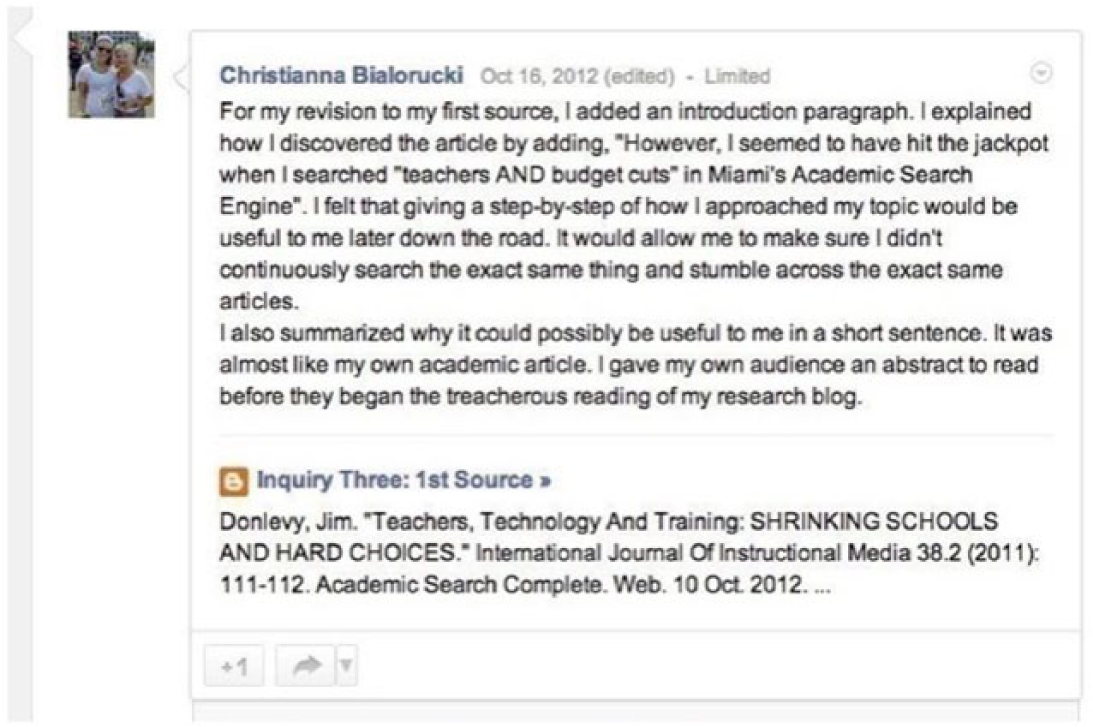
Research blog post.
One important element of a flipped classroom is the opportunity for students to own classroom knowledge and develop their own strategies for communicating online. Not only should business and professional communication include multimodal elements but also the ability to develop tactics that can identify affordances for different kinds of composing programs and social media. For example, in the most recent edition ofBusiness Communication: Polishing Your Professional Presence,Shwom and Snyder (2014)asked students to not only create short and long business reports but also what they call digital “report decks,” an emerging genre in business and professional communication. Essentially, these report decks are PowerPoint slides that make sense without a presenter. Students can participate in this emerging genre by exploring different platforms and modes of delivery. Choosing PowerPoint, Google Slides, or Prezi is a rhetorical choice that requires a broader contextual analysis of the networks and interfaces that surround business and professional communication.
Of course, there are challenges when flipping any kind of classroom, whether online or elsewhere. Our pilot study sought to intentionally structure our online classes around writing and workshopping, making use of new tools and environments like Google+ Hangouts (video chat) and, for my class, Google+. I also used Blogger as my landing site so that the entire class was richly networked with different Web 2.0 technologies available through Google Apps. This allowed us to make the most use of Web 2.0 technologies, though these spaces were not what students expected at first. Teaching in these types of online courses denaturalizes the classroom and can create a degree of dissonance as students acclimate to the course. Even so, most students liked the flexibility once they understood how the environment worked—a common theme in my course evaluations. Several comments discussed the difficulty of learning and navigating interfaces outside of our institutional LMS, but after a period of adjustment, students found these environments much more adaptable to their workflow. Many saw this flexibility as critical to the development of their writing process. Also, students were able to engage “information” in more complex ways, though they needed time to acclimate.
In the aforementioned Institutional Review Board–approved pilot study at Miami University of Ohio, a few of the students participated in a focus group after the class had finished. Though most of the discussions revolved around social connection and Google+ Hangouts, students did mention how taking the course online allowed them to shape the class to their own personalities and workflows: Yeah, my professor kept emphasizing that writing is different for every person . . . it’s like “it’s different for every person, but here are some cookie-cutter molds that you kind of have to fit into,” and so I felt like the online format kind of allowed you to be more different, and allowed you to kind of work the way you wanted to and the way you could, rather than what they thought you should do.
Adaptability is a key aspect that makes Web 2.0 environments work. Many students began to see the online classroom as an opportunity to develop their own sense of process as digital writers: Yeah, the online atmosphere is like, you work at your speed and sometimes your speed may be faster than other people’s speeds so, you know, you feel like you can accomplish more than just sitting in a classroom all the time, you know. Then hope that the teacher doesn’t get off topic, you know [laughs] but they hardly ever do that, so. That’s good.
Working asynchronously allowed students to work at their own pace, reflect on their practice as writers, and develop their own strategies for writing and communication without sacrificing interaction. In fact, one set of students noted that they interacted more with each other in this online class, even though they had taken several other face-to-face classes together. In the brief research done on these pilot courses, evidence shows that “flipping” the online classroom through asynchronous workshops can enhance student engagement and learning, and yes, produce good writing and communication.
Teaching writing online has been conceptualized as not “that different from teaching onsite” (Warnock, 2009, p. xiii). Instructors only need to adapt how their course materials are distributed and incorporate assignments and discussions within an available LMS. The advantage of online writing classes has often been seen as “textualizing” the classroom; students will have to write more (instead of speaking), thus automatically improving their overall writing abilities (Barker & Kemp, 1990;Harrington, Rickly, & Day, 2000). In other words, online writing spaces come readymade with real audiences: “Students are in a rich, guided learning environment in which they express themselves to a varied audience” (Warnock, 2009, p. xix). Students writing in online courses improve their communication skills by communicating. Moving outside of LMS environments for business and professional communication courses goes beyond the simple act of writing or communicating in unidirectional ways. Flipping the classroom using social software like Google+ can increase student interactivity and performance, while also increasing awareness of how online writing environments influence communication, as well as the flexible strategies available to students as business and professional communicators. What I have found in any classroom is true in the online classroom: If students are given the freedom to engage material in their own reflective way, they discover new ideas and develop rhetorical approaches not necessarily delivered in the content of the course. This extends beyond simply their own writing and into how we define the online classroom together. Flipping the online classroom with asynchronous workshops can effectively bring business and professional communication courses into digital spaces that enhance student learning by maximizing student and instructor interaction, therefore increasing our awareness of how these spaces encourage community and dialogue in flexible ways.
Footnotes
Acknowledgements
I would like to thank the research team involved in our online pilot courses at Miami University, including Caitlin Martin, Heidi McKee, Jason Palmeri, and James Porter. Special thanks goes to the two other instructors who piloted Miami University’s online writing courses with me: Renea Frey and Ryan Ireland.
Author’s Note
This study was approved by the Institutional Review Board of Miami University of Ohio; student comments are reproduced by permission.
Declaration of Conflicting Interests
The author(s) declared no potential conflicts of interest with respect to the research, authorship, and/or publication of this article.
Funding
The author(s) received no financial support for the research, authorship, and/or publication of this article.
Author Biography