



Abstract
A key issue when making spaces smart is the availability of satisfying and personalized interaction methods, for the user to comfortably manage the physical and virtual resources in the environment. Among the multiple interaction approaches that are nowadays being explored with this objective, gesture-based ones seem to have a great potential. In this line, this research describes a gesture-based interaction method that uses a specific grammar to control and network objects in a smart space. The method’s grammar establishes that the user has to identify the object to interact with by performing an individuation gesture primitive (the object’s initial letter), then using an action gesture primitive to indicate the action to perform. The action may involve a second object, which will be identified as the first one. The user will be able to personalize the action gestures in the vocabulary, and to configure the commands assigned to gestures, and the system will provide interaction cues for the user not to feel lost. The main component of the system is a gesture recognition module based on an adapted Dynamic Time Warping algorithm. This module works sharply on acceleration or position data inputs, being suitable to deploy device instrumented or infrastructure-based solutions for gesture recognition (i.e. smartphone or Kinect-based ones). The average recognition rate is 93.63% for smartphone-based recognition and 98.64% for Kinect-based one, respectively. The paper also details the architecture and software tools that enables the interaction method to work in a real environment.
Keywords
Introduction
The concept of smart space has been in literature for long now. As Mark [20] states, it was Doug Engelbart the one that envisioned it when exploring concepts that could augment the human capability [8]. “In brief, intelligent environments are” spaces in which computation is seamlessly used to enhance ordinary activity. And “one of the driving forces behind the emerging interest in highly interactive environments is to make computers not only genuine user-friendly but also essentially invisible to the user” [36]. The fact of making invisible the sensing, actuating and computing elements in daily environments underlines the need of providing the user with simple, familiar, easy to discover and learn interaction methods enabling him to have the control (and the control feeling) over the “invisible” components of the space. Thus, although it is obviously important to coordinate sensors or other elements in the smart space, it is equally relevant to define how to provide a consistent interaction between the space and the final user [7].
Nowadays, interaction techniques are moving ahead towards natural user interfaces (NUIs). NUIs build on traditional human-to-human interaction models, intend not to be instrumented through artificial control devices (that is why they are named as “natural”) and aim at being or becoming “invisible” after a learning process (the system is naturally giving the user the feeling that he is continuously and instantly successful). Voice control, gaze tracking or gesture identification are taken as a basis to implement NUIs.
In this paper, the focus is on exploring gesture-based interaction in smart spaces. The first gesture-based interaction systems are as distant in time as the 60 s; it was Teitelman in 1964 who developed the first trainable gesture recognizer [21]. It is not even possible to talk about the novelty of the commercial presence of gesture-based recognition, as it was integrated in non-specialized end-user devices in 1992, with the Apple Newton. In 2000, Oviatt and Cohen [24] reflected on how gesture systems should be merged with other technologies (e.g. speech recognition) to create multimodal interaction. As Norman [23] states, the difference between current and past systems is the availability of inexpensive technologies for sensors and processing.
An example of mass-market technology enabling gesture recognition is the game-oriented Microsoft’s Kinect sensor (commercially launched in 2009). Kinect device is composed by an RGB camera, a low-cost depth sensor and a multiarray microphone. Through its sensors, Kinect enables full-body 3D motion capture, facial recognition and voice recognition capabilities. The same type of technology makes possible the small Leap Motion sensor and current developments show how low-resolution infrared proximity sensors may be also integrated e.g. with the keys of a regular mechanical keyboard to enable gesture recognition [30]. Previous to Kinect, in 2006, the Nintendo Wiimote was delivered to market: it was a low cost tangible interface [10] enabling gesture recognition, thanks to the accelerometer and gyroscope integrated in it. Today, all smartphones integrate these technologies, thus it is feasible to make them become as gesture-based remote controls. In another group of solutions, wearable devices will be soon in the market (e.g. the MYO armband, which detects the electrical signals in the arm muscles, or still bulky ring-like devices such as Nod). These solutions avoid the need of being in the vision range of a sensor or having to grasp a particular device.
In this paper, we aim at exploiting the gesture recognition capabilities of low-cost sensors, under their tangible and vision-based approaches (i.e. smartphone and Kinect alternatives) to build a natural interaction method with objects in the smart space. The main contribution of the work is the interaction method itself, which proposes a subject-verb-object grammar that aims at shortening the user learning curve while providing high functionality. This grammar makes possible performing a wide number of actions on individual objects, but also to orchestrate objects in a network. In brief, the user will be able to select an object to interact with by performing an “individuation gesture” that will be the initial letter or acronym of the English name. On selection, the user will be able to define the action to be carried out by the object through an “action gesture”, defined in a customizable vocabulary. For example, the user will select the TV by performing in-air writing of “TV” and with a straight up movement will make its volume rise. Under the same philosophy, the user will be able to define actions between two objects (e.g. ‘iPad play your current contents at TV’).
The interaction method relies on a robust multi-technology component for gesture recognition, which performs satisfactorily both with smartphone and Kinect sensors. Through the Gesture Recognition Module (GRM) – which is the second main contribution of the work –, users in a smart space will be able to utilize both smartphone and Kinect-based interaction irrespectively, being able to choose the interaction technology but preserving the same interaction grammar. The GRM is based on a Dynamic Time Warping algorithm, which has been validated for the specific use case through a complete performance analysis (considering accuracy, responsiveness, training needs and user-independent response).
The paper details the interaction method and the system to make it deployable, being structured as follows. Section 2 reviews the state-of-the-art both of gesture-based interaction in smart spaces and gesture recognition algorithms. Section 3 describes the interaction method, explaining the interaction vocabulary, grammar and operational workflow, including the definition of the interaction cues. Section 4 focuses on the Gesture Recognition Module’s architecture and its enabling algorithm. Section 5 gathers the algorithm implementation details and evaluation experiments, and the performance report. Section 6 explains the whole system that enables putting the interaction method to work in real environments. Finally, Section 7 concludes the paper.
Related work
As the objective of this paper is to describe a gesture-based interaction method to tackle with smart environments, and the underlying technology that will make this possible, this state-of-the-art Section is divided into two different parts. The first one includes some relevant works that use gesture recognition to interact with smart environments, while the second one gathers a review of the main algorithms that have been proposed in literature for gesture recognition.
Gesture-based interaction in smart spaces
Mobile phones and inertial-equipped devices have been widely used in literature to coordinate interaction with smart objects. For example, it is the case, of Gestures-Connect [25]. Gestures-Connect is a system that uses both NFC and acceleration-based gesture recognition to make selection and action on an object: i.e. a user can capture the information about the playing in a stereo system by scanning a NFC tag on it and flicking the wrist to the left.
Many systems opt for including external devices to facilitate gesture recognition in smart spaces applications, in some occasions combined with other type of technologies. One of the first complete examples of interaction in a smart environment is the “Put-that-there” system [4], designed to work in the Media Room developed by the Architecture Machine Group at MIT in mid-70s. The system relies on speech recognition and on specific hardware to calculate the user’s position and orientation; then, through specific sentences and natural pointing, the user can perform different media actions in the room’s screens. Sawada et al. [28], in 1995, designed a musical performance system to be controlled by hand movements, relying on the input from acceleration sensors integrated in a glove. A ten-gesture set (shakes, strokes, rotations and pauses) enabled the conductor to manage the musical performance and timbre control in real time. The gesture recognition algorithm (based on kinematic analysis) required the user to train it. The conductor was also able to personally match the gestures to the music effects (start, stop, volume change, etc.).
MagiTact [15] is a permanent magnet shaped as a rod, pen or ring that enables changing the magnetic field in the vicinity of a smartphone equipped with a compass to interact with the mobile device. Authors call this concept Around Device Interaction, claiming that the idea provides possibility of extending the interaction space of mobile devices beyond their physical boundary. Although the initial proposal (which is not clear that it is effectively implemented) is thought to control the smartphone functions, the concept could be applied to control any smart object in the space equipped with the necessary technology.
Kela et al. [14] propose to use accelerometer-based gesture control (implemented in a wireless sensor device – SoapBox) to interact with external devices. In this work, gestures are freely trainable by the users.
Costanzo et al. [6] propose to use a gesture recognizer together with an RFID reader that may detect RFID-tagged objects in the vicinity of the user. The gesture recognizer may retrieve or modify the status of the selected object. The gesture recognizer is an independent unit that includes a vibro-motor and three LEDs to provide feedback to the user, together with a 3-axis accelerometer and a microcontroller to host a Hidden Markov Model recognition algorithm.
Camera-based systems have also been used to facilitate gesture identification in smart space applications. Mahfujur et al. [26] propose a motion-path based gesture recognition technique; in their system, an infrared camera is used to track the emitters located in a glove. The idea of using a data glove to interact with objects was already developed in 1999. In this case, authors [13] propose to use the glove to interact with virtual smart objects (e.g. to open and close drawers of some virtual furniture). Smart objects display their capabilities depending on the position of the user’s hand, and then the user can select the desired action. The glove provides different type of vibrations as interaction cue. Hand gestures are not recognized; the interaction depends only on hand tracking instead.
As gloves may not be easy to wear in real scenarios, other concepts have been developed. The Gesture Pendant [9] is a wearable device for control of home automation systems via hand gestures that was designed in 2000. It is based on a small IR camera worn as a part of a necklace or pin. The user proactively initiates the recognition system by pressing a button when a gesture has to be recognized. Eight gestures are defined, which include pointed fingers and palm positions. Authors prototype a service scenario that includes gestures to switch fire on/off, door close/open and window up/down. Additionally, authors include an analysis on how their system can also be used for pathology-related tremor detection.
How to remotely select a specific device within a population through a unified control interface has already been considered in some of the mentioned works, e.g. through touch-based strategies [3,25]. Pointing is another approach: for example, the Point & Click system [2] proposes an ad-hoc device (equipped with a laser pointer, an LCD display and an IrDA transceiver) that is capable of retrieving information from an object (also equipped with an IrDA transceiver) for the user to launch the desired action on it by selecting commands on the control device screen. Stocklöw et al. [29] also employed the strategy of selecting by pointing at it, using camera-based detection. Then the users perform gestures following the options on a screen in the vicinity to control the device.
Apart from functional optimization and technology performance, a crucial aspect in gesture-based interaction systems obviously is user acceptance. The reviewed literature includes some reassuring conclusions regarding this issue. For example, in [26], 15 users evaluated the proposed system’s accuracy to access different media services by using hand gestures drawing (e.g. to play, pause or stop a media content; in the vocabulary, each gesture applied for a given smart object). More than 75% of the users considered that hand gesture-based interactions are interesting. In [14] authors made a questionnaire-based study on the preferred gestures of 37 users to control a TV, VCR, lighting and 3D design software. It is relevant that results showed that different people usually prefer different gestures for the same task. In a second use case, in which users had to control a 3D design software, the study underlines that gestures were considered as a natural modality to perform certain tasks, especially for commands with spatial association, in comparison to other interaction options (speech, RFID-based physical tangible objects, laser-tracked pen and PDA stylus). Authors in [33] studied free-hand gesture preferences for TV control, by using Kinect and a set of 12 gestures and 12 users. Among the guidelines derived from the experience, they point out that “a clear preference was observed for drawing letters in mid-air”. Actually, “participants witnessed letters were easy to use and suspected they would also be easy to remember”. In particular, “one participant imagined popping up a volume control by drawing letter V”. To make the ambient intelligence system personalized and adaptive, Vatavu [32] proposes several design requirements such as user-dependent gesture training and recognition, user-defined association between gestures and tasks. These design guidelines are also incorporated into our work. “Nomadic gestures” concept was suggested in that work to reuse users’ personal trained gesture data so that users will not bother to learn and train gestures when switching to interact with unknown ambient environment. In our work it is also considered to simplify the training stage. Instead of reusing users’ own gesture data, our gesture recognition test results reveal how other users’ gesture data can be reused so that it is possible to interact even without explicit training stage.
Our work intends to be a step forward in the implementation of a fully-working gesture-based interaction system for smart spaces, providing a multi-technology, versatile and easy-to-learn solution. The interaction concept proposes to compose commands by only using mid-air gestures within a grammar framework that facilitates object individuation, networking and control. To the best of our knowledge, existing solutions that consider an object individuation stage in their interaction proposal relies on active object selection through a display, touching/proximity (NFC, RFID) or pointing. Among these options, the attitude-based pointing approach is greatly natural, but requires that the user knows where the object is and a continuous update of the space configuration. Some other solutions prefer to handle a wider vocabulary of gestures (i.e. two different gestures to set the same action on two different objects); this approach makes learning more complicated and limits scalability. Our proposal makes possible to configure actions in which two objects may cooperate, thus enabling easy object networking. Additionally, the proposal aims at being deployed in real scenarios, thus relies on existing low-cost technology: smartphones and Kinect sensors. As it is explained in the following sections, the recognition algorithm adapts to the user and enables to combine different technologies with the same interaction concept, facilitating the migration of the interaction concept among smart spaces.
Gesture recognition techniques
The core technology of the interaction concept that is proposed in this paper is a robust multitechnology gesture recognition algorithm. We following review the different strategies that may be found in literature to address this issue.
It is important to note that “gestures” in our work refer to hand motions without consideration of hand postures. The gesture motions are sensed and tracked by different tracking systems such as video-based or inertial-based systems, and the captured signal contains the spatial and temporal data of the movement so that the gesture recognition can be generalized as spatial-temporal pattern recognition problem. In this article, we assume the gesture signal is pre-isolated, i.e. the gesture signal to be recognized contains only one gesture and the start and end point of the gesture is already known. Gesture spotting which tries to segment meaningful patterns from a continuous stream of motion, is out of the scope of discussion.
Recently there has been an extensive exploration on motion gesture recognition. The approaches can be divided into deterministic and statistical. The template-based approaches belong to deterministic method, which measure the similarity of features between unknown gesture signals and templates, and select the template (or cluster classified based on similarity) which best matches the testing pattern as recognition result. The reviewed methods of similarity measurement include Dynamic Time Warping (DTW) [1], Longest Common Subsequence (LCS) [31], Protractor3D [17] and Levenshtein edit distance [11]. On the other hand, the reviewed statistical methods model the motions in a probabilistic manner such as Hidden Markov Models (HMMs) [5,18,37], or are based on probabilistic theory, like Probabilistic Neural Network (PNN) [34] which tries to asymptotically approach the Bayes optical decision surface. The authors in [17] argue that the template-based approaches perform well even with few training samples and they are easier to implement and deploy on different types of devices since they do not require specialized libraries. What is more, the probabilistic assumptions on which the statistical approaches are established may not accomplish in practice, for example, the Markov assumption and the stationary assumption set by HMMs. Since the vocabulary collection, gesture dataset, experiment settings are different in these works, it makes no sense to compare directly the recognition accuracies.
The recognition system may detect gestures in user-dependent or user-independent manner. The former gives more creativity to the users and allows them to personalize the gesture vocabulary as what they prefer so that the gestures are intuitive and familiar for them leading to that it is easier to learn to use the applications based on gesture recognition. With the latter, the user-independent manner, the gestures of users can be directly recognized without boring training step required by the user-dependent manner but the gesture vocabulary is normally predefined and fixed and may not be accustomed for users. The authors in [19], which applied DTW as recognizer, show the reasons why plenty of work is targeted at user-dependent gesture recognition only. First, user-independent gesture recognition is difficult, due to the great variation between different users even for the same predefined gesture. If the collected data are evaluated in a user-independent way instead of user-dependent, the recognition accuracy decreases significantly, from 98.4% to 75.4% as the case of that paper. Second, user-independent gesture recognition may not be as attractive as speaker-independent speech recognition because there is no standard or commonly accepted gesture set. The template-based approaches seem not be suitable in the user-independent situation because of the huge performance variations between different users which mean much more templates to match to cover the variations, causing deficiency in computation. The statistical approaches, however, do not have this problem and have obtained impressive results on user-independent test, such as [5].
The approaches mentioned above are all learning-based i.e. they can learn from the training samples to recognize gestures and such that they can adapt to the change of gesture vocabulary and features extracted from motion signals. On the contrary, rule-based ones [35] do not need the learning step and normally run very fast. They can work in user-independent manner. However, they need plenty knowledge about the gesture set to define the judging rules and the vocabulary is less flexible because the rules have strong association with the vocabulary. Obviously, the learning-based approaches are preferable taken into consideration that the gesture vocabulary varies with different application scenario and that the features of motion signals are distinct for different sensor and platforms.
In our work, we employ a traditional DTW strategy to implement our gesture recognizer, because of its simplicity and scalability in terms of gesture diversity. Furthermore, it requires small amount of training and allows users to customize the gesture vocabulary, which is significant to user experience. Our design makes possible to use the same underlying recognition algorithm on different input sensors (e.g. position and acceleration), thus facilitating its customization for different service scenarios.
Interaction method overview
An interaction method is an accepted workflow that allows the exchange of coded information, to make possible the communication among two or more entities. In particular, in our work, the entity governing the interaction is a human user, while the remainder entities are objects or services in the smart space that are controlled to fulfill the user’s objective. The code is based on gestures and the workflow is coordinated by a language-based grammar. The interaction method is technology agnostic, thus it can be implemented on different technologies enabling gesture recognition.
Interaction workflow
Let us imagine the following scenario: a person enters a living room populated with different items that may be automatically controlled or smartized through available technology. Among these items, it is possible to find, e.g. smart home objects (the blinds, the HVAC system, the table lamp, the ceiling lights, etc.), media/service presentation objects (the TV set, the user’s smartphone, a photo frame, etc.) or assistive objects (robots). Each of these objects is capable of performing a set of actions: for example, a table lamp may switch on or off and lower or raise its light level. In our living room, the user may choose to control the object through gestures through a simple syntax. Let us imagine that the user wants to “raise the light level of the lamp”. An easy-to-remember gesture-based method to do so would be a) identifying the object on which the user wants to act by drawing its initial letter in the air, and then b) indicating the action with another gesture. For the lamp case, the user would thus draw an “L” letter followed by a vertical translation up. Additionally, if the user goes to another environment in which there is another table lamp, the same type of syntax would work there, without any additional need of previous configuration.
When designing the interaction method, we have considered the main basic rules of interaction design [23]. The interaction method provides:
A well-defined mode of expression: in this case, the interaction method handles a syntax that is based on the human language and supported by a vocabulary thought to be familiar to the user, which is based on letters and directional physical movements.
A clear conceptual model of the way the user interacts with the system. A conceptual model is “a high-level description of how a system is organized and operates” [12]. In our proposal, the user will know that performing the right gesture sequence, the action he wants to occur will happen the same as he were manually acting on the devices. How the system deals with gesture recognition will remain hidden to the user.
Means of navigating unintended consequences and errors: the interaction method delivers error notifications when needed (e.g. when a gesture has not been properly recognized) and provides an undo mechanism that enables the system to be simply back to its previous state.
Means of providing feedback, which is provided through cues that are not making the system slower and maintain the user well informed about the interaction process. These cues are dependent on the interaction technology enabling gesture recognition.
Hints and guides to possible actions: on service initiation, the system specifies a list of available objects and related actions to perform on them, giving the user the possibility of customizing the gestures linked to each action.
Figure 1 gathers the general interaction workflow of the proposed method. As in activity diagrams, diamond shapes are decisions and system actions are represented in rounded boxes. The implementation of some of the stages are technology dependent, but the functional concept of each stage and the output to the next one are common. In Fig. 1, it is assumed that the gesture recognition system has been configured and trained as needed in a previous stage, thus the system may recognize the available gesture set without interrupting the interaction flow.
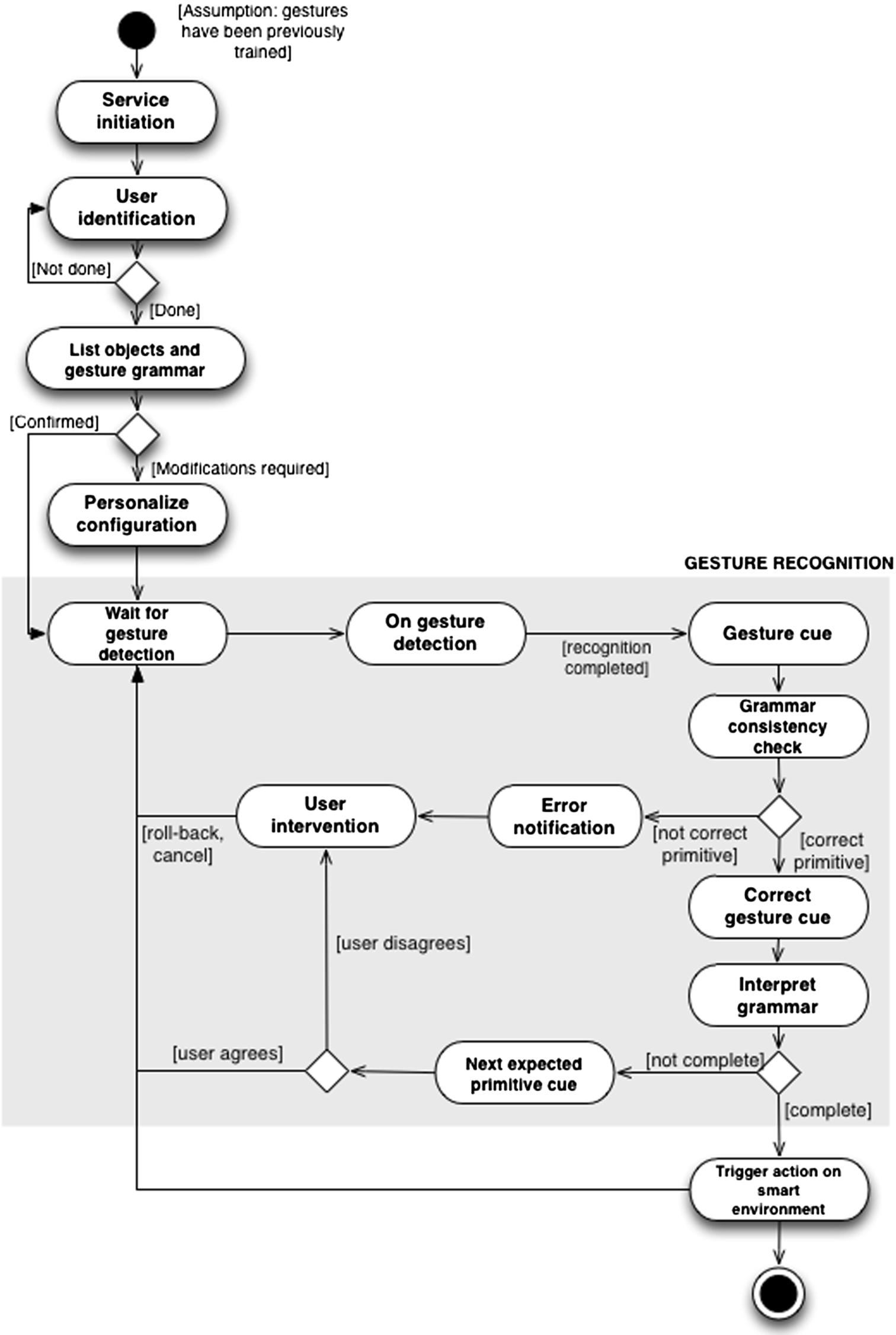
User-dependent gesture-based interaction workflow.
The interaction workflow starts with the service initiation. After this “setting-up” stage, the system intends to identify the user (user identification). As it is explained in Section 4, the Gesture Recognition Module works on a user-dependent algorithm, which enables to get better accuracy in gesture recognition but needs the system to know who the user is in order to improve the gesture detection time. In any case, this is not a difficult part of the process, as the technologies that are considered for implementing the method (Kinect and smartphone) enable, both of them, user identification. The next step provides feedback on the environment capabilities to the user, letting him know the list of objects and the gesture grammar to manage actions. The tuple “gesture-action” may be customized by the user, who may match actions with any of the gestures in the existing set. This configuration as well as user-dependent gesture recognition gives the freedom to control devices in a way users feel comfortable. As a result, users may have their own “local language”. This is opposite to the user-independent manner in which “gesture-action” tuples are fixed. Once the user has completed the configuration stage, the system will be ready to use and will enter a “daemon mode” which will remain waiting for gesture detection. In Fig. 1, gesture detection and grammar checking is depicted in gray. On gesture detection, the Gesture Recognition Module will intend to classify the performed gesture and display the recognition results as gesture cue. Depending on the current input gesture and the previously performed gestures if any, the system will evaluate if the last received gesture is the right one to build a meaningful sentence (grammar consistency check stage). For example, the user cannot initiate an interaction with a “verb”, but has to use a “subject”; identically, if s/he has already defined a “subject”, a “verb” is the next expected gesture word. If the gesture is coherent with grammar definition, the system will provide positive feedback to the user (Section 3.3), and inform about the expected next gesture if the gesture sequence has not been completed. Otherwise it will trigger the configured action in the smart environment by communicating with the environment controllers (see Section 6). In case the performed gesture violates the grammar definition, the system will inform about the error. The users can choose options to roll-back or cancel previous gestures when the last gesture is rejected, as well as when it is accepted as long as they want to modify the previous input.
The proposed interaction model is stateful, as the system keeps track of the gestures sequences. In general, stateful models are more difficult to understand for the users than stateless ones, because the system can behave differently on the same input parameters if it has different states. In any case, in our system, the input options intend to be expressive, using directional gestures and letters.
As previously said, the implementation of the interaction method may be satisfactorily built on different technologies enabling gesture recognition. In this work, we use two different technologies, one representing a “tangible” solution and the other one, a “natural” approach. From our point of view, with these two alternatives, we cover the real solutions to the gesture recognition problem that may be easily deployed in current smart settings. In practice, this means that the Gesture Recognition Module (that will be described in Section 4) will be ready to infer gestures from graspable/wearable inertial sensors (e.g. embedded in a smartphone) and from a Kinect device.
The control method is based on a “subject-verb” grammar, in which the subject is the object that triggers the action and the verb corresponds to the action itself (e.g. TV – switch on). Additionally, in some occasions, two objects could be connected through a specific relational action (e.g. transfer, link, move towards, etc.). In these cases, the grammar is extended to a “subject-verb-object” syntax, in which the object is the entity receiving the outcome of the action (e.g. TV content – transfer to – Tablet device).
The grammar connects gesture primitives classified into two types: i) individuation primitives, which are those that facilitate identifying “subjects” and “objects” and ii) action primitives, which are those gestures referring to “verbs” or actions. Table 1 gathers the set of primitives that have been initially set. The collection of example individuation primitives represent objects that could be available in a smart space: d or D identify the “door”, w/W is for “window”, p/P for “phone”, l/L for “light”, r/R for “robot”, f/F for “fridge”, m/M for “music” and s/S for “scale”. TV and AC are the standard acronyms. In any case, the vocabulary can be easily extended, by training the desired gestures.
To build the vocabulary, we have taken into account that the set of “words” should be as familiar as possible to the user, for the user not to memorize the alphabet. We aim at achieving a quickly transition from novice to expert in the use of the system. For this reason, the proposed vocabulary is based on human language for individuation primitives and evocative physical patterns for action primitives. In the first case, the interaction method establishes that the user will identify “subjects” and “objects” by their initial letter in English. In the second case, the user will be able to configure the gesture s/he wants to associate to an action, but the initial proposal will link the action meaning to a physical movement when possible; i.e. if the action is “rise the volume”, the associated gesture will be a vertical-up translation.
Primitive vocabulary for experiments
Primitive vocabulary for experiments
Differences at different service stages, for smartphones and Kinect
In order to complete the interaction method, it is important to define how the user receives feedback or information on what to do next during the process. For example, the user needs to know how to start gesture detection, when a gesture has been satisfactorily recognized or when a gesture sequence does not make sense.
The Gesture Recognition Module is designed to be easily customized for the inertial and Kinect-based solutions, but the interaction method has to adequate the implementation of its stages to these specific technologies. In brief, when the user carries a smartphone, he has an easy-to-reach screen and a number of feedback channels directly in his hand. In the Kinect case, cues and error notifications have to be integrated through the available elements in the environments (e.g. screens, lights or audio systems). Table 2 summarizes the functional difference when implementing the different stages of the interaction method for these two technological approaches.
For both technologies, there are different possibilities to implement different user interfaces, depending on the setting and on the typology of the final user. For example, a combination of voice/audio/haptic-based feedback approaches may be suitable for an environment that may be controlled by any person (including those with specific disabilities), both for tangible and natural implementations. Users are nowadays familiarized with the use of characteristic audio cues (“earcons”) that are permanently associated to different information or interaction type. Obviously, notifications including sound are privacy-sensitive and may be distracting to some users. On the other hand, “tactons” (haptic feedback e.g. through the phone vibration feature) are suitable for the tangible interaction model. In this particular case, the tangible approach provides in-device feedback, which may be handier in multiuser scenarios than the natural approach. The natural implementation may be integrated with environment screens or not, making it possible to provide the feedback through audio cues and visual signals through adequate objects (e.g. semaphore-like objects).
Gesture recognition module
The previous description of the interaction method relies on the existence of a Gesture Recognition Module (GRM) that implements a robust multitechnology gesture-recognition algorithm. For practical usage, the recognition algorithm needs to provide high accuracy at a low computational cost. Additionally, it needs to be scalable in terms of gesture vocabulary, to enable easy application scenario change and user personalization. In addition, since we intend to support recognition on different platforms, the algorithm has to work on sensor data coming from distinct sensing systems (i.e. accelerations and hand positions).
In this Section, the architecture of the GRM is described, together with our proposal of gesture recognition algorithm.
Module architecture
The general architecture of the recognition module is designed as a layered structure, as depicted in Fig. 2.
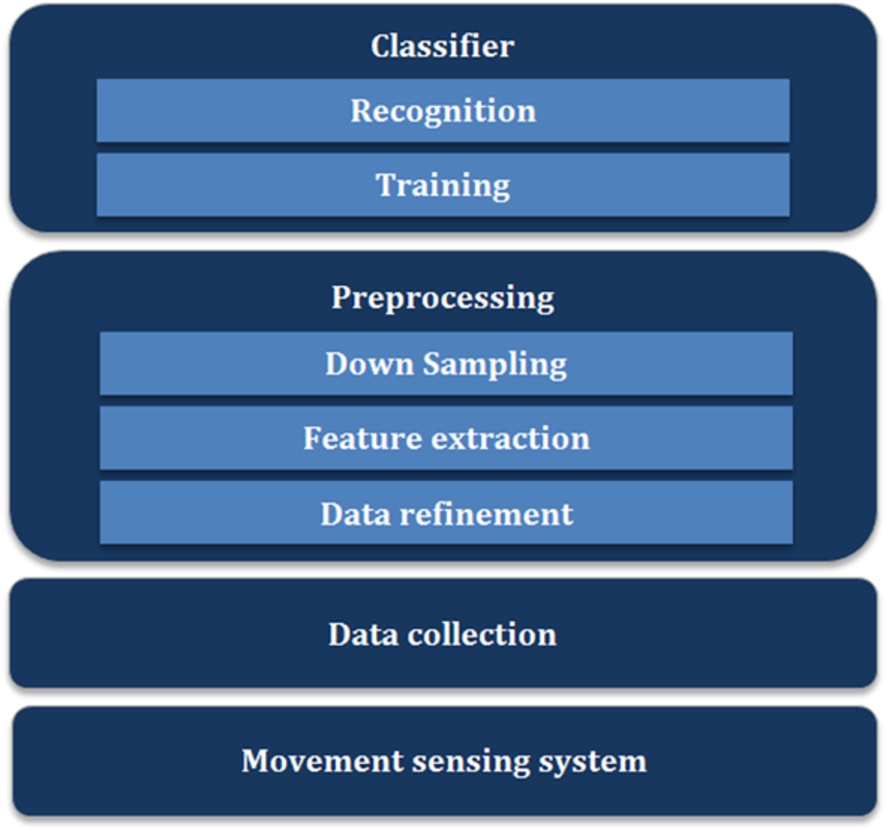
Architecture of the Gesture Recognition Module.
Raw data are collected from sensors that capture movements, which are, in our work, those embedded in Kinect and smartphone devices. Kinect tracks the 3D position of the center of user’s palm relative to the camera, while the accelerometer of the mobile phone senses the phone’s acceleration relative to its body frame with three axes.
Before passing the movement data to the classifier, a pre-processing procedure is applied on it, including data refinement, feature extraction and down sampling, for recognition accuracy improvement, platform difference isolation and computation efficiency enhancement, respectively. These stages are following described, while the classifier is detailed in Section 4.2.
Silence parts may appear at the ends of the raw gesture signal, corresponding to the moments when the users are preparing to perform the gesture or waiting for the termination of the recording (i.e. the gesture-making hand is approximately static). The data refinement step in Fig. 2 is focused on removing the silence parts at the end of the signal; in our work, this is done by setting a threshold to the module of the difference between two adjacent sampling moments.
Feature extraction
This step extracts the features of the movement signal which can be employed by the classifier to distinguish one gesture from another. In this work, the original sensed data types, i.e. the position data sampled by Kinect and acceleration data of mobile phone, are sent to classifier because they reflect the kinematic features of movements themselves. For Kinect data, to make the trajectory of the hand independent of the local coordinate system based on the camera, the coordinate system is translated to the one with the origin as the center of the volume that contains the trajectory of the gesture movement. As for the acceleration data, we did not utilize any transformation as it is already based on a relative coordinate system (body frame of the phone). Furthermore, the acceleration signal is very noisy and transformation may introduce significant deviation.
Down sampling
To make the computation more efficient, the sequence is shortened by down sampling. It is applied on raw data processed by operations mentioned in Sections 4.1.1 and 4.1.2, from both phone and Kinect. The data are passed through a Butterworth low pass filter and then length normalization is applied. The parameters of cutoff frequency of the low pass filter are different due to the different sampling frequencies in the smartphone and Kinect, which were empirically set. This was done like this to guarantee that the Shannon-Nyquist sampling theorem is maintained during the length normalization step. The reduced sampling rate after this low pass filtering should be smaller than the sampling rate when the signal is reduced to the normalized length (20 in this paper). The raw data from phone without low pass filtering (but with length normalization step, the normalized length is similar to the original length) were tested and the result was similar to the one with low pass filtering and length normalization to 20, but the computing time was significantly longer.
Suppose that the original sequence is
This method linearly interpolates or compresses the length of the original feature sequence into a fixed length
Summarizing, the preprocessing is highly dependent on the properties of platforms, such as data collection procedure, data type, sampling rate. This step deals with the diversity of distinct platforms to make the classifier transparent to the difference of platforms, and tries to feed the classifier with relatively uniform data targeted at decent classification performance in terms of accuracy and computational complexity.
The dynamic time warping (DTW) method developed in this work is based on the methods introduced in [27] and [22]. DTW is a dynamic programming (DP) based time-normalization algorithm, which is popular in spoken word recognition field. It was introduced in [27] to deal with the highly complicated nonlinear fluctuation in a speech pattern’s time axis. The algorithm is to solve an optimization problem, which tries to minimize the time-normalized distance between two pattern series. The minimized distance is a measurement of similarity between them. Then given a limited set of templates, a testing pattern can be recognized by calculating the time-normalized distances between itself and each of the templates and selecting the template which is “nearest” to the testing pattern as the recognition result.
Let us suppose that we have two sequences of feature vectors, denoted as:
A warping function F is defined as a sequence of points that indicates the mapping relationship between sequence A and B
It is the best matching between arbitrary sequences A and B in terms of matching cost. The minimization is obtained through a dynamic programming algorithm. For a concrete implementation, we have to specify the definitions of distance
The recognition system creates templates in the training stage. Their creation has great importance to the recognition accuracy so that the templates should be “standard” enough. In our work, minimum selection [16] is utilized for templates creation. The criterion of this method is the intra-class DTW distance, which is the sum of DTW distances between one certain training sample and all the other samples within the same class. The sample with the minimum intra-class DTW distance is selected as the template of this class.
Testing scenario
In order to test the gesture recognition method, we collected one dataset based on Kinect from 11 right-handed users, who repeated 10 times each gesture in the vocabulary in Table 1, and another dataset based on mobile phone from 11 right-handed users repeating 5 times per gesture on the same vocabulary. Each user completed the data collection in the same day he/she started to do it.
Data collection
The application to collect Kinect data runs on a desktop computer connected with Kinect and it was programmed in OpenNI in C++. The graphic user interface of the program informs the user of when the Kinect starts to record the movements and then visible signs are shown to count down the time left to the end of the performance, so that the users can synchronize their performances with the time slots of data collecting. The application can track and record the 3D position of the user’s palm center relative to the camera independent of the posture of the writing hand in the air (with opened palm or with one finger) and the obtained data has a sampling rate of about 30 Hz.
To collect data in the mobile phone, an Android application was developed. The chosen device was a Google Nexus 4, whose sampling rate of accelerometer is around 200 Hz. The sensed accelerations are based on a 3D coordination system relative to the device. In our first implementation, users trigger the data collection procedure by pressing a virtual button and then a vibration launches to inform them of the beginning of the performance of gesture. When they finish the movement their hands keep static until the second vibration comes. To unify the manner of holding the phone and at the same time make the manner as natural as possible, the subjects were required to hold the phone as if they wrote on blackboard with a chalk and the upper-left corner of the phone is the counterpart of the tip of the chalk. The subjects were asked to restrict the movements of the body of the phone to translations, i.e. theoretically no rotations are allowed. These requirements simplify the time series and the processing of signal for the classification.
Evaluation method
The developed recognition program was written in Matlab running on a desktop with Intel 2 Quad CPU (2.5 GHz, 2.5 GHz) and 4 GB memory. The evaluation method is Leave-One-Out Cross Validation (LOOCV). The idea is to split the data into two parts: one part contains the samples for estimating the performance of the algorithm and the remaining part is used for training the algorithm. Suppose that there are N samples labeled with one certain gesture. For the Leave-One-Out Cross Validation (LOOCV), the data are split so that there is only one sample in the validation part and the remaining
In this work, the gesture data were recognized in a user-dependent manner and the templates of one certain user were generated from his/her own gesture samples. Generally speaking, user-dependent system has higher recognition accuracy than user-independent system and is easier to implement because to recognize gestures independent of user, the system usually needs much larger gesture database to adapt the diversity of users’ behavior but the database may not include all the templates or models of different users resulting to degradation of accuracy. Accordingly, the computational cost may also increase due to the searching or matching in the larger database. In addition, the user-dependent system allows users to personalize the vocabulary so that the user can interact with the system with his/her favorite way and its degree of independence on the predefined vocabulary is larger than the user-independent manner.
Moreover, we assume that before recognizing the gesture, the system prioritizes gesture search on a particular gesture set: directional/geometric actions, small letters or a capital letters. We can assume this because the gesture type of each part of the gesture command series is determined according to the gesture syntax.
Within the framework of user-dependent manner and the assumption of already known gesture type, the construction of validation set and gesture template set is now formally described. Suppose that the m-th sample of each gesture of each user is selected as validation data (
Set
For
For
Set
End for i
End for u
As a result, the validation set V contains all the testing samples of gestures of all the users and set T has the templates of all gestures of all users.
Let
Change the value of m and repeat another
In our concrete implementation of the algorithm, Eq. (7) is calculated with Euclidean distance. Denote the weighting coefficient as
In the test, we utilized weighting function in asymmetric form mentioned in [27]
Assume that
Equation (12) is solved by a dynamic programming algorithm with the following initial condition
And its recursion equation
The final result is
We implicitly assume that

Illustration of Type I local continuity constraint.
Type I local continuity constraints [22], as illustrated in Fig. 3 are used to further specify the calculation of
In addition, the normalized length of sequences is empirically set as 20 and the size of the adjustment window, which restricts the search space [27], is 6.
To show the effectiveness of the method, the plot of Fig. 4a illustrates frequency-normalized histogram of all possible intra-class DTW distances of the samples of ‘D’ and ‘P’, and the histogram of all possible inter-class DTW distances between the samples of these two movements, using one user’s Kinect gesture data. For clearly showing the range of the histograms, the intra-class distances of ‘P’ and the frequencies of inter-class distances are set minus. If we call

Frequency-normalized histograms of intra- and inter-class DTW distances.
Thanks to the template choice with minimum selection method, the discrimination of the histograms is improved in the plot of Fig. 4b, which shows the distribution of distances by simulating the LOOCV procedure introduced in Section 5.1.2, i.e. calculating the distance between testing sample and the templates chosen by the minimum selection method. The left histogram of inter-class distance is the statistics of distances between testing samples of ‘P’ to the templates of ‘D’. Intuitively, the minimum selection method selects as template the sample which is nearest to the center of the cluster formed by the samples in the same class. Comparing with Fig. 4a, the histograms are more concentrated. Furthermore, the minimum value of inter-class distance is larger than the one in Fig. 4a, and the maximum values of intra-class distances are smaller, which is beneficial to the separation of the histograms and the accuracy of classification. All the histograms are separated in this plot.
Results show how the proposed algorithm behaves both for Kinect and smartphone datasets, in terms of accuracy and computation time. Additionally, it is obvious that the processes of a) training the system personally before interaction and b) identifying the user before starting the interaction processes are two aspects that should be as easier as possible for the user, or even disappear, if feasible. For this reason, results also show how to optimize the training stage and explore how the system can adapt to new users without explicit training.
Recognition accuracy
Because we tested the recognition method in user-dependent manner, let us first have a look at the accuracy with respect to users in the two platforms, as shown in Fig. 5. In practice, the gesture vocabulary has three independent groups: directional movements, small letters and capital letters, since according to our interaction grammar we can assume that the system already knows to which group the gesture movement belongs before recognizing it. The results were obtained by, for each user, averaging the recognition accuracies of the movements in each group respectively. Then based on the results in Fig. 5, we calculated the mean and standard deviation of the accuracies of each gesture group among all the users, and compared them based on the two platforms in Fig. 6. The average accuracies for Kinect are {99.18%, 98.91%, 97.82%} and for the Phone {94.18%, 95.27%, 91.45%}, with the order {directional, small letter, capital letter}. The standard deviations are indicated by the half length of the error bar on the top of the bars.

Recognition accuracy of users on the two platforms.
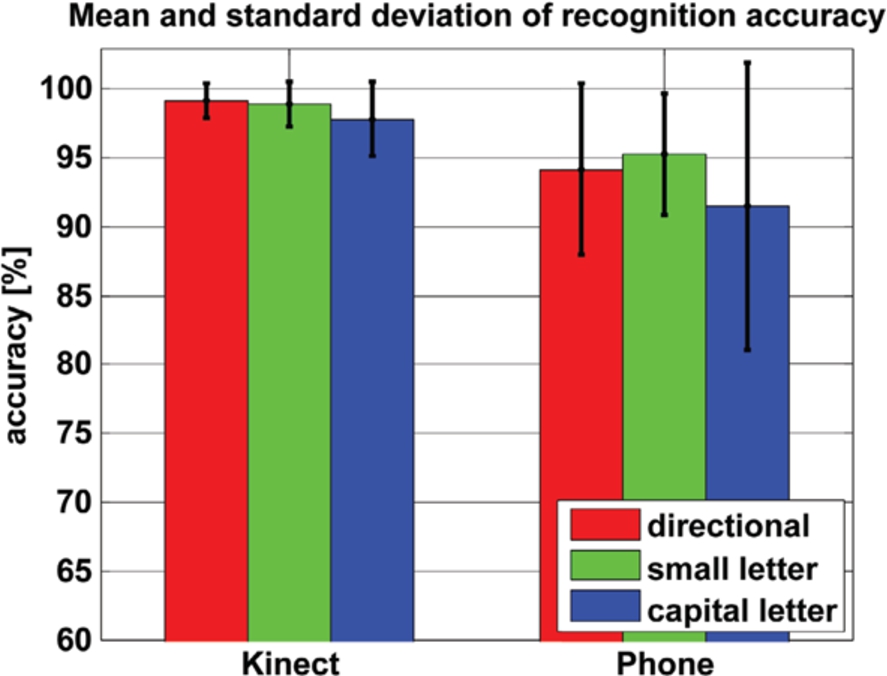
Mean and standard deviation of accuracy of gesture groups on the two platforms.
Another dimension to analyse the accuracy is in terms of gestures. The three plots in Fig. 7 compare the recognition accuracies based on the two platforms with respect to different gestures in the three groups of our vocabulary. The results with respect to gestures are calculated by averaging all the accuracies of gestures for each user. Most of the gestures were recognized with high accuracy in both of the two platforms and some of them were detected with accuracy 100%, including ‘down’, ‘forward’, ‘counter-clockwise circle’, ‘spiral to the left’, ‘d’, ‘l’, ‘s’, ‘L’, ‘M’ based on Kinect, ‘spiral to the right’, ‘r’, ‘S’ based on phone. Wrong detections recognize one gesture with another. Confusion matrices, which show the percentage of recognizing one gesture as one of all the gestures in the vocabulary, can help analyze the discrimination of gestures in the vocabulary. Readers can find the confusion matrices of the three gesture groups on Kinect and phone platforms in Appendix A. We have found from these matrices that the capital letters ‘D’ and ‘P’ were confused a lot in both platforms. Before the test, we made a survey of handwriting of the capital and small letters in the gesture vocabulary to see the diversity of the forms and manners of writing. A scanned copy of the handwriting by some volunteers is displayed in Appendix B. The gestures of directional movements and small letters are easier to recognize than the capital letters mainly because of the existence of some confusing letters such as ‘D’ and ‘P’ in capital letter group.
Here it is important to notice that this work does not aim at comparing recognition results on Kinect and phone on purpose because the test settings have more variables than platform difference. The idea is to demonstrate that the same Dynamic Time Warping algorithm could obtain high recognition accuracy both on phone and Kinect and that it could provide a unified recognition solution on different platforms. All test results are presented under the described testing scenarios.

The recognition accuracy with respect to the three gesture groups (for. = forward, back. = backward, c. c. = clockwise circle, cc.c. = counter-clockwise circle, s. l. = spiral to the left, s. r. = spiral to the right).
Since the instant response to the user is a necessity in real-time application like human-machine interaction with gestures, and the recognition algorithm may be implemented in resource restricted platforms, the method should be light in computational cost.
The comparison of time cost on Kinect and phone (ms)
The comparison of time cost on Kinect and phone (ms)
Only when the DTW distances between input signal and all the templates are calculated, the recognition result comes out by selecting the nearest template. So let us assume that we already have all the pre-processed templates, and then the total computing time to recognize one gesture sample is
From our data collection experience, we can say that repeating too many times each gesture to have the system trained may be tiring to the users. We were interested in investigating the dependency of recognition accuracy on the number of training times (the repetitions of one certain gesture). To this end, we further took a Leave-p-Out Cross Validation on the same dataset and testing scenario as the test in Section 5.2.1 to see how the recognition accuracy evolves as the number of training samples change.
The plot in Fig. 8 shows the performance of the method in accuracy using different number of training samples. In our case, N is 10 for Kinect and 5 for phone. The horizontal axis is the number of training samples for each gesture and the vertical axis is the percentage of accuracy value. We still did the test in a user-dependent manner and first calculated for each user the average recognition accuracy of the three independent gesture groups on Kinect and phone: directional movements, small letters and capital letters. Then based on these data, we averaged all the users to get the final average accuracy and corresponding standard deviation, plotted in the figure. The half-length of the error bar indicates the value of standard deviation of the accuracy.

The evolution of the mean and standard deviation of recognition accuracy with the number of training samples (directional = directional movements, small = small letters, capital = capital letters).
We can see from Fig. 8 that the recognition accuracy improves slowly, although with small ripples in the phone platform and the standard deviations of the accuracy decrease as the number of training samples rises, although this tendency of the results of phone data is not that obvious as Kinect because phone gesture data has fewer repetitions.
Suppose that we have four gestures and each of them has 10 samples. With the DTW algorithm, the distance between any two samples can be calculated and we can display these samples as nodes in a 2D plane to show their relative mutual distances, as illustrated in Fig. 9. Because the users cannot repeat one gesture movement exactly the same, the distances are not zero between these repetitions and the nodes which represent them are separated and form clusters in one area of the 2D plane. To simply the explanation, let us further suppose that the four gestures are designed so well that the samples of every gesture form one cluster and there is no overlap between any two clusters.
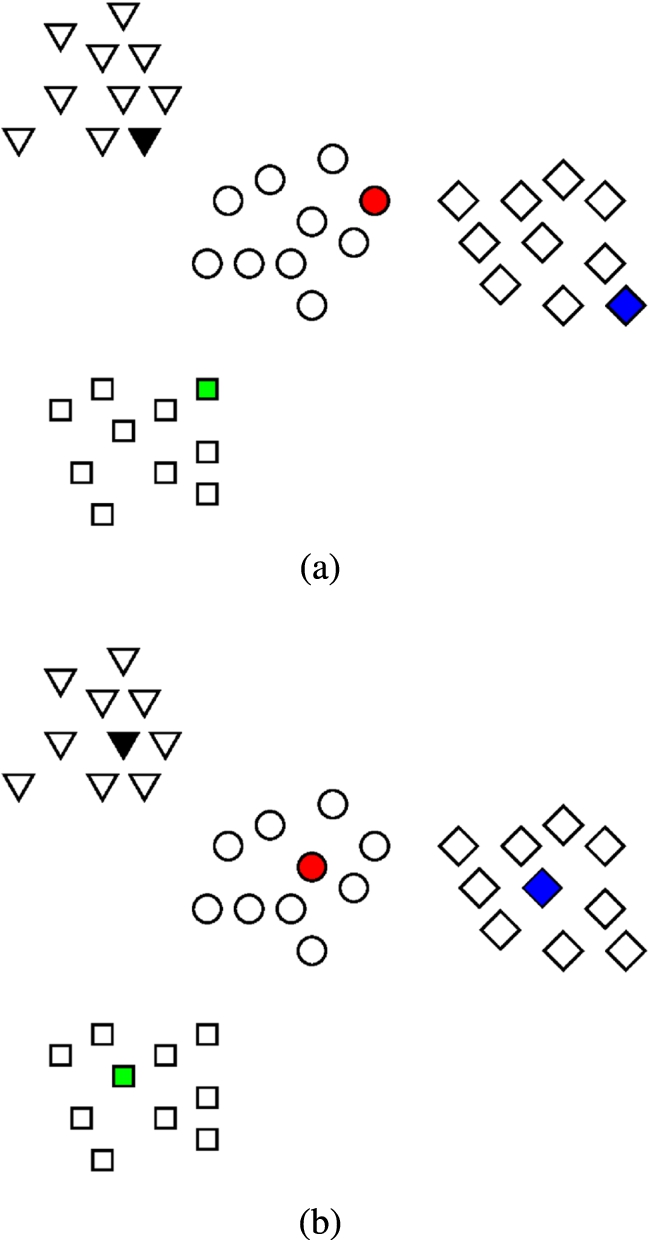
When the number of samples is small, such as 1 or 2, it is quite likely that the samples in the rim of cluster are selected as templates and this case is illustrated in Fig. 9a where the shaded nodes are selected as templates. As one unknown sample is recognized as the gesture whose template is nearest to this sample, some of the circle and diamond samples will be confused with other gestures in this graph. As the number of training samples increases, the selected templates gradually converge to the center of the cluster since we use the minimum selection method which tries to choose the sample which has minimum intra-class distance as template. Figure 9b illustrates the situation when the samples in the cluster center are selected as templates, which will lead to better recognition result than the Fig. 9a. This explains why the accuracy increases if more training samples are available. Here we should note, however, that this increasing tendency does not guarantee that more training samples always make better rate than less training samples especially when small amount of samples are available, because in such cases more samples may not lead to better template selection. This is what happens in the slight drops in the evolution on the phone platform. On the other hand, the convergence process of the template selection makes the selected templates more stable (no matter how we change the subset of training samples, the cluster center sample is always selected as template unless it is used as test sample itself) in each test so that the recognition results vary less if the testing samples do not have large variety, which means the standard deviation of the accuracy decreases gradually.
Following the same idea of reducing the amount of training samples, it is interesting to explore whether the existing users’ templates can be used to recognize the gestures of new users who have not trained the system. With the same gesture dataset we can simulate the following scenario: the system contains templates of N existing users who have trained the recognizer, and then a new user comes. Now we want to know what the recognition accuracy is if the new user performs gestures directly without training. The testing gesture is compared with the templates of all of the existing users. In our case, we have 11 subjects in total. For a certain N, the gesture samples of the
The N varies from 1 to 10 and we get the average recognition results shown in Fig. 10. As what we expected, the rate increases if more users’ templates are available making it more possible that the template similar to the new user’s gesture exists. However, the increasing available templates from different users also raises the risk that the one gesture template of existing user is similar to another gesture performance of the new user. This may explain the ripple in the evolution for directional gestures on Kinect platform.

The evolution of the mean and standard deviation of recognition accuracy with the number of existing users.
After analyzing results on different platforms and on gestures in detail, it can be noted that the recognition results are better when tested on Kinect than on the phone. This is reasonable due to the fact that the users hold the phone in various manners resulting to distinct acceleration signals even if they were performing the same motion, which complicates recognition. The Kinect, however, simply tracks the position of palm, so that the recognition on Kinect is more robust to hand postures. What is more, the gestures with uniform performing manner such as the straight movements and the capital letter ‘S’ tested on Kinect have high recognition accuracy and very small standard derivation.
We can conclude based on this test that in user-independent scenario, it is better to select motions with unified performing manners as elements of vocabulary (refer to Appendix A) as this benefits recognition accuracy as well as time and storage efficiency due to that there’s no need to maintain too many templates for one gesture. As for platforms, Kinect outperforms the phone platform in user-independent scenario. This test also provides a mechanism to measure the degree of variation of a certain gesture between different users. The movements with lower user-independent recognition rates, in another point of view, contain more personal information and thus are suitable for user-identification purpose.
Finally, with the results of this subsection and the previous one, we may come out a possibility that the users may do not need to specially train the system. As we have seen, for most of the gestures the average user-independent test results are around 80% or above on Kinect. And the user-dependent test with one training sample is above 90% in the worst case. Based on these two facts, the user can directly perform gestures to interact without training on purpose and the input gesture is recognized in a user-independent manner. At the same time, the input signal is stored as a training sample. When the user performs the second gesture, the system can recognize it in user-dependent manner and 90% recognition accuracy is already ensured. The risk of this idea is the possible frustration to the user in the first recognition caused by the low user-independent recognition rate. In any case, this approach will not work for a mobile phone platform due to the extremely low user-independent recognition rate.
Once that the core Gesture Recognition Module has been designed and validated, this Section describes the architecture that supports the integration of the proposed interaction method in a real smart environment.
In practice, a great variety of smart objects, with different technology interfaces, may be populating a smart space. To design the architecture, two types of objects will be considered. These objects enable to fulfil, both in functional and technology terms, the setting of the different interaction cases that have been explored in the paper (“subject-verb” and “subject-verb-object”). The first group of objects is capable of performing physical actions (e.g. managing lights, blinds, decoration, etc.) over the environment. The second one is prepared to transfer media contents among the network of media objects deployed in the smart space.
The architecture described below has been set up in a real setting: a space equipped with smart home, media and sensing technologies. The experiment environment is called “Experience Lab of Future Spaces”, located at the Montegancedo Campus of the Universidad Politecnica de Madrid. It aims at being a concept-testing environment that allows user-based prototyping of new ubiquitous services.
Architecture
The proposed architecture, depicted in Fig. 11, is divided into two main parts. The first one, including Smart Space Object Registry, Smart Space Coordinator and DLNA Controller, gathers the logical elements that are needed to maintain an ecosystem of smart objects and to trigger actions on them. The second one, the modules inside the dashed-line box, is composed by the building blocks that enable gesture recognition and its subsequent interpretation of control sentences, ready to be processed and executed by the first part.
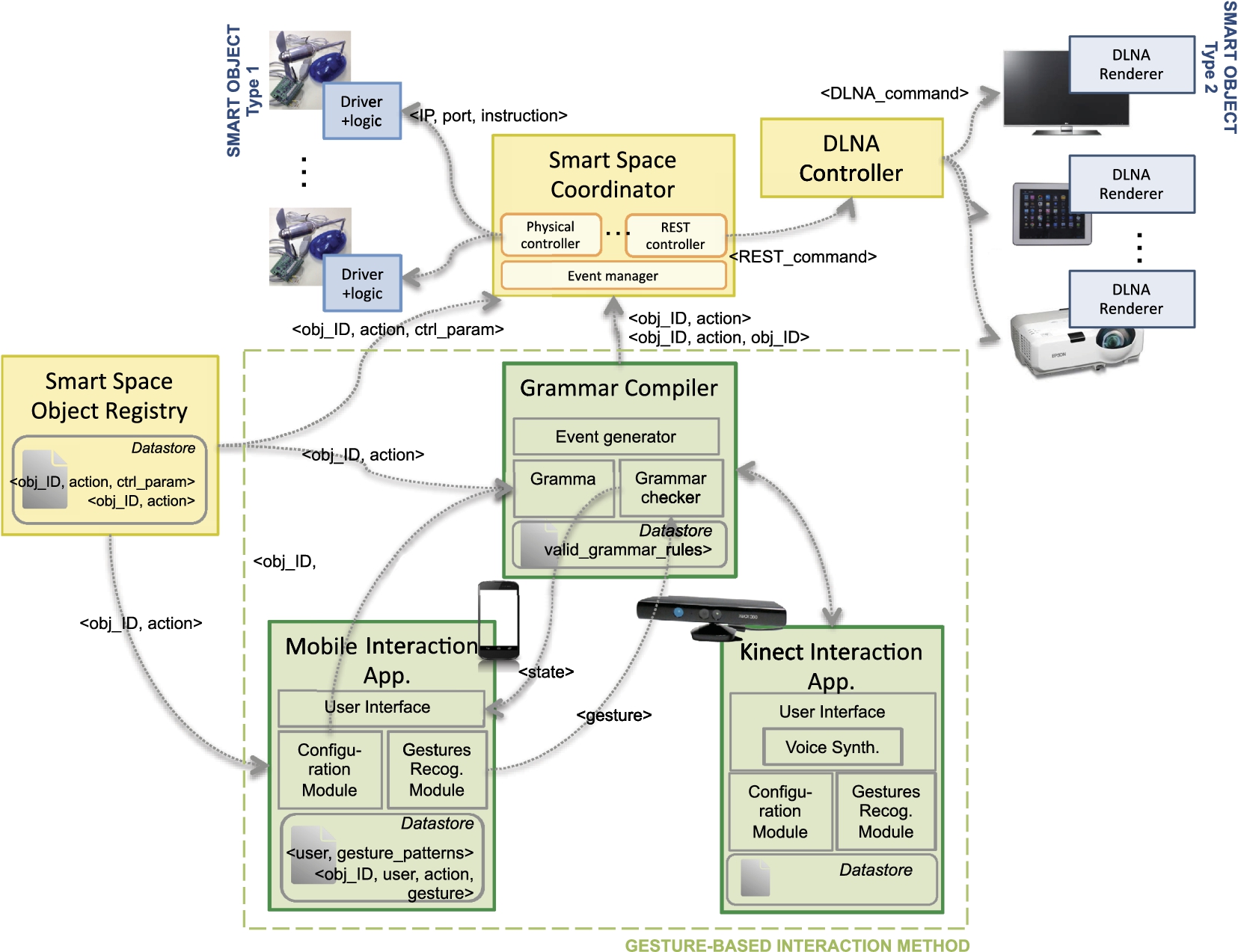
System architecture.
To exemplify (the many) different interfaces that may be serve to connect smart objects to try the interaction syntax, we have chosen to integrate objects based on two relevant technologies. The first group of objects is controlled by Arduino boards, that allows building e.g. objects with sensing and actuating capabilities. It is the case, for example, of a LED light that becomes controllable (switch on/off, blink) thanks to a relay connected to an Arduino board. These objects require each Arduino unit to embed the logic implementing the set of actions that are available for the object itself. Additionally, these objects will have to implement discovery and registration capabilities, and remote configuration tools if needed (e.g. to configure a temperature threshold for notifications). Arduino-based objects can be easily governed by sending the triple <IPAddress, port, actionInstruction> to their interfaces.
The second group of objects are those with media capabilities: they can play soundtracks, video, and photos. These objects facilitate the demonstration of interactions that involve two different objects. In order to control them remotely, we have opted for using the DLNA (Digital Living Network Alliance) standard, which is already available in many commercial devices. Every DLNA configuration has three device classes: a Digital Media Server with the multimedia contents to be shared, a Digital Media Renderer where multimedia contents can be played (each object playing contents needs to host one, there is a wide variety of them, e.g. for different mobile operating systems) and a Digital Media Controller (DMC) to discover and control the DLNA devices in the network. To set this deployment up, we have designed and implemented a DMC that provides a REST (Representational State Transfer) interface to manage the transfer of contents hosted in a server from one renderer to another.
With these two types of objects, two different interface technologies are integrated: light physical commands for Arduinos and web-based REST interfaces.
Every object in the smart space must be registered in the “Smart Space Object Register” (SSOR). The Register will list all the available objects, together with the actions that they can perform and the parameters to trigger each of them, depending on the technology used by the objects. From the Register, authorized components are able to retrieve the information they need about the network of objects. In particular, the “Smart Space Coordinator” (SSC) will query the SSOR to know how to send a command to a particular object. Then, it will forward the complete query to the adequate internal controller to dispatch the action. This will be done when an interpreted gesture arrives from the Grammar Compiler.
The Grammar Compiler is the first of the three modules related to gesture recognition. It is in charge of receiving and “compiling” the recognized gestures coming from the recognizer embedded in the Interaction Application for smartphones or in the Interaction Application for Kinect. In brief, the Grammar Compiler keeps track of the meaning of the performed gestures and informs the Interaction Applications about the correctness of the sequence in terms of syntax and semantics. The Interaction Applications uses the GRM libraries to recognize gestures and provide convenient User Interfaces that retrieve the feedback from the Grammar Compiler. Additionally, they provide configuration functions for the user to select which gestures to link for each <objectType, action> tuple. This information is used by the Grammar Compiler to decode the instruction.
The following subsections better detail the main aspects of the components enabling gesture recognition.
To make the communication manner or the “language” between the users and smart devices more expressive and intuitive, our interaction method proposes the users to compose commands by performing a series of gestures. Based on our current primitive gestures set, we defined a simple grammar of gesture composition to specify the gesture series. As mentioned in Section 3.2, the command can have “subject-verb” or “subject-verb-object” syntax; this is formally described in the following Grammar
Vocabulary to command a door and an air conditioning
Vocabulary to command a door and an air conditioning
Notes: c.c. = clockwise circle, cc. c. = counterclockwise circle.
Vocabulary to command a TV
Notes: c.c. = clockwise circle, cc. c. = counterclockwise circle.
As for semantic definition, we specified a list of meaningful operations on certain devices. Some examples are shown in Tables 4 and 5. The corresponding gestures of devices and operations are indicated in the parentheses. Anyway, the semantic definition and the gesture vocabulary is flexible and the users can customize the association between a directional gesture primitive and its corresponding operation command with respect to a certain device. For example, they can assign gesture “right” as the command of opening the door instead of gesture “forward” as specified in Table 4. It is even possible that the users could define and train new gestures and associate them with device commands.
We developed a compiler which integrated the generated syntax-analyzing parser by SLR(1) and the semantic definition. It can carry out analysis in terms of syntax and semantics concurrently while the gesture symbols arrive one by one, i.e., it can point out compile error and prompt help information by scanning the already received symbols without waiting for the finish of gesture series input.
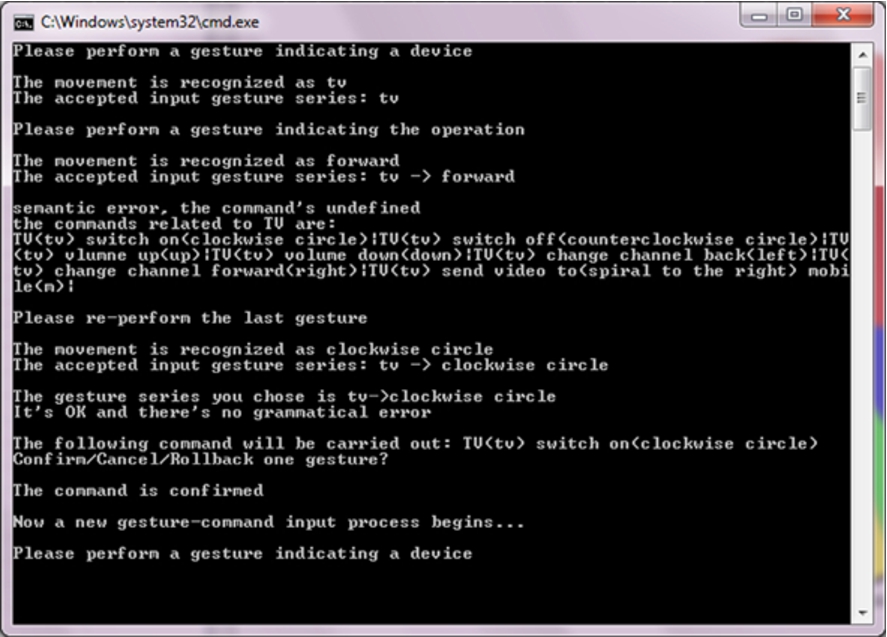
Compiler feedback for testing purposes.
To test the user experience of our gesture interaction model, a text user interface is developed as a prototype for the phone-based interaction. The users compose commands by performing gesture series with a mobile phone running an application which can capture and recognize gestures and send the recognition result once one gesture is performed to a wireless-connected computer which hosts the Grammar Compiler. The recognized gesture name is displayed in the computer and phone screens. Compile errors and guidance and help information is provided in the computer screen to make the interface as user-friendly as possible. Figure 12 shows the outputs of compiler when a gesture series is performed. If the recognized gesture violates the syntactic or semantic definition, the users will be informed to re-perform the gesture until there is no compile error. Performing one gesture is similar to typing one character into a text file and the users can control the input process as if they edited texts. For instance, if they realize that the performed gesture is not recognized correctly or that they did not intend to do that movement, they can roll-back one gesture, that is, to delete the last input gesture, or they can even cancel all the previous input to restart the composition by pressing the functional buttons on the phone’s screen. Once the gesture series composed by the users is accepted by the compiler, the phone is notified and the users can choose to confirm or negate the execution of the accepted command using the phone. If the Grammar Compiler receives confirmation, the command is executed and for now the triggered operation is just printing some messages on the screen.
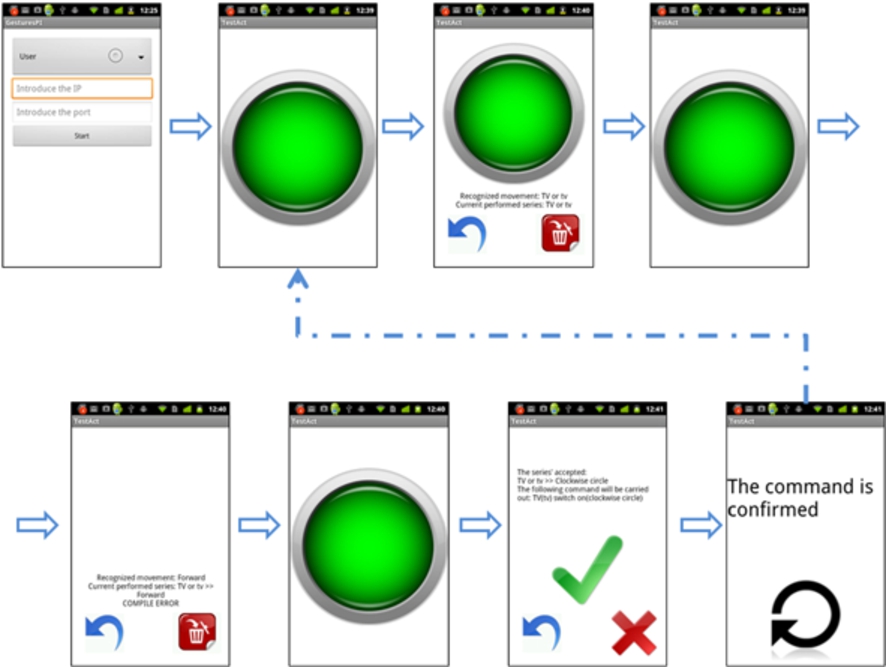
Mobile Interaction Application.
The core of the Mobile Interaction Application (MIA) is the implementation of the Gesture Recognizer. It has been codified in Java for in Android devices. The algorithm provides even higher accuracy than the stated in Section 5.2.1 in real operation, if the gesture set is correctly trained. This is because we have modified the mode in which the user indicates gesture initiation and end. While in the first implementation the user had to wait for a vibration to start the gesture and hold still to indicate its end, in the final implementation the user is expected to maintain the screen pressed while he performs the gesture (the almost screen-sized round button in Fig. 13).
The algorithm’s logic and its related functions are bundled in a software library, which can now be used in different applications needing gesture recognition [3]. On it, we have built the application that allows the user to perform gestures and send them to the Grammar Compiler, while receiving its feedback. Figure 13 shows the main screens of the tool, which illustrates the process when the users try to compose “TV->clockwise circle” command to switch on TV while Fig. 12 is the corresponding prompt of the compiler program in computer.
The UI integrates positive haptic and audio cues for correct gesture and sequence recognition, and error audio cues when there is any problem within the process. Although the application is designed to minimize the need of attention of the user towards the screen, the user has permanent visual feedback during the process (apart from the cues). Controls to cancel the action or to roll-back are also included.
Through the Object-Action-Gesture Configurator view in the application of the phone (see Fig. 14b, which is to configure the triggering gestures to command the “Up”, “Down” and “Stop” actions of a Blind), the users may change their preferences regarding to object’s action triggering. Once they change the action-gesture association, the Configurator updates and stores the configuration files that are exchanged with the Grammar Compiler for each user. These files summarize the user preferences with respect to all the available objects (<userId, objectId, action, gestureId>). The Configurator obtains the information about the structure of the environment from the Smart Space Object Registry, which contains the list of the available objects to govern, together with the actions that they can perform (<objectId, action>).
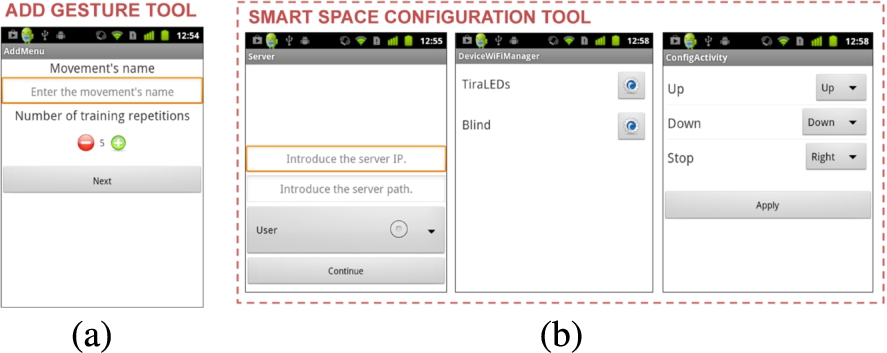
Trainer and Configurator for MIA.
Additionally, a Gesture Trainer complements MIA (Fig. 14a). The Trainer enables a user to compose and store new gestures; the user can define the number of times he wants to repeat the gesture. Once a gesture is trained, it is codified and made available for any application in the mobile device using gesture recognition (in our case, by MIA). The Gesture Trainer stores the gestures templates for a given user in a set of files that can be easily retrieved (<userId, gestureId, gesturePattern>). Even if it is possible to assume that a mobile device is always used by its owner, the multiuser scene based on a single device has also been considered. The Gesture Trainer is invoked from MIA when there are no gesture templates available for gesture detection or the user wants to configure a new one.
The application that enables Kinect-based Interaction Application (KIA) is functionally and structurally mirroring the mobile one. Both of them generate gesture detection events whose results are forwarded to the Grammar Compiler. KIA basically differs in its infrastructure-based implementation and in the way that it provides cues to the user. The Natural Interaction Scenario assumes that the device enabling gesture recognition is a) not carried by the user and b) not necessarily attached to a screen. Then control commands such as roll-back, confirmation and cancellation can not be issued by pressing buttons as in the case of MIA. Instead, the users employ reserved gesture primitives such as the drawing of left arrow (roll-back), check (confirmation) and cross (cancellation) to communicate with the interface. The absence of screen implies that other types of interfaces, apart from visual one, must be available.
For this reason, KIA integrates a Voice Synthesizer, capable of providing audio cues when needed. The Voice Synthesizer is built on Voce, an open source tool that has been programmed to provide confirmation sentences once a gesture is detected or a whole order is completed.
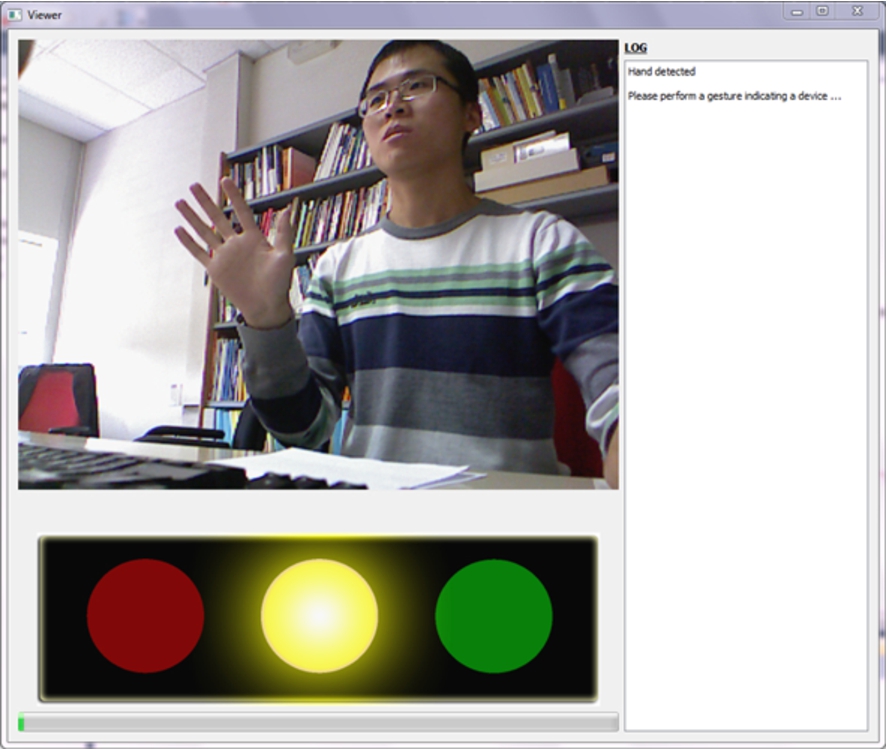
Kinect Visual Interface.
Using voice in a public multiuser scenario has its obvious limitations, thus we have also included a LED-based semaphore hardware that indicates the state of the gesture recognition process. A graphical interface is developed aiming at simulating and testing the effect of experience of the visual cues, shown in Fig. 15, in which the process bar additionally indicates users the process of the gesture series composition particularly when they roll-back or cancel the previous input. With red, yellow and green lights, as demonstrated from left to right in a semaphore UI component under the image video in Fig. 15, it is possible to indicate if a gesture has been correctly recognized without compile error (green blink), if the system is waiting for a new gesture to be performed (yellow light on) or if there has been an error (red light on). The finite state machine illustrated in Fig. 16 describes the state transitions of the KIA and marks the visual cues by semaphore lights. Smart objects could be equipped with their own “semaphore” LEDs, which could indicate their state during the interaction process. Augmented reality wearable devices (e.g. Google Glass-like) could also enable to give this visual feedback virtually.

Finite state machine of the state transitions of the interaction interface.
The Training and Configuration stages have been solved through a visual interface, in order to accelerate the process for the user. This interface should only be used occasionally, e.g. at the beginning of the interaction process or on arrival to a new space. Training and Configuration interfaces could be also programmed for voice narration if the scenario or the application requires it. For example, this would occur if the target users were visually impaired.
In this paper, a gesture-based interaction method to command smart objects has been described. The method relies on two types of gestures (“individuation” and “action” gestures) that enable the construction of a grammar to identify the object and the action to be performed on it. Gestures are recognized through two different devices: a Kinect device and a smartphone. Although the signals retrieved from them differ (the first device provides the user’s hand’s position, while the smartphone provides the user’s hand’s movement accelerations), within the paper it is demonstrated that the same recognition algorithm, based on Dynamic Time Warping, can successfully work for both inputs.
The average accuracy of the proposed DTW algorithm is 93.63% for smartphone-based recognition and 98.64% for Kinect-based one respectively on a 30-gesture vocabulary. The algorithm is user dependant, thus requires its users to train their own gestures to perform the best. From our analysis it is derived that it is enough with three repetitions to get nearly the best recognition accuracy. In the case of the mobile device, the algorithm also enables the user to hold the phone in his preferred manner. Thus, beyond the interaction method, the developed solution comes to be an effective, versatile and personalizable option to integrate gesture recognition for non-critical applications.
Confusion matrix about detection of directional movements based on Kinect
Confusion matrix about detection of small letters based on Kinect
Confusion matrix about detection of capital letters based on Kinect
Confusion matrix about detection of directional movements based on phone
Confusion matrix about detection of small letters based on phone
Confusion matrix about detection of capital letters based on phone
Our further work is focused on performing a user evaluation of the interaction method, to understand how the users will react to the possibility of commanding their daily space using the proposed grammar. Additionally, these user testing will also serve to enhance interfaces and explore the user’s feelings towards hybrid interactions, apart from retrieving feedback on how the user feel at the different stages of the process. We have perceived from the tests that users easily feel fatigue in the training. The strategy to optimize training proposed in Section 5.2.4 will be further investigated.
Footnotes
Acknowledgements
This work has being supported by the Government of Madrid under grant S2009/TIC-1485. The authors also acknowledge fruitful related discussions within the THOFU initiative, financed by the Spanish Center for the Development of Technology (CDTI). Additionally, the authors want to thank members of the Data Processing and Simulation Group for their help to build the testing datasets.
Confusion matrices
This part lists the confusion matrices of gestures in the three groups of our vocabulary: directional movements, small letters and capital letters. The first three tables are test results based on Kinect data and the latter three are based on phone data.
Handwriting of letters
Figure 17 is a scanned copy of the handwritings of the capital letters and small letters of our gesture vocabulary, written by several colleagues in our laboratory. It is observed that different persons wrote the same letter in various manners and one person may write different letters in similar, confusing way, such as the case of ‘D’ and ‘P’. It can be seen that the forms of capital letter handwriting vary a little while the forms of small letters change much more from one user to another such as ‘a’, ‘r’, ‘f’. The order as well as the direction of strokes of some letters also changes among the users, like ‘T’, ‘R’, ‘M’ and ‘d’.