



Abstract
We present the e-Gibalec system, designed to encourage schoolchildren towards a more active lifestyle. The system consists of a mobile application that, through sensors built into the smartphone, detects children’s physical activity and rewards them in a game-like manner. It also consists of a web application that allows the parents and physical education teachers to look at the children’s physical activity history, so they can further motivate them if needed. We discuss the motivational mechanisms employed in the system, provide an evaluation of the accuracy of the activity-recognition component, and present a pilot study that measured the effect of our system on a sample schoolchildren population.
Keywords
Introduction
Regular physical activity is of utmost importance to a healthy lifestyle and personal well-being. It acts as a major preventive factor against chronic and other diseases related to an increasingly sedentary lifestyle. Since the effects of sedentary lifestyle accumulate over the lifetime, one should adopt an active lifestyle at an early age.
Children are first systematically introduced to the connection between physical activity and healthy life in schools, through physical education (PE) classes. The aim of PE is not only to teach children essential movement patterns and sports, but also to encourage them to be physically active in their leisure time throughout their lives. However, it appears that PE is failing in its objectives. A study monitoring physical development and performance of elementary and high-school students in Slovenia for over 20 years, using standardized tests [39], revealed worrisome trends. The average physical fitness has been decreasing over the last two decades, while the child obesity has increased. Although the number of children with reduced or insufficient fitness has stabilized in recent years, the overall situation is nevertheless considered bad, as the number is still more than twice as high as it was 20 years ago. This problem is not specific to Slovenia and can be observed worldwide [17].
The drop in fitness can be in part attributed to an increasing use of computers and other electronic devices, with subsequent lifestyle changes. However, these same technologies can be used as a tool to stimulate children to increase their physical activity. Several studies [23] have already demonstrated that mobile applications can motivate children to be more active. A review of studies [22] also demonstrated that the most effective interventions aiming to increase physical activity in children are carried out through schools.
All this motivated us to develop the e-Gibalec system (Slovene for “e-mover“). The system uses a holistic approach that involves all actors involved in the PE of children, namely the children themselves, their parents and their PE teachers. e-Gibalec consists of a smartphone application designed for elementary school children, and a web application designed for their PE teachers and parents.
The smartphone application combines ambient-intelligence methods for monitoring children’s activities, and motivational mechanisms that stimulate the children to adopt a healthy lifestyle by accepting physical activity as a virtue. The intelligent methods are based on decision tree and Support Vector Regression machine-learning models constructed on the data from the smartphone’s built-in inertial sensors, to automatically recognize the children’s activities and estimate their intensity. The motivational mechanisms were designed in a human-centered fashion and include displaying children’s activities and progress in an understandable way, giving them daily goals to accomplish, awarding them with virtual rewards, having their avatar express different moods depending on their progress, and allowing them to compete with their friends.
The web application allows the PE teachers and parents to monitor children’s progress in their physical activity outside the PE classes, which gives them a better insight in the children’s lifestyles and allows them to detect potential problems earlier and act accordingly. Given that teachers and parents present a great influence on the children in this development phase, their involvement importantly complements the e-Gibalec application itself. Our hope is that together they may achieve what individually they could not.
In order to investigate how children interact with the application and obtain some information about its effectiveness, we carried out a pilot study on 42 children from two elementary schools. We compared the data from children using a fully-functional application against the data from a control group using a stripped-down version of the application which tracked their activity, but was otherwise “blank” (meaning that it did not feature any motivational mechanisms). We attempted to verify the hypothesis that children with a fully-functional application would be more motivated to use it and would consequently be more active, as opposed to children with the stripped-down version.
This paper is organized as follows: after a brief review of the related work in Section 2, we present a broad overview of the system in Section 3, including both the mobile and web application. In Section 4, we explain our motivational mechanisms, together with the approaches of gamification and serious game design that we used in the mobile application. In Section 5, we present the methods for the automatic recognition of the children’s activities and their intensity. In Section 6, we present the results of the pilot study.
This paper is an extension of the conference paper, presented at the 12th International Conference on Intelligent Environments in London in September 2016 [9].
Related work
Commercial products
The interest in activity monitoring has increased in the recent years, resulting in a plethora of dedicated smartphone applications as well as dedicated wearable devices. A large majority of these commercial products can be classified as “fitness trackers” for adults, specialized in tracking vigorous sports activities such as running or cycling (e.g., Runtastic [31], Strava [38]). Smartphone operating systems already contain a basic activity/wellbeing tracker, whose sensing capability typically consists of step counting [15,27,33]. If enhanced with a dedicated wearable [3,26,34], they can also assess the intensity of the performed activities. The popularity and availability of stand-alone wearable devices [13,19], usually worn on wrists, is also increasing.
However, a common problem of these applications is that the set of activities recognized is limited, users are commonly required to manually input their current activity and – as mentioned – they often rely on wearable devices that must be bought in addition to the phone. Finally, the motivational mechanisms in most of these applications are basic (typically limited to displaying progress and achievements). In many cases the reason is that they have been designed for people who are already active (e.g., runners) and do not need an additional motivation.
On the other hand, using gamification has a great potential in this regard. One of the most prominent recent examples of an application that uses gamification is “Pokemon Go”. A study [1] showed that people using the application increased their number of steps per day significantly – for more than 25% (although a part of this increase is probably due to the novelty factor, as seen by the drop of active users in the subsequent months). This indicates that such motivational approaches can be very effective. However, the application recognizes only walking, and does so only through GPS – which is expensive with regard to the battery life. Furthermore, the commercial nature of the application makes it potentially inappropriate to advertise in schools.
There are also products that are specifically designed for children to motivate them to be more active. Examples are dedicated wristbands Leap Band [24] and KidFit [21], and belt- or shoe-mounted pedometers (ibitz [18]). The activity-monitoring mechanism in them is very basic – it essentially counts the child’s steps and uses this information to stimulate the children to be active by awarding them virtual currency or allowing them to unlock higher levels in a game. Compared to them, we go a step further, by including intelligent methods which more precisely recognize the performed activity and more importantly increase the accuracy of the energy expenditure estimates. Additionally, we include both parents and PE teachers into the application.
Up to date, we found no wide-scale use of applications that promote active lifestyle in school population and, in addition, there are no PE-related applications available in Slovene. Here we present the e-Gibalec system which in addition to children engages the PE teachers and parents into the process. It performs the activity monitoring solely with in-built accelerometers in a smartphone and provides a playful environment which aims at motivating children to be more active.
Activity monitoring
Activity monitoring is still a developing area since there is a need for more accurate recognition of activities and estimation of their intensity, especially in order to help patients with medical conditions such as diabetes or chronic heart failure. The monitoring is composed of two major components: (i) the activity recognition (AR), which recognizes the activity being performed and (ii) the estimation of energy expenditure (EEE), which evaluates the intensity of the performed activity.
AR with dedicated sensors (mostly accelerometers attached to pre-defined parts of person’s body) is a fairly mature area of research. However, doing AR with a smartphone alone is a more difficult task since the phone’s location (on the body) and orientation is unknown and may frequently change. To overcome this problem, Siirtola et al. [35] utilized features independent of the on-body location and orientation. This approach proved sufficient for recognizing basic activities such as walking, running, and resting. Ustev et al. [41] went one step further and normalized the orientation and removed the gravity component from the acceleration data, which increased the recognition accuracy in comparison to previous work. In our previous work [10] we also considered different locations of the smartphone (trousers, torso, bag) in addition to normalizing the orientation. This approach increased the accuracy and the number of activities that can be recognized sufficiently accurately. Approaches that use other smartphone sensors (GPS and WiFi-based localization, sound, light, air pressure, etc.) also exist [8,25,37], but are not directly relevant for this paper, since we aim at an energy-efficient system.
EEE is usually measured in metabolic equivalents of task (MET), where 1 MET is equal to the energy expended at rest and 20 MET is the energy expended during extreme exertion. MET multiplied by the user’s weight is directly proportional to the calories burned. Methods that reliably measure the energy expenditure are expensive and can be used only under laboratory conditions (they rely either on the produced heat, CO2 concentration, or blood/urine samples), thus methods that are able to estimate the energy expenditure using a more convenient device are needed. In the past, the typical sensor for this task was a dedicated accelerometer placed on a pre-defined location on a person’s body. Crouter et al. [7] used an accelerometer attached to a person’s belt to first determine the activity and then used a specialized activity-specific regression model to predict the energy expenditure. Altini et al. [2] showed that two accelerometers (chest and ankle) are enough for accurate AR and EEE. Further enhancements utilize additional physiological sensors. Cvetković et al. [11] combined and evaluated different physiological sensors in addition to an accelerometer to accurately estimate the energy expenditure in sports and lifestyle activities. Vyas et al. [42] utilized an accelerometer and temperature-related physiological sensor data embedded into an armband to develop the method implemented in the SenseWear [30] commercial device. Estimation with only a smartphone has also been attempted. Pande et al. [28] used artificial neural networks with accelerometer and barometer features as the input to show that barometer data can increase the accuracy when dealing with activities that involve moving up or down (climbing stairs). In our previously mentioned work [10] we also developed a combination of location-specific models which utilize the recognized activity to estimate the energy expenditure with a smartphone.
In this work we simplify our previous work [10] to achieve better energy efficiency, but we still attain results comparable to both our previous work and the previously mentioned SenseWear commercial device.
e-Gibalec overview
The e-Gibalec system consists of a smartphone application for children and a web application for PE teachers and parents. Both applications are connected to a cloud hosted by The Academic and Research Network of Slovenia (ARNES) [4], which is the Internet provider for educational institutions in Slovenia.
The mobile application was developed for all major mobile platforms: Android, iOS, and Windows Phone, and is available on respective mobile markets. It utilizes the data from the smartphone inertial sensor to recognize the users’ activity and estimates its intensity. The web application was developed using the Django platform and other open-source technologies. The e-Gibalec system (smartphone applications and web application) has been made open-source (AGPL-3 license) and is available on Sourceforge [36].
In this section, we present a general overview of the system and its functionalities, while a detailed description of the serious game design and the activity monitoring algorithms (activity recognition and estimation of energy expenditure) will be presented in the following sections.
Smartphone application
When children log into the application for the first time, they are assigned a default avatar in the shape of an animal, which they can then change. In total, there are six different avatars available to choose from: dinosaur, fox, bear, wolf, rabbit, and dragon. Children also create their profiles, by choosing a username and password, and inputting their date of birth and weight, the latter being required for better energy-expenditure estimates.

e-Gibalec home screen and three emotional states of the avatar (neutral, happy, sad).
The left side of Fig. 1 shows the home screen of the application. It should be noted that the application is originally in the Slovenian language, the captions have been translated for the purpose of this paper. Under the avatar image, the status bar indicates the progress towards the daily goal. The avatar monitors the progress of the user and responds with an appropriate emotional state (right side of Fig. 1). Most of the time, the avatar is in the neutral state (top right avatar in Fig. 1). Once the user reaches the daily goal, the avatar changes to the happy state (middle right avatar in Fig. 1). In the evening, the avatar will display a sad state if the user is far from reaching the daily goal (bottom right avatar in Fig. 1). Under the status bar, there are four buttons to interact with the application; the results of the interactions are presented in Fig. 2. “My activities” button (top left view in Fig. 2) shows a screen with the activity intensity on a daily, weekly, or monthly basis, together with a pie chart that shows types of activities. It also shows the avatar with a motivational message, which depends on the current user’s progress. Activities can also be input manually, with the “Activity input” screen that offers a drop-down menu of different activities and their duration (bottom left view in Fig. 2). For schoolchildren, their parents have to confirm these activities in the web application. For potential adult users, the confirmation is not required.

Smartphone application views. Top left is the activities view where the daily/weekly/monthly activities are evaluated in terms of points and the pie chart presents the ratio of activities. The top right view is the interface to input the activities. Bottom left is the view where one can choose the avatar and purchase sports equipment. Bottom right view shows friends and ongoing challenges.
The “Avatar” button allows the user to change the avatar and to purchase and upgrade sports equipment with the in-game currency (bottom left view in Fig. 2). There are two types of currency – virtual coins, obtained by daily activities (corresponding to the points collected by being active), and special currency, obtained by reaching the daily goals (which is by default set to 12 points). The special currency is avatar-specific, such as a bone for the dinosaur, feather for the fox, honey for the bear, etc. Virtual coins are used to purchase sports equipment which then allows the user to challenge friends in specific activities. For example, a racket can be used for challenges in tennis, table tennis, and badminton; a ball can be used for challenges in football and basketball. The special currency is used for equipment upgrades, in the sequence regular-bronze-silver-gold, with each level increasing the rewards for winning activity challenges (left view in Fig. 3).
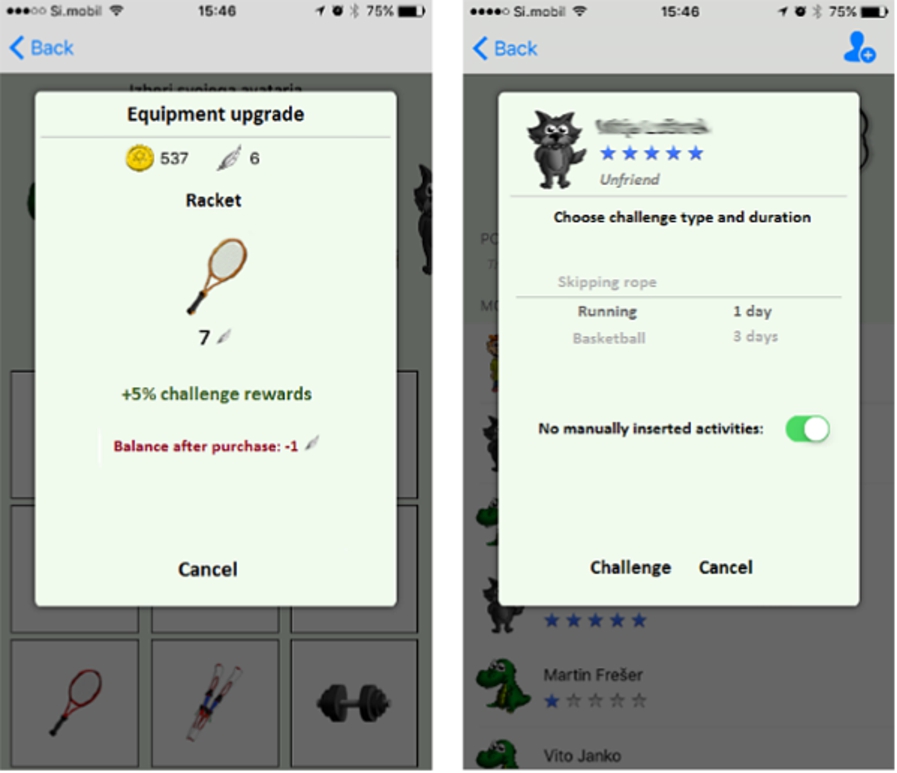
Purchasing and upgrading sports equipment (left) and challenging friends (right).
Activity challenges are an important social component of the application. They are accessible through the “Friends” button (bottom right view in Fig. 2). On the Friends screen, users can add one another as friends (searching by the username). They can also challenge one another in various sports activities (right view in Fig. 3). Challenges can take place over one day, three days, or the whole week, and can be limited to activities monitored with sensors, or can include all activities (this allows the users to take into account the perceived honesty of the friends they challenge). The progress can be monitored on a dedicated status bar, and the winner of the challenge (the more active person) receives virtual coins as a reward. In addition to challenges from human friends, the application also contains a virtual challenger Veselko Gibalec (Slovene for “Merry Mover”) who occasionally invites to challenges of its own.
When the daily goal is achieved, e-Gibalec uses a push notification to notify the user. Otherwise, unless opened, the application does not interact with the user and runs in the background.
The web application (Fig. 4) complements the smartphone application and is intended for parents and PE teachers. Since e-Gibalec is a somewhat didactic application, including parents and teachers can motivate the child to be more active. Parents can monitor the activity of their children and also confirm manually input activities. PE teachers can monitor the activities of all children in a class. This allows them to adjust their classes and provide individual counselling. In addition, they can enter activities for the whole class for PE classes, and also adjust daily goals for individual children. We are considering possible additional functionalities for PE teachers, such as the use of push notifications to send messages to children or to notify them about changes to daily goals etc.

Home page of the e-Gibalec website.
Our aim when designing the system was not only to accurately monitor children’s activity, but also to be able to motivate them to change their behavior toward a healthier lifestyle. We combined the approaches of internal and external motivation.
Internal motivation, also called the autotelic motivation [16], causes people to engage in an activity for their own pleasure, to improve with respect to themselves [12]. Physical education is frequently the only or the most important physical activity of children [20], and they frequently dislike this subject and its contents, which may also cause them to dislike physical activity itself. Through not engaging in physical activity and finding no pleasure in it, they are neglecting one of the basic prerequisites for a healthy lifestyle [32]. Our application automatically detects the child’s activity. This helps the child to see that he/she is improving in their activity, which is the essential part of internal motivation. As most physical activity takes place during the PE classes, the children’s motivation for participation will increase. Consequently, children will be more active in PE classes and physical activity will slowly start to become their habit.
An important mechanism of internal motivation are the avatars which represent the users in the application. Feedback for children is more effective when it is provided in a personalized manner, which is also seen as developmentally appropriate [14]. While adults can interpret and use raw numbers and graphs, the feedback for children should be more playful. Therefore, we decided to introduce the avatar figures, which would offer the children information on their activity. Our aim was to make the avatars look friendly and, in addition, to introduce a variety of options so that children can choose the one that suits them best. Avatars convey emotions depending on how far towards the daily goal the child currently is, motivating them to try and reach it.
A focus group was used to help us choose what kind of avatars should be used in the application. We wanted to get a detailed opinion on the image and likeability of avatars and we believed that a focus group was the most appropriate method for such purpose. The group consisted of 9 children, aged between 10 and 12 years, who were shown several drawings by two cartoonists. They depicted several animals, a boy and a girl. They were asked whether they would they like to have these characters as avatars (characters representing their personas in the application) and what they liked and disliked about each drawing. They were unanimous in selecting the animals while only two also selected the drawing of a girl, and one selected the drawing of a boy. They explained their choices by saying that animal avatars seem nicer and that they look like they “move more” than the drawings of the children. As the application focuses on physical activity, children thought they would be better represented by animal avatars. We thus decided to offer only animals as possible avatars. All six avatars in their neutral emotional states are presented in Fig. 5.
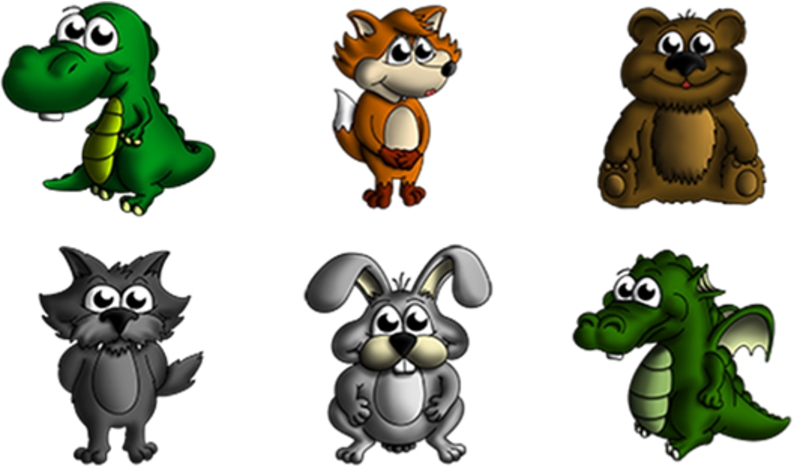
The avatars available in the application.
The application also uses external motivation, which can complement internal motivation, and is shown by handing rewards and allowing children to compete with classmates and other users of the application. External motivation means that we engage in activity for material resources, other people’s compliments or affection, that we want other people to notice our efforts and to see that we are better than our peers.
Rewards that the application hands out come in form of two virtual currencies: virtual coins and avatar-specific special currency. Virtual coins’ reward is directly proportional to the amount of user activity (weighted by its intensity) and promotes moving as much as possible. The special currency can be achieved only once per day, by completing the daily activity goal. This encourages children to perceive physical activity as a part of their daily routine and not as something to do in infrequent large batches.
Virtual coins can be used for buying sports equipment, while the special currency is used for equipment upgrades. This equipment can in turn be used both as a trophy and for bonus reward-point multiplier in any future activity challenges. The default value of the daily goal was set to 12 points, which roughly corresponds to 2 hours of moderate physical activity, such as walking, or 1 hours of vigorous activity, such as running or playing football. PE teachers are able to regularly change this daily goal in order to keep children motivated. For example, children who were initially not very active because of obesity or other health-related problems may be initially assigned lower daily goals, which their PE teacher finds more reasonable to reach; as they become more active, the value progressively increases. On the other hand, very active children may be assigned a higher-than-default value to present them with a challenge.
The price of buying and upgrading the sports equipment was set in such a way that it allows children to buy and upgrade all the available items in about a year’s time, provided that they are active and regularly reach their daily goals. The cost of upgrades was set to be the same for each item. 7 special currency units are required to upgrade to bronze, 14 to silver, and 21 to gold, which means that an individual item can be upgraded to the highest level in six weeks. Regarding purchasing the equipment, the cost of the items was set to progressively increase. The first item costs 50 coins, which is easily achievable in a couple of days. The price linearly increases to the most expensive item, which costs 1000 coins. In a year, solely by reaching the default daily goal every day, one can earn
Activity challenges present an additional external motivational mechanism. A child can challenge other children in activities, for example running, handball, skiing, etc. Being able to compare themselves with others gives children information on their competence. It has been shown that accurate perception of one’s competence enhances motivation [29]. In addition, winning activity challenges also brings rewards in form of virtual coins. For a daily challenge, the winner is awarded 25 coins, whereas 12 coins are awarded to each competitor in case of a draw. There are no rewards for the person who loses the challenge. For multi-day challenges (3 or 7 days), the award is a multiple of the award for a day. Each friend can be invited to one challenge at a time and one day has to pass before the next challenge can be initiated with the same user. The virtual friend, Veselko Gibalec, is set to challenge the user every 7 days if there were no other challenges from friends. Children can also challenge Veselko themselves. The activity of the virtual friend is calculated as the average activity of all users. This will likely have to be changed in future, for example to the average activity of recently active users, since inactive users lower the average, making the virtual friend increasingly easier to beat in challenges.
We aimed to teach the children to perceive a healthy lifestyle as a value. Therefore, we found it of utmost importance to involve parents and PE teachers as well. Since parents are the most important actors when it comes to teaching children about values, they also need to be involved when it comes to physical activity of their children [40]. The participation of parents is ensured by parents being required to confirm the activities which their children enter manually. This not only gives the parents an opportunity to monitor what the children are doing, but also to discuss the entered activities with their children. The PE teacher, on the other hand, is supposed to additionally encourage physical activity by individualizing the PE program and adapting the intensity of activity to the needs of every individual group or child. This option makes our application unique, as it gives the teacher a constant and continuous feedback on the progress of every class where children are using e-Gibalec.
To correctly reward users for their activity, the application first has to recognize and evaluate it. Users have the option of manually inputting their current activity, but doing so is tedious, not to mention dishonest users, therefore automatic activity monitoring with phone sensors is preferable. We split the task into two parts: (i) AR; recognition of the type of activity (for example “walking”, “running”, and “resting”) and (ii) EEE; estimation of the user’s expended energy (in MET). The latter depends both on the type and intensity of activity; for example: walking slowly expends less energy than walking fast.
In our previous work we presented an AR and EEE approach that was developed for the European project Commodity12 [5,10]. This system processes the phone’s accelerometer data in several steps. First, it uses a simple AR classification model to recognize walking (a common and easily recognized activity). After walking is recognized, the orientation of the phone is normalized. Then, the accelerometer data is used to determine where on the body the phone is worn (in trousers, on the upper body or in a bag). After the location is determined, the approach uses a location-specific classification model to recognize the current activity. Finally, it uses the detected location and recognized activity together with accelerometer data to estimate the energy expenditure.
While the described approach is accurate, its complexity makes it computationally expensive, putting a strain on the phone battery. Since the aim of the e-Gibalec application is to run continuously without significantly draining the battery, we decided to develop create another, simplified AR approach. In addition, the approach from Commodity12 uses models trained on adults, while the algorithms in e-Gibalec should be adapted to children, who are the target group here.
In the following, we first describe the data collection. Then, we discuss the path to designing the AR and EEE models. Finally, we evaluate the described models and compare them both against the Commodity12 models and a commercial EEE device.
Data collection
The dataset was collected from ten children, aged 10–12, who were equipped with the following devices:
Three smartphones (trousers pocket, jacket pocket, and bag), from which we collected the accelerometer sensor data at a 50 Hz sampling frequency.
SenseWear armband [30], a commercial device which estimates the energy expenditure and was intended for comparison with our methods.
Cosmed device [6], an indirect calorimeter which measures the energy expenditure based on the inhaled
Each child performed a series of activities from a pre-defined scenario, which included lying, sitting, slow and fast walking, slow and fast running, stationary exercise such as jumping and push-ups, team sports (dodgeball, basketball, football, volleyball), and cycling. Between the activities, children were instructed to take a break which allowed their energy expenditure to return to the resting level. The combined scenario took about an hour and is described in detail in Table 1.
We utilize the collected smartphone inertial data to train the models. The ground truth for the activity was labeled manually in real time, while the labels for the energy expenditure were taken from the Cosmed device (indirect calorimeter).
Data collecting scenario
Data collecting scenario
Data frequency: Since the phone’s battery consumption increases with higher sensor sampling frequency, we tried to minimize it while still retaining accuracy. To achieve this, we compared the AR accuracy at different sampling frequencies to choose the optimal one. The comparison is presented in Fig. 6, which shows that the accuracy of the AR starts to drop below the frequency of 9 Hz. For the EEE, the pattern repeats (which is reasonable, since the EEE depends on the input from the AR). We chose the frequency of 10 Hz based on this comparison and since it is natively supported by many smartphone devices. The features computed from the raw sensor readings (discussed later) were normalized with respect to the sampling frequency, allowing the model to be run even on phones that only support frequencies lower than 10 Hz (obviously, with lower accuracy).
Widowing: Data was split into windows of 5 seconds for the AR and of 15 seconds for the EEE. All the samples of acceleration in a window were transformed into features, comprising a single learning instance. All data together consist of approximately 5500 instances for the AR and 2000 instances for the EEE. Windows were intentionally made fairly long, to reduce the number of feature calculations (e.g., 12 times per minute in case the window is 5 seconds long vs. 30 times per minute in case the window is 2 seconds long – as in our previous work).
Feature selection: We started with approximately 60 features previously introduced in the Commodity12 system. From those features, we removed all the computationally intensive ones (namely, those derived from the Fast Fourier Transform) and all features that depended on the phone’s orientation (so that we are not required to compute it). We then ran a feature-selection algorithm that worked as follows: features were ranked with the ReliefF method and then iteratively added to the selected set. They were kept only if doing so increased the overall accuracy of the newly trained model in case of the AR and they were kept if the mean absolute error decreased in case of the EEE (the machine-learning algorithms to train the models are discussed later in this section).

Accuracy of different classification models with different sampling frequencies.
The final five features for the AR were the average of magnitudes, the value of the third quartile, the variance, the coefficient of variation, and the number of peaks.
The features used for the EEE were the activity as recognised by the AR model, the magnitude skewness, the kurtosis, the variance, the coefficient of variation, the second magnitude quartile, the interquartile range, the number of times signal crosses its average, the integral of the signal, and the number of peaks in the window.
Phone location: We want our models to work independently of phone’s location on the user. As the location can influence how the phone perceives the movement, we used the data from all three phones (that were placed in the trousers pocket, jacket pocket, and bag), created instances from each of them, and then added them all up into one training set – making it representative for all three locations.
Accuracy for different Commodity12 and e-Gibalec models (r-rest. w-walking, u-running, c-cycling, s-standing, t-sitting, l-lying, s-sport)
Activity set selection: Although our dataset contains many different activities, we wanted to find a subset of those that would cover a sufficiently wide range of user’s activity and could be recognized with a reasonable accuracy, since the activity is also presented in the application. We attempted to create three different sets. The first set contained “walking”, “running”, and “rest” (we define rest as a combination of “standing”, “sitting”, and “lying”, which all have a similar intensity). The second set added an additional activity, “cycling”, to the first set. The third set added an additional activity, “sport”, to the second set, thus bringing the total number of different activities to five. Here, all sport activities that were recorded were labeled as “sport”. Table 2 presents the evaluation of these three sets. Other activities are too difficult to recognize with a smartphone alone, so attempting to recognize them would degrade the overall quality of the classification model. This remains a challenge for future work.
Machine-learning models: For the AR task we tested three machine-learning algorithms: Random Forest, J48 decision tree, and Support Vector Machine (SVM), all implemented in the Weka suite [43]. The results shown in Fig. 6 show that the classification models trained with the three algorithms gave very similar results, with differences showing only at the very low accelerometer sampling frequencies. We therefore chose the decision tree as our model, as it is computationally the simplest and also easiest to implement on different mobile platforms without relying on any specific machine-learning library. For the EEE task, we also tested three algorithms: regression tree, multilayered perceptron, and support vector regression (SVR). SVR was chosen for producing both the simplest and the best performing regression model (shown in Table 3).
MAE for different regression models for the EEE task
All evaluations were done using the leave-one-person-out approach (the model is trained on nine persons and tested on the remaining one – repeated for each person). For the classification task we measured the classification accuracy. For the regression task we used the mean absolute error (MAE) in MET.
Figure 6 shows the results for the e-Gibalec activity classification model with the activity set: “rest”, “walking”, “running”, “cycling”, trained with different machine-learning algorithms and using different accelerometer data sampling frequencies. The same experiment was carried out for other activity sets with a similar conclusion: on this dataset, the type of classification model does not have a significant impact on the performance. The classification accuracy starts to drop after the frequency of 9 Hz, and starts falling quickly after the frequency of 5 Hz.
The results for the AR for both Commodity12 and e-Gibalec classification model (trained on the 10 Hz data using SVM) are listed in Table 2. For fairness of comparison we retrained the Commodity12 models on the e-Gibalec dataset. We also tested the original models trained on the adult data, but they consistently performed slightly worse than the retrained ones. This was not unexpected, considering that the target population was considerably different. Note that the Commodity12 classification models recognize different activities depending on the location of the phone.
We see that the e-Gibalec classification models work with a relatively high accuracy and comparably to Commodity12 classification models (when comparing models on the same activity set). In the e-Gibalec system, the same classification model is used on all phone’s locations. Nevertheless, we also decided to test it on each location individually. Location “trousers”, performed slightly worse than the other two, sometimes mixing walking and running. This may be a consequence of phone being loose in a “bag” or “jacket”, moving more intensely, thus making running easier to detect. Activity set that contained “sport” was tested with “trouser” location only, as “jacket” or “bag” locations can be considered unrealistic in this case.
Ultimately, we settled on the activity set without “sport”, since classifying “sport” reduces the overall accuracy while at the same time having a limited usefulness: children typically do not carry a smartphone in their pocket while playing sports. In addition, several sports can be viewed as a combination of rest, walking and running – which may give a decent EEE nevertheless.
The results for the energy expenditure estimation, using SVR, Regression tree (Reg. tree), and Multi-layered perceptron (MLP) models are listed in Table 3. As mentioned before, SVR turned out to be the best of the three, which was also observed in our previous work.
For comparing the e-Gibalec regression models against the Commodity12 “no location” regression model and SenseWear commercial device predictions, we carried out two separate experiments. In the first one we only tested the regression models on the part of the dataset that contained activities that our activity classification model can recognize (rest, walking, running, cycling). The second one was made on the whole dataset (including warm up, push-ups, jumps,
MAE for energy expenditure estimation
MAE for energy expenditure estimation
The results of the two experiments are listed in Table 4. They show that the e-Gibalec regression model performs similarly to the other two on the set of selected activities, and outperforms them on the whole dataset. The decreased performance of the Commodity12 model in the second experiment may be the result of the Commodity12 features that were originally selected for recognizing and estimating the expended energy of a wider range of activities that correspond to tasks in a more sedentary lifestyle of patients with diabetes.
To illustrate the outputs of the e-Gibalec EEE regression model, we plotted the ground-truth energy expenditure (as determined by the Cosmed device) against the one we estimated for one test subject in Fig. 7. Note that the data from the smartphones originates from three smartphones worn at the same time, therefore the Cosmed data is the same in all three cases.
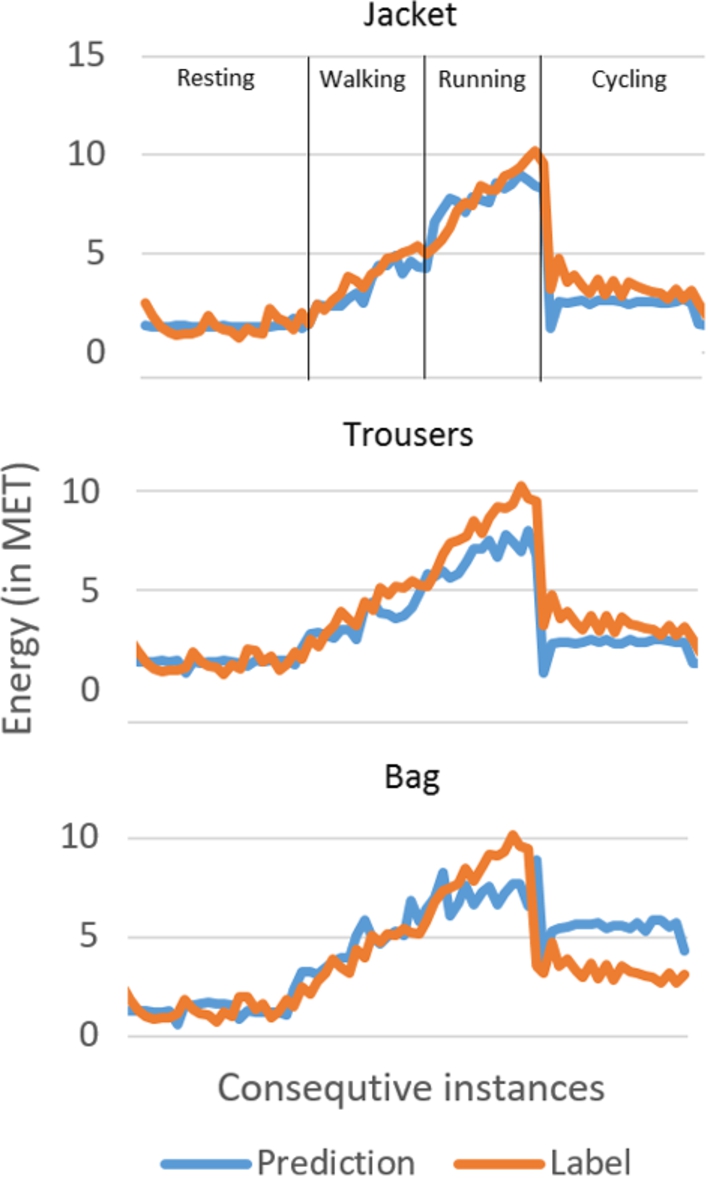
Comparison of the estimated and ground-truth energy expenditure. The labels on top indicate in the location of the phone and the activity.
In order to evaluate whether the e-Gibalec system stimulates the children to be more active, and to get a broader insight into its actual interaction with the users, a pilot study was carried out on
General statistics of the children engaged in pilot study
General statistics of the children engaged in pilot study
The pilot study was carried out over 5 weeks in April and May 2016. The participating children were students of 5th and 6th grades of elementary school, corresponding to ages from 10 to 12. The children were randomly divided into two groups, with roughly one third being assigned into a control and two thirds into a test group. Children in the test group were given a fully-functional e-Gibalec application. Children in the control group were given a stripped-down version, which retains full functionality regarding the activity monitoring and the manual input of activities, but omits all interactive aspects, namely the ability to monitor daily progress, display of the earned coins and special rewards, buying sports equipment, challenging friends, and the avatars. The aim was to create a “boring” version of the application, one that would affect children’s activities as little as possible. Nevertheless, the stripped-down application still retained the function for manual input of activities, since manual input is the only mean of obtaining information about activities when the child was not carrying the phone. Due to the limited duration of the study, the cost of the sports equipment was set to 80 coins per item, so that children could buy several of them (in the regular version, children would typically require several months to afford all the items). The costs of the equipment upgrades remained the same.
At the beginning of the study, we generated the user accounts and assisted the children to install the assigned application and log in. In addition, user accounts were created for the parents so they could confirm the manually-input activities. Children were asked to use their version of the installed application over the course of five weeks (35 days). Both children in the test and the control group were asked to manually input their activities performed when they were not carrying their smartphones. Throughout the duration of the study, the authors of this paper were available both to the parents and the children to solve potential technical issues. At the end of the study, the participating children were asked to fill in a questionnaire about their user experience.
The analysis of the pilot data showed that the usage of the application varied significantly among the children. In both schools and both in the test and control groups, some children used the application throughout the run of the pilot study and were also inputting their activities manually. On the other hand, several children lost interest in the application at some point and ceased using it. In this evaluation, we focus on the following aspects: the time of use, the average activities within each group, the number of daily goals reached, and the interaction with the application, such as the manual input of activities and activity challenges with friends. At the end, we present the results of a survey we carried out among the children after the end of the pilot.
The statistics of the number of days the children were actually using the application, meaning that the application was sending data to the server, is presented in Table 6.
Number of days the children were using the application
Number of days the children were using the application
We can see that in both groups we had children who used the application during the entire duration of the pilot. Some children ceased using the application within days of the beginning of the pilot, and one child in each control group did not use it at all. The average and median use of the application shows that children in the test group were using the application significantly longer than in the control group. The median values for the use of the application in both control groups are comparable, while the median use in the test group is higher in the outskirts school. Some children kept using the application even after the formal conclusion of the pilot, but that data was excluded from the analysis.
In the analysis of the activities, we have to differ between sensor-monitored activities and activities that were input manually through the application. It turned out that only eight children in total were using this function – six in the urban school and two in the outskirt school, all of them belonging to the test groups. In total, children used the input function 243 times. The most frequently input activities were walking (96), football (27), gymnastics (23), running (17), cycling (13), playing an instrument (10), and home chores (10). There were 15 more activities which were recorded less than ten times each.
We next checked how many times children reached their daily goal. In the urban school, one child from the control group and seven children from the test group reached the daily goal at least once. The child in the control group reached the daily goal 9 times and the best two performances in the test group were 22 and 15 daily goals reached. In the outskirts school, two children from the control group and eight children from the test group reached the daily goal at least once. The maximum number of daily goals reached in the control group was 3 and in test group 5.
As the usage of the e-Gibalec application among children has been somewhat inconsistent, especially regarding the manual activity input, we cannot draw firm conclusions regarding the amount of children’s physical activity. Nevertheless, we present a comparison of the average active calories burned and points gained per child per day of use in Table 7. Active calories are the calories burned while performing moderate or vigorous activities, which in our case includes moderate and vigorous activities recognised with sensors and input manually.
Average active calories (kcal) and average gained points per user per day of application use during the pilot study

Chart representing points gained per day for a single test user from urban school.
The above analysis indicates that in both schools, the children in the test group were in total more active than the children in the control group. This suggests that the e-Gibalec system successfully promotes physical activity, although the data is collected on a relatively small sample and cannot be generalized. The results show that children in both control groups achieved a comparable number of points while using the application. When comparing the test groups, we can observe that the children in the urban area achieved a higher number of points than the children in the outskirts area. We suspect that this difference arises not necessarily from urban children being physically more active, but rather that children from the outskirts do not keep their phone with themselves all the time. If they play in the garden or help their parents with chores around the home, they are active, but the phone will not detect that, as they might leave it in the house. Figure 8 presents an overview of the daily points gained for a representative active child from the test group from the urban area. The green area represents the total points per day, while the blue and orange bars correspond to the points gained from the activity monitoring and from the manually input activities, respectively. The black line is the threshold for achieving the daily goal.
We also analysed the use of the avatars and activity challenges. The most popular avatar turned out to be the dragon (35%), followed by the dinosaur (25%). During the course of the pilot, 11 children purchased at least one sport equipment item. Out of those, only two children upgraded at least one item. This is not surprising since children typically did not reach seven daily goals, which is required for the first upgrade. Interestingly, the most active child in the pilot purchased all the sports equipment items and even upgraded one. In the analysis of the activity challenges, we found that 13 children were using this function and 33 challenges were carried out in total throughout the run of the pilot.
At the end of the pilot, several children reported that they wanted an even bigger variety of avatars, which is something we will consider in future work. Children also mentioned that, as some parents had technical difficulties confirming their activities outside school, the scores did not necessarily reflect the correct levels of their physical activity. Since such technical problems were not reported to the technical support team during the pilot, there was not much we could do about this issue.
Most of the comments in the survey were given by the children who used the full version of the application, while the children who used the stripped-down version gave practically no additional comments. As the children who used the full version commented more on it and suggested more ideas on how to improve the application and – as indicated by the results of the study – were also more active, we assume that the full version motivated the children more and that e-Gibalec shows potential to help lead the children to a more active lifestyle.
In this work we presented the e-Gibalec system that aims to stimulate children, with the help of parents and PE teachers, to lead a more active life. The smartphone application focuses on children. It can automatically detect children’s activity and estimate their energy expenditure, and then motivates them to be physically active. The web application helps parents and PE teachers to monitor children’s progress and to further stimulate them. As opposed to commercially available products, e-Gibalec distinguishes itself by being specifically designed to target schoolchildren, by not using additional wearables, and by being the first PE-related application in Slovenian language.
We demonstrated that the AR and EEE models are sufficiently accurate for the purpose of the mobile application, taking into account the data acquisition frequency and the computational complexity, which both influence the battery life. The AR module correctly classified over 86% of activities when looking at rest, walking, running, cycling. When considering only the first three activities, the accuracy was even above 93%. The EEE results were comparable to the more complex models used in the Commodity12 project and also to those obtained by a dedicated commercial wearable device.
The pilot study provided us an insight into how children use the application. Although the results indicate that the test group (using the fully-functioning version of the application) appeared to be more active than the control group (with the stripped-down version) during the duration of the study, the nature of the data collected prevents us from performing a detailed statistical comparison between the urban and the outskirts settings. Nevertheless, we saw that the children that were using the application embraced its various functionalities, such as choosing the avatars, purchasing sports equipment, and challenging friends in various activities. We plan to extend the study with validation pilot with larger groups, again focusing on difference between children from urban and outskirts environment.
During the development of the system and during the pilot study, we identified several potential improvements for future versions of e-Gibalec. In order to keep children motivated, we can introduce additional unlockable avatars, sports equipment items, and higher upgrade levels. Depending on the preferences of the users, additional push notifications for children and messaging components for interactions between children and teachers may turn out to be beneficial. A long-term goal is to expand the AR models to include various sports activities and thus enable children to challenge friends in, for example, football with sensor readings. A potential extension could include short- and long-term tasks in addition to daily goals.
In the next step, we plan to work with Slovenian schools to introduce the e-Gibalec system to PE classes and daily lives of schoolchildren. Doing so, we can influence the children to be more physically active and to embrace a more active lifestyle. Although the e-Gibalec has been developed for children, and is in appearance adapted for them, we believe that we could apply this model (rewards, notifications, avatars, personalised messages) with minor modifications for adolescents and adults as well.
Footnotes
Acknowledgements
This paper is an extended version of our previous published work Mobile application to stimulate physical activity in schoolchildren [ ], presented at the 12th International Conference on Intelligent Environments – IE’16 in London, in September 2016. The work was partially financed by the EU fund for regional development and by the Ministry of education, science, and sport of Slovenia. Special thanks to Grega Mežič, Tomaž Kunst, and Klemen Turšič, who helped to develop the e-Gibalec application for all mobile and web platforms, and Uroš Prosenik for the visual design. We also thank the staff at elementary schools OŠ Dob and OŠ dr. Vita Kraigherja for assistence with the pilot study.