



Abstract
In order to improve the effect of English Teaching in multimedia environment, this paper proposes an English teaching method based on intelligent language AIDS in multimedia environment. Firstly, an intelligent speech teaching assistant system is designed in the multimedia environment. The software mainly includes four modules: new words and sentences, Chinese and English reading, voice evaluation, tools and settings. Learners can learn independently through the software, and teachers can also use the software to make various audio teaching resources in the classroom. In addition, the system can promote vocabulary teaching and support sentence pattern teaching and situational teaching in English teaching. The experimental results show that the average score of class 3A is increased from 86.35 to 86.79, with an increase of 0.64, which proves that the application of this method can effectively mobilize the enthusiasm of students in learning English and achieve good teaching effect.
Keywords
Introduction
Under the influence of multimedia environment, information technology has been systematically dependent into all fields of society, specifically in the field of education. It has promoted the change of educational philosophy, teaching methods and teaching means in all countries in the world, and made education move towards a new stage – Information Education [1]. At present, more and more attention has been paid to information education in China. On July 29, 2010, The Outline of National Medium and Long Term Education Reform and Development Plan (2010–2020), which was deliberated and approved by the executive meeting of the State Council, was officially released. In Chapter 19 of the outline “accelerating the process of educational informatization”, it is proposed that information technology has a revolutionary impact on the development of education, and we must attach great importance to it. We should bring education informatization into the overall strategy of national informatization development, and advance the deployment of education information network. By 2020, the education information system covering all kinds of schools in urban and rural areas will be basically completed to promote the modernization of teaching content, teaching means and methods. Make full use of high-quality resources and advanced technology, innovate operation mechanism and management mode, integrate existing resources, and build advanced, efficient and practical digital education infrastructure [2]. Speed up the popularization of terminal facilities, promote the construction of digital campus, and realize multiple access to the Internet. We should focus on strengthening the information infrastructure of rural schools and narrowing the digital gap between urban and rural areas. Strengthen the application of information technology, improve the level of teachers’ application of information technology, update teaching concepts, improve teaching methods and improve teaching effect. Encourage students to use information means to study actively and autonomously, and enhance the ability of using information technology to analyze and solve problems.
Language is not only the most important tool of human thinking and communication, but also an important condition for people to participate in social activities, so it is of great significance to promote people’s all-round development [3]. With the advent of the information age and the increasing frequency of international exchanges, mastering a foreign language has become one of the basic qualities of citizens all over the world [4]. Therefore, it is of great significance to learn and master foreign languages, especially English. Effective use of information technology and information tools to assist English teaching, to create an environment for English learning, to develop learning resources, and to let students learn English easily and happily in a rich and realistic environment are still the focus of attention and research. Therefore, in the multimedia environment, this paper analyzes the application of intelligent voice teaching aids in English teaching, and puts forward an English teaching method based on intelligent voice teaching aids in the multimedia environment.
English teaching method based on intelligent speech aids in multimedia environment
Design of intelligent speech teaching aid system
Firstly, in the multimedia environment, the intelligent voice teaching aid system is designed. The designed intelligent speech teaching aid system is mainly composed of host, recognition pen, memory card, system software and supporting books [5]. It can be applied to classroom teaching, to provide students with standardized English pronunciation, so that the English classroom more colorful, flexible, but also more convenient for teaching. This is because in the past, when the tape recorder was used to play the tape, it was loud and easy to interfere with the students’ listening effect. Moreover, it is difficult to listen to a certain voice repeatedly with a tape recorder, and the intelligent voice teaching aid system can make it more convenient for students to retell the voice, just click the content to be read with the recognition pen. If you want to repeat the current content, please press the “play/stop” key, which can save time and reduce trouble [6]. Moreover, the use of intelligent voice teaching aids system can also reduce the workload of teachers, create a standardized language learning environment for classroom teaching, increase classroom interaction between teachers and students, improve students’ interest in learning, effectively improve the quality of Chinese and English teaching, and improve the imbalance of urban and rural education resources to a certain extent.
Among them, the functions of the host and the recognition pen are as follows: The host is used to read the corresponding language content on the book. The recognition pen can be used to touch the teaching content on books, cards and wall charts, and can control the host to play the corresponding voice files. Teachers use the recognition pen to touch the teaching content on the matching books, cards or wall charts in the classroom, and transmit it to the host through wireless signal. The host can read out the corresponding pronunciation with standard voice, so as to realize the functions of click read, standard tape read and demonstration of teaching content. In the process of teaching, teachers can also realize the pause and repeat function of teaching content by identifying the “play/stop” key on the pen [7]. In addition, teachers can use the “laser emission” key on the identification pen to send out laser beam instead of the pointer, and use the “special function” key to maintain classroom order and carry out classroom management.
Memory card: It can store the standard teaching content and the classroom reading content made by teachers, and can be used on the host, and it also has the corresponding voice file to read the corresponding voice content by the recognition pen.
System software: The expansion and extension of hardware. Teachers can make their own audio AIDS and improve their professional level by using the system software. Using the system software, we can realize the functions of synthetic reading of any Chinese and English articles, oral pronunciation evaluation and comparative learning, and visual production of audio assisted teaching aids [8].
Supporting books: Teaching books printed with special identification labels. The invisible identification code printed in the book is one-to-one corresponding to the teaching content in the book [9].
The composition of the intelligent speech teaching aid system is shown in Fig. 1.
Composition of intelligent speech teaching aid system.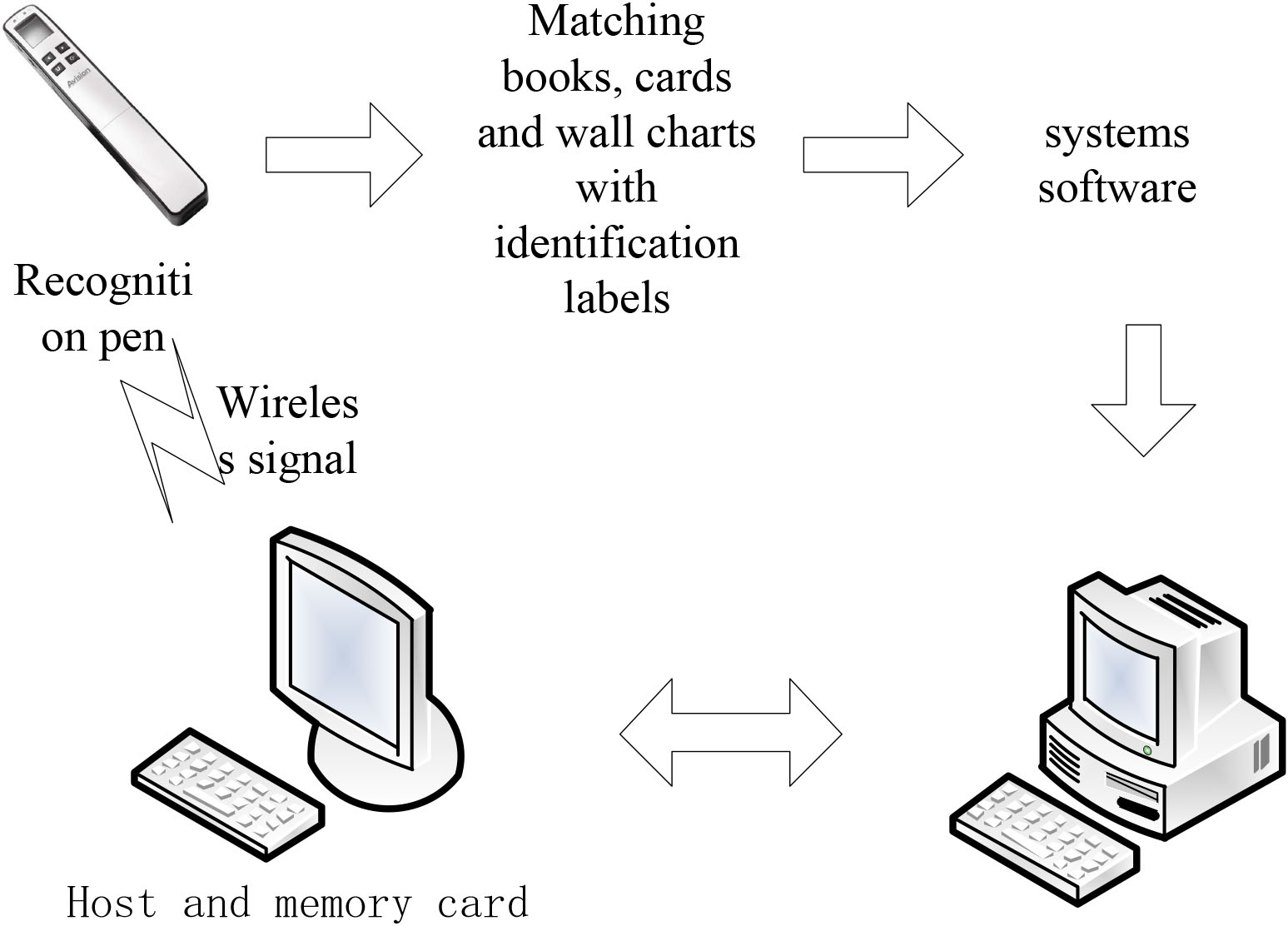
Intelligent speech teaching aid system software is an intelligent interactive software for primary and secondary school English listening, speaking and reading three-dimensional comprehensive ability learning. The software mainly includes four modules: example sentences of new words, Chinese and English reading, pronunciation evaluation, tools and settings, as shown in Fig. 2. Learners can learn by themselves through the software, and teachers can also use it to make various audio teaching resources used in the classroom [10].
System software module.
In the “new words and sentences” function module, the system classifies according to the textbooks of different grades, lists words, explanations and examples, and can read aloud to help learners learn words and their usage in sentences [11]. When learners learn words, they can learn pronunciation, explanation and examples, so that they can easily and normatively memorize English words on the basis of understanding. Its main functions are as follows:
Textbook selection. Learners need to choose according to the order of “grade”, “publishing house”, “book title” and “unit”. After selecting the content, click “show words” and the content will be displayed on the right. In addition, new word resources can be obtained by clicking “update resources [12]. Learning control. You can choose “word spelling”, or you can choose the number and interval of word reading. The number and interval of word reading are effective in the automatic reading mode. My new words book. When listening to the words read aloud, if learners feel unfamiliar with any words, they can click “add new words” in (5). In this way, learners only need to open “my new words book” for targeted learning. Search for words. Enter the word (or part of the word) to search in the input box. If you select “local” search, all the words searched are provided by the software; If you select “local” search, all the words searched are provided by the software Dict.cn Search on the sea word, then it will open Dict.cn Search results on haici.com about the words you entered. Word information display area. It has explanation of words, phonetics, explanations, examples and examples. Click the horn icon on the left side of the word to listen to the pronunciation of the word. The up and down arrows on the right side are the function of turning the word up and down. The “automatic mode” on the right side can read from the first word to the last word [13]. List of words. The words to be read are displayed in the word list for searching.
The classification algorithm used in the module is naive Bayesian classification algorithm, which is a relatively simple probability Classification Algorithm Based on Bayesian classification algorithm. Compared with the original algorithm, naive Bayesian classification algorithm has high efficiency and wide application range [14]. There is a hypothesis in naive Bayes that when class variables are given, attribute variables are conditionally independent. The conditional independence in probability model is as follows:
For probability mode
In Eq. (1),
In Eq. (2), when the condition
“Chinese and English reading” module: teachers input any Chinese and English text information, and the software can automatically convert it into the corresponding voice information. By clicking the “male voice reading” or “female voice reading” button, standard male or female voice reading and voice reading can be realized, which helps teachers and students learn English. And the converted pronunciation can be saved as a sound file, which can be used to make audio AIDS. In addition, the system software also has a daily recommendation function, which provides several customized audio articles in both Chinese and English for teachers to listen to or make audio AIDS [15].
The module is divided into three parts: Chinese reading, English reading and classified articles. In “Chinese reading” and “English reading”, learners can input any English or Chinese text, and then they can easily hear the corresponding speech synthesis reading and follow the reading practice. In the “classified articles”, learners can listen to the demonstration reading of various English articles recommended by the software, and follow the reading practice.
In the Chinese reading module, learners can perform the following operations:
By opening the local computer file, enter the text to be read. The system supports. txt. and doc. pdf and. rtf files. The system keeps the reading articles entered by the learners for the last 20 times, which can be viewed by clicking “recent reading”. Learners can input the text directly in the text box, or input the text to be read by copy/paste. Selecting Chinese female voice or Chinese male voice to read the Chinese text. Click the avatar icon to enter the listening and reading interface to learn and practice listening and reading [16].
In the listening and reading interface, you can perform the following operations:
Listen to the reading. Highlight the current sentence in blue. Click on any sentence to hear it read aloud. Selecting different text display methods. The default way to display text is “display text only”. Learners can choose different ways to display text by clicking the drop-down list box. Learners can switch between speakers through the icons of male and female avatars on the top right. You can save sound files and web files by clicking “save” [17].
In the English reading module, you can do the following operations:
By default, it enters the listening and reading interface. In this interface, users can read audio-visual standard pronunciation. Listen to the reading. Highlight the current sentence in blue. Click on any sentence to hear it read aloud. Click the “follow” button to switch to the follow interface. In the follow-up interface, click “I want to record” (this button becomes “stop recording”) to record. After recording, click “stop recording” to start the evaluation automatically. After the evaluation, the corresponding score is given on the right. Clicking “model reading” to listen to the standard pronunciation of the selected sentence. Click “my pronunciation” to listen to the user’s pronunciation. Selecting the “instant translation” check box and point the mouse at a word to get the English explanation of the word (displayed below the word). Learners can switch between speakers through the icons of male and female avatars on the top right. Learners can save sound files and web files by clicking “save”. The sound file can be saved as: special sound file (. TCR format) and MP3 sound file, both of which can be opened through “courseware making tool”.
In the “classified articles” module, various types of English articles are provided for learners of different grades. Learners can not only hear the standard demonstration reading, but also follow the reading practice.
“Pronunciation evaluation” module: This module includes “textbook synchronization” and “optional content”. Learners can choose words, new words, sentences or chapters synchronized with English and Chinese texts, or input words or sentences at will to test their pronunciation level. The system will evaluate and score learners’ pronunciation, and can carry out reading practice and comparative learning.
In the module, the user can perform the following operations:
Clicking the “record” button to start recording. The words to be read are listed on the right. Display the content of words to be evaluated [18]. Users can play demonstration reading. It should be noted that the demonstration reading is only a demonstration, and the evaluation and error detection are not compared with the demonstration reading. When you click “demonstration reading”, when the system is reading demonstration pronunciation, the words to be read will also be highlighted synchronously. Users can play their own recording. When the user does not evaluate the pronunciation, click “my pronunciation” to hear the user’s own recording; After the evaluation is successful, click “my pronunciation” to highlight the words read by the user synchronously when the system reads the user’s pronunciation.
After the evaluation, the pronunciation score of each word will be given in the window. Click any words, a detailed comparative learning window will pop up. Learners can hear the contrast between “model reading” and “my pronunciation” so as to facilitate learners’ learning. In addition, users can record the sound of the word individually for repeated practice. Click “record” button to record, click “stop” button to stop recording, and the system will automatically evaluate the recording. Users can repeatedly record, evaluate and contrast learning to improve their English word pronunciation.
“Tools and settings” module: This module mainly includes three parts: courseware making tools, English reading settings and my materials. In this module, users can make their own learning cards, choose American and British pronunciation, view information and modify passwords.
“Courseware making tool” is a tool of the intelligent speech teaching aid system. With this tool, users can make sound files with similar format in the memory card of the intelligent speech teaching aid system, save the files in the memory card, and make their own reading pen cards with the “invisible identification tag” attached at random, so as to help learners make their own reading pen cards suitable for their own learning or teaching, the audio object, card and wall chart of the system are used together with the host computer and recognition pen in the intelligent speech teaching aid system to carry out personalized learning.
In the module, the user can perform the following operations:
Users can get the sound. You can get the sound by “open the sound file”, “open the textbook file”, “new words list” and “record by yourself”. Users can take sound processing. The courseware tool provides a series of sound editing and processing functions, such as adjusting speech speed, inserting mute and cutting, copying, pasting, deleting sound, etc. Users can listen to the sound. You can listen to the sound through the play sound and stop buttons. Users can set up an invisible ID. The corresponding relationship between the sound file and the invisible identification code is established through the software. Click “set invisible identification code” and enter the identification code in the pop-up dialog box (the range is 16384–18431). If the ID needs to be changed, it can be realized by “resetting the invisible ID”. The identification code is in digital format and printed on the invisible identification label presented with the reading pen. Users can save the sound file to the memory card. After setting the invisible ID, the set file (. TCR format) can be saved to the memory card [19]. Users can view the memory card file. Users can also open the memory card through “memory card management” to manage the contents of the memory card.
In English teaching, the system can promote vocabulary teaching, support sentence pattern teaching and situational teaching.
Using intelligent speech teaching aids system to promote vocabulary teaching: using the demonstration reading function of intelligent speech system to support vocabulary learning. In the teaching of new words, teachers can make use of the demonstration reading function of the intelligent speech system, so that students can form a correct perception of the pronunciation of words in the brain in the process of following. In the classroom teaching, by clicking the marker pen on the object or picture, the host can read out the corresponding standard English words, play the role of demonstration reading, let the students learn in the standard English language environment [20].
The use of intelligent voice system assisted by the production of audio AIDS function. In order to support the consolidation of vocabulary learning. In the teaching of English words, teachers should give full play to the advantages of intelligent voice system, create a real audio world for students, or provide a standard English learning environment, and help students master and understand words in vivid perception through demonstration reading and listening performance.
Using intelligent speech teaching aids system to support sentence pattern teaching: in the learning of sentence patterns, words and grammar can be integrated into sentence patterns. Using the speech synthesis and audio courseware making function of intelligent speech system, combined with animal toys, pictures, courseware and other resources, classroom teaching resources are designed and made to support students’ learning of sentence patterns. With the support of the intelligent voice system, through the production of real life scene courseware, let the object speak sentence patterns, read the sentence patterns in the textbook, create a variety of sentence pattern replacement practice forms, stimulate the interest and enthusiasm of learning, increase the practice opportunities, strengthen the students’ desire for communication, so as to achieve the purpose of understanding and application of sentence patterns [21].
Using intelligent voice teaching aids system to support situational teaching: at the beginning of teaching, teachers can make full use of the audio courseware making function of intelligent voice system, and organically combine it with toys and multimedia courseware to create vivid English learning situations for students in the form of games, English songs, and dialogue with dolls, so as to mobilize students’ learning motivation and improve teaching efficiency High interest in learning. As the saying goes, a good beginning is half done. Creating situations at the beginning of teaching can prepare students for active and effective learning in the whole class. In classroom teaching, teachers can make full use of the audio courseware making tools of intelligent voice system software to create vivid learning situations for students, so that students’ learning motivation and willingness are greatly stimulated, and students’ interest in learning is improved. In this way, students’ senses can be aroused, their interest in learning can be stimulated, and they can think according to their own knowledge and life experience instead of passively accepting knowledge.
Experimental verification
Experimental scheme design
In order to prove the effectiveness of the intelligent phonetic teaching assistant system in English teaching, this paper selects two parallel classes from class 3A and class 3B of grade 3 in Honggutan Primary School of Nanchang University. The specific distribution of students in the two classes is shown in Table 1.
Distribution of students in two classes
Distribution of students in two classes
The first class is class 3A and the second class is class 3B. The average age of both classes is 9–10 years old. Among them, class 3A is the experimental class. In this class, the English teaching method based on intelligent voice teaching aids is used for English teaching. Class 3B is the control class. In this class, teachers still use traditional teaching methods for English teaching. After a period of classroom teaching, analyzing the comprehensive level of the experimental class and the control class, collecting the experimental research data, analyzing the statistics, we can get the comparative data of the teaching effect of the English teaching method based on intelligent voice teaching aids in the multimedia environment and the effect of the traditional teaching methods.
The English textbook used by the students of these two classes this semester is the third edition of English PEP Starting from Grade Three published by people’s education press. The experiment lasted for 13 weeks from October 12, 2019 to January 5, 2020, with a total of about 5 units. After the experiment, the author continued to follow up the English classroom teaching of class 3A and class 3B, and recorded the teaching process of the experimental class and the control class in detail.
The objectivity and accuracy of experimental data can often affect the persuasion and credibility of the experiment, so we should pay attention to the collection and statistical analysis of formal experimental data. In this experimental study, a total of two experimental data need to be collected and statistics, respectively: experimental class 3A class data, control class 3B class data.
Through a 13 weeks experiment, the teacher conducted a classroom test on the students of two classes. The test scores of the experimental class and the control class were collected. After the analysis of SPSS data, the average scores of the two classes are shown in Table 2.
Average results of posttest in class 3A and class 3B
Average results of posttest in class 3A and class 3B
Compared with the data of the pre-test, the average score of class 3A increased from 86.35 to 86.79, an increase of 0.64; The average score of class 3B decreased from 83.02 to 82.86, a decrease of 0.16. After 13 weeks of intelligent speech aids assisted teaching, the performance of the experimental class has been improved to a certain extent, while the performance of the control class has declined. The average difference between the two classes is 3.93. This is because in the classroom teaching, the use of design methods can well attract the attention of students, activate the classroom atmosphere, mobilize the enthusiasm of students to learn English, so that English teaching is no longer so boring, so as to really let students become the leader of classroom teaching, teachers also change from simple teachers to students’ partners and mentors in learning life. Therefore, it makes students change from passive learning to active learning, which leads to the improvement of students’ performance.
In order to improve students’ English learning effect, this paper analyzes the application of intelligent speech aids in English Teaching under the multimedia environment, and points out the four modules of the system. The experimental results show that the average score of class 3A is increased from 86.35 to 86.79 by 0.64, which solves the problems in practical teaching to a certain extent. However, due to the time limit, there is no research on more aspects, so further improvement is needed. Therefore, more analysis will be strengthened in the next step.
Footnotes
Acknowledgments
The article is supported by the project named “The Application Research of English Teaching Mode in Higher Vocational Colleges Based on English-Level-Graph and Study-Progression” (Project No. WYJZW-2020-1357) approved by Steering Committee of English Teaching for Higher Vocational Colleges, Ministry of Education of China (Ref.: TEFL 2020 No. 10).