



Abstract
Root is the administrative privilege on Android, which is however inaccessible on stock Android devices. Due to the desire for privileged functionalities and the reluctance of rooting their devices, Android users seek for no-root approaches, which provide users with part of root privileges without rooting their devices. Existing no-root approaches require users to launch a separate service via Android Debug Bridge (ADB) on an Android device, which would perform user-desired tasks. However, it is unusual for a third-party Android application to work with a separate native service via sockets, and it requires the application developers to have extra knowledge such as Linux programming in application development. In this paper, we propose a feasible no-root approach based on new functionalities added on Android, which creates no separate service but an ADB loopback. To ensure such no-root approach is not misused in a proactive instead of reactive manner, we examine its dark side. We find out that while this approach makes it easy for no-root applications to work, it may lead to a “permission explosion,” which enables any third-party application to attain shell permissions beyond its granted permissions. The permission explosion can further lead to exploits including privacy leakage, account takeover, application UID abuse, and user input inference. A practical experiment is carried out to evaluate the situation in the real world, which shows that many real-world applications from Google Play and four third-party application markets are indeed vulnerable to these exploits. To mitigate the dark side of the new no-root approach and make it more suitable for users to adopt, we identify the causes of the exploits, and propose a permission-based solution. We also provide suggestions to application developers and application markets on how to prevent these exploits.
Introduction
Android devices are popular in recent years, dominating 78% of the market share in the first quarter of 2015 [28]. As an operating system, Android has 23 main versions (i.e., API levels) since the initial release in September 2008. While all versions are in use nowadays, the later Android versions from API level 15 to 22 take up to 95.7% in the distribution of Android devices according to the official statistics [20]. Android is a Linux-based system with discretionary access control enforcement. Root access, which is part of traditional Linux systems, is blocked on stock Android devices for security reasons. If users would like to gain a complete control over their Android devices with administrative permissions, they could root their devices at their own risks, such as device bricking, warranty turning void, and malware breaching security protections.
To avoid the risks of rooting their Android devices, users turn to no-root approaches which enable them to attain their desired permissions but without rooting their devices. The motivation of using such no-root approaches might be strong since Android devices do not always provide all easy-to-use but desperately needed features. For example, popularly desired features such as screen capture, wireless tether, and application backup are not available before Android 4.0 for normal users. It is a natural choice for users to resort to no-root approaches for the desired features if they do not want to risk rooting their devices. It is notable that even some of the features are added to the newer versions, users are still fond of no-root applications either because of the user-friendly interfaces and good user experiences or the continuation of user’s habit. For example, Helium [13], which provides no-root data backup service, is still popular after Android provides backup service after version 4.0. Consequently, some popular no-root applications [1,2,13,25], have achieved millions of downloads and high reputations in Google Play.
The existing no-root applications [1,2,13,25–27] are primarily based on the power of Android Debug Bridge (ADB) [4]. ADB is the official command-line debugging tool for Android. It wraps a set of protocols for debugging jobs, including file transfer, command execution, and other necessary testing tools. The existing no-root approach requires a USB-cable connection between a development computer and a target Android device, through which a user may use ADB commands on the development computer to launch a separate executable program as background service on the target device. Since the background service is started by ADB, it inherits the ADB privileges which are originally assigned to ADB for debugging purposes. The background service can be designed such that it responds to the user’s requests made from certain no-root applications running on the target device and performs certain privileged tasks which the no-root applications are not authorized to perform.
However, it is unusual for an Android application (hereinafter, “app” for short) to work with a separate native service by communicating via sockets. It requires app developers to have extra knowledge such as Linux programming so as to develop the separate native service. In this paper, we propose a feasible no-root approach leveraging the new ADB functionality provided on Android. This no-root approach has its advantage compared to the other no-root approaches in that it creates an ADB loopback instead of a separate native service. After the ADB loopback is created, a no-root app on the target device can run as a debugger to execute ADB commands in the TCP mode, as long as it has the internet permission.
Though we have not found any wild sample using this new no-root approach, it may appear in the market at any time in any form, e.g., malicious apps pretending to be no-root apps. To ensure that such no-root approach is not misused in a proactive instead of reactive manner, we examine the dark side of this approach, and find out that it can be potentially exploited to launch many serious attacks. In particular, it may lead to a “permission explosion,” which enables any third-party app with the internet permission to attain all shell permissions beyond its granted permissions. Once an ADB loopback is set up, it may be misused by any internet-enabled apps running on the user’s device due to the permission explosion.
While it is well known that ADB is powerful and it may lead to many attacks due to its debug privilege, it is not clear before about the impact and prevalence of such attacks. We reveal that the attacks can be launched from an app on a standalone victim device instead of on a development computer connected to the victim device. We examine typical attacks exploiting this no-root approach, including privacy leakage, account takeover, application UID abuse, and user input inference. Based on the attacks we identified, we evaluate the vulnerabilities that can cause such attacks on an app dataset collected from Google Play and third-party markets. It shows that many real-world apps are vulnerable to these attacks.
To avoid the exploits brought by the no-root approach, we discuss the causes of the exploits and suggest how to mitigate them. The root cause of the exploits is the ADB loopback, which is further due to the availability of the ADB client and the TCP mode of ADB connection on Android devices. We reported the issue to Google security team. The latest Android 6.0 takes action to remove ADB client and ADB server to avoid the attacks. While it would be a simple solution to block ADB loopback in the future versions of Android, it is not ideal due to sacrificing much benefit/convenience of ADB debugging and no-root apps. To address this problem, we propose an alteration permission-based solution, which introduces no significant change to the current security mechanism on Android, but adds one more permission to control the use of ADB. Except for the permission-based solution on the Android’s side, we also provide suggestions to app developers and app markets, since it is observed in our analysis that their negligence contributes a big part to exposing apps to the dark-side exploits.
The rest of this paper is organized as follows. Section 2 introduces the background knowledge on ADB and no-root apps. Section 3 presents a new feasible no-root approach based on ADB loopback, and describes the permission explosion it may cause. Section 4 provides details on typical exploits on the dark side of ADB loopback, including privacy leakage, account takeover, application UID abuse, and user input inference. Section 5 discusses the causes of the exploits, proposes a permission-based solution, and suggests to app developers and app markets on how to mitigate the exploits. Section 6 summarizes the related work, and Section 7 concludes the paper.
Background
ADB
ADB is a debug system for Android that allows developers to connect development computers and Android devices (or emulators). Developers can debug Android devices on separate development computers equipped with other operating systems via ADB. As shown in Figure 1, ADB includes three components, i.e., ADB client, ADB server, and ADB daemon. In practice, ADB server is implemented in the same binary as ADB client. A developer issues an ADB command via the ADB client on a development computer. The ADB server on the development computer, passes the command from ADB client to the ADB daemon which runs on a target Android device. When the response of the ADB command is ready, it passes back to the developer along the same route. Before debugging, there is a switch to be enabled in the Settings→Developer options.

The ADB architecture.
Taking security into consideration, the debugging connection is performed with RSA authentication since Android 4.2.2. On these new versions, an Android device authenticates a development computer it is connected to by verifying the RSA signature of the development computer. In addition to the authentication, ADB connection requires a manual confirmation. Each time a development computer requests to connect, there’s a pop-up dialog on the connected Android device showing the MD5 hash of the RSA public key of the development computer which the user can use to confirm the approval of debugging from this development computer. The confirmation is to make sure that the debugger indeed has the access to the target device, capable of unlocking the device and responding to the pop-up dialog correctly. The confirmation dialog could be also waived, once “Always allow from this computer” has been checked during the confirmation of the connection from this computer.
ADB capability can be categorized into two parts: ADB commands and shell commands. ADB commands fulfil the functionalities for debugging purpose, such as device connection, app (un)installing, data transfer, and shell starting. Shell commands can be used after the shell starting, when a shell user, whose UID is 2000 on Android, is born with shell permissions. The permissions for the shell user are listed in Table 7 in Appendix. The majority of shell permissions have protection levels higher than “dangerous.” Any permissions at “signature” level or “signatureOrSystem” level are either hidden or not for use by third-party apps, and such permissions account for more than half (43 out of 65) of the shell permissions. High-level shell permissions are necessary for debugging as debugging requires close inspection and precise control of system status and resources. It is because of ADB’s powerful debugging functionalities and high-level permissions that we need to make sure that ADB is not misused for malicious purposes.
ADB is commonly adopted by existing no-root apps during their preprocessing [1,13,25–27]. The preprocessing usually includes two manual operations. The first is to connect the Android device to a development computer and switch on the debug mode in the Settings→Developer options. The second is to run a provisioned enabler on the development computer which has been downloaded separately from a no-root app’s website. To understand the purpose of using an enabler, we introduce a typical enabler script, which is shown in Listing 1. In Listing 1, “nservice” denotes the native service that performs a target task which requires certain high-level permissions. The executable of this service is pushed to the Android device using a command “adb push” (Line 2), and its access permission is changed to “executable” for all users (Line 3). Then, the service is started by ADB shell (Line 4) so that it inherits the shell permissions for exercising some privileged functionalities such as screen shot. After that, the no-root app which directly interacts with users, is able to work by delegating some of its tasks to the running service through sockets. 
A feasible no-root approach
In contrast to the existing approach, whose privilege resides in a separate service, we propose a feasible no-root approach that requires no separate service but attains the full shell capability. It achieves no-root via ADB loopback which works on 95.7% of the distribution of Android devices [20].
ADB loopback
An Android device from API level 15 to 22 can debug another Android device, because these new versions have introduced the ADB components, which are originally on development computers, to Android systems, i.e., ADB client and ADB server (shown as the dashed ADB Binary in Figure 2). In addition, the connection mode is not limited to using USB cable. A TCP mode newly added since version 4.0 allows a development computer using TCP links to connect to the target Android device (shown as the dashed TCP connection between the development computer and the Android device in Figure 2). However, an inconspicuous side consequence is that an Android device gains the capability of debugging itself by connecting its ADB server to its local ADB daemon (shown as the dashed ADB loopback in Figure 2). Based on such ADB loopback, we propose a feasible no-root approach.

ADB loopback.
Similar to existing no-root approaches, this approach takes a preprocessing. What a user needs to do in this preprocessing is to run a script which we name as “Looper” on a development computer connected to the target Android device via a USB cable. Looper can work on any platform that supports Android ADB. Listing 22
In Looper, it must be done on a development computer to change ADB connection mode to TCP mode (Line 1), whereas the rest could be alternatively executed on the target Android device without prefix “adb shell.”
We use “/sdcard” folder for brief illustration. It can be set to any folder that can be accessed by the shell user.

After ADB loopback is established, a no-root app with the permission to connect to local TCP ports can play the role of a debugger. The permissions of ADB that are intended for remote development computers are now available on stand-alone Android devices for such apps. As a result, by using ADB loopback, no-root apps can perform privileged tasks as long as they can connect to local TCP ports.
No-root has always been a double-edged sword.3
It is shown that the existing no-root approach could lead to privacy leakage due to the insecure socket communication between the no-root app and its native service [16].
Recall on Android, permission control is the basic security mechanism. Sensitive resources and system functions are all protected by permissions. Apps request for permissions explicitly during installation. The grant procedure varies according to the protection levels of requested permissions. There are four protection levels for permissions, which are “normal”, “dangerous”, “signature”, and “signatureOrSystem.” The normal level permissions are automatically granted as they are considered harmless. The permissions listed on screen during installation are mostly at dangerous level, which should be approved by users explicitly. The signature level permissions are granted only if the requesting app is signed with the same certificate as the app that declares the permissions. Specifically, for the permissions defined by Android system, the certificate of the app that declares the permissions is the system certificate. The signatureOrSystem level permissions are granted either the requesting app satisfies the grant condition of signature level permissions or the app is built in the Android system image. Hence, the permissions requested by an app represent the app’s capability. There are already many solutions proposed to model an app’s capability through permission analysis, based on which advanced security mechanisms can be developed [6,9,35].
A “permission explosion” happens when an Android app plays the role of a debugger and attains shell privileges by ADB loopback. The only permission needed is “
It is known that the shell privileges are just part of the total control of Android. What permission explosion makes things worse is, however, the capability of misusing the package (un)installation permission which could (un)install APK files silently even when “Unknown sources” is disabled. This would enable malwares to settle down on target devices. With this capability, there is no need for a malware to request for all necessary but suspicious permissions since it can install more malwares silently and conclude with them in attacks. Collusion with sound job division [8] is hard to detect based on analysing app individually [18]. In addition, this capability makes it possible to replace a benign app with a malicious one displaying similar icon and UI in app phishing [11], which may steal users’ input such as account credentials without users’ awareness.
The no-root approach we propose is easy to implement, and it meets the user’s requirement for no-root. We need to ensure that this no-root approach is not misused, since an app using this no-root approach may come to market at any time. Thus, it is necessary to estimate the potential threats to other existing apps from such no-root approach.
The no-root approach may lead to permission explosion which is due to the locally available ADB functionalities. While it is well known that ADB is powerful and may lead to many attacks due to its debug privilege, it is not clear before about the exact impact and prevalence of such attacks. We investigate these attacks for the purpose of preventing them proactively. In particular, we set up a no-root environment and discover that the no-root approach can be potentially exploited to launch many serious attacks, including privacy leakage, account takeover, application UID abuse and user input inference. Moreover, we evaluate on a real-world dataset to see how prevalent the exploits are. According to the evaluation results, we would say that some of the attacks are not merely due to the permission explosion. The negligence of apps developers and app markets is another important reason.
Adversary model & experiment setup
The scenario of our investigation is that a user has a device which is not rooted. (S)he has installed a no-root app that adopts our no-root approach on his/her Android device for the purpose of enjoying privileged functions without rooting the device. We investigate the potential threats from a malicious app only with the internet permission, i.e., how much the other installed apps on the same device would suffer from the malicious one in terms of security and privacy.
After identifying the threats, we test the vulnerabilities causing the threats on a recently collected dataset to find out how prevalent the exploits are among real-world apps. Table 1 shows about 100,000 apps we collected between June and December 2014 from Google Play and four third-party app markets from United States (US) and China (CN), including Android Freeware (US), Anzhi Market (CN), Eoe Market (CN), and Slide Me (US).
The distribution of our application dataset
The distribution of our application dataset
Two Android devices without root privilege, i.e., Nexus 4 and Nexus 5, which have been preprocessed by Looper, are used in our experiments. It is verified that this new no-root approach works on the Android versions ranging from 4.0.4 to 5.1.1.
Android provides a logging system for collecting and inspecting debugging outputs. The access to log messages is regulated by callers’ UIDs. Normal users, i.e., third-party apps without root privilege, can only access the logs related to themselves, whereas the shell user is not limited by such restriction. Therefore, when an app attains the shell privileges via the no-root approach we propose, it can get all system-wide logs using
Since the system-wide logs are readable, we investigate whether a malicious app can obtain any sensitive information from the logs of other apps. In fact, Android documents suggest that logs should be managed according to their types. The logs of verbose type should never be compiled into an app except during development, and the logs of debug type can be compiled in but should be stripped at runtime [3]. The negligence of logging informative data has also been pointed out previously [17]. If there is no sensitive data being logged, a malicious app can get nothing even with the capability of dumping log messages. We are interested to know what the situation is in app markets nowadays. Do app developers remove their logs as required? The answer is “no” according to our investigation.
We need to clarify in this case what information is sensitive. We classify the sensitive information on mobile devices into four categories, i.e., device parameters, app account information, user interaction indications, and others. The first category is the device parameters which reflect the characteristics of devices, including Android version, device model, manufacturer, root status, and SIM card related information such as phone number, IMEI, and IMSI. The second category, i.e., app account information, is on the application level, which includes account ID, account credential, and personal profile. The third category is the user interaction indications, which indicate the operations a user performs at different time, such as opening an activity and inputting a password. In addition, geographic information (e.g., location, latitude/longitude, and country code) and network status (e.g., SSID, gateway IP, and network quality) are classified into the last category along with other information.
To evaluate the risk of leaking sensitive information against the privacy leakage exploit, we select top 10 account-sensitive apps from the top free list from Google Play and Anzhi Market, respectively. We run these 20 target apps on our experiment device, and test them manually according to their functionalities. The observation on the messages logged by these apps begins from the time when they are launched, and lasts the entire runtime till there’s no further operation. Experimental results show that 11 of the 20 top-ranked apps log some sensitive data. The apps with respect to their logged sensitive information are shown in Table 2. According to the location of logging code (i.e., the code generating logs), we categorize the logs of sensitive information into two types.
The sensitive information collected from log messages of the top free account-sensitive applications
The sensitive information collected from log messages of the top free account-sensitive applications
We test top 10 free account-sensitive applications from Google Play (G) and Anzhi Market (A), respectively.
Only those with sensitive information in logs are shown.
“✓” means that the corresponding category of sensitive information is spotted in logs.
The first type is logged by apps themselves. One example of such app is “com.sinovatech.unicom.ui” which is the service app of China Unicom.4
China Unicom is one of the largest mobile carriers in China, which operates with about 300 million subscribers.

The second type of logs is from third-party SDKs. For example, Snapchat [29] and Vine [31] both use Flurry [12] SDK to help their developers to know how the apps are used by users according to accurate usage data analytics. Flurry defines log APIs, including
On Android, a third-party app stores private data in its private folder, the access to which by other third-party apps is prohibited so as to avoid account takeover. A private folder is thus only accessible to Android system and its owner app. Even the shell privileges cannot access such data directly. We show that however, there is an alternative way to achieve account takeover without knowing any account credentials.
ADB backup is an ADB mechanism which performs the backup and restore task on Android. It can be used to back up all the data files in an app’s private data folder, including databases and shared preferences, to a single file.5
The file containing backup data is not protected by default. A user can choose to use password to encrypt backup file by setting Developer options→Desktop backup password. In this section, we assume that the setting is by default, i.e., with no password.
Account credentials are rarely stored in plain text locally, thus it is of little use to obtain the data in apps’ private folders. Nevertheless, when restored on a different device, an app’s account login status could be kept the same as they were on the former device. Hence, a malicious app can take over other apps’ private data protected in the account circuitously by backing up target apps and then restoring them on a fully-controlled device. In such case, even the attacker does not know the account credential, (s)he can perform any operation to the target app with a logged-in account on the restored device. To avoid becoming a victim, an app should detect any new runtime device and protect its private data accordingly, e.g., logging out of the account if a different runtime device is detected. In the following, we investigate how many real-world apps in our collected dataset allow backup, and whether some most popular apps enforce any protection on their private data when restored on a different device.
In the first part of our investigation, we focus on the usage of “allowBackup” in the dataset we collected from multiple markets (Table 1). The results are shown in Table 3. We observe that most apps do not set “false” explicitly to the backup attribute either by intention or ignorance, which means that they are potential victims of the above-mentioned account takeover exploit. A small portion of apps set “allowBackup” to “false”, which accounts for 6.95% in Google Play dataset. This proportion is lower in alternative market datasets; the lowest proportion is 0.01% in Anzhi Market. It is both reasonable to set “allowBackup” to either “true” or “false.” However, it is critical for an app with true (or default) value in “allowBackup” to enforce some necessary protection on the backup data.
The usage of “allowBackup” in our application dataset
In the second part of our investigation, we focus on whether some popular apps that allow backup would lead to account takeover. Unlike the first investigation which can be performed in a large scale, this investigation requires a manual analysis of a small number of apps so as to verify account takeover. In this investigation, we choose two categories of apps for which it is important to protect users’ data against account takeover (i.e., mail apps and browser apps), and the most popular apps in these categories (i.e., top 5 apps). Specifically, we target at the top 5 free mail apps (i.e., K-9 Mail, myMail, Microsoft Outlook, Yahoo Mail, and Mail.Ru) and top 5 free browser apps (i.e., Chrome Browser, Opera browser for Android, UC Browser, Dolphin Browser for Android, and Firefox Browser for Android) in Google Play. The values of the backup attribute show that all of the 10 apps can be backed up.
The mail apps are used for handling emails, such as logging in, sending/receiving mails and saving drafts. We inspect into account login status, inbox/outbox mails, and draft content after restoring a user’s account data to a different device. Table 4 shows that three out of five mail apps keep their accounts logged in on the different device to which they are restored as they were logged in on the original device. In such case, the whole account data is accessible and arbitrary mailing operations can be performed on the restored device, which leads to the takeover of their mail accounts. In contrast, the other two apps have adopted certain protections, both of which require re-login after being restored on a different device. A minor difference is that Yahoo Mail needs both username and password to complete the re-login, whereas myMail prompts the username as a hint and requests the password only.
Data accessible status for mail applications after being backed-up on one device and restored on a different device
“✓” means accessible, “✗” otherwise.
Username is obtained.
For browser apps, we care about the data related to user privacy and account safety, including browser account login status, saved passwords (for other websites), history, bookmarks, and downloads. Table 5 shows whether the above-mentioned data is accessible by an attacker after restoring a user’s account data to a different Android device. History data and bookmarks are accessible for all five browser apps on the different device. Although no downloaded file is available, because the “Downloads” folder, which is the recommended location to store downloaded files on Android, is not within the browsers’ backup scale (i.e., private data folders), two of the five browsers still leak valuable information about users’ downloads by either filenames or URLs. Except Chrome, all tested browsers that support account login fail in detecting the change of runtime device, and keep their accounts logged in on the restored device. A more serious problem is that some browsers provide the choice of saving login credentials for users. Such browsers can fill in the login forms of visited websites with saved usernames and passwords. In our testing, four browsers (i.e., Chrome Browser, Opera browser for Android, Dolphin Browser for Android, and Firefox Browser for Android) provide this functionality. Except for Dolphin Browser (i.e., mobi.mgeek.TunnyBrowser), the other three browsers fill in web forms on the different device to which they are restored with the account information saved on the original device. It is worth noting that the auto-fill of saved passwords in Chrome still works, although Chrome has detected the different runtime device and logged out of its account.
Data accessible status for browser applications after being backed-up on one device and restored on a different device
“✓” means accessible, “✗” otherwise, and “–” indicates no support for the function.
The application attribute “debuggable” defines whether an app can be debugged, even when running on a device in user mode. During the app development, “debuggable” needs to be explicitly set to “true”; however, sometimes it fails to be set back to “false” when the release version is produced. Any app with true “debuggable” attribute value registers itself to ADB daemon by connecting to the local socket
To mitigate this threat, it is prohibited to publish apps with the true “debuggable” value on Google Play since late 2013. Unfortunately, according to our evaluation, the third-party markets still put apps on shelves without enforcing any restriction on the debuggable attribute.
We investigate how many apps in our dataset (see Table 1) collected from Google Play and four third-party app markets are subject to UID abuse by examining whether the “debuggable” attribute in
The usage of “debuggable” in our application dataset
The usage of “debuggable” in our application dataset
User input inference is a way to capture user private information such as account credential. Previous research targets on user input inference from various channels such as device sensors [7,19], the clipboard [10,33], sound from voice response systems [24], screen captures [16], and indirect shoulder surfing [23]. While the existing inference approaches can still work in no-root environment, a malicious app in no-root environment can obtain more accurate information about user’s input, including the input characters and the time of the input.
First, let us consider the inference of touch positions. In Android, a touch screen registers the absolute position of each click in its coordinates, i.e.,
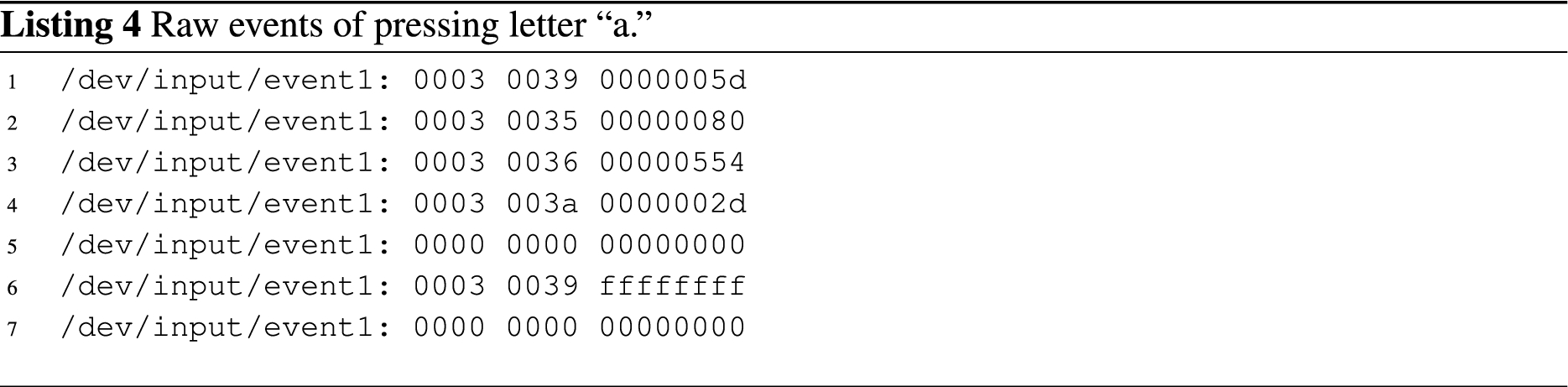
Second, let us consider the inference of keyboard layout, whose varieties are introduced by different vendors. Even for the input methods that endorse the same “QWERTY” layout, the position of each key is slightly different due to the appearance adjustment by vendors. The information about the input method (e.g., its name and whether it is invoked) is available using
Algorithm 1 illustrates our good timing detection algorithm in pseudo code. The good timing is a logical variable which is detected to be true when the login activity of a target app is shown and an input keyboard is invoked. The
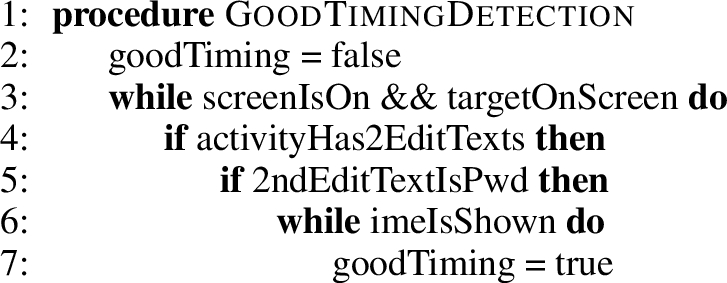
Good timing detection
Login activities share a common pattern which can be used to detect them. A login activity normally consists of at least two
We test our good timing detection algorithm with the top 20 finance apps in Google Play. The protection of users’ credentials is critical for these apps since any leakage may lead to financial loss. These target apps are installed on the test device on which our good timing detection algorithm runs in the background. Volunteers are recruited to operate on the device at will, e.g., playing games, browsing websites, and logging in the target apps with provided accounts. For demonstration purpose, we add one more component to the good timing detection service to take a screenshot using shell command
In this section, we discuss how to prevent the no-root approach from being misused in a proactive manner. All exploits presented in the previous section rely on ADB loopback, which can be set up due to the availability of the ADB client and the TCP mode of ADB connection on Android. While it would be a simple solution to block ADB loopback by removing TCP connection mode or ADB binary in the future versions of Android, it is not ideal due to sacrificing much benefit/convenience provided by ADB debugging and no-root apps. We thus propose a permission-based solution without blocking the ADB loopback. We also provide suggestions to app developers and app markets on how to prevent the exploits.
Permission-based solution
Once the ADB loopback is set up, a benign no-root app can access the ADB client (one of the ADB components introduced in Section 2.1) to meet users’ requirements. However, malicious apps may abuse ADB client, which helps them to access the resources beyond their granted permissions. The ADB client cannot distinguish whether the calls are from benign no-root apps or malicious apps. All of the exploits presented in this paper rely on unauthorised calls to ADB client from malicious third-party apps. Consequently, the exploits can be mitigated by thwarting unauthorised calls to ADB client.
A preferred solution should mitigate the ADB loopback exploits while still making it work for benign no-root apps. It is thus not an optimal choice to shut down the ADB loopback on Android. One possible solution is to extend the existing Android permission mechanism properly without introducing too much modification to it.6
We assume that the permission mechanism of the current Android system is effective as designed. We do not address any problem on current permission-based mechanism, such as permission re-delegation [22] or how users treat the permission declaration [21]. It is out of the scope of this paper.
In Android frameworks, a wide variety of permissions is defined to control the access to critical resources such as equipped hardware resources, system API functions, and file systems. An app cannot access any protected resources unless it has the required permissions. The enforcement of permission checking is located at two different layers, including Framework layer and Linux kernel layer. The checkpoints at the Framework layer mainly deal with the Android API callings to some sensitive resources such as contacts. Other checkpoints in Linux kernel are responsible for checking file system and network related permissions. Android assigns a unique Group ID (GID) to each type of permissions that are checked in Linux kernel. If any permission is granted to an app, this app will include the corresponding GID to its
Since ADB is an open-sourced protocol, a third-party app can implement it and communicate with ADB server as ADB client does. Previous research [14] suggests to verify whether the entity communicating with ADB server is truly the system ADB client. It requires that only ADB client can communicate with ADB server. In our solution, we focus more on how to protect the ADB client.
To prevent unauthorized calls to ADB client, we propose to add one extra permission to the current permission system. In particular, we add



Having defined the new permission, we need to specify the constraint related to this permission for ADB client. We add a permission check function at the beginning of ADB source code so that the
We also need to maintain the original usage of ADB for shell user. We declare the use of
Once the above permission-based solution takes effect, any app which requires access to ADB client should require for
Besides the permission-based solution which can be enforced on the Android side, we also give some suggestions for app developers and app markets based on our observation that the negligence from both sides may lead to exploits.
On the app developers’ side, proper coding and configuration would help protect apps against some malicious exploits. It is common that app developers sometimes insert logging code or use logging APIs from SDKs in their apps in the development phase for testing purposes. Probably due to negligence, some of them leave the logging code without change when they release their final products. In the no-root environment with ADB loopback, such apps are subject to the privacy leakage exploit. This exploit can be mitigated by cleaning the logging code before releasing their apps. Besides cleaning unnecessary logging code, app developers need to check for the configuration of the application attribute “allowBackup.” It is reasonable to set the value either to “true” or “false”. If it is set to “true” (explicitly or by default), necessary protection must be enforced on the backup data, e.g., logging out of account once the app is restored on a different device; otherwise, the app is subject to the account takeover exploit. Lastly, app developers should check for the misconfiguration of application attribute “debuggable.” If it is set to “true” in the development phase, it should be set to “false” in the released version so as to mitigate the application UID abuse exploit.
On the app markets’ side, it is suggested that app markets enforce effective vetting processes. Google Play has set up an example of using its bouncer [5], which checks for malicious operations and certain vulnerabilities in each app submitted to Google Play and suggests whether or not Google Play should accept the app. One of the jobs that bouncer do is to ensure that debuggable apps should not appear in the market since late 2013. This would help mitigate the application UID abuse exploit due to the permission explosion. On the other hand, we discover that several popular third-party markets, including Android Freeware, Anzhi Market, Eoe Market, and Slide Me, still host a considerable portion of apps that can be debugged. They may consider to improve their vetting systems to catch up with Google Play in prohibiting the debuggable apps. Besides blocking debuggable apps, we suggest that Android markets should check for the apps with debug or verbose logging code so as to avoid leaking sensitive information in logs.
Discussion
Related works
In this section, we summarize the related works and compare them with ours.
ADB is the official debugging tool provided by Android. A set of ADB based attacks has been identified before. Vidas et al. [30] mentioned in their survey that an untrusted ADB connection via USB could result in security breaches when an attacker is physically close to the target device. Recently, Symantec detected a Windows malware which may infect Android devices with ADB [32] via USB connections. Hwang et al. [14] presented some feasible stealthy operations which can be performed within ADB capabilities by enumerating a series of attacks. Such attacks cannot be easily identified because they take advantage of normal ADB commands. Different from these works, we propose a feasible no-root approach that based on ADB loopback which is due to the available of the ADB client and the ADB TCP mode newly added in Android. If this no-root approach is adopted for any reason on an Android device with ADB, it brings along the dark side that all the ADB capabilities are available to any app with the internet permission on the standalone device, including those contributed to the attacks identified by Hwang et al. [14]. The typical exploits of this no-root approach are complementary to the ADB based attacks identified before in terms of providing a better understanding on how ADB can be misused.
Previous research has shown that some existing no-root applications can be misused or attacked. Lin et al. [16] attacked some existing no-root screenshot apps and abused their screenshot functionalities. It was shown that user input can be inferred by analysing the screenshots taken by these apps. In this paper, to explore the dark side of the new no-root approach, we also identify a user input inference exploit, for which the characters of user input can be obtained. In addition, the good timing detection algorithm, Algorithm 1, can be used to capture the exact time point when a user is ready to input his/her account credentials.
Developers’ negligence in code regulation leads to various attacks. It is demonstrated in previous research [17] that a malicious app can read SMS, obtain contacts and access location by selectively reading the system logs in earlier versions of Android. However, this attack cannot work on Android 4.1 and later versions, since on these new versions, an app is restricted to read its own log only. Nonetheless, it is still not a secure way to log sensitive information. In this paper, we show that despite the restriction enforced since Android 4.1, the system-wide log is available to any apps with the internet permission on the device due to the exploit of this new no-root approach. We examine the usage of log on top-listed real-world apps. We discover that many of them still log informative data which leads to severe privacy leakage.
Developer’s negligence in attribute configuration also leads to various attacks. Davi et al. [8] showed that malicious apps can escalate their granted permissions due to the misconfiguration of component attribute “exported” in victim apps. Zhou et al. [15] disclosed a type of passive content leakage on Android as a result of improper true “exported” value of content providers. Instead of focusing on the component attribute “exported”, we evaluate the use of the application attributes “allowBackup” and “debuggable” in apps collected from Google Play and four third-party markets. It is shown that the configuration of “allowBackup” with true or default value along with the lack of necessary protection on backup data leads to the account takeover. The misconfiguration of “debuggable” leads to the application UID abuse, which is prohibited in Google Play but still can be discovered in all of the markets we test.
About the protection of ADB capabilities, it is proposed that the ADB server should add certain authentication so as to make sure its functionalities can only be invoked by the original ADB client [14]. Different from this work, we emphasise on the protection of the ADB client in the mitigation part since the ADB loopback exposes the ADB client to a wide range of apps with the internet permission. We propose a permission-based solution to prevent the misuse of the ADB client, which allows only those apps with granted ADB permission to access the ADB client.
Loosely related to our evaluation of vulnerable apps in different markets, the health condition of third-party markets has been measured in previous research. For example, Zhou et al. [34] studied the repackaging problem in third-party markets. They discovered that repackaged apps either steal advertisement revenue or add malicious payload, both of which contribute to an unhealthy and unfair market. DroidRanger [36] showed that the malware ratio is 10 to 23.5 times higher in third-party markets than Google Play. Consistent to the previous research, we discover that third-party markets enforce less restrictions on publishing “debuggable” apps in comparison with Google Play.
Conclusions
In this paper, we propose a new feasible no-root approach working on Android devices. This no-root approach has its advantage of performing privileged operations based on ADB loopback instead of a separate service as in other no-root approaches. To ensure that this no-root approach is not misused in a proactive instead of reactive manner, we investigate the dark-side exploits of it, and evaluate them with a large number of apps downloaded from Google Play and four third-party markets. We discover that a large number of apps are vulnerable to the exploits, and that the exploits are due to not only the ADB loopback but also the negligence of app developers and app markets. We further attempt to mitigate the exploits from different perspectives, including proposing a permission-based solution and providing suggestions to app developers and app markets.
Footnotes
Acknowledgment
This material is based on research work supported by the Singapore National Research Foundation under NCR Award Number NRF2014NCR-NCR001-012, and National Natural Science Foundation of China (Grant No. 61502468).
Permissions and protection levels of shell on Android 5.1.0
| Permission name | Protection level |
| ACCESS_COARSE_LOCATION | dangerous |
| ACCESS_CONTENT_PROVIDERS_EXTERNALLY | signature |
| ACCESS_FINE_LOCATION | dangerous |
| ACCESS_LOCATION_EXTRA_COMMANDS | normal |
| ACCESS_NETWORK_STATE | normal |
| ACCESS_SURFACE_FLINGER | signature |
| ACCESS_WIFI_STATE | normal |
| BACKUP | signatureOrSystem |
| BATTERY_STATS | signatureOrSystem |
| BIND_APPWIDGET | signatureOrSystem |
| BLUETOOTH | dangerous |
| BLUETOOTH_STACK | signature |
| BROADCAST_STICKY | normal |
| CALL_PHONE | dangerous |
| CHANGE_CONFIGURATION | signatureOrSystem |
| CLEAR_APP_USER_DATA | signature |
| DELETE_CACHE_FILES | signatureOrSystem |
| DELETE_PACKAGES | signatureOrSystem |
| DEVICE_POWER | signature |
| DUMP | signatureOrSystem |
| EXPAND_STATUS_BAR | normal |
| FORCE_BACK | signature |
| FORCE_STOP_PACKAGES | signatureOrSystem |
| FRAME_STATS | signature |
| GET_ACCOUNTS | normal |
| GET_DETAILED_TASKS | signature |
| GRANT_REVOKE_PERMISSIONS | signature |
| INJECT_EVENTS | signature |
| INSTALL_LOCATION_PROVIDER | signatureOrSystem |
| INSTALL_PACKAGES | signatureOrSystem |
| INTERACT_ACROSS_USERS | signatureOrSystem |
| INTERACT_ACROSS_USERS_FULL | signature |
| INTERNAL_SYSTEM_WINDOW | signature |
| KILL_BACKGROUND_PROCESSES | normal |
| MANAGE_DEVICE_ADMINS | signatureOrSystem |
| MANAGE_USERS | signatureOrSystem |
| MODIFY_APPWIDGET_BIND_PERMISSIONS | signatureOrSystem |
| READ_CALENDAR | dangerous |
| READ_CONTACTS | dangerous |
| READ_EXTERNAL_STORAGE | normal |
| READ_FRAME_BUFFER | signatureOrSystem |
| READ_USER_DICTIONARY | dangerous |
| REAL_GET_TASKS | signatureOrSystem |
| REORDER_TASKS | normal |
| RETRIEVE_WINDOW_CONTENT | signatureOrSystem |
| RETRIEVE_WINDOW_TOKEN | signature |
| SEND_SMS | dangerous |
| SET_ACTIVITY_WATCHER | signature |
| SET_ALWAYS_FINISH | signatureOrSystem |
| SET_ANIMATION_SCALE | signatureOrSystem |
| SET_DEBUG_APP | signatureOrSystem |
| SET_KEYBOARD_LAYOUT | signature |
| SET_ORIENTATION | signature |
| SET_PROCESS_LIMIT | signatureOrSystem |
| SET_SCREEN_COMPATIBILITY | signature |
| SIGNAL_PERSISTENT_PROCESSES | signatureOrSystem |
| STOP_APP_SWITCHES | signatureOrSystem |
| UPDATE_APP_OPS_STATS | signatureOrSystem |
| WRITE_CALENDAR | dangerous |
| WRITE_CONTACTS | dangerous |
| WRITE_EXTERNAL_STORAGE | dangerous |
| WRITE_MEDIA_STORAGE | signatureOrSystem |
| WRITE_SECURE_SETTINGS | signatureOrSystem |
| WRITE_SETTINGS | normal |
| WRITE_USER_DICTIONARY | normal |