



Abstract
The authentication of a web server is a crucial procedure in the security of web browsing. It relies on certificate validation, a process that may require the participation of the user. Thus, the security of certificate validation is socio-technical as it depends on traditional security technology as well as on social elements such as cultural values, trust and human-computer interaction.
This manuscript analyzes extensively the socio-technical security of certificate validation as carried out through today’s most popular browsers. First, we model processes, protocols and ceremonies that browsers run with servers and users as UML activity diagrams. We consider both classic and private browsing modes and focus on the certificate validation. We then translate each UML activity diagram to a CSP# model. The model is expanded with the LTL formalization of five socio-technical properties pivoted on user involvement with certificate validation. We automatically check whether the CSP# models are socio-technically secure against Man-in-the-Middle attacks using the PAT model checker. The findings turn out to be far from straightforward. From them, we state best-practice recommendations to browser vendors.
Keywords
Introduction
Although the Web has not been conceived to be a secure platform, nowadays most of the popular websites can be accessed via TLS and are authenticated via certificates. While we can reasonably assume that TLS provides confidentiality and integrity as it uses robust cryptographic schemes, we should be more careful in assuming the same for authentication. The authentication of a website depends, to various degrees, on trust. One element of trust comes either from the web-of-trust concept or from the public-key infrastructure (PKI). Either way, the authentication of a website works through the issuing of certificates. A certificate binds an identity with a public key, and contains other pieces of information that the verifier, also known as authenticator or trustor, needs to check to accept the certificate. The verifier is a software, normally the browser of the user who accesses a website. The browser verifies that the identity on the certificate corresponds to the identity on the website, and that the certificate is signed by a trusted authority. Thus an authentication that succeeds seems to depend mostly on the browser rather than on the user. But when the validation fails, browsers usually resort on the choices of users. In this case, the user is the ultimate responsible for the website’s authentication.
Invalid certificates are not rare. For example, to cut on costs, institutions often self-issue their own certificates rather than purchase them from accredited certification authorities. While the deployment of a private PKI for a large organization also bears costs, self-issuing a certificate comes at no expense. But, even if institutions purchase their certificates from a recognized authority, they may still use the certificate beyond its expiration date or abuse it to certify different domains and sub-domains that are not actually provided for the certificate. With a security take, an invalid certificate may originate from a network attacker who attempts a Man-in-the-Middle attack, namely the attacker replaces the server’s certificate with his own.
We do not intend to contribute to the long-established debate on the interpretation of the technical meaning of authentication [34] but, rather, we expect to substantiate our observation that server authentication with modern browsers goes beyond the technical certification path validation algorithm as described in the X.509 standard [22]. The validation of a certificate is in fact socio-technical to the extent in which modern browsers consider user’s choices and support the validation with novel technologies, such as the HTTP Strict Transport Security (HSTS). Thus, with certificate validation we refer to the property of the extended protocol that browsers customize with user’s involvement and additional security mechanisms.
We note that the way the certificate validation is accomplished varies considerably among browsers. This variety motivates a number of research questions. What are the differences in terms of user involvement in how modern browsers implement server authentication? Which browsers reduce the security risks for users when a certificate is invalid? Can browsers improve their security by involving the user more profitably than they do at present? This list of questions, purposely truncated to length three here, arises when server authentication, and certificate validation in particular, is assessed from a socio-technical standpoint.
Contribution. Our work complements traditional studies in human-computer interaction by advancing what seems to be the first formal analysis of browser’s certificate validation that is not only logically conditioned on the technology but also on user actions. This formal analysis was not carried out using a known approach. By contrast, it was not obvious how to represent (portions of) the functioning of a browser in order for the security analyst to quickly get confidence with its properties without reading long prose. Various graphical notations were tried out, and finally we found Unified Modelling Language (UML) activity diagrams [55] to bear the necessary flexibility. Building these diagrams is a major hallmark in our understanding of the technicalities of the browsers. However, they are only semi-formal and not directly executable; a formal model is needed for a fully automatic analysis. We therefore translate our UML diagram models to models in the Communicating Sequential Processes (CSP) process algebra [37]. The models are extended with a Linear Temporal Logic (LTL) specification of the properties of interest. Each extended model forms the input to the Process Analysis Toolkit (PAT) model checker [62], which yields the findings reported below.
This manuscript extends our earlier conference paper [12] with various contributions: (i) it considers expired and revoked certificates as causes that lead to the failure of certification path validation; (ii) it analyzes a new desktop browser, Safari, in addition to Chrome, Internet Explorer, Firefox, and the cross-platform browser Opera Mini; (iii) it considers the analysis of private browsing mode, and the interleaving of classic and private browsing; (iv) it includes a novel security property that concerns browser’s certificate validation, so that overall the manuscript considers five socio-technical properties. Finally, (v) it analyzes Safe Exam Browser (SEB), a kiosk browser conceived for Internet-based exams. Although SEB is not as popular as the other browsers considered in this manuscript, its particular purpose is to minimize the involvement of users; it is then interesting to evaluate how this feature affects certificate validation. The mix of new browsers, modes, and properties increases the 16 scenarios analyzed in the previous paper to this manuscript’s 60 scenarios. A disclaimer is in order that the proposed list of properties is not meant to be complete; however, our browser models are fairly well detailed, for example by allowing for the reception of a newly issued certificate to replace the older, expired one.
The intellectual value that this manuscript gains is at least twofold: (i) it makes three best-practice recommendations to browsers upon the basis of the additional findings on the new set of browsers and modes; (ii) it finds two bugs in Safari, respectively one in Safari for OS X and one in Safari for iOS, which (we reported to Apple getting a reply that a fix would be available in the upcoming versions of the browser, and) are now filed with the vulnerability identifier CVE-2015-5859 [6,54]. It is also worth noting that, after our conference paper observed that Opera Mini fails to prompt the user in case of invalid certificate [12], a new version of the browser fixed this issue.
Socio-technical analysis. Ellison coined the concept of a ceremony extending “the concept of network protocol by including human beings as nodes in the network” [26]; therefore, a ceremony is a technical system extended with its human users and the possible interactions between the system and its users. A ceremony extends the notion of protocol to include interactions, messages, and behaviours of the social components. Similarly, the term socio-technical system refers to the system including its social components [29]. Therefore, analyzing a ceremony means to conduct a socio-technical analysis focusing on socio-technical properties. It is somewhat understood that a socio-technical property pertains to how user choices affect a traditional property of a technical system such as a security protocol; for example, we mentioned above that certificate validation is a socio-technical property. However, there seems to exist no standard approach to analyzing socio-technical properties and, in particular, to effectively modelling the user in support of that analysis. While this is subject of significant international effort, as demonstrated by the vast related work (Section 2), we base our work upon the recent ceremony concertina traversal methodology [11]. It prescribes selective focus on the layers that interpose between society and each technical system, and leverages on a previously identified layering of a ceremony [10]. In particular, layer IV is about the user expression of personas, each embodying a different attitude towards a technical system, such as a careful or a distracted one; layer III is about the interaction of the given persona with the user interface of the given technical system, normally executed on a computing device; the management of the user interface on the device, and the potential communication of the latter with another remote device are captured by the lower layers.
Following the ceremony concertina traversal methodology, our work focuses on layer III of the TLS certificate validation ceremony. In consequence, this article is, in particular, not about user studies: these traditionally assess layer IV, namely how people approach and express themselves in front of a technical system. By contrast, this article shall inspect how the particular choices of a user, namely a user persona, can affect the crucial property of certificate validation. We found out that this can be done elegantly in CSP by appealing to non-deterministic operators that allow us to account for all possible personas that can play at layer III – again, leaving aside an assessment on how and why such personas manifest themselves, which would stand on layer IV. While layer IV is the traditional playground for researchers from the Humanities, and the lower layers for researchers from Computer Science and Engineering, layer III is the meeting point for the trans-disciplinary discourse at the basis of inherently socio-technical analysis. It is therefore considered particularly challenging at present [11].
Article outline. After the related work discussed in Section 2, we position our work and detail the different aspects of certificate validation in Section 3. We introduce a description of the browsers concerned in this manuscript in Section 4, and detail their certificate validation ceremonies in Section 5 using UML activity diagrams. We then analyze five socio-technical properties on the browser’s ceremonies with the PAT model checker in Section 6. We discuss the results in Section 7 and provide three recommendations. Section 8 discusses some implications and concludes the manuscript.
Related work
A few works have developed formal verification techniques to model and analyze web browsers [7,8,14,16,17,30]. Akhawe et al. [4] introduce a formal model of web security. They define the main components of the web, namely Non-Linear Time, Browser, Servers, and the Network as Web Concepts. They consider a spectrum of threats that span from a malicious web server to a more advanced attacker who is able to inject contents into an honest web server. Finally, they analyze two security properties, i.e., security invariants and session integrity, in five web security mechanisms. The considered mechanisms include neither TLS nor certificate validation, and the formal model assumes that the user correctly interprets the browser’s security indicators. Our work focuses on certificate validation and considers users who may not correctly understand security indicators. Groß et al. [36] propose a formal framework to model a web browser and the behaviour of a user who interacts with the browser. They validate their framework by analyzing the security of password-based user authentication. Instead of modelling an ideal browser, we analyze the actual implementation of modern browsers. It would be interesting to merge our approach with their model of web browser. Formal verification techniques have been used to analyze Human-Automation Interaction [15]. They mostly focus on cognitive aspects of users rather than on the technical aspects of the systems the users interact with. In this manuscript, we consider user choices, which do depend on human cognitive factors, but our focus is more on the technical part, namely the web browsers.
There are many studies that conduct a security analysis of certificate validation [27,28]. Georgiev et al. [33] analyze certificate validation in the context of TLS for different web applications, including shopping carts, cloud storage, and payment gateways. They show several vulnerabilities due to the customization of APIs that implement certificate validation without following any standard. Differently to our automated approach, they detect attacks by visual inspection of the source code; moreover, the analyzed applications involve no browsers. Kaminsky et al. [41] discuss different attacks against the certificate infrastructure. They point out that certificate issuers and browsers may differently interpret the field subject name in an X.509 certificate. Such a lack of standardization makes the subject name vulnerable to injection attacks. A recent update to the X.509 standard [71] aims to fix the issue. Clark and Van Oorschot [20] provide a comparative evaluation of enhancements implemented into browsers for certificate validation. They argue that it is becoming more common that attackers own valid certificates for a web site. Attackers’ attention focuses on certificate infrastructure because of its reliance on human factors. We share their view that certificate validation goes beyond the mere binding between a domain name and a public key.
Certificates may be revoked for various reasons, such as compromise of the corresponding private key or variation of the subject details. Abstracting away from those details, Liu et al. advance a comparative analysis on how modern browsers handle revocation [46]. They demonstrate that different browsers make dissimilar decisions in mapping the output of the certificate revocation statuses “unavailable” and “unknown” into yes/no decisions. Contrarily to our earlier work [12], the mapping is now explicitly represented in our models (Section 5).
Different solutions have been proposed to modify the structural flaws of the certificate infrastructure [39,50,51], but they also require dedicated modifications to the protocols that use certificates to achieve authentication. For example, the Certificate Transparency project [44] suggests an improvement to the current TLS certificate system that consists in supplemental monitoring and auditing services via certificate logs. Such improvement requires a different server implementation to accommodate a TLS extension. Structural solutions such as TLS extensions may take a long time before being implemented extensively, because both browser and server need to support the extension. In this manuscript, we also end up with a similar proposition, but it requires a modification of the browser only, with no change required on the server and on the TLS protocol.
The human aspect of certificate validation has recently been analyzed via different empirical studies and more recently also with formal methods [9]. Akhawe and Felt [5] make an empiric analysis to assess the effectiveness of browser security warnings. In particular, they measure the users’ click-through rates on certificate and malware warnings. They find that users tend to ignore warnings as they click through the Chrome certificate warnings. Such a finding led Google to redesign Chrome’s certificate warnings. Similarly, Flinn and Lumsden [31] conduct a survey to assess whether users are aware of the security risk they face online. They find that users have different interpretations of the term “secure web site” and are generally unaware that TLS provides server authentication. By contrast, our formal analysis does not pertain to user perception, but investigates the various ways in which user’s choices influence server authentication. Jøsang et al. [40] point out that web browsers can only do syntactic server authentication, as TLS cannot provide semantic server authentication. Thus, the attacker can exploit semantic attacks to trick the user. They advocate the need of a framework to determine the assurance level of server authentication. Our approach aims at analyzing how web browsers help users to avoid such server authentication attacks. Gajek et al. [32] propose a new authentication protocol that consists of a mix between the Password Authentication Key Exchange (PAKE) and TLS protocols without relying on a PKI. They formalize a user as a probabilistic machine. The user’s behaviour can recognize the so-called human-perceptible indicators like pictures and sounds. In contrast, we are not interested in the cognitive aspects, and make minimal assumptions about the user capabilities. Akhawe et al. [3] produce a taxonomy of certificate validation warnings and collect data over more 10 billion TLS connections that are not under MITM attacks. Thus, they calculate the false positive rate of showing warnings and present a number of recommendations to improve the design of browsers. Conversely, our approach considers MITM attacks.
The security of browsers has been studied variously, for example to avoid the user’s oversight of warning messages [64], or to improve the readability of their contents [13]. These works are positioned over the cognitive aspects of human-computer interaction with the browsers. In short, our work can be positioned as follows: we see the socio-technical system consisting of a web server, a computer network, a browser, a user and possibly an intruder as a ceremony in the sense of Ellison [26]; we focus on layer III of that ceremony, referring to a layering of Bella and Coles-Kemp [10], where user personas interact with the interface of a technology.
Basics
This section clarifies a few technical notions and sets the terminology used throughout this article. First, it details the constituents of a web certificate and explains how their validation works or can fail. Then, it discusses the regulations that specifies the path validation of a web certificate, and observes how the standard eventually leaves the interpretation of certificate validation to browser manufacturers. In consequence, certificate validation becomes a mix of user’s choices and technical security mechanisms, from which emerges that certificate validation in modern browsers is a socio-technical process. The sequel of this section outlines a few basic concepts that are needed later.
Web certificates
A web certificate binds an identity to a public key. The X.509 standard [22] specifies the structure of a certificate as a set of mandatory and optional fields. Among the mandatory fields, four are fundamental to understand the authentication purpose of a certificate: subject, which specifies the certificate owner’s identity; subject public key, which specifies the public key associated to the subject; issuer, which specifies the entity who verified that the public key belongs to the owner described in the subject; certificate signature, which specifies the digital signature generated by the issuer on subject and public key.
A subset of mandatory fields also includes the following ones: version, which specifies whether optional fields are expected to be used; serial number, which is unique among the certificates generated by the issuer; and not before and not after, which specify the time interval during which the issuer maintains information about the status of the certificate.
Certificate validation
The algorithm for the path validation of a certificate checks whether the certificate is valid. It consists in verifying that the signature is correct provided that the verifier trusts the issuer. In this case the public key can be used to communicate with its owner. However, even if the signature is correct, the verifier may not trust the issuer. In this case the issuer, which is known as intermediate authority, needs itself to be certified. This forms a chain of intermediate authorities called certificate path. The certificate path always chains up to a root called certification authority (CA), whose certificate is self-signed, namely the issuer and the subject coincide. The verifier is assumed to trust the public key of the CA. Thus, the validation of a certificate path is to check the fields of each certificate up to a trustful root certificate. The X.509 standard details a certification path validation algorithm, but verifiers are free to implement their own algorithms, provided they offer equivalent functionality [22]. The fetching of the certificates forming a certificate path is outside the scope of this paper; by contrast, this paper focuses on the validation of a given certificate path.
Invalid certificates
If the path validation of the certificate succeeds, then the certificate is valid for the verifier, namely the verifier trusts the link between the public key and the identity presented by the certificate. However, the validation may fail due to a number of errors:
The certificate path chains up to a certification authority that is not in the list of CAs the verifier trusts. Verifiers may trust different certification authorities, since there is no universally trusted list of CAs.
A certificate may be invalid because entities, such as web servers, may prefer to self issue a certificate rather than purchase expensive certificates by commercial CAs. This choice may be even necessary when a single entity owns many different domains that need to be certified. Self-issuing a certificate is a quick procedure and has no costs. Self-issued certificates “are often used in large companies” [69] as well as in important institutions, such as the U.S. Army [66].
A certificate expires if the not after field contains a date in the past.
Entities may forget to renew their certificates before they expire. According to a recent survey [3], expired certificates are the most common form of benign (i.e., false positives) certification path validation failures.
A certification authority may revoke the certificate due to either administrative or security reasons. For example, if an entity believes that an attacker has learned the private key, it may ask the CA to revoke the certificate.
Again, verifiers may trust different certificate authorities, thus revocation also depends on the specific CA store used by the verifier. Moreover, certificate revocation is a protocol by itself: CRL, OCSP, and CRLSets are three common protocols to revoke and check certificates [35,59,71], and verifiers may support any of these. The certificate specifies which protocols the verifier should use to check the certificate revocation status. However, such information might be missing, leading to the unavailable status. Some protocols may not be able to evaluate the revocation status, hence terminating with an unknown status.
The subject expected by the verifier mismatches the one shown in the certificate. According to a large-scale survey on certificates [69], mismatched certificate subject is a frequent case of certificate path validation failure.
False positives may occur because an entity needs to secure its own sub-domain (e.g., www.sub1.entity.com), but, to save costs, the entity does not purchase a certificate for each sub-domain.
The standard X.509 says that if any one of the checks of the certification path validation fails, then the algorithm terminates, returning a failure indication to the concerned protocol. The TLS protocol uses X.509 certificates to support authentication, and browsers implement TLS over HTTP to provide confidentiality, integrity, and authentication on the communications with web servers. Since authentication is an optional TLS requirement, the corresponding RFC standard [24] outsources the certificate validation to the browsers: “How to interpret the authentication certificates exchanged is left to the judgment of the designers and implementors of protocols that run on top of TLS.” Moreover, the HTTP over TLS standard [57] advocates the involvement of the user when the certification path validation fails: “User oriented clients MUST either notify the user (clients MAY give the user the opportunity to continue with the connection in any case) or terminate the connection.” Ultimately, browsers can implement differently the certificate validation, which becomes socio-technical when the technical approach, namely the certification path validation, fails.
Socio-technical aspects of certificate validation
Browsers communicate with the user in different ways, such as text warnings, pop-up windows, open or closed padlocks, and colored address bars. The main component that browsers use to interact with the user is the viewport, which is depicted in Fig. 1.

The viewport component of a browser.
The user can choose any of the options proposed in the browser’s viewport: a cautious user may close the browsing session, while a curious one may click through a warning. Users may be variously skilled and educated. They are influenced by a huge variety of local or global cultural values.
Malicious websites nowadays can use scripts to gain major control on browser’s viewport and deceive users [20] on security warnings. Although the design of browser’s security indicators has improved over the years [70], a number of studies have shown that users tend to click through a warning without paying attention [3,43,64]. These social factors make the problem of certificate validation a security problem that cannot be solved by purely technical means.
A few proposals have been recently advanced to minimize the participation of users in certificate validation and make security less reliant on user’s choice [38,65]. Different browsers have adopted HSTS [38], a security mechanism originally conceived to thwart TLS stripping attacks [48,49]. In a TLS stripping attack, the attacker forces the user to communicate via an HTTP connection although the web server supports HTTPS connections. HSTS-compliant browsers prevent “unsecured” HTTP connections to HSTS-compliant web servers. To do so, the web server sends the browser an HSTS header during a secured TLS session. Optionally, the HSTS header may include a list of the only certification authorities allowed to issue the web server’s certificate. Then, the browser adds an internal policy stating that the concerned web server must be accessed via HTTPS only, and with a valid certificate. Thus, once the authentication of the web server succeeded, it shall not fail in the future.
HSTS minimizes user’s participation in favour of a purely technical enforcement of security: if the certificate validation fails for browser-known HSTS-compliant web servers, then the browser shows the user an error message (not a warning) and aborts the connection. Some browsers implement an HSTS pre-loaded list of web servers precisely to make those servers browser-known and hence mitigate so called bootstrap MITM attacks: this attack exploits a vulnerability that sees a user type a URL or follow a link using HTTP rather than HTTPS to an unknown HSTS-compliant server.
Since HTTP uses an insecure channel, the first attempt to interact with the specified server is still vulnerable to MITM attacks. However, HSTS usage statistics show that only a small percentage of top web servers is HSTS-compliant [18,42]. Similarly to what they do with certification path validation, browsers implement HSTS differently from each other, as we shall see below.
Modern browsers
This manuscript considers the most popular browsers available nowadays. According to StatCounter [61], the most used browsers are Firefox, Chrome, Internet Explorer, and Safari. Additionally, we consider two more browsers: Opera Mini and Safe Exam Browser (SEB) [60]. Opera Mini is the most popular platform-independent browser [56] and is available on many mobile devices. Its analysis is motivated because nowadays more and more users prefer to browse the Web with touchscreen mobile devices, and in particular Opera Mini dramatically reduces the amount of data transferred. In doing so, we aim to evaluate how such restrictions affect certificate validation. SEB is the state-of-the-art browser to carry out online exams securely, in which authentication is a critical security property [25]. By analyzing SEB socio-technically, we mean to evaluate how certificate validation is affected by a kiosk browser intended to minimize the interaction with its users. We remark that not all browser specifications are available, hence many of our modelling choices are derived empirically, as noted below.
Firefox. The inception of Mozilla Firefox originates from Netscape Navigator. According to StatCounter [61], it is the third most popular browser over desktop, mobile, tablet, and console devices. Among the browsers we consider, Firefox seems to be the most complete: it supports HSTS, distinguishes two different certificate stores, and allows users to store server certificates either permanently or temporarily. Since Firefox is open source, we studied it by looking at its official documentation and source code. In this manuscript we consider Firefox version 36.0.4.
Chrome. Although Google Chrome is the youngest browser we consider, it is the most popular. It was the first browser to support HSTS policies, and adopts different certificate stores depending on the operating system underlying the browser. Chrome is based on the Chromium open source code with minor differences. We analyzed Chrome inspecting the Chromium source code and using empirical tests. This work considers Chrome version 41.0.
Internet Explorer. Microsoft Internet Explorer was the most popular browser for years, and has been overtaken by Chrome only recently. Currently, it does not support HSTS, which is however planned to be implemented soon [53]. Internet Explorer is available only for Windows operating systems, and uses their certificate stores. Since Internet Explorer is closed source, we relied on empirical tests, also supported by network analyzers. The version of Internet Explorer analyzed is 11.0.16.
Safari. Safari is the browser developed by Apple and is popular on the company devices. It supports HSTS and, similarly to Firefox, distinguishes two different certificate stores allowing users to store server certificates. Safari is available only on Apple’s operating systems and is closed source. We thus analyzed it empirically and assisted by network analyzers. We studied Safari 8.0.3.
Opera Mini. Opera Mini is used by more than 244 million people per month and is particularly popular in emerging countries, according to the company data [56]. It aims at being the most lightweight browser for any Java-capable device. To do so, the browser uses Opera proxy servers and compression technologies to reduce traffic and speed up page display. Thus, although communications to the proxy server are encrypted, there is no end-to-end TLS encryption between the browser and the web server. We analyzed the (closed-source) browser empirically, using a Java emulator with network analyzers. In this work we consider version 7.6.4.
Safe Exam Browser. The last browser considered in this manuscript is SEB, which is developed at ETH Zurich. The goal of SEB is to impede fraud in online exams by preventing access to unwanted resources and utilities of the operating systems. In practice, it turns the device into a kiosk for exams by removing any other components of a browser but the viewport. Due to the stringent security requirements imposed by the risk of cheating at exams, SEB is an interesting case study for our browser analysis. Since SEB is open source, we studied it by looking at its official documentation and source code, analyzing the version 2.0 of the browser.
Private browsing
All the browsers we consider in this manuscript support private browsing,1
SEB supports private browsing sessions only.
We tested the certificate validation in Firefox, Chrome, Internet Explorer, and SEB using an Intel Core i7 3.0 GHz with 8 GB RAM running Windows 8.1 on a virtual machine. We tested certificate validation on Opera Mini inside MicroEmulator, a Java implementation of JavaME, and analyzed certificate validation on Safari on an Apple MacBook Pro Intel Core i5 2.5 GHz with 8 GB RAM running OS X Yosemite 10.10. The network analyzers we used to understand how certificate validation works, especially on closed-source browsers, are “Wireshark” [21], “mitmproxy” [23], and “Charles” [68]. They ran on a second virtual machine with Linux Ubuntu 14.04 and intercepted any traffic between a server and the target browser on the main virtual machine.
Modelling certificate validation
As seen in Section 3, the certificate validation is not an algorithm, since it may involve users. Therefore, we refer to it as a ceremony, namely as a heterogeneous protocol where users and machines are the communicating processes.
The certificate validation ceremony includes a user, the browser, and the web server. In this section, we provide a formalization of the ceremony for each browser. However, finding the right formalism for the socio-technical analysis is not easy. The standard notation to describe security protocols is the Alice-and-Bob notation [47]. Although this notation provides a simple and clear description, it comes with some limitations: it cannot express fork, join, and branching, which are essential, for example, to model multiple user’s choices in the certificate validation. Flowcharts offer a graphical description and look suitable to describe browsers and algorithms in general, but are less appropriate for the description of protocols: we have the three roles of browser, user, and server, and we need to detail the messages that the roles exchange. Message sequence charts extend flowcharts to the domain of protocols, emphasizing the interaction among the roles. Still, they have the same limitation of the Alice-and-Bob notation.
Thus, we choose the semi-formal and graphical description of UML Activity Diagram [55], but we are aware that also Workflow Description Languages such as BPMN would have suited well. An UML activity diagram is a graphical scheme that defines the activities needed to meet a given functionality. UML activity diagrams are made of shapes that model choices, interactions, and concurrency. A description of the main UML activity diagram’s shapes is given in Appendix A. The contribution of activity diagrams is threefold. First, they give an intuitive representation of a protocol session, highlighting the mechanisms used on each role. Second, they can represent parallel actions (fork/join) and multiple choices (branching). Third, they can be easily translated in a fully formal language, thanks to their semi-formal semantics [1]. In short, the activity diagrams provide invaluable help to our understanding of the various entanglements of modern browsers, and we can now comment a posteriori that we would not have managed the formal models for the browsers without an intermediate graphical notation.
We translate UML activity diagrams to CSP# [62], a modelling language that enriches the high-level operators of CSP (e.g., choices, interleaving, hiding, etc.) with low-level programming constructs (e.g., arrays, while, etc.). The CSP# code is then fed to an automatic tool that checks whether the input model guarantees a set of properties. The code is given in Appendix B.
UML activity diagrams for certificate validation
We build nine activity diagrams that model the certificate validation ceremonies for the browsers both in classic and private browsing. Although we consider six browsers, we do not model the private browsing of Internet Explorer and Opera Mini because they are identical to the corresponding classic browsing modes, and we do not model the classic browsing for SEB since it supports only private browsing.
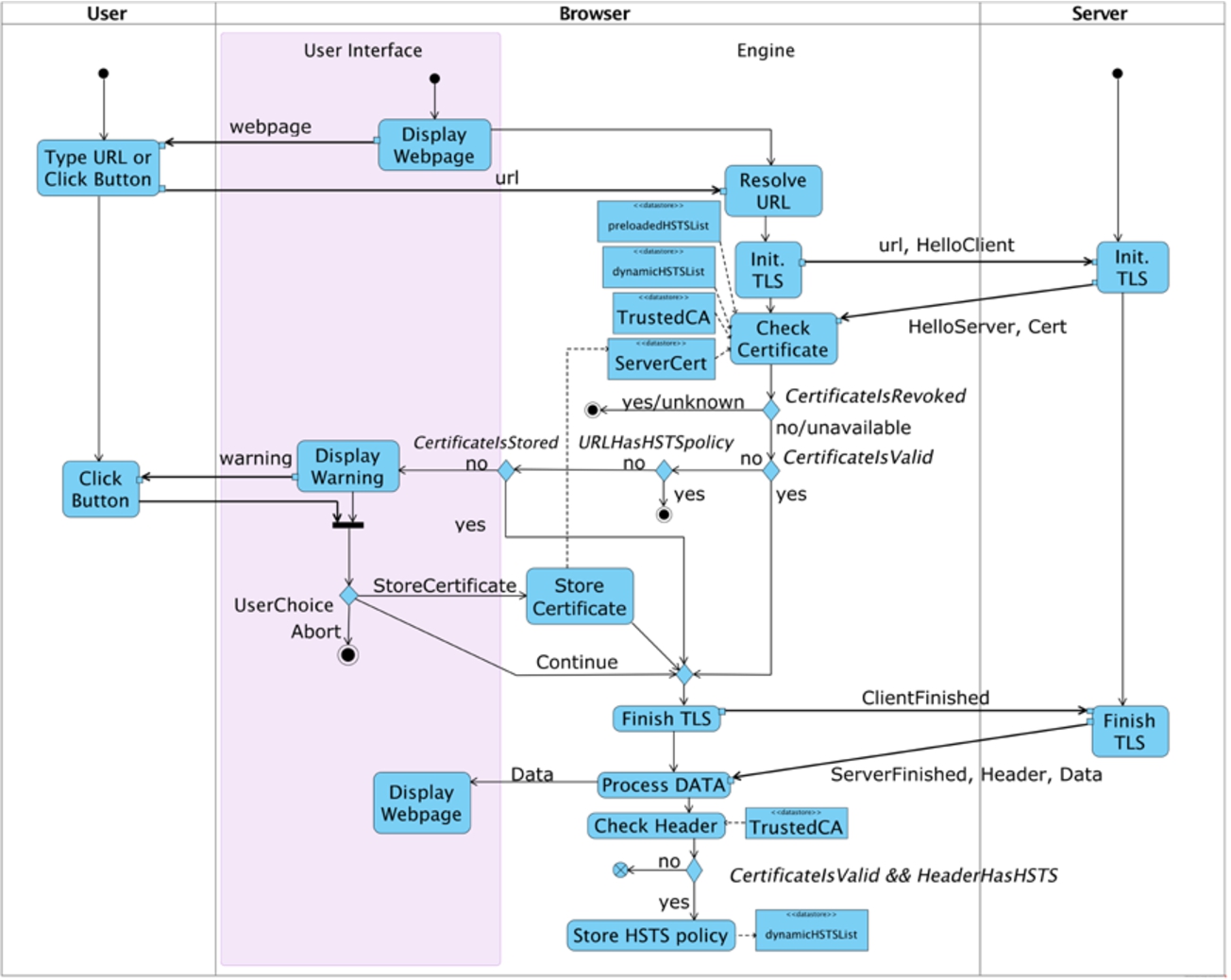
Activity diagram for certificate validation in Firefox.

Activity diagram for certificate validation in Firefox in private browsing.
The UML activity diagrams modelling Firefox in classic and private browsing are respectively in Fig. 2 and in Fig. 3. The remaining seven activity diagrams can be found in Appendix A.
The activity diagrams include the functionalities limited to describe how each browser achieves certificate validation. Each activity diagram has four columns, each representing a communicating role. From left to right we have the user, the browser user interface, the browser engine, and the server. Each role begins with a filled dot that points to their first activity. We assume that the browser bootstraps with the start web page, which is displayed in the browser user interface. Next, the browser user interface can load a web page because the user types a URL or clicks on an active link in the currently displayed web page. A label close to a thick arrow defines the object exchanged between activities. Activities may need to get access to datastores, which are represented as object nodes.
For each role involved in the certificate validation, we describe the principal activities and checks that concern their UML activity diagrams. In the remainder, we denote UML activities in
A user is modelled as a non-deterministic entity, so she may choose any of the paths of interaction that the browser offers, namely
The representation of the browser is split into user interface and engine. The former has the activities of
We purposely consider only two activities of the server. We aim in fact to focus more on the model of the browser rather than that of the web server. The server starts the TLS handshake on its side with the activity
Before formally analyzing the socio-technical properties on each browser, we note that the activity diagrams already offer some interesting insights (this supports the case that graphical models may be more insightful than formal ones). Firefox, Chrome, Internet Explorer, and Safari involve the user more than Opera Mini and SEB. In particular, only Firefox and Safari allow the user to store a server certificate either permanently or temporarily. Both browsers ignore previously stored certificates if a new valid certificate is encountered, which could happen, for example, when mobile users access the same site from different locations.
However there is a fundamental difference between Firefox and Safari: Firefox prioritizes the HSTS policy check (i.e.,
Some browsers also show differences between their classic and private browsing. Firefox involves the user and implements HSTS differently in private browsing: the user cannot store a server certificate, and HSTS policies stored in earlier sessions are not considered. Also Chrome has a different implementation of HSTS in private browsing: no new HSTS policies can be permanently stored while the ones stored in previous classic sessions are considered. More surprisingly, Safari neither permanently stores HSTS policies in private browsing nor considers the ones previously stored in classic sessions.
This brief informal analysis corroborates the statement that certificate validation differs among browsers. In the next section, we see in depth by means of a formal approach how these differences affect the socio-technical security aspect of browser certificate validation.
Formal analysis of certificate validation
We use model checking to formally analyze certificate validation. We provide a systematic method to translate the UML activity diagrams to a formalization in CSP# that is amenable to automatic validation by means of PAT. Then, we define a threat model and specify the socio-technical properties that concern certificate validation in LTL.
It must be noted that the idea of using LTL model checking for validating web protocols is not a novelty: notably it has been vastly explored within a successful EU project [67]. Our work explores how a generic model checker can be tailored to the same task.
Threat model
We consider a Man-in-the-Middle (MITM) attacker who wants to violate server authentication. He controls the network and can divert the browser’s
Socio-technical security properties
We select five different socio-technical properties that we deem relevant. They bind elements that span from TLS session identifiers to user choices. They aim to demonstrate how the technical mechanisms implemented in browsers interrelate the user choices with the overall system security. We first give informal and intuitive descriptions of the properties and then express them formally.
(Warning users).
A user whose browser receives an invalid certificate is warned before the browser completes the session.
This property is about a browser warning the user that the certificate of the required server is invalid. As explained in Section 3, a certificate can be invalid for different reasons, each of them being more or less risky for the user. For example, some circumstances observe a server that self-issues its certificate, others conceal an attacker who attempts a MITM by injecting a fake certificate of his own.
(Storing server certificates).
A user who approves a server certificate via a browser by means of successful out-of-band validation is protected from Man-in-the-Middle attacks on future sessions with the same server via the same browser.
This property is about how storing a server certificate relates with MITM protection. When browsers receive a server certificate that they cannot validate, they prompt the user with some choices on how to treat it and, notably, may still allow the user to store the certificate. The user may decide to do so for a number of reasons, ranging from distraction to the successful out-of-band validation of the certificate. The preconditions of this property refer to the latter, which may variously take place, for example by handing over the certificate face-to-face via a pen drive or by verifying the certificate fingerprint over a secure voice channel. Despite the obvious scalability limitations of out-of-band validation, one could expect that, when successful, it could help protect future sessions with the same server from MITM attacks. We shall see in the discussion that follows that this is not true for all browsers.
(Applying HSTS user security).
A user who accesses a server via a browser that receives a valid certificate and an HSTS header is protected from Man-in-the-Middle attacks on future sessions with the same server via the same browser.
This property stands on a different scenario from that of the previous one, although their conclusions are equal. This scenario sees an HSTS-compliant server who sends a valid certificate to the browser the user is using.
(Applying HSTS bootstrap).
A user who accesses a server that is pre-loaded on the browser’s HSTS list is protected from Man-in-the-Middle attacks on future sessions with the same server via the same browser.
This property concerns the relation between HSTS pre-loaded list and MITM protection. In particular, we check whether HSTS-compliant browsers correctly implement the HSTS pre-loaded list to mitigate bootstrap attacks, namely MITM attacks at the first server visit.
(Learning from server certificate history).
A user who completes a TLS session with a server via a browser receiving an invalid certificate, and then completes another session with the same server via the same browser receiving a valid certificate is warned by the browser about the risk of Man-in-the-Middle attack.
This last property aims at checking whether the browser informs the user that a MITM attack may have occurred in a previous TLS session. For example, if one considers a session where the browser receives an invalid certificate, then the browser may warn the user about this (according to Property 1). If in a subsequent session the browser receives a valid certificate for the same web page, it may be the case that the former session experienced a MITM attack, hence the browser warns the user.
Analysis
Our automated analysis relies on PAT, a model checker for the analysis of concurrent and real-time systems. Its layered design separates modelling languages from model checking algorithms, thus supporting different languages via different algorithms. It supports a range of application domains that span from bio-systems to security protocols.
PAT supports an enriched version of CSP, called CSP#. The extensions of CSP# include low-level constructs that offer a connection between data states and executable operations. Moreover, PAT supports user defined C# functions and data types that can be used directly in CSP# code as external libraries. We take advantage of this by defining an advanced data structure to model the certificate stores of browsers. PAT can model safety (i.e., bad things never happen) and liveness (i.e., good things eventually happen) properties. In PAT, a property can be specified in the same language used to specify the system model, i.e., CSP, or in a temporal logic language. We use Linear Temporal Logic to specify our properties, and resort on PAT’s model checking techniques for their validation, namely a dedicated temporal-logic model checker. In particular, we use depth-first-search as searching strategy algorithm to check whether a property is valid. If the property turns out to not be valid, we use the breadth-first-search algorithm to find the shortest witness trace that falsifies the property.
PAT supports symbolic and explicit model checking. Notably, our models interleave an unbounded number of browser instances because it can be seen (Appendix B) that each specification of a browser concludes by recalling itself. However, PAT implements a clever abstraction mechanism (which ensures fairness and yet groups behaviourly similar processes) to keep the state space finite [63]. The absence of a violation signifies that the security property that is being checked holds of the underlying finite-state model.
CSP# syntax
CSP# syntax
Mapping UML activity diagrams to CSP#. We systematically generate the CSP# code from UML activity diagrams, and then validate the code with PAT. Such generation is quite straightforward because we define a map between the shapes of UML activity diagrams and the CSP# syntax, which is outlined in Table 1. More precisely:
the activity node maps to the CSP# event;
the object (datastore) node maps to the CSP# array;
the decision point maps to CSP# conditional choice;
input and output objects of activities map to the CSP# values of input and output communications;
activities roles are distinguished within a CSP# process;
the beginning of the activity flow is a CSP# event;
the ending of the activity flow maps to CSP# termination;
the flow of activities within a role maps to the CSP# event prefixing;
the flow of activities among different roles maps to CSP# input and output communications;
the flow of data of an object node maps to the CSP# assignment.
PAT fully supports LTL. An LTL formula is defined by events, predefined propositions, logical operators, and modal operators. An LTL formula can be evaluated over an infinite sequence of truth evaluations and paths. Thus, the assertion is true if every execution of the system satisfies the formula.
Although LTL defines five different modal operators, our properties can be expressed using the combination of two operators only: □, whose semantics is that the formula holds on the current state and the entire subsequent path; ◯, whose semantics is that the formula holds at the next state on the path. The combination
The propositions of our LTL formulas refer to “choices” (e.g.,
(Warning users).
Assertion 1 formalizes Property 1. It says that it is always the case that, when the browser concludes the TLS session (
(Storing server certificates).
Assertion 2 formalizes Property 2. It signifies that it is always the case that if the user visited a web page (
(Applying HSTS user security).
Assertion 3 formalizes Property 3. It is structured as the previous property, and can be interpreted similarly, but it is about the HSTS policy. It says that it is always the case that if the web page is HSTS compliant (
Assertion 3 is about the HSTS policy, hence strictly technical as it focuses on the engine of the browser. Also,
(Applying HSTS bootstrap).
Assertion 4 formalizes Property 4. It also relates to the HSTS policy. It expresses that it is always the case that if the web page is stored in the browser’s HSTS pre-loaded list (
It is worth noting that Assertion 3 implicitly refers to certificate expiry, which is buried into
(Learning from server certificate history).
Finally, Assertion 5 formalizes Property 5. It signifies that it is always the case that if the user visited a web page (
Findings
We studied our five properties on the six browsers by checking the satisfiability of our formulas on the CSP# models of the certificate validation. As said above, we considered Firefox, Chrome, and Safari in three different modes: classical browsing, private browsing, and their interleaving. In total, the analysis covered 60 different scenarios due to the mix of browsers, modes, and properties.
Interpreting the output of the tool required some effort, and Table 2 summarizes the findings. At first glance, the browsers that verify the highest number of properties are Chrome and SEB, then come Internet Explorer and Firefox, and lastly Safari and Opera Mini, but this conclusion should be gauged through the details that the table conveys.
The five socio-technical properties studied over six browsers
The five socio-technical properties studied over six browsers
Note: The term cb indicates classic browsing, pb is for private browsing, and in is the interleaving of classic and private browsing sessions. The term co indicates that classic and private browsing activity diagrams coincide. The symbol ✓ indicates that the property holds in the full PAT model; the symbol
It was possible to encode most of the scenarios without incurring state explosion: PAT terminates the validation of each scenario in just a few seconds over an Intel i7 processor with 8 GB RAM. However, we needed to assume no expired certificates to avoid non-termination in five scenarios that turn out to ensure the properties: Applying HSTS User Security on classic browsing of Firefox, and Applying HSTS Bootstrap on classic browsing of Safari, Firefox, and the respective interleaving. This does not seem limitative because expired certificates would only cause CertificateIsValid to fail, which in turn may also fail due to a subject mismatch or to an unknown certificate issuer.
Also, as expected, if a property fails in one of the modes (i.e., classic or private), then it fails also on their interleaving. However a more interesting result is that a session in one mode may influence a later session in a different mode. This is the case with Safari for Applying HSTS Bootstrap. In the remainder, we comment on each property in detail.
Warning users. The first property is found valid over Chrome, Internet Explorer, and SEB. It is also valid in Firefox in private browsing. By contrast, the model checker shows traces that falsify the property over the other modes for Firefox, Safari, and Opera Mini. With Firefox and Safari the traces are similar. They report a sequence of two TLS sessions both with a MITM attack. In the first session, the browser connects to the corrupted server and warns the user, who chooses to store the certificate of the attacker anyway. In the second session, the user tries to get access to the same server, but this time the browser has the attacker’s server certificate stored, and completes the session without warning the user. This is due to the drawbacks of storing server certificates, which Firefox and Safari allow their users to do. Notably, Firefox in private browsing forbids the user to store server certificates, hence the property turns out to be valid. The trace that falsifies the property with Opera Mini is rather trivial because the browser does not involve the user at all. Opera Mini in fact shows a padlock when the certificate is valid, but even if the certificate is invalid, the browser completes the TLS session anyway, without informing the user.
Storing server certificate. The second property turns out to be the most tricky to be interpreted. It is found that all browsers verify the property except Firefox and Safari, since the latter are the only browsers that allow a user to store server certificates. This is because the property is a logical implication whose precondition is trivially falsified by the browsers that do no store server certificate. The property does not hold on Firefox in classic browsing and on Safari in all modes, even though the precondition is not falsified. The user can in fact replace a server certificate as many times as she wishes to, while the browser does not inform the user that a server certificate was already stored. In support of this, the tool exhibits the following counterexample. In one session, the user engages with an honest server that transmits a self-issued certificate; the browser warns the user about the invalid certificate, but she chooses to store the certificate, thus the browser successfully concludes the TLS session. In a subsequent session, the user wants to connect again with the same server, but this time the attacker interposes himself between the communication and sends a self-issued certificate pretending to be the honest server; the browser warns the user about this second invalid certificate, regardless the fact that another certificate was already stored for the same server; the user decides to store also this certificate and the browser concludes the TLS session.
Applying HSTS user security. The third property is valid in classic browsing on Chrome and on SEB. PAT does not terminate in the full model of classic browsing on Firefox unless assuming no expired certificates. In that case, the property is valid. The property does not hold in private browsing because Firefox and Chrome prefer to remove HSTS policies stored during private browsing sessions to protect user’s privacy. In fact an examination of the stored HSTS policies would reveal which HSTS-compliant websites the user visited in private browsing. Surprisingly, the property is not valid on Safari in any mode. The model checker shows a trace as follows: in the first session the attacker interposes himself in the communication, and the user chooses to store the attacker’s certificate. In a subsequent session, the browser communicates with the honest server, from which it receives the HSTS header. Then, in a new session, the attacker interposes himself again on the communication, and the browser does not abort but concludes with no warnings. This is because a user’s approved certificate bypasses the HSTS policy in Safari as the browser prioritizes user’s approved certificates over HSTS policies.2
After we filed a bug report to Apple, we received this reply: “The information you’ve provided will be valuable in our efforts to determine the cause of the issue you reported.”
Applying HSTS bootstrap. The fourth property is checked over the browsers that support HSTS. PAT does not terminate in the full models for Firefox and on classic browsing for Safari. The property can be proved valid only assuming no expired certificates. It is valid on Chrome but not on private browsing of Safari, which does not consider the HSTS pre-loaded list.3
We received this reply from Apple: “Your reported issue will be addressed in upcoming releases. If you are a member of our developer program, you can test our fix in the current beta release of iOS 9 and OS X 10.11 El Capitan.”
Learning from server certificate history. Finally, the fifth property holds only on SEB, in which the precondition
Upon the basis of our findings, we formulate the following three recommendations. The first refers to certificate validity, and in particular to the treatment of expired certificates and to the management of invalid certificate history.
Browsers should keep track of invalid certificate history to warn users more appropriately.
Users may forget past security warnings, and browsers may help. For example, browsers could maintain a cache of all invalid certificate hashes. In doing so, it would be possible for browsers to warn users when a different invalid certificate is presented by a server with which the browser communicated in the past. It is worth noting that looking at past interactions is the strategy that the Session Description Protocol [45] advances to strengthen the management of self-issued certificates. Surprisingly, it has not been used in HTTPS.
In particular, Recommendation 1 is about caching certificates that are invalid for any of the four possible reasons we model (Section 3), therefore it does not rely on a single specific reason. An implication is that a browser should implement an additional check every time it receives a live certificate from a web site and the certificate is invalid: whether the same certificate is already in the browser cache.
The remaining recommendations pertain to the HSTS technology. Although we noted above that HSTS is only relatively widespread among modern web servers [18,42], our recommendations remain valid because they pertain to the browser-side of the use of HSTS, which is itself very rich. For example, “if a UA receives HTTP responses from a Known HSTS Host over a secure channel but the responses are missing the STS header field, the UA MUST continue to treat the host as a Known HSTS Host…” [38]; this means that browsers must force the HSTS policy for any web server found in their pre-loaded HSTS list, notably even if the web server is not HSTS-compliant. Also, “A user-declared HSTS Policy is the ability for users to explicitly declare a given domain name as representing an HSTS Host, thus seeding it as a Known HSTS Host before any actual interaction with it.” [38]; this means that users may decide to enforce an HSTS policy over any server.
In support of the following recommendations, we also conjecture that, if browsers implement HSTS properly, and in particular following our recommendations, then the adoption of HSTS by web servers will be fostered.
Browsers should consider the HSTS pre-loaded list also in private browsing.
Firefox and Chrome show that it is possible to protect the user and mitigate bootstrap attacks with HSTS without breaking user’s privacy in private browsing. The choice of Safari not to consider the HSTS pre-loaded list leads to some weaknesses that when mixed with other features (i.e., user approved server certificates) may become serious vulnerabilities.
Browsers should prioritize HSTS policies over user’s past choices.
Also this recommendation comes from the findings on Safari, which currently implements a customized HSTS mechanism. HSTS has been conceived to avoid user’s participation in security choices. A server that chooses to be HSTS-compliant cannot self-issue a certificate. Thus, any check on a user’s approved certificate should be superseded by the HSTS policy stored in the browser.
The socio-technical analysis of the security of modern browsers is yet to be considered innovative at present. It combines traditional analysis of the technologies underlying browsers on the one hand, with elements of user participation on the other. By doing so, the socio-technical approach is oriented at characterizing security properties also in terms of what the user may accomplish, with the ultimate aim of building browsers that are secure in the presence of humans.
This manuscript describes our work in this area. It focuses on server authentication with the user via the browser. More specifically, it studies the socio-technical ceremony of certificate validation in the various circumstances where this validation can fail, including MITM attacks, and formulates three high-level, best-practice recommendations.
The security analysis of the ceremony of certificate validation from a socio-technical standpoint inspires a number of research questions, and we concentrated on three (cf. Section 1): the first addresses the differences in terms of user participation in server authentication; the second concerns the strategies that browsers use to reduce the security risks for users in the presence of an invalid certificate; the third relates to how browsers improve the security by involving the users more profitably than they do at present.
To address these questions we formulated five properties that tackle how users are involved in the ceremony of certificate validation. The outcome of our analysis demonstrates that each browser implements the ceremony of certificate validation differently, and that this is the origin of a few security problems. In particular, our analysis shows that HSTS fails on its goal when implemented in the wide customized process of certificate validation. Microsoft announced that the next version of Internet Explorer will support HSTS [52]. We argue that its usefulness will depend on how HSTS is implemented in the browser’s certificate validation.
A major hallmark through our work is the adoption of UML activity diagrams as a semi-formal language to represent portions of browser functioning compactly, so that the human analyzer can quickly realize their niceties. However, rigorous security analysis requires a formal approach. Thus, the diagrams that represent the ceremonies are systematically mapped into CSP# and validated in the PAT model checker against the LTL specification of our five socio-technical properties. These are the main steps of our approach to the socio-technical formal analysis of the security of browsers. The current findings encourage us to develop this approach further, for example by automating it fully, and by trying it out on additional socio-technical properties. It is worth stressing that our current choices of formal languages and supporting tools are not meant to be binding; rather, they aim at demonstrating our approach.
An obvious step in front of this work is to assess the failed properties and to design dedicated fixes upon inspiration of our best-practice recommendations; it can be expected that this will also require tweaking the models slightly and repeating the validation process accordingly. Also, we are currently working on reproducing the experiments described above using different tools, since PAT does not terminate in all general cases. We advocate alternative validation methods to check other properties such as privacy, a property that cannot be modelled in PAT. While looking at the interleaving of sessions in different browser modes, we noted that a session in private browsing should not interfere the subsequent sessions in classic browsing. A different approach, possibly a different model checker such as FDR [58], is required to understand whether this interference may leak information, since PAT cannot verify privacy properties. We leave these further developments as intriguing future work.
Footnotes
UML activity diagrams for certificate validation
Table 3 recalls the main UML activity diagram’s shapes. The remaining seven UML activity diagram models are depicted from Fig. 4 to Fig. 10. Specifically, the activity diagrams modelling Chrome in classic and private browsing are respectively in Figs 4 and 5; the activity diagrams for Safari are in Figs 6 and 7. the activity diagrams for Internet Explorer, Opera Mini, and SEB, which each are represented only by one diagram, are respectively in Figs 8, 9, and 10.