




Abstract
Web-based Git hosting services such as GitHub and GitLab are popular choices to manage and interact with Git repositories. However, they lack an important security feature – the ability to sign Git commits. Users instruct the server to perform repository operations on their behalf and have to trust that the server will execute their requests faithfully. Such trust may be unwarranted though because a malicious or a compromised server may execute the requested actions in an incorrect manner, leading to a different state of the repository than what the user intended.
In this paper, we show a range of high-impact attacks that can be executed stealthily when developers use the web UI of a Git hosting service to perform common actions such as editing files or merging branches. We then propose
Introduction
Web-based Git repository hosting services such as GitHub [1], GitLab [2], Bitbucket [3], Sourceforge [4], Assembla [5], RhodeCode [6], and many others, have become some of the most used platforms to interact with Git repositories due to their ease of use and their rich feature-set such as bug tracking, code review, task management, feature requests, wikis, and integration with continuous integration and continuous delivery systems. Indeed, GitHub hosts over 96 million repositories [7] which represents a growth of more than 900% since 2013 [8]. These platforms allow users to make changes to a remote Git repository through a web-based UI, i.e., by using a web browser, and they comprise a substantial percentage of the changes made to Git repositories: 48 of the top 50 most starred GitHub projects include web UI commits and an average of 32.1% of all commits per project are done through the web UI. For some of these highly popular projects, web UI commits are actually used more often than using the traditional Git command line interface (CLI) tool (e.g., 71.8% of merge commits are done via the web UI).1
These statistics refer to commits after June 1, 2016, when GitHub started to use the
Unfortunately, this ease of use comes at the cost of relinquishing the ability to perform Git operations using local, trusted software, including Git commit signing. Instead, a remote party (the hosting server) is instructed to perform actions for the client. Given that the server performs most of the operations on behalf of the user, it cannot cryptographically sign information without requiring users to share their private keys. Effectively, since GitHub does not support user commit signing, those who use the web UI give up the ability to sign their own commits, and must rely completely on the server.
However, trusting a web-based Git hosting service to faithfully perform those actions may be unwarranted. A malicious or compromised server can instead execute the requested actions in an incorrect manner and change the contents of the repository. Since Git repositories and other version control system repositories represent increasingly appealing targets, they have been subjected historically to such attacks [9–16], with varying consequences such as the introduction of backdoors in code or the removal of security patches. Similar attacks are likely to occur again in the future, since vulnerabilities may remain undiscovered for a prolonged amount of time and websites may be slow in patching them [17].
For example, a user interacting with a GitHub web UI to create a file in the repository can trigger a post-commit hook that adds backdoored code on the same file on the server-side. To introduce such a backdoor, an unscrupulous server manipulates the submitted file and adds it to the newly-created commit object. As a result, from that moment on, the Git repository will contain malicious backdoor code that could propagate to future releases.
To counter this, we propose
To achieve this, we present two designs. In the first one, which we refer to as the lightweight design,
After exploring several strategies to compute the information necessary for the two designs, we settled on solutions that we implemented exclusively in the browser using JavaScript, i.e., as a Chrome browser extension. This covers the large majority of software development platforms (i.e., laptops and desktops). Despite the tedious task of re-implementing significant functionality of a Git client in JavaScript, this approach achieves the best portability and does not require the presence of a local Git client. It also features optimizations that leverage the GitHub/GitLab API to download the minimum set of Git objects needed to compute the verification record (for the lightweight design) or the commit signature (for the main design). The browser extension based on the lightweight design contains 15,838 lines of JavaScript code, whereas the one based on the main design has 25,611 lines of code (numbers include several third-party libraries needed to create the necessary Git objects and to push these objects to the server). Excluding HTML/CSS templates, JSON manifests and libraries, the extension consists of a total of 4,095 and 4,467 lines of Javascript code for the two designs, respectively.
In addition to the cryptographic protections suitable for automatic verification,
While this paper focuses specifically on
In this paper, we make the following contributions:
We identify new attacks associated with common actions when using the web UI of a web-based Git hosting service. In these attacks, the server creates a commit object that reflects a different repository state than the state intended by the user. The attacks are stealthy in nature and can have a significant practical impact, such as removing a security patch or introducing a backdoor in the code.
We propose
We implement
We perform a security analysis of
We evaluate experimentally the efficiency of our implementation. Our findings show that, when used with a wide range of repository sizes,
We perform a user study that validates the stealthiness of our attacks against a GitLab server. The study also provides insights into the usability of our
Together, our contributions enable users to take advantage of GitHub/GitLab’s web-based features without sacrificing security. For ease of exposition, we will use GitHub as a representative web-based Git hosting service throughout the paper, but our attacks and defenses (including the
GitHub is a web-based hosting service for Git repositories, and its core functionality relies on a Git implementation. In this section, we describe several Git and GitHub concepts as background for the attacks introduced in Section 4 and the defenses proposed in Section 5. Readers familiar with Git/GitHub internals may skip this section.
Git repository internals

A Git repo with two branches,
Git records a project’s version history into a data structure called a repository. Git uses branches to provide conceptual separation of different histories. Figure 1 shows a repository with two branches:
A branch can be merged into another branch to integrate its changes into the target branch. When a new feature is fully implemented in the
To work as depicted above, a Git repository uses three types of objects: commit objects, tree objects, and blob objects. From the filesystem point of view, each Git object is stored in a file whose name is a SHA-1 cryptographic hash over the zlib-compressed contents of the file. This hash is also used to denote the Git object (i.e, it is the object’s name).
A blob object is the lowest-level representation of data stored in a Git repository. At the filesystem level, each blob object corresponds to a file. A tree object is similar to a filesystem directory: It has “blob” entries that point to blob objects (similar to a filesystem directory having filesystem files) and “tree” entries that point to other tree objects (similar to a filesystem directory having subdirectories).
Git provides the ability to sign commits: The user who creates a commit object can include a field that represents a GPG digital signature over the entire commit object. Later, upon pulling or merging, Git can be instructed to verify the signed commit objects using the signer’s public key. This prevents tampering with the commit object and provides non-repudiation (i.e., a user cannot claim she did not sign the commit).
However, with a service like GitHub, the server creates a commit object that is not signed by the user, as the server lacks the cryptographic key material needed for such a signature.
Commiting via the GitHub web UI
For every code revision, a new commit object is created reflecting the state of the repository at that time. This is achieved by including the name of the tree object that represents the project’s files and directories at the moment when the commit was done. Each commit object also contains the names of one (or more) parent commit objects, which reflect the previous state of the repository. The exact format of a commit object is described in Fig. 2.

The format of a Git commit object. Bold font denotes pre-defined keywords, and angle brackets (i.e., < >) denote actual values for those fields. Regular and squash-and-merge commits have only one parent, whereas merge commits have two (or more) parents depending on how many branches were merged – we show the case with two parents, the 2nd parent is enclosed between square brackets.
Performing a code revision using GitHub’s web UI will result in one of three possible types of Git commit objects: regular commit, merge commit, or squash-and-merge commit objects:
Regular Commit Object. GitHub’s web UI provides the option to make changes directly into the repository, such as adding new files, deleting existing files, or modifying existing files. These changes can then be committed to a branch, which results in a new regular commit object being added to that branch of the repository. A new root tree is computed by modifying/adding/deleting the blob entries relevant to the changeset in the corresponding trees and propagating these changes up to the root tree. Then, a new commit is added with the new root tree.
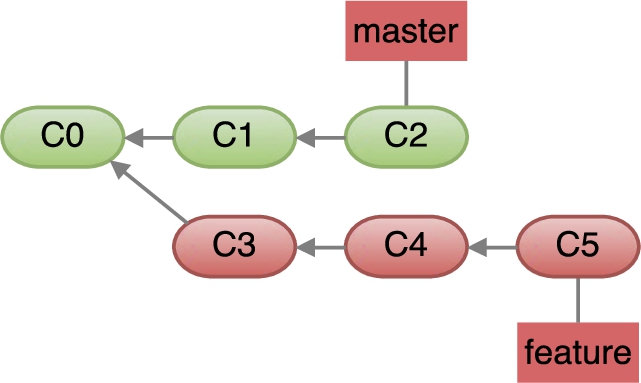
A regular commit on the
For example, consider the repository shown in Fig. 1. Using GitHub’s web UI in her browser, a user edits a file under the
Attacks against regular commit objects are described in Section 4.1.
Merge Commit Object. Consider a GitHub project in which an owner is responsible for maintaining a branch called “master” and contributors work on their own branches to make updates to the code. When a contributor completes the changes she is working on, she will send a “pull request” to the project owner to merge the changes from her branch into the
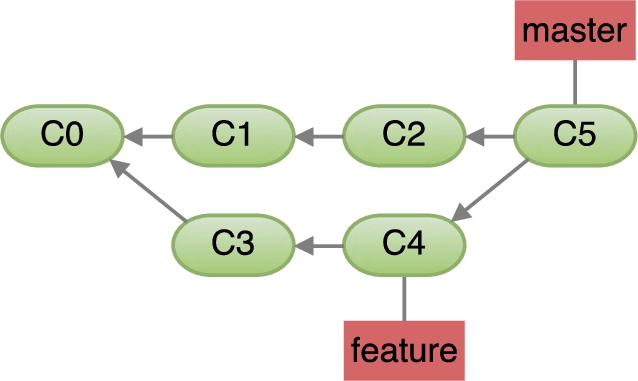
Merge commit from merging two branches.
For example, in Fig. 4, C5 is the merge commit object obtained by merging the
We note that, in general, Git allows to merge n branches (with
Attacks against merge commit objects are described in Section 4.2.
Squash-and-Merge Commit Object. When a pull request contains multiple commits, GitHub provides the squash-and-merge option: The commits in the pull request are first “squashed” into a new commit object that retains all the changes (commits) but omits the individual commits from its history. This new squash-and-merge commit object is then added to the repository.
For example, consider the repository shown in Fig. 1, in which the project owner receives a pull request for the
Attacks against squash-and-merge commit objects are described in Section 4.2.3.
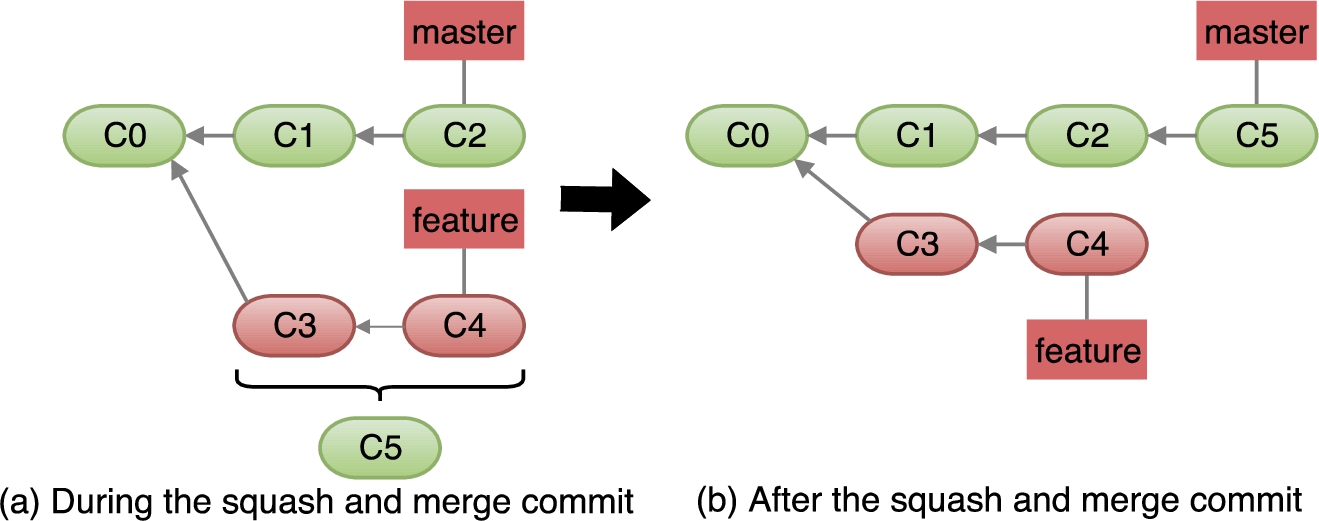
Repository state for squash-and-merge operations.
Rebase-and-merge Commit Object. A pull request may also be merged using the rebase-and-merge option: all the new commits from the pull request are placed on top of all the commits in the
For example, consider the repository shown in Fig. 6(a), in which the
Attacks against rebase-and-merge commit objects are described in Section 4.2.4.
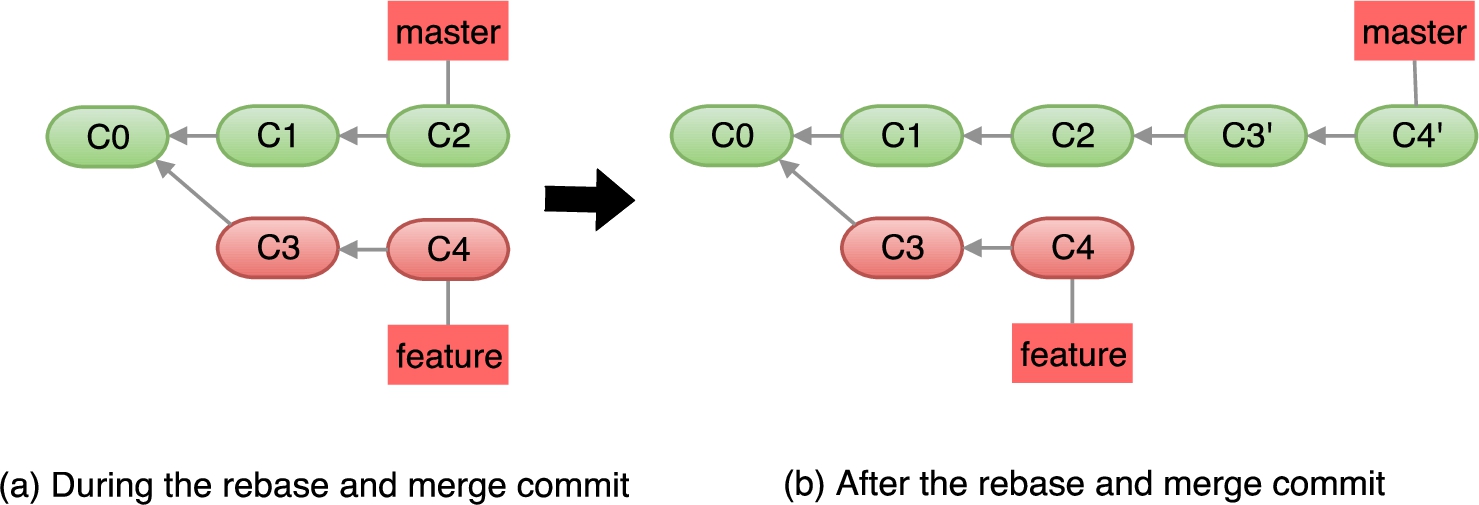
Repository state for rebase-and-merge operations.
We assume a threat model in which the attacker’s goal is to remove code (e.g., a security patch) or introduce malicious code (e.g., a backdoor) from a software repository that is managed via a web interface. We assume the attacker is able to tamper with the repository (e.g., modify data stored on the Git repository), including any aspect of the webpages served to clients. This scenario may happen either directly (e.g., a compromised or malicious Git server), or indirectly (e.g., through MITM attacks, such as government attacks against GitHub [23,24]). There is evidence that, despite the use of HTTPS, MITM attacks are still possible due to powerful nation-state adversaries [24] or due to various protocol flaws [25–27]. Such an attacker will continue to violate the repository’s integrity as long as these attacks remain undetected. Since commit objects created by the server as a result of user’s web UI actions are not signed by the user, the attacker may go undetected for a long amount of time. Thus, rather than relying exclusively on the ability of web services to remain secure, client-side mechanisms such as the one proposed in this work can provide an additional layer of protection.
The attacker can read and write any files on a repository that may contain a mix of signed commits (e.g., created via Git’s CLI tool) and unsigned commits (e.g., created via the web UI). The integrity of commits not created via the web UI can be guaranteed only if these commits are signed by users using Git’s standard commit signing mechanism. Our solution is independent of whether commits not created via the web UI are signed or not. We assume the attacker does not have a developer’s signing key they are willing to use (such as insiders that do not want to reveal their identity). As such, the attacker cannot tamper with signed commit objects without being detected. However, commit objects that are not signed can be tampered with by the attacker. Since all commits created via the web UI are not user signed (as is the case with GitHub and GitLab today3
In late October 2017, GitHub started to sign commits made using the GitHub web interface (as an undocumented feature). However, this only provides a false sense of security and does not prevent any of the attacks we describe in this paper because GitHub uses its own private key to sign the commits.
Although the attacker can create arbitrary commits even when users are not interacting with the repository, these commits are not user-signed and will be detected upon verification. Removing an existing commit from the end of the commit chain, or entirely discarding a commit submitted via the web UI are actions that have a high probability of being noticed by developers. Otherwise, our solutions cannot detect such attacks, and a more comprehensive solution should be used, such as a reference state log [28].
We focus on attacks that tamper with commits performed by the user via the web UI (specific attacks are described in Section 4). Such attacks: (1) are stealthy in nature since subtle changes bundled together with a developer’s actions are hard to detect, (2) can be framed as if the user did something wrong, (3) can be executed either by attackers than control the Git server, or by MITM attackers in conjunction with a user’s web UI actions, and (4) may be performed by an unscrupulous developer who later denies having done it and blames it on the web UI’s lack of security. Thus, we are mainly concerned with two attack avenues:
Direct manipulation of the commit fields, so that the commit does not reflect the user’s actions through the web UI. Tricking the user into committing incorrect data by manipulating the information presented to the user via the web UI. If not handled appropriately, this attack approach can even circumvent a defense that performs user commit signatures, because the user can be deceived into signing incorrect data.
We assume attackers cannot get access to developer keys. Alternatively, a malicious developer in control of a developer key may not want to have an attack attributed to herself and would thus be unwilling to use this key to sign data they have tampered with.
Answering to this threat model, the goal of a successful defensive system should be to enforce the following:
SG1: Prevent web UI attacks. Developers should not be tricked into committing incorrect information based on what is displayed in the web UI. SG2: Ensure accurate web UI commits. The commits performed by users via the web UI should be accurately reflected in the repository. After each commit, the repository should be in a state that reflects the developer’s actions. SG3: Prevent modification of committed data. An attacker should not be able to modify data that has been committed to the repository without being detected.
Attacks
A benign server will faithfully execute at the Git repository layer the operation requested by the user at the web UI layer. However, the user’s web UI actions can be transformed into damaging operations at the repository layer. In this section, we identify new attacks that can result from some of the most common actions that can be performed using GitHub’s web UI. Common to these attacks is the fact that the server creates a commit object that reflects a different state of the repository than the state intended by the user. In a project with multiple files, subtle changes in some of the files may go unnoticed by the user performing the commit via the web UI. As a result, anyone cloning or updating the repository will be unaware they have accessed a repository that was negatively altered.
Attacks against regular commits
Commit Manipulation Attacks. GitHub’s web UI allows users to manipulate repository data. The user can add, delete, or modify files and directories. The user then pushes a “Commit” button to commit the changes to the repository. As a result, the GitHub server creates a new commit object that should reflect the current state of the project’s files. However, the server can instead create a commit object that corresponds to a different project state, in which files have been added, deleted, or modified in addition to or instead of those requested by the user.
The attack is easy to execute, as the server simply has to create the blob, tree and commit objects that correspond to the incorrect state of the repository. Nevertheless, the attack’s impact can be significant. Since the server can arbitrarily manipulate the project’s files, it can, for example, introduce a vulnerability by making a subtle modification in one of the project’s files.
Attacks against merge commits
The server can manipulate the various fields of a merge commit object that it creates. Based on this approach, the following attacks can be executed.
Incorrect merge commit attacks
The server can create an incorrect repository state by manipulating the “tree” field of the merge commit object. The server generates an incorrect list of blob objects by adding/deleting/modifying project files, then a tree object that corresponds to this incorrect blob list of blobs, and finally a merge commit object whose “tree” field refers to the incorrect tree object. A project owner or developer will not detect the attack when they clone/update the repository from the server.
For example, in Fig. 4 the
By manipulating the set of blobs pointed to by the tree object, the server can make arbitrary changes to the state of the repository pointed to by the merge commit.
Incorrect history merge attacks
The server can also create an incorrect repository state by manipulating the “parent” fields of the merge commit object. Instead of using the heads of the two branches to perform the merge commit, the server can use other commits as parents of the merge commit.
Consider the initial repository shown in Fig. 1. As shown in Fig. 4, a correct merging of the “master” and “feature” branches should result in a merge commit of C2 and C4 (i.e., the heads of the two branches). However, the server can create the repository shown in Fig. 7 by merging the head of the
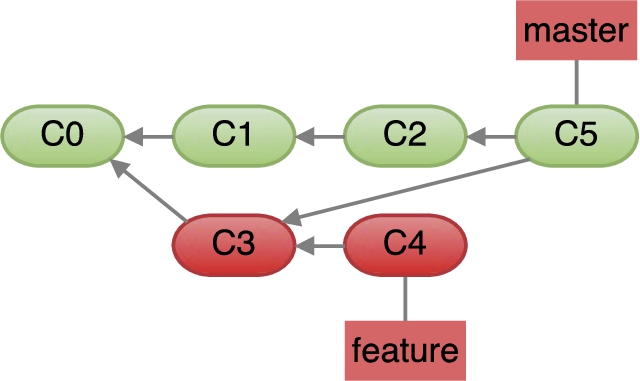
Incorrect history merge attack.
The impact of this attack can be severe. If C3 contained a security vulnerability, which was fixed by the developer in C4 before submitting the pull request, the fix will be omitted from the master branch after the incorrect merge operation. In a different flavor of this attack, the malicious server merges the head of the
Unlike the previous attack described in Section 4.2.1, the server does not have to manipulate blob and tree objects, but instead uses incorrect parents when creating the new merge commit object.
Consider the same scenario described in Fig. 1, except that the project owner chooses the squash-and-merge option instead of the default recursive merge strategy to merge changes from the
As shown in Fig. 5, the server should first create a new commit object by combining all the changes (commits) mentioned in the pull request, and then should add the newly created commit object C5 on top of C2, which is the current head of the
During the creation of C5, a malicious server can add any malicious changes or delete/modify any of the existing changes mentioned in the pull request, and this action may go undetected.
Incorrect rebase-and-merge attacks
The server can also manipulate a client’s request to use the rebase-and-merge option to merge changes from a pull request. Consider the merge scenario described in Fig. 6, in which the rebase-and-merge option is used to merge the
Incorrect merge strategy attacks
Git can use one of five different merge strategies when merging branches: recursive, resolve, octopus, ours and subtree. Each strategy may in turn have various options. The choice of merge strategy and options influences what changes from the merged branches will be included in the merged commit and how to resolve conflicts automatically (e.g., “favoring” changes in one branch over other branches, or completely disregarding changes in other branches).
We note that web-based Git hosting services such as GitHub and GitLab allow a user to merge two branches using the web UI only when there are no merge conflicts. Currently, such services support only the recursive merge strategy with no options. However, given their track record of constantly adding new features [29,30], we adopt a forward-looking strategy and consider a scenario in which they might add support for a richer set of Git’s merging strategies.
The merge strategy introduces an additional attack avenue, as an untrusted server may choose to complete the merge operation using a merge strategy different than the one chosen by the user. For example, the server can use a different
Web UI-based attacks
The server could display incorrect information in the web UI in order to trick the user into committing incorrect or malicious data. Web UI attacks are dangerous because even if a mechanism was in place to allow the user to sign her commits via the web UI, these signatures would only legitimize the incorrect data.
Incorrect list of changes. Before doing a merge commit, the user is presented with a list of changes made in one branch that are about to be merged into the other branch. The user reviews these changes and then decides whether or not to perform the merge. The server may present a list of changes that is incomplete or different than the real changes. For example, the server may omit code changes that introduced a vulnerability. Thus, the user may decide to perform the merge commit based on an incorrect perception of the changes.
Inconsistent repository views. GitHub may provide inconsistent views of the repository by displaying certain information in the web UI and then providing different data when the user queries the GitHub API to retrieve individual Git objects. This might defeat defense mechanisms that rely exclusively either on data retrieved from the GitHub API or on data retrieved from the web UI.
Hidden HTML tags. A web UI-based mechanism to sign the user’s commits may rely on the information displayed on the merge commit webpage to capture the user’s perception of the operation. For example, the head commits of the branches being merged may be extracted based on a syntactic check that looks for HTML tags with specific identifiers in the webpage source code. Yet, the server may serve two HTML tags with the same identifier, one of which has the correct commit value and will be rendered in the user’s browser, and the other one referring to an incorrect commit that will not be displayed (i.e., it is a hidden HTML tag). The signing mechanism will not know which of the two tags should be used, and may end up merging and signing the incorrect commit – while providing the user with the perception that the correct commit has been merged.
Malicious scripts. The webpage served by the server in a file edit operation for a regular commit may contain a malicious JavaScript script that changes the file content unbeknownst to the user (e.g., silently removes a line of code). As a result, the user may unknowingly commit an incorrect version of the file.
le-git-imate : Adding verifiability to web-based git repositories
In this section, we present
We adopt a similar strategy and present first a solution based on a lightweight design, namely to embed a verification record in the commit object, even when the client does not generate the commit object. We then present an improved solution, our main design, in which the user is able to generate Git standard commit signatures in the browser and therefore can sign web UI commits.
Design goals
We identify a set of design goals that should be satisfied by any solution that seeks to add verifiability to web-based Git repositories:
The solution should embed enough information into the commit object so that anyone can verify that the server’s actions faithfully follow the user’s requested actions. More specifically, the solution should offer the same (or similar) security guarantees as do regular Git signed commits. For ease of adoption and to ensure that it can be used immediately, the solution should not require server-side changes. The solution should not require the user to leave the browser. This will minimize the impact on the user’s current experience with using GitHub. The solution should preserve as much as possible the current workflows used in GitHub: to perform a commit operation, the user prepares the commit and then pushes one button to commit. In particular, the solution should preserve the ease of use of GitHub’s web UI and must not increase the complexity of performing a commit, as this may hurt usability. The solution must be efficient and must not burden the user unnecessarily. In particular, the solution should not add significant delay, as this will degrade the user experience and it may hurt usability. The solution should not break existing workflows for Git CLI clients: Regular signed commits can still be performed and verified by Git CLI clients.
A Strawman solution
A simple solution can mitigate one of the attacks described in Section 4.2.1, the basic attack against merge operations. By default, Git uses the recursive strategy with no options for merging branches. The tree and blob objects corresponding to the merge commit object are computed using a deterministic algorithm based on the tree and blob objects of the parents of the merge commit object.
As a result, the correctness of the merge operations performed by the Git server can be verified. After a user clones/pulls a Git repository, the user parses the branch of interest, and computes the expected outcome of all merge operations based on the parents of the merge commit objects. The user then compares this expected outcome with the merge operation performed by the server.
This solution is insufficient because it can only mitigate the simplest attack against a merge commit operation – only when the recursive merge strategy with no options is used, and the server includes an incorrect list of blob objects in the merge commit object by adding/deleting/modifying project files. In particular, this solution cannot handle any of the other attacks we presented, including attacks against regular commits, against merge commits based on incorrect parents or incorrect merge strategy, against squash and merge operations, or web UI-based attacks. Instead, we need a solution that provides a comprehensive defense against all these attacks. In addition, we need to address design and implementation challenges related to the aforementioned design goals.
le-git-imate design
We propose two designs for
Lightweight design
To achieve design goal #1, we are faced with two challenges. First, the user cannot compute the same exact commit object computed by the server, because a commit object contains a field, timestamp, that is non-deterministic in nature, as it is the exact time when the object was created by the server. The lightweight design takes advantage that, at the moment when the commit object is being created by the server, most of the fields in the commit object are deterministic and can be computed independently by the user. Second, we need to find a way to embed the verification record created by the user in the commit object that is created by the server. We add verifiability to the Git repository by leveraging the fact that GitHub (as well as any other web-based Git hosting service) allows the user to supply the commit message for the commit object. The user creates the verification record and embeds the verification record into the commit message of the commit object. The verification record contains information that can later be used to attest whether the server performed correctly each of the actions requested by the user through the web UI. By including the verification record in the commit message, our solution also meets design goal #2 – no changes are needed on the server.
We include the deterministic fields of the commit object into the verification record, as shown in Fig. 8. For merge commit objects, we also include the merge commit strategy chosen by the user. All these fields, except the “tree hash”, are extracted from the GitHub page where the user performs the commit. The “tree hash” field is computed independently by the user (as described in Section 5.4.2). The user may describe her commit by providing a message in the GitHub commit webpage. However, our solution overwrites the user’s message with the verification record. To preserve the original user’s message, we include it in the verification record as the “original commit message” field.
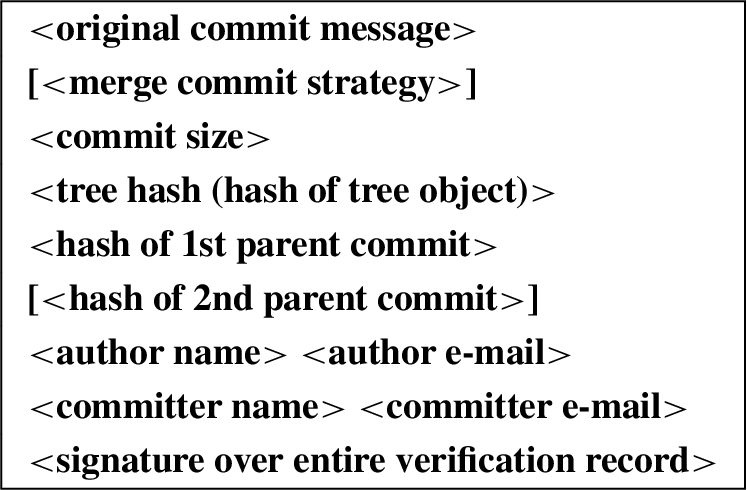
The format of the signed verification record, used in our lightweight design. Fields in between square brackets ([ ]) are included only for merge commit objects (merge strategy and hash of 2nd parent commit).
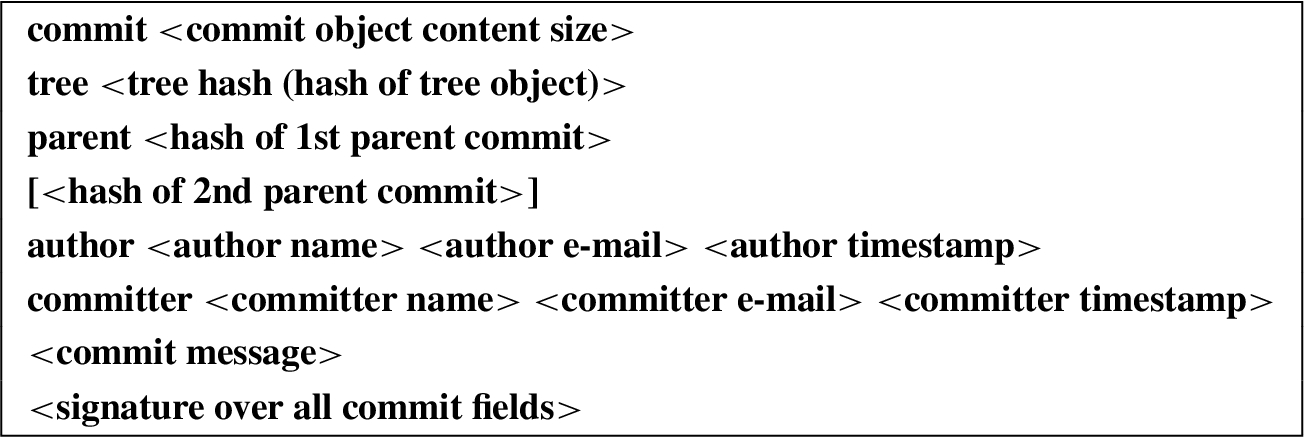
The format of the signed commit object, used in our main design. Fields in between square brackets ([ ]) are included only for merge commit objects (hash of 2nd parent commit).
The main challenge that prevents the lightweight design from computing a standard Git commit signature for web UI commits is that the commit timestamp is determined by the server and, thus, is not known by the user when it initiates the commit via the web UI. To address this issue, our main design creates the commit objects on the user side and pushes them to the server. The user chooses the commit timestamp and creates a standard signed commit object by computing a signature over all the fields of a commit, as shown in Fig. 9.
When computing the signed commit object on the client side, our main design is faced with the challenge to meet design goal #3: creating a signed commit object without requiring the user to leave the browser. We pioneer the ability to create a standard GPG-signed Git commit object in the browser by re-implementing the functionality of the
Just like in the lightweight design, all the fields of a commit, except the “tree hash” and the commit timestamp, are extracted from the GitHub page. The “tree hash” field is computed independently by the user (as described in Section 5.4.2). As explained later in Section 6, both designs of
Verification procedure
When a developer retrieves the repository for the first time (e.g.,
for the lightweight design: execute the Verify_Commits procedure. We implemented this verification procedure as a new Git command. Alternatively, it can be implemented as a client-side Git hook executed after a
for the main design: run the standard
Based on this verification strategy,
Verify Commits Procedure. The developer expects each commit to have either a valid standard commit signature (line 4) or a valid verification record (line 8). If there is at least one commit that does not meet either one of these conditions, the verification fails, since the developer cannot get strong guarantees about that commit. The function that validates a verification record (Validate_Verif_Record, line 8) returns success only if the following two conditions are true: (a) the verification record contains a valid digital signature over the verification record; (b) the information recorded in the verification record matches the information in the commit object. Specifically, we check that the following fields match: commit size, tree hash, first parent commit hash, author name, author email, committer name, and committer email. For merge commit objects, we also check the merge commit strategy and hashes of additional commit parents.
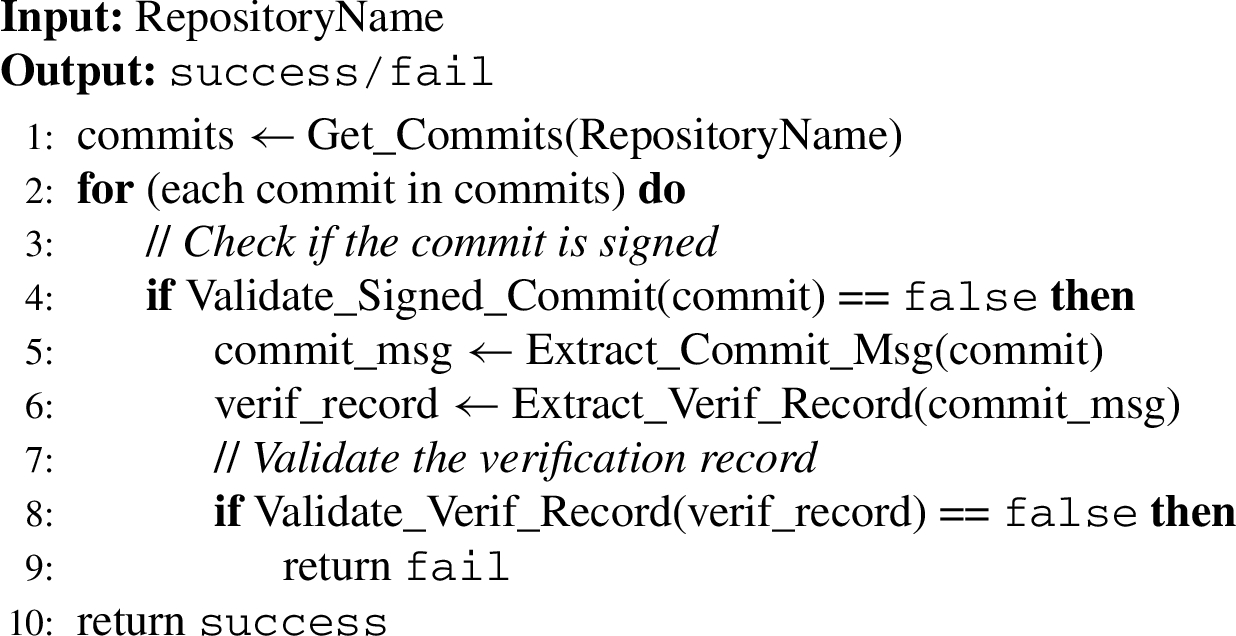
Verify_Commits
With the aim of meeting design goals #2, #3 and #4, we implemented our solution as a client-side Chrome browser extension [31]. After preparing the commit, instead of using GitHub’s “commit” button to commit the change, the user activates the extension via a “pageAction” button that is active only when visiting GitHub. The extension is intended to help the user create a verification record (for the lightweight design) or a standard signed commit (for the main design). To do so, our extension parses the GitHub web UI, obtains the relevant information regarding the current head of the repository (for regular commits) or a pull-request (for merge commits and squash-and-merge), and computes the “tree hash” of the new commit. Then, the following steps take place depending on which design is implemented:
for the lightweight design:
compute the signed verification record;
include the signed verification record into the GitHub commit message, and push the commit to the server;
for the main design:
compute the signed commit object;
push the commit object to the server.
In the following, we first give an overview of the implementation of each design. Then, we outline computing the “tree hash” field, which is a core component of both designs. We then describe creating a signed commit object in the browser, as the main improvement in the main design over the lightweight design. Finally, we present the key management component of
Implementation overview
The extension consists of two JavaScript scripts that communicate with each other via the browser’s messaging API as follows:
The content script [32] runs in the user’s browser and can read and modify the content of the GitHub webpages using the standard DOM APIs. The content script collects information about the commit operation from the GitHub commit webpage and passes this information to the background script.
The background script [33] cannot access the content of GitHub webpages, but computes the “tree hash” (as described in Section 5.4.2). This script then performs automatic and manual checks to prevent web UI-based attacks (as described in Section 6). In short, the automatic checks ensure that GitHub is providing consistent repository views between the web UI and the GitHub API (or any other API used by the Git hosting provider). For the manual checks, the background script allows the user to check the accuracy of the commit fields by displaying it inside a seperated pop-up window. If the user is satisfied, she hits a button called “finalize commit”. Upon pushing the button, the following steps are performed.
for the lightweight design:
the background script transfers the signed verification record to the content script;
the content script includes the signed verification record into the GitHub commit message and triggers the commit button on the GitHub webpage. As a result, the signed verification record is embedded into the GitHub repository as part of the commit message;
for the main design:
the background script creates a signed commit object and pushes it to the server (as described in Section 5.4.3);
the content script triggers the commit button on the GitHub webpage to reload the page and notify the user about the changes.
Performing a commit using GitHub’s web UI requires the user to push one button. With
The extension consists of a total of 4,095 and 4,467 lines of Javascript code for the two designs, respectively, excluding HTML/CSS templates, JSON manifests and third-party libraries. All operations to compute commits, signing and verification are done in pure browser-capable Javascript, which required the re-implementation of some fundamental Git functions (such as
At the time of developing the
We note that isomorphic-git [22] released its first implementation of the
The extension can populate most of the fields of the new commit by extracting them from the GitHub commit webpage, except for the “tree hash” field which needs to be computed independently. We now describe how to compute this field, which is expected to have the same value as the “tree” field of the commit object (i.e., the hash of the contents of the tree object associated with the commit object that is about to be created).
To compute the tree hash, the background script needs the following information, which is collected by the content script and passed to the background script:
for regular commits: branch name on which the commit is performed, and the following file/directory information depending on the user’s operation that is being committed:
add: the name and content of added file(s); edit: the name and updated content of edited file(s); delete: the name of deleted file(s).
The background script also needs the name of the directory(es) that might have been affected by the file operation;
for merge commits and squash-and-merge commits: branch names of the branches that are being merged.
Basic approach 1. The background script can delegate the computation of the tree hash field to a script that runs on the user’s local system (outside the browser). The local script runs a local Git client that clones the branch(es) involved in the commit from the GitHub repository into a local repository. The Git client simulates locally the user’s operation and performs the commit in a local repository, from where the needed tree hash is then extracted.
Basic approach 2. The previous approach is inefficient for large repositories, as cloning the entire branch can be time consuming. To address this drawback, the client could cache the local repository in between commits. That helps the local Git client to retrieve only new objects that were created since the previous commit.
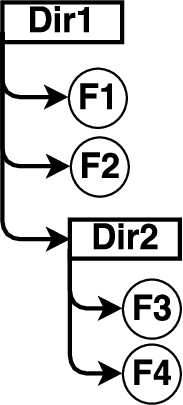
An example object tree.
Optimized approach for regular commits. Delegating the computation of the tree hash field to a local script is convenient since a local Git client will be responsible to compute the necessary Git objects. However, whenever GitHub’s web UI is preferred for commits, this usually implies that the user does not have a local Git client. Moreover, assuming that the repository is cached in between commits is a rather strong assumption.
We explore an approach in which the tree hash is computed exclusively using JavaScript in the browser. For this, we have re-implemented in JavaScript the regular and the merge commit functionality of a Git client. As such, both designs are implemented exclusively in the browser, without the need to rely on any software outside of the browser, and without assuming any locally-cached repository data. Design goal #3 is thus achieved.
Instead of cloning entire branches, we propose an optimized approach. An analysis of the top 50 most starred GitHub projects reveals that for a regular commit performed using GitHub’s web UI, only one file is edited on average and the median size of the changes is 76.5 bytes. For merge commits, the median number of changed files in the pull request branch is 2. The median number of commits in the master branch and in the pull request branch after the common ancestor of these branches are 10.2 and 3.7, respectively. This raises the possibility to compute the tree object without retrieving the entire branch. Instead, we only retrieve a small number of objects and recompute some of the objects in order to obtain the needed tree object.
Our optimized algorithm leverages the fact that GitHub provides an API to retrieve individual Git objects (blob, tree, or commit). We illustrate the optimized algorithm with an example for the object tree shown in Fig. 10. Assume the user performs an operation on a file under Dir2 and then commits. To compute the tree object for the commit, the background script first retrieves the tree object TDir2 corresponding to Dir2, followed by the following steps which depend on the performed operation:
add a file under Dir2: compute a blob entry for the newly added file; re-compute TDir2 by adding the blob entry to the list of entries in TDir2;
edit a file under Dir2: compute a blob entry for the edited file; re-compute TDir2 by replacing the blob entry corresponding to the edited file with the newly computed blob entry;
delete a file under Dir2: re-compute TDir2 by removing the blob entry corresponding to the deleted file.
The change in the TDir2 tree object needs to be propagated to its parent tree object TDir1 (i.e., the tree object corresponding to Dir1). To do this, the background script retrieves the TDir1 tree object using GitHub’s API, and then updates it by changing the tree entry for TDir2 to reflect the new value of TDir2. In general, the propagation of changes to the parent tree object continues up until we update the “root” tree object which corresponds to the commit object that will be created by the server. This “root” tree object is the tree object that we need to compute.
Unlike the basic approach 1 presented earlier, this optimized approach proves to be much faster (as shown by our evaluation in Section 7) and does not require a Git client installed on the user’s local system. We note that all Git objects retrieved through the API are verified for correctness before being used (they need to either have a valid
Optimized approach for merge and squash-and-merge commits. We now describe our optimized algorithm to compute the tree object for merge commits and squash-and-merge commits. The algorithm is described for the case of merging two branches: the pull request branch
Just like in the optimization for regular commits, we leverage the GitHub API for retrieving a minimal set of repository objects that are needed to compute the tree object for the merge commit.
The merge commit is a complex procedure that reconciles the changes in the two branches into a merge commit object. At a high level, the tree of the merge commit (i.e. the merge tree) is obtained by merging the trees of the head commits of the two branches. We do by initializing the merge tree with the tree of the
To determine the lists of added, modified, and deleted blobs in the
Retrieve the tree of the head commit of the
Retrieve the tree of the commit that is the common ancestor of the two branches. Let L2 be the list of all the blob entries in this tree.
Given lists L1 and L2:
if a blob entry exists in both lists (i.e., same blob path), but the blob has different contents (i.e., different SHA1 hash), then add the blob entry to the list of modified blobs;
if a blob entry exists in L1 and does not exist in L2, then add it to the list of added blobs;
if a blob entry exists in L2 and does not exist in L1, then add it to the list of deleted blobs.
Since the entries in the trees retrieved from the GitHub API are already ordered lexicographically based on the paths of the blobs, this algorithm can be executed efficiently (execution time is linear in the number of tree entries).
Having obtained the lists of blobs that were added, modified and deleted in the
We note that changes in the tree of a subdirectory have to be propagated up to the tree of the subdirectory’s parent directory. Similarly to our optimization for regular commits, the propagation of changes to the parent tree object continues up until we update the “root” tree object which corresponds to the merge commit object that will be created by the server. This “root” tree object is the tree object that we need to compute.
Create the signed commit object. Once the deterministic fields of the new commit are extracted from the GitHub page,
determine the commit timestamp locally;
compute the “tree hash” field, as detailed in Section 5.4.2;
compute a Git standard commit signature over the commit’s fields;
create the commit object and insert the commit signature into it;
create all new blob and tree objects related to the new commit.
Push the commit object. Git provides transferring data between repositories using two types of protocols: the “dump” protocol and the “smart” protocol [41]. The first one only allows to read data from the server (i.e., no writing data to the server). The “smart” protocol, however, supports both reading and writing data from/to the server. This protocol uses two sets of processes for transferring data: a pair for pushing data from the client to the server, and a pair for fetching data from the server. To push data to a remote server, Git uses the “send-pack” and “receive-pack” processes. The send-pack process runs on the client and connects to a receive-pack process on the server. These processes help the client to find what is the server’s state, and then to negotiate the smallest amount of data that should be sent to the server. As a result, the client can publish what is being updated locally to a remote repository on the server.
The transferred data between client and server is sent over a custom file called “Packfile”, which is a file used to store Git objects in a highly compressed format. Git objects are normally stored in the “Loose” format, in which each version of a file is stored in its entirety. Unlike the Loose format, the Packfile stores a single version of a file, and maintains different patches to derive the other versions of the file.
When the user wants to update a remote repository, Git runs the send-pack process to initiate a connection to the server. The receive-pack process on the server immediately responds with the server’s state, specifying the head of each branch. Using the server’s response, the client determines what commits it has that the server does not. Then the send-pack process tells the server which branches are going to be updated. For each branch, the client sends the old head and the new head. Next, the client sends a packfile of all the objects the server does not have. Finally, the server replies with a success (or failure) message.
To run the protocol depicted above, execute the create the packfile of all the objects (i.e, commit, blob, tree) that the server does not have; send the packfile to the server; get the server’s response (success or failure).
Key management
Key management can be either performed manually or in an automated fashion.
Automatic (Private key store):
Manual (Import local keys): The extension supports manual key management for those users who dislike storing even a passphrase-protected private key on a third-party server. Such users have options to either load an existing private key or generate a new one.
Out of several key management systems ([42–44]), we leverage Keybase [42] as a private key store based on its relatively high popularity (over 300,000 active users) and on its rich set of APIs. It allows users to store passphrase-protected private keys on Keybase servers, without trusting the Keybase servers. This system simplifies the private key management by allowing users to retrieve their private key from a server anywhere anytime, and even use one private key across different devices. We note that Keybase puts the private keys at risk if the passphrase is compromised.
We note that GitHub has recently introduced a feature to verify GPG signed commits using the public key of the signer [45], which is stored and managed by GitHub. However, relying on an untrusted server to manage user keys does not fit our threat model, and so
Security analysis
In this section, we analyze the security guarantees provided by
Prevent web UI attacks
To defend against a server that presents an incorrect list of changes before a merge commit, we use the API to compute independently the list of changes based on the heads of the branches that are being merged. We then compare it with the list of changes presented in the webpage, and alert the user of any inconsistencies. Since the “hash tree” field is computed based on Git objects retrieved via the API, the GitHub server has to create commit objects that are consistent with the commit signature. Otherwise, any inconsistencies will be detected when the verification procedure is run.
To defend against the hidden HTML tags attack, we leverage the fact that a benign GitHub merge commit webpage should present only one HTML tag describing the number of commits present in the branches being merged. If more than one such tag is detected, we notify the user. We also inform the user about the number of commits that should be visible in the rendered webpage, and the user can visually check this information. Assuming there are n commits, we then check that there are n HTML tags describing a commit and report any discrepancy to the user as well.
Before pushing the commit to the server,
information about parent commit (author, committer, and creation date), retrieved via the API. This helps the user to detect if the new commit is added on top of a commit other than the head of the branch;
for regular commits, the differences between the parent commit (retrieved via the API) and the commit that is about to be created. This allows the user to detect any inconspicuous changes made by malicious scripts in the commit webpage;
the fields of the new commit object. This allows the user to check if the fields of the new commit match the information displayed on GitHub’s commit webpage.
Whereas these checks may not be 100% effective since they are done manually by the user, they provide important clues to the user about potential ongoing attacks.
It is notable that the pop-up window could be integrated with the original GitHub webpage. However, the content of the GitHub page may be manipulated by malicious scripts originating from the untrusted server. To mitigate this threat,
Ensure accurate web UI commits
To create a signed verification record or a standard Git commit signature,
Prevent modification of committed data
Commits created by
Experimental evaluation
In this section, we study the performance of our browser extension prototype to see whether it meets design goal #5. Specifically, we investigate whether the time to sign a web UI commit remains within usable parameters for our different implementations. In addition, we consider the tradeoffs between setup time and disk space required.
For this evaluation, we covered five variants of our tool:
No-Cache: In this approach, a local Git CLI client clones an entire branch and computes the new Git commit object, whereas the browser extension computes the verification record based on information from the new commit. This is the “Basic approach 1” described in Section 5.4.2. Cache: This approach is the same as above, but it uses a local copy of the repository (as cache). Thus, the client retrieves only new objects that were created since the previous commit. Based on our findings about the top 50 most starred GitHub projects, we assume a cached local repository is behind the remote repository by 4 commits (for a regular commit) and by 10 commits (for a merge commit). This corresponds to the “Basic approach 2” described in Section 5.4.2. NativeSign: A baseline approach in which the local script of the extension performs a signed commit locally using a Git client. This is the same as the Cache approach, however, it results in a standard signed Git commit object. Optimized1: An optimized approach based on the lightweight design, that queries for Git objects on demand to compute the verification record exclusively in the browser. This does not require a local repository nor any additional tools outside of the browser. Optimized2: An optimized approach based on the main design, that queries for Git objects on demand to create signed commit objects exclusively in the browser. Compared to the Optimized1 variant, it creates a standard signed Git commit object on the client side.
Experimental results
To test our implementations against a wide range of scenarios, we picked five repositories of different history sizes, file counts, directory-tree depths and file sizes, as shown in Table 1. To simulate real-life scenarios, they were chosen from the top 50 most popular GitHub repositories (popularity is based on the “star” ranking used by GitHub, which reflects users’ level of interest in a project5
The statistics refer to the top 50 GitHub projects as of August 25, 2019.
Repositories chosen for the evaluation. We show the size of the master branch, the number of files, the average file size, and the number of commits for each repository
The client was run on a system with Intel Core i7-6820HQ CPU at 2.70 GHz and 16 GB RAM. The client software consisted of Linux 4.8.6-300.fc25.x86_64 with git 2.19 and the GnuPG gnupg2-2.7 library for 2048-bit RSA signatures. Experimental data points in the tables of this section represent the median over 30 independent runs. For all variants, the time to push the Git commit object to the server is not included in the measurements. When running the five variants of our tool, we noticed that one CPU core (out of 8 cores) was used.
We note that, compared to an earlier version of this article [48], the experimental numbers in this section for the Optimized1 of
Execution time for a regular commit (in seconds)
Regular commits. Table 2 shows the execution time for regular commits for all variants of our tool. A regular commit consists of editing a file that is two subdirectory levels below the root level and committing the changed file (we also measured the time for commits in a subdirectory nested up to four levels below the root level, but the difference is negligible – under a tenth of a second). The size of the changes for the edited file was 1.2 kilobytes, which is the maximum size of the changes observed for the top 50 most starred GitHub projects.
In the case of the No-Cache variant, the execution time is dominated by the time to clone the repository. Notice that this only requires to retrieve one commit object with all its corresponding trees and blobs, which leaves little space for optimization. In contrast, the Cache and NativeSign variants are barely affected by network operations, since only new objects are retrieved from the remote Git repository.
The optimized variants fetch the minimum number of Git objects needed to compute the commit object. As a result, they are influenced by two factors: (1) the number of changed files and (2) the location of these files in the repository, which determines the number of tree objects needed to be retrieved. In particular, repository size is not a major factor for the performance of the optimized variants.
It is important to point out that the execution time for the optimized variants is dominated by the time to retrieve the Git objects from the remote server over the network. On average, Optimized1 is about 300 ms faster than Optimized2 due to the fact that Optimized2 needs to create a packfile of all new objects the server does not have. That includes, as explained in Section 5.4.3, making additional network connections. Our experimental results show that, if we exclude time to create the packfile, Optimized2 has a similar performance with Optimized1.
Finally, we point out that optimized variants use the OpenPGP Javascript library [49] to compute in the browser a digital signature for the verification record or for the commit object. As opposed to that, computing signatures in the Cache and NativeSign variants is faster, because it is done by the Git client, which is optimized for specific architectures. If we exclude the signature creation time, Optimized1 exhibits similar performance with NativeSign.
Execution time for a merge commit (in seconds)
Merge commits. Table 3 shows the execution time for merge commits for all variants of our tool. A merge commit is created by merging into the
None of our variants have complexity worse than linear. Similarly to the regular commit experiment, the No-Cache variant exhibits a running time linear with the size of the repository. Likewise, the Cache and NativeSign variants exhibit a slightly higher time for merge commits when compared to regular commits due to the computation of the merge operation itself.
The optimized variants perform under 1.5 seconds for all cases – regardless of repository size, because the time it takes to perform the operation depends on the number of changed files and directories in the target branch and in the pull request branch. This explains why the time for the “react” pull request is higher than for “go”, which is a bigger repository.
Similarly to regular commits, the Optimized2 variant is about 300 ms slower than Optimized1 on average, because it creates the packfile of all new Git objects that are necessary.
From the results above, we concluded that a No-Cache version is out of usable parameters due to its high execution time. However, the Cache and Optimized versions perform well under website responsiveness metrics.
Work by Nielsen and Miller [50–52] suggests that a response under a second is the limit in which the flow of thought stays uninterrupted, even though the user will notice the delay. From then on, and up to 10 seconds, responsiveness is harmed, with 10 seconds being a hard limit for the time a user is willing to spend waiting for on a website’s response. Further work [53,54] presents an “8 second rule” as a hard limit in which websites should serve information. In addition, work by Nah [55] sets a usable limit around two seconds if there is feedback presented to the user (e.g., a progress bar). Work of Arapakis [56] argues that 1,000 ms of increased response time is still hard to notice by some users, depending on the nature of the activity. Finally, further studies suggest that response times that range from two seconds to seven seconds are associated with low user drops (and high conversion rates) given that users are engaging in activities understood to be complex [57]. Using GitHub’s web UI for actions such as code commits and merge commits usually requires the user to review the code changes, which can take from seconds to minutes.
Under these considerations, and in context of the above experiments, we conclude that the Cache, NativeSign and Optimized versions fall under usable boundaries.
Disk usage and other considerations
Among the three implementations, NativeSign requires to store a local copy of the repository. In contrast, the Optimized versions run entirely on the browser, and with fairly minimal memory requirements.
Likewise, the Optimized versions do not require a local installation of a Git client, a shell interpreter, and any other tools. The size of this Optimized implementation is much smaller than the official Git binary (as of version 2.19). The disk space needed for the whole extension is 465 KB for the Optimized1 version and 735 KB for the Optimized2 version. If we also consider dependencies (which include other JavaScript libraries that are needed), the storage grows to 1.2 MB and 1.67 MB, respectively.
Finally, we contrast the required configuration parameters, such as paths to executables, cache paths, and private key settings. In this case, the Optimized versions also shine in contrast to the remaining three. Since all operations are performed in-browser, the Optimized variants can almost work out of the box, as they only require configuring the key for signing the verification record or the commit.
Due to the reasons outlined above, we consider our Optimized variants to fall under reasonable parameters for usability. We conclude that, with minimal disk and memory footprints, minimal configuration parameters and reasonable delays, our optimized implementation meets
Comparison between the lightweight and main designs
In this section, we compare the two designs by summarizing their various advantages and drawbacks:
Verifiability and Compatibility with Existing Workflows: The main design computes standard Git signed commits which can be verified with the standard Git CLI tool. The lightweight design introduces a verification record which requires adding a Git command to the Git CLI tool in order to perform verification. This may require slight changes to existing workflows, as the verification now relies on information that exists in the commit message.
Security: The main design provides the exact security guarantees offered by Git’s standard commit signing mechanism. The lightweight design provides security guarantees comparable and compatible with Git’s standard commit signing mechanism
Performance: Both designs have comparable performance with Git’s standard commit signature mechanism. However, the lightweight design is slightly faster than the main design, because it does not need to create a packfile of all new objects on the client side.
Storage: The lightweight design has smaller storage and memory requirements (15,838 lines of JavaScript code and 1.2 MB) compared to the main design (25,611 lines of JavaScript code and 1.67 MB).
User interface: Both designs have the same user interface.
We conclude that the main design is preferable in general due to its full compatibility with existing workflows, but the lightweight design may be preferable when performance and storage are critical and even a slight improvement in these parameters would make a difference.
User study
Having received IRB approval, we conducted a user study on 49 subjects with two primary goals in mind. The first goal was to evaluate the stealthiness of our attacks against web-based Git hosting services. The second goal was to evaluate the usability of our
User study setup
In order to measure user’s interactions with the web-based Git UI, we hosted an instrumented GitLab server using Flask [58] and the original GitLab source code [2]. For each participant, we assigned a copy of the
Our study used the
The subjects were recruited as volunteers from the student population at our institutions, with a majority of them receiving extra course credit as an incentive to participate. After a screening process to ensure that participants had a basic understanding of Git and GitHub/GitLab services, 49 subjects took part in the study. We also discarded six additional participants given that they were unable to complete any or most of the tasks in the user study. Table 4 in Appendix A provides demographics about the remaining 43 participants in the study.
User study description
The study consisted of two parts, each of which contained several tasks. Each task required participants to interact with the GitLab web UI in order to perform either a branch merge, or to edit, add, or delete one file in their copy of the
During the first part, we collected a baseline usability data of the GitLab web UI usage, as well as the participants’ ability to detect any of our GitLab web UI attacks. Participants had to perform 10 tasks, 4 were related to merge commits operations and 6 were related to regular commits using the web UI. To test the attack-stealthiness aspect, the GitLab server would maliciously transform their actions using a pre-commit hook on 5 out of the 10 tasks. During the second part of the user study, which consisted of 8 tasks (of which 4 were merge commits and 4 were regular commits), we tried to measure the usability of our
To measure the stealthiness of the attacks, we asked the subjects if they think that the GitLab server performed the tasks correctly after they were done with both parts. While answering this question, access to the GitLab repository was disabled, to ensure the users only noticed the attacks before being asked explicitly about them.
In order to assess the usability of the tool and the web UI usage, we recorded the time taken to perform each task. We compared the time taken to perform similar tasks with and without the extension in order to assess the burden our tool adds to the time users take to perform operations. In addition, the subjects were then asked to rate the usability of the browser extension on a scale of 1 to 10 (1 = least usable, 10 = most usable).
Finally, in order to gain additional insight into the users’ individual answers, they were required to answer a few general questions about their experience level with using web-based Git hosting services and demographic questions (age, gender, etc.).
User study results
While performing the study, a user could fail on performing a task by either performing a wrong type of commit than the one required, or because the user did not perform any commit (i.e., a skipped task). Tasks that were skipped in a time in which a user did not spend a realistic time to attempt the task (i.e., less than 4 seconds), were labeled as ignored tasks.
Attack stealthiness. During the first part of the study, we expected that a few participants would detect some of the attacks, especially those that made widely-visible changes to the repository (such as those that changed multiple files in the root-level). However, results indicate the opposite, as no participant was able to detect any attacks. The reason behind it may be that most users are not expecting a Git web UI to misbehave.
Extension usability. We evaluate the usability of our extension based on several metrics: percentage of successful tasks and average completion time for tasks in Part 2 compared to tasks in Part 1, and direct usability rating by participants.
In Part 1, subjects were able to successfully complete on average 97.6% of the tasks (9.76 out of 10). The average time needed to perform a task was 63 seconds.
In Part 2, subjects were able to successfully complete on average 92.1% of the tasks (7.37 out of 8). However, if we discard the ignored tasks (which subjects may have skipped due to a lack of interest), the successful completion rate increases to 94.8%. It is worth nothing that 10 participants had to perform the same task twice, as they performed it the first time without using the extension. However, once they realized their mistake, they performed the rest of the tasks using the extension. In Part 2, the average time needed to perform a task was 44 seconds. Interestingly, the tasks in Part 2, which are using our browser extension, were completed faster than those in Part 1. This is likely because users familiar with GitHub, but not with GitLab, initially needed some time to learn how to perform various types of commits in GitLab.
The extension received a direct usability rating of 8.3 on average.
Related work
This work builds on previous work in three main areas: version control system (VCS) security, security in VCS-hosting services and browser/HTML-based attacks. In this section, we review the primary research in each of these areas.
VCS Security. Wheeler [59] provides an overview of security issues related to software configuration management (SCM) tools. He puts forth a set of security requirements, presents several threat models (including malicious developers and compromised repositories), and enumerates solutions to address these threats. Gerwitz [60] provides a detailed description of creating and verifying Git signed commits. Commit signatures were also proposed for other VCS systems, such as SVN [61]. This work focuses on providing mechanisms to sign commit data remotely via a web UI on an untrusted server.
There have been proposals to protect sensitive data from hostile servers by incorporating secrecy into both centralized and distributed version control systems [62,63]. Shirey et al. [64] analyze the performance trade-offs of two open source Git encryption implementations. Secrecy from the server might be desirable in certain scenarios, but it is orthogonal to our goals in this work. Finally, work by Torres-Arias et al. [28] covers similar attack vectors where a malicious server tampers with Git metadata to trick users into performing unintended operations. These attacks have similar consequences to the ones presented in this paper.
Security in SaaS. In parallel to the VCS-specific issues, Git hosting providers face the same challenges as other Software-as-a-Service (SaaS) [65,66] systems. NIST outlines the issues of key management on SaaS systems on NISTIR-7956 [67], such as blind signatures when a remote system is performing operations on behalf of the user. This work is a specific instance of the challenges presented by NIST.
Further work explores usable systems for key management and cryptographic services on such platforms. For example, work by Fahl et al. [43] presents a system that leverages Facebook for content delivery and key management for encrypted communications between its users. The motivation behind using Facebook, and other works of this nature [68,69] is the widespread adoption and the ease of usage for entry-level users. Based on similar motivation, this work seeks to bring Git commit signing to the web UI.
Web and HTML-based Attacks. In addition to the challenges SaaS systems face, web UI issues are of particular interest. Substantial research was done in the field of automatic detection of web-based UI’s vulnerabilities that can target the web application’s database (e.g., SQL Injection) or another user (e.g., Cross Site-Scripting). While automatic detection of these vectors is relevant to the overall security of our scheme, we assume that a repository may be malicious or impersonated (e.g., via a MiTM attack).
Additional work in this area, a direct motivation for Section 4.3, explores ways that a UI can use to force user behaviors [70]. While we do not consider phishing attacks to be part of the threat model (besides a possible pathway for a MiTM attack), research into the detection of phishing schemes could be used to identify and leverage compromised web UI’s that trick users into performing unintended actions [71]. Specifically, we highlight the work by Kulkarni et al. [72] and Zhang et al. [73], which attempt to identify known-good versions of a web UI and warn users of possible impersonations.
Conclusion
Web-based Git repository hosting services such as GitHub and GitLab allow users to manage their Git repositories via a web UI using the browser. Even though the web UI provides usability benefits, users have to sacrifice the ability to sign their Git commits.
In this paper, we revealed novel attacks that can be performed stealthily in conjunction with several common web UI actions on GitHub. Common to all these attacks is the fact that commits created by the server do not reflect the user’s actions. The impact can be significant, such as removing a security patch, introducing a backdoor, or merging experimental code into a production branch.
To counter these attacks, we devised
Footnotes
Acknowledgment

User study demographics
Table 4 provides demographics about the user study participants.