



Abstract
Association attacks aim to manipulate WiFi clients into associating with a malicious access point, by exploiting protocol vulnerabilities and usability features implemented on the network managers of modern operating systems. In this paper we classify association attacks based on the network manager features that each attack exploits. To validate their current validity status, we implement and test all known association attacks against the network managers of popular operating systems, by using our Wifiphisher tool. We analyze various strategies that may be implemented by an adversary in order to increase the success rate of association attacks. Furthermore, we examine the behavior of association attacks against upcoming security protocols and certifications for IEEE 802.11, such as WPA3, Wi-Fi Enhanced Open and Easy Connect. Our results show that even though the network managers have hampered the effectiveness of some known attacks (e.g. KARMA), other techniques (e.g. Known Beacons) are still active threats. More importantly, our results show that even the newer security protocols leave room for association attacks. Finally, we describe novel detection and prevention techniques for association attacks, as well as security controls based on user awareness.
Introduction
WiFi is the most popular type of network for wireless home networking, as well as for network access on public or guest networks. It is based on the IEEE 802.112
Association attacks are one of the most popular class of attacks against WiFi. Essentially, they are an instance of a man-in-the-middle attacks in WiFi networks. From a high level, the attacker attempts to exploit known vulnerabilities in the access selection phase of IEEE 802.11, in order to place a rogue access point between the end devices and the legitimate WiFi access point. The root cause is that IEEE 802.11 loosely defines the access selection phase, in order to leave room to the vendors to implement different stack behavior. And since many vendors prioritize usability instead of security, several user-friendly functionalities implemented in most Operating System (OS) network managers, may allow an attacker to fool a client into connecting (associating) with the rogue access point. As vendors are implementing usability features to make the WiFi experience smoother for the end-user, new variations of association attacks are keep coming to the surface, which exploit new vulnerabilities identified in those newly added user functionality features.
An association attack is considered successful when the adversary has achieved a man-in-the-middle position. Since a wide range of software has inadequate protection against man-in-the-middle attacks, the exposure against such attacks is high. After successfully associating with a victim device, an attacker will be able to carry out further attacks by intercepting part of, or all of its network traffic or even leveraging this position to exploit device-specific vulnerabilities. Sophisticated phishing attacks may lead to the capture of credentials (e.g. from third party login pages or WPA/WPA2 Pre-Shared Keys) [12]. Note that association attacks may be part of attacks with wider scope and stronger impact. For example, an adversary may be able to expose the real MAC addresses of connected mobile devices and in this way bypass any privacy controls, such as MAC address randomization (e.g. by exploiting Hotspot 2.0 capabilities [6]), and track the location of the victim users.
Several approaches that detect association attacks in IEEE 802.11 have been proposed. These techniques are implemented in Wireless Intrusion and Detection Systems (WIDS) that are deployed in Enterprise environments [25,49]. However, as already stated, WiFi association attacks are not targeting a particular network, but rather on the client devices and the users themselves; hence they can be applied in WiFi environments where WIDS are not available, by exploiting vulnerable usability features implemented at the client side. Furthermore, as it is analysed letter in this paper, the detection techniques implemented by WIDS are not always effective against all types of association attacks, leaving room for further research in this field.
Motivation and contribution. In this paper we provide a thorough analysis and classification of WiFi association attacks. We analyze their differences and examine the situations in which these attacks may be active. We show that although modern network managers are assumed to provide adequate protection against known association attacks, new variations can still be an active threat, mainly due to the prioritization given by OS vendors to the usability, instead to the security features, of network management software. To demonstrate the applicability of such attacks, we have incorporated most of them in Wifiphisher [13,57], a well-known open source WiFi security testing tool.3
The first author is the lead developer of Wifiphisher.
Paper structure. The rest of this paper is structured as follows. In Section 2 we provide the necessary background information, including both protocol and implementation details, that is necessary for understanding the internals of the various association attacks. In Section 3 we provide a taxonomy of known association attacks, based on the usability features that each attack exploits. To the best of our knowledge this is the first taxonomy of IEEE 802.11 association attacks. In Section 4 we review the different implementations of network managers across the modern operating systems and we examine how they react to association attacks. In Section 5 we examine the effect of association attacks against newly published WiFi security protocols and certifications. In Section 6 we propose security techniques for the detection and prevention of association attacks. Finally, Section 7 concludes this paper.
As explained before, association attacks exploit various usability features implemented on the OS network managers. For example, by taking advantage of the automated access point selection phase, usually implemented as a feature to enhance user-friendliness. Therefore, in order to understand the origin of such attacks, we will describe the underlying protocol and implementation details. First we will describe the Access Point Selection process, defined in the IEEE 802.11 protocol. Then we will review the various usability features that are commonly implemented in the network managers of popular Operating Systems.
Access point selection in 802.11
The IEEE 802.11 specification [2] defined two main entities, the station and the access point. The station (STA) is any IEEE 802.11 enabled device, such as a laptop, a desktop, smart phone or any other WiFi enabled device. The access point (AP), is a network device that allows stations to connect to it in order to join in a wired network. The AP typically connects to a router via a wired connection as a standalone device and then provides wireless connections to various STA devices, using the WiFi technology.
Before a station is associated with an access point, it must populate a list of all available nearby WiFi networks, known as the Available Networks List (ANL). Each entry in the ANL includes the logical name of the wireless network, the Service Set Identifier (SSID) and its encryption type. In addition, for each stored network in the ANL, the station also stores the identifier of the access point, a 48-bit label known as the Basic Service Set Identifier (BSSID). If more than one BSSIDs correspond to the same SSID, then the BSSID of the AP with the strongest signal is stored in the ANL.
In order to construct the ANL, the station may apply the following two scanning methods as shown in Fig. 1. With (a) passive scanning, the station detects special frames called ‘beacon frames’, which are periodically broadcast from the access points to announce the presence of a wireless network. With (b) active scanning, the station sends a probe message, known as the ‘null probe request frame’, which instructs all access points within the wireless range, to respond directly with the necessary information required to establish a connection.
After the ANL is populated with one or mode nearby networks, the station may decide if it will attempt connection to one of those stored networks. This decision can be made automatically or manually. If the network manager software of the OS is implementing usability features such as those discussed in the next section, network connection can be automatically performed once at least one suitable nearby network is found. Else, the end-user can manually select a network to connect to, via the user interface. When a wireless network is selected, the station will pick from the ANL the associated BSSID and will send a directed probe request to the corresponding access point, to ensure that the access point is within the area. The access point will respond with a probe response. After this process, both endpoints are ready to proceed to the Authentication and Association Process.
During the Authentication Process, the station must authenticate to the access point, by proving knowledge of some credentials, such as a password. However ‘Open Authentication’ is also supported, which does not require knowledge of any secret credential. Once authentication is complete, mobile devices can finally associate with the access point. The Association Process will allow to the access point to record each station in order to send and transmit data frames to it.

ANL population using: (a) passive scanning (left) and (b) active scanning (right).
Since the IEEE 802.11 specification [6] leaves room for different stack behavior, software vendors have introduced various features that provide a more user-friendly AP selection phase, usually without requiring any user interaction. We briefly present these features and discuss their underlying logic. Note that a few of those features were later removed from the network managers due to security concerns. For completeness, we will also include those features. Below we describe implementation features related with the network manager software, as well as features related with the implementation of the IEEE 802.11 protocol.
Network manager implementation features
The features that are related with the AP selection phase, usually make use of a special list, called the Preferred Network List (PNL). Recall that the Available Network List (ANL) (see Eq. (1)) contains all nearby WiFi networks, along with the BSSID of the strongest access point. In contrast, the PNL contains information such as SSID and encryption type, only for those networks that the wireless station will prefer to associate, if they exist within the wireless range (see Eq. (2), (3)). As soon as the ANL is populated and during the AP selection phase, the station will automatically connect to the strongest access point in the intersection of the ANL and the PNL. If there are no networks around that are also stored in the PNL (i.e. if the intersection of the ANL and the PNL is empty), the station will remain unauthenticated and unassociated until the user manually selects a network.
The “auto-reconnect” feature automatically adds the attributes (SSID and encryption type) of a network to the PNL upon the first connection. The network is usually stored in the PNL until the user manually ‘forgets’ it. In most operating systems, the default behavior of the auto-reconnect feature differs on the encryption type of the network that the station connects to.
The “available to all system users” feature is an extension of the auto-reconnect feature and exists only to multi-user operating systems where each system user has its own version of a PNL. When this feature is enabled, the PNL becomes global across users. For example, if a user adds a network to the PNL, e.g. due to the ‘auto-reconnect’ feature, then that network will also exist to the PNL of all other users due to the ‘available to all users’ feature.
The “active scanning for networks in the PNL” is another usability feature where the station sends directed probe request frames for networks the stations have associated with in the past (i.e. they exist in the PNL) even if these networks are not around (i.e. they are not in the ANL).
The “automatically connect to high-quality open networks” feature allows certain devices to automatically connect to specific high and reliable open networks according to a specific vendor. An example of this feature is the “WiFi Sense” that was introduced by Microsoft in 2016 and it allowed a Windows10 or Windows Phone 8.1 device to automatically connect to suggested open hotspots (WiFi Sense networks). The WiFi Sense feature was removed by Microsoft shortly after the associated risk that we discuss later in this paper was revealed. However, a similar feature was introduced by Google, called WiFi assistant. This feature can be found on Pixel and Nexus devices using Android 5.1 and up in selected countries and it allows automatic connection to open WiFi networks that Google verify as reliable.
Finally, the “turn on WiFi automatically” feature will turn the WiFi connection back on when the device is near a network that exists in the PNL of the device.
802.11 protocol features: WiFi roaming and WiFi direct
According to the WiFi specification, an Extended Service Set (ESS) may be formed by deploying multiple access points that are configured with the same SSID and security settings. WiFi roaming is an operation where the station decides that is time to drop one AP and move to another (in the same ESS). The operation is completely dependent on the client device; as we have discovered after testing, in modern operating systems a WiFi client device will typically attempt to maintain a connection with the access point that can provide the strongest signal within a service set.
WiFi Protected Setup Push Button Configuration (WPS-PBC) [53] is an operation where the user presses a (virtual) button on the wireless station and a physical button on the router within 120 seconds in order for the device to automatically connect to the wireless network without requiring to input any passphrase.
The WiFi Direct protocol [9] is built upon the IEEE 802.11 infrastructure and it enables the devices to form P2P groups by negotiating which device will be the Group Owner and which devices will be the clients. WiFi Direct is mainly used for data sharing, video streaming and gaming.
Association attacks: A taxonomy
As explained above, the goal of association attacks is to trick wireless stations into associating to an AP controlled by the attacker. Since these attacks are targeting the stations and not the AP, they are equally effective against stations connected to an infrastructure or ad-hoc networks. Association attacks can be categorized based on the feature of the Network Manager that they exploit. We divide them into two main categories (see Fig. 3): In automatic association attacks the only prerequisite is for the victim node to be within the range of the attacker-controlled AP. We analyze these attacks in Section 3.1. A second category involves association attacks that require user interaction, which are analyzed in Section 3.2. The exploitability of each association attack is then analyzed in Section 3.3.
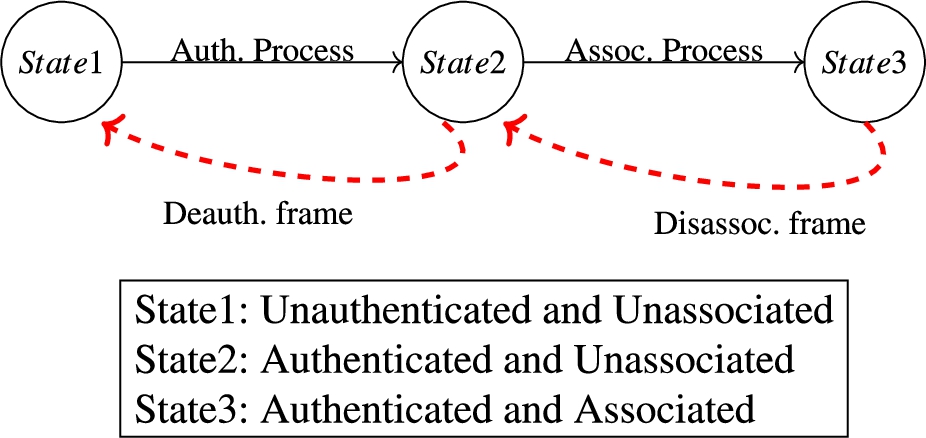
Dissassociation and deauthentication.
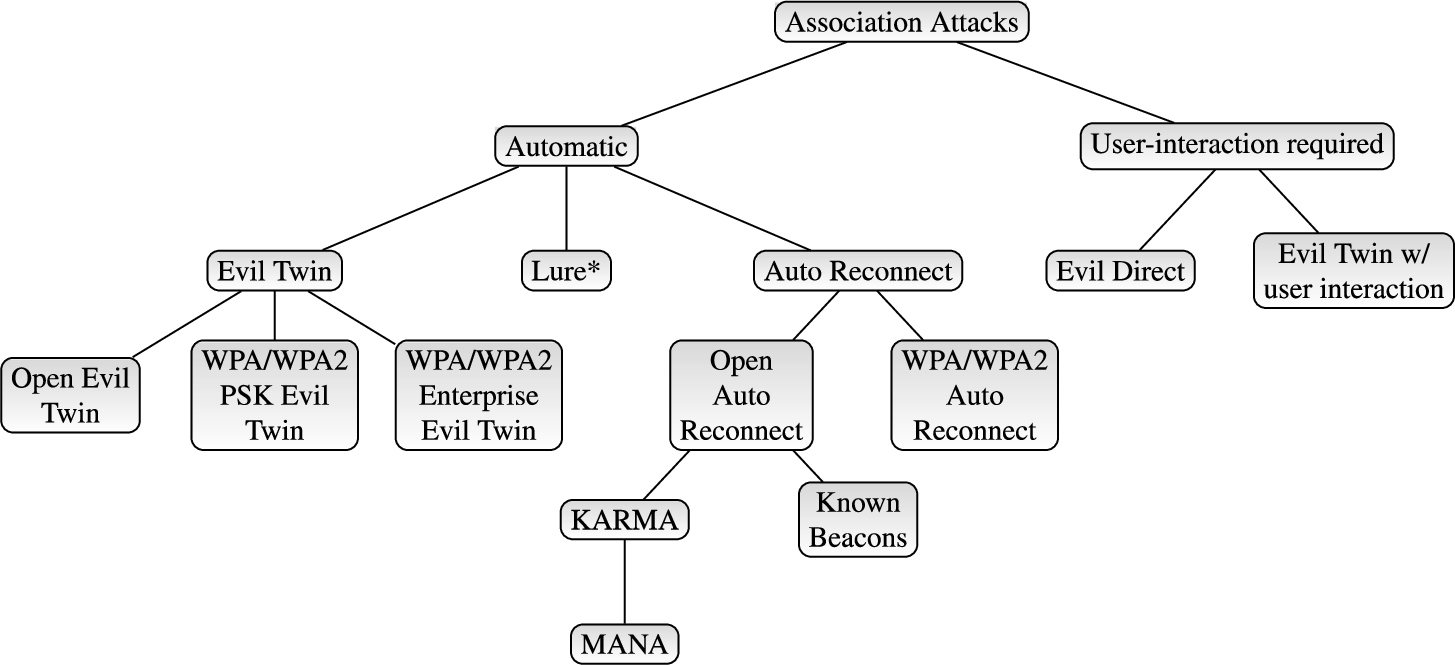
Classification of WiFi association attacks.
Automatic association attacks are possible during the Access Point Selection phase. Rogue Access Points may lure victim nodes during the selection phase, by abusing different features of the victims’ network managers.
Initially, the attacker must force the victims to run the Access Point Selection algorithm. To do this, the victim nodes must first be traversed to a state where they are neither authenticated nor associated with any AP. The most common way to traverse authenticated and associated WiFi stations to an unauthenticated and unassociated state is by forging “Deauthenticate” and “Disassociate” packets as shown in Fig. 2. This can be easily achieved by an attacker, since a known issue with 802.11 is that the management packets are not cryptographically protected against eavesdropping, modification or replay attacks [34]. Alternatively, radio jamming is another common method to block or interfere with authorized wireless communications. An attacker can use an Software Defined Radio (SDR) or WiFi dongles to transmit radio signals in order to make a wireless channel unusable for other devices [46].
Another way to force WiFi stations to run their Access Point Selection algorithm is by making them restart the WiFi feature itself. This can be done either programmatically (e.g. malware applications within the device may be able to restart the WiFi service) or by abusing the ‘enable WiFi automatically’ feature. By broadcasting a WPA/WPA2 network that exists in the PNL of the victim’s device, it is possible to force the device that has this feature enabled, to turn its WiFi feature on and run the Access Point Selection algorithm.
Evil Twin
During an Evil Twin attack [40,60], the adversary copies the ESSID and the encryption type of the wireless network that the victim device is connected to and sets up an AP that broadcasts the same attributes. If the malicious AP offers a stronger signal, and due to the operation of WiFi roaming, the victim device will automatically connect to the rogue network.
The Evil Twin attack is common against public hotspots that are usually employed along with a captive portal mechanism and are commonly deployed in airports, hotels and coffee shops. The adversary can easily replicate both the ESSID and the encryption type (Open) of these networks and assuming that the rogue AP offers a stronger signal, the victim stations will automatically connect to the malicious network.
The Evil Twin attack is also possible in WPA/WPA2 WiFi networks with known or disclosed Pre-Shared Keys (PSK) or in infrastructures whose members are dynamically joining and leaving the network (e.g. a conference WiFi). In such cases, the secret is either published or known by many parties, thus it can be easily known by a malicious party. Knowing the PSK, the adversary can replicate the ESSID and the encryption of the legitimate Access Point and as in open setups, the clients of these networks will automatically connect to the rogue Access Point. Finally, the Evil Twin attack is also popular against Enterprise networks [10,35] that are widely used in large corporations. If the victim stations are not validating the server certificate presented by the AP, the corporate setups are vulnerable to Evil Twin.
Victim device is connected to a wireless network Physical position within the Wi-Fi range of the victim device Knowledge of the wireless network’s SSID that the victim device is connected In case the victim is connected to WPA/WPA2 network, knowledge of it secret (e.g. PSK) Obtain position within the Wi-Fi range of the network that the victim device is connected Spawn a network with the same SSID and encryption type as the network that the victim device is connected. Rogue network’s signal strength needs to be stronger than the legitimate.
Lure*
The Lure*-type attacks are abusing the “automatically connect to high-quality open networks” that is found in some Operating Systems. The first attack of this type was Lure10 [14] that used to exploit the ‘WiFi Sense’ feature found on Windows 10 and Windows Phone 8.1. This attack relied on the victim’s device being fooled into believing it is within the geographical area of a WiFi Sense-tagged open wireless network. This could be achieved by broadcasting beacon frames of that area and eventually tricking the Windows Location Service [44]. Finally the attacker would successfully mimic the WiFi Sense network in that area (broadcasting the same SSID was found to be enough) and the victim users would connect to the rogue AP. Our implementation of Lure10 attack can be found on Github [57]. It is worth noting that after Lure10 was initially released as an extension to our Wifiphiser tool, Microsoft turned off the vulnerable feature by default, while a few months later it was completely removed [31].
While the Lure10 attack is no longer applicable since the removal of the WiFi Sense feature by Microsoft, a similar attack vector recently appeared on certain Android devices with the introduction of the Google Assistant, which also enables the automatic connection to open networks.
Physical position within the Wi-Fi range of the victim device A feature that allows automatic connection to vendor-suggested hotspots is enabled on the victim’s device Knowledge of a vendor-suggested hotspot’s SSID Requirements for Location Service or GPS spoofing should also be satisfied Obtain position within the Wi-Fi range of the victim device If needed, traverse the WiFi station to a state where it is not authenticated nor associated with any AP Spoof GPS or Location Service in order to “transfer” the victim in the vendor-suggested hotspot’s location Spawn a rogue network with the same SSID as the vendor-suggested network
Auto reconnect exploitation
To exploit the auto-reconnect feature, the adversary first publishes a network that is stored in the PNL of the target device. While in the Evil Twin attack the rogue network must impersonate the network that the target device is currently connected to, in this attack the rogue network is not required to exist in the current wireless range of the victim device. If the victim’s device is not authenticated to any network, it will automatically join the rogue network that was spawned by the attacker, regardless the fact that the attributes of this network may have been added to the PNL a long time ago in a completely different environment.
If the impersonated network is an open one, then the attacker only needs to replicate the SSID of such a network that exists in the PNL of the victim. If the impersonated network utilized encryption (WPA/WPA2), the Pre-Shared Key (PSK) is also required. In that case the attacker may leverage public crowd-sourced databases to retrieve the secret and to successfully mimic a network that exists in the victim’s PNL. This attack typically requires some familiarity with the victim user’s whereabouts in order for the adversary to guess the attributes of a network in the target device’s PNL. If the “available to all system users” flag is enabled, the attack surface is increased; networks that were stored as part of the association process of other users in the target system can be leveraged to carry out the attack.
Even if the whereabouts of the victim user are not known, an attacker that has achieved local access to the remote station (e.g. by infecting the victim device with a malware) will be able to add a network to the PNL of that host that can be leveraged later to carry out the attack. These kind of “backdoor” networks may also be added to the victim stations by physical means. Notably, in a host running Windows 10, even if the workstation is locked, an adversary with physical access may still connect to a wireless network that will be eventually added to the PNL of this device [45].
Physical position within the Wi-Fi range of the victim device Auto-Reconnect flag is enabled on victim’s device Knowledge of an unencrypted wireless network’s SSID that exists in the victim’s PNL In case of WPA/WPA2 network, knowledge of the secret (e.g. PSK) Obtain position within the Wi-Fi range of the victim device If needed, traverse the WiFi station to a state where it is not authenticated nor associated with any AP Spawn a wireless network with the same SSID as the unencryted wireless network that exists in the victim’s PNL
KARMA and MANA
While Open Auto Reconnect attacks exploits the “auto-reconnect” feature, the KARMA attack [20] also exploits the active scanning for networks that stations have associated with in the past. In this attack, a rogue AP is introduced that masquerades as a public network that nearby WiFi clients are actively searching for. Victim stations that are actively looking for open networks stored in their PNL will automatically join the rogue AP.
MANA [41] is an attack that took KARMA a step further by configuring a rogue AP that not only replies to directed probes, but additionally it responds to the victim device’s broadcast probe requests (e.g. using the same response). Furthermore, a “loud” mode was introduced where the rogue AP is responding to each device’s probe request frames with a list of networks that have been searched for by other devices within the range of the rogue AP.
Physical position within the Wi-Fi range of the victim device Auto-Reconnect flag is enabled on victim’s device The victim device performs active scanning for networks stored in its PNL At least one unencrypted wireless network exists in victim’s PNL Obtain position within the Wi-Fi range of the victim device If needed, traverse the WiFi station to a state where it is not authenticated nor associated with any AP Respond positively to directed probe requests that are intended for unencrypted networks Additionally, respond to broadcast probe requests using the same response
Known beacons
The Known Beacons attack [15,19] is also a special instance of an Open Auto Reconnect attack, which is usually applied when the attacker has no prior knowledge of the victims’ PNL and is applicable against all modern operating systems. In an attempt to guess the SSID of an open network that exists in the victim device’s Preferred Network List, the attacker will broadcast dozens of beacon frames from a “dictionary” of common SSIDs. The dictionary includes entries with popular SSIDs that are commonly used by network administrators (e.g. ’wireless’, ’guest’, ’cafe’, ’public’), SSIDs of global WiFi networks (e.g. ’xfinitywifi’, ’attwifi’, ’eduroam’, ’BTFON’), SSIDs of hotspots that exist in hotels, airports and other places of public interest (e.g. ‘hhonors_public’, ‘walmartwifi’). Finally, location-specific SSIDs based on the victim users whereabouts can be collected with wardriving [24] or by looking at public databases of 802.11 wireless networks. Our implementation of Known Beacons attack, as part of our Wifiphisher tool, was to the best of our knowledge the first published proof of concept implementation of this attack and can be found on Github [57]. Since the initial disclosure of the attack in 2017, many open source security tools have incorporated the attack in various programming languages, such as eaphammer [21].
Physical position within the Wi-Fi range of the victim device Auto-Reconnect flag is enabled on victim’s device There is at least one wireless network from the victim’s PNL in the dictionary of popular SSIDs Obtain position within the Wi-Fi range of the victim device If needed, traverse the WiFi station to a state where it is not authenticated nor associated with any AP Broadcast dozens of beacon frames from a dictionary of common SSIDs
Association attacks requiring interaction
In contrast to the previous category where the attacks only rely on actions taken by the attacker, in this case the attacks require some interaction by the victim user, or by a system process initiated by the victim user. For this reason, their estimated risk is usually lower. However, these attacks are applicable in cases where the requirements for automatic association attacks are not satisfied.
EvilDirect attack
The WiFi Direct protocol defines a Group Owner (GO) to allow other clients to connect with. EviDirect attacks [4] the WiFi Direct protocol by spawning a rogue GO that operates on the same channel as the original and has the same MAC address and SSID. If the rogue GO accepts any invitation requests faster than the legitimate one, the adversary will be able to hijack the wireless communications.
The fundamental problem with EvilDirect lies in the underlying WiFi Protected Setup Push Button Configuration (WPS-PBC) protocol which is susceptible to an active attack where the attacker offers an AP in the PBC state on another channel to induce an Enrollee to connect to the rogue network. These techniques require the victim users to actively use the WPS-PBC and WiFi Direct functionalities. Notably, we discovered that this attack is more viable on Windows10 where the WPS-PBC virtual button is automatically pushed just by selecting a network with WPS capabilities on the networks manager’s list and without the end-user’s explicit consent.
Physical position within the Wi-Fi range of the victim device Victim user initiates a WPS-PBC request Obtain position within the Wi-Fi range of the victim device Wait until the victim user activates WiFi Direct on the device Accept the invitation request faster than the legitimate GO
Evil twin (requiring user interaction)
As in the case of the automatic Evil Twin, this attack is also based on the replication of a legitimate AP, however it requires some user interaction. The replicated rogue Access Points have at least one of their attributes (i.e. SSID and encryption type) different from the legitimate AP. In our experience, this may happen for two reasons: In the first case, the adversary cannot replicate the encryption type of the legitimate AP (e.g. because the PSK is unknown). In this scenario, the adversary will commonly perform a downgrade attack by spawning an Open-type network. Interestingly, from our research, it appears that only macOS systems will issue a warning for downgrade attacks.
In the second case, the adversary targets an Open-type network in an infrastructure where new members are dynamically joining the network (e.g. in public areas). In this scenario, it is reasonable for the attacker to spawn a rogue network with an SSID that precedes alphabetically from the target’s AP SSID. Since network managers order the networks of the same signal power in an alphabetic order, the adversary raises the chances of having the rogue AP shown first in the network manager’s list, hence victim users are more likely to select it. The attacker can take this a step further by spawning intermediate networks (i.e. by mounting an SSID flooding attack) in an attempt to push the legitimate SSID further down the Network Manager’s list.
Physical position within the Wi-Fi range of the victim device Victim user is fooled into choosing to connect to the rogue Access Point Obtain position within the Wi-Fi range of the victim device Spawn a rogue Access Point that has at least one of its attributes different from the legitimate AP Fool victim user into selecting the rogue Access Point
Association attacks exploitability
We used the exploitability sub-score equation proposed and utilized in CVSS 3.1 [1] to calculate the exploitability scores of existing association attacks. Recall that the expolitability score of CVSS reflects how easy is to exploit a vulnerability in terms of attacker proximity (Attack Vector), technical or other prerequisites (Attack Complexity), the required logical access level (Privileges Required) and whether the realization of the attack requires User Interaction. For example, in Table 1, the EvilDirect attack with a score of 2.1 can be conceived as almost twice as difficult to exploit as the WPA PSK2 Evil Twin attack with a score of 1.2.
We assumed an attacker that is positioned within the Wi-Fi range of an area with a moderate number of users (e.g. 50–100 devices). Finally, we considered that an attack is successful if at least one device is associated with the attacker-controlled AP.
In Table 1 we outline all association attacks with their exploitability metrics and the calculated scores. It is notable that KARMA, MANA and Known Beacons attacks have the higher exploitability score due to their automatic nature and their low complexity. The attacks with the lowest exploitability score are “WPA/WPA2 PSK Evil Twin” and “Auto-Reconnect WPA/WPA2” because of the required privileges and the difficulty of the conditions that need to be satisfied to mount the attack.
Exploitability matrix of association attacks
Exploitability matrix of association attacks
Attack implementation
We implemented Evil Twin and Auto-Reconnect attacks against 802.11 clients using Python standard library modules. We included them in the first release of Wifiphisher that was published under GPLv3 [57]. The rest of the association attacks and de-authentication techniques, were implemented as “Wifiphisher extensions” which are scripts in Python that are executed in parallel and expand the functionality of the main Wifiphisher engine. For time-critical operations we developed “roguehostapd” [39], a fork of hostapd, that communicates with the main Wifiphisher engine by providing Python bindings with ctypes. Running Wifiphisher requires at least one wireless network adapter that supports AP and Monitor mode in order to sniff and inject wireless frames. Wi-Fi drivers should also support the Netlink socket family.
Result analysis
We examined the behavior of modern Operating Systems against known association attacks that were described in the previous sections of this paper. Specifically, in desktop systems, we analyzed the behavior of Windows10 and macOS 10.15, while in mobile devices, we examined Android 9 and iOS 12.4.
In Table 2 we summarize all existing usability features that are supported by the examined Operating Systems, and we also identify which features are enabled by default. The dissimilarities are notable. It can be concluded that each OS was designed with a different threat model in mind given that the risk involved with these usability features is known for some time now. For example, Windows10 will not allow automatic connection to previously connected open networks by default. However, the vendor seems to accept the risk of a physical attacker adding a network to the PNL (i.e. adding a network with locked screen is enabled) while the rest of the OS show the exact opposite behavior.
Usability features on modern Operating Systems
Usability features on modern Operating Systems
Mobile devices appear to have more usability features enabled by default than desktop operating systems. We find this reasonable since mobile devices rely on both user-owned and externally-managed WiFi connectivity.
It also seems that most of the vendors have stopped the probes to previously connected networks in order to hamper the effectiveness of KARMA and MANA attacks. However, they do accept the risk involved with leaving the Auto-reconnect feature enabled that makes them susceptible to Known Beacons.
In Table 3 we outline all association attacks and we show the Operating Systems that are vulnerable to each one of them. We can conclude that even though network managers have removed some of the risky features (for example those related with the KARMA attack), other association attacks are still active. Known Beacons appears to be the most effective WiFi association attack against modern Operating Systems. It is also worth mentioning that in a real scenario and depending on the identified vulnerabilities and effective usability features, an attacker will use a combination of the above attacks, for example KARMA and Known Beacons, at the same time.
Current landscape of association attacks
As new versions of the IEEE 802.11 standard require or propose the deployment of new security protocols, there is a need to examine the behavior of known association attacks against these novel security extensions. We are examining the validity of association attacks against the modern protocols and certifications introduced by Wi-Fi Alliance such as: (i) WPA3 certified devices, (ii) Wi-Fi Enhanced Open and (iii) Wi-Fi Easy Connect.
WPA3 certified devices
The WPA3 certification program [55] mandates support of the new Dragonfly handshake, also called Simultaneous Authentication of Equals, [23] a significant improvement over the old 4-way handshake of WPA2. However, WPA3 only provides limited protection against some association attacks and in particular against automated attacks only, as explained below.
Many solutions have been proposed in the past decade, which enable wireless clients to authenticate the Access Point, including a Trust-on-First-Use (TOFU) authentication, similar to the one adopted by the Secure Shell (SSH) authentication protocol [22]. These solutions would mitigate the threat of association attacks by allowing the wireless client to strongly authenticate the AP upon connection. However, WPA3 is not enforcing such an authentication control, and consequently association attacks remain a valid threat against new wireless security implementations. Furthermore, as with its predecessor, WPA3 is leaving room for custom implementation in regards to the wireless station’s preferred networks and automatic connections. Hence, while WPA3 is not yet widely deployed, it is reasonable to assume that the association attacks described in this paper will affect the modern protocols in a similar manner.
WPA3 will also mandate support of Protected Management Frames (PMF). Among other benefits, PMF prevents de-authentication attacks by providing data confidentiality of management frames. This feature will partially hamper the effectiveness of automatic association attacks, at least until new methods that can traverse the WiFi stations to a state where they are not authenticated nor associated with an access point are discovered.
Wi-fi enhanced open
The Wi-Fi Alliance introduced Wi-Fi Enhanced Open [54] as an extension to IEEE 802.11, to provide unauthenticated encryption when connecting to an open wireless network. The protocol uses Opportunistic Wireless Encryption (OWE) [36] to provide data confidentiality with encryption over the air. However, it does not provide any authentication controls and hence no protection against association attacks.
The protocol also offers the OWE Transition Mode, which enables legacy clients to connect to a network that is OWE protected. In this mode, the AP will spawn two different networks; one ‘Legacy Open’ network for the legacy devices and one ‘Hidden OWE’ network for the OWE-capable devices. The Legacy network includes an OWE Transition Mode element to encapsulate the BSSID and SSID of the OWE network. An end-user with an OWE-capable device that selects to associate with a ‘Legacy Open’ network will be redirected to the ‘Hidden OWE’ network as shown in Fig. 4.

OWE transition mode.
The OWE Transition Mode is an example of a specification that does not take into consideration the modern operating systems’ usability features, resulting in potentially vulnerable implementations. Particularly, OWE Transition Mode disregards the wide use of PNLs in modern operating systems and does not specify which one of the two networks should be stored in the PNL of the station, leaving room for two different implementations. The problem lies in the implementation that stores the ‘OWE’ network in the PNL, instead of the ‘Open’. It should be of no surprise if vendors decide to follow this implementation as it is more efficient than storing the ‘Legacy Open’ network. For example, for future wireless connections, the station will connect directly to the OWE network without probing the ‘Legacy Open’ network first. However, storing a “hidden” network of Open-type in the PNL will force the device to perform active scanning, hence being susceptible to KARMA attack as described in Section 3.1.4. An attacker can take this a step further by spawning a rogue Open network that includes an OWE Transition Mode element and forcing OWE-capable stations to store the hidden OWE network in the PNL that will act as a “backdoor”. This makes them susceptible to the KARMA attack from that point on. It is worth mentioning that at the time of writing this paper Wi-Fi Easy Connect is not widely deployed and no vulnerable implementations have been identified.
Wi-Fi Easy Connect [56], also known as Device Provisioning Protocol (DPP), is the replacement of WPS, which allows to securely add new devices to a network, by scanning a QR code or by using NFC or Bluetooth.
The protocol relies on public keys to authenticate connected devices. However, mutual authentication is optional and whenever it is not employed, the protocol is vulnerable to an association attack. This means an active adversary can create a new rogue network and divert devices from the legitimate network to itself. The complexity of the attack heavily depends on the method the attacker employs to associate with the devices. For example, an attacker may decide to impersonate a legitimate entity by sharing bogus QR encoded public keys or by accepting the bootstrapping key of a device via Bluetooth faster than the legitimate entity. This attack is similar to EvilDirect attack as explained in 3.2.1).
Association attacks detection and prevention
Detecting rogue access points is an ongoing problem and several solutions have already been proposed in the literature [3]. While some of these solutions are still effective in detecting or preventing association attacks, others can be easily bypassed by an attacker. In Section 6.1 we review existing solutions, along with possible limitations that may exist. In Section 6.2 we propose novel, attack-specific detection techniques for various types of association attacks, along with prevention controls that may be implemented from the end user side.
Existing solutions
Most of the existing approaches for detecting rogue access points focus on comparing attributes between a legitimate and a rogue AP. These attributes include measurements of RSSI [26], TSF timestamps extracted with clock skewing techniques [5,25,28], response times related to the authentication procedure [42], IP addresses [33], data rates and modulation types [18], cipher types [11], cell tower information [43], Local Round Trip Time (LRTT) of TCP packets [38], ISP data [32], and other fingerprints generated by active behavioral methods [29,42,52]. Other solutions require a wired link [8,51,59] or modifications to the protocol [7,22] or the use of a whitelist [17].
While each of the above methods are effective to a certain extend, they do not offer adequate protection against association attacks and they come with various limitations. In particular, [26,42] rely on active detection methods which can be avoided by most attackers, [29,38] interfere with regular WLAN operations causing interference and delay, [8,8,17,51,52,59] can only be deployed in Enterprise environments and [7,22] require modifications to the protocol. Finally, [5,11,25,28,33,38,43] are only effective under certain conditions as described in [3].
At a high level, it can be concluded that the large majority of the existing detection techniques only focus on solving the problem of Evil Twin, disregarding other known association attacks. Furthermore, most of the solutions only attempt to solve the problem in enterprise environments, while public areas or other environments that are lacking the implementation of protection systems such as a WIDS, have not attracted the same attention from the research community.
Proposed techniques for attack-specific detection
As explained above, we will follow an attack-specific approach to detect rogue Access Points. Instead of focusing on characteristics or attributes of the examined access point, we propose a number of targeted methods for detecting each specific association attack individually with high accuracy, by looking for certain patterns that can very rarely be followed by legitimate clients. These techniques can be implemented along with existing solutions to enforce fine-grained detection.
Our techniques can be built directly into wireless stations (e.g. mobile devices) and provide adequate protection against most association attacks regardless of the surrounding environment. For the association attacks that still cannot be fully addressed by the proposed techniques, we propose user-side protections that can be configured by the end user according to the respective threat model.
Detecting KARMA and MANA
Existing solutions of detecting KARMA and MANA attacks include [30] which is using a signature-based detection. This passive-only method is only suitable in enterprise environments where a white-list of deployed Access Points can be maintained and managed. An interesting solution is proposed in [27] that relies on generating and broadcasting long (32-character) random SSIDs. The probability of receiving a probe response is very low due to the rarity of a network configured with such a long and random SSID. This can easily be identified and bypassed by adaptive attacks such as KARMA, based on the length of the random SSIDs, which can then ignore the relevant probe requests. One way to improve this detection technique is to broadcast random SSIDs that are more ‘covert’ (e.g. random but shorter, typical looking SSIDs) and repeat the test multiple times instead of accepting a connection after the first probe. In this way, if replies are received for several random SSIDs, KARMA and MANA can be detected. The pseudocode of such an implementation is shown in Algorithm 1.

Detecting KARMA and MANA
Known Beacons is one of the most recently discovered attacks and because of this there is insufficient research regarding its detection. We recommend a solution that counts the received beacon frames from different open networks within a reasonable time-frame. In particular, receiving an extraordinary number of beacon frames in a short time period is an indication of an ongoing attack. We propose the implementation described by the pseudocode shown in Algorithm 2. The constants TIME_ THRESHOLD and BEACON_THRESHOLD should be configured accordingly in order to set a proper level of cautiousness. For static environments, they may be configured based on historical data for each environment. Machine Learning techniques may also be applied to adapt the thresholds for dynamic environmental changes (e.g. for mobile devices). The passive nature of this detection technique (as opposed to detecting KARMA that was discussed earlier) is shown in Fig. 5.
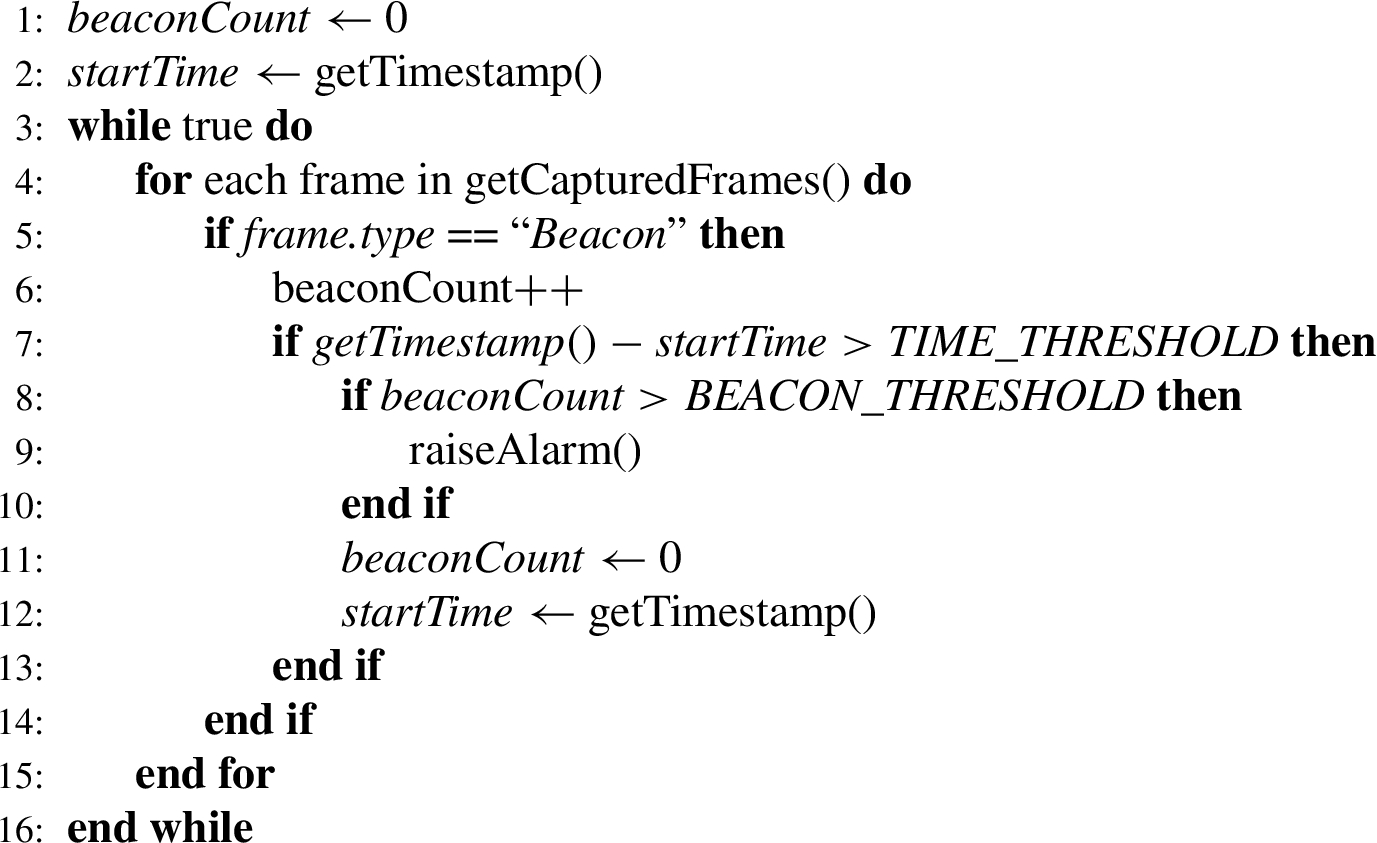
Detecting known beacons

Detecting: (a) KARMA by receiving a Probe Response for a directed probe request (left) and (b) Known Beacons by receiving N beacon frames in an interval
Lure-type attacks rely on fooling the location service, as the network manager does not check if entries from the PNL are related to the current location of the device. These types of attacks can be detected with reasonable accuracy by identifying bogus long-distance changes within a short time-frame in the Location Service as illustrated in Fig. 6. The pseudocode shown in Algorithm 3 is able to detect Lure attacks based on the identification of location spoofing.

Lure-type attack detection: long-distance changes in short time frames is an indication of a location service spoofing.
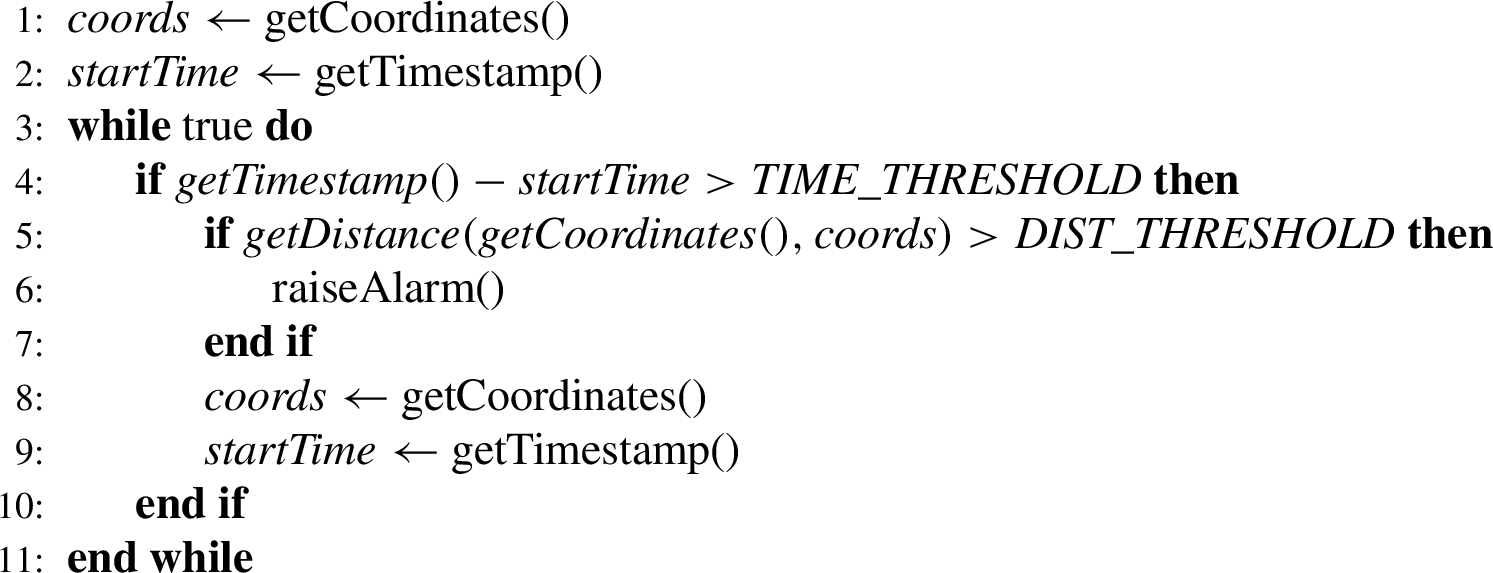
Detecting Lure-type attacks
Evil Twin Attacks and Auto-Reconnect Attacks are particularly challenging to detect without modifications to the protocol. An attacker can always spawn and operate an access point that does not show any signs of suspicious activity. For this reason, user awareness is a critical factor for effectively mitigating all association attacks. In this section we discuss protections that can be implemented on the user-side and hamper the effectiveness of association attacks, even for those types that are technically hard to detect.
Disabling Wi-Fi features that force automatic association is an obvious defence against those association attacks that exploit usability features implemented on the network managers of modern Operating Systems. In Table 2 we outline the features that are required for the success of each attack. Disabling them will successfully mitigate the risk of the relevant attacks.
Cleaning the PNL will completely hamper the effectiveness of the Auto Reconnect attack and all of its successors. This action should not be considered absolute; an individual may decide to remove some entries from the PNL, leaving the rest of them intact according to their security and usability needs. In particular, open networks stored in PNL are considered more critical than networks that require encryption. This is because stored open networks in the PNL are one important condition for the accomplishment of popular association attacks, such as KARMA, MANA and Known Beacons, while WPA/WPA2 networks in the PNL are less commonly exploited, as explained in Section 3.1.3.
Using a VPN solution right after associating with an access point is an effective countermeasure against all association attacks, assuming the VPN client properly authenticates the other endpoint. This protection assigns the authentication of the other endpoint, a feature missing from 802.11 specifications, to VPN protocols, such as L2TP/IPSec, OpenVPN and IKEv2.
Finally, revoking the Wi-Fi permission for all installed apps on a mobile ecosystem (such as Android or iOS) will prevent other installed apps from re-running the Access Point Selection algorithm (e.g. by changing the Wi-Fi state of the phone), an important step for the execution of all automatic association attacks. However, it is worth mentioning that even when the Wi-Fi permission is revoked for all installed apps, other ways to force stations to run their Access Point Selection algorithm remain possible as described in Section 3.1.
There is an obvious trade-off between using the usability features that we described in Section 2.2 and preventing association attacks. The proper balance between security and usability depends on each individual’s threat model.
Performance analysis
In this section, we review the performance of our proposed detection methods and discuss their detection rate. As opposed to the majority of the existing solutions which rely on heuristics, our detection techniques are based on patterns which are specific to each different association attack. As a result, false-positive alarms are much less likely to occur.
KARMA detection
We already discussed in 6.2.1 that probing for long SSIDs (e.g. longer than 25 characters) can be identified and bypassed by active attackers. However, using shorter SSIDs for the probe requests, although unlikely, may result in a false positive. In particular, in KARMA, a false positive can occur when all of the N probes are replied to by legitimate clients who include the SSIDs the WIDS is probing, in their PNLs. The probability of a false positive is dependent on the character count of the generated SSIDs that the WIDS will probe for. In Fig. 7, we used data from WiGLE API [58] (i.e. data returned from the general statistics API call) to calculate the worldwide percentage of SSIDs per their length. Using this matrix, we can calculate the probability of a false positive by assuming that devices contain, on average, 10 networks of Open-type in their PNL. This assumption was made by empirical testing of the authors’ devices in order to speculate a realistic average. For the sake of calculation, we also assume that the WIDS generates the random SSID using characters from the ASCII charset (128 characters) and without following any SSID naming conventions:
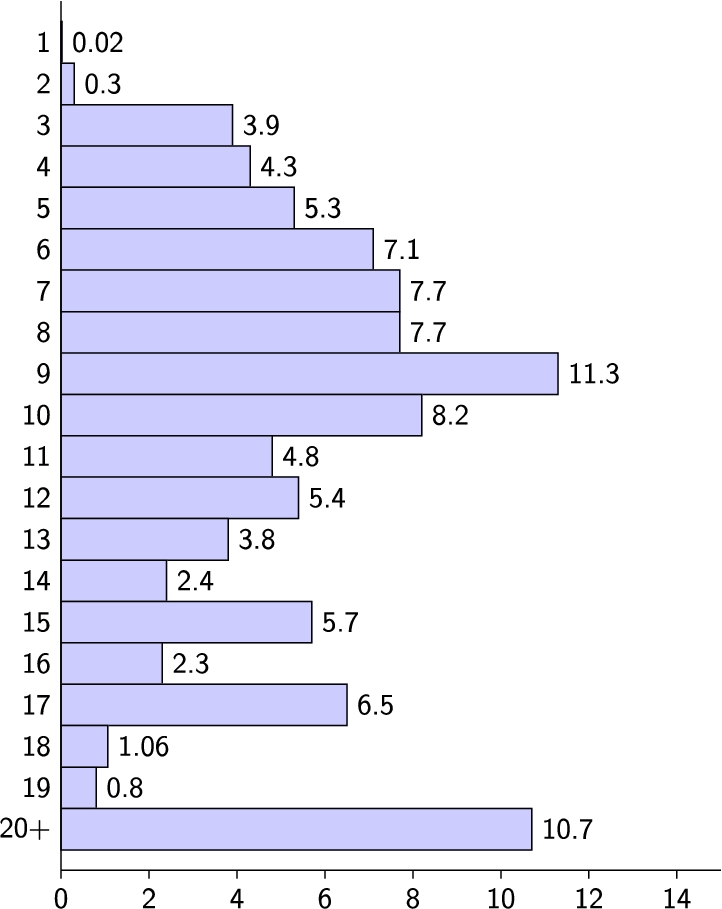
Worldwide percentage of SSIDs per their length.
False positives of KARMA detection wrt the SSID size and the number of devices within range
As shown in Table 4, the probability of a false positive is low in most cases. This is due to the fact that the pattern used for the detection is specific to the KARMA attack and not based on heuristics for all types of association attacks. Probes with very short SSIDs (e.g. less than 6 characters) are the most likely to result in a false positive and should be avoided. In addition, by relying on more than one probe for an alarm, as recommended in 6.2.1, detection will always succeed after a number of repeated probes eradicating the chance of a false positive even more.
False positives in detecting Known Beacons can only occur in a setting in which a higher than usual number of beacon frames with different SSID are received in a short time period. We evaluated the possibility of such an event occurring in a natural setting by periodically counting the wireless networks in a populous area in Minneapolis, Minnesota.4
Only passive monitoring of the number of surrounding networks was conducted (i.e. there was no interference with the access points).

Identified networks through the passage of time.
Since 802.11 leaves room for custom implementations regarding the WiFi association phase, Operating System vendors tend to prioritize usability features instead of security. In this paper we have analyzed how these usability features can be exploited by various WiFi association attacks and we have validated the behavior of modern OS network managers, by implementing these attacks using Wifiphisher. Furthermore, we examined modern protocols and certifications introduced by IEEE 802.11 and verified that they are not only vulnerable to known association techniques, but they also leave room for new attacks. Finally, in contrast to existing solutions, we proposed a different approach to detecting rogue access points by investigating the specific characteristics of each association attack while the role of the user remains crucial for protecting against them. For our future work, we plan to validate the proposed security solutions and further examine the technical details of the implementations of the newly proposed protocols introduced by WiFi Alliance.
Footnotes
Acknowledgment
This research has been co-financed by the European Union and Greek national funds through the Operational Program Competitiveness, Entrepreneurship and Innovation, under the call RESEARCH-CREATE-INNOVATE (project code: T1EDK-01958).