



Abstract
HTML5-based mobile applications (or apps) are built by using standard web technologies such as HTML5, JavaScript and CSS. Due to their cross-platform support, HTML5-based mobile apps are getting more and more popular. However, similar to traditional web apps, they are often vulnerable to script-injection attacks. It results in new threats to code integrity and data privacy. Compared to traditional web apps, HTML5-based mobile apps have more possible channels to inject code, e.g., contacts, SMS, files, NFC, and cameras. Even worse, the injected scripts may gain much more powerful privileges from the mobile apps than those in the traditional web apps.
In this paper, we propose an approach to detect injected behaviors in HTML5-based Android apps. Our approach monitors the execution of apps, and generates behavior state machines to describe the apps’ runtime behaviors based on the execution contexts of apps. Once code injection happens, the injected behaviors will be detected based on deviation from the behavior state machine of the original app. We prototyped our approach and evaluated its effectiveness using existing code injection examples. The result demonstrates that the proposed method is effective in code injection detection for real-world HTML5-based Android apps.
Introduction
HTML5-based mobile apps use HTML5 and CSS to describe the user interface, and use JavaScript to build the programming logic. Because the apps run in browser environments, e.g., WebView of Android [49] and UIWebView [47] of iOS, porting HTML5-based mobile apps from one platform to another becomes easy. As a result, HTML5-based apps are popular in cross-platform development. In order to provide system-level functionalities, e.g., accessing Camera and GPS, HTML5-based apps use middleware frameworks, such as PhoneGap [36], to access system resources. However, these web technologies brought new security challenges to mobile platforms. For example, the Cross-Site Scripting (XSS) attacks [52] is a typical channel to inject malicious code into web applications. In mobile devices, there are much more possible channels for such code-injection attacks, e.g., contacts, SMS, file systems, NFC, and cameras [6,12,29]. In addition, the injected code in Android shares the same system privileges with the victim app, resulting in more powerful attacks compared to that in web applications.
There are mainly two types of existing solutions to enhance the security of HTML5-based mobile apps. One type of solutions improves the permission mechanism of Android [24,30]. They try to limit privileges of untrusted code. However, in code-injection attacks, malicious code may be injected into trusted apps, where attackers’ code is not constrained. The other type of solutions detects code-injection attacks by filtering code from data in the potential code-injection channels of the devices [28,29]. However, it does not provide comprehensive protection and only concentrates on the known injection channels. Along with the development of mobile devices, new channels may be exploited to inject malicious code.
We have the following observation about injected malicious code in HTML5-based apps: a single malicious behavior (such as accessing GPS location) caused by the injected code may also appear as normal functionality in the vulnerable app. However, it usually happens in a different program context. Defining and identifying such contexts will be the key to detect injected malicious behaviors.
In this paper, we propose a new approach to detect malicious behaviors in HTML5-based Android apps. Our approach can accurately capture the contexts under which app behaviors take place. Based on apps’ behaviors and their corresponding contexts, we build behavior state machines for HTML5-based Android apps. The behavior state machines can then be used to detect injected behaviors in these apps. We prototyped our solution in Android system, and evaluated its effectiveness with real-world HTML5-based Android apps.
Contributions. In summary, we make the following contributions:
We propose an approach for detecting injected behaviors in HTML5-based Android apps based on new behavior state machines of apps. To build the behavior state machines for HTML5-based Android apps, we identify the relationship among the apps’ behaviors and the program contexts where the behaviors take place during the execution of the apps. We prototype our approach, and evaluate our approach with real-world HTML5-based Android apps.
Background
WebView and PhoneGap
In Android, WebView uses the WebKit rendering engine to display web pages. It packages the web-browsing functionalities into a class. This class is the basis upon which apps can roll their own web browser or simply display some online contents within their activities [49].
Since WebView is designed to display web contents, which usually come from untrusted external sources, the Android Browser isolates it inside a sandbox. The sandbox prevents the JavaScript code in the WebView from accessing local system resources, such as contact lists, cameras, file systems, etc. To allow HTML5-based apps to have system-level accesses, WebView adds a bridge between the JavaScript code and the native Java code such as an API called “addJavascriptInterface()”. In this way, it is possible for JavaScript code to invoke the outside native code, which is not restricted by WebView’s sandbox and can access system resources.
Middleware frameworks (e.g., PhoneGap [36], RhoMobile [40], Appcelerator [5]) can provide this kind of bridges to web pages which run in WebView. In this paper, we focus on PhoneGap, which is the most popular one and supports most of the mobile platforms such as Android, iOS, Windows Phone.
The PhoneGap apps are hybrid. On one hand, the layout rendering of apps is done via web views like web apps; on the other hand, all code including HTML5, JavaScript and CSS, is packaged as apps for distribution and has access to native system resources [37].
PhoneGap can be extended with native plugins that allow developers to add functionalities for apps. These plugins can be called from JavaScript code, making direct communication between the native system and the HTML5-based apps. The overview of PhoneGap architecture is illustrated in Fig. 1.
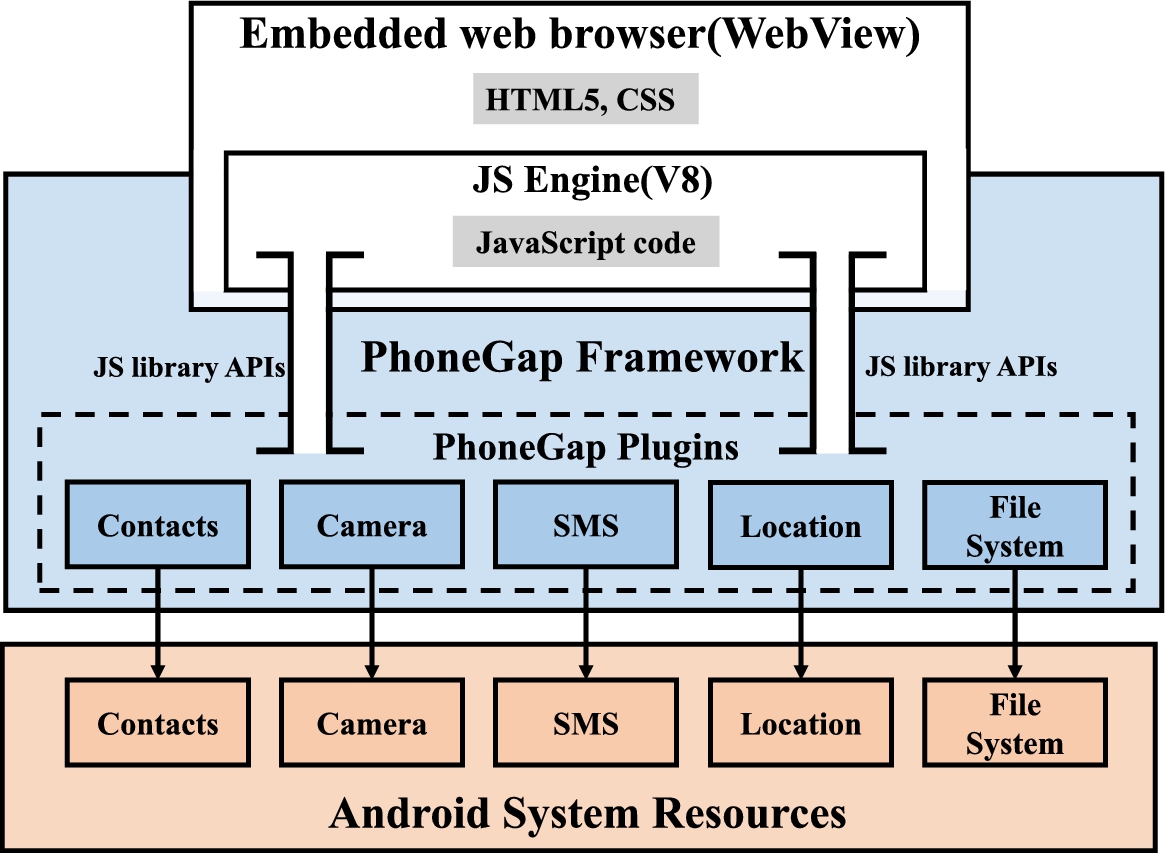
The PhoneGap architecture on Android.
By default, PhoneGap includes 16 basic plugins which allow apps to access to the device’s Accelerometer, Camera, Compass, File System, etc. If they cannot meet the apps requirements, developers can either write their own plugins or use third-party plugins (so far, the total number is 1,014). The plugins provide a set of uniform JavaScript libraries that can be invoked by the apps JavaScript code. When an app needs to access system resources, it calls the APIs provided in the libraries, which will then invoke the Java code of PhoneGap, and eventually access the corresponding system resources.
So far, PhoneGap supports most of mobile operating systems, e.g., Apple iOS [27], BlackBerry [9], Google Android [4], LG webOS [50], Microsoft Windows Phone (7 and 8) [54], Nokia Symbian OS [43], Tizen (SDK 2.x) [44], Bada [7], Firefox OS [22] and Ubuntu Touch [46].
Web apps often make use of JavaScript code that is embedded into web pages to support dynamic client-side behaviors. This script code is executed in the users’ web browsers. To protect users’ system from the outside untrusted JavaScript code, access control such as the same-original policy (SOP) [53] is indispensable. The essential of SOP is that if contents from one site is granted permissions to access resources on the users’ system, then any content from that site will share these permissions, while contents from other sites will have to be granted permissions separately.
Unfortunately, the XSS vulnerability enables attackers to bypass these security mechanisms to inject malicious code into web applications. Attackers can hide malicious code in the contents from the trusted site. When the contents containing the malicious code arrive at users’ browsers, the injected code will get full access to all resources (e.g., authentication tokens and cookies) that belong to the trusted site. For example, attackers can hide the malicious code into an innocent-looking URL, clicking the link can cause the victim’s browser to execute the injected script.
In recent years, XSS has surpassed buffer overflow [51] to become the most common publicly reported security vulnerability [48]. Some famous sites affected by XSS include Twitter, Facebook, MySpace, YouTube and Orkut [52].
Code injection attacks in HTML5-based mobile apps
With the middleware framework represented by PhoneGap, web apps can be easily ported to the mobile system, such as Android. Unfortunately, the code injection attack is also introduced into the mobile system. What is worse, mobile devices have more possible channels for attackers to inject code into the apps. Previous work [28,29] have already extensively discussed this serious problem.
Wi-Fi access point. Most of today’s mobile devices can connect to Internet via Wi-Fi technology. Attackers can inject malicious JavaScript code into the field of a Wi-Fi access point’s Service Set Identifier (SSID). If an HTML5-based mobile app scans the available Wi-Fi hotspots nearby and displays their SSIDs, the malicious code injected into the SSID will be compiled and executed in the victim’s mobile device.
Barcode. Most mobile devices can scan barcode via cameras and certain apps. However, such functionality can be leveraged by attackers to inject code into mobile devices. Because the data inside the barcode are invisible to users, malicious JavaScript code can be embedded in the barcode data, which might be injected into apps due to the lack of sanitization checking.
SMS message. Attackers can also inject JavaScript code into the body of an SMS message. When this malicious SMS message is displayed in an HTML5-based app, the injected JavaScript code can be executed.
In this paper, we do not concentrate on the specific channel where the code been injected into the apps. We believe that new channels may emerge with the rapid development of mobile devices while the traditional methods cannot face that challenge. Instead, we focus on the specific effects caused by the injected code. App’s behaviors and their program contexts will give us sufficient information to detect code injection attacks.
Design
Behavior state machines for HTML5-based Android apps
We propose a behavior state machine for HTML5-based Android apps. It includes two dimensions: actions and their contexts.
Actions. In our behavior state machine, actions denote behaviors of HTML5-based Android apps. We classify apps’ actions into two categories: local actions and network actions.
Local Actions are conducted by calling APIs provided by middleware frameworks, such as PhoneGap, to access local system resources (e.g., contact list, GPS coordinate, camera, file system, and so on).
Network Actions are communications between the apps and remote servers. They are conducted as HTTP requests sent by the app.
Interface context. The interface contexts of an app may provide important logic clues to determine whether the app’s behaviors are abnormal. Therefore, we use the apps’ interfaces to represent the contexts of apps’ behaviors. Due to their complexity, HTML5-based Android apps contain more types of interfaces than native Android apps. We classify the interfaces of HTML5-based Android apps into three categories, namely, activity interface, HTML interface and jQuery interface.
Activity interface: For native Android apps, each interface is corresponding to an activity. If the app wants to present a new interface to users, it has to create a new activity. But in HTML5-based Android apps, which execute inside the built-in web browser, the graphic interface is developed using web technologies such as HTML5, CSS3, etc. So this kind of apps only needs one activity to create a WebView object, and uses different HTML files to present different graphic interfaces instead. HTML interface: As described above, HTML5-based Android apps use web programming languages to present user interfaces and achieve apps’ functionalities. So different interfaces are represented by different HTML pages loaded in one WebView object. jQuery interface: jQuery Mobile is a HTML5-based user interface system designed to make responsive web sites and apps that are accessible on all smartphones, tablets and desktop devices [31]. Developers can create multiple pages as interfaces in a single HTML file using jQuery mobile technology. They can also allocate a unique ID for each page and use the “href” attribute of archor elements to switch interfaces.
Approach overview
The architecture overview of our system is illustrated in Fig. 2, there are four major components:
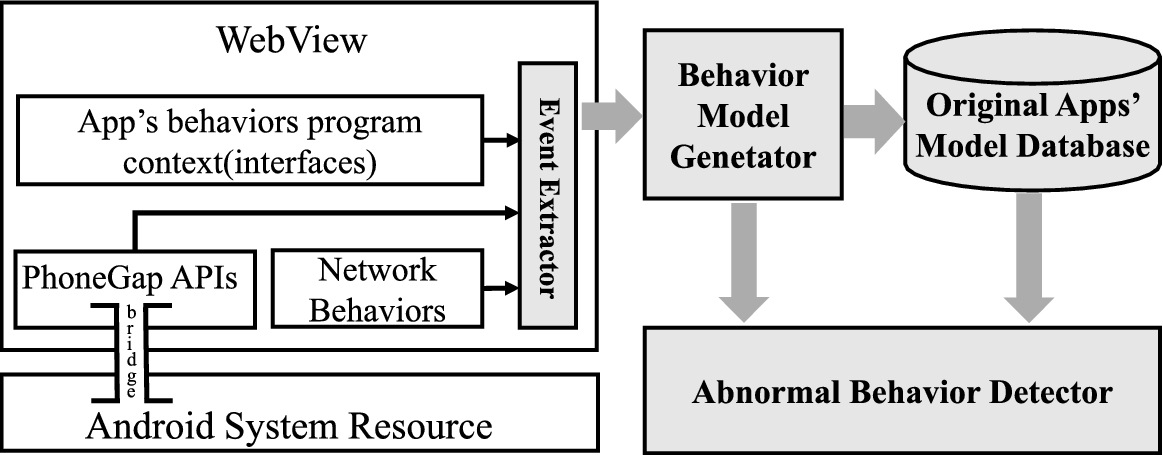
Architecture overview.
Event extractor. “Event extractor” is a run-time module inside the Android system. By hooking into the WebKit component of the Android system, we extract necessary information about apps’ actions and the program contexts where the actions take place. With our extractor, when the app makes a PhoneGap API call, sends an HTTP request, or creates a new interface, our system will record them.
Behavior state machine generator. According to the app’s actions and the related interfaces extracted by the first module, “Behavior State Machine Generator” will automatically build the behavior state machine of the app. For every interface context, this module associates it with actions taking place in it.
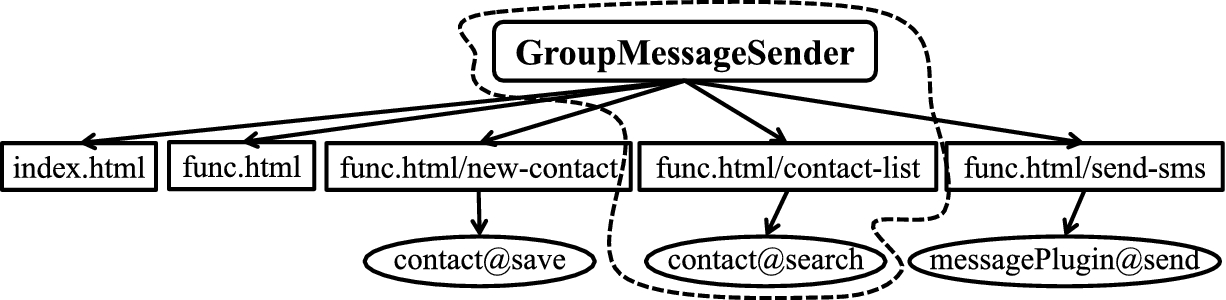
GroupMessageSender’s primitive behavior state machine.
Figure 3 presents a sneak preview of a app’s behavior state machine. Our behavior state machine includes the app’s actions (represented by ovals) and the pages where the actions take place (represented by rectangles). The pages represent the distinctive interface contexts of the actions. In the state machine, and the arrowed line from a page to an action illustrates the dependency between the context and the action. As shown in Fig. 3, there are four interface contexts and three actions in the app “GroupMessageSender”. For every interface, if there is an arrowed line from it to an action, it means this interface is the distinctive context of the action. For example, in Fig. 3, page “index.html/scan” is the interface context of the action “exec@camera”.
Original app’s state machines database. Security analysts can run the app in a pure environment to obtain its original behavior state machine. After traversing the app and triggering all behaviors from each interface using a test suite, the output from the Behavior State Machine Generator will be treated as the app’s original behavior state machine and stored in the behavior state machine database.
Abnormal behavior detector. In this module, we check the context of the app actions of the target app’s behavior state machine against its original behavior state machine stored in the database. Specifically, given an action in an app’s behavior state machine, we first identify its interface context. In the corresponding context, we check whether the action–context pair appears as a part in the original state machine to detect the abnormal behavior. If the pair of the action and its context is not in the original behavior state machine, it will be treated as an abnormal behavior. The result of detection not only reveals traces of the abnormal behaviors caused by the injected code, but also locates the specific page where the code injection attack happened.
We implemented a proof-of-concept prototype of our solution in Android 4.1.2. Our system consist of 4 components: a run-time events extractor, a behavior state machine generator, a database for the original behavior state machines and an abnormal behavior detector.
The Event Extractor monitors the interfaces created by the app and the APIs called by the app (apps’ actions and their corresponding APIs are illustrated in Table 1). In the WebKit part of Android source code, we set hook functions to get the apps’ interfaces and actions information.
Apps’ actions and the corresponding APIs
Apps’ actions and the corresponding APIs
More specifically, for the app’s local actions triggered by calling certain PhoneGap APIs, we set the hook function “WebCore_npObjectInvokeImpl” in the WebKit component to hook the APIs as well as the corresponding system resources that the app called. For the app’s network actions, we set the hook function “XMLHttpRequest_createRequest” in the WebKit component where the XML HTTP requests are generated. For the app’s interfaces, we set the hook function “WebFrame_documentLoaded” in the part of WebKit which creates the web frame according to the app’s source code. We write all the hooked information into a log file and pass the file to the “Behavior State Machine Generator”.
The Behavior State Machine Generator uses the log file generated by the Event Extractor to build the behavior state machines for the app. It allocates an array for every interface in the app, uses the interface’s identifier as the first element of array, and adds the actions belong to the interface to the array as other elements. Then, it collects all interfaces’ arrays in a set to form the final behavior state machine of the app.
In order to evaluate the effectiveness of our solution in detecting injected behaviors in HTML5-based Android apps, we deploy our solution to model the behaviors of real-world popular HTML5-based Android apps, and demonstrate its capabilities in detecting injected behaviors with simulated code injection attacks on those apps.
So far, we have collected 150 popular HTML5-based Android apps which download times are over 5,000 in GooglePlay. We also generated original behavior state machines for these apps. Among these 150 apps, we manually selected 4 vulnerable apps which have channels for attackers to inject code into them. We use these 4 apps as case studies to prove the effectiveness of our solution on injected behaviors detection. We simulated attackers’ efforts to inject malicious JavaScript code into the apps. With the original behavior state machines we already built, we can successfully detect the injected behaviors in the apps.
There are various channels the mobile devices provided to attackers to inject malicious JavaScript code into the apps. In our case studies, the malicious JavaScript code is injected into a QR code and the name of a contact. When the app scans the QR code or reads the contact list, the injected code will be executed.
Case study: RewardingYourself
RewardingYourself [39], shown in Fig. 4, is an HTML5-based app that maintains the record of miles or points of the user’s loyalty program. The app can take QR code as its input via a third-party barcode-scanner plugin. This additional input channel opens a door for code injection attack. Attackers can write QR code containing malicious JavaScript and when the app scans this QR code, the malicious code will be injected into the app.
This app is a case study in the paper of Wenliang Du et al. [29]. In their work, they can find the vulnerable channel (QR code) the app contains for the code injection attack. But, the result of the attack is beyond of their ability. Instead, our system can detect the injected behaviors brought by the malicious QR code. Furthermore, we can also know the detail of behaviors and their program contexts.
In this case study, we thoroughly test the app and explores its functionalities. Under the monitor of “Event Extractor” in our system, we get the record of the app’s actions and the program contexts where the actions take place. “Behavior State Machine Generator” then use the record from “Event Extractor” to automatically build the original behavior state machine for RewardingYourself shown in Fig. 5. In Fig. 5, rectangles are interface contexts represented by different interfaces in the app, ovals denote app’s actions, and the arrow from a context to an action denote the dependency between the app’s action and it’s interface context.

The RewardingYourself application.
We use a malicious QR code, shown in Fig. 6, which embeds the malicious code shown in Fig. 7. The result of the attack is illustrated in Fig. 8.
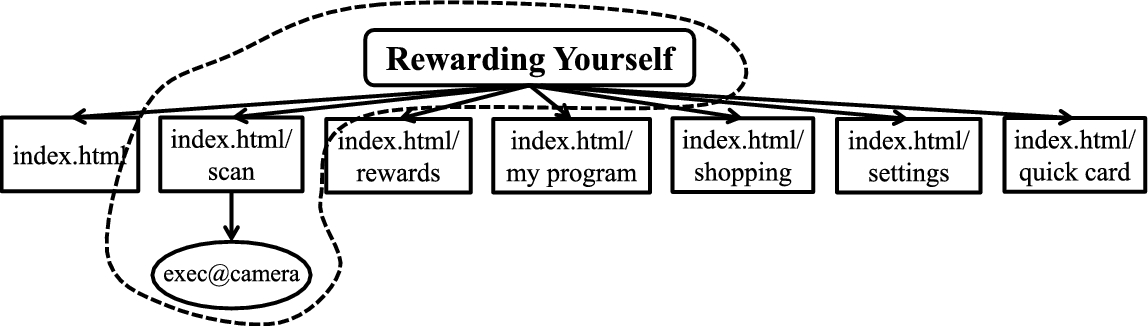
Original behavior state machine of RewardingYourself.
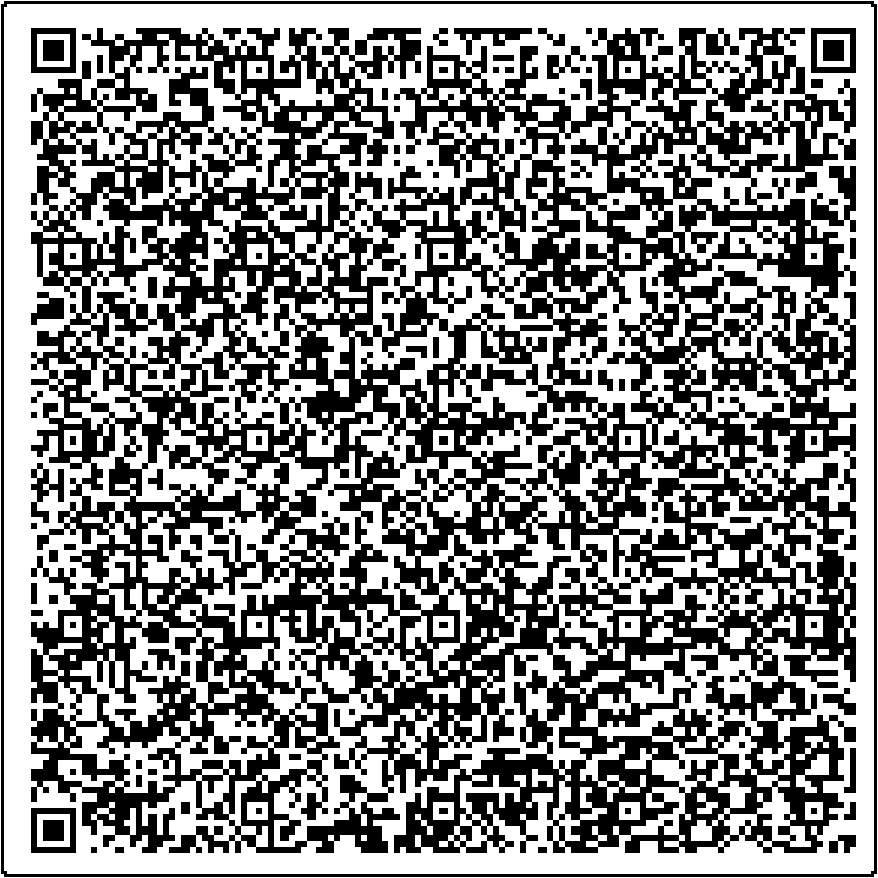
QR code containing malicious JavaScript.

The injected malicious code that attempts to read users current position and send it to the remote server.

The result of code injection attack to RewardingYourself.
As it is illustrated in Fig. 9, because of the attack, new actions “position:1.295037, 103.773856” and

Injected behaviors state machine in RewardingYourself.
After checking the app’s original behavior state machine, we can detect the injected behaviors brought by the scanning of malicious QR code. The injected code will leak the current position of the user which is not merely a privacy leakage. Our approach can successfully detect the malicious behaviors brought by the injected code.
TripCase [45] is a travel management applications based on web technologies, as shown in Fig. 10. Users can organize their travel through it, for example set flight time alert, note the important places, organize the whole travel schedules, and so on. Because of the portability convenience the HTML5 technology provided, the trip information stored in TripCase is available almost all platforms such as phone, tablet, Android Wear and desktop website. TripCase is a popular travel assistant application, it is downloaded over 500,000 times in GooglePlay (the official app market in Android) and get recommendations from Forbes Travel Guide and The Washington Post.

The TripCase application.
Due to web technologies it use, TripCase share the vulnerabilities of HTML5-based Android apps. The various channels mobile devices provided make the app become a target of attackers to inject malicious code in it.

A fragment of original behavior state machine of TripCase.
We deployed our solution to evaluate the effectiveness of injected behaviors detection with TripCase. Like RewardingYourself, we thoroughly test the app and explores its functionalities in our system. Because there is 11 interface contexts in the app, for demonstration purpose, we only illustrate a fragment of the compact behavior state machine in Fig. 11.
Up to now, the behavior state machine we built is under a trusted environment, we can save it as the primitive behavior state machine of TripCase in the database. Then, we simulated attackers’ efforts to inject malicious JavaScript code into the app. The malicious JavaScript code we injected is illustrated in Fig. 12.

The injected malicious code that attempts to read user’s contact list and send it to remote server.
We inject the attack code into a meeting’s address in TripCase, when the app read the malicious “address” we input, the injected code will be executed. The result of the execution will read the whole contact list of the victim user and send them to a specific remote server. The detail of the attack is illustrated in Fig. 13.
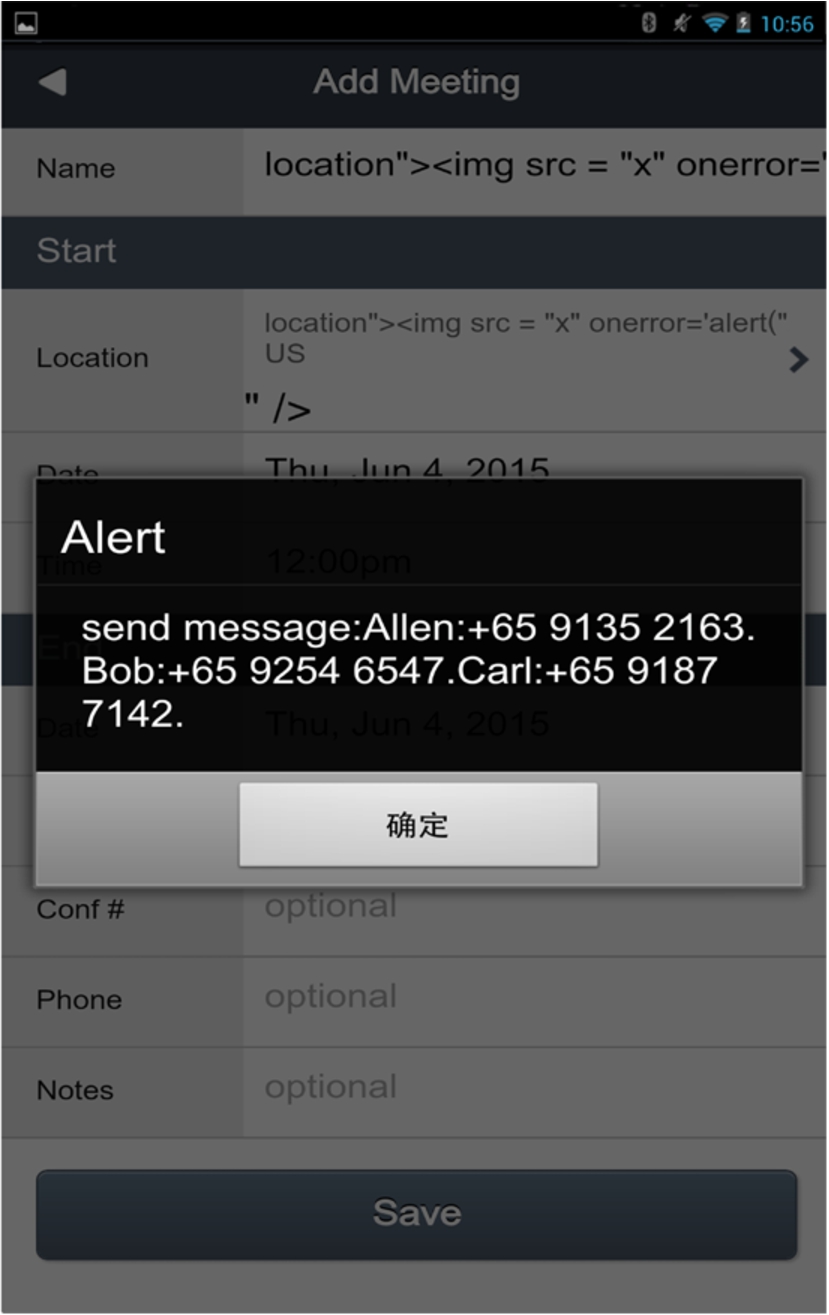
The result of the attack to TripCase.
Because the code injection happened, there are new actions (read contact list and send them to the server) under certain interface contexts. As it is illustrated in Fig. 14, under the same interface
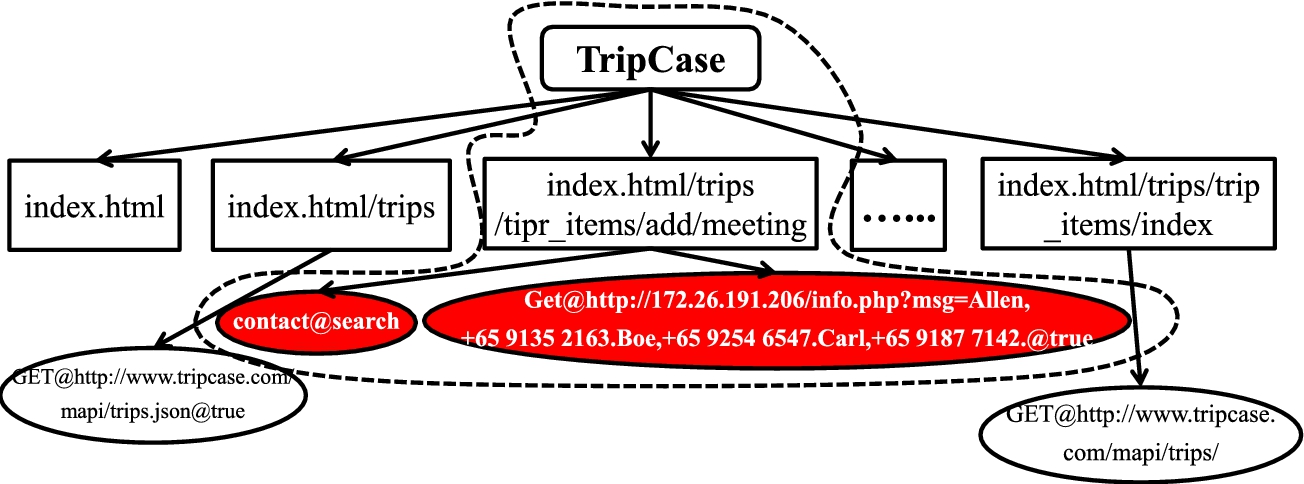
Injected behaviors state machine in TripCase.
After checking the app’s original behavior state machine we can successfully detect the injected behaviors in the compromised app. Furthermore, we can also know the specific page where the code injection attack happened, which gives security analysts a clue to find vulnerabilities of the app.
PRS Barcode Scanner [38] shown in Fig. 15 is a quite popular barcode scanner app based on the HTML5 technology. It is downloaded almost 5,000 times in GooglePlay.
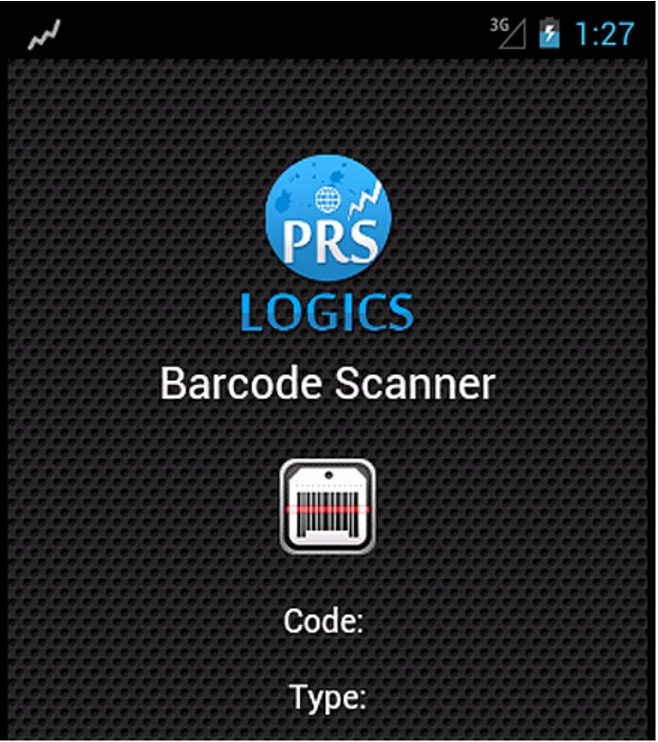
The PRS Barcode Scanner application.
It share the same vulnerabilities of HTML5-base Android apps. We also use the malicious QR code (as it is illustrated in Fig. 6) to let the app scan. Under our system, we can successfully detect the injected behaviors brought by the scanning of malicious QR code.
We also traverse the app in our system, and get the original behavior state machine of it, as it is illustrated in Fig. 16. Then, we simulated attackers’ efforts to inject malicious JavaScript code into the app. The result of the attack is illustrated in Fig. 17.

Original behavior state machine of PRS Barcode Scanner.

The result of code injection attack to PRS Barcode Scanner.
Because of the attack, there are new actions under certain interface contexts. As it is illustrated in Fig. 18, under the same interface context
PhoneGapMega [35] is a demonstration app for PhoneGap APIs shown in Fig. 19. It contains examples of almost all of the PhoneGap APIs (16 kinds of them) which the framework provide to developers by default. jQuery Mobile is used as the display framework in the app.
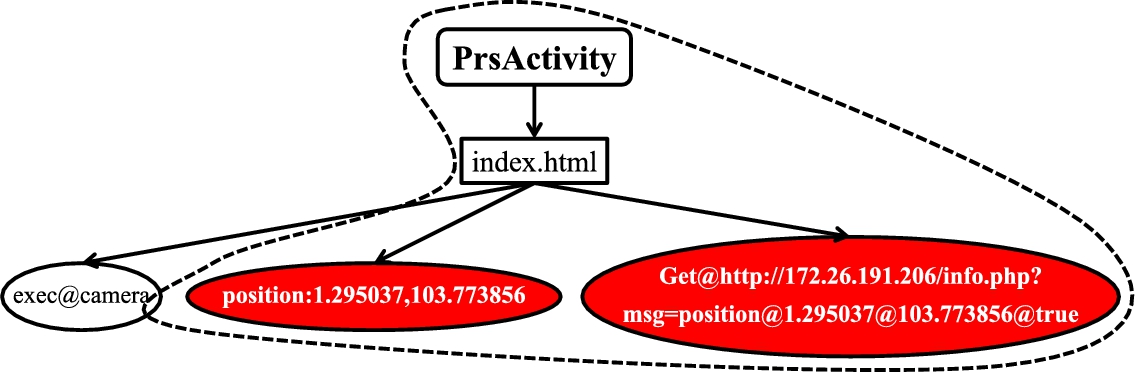
Injected behaviors state machine in PRS Barcode Scanner.
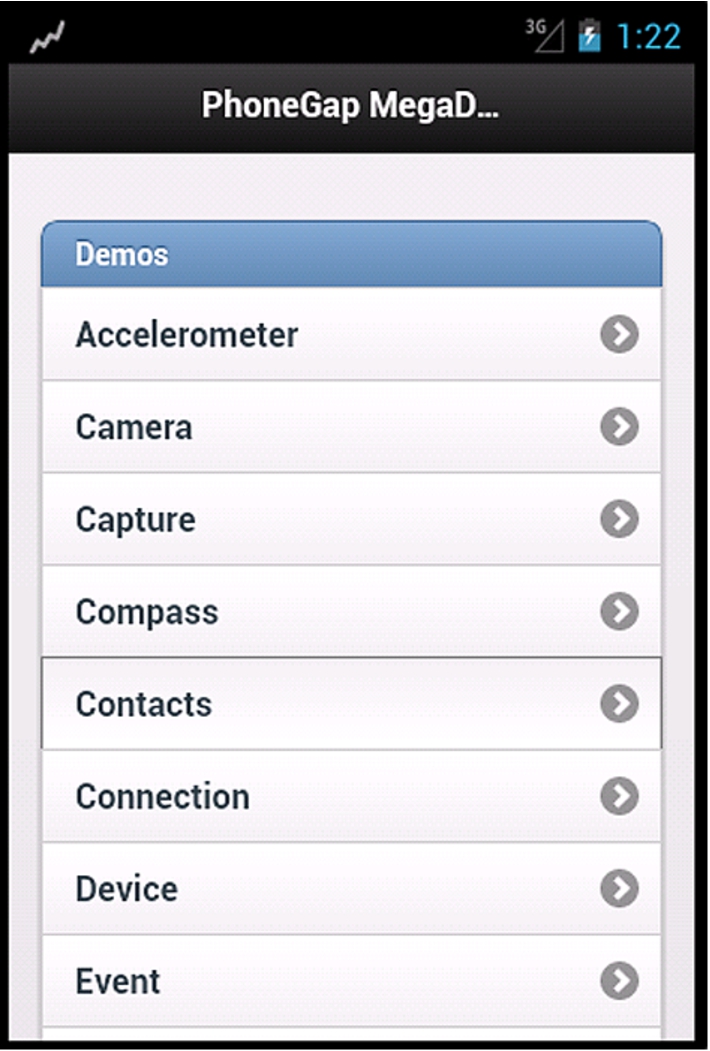
The PhoneGapMega application.
PhoneGapMega is a popular PhoneGap example app in GooglePay which has been downloaded almost 10,000 times. It is just a representative of that kind of PhoneGap APIs example apps, there are other apps which serve as the same purpose with PhoneGapMega such as cordova-mega-demo [15], GWT Mobile PhoneGap Showcase [25], PhoneGap Demo [34], and so on.
PhoneGapMega share the same vulnerabilities of HTML5-base Android apps. Malicious JavaScript (shown in Fig. 12) injected into a contact’s name can be executed in the app.
We also traverse all interfaces in the app and explore every action belong to each interface. Because PhoneGapMega contains almost all of 16 default PhoneGap APIs and allocate one page for each API, for demonstration purpose, we only illustrate a fragment of the compact behavior state machine in Fig. 20.
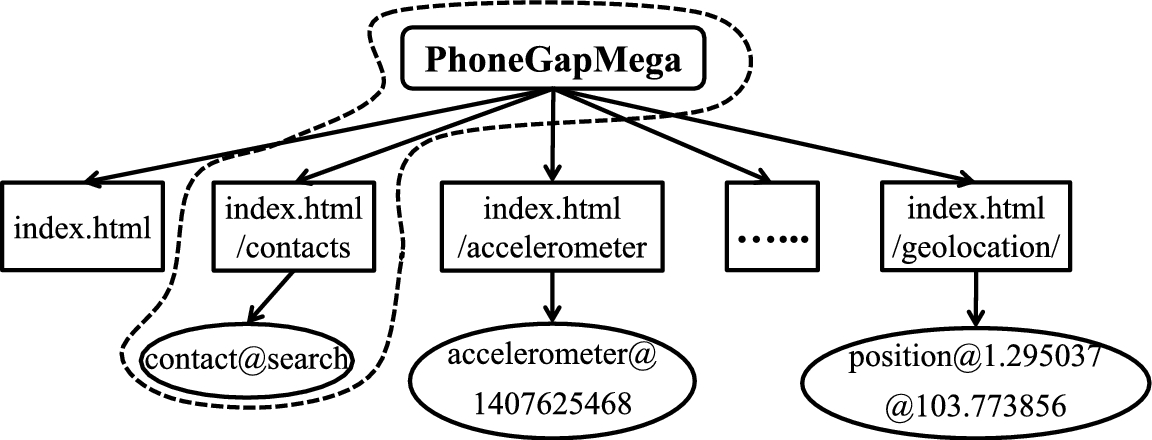
A fragment of the original behavior state machine of PhoneGapMega.
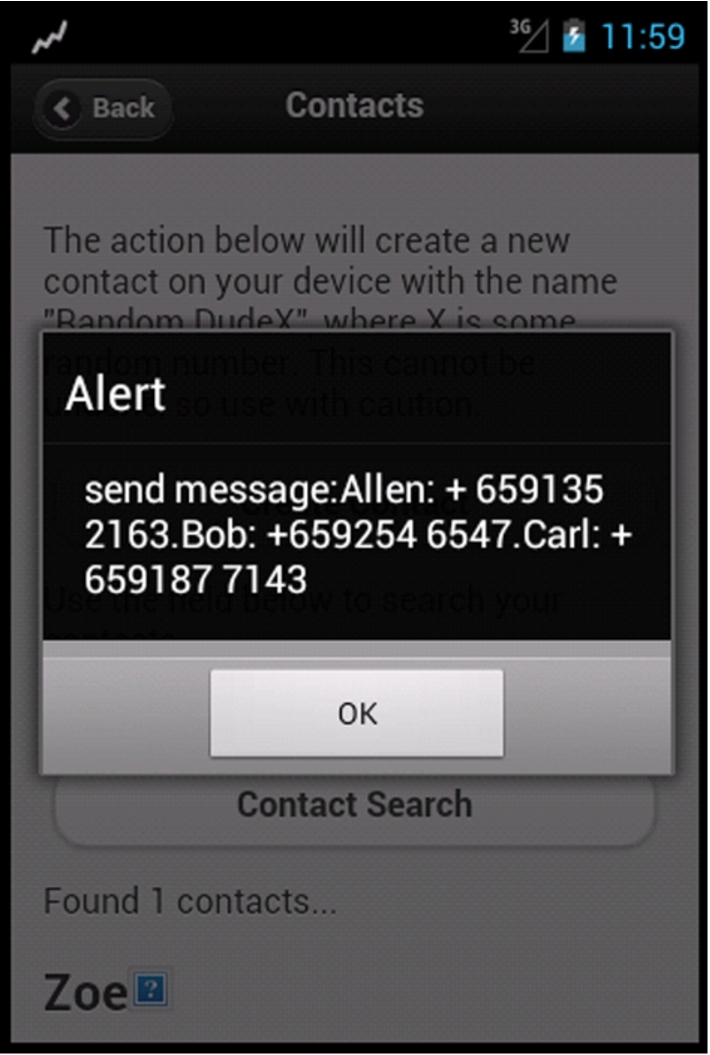
The result of code injection attack to PhoneGapMega.
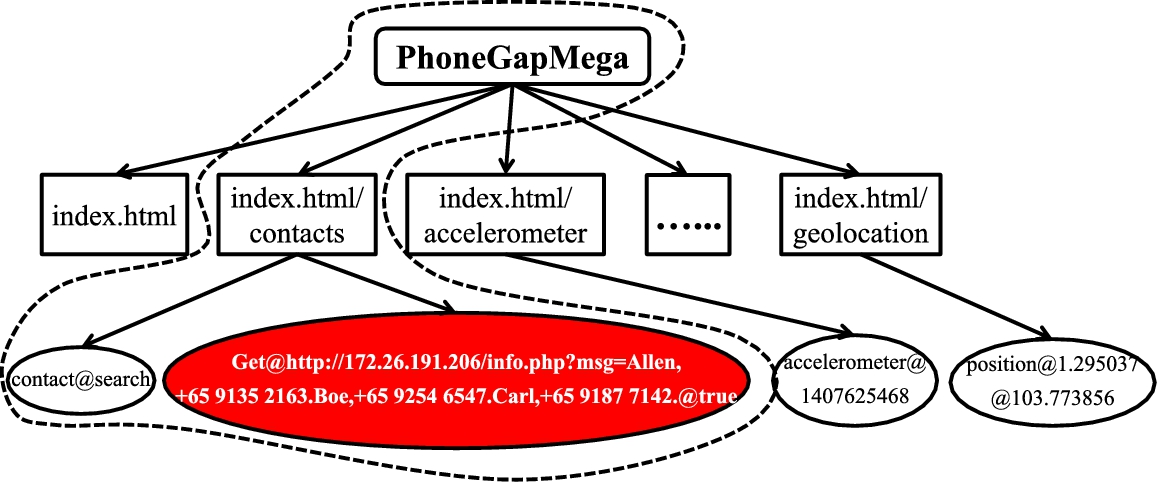
Injected behaviors state machine in PhoneGapMega.
When the app read the malicious contact item, the injected code will be executed. The result of the execution will read the whole contact list of the victim user and send them to a specific remote server, as it is illustrated in Fig. 21.
Because of the attack, there are new actions under certain interface contexts. As it is illustrated in Fig. 22, under the same interface context
Summary. With the above case studies, we demonstrate the importance of including app’s actions and program contexts where actions take place in behavior state machine generation. It confirms that our approach is effective in detection of injected behaviors in HTML5-based Android apps.
To measure the performance overhead of our system, we benchmarked it against original Android system. Table 2 lists the average page loading time for above case studies apps, measured on a Linux desktop with Intel Core i3-2130 CPU with 4 GB of RAM.
As it is shown in Table 2, our system introduces approximately 0.108 s (6.75%) additional time cost in page loading compared to original Android system, which is hard for users to perceive it.
Performance overhead of our system
Performance overhead of our system
Apps’ information in the original behavior state machine database
So far, we have generated original behavior state machines for 150 popular HTML5-based Android apps,1
All of these apps are downloaded from GooglePlay.
The original app’s behavior state machines is generated by traversing the whole app and triggering all behaviors of the app. If there is a code injection attack in these apps, the malicious code must contain some “new” behaviors compared to the original apps.
As it is shown in above case studies, with the compact original behavior state machines, our system can successfully detect the injected behaviors. Typically, there is no false positive in our system consider the completeness of the original app’s behavior state machines.
As far as we know, there is a limitation in our approach. If the malicious code conducts the same behaviors under the same contexts with the original app, we can not detect them. In our future work, we will try to find a more fine-grained definition of program context to solve this problem.
Existing researches on native Android apps
Control flow-based detection. The basic idea of control flow-based detection is to monitor and analyze the control flow of the Android apps [14,41,42], which includes system calls and their corresponding trigger events [3].
CrowDroid [11] is a framework to analyze smartphone apps’ actions. CrowDroid monitors every system call of the apps and counts the number of each call the app has sent. The remote server will create a feature vector for the app based on crowdsourcing. If there is a malicious app that shares the name with a benign one, the system calls of the malicious app must be different from the benign one, as a result, the vector of the malicious app will be different. Base on the difference between the vectors, CrowDroid can detect anomalous behaviors of the malicious app counterfeiting the name and version of a benign one.
DroidSIFT [55] classifies Android malware base on weighted dependency graphs of apps’ contextual APIs. According to the graph-similarity metrics, DroidSIFT may discover the homogeneous app behaviors and identify the transformation attacks and malicious variants.
Data flow-based detection. Data flow-based solutions are focused on users’ privacy leakage detection and prevention. Jung et al. [32] propose a mechanism to find the information leakage with the black box differential testing. Felt and Evans [19] suggest returning fake data when apps require the user’s privacy information to maintain normal operations and prevent the privacy leakage.
TaintDroid [17] classifies the privacy data in the Android system and assigns an unique taint tag to each data type. It tracks privacy data processing dynamically. When the tainted data is leaving the device, TaintDroid will record the Taint tag and the next-hop of the data.
AppFence [26] offers two different approaches to protect sensitive data in Android apps: shadowing sensitive data and blocking sensitive data from being exfiltrated off the device. It substitutes shadow data for data that the user wants to hide, and blocks network transmissions that contain sensitive data only for apps’ on-device usage.
Permission-based detection. Permission-based detections aim at optimizing the Android system’s permission management by setting granular permission rules or detecting the dangerous permissions set in apps [8,20,23,33].
XManDroid [10] extends the monitor mechanism to detect and prevent privilege escalation attacks on Android application level [16]. It sets a series of secure policies about Inter-component communication (ICC) [13] between two apps. It dynamically analyzes apps’ transitive permission used by ICC call, and examines these two apps’ permissions against the secure policy. If there is dangerous combination of permissions from these two apps, XManDroid will prohibit the ICC call between them.
TISSA [57] provides a fine-grained access control mechanism for users to grant the apps’ accesses to different types of private information. The granted access may be changed on-demand according to the privacy requirements in specific scenarios. Kirin [18] is a security checker to identify the dangerous permissions by analyzing the apps’ manifest files. It identifies permissions in the app’s manifest file during the installation and checks whether they conform with security policies.
Beside above three kinds of detections, there are some works on detecting anti-forensics activities in Android [1,2]. Pietro Albano et al. prove that it could be possible to artificially create a false digital alibi, plausible in the context of a legal proceeding, by exploiting some features of an Android device. The proposed techniques make use of a software automation which is able to fully simulate a real series of human activities.
However, there are attacks that do not need special permissions. In [21], authors carried out energy-based attacks through the Android browser without installing App to users’ Android system. Zhang et al. [56] proposed a new approach called App Guardian, which changes neither the operating system nor the target apps, and provides immediate protection as soon as an ordinary app is installed. App Guardian thwarts a malicious app’s runtime monitoring attempt by pausing all suspicious background processes when the target app is running in the foreground, and resuming them after the app stops and its runtime environment is cleaned up.
Existing research on HTML5-based Android apps
Georgiev et al. [24] and Jin et al. [28] propose solutions to prevent untrusted foreign-origin web code from accessing local system resources. They modified the PhoneGap framework and extend an whitelist-based permission system. They limit the privilege of untrusted code and forbid them to access sensitive local resources.
Du et al. [30] propose a fine-grained access control mechanism to refine the privilege authorization policies for HTML5-based apps in Android system. They define two types of policies, frame-based and origin-based, to separate subjects of the same app. Developers can specify frame permissions using the permissions attribute for frames in HTML code, or origin permissions in the manifest file.
Besides the permission based protection, Du et al. [28,29] make a systematical study on the code injection attacks to the HTML5-based mobile apps and test different possible injection channels provided by the mobile devices. They also develop an automatic tool to detect code injection vulnerabilities in HTML5-based Android apps and provide a prototype called NoInjection as a patch to PhoneGap in Android. The core idea of NoInjection is to filter out the malicious code hidden in the data provided by the attack channels. But it cannot handle the situation that the code is dynamically loaded from remote servers.
Conclusion
Using web technologies (e.g., HTML5, JavaScript, CSS) to build HTML5-based mobile apps introduces new security challenges in mobile platforms. In this paper, we propose a new behavior state machine for HTML5-based Android apps, as well as an abnormal behavior detection system. The behavior state machine captures an app’s actions as well as the contexts where actions take place, providing sufficient information about the program context of the app’s behaviors. Our prototype detection system can automatically build the behavior state machines for HTML5-based Android apps, which will be compared with original one to detect abnormal behaviors. We demonstrate its effectiveness of abnormal behaviors detection with case studies on real-world HTML5-based Android apps.
Footnotes
Acknowledgements
The authors thank Zhenkai Liang for suggestions on various aspects of this paper. The authors also thank anonymous reviewers for their insightful comments. This work was supported in part by the National Natural Science Foundation of China (No. 61402029), the Beijing Natural Science Foundation (No. 4132056), the National 973 Project of China (No. 2012CB315905), the National Natural Science Foundation of China (Nos. 61170246, 376349), and the Beijing Natural Science Foundation (No. 4122024).