



Abstract
According to the reports of a NGO-World Blind Union in 2017, approximately 253 million people have visual impairment. Besides, the statistics of Taiwan’s Ministry of Health and Welfare also reported that the number keep growing in these two decades. Therefore, how to assist them to have better daily life experiences will be a significant issue. The purposes of this study were designing and constructing a guidance system in order to assist them to know their spatial position and further to guide them to arrive their destination. In this system, the researchers used the integration of smartphone, wearable devices and iBeacon technique to achieve the purpose of guide. Furthermore, this system allowed caregivers to contact the visually impaired and know their real-time circumstances through the internet in order to enhance their sense of security in unfamiliar indoor environment. For system evaluation, the researchers adopted a SUMI questionnaire suitable for evaluating the usability of the system through users’ feedbacks. According to the research survey, this system can provide the visually impaired with a safer indoor guidance in order to improve their ability and confidence in independent walking.
Introduction
According to the reports of a NGO -World Blind Union in 2017, approximately 253 million people have visual impairment; 3% among them were total blindness and the others were amblyopia. The statistics of Taiwan’s Ministry of Health and Welfare also reported that the number of the visually impaired swiftly increased from 36 thousand in 2000 to 60 thousand in 2016. Therefore, how to assist them to have better daily life experiences will be a significant issue. People depend all types of sense to learn and receive outside information such as the senses of vision, hearing, touch, taste and smell etc. For the visually impaired, the daily inconveniences caused by the dysfunction of visual senses, most of them used tactile and hearing senses and also related assistive devices such as white canes or guide dogs to assist themselves. Nonetheless, the usage of white canes might cause other problems; for instance, obstacles that couldn’t be detected emerged would affect their movement or they might need to walk to the boundary to change the direction in a large space when using white canes. For guide dogs, the problem was that they needed a long time to be trained professionally, and currently there were only few graduated guide dogs in Taiwan yearly. Based on the above mentioned, the population of the visually impaired keeps growing each year, and hence not all of them could receive the assistance of guide dogs. Moreover, as moving toward a new environment they also needed the company of their friends and relatives to locate the destination; nevertheless, there were restrictions for companies in some occasions (such as schools, exam centres or workplaces). Based on the studies related to sensory guidance devices, the researchers investigated techniques and problems to improve existing auxiliary tools.
In this study, the researcher utilized the widely-applied iBeacon technology to develop a positioning and guidance system in order to assist the visually impaired to move indoors and interact with the environment. The features of iBeacon included that it had Bluetooth Low Energy (BLE) which could reduce power consumption, it could communicate with smartphones supporting Bluetooth 4.0 and could be applied to indoor positioning. Besides, these beacons could be placed on ceilings and higher positions of walls and could form sensory grids as significant identification knots for contextual sensing; it was more efficient than tactile paving in construction time and cost. This system not only provided the functions of orienting, positioning and offering information but also could transmit their position and information to caregivers and building managers to give them assistance in emergencies in order to improve the security of the entire environment.
Literature review
Visually impaired (VI)
The visually impaired (VI) were those whose structures or functions of visual organs (eyeball, visual nerves, brain visual centre) were partially or totally impaired caused by inborn or acquired reasons and they still couldn’t perform visual identification after treatment. According to the degree of the impairment is divided into severe, moderate and mild levels. Besides, with different vision degree they had different characteristics such as total blindness, incapability of light perception, incapability of manual visual, and having only center vision (Ministry of Health of Taiwan, 2008). Therefore, they usually depended on the support of assistive devices in order to satisfy the needs of daily lives; generally, the most-frequently used methods of walking included unaided travel techniques, human-guides techniques, cane techniques, dog-guides techniques and sensory guidance devices. Based on the “major task and function” of assistive products, ISO 9999 categorized them into 11 groups such as “assistive products for personal medical treatment”, “assistive products for training skills”, and “assistive products for communication and information” etc.
There are three main focuses of assistive devices for the visually impaired (VI). Firstly, the obstacle-avoidance function can provide a local hazard detection [1–3]; secondly, the position (localization) function can locate the user on their physical space and the last function is the navigation to guide VI directions to a user specified destination [4, 5]. This study focused on the assistance of “spatial orientation” and “independent walking” functions; spatial orientation function was voice identification of different directions, while independent walking function was helping them to know the direction they move towards by tools. Overall, orientation was the ability to use personal senses to understand the relation and relative position between oneself and the surroundings at any specific time.
Besides the focuses dimension, context-aware is another perspective to classify the related studies basing on the different techniques to deliver their assistive functions for visually impaired. The context-aware capabilities were proposed as four generic categories. Firstly, contextual sensing is able to sense environmental states and acknowledge the users. Secondly, contextual adaptation is able to leverage contextual knowledge by adapting its behaviour to fit the dynamic environment they faced. Thirdly, contextual resource discovery is an application to discover the related resources within the same settings. Fourthly, contextual augmentation is able to augment the settings with supplemental information.
Dead-reckoning technique
In order to deliver these context-aware capabilities, assistive techniques were developed and combined in different applications of a specific research setting. Dead-reckoning techniques integrate measurements of the user’s motion, speed and direction. Accelerometers and compass have been used as contextual sensing for localization [6]. Step-based tracking of mobile phone was used for indoor navigation [7]. A more popular method of dead-reckoning is inertial measure unit (IMU), which measures and reports body’s movement and acceleration by combination of accelerometers and magnetometers. It also equipped widely in smart phone as a fundamental function.
Sensor-based technique
Sensor-based techniques supports contextual sensing and resource discovering capabilities for positioning and navigation. This method can be implemented by variant sensing devices such as RFID, NFC, Beacon, VLC (visible light communication), IR transmitter, and QR code, etc. [2]. Di Giampaolo (2010) proposed the idea of applying passive Tags to indoor navigation; the researcher of this study placed a passive Tag on the ceiling, and as the reader and cell phone combined to transmit wireless RF signals and the passive Tag received the signal range, then the user’s position could be positioned. Shiizu, Hirahara, Yanashima & Magatani (2007) published a blind navigation line by combining a color sensor with a chromaticity diagram; they also used RFID Tags as points of interest at corners which could inform them the next movement by these points of interest. For instance, they could prompt that they should make a turn at the next corner. A colour sensor and reader were installed in their guiding cane, and the color sensor could detect that whether they move along the navigation line or not; the reader could detect a spot where they should make a turn. This method could replace the tactile paving which cost a lot (Seto, 2009).
Space detection technique
Space detection technique was one of the common techniques that assisted the visually impaired. In some studies, the researchers used portable cameras to set the captured images as areas of interest and then utilized edge detection to obtain edge features to determine roadway edges and finally used the roadway range to guide the direction [8–10]. The assistive product of helmet designed by Zöllner, Huber, Jetter, Reiterer (2011) could divide the depth figure into three cylinders and each one had a vibrator; once an object existed in the alert area, then the vibrator would vibrate to inform the user. The vibrator had different vibration levels which changed with the distance between the obstacle and the user. Besides, the technique of reading 2D figure was combined in the system; for instance, when a designated name was put in a room entrance, then it could inform the user of the room name to help them to locate the destinations indoors.
Katz, Kammoun, Parseihian, Gutierrez, Brilhault, Auvray, & Jouffrais (2012) utilized encoded tags produced by color information with augmented reality (AR) and put them on roadways to deliver information for guiding directions [11]. The detection results of this device were highly precise; nevertheless, the flaw was that it would be greatly affected in environments which was too dark or bright. In recent years, a device assisting the visually impaired was produced by the integration of Android smartphones, Kinect and Bluetooth earphones; this system adopted the buttons of Bluetooth earphone multimedia to control the operation. In addition, it could obtain 3D spatial images through Kinect and transmit back to smartphones, and then it could inform them of the type, direction and distance of the obstacle after real-time computation [12, 32, 13].
Methodology and system design
Sensing and positioning techniques
The selection of sensing and positioning techniques were highly crucial in designing technological assistive products for the visually impaired. Currently, indoor positioning technique mainly used proximity analysis which referred to objects of known positions and then estimated possible positions, and the widely-utilized techniques included the following. (1) GSM and CDMA system combined the indoor positioning of GPS, not suitable for the applications of insufficient space or of which required highly-precise positioning. (2) UWB (Ultra WideBand): it was a short-distance wireless communication and had the merits of low radiated power, high anti-interference ability, high safety and high positioning precision, and it could precisely measure AOA, TDOA and RTOF with a precision level of 0.1–1M. (3) For Bluetooth and WiFi wireless services in public sites, its positioning precision reached up to 10 to 30M. (4) RFID and BLE used the technique of Sensor tag and the features of near field operation; they could present extremely high positioning precision. Otis-Smith (2014) analysed and compared the related characteristics of each indoor positioning technique (as Table 1), and the results indicated that BLE and NFC had the highest precision of positioning and tracking; nevertheless, setting up and maintaining BLE was the simplest one, and it was more difficult to set up and maintain NFC and Bluetooth. WIFI was a widely-discussed solution for indoor positioning technique; it wasn’t difficult to set up the environment but its positioning precision was not high.
Comparison of indoor position technologies
Comparison of indoor position technologies
After generalizing the above analyses, the researcher utilized the micro-positioning technique - iBeacon. Developed by Apple, it was a location based service (LBS) technology based on Bluetooth low energy (BLE); iBeacon utilized the advertisement channel of BLE to broadcast packets to all receiver devices. It could send few messages per second to any device equipped with Bluetooth 4.0, and its broadcasting method was one-to-many; besides, during the transmission process multiple position information and signal strength could be obtained included the following. (1) UUID (16 byte): In the application area, beacons that were placed could adopt a common UUID so that they could be differentiated from the sensor tags in nearby application areas. (2) Major (2 Bytes): It could be a group ID after dividing application parts in an application area; using this method produced higher flexibility and diversity in planning the area. (3) Minor (2 Bytes): It was the ID of this beacon node. This NODE unique ID was created after integrating the above UUID and Group ID. (4) TxPower (1 byte): It was the RSSI unit (dBm) measured within 1M range, and the distance was estimated by the signal strength. In recent years, beacon technique has become increasingly mature and been widely applied to all fields. Moreover, smartphones supporting BLE could be the receiving devices of iBeacon messages.
Moder, hafner & Wieser (2014) mentioned that after observing and interviewing the visually impaired they had generalized several suggestions on interface operations and information prompt which could satisfy their needs including reducing page hierarchy, keeping habitual input methods, providing appropriate detailed information, and avoiding absolute units. Zhang et al. (2014) also summarized major principles of designing touch interaction interface for the visually impaired including using habitual gestures to operate the interface, providing voice feedback according to the priority of importance, designing contents mainly by the layout of hierarchy or list, and giving clear voice or tactile clues when changing pages in their study [10].
For the considerations of their visual impairment, the interaction with the system should be substituted and transferred to other sensing mechanisms. Zhang, Ong & Nee (2009) employed two mechanisms as sensory substitutions including acoustic and tactile senses. Verbal instruction was utilized as the output mechanism. It provided descriptive audible voices to inform the visually impaired to assist their perception of surroundings. Another sensory substitution was tactile sense, which sent out a vibration signal to the respective motor to alert the visually impaired instead of visual sense. Besides, we must use habitual gestures to design the interface such as click, long press, horizontal slide and vertical slide etc. in order to reduce the time of learning the new system for them. The contents would be designed and presented mainly based on “hierarchy” and “list”, and when pages changed clear voice or tactile prompts should be provided; as each page changed, there would be simple instructions. After generalizing the designing principles of interaction and interface in the literature, this system was designed by the following principles. (1) For gestures, the researcher used former operation habits to do extension or creation which allowed users to easily understand and use. (2) For voice feedback, it was default that the system would provide complete and detailed instructions and system information, and they would be read out by the importance level and could be stopped at any time. (3) The contents would be presented mainly based on “hierarchy” and “list”, and when pages changed clear voice or tactile prompts should be provided. Meanwhile, according to information type this system would provide three types of operation prompt including “simultaneous vibration and voice prompts”, “voice prompt” and “vibration prompt first and voice prompt next”.
Concept integration and system design
The system of this study could assist the visually impaired with severe, moderate and mild levels in two functions “spatial orientation” and “independent walking” in order to provide indoor guidance and also help them to contact and communicate with caregivers. The simplified framework of the system is designed by authors and it is shown in the Fig. 1. The system was operated mainly through smartphones; the combination of the micro-positioning technology of iBeacon and wearable devices could assist them to contact their indoor surroundings through the integration of iBeacon. The system used smartphones as the central devices and utilized the indoor positioning of iBeacon to acquire the information of position; after receiving information, smartphones would inquire local database to obtain map and then inform users of the next action through wearable devices. The simplified framework of the system was shown in the following figure.
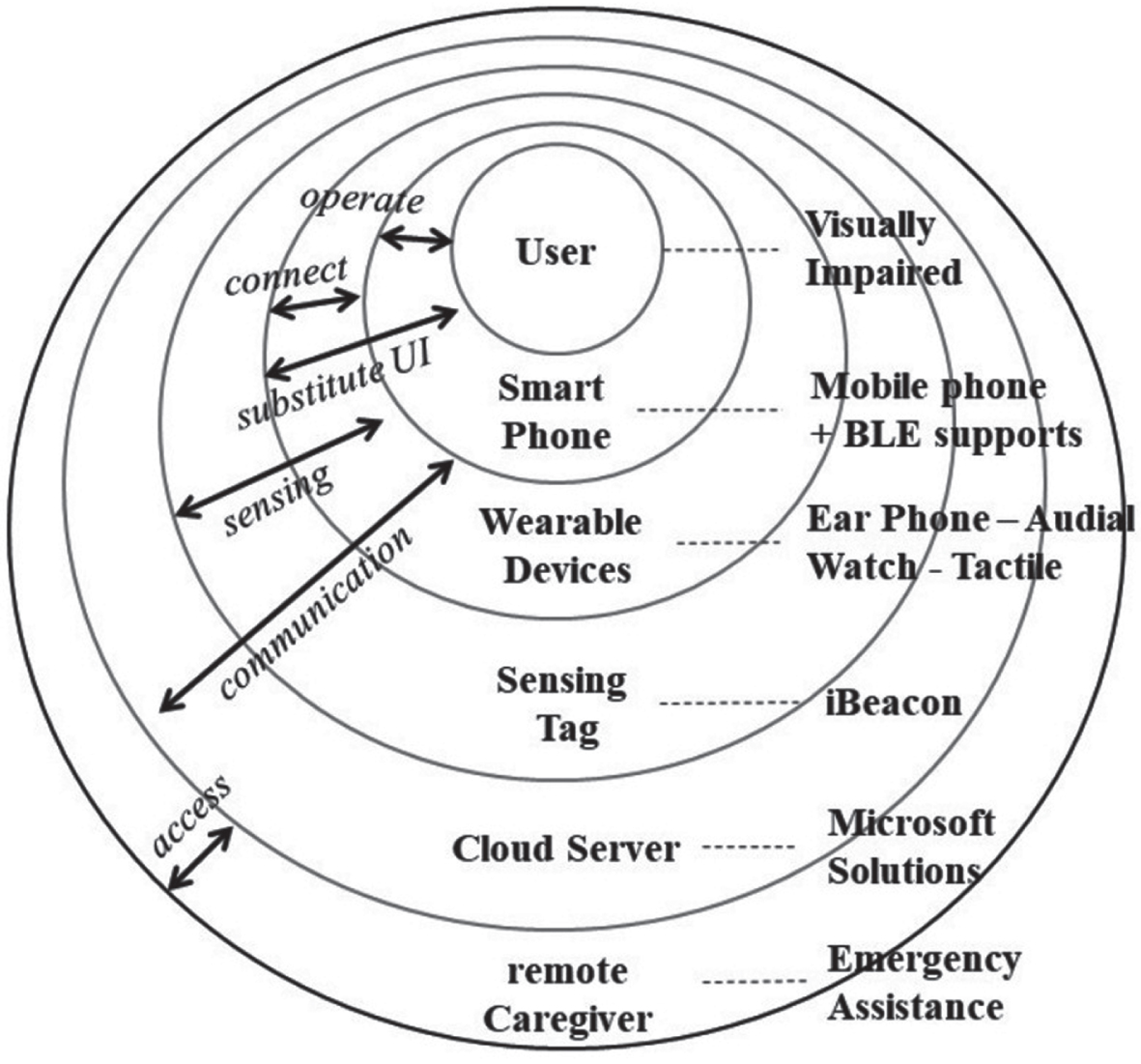
The simplified framework of the system.
Smartphones were widely used to support the applications of positioning and navigation mainly because they were highly-spread handheld devices and simultaneously were equipped with diverse sensors generally including compass, accelerometer, gyroscope and barometer. In order to improve navigation experiences and positioning precision, the researcher employed smartphones to integrate multiple positioning techniques and further develop a positioning system with sensor fusion. For instance, after a smartphone sensed the position of beacon tag the mechanism of sensor fusion could roughly estimate the current positioning with the help of accelerometer and compass sensor before receiving the beacon signal of the next positioning.
Another designing key point was that this system included area administrators to assist caregivers; in the existing researches related to applying iBeacon micro-positioning technique to helping the visually impaired, those researchers mostly focused on notices of guiding routes or messages and seldom researched the connection between users and the surroundings or outer caregivers. Once severe security events happened in the area, then caregivers couldn’t know the amount and position of the visually impaired and couldn’t assist them immediately. Besides, proximal modules could be used in off-line circumstances so that the visually impaired could connect with the surroundings and know their current positions swiftly and hence it could replace other guiding systems transmitting signals by the internet which would cause users’ sense of insecurity. Remote modules mainly enabled users taking care of the visually impaired (abbreviated as caregivers) to connect with users and understand their current statues.
In this system, the researcher used Android Studio as the development platform and JAVA programming language; the data were mainly presented by significant data sheets including data of caregivers, the visually impaired, help messages, and guiding maps etc. In the study, NoSQL’s dispersed concept was used to replace relational database and to do data planning. The characteristics of NoSQL database was its convenience of system development; when needing to obtain related information, we could just inquire by easy field inquiry without doing SQL inquiry. In addition, the information of data sheets of this system would be saved in users’ smartphones and database of remote servers simultaneously, and for data of the visually impaired and caregivers, user’s roles determined data that would be saved by smartphones. Figure 2 showed the sequence diagram of the system.

The sequence diagram.
The researcher had tested the system after development on realistic environments for checking its operation process and precision and then collected users’ feedbacks by a user inventory to understand whether it could effectively assist the visually impaired or not. The following sections included the design of experiment process, tool of experiment and result analyses.
Setting for the experiment
After designing this system, the researcher had tested it in the real world and the environment was set up as Fig. 5 showed. The researcher placed iBeacon upon the ceiling to avoid the affections from obstacles on the signal strength and utilized TxPower and Rssi information to estimate users’ position and Distance value to guide them indoors. The guiding method and process were shown in Fig. 3.

The Experiment setting.
The experiment of this study was conducted on one single floor in a building (refer to 4.1); the experimental subjects were totally 11 users after selection and they didn’t wear correctional glasses during the experiment. According to mild visual impairment, as one’s vision of the better eye was between 0.1(included) and 0.2 he/she belonged to mild level. In Taiwan, 0.1 to 0.2 nearly equalled to – 6 near-sightedness; based on the above, near-sightedness above – 6 belonged to mild level. When two eyes’ vision difference was higher 2, then it was highly different which would affect the sense of balance and 3D.
Before the test, users must remove their glasses and our assistants would lead them to the starting point; in the beginning, they held a smartphone on one hand to use this system during the process, and they used this system to select their destinations and finished the operation by themselves. During the process, they would move according to all types of prompts (such as voices, vibrations or colour blocks etc.).
The system started to guide them after they selected the destinations; they moved along the route that the system read, and if they moved toward the contrary direction, then it would read “wrong direction, please turn around”, and if they move toward the right direction then it would inform them to move on. For safety, the assistants followed these users during the whole process.
System evaluation method
Brought up by Kirakowski and Corbe, Software Usability Measurement Inventory (SUMI) was a method to measure system quality and users’ experiences through users’ perspectives [14]. It adopted strict methods of scientific analysis to evaluate users’ using experiences of a certain system, utilized a large-scale standardized database and SUMISCO tool to do analysis, and finally compared the collected data with more than 2000 items of users’ experiences of different systems through standardization in order to understand the differences with other systems in the market. This inventory was developed in versions of different languages (including English, German, Spanish, Dutch, Swedish, and Traditional Chinese) and also was verified by the teams of all languages; it has been used in the industries for 25 years. For international standard, SUMI was mentioned as one of the generally acknowledged methods which could test users’ satisfaction in ISO 9241 (Federal Aviation Administration, 2017). The features of SUMI allowed it to be suitable for evaluating users’ opinions of a small sample group; when users were selected appropriately, the sample amount could be 10 to 12, and the total testing period was short (Kirakowski,1994). Therefore, it was frequently used to collect using opinions about newly-developed software and evaluate the systems or system prototypes in research stages [15–17].
SUMI had totally 50 items including six dimensions of Efficiency, Affect, Helpfulness, Control, Learnability, and Global; the overall reliability was.92. The former five dimensions included 10 items; the Global scale consists of 25 items out of the 50 which loaded most heavily on a general usability factor. Because of the larger number of items which contribute to the Global scale, reliabilities are correspondingly higher. The Global scale was produced in order to represent the single construct of perceived quality of use better than a simple average of all the items of the questionnaire. The Affect subscale measures the user’s general emotional reaction to the software. Efficiency measures the degree to which users feel that the software assists them in their work and is related to the concept of transparency. Helpfulness measures the degree to which the software is self-explanatory, as well as more specific things like the adequacy of help facilities and documentation. The Control dimensions measures the extent to which the user feels in control of the software, as opposed to being controlled by the software, when carrying out the task. Learnability, finally, measures the speed and facility with which the user feels that they have been able to master the system, or to learn how to use new features when necessary [14].
In the inventory, the opinions of each item included “Agree”, “Undecided” and “Disagree”; in order to enhance the answering consistency, the items included both positively-worded and negatively-worded questions. Therefore, higher scores of positively-worded questions meant that this system was well and lower scores represented that it might need improvement. On the other hand, for negatively-worded questions higher scores meant that this system might need adjustment and lower scores equalled to positive feedbacks.
For standardizing the collected samples, SUMI used Item Consensual Analysis (ICA) to allow evaluators to find out usability problems more precisely rather than checking the whole inventory. The standardization database is used to generate an expected pattern of response for each SUMI item (i.e., how many Agrees, Don’t Knows, and Disagrees there should be for each particular item). The expected pattern of response is then compared with the actual, obtained pattern (i.e., how many Agrees, Don’t Knows, and Disagrees there actually are for that item). The observed and the expected patterns are then compared using a statistic distributed as Chi Square. SUMISCO formulated a series of formula based on the information of standardized sample and then converted those users original scores to the standard of the mean as 50 and standard deviation as 10. More than 68% of the system would find a score within one standard deviation of the mean, between 40 and 60. This represented that the system whose score by definition higher (or lower) than these points was greatly higher (or lower) than the average.
Results and discussion
In SUMI, the proposed range of the user amount was between 10 to 12 and hence the researcher invited 11 mild visually-impaired persons (described in 4.2) to test the system and fill in the questionnaire in this study. Later, the analysis and investigation of the dimensions of Efficiency, Affect, Helpfulness, Control, Learnability and Global were conducted.
Analysis of major dimensions
The researcher conducted the analysis on the collected questionnaires through SUMISCO developed by SUMI team and the calculation method was depicted in 4.3. Further, the researcher then summarized the users’ statistics of each dimension: including mean, standard deviation, median, IQR, maximum and minimum and made a box plot of the users’ standard score shown in Fig. 4.
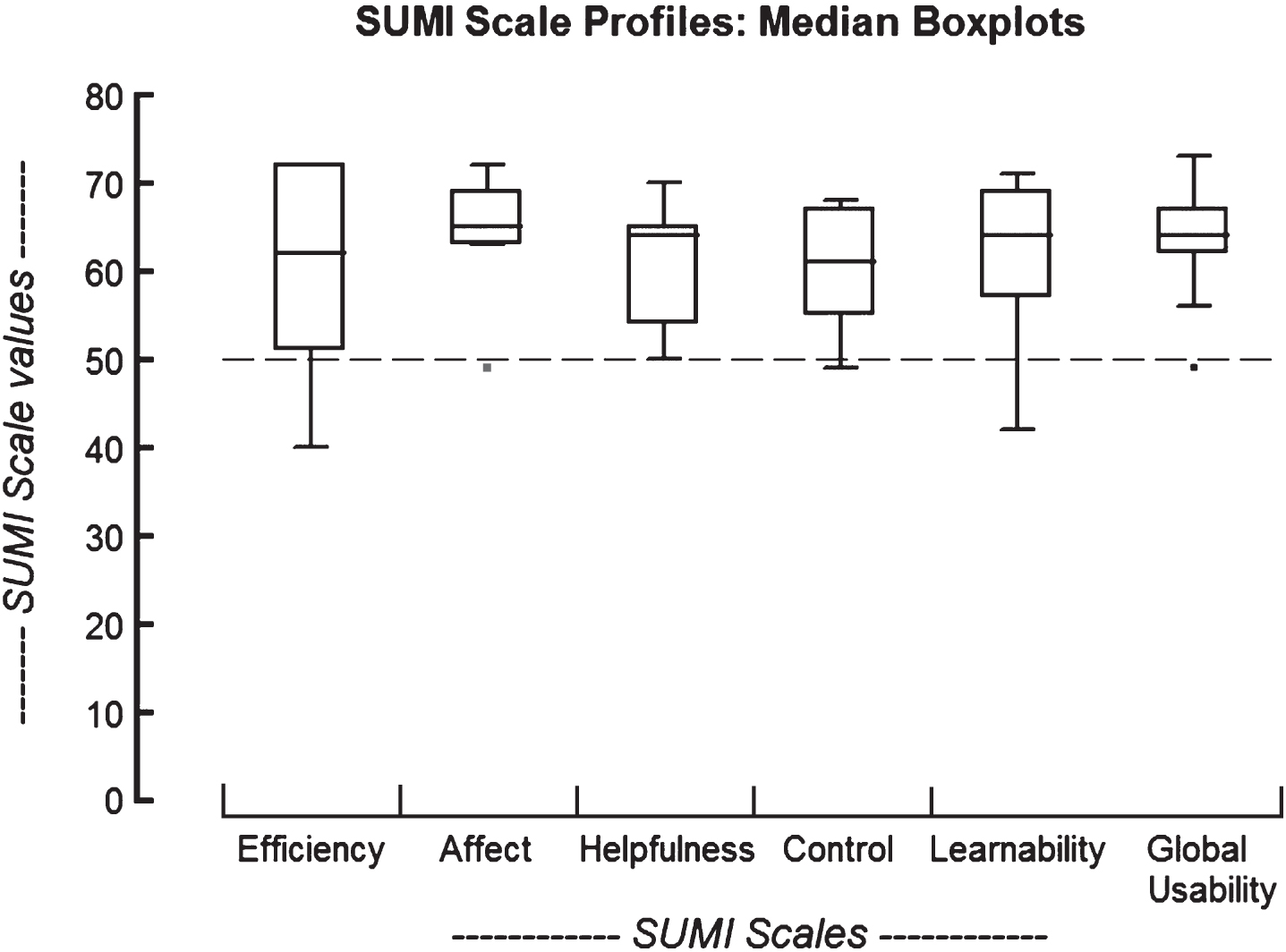
Box plot of users’ standard score.
Table 2 showed that the users’ mean values of Global, Affect, Helpfulness and Learnability were all higher than 60 and this meant that this system was above mean in the evaluation of the above-mentioned interfaces [14]. The mean values of Efficiency and Control fell within the standard range. Global dimension evaluated the general usability in SUMI and it included 25 items which allowed the evaluators to analyze the overall usability. The mean of Global dimension of this system was 63.73 which indicated that generally the user thought that this system could assist them in indoor guidance. Moreover, the Affect dimension of this system had highest score among all and this showed that the user had positive affection about using this system; it could be speculated that they felt pleasantly and positively during the process of using it.
The statistical analysis of the constructs
In addition, from Fig. 8 we could see the evaluation was centralized in each dimension. The means of Global and Affect dimensions were both higher than the average, and the evaluation was highly centralized. This indicated that the users’ scores of the above dimensions were overall highly centralized (only one outliner as 49), and this also showed that they were not greatly different and they had consistent opinions. The answers of Efficiency of the above figure were more diverse, and the possible reason was that some useres mentioned that the speed of providing guiding feedback was slow because the researcher had set up a longer time to transmit feedback signals of iBeacon. This meant that the users would receive feedback when they were closer to iBeacon, and this might lead to insufficient time for them to react. In future researches, we will adjust this parameter to provide users with feedback earlier.
The SUMI questionnaire that the researcher used included 50 items and the researcher analyzed the consistency of the feedbacks of all items. The research result of this study is shown in the Table 3. Among them, the consistency of 13 items was higher than 95% and this indicated that the users’ had quite similar opinions about these items, and these items were listed in the following.
Items with a consistency above 95%
Items with a consistency above 95%
Among them, items 6, 8, 24, 41, 46, were all negatively-worded questions; this meant that they highly disagreed with these negatively-worded descriptions so this represented that their feedbacks were positive. Among all positively-worded items, items 8 and 13 belonged to both Global and Helpfulness dimensions and it showed that the voice prompt of this system could assist them.
In the study of Zhang, Ong & Nee (2009), they mentioned that it might be helpful to read the voice prompt of the next step earlier for the visually impaired due to their visual impairment and brief and concise reading of guiding information could also assist them to overcome possible problems during the process.
Item 15 belonged to Learnability dimension. The results showed that the users regarded that the information this system offered was sufficient for them to understand the operation. In the study of Zhanget al. (2014), they also mentioned that we should try to use habitual gestures to reduce users’ process to learn or adapt to in the system that the visually impaired used. Therefore, for designing a system it was significant to reduce users’ learning burdens.
Items 6, 31, 41, and 46 belonged to Efficiency. Items 6 and 46 were negatively-worded items; this indicated that users thought that they could understand and expect the operation and process of the system. Item 31 showed that most users thought that their needs were fully considered in the design of this system. Item 41 was also a negatively-worded item, and the results showed that the operation of this system met the users’ expectations. The high consistency of the above items indicated that the services this system provided could satisfy these users’ needs; besides, users could understand the operation and logic of this system and therefore Efficiency of this system could be improved.
Item 17 belonged to affect dimension. The answering consistency reached up to 98% which corresponded to the purposes of designing this system to assist the visually impaired to walk indoors safely, independently and confidently. Items 24 and 39 belonged to Control; it meant that as users’ operational process was different from their expectations this system still had good abilities of response. This was highly crucial for planning and designing a system. It showed that the operation prompts should be very clear, and as users’ operational process was different from their expectations this system still was able to lead them to correct operation interfaces.
Item 31 was related to user satisfaction, and the consistency of agreement also reached up to 98%. This indicated that users’ needs were fully considered in the design of this system. Items 24 and 46 were related to users’ expected effects after operating the system, and the results showed that it was seldom that this system failed to be executed.
In the above table, the results of 3 items were highly consistent in “undecided”. In item 44 “Compared to other guiding systems, this system the guide was easier to use than others”, and this item had a consistency in “undecided” of up to 99%. The possible reason was that they had not used other guiding systems and hence couldn’t determine whether this system was easier to use than others or not. For item 11 “I sometimes wonder if I am using the right function”, 98% answered “undecided”. The reason might be that some users expressed that sometimes consecutive use of “click” and “long-press” would cause misunderstanding. Consequently, we can use “double click” to do selection to improve the correctness in the future. For item 18 “There is never enough information on the screen when it’s needed”, the consistency of “undecided” reached to 97%. One possible reason was that the scale of this experiment was small, and therefore there weren’t plenty of emergencies during the experiment and the system effects can be observed in more complex environments in the future.
The purpose of this study was to design a guiding system to assist and guide the visually impaired indoors. It had improved the issues of most assistive systems designed for the visually impaired including portables and demand for light. The researcher placed iBeacon in the environment with the cooperation with users’ smartphones, smartwatches, and Bluetooth earphones in order to provide multiple sensory interactions to provide indoor guidance. In addition, the connection between them and caregivers through using the internet could enhance their safety while walking indoors; moreover, they could be assisted immediately.
After developing this system, the researcher then conducted a real-world experiment and used a SUMI questionnaire to analyze users’ opinions and feedbacks. The results indicated that the design of the voice prompts of this system could effectively assist them; for interface design, these users thought that they could understand the interface without much learning cost and their scores of learnability and helpfulness dimensions were higher than the average. Besides, the efficiency and control of this system functioned quite well; the users wouldn’t be at loss when operating it and the overall interface was presented in full-screen layouts so that they wouldn’t operate it incorrectly. The high mean of Affect dimension also represented that they feel pleasantly and positively in using this system.
Moreover, the mean of Global dimension was 63.73, higher than those of other systems. This result demonstrated that this system had satisfied users’ needs and enhanced their confidence in indoor and independent walking. Nevertheless, the results also showed that it had something needing improvement such as adjusting several operations which might easily cause confusion, replacing “long-press” by “double click” to differentiate it with “click”, and finally providing adjustable reading speed for them so that they could adjust suitable using feedbacks.
The system of this study was expected to provide the visually impaired with a safer indoor guidance in order to improve their ability and confidence in independent walking. For future researchers, the suggestions included two parts. (1) User scale: In this study, the researcher invited 11 persons with mild visual impairment to test the system and provide feedbacks in the development phase; the sample of this experiment was limited and hence future researchers can invite users with different levels of visual impairment to do testing to obtain more complete feedbacks. (2) Design of experiment: The environment in this experiment was only limited to a single floor, and future researchers can increase the complexity of environments such as testing cross-floor guidance to observe users’ status and collect feedbacks so that the usability of systems can be improved.