



Abstract
Keywords
Introduction
Employment is an integral part of daily life for most adults. The National Longitudinal Transition Study 2 (NLTS-2) found that only about 38% of people with IDD are employed eight years after graduation, compared to 66% of similarly-aged peers without disabilities (Newman et al., 2011). The employment gap among youth with disabilities, especially those with IDD, has been a persistent challenge for educators and vocational service providers, as evidenced by the number of people with IDD who are unemployed or employed in sheltered workshops (Butterworth et al., 2011). Sheltered employment workshops can be problematic because of their high cost (quadruple that of community employment); artificial work environment with a narrow possibility for obtaining authentic employment; and frequent unproductive blocks of time throughout the day (Kiernan & Mank, 2011; Rogan & Rinne, 2011).
Common challenges individuals with IDD face in employment settings include following step-by-step directions, remembering previously learned tasks, completing tasks in sequential order, and transitioning from task to task independently (Mechling & Ortega-Hurdon, 2007). Previous research has shown that people with significant disabilities and support needs can succeed in integrated employment if afforded customized supports that are designed to remediate these challenges, such as self-prompting (e.g., Browder & Minarovic, 2000; Cihak et al., 2007; Mechling & Ortega-Hurdon, 2007). Self-prompting is an antecedent-based self-management strategy in which a participant manages his/her own visual, audio, and technology-based supports (Mechling, 2007). In integrated employment settings, self-prompting supports have been demonstrated to be an effective tool to help participants acquire new tasks (e.g., Copeland & Hughes, 2000; Lancioni et al., 2001), complete tasks more independently and accurately (Van Laarhoven et al., 2009), stay on task (e.g., Cihak et al., 2007), transition between tasks (e.g., Carson et al., 2008; Taber et al., 1998), and assist with using appropriate social skills (Cihak et al., 2007). Specific mobile technology devices used for technology-mediated self-prompting include iPods, iPads, and iPhones. In one example of technology mediated self-prompting supports, Van Laarhoven et al. (2007) utilized a pocket PC to prompt completion of vocational tasks that included clocking in/out, preparing food, and cleaning in a competitive community-based employment program with a resulting increase in accuracy of task completion and a reduction in prompts needed from job coaches.
Several considerations for video self-prompting must be considered in designing effective supports for employment settings. These considerations include training participants to use the device correctly, engaging in ongoing measurement of navigation, and programming for generalization of video prompting to other tasks (Mechling, 2007; 2008). Once prompts are created and saved onto the appropriate technology device, training methods must be selected to adequately teach participants on both the use of the device and completion of the tasks (Cihak et al., 2008; Taber-Doughty, 2005). Acquisition of skills to properly navigate devices can be one of the most challenging aspects of technology use for people with intellectual disabilities (Lopez et al., 2009). Thus, planning, implementing, and evaluating the participant’s navigation skills prior to introducing the support in the employment setting is essential to successful use of self-prompting technology when and where it is needed (Taber-Doughty, 2005; Van Laarhoven et al., 2010).
One important advantage of technology mediated self-prompting devices is their instrumental applicability for promoting generalization across behaviors and settings. Although previous research has demonstrated successful generalization of daily living skills, previous research has not specifically examined generalization of technology mediated independent self-prompting for vocational skills in employment settings (e.g., Trask-Tyler, 1994; Hansen & Morgan, 2008). Employers often require individuals to adapt to different locations, materials, and skills as the demands of the employment setting change or evolve. Utilizing technology based visual supports represent a powerful technology that can be applied to the continually changing demands in integrated employment settings. Employees must be able to complete multiple tasks and independently transition between tasks. Independent completion of tasks must occur quickly to allow for successful employment experiences. However, the research on using technology-based visual supports has limitations. Specifically, the limitations that exist in the literature on using technology based visual supports in employment are that the training methods used to teach technology use are unclear, rarely has data been taken on performance during training or accurate navigation during intervention, and generalization has not been assessed in implementation. Therefore, the purpose of this study is to investigate the effects of self-directed video prompting in integrated employment settings. Specific procedural components of this study that contribute to the literature are the application of video prompting in integrated employment settings and generalization to new tasks, settings, or people.
The following research questions guided this study: (a) What are the effects of video self-prompting using iPads on the percentage of vocational task steps completed accurately by young adults with IDD in integrated employment settings? (b) What are the effects of video self-prompting using iPads on the generalization of vocational tasks? (c) What are the effects of training young adults to use an iPad with modeling and least-to-most prompting on the task accuracy and correct navigation of a training task? (d) What are participants’ and job coaches’ opinions about the use of self-directed video prompting of vocational tasks in integrated employment settings?
Methods
Participants
Three adult males identified with intellectual disability, ages 20 to 26 years old, were participants in this study. Participants were recruited from a postsecondary program for individuals with IDD who were working in unpaid job internships or in paid integrated employment settings. To be included in the study the participants were: (a) required to learn at least three new tasks in the vocational setting, (b) able to visually view items on an iPad, and (c) able to repeat an action modeled on a video clip. Consent was obtained from each participant prior to beginning the study Job coaches assisted the primary researcher in obtaining verbal permission from each employer to film tasks and allow the participant to use an iPad to facilitate learning new tasks. Table 1 shows demographic and assessment information for each participant’s characteristics. The following provides addition information about each participant’s diagnosis, employment situation, and skills.
Participant Characteristics
Participant Characteristics
1Differential Abilities Scale. 2Wechsler Abbreviated Scale of Intelligence.
Perry, diagnosed with autism, was in his first year in the postsecondary program. He had experience volunteering in an animal shelter prior to enrolling in the postsecondary program. Perry’s long-term employment goal was to care for exotic animals. His initial internship training site was at a pet store. Perry’s job duties consisted of cleaning shelves and organizing displays. Perry had no experience using iPads, performing the assigned tasks or job duties, or using video prompting for support.
Cam, diagnosed with multiple disabilities, had significant limitations in intellectual functioning, gross and fine motor skills, and communication. Cam was in his second year of the postsecondary program, and had multiple work experiences both at the university and in the local community. Cam had a long-term employment goal of working with people in his community. Most recently, he worked at the library (shelving books and journals, sorting and delivering mail), the hospital cafeteria (making salads), and the Nisonger dental clinic (assembling trays). Although Cam had previous experience using an iPad, he had no experience using video prompting for support. Cam had previously been exposed to the tasks on the job site and had used an iPod for self-monitoring transitions between tasks with a checklist at the library.
Mac, diagosed with Down’s syndrome and a co-existing visual impairment, was in his first year of the postsecondary program. His long-term employment goal was to obtain employment in a field related to politics (advocacy), but was undecided after an internship in a legal office. He was also considering employment in the health field, as he has family members who work in that field. At the beginning of the study, Mac was participating in two jobs at the university, the athletic facility and the dental clinic. Mac’s job responsibilities at the athletic facility included cleaning and setting up for special events. His job duties for the dental clinic included cleaning and assembling dental trays for the dental hygienist, basic cleaning, and filing. Initially, the athletic facility was selected to implement the self-directed video prompting intervention, but the job routines varied daily and assigned tasks were unpredictable, therefore, the dental clinic was selected to conduct the intervention. Unfortunately, his job ended at the dental clinic because of frequent attendance violations. However, the intervention for the third task cleaning the breakroom, was able to continue, because the breakroom was accessible without going into the dental clinic.
The study was conducted in three integrated employment settings at the university and in the local community. The tasks and settings targeted for intervention varied across the participants (see Table 2). To be selected as a potential targeted task for the study, the task must have met the following criteria: (a) consistent or semi-consistent occurrence at the employment site, (b) similar procedure every time the task is completed (c) similar number of steps, (d) similar fine and gross motor requirements, (e) dissimilar enough in content to not be generalized from learning an earlier task (e.g., the tasks had to consist of the same procedures every time they were completed. Observation and data collection times ranged from 15 minutes to 3 hours, because intermittent completion of tasks not targeted for the intervention were also completed during data collection times.
Setting, Tasks, Time Allotted, Per Step, Generalization Tasks
Setting, Tasks, Time Allotted, Per Step, Generalization Tasks
Perry’s job duties included performing three tasks at the pet store. The pet store had approximately 30 rows of shelves in the center of the store with additional shelves along the perimeter. During baseline and intervention, a job coach, the experimenter, one or two store managers, two to three employees, one other student, and up to 15 customers were present at the pet store. The supplies used in the pet store included a spray solution for dusting, dishrags that the participant obtained from the rag area in the storeroom, and a shopping cart.
Recreation center
Cam completed three tasks at the recreation center. Two of the tasks (i.e., cleaning the treadmill and stairstepper) were done on exercise equipment in the cardiovascular fitness area. One of the tasks (i.e., equipment checkout) was done at the equipment checkout desk where up to two other student workers, a job coach, the experimenter, and occasional customers checking out equipment were present.
Dental clinic
Mac completed three tasks at the dental clinic. Two of the tasks (i.e., coding the sheet and setting up cleaning trays) were done in the back room at the dental clinic where the job coach, researcher, and ocassionally two staff members were present. Mac’s third task was cleaning the break room located in the same building as the dental clinic.
Technology
IPads (iPad 2 and iPad 4) were used throughout the study in self-prompting employment tasks utilizing the app MyPicsTalk, which allows for easy recording, combining, and adapting the video prompts. Video prompts of job tasks representing one step of a task were recorded using the iPad camera. The movies were then edited in the MyPicsTalk app and iMovie. Two combinations of videos were recorded, with the primary method being from the viewpoint of a spectator (i.e., showing a model performing the task) and the other, from the viewpoint of the participant (i.e., showing the salient features of the task such as words, numbers, and buttons) or tools used to complete the task (Legrice & Blampied, 1994). When participant view was used, it was for close-ups of a specific part of a step, and then a return to participant view. A one-sentence voice over instruction was embedded within the video-prompting clip (e.g., Sigafoos et al., 2007). iMovie on the iPad was used to edit videos as needed.
Additional details, such as captions or titles, were created and edited within the MyPicsTalk app. Headphones or speakers were available for use as needed. In addition, cases that allowed for the iPad to be set upright while the participants watched the video prompts were also available. However, the only participant who needed it to be set upright was Perry. The iPad was selected for this study because it is portable, has a larger screen for viewing, and the MyPicsTalk app was only available for the iPad. To use the iPad with MyPicsTalk, the user must select the app from the iPad (see Fig. 1 for screenshot); select the correct task from the list of available tasks; select the first step of the task by tapping it; and then click play to start playing the step. Finally, the user can swipe with one to two fingers to move to the next step of the task or tap the arrow with one finger to move to the next step.
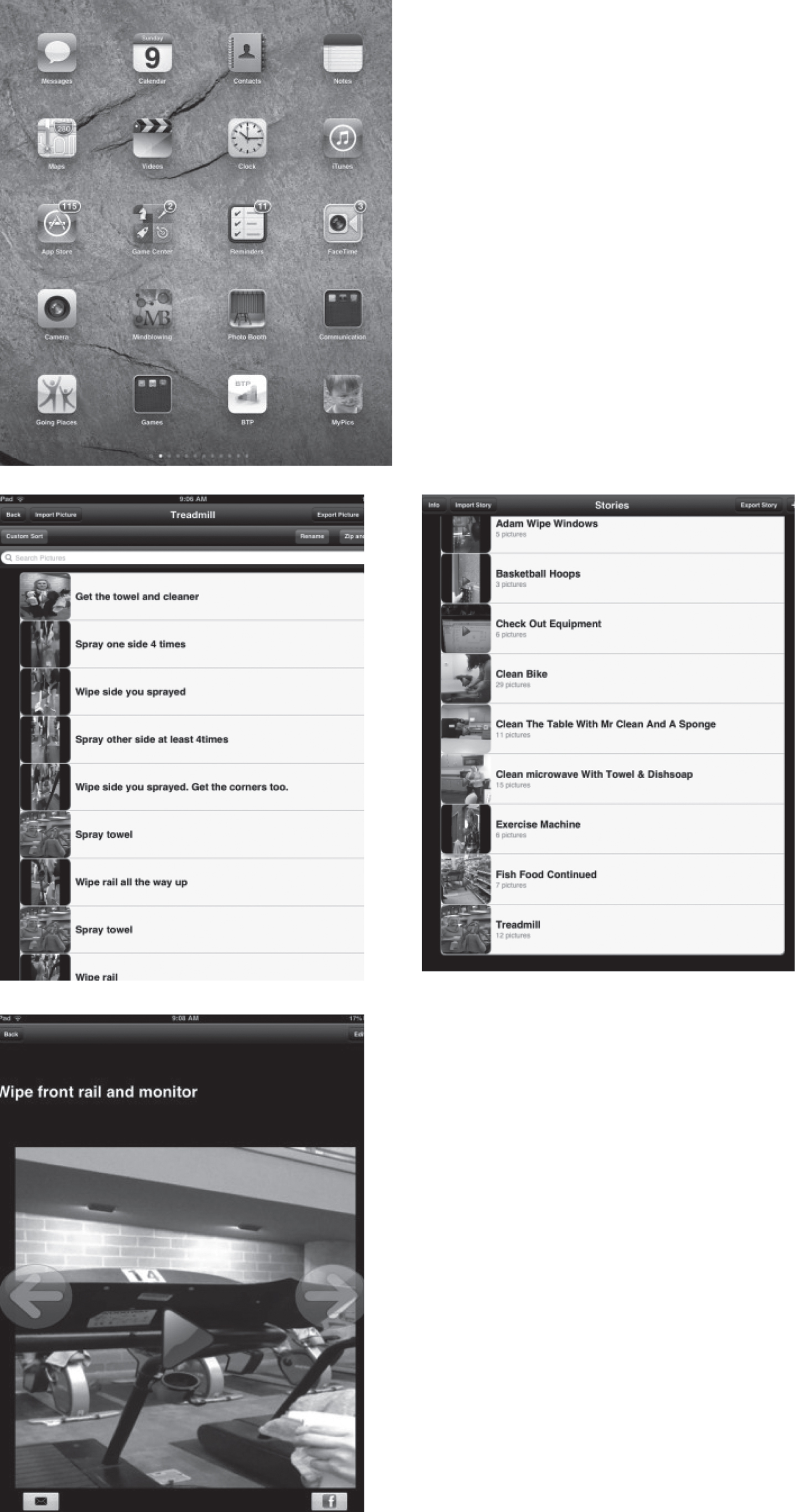
Screenshots of home screen, list of tasks, steps in treadmill task, and individual step of treadmill task.
Accuracy of task completion
Accuracy of task completion was measured by percentage of steps completed correctly without experimenter prompting. The participant had to begin the task within 5 s of the presentation of the video or picture prompt for the step to be counted correct. In addition, the step had to be completed within the allotted maximum time for steps of the task (see Table 2). The maximum time allotted for a step was determined by taking the longest duration of a step in the task and adding 10 s (e.g., wiping the top rail of the treadmill takes 24 s so 34 s would be the longest duration allowed for a step of the treadmill task before a step would be counted incorrect). The number of steps varied by task, but were identified prior to intervention through task analyses developed by the job site, job coaches, or the experimenter. The percentage of steps completed accurately was calculated by dividing the number of steps completed accurately by the total number of steps in the task and multiplying by 100.
Accuracy of iPad use
Accuracy of iPad navigation and usage was measured by the percentage of correct navigation and usage steps completed correctly without experimenter prompting. This was calculated by dividing the number of steps completed correctly by the total number of steps and multiplied by 100. The participant had to initiate the next navigation or usage step within 5 s of the completion of the previous step of the task, navigation, or usage for navigation to be counted correct.
Experimental design
A multiple probe across tasks design was used to determine the effects of technology mediated self-prompting on the acquisition of vocational tasks in integrated employment settings by participants with mild to moderate IDD, and a multiple baseline design across participants was used to evaluate the training for teaching device usage.
Procedures
Prior to beginning data collection, task analyses were developed for each task targeted for intervention. For existing internships, the task analyses developed by previous job coaches and occupational therapists were revised if necessary. For new integrated employment sites or new tasks within existing employment sites, task analyses were developed in conjunction with job coaches, supervisors, and/or occupational therapists.
Baseline
During baseline, participants received regular job coaching support and used checklists that were used by all employees. Baseline sessions were conducted at a time agreed upon by the job coach and experimenter that allowed data collection for a minimum of one task. Baseline sessions began with the experimenter giving the participant a verbal task direction (e.g., clean the treadmill). In each baseline probe, the participant was given 5 s to initiate a task step. If the participant did not begin the task step, the experimenter either turned the student away from the task and completed the step, or the experimenter or job coach prompted the student verbally or through modeling to complete the step. This process continued for all steps required to complete the task. Direction between steps was simply, “Keep going.” At the end of the session, the experimenter praised the participants for working.
Pre-intervention training
Prior to intervention, the participants were individually trained to use the device and app until they demonstrated the following seven key steps of usage and navigation: Turn on the iPad; select the app; select the specified task; play a clip; advance sequentially through the clips until the task is completed; exit the app; and turn off the iPad.
Data on correct navigation and task accuracy were collected to ensure that participants were able to correctly navigate the iPad and complete the training task with at least 90% accuracy across two trials. The training utilized a task analysis and iPad usage and navigation checklist to train and measure participant mastery of the required skills. The checklists consisted of a series of steps for assembling school supplies on a desk in a specified order. The participant was directed to complete the task using the iPad to learn how. A system of least-to-most prompting was used for error correction of usage and navigation. An error in navigation was defined as failing to complete any of seven steps. Error correction of task completion consisted of having students re-watch the video, then using a system of least-to-most prompts to correct errors. The least-to-most prompting procedure provided increased degrees of assistance with each incorrect attempt to complete the step prompts in the following order: verbal, gesture, partial physical, and full physical prompts.
An error in task completion was identified as failing to initiate the step of a task within 5 s of watching the video prompt, failing to complete the step within the maximum time allotted for step completion, failing to complete a step correctly according to the task analysis, or completing a step out of sequence. A final phase of pre-intervention training involved selecting the first task targeted for intervention from the task selection screen of MyPicsTalk. The participant had to correctly select the task for three trials in order to proceed to intervention on the first task.
Intervention
After baseline data were collected, the intervention was introduced for the most stable of the three tasks. The procedures for intervention mirrored that of the training task, except the task targeted were one of the vocational tasks selected for intervention. Error correction procedures used in the training task for both navigation and accuracy were implemented the same way during intervention. When the participant reached 80% accuracy across three consecutive sessions on the first task and had stable baseline levels for the second task, intervention for the second task was introduced. Similarly, when the participant reached 80% accuracy on the second task across three consecutive sessions and had stable baseline levels for the third task, intervention for the third task was introduced.
Generalization
Generalization was also assessed by either having students complete a similar task in the same setting, the same task in a different setting, or the same task with different materials or people (see Table 2 for generalization tasks). For example, Cam cleaned a different kind of treadmill. Mac completed generalization tasks with a similar kind of dental tray. Perry completed similar tasks in a different area of the pet store with different materials. For example, the video prompting tasks for boxes and bags for Perry focused on the boxes and bags of dog treats. Generalization probes consisted of shelves that included boxes and bags such as rodent bedding and vitamins. No error correction procedures were used during generalization settings. Additionally, for Cam, generalization procedures differed for Task 1. In the first intervention session, video prompting was used with an authentic customer. However, this created a time delay in getting the customer their equipment associated with video prompting; therefore, pseudo-customers were used for the rest of intervention. Authentic customers were used for generalization after intervention criterion was concluded.
Observer training
Data collectors were trained on the use of the forms for procedural integrity using videos of mock run-throughs of cleaning tasks or in vivo vocational tasks not targeted for intervention. The same task analysis forms used for navigation and accurate task completion were introduced in one-on-one sessions. Following a formal training, a trial run through with modeling of how to use the forms was conducted. Then the observer independently collected data on two trials. If agreement was at least 90%, then the observer was identified as trained. All observers achieved 90% or higher agreement in the two independent data collection trials. Finally, the observers were trained on the procedural integrity forms. Procedural integrity and IOA were assessed through a second observer being present and/or video recordings of sessions.
Interobserver agreement
IOA was assessed across all phases with at least 25% of baseline and 25% of intervention sessions of the study for each participant for accuracy of task completion based on the task analysis for each task and accuracy of iPad use. For Perry, IOA was assessed for 10 of 37 (27%) sessions and ranged from 90% to 100% (mean, 98%). For Cam, IOA was assessed for 15 out of 54 (27%) sessions and ranged from 80% to 100% (mean, 96%). For Mac, IOA was assessed for six of 18 (33%) sessions and ranged from 98% to 100% (mean, 99%). To calculate IOA, the number of agreements was divided by the total number of trials and then multiplied by 100 to give a percentage of agreement.
Procedural integrity
Procedural integrity was assessed in at least 25% of intervention sessions and was calculated by dividing the number of steps completed correctly by the experimenter by the number of possible steps implemented in the assessment and multiplying by 100. Procedural integrity was assessed for at least 25% of sessions using a procedural integrity checklist of the steps the experimenter should take to correctly implement the intervention and completed by a second observer. For Perry, procedural integrity was calculated for 10 of 37 sessions. For Cam, procedural integrity was calculated for 15 out of 54 sessions. For Mac, procedural integrity was calculated for six of 16 sessions. The overall procedural integrity for the study was 98%. For Perry, Cam, and Mac, the average procedural integrity was 93%, 96%, and 100%, respectively (range: 84–100%).
Social validity
Social validity data were collected from both participants and staff who work with the participants. Participant interviews were conducted through a structured interview (see Tables 3 and 4 for responses). Social validity data were collected from the staff using an anonymous survey administered through Survey Monkey. Five of the questions were adapted from social validity questions used in a previous video prompting study (i.e., Hammond et al., 2010). Staff members who responded included two job coaches, two program managers of the postsecondary program, and two job developers. Questions addressed opinions about the goals, procedures, and effects of the intervention.
Student social validity responses
Student social validity responses
Staff social validity responses
Navigation and accuracy of task completion in training task
Figure 2 shows the percentage of steps correct in accuracy of navigating the iPad during the training task and accuracy of task completion of the training task for all three participants. Overall, participants were able to acquire the skills to correctly navigate and use the iPad and MyPicsTalk to preset criterion levels (i.e., 90% across two trials), within two to five trials. A functional relation between the training and improved accuracy in training task completion and navigation accuracy was demonstrated through improvement only when the training on device usage was implemented.
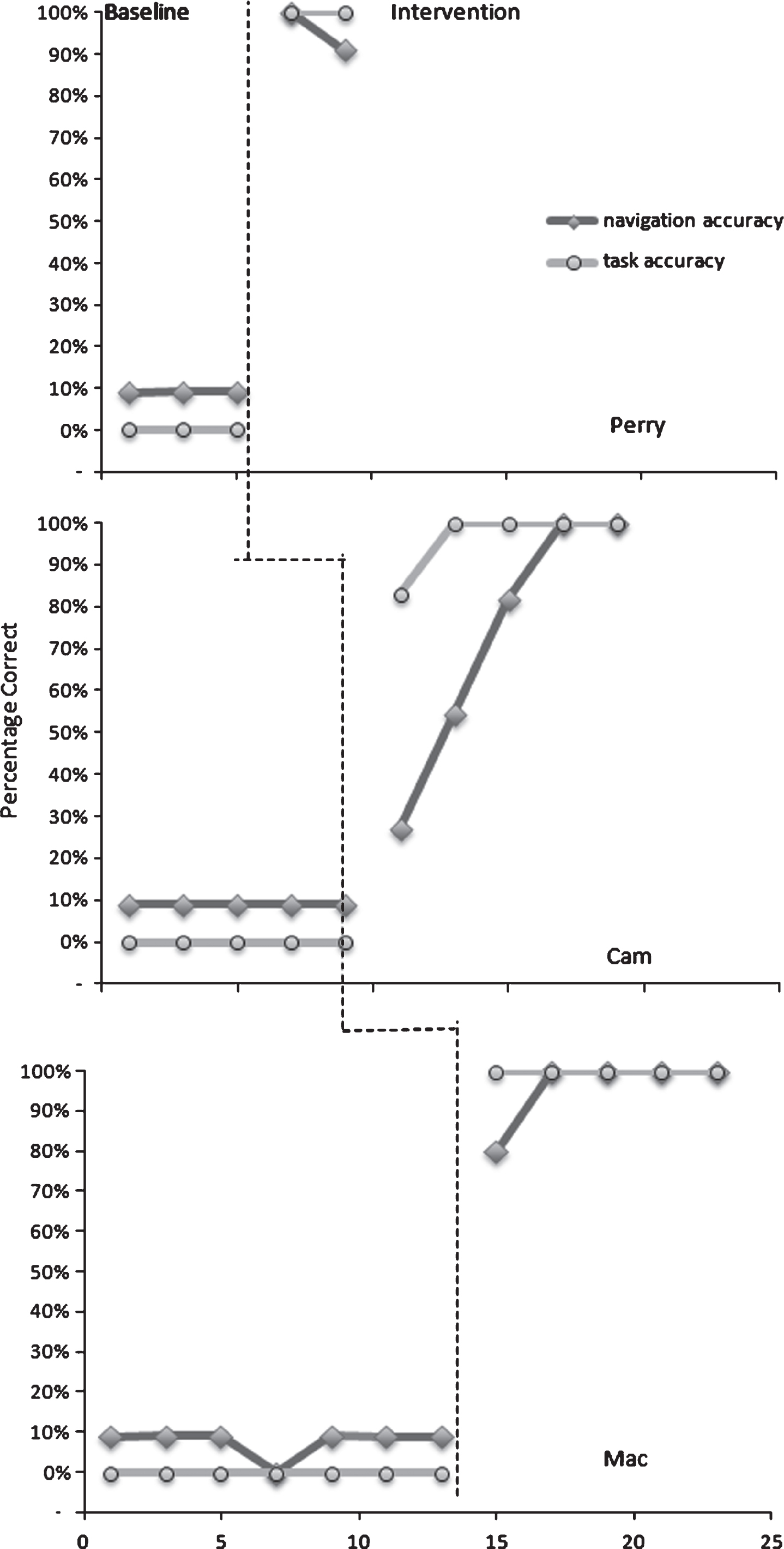
Navigation and Accuracy for Training Task.
Navigation of the iPad and MyPicsTalk app was measured throughout the study. Perry had 80% accuracy in Task 1 for navigation, but improved to 100% accuracy for Tasks 2 and 3. Cam showed steady improvement in navigation accuracy with each task; he improved from 85% accuracy in Task 1 to 91% in Task 2, and to 97% in Task 3. Mac showed consistently high accuracy in all three tasks, with his lowest accuracy in Task 2 of 98% accuracy.
Accuracy of task completion
Figures 3, 4, and 5 show the percentage of steps completed accurately for vocational tasks for Perry, Cam, and Mac respectively. Overall, video prompting was effective at increasing the accuracy of vocational task completion across all three participants. Baseline levels were low with stable scores or with decreasing trends prior to intervention. Once intervention began, there was an immediate performance change with accuracy increasing throughout intervention for all three participants. Additionally, each participant demonstrated generalization to new materials, settings, people, or response maintenance in two of their tasks. For each participant, there was one task where generalization was not measured due to changes in internship or obtaining another job.
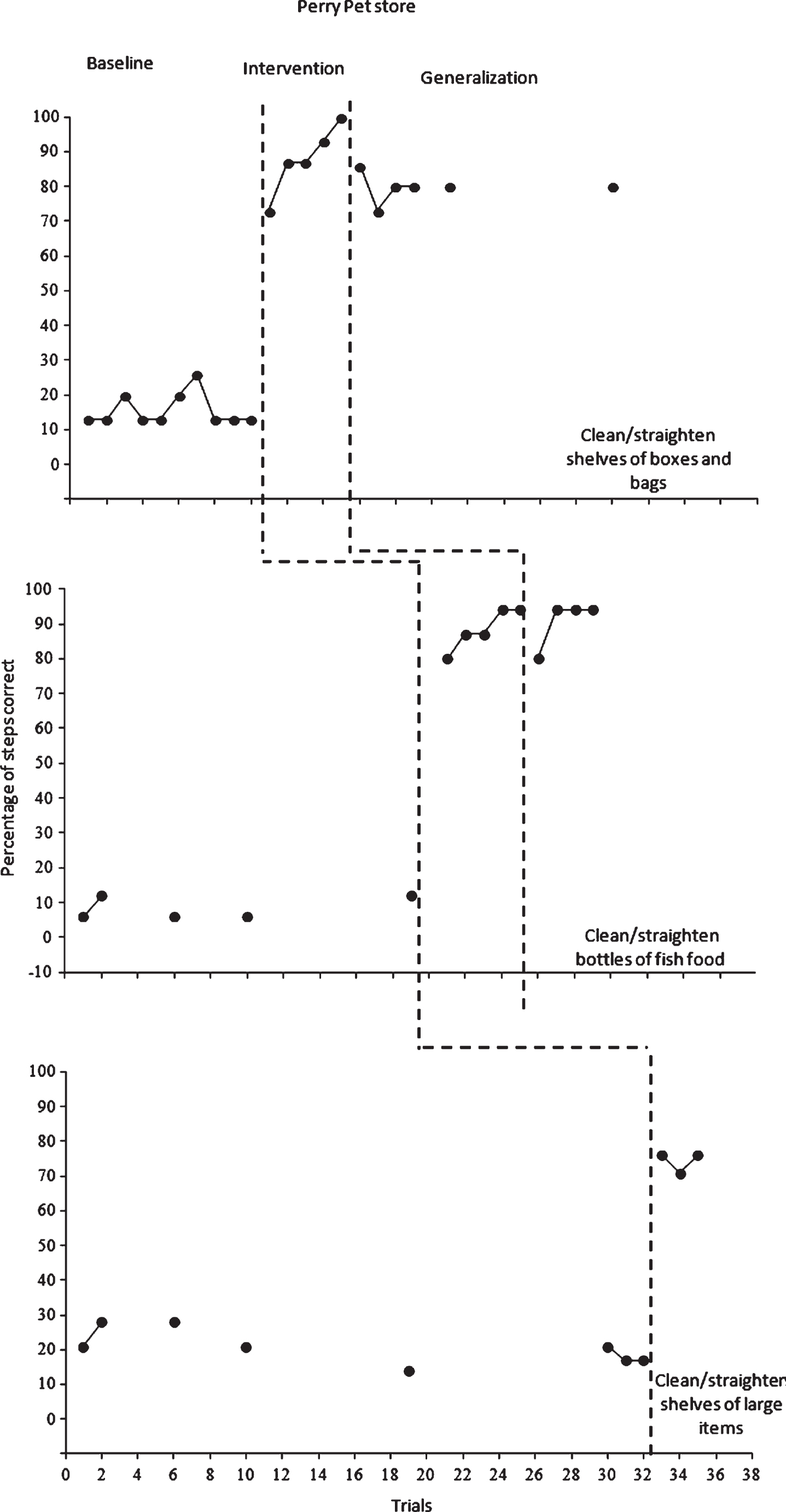
Perry’s vocational task performance.
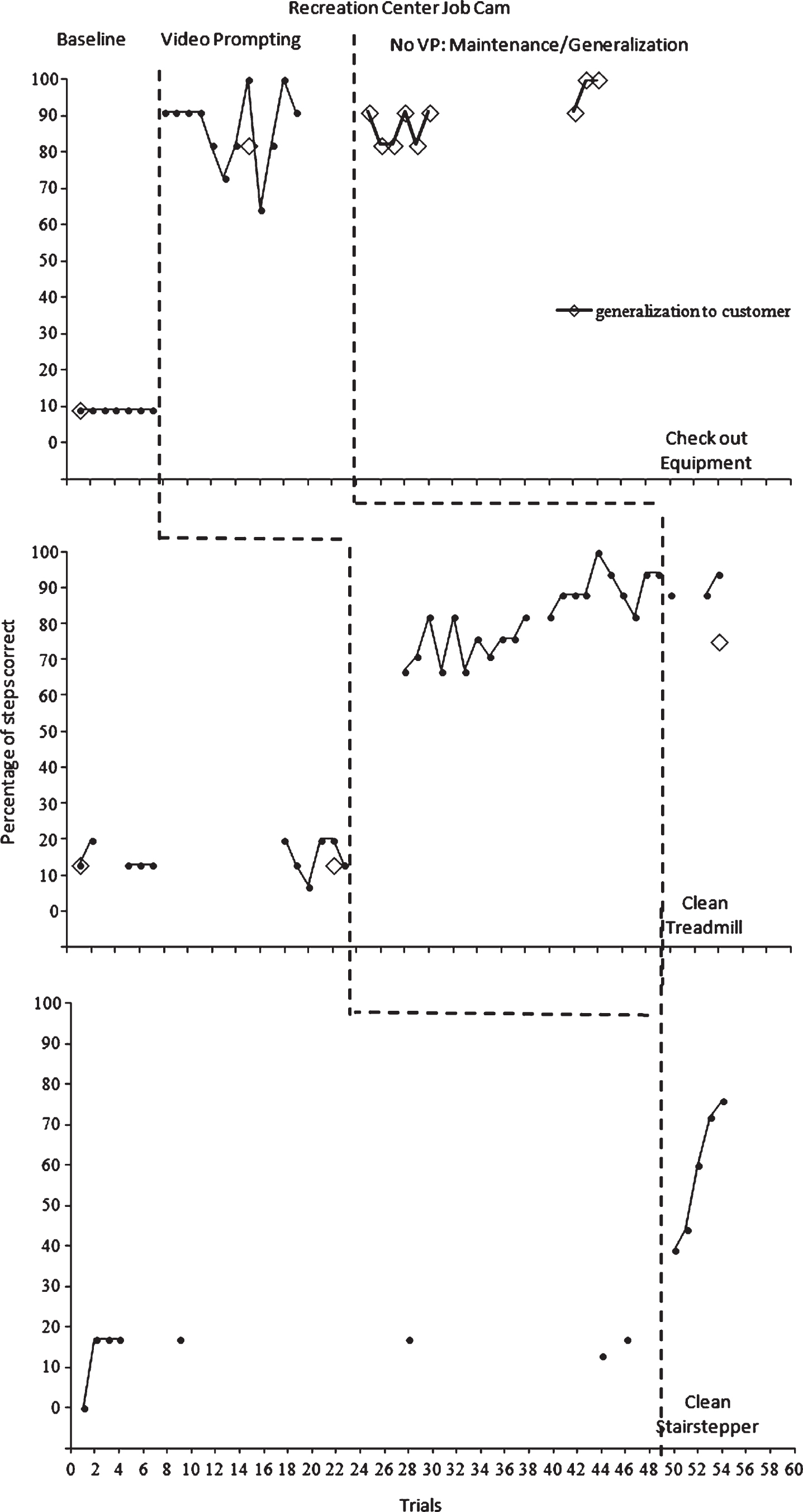
Cam’s vocational task performance.
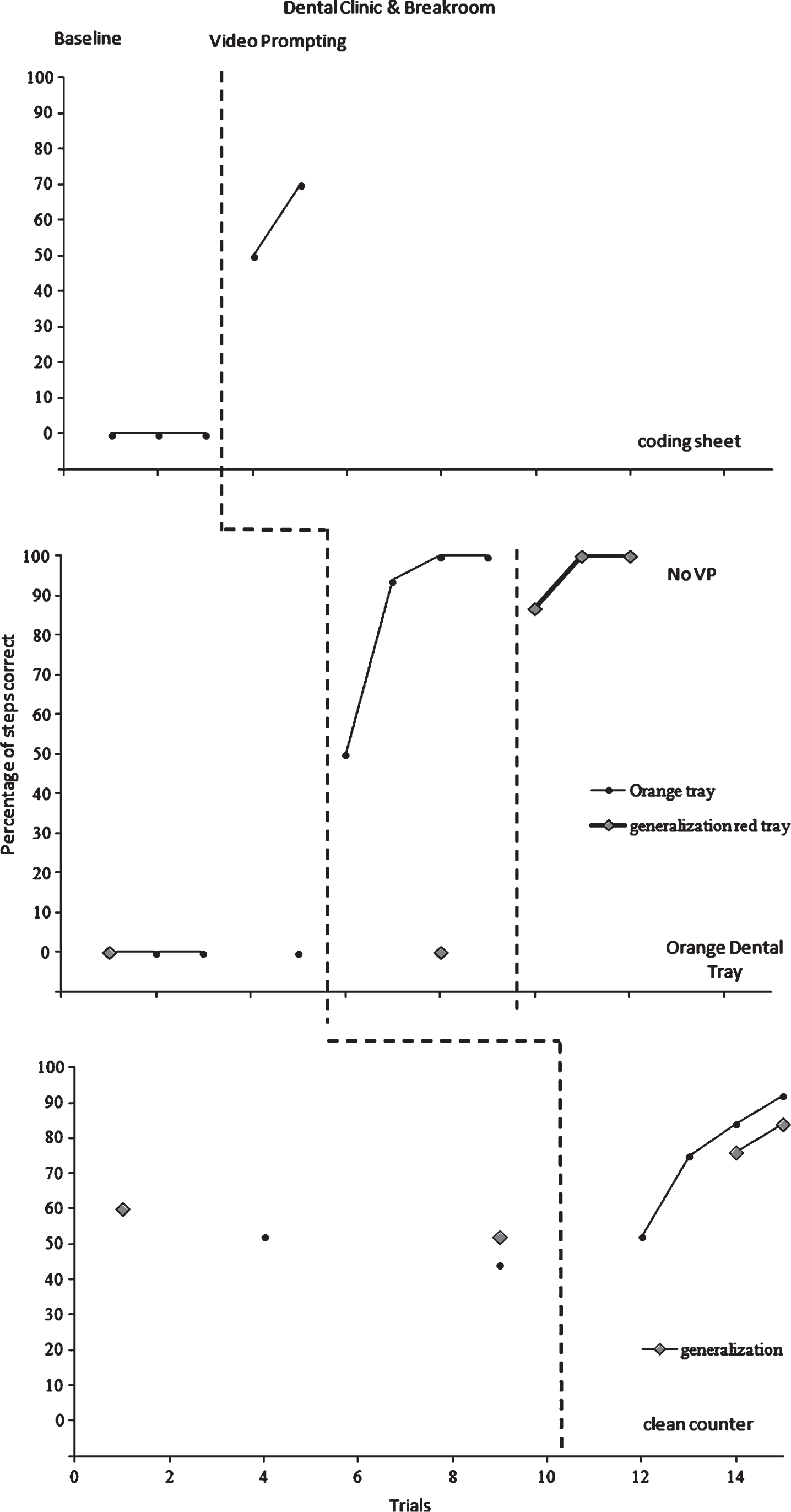
Mac’s vocational task performance.
This study demonstrates that self-directed video prompting using iPads was functionally related to improvement in accuracy of employment tasks by three young adults with intellectual and developmental disabilities in integrated employment settings. All participants successfully acquired three vocational tasks in integrated employment settings using the intervention. Finally, all participants successfully generalized two of the three tasks to new materials, people, or settings.
The results of this study are consistent with previous research using self-directed video prompting for vocational tasks (e.g., Cihak et al., 2008; Davies et al., 2002; Kellems & Morningstar, 2012; Van Laarhoven et al., 2009). However, there are key differences between the current study and these studies that make it a contribution to the literature. In Cihak et al. (2008), prompts were limited to audio plus picture and the focus of the study was on transition between known tasks with no new vocational tasks were acquired during the intervention. In Bereznak et al. (2012), vocational and daily living tasks were taught in mock vocational settings (i.e., teacher workroom and kitchen) using video prompting on an iPhone; however, the students did not maintain the instructed tasks after the iPhone was removed. Therefore, this study represents an advance because it was completed in integrated employment settings, and the students maintained the behavior after the iPad was removed. Two previous studies utilized self-directed video prompting in integrated employment settings (Kellems & Morningstar, 2012; Van Laarhoven et al., 2009), and one study utilized self-directed video modeling in an integrated employment setting (Van Laarhoven et al., 2007). In Van Laarhoven et al. (2007), self-directed video modeling was used, but participants had difficulty with device usage, and ongoing navigation data were not collected as in the present study. Additionally, the Van Laarhoven et al. (2007) study did not attempt to assess generalization to new materials or settings in any of the three self-directed video supports studies completed in integrated vocational settings mentioned above.
Regarding this study, generalization has been an issue identified by job coaches working with Cam in several previous internship sites. Cam’s relatively similar performance on generalization tasks to intervention tasks is promising, because it shows that when a task is mastered, similar tasks may also be mastered. Additionally, Cam has struggled in the past with generalizing to new people. He may complete a task in the presence of one person, but not in the presence of another. However, he was able to maintain performance of checking out equipment in the presence of authentic customers versus pseudo-customers. Using self-directed video prompting is a form of self-management intended to promote generalization through learning a strategy for acquisition of new tasks that can be applied to a variety of settings and tasks.
Recently, Cam began a new internship delivering mail in a building at the medical center. Video prompts were created for the job coach to implement. With Cam’s experience with video prompting, it was thought he would need relatively few prompts to utilize the iPad. However, he required multiple prompts to navigate to the next step in the task in the first three days of his internship. He also needed modeling to find the app and select the task. There had been a time delay of 5 weeks between the end of the study and the beginning of the internship. This lack of generalization of device usage and navigation to a new setting may indicate that Cam needs additional programming for generalization for it to be used in a variety of settings. However, it may also be attributed to the lapse of device usage between the two settings. Continuing to use a self-prompting device intermittently may be necessary for individuals with more intensive disabilities to maintain the skills needed for navigation and usage.
Response maintenance was assessed in four previous studies utilizing self- directed video prompting in integrated employment settings. Response maintenance was assessed in one data point for one of three tasks for the single participant in Van Laarhoven et al. (2009). Similarly, one data point was used in Van Laarhoven et al. (2007) for three tasks for one participant, with positive results that were equivalent to intervention performance. In Bereznak et al. (2012), response maintenance was assessed in all three participants. However, video prompting had to be re-implemented for all three participants because of a substantial decline in accuracy when video prompting was withdrawn in maintenance. In the present study, response maintenance occurred in one task for one participant in which it was measured (Cam). In Kellems and Morningstar (2012), maintenance was assessed for all three participants across two of three tasks. However, the iPod with video models was utilized during maintenance settings, which is different from assessing maintenance without watching video supports.
More specifically with two participants, there were factors related to navigation that potentially affected the outcomes in this study. Initially, when video prompting was introduced in Task 1, Perry was resistant to the use of video prompting on the iPad, and required reassurance that the use of video prompting would not make supervisors, or his job coach think he was not capable of performing his job. He required frequent prompts to watch the next video before performing the task; thus, his accuracy in navigation for Task 1 (80%) was much lower than Tasks 2 and 3 (100%). Once he was comfortable with using video prompting at his internship site, he did not express any further discontent with video prompting.
Cam had difficulties in navigation, particularly in Tasks 1 and 2. This may have contributed to the lengthy intervention phase in Task 2. His navigation error in Task 2 frequently occurred in two spots. Specifically, in step 6 when he was to spray the other side of the treadmill, and in step 12 when he was to spray the towel five times. These two steps were both a repetition of a previous step, just completed on the other side of the treadmill. His error consisted of navigating one step too far on these steps, and was heard twice to say that he had already done that. After trial 33, a verbal prompt consisting of the statement, “Remember, Cam you have to do that twice, go back a step and watch the video” was implemented in future trials when he made that error. That prompt was used in three subsequent trials (34, 36, and 37) after which he no longer made that specific navigation error.
The training for device usage in previous research has frequently left out specifics of required criterion levels and training procedures (e. g., Kellems & Morningstar, 2012; Furthermore, the training procedures have had mixed results. For example, one participant in Bereznak et al. (2012) shifted to teacher-directed video prompting from self-directed video prompting, because they could not acquire device usage after multiple training sessions. Similarly, the participants in Van Laarhoven et al. (2007) never acquired independent device usage and navigation in the training or subsequent intervention. The successful pairing of a training package consisting of prompting and a training task parallels successful device training in two previous studies of technology mediated self-prompting in vocational settings (Cihak et al., 2008; Van Laarhoven et al., 2009).
Limitations and future directions for research
There are several limitations to this study that should be considered in developing future research. First, the small numbers of participants make it difficult to generalize the results to a larger population. More research on the use of self-directed video prompting should be implemented in integrated employment settings to further validate the results of this study and previous studies utilizing video prompting in integrated settings.
Second, generalization was assessed in four different ways: response maintenance, generalization to new settings, generalization to new people, and generalization to new materials. Generalization was also assessed for all three participants, but only for two of their three tasks due to time constraints or limited availability of a generalization task. Future research could identify one form of generalization to strengthen the evidence for generalization of self-directed video prompting for vocational tasks, and assess that form of generalization across all the tasks targeted for intervention.
Third, the size of the device may have impacted results. Both participants and program staff identified the large size of the iPad as problematic. However, one participant had fine motor deficits, and one participant had a visual impairment, which was a factor in the selection of the iPad and the MyPicsTalk app as the tool for intervention. MyPicsTalk allowed for the video to be shown the entire width of the screen, and also allowed for both swiping or tapping in navigation. Future research could look at the characteristics of participants in the selection of a device, and compare screen sizes in best meeting the needs of individuals.
Fourth, this research was conducted in integrated employment settings, which inherently have frequent changes associated with targeted vocational tasks. Specifically, time tasks are completed, the frequency with which targeted tasks were part of the participant’s job responsibilities, additional tasks that take precedence over the targeted tasks, interference of coworkers, and differing requirements based on the supervisor or coworkers were evident in this research. Future research could look at controlling some of these factors. Similarly, some employment settings in this study had developed a natural support system for all employees, in which they worked in pairs. This made the use of video prompting a potential deterrent to the development of these natural supports. Additionally, baseline data included in vivo prompting. This could have allowed for ascending baseline trends, but did not. Procedures for handing these employment-setting factors should be a part of future research.
Fifth, long term maintenance data were limited, because of the short-term nature of the integrated employment internships in which the participants were engaging. Future research should attempt to collect maintenance probe data over longer periods of time in order to provide more evidence of behavior change over time.
Sixth, the focus of this study was an intervention to remediate one challenge in employment, the acquisition of vocational tasks. This inherently limits the applicability of the intervention to be a solution for all employment challenges. This intervention did not include components to work on challenges specifically faced by the participants in this study that became evident during the intervention outside the scope of the study. Specifically, arriving to work on time, and transitioning to different tasks were challenges that emerged during the study. Rather, the job coach provided supports for those areas. Future research may look at including more components targeted to social skills, difficulties transitioning between tasks, and personal responsibility. Additionally, future research may look at the impact of video prompting on long-term employment outcomes, as that also was not the focus of this study.
Seventh, the use of prompting the participant through completion of baseline tasks represents a limitation because it provides instruction during baseline. Future studies could turn the participant around during baseline tasks when an error is made to provide true baseline, rather than a baseline method that provides instruction.
Recommendations for practice
This study supports previous research that shows benefits for the use of video prompting in integrated employment settings (e. g., Bereznak et al., 2012, Kellems & Morningstar, 2012; Van Laarhoven et al., 2007; 2009). However, several considerations for practice also were evidenced when implementing the procedures of this study. First, the characteristics of the participant may warrant the selection of a particular device. Specifically, coexistence of fine motor deficits, or visual impairments may warrant the selection of a larger device. Similarly, smaller or larger assistive devices may also be necessary based on the requirements of the setting. For example, stationary sites such as the dental clinic were more conducive to the use of the iPad for video prompting over sites where frequent movement was required (i. e., recreation center).
Social validity data indicated a need for staff training on both implementation of the intervention and on creating new video prompts to match changing job requirements. Similarly, staff procedures for the creation and storage of video prompts may be necessary to allow them to be used in subsequent placement of participants in that employment setting. Involving staff in the creation of self-directed video prompting may alleviate some of the fears associated with self-directed video prompting. In a previous attempt to implement self-directed video prompting at an integrated employment site, the director of the site indicated to the experimenter that self-directed video prompting was an attempt to do away with job coaches.
The identification of settings and tasks was the single most challenging aspect of implementing video prompting in integrated employment. A framework for identification of tasks may make the process easier to identify whether a setting and/or task is appropriate for using self-directed video prompting. A flowchart (see Fig. 6) may be beneficial to practitioners to aide in identifying the applicability of a setting and tasks for self-directed video prompting.

Flowchart for determining appropriateness of video prompting.
Self-directed video prompting was effective at helping three male participants with intellectual and developmental disabilities each acquire three vocational tasks in integrated employment settings. Participants were trained to use an iPad with the MyPicsTalk app through a training package consisting of least to most prompting and a training task prior to beginning intervention. Participants were also able to generalize to different settings, materials, or people in two of their three tasks. Although developing employment for adults with IDD in integrated employment settings has challenges, the use of self-management supports to increase successful task acquisition has great potential to increase integrated employment outcomes for adults with IDD. Securing and maintaining employment will likely impact not only the finances of the individual with IDD, but also their quality of life through bringing purpose and social relationships typical of employment.
Conflict of interest
The authors have no conflict of interest to report.
Footnotes
Acknowledgments
This research was supported in part by an MCHB training grant (#T73MC24481) (supported first author) and a US Department of Education Grant Office of Postsecondary Education (# P407A100039) (supported postsecondary program).