



Abstract
BACKGROUND:
Technology is portable, affordable, and accessible, making it a viable support option for people with disabilities in the workplace. In the past, many supported employment programs relied on natural and paid job coaching supports with little to no use of technology.
OBJECTIVE:
The purpose of this two-experiment study was to investigate the use of a portable multimedia device to teach seven young adults with developmental disabilities to increase independence and decrease dependence on coaching prompts while performing a food preparation task.
METHODS:
Participants adhered to an industry specific protocol while using an application on an iPad that provided audio and video prompts. A multiple baseline across participants was used to show effects of the intervention on task performance and reliance on prompts.
RESULTS:
All participants were able to follow directions delivered to complete tasks accurately, while reducing the need for simultaneous coaching prompts. Maintenance probes were added to Study 2, and for two of three participants, newly acquired skills were maintained for eight weeks.
CONCLUSIONS:
Results from both studies indicated that using the iPad application to video model tasks was effective in improving and maintaining accurate skill performance, while reducing the need for prompts.
Introduction
Technology has become more portable, less-expensive, and less obtrusive and is considered a viable support option for people with disabilities in the workplace (Boles et al., 2019; Mechling, 2011). In the past, many supported employment programs relied on natural and paid job coaching supports with little to no use of technology, but this has changed (Gilson et al., 2017; Rusch & Braddock, 2004; Wehman et al., 2018). The shift from staff and peer supports to technological supports may be a viable method for increasing task performance and decreasing paid coaching support and time in the workplace (Burke et al., 2013; Sauer et al., 2010). Young adults with developmental disabilities have been shown to have the ability to self-manage behavior and complete functional, daily tasks independently when provided with support tools and technologies (Aljehaney & Bennett, 2019; Mechling, 2011). For example, technology has been used to (a) deliver prompts to increase independence of a previously learned skill (Van Laarhoven et al., 2009), (b) guide a person’s behavior by using pictures, video, or audio cues that precede occurrence of behavior (Mechling et al., 2010; Mechling & O’Brien, 2010), (c) increase a person’s ability to perform tasks without waiting for prompts (Gentry et al., 2010; Riffel et al., 2005), (d) reduce the need to memorize step sequences (Kearney et al., 2020; Van Laarhoven et al., 2009), (e) increase fluency and maintenance of new skills (Mechling, 2011; Van Laarhoven et al., 2012), and (f) increase independence in transitioning between tasks (Cihak et al., 2008).
Video based intervention (VBI) has numerous training benefits, including demonstration of desired skills in relevant contexts, use of multiple stimulus and response exemplars, and standardization of the presentation of training (Aljehany & Bennett, 2019; Baker et al., 2009). VBI has been found to result in faster skill acquisition by some learners, with generalization to untrained settings. Behaviors targeted for VBI include improvements and increases in (a) social interactions, (b) language and communication, (c) functional skills, and (d) employability; VBIs have also resulted in increased cooperation and decreased problem behaviors (Collins et al., 2014; Cruz-Torres et al., 2020; Hill et al., 2013; Plavnick et al., 2013; Rayner et al., 2009). Incorporating multi-media features (such as visual, auditory, and animated cues; a host of different types of commercial applications) into VBI may further address the unique and multiple learning characteristics of persons with disabilities. Multimedia prompting systems and applications (apps) can (a) increase the ability to make real time adjustments to antecedent prompts as the learner performance improves or tasks change, (b) decrease student errors during the sequence of a task, and (c) incorporate auditory cues along with visual prompts to minimize loss of attention to the task (Kearney et al., 2020; Mechling, 2011). A continued challenge is to examine applications of various technologies to determine which properties are the most beneficial and suitable to different individuals (Ayres et al., 2013; Mechling, 2011).
One study that included these multi-media features compared self-operated picture and audio prompting systems (Taber-Doughty, 2005). Although it was a comparison between two low-tech instruments, the investigator found preferred prompting systems were more effective in promoting acquisition and maintenance of new tasks. Two additional studies compared static picture prompting and video prompting simulation strategies (Cihak et al., 2006; Van Laarhoven et al., 2012). Cihak and colleagues found that students were split in their preference for video prompts versus pictorial prompts, however Van Laarhoven and colleagues (2012) reported their participants all preferred video prompting.
The current work includes a series of two experiments conducted at an agency who prepared adolescents and adults with developmental disabilities for employment. Study 1 was conducted to explore the efficacy of using an iPad-based intervention to promote acquisition of an employability skill. Study 2 replicated the findings and extended the research to explore the intervention’s impact on acquisition and maintenance. Specifically, the intent of these studies was to investigate the use of a portable multimedia device with built-in video, camera, text, and voice over capabilities to teach skill acquisition, increase task performance, and decrease job coach time engagement for people with disabilities. Both studies addressed the following questions: Will an iPad application improve accuracy of a food preparation employment skill by adolescents and young adults with developmental disabilities? Will the iPad application reduce the need for simultaneous job coaching prompts to perform the food preparation employment skill accurately? In addition to these questions, Study 2 was implemented to address an additional question: Will adolescents and young adults with developmental disabilities maintain the food preparation employment skill after the iPad application is removed?
Method
Participants
Participants between the ages of 18 and 22 were recruited from an agency providing supported employment and community living programs for adults with developmental disabilities. Criteria for participation in the study included: (a) a diagnosis of a developmental disability (e.g., autism, intellectual disability), (b) previous work experience, (c) an expressed interest in food preparation but no actual food preparation experience, (d) ability to navigate simple functions on an iPad device, (e) willingness to view a safety demonstration video, (f) ability to follow multi-step directions using video and auditory prompts, (g) ability to lift objects that weighed between 10–20 pounds, (h) ability to move within small areas of a busy work environment, and (i) willingness to maintain personal grooming (i.e., tied back hair and clean cut fingernails). Prior to beginning the study, a researcher sat with interested participants to review the above criteria and terms for study participation. All participants expressed interest in making smoothies and agreed to move forward. Four participants attended an after-school program at the agency, and three attended a district sponsored high school transition program at the agency. At the start of each individual participant session, the researcher walked the participant from his or her classroom located in one building on the agency campus to the breakroom in another building.
Study 1 participants
The four individuals selected for Study 1 participated in the agency’s high school employment transition program. Each applicant had a Transition Individual Education Program with a summary of employment history, work experience, and employment evaluation data from the Job Observation and Behavior Scale (JOBS). JOBS is an instrument developed to measure quality of performance and need for supports by employees with disabilities (Brady & Rosenberg, 2002). Results from the Work-Required Job Duties (WRJD) sub-scale were used to summarize participants’ employability status.
Jack was an 18-year-old male diagnosed with an intellectual disability, as well as visual and speech disabilities. Jack had experience working at a local food market as a volunteer stock person, and at Chili’s restaurant as a summer intern with duties that included portioning sugar, folding napkins, and rolling silverware. On his JOBS WRJD assessment, Jack scored below average for entry-level workers in: quantity of work, multiple task performance, organization of work tasks, and employee motivation.
Frank was a 19-year-old male with Autism Spectrum Disorder (ASD), and a language and speech impairment. Frank had paid work experience as a bagger at a grocery store, and a summer internship stocking shelves at a different store. On his JOBS WRJD assessment, Frank scored below average in: quality and quantity of work, performance on previously learned tasks, multiple task performance, organization of work tasks, safety procedures, cleanliness of work environment, and employee motivation.
Kim was a 21-year-old female with an intellectual disability, post-traumatic stress disorder, cerebral palsy, and a language impairment. Kim worked as a paid summer intern at Legal Aid, and had volunteer experience at Comfort Suites, Chili’s, an electronic recycling center, and a grocery store. On her JOBS assessment, Kim earned average or above average ratings on all items on the WRJD subscale.
Mike was a 20-year-old male with ASD and a language impairment. He worked as a paid summer intern at Chili’s, in non-paid work experiences at Walgreens (stocking merchandise), and in an electronic recycling center. On his JOBS WRJD assessment, Mike scored below average in: speed of learning new tasks, multiple task performance, safety procedures, cleanliness of work environment, and employee motivation.
Study 2 participants
Three individuals selected for Study 2 participated in the agency’s after-school transition program. Their Transition IEPs did not include JOBS employment assessment data, but did include disability diagnoses and employment experiences. Greg was a 19-year-old male with an intellectual disability. Greg had paid and volunteer work experience in a barber shop performing janitorial duties, at a hotel where he cleaned the breakfast area and conference room, and at Walgreens, stocking shelves. Greg also had experience in the agency sweeping floors, cleaning tables, washing dishes, and assisting children in a childcare program. Amy was a 21-year-old female diagnosed with an intellectual disability and language impairment. Amy had work experience waving signs for a small business, at Comfort Suites performing light housekeeping, and with a store performing inventory and pricing tasks. Amy also volunteered at the agency’s childcare program. Erin was a 22-year-old female diagnosed with an intellectual disability, along with orthopedic, speech, and language disabilities. She had paid summer work experience as a teacher’s aide in a childcare center, and as a volunteer at the agency’s senior day program.
Setting
Both studies were conducted in the agency’s staff break room (approximately 34 ft.×26 ft.). The room contained eight tables, each with four chairs; three large garbage cans; two electronic paper towel dispensers; one sink with a soap dispenser; and one standard sized Maytag refrigerator/freezer (approximately 51/2 feet tall). The counter used for the food preparation task (smoothie preparation) was approximately 5 feet wide and 2 feet in depth. The refrigerator was approximately 12 feet from the counter. The blender was stationed on the counter along with blender cups, the blender blade, measuring cups, the tablespoon, oatmeal, cocoa powder, and paper cups. The iPad used for the intervention was positioned on the counter, on a stand between the blender and the ingredients. The breakroom was selected instead of implementing the intervention in a community work site for two reasons. First, although the breakroom is not a work site, it operates as a kitchen and breakroom, and is similar to many office and other work environments in which many students from this agency gain work experience. That is, many work environments have kitchen areas and breakrooms similar to the one at this agency. Second, because all of the participants were engaged in numerous work and school activities, implementing the intervention at the agency provided the opportunity to include all of the participants in the training.
Task selection
The focus of the studies was to teach food preparation. Making smoothies was the target, a healthy independent living skill and a potential employment outcome in some commercial ventures. There are numerous smoothie combinations, and many require an intricate mix of ingredients. Therefore, several factors were considered when selecting the specific smoothies. Task analyses for all smoothies could be completed with 10 or fewer steps, with a total completion time of 1 minute or less. Ingredients were available for purchase at local grocery stores. All smoothies could be created in a stationary setting, so participants could watch the videos on an iPad secured on a stand at the counter. Finally, participants were encouraged to drink the smoothie or give it to a friend when the task was completed. Four smoothie recipes were selected for Study 1; only one smoothie was chosen for Study 2.
Materials
Participants in both studies used a 16GB iPad device, 9.5 in. × 7.31 in. × .37 in., weighing 1.44 pounds. The iPad had a 9.7-inch widescreen multi-touch display, 2048-by-1536 pixel resolution at 264 pixels per inch. Although multiple devices have video and viewing capabilities similar to this device, the iPad was chosen for three reasons: (a) the 9.7-inch screen is larger than smaller phones and assists participants view videos positioned up to 2 feet away, (b) icons on an iPad are easier to navigate and control than those on smaller devices, and (c) when working at a food station, the iPad could be displayed on a stand and did not need to be portable. In both studies, an iOstand stand was used to display the iPad. The stand displays any full-size tablet, 7 inches above the counter on an adjustable mount, using a magnet and rotating mount. Participants in this study touched the screen with a finger to navigate functions on the iPad. If gloves are required as a part of safety and sanitation requirements, a stylus can be used to navigate the app.
Participants in both studies used Picture Scheduler, a task organizer app designed for people with disabilities, meeting universal design standards. The Picture Scheduler app is compatible with iPad, iPod touch, and iPad devices. Users can create visual tasks with audio, video, pictures, and alarms. Tasks can be organized into categories (such as work or home) and each category can be supplemented with an attached picture. For these studies, a category folder was created for individual smoothies, and a series of videos was loaded within each folder. When the icon of a smoothie was touched, a list of videos was displayed. When the icon for each task was touched, a video showing an investigator completing the task began playing (see Fig. 1). For example, when the icon for the Strawberry Banana smoothie was touched, another list of icons was displayed with a picture representing each task (such as pouring milk, adding strawberries and ice, and operating the blender). Touching the icon for the ice played a video of the investigator retrieving ice from the freezer and placing three cubes into the blender cup. All videos were 1 minute or less. When the video was complete, the app displayed a “Hide” icon represented for the completed task. The Ninja Ultima Blender, model BL830, was used for both studies. The blender included a 16 oz. Pro Nutri Ninja Cup (referred to as “blender cup”), a Nutri Ninja Blade Assembly (referred to as “blade set”) and a motor base.
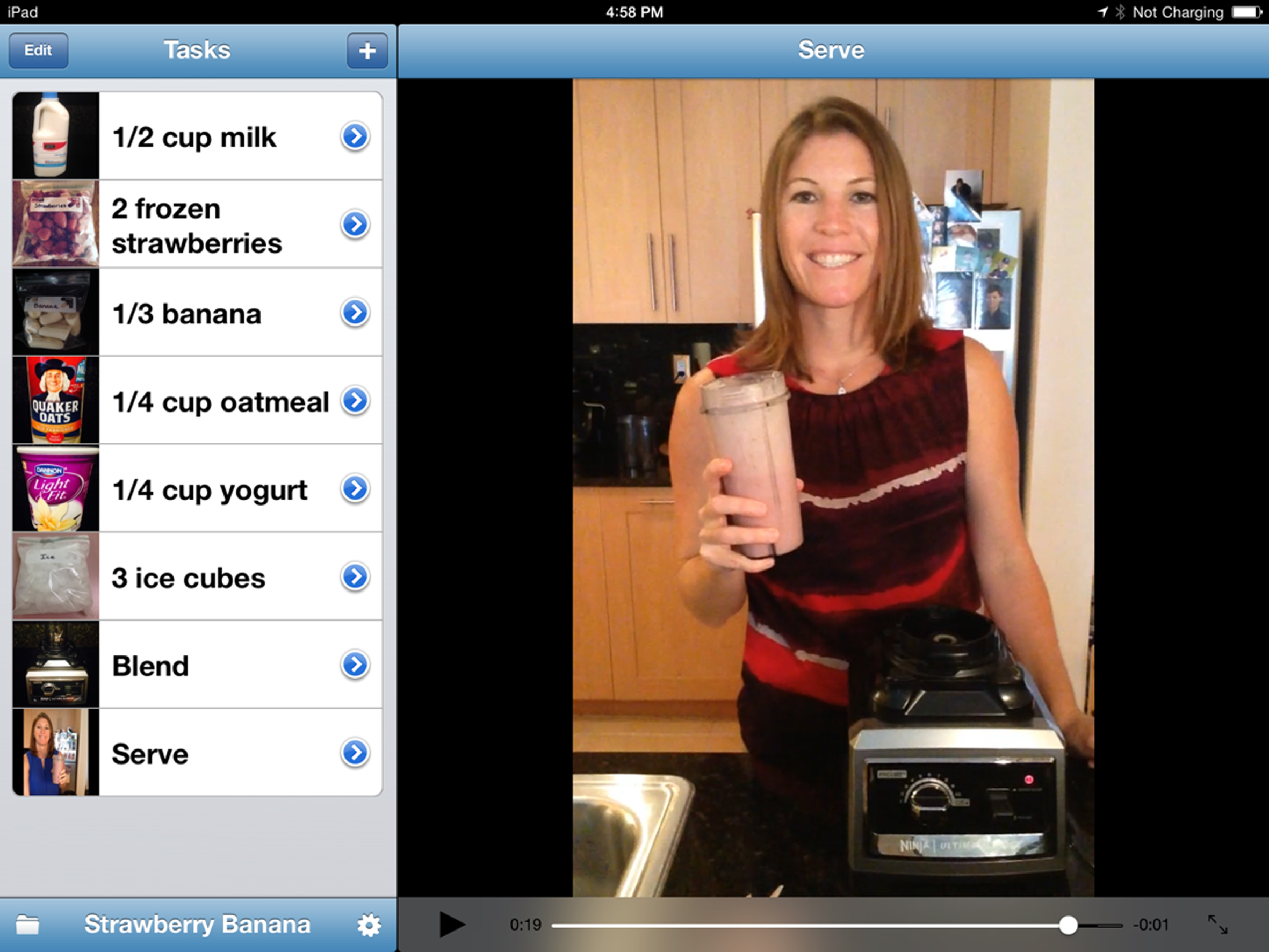
Picture scheduler application.
The independent variable consisted of two types of prompts, visual and verbal, delivered as a package to promote accurate task performance. Visual prompts were displayed in the video app on an iPad, and paired with audio instructions. Verbal prompts were given by the first author. Participants were asked to view video segments via the Picture Scheduler app. Video segments showed an investigator demonstrating each task, and were labeled with a picture of the ingredient and measurement. Each video instructed participants to: (a) retrieve materials and ingredients, (b) measure ingredients, and (c) place measured ingredients in the blender cup. The video had both visual modeling and verbal narration. Participants were encouraged to refer to the video segment when completing the task, if needed. When each video was complete, the task analysis re-appeared with a “Hide” icon represented for the completed task.
Dependent variable
Task performance and completion time were the two dependent variables for both Study 1 and Study 2. Smoothie production required that participants complete tasks in a chained sequence, and this performance was categorized as: (a) completed the task accurately, (b) made an error, or (c) did not complete the task. Accurate task completion was defined as completion according to the steps and order demonstrated in the video. (Although the order in which ingredients were added have little bearing on the “accuracy” of a smoothie, the protocol required sequential tasks to emulate job performance expectations in the food preparation industry.) Errors were defined as either a procedural error (e.g., using the wrong measurement) or a non-response error (if a participant did not respond within 6 seconds).
To convert the dependent variable to a metric for the graph, researchers adopted a 10-point coding system. Eight of these points were derived from the eight steps in the task analysis. To strengthen the habit of completing the tasks in a particular order, a requirement common in many food preparation tasks, a ninth point was assigned when all steps were implemented in the order as described. Finally, a tenth point was added if the smoothie was completed without using extraneous ingredients. This 10-point system was converted to a percentage correct graph for each participant.
Participants were not given a rate parameter to complete the smoothie, nor were participants aware that completion time was being recorded. Completion time was measured for all intervention sessions in Study 1 and for both intervention and maintenance sessions in Study 2. Completion time was defined as the number of minutes taken to make the smoothie. Time was measured using the clock function on a smart phone, starting when an investigator said, “Please begin” and ending when the participant opened the blender cup.
Data collection
Two observers and an investigator collected all data during the studies. Observers had two or more years of experience working with adolescents and adults with developmental disabilities in vocational and educational settings, and had graduate degrees in Special Education or Social Work. Prior to beginning each study, the observers practiced the data collection system by observing other adolescents and adults during live and recorded observations until they achieved a minimum of 90%agreement on the code.
Observers collected data for three measures: (a) accurate task completion, (b) prompts, and (c) task completion time. Data were collected using a paper-pencil template, with observers coding each step on the task analysis, and the time taken to complete the task. Data collection began after the initial prompt, “Please begin.” During intervention sessions, observers coded whether participants watched the video, prompts delivered, errors made and, if so, the types of errors. The data were converted to the point system described previously to account for accuracy and order of the tasks, prior to being transferred to the graphs. Data were collected once daily during baseline and follow-up conditions. When afforded the opportunity to increase training to create a more robust intervention condition, training was increased and multiple observations were conducted during a single session. Due to scheduling and timing, the number of sessions was sometimes limited, leaving some training sessions more robust than others. In order to make the training sessions equivalent, the data from multiple sessions on the same day were averaged and the average score was then recorded on the graph.
Interobserver agreement
Data were collected simultaneously by two observers during all experimental conditions to establish observer agreement for each study. Observer agreement on the task codes (steps in the task analysis) was calculated using the formula: agreements divided by number of agreements plus disagreements, multiplied by 100%. Observer agreement on completion times was calculated using the formula: smaller time divided by the larger time, multiplied by 100%. During Study 1, 53%of the sessions had observer agreement checks across all participants, resulting in 100%agreement on task codes and 87%agreement on completion times. During Study 2, 24%of the sessions had observer agreement checks across all participants, resulting in 98%agreement on task codes and 89%agreement on completion times.
Procedures and fidelity
All participants watched a 1-minute video demonstration on how to safely assemble the Ninja blender (Ninja Blenders, 2014). Thereafter, participants were prompted to wash their hands prior to every baseline, intervention, and maintenance session. We did not have a prompt for handwashing on the Picture Scheduler app, but a researcher ensured that hygiene protocols (i.e. dirty fingernails, hair tied back) were in place prior to the start of each session. Participants were only exposed to recipes, equipment, training, and scripts for making smoothies during intervention. During the study, we did not ask participants to participate in clean-up.
Baseline
To increase procedural fidelity of both studies, an investigator read baseline instructions from a script prior to each baseline session. All materials were located in the freezer, refrigerator, or on the counter. A session began when an investigator requested, “Please begin.” If a participant did not begin, an investigator used an additional verbal prompt to participate. If a participant was unable to complete Task 7 (blend) or 8 (serve), a hybrid opportunity probe was used, with the investigator completing the task out of the participant’s line of vision.
Intervention
As in baseline, an investigator used a script to guide the procedures during the intervention. All materials were available in the freezer, refrigerator, or on the counter. The “Please begin” prompt was used to initiate the session, and the intervention required that the participant listened to scripted instructions before starting. The script prepared each participant to make the smoothie by viewing the video and following the steps in the Picture Scheduler app. If participants were unsure of what to do, they were encouraged to review the video segment again.
If participants made errors during the intervention, a video-referenced error correction procedure was used (Van Laarhoven et al., 2010). This procedure included a series of prompts aimed to promote participant self-correction, requiring participants to refer back to video clips in the Picture Scheduler app. Errors were scored as one of two types: procedural errors (PE) (e.g., wrong measurement or wrong ingredient) or a no-response error (NRE) (participant failed to respond within six seconds). For both errors, an investigator stopped the participant from continuing and verbally prompted the participant to watch the video. If a participant made an additional error after watching the video, the investigator again stopped the participant from continuing and verbally prompted the participant to re-watch the video. If a participant made an error after watching the video twice, the investigator again stopped the participant from continuing and said, “You seem to be having trouble with this task; let’s try watching the video together.” The investigator then played the video in segments, pausing after each video demonstration to allow the participant to perform the task. After each video segment, the investigator repeated the verbal instruction or asked the participant to repeat the instruction provided in the video. Finally, if a participant failed to complete the segment correctly after watching the video in segments, the investigator said, “Let’s watch that one more time,” and again repeated the verbal instruction as a prompt to begin. If a participant continued to make an error after the correction procedure, the investigator marked the step as “Incomplete” and completed that step for the participant.
Maintenance during Study 2
During Study 2, maintenance probes were added four and eight weeks after the intervention was removed. As in other conditions, an investigator used a script to guide the maintenance procedures, and began each session with a prompt to begin. All materials were available in the freezer, refrigerator, or on the counter. As in baseline, no intervention activities were delivered during the maintenance sessions.
Experimental design for Study 1 and Study 2
A multiple baseline design across participants was used in each study to demonstrate effectiveness of using the Picture Scheduler app on an iPad for task completion. This design allowed for simultaneous evaluation of different patterns of behavior as the intervention was introduced across participants. When the video support was introduced, it was expected that there would be an increase in accurate completion of the food preparation skill, and a reduction in the coaching prompts needed to complete the skill. For both studies, intervention was applied to each subsequent participant after low, steady, or declining baselines were observed. For the participants in Study 1, intervention continued until participants reached 90%or better for four consecutive days. In Study 2, criteria for ending intervention was increased slightly; each participant was required to show mastery at 100%for five consecutive days. At this point, maintenance was assessed at four and eight weeks after the final intervention session for all participants in Study 2.
Data analysis and effect size
Data were analyzed using traditional visual inspection procedures, as well as calculating measures of central tendency for the measures during each condition. Condition changes from baseline to intervention were made based on multiple data points showing low and stable baseline performance. Decisions to end the intervention were based on multiple consecutive data showing a minimum of 90%accuracy. For a post-hoc analysis, the Percent of Non-Overlapping Data (PND), a common effect size estimate for single subject design studies (Scruggs & Mastropieri, 2013), was calculated to supplement the visual inspection of the graphed dependent variable. PND was established separately for baseline-to-intervention, and in Study 2, from baseline-to-follow-up conditions. Intervention ratings were defined as (a) highly effective when 90–100%of data do not overlap with baseline, (b) moderately effective when 70–90%of data do not overlap with baseline, (c) minimally effective when 50–70%of data do not overlap, and (d) ineffective when 50%or less of data fall below baseline (Scruggs & Mastropieri, 2013).
Results
Results for Study 1
All four participants in Study 1 made dramatic improvements on the accuracy of their task performance from baseline to intervention (see Fig. 2). From the last baseline session to the first intervention session, Kim improved accuracy from 20%to 80%, and Mike improved from 10%to 80%. Frank ended his baseline with a score of 20%and increased to 90%during his first intervention session. Jack made the most substantial increase from baseline to intervention, and achieved 100%accuracy for all four intervention sessions. When reviewing these results, it is important to note that unlike the other three participants, Jack watched the videos on the Picture Scheduler app before completing tasks during all intervention sessions.
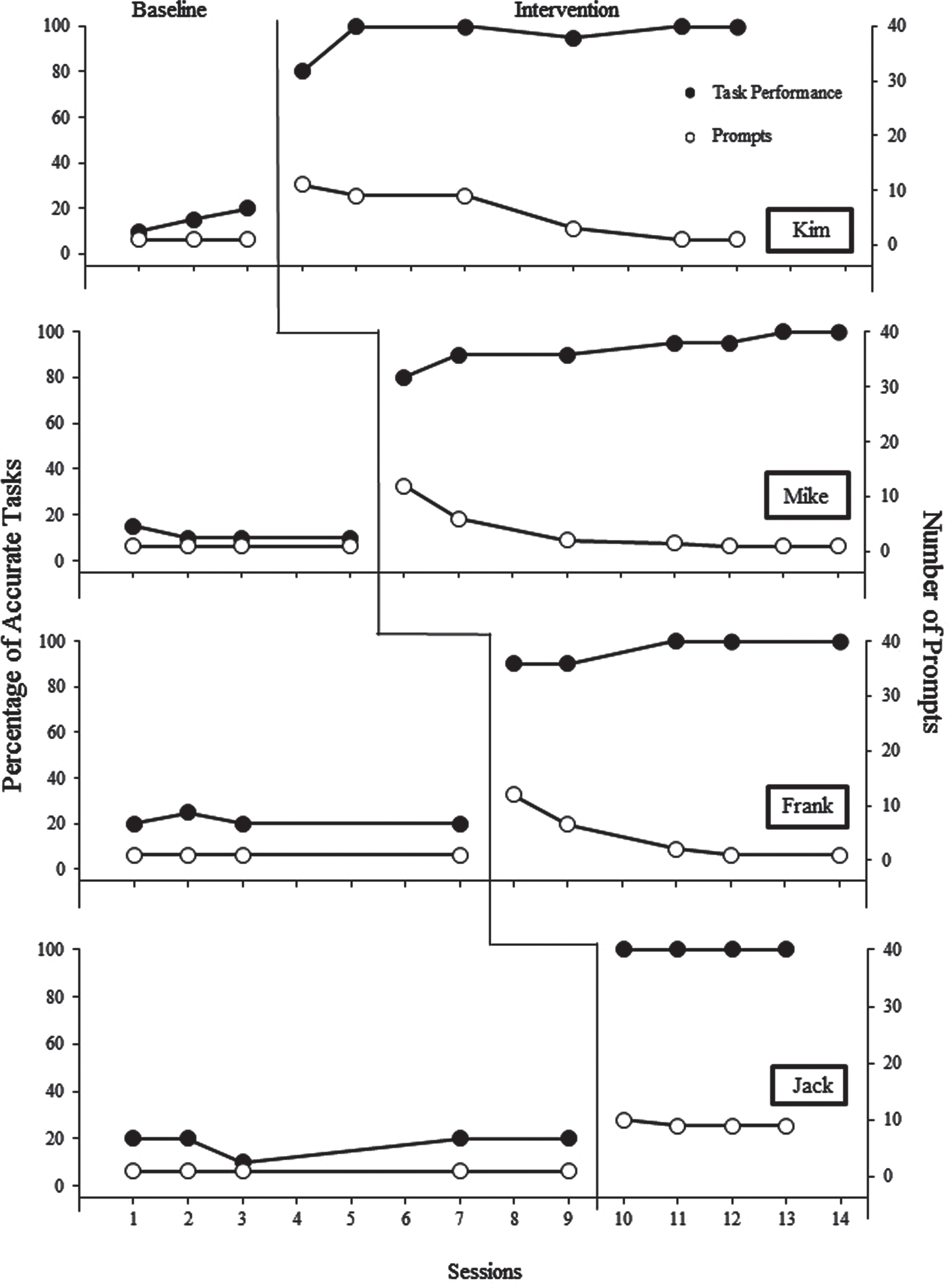
Study 1: Graphic display of task performance.
A second indicator of intervention efficacy is seen by examining the prompts delivered to the participants by the coach (shown as open circles in Fig. 2). Three of the four participants greatly reduced the number of prompts needed to complete each task accurately. During initial intervention sessions, Kim, Mike, and Frank required 11, 12, and 12 prompts respectively at the initiation of the intervention; by the end of intervention, each required only one prompt. The reduction of prompts followed a similar pattern for all three participants. At the start of intervention participants watched all video prompts, and made a number of errors that required verbal direction to re-watch the video. As the participants learned to make smoothies, they reduced their need for both video and verbal prompting. Alternatively, Jack started intervention requiring 10 prompts and was only able to reduce his need for prompts to 9. Jack expressed that he was fearful of making a mistake so he used video prompting before every task. Jack was able to meet mastery criteria quickly, thus mastering them without additional error corrections.
An unexpected finding during Study 1 involves the time needed to perform tasks. As the accuracy in making smoothies increased, the time taken to complete smoothies also increased during intervention for three of four participants. During baseline, all participants in Study 1 were able to make a smoothie in 8 minutes or less. Mike had the shortest average time (3.3 minutes), and Jack had the longest average time (7.58 minutes) (see completion times in Table 1). All participants, with the exception of Jack, increased their average completion times from baseline to intervention. During intervention, Mike completed the task with the lowest average time (5.29 minutes) and the lowest overall time (3 minutes). To consider the changes in the speed of task completion further, a comparison was made between the first half and second half of intervention sessions. (For participants with an even number of intervention sessions, the sessions were divided evenly. For participants with an odd number of sessions, the first and second intervention halves were calculated with one less session included in the 2nd half of the intervention.) These findings showed that as the intervention drew toward a conclusion, three of four participants decreased their completion times back to their baseline (or near-baseline) times.
Study 1: Mean and range of completion time (in minutes)
The intent of Study 1 was to establish the efficacy of the iPad app to increase participants’ accuracy in making smoothies as an employment preparation task. We also sought to decrease coaching prompts needed by the trainees to acquire these skills. We added the second study for two reasons. First, we sought to replicate Study 1, and assure that the intervention did indeed increase the efficacy of the intervention. Second, we identified the need to follow-up the investigation by assessing potential maintenance once the coaching intervention was removed.
As in the first study, all three participants in Study 2 made dramatic improvements in the accuracy of their task performance from baseline to intervention, and these results are found in Fig. 3. From their last baseline to their first intervention sessions, Greg’s accuracy improved from 10%to 100%, Amy’s improved from 10%to 90%, and Erin’s improved from 20%to 100%. Erin, however, was unable to reach her mastery criteria, so at the start of session 13, a booster was added to the intervention. The booster consisted of a single statement from the investigator: “Erin, this time, I really want you to concentrate and try your best to complete all of the tasks in the right order.” After the booster session, Erin completed five consecutive sessions with 100%accuracy.

Study 2: Graphic display of task performance.
Prompts delivered to the participants by the coach are shown as open circles on Fig. 3. One of the participants (Erin) eliminated the need for prompts after three intervention sessions. The other two participants required 9 and 11 prompts but were only able to reduce their need for prompts to eight. For all three participants, two maintenance probes were conducted four and eight weeks after the intervention was removed. These data are found in the final condition of Fig. 3 for each participant. Two of the three participants showed strong maintenance results. Amy scored 90%in her first maintenance session and 60%in the second. Erin’s accuracy showed the greatest maintenance, scoring 90%during both of her sessions. Only Greg had substantial difficulty maintaining accurate skill performance, scoring 30%and 40%in his two sessions. Similar to Study 1, as the accuracy in making smoothies increased the time taken to complete smoothies also increased initially. For two participants, completion time increased from baseline to the first half of the intervention sessions. During the second half, their completion times returned to baseline, or near-baseline times. It should be noted that completion times for Erin were longer than her peers, in part due to her physical impairment, requiring more time to gather materials, measure and pour ingredients, open and close containers, and navigate iPad functions. Table 2 displays a comparison of completion times during baseline and intervention and maintenance.
Study 2: Mean and range of completion time (in minutes)
A post-hoc analysis of the findings using Percent of Non-Overlapping Data indicated that the impact of the iPad intervention on participants’ employment (smoothie preparation) skill in both studies was highly effective. Effect size for each participant between baseline and intervention in both Study 1 and Study 2 was 100%. For the participants in Study 2, the PND between baseline and maintenance was also 100%.
Discussion
Accurate skill performance
Similar to findings in the literature (Bereznak et al., 2012; Burke et al., 2013; Cruz-Torres et al., 2020; Davies et al., 2002 & 2003; Hill et al., 2013; Kearney et al., 2020; Kellems & Morningstar, 2012; Riffel et al., 2005; Van Laarhoven et al., 2009; Van Laarhoven et al., 2007), results from these two studies demonstrate that a video-based prompting intervention on a high tech device can improve accurate skill performance of individuals with developmental disabilities, and extends the literature to a food preparation skill common to employment routines. The immediate improvement demonstrates that participants acquired skills involving mixing and measuring ingredients quickly when the prompting tool was introduced.
While the iPad app demonstrated an increase in accuracy overall, some participants had difficulty completing the tasks in the correct sequence. Mike and Erin had the most trouble with sequencing tasks, but only when they attempted to perform the skills without watching the videos. By contrast, Greg and Amy played the videos during all intervention sessions and completed all tasks in sequence.
In addition to using the right ingredients and completing tasks in order, participants were required to use accurate measurements and processes. While some participants made more measurement errors than others, there was no clear measurement error pattern. For example, Kim made errors measuring the apple juice and yogurt in her first intervention session, made no errors in the next three sessions, and then added an incorrect amount of spinach during her fifth session. During Frank’s first intervention session, he made simple errors when counting blueberries. Other process errors were occasionally made; for example, Frank sometimes struggled assembling the blender blade onto the blender cup. Both Amy and Mike erroneously held down the lever while blending during their first intervention sessions. While there may be a relationship between watching the videos and sequencing errors, watching the videos appeared to be unrelated to measurement and process errors.
Independent device navigation
In 2009, Van Laarhoven and colleagues conveyed that independent device operation is critical when using handheld technology. They explained that participants increased their ease of device navigation when using an iPod rather than other pocket devices. In the current studies, participants’ ability to use the iPad and the Picture Scheduler app was assessed before taking part in the study. All participants demonstrated eight of the nine navigation tasks within two training sessions, regardless of their previous iPad or iPhone experience. These findings indicate that individuals with developmental disabilities are able to quickly learn to navigate high tech devices independently. However, it appears that additional research may be needed to assess this technology for individuals with significant motor and/or language impairments.
Prompts
Similar to findings reported in Mechling’s (2011) review, using a computer-based video modeling intervention allowed participants in both studies to adjust task instructions to their individual levels of performance. Because the Picture Scheduler app was used as an instructional tool, participants reduced the need to use the tool as they became skill proficient. Ayres et al. (2013) and Mechling et al. (2014) compared the use of assistive technology to instructional technology. They explained that assistive technology is most commonly used as an ongoing support–to assist individuals to complete tasks. By contrast, instructional technology is used to promote new skill acquisition, then faded as tasks are learned. This difference is important for students, employees, coaches, and other employment specialists, regardless of the model of employment and support available (Wehman et al., 2018). From this perspective, the current work illustrates the use of the iPad and Picture Scheduler app as instructional technology that promotes learning and independent skill performance. Participants in the current studies tailored their use of the Picture Scheduler app to meet their need for support during task acquisition. This finding parallels the Kellems and Morningstar (2012) results that used instructional technology to teach vocational skills; their findings showed that when given an opportunity, participants would modify their use of the device from a video modeling tool to a video prompting tool, pausing the video in between steps of a task, and only triggering the videos when needed to recall how to complete the task. Based on the reduced need for prompting in addition to the independent use of the app and device, perhaps job coaches can reallocate the way in which they use time to offer support.
Results from the current studies demonstrate that the iPad and Picture Scheduler app can lead to skill acquisition, and participants may select their own levels of instructional technology support while they learn. Kim, Mike and Frank (Study 1) preferred to reduce the use of video prompts during task performance. This is similar to findings by Beresnak and colleagues (2012); when participants were not using the tool, skills decreased due to occasional errors, but over time, they increased their accurate task completion with only a single directive to begin the task. Alternatively, Jack (Study 1), and Amy and Greg (Study 2) preferred to use video prompts throughout intervention, expressing their choice to watch the videos because they were cautious of making errors. Together, these preferences support the Beresnak et al. observation that technology should be offered both as an instructional tool for new tasks, and as an ongoing support, giving individuals an opportunity to access it when they believe they need it.
Maintenance
Results from Study 2 demonstrated that the iPad and Picture Scheduler app also can help to maintain skill performance. Although maintenance varied across participants, results suggest a relationship between the number of practice sessions and maintenance of skill accuracy. Erin had the largest number of intervention sessions (11) and demonstrated the highest scores during maintenance sessions. Greg participated in the fewest number of intervention sessions (5) and showed the weakest evidence of maintenance. Ironically, Greg committed the fewest errors during intervention but was the least accurate during maintenance sessions. These studies extend the literature on the maintenance of accurate task performance following video-based modeling and prompting interventions with both children and adults, across tasks and settings (Bereznak et al., 2012; Domire, 2014; Kellems & Morningstar, 2012; Shipley-Benamou et al., 2002; Van Laarhoven et al. 2007).
Completion time
All participants, with the exception of Jack and Greg, demonstrated a substantial increase in completion time from baseline to the start of intervention. After two to three sessions, participants steadily decreased completion times back to rates similar to baseline. This pattern of increased completion time when introducing the intervention is similar to findings by Riffel et al. (2005), where participants showed an initial increase in time to complete tasks when beginning the intervention phase, but gradually began to complete tasks more quickly, returning back to completion times similar to baseline (Riffel et al., 2005). The increase in completion times during the first half of intervention occurred when participants were learning a new skill. A reasonable explanation includes that this increase might be a natural outcome of initial learning–that is, making and correcting errors, and “figuring things out.” Once participants learned the task, made fewer errors, and faded their use of the videos, their completion times decreased.
Limitations and implications for research
These studies had several limitations that should be considered when interpreting the results. One thing missing from both studies is the participants’ perceptions of the social validity of the device and app used to complete smoothie making. Social validity assessments typically provide information on the goal of the outcome being pursued, the acceptability of the intervention, and its effectiveness. This study would benefit from an assessment from the participants, their co-workers, and their future employers. For example, employers may require employees to makes smoothies following a specific time standard as part of the job requirement. For this study, standard recipes were used, but completion times were not measured in comparison to industry standards, to allow for skill acquisition. Even for interventions as subtle as this one, future research should collect information on these types of interventions.
Participants selected for both studies were enrolled in community-based employment programs. Although none had formal training in food preparation, the previous employment training they received (e.g., following task sequences or attending to instructional models) may have influenced their general ability and willingness to learn these new skills.
A related limitation involves the participants’ “readiness” to learn using the iPad technology. Because video modeling and hand-held devices have become extremely popular through social media and video-based websites, the participants were at least familiar with technology and videos. Although none had previous experience using the technology as an instructional tool, all showed that they could navigate simple functions on an iPad prior to the study. Thus, participants in these studies could be considered as “predisposed” to being able to learn with this technology. The participants’ comfort and familiarity with videos should also be considered as a potential factor in their ability to learn from this intervention. Individuals with limited exposure to technology, and whose instructional experiences are limited to picture cues or staff modeling, might need additional exposure to video-based modeling interventions before instructional interventions such as the iPad and Picture Scheduler app would be effective.
There was an additional limitation involving how the participants accessed supports on the iPads. Some participants often chose not to watch videos, but instead referred to the screen task list for assistance. Task lists displayed on the Picture Scheduler app showed the name and picture of each task. Referring to the screen list was considered a visual prompt, even though a full video segment was not played. In future studies, it might be useful to differentiate the type of support used by participants (e.g., screen list reminder vs instructional video). Instead of considering support as a dichotomous variable (received vs did not receive), some differentiation of the type or level of support might help future job coaches or others involved in instructional decisions. This could be particularly important for individuals who are not making progress as quickly as the participants in these two studies. Differentiating the support would also demonstrate whether the participants would learn better using a system of graduated guidance and prompts during instruction, and would make personal preferences in the classes of prompts to guide their performance (e.g., visual, verbal, or animated).
In future studies it would be worthy to investigate further the time required to prepare videos and instructional sequences for the tasks to be taught. In 2010, Van Laarhoven and colleagues compared the amount of time needed to prepare materials for a picture book intervention and a video-based intervention (Van Laarhoven et al., 2010). The investigators calculated an efficiency score by examining the number of minutes it took to prepare each intervention. Even though teachers preferred to use picture book interventions, the video prompting intervention was more efficient. A similar analysis of intervention efficiency should be considered in future research when investigating the efficacy of interventions, including efficiency of lesson preparation time, efficiency in learner acquisition, as well as traditional measures of intervention effectiveness. Future research might also explore the various roles that participants might play in selecting their own support. To date, participant preference has occurred after video-based interventions have already been designed and filmed by investigators. It is not clear whether individuals who record and load their own videos into an app might use them more effectively when they need assistance or when learning new tasks. Combined with goal setting and problem solving interventions in a supported employment training model (such as The Self-Determined Career Development Model;Devlin, 2008), participants might create libraries of videos for difficult employment that they have trouble remembering. Finally, it would be helpful to identify whether these participants and others would use similar supports to make their smoothies (and conduct similar food preparation tasks) in other community business ventures, stores, and restaurants.
The seven participants in these studies used instructional technology to learn a food preparation employment skill, and for two of three participants in Study 2, these new skills maintained for eight weeks. Participants were able to follow directions delivered by the iPads to complete tasks accurately, while reducing the need for simultaneous coaching prompts by paid personnel. As such, the studies extend previous research using iPads as instructional technology, and provide additional evidence of intervention effectiveness for supported employment outcomes.
Footnotes
Acknowledgment
None to report.
Conflict of interest
None to report.
Ethical approval
Ethical approval for this study was obtained from the Florida Atlantic University Social/Behavioral Institutional Review board (Approval number 719458-3).
Funding
None to report.
Informed consent
Written informed consent was obtained from all subjects before the study. When necessary, written informed consent was obtained from legally authorized representatives before the study and then verbal assent was obtained from individuals who participated in the study.