




Abstract
Data comes in all forms, shapes, sizes and complexities. Stored in files and data sets, SAS
Most statistical software users are aware that two or more data files can be joined, or combined, without a problem when the data files have identifiers with unique and reliable values. However, many files do not have unique identifiers, or “keys”, and need to be joined using character values, like names or E-mail addresses. To add to the difficulty and confusion, these identifiers might be spelled differently, or use different abbreviation or capitalization protocols. This paper describes a versatile 6-step approach to handling data preparation and fuzzy matching issues for improved statistical modeling. The steps include the identification and understanding of potential matching scenarios; exploring data values and data types; data cleaning and validation; data transformation; traditional merge and join techniques; and an assortment of techniques to successfully merge, join and match less than perfect, or “messy”, data by doing phonetic matching using special-purpose character-handling functions like the SOUNDEX algorithm, and the SPEDIS, COMPLEV, and COMPGED fuzzy matching functions. Although the programming techniques described in this paper are illustrated using SAS code, many, if not most, of the techniques can be applied to any software platform that supports character-handling capabilities.
Keywords
Introduction
When data sources and data sets contain consistent and valid data values, share common unique identifier(s), and have no missing data, the matching process rarely presents any problems. But, when data originating from multiple sources contain duplicate observations, keys with capitalization and punctuation issues, inconsistent matching variables, and imprecise text identifiers, the matching process could be complicated by unreliable and/or unpredictable results.
We explore, contrast and share a comprehensive step-by-step progression of special processes, methods, and SAS and non-SAS functions to evaluate how close specified character strings are, or aren’t, to being identical (Sloan & Hoicowitz, 2016; Dunn, 2014; Teres, 2011; Cadieux & Bretheim, 2014; Lafler & Sloan, 2017). A number of SAS character-handling functions and methods are available to adjust and compare character strings (Cody, 2017). We take note of the known limitations of these methods when dealing with non-English-sounding names (Foley, 1999). We further investigate how edit distance weights are assigned in a variety of low-resource languages when phonetic transcriptions, information about word meaning, and hand-created lists of the same or similar words are not available (McCoy & Frank, 2018).
When data issues exist, statistical modelers must first clean and standardize all data irregularities before attempting to match data records. To assist in this time-consuming and costly process, special-purpose programming techniques are often utilized including the application of approximate string matching, user-defined validation formats, and constructive programming techniques to standardize and combine data sets together.
We begin this paper by describing the data sets that we specifically set up to illustrate the data preparation and fuzzy matching process. After the data is rationalized, we describe the steps for cleaning and transforming data. This involves finding possible anomalies in the data and adjusting the data so that the files can be compared. Once the data is cleaned and, if necessary, transformed to the desired structure, we describe traditional matching processes using merge and join techniques.
We then describe the techniques we recommend to apply fuzzy matching. This involves a combination of adjusting the character strings and numeric identifiers that we are trying to compare to make them more comparable, and then using statistical tests on all the pairs to see how close they are to each other. Those that have a pre-determined level of closeness are declared to be matches.
Data sets used in examples
The examples presented in this paper illustrate two data sets, Movies_with_Messy_Data and Actors_with_Messy_ Data. Using PROC CONTENTS, we examine the results of the TITLE variable in both data sets. The Movies_with_Messy_Data data set consists of 31 observations, a data structure of six variables where Title, Category, Studio, and Rating are defined as character; and Length and Year are defined as numeric. After careful inspection several data issues can be found in this data set including the existence of missing data, duplicate observations, spelling errors, punctuation inconsistencies, and invalid values.
The Actors_with_Messy_Data data set contains 15 observations and a data structure consisting of three character variables: Title, Actor_Leading and Actor_Supporting. As with the Movies_with_Messy_Data data set, several data issues are found including missing data, spelling errors, punctuation inconsistencies, and invalid values.
6-step data preparation and fuzzy matching process.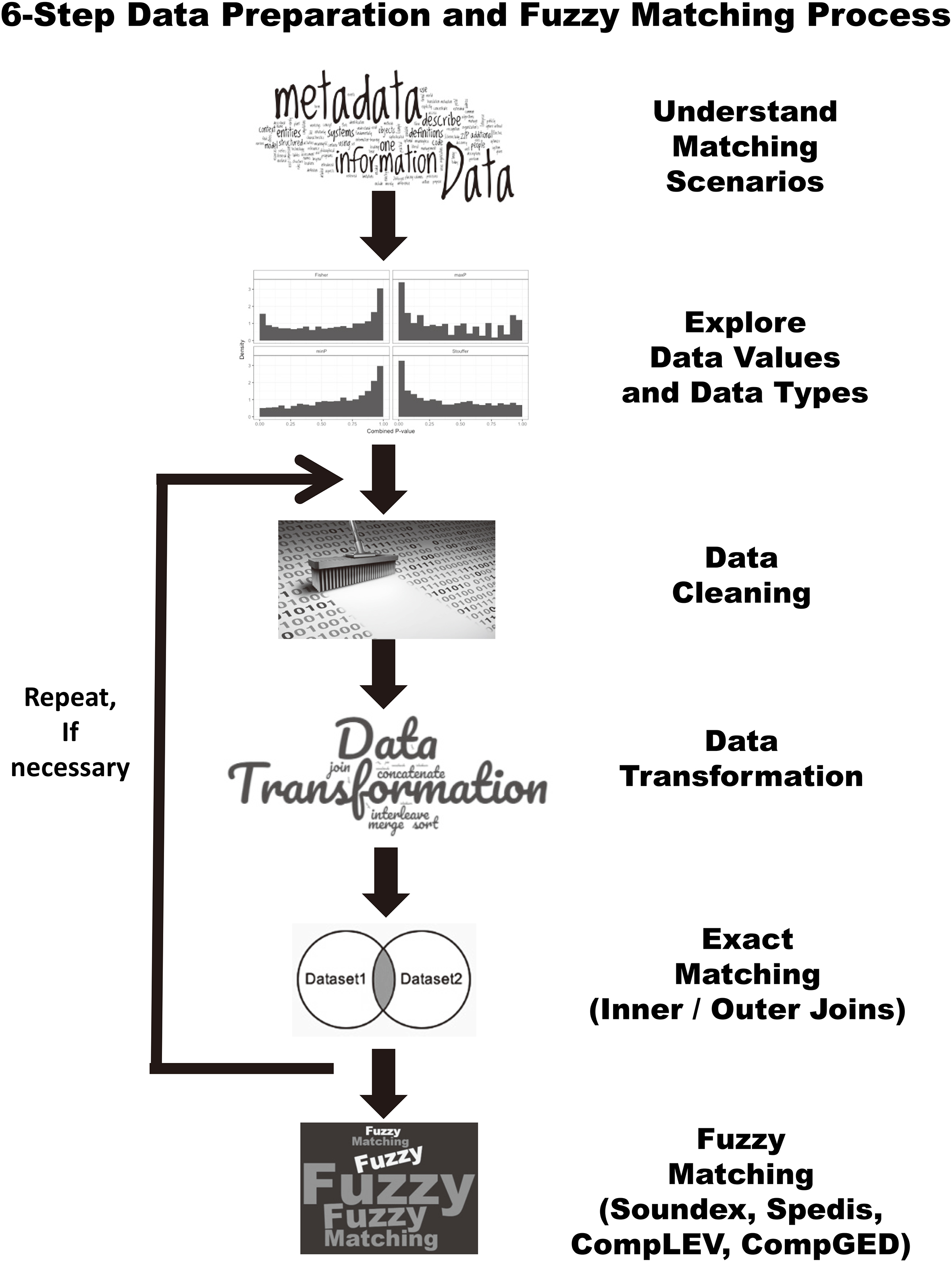
Understand the Likely Matching Variables using Metadata. Explore the Distribution of Data Values and Data Types. Perform Data Cleaning. Perform Data Transformations. Eliminate Observations with Missing Keys and Process Exact Matches using traditional Inner and Outer Merge and Join Techniques. Match Key Fields using Fuzzy Matching Techniques.
This first step determines and understands if any variables exist for matching purposes. Using SAS’ PROC CONTENTS listing, we examine the results of the TITLE variable along with a sampling of values to determine whether it can serve as the key for matching observations in both data sets, as well as the distribution of data values for other categorical variables.
To derive a more accurate picture of the data sources, we suggest that users conduct extensive data analysis by identifying missing values, outliers, invalid values, minimum and maximum values, averages, value ranges, duplicate observations, distribution of values, and the number of distinct values a categorical variable contains. This important step provides an understanding of the data, while leveraging the data cleaning and standardizing activities that will be performed later. One of the first things data wranglers will want to do is explore the data using the SAS FREQ procedure, or an equivalent approach like Excel Pivot Tables.
Reviewing the results, we see an assortment of data issues including “key” values and/or record duplication, data accuracy, inconsistent values, missing values, validation, capitalization versus mixed case, and incomplete (partial) data issues.
Determining the number of distinct values a categorical variable has is critical to the fuzzy matching process. Acquiring this information helps everyone involved better understand the number of distinct variable levels, the unique values and the number of occurrences for developing data-driven programming constructs and elements as produced from the FREQ procedure results.
Data cleaning, often referred to as data scrubbing, is the process of identifying and fixing data quality issues including missing values, invalid character and numeric values, outlier values, value ranges, duplicate observations, and other anomalies found in data sets. SAS provides many powerful ways to perform data cleaning tasks (Cody, 2017). When confronted with outlier values, a common strategy is to delete them. Still, in other instances, you may want to deal with them. In either case, it may be advisable to perform your analysis twice – once with outliers included and once with the outliers removed. This will allow you to examine which method gives you the best results.
Use SAS functions to modify data
Many statistical software packages have powerful functions and/or tools to help modify data. SAS’ functions, for example, are an essential component of the Base SAS software. Representing a variety of built-in and callable routines, functions serve as the “work horses” in the SAS software providing users with “ready-to-use” tools designed to ease the burden of writing and testing often lengthy and complex code for a variety of programming tasks. The advantage of using SAS functions is evidenced by their relative ease of use, and their ability to provide a more efficient, robust and scalable approach to simplifying a process or programming task.
It is sometimes necessary to concatenate fields when matching files, because the fields could be concatenated in one file while separate in another. SAS functions span many functional categories, and this paper focuses on those that are integral to the fuzzy matching process. The following is a list of alternative methods of concatenating strings and/or variables together.
Use the STRIP function to eliminate leading and trailing blanks, concatenate the stripped fields using the concatenation operator, and insert blanks between the stripped fields. Use one of the following CAT functions to concatenate fields:
CAT joins two or more strings and/or variables together, end-to-end producing the same results as with the concatenation operator. CATQ is similar to the CATX function, but the CATQ function adds quotation marks to any concatenated string or variable. CATS removes leading and trailing blanks and concatenates two or more strings and/or variables together. CATT removes trailing blanks and concatenates two or more strings and/or variables together. CATX removes leading and trailing blanks and concatenates two or more strings and/or variables together with a delimiter between each.
Validate data with SAS’ PROC FORMAT
Problems with inaccurately entered data often necessitate time-consuming validation activities. A popular technique used by many to identify data issues is to use SAS’ FORMAT procedure. User-defined formats can be created with PROC FORMAT along with a SAS DATA step and a simple report to identify data issues associated with the Category variable.
Once any, and all, invalid movie categories are identified with the validation report, users have the option of using one or more data cleaning techniques to manually correct, automate the process, or apply fuzzy matching techniques to correct (or handle) each invalid movie category.
Add categories, if available, to the start of the name
Doing this can eliminate matches that might occur if two businesses are in the same general area and have the same name (for example: Smith’s could describe a hardware store, a restaurant, or another type of business.)
Remove special or extraneous characters
Punctuation can differ even when names or titles are the same. Therefore, we remove the following characters: “&” – from the movie title. For example, “National Lampoon’s Vacation” and “National Lampoons Vacation” refer to the same movie title even though the former contains an apostrophe and the latter does not. Although the special characters can be removed in a number of ways, the next example shows their removal from the Title variable in both data sets using the COMPRESS function.
Put all characters in upper-case notation and remove leading blanks
Different data bases could have different standards for capitalization, and some character strings can be copied in with leading blanks. As found in our example data sets the value contained in the Title variable can be stored as all lower-case, upper-case, or in mixed-case which can impact the success of traditional merge and join matching techniques. Consequently, to remedy the issue associated with case and leading blanks, we recommend using the STRIP function to remove leading and trailing blanks along with the UPCASE function to convert all Title values to uppercase characters. For users of other popular programming languages, there is generally an equivalent function, or method, available to handle these types of issues.
Remove words that might or might not appear in key fields
Commonly used words, referred to as stop words, are frequently ignored by many search and retrieval processes. Stop words are classified as irrelevant and are inserted into stop lists and ignored. Examples include The, .com, Inc, LTD, LLC, DIVISION, CORP, CORPORATION, CO., and COMPANY. Some data base tables might include these, others might not.
Choose a standard for addresses
Address fields can present a challenge when analyzing and processing data sources. To help alleviate comparison issues, decide whether to use Avenue or Ave, Road or Rd, Street or St, etc, and then convert the address fields accordingly or create a user-defined lookup process using PROC FORMAT to match the standard values.
Rationalize zip codes when matching addresses, use geocodes when available
We found it useful to remove the last 4 digits of 9-digit zip codes, because some files might only have 5-digit zip codes. Since some files might have zip codes as numeric fields, and other files might have zip codes as character fields, make sure to include leading zeroes. For example, zip codes with a leading zero, as in 08514, would appear in a numeric field as 8514 requiring the leading zero to be inserted along with the specification of a Z5. informat and format being assigned to the zip code variable.
If working with US zip codes, make sure they are all numeric. This may not apply for other countries. One common mistake to watch for is that sometimes Canada, with abbreviation CA, is put in as the state CA (California) instead of the country. Since Canada has an alphanumeric 6-character zip code, this, hopefully, will be caught when checking for numeric zip codes.
If the program has access to geocodes, or if they are in the input data bases, geocodes can provide a further level of validation in addition to the zip codes.
Specify the DUPOUT=, NODUPRECS, or NODUPKEYS options
A popular and frequently used procedure, PROC SORT, identifies and removes duplicate observations from a data set. By specifying one or more of the SORT procedure’s three options: DUPOUT=, NODUPRECS, and NODUPKEYS, users can control how duplicate observations are identified and removed.
SAS’ PROC SORT’s DUPOUT= option is often used to identify duplicate observations before removing them from a data set. A DUPOUT= option, often specified when a data set is too large for visual inspection, can be used with the NODUPKEYS or NODUPRECS options to name a data set that contains duplicate keys or entire observations that are duplicates.
It should be noted that when Observations with identical key values are not adjacent to each other, users may first need to specify the NODUPKEY or NODUPKEYS option and sort the data set by all the variables (BY_ALL_;) to ensure the observations are in the correct order to remove all duplicates (SAS Usage Note 1566, 2000; Lafler, 2017).
Although the removal of duplicates using PROC SORT is a popular technique among many SAS users, an element of care should be given to using this method when processing large data sets. Since sort operations can often be CPU-intensive, the authors of this paper recommend comparing PROC SORT to procedures like SAS PROC SQL with the SELECT DISTINCT keyword and/or SAS PROC SUMMARY with the CLASS statement to determine the performance impact of one method versus another. The TAGSORT option can be used with PROC SORT to reduce the amount of CPU required during the PROC SORT operation. TAGSORT can, however, make the PROC SORT take longer.
Data transformations can be required to compare files. Data set structures sometimes need to be converted from wide to long or long to wide and files may need to be reconciled by having their variables grouped in different ways. When a data set’s structure and data are transformed, we typically recommend that a new data set be created from the original one. SAS’ PROC TRANSPOSE is handy for restructuring data in a data set, and is typically used in preparation for special types of processing like array processing. In its simplest form, data can be transformed with or without grouping.
Since we are trying to match entries that do not have an exact match, we can save processing time by immediately eliminating the observations (or rows) with missing key information. This can be accomplished in a number of ways, including using IF-THEN/ELSE or WHERE logic to bypass processing observations with missing movie titles.
Another approach to bypass processing observations with missing movie titles could be to use the NODUP or NODUPKEY parameter with SAS’ PROC SORT (more detail on these options will be presented later). Once observations with missing keys are eliminated, the focus is then turned to processing observations that have exact matches on name, address, and, as with our example data sets, the Title variable. We also retain the observations that have mismatches on the Title variable; the observations that did not have exact matches on the Title variable from the Movies data set; and the observations that did not have exact matches on the Title variable from the Actors data set.
Once the data has been cleaned and transformed, a variety of fuzzy matching techniques are available for use. As mentioned in (Dunn, 2014), these techniques are designed to be used in a systematic way when a reliable key between data sources is nonexistent, inexact, or unreliable.
Fuzzy matching techniques are available with most, if not all, the leading software languages including R, Python, Java, and others (RosettaCode, 2018). SAS offers four techniques: the Soundex (phonetic matching) algorithm, and the SPEDIS, COMPLEV, and COMPGED functions to help make fuzzy matching easier and more effective (Sloan & Lafler, 2018).
Apply the SAS soundex algorithm
The Soundex (phonetic matching) algorithm involves matching files on words that sound alike. As one of the earliest fuzzy matching techniques, Soundex was invented and patented by Margaret K. Odell and Robert C. Russell in 1918 and 1922 to help match surnames that sound alike. It is limited to finding phonetic matches and adheres to the following rules when performing a search:
Ignores case (case insensitive); Ignores embedded blanks and punctuations; Is better at finding English-sounding names.
Although the Soundex algorithm does a fairly good job with English-sounding names, it frequently falls short when dealing with the multitude of data sources found in today’s world economy where English- and non-English sounding names are commonplace. It also has been known to miss similar-sounding surnames like Rogers and Rodgers while matching dissimilar surnames such as Smith, Snthe and Schmitt (Foley, 1999).
So, how does the Soundex algorithm work? As implemented, SAS determines whether a name (or a variable’s contents) sounds like another by converting each word to a code. The value assigned to the code consists of the first letter in the word followed by one or more digits. Vowels, A, E, I, O and U, along with H, W, Y, and non-alphabetical characters do not receive a coded value and are ignored; and double letters (e.g., ‘TT’) are assigned a single code value for both letters. The codes derived from each word conform to the letters and values. The general syntax of the Soundex algorithm takes the form of:
Variable
To examine how the movie title, Rocky, is assigned a value of R22, R has a value of 6 but is retained as R, O is ignored, C is assigned a value of 2, K is assigned a value of 2, and Y is ignored. The converted code for “Rocky” is then matched with any other name that has the same assigned code.
We show how the Soundex algorithm’s
Apply the SAS SPEDIS function
The SPEDIS, or Spelling Distance, function and its two arguments evaluate possible matching scenarios by translating a keyword into a query containing the smallest distance value. Because the SPEDIS function evaluates numerous scenarios, it can experience varying performance issues in comparison to other matching techniques. The SPEDIS function evaluates query and keyword arguments returning non-negative spelling distance values. A derived value of zero indicates an exact match. Generally, derived values are less than 100, but, on occasion, can exceed 200. The authors have used and recommend using the SPEDIS function to control the matching process by specifying spelling distance values greater than zero and in increments of 10 (e.g., 10, 20, etc.).
So, how does the SPEDIS function work? As implemented, the SPEDIS function determines whether two names (or variables’ contents) are alike by computing an asymmetric spelling distance between two words. The SPEDIS function computes the costs associated with converting the keyword to the query. The general syntax of the SPEDIS function takes the form of SPEDIS (query, keyword).
In this example, the SPEDIS function is used in a DATA step with a WHERE statement or a PROC SQL step with a SELECT clause and CALCULATED keyword to select observations that matches the Movie Title, “Michael”. The results indicate that “Michael” and “Micheal” were chosen, and no other observations were selected. Note: This matches the result we obtained from the SOUNDEX inquiry previously.
Apply the SAS COMPLEV function
The COMPLEV, or Levenshtein Edit Distance, function is another fuzzy matching SAS technique. COMPLEV counts the minimum number of single-character insert, delete, or replace operations needed to determine how close two strings are. Unlike the SPEDIS function and COMPGED function (discussed later), the COMPLEV function assigns a score for each operation and returns a value indicating the number of operations. The general syntax of the COMPLEV function takes the form of:
COMPLEV (string-1, string-2
i or I Ignores the case in string-1 and string-2. l or L Removes leading blanks before comparing values in string-1 or string-2. n or N Ignores quotation marks around string-1 or string-2. : (colon) Truncates the longer string to the length of the shorter string.
The result of using the COMPLEV function determines the best possible match with DRAMA. The lower the value the better the match (e.g., 0
The COMPLEV function’s computed value is limited to 1 or less using a WHERE-clause. The results show the observation associated with the movie “The Hunt for Red October” in the string-1 argument matches the value of “The Hunt for Red Oktober” in the string-2 argument.
Modifier values can be added to the COMPLEV function. For example, when a modifier value of “INL” is specified to ignore the case, remove leading blanks, and ignore quotes around string-1 and string-2 and a value for the COMPLEV score of 1 or less, we find that the observation associated with the movie “Ghost” in the argument for string-1 matches the value of “GHOST” in the argument for string-2. We also find that the observation associated with the movie “The Hunt for Red October” in the string-1 argument matches the value of “The Hunt for Red Oktober” in the string-2 argument.
Apply the SAS COMPGED function
The COMPGED function is another fuzzy matching technique which is facilitated by a SAS function. It works by computing and using a Generalized Edit Distance (GED) score when comparing two text strings. The Generalized Edit Distance score is a generalization of the Levenshtein edit distance, which is a measure of dissimilarity between two strings (Teres, 2011). When using the COMPGED function to match data sets with unreliable identifiers (or keys), the higher the GED score the less likely the two strings match (Sloan & Hoicowitz, 2016). Conversely, for the greatest likelihood of a match with the COMPGED function users should seek the lowest derived score from evaluating all the possible ways of matching the two strings.
The COMPGED function returns values that are multiples of 10, e.g., 20, 100, 200, etc. It’s been our experience, as well as others, that most COMPGED scores of 100 or less are valid matches for the comparison that they are performing (Cadieux & Bretheim, 2014). The COMPGED function compares two character strings, and has optional parameters indicating whether the cases need to match, leading blanks or quotation marks need to be removed, and longer strings should be truncated. The general syntax of the COMPGED function takes the form of:
COMPGED (string-1, string-2
i or I Ignores the case in string-1 and string-2. l or L Removes leading blanks before comparing the values in the two strings. n or N Ignores quotation marks around string-1 or string-2. : (colon) Truncates the longer of the two strings to the length of the shorter string.
The SAS COMPGED function assigns different point values for changes from one character string to another. The re-sorted scoring used in the SAS COMPGED function that matches string-1 with string-2 is explained in the Help screen for the COMPGED function (Sloan & Hoicowitz, 2016).
We used the COMPGED function with traditional SQL-SELECT WHERE-clause logic and the UPCASE function to equate the values of string-1 with string-2. Although this approach is more time consuming than using traditional data cleaning methods or the COMPLEV function, the results indicate that the value for the movie “Christmas Vacation” in the string-1 argument matches the value of “XMAS Vacation” in the string-2 argument.
A cutoff-value can be specified in the COMPGED function. When a “cutoff-value” for the COMPGED score is set at 100, the results indicate that the row associated with the movie “The Hunt for Red October” in the argument for string-1 matches the value of “The Hunt for Red Oktober” in the argument for string-2.
As we saw with the COMPLEV function earlier, the COMPGED function supports modifier values as well. When a modifier value of “INL” is specified to ignore the case, remove leading blanks, and ignore quotes, and a “cutoff-value” for the COMPGED_Score is set at 100, the results indicate that the row associated with the movie “Ghost” in the argument for string-1 matches the value of “GHOST” in the argument for string-2.
Use the lower score
For those fuzzy matching techniques that are not commutative (it matters which data set is placed first), use the lower score that results from the different sequences.
Eliminate entries where the word counts are significantly different
Eliminate entries where the word counts are significantly different (the level of significance will be determined based on the data sets being compared).
The final step in the process is to perform a statistical validation of the results, to make sure that they are accurate and can be replicated.
In our comparisons of the SOUNDEX and SPEDIS methods, and when looking at the results from the COMPLEV and COMPGED, these methods worked well on the test data set that was designed to illustrate the results. It should be noted that the authors found the COMPLEV function to be best used when comparing simple strings where data sizes and/or speed of comparison is important, such as when working with large data sets. It should also be noted that the COMPGED function required more processing time to complete because of its more exhaustive and thorough capabilities.
For example, research was conducted on 50,000 business names to manually identify fuzzy matches using SAS’ COMPGED function (Sloan & Hoicowitz, 2016). The intent of the study was to identify false negatives by looking at an alphabetic sort of the business names. From the extracted test files the authors identified false positives. Finally, the conditions that were specified in the COMPGED function were repeated until the false positives and false negatives were significantly reduced. This then became part of the fuzzy matching process and achieved improved results efficiently and on demand.
Conclusion
Although today’s statistical software products are extremely powerful, they are typically not designed to overcome poor quality data. When data originating from multiple sources contain poor quality data such as duplicate observations, duplicate and/or unreliable keys, missing values, invalid values, outliers, capitalization and punctuation issues, inconsistent matching variables, and imprecise text identifiers, the matching process is often compromised. This can adversely affect the statistical modeling process.
This paper demonstrates an end-to-end data preparation and fuzzy matching approach including identifying, cleaning and standardizing data irregularities; conducting data transformations; an assortment of constructive programming techniques to standardize and combine data sets when a reliable key exists between data sources using merge and/or join constructs; and utilizing special-purpose programming techniques such as the application of the SAS SOUNDEX algorithm, and the SAS SPEDIS, COMPLEV, and COMPGED functions when an unreliable or less than perfect key exists between data sources.
Although we used SAS for our analysis and production of results, other programming languages, including R, Python, Java, C, C++, C#, and others have comparable algorithms, functions and programming techniques that can be used to achieve the same positive results from the data preparation and fuzzy matching techniques presented in this paper.1
Footnotes
Readers are encouraged to request, and the authors are happy to supply, the SAS program code and data sets referenced in this paper.