



Abstract
BACKGROUND:
Embodied conversational agents (ECA) are possible enablers of assistive technologies, in particular for older adults with cognitive impairment. Yet, dedicated interaction management techniques addressing the specificities of this public are needed.
OBJECTIVES:
We assess whether the interaction management framework of the LOUISE (Lovely User Interface for Servicing Elders) ECA has the potential to overcome the user interface constraints linked to cognitive impairment.
METHODS:
LOUISE supports key target-specific features: personalization; attention management; context reminders; image and video displays; a conversation manager for task-oriented interactions; and the foundations for a domain-specific XML-based language for task-oriented assistive scenarios. LOUISE’s usability and acceptance were evaluated at the Broca geriatric hospital in Paris. with a group of 14 older adults with either mild cognitive impairment (MCI) or Alzheimer’s disease (AD) through four simple but realistic assistive scenarios: drinking, taking medicine, measuring blood pressure and choosing the lunch menu.
RESULTS:
Most of our participants were able to interact with the ECA, succeeded in completing the proposed tasks and enjoyed our design.
CONCLUSION:
The field usability evaluation of LOUISE’s interaction management framework suggests that this suite of interaction techniques can be effective in enabling interfaces for users with MCI or AD.
Introduction
Cognitive impairment that is severe enough to affect performance in activities of daily living in older adults is mainly caused by organic pathologies grouped under the name dementia, or major neurocognitive disorders, since the 5
In that context, computer-based applications can be of great help. Introducing computer technology in the care of older adults with cognitive impairment poses however two main challenges: usability and acceptance. The former can be simply defined as user-friendliness or ease of use and the later corresponds to one’s willingness to use a technology on the short and long terms. According to Davis [3], technology acceptance is mostly conditioned by two factors: perceived usefulness and perceived ease of use. According to Chen and Chan [4], in the context of older adults, perceived usefulness means “believ[ing] and realiz[ing] that those technologies might be used to improve their lives and satisfy their needs”. In addition, Chen and Chan noted that, for most older adults, perceived ease of use is one of the predictors of perceived usefulness. To produce assistive software or devices that are most likely to be accepted by elders, it is therefore critical to address usability issues. As age and cognitive impairment make it very difficult to learn how to use new products and applications, the ideal user interface is one that would not require any learning and relies on people’s remaining capabilities.
Human beings communicate with each other thanks to a myriad of articulated sounds, voice intonations (prosody), facial expressions and gestures. Learning this very complex mean of interaction starts at birth and quickly becomes very natural. Relying on natural verbal and nonverbal communication for older adults with neurodegenerative diseases to interact with assistive technologies therefore seems like an interesting path to explore. To do this, several researchers [5, 6, 7, 8, 9] have proposed to use virtual humanoid characters, called Embodied Conversational Agents (ECAs), that are able to interact with a person through verbal and nonverbal communication. However, the current literature on the use of ECAs by older adults with cognitive impairment does not provide many guidelines for adapting ECA technology for this public. Indeed, very few of the systems proposed in the literature are specifically designed to address the cognitive limitations faced by older adults with cognitive impairment. In addition, as little evaluation data is available, little is known about how these users interact with ECAs and how the interaction should be managed by the system.
To bridge this gap, we propose an ECA system, called LOUISE (Lovely User Interface for Servicing Elders), that specifically targets elders with cognitive impairment. More specifically, it is meant to be used by people with mild or moderately severe cognitive impairment (MMSE
This study has several goals: (1) obtaining feedback from elders about LOUISE’s pleasantness and perceived usefulness; (2) gathering precise information regarding the way older adults with cognitive impairment interact with LOUISE; (3) identifying the technical limitations of our implementation to gain insights for future development; and (4) better evaluating the suitability of the LOUISE system for our target public, depending on each person’s cognitive capabilities. Ultimately, the main contributions of this work are:
the design and implementation of LOUISE’s unique set of features to target older adults with cognitive impairment; the design and implementation of four LOUISE use cases that have been selected to illustrate the diversity of possible applications of its interaction capabilities; the detailed laboratory evaluation of LOUISE and its use cases in a hospital with a group of 14 older adults with mild to severe cognitive impairment.
We start this paper by reviewing the related work on the use of ECAs by older adults with cognitive impairment and some of the work about assistive technologies for cognition in Section 2. We present the design of LOUISE, our assistive ECA (Section 3), and describe its evaluation with older adults with cognitive impairment (Section 4). We discuss our findings in Section 5. Lastly, in Section 6, we summarize our key findings, highlight our contributions and present ideas for future work.
Embodied conversational agents and older adults
Researchers around the world investigate the possibility of building machines with social interaction capabilities, in the form of social robots and embodied conversational agents (ECAs). ECAs have many foreseeable applications in elderly care. Compared to assistive robots, which are just beginning to enter the marketplace, the technology is less mature and the applications presented here are only at the research state. This is also due to the fact that robots can be helpful even with limited social interaction capabilities (vacuum cleaner robots, for instance). ECAs, on the contrary, mostly play the role of user interfaces in assistive scenarios. However, for cognitive assistance, ECAs have the potential to provide many services that social robots would, but for a much lower price.
Globally, current results [10, 11, 5, 6, 12] lead to the conclusion that the use of ECAs could improve the accessibility and acceptance of computer-based assistive technologies, compared to graphical user interfaces and voice interfaces, especially for older adults with cognitive impairment. The aforementioned authors have identified the following advantages of ECAs over other kinds of interfaces: naturalness [11, 5, 6], higher levels of attention [10, 11, 5], easy understanding [11, 5], believability [10, 11], higher motivation [10, 12, 13] and effectiveness [10, 11, 5].
Even though ECAs may end up not being the ideal solution for all applications targeting older adults with dementia, there is a significant and growing list of use cases for ECAs targeting older adults, with or without cognitive impairment, or their caregivers that have been investigated by researchers around the world:
virtual coaches that encourage older adults to change life-long habits for a healthier way of life, such as following a diet or doing more exercise [13]; virtual companions for isolated older adults that aim at providing entertainment and restoring/maintaining social links [14, 7, 15]; virtual personal assistants that provide help for organizing or taking medication, for instance, or other tasks that get more difficult due to age-related declines or cognitive impairment (in the case of mild cognitive impairment and dementia) [8]; virtual butlers, that is to say, ubiquitous user interfaces for a smart connected home with ambient intelligence [16, 17]; training tools to help formal and informal caregivers [18].
Among the studies cited above, some were designed to evaluate if ECAs are a good way of presenting information for older adults with cognitive impairment. In [11], three information presentation modalities were compared: ECA, on-screen text with speech and text only. The results show that the participants, older adults with and without cognitive impairment, liked the ECA better and performed significantly better in a guided task with the ECA than with the other prompting modalities. In [5], the authors found similar results by comparing a photograph with animated lips with a text and speech prompt in a Wizard of Oz1
A protocol consisting in giving the illusion that the system is automatic when it is in fact remotely controlled by an operator. This method is often used in social robotics and ECA research.
Carrasco et al. conducted the first work in which people with dementia actually interacted with an ECA, by pressing buttons (green for “yes” and red for “no”) on a remote control [6]. More recently, some authors have proposed systems that allow verbal and nonverbal interaction. An effort to design an ECA as a companion for older adults with memory impairment was proposed by Huang et al. [7]. The ECA proposed there mostly performs active listening: the user’s prosody is analyzed for power and pitch to make the virtual character produce backchannel behaviors, such as head nods and acknowledgment vocalizations, at appropriate moments. Unfortunately, to the best of our knowledge, no evaluation of this prototype has been published so far. Other authors have proposed a somewhat more sophisticated active listening system for older adults with cognitive impairment in [9]. Our approach with LOUISE intends to introduce a more balanced, richer, two-way communication between users and the ECA.
As stated earlier, an assistive ECA-based system may also act as a virtual personal assistant. Yaghoubz-adeh et al. [8] conducted a feasibility study of a daily assistant for older adults and cognitively impaired people. This usability study involving 11 cognitively impaired adults aged from 24 to 57 and 6 healthy older adults aged from 76 to 85. The participants were asked to interact with the WoZ-based ECA to set appointments and task reminders in a calendar. Overall results were very encouraging: 10 of the 11 cognitively impaired users successfully entered their appointment and could spot and correct 75% of the (purposefully introduced) errors. All the elderly participants completed the task successfully and could repair about 80% of the errors introduced. Regarding acceptance, feedbacks were mostly positive. In a follow-up article [21], the same authors have proposed and evaluated an automated conversation manager; this dialog manager is highly specialized for the calendar management task and does not allow for other applications. In our work, we introduce a more general framework to specify and implement arbitrary interaction scenarios with cognitively impaired adults.
Recently, Hanke et al. [22] have proposed an ECA system capable of verbal and nonverbal interaction as a “virtual support partner” for older adults. It is intended to centralize several computer-based services for daily life support of older adults, such as an agenda, medication reminders, motivation for physical exercise, assistance in locating objects at home and entertainment services. It was evaluated in laboratory conditions with 14 older adults, which has shown mitigated usability results. A long-term evaluation of the system is said to be in progress, but the results have not been published yet at the time we write this article.
To the best of our knowledge, the only system that explicitly targets verbal and nonverbal interaction between an ECA and older adults with cognitive impairment is presented in [7]. However, the system proposed by these authors does not seem to include features that are specifically designed for people with cognitive impairment, our work being thus the first to introduce dedicated interaction management mechanisms for this public.
Lastly, few studies were conducted about the long-term use of ECAs by older adults at home. The only ones were conducted by Bickmore et al. [12, 13] and Vardoulakis et al. [14]. These three studies evaluated very similar systems, all of which used interaction through multiple choice touch interfaces. In addition, none of these studies involved older adults with cognitive impairment and the study conducted by Vardoulakis et al. was a WoZ study. To the best of our knowledge, there is no publication presenting a usability evaluation of an ECA that interacts through verbal and nonverbal channels with older adults with cognitive impairment. Our paper thus contributes to the field by offering a detailed evaluation of LOUISE.
In the past two decades, there have been countless works about assistive technologies for cognition, sometimes called “cognitive prosthesis” [23]. The term assistive technology (AT), in the context of older adults, refers to any device, product or equipment that helps people to perform a task they would be unable to do otherwise or facilitates seniors’ daily lives, whether it was designed for that specific purpose or is an off-the-shelf piece of equipment [24]. According to Sanford [25], what differentiates AT from other technologies is that it is “individualized and usually follows the person” [26]. Given this definition, assistive technologies may take many forms, from low-tech devices, such as automatically ignited lights, to high-tech personal robots.
Among the works most closely related to LOUISE, though they do not include ECAs, we can list task support systems. The most cited one is probably the COACH system [27, 28], which uses both a model of the task to accomplish and activity recognition through video analysis to perform timely auditory and visual prompts to help people with dementia wash their hands. This system was evaluated in ecological conditions [29]. Hamada et al. [30] have proposed a similar system for assisting people with dementia when they go to the bathroom. More recently, Peters et al. [31] have proposed TEBRA, similar to COACH, to help people with cognitive impairment wash their teeth. ECAs like LOUISE could enrich the interaction with this type of systems and have the power of providing richer instructional cues to guide through complex instrumental tasks; however, they may also distract the user from the task and render the system less effective [31]. This is partly why we chose to investigate attention management for ECA-based task guidance. A review of other assistive systems can be found in [32].
Like any assistive system, ECAs face usability and acceptance issues, which impact the products’ adoption by the target end users [3]. These criteria are not always met by the systems currently available on the market. To avoid this, it is necessary to understand the needs and abilities of people with cognitive impairment. Summaries of the main medical conditions causing cognitive disabilities (Mild Cognitive Impairment and Alzheimer’s disease) and design recommendations to avoid the main pitfalls can be found in [33] (see also [34]). We believe our work on LOUISE, and in particular the in-depth usability research reported here, strives to adhere to what we think should become “best practices” in the field of assistive technologies.
LOUISE
Our main technical contributions in LOUISE are to propose (1) a specific dialog management approach for older adults with cognitive impairment, based on a finite state machine, and (2) a specific scenario description language in XML to create such dialogs. We provide a general overview of LOUISE before delving into these issues.
System overview
The LOUISE system, as used in the evaluation.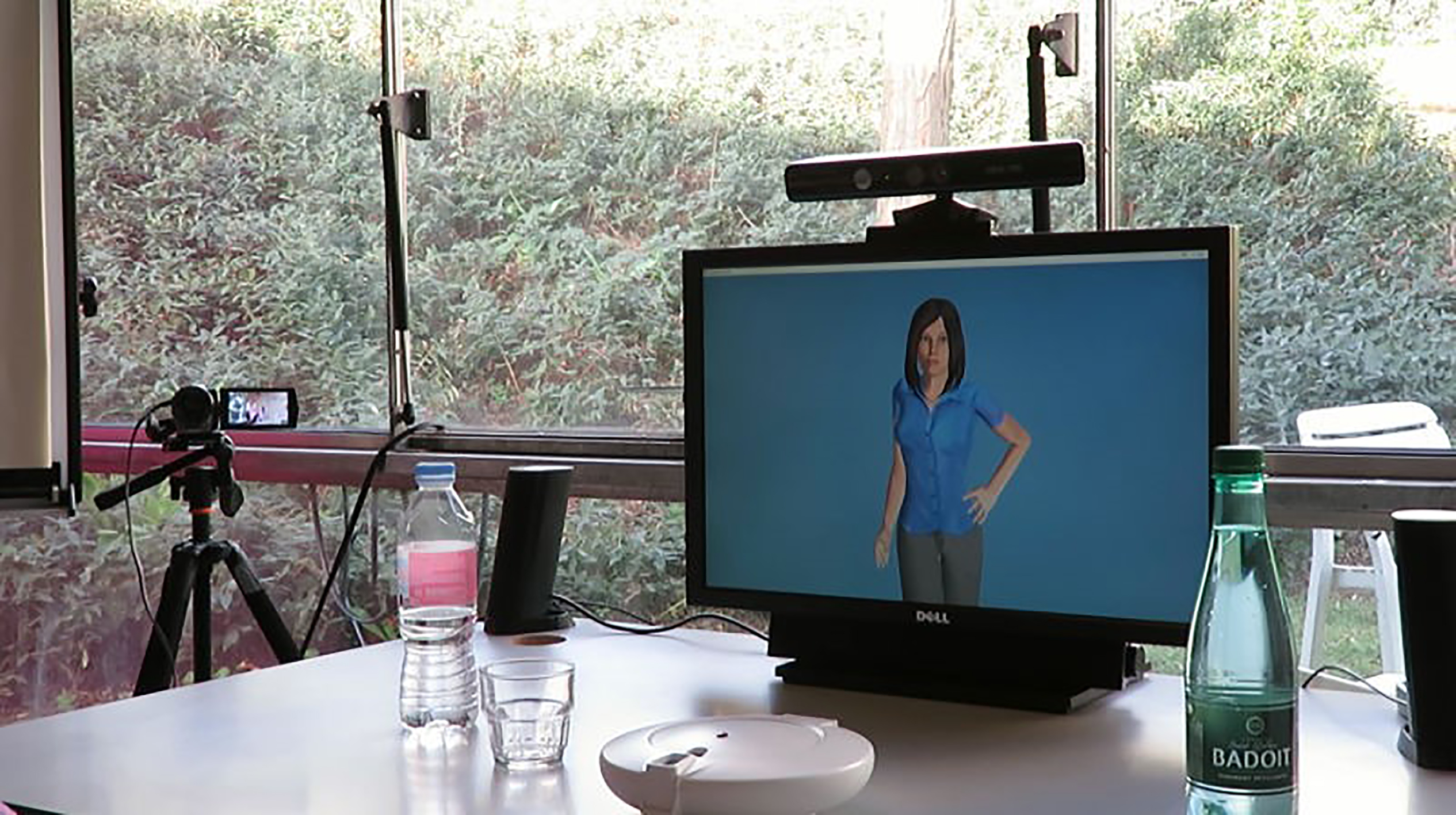
The LOUISE ECA software is meant to run on a standard PC, under Microsoft Windows, and the character is displayed on either a computer screen or a television set, with the Kinect sensor used for sensing placed on top, as depicted on Fig. 1. The software architecture of LOUISE is similar to the state-of-the-art framework for creating ECAs [35, 36]. The user behavior data is extracted thanks to the Kinect sensor and used as input for a multimodal behavior analysis module; the results of the analysis are passed on to the interaction manager, which uses an XML dialog description, tagged “scenario” on Fig. 2. The verbal and nonverbal behaviors to be produced by the virtual character are represented using the Behavior Markup Language (BML) [35]. Once the behavior that should be produced by the character is determined by the interaction manager, its BML description is sent to the behavior realizer, composed of a behavior controller, a voice synthesizer and a game engine. The behavior analysis and interaction manager modules are implemented in the same program and communicate with the behavior realizer by exchanging messages through the Apache ActiveMQ2
Architecture of the LOUISE ECA system.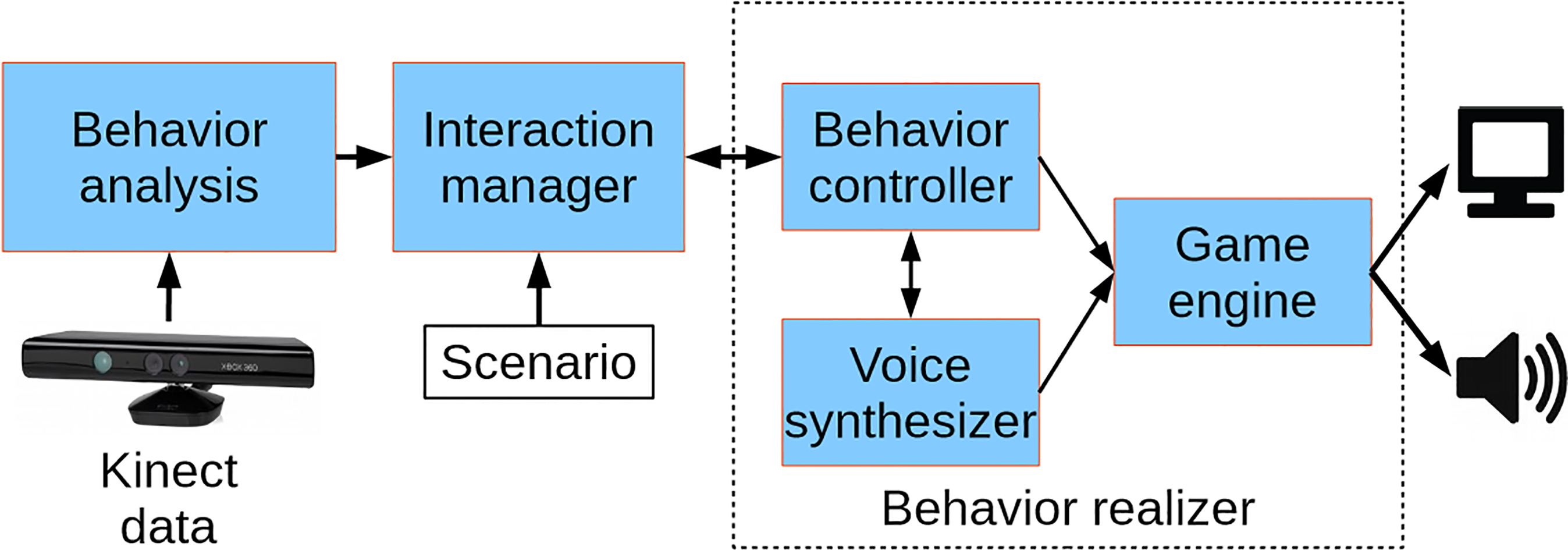
Our system implements the following key features:
attention estimation; user speech turn detection; automatic speech recognition; interaction management allowing for prompting in case of inattention, context reminders when the user is paying attention again and handling of wrong answers or speech recognition errors; XML dialog description; BML behavior realization allowing for gestures, facial expressions, head movements, gaze direction, eye saccades and blinks; display of images for concept illustration and example videos for step-by-step task guidance.
The behavior analysis module combines four sources of information: (1) user body tracking, in the form of a skeleton, (2) user face tracking, (3) speech signal, and (4) sound source localization. User body and face tracking is used to estimate the user’s attention; the speech signal is used for automatic speech recognition (ASR); and sound source localization is combined with user body tracking to detect the user’s speech turns. To perform ASR, we used the Microsoft Speech API speech recognition engine. The ASR is performed given reduced grammar sets, which only include typical words or phrases for greetings, positive answers and negative answers.
Our attention estimation method relies solely on determining, in real time, if the user is gazing towards the screen or away from it. It combines the measures of orientation of the user’s shoulders, as done in [37] and [38], and head pose, as in [39], seen here as proxies for his or her intensity of attention towards LOUISE [40, 41].
This method relies on the Kinect’s skeleton and face tracking data. Only the 3D positions of the shoulders and the yaw and pitch rotations of the head are used. It assumes that the sensor is placed on top and in the middle of the screen displaying the ECA. The obtained attention level values range from 0 to 10, 10 being the maximum level, when the user’s body and face are directly oriented towards the sensor. These values are then used to decide the user’s attentional state, i.e., whether the user is engaged or not, using a hysteresis threshold rule: the user is considered engaged if the attention value is more than 8. Transition from engaged to disengaged is triggered when the attention value decreases below 6. Two more states are used: “user detected” (at the beginning, when the user has been detected and is not engaged yet) and “no user”.
To detect users’ speech turns, since the Kinect ended up not to be reliable enough to detect movements of the lips observed thanks to face tracking data, whether by detecting opening of the mouth or the variations of mouth openings, we implemented a very simple method; it consists in comparing the sound source angle estimation, given only when the energy of the signal is sufficient, with the angular position of the tracked user. The sound source angle estimation is provided by the Kinect SDK with a confidence indicator
Interaction manager
To allow for arbitrary interactions to be used with LOUISE, we designed a Domain-Specific Language (DSL) called Assistive Interaction Scenario Markup Language, or AISML. This description language, for now an XML specification for defining assistive scenarios, is based on the concepts of finite state machines (FSM) and dialog trees presented in this section. Utterances by LOUISE are seen as states, which have transitions to other utterances, with or without condition, depending on whether it is a statement or a question. Each utterance has to contain at least a command specified using the Behavior Markup Language (BML) and/or the Speech Synthesis Markup Language (SSML) (see [42] for the technical details about AISML, as well as its XML schema specification).
Given an AISML scenario, LOUISE interaction manager maintains a finite state machine with five orthogonal regions. Each of these regions is responsible for the internal representation of one aspect of dialog management, i.e., three states (dialog, speech turn and user) and two timers. We describe in this section the main features of LOUISE interaction management.
Dialog state representation
The dialog state region, depicted on Fig. 3, keeps track of the current state of the dialog, once a scenario file has been loaded. A dialog “tree” is represented as a set of utterances, with transitions between utterances that can be conditional or not. Each utterance corresponds to a speech turn (or part of a speech turn) of the ECA. Transitions are then performed without condition if the utterance is a statement, or only a part of a speech turn, quickly followed by another utterance; or with conditions if the utterance is a question. In the later case, the next utterance is selected based on the user’s answer. This region of the FSM is also responsible for performing interruptions when the user stops paying attention, attention recapture prompting, outputting transition sentences and handling context reminders.
Dialog state representation in LOUISE’s interaction manager.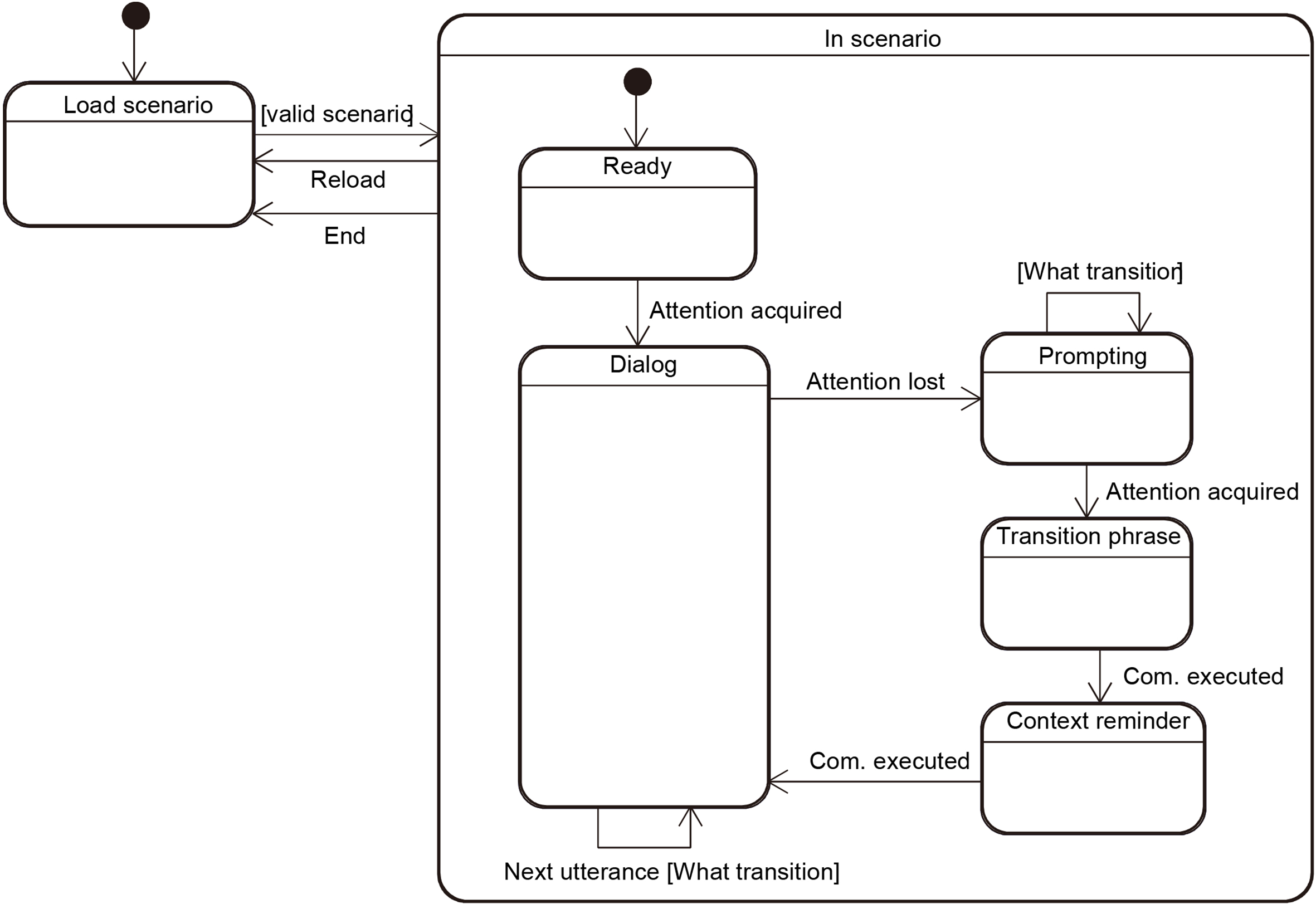
As depicted on Fig. 3, the dialog starts when attention is acquired by a transition from the Ready state to the Dialog state. When an utterance has been completed, a Next utterance event is triggered by the speech turn manager described below, possibly containing user answer data. Based on the scenario, the type of the current utterance (statement or question) and the answer data, the next utterance is selected and sent to the speech turn manager.
When the user is inattentive for more than 2 seconds, an Attention lost event is sent by the user state representation region. This triggers a state transition between the Dialog state and the Prompting state. The FSM remains in this state and sends prompting utterances sequentially (several different prompting utterances can be chained), until the user pays attention again and an Attention acquired event is received. The FSM then changes its state to the Transition phrase state, then to the Context reminder state, then back to the Dialog state. The last two transitions occur when the corresponding utterances are done being spoken by the behavior realizer.
The interaction manager can have LOUISE generate two types of utterances: statements and questions. In the case of statements, LOUISE will keep the speech turn in the next utterance. In the case of questions, LOUISE will give the next speech turn to the user. Utterances are therefore managed in two submachines: statement and question. The corresponding region of the global state machine is depicted in Fig. 4.
State of speech turns representation in LOUISE’s interaction manager.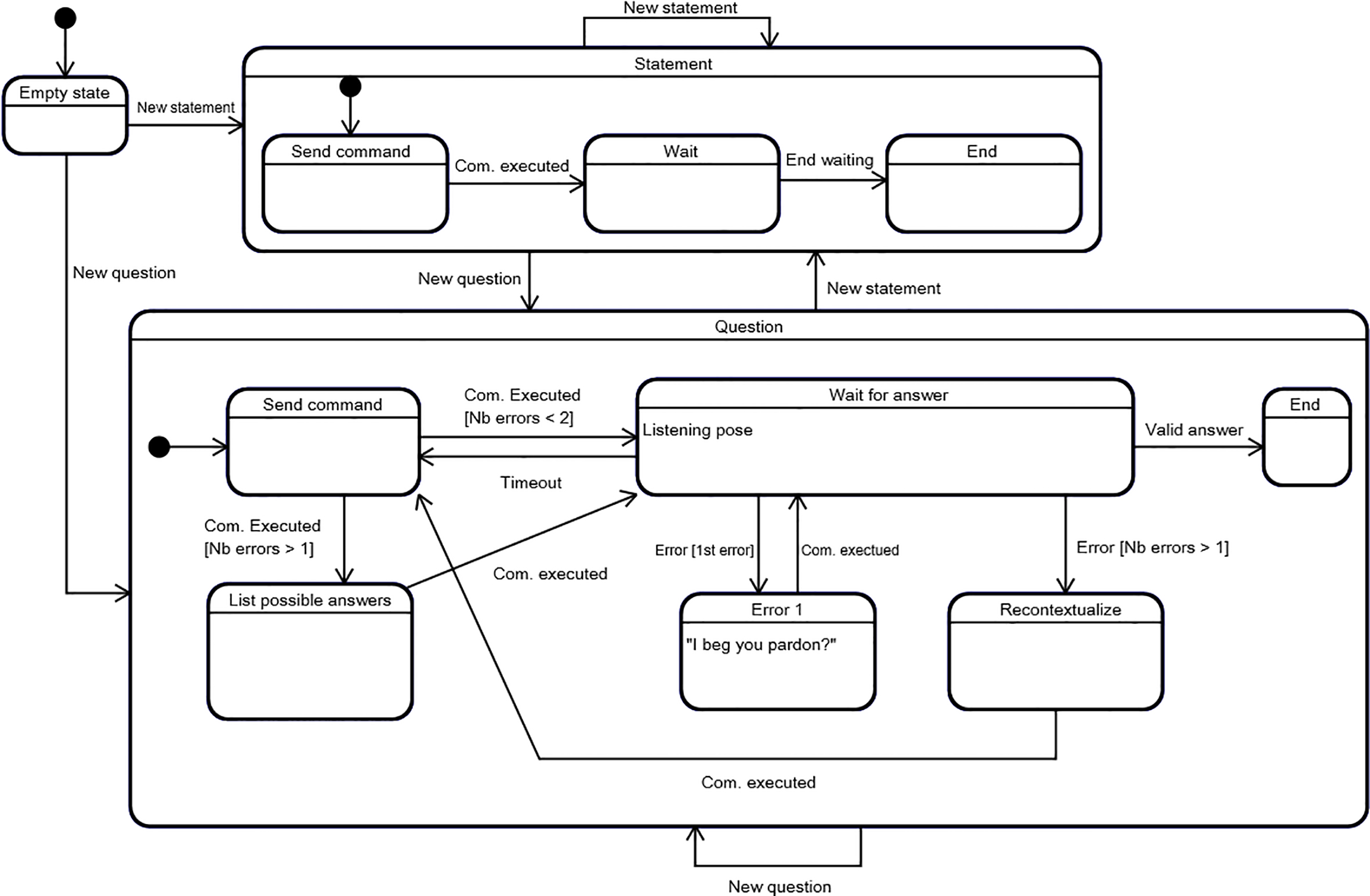
The utterance handler of LOUISE is composed of an empty state, which is the default initial state of the two submachines mentioned above. Transitions occur when a new utterance is sent by the dialog manager and the target submachine simply depends on the type of utterance, that is to say whether it is a question or a statement (attention prompts are considered to be statements).
The statement submachine is composed of three states: send command, wait and end. The send command state performs the action of sending the BML behavior instruction to produce to the behavior realizer. Once the behavior has been executed by the virtual character, a feedback message is received and a com. executed event is fired, which triggers a transition to the wait state. This state allows to control the time between the current statement and the next utterance. Once the waiting time is up, signaled by the end waiting event, the statement submachine transitions to the end state and the dialog manager can send the next utterance.
The question submachine has the same basic functioning but, instead of waiting for a time delay before the next utterance can be sent, it waits for an answer from the user. In addition, it handles incorrect answers and/or speech recognizer errors. When the state machine is in the wait for answer state, the character adopts a listening posture, as depicted on Fig. 5. If an error occurs for the first time for the current question, it goes to the error 1 state, in which an error resolution behavior is sent to the behavior realizer. Then, once the behavior has been executed, the state machine goes back to the wait for answer state and the user has a second chance to answer. If a second error occurs, a context reminder is sent in the recontextualize state; then the question is asked again and the possible answers are listed in the list possible answers state, before going back to the wait for answer state. Lastly, if after a given time the user does not answer, the question is asked again. This sequence is repeated until a valid answer is provided and can potentially loop forever, as there is no escape case.
(a) Louise Character in the default posture. (b) Louise character in the listening posture.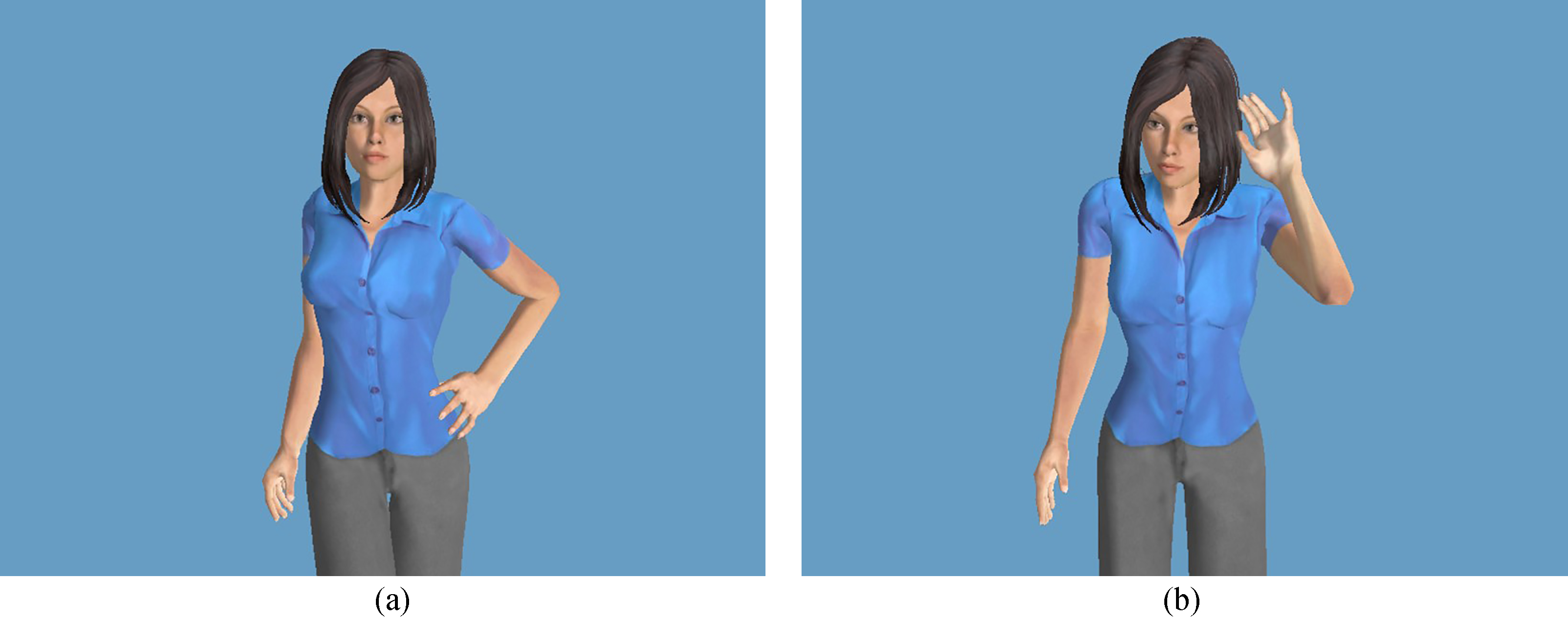
Our interaction manager includes an internal representation of the user’s state, depicted on Fig. 6. It is composed of a no user state and a user detected submachine. The transition between no user, which is the entry state, and user detected occurs when a user is detected by the Kinect sensor. The opposite transition occurs when user tracking is lost.
User state representation in LOUISE’s interaction manager. The +flag labels indicate that when the state that contains them is active, the corresponding flag has to be raised to notify the other regions of the FSM of the current state of the user.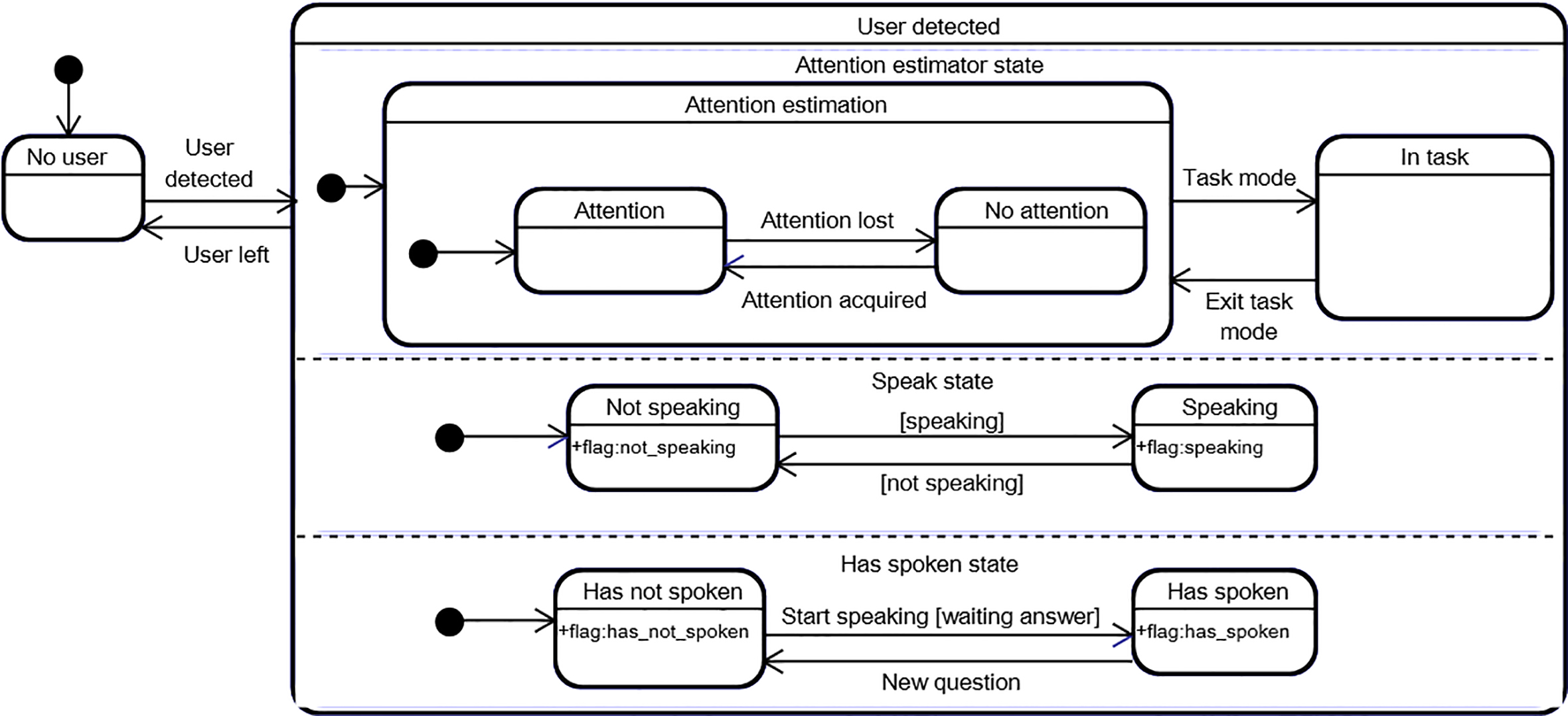
The user detected submachine is composed of three orthogonal regions. The first region represents the attentional state of the user, which is updated on every data frame by the attention estimation component of the behavior analysis module. It is also possible to disable attention estimation, by transitioning to the in task state. This feature is useful for step-by-step task guidance applications: when LOUISE asks the user to perform an action with an object, it is likely, even desired, that he or she directs his or her attention towards the object, instead of the ECA’s display. In this case, we would not want LOUISE to perform attention recapture prompts. This is why we added the in task state. The second and third regions are used to manage speech turns and allow to represent if the user is currently speaking or not and if he or she already has spoken, or not. These parts of the machine are reset to not speaking and has not spoken after each user speech turn, that is to say every time a situation requiring the user to provide an answer has just been resolved.
The behavior realizer component in LOUISE is able to interpret and execute Behavior Markup Language (BML) [35] commands, and performs all communication functions allowed by this behavior description DSL: speaking with synchronized lip animations, gesturing, showing facial expressions, performing head movements, directing the character’s gaze, blinking, and performing eye saccades. In addition, it allows to display images and a virtual television screen, on which example videos of expected actions can be shown.
(a) The Charlotte character showing a bottle of sparkling water. (b) The Charlotte character showing an example video of taking a water bottle’s screw cap off.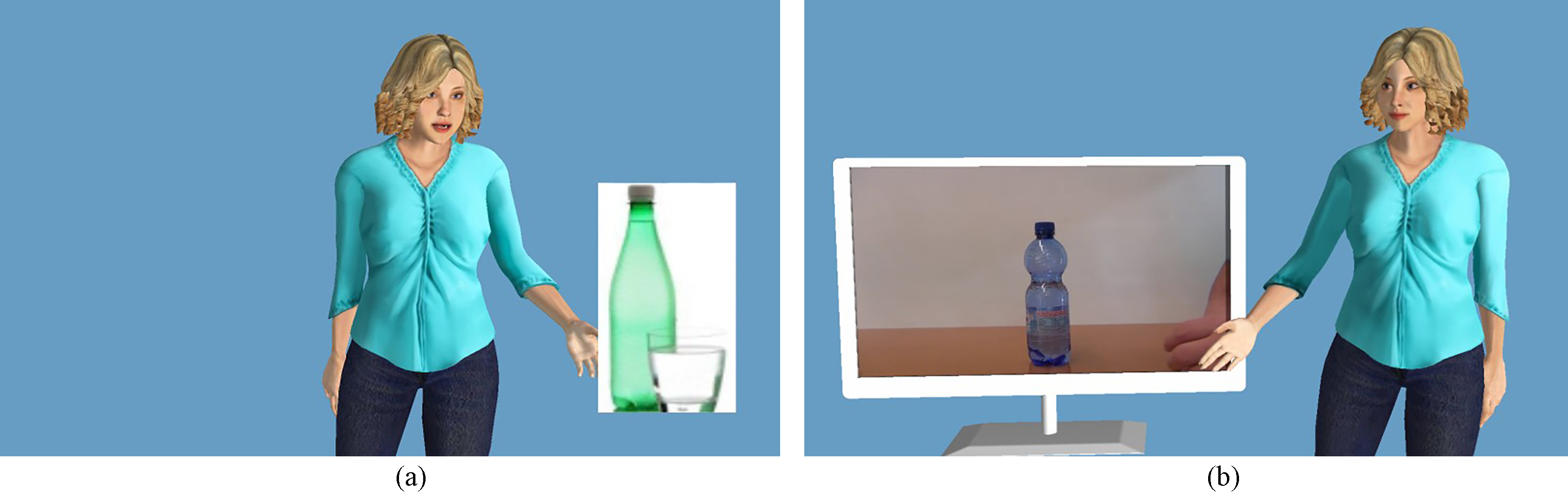
Our behavior realizer is built on top of SmartBody [43], a state-of-the-art BML realizer. It can be seen as an animation controller, or behavior controller, as it is labeled on Fig. 2. Its role is to interpret BML commands and transform them into character animations and sounds. It comes with a large database of animations for nonverbal behaviors. A game engine is used for rendering the character and playing the synthesized sounds. The game engine that we used is Panda 3D.3
We programmed our application so that any model created with Autodesk Character Generator4
We used BML events to perform several additional actions: notifying the interaction manager when a behavior is completed, by sending a message through the middleware, which in turn fires a com. executed event upon reception; displaying and removing images; displaying and removing the virtual television set; start and stop playing videos on the virtual television set; and having the character speak louder for one utterance. Figure 7 shows the renderings of the virtual scene when displaying images and videos.
The main goal of this study is to assess the usability of the LOUISE ECA. This means two things: evaluating the system as a whole, particularly our model of interaction management; and proposing, testing and refining conversational structures for goal-oriented dialogs between LOUISE and elders with cognitive impairment. All of this is done through “usability” testing, based on “believable” use cases. To this aim, we created several scenarios containing the basic actions that will very frequently be used in assistive applications in which LOUISE is susceptible to be included: asking questions and reacting to answers, having the user make a choice and providing step-by-step instructions to complete a task.
The secondary goal is to test the system with people with varying levels of cognitive functioning, to identify the maximum level of cognitive impairment that LOUISE, and likely most tailored ECA systems, can handle.
Structures of conversation
For each of the basic actions that compose the scenarios, we propose a specific conversational structure. These are based on the observations made in a previous study [41], in which we conducted an anthropological analysis of interactions between elders and a Wizard of Oz version of LOUISE. We also took inspiration from the knowledge of the symptoms of dementia.
Dialog initiative
In the previous Wizard of Oz experiment, none of the participants complained that the ECA always had the dialog initiative, neither did they try to take the initiative themselves. This is why we built our system with the assumption that LOUISE will always keep the initiative and did not try to accommodate for mixed-initiative dialogs. This assumption is also in line with the knowledge of dementia symptoms: people with dementia seldom take actions spontaneously, because of apathy and prospective memory disorders.
Asking questions and reacting to answers
Our interaction manager could very well handle open questions with multiple possible answers, though choosing the appropriate response could be challenging and would likely require some language processing of the user’s answers, to interpret his or her intents, in the behavior analysis stage. However, with our target user group, we have identified that narrow or contrasted questions, such as yes/no questions, should be privileged [41]. This is also in line with the recommendations of Zajicek [44], who suggested that menus in speech-based interfaces for older adults should be limited to 3 items at a time. Hence, our conversational trees, which in fact are more like conversational graphs, as there can be branches that reunite at some points, will normally have a maximum of two branches at each node.
Multiple choices
To perform multiple choices, all options are presented first, then a yes/no question is asked for each item. Each time an item is mentioned, a picture illustrating the concept is displayed, as shown on Fig. 7. When an image is displayed, the character points at it and directs its gaze towards it, by turning its eyes and head, so its body posture is still facing the user. Then, when the image disappears, the character turns its head and eyes towards the user again. This is meant to direct the user’s attention towards the object of interest when necessary. This specific choice of gaze direction and posture behaviors is inspired by the findings of Pejsa et al. [45], who studied the influence of gaze and postures on the user’s quality of attention and reported that the best compromise is for the ECA to fully look towards the user when speaking (affiliative strategy) and fully looking towards the object of interest when making mentions of it (referential strategy). This also resembles the model of engagement behaviors for collaborative tasks involving a human and a robot proposed by Rich et al. [46].
If no item is selected, there are two options: choosing none or starting over at the first option. After one option has been selected, an explicit confirmation is asked. When a choice is confirmed, an acknowledgment behavior is executed and the dialog can go on. This is similar to the approach for confirmations recommended by Yaghoubzadeh et al. [8], who stated that it is best to confirm each bit of information individually.
The typical conversation graph we used for having the user choose one option in several possibilities is depicted on Fig. 8. The “None?” option represents the case in which it is allowed not to choose an item. In that case, the conversation will jump back to the first item proposition only after the question of picking no item is asked, instead of doing it right after the n
Conversation graph for selecting items with multiple choices.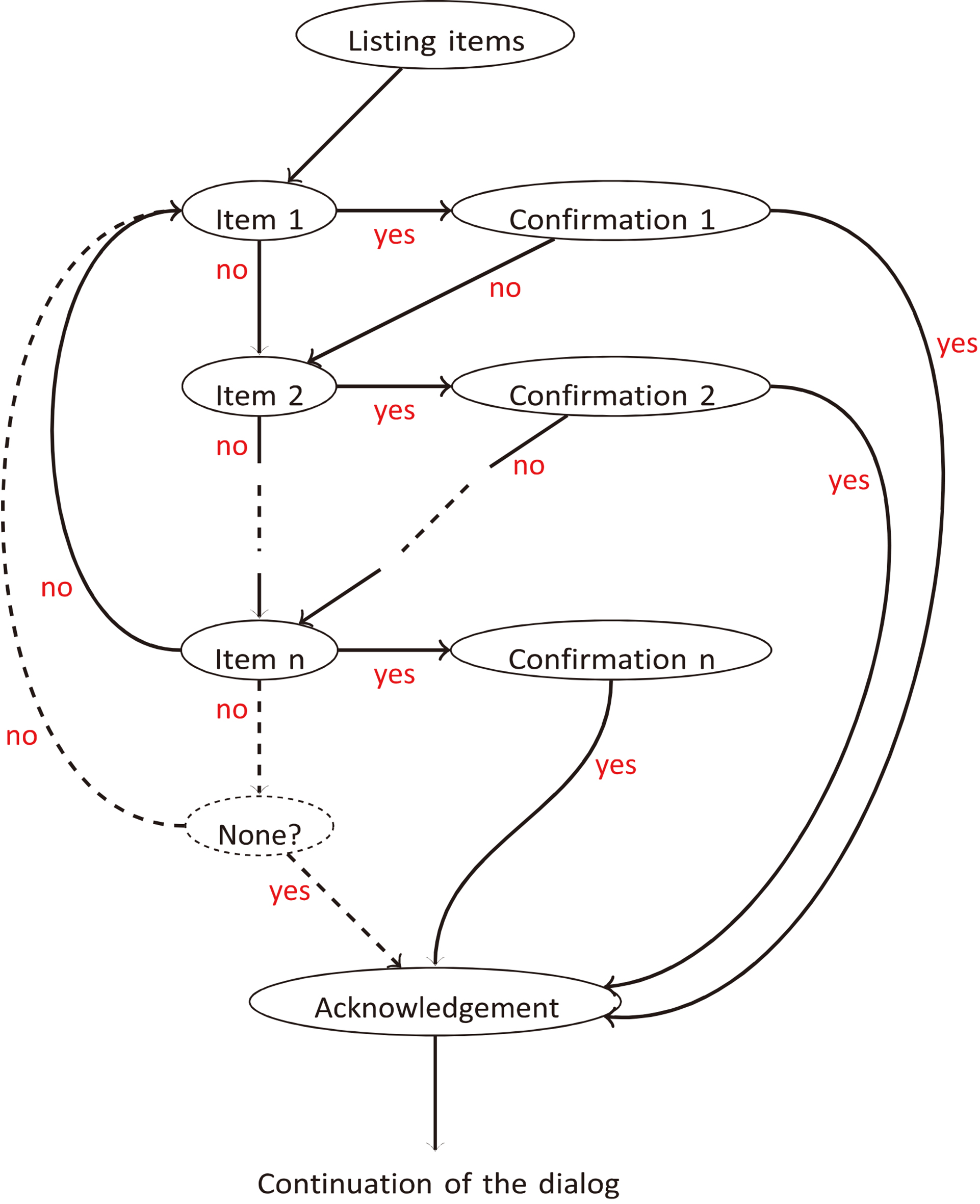
For task instructions, each step is managed in the following order:
the ECA explains the action to perform, while pointing and gazing at the virtual television set, on which the example video has started looping; it lets the user watch the example video as it loops on the virtual TV screen for a few seconds and keeps gazing at the screen during that time – this is when the wait parameter for statement utterances is the most useful (see Section 3.3); LOUISE directs its gaze towards the user and instructs him or her to perform the action (the attention estimation is disabled and the video is still looping on the virtual screen); LOUISE waits for a few seconds, thanks to the wait parameter in statement utterances; the attention estimator is enabled again, the video is stopped and the ECA asks if the user has finished performing the action; if the answer is “yes”, the task is assumed completed and the dialog can go on to the next instruction, or to the conclusion; if the answer is “no”, the dialog manager goes back to the first step and the instructions are given again; when the task is complete, the ECA congratulates the user and the video is stopped; in case of attention loss, the video is stopped and only gets restarted after the context reminder is performed.
Note that the gaze and posture management approaches are the same as when still images are shown, except that the character keeps looking at the screen when the user is supposed to watch the example video. In addition, the fact that LOUISE gazes at the user again when it asks him or her to perform an action is supposed to make the user think that it is checking for the execution of the action.
For this experiment to have some ecological validity, we wanted to use believable use scenarios for LOUISE. These scenarios were also selected based on the fact that they include the typical situations present in most potential applications of LOUISE: asking questions, having people choose among several items and guiding step-by-step through a task. Throughout the study, we have used four different scenarios, which were validated by physicians or in previous exchanges with older adults:
reminding to drink water and guiding through the task of preparing a glass of water; reminding medication intake and guiding through the task of taking pills; guiding through the task of measuring one’s blood pressure; choosing the composition of a meal.
A blood pressure scenario was created to replace the medication intake for testing with the most strongly impaired patients, as the physicians of the hospital were afraid that someone would choke when taking the Tic-Tac candies, used as fake pills (in the Broca hospital’s services, pills are administered to the patients with moderate to severe dementia by mashing them down and mixing them with compote). The water-drinking scenario could be used both at home or in institutions; the medication intake and blood pressure scenarios mostly target patients still living in their homes; and the menu scenario mostly targets institutionalized patients.
This study was approved by the Committee of Ethical Evaluation for Research in Health held jointly by the Broca hospital and the Paris Descartes University. The participants who tested the family of scenarios described in Section 4.2 were seated at a table in front of a screen on which the ECA was displayed; the Kinect sensor was placed on top of the screen, in the middle. The software ran on a Toshiba laptop with an Intel i7 quad core CPU, an Intel HD Graphics GPU and 8GB of RAM; the Kinect sensor we used was the Kinect for Xbox 360; and the character was displayed on a DELL 22-inch display. All of the necessary objects for the experiment (a glass, a bottle of still water, a bottle of sparkling water and the pill dispenser or the blood pressure monitor, depending on the case) were placed on the table, as depicted on Fig. 1. Participants were informed of what was going to happen, that they had to greet the ECA back when it greets them and that they had to answer questions by “yes” or “no”. If the participant agreed, a video recording of the session was done. We used two cameras: one to film the person and one to film the table and the ECA. In addition, the LOUISE application was instrumented to record the input data and the evolution of the dialogs, including the states of the interaction manager FSM.
Participants had to interact with LOUISE through 3 scenarios in a row, always in the same order: reminder to drink water, meal menu choice and medication intake reminder or blood pressure measurement, depending on the participants, since we were not allowed to have hospitalized patients do the medication intake scenario. Before the interaction, they were asked to choose their favorite embodiment between the Louise and Charlotte characters. During the tests, the Microsoft Speech API speech recognizer was used, except for the last test, in which we tried a cloud-based speech recognizer (Microsoft Bing Speech API).5
Once the test, which took about 20 minutes, was over, we conducted individual semi-structured interviews with each participant and had them fill a questionnaire of 4-level-scale (1 to 4) questions regarding their impressions of the ECA during the test and 7 general questions about ECAs. To build the questionnaire, inspiration was taken from the assistive social agent technology acceptance model proposed by Heerink et al. [47], which is specifically designed for older adults. The questions were about how pleasant they thought the character was, how much they liked its appearance, how clear the character’s speech was, how clear the instructions it gave were and if the conversation’s pace was too fast. The general questions were about the possibility of personalization, the applications of ECAs, how the character should address them (using their first name of their last name, calling them “vous” or “tu” – a very frequent issue in French),6
In French, when addressing a single person, a choice of pronoun has to be made between “tu”, the normal pronoun for the second-person singular, and “vous”, the pronoun for second-person plural. The former is considered to be informal and is usually used by friends and family, while the latter is considered formal and is a mark of politeness. In an institutional health care context, the use of “vous” is mandatory for care staff to address patients.
To be included in the study, participants had to be over 65, have a diagnosis of cognitive impairment and give written informed consent. People with severe auditory impairment, unable to speak or with severe visual disability were excluded. Following general guidelines on the appropriate group size for usability studies [48], which state that, on average, a group of 5 allows to uncover about 85% of usability issues, while 10 participants reveal about 95% of them, 14 participants, 11 females and 3 males, were enrolled. They were between 71 and 89 years old (mean
Evaluation methodology
Eleven participants, out of 14, agreed to the video recording of the experiment. The videos, for a total of about 3.5 hours, were annotated using Noldus The Observer XT 11.5,7
Overall, 13/14 participants were capable of interacting with LOUISE, leaving out the participant with the most severe cognitive impairment (male, age
Table 1 presents, for each evaluation indicator we have used, the minimum and maximum totals for one participant, the per-participant average and standard deviation, the number of participants with whom the corresponding situation occurred and the total number of occurrences (or global percentage, when the values are percentages). This data was gathered thanks to video annotations and experiments’ logs. It only includes data for 9 participants: only 10 of the participants who agreed to be filmed did interact with LOUISE; and the last test, in which the cloud-based speech recognizer was used, was actually conducted in WoZ mode (the system allowed the experimenter to press keys to notify answers in case of malfunction), since the speech recognition did not work because of a configuration error. Also note that the attention estimation data was not included for Participant 11, who could not be tracked by the Kinect sensor as she had only one arm that she could not move.
Quantitative results for 9 participants (7 females, 2 males), aged between 72 and 89 (mean
79, standard deviation
6) with MMSE scores comprised between 14 and 30 (mean
25.2, standard deviation
4.3), obtained through video annotation and experiment logs. The “Nb. part.” column indicates the number of participants for whom the situation occurred
Quantitative results for 9 participants (7 females, 2 males), aged between 72 and 89 (mean
The first issue we observed is that some of the test participants tended to forget that they could only answer by “yes” or “no” and answered incorrectly, particularly the participants with the most severe memory impairment, scoring less than 20/30 at the MMSE, who account for 29 of the 56 incorrect answers (52%). This confirms the observations revealed in the anthropological analysis we conducted in the first round of experiments, reported in [41], that people with cognitive impairment tend to provide more elaborate answers and interact in a “social” way. Given this result, our error management strategy that lists the possible answers proved useful, as participants could correct their mistakes in all cases, especially after the system was changed for the valid answer reminder to be performed after two errors instead of three. Although the cloud-based speech recognizer did not work for Participant 14, considering that it was supposed to spot the “yes” and “no” keywords in the recognized sentence, all of her answers were considered as correct in the video annotation.
Regarding speech recognition, the performance of the ASR we have used are far from satisfying, with a word error rate of more than 20%. In addition, the system sometimes did not react to the participant’s answers, when they did not speak loud enough (9.9% of all answers) or reacted to the ECA’s own speech (the exact number of times could not be computed, since the logs are not reliable enough due to the amount of speech recognition errors). These three factors combined were quite confusing for the participants.
Regarding the attention estimator, it sometimes made errors that led to unwanted attention prompting (on 23 occasions). Most of these errors are due to losses of face tracking caused by participants being too close to the sensor. Indeed, they were seated close to the screen whereas the theoretical minimum distance for the Kinect sensor for Xbox 360 to work properly is about 80 cm and this distance is closer to 1 m in practice. This was particularly problematic when users came closer to the sensor to reach for objects on the table. We therefore mounted the Kinect slightly behind and above the screen. This positioning, as well as the hunched posture of some participants, caused the pitch angle measure to be incorrect and the attention estimator produced more errors than in the first round of experiments. Attention estimator errors also negatively impacted the user experience and caused confusion. In addition, attention management does not seem sufficient to keep people with dementia engaged in the interaction, since participants 10 and 14, who respectively scored 14 and 22 at the MMSE, sometimes did not answer the ECA although they were looking at it (Patient 10 did not answer on 28 occasions). However, when participants did get distracted, which happened once with Participant 2 and 3 times with Participant 10, the ECA could successfully recapture their attention.
LOUISE ratings, on a scale from 1 (very negative) to 4 (very positive)
Given the structure of dialog management for step-by-step task instructions presented in Section 4.1.4, 3 of the first 4 participants, who all had MCI, tended to perform the action while the video instruction was being shown (9/10 actions were performed too early) and the fourth one did not because she had asked the experimenter if she had to perform the action right away. This caused the attention estimator to react at an inappropriate moment on 5 occasions. The structure of interaction management for tasks was thus changed to allow the user to perform the task right away, as detailed in Section 5. This was successful, since the issue did not occur for the other participants with MCI. However, this only seemed suitable for one of the participants with Alzheimer’s disease, who had the highest MMSE in the Alzheimer’s group. Attention prompting was also triggered on 3 occasions by the last participant while she was performing actions of the blood pressure task, because she went past the time allowed (5 or 10 seconds, depending on the action).
On many occasions (60 in total), the participants tried to talk to the ECA while it was not listening to them. In particular, in the menu choice scenario, we observed that several participants wanted to choose a dish right after the presentation of the available options. As this was not allowed by our scenario, it caused them some frustration. In addition, the explicit confirmation after each choice annoyed some participants, who complained that the ECA was repeating itself a lot. Participants with MCI also tended to anticipate their answer to the confirmation question or after two speech recognition errors, when the ECA kept the speech turn for a longer time than usual to remind them of the valid answers. Another issue we encountered is that 2 participants with Alzheimer’s disease tended to state that they had correctly performed an action when they had not, on a total of 8 occasions (this includes Participant 14, who is not counted in Table 1). In addition, the “welcome back” transition sentence after a loss of attention turned out to be confusing for several participants. This was also due to the phrase we used (“vous revoilà”, which translates “you are back”), which did not seem very natural.
Results of the questionnaire about ECA usability (13 participants)
Lastly, most of the requests for help and interventions of the experimenter were caused by system malfunctions (attention estimator errors or speech recognition error). The few exceptions had to do with participants formulating incorrect answers but not getting reminded of the correct answers soon enough (this is why we changed the system to perform the valid answers reminder after 2 errors instead of 3), helping participants with the lowest MMSE perform a difficult action (putting on the blood pressure monitor’s armband), so they could go on to complete the task, and to remind people that they had to answer the ECA when they were not responding.
The feedbacks in the questionnaires were mostly positive. The results to the questions in the questionnaire are given in Table 2. This includes answers from 13 participants out of 14, as the one who did not interact with LOUISE was not asked to fill in the questionnaire.
Regarding pleasantness, most participants had a positive or very positive impression of LOUISE and only two participants out of 13 had a negative opinion. Regarding the appearance, all participants expressed a positive or very positive opinion. In addition, all participants thought LOUISE’s speech was clear or very clear, and that the instructions were easy or very easy to follow. Lastly, regarding the pace of the conversation, only one participant, with a low MMSE score (17/30), said that the conversation was too fast; all others said it was not too fast or not fast at all. However, several participants (5, all with MCI) complained that the system was too slow. Overall, the feedbacks from the participants are very positive, which is encouraging; this suggests that our participants may perceive LOUISE as being a medium with inherent user friendliness. Some results, however, regarding the ease of following the ECA’s task instructions are surprising, as they do not match our observations: two participants obviously had some difficulties following the instructions but said it was easy. These participants had low MMSE scores (14/30 and 22/30). This may be due to the fact that they did not realize that what they were doing was incorrect or did not want to admit it. It could also be linked to the white-coat effect.
The feedback given in the semi-structured interviews were not as positive. As already mentioned, 5 participants complained that the system was too slow to speak and to respond to their answers. One of the participants said it was because the ECA’s utterances were too long. Two participants were not sure when the time was appropriate to give their answers, which partly explained the many times when they attempted to answer whereas the system was not ready to listen to them. A participant made a comment about her expectations of the ECA’s capabilities being too high because of its appearance; this may partly explain why several participants tended to formulate invalid answers, thus not adapting to the fact that they were talking to a computer, and tried to answer when the ECA was not listening. Only 2 participants emitted negative comments about the system’s malfunctions. Regarding the system’s usefulness, only 1 participant formulated comments spontaneously: she did not think it would be useful for her; however, she mitigated her answer by saying that it could be useful if it were meant for cognitive stimulation exercises. Two other participants said it could be useful in some situations. Lastly, participants 2 and 8 spontaneously formulated positive comments about the system, regarding the presentation of the task instructions and the system’s ease of use.
General questions about ECAs
As mentioned above, in the questionnaires filled after the tests, we also asked more general questions about ECAs. The results are shown in Table 3.
Regarding the possibility of personalizing the character’s appearance, more than half of the participants (7/13) said they would like to be able to do that. This is a smaller proportion than in the previous phases of the study.
Regarding the applications of ECAs they would be interested in, 6 participants selected the virtual assistant (providing information and doing reminders); 6 were interested in the coaching application; 7 said they would like step-by-step task instructions; 7 thought that it would be useful for controlling home appliances; and 2 said it was not useful for anything.
Regarding the type of display, similar results as the ones observed in the previous phase were obtained: only one participant wanted a dedicated display for the ECA; 7 said they would like it to be displayed on a television set, which is a larger proportion than in the first study; 7 participants selected the tablet; only three selected the smartphone; and one said “nowhere, I do not want to use this technology”. Again, most people would like an assistive ECA to be added on a device that they already own or is not only dedicated for this use.
Regarding how the ECA should address people, 9 participants said it should use their first name; 3 would prefer it to call them Mr or Mrs X; and one participant did not have an opinion. For the very frequent issue in French language regarding the use of “tu” (informal) or “vous” (formal), each possibility was selected by 6 participants and one did not know. This means that these options should be configuration parameters, as this kind of preferences depends on each user and may influence their adherence to the system. For instance, people who wants the ECA to address them in a very polite manner may reject the ECA, thinking it is disrespectful, if it calls them by their first name and uses the “tu” pronoun. In addition, it might change over time, as this also depends on the kind of relationship that exists between people and their ECA. For information, the guidelines for positive treatment of people with dementia impose the use of “vous”, without exceptions. This should therefore be the default setting. However, we do not see why the ECA could not call its user “tu” if that is what he or she wants.
Lastly, regarding the acceptability of the perception system, few people (5) said they would want it to be installed in their homes, and only 3 would want it to be always on and one person did not know. By comparison, 7 people would not accept it and 8 said it should only be activated when they decide it. It is however difficult to say if they fully understood the implications of the question, especially the ones with the strongest cognitive impairment.
Discussion
Performing LOUISE usability testing allowed us to debunk several issues and sometimes fix them, or at least get ideas for solutions. In addition, the fact that we allowed some slight changes between tests to be performed enabled us to iterate quickly and evaluate our solutions right away.
Globally, the facts that all but one participants were able to interact with the ECA and that inability to do so was more linked to system malfunctions or limitations (i.e., the speech recognizer only allowing to answer by “yes” or “no”) than to the person’s capabilities suggest that LOUISE, after some improvements, could be suitable for people with MCI or moderately severe dementia (down to 10/30 at the MMSE) who are still capable of speaking, provided that they do not have severe hearing impairment. However, it will probably not be suitable for guiding through a task, at least not in its current state, that is to say without activity recognition capabilities. It would likely be the most useful as a cognitive prosthesis for people with dementia, particularly to address memory loss by performing reminders (date, time, place where they are, appointments, medication intakes, etc.). However, it could also find useful applications for people with MCI, such as cognitive stimulation exercises, eased access to video chat to remain socially active or entertainment.
Technical aspects
The most limiting factor is the quality of automatic speech-to-text transcription, especially for elderly voice [50]. In fact, Aman et al. [51] have demonstrated that performance in automatic speech recognition dropped significantly when users were disabled older adults, which are the ones who need assistive technologies the most. In addition, the ECA tended to react to its own speech, which is a problem we put a lot of effort in trying to fix but could not eliminate completely. This last issue proved to be a difficult point as the speech recognizer we used, the Microsoft Speech API, did not allow to turn it on and off as desired. We thus used our speech turn management protocol to make the system more robust, by ignoring speech recognition results outside of user speech turns, but, because of delays in the system, the problem still occurred in some cases. In addition, this caused some of the participants’ answers to be ignored by the system. Another reason why this flaw is difficult to fix is that, if the delay between the end of the ECA’s speech turns and the moments when it starts reacting to speech recognition data is too long, we may miss the user’s answer. These malfunctions are very damaging to the quality of experience and also cause misunderstanding and confusion for our users with cognitive impairment. However, the technologies on which ECAs are built have made progress in the past decade and keep improving fast. We thus believe that these technical limitations will soon be overcome. This issue can also be addressed by using a directional microphone or using a headset-mounted microphone. However, the former would make the system more expensive and more complex to install, while the later would be cumbersome for the user and is not feasible in a real-world scenario for people with cognitive impairment and, possibly, reduced mobility. In our system, we have implemented a new speech recognition module at the end of the testing phase, using the recently launched Microsoft Bing cloud-based speech recognition API. It seems more reliable than the one performed locally and it allows to handle word spotting, as it provides a full transcription of the user’s speech. In addition, it can be turned on and off as desired, which also fixes the problem of undesirable recognition of the ECA’s own speech. Unfortunately, we have not evaluated it with patients yet. Using this new tool could change our error management strategy, since it may enable the system to distinguish between recognition errors, which should make the ECA ask the user to repeat his or her answer, and incoherent answers, which should trigger a context reminder utterance.
Related issues are the facts that people were not sure when to answer and that their expectations of the ECA’s understanding capabilities were too high. As a result, they sometimes tried to formulate answers when the system was not listening. They also were not always sure if the system had heard their answer when it took some time to react and repeated their answer. It therefore appears that the listening pose (with hand on ear) is not sufficient and the system’s feedback notification capabilities should be augmented with other visual cues to indicate more clearly when the person should speak, when their answer has been heard and when it is being processed. This would likely diminish frustration. Furthermore, reminding people of the valid answers when the ECA does not understand them proved useful.
Regarding the Kinect’s placement and functioning range, the best solution would be to use another sensor, which works at a closer range. The Kinect sensor for Xbox One8
The questionnaire results presented in Section 4.6 provide some information about the opinions of older adults regarding deployment devices for an assistive ECA in a home context. The first two choices are TV and tablet computer. The television set offers several advantages: it has a large display, loud and clear speakers, and usually a central position in the living space. However, it also has practical issues of computing power and availability at all times to display the ECA. The computing power issue could however be solved by using an Android smart TV or implementing the program on a set-top box (TV decoder), as done by Carrasco et al. [6]. The issue of availability is however more challenging. The tablet computer, on the other hand, would be quite practical: it has enough computing power, built-in connectivity, camera, speakers and microphone and is quite cheap. However, it would require to use at least some external loudspeakers and a directional microphone. The screen may also be too small for some applications. For care home and hospital contexts, the deployment devices could also be either TVs or tablets. The main additional practical constraints would reside in placement aspects: the TV or tablet would have to be fixed to the wall, either in a high position or in a sturdy case.
So far, LOUISE is a research system that uses a custom XML language (AISML) to specify pre-scripted interaction scenarios in the form of state machines with simple question-answer pairs. It allows full control over the virtual character’s behavior and speech as well as extra displays such as icons, pictures and videos. Conversational structures, question/instruction formulation, visual information placement and timing relative to speech and gestures and nonverbal behavioral cues can be tested. As further discussed below, we obtained here useful information about the efficacy of our attention recapture strategy, the efficacy of our reminder to drink some water and the way verbal and visual instructions should be arranged with regards to a person’s cognitive abilities.
The system’s attention management proved useful in a few cases and is likely to be even more useful in a less controlled environment. However, in some cases, people with Alzheimer’s disease did not answer the ECA’s questions, although they were looking at it. This suggests that a strategy to handle this kind of situation should be proposed; e.g., the ECA could prompt the person and call him or her by name (first or last, depending on their preferences) to make clear that it is addressing him or her.
In the water scenario, the majority of the participants said that they were not thirsty and did not want to drink, which cut short the interaction. Dehydration is known to be an issue in elder adult care. This is partly due to the fact that, with age, elders tend not to feel thirst as much as when they were younger. As a consequence, it could be desirable for a daily-life support ECA to be able to encourage people to drink more water. Behavior change coaching is a vast subject that was investigated by Bickmore et al. [13] for encouraging older adults’ to exercise more. In their study, the ECA is prescribed by a physician and is coupled to a step counter to monitor the participant’s activity. While this study shows the potential of ECAs to influence people’s behaviors, more research is needed to understand the underlying mechanism of this influence and it is not warranted that the ECA can be influencial by itself, without the intervention of an authority figure (the physician in Bickmore’s study). Inspiration can also be taken from linguistic anthropology to select the most effective formulation of the reminder to drink some water. For instance, Carletti [52] has found that some formulations of the offer to drink water could be more effective than others. It is also worth mentioning that the matter of using ECAs to manipulate people into healthy behaviors also has ethical and philosophical implications.
To address the issue linked to task instructions, we re-arranged the scenarios for the dialog to be structured slightly differently. Instead of explaining and showing what action should be performed first and then asking the person to perform the task, we let the user do the task right after it is explained. We then ask if it is completed, and only explicitly ask the person to act if the answer is negative. This also changes the policy of attention estimation deactivation and gaze direction. Note that, if the answer is still “no” after the prompt to perform the action, the ECA does not go back to the instructions, but keeps repeating the prompt and asking if the action has been completed. This strategy worked better with the participants with MCI, but the participants with dementia struggled when they had to look at the example and perform the actions at the same time. This is due to their reduced attentional capabilities, as it requires switching attentional focus rapidly and several times. As a result, they performed incorrect actions and thought they were correct. This suggests that there should be a different mode for task guidance that depends on the person’s level of cognitive impairment. We think that the first way of managing step-by-step task instructions we have described in Section 3.3 would be well adapted to the patients with severe cognitive impairment, but it should be more explicit that they have to concentrate on the instruction first and wait for the ECA to tell them to perform the action. In addition, the instruction sentences have to be carefully written, not to make people think that they have to perform the action right away.
Following the steps of a task is more difficult for people with dementia than for people with MCI and, in our experiment, this situation was worsened by the fact that the blood pressure measurement task is more complex than the pill dispenser task. However, this allowed us to observe that guiding patients through the task step-by-step and asking them for confirmation at each step is not sufficient for them to perform it autonomously, as soon as it is a bit complex. In that regard, some very encouraging results were obtained by Hoey et al. [28], who worked on automated task assistance for patients with dementia using activity recognition (see Section 2.2). Given the results of their work and our own observations, we think that having people with dementia do things they can no longer do alone, thanks to an assistive ECA system, seems achievable, at least in some cases, but it would require activity recognition and/or feedback from the objects involved in the task. This would also allow to compute a confidence indicator for task completion, which could be harnessed by a caregiver to help only when necessary, as also suggested by Hoey et al. [28]. Furthermore, training users to use the ECA could increase the success rate.
Regarding item selection in a list, the way the interaction is managed by the ECA worked quite well, since all 13 participants who did interact with the ECA were able to complete the scenario. It could be improved by adding a step when people can say what they want, if they know, before reviewing the items one by one. To introduce more flexibility in dialog management, some inspiration could be taken from the work of Yaghoubzadeh et al. [21], who have obtained some good results in using a conversation manager that allows for mixed-initiative interaction in a scheduling assistant ECA, though their system was only tested with a few older adults without cognitive impairment. However, it would be difficult to let the person interrupt the ECA to say what he or she wants. This remains a challenging issue to address because, as we have mentioned above, the ECA will react to its own speech. In addition to the microphone approach already discussed, another solution could consist in using advanced speaker identification techniques. A simpler improvement, however, would be to remove the confirmation step and confirm all chosen items at the end of the dialog, checking them one by one, as recommended in [8], to avoid annoying repetitions.
Lastly, after checking with two psychologists, we decided to remove the “welcome back” transition phrase because they said that it sounded very unnatural and it was redundant with the recontextualization phrase. In addition, when the inattention time was too short, the ECA spoke that sentence directly, without doing the prompting, which was confusing for our test participants.
Conclusion and future work
We have conducted the design and laboratory evaluation of LOUISE, an ECA meant to serve as a generic, application-parameterizable user interface in assistive technologies for older adults with cognitive impairment. LOUISE includes (1) rich animation capabilities, thanks to the use of the state-of-the-art BML realizer SmartBody, (2) the display of images and example videos, (3) the ability of easily adding new character models for the embodiment and (4) a custom-built interaction manager module that allows to describe interaction scenarios in a dedicated XML syntax. Our new ECA-based interaction management framework tailored for older adults with cognitive impairment is able to (1) manage their attention, (2) perform context reminders after the user gets distracted and (3) specify the possible answers for a given question if people do not answer adequately.
We used LOUISE to explore the specifics of dialog management for elders with dementia; in particular, we created interaction scenarios, based on realistic use cases, to study two tasks that would intervene in most applications of ECAs as user interfaces for assistive technologies – choice with multiple options and step-by-step task guidance – for which we proposed a dialog structure. We then conducted a usability study, in a geriatric hospital, to refine and validate our system with 14 older adults with mild to moderately severe cognitive impairment. Our results suggest that LOUISE is an innovative ECA that the majority of participants of our study enjoyed using, paving the way to a new type of general UI for elder patients with cognitive disabilities. We found that LOUISE in its current state could be used for simple functions, such as offering to drink water, having people choose the menu for their meals or guiding them through the steps of a simple task. However, in our experiments, it did not perform well in encouraging participants to drink some water and guiding people with Alzheimer’s disease in performing a task, while it worked for people with MCI. In particular, we found that interaction management should not be the same for people with Alzheimer’s disease and for those with MCI, mainly because the former struggle when required to divide their attention between two stimuli.
So far, our work in the LOUISE project has focused on attention and interaction management. However, the conversation management we have proposed is quite elementary and must be improved in our future work, especially to account for the interpersonal variability of dementia and its evolution in time for each person. Moreover, besides making the system more robust, it could be worth looking at adding extra sources of information, such as emotion detection or data from external devices, connected to the Internet of Things (pill dispenser, refrigerator, etc.), which could add value to the system, particularly for people with moderate to severe dementia, who have difficulties expressing themselves and performing simple tasks. Furthermore, as LOUISE is a multi-purpose tool, it could be used in larger systems, such as assistive homes, or in mobile robots and in other research works. It is worth considering how the availability of better off-the-shelf software and hardware may improve the system, with a little refactoring work. Lastly, after improvements are made, the system should be validated in a larger study that would include more subjects. As neurodegenerative diseases such as Alzheimer’s have high interpersonal variability, a larger study will also have to group participants in terms of severity of impairment in specific cognitive domains and not solely according to their global medical condition diagnosis.
Footnotes
Acknowledgments
We would like to thank all the care personal of the Broca Hospital who helped us conduct this study. This work was funded by a public grant of Région Île-de-France.
Conflict of interest
None to report.