



Abstract
INTRODUCTION:
3D Printing can be used to make prosthetic and assistive devices for the physically disabled with the advantages of being affordable and bespoke. A physically challenged test participant was selected who required assistive devices for writing and typing. The participant had a pilocytic astrocytoma in the left peduncle in 2013, which was successfully removed. However, some right arm motor function was lost decreasing writing and typing ability, and forcing adaptation of the left arm. Thus, 3D printed devices were developed to assist the right arm with writing and typing.
METHOD:
The study employed an Alternative Treatment Design, in which writing and typing tests occurred every day for the first three days and then the fifth and seventh days. Two devices were made for writing and two for typing.
RESULTS:
The writing device that consisted of a 2-ring connected design (one finger fits into one ring and the writing utensil into the other) was 15% faster than without any aid on the right hand. Its use also showed the smallest average deviation from a template, 1.8 mm (0.07 in), offering the neatest handwriting quality for the right hand. Regarding typing, the design consisting of a ring and pointer was found to be 54% faster than using no assistive device on the right hand (when typing with right hand alone) and 30% faster than using no assistive device (when using both hands to type).
DISCUSSION:
The study can assist others who intend to produce assistive devices for writing and typing by not only providing ideas for bespoke designs but also the ways in which these assistive devices can be assessed.
Introduction
According to Gitlin et al. [1], assistive devices minimize the limitations of physical impairment and are integral to rehabilitation. These can also help prevent impairments and secondary health conditions. Examples of assistive devices and technologies include wheelchairs, prostheses, hearings aids, visual aids, and specialized computer software and hardware that increase mobility, hearing, vision, or communication capacities. In many low-income and middle-income countries, only 5–15% of people who require assistive devices and technologies have access to devices [2].
Comparison between methods to prototype adapted from Rengier et al. [8]
Comparison between methods to prototype adapted from Rengier et al. [8]
More of “
According to the Trinidad and Tobago’s “National Policy on Persons with Disabilities”, the Government remains fully committed to providing assistive devices for its nationals who are physically disabled. “There is a critical need to undertake studies focusing on issues, which affect the lives of persons with disabilities and their families. Research efforts in the under mentioned areas, should be conducted with a view to establishing a comprehensive data bank on persons with disabilities providing data on areas such as Development of assistive devices for persons with disabilities” [3].
There is a need for the provision of assistive devices and prosthetics to those in Trinidad and Tobago who require such tools. One major problem faced in doing so, however, is that the cost associated with designing and manufacturing can be relatively high since these devices are typically custom-fitted for each individual and is required to be made from lightweight but durable material. There is no subsidy or sponsorship option available to citizens as there was for assistive devices in the past and so an alternative means for providing these devices have to be found. Another problem faced is the time taken to design and manufacture can be very long.
Additive Manufacturing (AM) can be used to manufacture these items at low cost, quickly and with high quality design [4]. Matias and Rao [5] define AM as “the process of building products by adding many very thin layers of material, layer on top of layer”. Thermoplastic material is one type of material that is being used quite extensively for AM. The plastic is melted to create a stream of molten material which then forms layers of a product based on where the melting tip is moved. This technology can be used to manufacture assistive devices in Trinidad and Tobago, saving both time and money.
This project used 3DP to manufacture custom-made assistive devices that were subsequently assessed by the user. Two devices were made for the purpose of writing and two for typing, and were not only tested to see if these would work, but how well, in comparison to other devices, as well as, to no devices being used. However, function was not the only major concern, comfort during use was a characteristic the team wanted to assess, as most non-custom made assistive devices ‘don’t fit right’, making it more difficult and discouraging to use. Thus, the objective of the study was to design and evaluate the function and comfort of using different assistive devices made using 3DP processes, deemed a faster, cheaper and easier way to create a bespoke device. The hypothesis is that an assistive device can improve a participant’s physically challenged right hand’s writing speed/quality and typing speed whilst not being uncomfortable. In support of a holistic view to the study, further comparisons have been made with the left-hand’s writing speed/quality and typing speed. The left hand became the predominant hand for both typing and writing post the participant’s pilocytic astrocytoma removal. This study was approved by the Campus Ethics Committee of the University of the West Indies, St. Augustine Campus.
Summary of the assistive device designs for hands
Developments in 3D printing technology and scanning methods
AM is the process which is more commonly known as 3D Printing. In 1986, the stereo lithography (SLA) machine was introduced and is generally accepted as the first 3D printer, but it was extremely expensive [6, 7]. Over time, 3D printer prices have reduced significantly through competition and advancements in technology. There are three main methods and two lesser used methods of AM technology, each having its own applications, advantages, and associated limitations – SLA, Selective Laser Sintering (SLS), and Fused Deposition Modelling (FDM) being the former and Laminated Object Manufacturing (LOM) and Inkjet printing techniques being the latter. Table 1 summarises characteristics of each of these methods. This led the team to select the method of FDM as the printing process due to the low-cost, good strength advantages. FDM works by extruding small beads of fused thermoplastic materials or eutectic metals that immediately bond to the layer below. Examples of FDM materials are Polylactic Acid (PLA) and Acrylonitrile Butadiene Styrene (ABS) [8]. The low-speed disadvantage of the FDM process can be overcome through printer setting adjustment (where higher print speeds can be obtained at the expense of print quality), non-stop printing (24-hr operation), or via the use of multiple printers (provided that the printed part can be designed in a modular fashion for ease of assembly).
Some studies which also validate the use of this manufacturing process include, Murayama et al. [9] who discussed the use of a computer-aided method for manufacture of a finger prosthetic. Physical measurements of a finger were taken and based on this, a 3D prosthetic model was made using 3DP. Positive results were identified with a 0.25 mm (0.01 in.) difference between the prosthetic and the real finger that the prosthetic was based on.
Ebrahim [10] described 3D laser scanning as “the controlled steering of laser beams followed by a distance measurement at every pointing direction used to rapidly capture shapes of objects, buildings, and landscapes.” By capturing distance information at several different points on an object, the topography of the object can be modelled. The first 3D scanning technology came into being during the 1960s using lights, cameras and projectors, and by the mid-1980s, the technology evolved to use white light, lasers and shadowing to capture a given surface. This optical technology had three types available at the time-point, area and stripe. Breuckmann [11] indicated that “We can expect a continuous progress in the technical specifications of 3D scanners, e.g. camera resolution, processing power, brightness of the projections units etc. Moreover, there will be faster and advanced algorithms that allow a more automatic processing of even more data in a shorter time.”
Rengier et al. [8] listed some of the existing technology used in the medical 3D scanning world that includes Multi detector Computed Tomography(MDCT), Magnetic Resonance Imaging (MRI), Cone Beam Computed Tomography (CBCT), Positron Emission Tomography (PET), Single-Photon Emission Computed Tomography (SPECT) and Ultra sonography (US). Scanned object files can be saved in the DICOM format (Digital Imaging and Communications in Medicine). Combining 3D scanning and printing technology broadens the overall application. For example, the objects can be scanned, altered and then printed to view the new look on a physical model. In essence, the image scanned can be altered in some way to produce something else when printed. Rengier et al. [8] describe the process for printing from CT/MRI as imaging, image post-processing and finally printing for a medical application.
Assistive device designs for hands
Table 2 is a summary of assistive device designs for hands. These devices were used as inspiration and to determine constraints in order to develop the concepts in this study. The summary includes main characteristics of the reviewed device which the research team deemed useful, as well as the difficulty that the device had to overcome.
Way forward
The literature review covered the technology behind 3DP and scanning and also surveyed a number of different technologies used with regard to assistive devices for those who have problems writing and typing, due to a decrease in arm/hand ability. The trends seen in additive manufacturing allude to fused deposition modelling as the optimal technique for manufacture of assistive devices due to its low cost and good strength. It was also seen that 3D scanning can play a role in the personalisation of the said devices by creating devices that can fit into the grip of the participant very ergonomically providing a higher level of comfort than would be expected in a non-personalised device. Most of the devices surveyed made use of the hand as a structural member for the assistive device with some means of attaching the writing device to the hand.
The human hand has 27 degrees of freedom (DOF): 4 in each finger, 3 for extension and flexion and one for abduction and adduction; the thumb is more complicated and has 5 DOF, leaving 6 DOF for the rotation and translation of the wrist. This is the typical dexterity an able person will show when writing or typing, using their hands and wrist. The movement of the writing device was largely controlled by the upper arm whereas typically it is done with the wrist and hand for fully functional persons, using the various degrees of freedom mentioned above [12].
Design of devices
Aspects of the design process outlined by Ulrich and Eppinger [13] were employed with the exception of production ramp-up. Production ramp-up was not applicable as the devices were bespoke and highly dependent on the individual needs. A 23-year-old university graduate participant was selected who is physically challenged and in need of assistive devices. The participant under study had a pilocytic astrocytoma arising in the left peduncle in 2013, which was subsequently removed.
Juvenile pilocytic astrocytoma (JPA) is a rare childhood brain tumour and in most cases, the tumour is a benign, slow growing tumour that usually does not spread to surrounding brain tissue. Symptoms of a JPA will vary depending upon the size and location of the tumour but most symptoms result from increased pressure on the brain and include headaches, nausea, vomiting, balance problems and vision abnormalities [14].
When the tumour was removed, the participant lost some motor function in his right hand and was unable to walk. Although physiotherapy helped regain some functions, the participant was forced to adapt to using his left arm for writing and typing. The participant has full wrist mobility on his right hand (6 DOF). However, there is no mobility or strength in his fingers and thumb so he cannot open and close them without aid from his left hand. He was evaluated by his physiotherapist as “being able to handle most objects but with somewhat reduced quality and speed”.
The goal of this study was to design bespoke 3D printed assistive devices in order to enable the participant to make use of his right arm once more for both writing and typing purposes. It is noted that of the commercial products (such as the Sammons Preston Typing/Keyboard aid) reviewed, none suited the unique needs of the participant considered in this study. Therefore, a bespoke device for writing and typing was designed and 3D printed. The participant did not use an assistive device for writing or typing previous to this study. Two devices (Concepts #1 and #2) were manufactured for use in writing and two more (Concepts #3 and #4) for use in typing (refer to Fig. 1). AM was the manufacturing process chosen due to its fitness for purpose and cost. The method of FDM was used on the Raise N2 plus 3D printer and all four devices were 3D printed using Polylactic Acid, PLA, material. PLA was seen as an appropriate material choice (as opposed to ABS) as it is environmentally friendly, prints at a relatively high printer speed, creates no harmful fumes when printing, even smelling sweet, and has a smooth appearance. Although it has a lower melting point and is less sturdy than ABS, the participant would not be using the device in an environment where it would be exposed to these denaturing characteristics. Additionally, The FARO’s Portable Measurement Arm – the Faro Arm, was the 3D scanning equipment used to scan the moulded clay, for Concept #2, which was then imported to SolidWorks (2015 version) and edited. SolidWorks is a 3D computer-aided design, analysis, and product data management software that runs on Microsoft Windows. The other three concepts were created on SolidWorks and then sent to the software of the 3D printer, where it was then printed.
A: Concept #1 – Slip N’ Write; B: Concept #2 – Grab N’ Write; C: Concept #3 – Slip N’ Type; D: Concept #4 – Grab N’ Type.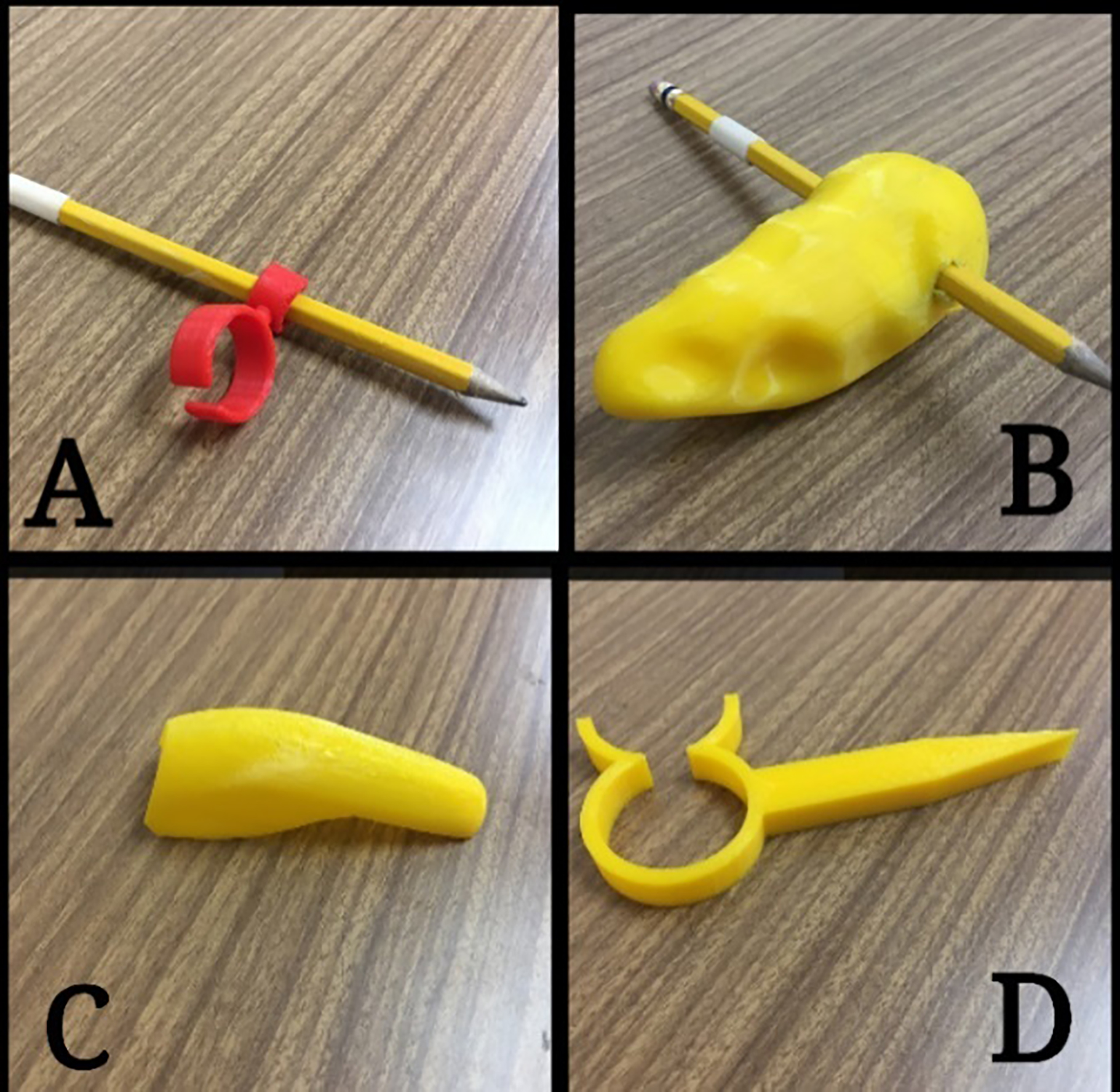
A: Usage of Concept #1; B: Usage of Concept #2; C: Usage of Concept #3; D: Usage of Concept #4.
Figures 1 and 2 show the four concepts (not in-use and in-use respectively) listed herein.
This design for writing utilized the index finger for support of the device while the two fingers, the index and thumb, support the pen/pencil. Circumference of the index finger of the right hand just above the knuckle was measured using a physical method, a micrometer, in order to design the device. The change in angle from the finger support to the pen/pencil support is 45
Concept #2 – Grab N’ Write
The second design for writing used a 3D scanner to scan and produce a model which replicated the geometry of the individual’s grip. The inspiration for this was based on the work of Heyne [15]. This was done by first taking some moulding clay and allowing the individual to grip it, therefore obtaining the fingers’ most comfortable gripping position. Since the participant had no residual grip strength, the fingers were put in a relaxed position around the clay, and then actively pressed into the clay by the left hand in order to make indentations. The moulding clay was then scanned and edited to achieve a writing device with this unique holding position. Only the shell (exterior) of the clay was printed and this was done to a thickness of 2 mm throughout the entire surface area of the device. Printing of the shell provided an advantage of low-weight to the participant compared to the use of the clay alone without 3DP. The hole for the pencil is 7.5 mm (0.3 in) in diameter, which is slightly smaller than the size of most pencils and smaller pens, in order for a slight interference fit. An alternative to the 3DP process for this Concept would be through the use of a plastic such as a thermosetting resin, although there would be difficulties in creating the shape from an initial liquid form (as time is needed in curing to achieve solidification) and in creating the hollowness of the form.
Concept #3 – Slip N’ Type
This first design for typing takes into consideration the maximum width of the individual’s middle finger. This measurement is considered to obtain an easy slip on concept which can be used for typing. The middle finger was chosen because it is the longest finger, so it was presumed that the extension the assistive device would provide, would be enough for the participant to rest his arm while still being able to type.
Concept #4 – Grab N’ Type
The second design for typing takes the maximum width of three fingers in a hole/ring and uses a pointed section in order to type. This facilitated the participant only having mobility in his wrist which made it easier for him to gently rotate his wrist in order to type.
Testing methods
Overview
The study employed an Alternative Treatment Design, in which writing and typing tests occurred every day for the first three days and then the fifth and seventh days. The purpose for running the tests over a period of time was to gauge whether the participant adapted to the use of the assistive devices with time.
Study conditions
Recommendations for best practice in Alternating Treatment Design were subscribed to as documented by Barlow and Hayes [16] with an exception being that baseline data (use of a hand with no aid) was collected during the same testing window as the treatment (use of different concepts). The justification for this exception was that the treatments undertaken were independent of the baseline condition. Specifically, the use of an aid had no influence on the writing or typing performance of the hand without an aid (and vice versa) due to the inherent difference in the design function of the aids compared to the design function of the hand without an aid. A break of 15 minutes between each test for mental and physical rejuvenation was allowed. On each testing day, the order of the eleven tests (4 writing and 7 typing) was randomly assigned. The participant did not have access to the devices outside of the testing period.
Writing test
The writing tests entailed the use of tracing over a template of the alphabet (shown in Fig. 2A and B), with capital and common letters where both time taken to complete the task as well as quality of the writing, were observed and measured. The writing template was printed and the participant wrote directly on the dashed lines on the printout. This writing template is one that is typically used to teach students how to write. The 4 writing tests were:
– Using the left hand without an aid. – Using the right hand without an aid. – Using the right hand with Concept #1. – Using the right hand with Concept #2.
Tests #1 and #2 were used to create 2 separate baseline conditions. Test #1 being used as a holistic measure since the left hand is the hand of dominant use for writing. Test #2 is directly related to the hypothesis. Tests #3 and #4 were the concepts used to evaluate the hypothesis.
For the typing aspect of the testing, the participant was given a task to type a series of random perfect pangrams, which contains all the letters of the English alphabet and which can be used in typing tests. Pangrams have been used as a speed test for typing by Prunty et al. [17] and Wallen et al. [18]. A typical QWERTY, push button keyboard was used and each run was timed for each test. The participant was allowed to correct any mistakes made when typing and time taken to complete the task was measured. The seven typing tests were:
– Using the left hand without an aid. – Using the right hand without an aid. – Using the right hand with Concept #1. – Using the right hand with Concept #2. – Using both hands without an aid. – Using both hands with Concept #1. – Using both hands with Concept #2.
Tests #1, #2, and #5 were used to create 3 separate baseline conditions. Test #1 and #5 being used as holistic measures, with Test #1 factoring that the left hand is the dominant hand for typing and with Test #5 taking into account that typing on a keyboard is usually done with 2 hands. Test #2 is directly related to the hypothesis.
When using both hands, the participant was instructed to use the left side of the QWERTY keyboard with his left hand and the right side of the keyboard with his right hand as typically done when typing with both hands.
Time was recorded by an observer, who has no relation to the participant, using a stopwatch. The observer also measured the distance of the deviation. For comfort, a numeric rating scale (NRS) from 1–10 was used, (with 1 being very uncomfortable and 10 being very comfortable) as validated by the study [19]; which states that a numeric scale with defined end points, 10-point end-defined scales (NRS) are preferred, for rating concepts such as subjective quality of life. Thus, this scale was seen as an appropriate way to assess the subjective measurement of comfort for the participant. Comfort data was only assessed on the seventh day of testing based on the determination that the last day of testing would offer the best assessment of this criterion. For writing, the largest deviation in millimetres, from the template guide was recorded using a Vernier calliper for each of the 52 letters, the average subsequently found and rounded to the nearest millimetre. A low value would be indicative of a good writing quality. The four writing tests involved using the left hand with no aid, the right hand with no aid, the right hand with one concept, and the right hand with another concept. The participant was not allowed to correct his mistakes when writing.
Independent variable
The independent variable of Time (Day) was used. This variable is significant due to the ability of the human to learn to adapt to certain situations with time, in this case a device. A device that offers improvement with time (shown by improvement in typing speed over a period of days for example) to the user is therefore an advantage to one that does not and can be considered a good correlator to usability and sustained use.
Data analysis
Data was plotted with respect to time taken to complete each writing/typing test on each testing day to produce respective graphs. Simple linear regression was applied to each data point set and an associated coefficient of determination R-squared value was shown. The slope of the graphs and the associated R-squared values were used as indicators to evaluate rate of improvement/decline and the reliability of the evaluation respectively. This analysis was used to not only support the hypothesis that the assistive device could improve the speed at which the task was performed (compared to no assistive device) but also to provide a measure of forecast in improvement if the device’s use is continued. Statistical analysis of this device to an applicable population was not conducted due to the bespoke design that was crafted for this particular participant and also the unique nature of the participant’s disability.
Measurement of the handwriting deviation for both hands without aids and with Concepts #1 and #2 on the right hand, based on the largest deviation from the template, in millimetres (rounded to nearest millimetre), where the larger the deviation, the worse the handwriting quality
Measurement of the handwriting deviation for both hands without aids and with Concepts #1 and #2 on the right hand, based on the largest deviation from the template, in millimetres (rounded to nearest millimetre), where the larger the deviation, the worse the handwriting quality
Time taken to complete writing task with left hand (which has no physical disability) and right hand with no aid, with Concept #1 and with Concept #2.
Writing
The results of writing speed tests are shown in Fig. 3. The left hand’s writing times were much faster than any writing produced by the right hand, as expected, since the participant was using this as his primary hand for over 3 years.
The right hand took 423 seconds (
Degree of comfort on seventh day for writing for both hands without aids and with Concepts #1 and #2 on the right hand based on a numeric rating scale of comfort with 1 being very uncomfortable and 10 being very comfortable
Degree of comfort on seventh day for writing for both hands without aids and with Concepts #1 and #2 on the right hand based on a numeric rating scale of comfort with 1 being very uncomfortable and 10 being very comfortable
Degree of comfort on seventh day for typing for left and right hand without aids and with Concepts #3 and #4 on the right hand based on a numeric rating scale of comfort with 1 being very uncomfortable and 10 being very comfortable
Table 3 reveals the Handwriting quality results where the lower the value, the better the writing quality. From the measurement by an impartial recorder, the writing quality was seen to be generally better with the use of Concept #1, over the use with no aid on the right hand and with the use of Concept #2 on the right hand. There was an increase in quality of penmanship over time with Concept #1. However, with Concept #2, the penmanship did not improve. The left hand also showed the best penmanship generally, having an average deviation (over the 5 days of testing) of 1.4 mm (0.06 in), which is attributed to the left hand having most practice in writing since the participant now uses it as his preferred hand. The right hand with no aid had an average of 2.4 mm (0.9 in) deviation whilst usage of Concept #1 gave an average deviation of 1.8 mm (0.07 in) and with Concept #2, there was an average deviation of 2.0 mm (0.08 in).
The results of Comfort are shown in Table 4. Use of the left hand was most comfortable for the participant with a rating of 10, while the right hand with Concept #2 was on the other end of the spectrum proving to be uncomfortable with a rating of 3.
Figure 4 reveals the results of the typing speed tests. Calculations were based on Day 7 data. The right hand took 152 seconds (
Time taken to complete typing task with left hand (which has no physical disability) and right hand with no aid, with Concept #3 and with Concept #4.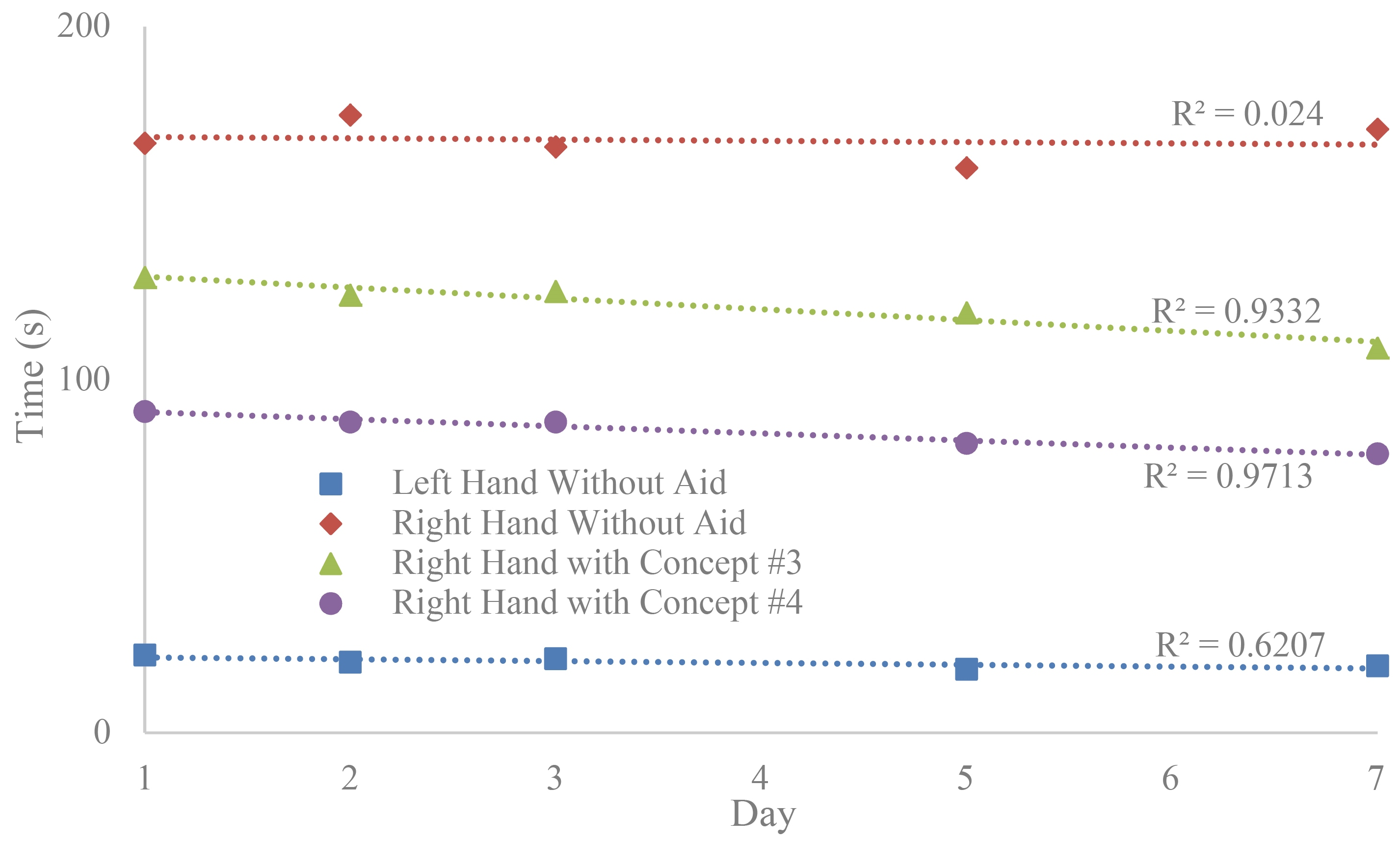
Time taken to complete typing task using both hands with no assistive device, with Concept #3 and with Concept #4.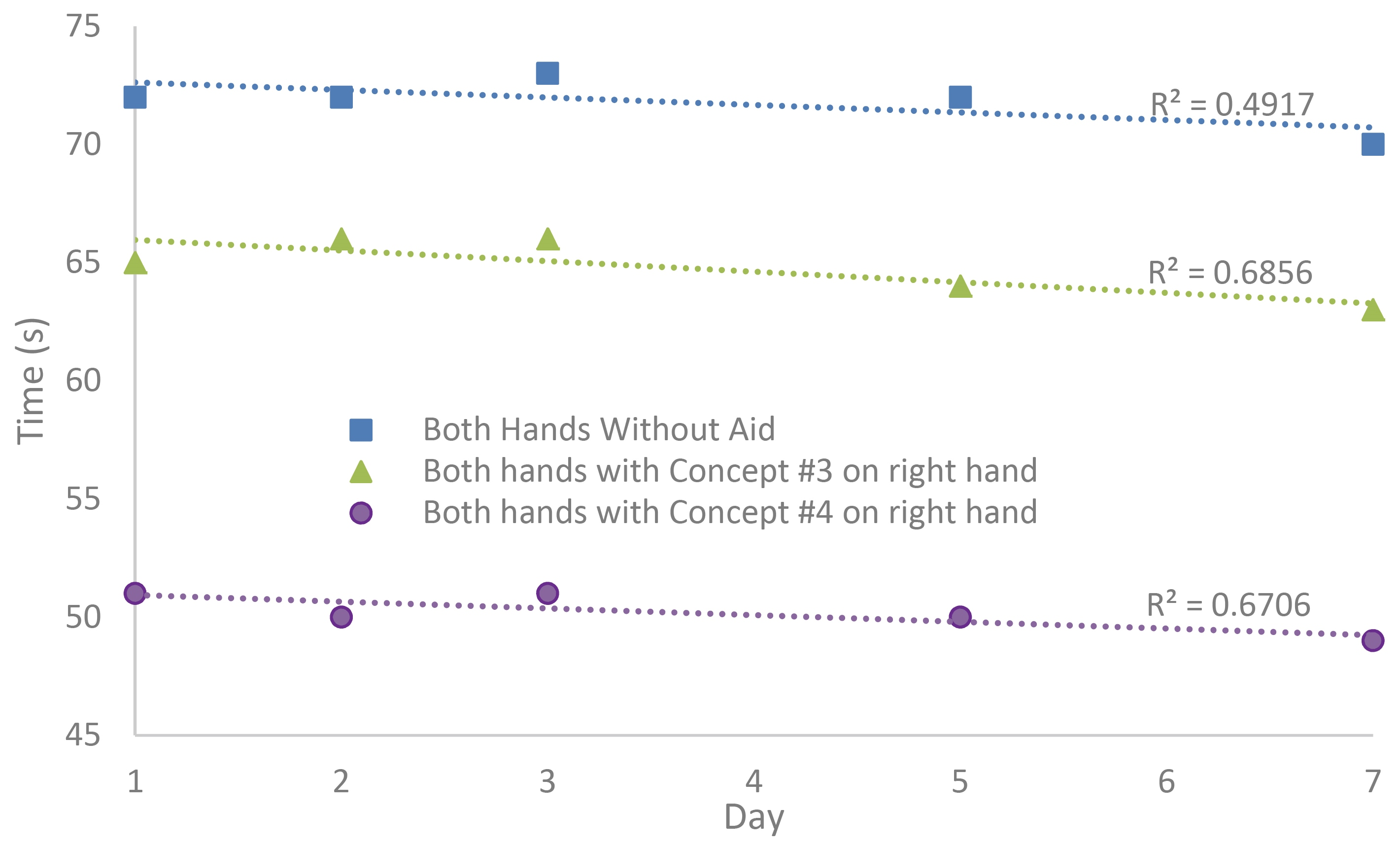
Figure 5 shows the results when typing was done with both left and right hands. The aim of typing with both hands would be an attempt to restore the participant’s capability before the pilocytic astrocytoma removal where he used 2 hands to type. Concept #3 was 7 seconds faster than typing using no aids on either hand, whilst Concept #4 was 21 seconds (30%) faster. Concept #3, again, had the highest rate of improvement with time, though on the other hand, it was seen that Concept #4 was 14 seconds faster than Concept #3. Thus, Concept #4 offered the lowest time overall to complete the task with the two hands typing.
Summary of time taken to complete typing and writing tasks with left hand (which has no physical disability) and right hand with Concept #1 and Concept #4
Table 5 presents the results of comfort for the typing aids. Use of the left hand was most comfortable for the participant with a rating of 9 while the right hand without aid was on the other end of the spectrum proving to be in the uncomfortable spectrum with a rating of 2.
As expected, the lack of practice and use of the right hand with no aid accounted for the relatively slow and low quality hand writing. From Fig. 3, the speed increase seen when Concept #1 was used over when no aid was used with the right hand, can be attributed to better control of the pencil, which allowed the participant to move his hand at a faster pace than before, while maintaining legibility. Concept #1 was also more efficient than Concept #2, despite the fact that Concept #2 was designed with grip form-fitting qualities through the use of 3D scanning. This showed a contrasting view of Rengier et al. [8], who suggested that the use of 3D scanning would provide a more efficient device. The reason for the discomfort, though, was determined to be the bulky shape of Concept #2. The device may have put added strain on the participant as he wrote causing fatigue and thus slowing his time. The bulky shape, as well as no support of the device, other than grip, caused a loss of control over the device and thus the pencil, leading to greater deviations when writing as well as general discomfort. The comfort experienced with use of Concept #1 was as a result of a small size which allowed it to work best for the right, weakened arm. Additionally, it was found that control was facilitated due to wrist and finger involvement for Concept #1. Correspondingly, more focus could have been placed on writing solely with Concept #1, rather than having to focus on maintaining grip for Concept #2, whilst writing. It is suggested that a support or attachment should be added to Concept #2, similar to Moxon [20] in order to make improvements to stability.
With respect to typing, the right hand with no aid was found to be uncomfortable due to the hovering action which the participant had to perform over the keyboard, which caused fatigue, as well as having to type with his thumb alone due to the lack of the ability to extend his other fingers. The use of typing aids on the right hand, whilst not approaching the speed at which typing took place with the left hand, did show improvement over the right hand when no aid was used. This can be attributed to the reach advantage of both concepts which made the keys on the keyboard easier to press, by being more accessible. This was in line with the findings of Buehler et al. [21] where an in-house 3D object was easily designed in support of accessibility. Furthermore, this increase in speed was by a very large margin as well, considering only the thumb could be used (by rotating the wrist clockwise and anticlockwise). The participant did not have control over the four fingers to extend them or control them individually, as an abled person would. Concept #4 was quicker than Concept #3 because it had an extended reach advantage (being longer). Additionally, even though Concept #3 was compact, it did not incorporate many fingers in performing the typing operation. Concept #4 did incorporate all the fingers and the thumb played the major role in controlling the device. Concept #4 also proved superior to Concept #3 with respect to the comfort experienced in using typing aids, due to Concept #3 being a model to slip onto the middle finger, which made it necessary for the index and ring fingers to hold it in place, requiring additional effort, and making typing harder. Table 5 summarises this by the rating of the participant who gave Concept #3 a rating of 3 and Concept #4 a rating of 6. The higher value, again, means a better rating.
A review of measures to assess assistive device impact such as the Canadian Occupational Performance Measure [22], Psychosocial Impact of Assistive Devices Scale [23], and Quebec User Evaluation of Satisfaction with Assistive Technology [24] was undertaken. These measures did not contain tools to specifically evaluate typing/writing quality and performance.
One of the limitations of this study was the use of a single participant. Although multiple devices were made, these only served the purpose of assisting with writing and typing although there is a much wider variety of assistive devices which can be tested. Additionally, the process of manufacturing the devices was done with just one of the possible options, FDM. Thus, future works could include looking into using the other processes and comparing characteristics on multiple participants.
Conclusion
Concept #1 (2 ring connected design where one finger fits into one ring and the writing utensil fits into the other ring) was seen to be 15% more effective in terms of speed of writing than writing with no aid on the right hand, while Concept #2 (based on a 3D scanned model of the participant’s grip) proved to be less effective by 40% compared to no aid on the right hand. The results of the quality of writing achieved mirrored the speed results in that Concept #1 produced better writing quality than Concept #2. Based on the relatively high slope of the regression line and high coefficient of determination for Concept #1 as shown in Fig. 3, this concept can possibly approach the speed and quality of writing as the left-hand through continued use. This comparison is presented in Table 6. Further weight to Concept #1’s positive results is observed with a comfort rating of “7”. This was better than that of Concept #2 and the right hand with no aid which had ratings “3” and “4” respectively.
With respect to typing, Concept #4 (consisting of a ring with pointer where three fingers are meant to fit inside the ring) was 54% faster than using no assistive devices on the right hand when typing with right hand alone. This concept was also 28% quicker than Concept #3 (a device that slips onto the participant’s middle finger as an extension) when used to complete the task assigned. Concept #4 was also found to be more comfortable for the participant than Concept #3 and when typing without aid on the right hand. Though typing with both hands using Concept #4 was not better in time than typing with the left-hand alone (as shown in Table 6), the participant was especially appreciative that he could resume playing video games where simultaneous typing of keys on the keyboard was required. This was a previous hobby. Therefore, Concept #4 contributed to resuming the quality of life of the participant to where it was before surgery. The participant was also appreciative of his ability to become ambidextrous once again with respect to typing as he believed that he would get better with time with continued practice. Determination/drive of a participant combined with the applicable tools can bode well for possible brain/activity redevelopment post brain surgery for essential tasks. Though speech recognition software and hardware (Amazon Alexa being an example) has offered significant improvements in the early part of the 21
Summarising, Concept #1 was seen as the better option for writing and Concept #4 as the better option for typing with respect to the use of an assistive device on the physically-challenged right hand. The participant was left with these concepts for his future use. Concept #2 was found by the participant to be bulky. This required the user to place too much focus on gripping versus writing and Concept #3 required a design to facilitate more support at the hand.
Thus, this study completed its aim to design and evaluate the function and comfort of using four different assistive devices that were made using the 3DP processes of FDM as it was deemed a faster, cheaper and easier way to make the bespoke devices. With a moderate degree of comfortableness, Concept #1 helped a participant write faster and neater compared to no assistive device with the right-hand whilst Concept #4 improved the typing speed for right-hand typing, thus supporting the hypothesis. However, the hypothesis was not supported for Concept #2 which was both uncomfortable and did not improve writing speed/quality. Concept #3 supported the hypothesis on improving on typing speed. Though the level of comfort was only marginally improved compared to the participant using his physically challenged right hand without an aid. The study can also assist others who intend to produce assistive devices for writing and typing by not only providing ideas for bespoke designs but also the ways in which these assistive devices can be assessed.
Footnotes
Conflict of interest
None to report.