



Abstract
BACKGROUND:
Web accessibility is one of the most important aspects of building a website. It is important for web developers to ensure that their website is accessible according to WCAG standards for people with different range of abilities. There is plethora of tools for ensuring conformance to WCAG standards but not many studies compared performance of automatic WCAG tools.
OBJECTIVE:
This paper compares a set of ten WCAG tools and their results in terms of ease of comprehension and interpretation by web developers. We proposed a Common User Profile format to help personalize contents of website making it accessible to people with different range of abilities.
METHODS:
We selected ten WCAG tools from World Wide Web Consortium (W3C) to evaluate landing pages of two popular websites. For each webpage, we identified accessibility issues and recommended alternate suggestions to help developers improve accessibility. Further, we highlighted accessibility issues that cannot be captured only through conformance to WCAG tools; and proposed additional methods to evaluate accessibility through an Inclusive User Model. We then demonstrated how simulation of user interaction can capture usability and accessibility issues that are not detected through only syntactic analysis of websites’ content. Finally, we proposed a Common User Profile format that can be used to compare and contrast accessibility systems and services, and to simulate and personalize interaction for users with different range of abilities.
RESULTS AND CONCLUSIONS:
After careful evaluation of two websites using the ten tools, we noted that, both websites lacked color contrast between background and foreground; lack of sign language alternatives; opening of pop-ups without proper warnings and so on. Further, results from comparative analysis of selected web accessibility tools noted that, there is no single tool that can be found ideal in all aspects. However, from our study, Utilitia Validator by Utilitia SP. z O.O was considered the most feasible tool. By rectifying and incorporating issues and alternate suggestions by simulation study and Common User Profile format respectively, developers can improve both websites making it accessible to maximum audience.
Keywords
Introduction
Web accessibility is one of the most important aspects of building a website. It is an inclusive practice of ensuring no barriers to prevent interaction with, or access to websites on the World Wide Web (WWW), by people with physical and situational disabilities, and socio-economic restrictions on bandwidth and speed [1]. Web developers should make sure that their website is accessible to people of varying abilities, or at least by those for whom the website is designed [2]. Web developers usually use standard authoring and evaluation tools to create web content. To evade confusions regarding accessibility assessment of different websites, W3C proposed a set of guidelines [1] and formed the Web Accessibility Initiative (WAI) [3]. These guidelines are critical for developers who tend to design and develop websites, for example, a person with blindness requires screen reader technology, and color contrast should be taken care of for persons with blurred vision [3]. Similarly, videos should have sign language and should be close captioned for people with hearing impairment. Additionally, systems and services developed for elderly or disabled people often find useful applications for their able-bodied counterparts – examples include mobile amplification control [4] originally developed to compare 10 different web accessibility tools on two popular websites for people with hearing problem but helpful in noisy environment, audio cassette version of books [5] originally developed for blind people, standard of subtitling in television [6] for deaf users and so on. However, existing design practices often isolate elderly or disabled users, by considering them as users with special needs. Web developers fail to consider their problems during the design phase leading to design of poorly accessible websites. In the context of accessibility of websites, this paper made the following contributions:
Identified issues with existing WCAG tools in terms of WCAG guidelines followed, POUR (Perceivable, Operable, Understandable and Robust) factors, success criteria, types of automatic checks, disability checks and so on Used a simulator that can identify interaction issues for people with different range of abilities and complement results obtained from existing tools Proposed a common user profile format to personalize content of websites for people with different range of abilities.
The WWW [1] has undergone several improvements to make it available for a larger population across the globe. However, there still exists problems of accessibility, which limits a major fraction of population from utilizing it. Accessibility evaluation of a website is a complicated and difficult task. Hence, most web developers fail to evaluate websites for accessibility in the website development life cycle, making it inaccessible for people with disabilities.
When web accessibility tools were newly released, websites were manually evaluated for accessibility problems, leading to unreliable results for flagging issues [7]. An inspiring paper by Brajnik et al. [8], discussed evaluation of accessibility checks done by experts resulting in detection of such violations with more accuracy. Manual inspection method consumed more manpower and time, thereby being expensive compared to automated tools. There is no way to confirm the expertise of an evaluator resulting in biased evaluations, and experts may fail to perform a detailed meticulous review. Another approach was to evaluate websites for accessibility by conducting user trials with people with disabilities using a method called User Testing [9]. However, this method is not easy, as it requires the need to find users with disabilities, every time a website needs to be evaluated. Disabilities are of various types, so we have to find appropriate user group, to ensure thorough evaluation. Nowadays, most automated web-based tools help in evaluating websites by providing a detailed report of areas which need to be improved [10].
In a recent study by Alsaeedi [7], only two tools were used to check for accessibility of a website. Tools were selected without proper justification for their selection. A study by Sandhya and Devi [11], focused on evaluating The Times of India and NDTV webpages, using a screen reader. The study provided a discussion on methods followed in using screen reader and not the evaluation process itself. Alsaeedi [7] evaluated the website of University of Saudi Arabia for accessibility using two tools. Authors proposed a Coverage Error Ratio (CER) metric to select any web accessibility tool. It is the ratio of number of errors detected by a given tool to the total number of errors detected by all tools. Value of CER scores calculated for each tool, can be used to measure the performance of tools. In this study, authors used the Wave and Site Improve tool for webpage evaluation as they possessed a high CER score. In a recent study by Almeida and Duarte [12], a webpage was evaluated by three tools namely Color Contrast Accessibility Validator, WAVE and WCAG Color Contrast Validator, to check if webpage meets color contrast specifications. Tools used were compared based on different sets of foreground and background colors [12].
A paper by Akgül [13] evaluated Turkish local and state government websites for accessibility using A-checker. The author discussed the importance of usability, accessibility and readability and argued that, these factors should be considered during design phase as it helps provide users with information about services offered by website. The paper noted HTML and CSS errors detected but failed to compare tools based on various tool selection parameters as mentioned in the W3C tool selection guide [14]. However, the author emphasized the need to use visual impairment simulation to determine actual accessibility. Another paper by Akgül and Vatansever [15] evaluated accessibility of a Turkish municipal authority website using TAW tool. The paper focused on the need to consider POUR factors for accessibility evaluation. The obvious limitation of study was evaluation for WCAG 2.0 guidelines using automatic evaluation tools. On the other hand, a paper by Vigo et al. [16] explored risk of solely relying on automated tools for evaluation. Authors demonstrated effectiveness of choosing right evaluation tools to improve evaluation.
Thus, in our study, we have selected 10 different WCAG tools, based on parameters [17] like WCAG guidelines followed, POUR factors followed, features offered by each tool, license of tool, ease of usability and interpretation, disability checks, success criteria [17] and tool completeness [18]. Tools were selected with an intention to cover different accessibility checks and features offered, making the website accessible according to WCAG standards. Since we have chosen tools that perform different accessibility checks rather than selecting tools that perform same accessibility check, evaluation of tools based on precision and accuracy is not considered feasible [18]. Additionally, we have used a simulation-based approach to further evaluate two websites for accessibility. The simulator is designed as a tool, to help web designers visualize, understand and measure effects of age and impairment on their websites. Finally, we propose a Common User Profile Format to personalize websites across different platforms and devices.
Selection of websites and appropriate web accessibility tools
Websites selected for accessibility evaluation
For our study, we considered evaluation of landing pages of two popular websites- the ‘World Health Organization (WHO)’ and the ‘British Broadcasting Corporation (BBC)’. The WHO is a part of the United Nations Organization (UNO), tasked with promoting universal healthcare, monitoring public health risks, coordinating responses to health crises, and bettering human health and wellbeing [19]. The organization is headquartered at Geneva, Switzerland, with 6 semi-autonomous regional offices and 150 field offices worldwide [19]. The BBC on the other hand, is the worlds’ oldest media broadcaster headquartered in Westminster, London [20]. It has a staff of around 22,000, and more than 16,000 other personnel engaged in public sector broadcasting organization [20]. The website hosts a sizeable amount of traffic [21] and is claimed to be the worlds’ most visited news website in 2020 [22], offering online services in Arabic and Persian languages.
We noted that, WHO website follows accessibility requirements stated by the UNO to enhance reachability [23]. However, the website failed to check for accessibility with respect to WCAG guidelines [24]. Similarly, although BBC followed the WCAG 2.0 standards [25, 26, 27], the webpage required change in color and contrast, clear labelling of video content, simplifying most read and most watched sections for better understanding [28]. For the above-mentioned reasons, we have chosen to evaluate the two websites for accessibility.
Website parameters considered for accessibility tool selection
There is a plethora of tools available for automatic evaluation of web accessibility with respect to Web Content Accessibility Guidelines (WCAG). We have chosen tools such that each tool covers different accessibility checks and features offered, making the website accessible according to WCAG standards. Following parameters are considered to select the 10 tools from W3C:
WCAG guidelines followed
Accessibility, usability, and inclusion are three important factors to be considered while developing a website usable by people with disabilities [29]. The WAI suggests a set of WCAG guidelines to be followed by developers of any website. Thus, each tool is checked if it follows at least one version of WCAG standards like WCAG 1.0, WCAG 2.0, and WCAG 2.1. Additionally, the tool can further satisfy other guidelines like Barrierefreie-Informationstechnik-Verordnung (BITV), BITV 2.0, US Federal Procurement Standard, Section 508, Japanese Industry Standard, Stanca Act, Italian Accessibility Legislation, German Government Standard EN 301 549, European Accessibility Standard and so on.
Criteria to classify a tool for ease of usability and interpretation
Criteria to classify a tool for ease of usability and interpretation
WCAG guidelines available at the W3C have a testable success criterion [17] that can be categorized into three levels of conformance namely A, AA and AAA respectively. Each conformance level creates a better user experience for a wider audience. Thus, we ensured to select tools that follow at least two levels of conformance to evaluate a webpage no less than sufficiently accessible. The conformance levels are as follows:
Level A (Lowest Level): This holds the lowest level of accessibility success criterion to be satisfied by any website to be classified as accessible. A few suggestions by this level include-provide text alternatives for all non-text content; provide equivalent information for time-based media; create content that may be presented in multiple ways; use of color; audio and keyboard controls.
Level AA (Sufficient Level): This holds a higher level of accessibility success criterion than Level A. The website should meet all conditions mentioned in Level A. Additionally, it should include live audio caption; audio description; text contrast and resizing; text over images; appropriate labels/headings.
Level AAA (Highest Level): This holds the highest level of accessibility success criterion. The website should successfully meet all the criteria mentioned in Level A and Level AA along with extended audio descriptions; sign languages; multimedia alternatives and interruptions; and content size.
Guidelines and success criteria defined by the W3C are organized around four principles called the POUR factors. These principles lay the foundation necessary for anyone to access and use Web content with ease [30]. POUR is the abbreviation of Perceivable, Operable, Understandable and Robust. Each of the web accessibility evaluation tool is checked to follow at least one of the four factors. Additionally, information available on the website should be:
Perceivable: The user interface components and information on website must be presented in a way that can be perceived by users with ease
Operable: Navigation and user interface components must be operable. This is necessary for users to operate all components required for interaction
Understandable: Operation and information of the interface must be understandable by user. This is necessary as users must be able to understand the information and operations offered by website
Robust: Contents of website should work across multiple platforms, without any interface issues, providing same experience to all its users, across all platforms. Since the Web industry is improving on a day-to-day basis, websites should be kept updated to meet latest standards, for users to access.
If any of these principles are not met, users with disabilities will find it difficult to use the webpage.
We have chosen tools that are explicitly available as free, open source, trial/demo, enterprise or commercial.
Unique features offered by each tool
We have selected 10 different tools such that each tool checks for a unique feature of accessibility. Few features covered are color contrast checker, testing through plugins and modules for Node JS and Karma [31], checks for visual representation, evaluation through command line interface or application and so on.
Ease of usability and interpretation
Each tool is selected such that it is easy to use for webpages to evaluate accessibility. Additionally, we ensured that, results obtained by each tool are easy to interpret and understand, to help developers incorporate the same. We have classified each tool as easy, moderate and difficult based on the ease of usability of tool, and interpretation of results as defined in table (Table 1) below.
Error chart of WHO and BBC websites.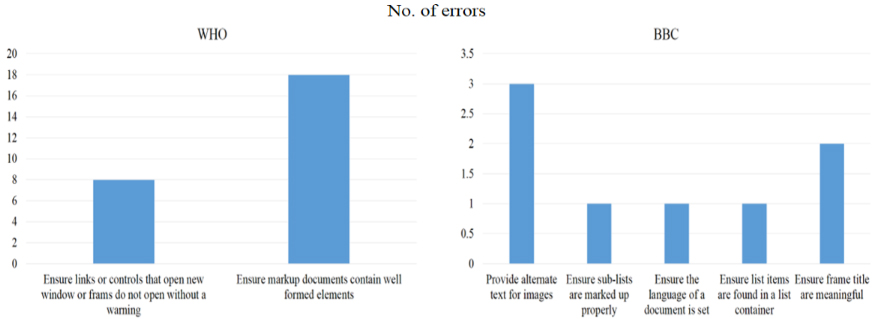
Tools should evaluate a website for a specific group or type of disability. The types of disabilities considered are:
Visual: This type of disability ranges from slight vision loss to total blindness. It includes color blindness, heightened sensitivity to bright colors, and other variations in color and brightness perception with or without visual acuity [32].
Physical: This type of disability is known as motor disability. This disability type hampers movement of muscle of any individual but is not restricted to partial or total loss of muscular co-ordination, muscular control or physical sensation as well as pain or missing limbs [33].
Auditory: This type of disability ranges from slight to severe hearing loss in one or both ears. It includes the ability of a person to hear sounds, but possibly not understand speech. This worsens in case of any added background noise and may be applicable to people using hearing aids [34].
Speech: Any difficulty in audibly speaking in a way that is not understandable to others [35].
Therefore, we selected 10 different web accessibility tools that confirm to all parameters considered. The tools selected are available at the W3C [36] for website evaluation and are as follows:
Access Assistant Community Edition by Level Access A-Checker by Inclusive Design Research Centre Functional Accessibility Evaluator 2.0 by University of Illinois at Urbana-Champaign QualWeb by Faculdade de Ciências da Universidade de Lisboa WAVE by WebAIM Accessibility Insights for Web by Microsoft Button Contrast Checker by Aditus Siteimprove Accessibility Checker by Siteimprove Utilitilia Validator by Utilitia SP. Z O.O IBM Accessibility Equal Access Toolkit: Accessibility Checker by IBM
Finally, our study is divided into three phases; Phase – 1, describes tools selected for accessibility evaluation with a detailed interpretation of results, issues identified and alternate suggestions to solve the issues. A section on comparative analysis of selected web accessibility tools is presented next. Phase – 2, evaluates the two websites further, using Cambridge Simulator [37]. This tool provides an overview of how a website is accessible to a user with three types of disabilities-visual, motor and hearing impairments. Results obtained from the simulator for each disability type is given in Section 6.1. Phase – 3, describes a common user profile format proposed to personalize websites across different platforms and devices.
Result obtained by the tool
Error chart of WHO and BBC website.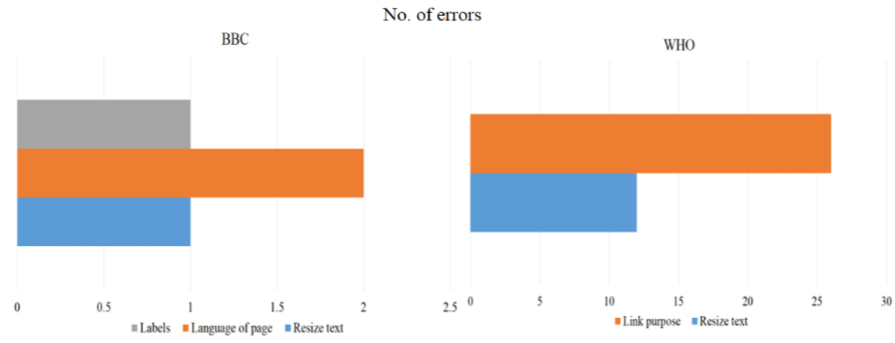
We present results for evaluation of two websites using 10 different tools available on the W3C. Two websites were evaluated using Chrome browser (Version: 85.0.4183.83) on a Laptop (Windows 8.1, Operating System having Intel (R) Core (TM) with i5- 8250U (8th Gen) CPU @ 3.40 GHz (4 CPUs and installed memory (RAM) 8000 MB). It may be noted that, we have chosen Chrome browser in particular for evaluation, as the same is supported by all tools selected. A detailed description of each tool, error chart, issues identified and alternate suggestions for both websites are furnished below.
Access Assistant Community Edition by Level Access [Release date: 15-Dec-2017]
This tool [38] checks for all iterations of code with web components. It offers two modes of evaluation of a webpage namely: quick test and preview mode. Error chart showing issues for both websites are given in Fig. 1. Results for the same are mentioned in Table 2.
A-Checker by Inclusive Design Research Centre [Release date: 19-Sept-2019]
This tool [39] is based on Open Accessibility Checks (OAC) providing users, the ability to create their own guidelines that can be taken care of, while checking for conformance. Issues identified in both webpages are depicted in Fig. 2. Results are mentioned in Table 3.
Result obtained by the tool
Result obtained by the tool
This tool [40] evaluates webpages for WCAG 2.0 Level A and AA conformances. A unique feature of the tool is to provide with the option of choosing between HTML5, ARIA Techniques or HTML4 Legacy Techniques for evaluation. The tool calculates the implementation score (Score
Error chart of WHO and BBC websites.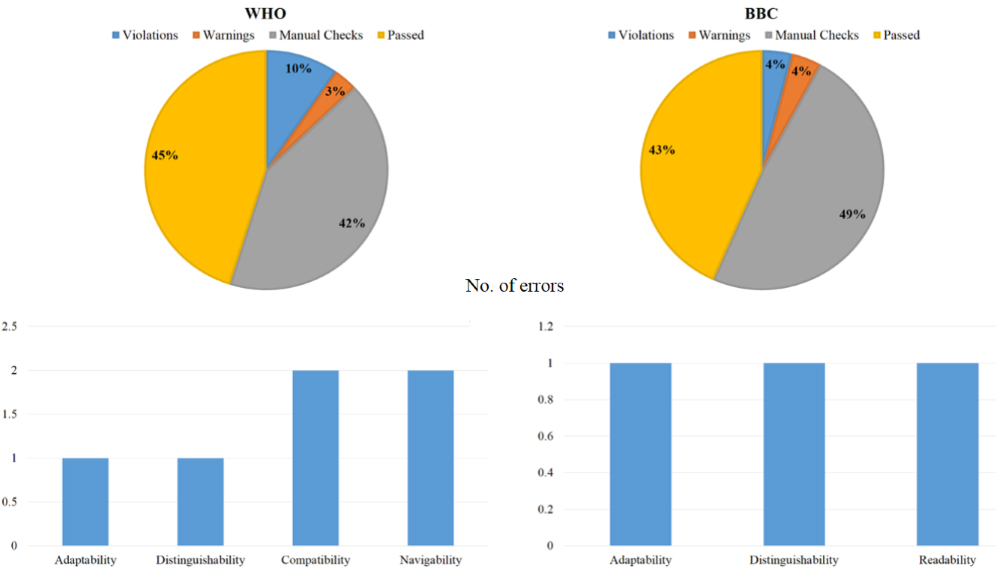
Results obtained by the tool
This tool [41] automatically evaluates a webpage on ACT-Rules [37] and WCAG 2.1 HTML and CSS techniques. The tool can be used through a command line interface or as a part of the application. Issues identified in both webpages are depicted in Fig. 4 with results mentioned in Table 5.
Error chart of WHO and BBC websites.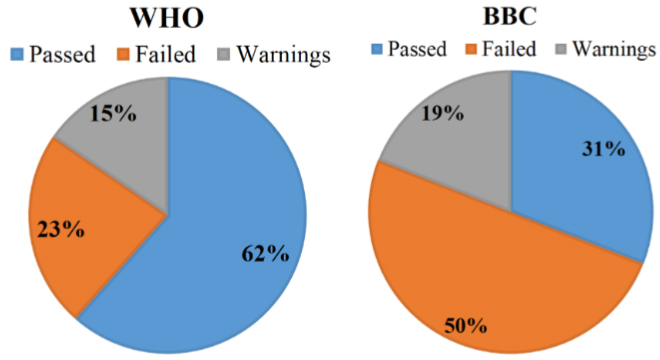
Result obtained by the tool
Error chart of WHO and BBC websites.
This tool [42] facilitates human evaluation of web content providing a visual representation of accessibility issues within the page. The tool marks potential accessibility concerns on the webpage. Errors are marked on an interactive interface making it easy to comprehend. Red icons marked (Fig. 5) indicate accessibility errors; yellow icons symbolize alerts; green icons symbolize accessibility features; and all light blue icons symbolize structural, semantic or navigational elements. This tool has a high CER score indicating that all errors can be identified, thereby exhibiting high performance [7]. Error chart for both websites are given in Fig. 5 and results mentioned in Table 6.
Result obtained by the tool
Result obtained by the tool
Result obtained by the tool
Error chart of WHO and BBC websites.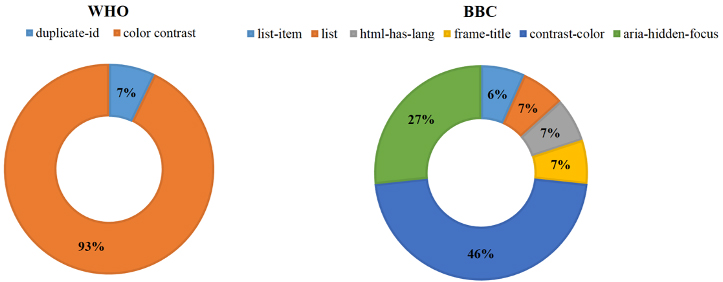
Error chart of WHO and BBC websites.
This tool [43] checks for accessibility issues by generating a brief report of step-by-step guidance on improvements for a webpage. This tool provides an option of selecting two different modes for evaluation-Tab stops (Fast scan) check and Assessment (Comprehensive scan) check. Issues identified in both webpages are depicted in Fig. 6 followed by results in Table 7.
Difference between valid and invalid color contrast.
This tool [44] checks for WCAG 2.1 compliance of all buttons and links on the webpage in just a click of a button. This tool specifically checks for contrast of buttons with default, hover, focus, active, disabled, etc. states. Error chart for both websites are given in Fig. 7. Results are mentioned in Table 8.
Result obtained by the tool
Result obtained by the tool
Result obtained by the tool
Result obtained by the tool
Error chart of WHO and BBC websites.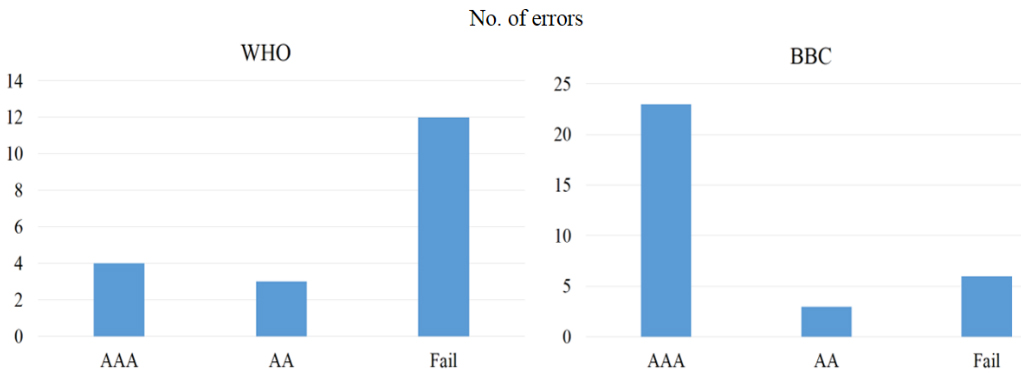
Error chart of WHO and BBC websites.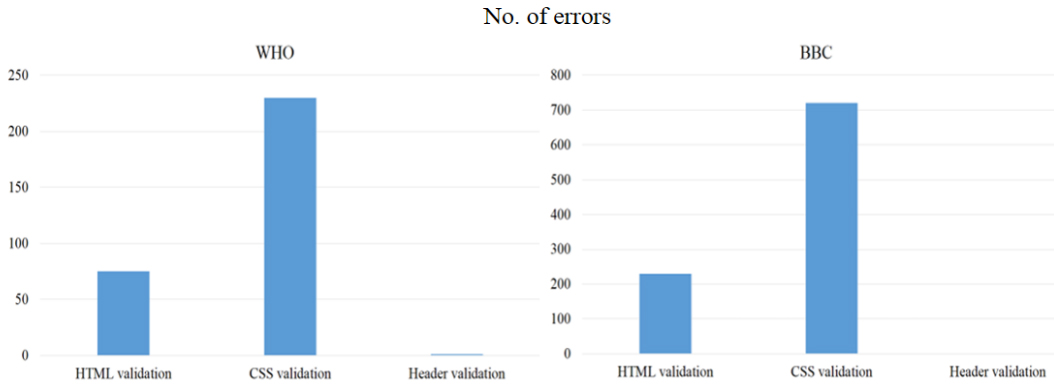
Error chart of WHO and BBC websites.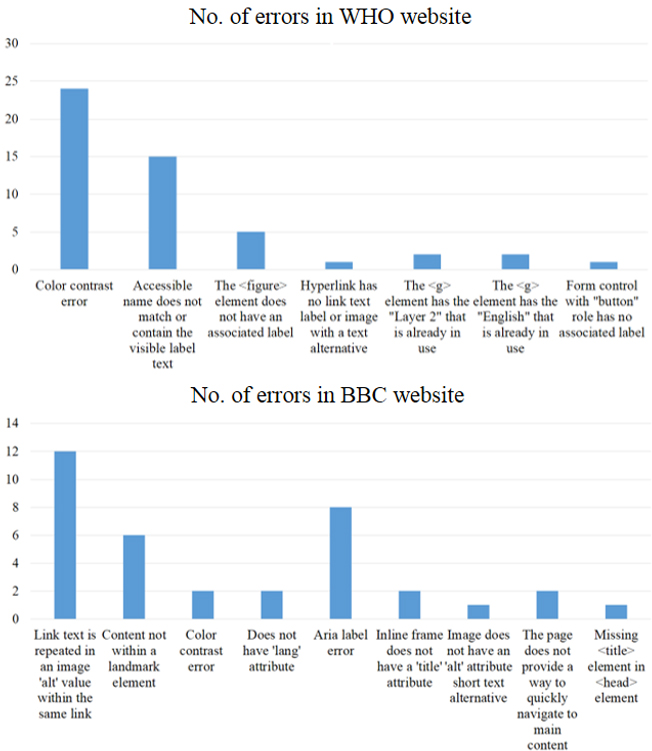
Result obtained by the tool
This tool [45] scans individual webpages and provides a clear explanation of different issues and how to fix each issue according to WCAG standard. It scans for restricted and password-protected pages. It displays accessibility issues on the webpage along with instruction to fix them. This tool exhibits high performance [7] with a high CER score indicating that all errors can be identified precisely. Issues identified in both webpages are depicted in Fig. 9 followed by results in Table 9.
Utilitia Validator by Utilitia SP. z O.O [Release date: 01-Jan-2011]
This tool [46] scans webpages and checks their accessibility. The tool checks for validity of webpage by using additional guidelines provided by the Polish Government. It provides ability to select a specific validation check based on three levels of conformance. Error chart for both websites are given in Fig. 10. Results are mentioned in Table 10.
IBM Accessibility Equal Access Toolkit: Accessibility Checker by IBM [Release date: 18-May-2020]
This tool [47] is an open-source software that offers integrated accessibility testing through plug-ins and modules for Node JS and Karma [31]. The tool provides an integrated checking experience by displaying accessibility issues on the website as well as by generating a detailed report for the same. Error chart for both websites are given in Fig. 11. Results are mentioned in Table 11.
Comparative analysis of selected web accessibility tools
This section presents a comparative analysis of 10 selected web accessibility tools based on various factors for WCAG guidelines. Initially, we have identified unique features of accessibility check offered by each tool as shown in Table 12. Further, each tool is checked and summarized for factors like WCAG guidelines and success criteria followed, POUR factors followed, license, formats not supported, ease of usability and interpretation of each tool, type of disability check, and total violations found and total needs reviewed by each tool. Results for evaluation of the mentioned factors are tabulated from Tables 12 to 17 below.
Unique feature of accessibility check offered by each tool
Unique feature of accessibility check offered by each tool
WCAG guidelines and success criteria followed by each tool
POUR principles satisfied by each tool
Licence type and formats not supported by each tool
Comparison of ease of usability and interpretation and type of disability check of each tools
Total violations found and total needs reviewed by each tool
Summarizing the results mentioned from Tables 12 through 17, it may be noted that all tools considered for evaluation are open source or freely available and follow WCAG 2.0 guidelines and confirm to have at least Level AA conformance. Further, each tool follows a minimum of two POUR principles. From Table 14, it may be noted that, A-Checker, Functional Accessibility Evaluator, Accessibility Insights for Web and Utilitia Validator satisfied all four POUR factors. Additionally, we identified formats that were not supported by each tool as per Web Accessibility Evaluation Tools list [36] indicating that the tool cannot evaluate the website in the said format. Table 17 lists the total number of violations found and total needs review by each tool [49]. From this table, we can infer that, in most tools the total violations flagged are much less than potential issues detected. Here, total number of violations are issues detected which directly violate the WCAG guideline and need to be resolved as soon as possible, as they might reduce accessibility of website. Total needs review, refers to potential issues detected. This means that the tool is not certain if errors detected might actually affect accessibility of website [49]. However, it is always encouraged to resolve the total needs review through manual check to evaluate accessibility.
After detailed comparison of 10 WCAG tools, we can conclude that, there is no single tool that can be found ideal in all aspects. However, from our study, it can be safe to say that, Utilitia Validator by Utilitia SP. z O.O is the most feasible tool for those requiring a precise and elaborate review of websites on WCAG 2.0 criteria and covers majority of disability checks namely-visual disability; speech disability; physical disability and auditory disability. Further, this tool has detected the most number of violations. We noted that this tool supports all POUR factors following WCAG 2.0 standards, Section 508 guidelines, US Federal Procurement Standard, Japanese Industry Standard (JIS), Stanca Act, Italian Accessibility Legislation, BITV 2.0 and German Government Standards respectively. The tool supports a variety of licenses such as Free, Trial/Demo, Commercial and Enterprise. Finally, output generated by the tool for both websites is moderately-difficult to interpret.
In addition to evaluating the WHO and BBC websites with 10 WCAG tools, we used a simulation-based approach to visualize accessibility issues for different types of disabilities. In a study by Velázquez et al. [50], authors developed Emagin Z800 3DVisor-based virtual reality headset that projects image and video within an immersive environment. This handset simulates various visual impairments such as Macular Degeneration, Diabetic Retinopathy, Hemianopsia, Central Scotoma, Tunnel Vision, Migraine Fortification, Pituitary Tumors, Glaucoma, and Retinitis Pigmentosa upon varied inputs. The goal of the project was to educate normal people who work on accessibility on visual impairment and provide them with firsthand view of visual impairment. However, this simulator lacked the simulation for hearing and mobility impairment. Goodman-Deane [51] developed a simulator using Adobe Flash to simulate visual as well as hearing impairment. The visual impairment simulator simulated impairment for cataracts, macular degeneration, loss of accommodation, glaucoma, and color blindness. The hearing impairment simulator simulates for three levels of hearing loss namely mild, moderate, and severe. This simulator lacked the capability to simulate mobility impairment.
Thus, we used an inclusive performance simulator called the Cambridge Simulator, developed by Biswas and Robinson [52] at the Cambridge University. The Cambridge Simulator provides an overview, of how a website could be perceived by a user with different range of abilities. The simulator imitates four different types of impairments, namely: Visual, Hearing, Cognition and Motor impairments. Further details of the simulator can be found in the paper by Biswas and Robinson [52]. While web accessibility tools provided a documented report of issues in both websites, the Cambridge simulator provided a real-time perspective of webpages in the eyes of people with disabilities. Unlike the case of WCAG tools having a predefined set of parameters to evaluate a webpage, the Cambridge Simulator can take a variety of custom inputs for different types of disabilities. The simulator can be found in the link –
Interface of the simulator is interactive and user-friendly It simulates different disabilities without requirement of real participants. However, it does not intend to replace real participant, rather try to widen design space at early stage of development Customization of personal user profiles and parameters as input for disability check Multiple websites can be simulated simultaneously Simulation results are achieved in real time.
Output for WHO and BBC websites.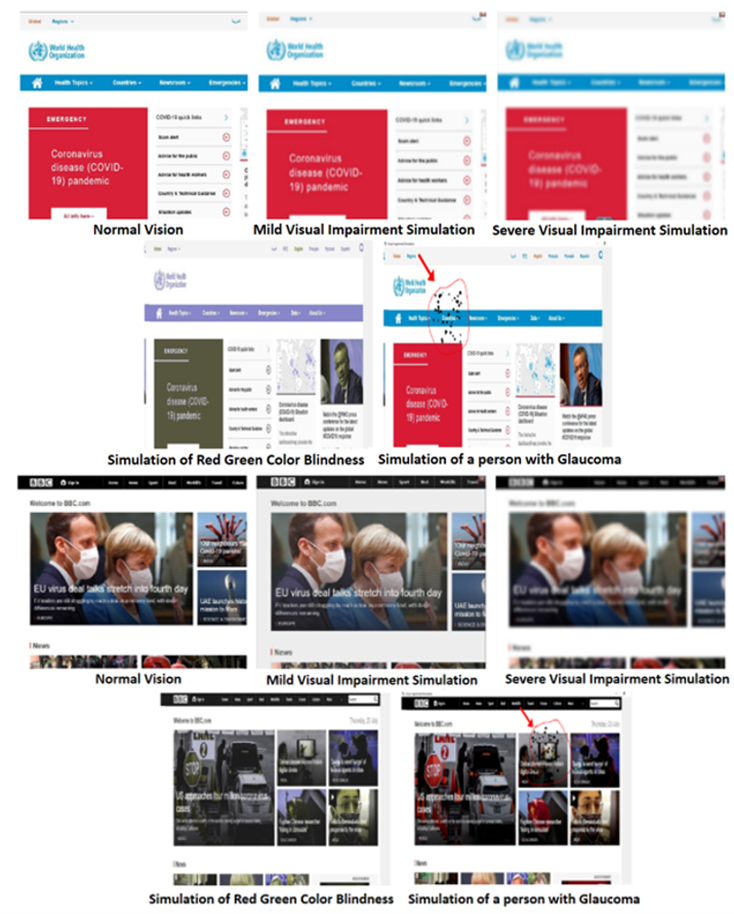
Output from motor impairment simulator for WHO and BBC websites.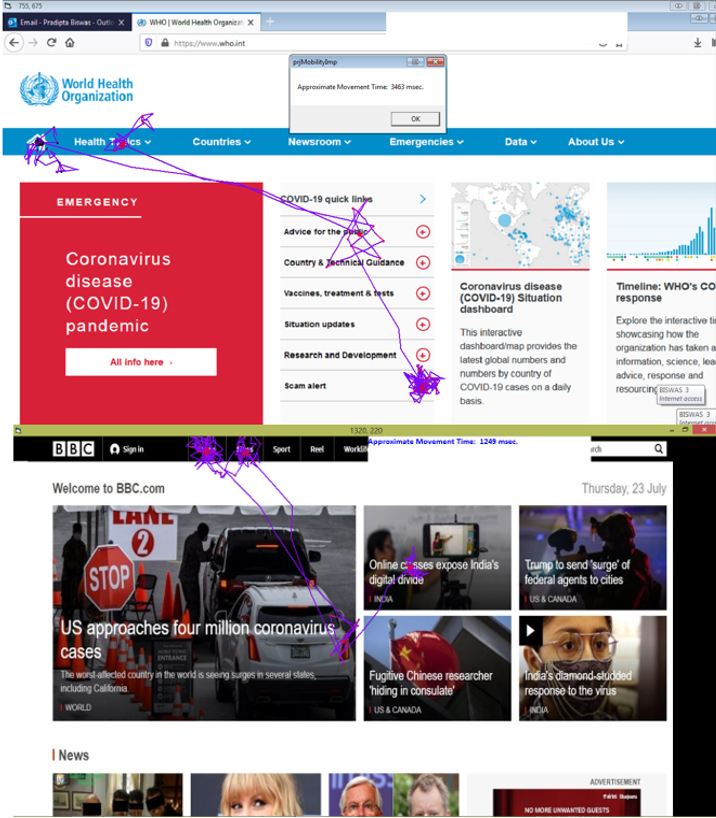
Simulation for visual impairment
The software runs image processing algorithms [53] to simulate effects of different variants of visual impairment ranging from mild vision acuity loss, severe visual acuity loss, red-green color blindness, glaucoma, macular degeneration and diabetic retinopathy [54, 55]. Results from the simulator (Fig. 12) noted that, both websites possessed lack of quality of images with poor color contrast, making websites difficult to use by mild visual impairment.
Simulation for hearing impairment
The Cambridge simulator simulates hearing impairment [52] with conductive and sensory hearing, ranging from mild to severe. Results found a noticeable difference in the output audio file, for podcast and speech, as perceived by the listener. For both websites, the audio was barely coherent when deficit of disease was set to ‘severe’. However, when deficit was set to ‘mild’, the audio was coherent to a certain extent. Additionally, we found that the audio track of the WHO website was not processed before it was put on the website, leading to unclear sound, while the BBC website was comparatively better when compared to WHO website. Resulting audio files are given in –
Simulation for mobility impairment
We ran the simulator for mobility impairment [56] on a profile with mild Parkinson’s disease that results in hyperkinetic motor impairment. Most links and news items in both websites found to have adequate inter-element spacing except the plus (
Common user profile format
We may note that, it is often difficult for web developers to cover requirements of people with a wide range of abilities. A one-size-fits-all approach is difficult to implement while developing different versions of the same website for people with different range of abilities and is often not scalable for large websites. Researchers already explored ways to adapt the same website differently for different users based on a user profile. The SUPPLE project [57] at University of Washington, Inclusive User Model [47] described in previous section in the context of simulation-based evaluation, IBM Web Adaptation technology [59] and AVANTI browser [60] are notable examples, mostly working for people with different range of visual and motor impairment. A user profile is an essential component for any personalization or adaptation.
ISO-FDIS 9241-129 [61] published a standard on managing user profiles for software individualization in 2010. From 2010 onwards, there were various attempts among researchers to create a common user profile format. The European Union-Virtual User Modelling and Simulation (EU-VUMS) cluster [62] took an ambitious attempt to publish an exhaustive set of anthropometric, visual, cognitive, auditory, motor and user interface related parameters for adapting man-machine interfaces of automobile, consumer electronics, audio-visual media and so on. ISO_IEC_24756 published the concept of Common Access Profile [63] for accessible and assistive devices. A detailed review on user profile and model can be found in separate research papers [58, 64]. ITU Focus Group [65] published a much compact set of parameters for creating user profile for smart TV.
As computers turn more ubiquitous with advancement of electronic technology, presently users including people with disabilities access information through multiple devices each having different set of applications and software platform. Ideally, an accessibility service should be provided to all devices and applications irrespective of underlying hardware. Responsive design of website can be considered as an example of automatic adaptation of layout based on screen size and platform of deployment. However, information about users is essential to personalize content and layout of an audio-visual media with respect to range of abilities of users. A user profile can be defined as an instantiation of a user model while a user model can be defined as a machine-readable description of user. In the context of personalization and accessibility, a common user profile format may have the following advantages:
Personalizing user interface content and layout for different applications after creation of a single user profile Offering accessibility services to all devices and platforms after creation of a single user profile Sharing personalized content and interface across different platform and devices to improve usability Adapting quality of accessibility services (e.g. font size of subtitle) across multiple media Sharing personalization metadata among service providers like website or content developers.
Figure 14 below, shows examples of interface adaptation across multiple devices and platforms using a common user profile format. It may be noted in the picture that, color contrast, font size, inter-element spacing of icons is adjusted across smart TV, desktop and laptop computers, smartphones and low-end mobile phones based on a common user profile. The Common User Profile will not only ensure accessibility but can be used to compare quality of accessibility services itself. For example, it will enforce authors to explicitly state font size, color contrast for general content as well as for closed caption or subtitles.
Example of interface personalization using common user profile format.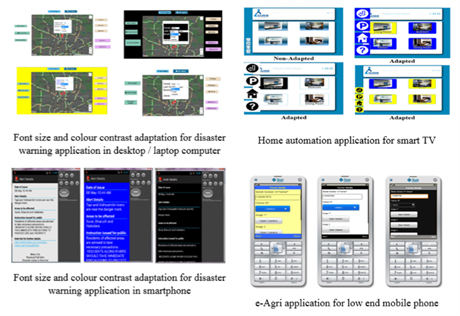
However, sharing information about user always possess security risk and unintended use not authorized by end users. Implementation of common user profile should take care of security aspect and local regulation and legislation. If the format and details of common user profile is agreed and shared among service providers, then sharing of actual content may not be necessary, rather the personalization algorithms can run on user profile stored on local machines. Standardization and sharing of only the format definition across service providers will enable personalization without taking risk of sharing details of individual user.
This paper compares 10 WCAG tools by evaluating landing pages of two popular websites-WHO and BBC. We selected these tools covering different accessibility checks and features offered. Evaluation of both websites revealed many scopes of improvement. In the WHO website, links open without any warning; markup document do not contain well-formed elements; size of text do not fulfill the required criteria; presence of duplicate ID in mark-up languages; header violation in HTML and CSS code were found noticeable. In the BBC website, most frame titles were not meaningful; list containers for list items were missing; sub-lists were not marked properly; language of the document was not set; alternate texts for images were not provided; size of text and labeling did not meet the WCAG criteria; specified color contrast guidelines were not followed; there was violation with respect to ‘Html-has lang’, ‘frame title’ and ‘aria-hidden focus’; insufficient time to read the content and so on.
Compared to a study by Brajnik [8], we used automated tools instead of manual evaluation with human experts, as it provided accurate and fast results with respect to syntactic issues in the markup language of a website. A study by Alsaeedi [7] considered only two tools leading to incomplete evaluation of webpage. In our study, we have selected 10 different WCAG tools for website accessibility evaluation. Any issue left undetected by one tool can be picked up by other nine tools, making our results more reliable. Additionally, we used the Inclusive User Model [58] simulating interaction of a wider range of abilities of users, compared to existing studies [10, 11]. We then presented a concept on common user profile format that can help personalize websites across platforms based on a common understanding of users’ range of abilities. Finally, we may note that, this study presents a brief idea for web developers on how a website can be evaluated for accessibility using existing automatic WCAG tools; parameters to consider for appropriate tool selection; interpretation of results for each tool based on performance; generate a comprehensive report based on the interpreted results; perceive a webpage in the eyes of a person with different range of abilities using simulation; and personalize web content for design of accessible websites using common user profile format.
Conclusion
This paper analyzed a set of 10 different WCAG evaluation tools on two popular webpages and compared the output from these tools. Webpages were evaluated to check whether they followed WCAG guidelines by meeting all three-conformance levels. While automatic accessibility tools are easy to apply, it may be noted that their output are not equally comprehensible. There are many differences among the syntax of checking and there is not a single winning candidate among tools. Certain aspects of usability could not be captured by mere syntax checking of tools and required thorough analysis. In this context, we presented a simulation-based approach and showed how people with different range of abilities perceive a particular webpage. Finally, we presented a concept of Common User Profile format that can personalize websites across devices and platforms based on a common understanding of users’ range of abilities.
Footnotes
Acknowledgments
The authors have no acknowledgements.
Conflict of interest
The authors have no conflict of interest to report.
Author contributions
All authors have equally contributed to the work.