Access to low-cost tactile displays that allow sliding contact between text and reading fingers remains a challenge for blind and visually impaired (BVI) users. This impedes the widespread learning of braille and tactile reading. Previous work demonstrated a high accuracy in the tactile reading of braille and raised print presented at varying refresh rates.
OBJECTIVE:
This work compares the most suitable spacing between embossed characters on a sliding contact tactile display for the accurate reading of words.
METHODS:
Two discs, differing in inter-character spacing (ICS), embossed with braille on one side and raised print on the reverse side are used here. MNREAD sentences are read for a period of 5 minutes by 17 participants, who are visually impaired, using both discs.
RESULTS:
The results show that an ICS of 8 mm is sufficient for reading braille with a low percentage error rate of 6.4. However, an ICS of 8 mm does not allow similar rates while reading raised print.
CONCLUSION:
The results presented here will be relevant towards the research that works towards the design of economical sliding contact tactile displays for BVI users.
Worldwide there are 35 million people who are blind while 246 million are visually impaired [1]. Persons with visual impairment (VI) can access digital information by means of audio and tactile feedback while those who are deaf-blind are limited to tactile feedback. People with VI typically use text-to-speech software such as NVDA or JAWS, which are widely available even in developing countries.
Braille, a code devised by Louis Braille, has proven to be a notable method of reading by touch. The versatility of braille is that it can be adapted to represent many languages thereby having a widespread impact. However, out of those who are blind, only a few are learning braille. It is imperative that children born blind or who develop VI need braille to gain literacy, to understand sentences and grammar that cannot be substituted by computer audio technology [2]. The main reason for the low uptake of braille is the high cost as a device with 20 cells comes at a cost of $ 400. It is critical to have affordable assistive solutions for education, communication, and employment that reach a larger audience in developing countries [3]. Researchers look at different ways of representing braille in a view to bringing the costs down. Alternative forms of displaying braille have also been investigated but have not reached commercial stage [4]. Another important consideration when designing braille displays is to include a sliding contact between the text and the reading finger. Incorporating this feature in the design of braille displays seems to be a challenge as seen in the multitude of developed single cell displays that incorporate braille pins which update in place, i.e., rise and fall beneath the users reading finger. One drawback of this is that pressing letters into the finger pad of the user causes little deformation in comparison to the standard mode of reading (cited in [5]). Recent work by Russomano et al. have shown that the lack of sliding contact between the text and the reading finger results in a greater number of errors and the number of errors increase as the speed of presentation increases [5, 6, 7].
Bettelani et al. [8] have presented the design and characterization of a single cell readable system where electromagnetic actuators are used to update the braille pins in place. The design was validated by testing with 8 VI users. Similar up-down braille displays that update in place have been designed which also include the adjusting of braille cell sizes by moving the actuators [9]. Adjustable and variable braille sizes were included to allow the learner to select the most comfortable braille size till they got accustomed to reading standard braille. However, both these designs do not include the sliding contact between the finger pad and the reading surface.
Raised print is useful as the late blind retain visual images of letters. This aspect can be used to assist those who are late-blind and struggle to learn braille [10]. The Moon script, which was based on this aspect, uses simplified embossed symbols from the Latin script but is not as well-known as braille. It is used in some places such as Australia and the U.K by people who are late blind and have not learned braille [11]. In previous work, Heller et al. demonstrated that for large print letters, accuracy was comparable between raised print and braille, i.e., 8 mm letters and 8 mm braille with character spacing maintained at 1.4 cm [12]. Their research suggested that for greater accuracy, letters should be 8–11 mm high. However, it did not compare the spacing required for high accuracy rates in reading.
The purpose of this study is to compare the best intercharacter spacing (ICS) for reading characters embossed on a sliding contact tactile display. This study will help towards achieving our primary objective of designing a single cell display, thus bringing down the overall costs to the users and incorporating the benefit of a sliding contact to increase accuracy. This work builds on prior work by Thomas et al. where words could be read accurately on a prototype sliding contact single cell display [13]. The spacing between the raised print and braille characters, on the display were 10 mm. But only 12 characters were used in testing. In the current study, we have included 40 characters comprising of all the letters of the English Alphabet as well as extra characters for punctuation. The goal is to determine the minimum ICS at which characters can be perceived accurately and comfortably. The ICS of 6.5 mm and 8 mm were chosen in this study. According to previous literature, the maximum distance between the centers of corresponding dots as specified by the braille standard is 6.5 mm [14]. Finding the appropriate spacing between characters arranged on a circular disc will determine the maximum size of the display and is thus an important point of investigation in this sliding contact design for reading both braille and raised print.
Comparison of the 2 tactile units
UNIT 1
UNIT 2
No: of characters
(Braille and raised print on reverse)
40
40
Disc diameter
82.8 mm
101.9 mm
Inter Character Spacing (ICS)
6.5 mm
8 mm
Disc Thickness
3 mm
2 mm
Disc and coupler weight
30.6 g
24.5 g
Speed
100 rpm
100 rpm
System architecture and control strategy/Actuation strategy
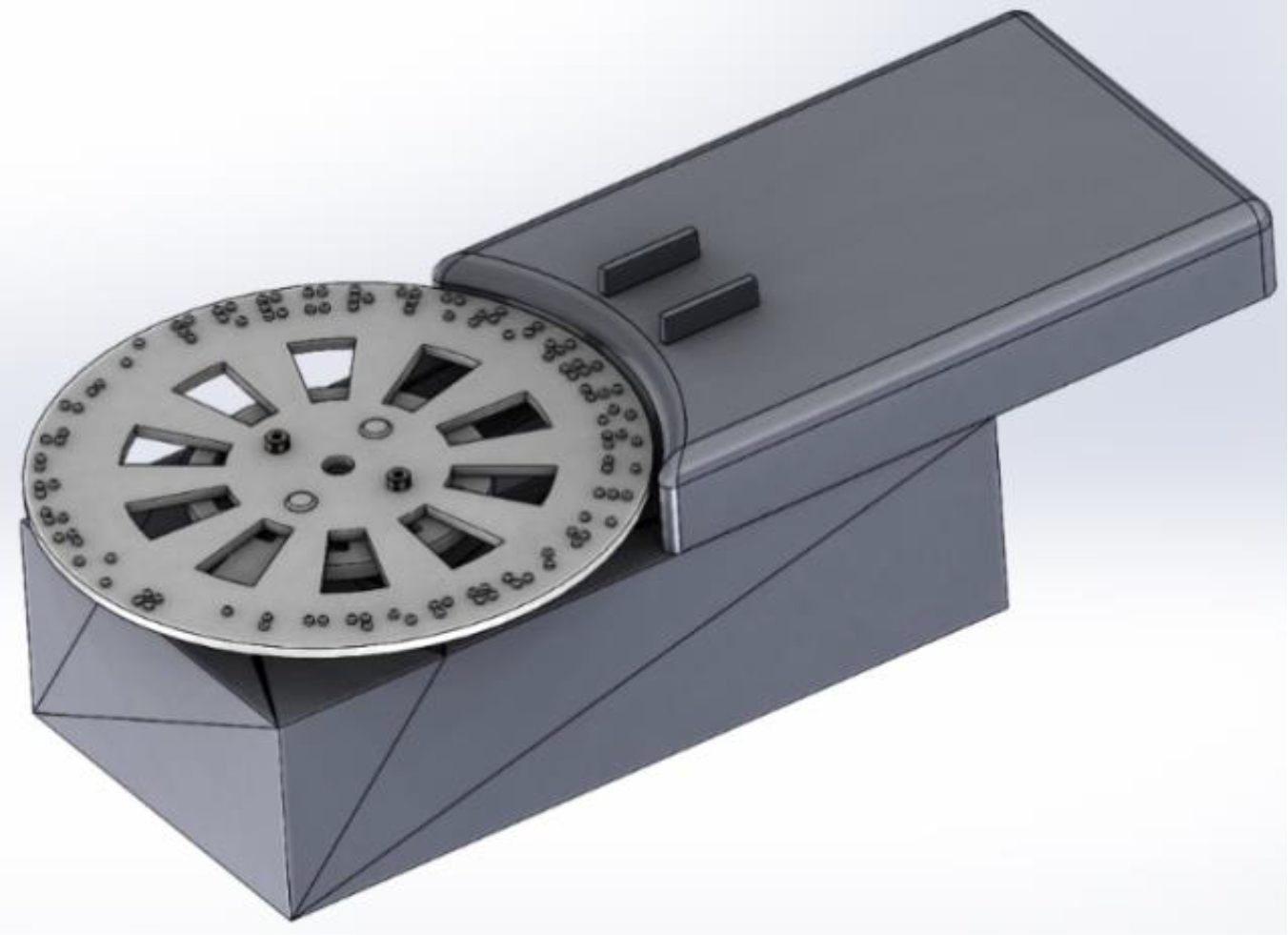
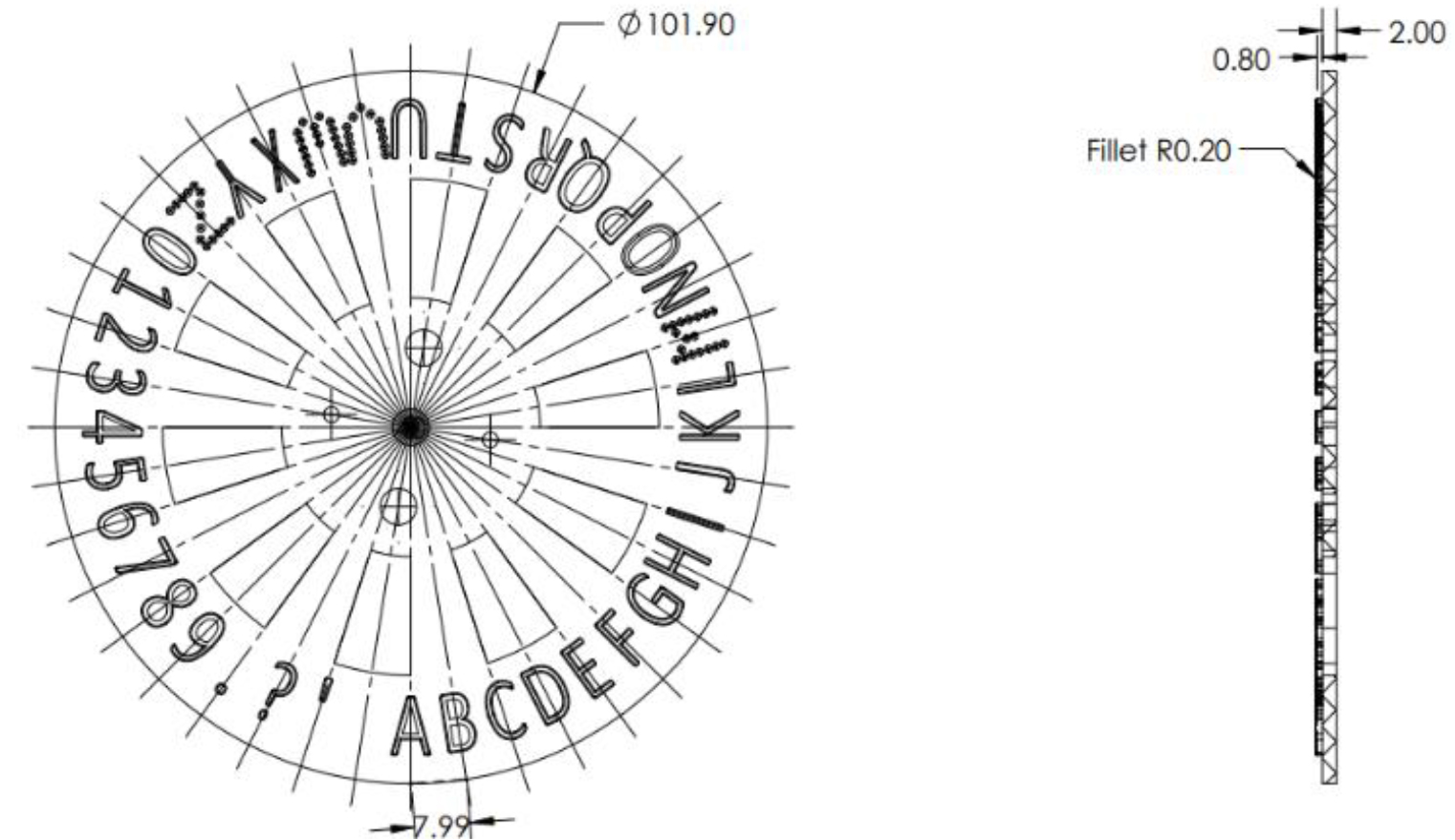
The design presented here is economical as only a single actuator is used to display text to the user in contrast to more expensive designs that use several actuators. A NEMA17 stepper motor rated at 12 V with a step angle of 1.8 degrees weighing 220 g and a speed of 100 rpm is used as the actuator. The vertical finger force while reading braille is 5–15 g [14]. With a holding torque of the motor, of 0.303 N-m, the dots will be firmly held beneath the users’ reading finger. Two units of this design are used in the study here to compare the best inter character spacing of the embossed characters on the disc. One disc has an ICS of 6.5 mm and is of diameter 8.28 cm while the other disc has an ICS of 8 mm and therefore an overall diameter of 10.19 cm. Table 1 gives the comparison of 2 units.
Font: One side of the disc had embossed braille while the reverse side of the disc had embossed raised print. Braille characters are embossed via 3D printing as per standard specifications [14]. The fillet used for braille dots is 0.4 mm. For the raised print characters, the letter height was kept at 8 mm, extruded by 1 mm. Font Calibri was used for raised print. Prior literature states that raised print letters of size 8–11 mm are tangible [12]. In previous work [13], the letter height was kept at 9 mm but in the present study the letter height was decreased to 8 mm to evaluate the tangibility of letters in this design. Disc weight: The weights of both discs were kept at minimum so that the inertia ratios were less than 6. The NEMA17 stepper motor used had a rotor inertia of 54 g cm. A low inertia ratio ensured that the speed of the rotating disc could be kept at 100 rpm.
Tactile units 1 and 2 with raised print discs.
Tactile unit with the braille disc.
Embossed raised print disc.
Embossed braille disc.
Both discs are embossed with characters that are 9 apart (Fig. 1). The interfacing electronics, housed in an enclosure (Fig. 2), receives power supply from a 12V, 2A SMPS adapter to drive the stepper motor according to the pulses received via a microcontroller. On receiving pulses from the microcontroller, the disc rotates bringing the character to be read beneath the user’s reading finger. Both sides of the disc used in Unit 2 are shown in Figs 3 and 4.
Experimental evaluations using the braille embossed disc
Participants profile
12 VI users (6F, 6M) took part in the study. They were fluent braille readers reading up to 2 hours per day. The average user age was 29 years (SD 6.61) with ages ranging from 24 to 46 years. The participants reported no other physical or cognitive impairments. Informed consent was obtained from the participants for the study.
Testing protocol for embossed braille
Participants are initially allowed to feel the disc and the enclosure and have a trial session reading first letters. If the accuracy in reading letters on unit 2 (with ICS 8 mm) was more than 90%, they were tested in reading words. Fifteen MNREAD sentences were chosen from MN charts which provide a standardized method of measuring braille reading speeds [15]. To maintain the spatial layouts used in the visual MNREAD charts, sentences were presented in uncontracted braille, lowercase, and without punctuation symbols. While measuring reading speeds is not the ultimate goal here, MNREAD sentences were presented with both the devices and reading was recorded for 5 minutes during the trial and test sessions. A python script sends out the MNREAD sentences one character at a time. The sentences presented to the users were different when testing during the trial and testing phase of both devices. Reading with both displays were compared in terms of error rate and speed of reading. The participants were tested on the device with an ICS of 8 mm first and then on the device with an ICS of 6.5 mm. This was the protocol followed for testing reading with raised print and with braille characters.
We note that the reading of words with this design is based on two aspects that was presented in prior work [13]: a) Words could be read when characters are presented at varying refresh rates and b) words could be read even as non-sensical letters passed beneath the user’s finger pad. The design is based on these two aspects.
Number of braille words read by 12 users.
Percentage errors of 12 users with Unit 1 and Unit 2.
Results of testing with braille embossed disc
The results seen in Fig. 5 specifically look at the number of braille words that are read in 5 minutes. This is also indicative of the speed of reading with a single cell display. Previous literature has stated that in comparison to reading with a display having a higher number of cells, single cell reading is slower [16]. The results seen in Fig. 6 also show a comparison in the percentage of errors obtained while reading with both devices. A paired t-test between the 2 units shows significant difference in the number of braille words read ( 0.05) and in the percentage errors ( 0.05) while reading over a 5-minute period. Tables 2 and 3 consolidate the results.
Comparing the number of braille words read in 5 minutes with both units
Unit 1 (ICS 6.5 mm)
Unit 2 (ICS 8 mm)
Mean
25.58
35.16
SD
10.29
10.72
-test probability value: 0.00007 (Significant).
Comparing the mean percentage errors in braille word reading in 5 minutes
Unit 1 (ICS 6.5 mm)
Unit 2 (ICS 8 mm)
Mean
43.7
6.4
SD
36.5
11.9
-test probability value: 0.0025 (Significant).
Comparison of Grade1 and Grade 2 braille reading with Unit 2
Grade 1 braille
Grade 2 braille
Mean percentage accuracy
96.8%
94.1%
Mean reading speed (wpm)
7.84
13.84
Grade 2 braille test
Percentage error comparison in both units with the raised print disc.
Since the accuracy in reading with Unit 2 was high for Grade1 braille we further tested 10 VI users on whether they could read Grade 2 braille. Grade 2 braille or contracted braille is used by more experienced braille readers. It enables VI users to read faster as shorter combinations of braille cells are used to represent larger or more commonly used words. According to literature, the speed of reading Grade 2 braille is faster than reading Grade 1 braille [15]. The testing protocol was similar to the protocol followed earlier. Table 4 shows the comparison between the percentage accuracy and the mean reading speed made while reading Grade 1 braille and Grade 2 braille using Unit 2 with an ICS of 8 mm.
Experimental evaluations using the raised print disc
To present the user with raised print, the disc was reversed and placed on the shaft of the stepper motor. It must be recalled that the aim is to compare the results of reading using 2 displays which differ in the spacing between characters, which is raised print in this case.
Participant profile
5 users (3F,2M) who were VI were tested with the raised print disc. Of the 5, 4 were partially blind while 1 was fully blind. The 4 partially blind participants were accustomed to reading text with a screen reader and/magnifier while the fully blind participant did not know braille and was learning how to use the screen reading software on a computer. Average age of the users was 26.6 (SD 4.09).
Testing protocol for raised print
Similar to the testing protocol for braille the users were allowed to feel the device. They were first tested on reading letters and if the accuracy in reading letters on unit 2 with ICS 8 mm was more than 90%, they were allowed to move on to the test to read words presented as MNREAD sentences.
Comparison of percentage error with raised print disc
Unit 1 (ICS 6.5 mm)
Unit 2 (ICS 8 mm)
Mean
65
33
SD
10.7
17.5
-test probability value: 0.002 (Significant).
Results on testing with raised print
The participants performed poorly in reading letters Fig. 7 shows the numbers of errors in reading raised print using both devices. Due to the high number of errors in reading letters, the participants were not tested in the reading of words. A paired t-test between the 2 units shows significant differences ( 0.05) even though the percentage errors while reading with both units was high as seen in Table 5.
Discussion
A paired sample t-test revealed a significant difference between the 2 units while reading braille suggesting that reading with Unit 2 differed significantly from Unit 1. This is measured in terms of the percentage errors and the number of braille words read in 5 minutes. The high accuracy in reading grade 2 braille validates the design’s ability to present braille accurately. In line with previous literature [15], Grade 2 speeds are higher than Grade 1 braille when reading with this design because of the difference in the number of characters that represent a word. Reading speeds are known to be slower for single cell displays [16] with a mean rate of 12 wpm (SD 2.5). However, single cell displays can be used in early braille education. While the average reading speed here is 7 wpm, it has been seen in previous literature that the reading speed increases to up to 3 times with practice [13].
Based on current calculations, the final size of the braille disc embossed with 64 braille characters will be 16 cm in diameter. While reading Grade 1 and Grade 2 braille has been demonstrated, the overall device size may be considered too large. Recall that this design is based on previous work in which braille could be read despite characters being presented at varying refresh rates [13]. Additionally, braille could be read accurately even when nonsensical letters brushed beneath the reading finger.
However, in the reading of raised print letters, the mean percentage error of both units was over 30%, indicating that ICS of 6.5 mm and 8 mm are insufficient for accurate raised print reading. A paired t-test still shows significant differences in letter reading between the two units ( 0.002). It also implies that reading raised print at an 8 mm character height was insufficient for accurate perception. These findings can be compared with previous research [13], where at an ICS of 10 mm, a high accuracy rate of more than 90% was obtained in reading raised print words. As a result, the character spacing for raised print characters should be increased to 10 mm. Consequently, the diameter of a raised print disc is greater than that of a braille embossed disc. Additionally the height of the printed character must be greater than 8 mm. In short, more ICS is required for accurate tactile perception of raised print, increasing the overall size of the display.
For reading Grade 1 and Grade 2 braille all 64 braille characters need to be embossed on the disc. Based on the current results, with the minimum ICS of 8 mm the braille disc diameter will be 16.3 cm. The 40 raised print characters in English encompass the 26 letters of the alphabet and added punctuation marks. If 40 raised print characters of the English Alphabet are embossed on the reverse side of a disc with diameter 16.3 cm, the spacing between raised print characters would be 12.79 mm which will allow tangibility in line with previous studies [13]. It is essential to examine the alphabet of different languages to determine which can fit on the disc. An alphabet with a small number of characters can be embossed as raised print on a disc of lower diameter and checked for tangibility while reading. The Moon script, which has characters containing simplified version of letters with only lines and angles can be embossed instead of raised letters. However, there are not many countries that are familiar with the use of the Moon alphabet.
The limitations of the study can be improved upon for future explorations. A larger sample size could strengthen the reliability of the study and the generalization of results. Also, the current duration of testing is five minutes. Multiple test sessions or a study with a longer duration could capture potential issues that would arise during a prolonged time of interaction with the device.
Future work
While the results indicate that it is feasible to read Grade 1 and Grade 2 braille with characters presented at varying refresh rates and also with nonsensical characters passing beneath the user’s reading finger, the overall size of the display is large. We will investigate further means to reduce the size of the display in the future to allow for portability while allowing sliding contact between the text and the reading finger.
Author contributions
CONCEPTION: Anupama Thomas. PERFORMANCE OF WORK: Anupama Thomas. INTERPRETATION OR ANALYSIS OF DATA: Anupama Thomas. PREPARATION OF THE MANUSCRIPT: Anupama Thomas and Anil Prabhakar. REVISION FOR IMPORTANT INTELLECTUAL CONTENT: Anupama Thomas and Anil Prabhakar. SUPERVISION: Anil Prabhakar.
Ethical considerations
The Institutional Ethics Committee approved the research and the research tools (IEC/2021-03/AP/04). Testing of the device with visually challenged users are as per the Ethical Guidelines for Biomedical Research on Human Participants issued by the Indian Council of Medical Research.
Footnotes
Acknowledgments
This work was supported by the Department of Science and Technology, Government of India, under the Women’s Scientist Scheme (DST/WOS-B/EIT-7/2021). The authors are grateful to all the participants who so willingly gave of their time and the Indian Institute of Technology-Madras for the support and infrastructure.
Conflict of interest
The authors report no conflicts of interest.
References
1.
PascoliniDMariottiSP. Global estimates of visual impairment: 2010. British Journal of Ophthalmology.2012 May 1; 96(5): 614-8.
PawlukDTAdamsRJKitadaR. Designing haptic assistive technology for individuals who are blind or visually impaired. IEEE Transactions on Haptics.2015 Aug 27; 8(3): 258-78.
8.
BettelaniGCAvertaGCatalanoMGLeporiniBBianchiM. Design and validation of the readable device: a single-cell electromagnetic refreshable braille display. IEEE Transactions on Haptics.2020 Jan 31; 13(1): 239-45.
9.
SaikotMMSanimKR. Refreshable Braille Display With Adjustable Cell Size for Learners With Different Tactile Sensitivity. IEEE Transactions on Haptics.2022 Jun 17; 15(3): 582-91.
10.
MerryRV. Fingers for Eyes. The Scientific Monthly.1937 Mar 1; 44(3): 273-9.
11.
https://en.wikipedia.org/wiki/Moon_type.
12.
HellerMANesbittKDScrofanoDKDanielD. Tactual recognition of embossed Morse code, letters, and braille. Bulletin of the Psychonomic Society.1990 Jul; 28(1): 11-3.
13.
ThomasARufusE. Exploring the design of a tactile reader for braille and non-braille users. Technology and Disability.2019 Jan 1; 31(4): 153-67.
14.
RunyanNBlazieD. EAP actuators aid the quest for the ‘Holy Braille’ of tactile displays. In Electroactive Polymer Actuators and Devices (EAPAD)2010 Apr 9 (Vol. 7642, pp. 29-40). Spie.
15.
LeggeGEMadisonCMMansfieldJS. Measuring Braille reading speed with the MNREAD test. Visual Impairment Research.1999 Jan 1; 1(3): 131-45.
16.
RamsteinC. Combining haptic and braille technologies: design issues and pilot study. In Proceedings of the second annual ACM conference on Assistive technologies1996 Apr 15, pp. 37-44.