



Abstract
In this paper, we propose a new education assistant system model using both smartphones and service robots for children's learning. Through the interaction between a smartphone and a robot, various use cases can be derived. For example, we can control the movement of the robot remotely, watch the status of the children using real-time streaming, or read the answer on the smartphone while only the question is displayed on the robot. Considering these facts, we present three use cases, namely ‘remote control’, ‘streaming’ and ‘N-screen’ for robot-based learning with smartphones. The proposed learning model is implemented in Android-based smartphones and a service robot using the OPRoS platform, and we show that the proposed model works well. 1
Introduction
As service robots become ever more intelligent, their application areas become wider in scope. Service robots have been used in various areas such as education, child care, home service and elderly person care [1]–[6].
In particular, there have been numerous studies where robots have been used as educational assistants for children [1]–[4]. Robot-based learning is closely related to pedagogical models such as smart learning, agent-based learning and adaptive learning [7]–[12]. Since robots can stimulate and generate excitement among children, it has been stated that robot-based education is an extremely effective way of learning for students and especially for children [1]–[4]. In robot-based learning, interaction between children and robots can be effected using voice input, a touch screen or key pad and various contents can be played using a screen, speakers or the motors of the robot.
In order to provide robot-based learning for children efficiently, the interaction between robot and child should be performed naturally. This interaction has become one of the most important functions of the robot [2]. Hence, the intelligence of the robot should be high enough and the educational content should be well-made. This can render the cost of the system expensive. Currently, the cost problem is one of the main drawbacks for robot-based learning system.
There have been numerous studies applying smartphones as remote controllers for robots [13]–[15]. Likewise, smartphone to robot-based learning has various advantages, one of these being that the cost problem of the robot-only system can be overcome. Firstly, we can compensate for the intelligence of the robot using smartphones. Teachers can move the robot remotely, or execute appropriate content at the right time using a smartphone. Secondly, we can improve the safety of robot-based learning. Robot content developers cannot predict all behaviour of children and robots that might occur. If unexpected accidents happen, smartphones can be used to avoid such accidents by finishing the playing content or stopping the movement of the robot. Thirdly, the smartphone based learning model can help the teacher to educate students. Teachers can observe the reaction of students using smartphones through real-time streaming, or use the explanation for the answer displayed on the smartphone while only the question is displayed on the robot to the students. Hence, inserting a smartphone to the robot-based learning model is effective in terms of cost and performance.
Considering these facts, in this paper, we propose a new robot-based learning model using both smartphones and service robots for children's learning. In particular, we present three use cases for robot-based learning with a smartphone, namely ‘remote control’, ‘streaming’ and ‘N-screen’.
In the remote control use case, the teacher can control the robot remotely via input to the smartphone. In the streaming use case, the camera of the robot transmits video of the children to the smartphone. In the N-screen use case, teachers can use the smartphone screen for the teacher's own purposes in a different manner from the robot screen, which is displayed to the students.
The proposed use cases were implemented in Android-based smartphones and a service robot running the OPRoS platform [16]–[18]. The experimental results showed that the proposed method works well.
The remainder of this paper is organized as follows. In Section 2, related works are briefly introduced. In Section 3, the proposed learning model is presented. In Section 4 and Section 5, implementation and experimental results are discussed, respectively, for the proposed learning model; the conclusion follows in Section 6.
Related works
General education models
Recently, various digital devices have been applied to learning models such as smart learning, adaptive learning and agent based learning [7]–[9]. Using smart learning and agent-based learning, smart devices have been used to enhance learning performance. Additionally, in adaptive learning systems, customized learning can be provided to the user based on the analysis of each student.
In [10], smart learning content has been proposed based on the E4S (smart pull, smart prospect, smart content and smart push). User action is collected and analysed through the cloud server and an adequate learning service is provided to the user. In [11], an adaptive learning method that uses mGBL (mobile game-based learning) is presented. An adaptive learning scheme has been proposed in [12] for selecting an adequate learning method based on the cognitive state of users.
Robot-based learning
There have been numerous studies and examples for robot-based learning [1]–[4]. Robot-based learning is closely related to pedagogical models such as smart learning, agent-based learning and adaptive learning.
In [1], a tutor robot supported the students for language learning, especially English and enhanced learning performance. In [2]–[4], numerous models are proposed for the robot to assist in learning in the school or home environment.
OPRoS
Open Platform for Robotic Services (OPRoS) is a component based robot platform [17], [18]. A SW component in OPRoS is reusable and we can develop robot application easily by connecting components. Additionally, we can reduce the time and cost for robot SW development [17], [18]. Since OPRoS has been applied to various robots such as iRobiQ [16], Kobot, RoboSem, DARwIn, etc., we can develop related SW for the implementation of a robot-based learning model.
Robot-based learning model using both a smartphone and an educational robot
Basic concept of the presented system
Figure 1 briefly illustrates the basic concept of the proposed method. As shown in Figure 1 (a), conventional robot-based learning systems are based on the interaction between children and a robot. Since the interaction is made only between the robot and children, the movement of the robot and play of the content should be well-performed [2]. However, to guarantee natural interaction between a robot and children, the intelligence of the robot should be high enough and the related software should be made well enough to handle all possible situations. Hardware functions and artificial intelligence cause an increase in developing costs. Hence, these issues have been one of the major drawbacks for robot learning.

Education assistant system using a robot and a smartphone
On the other hand, if we use a smartphone as an assistant system for robot learning problems caused due to the robot-only system can be easily solved. Since the teacher can control the behaviour of the robot and the play of the content, we can compensate for the intelligence of the robot and the quality of the content with the intervention of the teacher using a smartphone. Furthermore, since control of the robot is effected remotely, we can apply the intervention without the children noticing and thereby enhance the performance of the learning system.
In the proposed model, as shown in Figure 1 (b), children interact only with the robot and teachers can utilize the smartphone as an assistant system for robot-based learning. Various commands from the teachers can be sent to the robot and the behaviour of the robot can be compensated in order to enhance the learning performance of the children.
Since the proposed model utilizes both a robot and a smartphone, we can provide smart learning and agent-based learning. We can provide an adaptive learning model with the intervention of the teacher.
Table 1 shows the advantages of the proposed architecture over robot-only systems. As shown in Table 1, we can obtain various advantages for factors such as robot intelligence, robot safety, performance enhancement of the learning etc.
Advantages of the proposed architecture over robot-only systems

In order to provide the advantages in Table 1, we should consider the requirements for the interactions between a robot and a smartphone. For example, to avoid collision between children and a robot, we need a remote control function between a smartphone and a robot.
Table 2 shows the required functions for the interaction between a robot and a smartphone. By integrating the functions of remote control, streaming and N-screen into a smartphone and a robot, we can obtain the advantages stated in Table 1.
Required functions for the interaction between a smartphone and a robot

Required functions for the interaction between a smartphone and a robot
Overview
We implement the proposed functions in a service robot and a smartphone.
Figure 2 and Table 3 show detailed information of the service robot and the smartphone used in this implementation. iRobiQ [16], which is an OPRoS based service robot and an Android smartphone were used for the implementation. Figure 3 shows the structure of iRobiQ.

Basic structure of robot-based learning

Structure of Service Robot (iRobiQ)
Specification of Service Robot and Smartphone

Since iRobiQ adopts ‘Windows XP Embedded’ as an operating system, the user interfaces of iRobiQ were implemented using several Dialogs with MFC. For the connection between the Android phone and service robot, we used Wi-Fi. The service robot functioned as a server and the Android phone functioned as a client.
Using a remote control function, we can control the movement of the robot through a smartphone, for example, start/stop playing content or coordinate the functions of streaming or N-screen in the robot as in Figure 4. To implement the remote control function in a robot and a smartphone, control command should be defined a priori. When the control packet is transmitted from the smartphone to the robot, it should be analysed in a robot platform and the robot platform should perform an appropriate operation for the control command.

Remote control using smartphones
iRobiQ has its own display unit and the user can control the robot using the display unit (local control). Different from local control, in remote control, the input is given via smartphone through the network. For the remote control, robot SW receives the input from the smartphone through the network connection, analyses the input and execute the corresponding API. For implementation, we needed a network connection, robot APIs and smartphone UIs.
Figure 5 and 6 show the mapping between smartphone UIs and corresponding robot HW parts. Each part of the smartphone UI's interacts with each part of the robot. As in Table 4, the robot can have four control types. We can control arms, head and wheels within the range of movement in Table 4, or execute LED display or dance types, which are already stored in the robot.

Smartphone UIs and corresponding parts in the robot remote control

Remote control using smartphone
Types of movement in iRobiQ
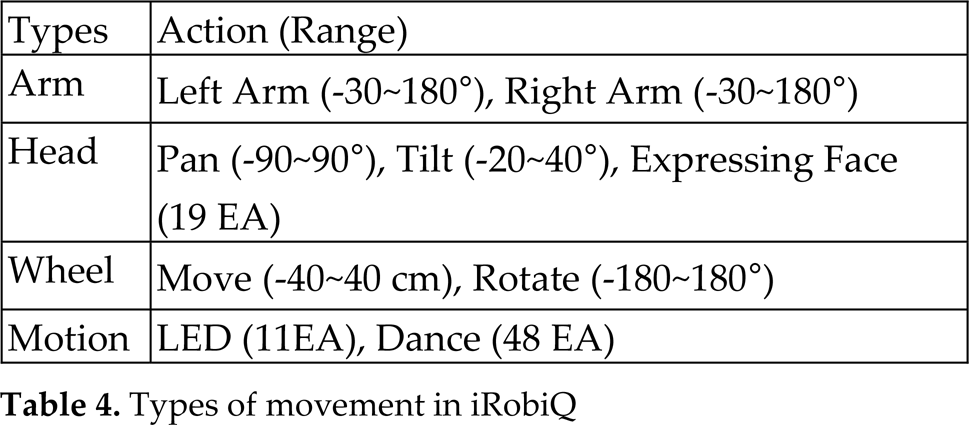
Figure 7 shows the SW architecture for the remote control. As in Figure 7, depending on the input, each component for wheel, arm, head and motion is executed and controls the robot FEW part.

Diagram of robot control
Using the streaming function between a smartphone and a robot, we can see video of the children using a camera in the robot and observe the reactions of the children

Real-time streaming
Using the streaming function, we can send real-time video to the smartphone using a robot camera. Figure 9 shows an example of streaming in the robot.

Example of streaming
To implement the streaming function in the robot, we needed a camera to obtain video, OpenCV library to process images, a socket program to send the video data and display the program in the smartphone.
Figure 10 shows the detailed procedure for the streaming.

The process of streaming
The video captured from the camera was obtained using OpenCV. The camera component in the OPRoS platform transmitted the captured video to the display components in the robot or sent components to the smartphone. By using these components, we were able to implement the streaming function. Figure 11 shows the detailed procedure in the robot for the streaming function.

The structure of streaming
The N-screen function is very useful as a learning application. Displaying different images in a smartphone and a robot can help facilitate the teaching of students. For example, on the robot screen, only the question can be displayed, while the answer and explanation for it is displayed on the smartphone as in Figure 12.

An example of N-screen service for an educational robot
To implement the N-screen function, the same content, including all learning materials can be used; alternatively, we can separate the content for the smartphone and the robot, respectively.
With the N-screen function, we can play the same content but display it differently according to the devices. Figure 13 shows the structure and processing of content used for N-screen. The content is composes of three parts, namely the common part, robot part and smartphone part.
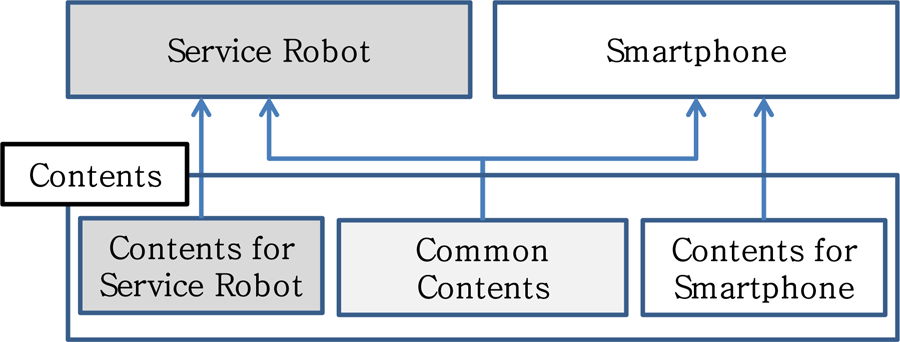
Structure of the N-Screen
Figure 14 is a display example of N-screen content. Considering the large size of the display in a service robot, we can display two parts simultaneously, as shown in Figure 14(a). In the smartphone, considering the small size of display, we can move between two screens using buttons, as shown in Figure 14(b). Each part of the robot and smartphone can be displayed differently, as shown in Figure 14.

Screen configuration
In this section, an exemplary implementation is introduced and a discussion is provided for the usability of the proposed method.
Implementation of exemplary content for robot-based learning
For the validity and applicability of the presented method, we implemented quiz content incorporating a smartphone and an iRobiQ robot.
Figure 15 shows the exemplary content interacting with a smartphone and a service robot. A quiz problem was displayed in both the robot and the smartphone. This way, the teacher could check whether the student's answer was right using the smartphone.

Quiz content example
Figure 16 shows the flow chart for the application. The operation in the smartphone and the robot was synchronized based on the network connection. Once the start button in the smartphone was pressed, the application would start.

Flow chart of the quiz application
In this example, a sequence of the quiz was randomly selected from the database. The robot received the quiz content sequentially from the smartphone or the server. The quiz was displayed on the screen of the robot, waiting for an answer provided by the student. Once the student chose an answer, the result was fed back to the smartphone. In the smartphone, a right answer and the students answer were displayed together and we could also see an explanation for the answer. Once a sequence was finished, we could see the ratio of right answers.
For the implementation in iRobiQ, we used nine components in the service robot with OPRoS, as shown in Figure 17. Figure 17 shows the structure of the SW components in both the robot and the smartphone, which combine the functions of remote control, streaming and N-screen.

System model for experiment
For UIs, iRobiQMainComp provides UIs and main control function for the content by connecting each function. For the motion of the robot, we implemented five components, namely, iRobiQControllerComp, WheelControllerComp, ArmControllerComp, HeadControllerComp and MotionControllerComp. iRobiQControllerComp controlled the motion of the four other components, while these four components handled the motion of the wheel, arm, head and specific motion, respectively. For the camera function, CameraComp was used. To support the network connection between the smartphone and the robot, TcpIpComp and UdpImageCompare were utilized.
Figures 18 and 19 show the operation of the quiz content. Depending on the types of problems, for example, true/false questions or multiple-choice problems, the UIs were different from one another. After choosing answers, whether the answer was true or false, the ratio of right answers was displayed on the smartphone. Additionally, a detailed explanation for the answer could be displayed on the smartphone for the teacher's use.

Execution of the quiz content

Quiz Screenshots
As can be seen in Figure 20, the student's expression could be seen using the robot's camera while running the quiz application.

Example of R-Learning content
In this implementation, we used all of the three stated functions, i.e., remote control, streaming and N-screen. The robot was remotely controlled using a smartphone, which can help the teacher/user execute better management of learning procedures. Using streaming, the teacher was able to easily monitor the reactions of students. Additionally, using N-screen, answers and explanations were given separately, thereby assisting the teacher to enhance students' learning performance. Since the components of the OPRoS platform can be reused for heterogeneous robots, it is expected that the proposed structures will be applicable to other learning robots using the OPRoS platform.
The following advantages can be obtained through the proposed model: firstly, it can provide customized education based on each child's interests, background knowledge and understanding abilities. Secondly, it can be used to increase children's interest and maintain their attention. Thirdly, it can help teachers provide active intervention by providing additional information and swift responses. Finally, it can supplement learning content instantly and restart the robot if it stops in case of malfunction.
Conclusion
In this paper, we presented a smartphone-assisted robot learning system for children. The intelligence of the robot has been compensated using a teacher-operated remote control. To do this, we categorized three functions: remote control, streaming and N-screen. Using the remote control function, we can direct the movement of the robot remotely and can enhance the safety and performance of robot-based learning. Real-time streaming can enable the teacher to check the status and reactions of students. Additionally, with N-screen, we can use the same content, but can display different aspects thereof for performance enhancement.
We implemented an exemplary demonstration system using the OPRoS platform in a service robot. In the implemented example, we have shown that the presented system works well.
Various robot applications based on the proposed system can be made for robot-based learning. This will be a worthwhile area of research for future studies.
Footnotes
1
This research was supported in part by the KITECH (Korea Institute of Industrial Technology) and in part by the MSIP (Ministry of Science, ICT & Future Planning), Korea, under the ITRC (Information Technology Research Center) support programme (NIPA-2013-H0301-13-2007) supervised by the NIPA (National IT Industry Promotion Agency).