




Abstract
Zebrafish are widely used and increasingly adopted in developmental biology, disease modeling and tissue regeneration research. However, a freely available and user-friendly zebrafish husbandry management application has been lacking. Here, we developed an open-source fish management application, referred to as VMS-Fish (https://shinypath.wustl.edu/vmsfishdb/), to accurately track and manage zebrafish stocks. The VMS-Fish application includes default user logging and exclusive administrative privileges, making it a robust and error-free option for individual users, small laboratories and large consortia managers. With easy online and offline installation options, VMS-Fish provides an intuitive and freely available resource for zebrafish researchers worldwide.
Remarkable genomic conservation and the availability of extensive genetic and genomic tools make zebrafish an ideal vertebrate model system for scientific research. 1 As a result, zebrafish are widely and increasingly used to study fundamental mechanisms of development, model human diseases and perform drug screens.2–4 With the advent of CRISPR-based reverse genetic screening and multi-omics approaches, the number of newly generated zebrafish lines has significantly expanded in our laboratories.5–8 However, many zebrafish laboratories around the world still rely on inefficient Excel-based platforms to track and manage husbandry. Over the past two decades, several studies have attempted to address this issue by developing tools for managing zebrafish stocks.9–14 Yet, even these excellent tools remain inaccessible to most of the zebrafish community due to complex infrastructure requirements, dedication to a single platform or costly subscriptions. This highlights the need for a new, user-friendly solution that is freely available to the zebrafish community worldwide.
In this study, we developed the VMS-Fish database as a comprehensive application for zebrafish husbandry management (Fig. 1). VMS-Fish is an interactive database, developed using R and the Shiny framework, designed to help users manage both larval and adult zebrafish across single or multiple fish rooms. Each fish stock entered into VMS-Fish requires mandatory details, including fish name, genotype, number of fish/larvae, stock number, date of birth, owner name and breeding parents’ information. To simplify tracking, each fish stock is color-coded based on its age, allowing users to easily monitor growth stages. When fish stocks are transferred from juvenile to adult racks, additional details such as experimental information and food labels are also recorded. Most fields, except for date of birth and fish name, can be easily edited for an individual fish stock or groups of stocks. VMS-Fish also provides the option to generate custom tank labels for each fish stock. These tank labels can be easily downloaded as image files (.png) and printed using standard label printers. Although zebrafish stocks can be removed from the fish rooms using the euthanize option, an archive feature retains a record of every stock added to the database even after euthanasia. This archive feature supports genealogy tracking and maintains the historical records of the database. Since offspring and parent details are mandatory when entering fish stocks, VMS-Fish enables users to accurately track genealogies through graphical representations (.pdf files) and tabular data (.xlsx files). For large zebrafish consortia, maintaining logs of all user actions is critical for routine inspections and occasional troubleshooting. Thus, VMS-Fish automatically records every user action performed within the database using the User Logs feature. Laboratories or large consortia can create unique user accounts to monitor database activities for individual members. These logs also serve as a record of the life cycle events associated with each fish stock, from birth to euthanasia.
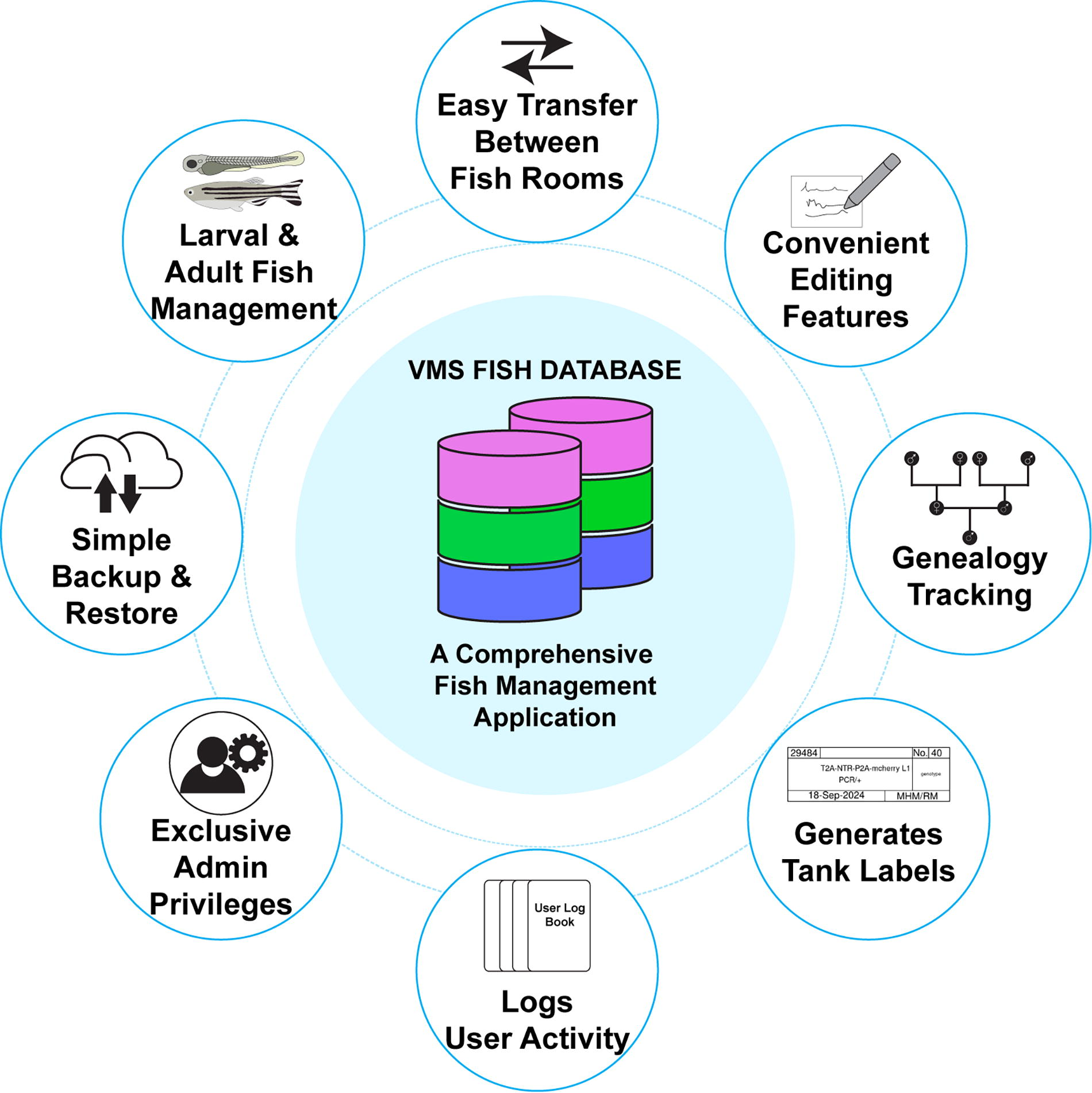
Schematics depicting key features of the VMS-Fish application.
When a fish database is managed by multiple users, it is often subjected to human errors, which can lead to database corruption. To address this, we developed an Admin Settings option, which grants exclusive privileges to fish consortia or laboratory managers. Various features under Admin Settings allow managers to add, edit or delete tanks, fish rooms and user accounts. Importantly, VMS-Fish offers options to create a full database backup and perform a factory reset through the Clean Slate Protocol under Admin Settings. Regularly creating full database backups is highly recommended to prevent potential data loss caused by unforeseen circumstances or software updates. These backup files (available in .rds format) can be easily restored using the Restore Database option, enabling recovery of the database to a previous time point.
VMS-Fish is an open-source database 15 with flexible deployment options, allowing it to function either as a web application or as installed software on various devices, or both. Below we present a free trial that allows users to test VMS-Fish prior to deployment or installation. Once tested, we offer users four different options to deploy or install VMS-Fish:
Free trial prior to deployment or installation
For demonstration purposes and a free trial of database functionality, a sample VMS-Fish is available at the website address: https://vmsanalytics.shinyapps.io/fishdb/. Anyone can sign into this demo account (username: Administrator; password: zebrafish) to explore and test the features of VMS-Fish before deciding to deploy the database for themselves.
Method 1—Online deployment using our website
Supplementary Video S1 demonstrates how to deploy VMS-Fish on the shinyapps.io server using our website. This is the easiest deployment method and requires no prior knowledge of handling R script or RStudio software.
Method 2—Online deployment using your computer
Supplementary Video S2 demonstrates how to deploy VMS-Fish on the shinyapps.io server using your own computer. This method is particularly useful for users who want to customize the VMS-Fish application (source code included in the deployment package). This method also allows users to adjust the deployment configuration before launching it on the server. However, a basic understanding of R scripts in RStudio is required for this method.
Method 3—Local installation on a Windows machine
Supplementary Video S3 demonstrates the installation procedure on a Windows machine.
Method 4—Local installation on a Mac machine
Supplementary Video S4 demonstrates how to install VMS-Fish using Docker, offering a containerized solution that allows the application to run independently of the operating system.
Online deployment methods 1 and 2 via the shinyapps.io server enable users to access the database through the internet using Android, iOS or desktop devices through a web browser (e.g., Chrome, Safari, Firefox, etc.) (Fig. 2). Online deployment requires a Google Drive account for data storage. Upon deployment, shinyapps.io generates a unique website address, enabling users to access the database over the internet. The shinyapps.io server supports both free and professional user accounts (visit https://www.shinyapps.io/ for more details). For individual users and small laboratories, we strongly recommend creating a free shinyapps.io account to deploy VMS-Fish online. For large fish consortia, a professional shinyapps.io account is more suitable.
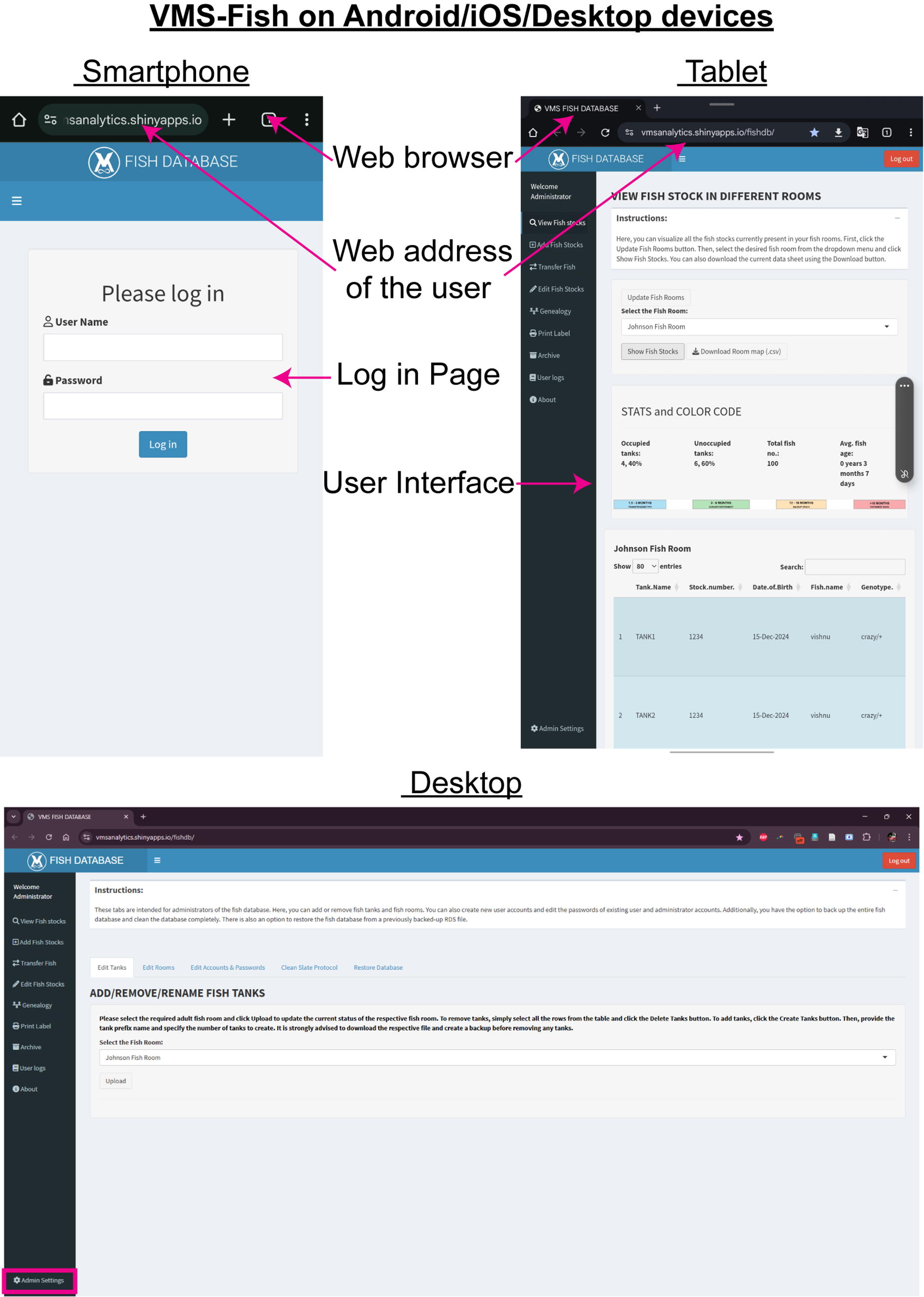
Screen shots showing VMS-Fish on mobile and desktop devices.
Although online deployment through the shinyapps.io server is the most efficient way to use VMS-Fish, local installation methods 3 and 4 are available and equally suitable for large consortia. Local installation, available for both Windows and Mac operating systems, stores all fish database data on the local computer. By default, VMS-Fish includes an administrator account (Administrator) and a standard user account (User1), which share the same password (zebrafish). Step-by-step instructions and video tutorials for both online deployment and offline installation of the database are also available at: https://shinypath.wustl.edu/vmsfishdb/. The source code for VMS-Fish is freely available for download and customization on https://github.com/MokalledLab/VMS_FISH_DATABASE.
Footnotes
Acknowledgment
The authors thank members of the Mokalled laboratory, including A. Saini, D. Klatt Shaw and C. Weinholtz for testing the VMS-Fish application.
Author Disclosure Statement
No competing financial interests exist.
Funding Information
This research was supported by grants from the NIH (2R01NS113915 and 1R01NS123708 to M.H.M.) and a Postdoctoral Fellow Seed of Independence Grant from the Department of Developmental Biology at Washington University School of Medicine (to V.M.S.).

References
Supplementary Material
Please find the following supplemental material available below.
For Open Access articles published under a Creative Commons License, all supplemental material carries the same license as the article it is associated with.
For non-Open Access articles published, all supplemental material carries a non-exclusive license, and permission requests for re-use of supplemental material or any part of supplemental material shall be sent directly to the copyright owner as specified in the copyright notice associated with the article.
