



Abstract
The Pandemic has required teachers to find ways to provide high-quality instruction in a virtual format. Video-based instruction (VBI) is a version of technology-aided instruction that has been effectively used in classrooms to improve mathematical outcomes for students with disabilities. This manuscript describes how a special education teacher can utilized VBI through free online platforms (i.e., SeeSaw, Loom) to implement a mathematical problem solving instructional strategy (modified schema-based instruction; MSBI) for students with autism spectrum disorder (ASD) while at home. MSBI utilizing VBI has successfully been used by teachers and researchers to improve additive and multiplicative problem solving skills for students with ASD. This manuscript describes how special education teachers can support students and their caregivers by providing high-quality problem solving instruction in a virtual environment.
Keywords
Mrs. Shaw is an experienced special education teacher who has taught students with a range of disabilities in a variety of grade levels and delivery settings. This year a pandemic has forced her to learn how to provide instruction virtually. She has faced challenges in supporting her students from afar, as they have varying needs. She is teaching a group of students with autism spectrum disorder (ASD), who struggle with mathematical problem solving. She used a strategy called modified schema-based instruction (MSBI) previously, which helped the students follow a problem solving process. MSBI supports students who struggle with executive functioning skills such as planning an attack strategy, persisting through the process, and monitoring their progress. Mrs. Shaw wants to continue to focus on improving her students’ mathematical problem solving skills, but understands and respects that caregivers have multiple demands on their time right now and may not be able to attend class “live” with their student each day. Caregivers may also feel unprepared to help their students solve mathematics word problems. Mrs. Shaw is dedicated to developing high-quality instructional activities that can be delivered remotely, while addressing family and student needs. She plans to provide explicit instruction through “on demand” videos. These videos will incorporate evidence-based instructional strategies, allow for flexibility in timing, and provide opportunities to differentiate instruction based on individual student needs.
The Covid-19 pandemic amplified challenges in providing high-quality mathematics instruction for students with autism spectrum disorder (ASD). Educators (like Mrs. Shaw), caregivers, and students had to abruptly adjust to new ways of teaching and learning without any preparation or models to follow. While the shift to digital learning was abrupt and unprecedented, the field of special education has long embraced technology-assisted instruction (TAI) as a means to provide high-quality instruction for students with disabilities. TAI has been classified as an evidence-based practice for students with ASD (Root et al., 2017), including to improve mathematical problem solving skills (Root et al, in press). The shift to digital learning environments is an opportune scenario to utilize technology to virtually deliver high-quality mathematics instruction. This article will describe how special education teachers, such as Mrs. Shaw, can use a digital engagement platform (e.g., SeeSaw) to provide students with “on-demand” (i.e., asynchronous) word problem solving activities embedded with instructional videos that follow a model, guided practice, independent practice format created by a free screen recording program (e.g., Loom).
Mathematical Problem-Solving
An emerging body of research confirms students with ASD can acquire and generalize mathematical problem-solving skills when provided with high-quality instruction (e.g., Root et al., in press; Hart Barnett & Cleary, 2015). Many mathematics assessments rely on word problems to assess achievement as they provide a way for students to demonstrate application of mathematical knowledge (Spooner et al., 2017). Solving word problems may be particularly challenging for students who have deficits in working memory, language, and executive functioning (Jitendra et al., 2016), such as students with ASD. To support these students, teachers can use explicit instruction and teach students how to make a plan for solving a problem, organize important information, attend to the task for a sufficient amount of time, and self-monitor progress (Hart Barnett & Cleary, 2015).
Evidence-based practices for teaching mathematical word problem solving to students with ASD include task analysis, system of least prompts, graphic organizers, explicit instruction, TAI, and schema instruction (Root et al., in press). Recent experimental research has found a combination of these practices is effective for teaching students with ASD in a treatment package known as Modified Schema-based Instruction (MSBI). Teachers such as Mrs. Shaw can use MSBI, to make problem solving accessible through supports designed to ensure the student can (a) access the problem, (b) conceptually comprehend the problem and mathematical content, (c) procedurally solve the problem, and (d) generalize multiple ways (Spooner et al., 2017). In schema-based instruction (Jitendra et al., 2016), students are taught to understand “what is happening” mathematically in the problem by drawing attention to important features of the schema (e.g., problem type) and represent that information on a schematic diagram (e.g., graphic organizer). To increase generalization, the focus is on salient features of the mathematical task, rather than to irrelevant information as is done in the faulty keyword strategy (i.e., more = add).
Using Technology to Teach Mathematical Problem-Solving
Recent studies have also shown technology can help students with ASD improve their mathematical word problem solving (Root et al., 2021, p. 15). For example, students who are not fluent in their basic math facts benefit from using a calculator. Middle and high school students with ASD demonstrated they were able to use a calculator on an iPod touch to solve word problems requiring multiple operations (Root et al., 2018). Technology has also been used to provide students with video simulations of real-world problem-solving tasks, both to assess their generalization (e.g., Saunders, 2014; Saunders et al., 2018) and to provide background information through anchor videos (e.g., Creech-Galloway et al., 2013; Root et al., 2018).
Video-based instruction (VBI) is one type of TAI that includes the use of video as a critical instructional element in supporting skill acquisition and has been effective for teaching mathematics to students with ASD (e.g., Burton et al., 2013; Saunders et al., 2018). The features of VBI that make it particularly relevant to our new educational paradigm are its cost-effectiveness and practicality. Students with ASD have demonstrated they can acquire mathematical problem solving skills through MSBI delivered via VBI. Saunders (2014) taught three elementary students with ASD and moderate intellectual disability to solve and discriminate between two additive schemas (group and change) through computer-based video modeling. Following an explicit instruction format (Archer & Hughes, 2010), students received VBI by first watching a screen recording of a researcher solving the problems while using think alouds and then practiced solving problems on the computer using the same program (SMART Board). The MSBI strategy delivered via VBI helped the students acquire mathematical problem-solving skills. In addition, students generalized problem solving to video simulations as well as paper-and-pencil tasks. Most recently, (Root et al., 2021, p. 4) taught secondary students with ASD to use videos to check their work after receiving MSBI. Students demonstrated the ability to self-monitor and change their answers based on the point-of-view video model. While teachers, students, and caregivers all adjust to the changes in the way they are teaching and learning, existing research can provide guidance on how to use technology to support mathematical problem solving. Teachers like Mrs. Shaw can draw on the strategies that they used prior to the pandemic and draw from the research on TAI to continue providing high-quality math instruction.
Considerations in Planning Virtual Problem-Solving Instruction
Based on her experience in the initial shift to remote learning in spring of 2020, Mrs. Shaw knows she needs to include strategies to maintain student engagement, provide students and caregivers with an organized and consistent learning routine, and develop a system to monitor progress so she can adjust instruction if needed. There are many online resources Mrs. Shaw can use to record videos and deliver instruction (e.g., YouTube, Canvas Studio, Google Classroom). Mrs. Shaw has decided to use two specific platforms because they are free and her district approved their use to receive and deliver secure video. She selected SeeSaw (https://web.seesaw.me/) as the engagement platform. She will create and assign all activities and instruction through SeeSaw to minimize the need for students and caregivers to learn and keep up with log-in information for multiple websites. Mrs. Shaw selects SeeSaw because it is free, she can embed videos and tasks within the one platform to streamline instruction, and she can easily differentiate for each student by assigning them specific tasks. She will provide explicit instruction videos of how to solve mathematical word problems using MSBI through Loom, a screen recording program that is also free for educators (https://www.loom.com/education). She plans to create three videos for each lesson: (a) a model video of her using think alouds as she follows a heuristic (i.e. visual to support process; Root et al., in press) to solve a word problem, (b) a guided practice video for students and caregivers to watch after working together to solve the problem, and (c) a video of her completing the independent practice problem, which students and caregivers will watch after the student independently solves to “check their work.”
Maintaining Student Engagement
Students must be engaged in order to make progress on learning goals. According to the Universal Design for Learning (UDL) framework, anticipating variability in interest, effort, persistence, and self-regulation can support sustained engagement in learning tasks (CAST, 2018). Students’ levels of expertise and motivation to engage in tasks differ. The UDL framework helps teachers proactively consider barriers students may face during learning, and intentionally design instruction to reduce potential barriers. Mrs. Shaw knows she can increase student engagement by contextualizing the mathematical problems within real-world contexts that are meaningful to students and connect to their experiences and preferences (Driver & Powell, 2017). First, Mrs. Shaw made a list of community locations that her students are familiar with and are a natural situation for applying the targeted mathematics skill (e.g., Rock Climbing Gym, Coffee Shop, Thrift Store). This list was generated from an interest inventory the families and students completed at the beginning of the year, ensuring representation of the student and caregivers’ priorities/experiences. Then she developed three multiplicative comparison word problems for each theme. Students will be able to choose the “theme” of their math problems each day. By allowing student choice and incorporating topics students have experience with, Mrs. Shaw hopes to increase and maintain her student’s interest throughout the lesson.
Relatedly, Mrs. Shaw wants to leverage the benefits of TAI to address barriers some students may face to engagement in sustaining effort and persistence. Several of the students in Mrs. Shaw’s class have difficulties with fine motor skills. She plans to provide opportunities for choice to allow the student to select the best method to show what they know. Within SeeSaw, Mrs. Shaw will give the students three different diagrams (e.g., schemas) they can drag onto the heuristic to help them solve the problem (see Figure 1). This support simultaneously reduces the fine motor requirements of having to draw the diagram while also providing boundaries for the students to keep their writing within. For students who prefer to record their responses, Mrs. Shaw will allow the students to verbally state their answers by using the recording function within SeeSaw to capture their thinking. Finally, Mrs. Shaw will teach students to use the text feature within SeeSaw to type their responses rather than writing them, reducing fine motor requirements while also promoting the functional skill of typing.
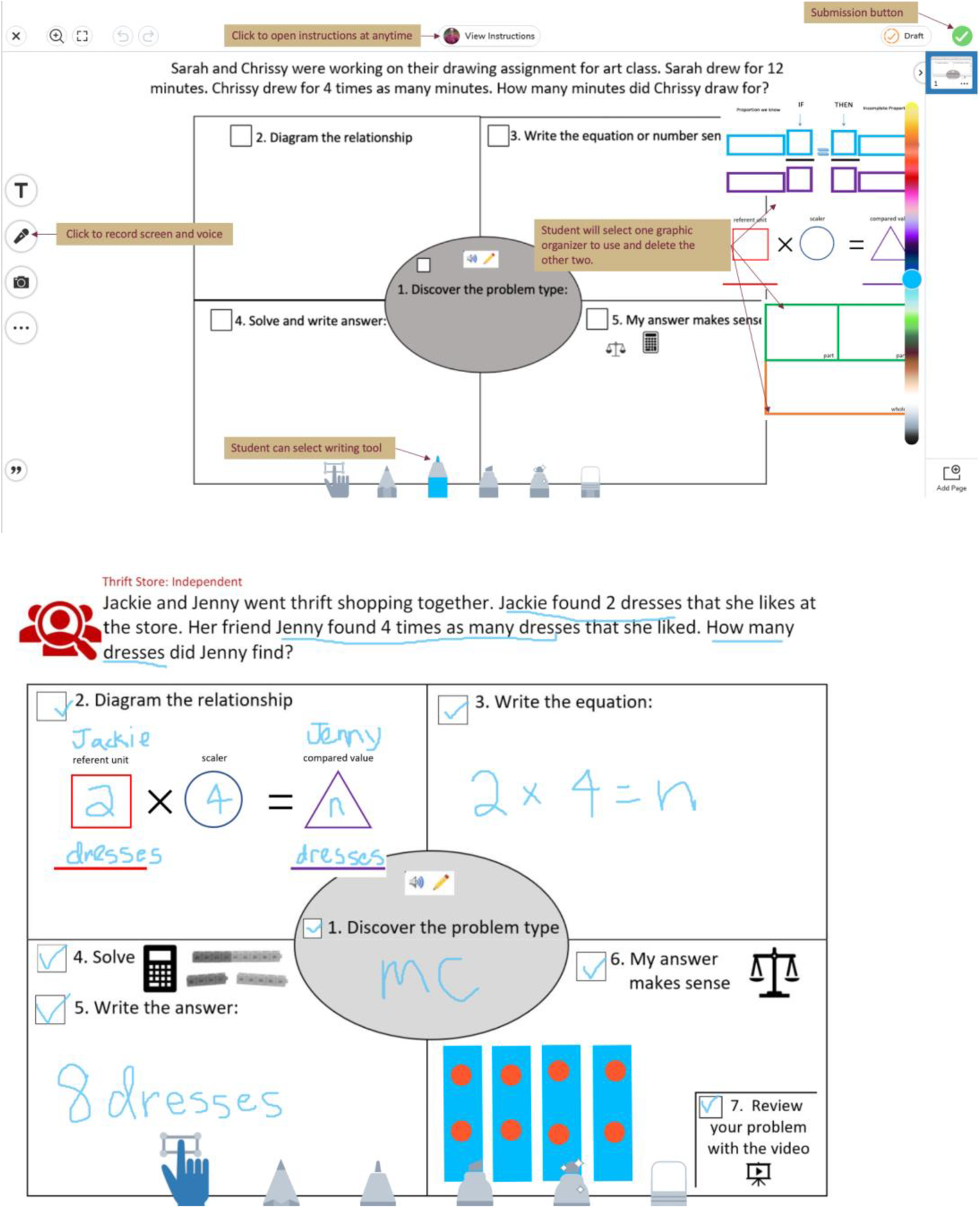
Problem solving activity in SeeSaw. Note. The top figure provides an orientation to the features within the SeeSaw application. The bottom figure is an example of a completed worksheet.
To maintain student engagement, each lesson is intended to last 20 min and include three videos of Mrs. Shaw modeling how to follow the heuristic to identify the schema and use the schematic diagram to solve the problem (i.e., model video, guided practice video, independent practice video). Mrs. Shaw is going to maintain principles of explicit instruction that she used during face-to-face instruction in her instructional videos. These include maintaining a quick pace of instruction and providing ample opportunities for students to respond (Archer & Hughes, 2010). In the virtual environment, providing opportunities for students to respond can be more challenging. Mrs. Shaw will evoke student responses within her video and use the student work submitted through SeeSaw to monitor student progress.
Establishing a Consistent Learning Routine
Mrs. Shaw selected MSBI because it is an evidence-based strategy for teaching mathematical problem solving to students with ASD (Root et al., in press). Some of her students have previously learned to look for “key-words” in the word problem to tell them what operation to choose (e.g., altogether = addition). In contrast, Mrs. Shaw is going to explicitly teach students to recognize the schema, or problem structure. This is a key feature of MSBI and supports development of problem structure by recognizing patterns in the mathematical relationships (Karp et al., 2019). To plan MSBI, Mrs. Shaw will need to make four decisions: (a) What process will students follow? (b) How will students represent the numerical relationship? (c) How will she support learning? and (d) How will students monitor their progress and show what they are thinking? For more information on teaching problem solving using schemas, see [https://gcalab.wixsite.com/gcalabfsu].
The videos Mrs. Shaw records on Loom will help her to make sure students and caregivers have a consistent learning routine. She created video “scripts” to follow to make sure she used consistent academic language. A benefit of the video lessons is students and caregivers can pause, rewind, and rewatch as needed. Loom offers free accounts for educators and records high quality videos of the screen and/or webcam, which can be embedded into other programs or shared as a direct link. She will use the Loom videos to teach students the structure of multiplicative comparison word problems, which contain a referent (the number compared against), a scalar or multiplier (the number of copies created) and a compared value (the product of the referent and the scalar). In the videos, she will model a chant paired with hand motions to help students remember these features.
Visual supports can assist students before, during, and after the problem-solving process by making the learning routine and expectations concrete. Increasing predictability is especially important for students with ASD during remote learning when non-teachers are assisting with instruction (e.g., caregivers). Mrs. Shaw created visual supports (e.g., visual schedule, heuristic) in Word and converted them to PDFs before uploading them to SeeSaw. A visual schedule of what the students will do in each lesson makes the learning expectations concrete for both students and caregivers (see Figure 2 for an example). The heuristic shown in Figure 1 is a feature of MSBI that supports students to systematically carry out the problem-solving routine. Students check off each step as they complete it, supporting progress monitoring. Icons are included on the heuristic to remind students of what is expected in each step. For example, Step 6 in Figure 1 directs students to think about whether or not their answer makes sense by using reasoning or solving the problem a second way. In the videos, Mrs. Shaw will teach students they can use manipulatives (blocks), the calculator (outline), or verbal reasoning (speaker) to check their answer makes sense. After completing the guided and independent practice problems, students watch Mrs. Shaw’s video model and check their work as a way to receive corrective feedback asynchronously.

Visual schedule.
Monitoring Progress and Making Instructional Changes
Mrs. Shaw will use Google Sheets to capture and graph student progress at the step level (see Figure 3). She will assess student progress by viewing their completed heuristics. If she has any questions about how students approached the problem or the order in which the steps were completed, she can watch the student’s screen recording, as SeeSaw allows students to record their screen as they complete their work. This will help her determine the types of errors students are making, which can guide her instructional decision making. For example, if a student accurately identifies the problem type, accurately diagrams the relationship between the quantities, but does not write an accurate number sentence with a variable, Mrs. Shaw can provide direct instruction to the student on variables by scheduling individual Zoom meetings to conduct discrete trials “live” or creating direct instruction video models to share with multiple students if similar difficulties arise. Data can also be used to increase challenge in problem solving. Students who are reliably completing all of the steps independently are ready to work toward fluency (e.g., completing steps within an allotted amount of time) or generalization (e.g., without visual supports). Instructional data is used both to increase support when needed as well as challenge and progress through phases of learning, as shown in Table 1.
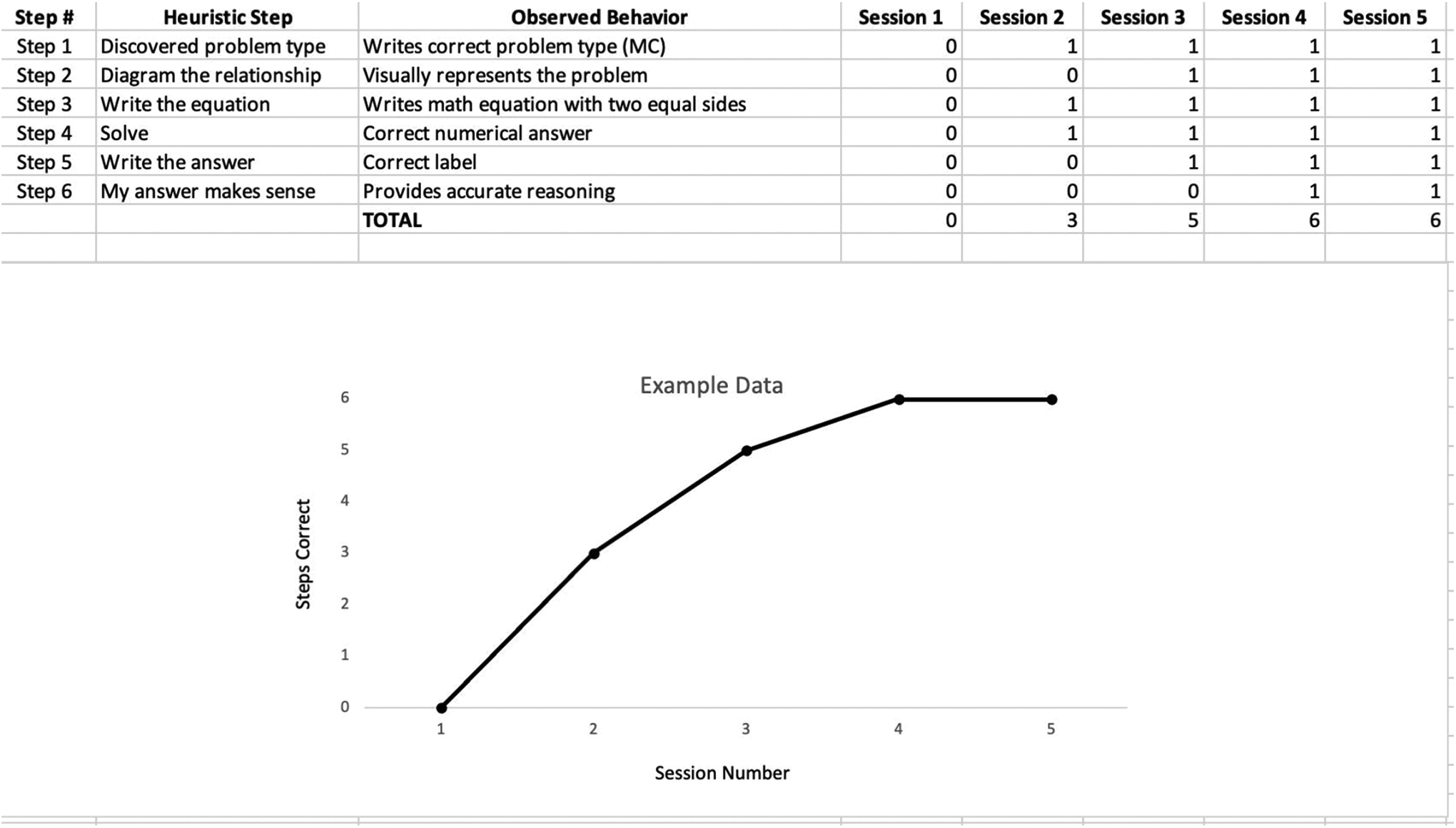
Data sheet example.
Instructional Changes to Increase and Decrease Supports.

Mrs. Shaw can use the instructional data to determine the type of supports students may need when they are not making adequate progress. Students may be exhibiting skill deficits (i.e., the student has not acquired the skill to complete the task) or performance deficits (i.e., the student is able to complete the task, but is doing so unreliably, likely related to motivation). Table 1 provides observations of common student behavior and recommended teacher responses to address the learner’s need. For example, many students with ASD rush through problem solving activities. Mrs. Shaw could introduce a self-monitoring tool paired with reinforcement to transfer the focus from being done to accurately completing the steps. Mrs. Shaw can review the student materials, set up a time to observe the student, or set up a time to talk with the caregivers to get a better sense of how she can best support students and their families at this time.
Supporting Caregivers Who Assist With Math Instruction
Mrs. Shaw has created the activities in a way that students should be successful whether they are completing them independently or with the help of a caregiver. The videos and visual supports benefit both students and their caregivers. Mrs. Shaw can ask families about their preferences, what their routines consist of right now, and make individual adjustments accordingly. These proactive meetings centered around an academic task provide the teacher and families the opportunity to understand their mutual goals and perspectives.
Sharing student progress using a graph (such as Figure 3) allows the teacher, caregiver(s), and student to discuss appropriate next steps. It is important that educators are following technology and data privacy guidelines provided by their district in creating and sharing technology-based instruction and data collection tools. Additional supports (e.g., visuals, additional instruction, or self-monitoring), can be provided for students who are making inadequate progress. Likewise, generalization training can be discussed for students whose data demonstrate mastery. In this way, individualized instruction can be provided for each student. Open and effective communication between caregivers and teachers is even more important during virtual instruction. Allowing flexibility while providing individualized supports for students and caregivers will promote student progress in this unique learning environment.
Footnotes
Declaration of Conflicting Interests
The author(s) declared no potential conflicts of interest with respect to the research, authorship, and/or publication of this article.
Funding
The author(s) disclosed receipt of the following financial support for the research, authorship, and/or publication of this article: American Educational Research Association (Division K Small Grant) and Autism Science Foundation (Covid Pivot Grant).
