



Abstract
Universal design for learning (UDL) is a construct that first appeared in the literature approximately 20 years ago. Yet, there is little agreement about what UDL looks like in the classroom. The purpose of this article is to assist students, educators, and parents in identifying universal usability designs, behaviors, and tools that reflect the practice of UDL in the classroom. Three types of exemplars are highlighted: platform tools, web-based curricula, and embedded supports. It is argued that knowing what UDL looks like is an essential step in measuring the outcomes of UDL.
For most of us, technology makes things easier.
For a person with a disability, it makes things possible.
The promise of universal design for learning (UDL) implies that instructional materials and environments can be designed to be accessible for all students (Meyer et al., 2014; Pisha & Coyne, 2001). Yet, to date there has been little agreement about how to document claims concerning UDL interventions (Rao et al., 2019). This critical shortcoming has negatively impacted the quality of the UDL research evidence base.
Edyburn (2010) argued that researchers and educators should attend to measuring the outcomes of UDL on both primary and secondary beneficiaries. Students with learning and/or emotional/behavioral disabilities could be considered as one group of primary beneficiaries. That is, special needs that impact students’ ability to access, engage with, and benefit from instructional in the general classroom delivered through multitier support systems (MTSS; Hoover, 2013). Secondary beneficiaries would be all students in the classroom. If it is discovered that an intervention is used only by the primary beneficiaries, it probably should be considered assistive technology. However, if an intervention is used, and provides benefit to the majority of students in a classroom, then perhaps there is quantifiable evidence that the intervention has universal design applications. Just to be clear, access and engagement are necessary, but not sufficient, to produce enhanced learning outcomes.
This article examines what UDL may look like from the perspective of a student with a mild disability such as a learning disability or emotional/behavioral disability (Hall et al., 2015; Johnson-Harris & Mundschenk, 2014). The purpose of this work is to assist students, educators, and parents in identifying behaviors and tools that reflect the practice of UDL in the classroom. It will be argued that knowing what UDL looks like is an essential step in measuring the outcomes of UDL.
Designing for All: Platform Tools
Universal Usability
Gregg Vanderheiden (2000) defined universal usability as “A focus on designing products so that they are usable by the widest range of people operating in the widest range of situations as is commercially practical” (p. 32). Accessibility is a component of usability but is no longer focused exclusively on people with disabilities. Rather, universal usability challenges the designer to improve the user experience for everyone. Vanderheiden’s work on assistive technology control panels ultimately led to the technology industry’s adoption of accessible settings not only on computers, but also on mobile phones and gaming consoles. Given the ubiquitous nature of these tools, it is not unreasonable to expect that every student in a UDL classroom will be aware of these tools and have a basic understanding of when, why, and how they could be used.
Classroom Practice
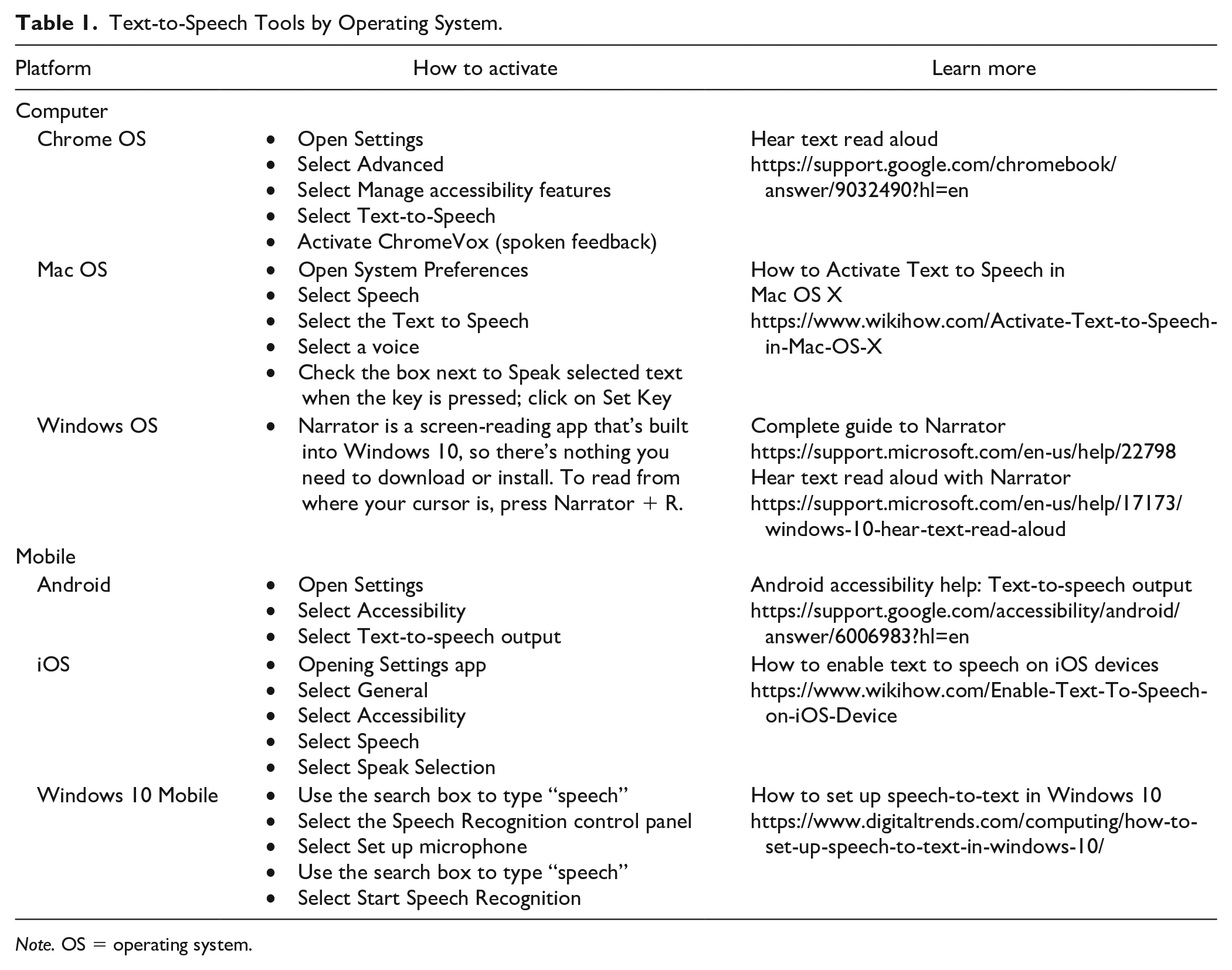
A common characteristic of many students with mild disabilities involves gaining access to text because of below grade level reading skills (Gilmour et al., 2019; Leko, 2015). Text to speech is one universal design application that also affords benefit to secondary beneficiaries such as learners interested in reading complex texts, people who have misplaced their reading glasses, and more. As illustrated in Table 1, every technology platform has universal accessibility features that support reading by allowing users to gain access to text-based information by listening as the text is read aloud by the computer.
Text-to-Speech Tools by Operating System.
Note. OS = operating system.
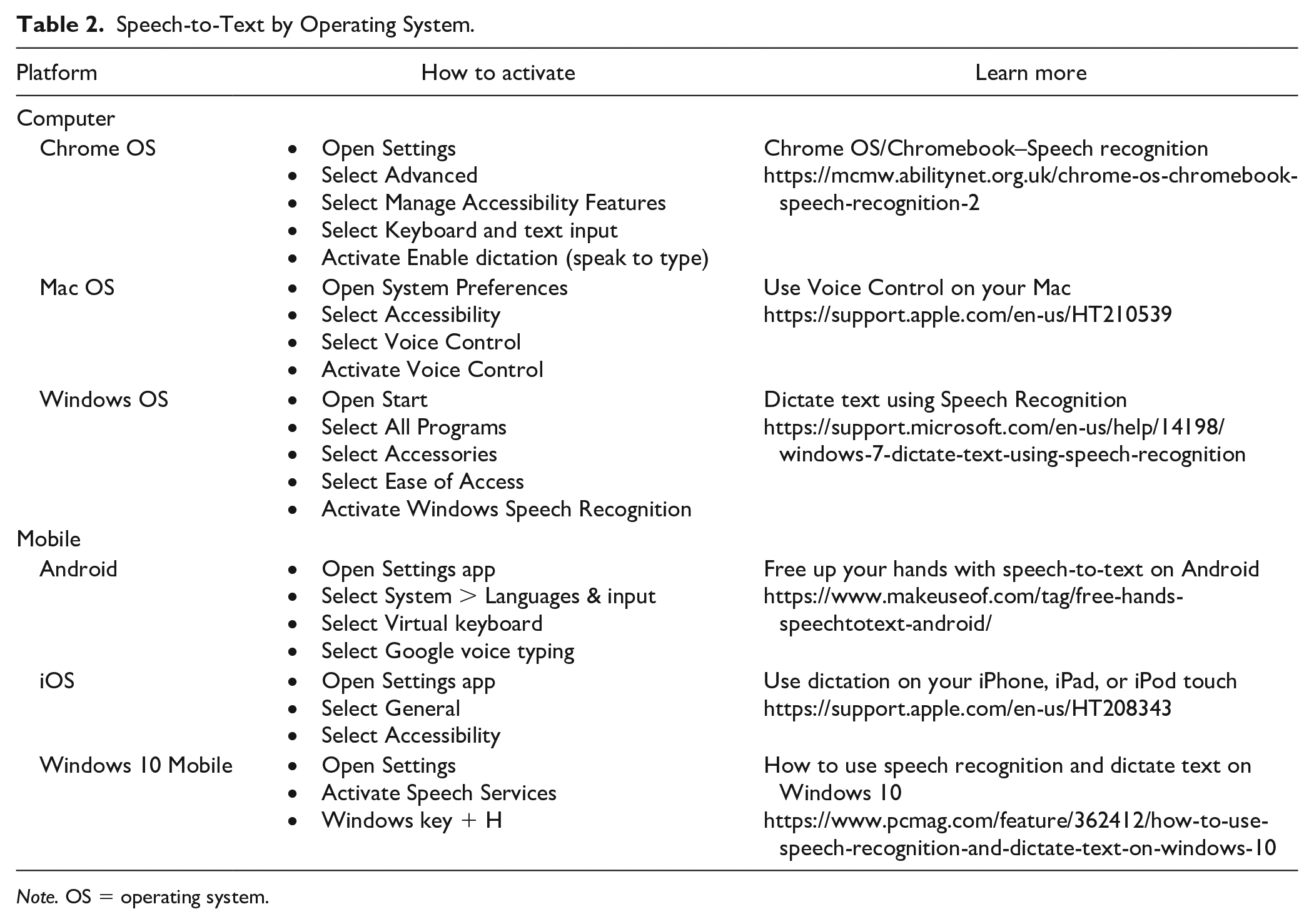
A second characteristic common to many students with mild disabilities involves difficulty in writing that may be attributed to poor handwriting and/or difficulty spelling. These types of problems severely impair the process of written communication and often contribute to negative attitudes toward writing (Graham et al., 2007). Dictation is an application that allows users to dictate their thoughts and have their device convert speech into text. As illustrated in Table 2, every technology platform has universal accessibility features that support the writing composition process by allowing users to speak their thoughts and have the device correctly spell the words. And yet it is not clear that American schools have recognized the need to provide students with instruction in voice typing.
Speech-to-Text by Operating System.
Note. OS = operating system.
Learner Application
In schools/classrooms that claim to implement UDL, all students would be introduced to the universal usability features of their technology devices. All students will know how to activate speech-to-text tools as well as text-to-speech tools on all common devices, even on those devices they do not personally own or use, so that they can assist others. Classroom observation should reveal that ubiquitous tools like text to speech and speech to text are used routinely by many students (i.e., secondary beneficiaries) in addition to those students whose disability requires the use of these tools (i.e., primary beneficiaries).
Because learning and/or emotional/behavioral disabilities are lifelong conditions, not developmental delays that are outgrown, parents and educators are encouraged to adopt a modified form of the expanded core curriculum (ECC), a key concept from the field of visual impairments (Sapp & Hatlen, 2010). The ECC draws attention to the fact that additional in-depth instruction is needed to maximize the benefit of assistive technologies for students with disabilities who need high levels of competence in using tools for accessing and compensating. Therefore, it is not unreasonable to anticipate that nearly 100% of the students with learning and behavioral/emotional disabilities will need to routinely use text-to-speech and speech-to-text multiple times a day.
When trying to calculate the return on investment (ROI) of universal usability tools, a foundational measure should be the number of minutes the devices are used. This simple metric of usage (vs. nonusage) will reveal patterns that offer insight about the value and use of ubiquitous tools. Subjective self-report measures of students’ confidence in using the tools, perceived efficacy, and decreased frustration can also be valuable in understanding the application of universal usability among primary and secondary beneficiaries. Finally, educators and researchers are encouraged to use quantitative measures to assess increased productivity and enhanced academic outcomes as perhaps the most persuasive argument of the value of the UDL interventions.
Designing for All: Web-Based Curricula
Spiral Curriculum and Depth of Knowledge (DOK)
Jerome Bruner (1960) coined the term “spiral curriculum” to describe the design of instruction that introduces basic foundational concepts that are periodically revised in a course of study, or in subsequent grade levels. The purpose is not simple repetition but a deliberate design principle to deepen the understanding of topics, subjects, or themes by successively building on prior knowledge. This curriculum design principle has important implications for general and special educators to understand relative to grade-level achievement, preparation of students for future learning, and remediation of content knowledge deficiencies (Cawley, 1994).
A second framework that impacts the design of universal curricula is Webb’s (2002) DOK framework. Whereas there is considerable misunderstanding about the application of this work (Francis, 2017), DOK gained considerable relevance when it was applied to the Common Core State Standards with language focused on rigor (Hess, 2013). Webb outlined four arenas in which students will express and share the depth and extent of their learning: What is the knowledge (DOK-1)? How can the knowledge be used (DOK-2)? Why can the knowledge be used (DOK-3)? What else can be done with the knowledge (DOK-4)? With these frameworks in mind, attention now focuses on classroom practice relative to web-based curricula.
Classroom Practice
Whereas first-generation digital curriculum design efforts in the 1990s mirrored the one-size-fits-all approach of textbooks by providing text on a screen, new curriculum design approaches have emerged that are much more sensitive to the needs of diverse learners (see Table 3). Two exemplars provide a glimpse of how the intentionality of universal usability of digital curricula can be achieved through design interventions.
Design Interventions Addressing Text Complexity.
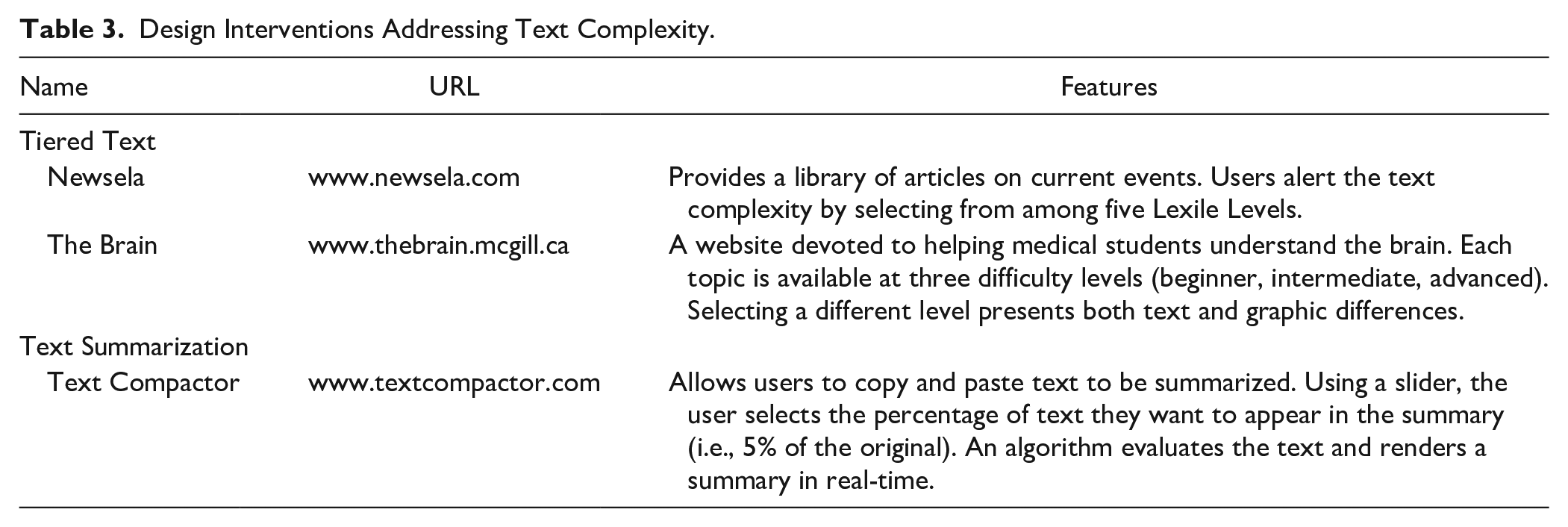
One example of universal usability can be called tiered text. That is, providing readers with multiple versions of the same text at different difficulty/complexity levels in real-time. Examples include Newsela and The Brain: From Top to Bottom. On these web sites, readers are presented with text-based curricula at a standard level. However, the user can click a button to have the text re-rendered at a lower, or higher, level of complexity. This requires that learners exercise agency in what is referred to as behaving as “Goldilocks.” This is a significant advance in educational practice as it is the work of the educational publisher to proactively value academic diversity by eliminating the need for the teacher to make curriculum accommodations and modifications. By design, the spiral curriculum and DOK are built into the instructional materials in a way that was never possible with printed materials.
A second tactic involves text summarization or what Edyburn (2002) called cognitive rescaling. That is, how to dynamically alter the cognitive difficulty of a text. Text Compactor is a web-app that allows users to copy and paste informational texts and create a real-time summary of the information. Whereas this tool has obvious application for struggling readers and learners whose first language is not English, it also serves secondary beneficiaries who may have difficulty summarizing information or who may have limited time for processing long complex texts.
Learner Application
In schools/classrooms that claim to implement UDL, learners are more likely to engage with web-based curricula rather than print-based learning materials. However, it is important to critically evaluate the curricula to ensure that it has evolved beyond simple text on screen.
This paradigm shift of specially designed web-based curricula provides significant value for diverse learners as they have the foundational universal accessibility tools in addition to web-based curricula that potentially offer more flexibility. Closer inspection of individual students will reveal that they have extremely high competence in navigating the digital curricula while pursuing different pathways to help them achieve the instructional objectives and a DOK not previously attainable with traditional learning materials.
When teachers implement tiered text interventions, two outcomes are likely to be noticed. Learner agency in UDL classrooms will be more advanced that in other classrooms because students are presented with meaningful choices that require them to act on decisions concerning what is the “just right” level of challenge—a key factor associated with higher level achievement (Schlechty, 2002). Finally, it is not unusual to observe another outcome associated with deep engagement in learning: Curiosity. That is, students posing new questions that they seek to answer by web searches, Wikipedia articles, and YouTube videos.
Designing for All: Embedded Supports
Embedded Supports
When designing for the academic success of diverse learners, it is important to understand where, how, and why learners will get stuck. One of the tenets of UDL is that it is not the learner that is disabled but the curriculum (Meyer et al., 2014). This means that educators and instructional designers should adopt instructional materials with supports that reduce the likelihood of failure. When supports are embedded in the curriculum, it may reduce the burden on teachers to reactively create curriculum accommodations and modifications and it will likely minimize learner frustration.
Classroom Practice
One of the critical roles teachers provide to students is context-sensitive help when they get stuck in the learning process. To date, this has not been an area that has been readily implemented in the context of UDL or educational technology. However, Table 4 summarizes two tools that offer a glimpse of what could be possible in providing students with context-sensitive help.
Approaches to Providing Context-Sensitive Help.
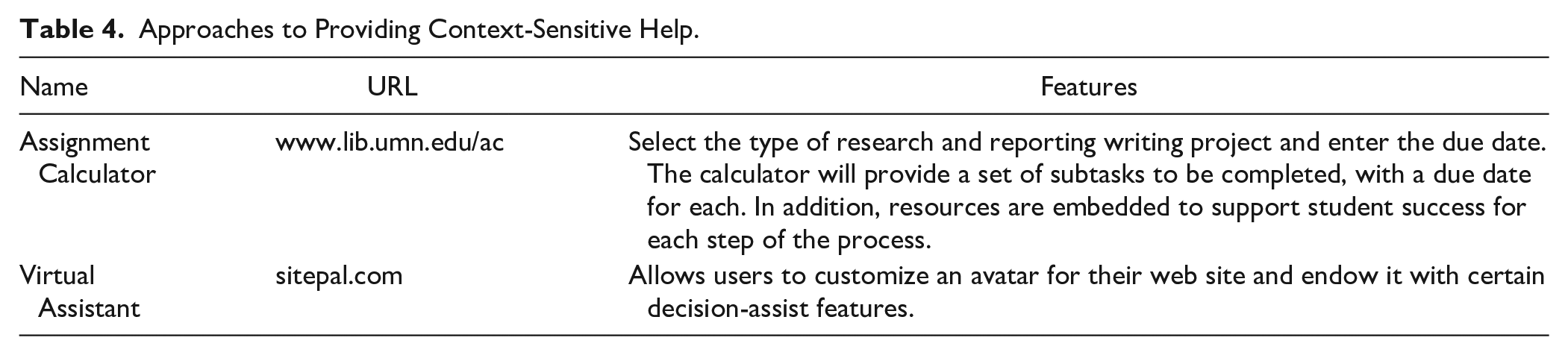
The Assignment Calculator was developed by librarians at the University of Minnesota. It serves two functions. First, it breaks down the many subtasks associated with research and report writing. Second, it weights the amount of time that should be spent on the various subtasks on a calendar to provide deadlines for completing each subtask. (Of course, if you wait until the night before a project is due, you’ll discover that all of the subtasks need to be completed today!). As any parent or teacher will tell you, many students have difficulty in managing a large project because they don’t fully comprehend the many steps and they have insufficient executive functioning skills required for effective time management (Bryan et al., 2001).
A second example involves the design and deployment of a virtual agent. The general context for virtual assistants involves customer service. Yet, there is quite a literature on the development of pedagogical agents to offer context-specific advice to learners stuck at a particular point in the learning process (Schroeder et al., 2013). Whereas pedagogical agents are not yet common in most curricula areas, voice command virtual assistants such as Alexa, Cortana, and Siri are finding their way into daily life as well as the classroom (Ellis, 2017). However, one drawback to existing voice command virtual assistants is that they require the user to form a well-articulated inquiry which is significantly different than the expertise that is built into a well-designed pedagogical agent that guides the user to confirm a diagnosis of the difficulty.
Learner Application
In schools/classrooms that claim to implement UDL, learners will routinely access interactive tools that offer embedded learning support. These context-sensitive tools will provide learners with meaningful guidance about an array of meta-cognitive, strategic, and practical steps forward to solve a problem. Currently, teachers and parents provide this important role to guide learners. However, as the tools for developing and deploying virtual agents continue to expand, along with the development of more advanced models of learner performance that will serve as the backend databases, it seems quite reasonable to expect that all learners in the near future will routinely interact with virtual pedagogical agents that can offer context-sensitive support for completing academic tasks.
Conclusion
In 2010, Edyburn asked the profession, “Would you recognize UDL if you saw it?” A decade later the field is still struggling to operationalize the definition of UDL and determine how to measure its application (Davies et al., 2013; Loreman et al., 2014). This article sought to provide exemplars of universal usability that could be readily observed in the UDL classroom by monitoring how students use their technology. Such efforts provide a foundation for understanding the primary and secondary beneficiaries of UDL interventions and serve as an essential step forward in measuring claims about the efficacy and outcomes of UDL (Smith et al., 2019).
Footnotes
Declaration of Conflicting Interests
The author(s) declared no potential conflicts of interest with respect to the research, authorship, and/or publication of this article.
Funding
The author(s) received no financial support for the research, authorship, and/or publication of this article.