



Abstract
With the development of the computer image processing and smartphones, image processing on smartphones will be a popular technology. This paper mainly provides an image color style migration method for mobile applications based color feature extraction. Firstly, we use dichotomy to extract color feature of the template image. Then we use Quartz2D engine of iOS to draw the target image according to the template image color feature. Finally we use Metal interface of iOS to adjust the target image’s color saturation and sharpen its edge. Through the whole process, the source image’s color style has been migrated to a new image. We have implemented the image color style migration system orient to iOS application. The experiment results show that the system runs stable and reliable.
Introduction
With the development of the computer image processing, the colorized images processing has become more and more popular. The image color style migration becomes an important branch of the colorized images processing for its extensive use [16]. It has irreplaceable effects in military field, medical field, archaeology and meteorology, such as generating restored images of antiques and ancient buildings and also restoring the color of faded antiques. Using images color style migration is able to get a relatively good result [6]. In the aspect of image post processing, color style migration for the photo is able to make it present a new colorific effect. Traditional image color style migration usually operated in the computer terminal, which orients is usually a small crowd. With the rapid development of smart mobile devices, implementing color style migration for mobile terminals is completely possible. Thus, this paper put forward an image color style migration method for mobile application in order to satisfy users’ need to migrate photo’s color style anytime and anywhere.
Related work
Image color style migration is getting the color feature value [14] of an image (source image) and migrating this feature value to another new image which makes the new image to present the source image’s color effect but doesn’t change the new image’s content.
In 2006, Bae et al. [11] implemented the image style migration through comparing the texture and the strength histogram. The method based on binary nonlinear decomposition, controlled and modified image’s histogram, and introduced Poisson equation to control the reversion of gradient. This method is able to migrate image style well, but there are many steps in the method require Poisson equation, which limits the method not able to process the high-resolution images and limits its implement and optimizing in program.
In 2010, Sunkavalli et al. [4] presented an image style migration method based on the image pyramid, this method is able to match the information of texture and noise through controlling the pyramid of scale in order to the image transfer within some area. This method is able to copy the human face feature from a specific location to a target location. This method is easy to implement while hasn’t ideal effect for there isn’t a good transition effect in the edge of the specific location after the content copied.
In 2011, Paris et al. [12] presented the Local Laplacian filters. This filter uses the Gaussian Pyramid to do downward sampling for images at first. It does pointwise processing for the sampled result in the next, and then it stores the processed result to a transitional Laplacian Pyramid. Finally, it does upward sampling for the transitional Laplacian Pyramid to get an image as big as the source image. This method is able to generate high quality images and well restrain the halo generated in the process of filtering. The shortcoming of this method is its slow running speed, though it is able to get high quality images in adequate time. Thus it is difficult to choose between image’s quality and processing speed. Yao et al. [15] presented a regional color migration technology with Gaussian mixture model, and the color space used in this method is Lab color space. This method firstly uses the Gaussian mixture model to do the clustering fitting for the source image’s color sample space to get the model with referenced color. And then it reclassifies the target image’s color sample with the referenced model to confirm the color matching relation among every region of target image and source image. Finally, they present the equation of implementing the target image’s color migration. It is able to implement the image’s color migration, but there are many complex algorithms in this method, which result in the problem of efficiency.
In 2013, Jie et al. [7] presented a multivariate color migration technology based on initiative contour exploring. Firstly this method is able to separate target image’s main body and background, use the method of initiative evolving to generate the virtual contour line and use the energy function evaluating mechanism compelling the virtual contour line approach the actual contour line. And then, it uses the expression, segmentation and transformation in RGB and LMS color space of target image and source image to implement the multivariate color migration [5, 19, 20]. Finally, it inverts recovering the migrated image got in the Lab color space to display in the RGB color space. The result of this method has a low fuzzification and nondeterminacy [3, 8, 9], which prevents the problem about color distortion relative well.
Traditional image color style migration usually operated in the computer terminal [2, 10, 13, 18, 7], while with the rapid development of smartphones, users may have demands of migrating photo’s color style any time and any where [1, 17]. Thus, this paper put forward an image color style migration method for mobile application.
Image color style migration method for mobile application
To meet users’ demand of migrating color’s feature on mobile terminals, this paper puts forward a method named image color style migration for mobile application and implements this method in iOS system on a smartphone. The general steps of this method are firstly using dichotomy to extract color feature of template image (user-defined image), then using Quartz2D engine of iOS to draw the target image according to the template image color feature, and finally using Metal interface of iOS to adjust the target image’s color saturation and sharpen its edge. Through the whole process, the source image’s color style has migrated to a new image.
Using dichotomy to extract color feature of template image (user-defined image)
Figure Extraction of image color feature is the basis of the whole color feature migration, so this paper researches a color feature extraction method based on dichotomy. For the convenience of adjusting image’s saturation in late period, we choose the HSV color space. The steps of this link as follow.
Step 1. Using dichotomy to confirm feature points’ position
After transforming the color space, it is able to start feature points extraction. With the research of plane composition method in photography, we conclude that the feature pixels of an image usually focus on the part that a bit deviation to the center of the image, just in the intermediate region of the four golden section lines which locate at the up, down left and right four parts of the image, as shown in Fig. 1.
Sketch map of centralized region of feature points.
Based on it, this paper researches an image color feature extraction method dichotomy-based to extract template image’s color feature. Dichotomy in this paper means getting feature points via constantly binary search. First, confirming a central point and eight scanning spots of the image, the scanning spots locate in the edges of image, where are the intersections of image’s edges and the rays in eight directions outward from the central point (the eight directions respectively are upside, upper right corner, right side, low right corner, downside, low left corner, left side and upper left corner). In the next, recording the midpoint coordinates of the central point and scanning spots. Then assigning midpoint’s coordinates to scanning spots to get new scanning spots so that it is able to iteratively binary searching to get new feature points. Finally, while the distance from central point to scanning spots is less than some one value, the iteration stops. So it has got the feature point arrays of eight directions.
Using the dichotomy method is able to get total eight feature point arrays, these arrays start from the scanning spots in eight directions and stop in the central point. The sketch map of distribution shows in Fig. 2.
Step 2. Double weighting on feature points
The sketch map of the positions of feature points.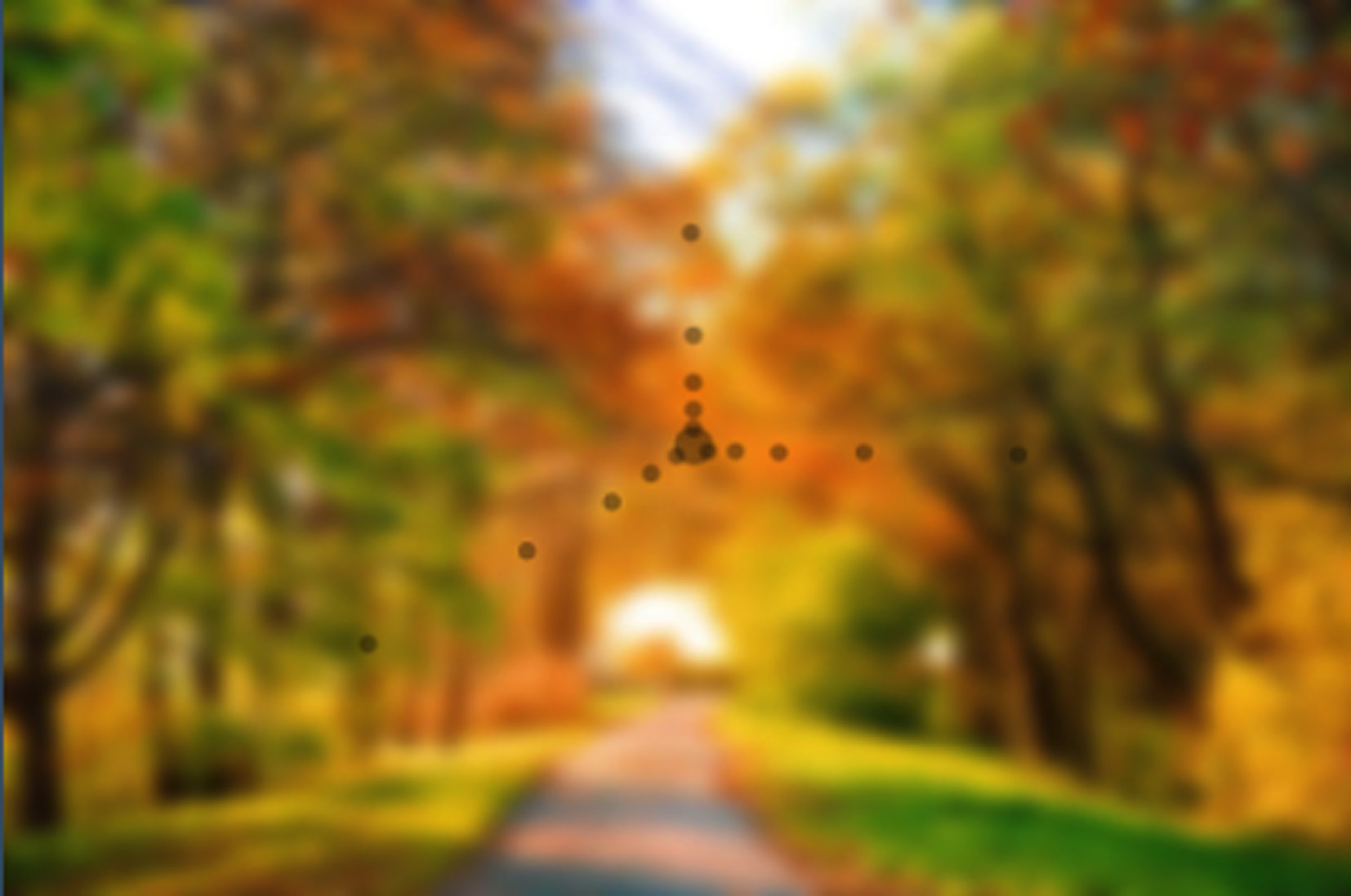
In order to get accurate image color feature, this paper does double weighting on feature points. The first layer weighting aims at feature points extracted by the dichotomy. The second layer weighting aims at the feature points in the arrays. Detailed description is as follows.
The first layer, while using dichotomy to extract feature point, doing weighting on total nine points to get average feature value, these points are feature point and its surrounding eight points. The weight of feature point is set as 1 to as an important reference and the weight of surrounding points is set as 0.8 to reduce the error. The equation of calculating the average color feature value is shown in Eq. (1),
The second layer, in order to highlight important part’s color feature, this paper does weighting on all feature points in every single array. The equation is shown in Eq. (2),
So far, it has got the feature value of every array. According to the thought of weighting and average, it is able to get the whole template image’s color feature via doing average of eight arrays’ color feature.
After extracting the template image color feature, it is able to start the target image drawing according to the template color feature. This paper chooses Quartz2D engine of iOS system to draw target image. The steps of this link as follows.
Step 1. Establishing the graphics context of bitmap
Graphics context is used to encapsulate the drawing information from Quartz2D to output equipment. In Quartz2D, all objects are drawn in graphics context. The information in graphics context includes the graphic drawing parameters in canvas and some manifestation patterns about equipment.
Step 2. Configuring the graphics context
In iOS system, there are two adaptive steps to use Quartz2D. First is the coordinate system adaption and second is the line width adaption at the time of drawing.
The coordinate system is used to descript objects’ position and size range in canvas. In Quartz2D, the data type of the coordinate system is float, the null point locates at the low left corner, the positive direction of y-axial is upward, and the position direction of x-axial is rightward. However, in the UIKit coordinate system of iOS system, the null point locates at upper left corner, the position direction of y-axial is downward, and the position direction of x-axial is rightward. So, it needs to do adaption for the coordinate system. The line width adaption due to the anti-aliasing mechanism built in Quartz2D. If this mechanism is opened, the system will modify some points to keep image smooth. However, this mechanism has some defects. When the central of the given path happen to locate at the edge of pixels, and the line width (the distance from central to two sides) is just one pixel, the drawing result is each side of the path exists a half point, at the same time, with the effect of anti-aliasing mechanism, the system will automatically complement the pixels that are not full, which leads the result occupies two pixels, as shown in Fig. 3a. Solution of this question usually is adding half pixel on the path central and it is able to prevent the anti-aliasing mechanism from launching, as shown in Fig. 3b. Another solution is shutting the anti-aliasing mechanism directly. It is able to solve the disturbance of the anti-aliasing mechanism, but it also loses the positive effect of this mechanism.
Sketch map of line width adaption.
Step 3. Drawing image in the graphics context
This paper uses the pointwise drawing way, after gaining the template image’s color feature, it needs to traverse the target image. The process of pixels traversing is firstly gaining target points’ HSV parameters, and then assigning its hue parameter and saturation parameter according template image’s color feature. After assigning, using the new color to draw image (it needs setting brush’s color and thickness, line’s starting point and ending point), then rendering the content as an image layer and overlaying it on canvas. When all target images’ pixels have overlain on canvas, it has implemented the target image drawing.
Step 4. Transform the graphics context to the final image
After drawing the target image, there is much content in the graphics context. However, this content is not able to be displayed on the screen, it needs being rendered to an ImageView, and content in this view is directly visible to users. The rendering mechanism of Quartz2D is simple, and it just needs submitting a graphics context to the rendering function, thus this paper doesn’t say more than is needed.
After drawing target image, it has finished the migration of image color style. However, the style migrated image might appear the problems of color distortion or contour line obscuring, so this paper uses Metal interface of iOS system to adjust image’s color saturation and sharpen image’s edge.
Adjusting image’s saturation
The specific steps of adjusting image’s color saturation as follow. Firstly, establishing a chartlet according to the image and the chartlet is interiorly maintained by the filter. In the next, establishing the base class of filter and implementing its foundational function. Then, basing on the base class, establishing a filter which is able to adjust image’s saturation, and the filter is able to transform the RGB color to gray value according to the human-eye-perceptibility equation. Finally, submitting the saturation coefficient and source image to image processing buffer to implement the transform of the image’s saturation.
Comparison of edge information when the image’s style has migrated.
The core function of the saturation adjusting filter is transforming source image’s every pixel’s RGB color to gray value. The transforming equation is shown in Eq. (3), it means weighting on every channel’s value in RGB color space to get a gray value. This equation is decided according the different sensitiveness of human eyes to the three-primary colors, R is the red channel, G is the green channel, B is the blue channel and Y is gray value.
After the filter is activated, image is able to be submitted to buffer to wait disposing. This disposing combines the saturation factor to filter the chartlet in the graphics context and the chartlet is interiorly maintained by the filter. When all disposing has finished, the final image will be displayed on the screen to users.
Image will appear edge information losing in a degree after style migrated, which leads the image’s edge appear obscuring. Figure 4a is the image before style migrated and Fig. 4b is the image after style migrated. With comparing, it is able to find that the target image’s edge information has somewhat lost after style migrated. Aiming at this question, this paper uses sharpening dispose on the style migrated image.
Feature value extraction results of template images.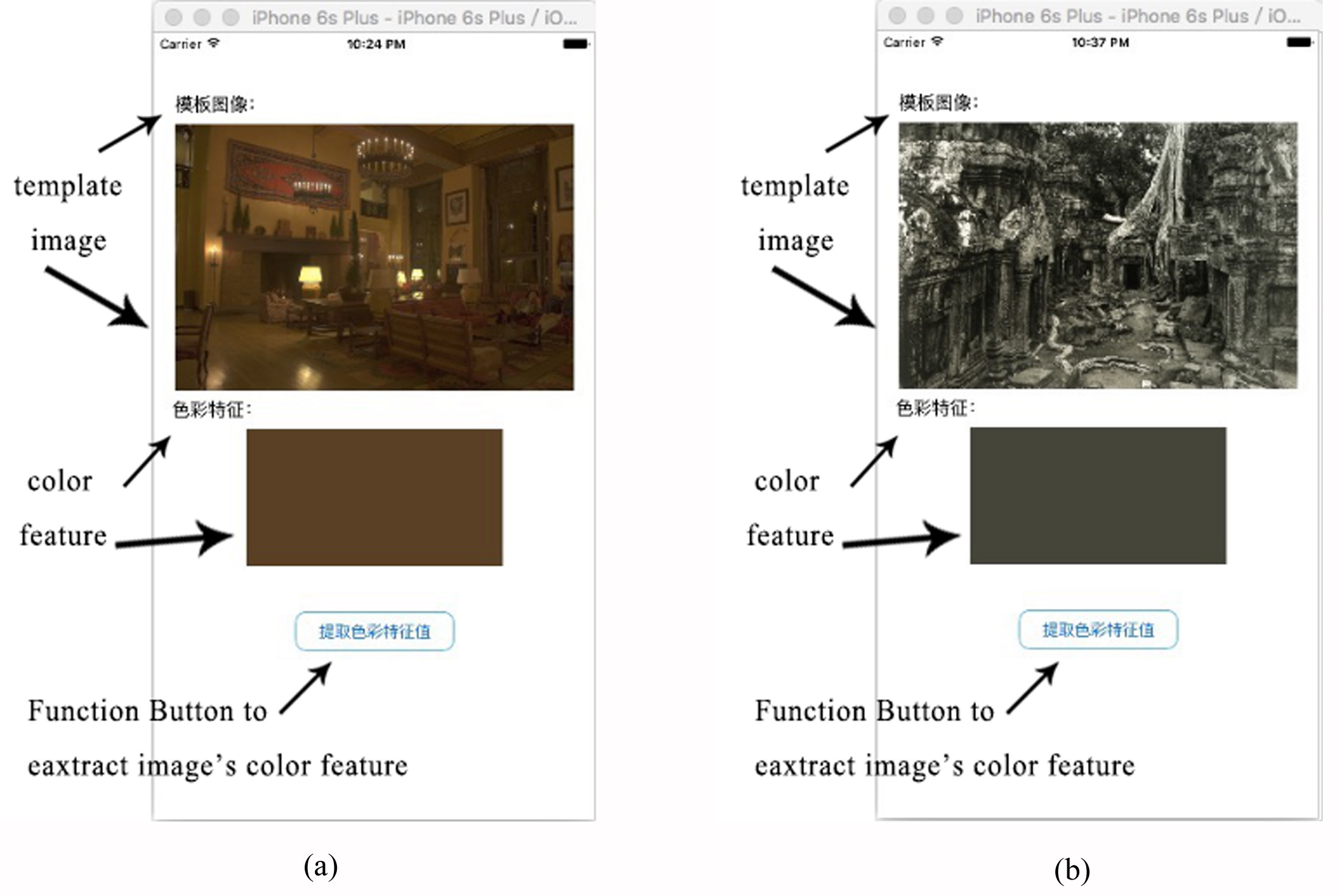
In order to verify the feasibility and validity of the method of image color style migration for mobile application, this paper implements this method and puts it into a mobile terminal with iOS system to do tests. The hardware facilities include an Apple Macbook Air computer to do debugging and an Apple iPhone 6 Plus testing phone. The operating system of the computer is OS X EI Capitan, the processor model is 1.6 GHz Intel Core i5 and the internal storage is 2 GB DDR3 1600 MHz. The operating system of the test phone is iOS 9.2, the processor model is 1.4 GHz Apple A8 plus M8 co-processor. The graphics processor model is 1 GB Imagination PowerVR SGX6450 and the compiler is XCode Version 7.0.
Verification for using dichotomy to extract color feature of template image (user’s image)
For the verification of this link, this paper sets up a simple UI frame. The frame includes the template image view, color feature view and a button to trigger the image’s color feature extraction.
The content shown in Fig. 5a is the extraction result of one template image, and its feature color is brown. The content shown in Fig. 5b is the extraction result of another template image, and its feature color is dark grey.
Verification for using Quartz2D engine of iOS to draw the target image point by point
For the verification of this link, this paper implements a simple UI frame. The frame includes the template image view, target image view, color feature view, style migrated image view and a button being able to trigger the color style migration.
Sketch of color style migration.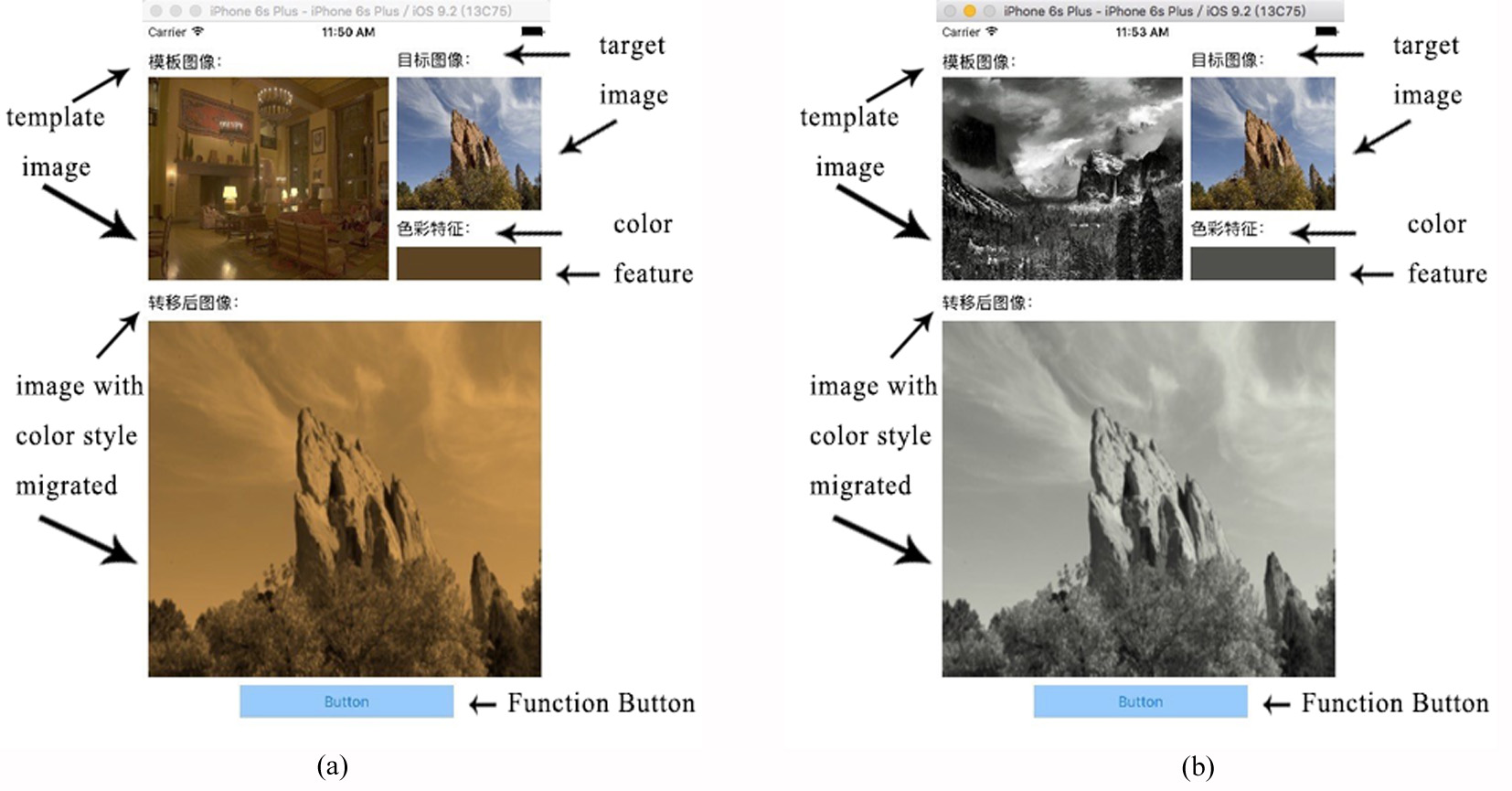
Sketch of an image adjusted with different saturation coefficient.
Sketch of an images’ edge sharpened.
As shown in Fig. 6a, the template image is a brown retro style photo and the target image is an ordinary colorized photo. After pressing the button, the color feature view shows the feature color extracted from the template image, the view below shows the target image that is drawn according to the feature color.
As shown in Fig. 7, all of the images originate from a same gray-scale image and are migrated their color style according to a claybank-color image. Figure 7a shows the result when the saturation coefficient is 0.2. Figure 7b shows the result when the saturation coefficient is 0.5 and Fig. 7c shows the result when the saturation coefficient is 1.0. Obviously, using Metal interface of iOS is able to adjust image’s color saturation.
As shown in Fig. 8, Fig. 8a hasn’t been sharpened and Fig. 8b has been sharpened. It is able to know through comparison, using Metal interface of iOS is able to clarify images’ edge and achieve the aim of repairing images’ edge information.
Sketch of image color style migration function.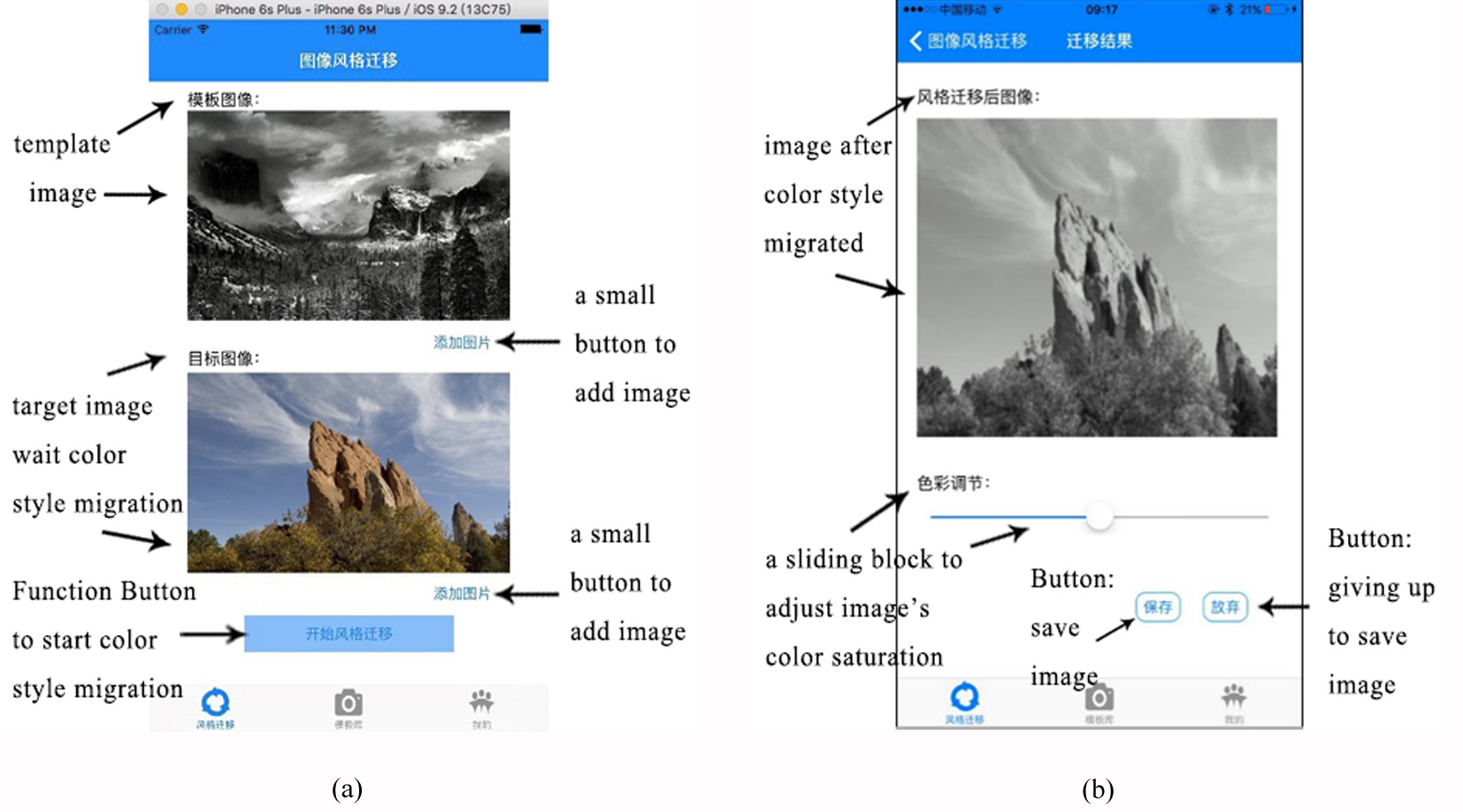
Sketch of the test-phone’s CPU utilization.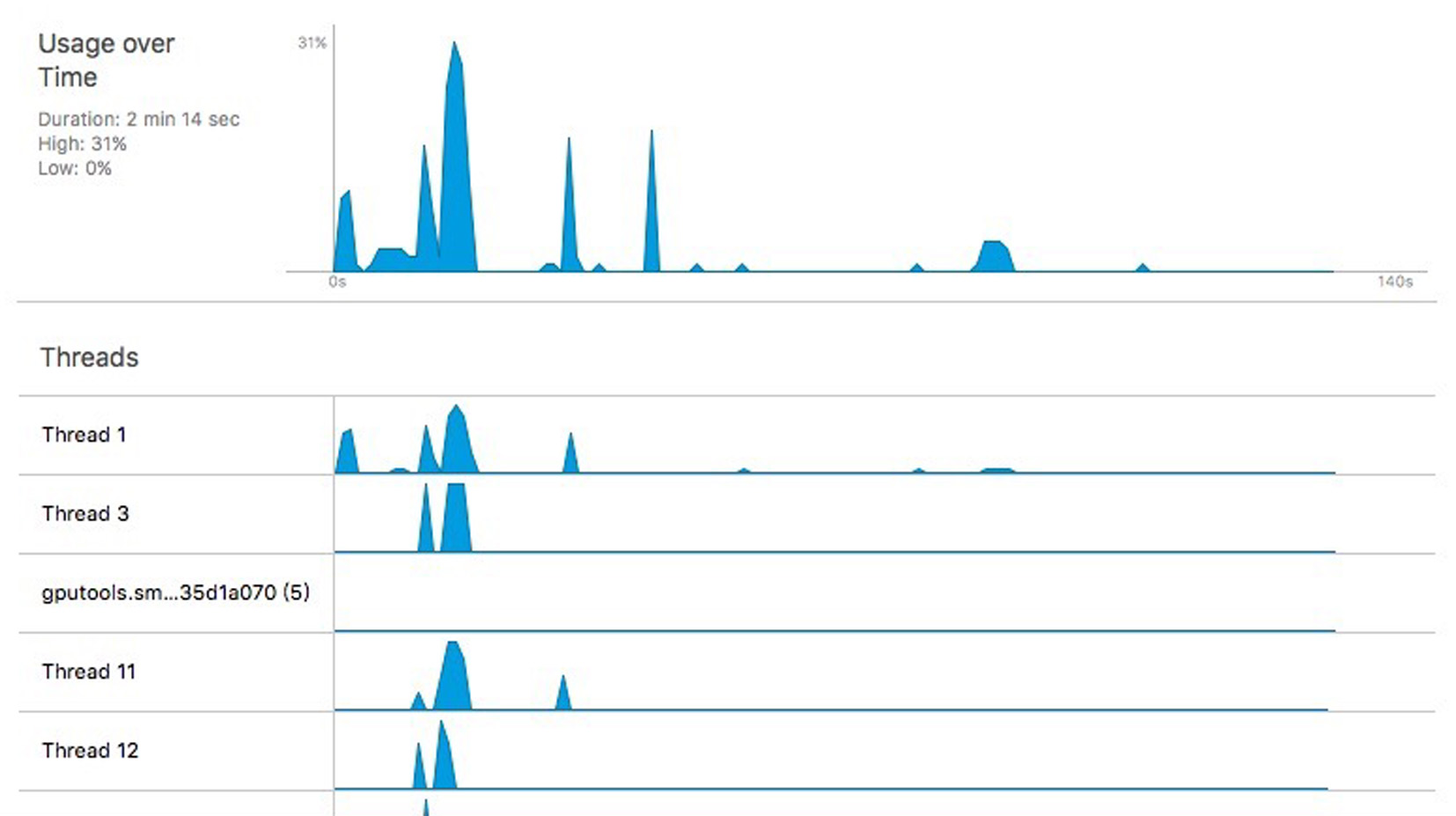
After finishing verifying the above links, this paper integrates them to implement an iOS application. In this application, the image color style migrating function is shown in Fig. 9a. This is the main function of this application, it includes template image view and target image view. Pressing the button of “adding image is able to add either template image or target image, and then it is able to start the image’s color style migration. Image’s style migration will be launching in the not-main threads, which is able to avoid interfaces getting stuck.
After image’s color style has migrated, it will enter the color saturation adjusting function. In this function, users are able to slide the sliding block to adjust the image’s saturation. The image can be preserved after adjusting, as shown in Fig. 9b.
The content in Fig. 10 shows the testing result of this image color style migrating application. With analyzing, it is able to know that the test-phone’s CPU utilization reaches the peak while doing the image style migration, it reaches 31%. Another conclusion is that we use the multithreading technology in the application is able to make the system finish the image color style migrating efficiently in the non-extreme cases, and also make application’s operation speed faster.
Conclusions and future work
The image’s color style migrating technology is a branch of the computer colorized image processing, one of its main functions is migrating a template image’s color style to a target image while not alter the target image’s contour information. Traditional image color style migration usually operated in the computer terminal, the users it orients are usually a small crowd. With the rapid development of smartphone, implementing color style migration on smartphone terminals is completely feasible. The method of image color style migration for mobile application put forward by this paper has solved these questions. At first, this method uses dichotomy to extract color feature of template image. In the next, it uses Quartz2D engine of iOS to draw the target image point by point. And then, this method uses Metal interface of iOS to adjust the target image’s color saturation and sharpen its edge. Finally, this paper implements an image color style migration application orient to iOS system, which can select template image and target image, migrate the target image’s color style and adjust the color saturation as well as sharpen the edges of the image. The experiment result verifies the method of image color style migration for mobile application put forward by this paper is valid, feasible and with a well running effect.
The further work includes implementing batch-migration and adapting the APP to Android platform as follows.
Implementing batch-migration In the image style migration algorithm in this article, the color style migration of a single picture is performed. However, in a certain scenario, the user may need to assign a new color style to a lot of photos, which requires that the image transfer operation can be implemented in batches. So this function will be added in subsequent work. Adapting the APP to Android platform The experiments in this article are all developed in the iOS system, but now Android phones are more popular than iOS phones, and the work of adapting this algorithm to the Android platform is imminent. Therefore, in the subsequent work, the development work will be completed under the Android platform.
Footnotes
Acknowledgments
This work was supported by the Funding Project of National Natural Science Foundation of China (No. 61503005), the Funding Project of Natural Science Foundation of Beijing (No. 4162022), and the Funding Project of Great Wall Scholar Reserve Training Program in North China University of Technology (No. NCUT2015006). We would like to thank those who care of this paper and our projects. Also, we would like to thank everyone who spent time on reading early versions of this paper, including the anonymous reviewers.