



Abstract
Different high performance techniques, such as profiling, tracing, and instrumentation, have been used to tune and enhance the performance of parallel applications. However, these techniques do not show how to explore the potential of parallelism in a given application. Animating and visualizing the execution process of a sequential algorithm provide a thorough understanding of its usage and functionality. In this work, an interactive web-based educational animation tool was developed to assist users in analyzing sequential algorithms to detect parallel regions regardless of the used parallel programming model. The tool simplifies algorithms’ learning, and helps students to analyze programs efficiently. Our statistical
Keywords
Introduction
Multicore architectures have significantly evolved in recent years. The traditional way of explaining the concepts of algorithm techniques and parallelism efficiently has become more complicated considering the rapid growth of parallel programming models. As a consequence, undergraduate students need new methods of analysis, design, and parallelism of algorithms to become more aware of the available parallel resources.
It has recently become easier to simplify the difficulty of understanding algorithms, due to the ability of visualization in modern software. The visual explanation of algorithms improve the process of teaching especially when detailed explanation is needed. Previous studies [1, 2] emphasized the difficulties of understanding the abstract concepts of programming for computer science students.
Animation added one more dimension to modern education, where the dynamic properties of an algorithm can be illustrated and explained. However, Naps et al. [3] argue that any animation technology must engage students in an active manner in order to be effective and reliable. Hundhausen et al. [4] concluded that the benefit of using animation and visualization in education depends on how students use algorithm visualization technology instead of what visualization shows them. In some cases, visualization of parallel algorithms can lead to further learning difficulties.
The major contributions of this paper can be explained as follows:
Develop an interactive web-based animation tool for different sorting algorithms while providing code tracing. Employ the tool to analyze the behavior of these algorithms in order to detect the regions of code that can be parallelized. Assess the effect of using our tool on students’ performance by conducting a statistical test on a sample of 200 students. Provide a critical discussion of this work in contrast to the related work in the literature.
This paper is organized as follows. Section 2 discusses the related work. Section 3 describes how algorithms animation was integrated into a learning environment. Section 4 discusses the experiments and results. A comparison study was discussed in Section 5. Finally, Section 6 concludes our paper, and highlights the future work.
Algorithm visualization has been used at different stages of university education with different perspectives and concepts. In this section, we partition the related systems into three main categories depending on methodology and concept of visualization.
Performance analysis tools
Instrumentation, profiling, and tracing are observation techniques that can be used to tune and improve the performance of parallel applications. Instrumentation can be done at different stages with different levels of accuracy and overheads. TAU (Tuning and Analysis Utilities) [5] and VALGRIND [6] tools employ instrumentation at different levels. TAU also supports profiling and tracing. Such techniques are dedicated to performance issues and are used to enhance parallelism, but they require sufficient understanding of parallel algorithms, parallel programming models, and optimization techniques.
Animation tools for parallel algorithms
Using animation and visualization to teach parallel algorithms was discussed in [7]. Three algorithms were only analyzed including the bitonic merge sort algorithm. It does not support code tracing and is dependent on one programming language. The tool Modeloo [8] gives students the ability to analyze parallel computations via graph representation. However, it does not provide any algorithm as an example and lacks code tracing, which is a critical feature for finding code bottlenecks. Rantakokko [9] animated few parallel sorting algorithms using the Polka package to facilitate learning. Only two algorithms are supported and code tracing is missing. VPMM (Visualization of Parallel Matrix Multiplication) [10] visualizes the parallel execution flow of matrix multiplication algorithms. Such tool does not allow users to try different input scenarios in order to check how algorithm execution might change or how parallelism can be detected. Grossman et al. [11] provides a unique approach to teach parallel programming from abstract parallel concepts to experiences with industry with auto-grader for parallel programming assignments. This tool lacks code tracing. Such tools explain how parallelism works, but they do not teach students how to parallelize a given code. In some cases, parallel algorithm animation and visualization can lead to further complications in understanding parallelism according to [4]. Such tools can be used more efficiently when users have a good background about parallel models and languages. On the contrary, our work covers sufficient variety of sorting algorithms implemented via different design techniques, while focusing on sequential behavior analysis as a crucial pre-step in parallelism.
Web-based animation tools for sequential algorithms
Some Web tools [12, 13] visualize the process of sorting algorithms. The user can interact with the tool to check how the process of sorting is virtually performed. ALGAE (Algorithm Animation Engine) [14] allows C
In terms of simulation, Tuparov et al. [19, 20] developed an interactive simulation-based tool in an introductory programming course focusing on sorting algorithms. Their study showed an increase in students’ willingness and understanding. However, the main disadvantage of this work was the limited number of sorting algorithms. TRAKLA2 [21] is a framework, which was developed for building interactive algorithm simulation exercises. Exercises constructed in TRAKLA2 are viewed as learning objects in which students manipulate conceptual visualizations of data structures in order to simulate the working of given algorithms.
To recap, the main idea of our approach is to teach parallelism via animation of sequential algorithms. Our tool animates the execution process of a variety of sorting algorithms including both comparison and non-comparison based algorithms, in contrast with most of the current tools, which discuss comparison-based sorting algorithms only. Moreover, our tool allows users to get involved in the learning process by letting them trying different input cases. This makes students more engaged in the topic of algorithms and parallelism. More details are given later in the paper.
There are other tools and applications that have been developed and used in the context of algorithms. However, we tried to focus on the most relevant ones.
Integrating algorithm animation into a learning environment
The overall mechanism of our interactive animation tool is shown in Fig. 1. In the following, each component of our proposed system is explained in details.
Framework of our animation tool.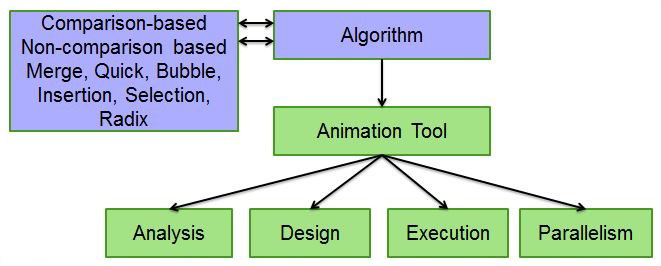
Because of the importance of design in any Web application, we tried to create an attractive and flexible interface that provides a convenient way of interaction for students/instructors. In other words, user can easily access our application and choose the type of sorting he/she wants to explore. Our system responds by giving the user an animated way to learn how the chosen algorithm sorts the input data, while displaying the algorithm’s pseudo-code and observing the current variable values.
Our methodology was to develop a web-based tool that animates the execution of sequential sorting algorithms while tracing their pseudo-code and observing the current variable values. Our tool is based on a two-tier architecture, where we used Hyper Text Markup Langaue (HTML), Cascade Style Sheet (CSS) and Java-script to design the front-end environment, while using Personal Home Page (PHP) for implementing the back-end functions and methods. For animation, we used the canvas library for the process of moving objects on the screen, then we added the corresponding algorithm to the animation code to create a simulation environment.
Based on our approach, we did not animate algorithm parallelism. What we did was animating the execution of sequential algorithms to assist in detecting regions of code that can be parallelized and teach students how to parallelize code accordingly. The building blocks of algorithm parallelism based on our approach can be explained in order as follows:
Use animation/visualization tool to assist in analyzing the execution of sequential algorithms. Provide code tracing to visualize the behavior of algorithms in a timely manner. Allow users to modify the input data to see how this affects the execution of algorithm. Detect the regions of code that can be parallelized based on the previous steps. Involve instructors to help students to parallelize sequential code. Check the correctness of parallel code by comparing its output with the sequential one. Optimize the performance of parallel code.
In this section, we elaborate on these steps by giving detailed explanation about the tool’s interface, features, code tracing, usage, instructor’s involvement, correctness of parallel code and its performance.
The home page of our tool is divided into separate frames reachable easily by the user. By clicking on the “ALGORITHMS” tab, the algorithms page, shown in Fig. 2, will be displayed. This page consists of six different algorithms.
Sorting algorithms main page.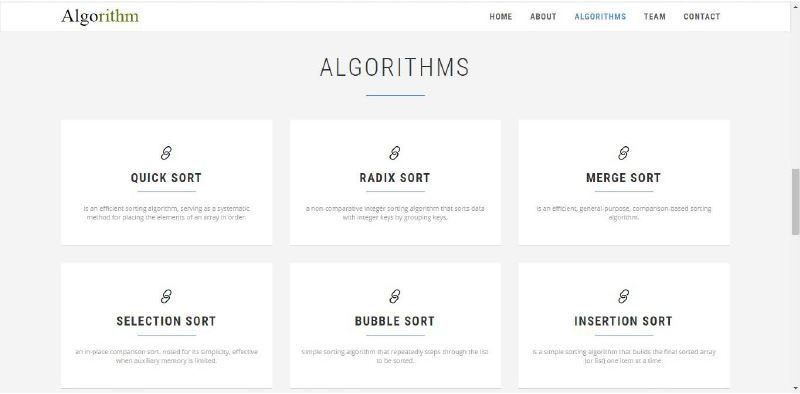
Each sorting algorithm page has an explanation paragraph that gives the user an overview of the algorithm. We also inserted a graphic multimedia element, as shown in Fig. 3 to give the user a visual explanation about the algorithm. There is also a written explanation in these multimedia pages about the given case. However, we just captured the visual explanation to save space. At the bottom of each page, we created a link, which transfers the user to the animation page.
Multimedia pages of different algorithms. (a) Merge sort. (b) Insertion sort. (c) Bubble sort.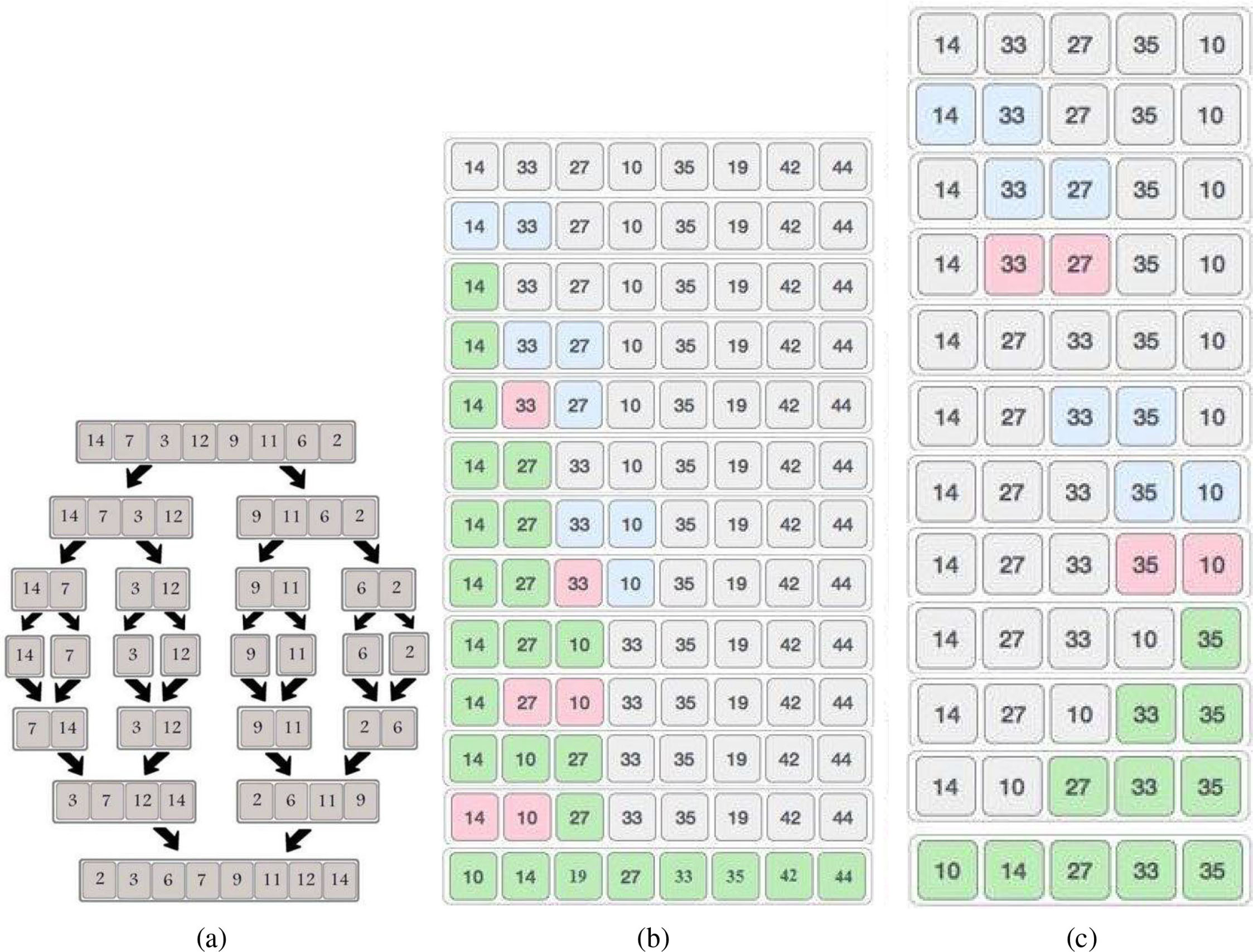
For the interface, we designed attractive simulation pages for each implemented algorithm. From a technical point of view, user can insert his own values or try the random numeric values given by the tool. After inserting the values and clicking on the “sort” button, the tool will start sorting the values according to the chosen algorithm. The tool gives the user a code tracker (pseudo-code) to make the process of understanding more efficient, while displaying the current variables values. The pseudo-code also describes the design paradigm used.
Instructor’s responsibility in term of parallelism is to explain the fundamentals of parallelism to students by linking the animation of execution and psuedo-code tracking from one side with parallelism exploration in algorithms from the other side. Dependencies among operations can easily be explained via animation. Critical regions and code bottlenecks can also be detected. This deep explanation of algorithm’s execution and behavior via animation can make the learning process of parallelism much easier. Checking the correctness of a written parallel code is done by comparing its output with the sequential output. Performance of parallel code can be improved by consulting instructors and trying different optimizations related to the given parallel programming model.
Animation page of comparison-based algorithms (Ex: Quick sort).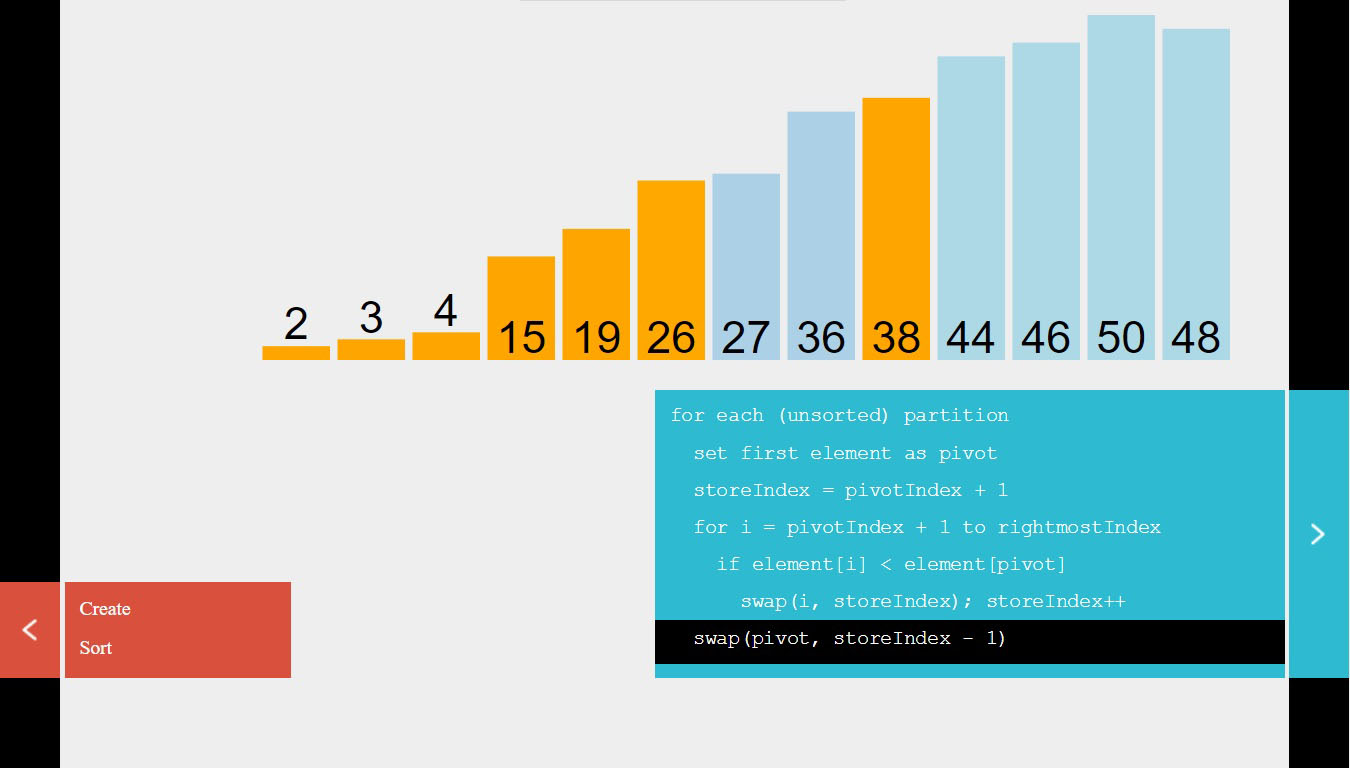
Figure 4 demonstrates the simulation process of comparison-based algorithms, where we show Quick sort algorithm as an example. Each color assigned to the displayed bars has its own meaning depending on the used algorithm, and this is thoroughly explained in every algorithm page. The same animation format was used in all comparison-based sorting algorithms, demonstrated in our tool, that include bubble sort, selection sort, insertion sort, and merge sort. However, we developed another animation format for the non-comparison Radix sort algorithm, as shown in Fig. 5. We included this type of sorting to help instructors explain the difference between comparison-based and non-comparison based sorting algorithms to their students more attractively.
Radix sorting animation page.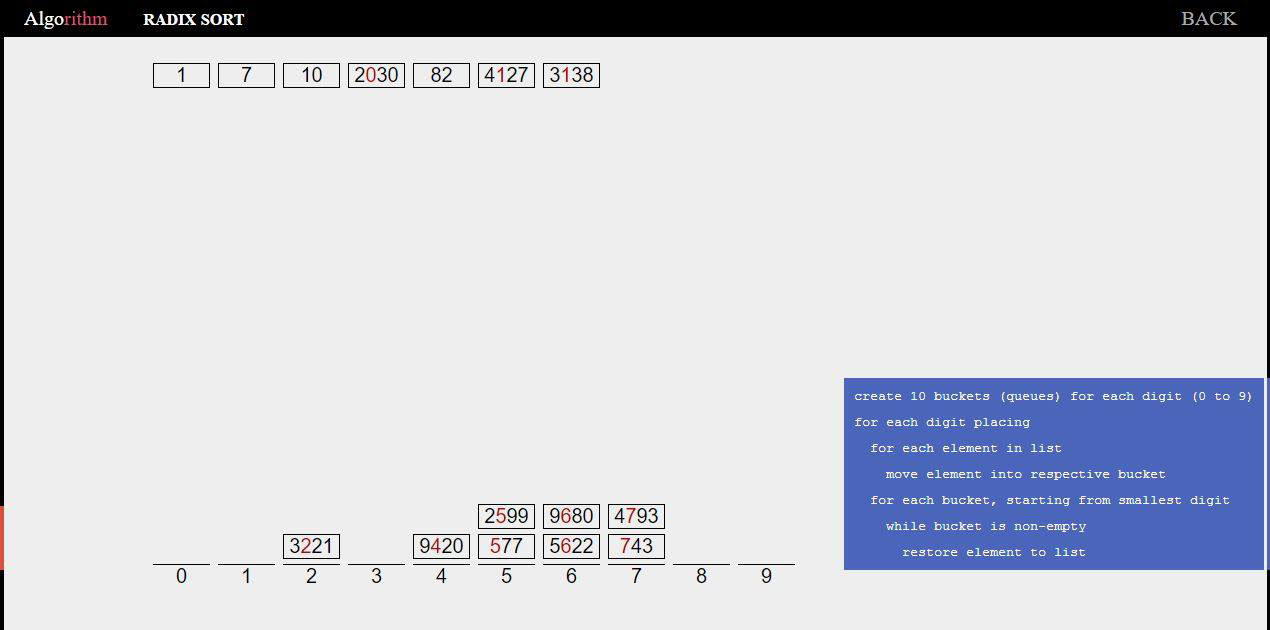
The tool also has an input/output page that can track a flat file containing unsorted data. The tool returns the values sorted. This page can track any value type (numeric, character, string, etc.) and produce a file with sorted data. The output file can be downloaded to the local directory of the user’s computer.
New algorithms can easily be added to our learning tool, as the simulation environment has already been developed. We first need to modify the home page to add the corresponding new algorithm. Second, we need to add a graphic multimedia element page to give the user a visual explanation about the new algorithm. For animation, we just need to add the corresponding algorithm to the existing animation code.
Parallelism of any algorithm requires deep analysis of the sequential behavior of this algorithm. In this section, we show parallel implementations of two sorting algorithms that differ in terms of input data sensitivity, design paradigm, complexity, and parallelism (Loop/irregular). We used OpenMP [22, 23], which is a shared memory programming model, to illustrate our point. OpenMP parallel construct represents a parallel region where different threads in the team will share the work inside the region. Algorithm 4 represents the merge sort algorithm, which exhibits irregular behavior considering its recursive calls. Merge sort is insensitive to the input data, which means that its behavior and complexity do not change while changing its input data. Hence, even its parallel version does not change. OpenMP section construct can be used, where each structured block (recursive call) is executed once by one of the threads in the team.
On the other hand, Algorithm 4 represents the insertion sort algorithm, in which loop behavior is depicted. Insertion sort is sensitive to the input data, which means that its behavior and complexity do change while changing its input data. In contrast with merge sort, insertion sort requires the ordered clause to ensure that the iterations are executed in order, while the critical construct ensures that its structured block is executed by one thread only in the team. This implementation actually means that this code will be executed sequentially, regardless of the number of working threads. However, assuming that the given input data is sorted, the critical construct can be ignored, as the while statement will be always false. This indicates that an actual parallel version can be implemented to handle such case.
Therefore, developing a reliable animation tool that can visually describe the execution of sequential algorithms is definitely crucial for teaching fundamentals of exploring parallelism.
Parallel merge sort algorithm
mergesortMerge-Sort
#pragma omp parallel sections
{
#pragma omp section
#pragma omp section
}
Merge(
Parallel insertion sort algorithmUnsorted Array A
Sorted Array A
#pragma omp parallel for ordered
#pragma omp critical
Statistical
-test
A study was conducted in the undergraduate course “Introduction to Algorithms” in the college of Information Technology at the Hashemite University in Jordan on a sample of 200 students during two different periods of time, where each period included 100 students. This sample included students in their second, third, or fourth academic year. The tool was available to students for self-learning as well as during face-to-face lectures and office hours. The instructor showed students how to obtain the best case, average case, and worst case complexity of each algorithm, while explaining the impact of these cases on algorithm’s parallelism.
To assess the effect of our tool on students’ achievement, we used a paired
As Fig. 6a illustrated, the
A paired 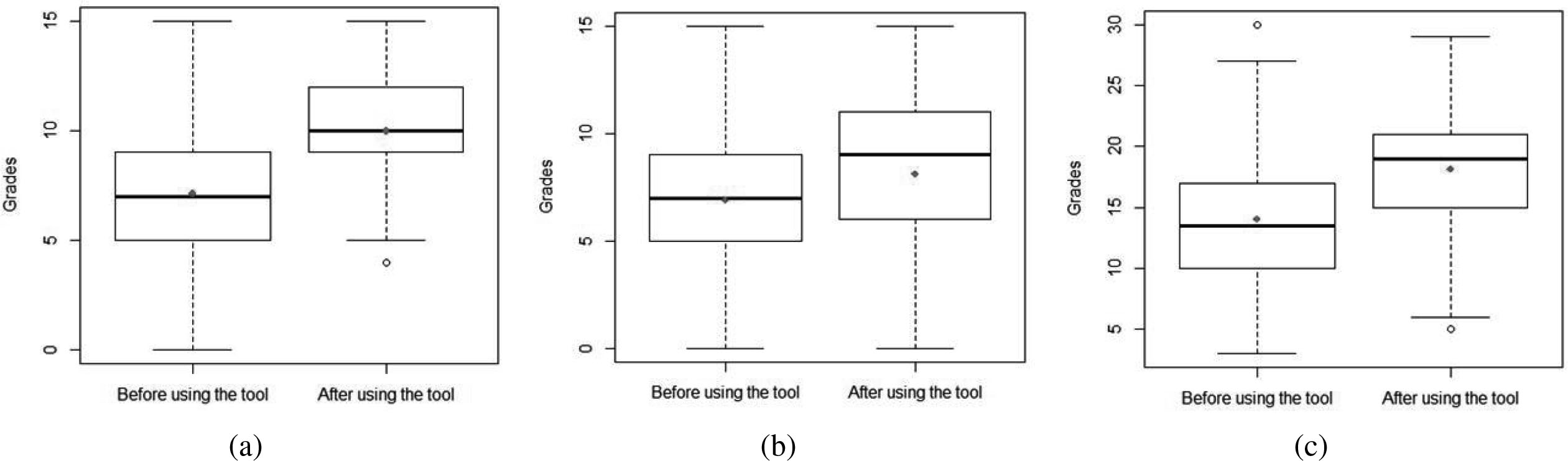
An unpaired 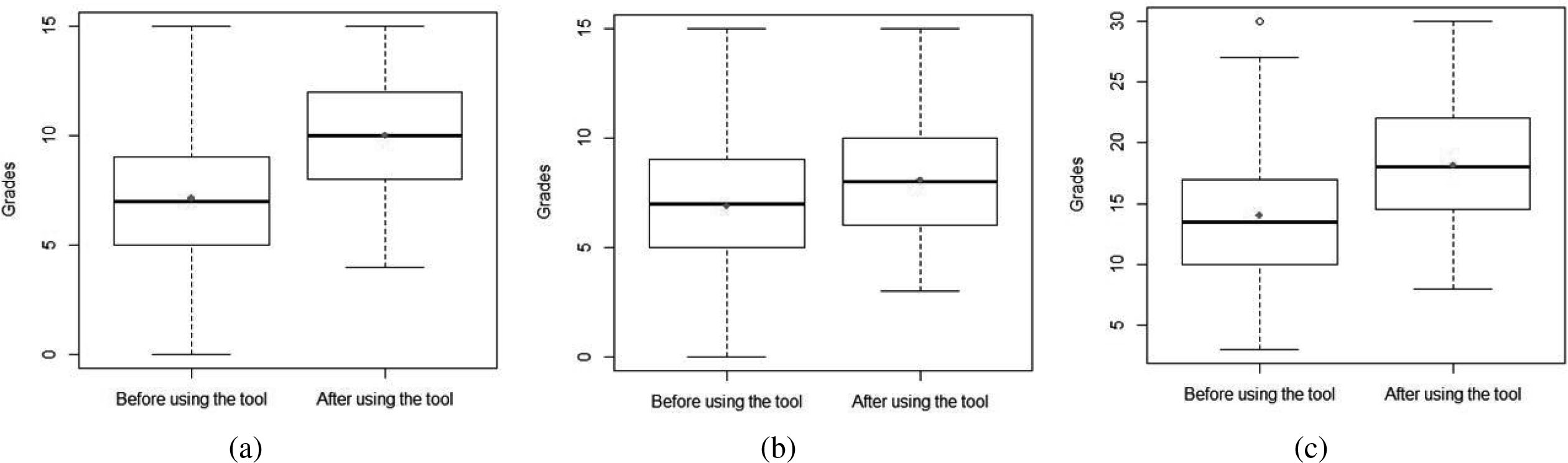
To further investigate the impact of our tool in improving students’ performance, A new set of students (
Beside the promising improvements in students’ grades as verified by our statistical study, students were impressed by the use of our interactive tool. The most interesting part was the ability to observe the potential parallelism in each algorithm and its behavior, while modifying input data. Students were able to understand the impact of changing input data on algorithms’ complexity and parallelism. Students also started to program these algorithms more easily using Java or C
Discussion
There have been many previous studies targeting animation, visualization, and performance analysis of sequential/parallel algorithms in the context of academia as well as industry. In this comparative study, we mainly focused on the most recent and related systems that have been used in the context of education. In this work, we proposed 8 different implementation and performance metrics as explained in Table 1. These metrics highlight the usage of these systems/tools and compare them to our work as shown in Table 2.
Our proposed performance and implementation metrics
Our proposed performance and implementation metrics
According to previous studies such as [10, 7], visualization of parallel computations in algorithms is very hard to explain. In most cases, it may complicate the process of education. Hence, systems, targeting parallel algorithms, such as [7, 8, 9] among others require some sort of knowledge about parallel programming models and how to use them for writing parallel code. This indicates that such systems do not teach students how to parallelize a sequential code. Many other tools have targeted sequential algorithms. However, they were either limited in terms of covered algorithms [19, 20], missing code tracing [21, 18, 11], depending on specific programming language/model [25, 11, 14], lacking user engagement [6, 19, 18], or limited in terms of input types [12, 13]. Moreover, most of the existing educational systems do not statistically analyze the performance of students before and after using the tool to validate the usage of these systems.
Comparison study
In contrast, our solution is a web-based tool built using a two-tier architecture. It depends on facilitating the learning process of algorithms’ behavior via animation code to create a convenient simulation and visualization environment. Our tool explains the sequential behavior of algorithms in order to help students to parallelize these algorithms regardless of any specific parallel programming model. It eases instructors’ job to teach students how to find the bottlenecks of algorithms in order to parallelize them as a next step. Our tool covers both comparison-based and non-comparison based sorting algorithms while
allowing students to modify different input types of an algorithm to change its behavior. Our tools allows students to trace the code while visualizing its behavior. Last but not least, our work provided a statistical study that analyzed the impact of using our tool on the academic performance of students.
This paper presented our experiences in developing a learning tool for teaching the concepts of analyzing, designing, and parallelizing algorithms. The tool provides an interactive environment for students to learn different programming concepts through animation and visualization of sorting algorithms. The tool meets the requirements of distance learning. It provides an animated demonstration of the execution process of different sequential algorithms that vary in terms of parallelism potential, usage, design paradigm, running time complexity, and difficulty of understanding. The tool is compatible with different Web browsers and can handle different input data types. Our statistical study, which was conducted on a sufficient number of students, showed that animation of algorithms can be of great assistance for students’ understanding of parallel programming fundamentals. Our tool also showed that instructors can efficiently teach the fundamentals of parallelism through visualizing the execution process of sequential algorithms.
We aim to integrate a mechanism in our tool to detect potentials of parallelism. This mechanism will firstly depend on detecting dependency conflicts among loop iterations at runtime. Later, we plan to handle irregular parallelism potentials.
Footnotes
Acknowledgments
The authors would like to thank the Hashemite University for providing the required resources.
Author’s Bios