



Abstract
BACKGROUND:
In this article, we will present Key-to-Voice, a software design that we developed in collaboration with people who have complex communication needs and respective research that we conducted during the collaboration. The design is the first of its kind and there has not been any similar research linked to testing the design in the Czech Republic.
OBJECTIVE:
Our original intention was to develop a device that could give a voice to people with severe health problems and enable them to verbalise their thoughts after medical treatment in hospital.
METHODS:
Participatory design was used throughout the development and we employed participatory observation, informal interviews and simple questionnaire for the research of the possibilities of the design implementation in a hospital environment.
RESULTS:
Target group accepted the design we developed without any major problems and, at the same time, the design, and its possibilities of implementation and usage, was improved by participation of people who will be potentially using it. Given that our target group consists mainly of older adults with some kind of complex communication need, possibly acquired disability, we had to consider these aspects during development, as there is, for example, a problem in that older adults can have difficulty using technologies.
CONCLUSION:
Our design is usable in a hospital environment without any major problems. Participatory design is a very effective approach for making any design better and more usable by a target group, and for minimising bias, stigmatization and exclusion.
Keywords
Introduction
It is broadly accepted (e.g. [1, 2, 3]) that communication with hospital personnel, be it physicians or nurses, is often one of the key factors with regard to the patients’ well-being and effectiveness of treatment procedures. As many scholars emphasised [1, 3, 4, 5, 6], people with complex communication needs pose a special case in this sense, as the personnel must approach them in a different way than people without needs and, possibly, use some kind of communication aid. The main difficulties in the communication are patients’ fewer opportunities to gain the attention of the personnel, (in some situations mutual) misunderstanding of the communication attempts and messages being communicated, and a mutual frustration coming from the repeated efforts to express (often trivial) things [1, 7, 8]. In this regard, as many scholars posed [2, 4, 9], the absence of meaningful communication could be very stressful both for patients and personnel, and this factor alone can prolong the treatment time as well as make duties of personnel more difficult to meet. This situation gets even more complicated in the settings of intensive care unit (ICU) where the environment and atmosphere can be more stressful than at any other ordinary hospital department [10]. In these conditions, as Costello [9] poses, ‘[t]he inability to communicate, no matter how temporary, has been identified as one of the most frustrating and stressful aspects’, which is furthermore multiplied by suddenness of voice loss. Thus, patients experience ‘panic, insecurity, anger, worry, fear, sleep disturbances, and perceptions of stress’ [11]. Magnus and Turkington [12] even encountered patients who felt like being in a prison.
Although deeper interaction and bonding is often crucial for the patient’s proper treatment process, cooperation and overall well-being [4], the personnel-patient interaction is often very limited (to information about tasks and procedures, commands and reassurances), minimal, ineffective, and initiated and controlled by the personnel [2, 8, 12]. One of the main identified interaction barriers is a lack of time that coerces the personnel to tight up its time-management, resulting in restriction of interactions with patients, as it is often the easiest way to save some time. The greater effort to interact with patients with complex communication needs is then even more problematic, both from the time and effectiveness perspective. In some cases, the personnel chose to give only ‘yes or no’ questions in order to simplify the interaction as much as possible [2], while in other, the personnel regarded the interaction as a waste of time [4]. As Hemsley, Baladin, Worall [4] showed, some personnel choose ‘walk away’ strategy in order to alleviate the occurred communication tension, hoping that it will make future interactions better. On the other hand, patients see this strategy as very stressful and depressing, and, as a result, they feel hopeless. According to Magnus and Turkington [12], due to these feelings, patients rather tend to avoid any interaction or reduce their communication, not asking all the questions they would have liked to. Probably the most demanding are head and neck operations, especially total laryngectomy, which combines a plethora of negative feelings that originate from the actual as well as permanent loss of voice, necessity of an adaptation to new life conditions, initial failures in interactions, and prolonged stay in a hospital (including ICU) [13, 14, 15].
People with complex communication needs may use an augmentative and alternative (AAC) intervention, which can have a plethora of forms – it can be (1) unaided (for example gestures or body language) or (2) aided (that includes low-tech solutions, such as pen and paper or picture/alphabet boards, and high-tech ones, for instance special electronic devices, computers or tablets) [10, 16]. Generally, low-tech solutions do not have computer components so they can be usually used straight away, while high-tech ones are computer-based systems that need a power source in order to be usable. High-tech devices can be dedicated or non-dedicated; dedicated devices, such as Dynamo, Pathfinder, Message Mate, DynaMyte and others, serve exclusively for communication purposes; non-dedicated devices are not specifically designed to be an AAC device but they can be used as one if they have appropriate software. Messages communicated through high-tech devices can be either pre-programmed or the user can generate his/her own messages by means of input. AAC devices can be controlled directly by, for example, touching the picture board, keyboard touch-screen etc. but this is inappropriate for persons who have any kind of the motor disadvantage. In that case, scanning can be implemented as a method of controlling the device: the user’s body (for example face and/or neck musculature) is monitored by the device that simultaneously offers and highlights symbols with a specific meaning; the user chooses the desired message by body movement, which is recognised by the device, and the message is communicated [8, 16, 17].
As for output, the messages can be mediated either verbally or visually or in the both ways. While visual output provides more private means for communication (and, of course, in some cases, it is the only solution for people with complex communication needs), verbal output is a more ‘natural’ way for communication [16]. Verbal output is created by a speech-generating device (SDG) that is sometimes also called voice output communication aid (VOCA). One problem with SGDs (VOCAs) is their generic or someone else’s voice that sometimes causes a feeling of impersonality when used, as a voice is often regarded as something very personal and unique for every individual [18]. There is a solution to, at least partially, alleviate the problem – voice banking – that can be utilised in a threefold manner. First, patients simply record messages of their choosing before the treatment process, the messages are uploaded to a device and played when needed. Played messages keep tone and intonation pattern of the speaker so more of the speaker’s personality is preserved. At the same time, more emotions can be expressed in the moment of communication. However, of course, only pre-recorded sentences can be played [9]. Second, patients record a number of predefined sentences to simulate ordinary speech in a studio and, then, his/her voice is synthesised by computer software that creates a personal speech synthesis usable in any supported SGD. In this case the user can say anything with his/her personal speech synthesis but some of the emotionality and situational intonation is lost [19, 20]. Third, there is a database called VocaliD that contains several thousands of recorded and synthesised voices. In case of voice deterioration, there is a possibility of comparing the residual patient’s recorded voice with the ones in the database, and the most suitable and similar, yet still individualised, voice can be chosen for loading to an AAC intervention [18].
As some scholars [21, 22, 23] summarized, AAC has undergone some major changes both with regard to variability of populations requiring an intervention and technology development in recent decades, especially towards the usage of touch tablets (be it iPads or tablets using Android platform). This enabled quite an extensive development of speech-generating devices (SGD), or various apps respectively, for people with complex communication needs. The development of apps was boosted by the introduction of Android, a platform for tablets and other portable computers, that makes the process easier and cheaper. Overall, this enables a reduction of AAC interventions’ costs and makes the interventions more accessible than specialised SGDs, as the process of device selection, acquisition, and training is significantly easier [5, 21, 22, 23].
Despite their proliferation, the potential of new technological AAC interventions remains unutilised. The reasons for this situation are, according to McNaughton and Light [24], fourfold. (1) There is a focus on technology, rather than on communication, i.e. functionality of devices and apps is sometimes restricted due to technology fetishism. (2) Because of wide availability of devices and apps the technical and professional support for people with complex communication needs is not sufficient. In many cases, individuals and families choose a SGD without knowing if it is suitable for them and they do not have a possibility to consult their choice with any expert. (3) The new technologies are still not available or accessible to many people with complex communication needs, be it for financial or informational reasons. (4) App developers reproduce existing ideas and features and neglect new possibilities of communication enhancements that are provided by the new digital mobile technologies. Lubas, Mitchell and De Leo [25] identify one main problem – significant lack of thoroughness in the apps’ development process, in which stakeholders, especially the users, are often omitted. They recommend using user-centred design in order to include the future users of the app into the process of development, which should result in a better and more usable app.
In addition, there are two very striking findings in quite a number of studies [1, 2, 3, 6, 8, 11, 12, 15]. (1) AAC interventions are very often not supported or lacking in hospitals that either do not offer any AAC intervention at all or only low-tech ones. (2) The personnel do not know how to operate the AAC devices, sometimes the personnel even fear the interaction and feel anxious about it, and are not well prepared for these specific communication situations, needing proper training in order to cope with them. This is happening despite the positive outcomes of utilising high-tech AAC interventions that some scholars have proven in their studies: better communication and interactions [2, 11, 26], better psychological well-being [9, 12], easement of the personnel’s work duties [4, 9], and better access to the assistance for patients when they needed it [10, 11].
In this article, we will present Key-to-Voice, a Czech Android app, which, if installed on a tablet running Android, provides an AAC intervention in the form of SGD/VOCA. We developed Key-to-Voice in collaboration with people with a voice impairment (both temporary and permanent), and respective research that we conducted during the collaboration. Given that the development was a part of HCENAT, a large project dedicated to AAC interventions with regard to people who underwent total laryngectomy, our original intention was to develop a device that could give a voice to people immediately after total laryngectomy, i.e. in the course of post-operative period in a hospital, with a future possibility to use the app by other patient groups as well. People who underwent total laryngectomy (the number of such patients is roughly 650 each year in the Czech Republic and they are mostly older adults [27]) are dependent on some form of an AAC intervention, even in the most simple communication situations. This becomes even more acute straight after the operation and throughout the stay in ICU when the patients are confronted with sudden loss of their voice and necessity to adapt their communication strategies, requiring some AAC intervention. Yet, surprisingly, as several scholars [5, 8, 13, 14] assert, there is a lack of studies regarded to AAC interventions in the post-operative periods, not to mention total laryngectomy ones. At the same time, the existing studies [5, 8, 9, 12, 15] show that an early post-operative AAC intervention, especially the SGDs, can play a crucial role in the patients’ well-being and be a very effective communication medium (for example a patient with SGD can initiate an interaction with the personnel more easily). However, as Baxter et al. [28] show in their literature review, the majority of studies are produced in Anglo-Saxon world and thus reflect the situation there. In addition, the majority of AAC interventions are in English language, which makes it more difficult to use the AAC interventions by non-English speakers.
Our app combines several advantages and specifics:
It is in the Czech language that makes it easily usable by Czech speakers. It is Android based so it can be used with any device that runs on Android system. It is very cost friendly; anyone may freely download it. It is possible to use personal speech synthesis. In that case, the voice has to be recorded and synthesised in a special laboratory before the treatment. The app then speaks with the personalised voice, which is less traumatising for the user and his/her close persons.
Upon completing the first version of the app (more in the next section), we anticipated that a typical user of our app would be a patient who underwent total laryngectomy and is mainly (but not exclusively) older adult who does not regularly use any touchscreen device.1
According to the Czech Statistical Office [29], more than 50% of the entire population of older adult never used the Internet (and, thus, probably never used any kind of a computer). Furthermore, older adults who browse the Internet periodically mainly use desktop computer, whereas cell phones and tablets are used less often.
[
Ellis and Kurniawan [32] note three main premises of the approach: (1) the goal of participatory design and subsequent device is improving the quality of life, not creating gadgets that are technologically superior but hard to use; (2) roles in the research are equal – there are no power disproportions between researchers/designers and members of the target group; (3) if possible, feedback from users should always be incorporated into the design. Another advantage of a participatory approach is the possibility to integrate the surroundings and context in which the device will be used into the design.
We chose to use a technique called cooperative prototyping, i.e. we designed the first version of the app with help of a specialist and let the target users test it and give us feedback [32], as opposed to the Usability, Safety, Attractiveness Participatory (USAP) technique posed by Demirbilek and Demirkan [35], in which users are participating even in the process of prototyping the first version of the design. In this approach, it is important to determine the intended population that will use the app, whether it will be age specific, diagnosis specific, or, on the contrary, it can be used by a broader spectrum of users. At the same time, the AAC apps are specific for their input/output design that influences the flow and clarity of communication [25]. We planned several cycles of app testing until the design would be saturated and there would be no major flaws with regard to use of the app.
Eventually, two testing cycles were sufficient for saturating the design. Both were carried out in September 2016 in Prague’s Faculty Hospital in Motol (at the Department of ORL and Head and Neck Surgery) whose ethics committee approved the research (under registration number EK-60A1/14). Although it would have been ideal for us to have a sample of participants made up only from people after total laryngectomy, we had to take into an account the specifics of the hospital environment in the process of sampling, especially with regard to wellbeing of patients and our presence at the department, which, of course, disturbed the usual workflow. Thus, we could not recruit only the persons who underwent total laryngectomy because many of them were coping with their psychical conditions and not able to give any kind of a feedback, not to mention violation of their wellbeing with the testing. So we had to test the app also with people who underwent total laryngectomy some time ago and were psychically stabilised (they were periodically visiting the hospital for check-ups); persons who had their voice permanently impaired (but not lost); and people who had less severe medical problems but, at the same time, had an experience with temporal voice loss, for example due to surgery. We received help from our contact at the hospital department, an attending doctor who participated in the process of sampling and testing and recommended us the suitable participants with regard to their health condition. According to recommendations, we sampled the participants in the usual inpatient section of the department, a consulting room where there were patients undergoing regular check-ups after their treatments, and the ICU. Given the circumstances the inclusion criteria were minimal – an experience with temporary or permanent voice impairment or loss, and willingness to participate. All participants were instructed about the research and they gave us signed informed consent for their participation. There were 20 participants in total (each cycle of testing had ten participants); eight males and 12 females; the average age of the first cycle was approximately 56 years and median 64 years (minimum age was 24 and maximum 74 years), while that of the second cycle was approximately 52 and 48 years (35 and 81 years), respectively. Eleven participants did not have regular experience of using a touchscreen device, while nine participants used mainly smart phones on day-to-day basis. Four participants did not speak due to total laryngectomy, one patient had a permanent voice impairment due to the radiation treatment process but he did not lose his voice completely, and the rest of the participants had less serious and temporary problems with their voice (mainly due to the thyroid surgery). In the time of the testing, only one participant had an experience with using of an AAC intervention. The participants from the first cycle did not participate in the second one.
Both testing cycles were conducted by three researchers – two males, one female who was an attending physician. Gender differentiation of designers and researchers is, as Oudshoorn et al. [36] assert, important for better and more user-friendly designs, as more varied perceptions are taken into account. First, we explained the main goals of the app and research/testing to patients, then their role in the research, and, if they agreed to participate, we let them sign the informed consent. After this introductory part, we described the app functionality to participants and taught them how to use it. Then, in order to see how they use the app, we asked them, to complete several simple tasks within the app. First, they had to verbalise some specific communication; second, get back to the basic menu in the app; third, make any chosen sentence favourite; fourth, verbalise the favourite sentence from the corresponding menu. In case of any problems in the process of tasks completion, we assisted the participants. The participants were also encouraged to use the app on their own after the familiarisation in order to provide us with additional information and incentives. Every individual testing usually took from 10 to 20 minutes. For data creation, we used participatory observation (we took field notes based on the observation of each participant), informal and unstructured interviews with participants after the testing, and a short and simple questionnaire that contained structured questions about participants’ experiences with using touchscreen devices and open-ended questions about participants’ opinions, suggestions and feelings with regard to the app. After each testing, we analysed data. Qualitative data – field notes and notes from the informal interviews – were analysed by qualitative content analysis and quantitative data by descriptive statistics. Then, we discussed and considered all the findings and participants’ suggestions in the research team. Where possible we incorporated the insights into the design.
There are several studies [8, 10, 28, 37] on participative designing of AAC interventions that provided an inspiration to us when we were designing the first prototype for testing in the hospital settings. Generally, the stakeholders, when testing AAC interventions, wished for simple devices that would enable quick communication with their surroundings [8, 10, 37]. Some stakeholders would have appreciated the possibility of writing, i.e. creating own messages instead of choosing the preprogrammed ones [8], and more spontaneous communication [37]. But, at the same time a message should be construed with only 5 to 10 clicks at maximum, and there should be a possibility to turn off the sound in order to secure privacy if needed [10]. As for physical appearance, the AAC intervention should be lightweight and small and at the same time have a large enough display for tapping, but not too ‘large as to obscure patient’s view’ [10]. From a content point of view, an AAC intervention should provide an opportunity to express basic needs (thirst, hunger, sleep etc.), time/place orientation (date, time, hospital department and so on), and medical needs/requests (nurses especially pleaded for the possibility to communicate explicitly about pain and its location). The AAC intervention should also be available in several language mutations or, eventually, be utilising pictograms or symbol buttons [10]. On the other hand, patients would have liked to be able to prerecord some messages that could be replayed after their surgery, which would make their communication somewhat easier as well as more personalised [10]. In regard of a more personalised communication, a desire for expressing emotions such as fear, sadness, love, and reassurance was thematised. On the other hand, the simplest ‘yes or no’ communication should be also available [10]. Quite a number of users experienced frequent breakdowns of specialised AAC devices. Not only that that situation itself was very complicated due to the occurred communication difficulties, but also the repair of the devices was very expensive [28]. Generally, a tablet was seen as a good compromise with regard to mentioned requirements that an AAC intervention should meet [10, 38].
In our thoughts, the device should be easily usable by patients after surgery as well as for older patients who, as we had anticipated, constituted a majority of all patients having the aforementioned problems. In the end, we decided to use an ordinary tablet that is easily available and developed an Android app that would allow easy input of required text, and its verbalisation through speech synthesis. We opted out other designs, mainly due to the cost as well as practical restrictions. For instance, eye-gaze technology potentially offers an interesting alternative but, as Mobasheri et al. [10] assert, it can be completely unusable by people at an ICU because of ‘sedation, orbital oedema, calibration needs, and learning barriers’. In that situation, “sometimes you’re not quite sure what you’re looking at [and] I think certainly in terms of touch, it’s easier”, as one nurse from their study pointed out.
One additional issue needs to be addressed. As many researchers and scholars have pointed out [39, 40, 41], older adults are less likely to have experience using technologies. In the study by Mobasheri et al. [10], the participants (users of an AAC intervention and hospital personnel) expressed a support to AAC intervention in general, but they are reserved towards abilities of older adults to use high-tech interventions unless they would be simple and easy-to-use enough. This was also our idea at the start of developing and researching, as we estimated that a majority of older adults in the Czech Republic do not use touchscreen devices and have some reluctance to use them. However, at the same time we did not want to overestimate this assumption and apply ageism, i.e. social exclusion based on the age of concerned persons and general bias towards older adults as a population [42]. As Lagacé et al. [43] assert, technological ageism can cause shame, feelings of being excluded and internalisation of the inability to learn how to use technologies. All these factors strengthen the reluctance of older adults to use technologies.
The currently available interface for speech synthesis systems we have been working with consists of simple text field and buttons used to play the message [for example [19, 20, 44, 45]]. The app allows storing predefined messages so the user can prepare the monologue in advance and play it during a desired occasion. However, this interface and possibilities of using speech synthesis were reported as insufficient and unwieldy by its users who complained especially about slow input that hinders communication. This objection was even posed by users who were accustomed to using a touchscreen [2, 3, 25, 37]. Another problem was the QWERTY software keyboard, which is present in mobile operating systems. This is often too small and the actual users were not used to fast typing [21, 46]. In addition, sometimes, overly complex device/app can be more confusing than helpful, as Happ, Roesch and Garret [11] document:
Critically ill patients forgot message options, message locations, and how to return to the main screen on the DynaMyte. Patients commonly typed “suction” or “I’m thirsty” on the DynaMyte despite the availability of single-key options for those messages.
In addition, Hemsley et al. [2] showed that the personnel may have problems with deciphering the patient’s messages due to large number of typos or their unclear composition.
Based on the above arguments, our first and main goal was creating a simplified user interface for the speech synthesis software utilised in the Key-to-Voice app so that users could communicate faster and easier. In our case, the population of users consisted of older adults with health problems, so the task was made even more difficult. The earliest input designs were based on the idea of T9 Text Input [47], common in cell phones with keypads. This technology was originally designed as a solution for fast text input on devices equipped with a 12 key keyboard and shows significant improvements in input speed [48]. Each key has an assigned group of letters and each press of the button allows insertion of the designed letter. By this procedure, words that the user intends to write can be put together by pressing the keys in proper order. The alternative to this kind of text input is a keypad that has a key for each letter (and possibly other selected characters). It allows words to be entered by a single key press for each letter, as opposed to the multi-tap approach. For our purpose neither method of text input was sufficient, so we rejected both as they did not suit the population we were developing the app for.
We decided on eliminating the manual text input altogether and instead used the design inspired by AAC2
For more infomation, see
Given this reasoning, we decided on a compromise and put a set of predefined phrases and sentences, usually used in hospitals and ORL departments where the research was carried out, into the first version of our app. Phrases and sentences were assigned to categories (for example ‘food’, ‘time’, ‘information’, ‘requests’, ‘health problems’ and so on) that were each represented by a picture. If the user wanted to verbalise his/her thoughts, he/she would simply choose the category and then the required phrase or sentence. We utilised an interface for organising the categories and phrases/sentences similar to files stored in a computer.
Main category selection screen of the app’s first version. Source: Authors.
A general visualisation of the first version can be seen in Fig. 1:
Navigation bar – contains a button to return to the home page, textual representation of currently displayed category and settings menu. Field containing the preview of the sentence being verbalized/synthesised. Category/Sentence selection – lists available categories to be browsed. In case the selected category does not have any subcategories lists of sentences appear. Controls – are grouped in a column on the right side of the screen. From top to bottom the buttons represent: Speak – plays the sentence displayed in the preview field. Clear – removes the content of the preview field. Level Up – displays the parent category of the currently opened category. Scroll Up/Down – scrolls the list of items in a selected category.
Sentence selection screen of the app’s first version. Source: Authors.
Figure 2 contains some basic sentences used for communication with the personnel (the star symbol is used to add selected sentence to the special ‘Favourites’ category):
What medication am I taking? What was the outcome of the surgery? Who is my attending physician? When will be my probe taken away?
To make using the app easier we also built a help guide into the app in the form of a slideshow that was intended to give a hand to users in a simple and interactive way. Upon launching the help, a series of frames highlighting and describing all the control elements of the app appeared on the home page; the frames and descriptions would rotate after users’ clicking that they understand what the actual part does.
Throughout the first testing we encountered these problems (the number in the brackets indicates frequency of occurrence):
Verbalisation of the selected sentence (7). Confusing pictograms on buttons (5). The help guide was not helpful and was rather confusing (4). Orientation in the app (1).
And participants made these suggestions:
Adding up titles to icons (3). A possibility to make a sentence on their own (1). A possibility to enlarge font size (1). Adding up more languages (1). Provision of a graphical model of the human body for determining the spot that hurts (1).
The problem with verbalisation of a sentence coincided with our designing the verbalisation of selected sentences as a two-step process: first, the user had to select the sentence (by clicking through the categories) and, second, he/she had to play the sentence by pressing the special Speak button (represented by an image of mouth and located in the Controls section), so the selected sentence did not verbalise straight away upon clicking on it. With this precaution, we wanted to minimise the possibility of selecting a wrong sentence and consequent confusion in communication (it is difficult for people who do not speak to quickly explain that they are mistaken and wanted to say something else). However, the participants were very confused with our approach, mostly because they were expecting the playback of the selected sentence after pressing it. In this sense the participants were confused also by the Clear button and its function because, due to an expectation of the prompt sentence verbalisation, they simply did not know what should be erased or put into the trash, hence they did not understand the existence of the button and its purpose.
The second problem was rather straightforward: the symbolic meaning of pictograms was sometimes not fully understood by the participants.
The built-in help guide was more obtrusive than helpful. The help guide did not receive a good reception from the participants, who complained about lengthiness and non-intuitiveness of the help. Lengthiness was caused by the impossibility to cancel the help at the time – if the user began with it, he/she had to complete it. Non-intuitiveness consisted in the impossibility to go directly to the control element the user was interested in within the help so he/she had to navigate through the whole slideshow anytime he/she wanted to get familiar with a particular element. One participant rather preferred intervention in the form of face-to-face training and assisting instead of an electronic help guide.
One participant did nor orientate well in the app. He saw the app for the first time and he needed more time to get familiarised with it.
As for suggestions posed by the participants, three of them would have liked to have titles on the buttons in order to prevent the confusion regarding the meaning of pictograms. One of the participants suggested adding the possibility of describing the body part where he/she would feel pain more thoroughly (there were predefined options that, according to the participant, should have been more interactive, for example in the form of an interactive body model). Although having the possibility of saving some sentences as favourites for quick recall, one participant asserted that it would have been plausible to have an option of typing own sentences in case the set of defined phrases would not be sufficient. The last two suggestions were rather technical ones: adding more languages for foreign patients and enabling enlarging the font size.
In the end, generally, a majority of the participants reacted positively to the first version of the app and encouraged us to continue developing it. They saw the app as a useful and applicable instrument providing at least basic means of communication for patients with voice problems.
Given the fact that the most pressing problem throughout the first testing was verbalisation of the selected sentence, we focused mainly on this issue. The text input field was completely removed as well as the Speak and Clear buttons and the button for verbalisation was added directly to each phrase/sentence so the user can verbalise the selected sentence by one click, instead of two. By adding the Speak button next to the sentence, we were able to streamline the user experience and make it more intuitive, and this change alone greatly improved the feedback during the second round of testing. The change is depicted in the Fig. 3.
Representation of the changes made after the first testing. Source: Authors.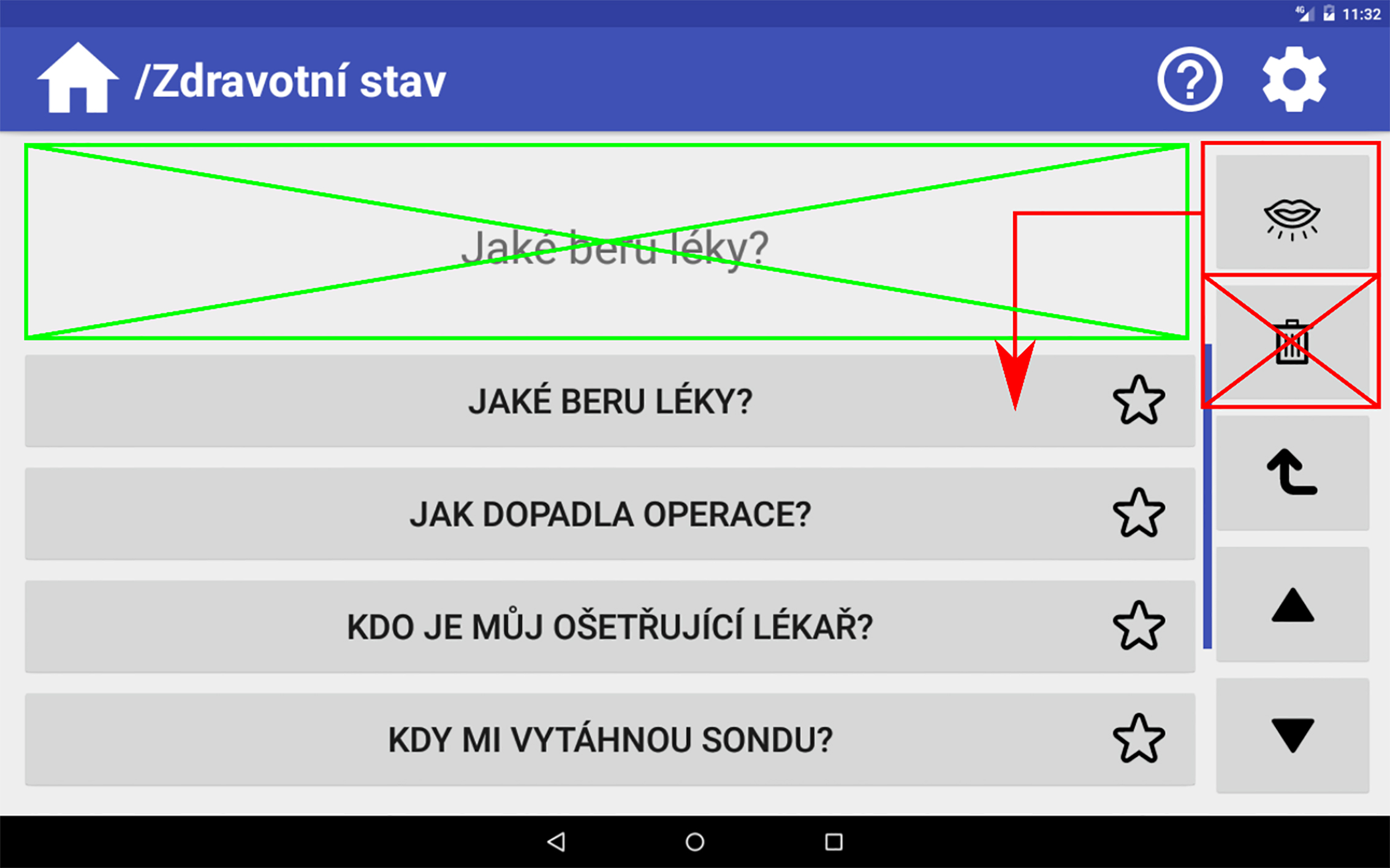
To minimise confusion regarding the symbolic meaning of the used pictograms, we added an option to turn on and off the labels for each pictogram. The user could turn on the labels if he/she would not know what the actual pictogram means.
The last major change was the removal of the previous tutorial from the app and its replacement with contextual help available for any interactive element in the app. To display the help, the app has to be switched to help mode by clicking the question mark button in the main bar. While in help mode, any interactive element will display a popup box with a description of the element’s function. The help mode is accessible at any time during use of the app and can be turned off whenever the user likes.
As for suggestions, we decided not to implement the free typing and an opportunity to write own sentences, as we wanted to maintain the intention of keeping the app as simple as possible. That applied also for adding up some other languages and a graphical model of the human body. We added a possibility to enlarge font size.
The second testing was less problematic and there was no major issue with the app and its use. The changes we made seemed to improve the user experience and helped to make usage of the app more intuitive. The main issues were two and occurred with two participants only:
Longevity of tapping/clicking the buttons (3). Handling the tablet (2).
Just like in the first testing two participants expressed their assertion that the app would be problematic to use for patients in ICU and older adults. This time, suggestions regarded mainly the content of the app:
Changing or adding content (4). Provide some kind of holder for the tablet (3). Larger pictograms (2). A possibility to adjust the brightness (1). Adding some games (1). A possibility to make a sentence on their own (1).
The first two issues applied mostly to older adults. The first one consisted of accidental touching the screen by participants with their thumb when holding the device. This made the app look unresponsive because the device was registering touch events from parts of the screen other than those the user wanted. That resulted in confusion for the participants who thought that the device was not doing anything and did not know what it was supposed to do. With regard to the second problem, the participants performed a long click or double click unintentionally, as they did not know about several types of tapping/clicking. Since we had not designed the app with these commands, input events were not registered and the app seemed unresponsive and broken. This led to further confusion for the participants. According to Zhou et al. [46], older adults having problems with finger-based input and touchscreens are not unusual because of their motoric problems and unawareness of how the tablet controls work. They recommend choosing the optimally sized tablet – 7 inches at minimum and 9.7 inches at maximum, depending on the user and activities. In the process of testing, we chose to test the app on 10.1 inches tablet so we fulfilled this advice, although, as Vaportzis et al. [49] assert, an overly large tablet can be also felt as too heavy – they stress that there is a threshold of 500 grams, which should not be exceeded. According to Rodrigues et al. [50], apps should be as simple as possible, especially with regard to programming buttons to have several functions depending on the way of button pressing.
We dealt with both problems quite easily. In the case of improper handling of the tablet, we explained the actual participants what the problem was and showed them how to hold the tablet properly. After this explanation, the majority of the participants did not have this problem anymore. In the case of other types of tapping/clicking, we added instructions to the app code that defined double click and long click to act in the same way as a simple click. Thus, proper training and support should effectively alleviate, as several scholars asserted [51, 52], both problems in the future.
As for feedback, the participants mostly suggested some changes regarding the content of the app. The participants told us that they would appreciate a possibility to ask where they are exactly because of family visits. Some of the participants would have also added more phrases with regard to health and pain problems that the patient could want to report. These problems included menstruation issues, bedsores, pain behind the neck and a tingle of some part of the body. Beside the content changes, some participant also expressed an idea that it would be good to provide some kind of a holder for the tablet in order to get a better grasp of it. Two participants would have appreciated larger pictograms. The prevalence of other suggestions was minimal, as, in every case, only one participant expressed them. Among these suggestions, there were: a possibility to adjust brightness; adding some games to kill some time in a hospital; a plea to be able to make own sentences. We have easily added the mentioned phrases that were missing, while we regarded other suggestions either to be implemented only with further assistance of the hospital (holders for tablets) or their implementation is not crucial for a basic proper usage of the tablet/app. The final main screen of the app is depicted on Fig. 4.
Main category selection screen of the app‘s second and final version. Source: Authors.
We presented development and research that utilized a participatory approach during the process of creating an app for older adults who have health problems with regard to voice and have difficulties speaking, or who cannot speak at all. Our app, which runs on ordinary tablets, enables basic communication through verbalisation of predefined sentences whose selection is simply done via tapping on pictograms and desired sentences. We primarily targeted our app for use in hospitals a few days immediately after surgery, when the patient needs a simple and quick means of communication and is still dizzy and confused. Of course, as some scholars [11, 14, 15] have pointed out, this could potentially be a problem, as any AAC intervention based on touch tablet can fail due to the patients’ possible temporary motoric incapacities (or other, mainly cognitive, reasons in that matter). Despite this factor, the app can help some patients to improve communication with the medical personnel, and sometimes it can make a big difference, as Blackstone and Pressman [6] assert. In addition, the fact that communication through an AAC intervention could sometimes be tedious and time-consuming is well documented [3, 16, 25, 37]. However, as nurses in the study of Hemsley, Baladin and Worall [4] explain, patience often ‘saves time in the long run, it makes things easier’.
We anticipated that the app would be used by older adults who do not have any experience with tablets or touchscreen devices. Although this was proven correct as the majority of users actually did not have such experience, it was a rather minimal problem because these users easily and quickly learned using the app. This generally related, as some scholars [49, 50, 53] point out, to the fact that older adults assess the tablet technology very positively and they tend to use this type of computer just because of the touchscreen, which they are enjoying working with. Furthermore, a tablet is less ‘intimidating’ than a computer for older adults.
A limitation of our testing was the fact that we approached the patients without any preceding familiarisation of them with the app so the testing could have been somewhat biased by this factor. However, when approached, the participants were thoroughly told about the app and the way to use it, and we gave them plenty of time to familiarise with it. Nevertheless, for an ideal scenario of using the app in hospitals, it would be suitable to utilise the AAC intervention described by Costello [9]. In this scenario patients are instructed about the possible AAC interventions before their treatment procedure and they then choose the most suitable intervention, which they familiarise with in order to minimise any problems using it in the post-operative period. In addition, it is also very desirable to give psychosocial support to people who temporarily or permanently lost their voice because their ability to interact with their surroundings is dependent not only on the appropriate AAC intervention but also on their psychological and emotional state [8, 27].
From a practical perspective we encountered the same problem as some other scholars [8, 11]: poor positioning of the tablet with the app. In our case we could not position the tablet at all because the equipment (for example beds) was not ready for this kind of possibility. This problem could be solved by proper readiness of beds and/or giving instruction about gripping in the course of the AAC intervention.
Another potential problem of the Key-to-Voice could be ‘an infection control risk’ – it should be easy to decontaminate the tablet in order to prevent spreading the infectious diseases [10]. A replaceable antibacterial tablet cover that would be changed in the process of migration to another patient could solve this.
As for the research design, it has some limitations. First, participants saw the app for the first time so they were a little bit confused when it came to the tasks. It is possible that, after longer training, they would handle the app with significantly less effort and problems. Second, the hospital setting did not enable us to carry out longer interviews because of the patients’ well-being and hospital logistics and regimes (we did not want to interfere more than it was absolutely necessary). Third, rooms were shared by several patients and often it was impossible to stay with the participant alone so that he/she could not influence others. Fourth, some participants could not speak due to health reasons so, where it was possible, we gave them the questionnaire to fill in on their own. All these limitations were, nevertheless, necessary in order to observe the design being used by target users in their actual environment.
Overall, our app is not perfect. There is definitely room for improvement, especially with regard to complexity of communication that is, right now, severely reduced in favour of simplicity and easiness. In the future, there is a room for some feature additions, such as typing own sentences and language mutations for foreign patients. However, from the perspective of the Czech Republic where the utilisation of any AAC intervention is still insufficient, we have proved that a tablet with proper app can be used as an AAC intervention quite easily and effectively, even in a specific environment such as hospital (ICU). Hopefully, we opened up a discussion about the implementation of the AAC interventions. From the international audience perspective, we would like to support using of AAC devices in the ICU settings where the interventions are still severely underused, as it could make communication easier for both the patients and personnel, which alone can result in better patients’ wellbeing in both physical and psychical terms. However, our study is an exploratory one, which means that it is the first study in the context of the Czech Republic that is focused on the possibility to implement an AAC intervention for improving communication in Czech hospitals. Further exploration and studies will be needed to better understand the whole issue and change the situation.
Footnotes
Acknowledgments
We would like to thank the staff of the Faculty Hospital in Motol for their cooperation and help. The research leading to these results has received funding from the Norwegian Financial Mechanism 2009–2014 and the Ministry of Education, Youth and Sports of the Czech Republic under Project Contract no. MSMT-28477/2014, Project no. 7F14236.
Conflict of interest
The authors declare that there is no conflict of interest.